

Zoho Recruit Review: Pros, Cons, Features & Pricing


Zoho Recruit is a recruiting software designed to streamline the hiring process. It’s best suited for small to medium-sized businesses, HR departments, and staffing agencies looking for efficient candidate management. Its value lies in its ability to integrate seamlessly with Zoho's suite, offering users a customizable and automated recruiting experience.
In this article, you’ll discover Zoho Recruit's features, pros and cons, best and worst use cases, pricing, and more. Whether you're looking to enhance your hiring process or evaluate new tools, this review will guide you in making informed decisions.
Zoho Recruit Evaluation Summary

- From $25/user/month (billed annually)
- 15-day free trial + free plan available
Why Trust Our Software Reviews
Zoho Recruit Overview
In my opinion, Zoho Recruit is a solid choice for businesses already using Zoho products, thanks to its seamless integration and extensive customization options. It excels in offering robust features and automation that can benefit small to medium-sized businesses and HR departments. However, its complex setup and less intuitive interface might be challenging for teams without dedicated IT support.
Compared to other tools, Zoho Recruit stands out for its integration capabilities but falls short in terms of ease of use and customer support. It's best for users who need a feature-rich environment and don't mind a steeper learning curve.
pros
-
The candidate tracking system is robust and easy to manage.
-
Its automation features save your team time on repetitive tasks.
-
You can customize workflows to fit your hiring process.
cons
-
Customer support response times may be slower than you'd like.
-
It can take time for your team to learn and navigate the system.
-
The user interface might feel clunky and outdated.
-

Checkr
Visit WebsiteThis is an aggregated rating for this tool including ratings from Crozdesk users and ratings from other sites.4.5 -
Kudoboard
Visit WebsiteThis is an aggregated rating for this tool including ratings from Crozdesk users and ratings from other sites.4.8 -
Native Teams
Visit WebsiteThis is an aggregated rating for this tool including ratings from Crozdesk users and ratings from other sites.4.9





How We Test & Score Our Tools
We’ve spent years building, refining, and improving our software testing and scoring system. The rubric is designed to capture the nuances of software selection and what makes a tool effective, focusing on critical aspects of the decision-making process.
Below, you can see exactly how our testing and scoring works across seven criteria. It allows us to provide an unbiased evaluation of the software based on core functionality, standout features, ease of use, onboarding, customer support, integrations, customer reviews, and value for money.
Core Functionality (25% of final score)
The starting point of our evaluation is always the core functionality of the tool. Does it have the basic features and functions that a user would expect to see? Are any of those core features locked to higher-tiered pricing plans? At its core, we expect a tool to stand up against the baseline capabilities of its competitors.
Standout Features (25% of final score)
Next, we evaluate uncommon standout features that go above and beyond the core functionality typically found in tools of its kind. A high score reflects specialized or unique features that make the product faster, more efficient, or offer additional value to the user.
We also evaluate how easy it is to integrate with other tools typically found in the tech stack to expand the functionality and utility of the software. Tools offering plentiful native integrations, 3rd party connections, and API access to build custom integrations score best.
Ease of Use (10% of final score)
We consider how quick and easy it is to execute the tasks defined in the core functionality using the tool. High scoring software is well designed, intuitive to use, offers mobile apps, provides templates, and makes relatively complex tasks seem simple.
Onboarding (10% of final score)
We know how important rapid team adoption is for a new platform, so we evaluate how easy it is to learn and use a tool with minimal training. We evaluate how quickly a team member can get set up and start using the tool with no experience. High scoring solutions indicate little or no support is required.
Customer Support (10% of final score)
We review how quick and easy it is to get unstuck and find help by phone, live chat, or knowledge base. Tools and companies that provide real-time support score best, while chatbots score worst.
Customer Reviews (10% of final score)
Beyond our own testing and evaluation, we consider the net promoter score from current and past customers. We review their likelihood, given the option, to choose the tool again for the core functionality. A high scoring software reflects a high net promoter score from current or past customers.
Value for Money (10% of final score)
Lastly, in consideration of all the other criteria, we review the average price of entry level plans against the core features and consider the value of the other evaluation criteria. Software that delivers more, for less, will score higher.
Core Features
Candidate Tracking System
Zoho Recruit lets you track applicants throughout the hiring process with ease. You can manage candidate data efficiently, ensuring no details are missed.
Resume Parsing
This feature automatically extracts information from resumes, saving your team time on manual data entry. It helps you quickly build a candidate database.
Job Posting Management
You can post jobs to multiple platforms directly from Zoho Recruit. This streamlines your job advertising efforts and broadens your reach.
Interview Scheduling
The tool simplifies scheduling by coordinating with candidates and team members. It reduces back-and-forth emails and keeps your calendar organized.
Customizable Workflows
Tailor the recruitment process to fit your business needs. You can set up stages and actions that match your specific hiring strategy.
Reporting and Analytics
Get insights into your hiring process with detailed reports. Use these analytics to make data-driven decisions and optimize recruitment strategies.
Ease of Use
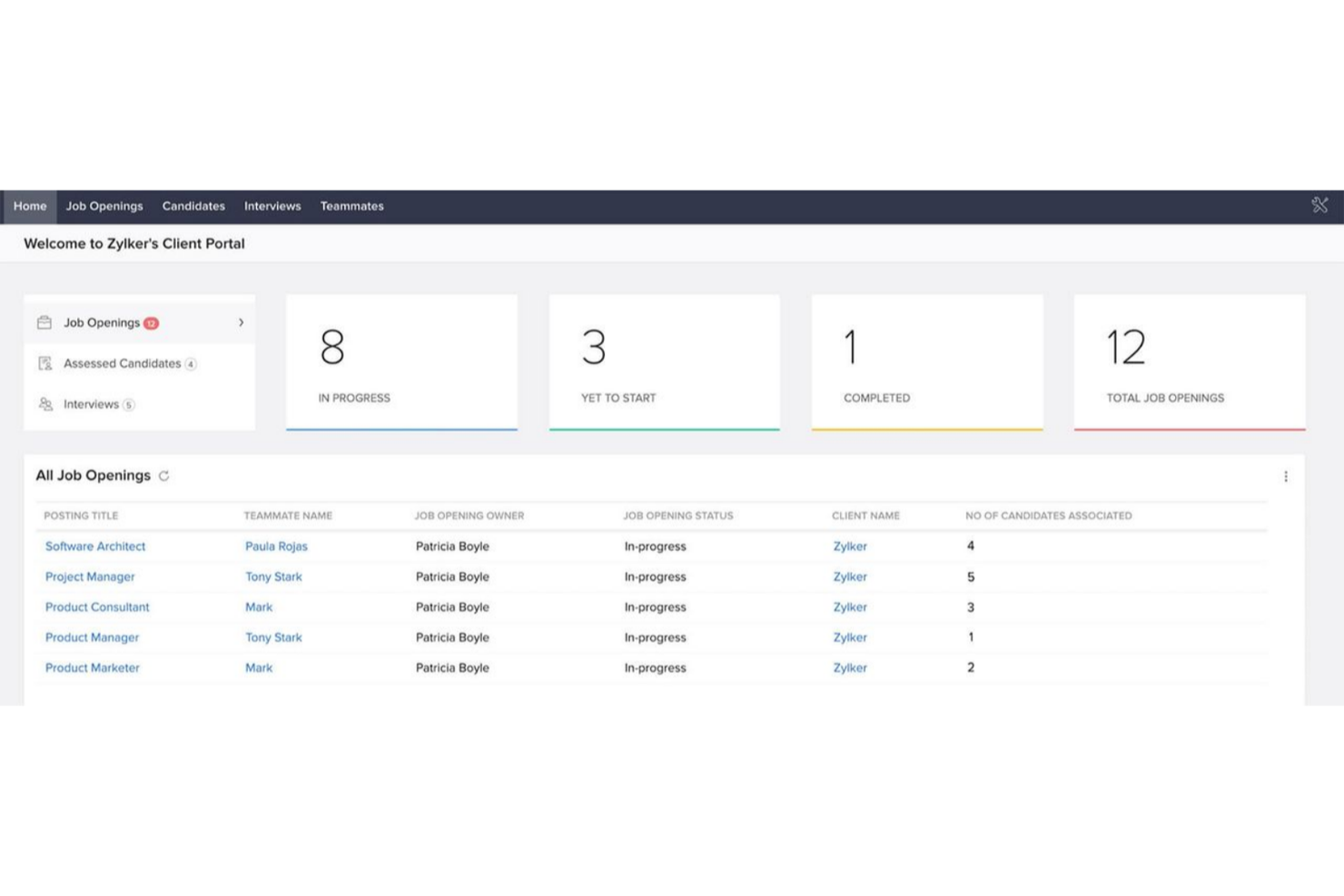
Zoho Recruit's interface isn't the most intuitive, which might slow down your team initially. The learning curve can be steep, especially if you're not tech-savvy. However, once you get the hang of it, the customizable workflows and automation tools can significantly boost efficiency. Users often mention that after the initial setup, the system becomes a powerful asset in managing recruitment processes. If your team is willing to invest time upfront, the long-term benefits are substantial.
Integrations
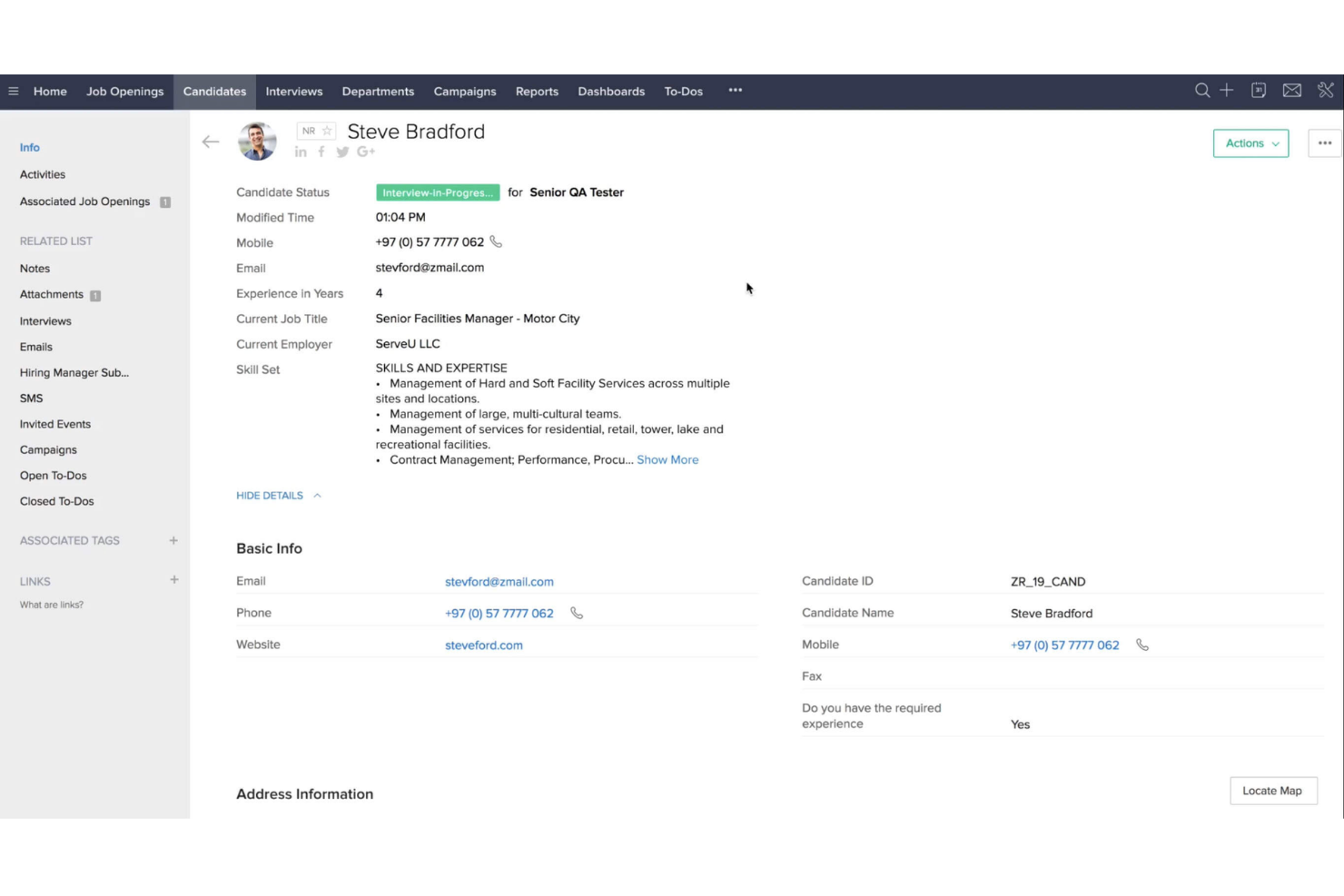
Zoho Recruit integrates natively with Zoho CRM, Zoho Mail, Zoho People, LinkedIn, Indeed, Glassdoor, Monster, Facebook, Twitter, and Google Calendar.
Zoho Recruit also has an API and connects with third-party integration tools like Zapier.
New Product Updates from Zoho Recruit

Zoho Recruit Introduces Block Candidates
Zoho Recruit now supports permanent candidate blocking directly from candidate and application records, improving control over repeat or high-risk applicants. Recruiters can also add internal notes when blocking and reverse the action if needed. Here are the details of the update:
- Blocked Candidates Control: This feature allows recruiters to block individuals from applying to future job openings using the same email address.
- Automatic Application Restriction: Once a candidate is blocked, any new applications submitted with that candidate's email address are automatically restricted.
Visit Zoho Recruit's official site for more details.
 for more details.
Zoho Recruit's Standardized Withdrawal Reasons
Zoho Recruit now requires a Withdrawal Reason whenever an offer is withdrawn, whether manually or through system actions. This ensures consistent records across the hiring process and removes guesswork during reviews and reporting. Here are the details of the update:
- Withdrawal Reason for Offer Withdrawals: Mandates adding a standardized reason for every withdrawn offer, ensuring clarity and consistency.
- Automation Compatibility: Integrates seamlessly with automated processes, allowing smooth tracking and reporting.
- Ease of Use: Newly signed-up users will find the Withdrawal Reason field pre-added, simplifying the setup process.
Visit Zoho Recruit's official site for more details.

Zoho Recruit Introduces Improved Subscription and Storage Controls
Zoho Recruit introduces improved Subscription Information and Storage Management to centralize visibility into account limits, file usage, and record capacity. These make it easier for admins to monitor usage, optimize storage, and maintain smooth hiring operations. Here are more details of the update:
- Enhanced View of Plan Limits: Users can easily track subscription limits and monitor their usage for more efficient management.
- Centralized Storage Management: All file and record storage usage information is now available in one place to help users prevent interruptions in hiring activities.
- Proactive Space Addition: The interface supports preemptive addition of extra storage, ensuring uninterrupted recruitment operations by avoiding potential limitations before they affect business.
Visit Zoho Recruit's official site for more details.

Zoho Recruit Introduces AI Interview Insights
Zoho Recruit introduces AI Interview Insights to automatically convert recorded One-way interviews into readable transcripts with concise summaries for each response. This helps hiring managers quickly identify strengths, concerns, and follow-up points without replaying long recordings. Here are the details of the update:
- Instant Transcripts and Summaries: Zia converts recordings into text, segments them by question and answer, and generates a brief summary for each response.
- Faster Interview Evaluation: Recruiters can quickly scan key talking points instead of replaying audio or relying on manual notes.
- Centralized Review Workspace: View transcripts, summaries, and answers together in the Evaluation tab, making it easier for teams to review and comment in one place.
Visit Zoho Recruit's official site for more details.

Zoho Recruit Upgrades Zia for Notes and Summaries
Zoho Recruit now enhances Zia with AI-assisted note-taking and expanded language support for profile summaries, helping recruiters document faster and collaborate seamlessly across regions. These updates improve clarity, reduce repetitive work, and accelerate screening. Here are the details of the update:
Zia AI Assist for Notes
- AI-Generated Notes: Turn rough bullet points into clear, professional notes with one click.
- Remove Redundancies Prompt: Automatically cleans repetitive or overlapping information.
- Faster Processing: Note generation now responds in 5–10 seconds for smoother workflows.
Zia Multilingual Profile Summaries
- Six Supported Languages: Generate summaries in English, French, German, Spanish, Italian, and Portuguese.
- Instant Translation: Convert Zia-generated summaries from one language to another with a single click.
- Faster Summary Generation: Profile summaries now load in 5–10 seconds instead of 30 seconds.
Visit Zoho Recruit’s official site for more details.

Zoho Recruit's New Details Sub-tab In Vendor Portal
Zoho Recruit has enhanced its platform by adding a new Details sub-tab to the Vendor Portal. This update empowers vendors by providing a comprehensive view of candidate profiles, streamlining the recruitment process and improving decision-making efficiency. Here are the benefits of the update:
- Comprehensive Candidate Profiles: Vendors can access complete candidate details including personal information, experience, and education, all integrated into the platform.
- Quick Reference Organization: All candidate information is neatly organized in one place to enable quick access and reference.
- Enhanced User Experience: The streamlined layout of candidate profiles ensures a smoother navigation and use experience for vendors.
Visit Zoho Recruit's official site for more details.
Zoho Recruit Specs
- API
- Application Tracking
- Behavioral Testing
- Budgeting
- Calendar Management
- Candidate Database
- Cognitive Testing
- Contact Management
- Custom Assessments
- Dashboard
- Dashboards
- Data Export
- Data Import
- Data Visualization
- Email Integration
- Employee Database
- Employee Onboarding
- External Integrations
- Feedback Management
- Forecasting
- Interview Scheduling
- Multi-Source Feedback
- Multi-User
- Notifications
- Personality Testing
- Psychometric Testing
- Scheduling
- Status Notifications
- Travel Management
Alternatives to Zoho Recruit


Zoho Recruit FAQs
How easy is it to implement Zoho Recruit into our existing hiring process?
Does Zoho Recruit offer mobile access for recruitment on the go?
How does Zoho Recruit handle candidate communication?
Can Zoho Recruit be customized to fit our unique recruitment needs?
What kind of reporting and analytics does Zoho Recruit provide?
Is Zoho Recruit compliant with data security and privacy regulations?
How does Zoho Recruit support collaboration within recruitment teams?
Does Zoho Recruit offer customer support for troubleshooting issues?
What's Next?
To remain up to date on all the latest in people management, subscribe to our newsletter for leaders and managers. You'll receive insights and offerings tailored to leaders and HR professionals straight to your inbox.