

İK süreçlerini elektronik tablolar, dağınık araçlar veya güncelliğini yitirmiş sistemler üzerinden yönetmek; gecikmelere, hatalara ve motivasyonu düşen ekiplere yol açar. Saha çalışanlarının zaman takibi, tutarsız performans değerlendirmeleri veya birbirine çok benzeyen fazla sayıda araç arasından seçim yapma konusunda zorlanıyorsanız yalnız değilsiniz.
Bu rehber size yardımcı olmak için hazırlandı. Çalışan bağlılığını artırmanız, planlamayı kolaylaştırmanız veya hibrit bir iş gücünü yönetmeniz gerekiyorsa doğru insan kaynakları uygulaması zamandan tasarruf etmenizi ve işinizi kolaylaştırmanızı sağlayabilir.
Gerçek İK sorunlarını çözmek için en iyi uygulamaların bu listesini oluşturmak üzere yüzlerce İK aracını inceledim; böylece size en uygun seçeneği daha hızlı ve güvenle bulabilirsiniz.
Why Trust Our Software Recommendations
6,700+
Reviews
20
Industry experts
16+
Evaluation factors
14
Years
Our team has been testing and reviewing software since 2012. As HR experts ourselves, we know how difficult—and important—it is to choose the right software.
For this guide, we evaluated tools using hands-on testing and independent research, scoring tools using our selection criteria. We also draw on insights from industry thought leaders and practicing HR experts.
Our reviews reflect our human editorial judgment, not a sales pitch.
Expert reviewers:
- Phil GrayCOO
 Kim BehnkeHR Tech Editor & Analyst
 Josh BarkerPeople Ops Manager

İnsan Kaynakları Uygulamaları Karşılaştırma Tablosu
En iyi İK uygulaması seçimlerim için fiyatlandırma, deneme ve demo ayrıntılarını bu karşılaştırma tablosunda özetliyorum.
Sorted by: Default
| Tool | Starting Price | Website | |
|---|---|---|---|
Best for self-service HR data access | 4.3 out of 5 | Pricing upon request Free demo available | Book Demo |
Best for mobile HR for managing global teams | 4.8 out of 5 | $5/user/month Free demo available | Website |
Best for flexible health benefits budgets | 5.0 out of 5 | $45/user/month Not available | Website |
Best for customizable evaluation templates | 2.6 out of 5 | $2.50/user/month 14-day free trial | Website |
Best for AI-driven benefits management | 4.5 out of 5 | Pricing upon request Free demo available | Website |
Best for streamlined payroll | 4.3 out of 5 | $99/month Free demo available | Website |
Best for managing hourly teams | 4.2 out of 5 | $99/month Free plan + 30-day free trial + free demo available | Website |
Best for employee performance reviews | 4.7 out of 5 | $8/user/month Free demo available | Website |
Best for field-based time tracking | 4.7 out of 5 | $40/month 14-day free trial + free demo available | Website |
Best for employee engagement | 4.6 out of 5 | $1/user/month + free plan available 30-day free trial + free demo available | Website |


En İyi İnsan Kaynakları Uygulamalarının İncelemeleri
Günümüzde kullanılabilen en iyi İK uygulamalarının ayrıntılı incelemelerini keşfedin. Her aracın hangi konularda başarılı olduğunu, nerelerde yetersiz kalabileceğini ve hangi özel senaryolara en uygun olduğunu açıklayarak İK süreçlerinizi kolaylaştırmak ve güçlendirmek için size en uygun seçeneği bulmanıza yardımcı oluyorum.
 Best for self-service HR data access
- Free demo available
- Pricing upon request
Visit WebsiteCustomer Rating:4.3/5
Paycom offers a multi-device payroll and HR platform with earnings statements, pay stub access, and employee change tracking for workforce management. Built on a single employee database, Paycom is an HCM platform that handles payroll processing, benefits, onboarding, time and attendance, and talent management.
Who Is Paycom Best For?
Paycom is a strong fit for mid-to-large employers who need a single platform to manage the full employee lifecycle without stitching together multiple HR tools.
Why I Picked Paycom
Paycom is one of my top picks because I love how it handles self-service HR data access at every level of the organization. The IWant AI engine lets employees, managers, and executives type or speak a question to instantly retrieve any piece of employee data, from time-off balances to shift schedules, without navigating menus or contacting HR. Managers can also review and approve punch changes or time-off requests directly inside IWant, cutting out the back-and-forth that usually slows down payroll. Because all of this pulls from Paycom's single employee database, the data is always current and accurate.
Paycom Key Features
- Beti payroll: Employees review and verify their own paycheck before processing, flagging errors before they become issues.
- Benefits administration: Employees can compare, select, and manage benefit plans directly within the platform during open enrollment.
- Performance management: Set goals, complete reviews, and track employee performance through structured, configurable review cycles.
- Applicant tracking: Post jobs, manage candidates, and move applicants through a hiring pipeline from a single interface.
Paycom Integrations
The platform is built as a single-database HCM system, so it relies on its own built-in tools rather than offering a wide library of native integrations.
Pros and Cons
Pros:
- Dedicated support specialist assigned per account
- Single database eliminates duplicate data entry
- Beti lets employees verify their own payroll
Cons:
- Implementation process can be lengthy and complex
- Custom reporting often requires extra Excel work
 Best for mobile HR for managing global teams
- Free demo available
- From $5/user/month
Visit WebsiteCustomer Rating:4.8/5
Deel centralizes global payroll within core HR workflows. Deel provides tools for handling global payroll, contracts, and workforce compliance. By centralizing processes like onboarding, payroll, and compliance, Deel is perfect for companies operating in multiple countries who want to eliminate the hassle of using multiple disconnected tools. It's particularly appealing to HR professionals and business owners seeking an efficient way to handle international hiring and payments while ensuring full compliance with local laws and regulations.
Why I Picked Deel
I picked Deel for its unique ability to handle global payroll management without the need for local entities. This feature allows your team to hire in over 150 countries while ensuring compliance with local tax and labor laws. Deel's automated HR operations, such as generating localized contracts and providing built-in compliance tools, directly address the complexities of managing a global workforce. These functionalities are essential for reducing payroll errors and delays, making it a valuable tool for any business looking to expand internationally.
Deel Key Features
In addition to global payroll management, Deel offers:
- Automated HR Operations: The platform automates various HR tasks, from onboarding to managing time off, tailored to different worker types and locations.
- Talent Management System: Deel promotes team engagement and productivity through tools like 1:1 meetings and training courses.
- Multiple Payment Methods: Deel supports various payment methods and currencies, making it easy to pay employees and contractors worldwide.
Deel Integrations
Integrations include QuickBooks, Xero, NetSuite, BambooHR, Greenhouse, Ashby, Workable, Lever, Expensify, and Gusto.
Pros and Cons
Pros:
- Offers customizable fields and policies for streamlined HR processes
- Provides valuable insights and alerts for compliance management
- Smooth payroll processing with multi-currency payment options
Cons:
- Certain tools may lack advanced functionalities
- Limited performance management features
 Best for flexible health benefits budgets
- Not available
- From $45/user/month
Visit WebsiteCustomer Rating:5/5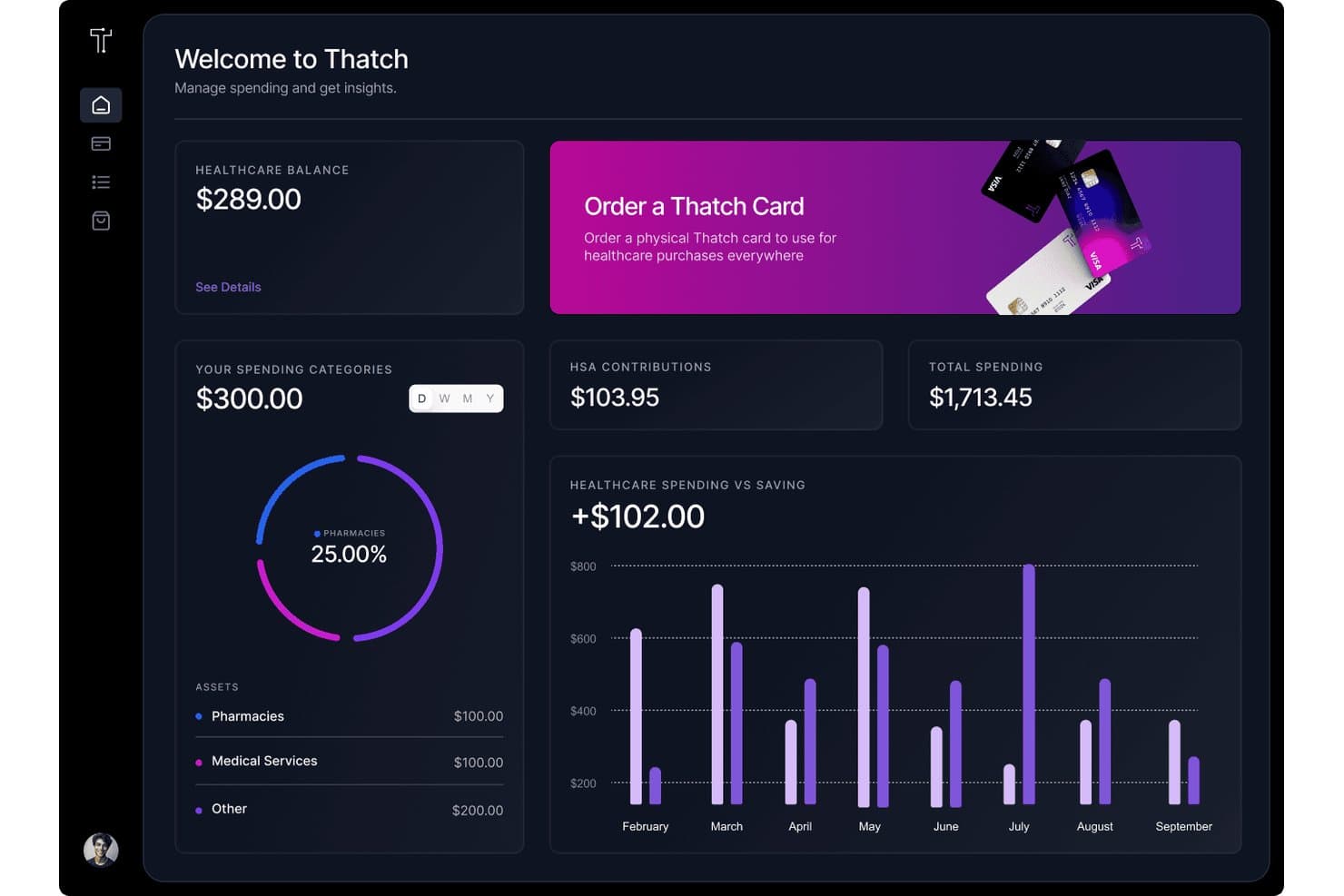
Thatch tracks healthcare spending, balances, and HSA contributions in one dashboard. Thatch is a health benefits administration platform that lets employers define allowance-based budgets and gives employees access to individual insurance plans, wellness services, and a healthcare debit card. It offers individual health coverage: set a budget, employees choose a plan, and Thatch handles enrollment and compliance.
Who Is Thatch Best For?
Thatch is a strong fit for small and mid-sized businesses that want to offer health benefits without locking into a fixed group plan.
Why I Picked Thatch
I picked Thatch as one of the best because the ICHRA model it's built on genuinely changes how health benefits work. Instead of locking into a group plan, I set a monthly allowance per employee, and they choose their own insurance through the Thatch marketplace. Any unused budget rolls into a Thatch Visa debit card for prescriptions, copays, or therapy. The AI-powered Ask Thatch service also lets employees text a photo of a receipt to instantly confirm whether an expense is covered.
Thatch Key Features
- Automated HIPAA and ACA compliance: Handles all compliance documentation required for individual health reimbursement arrangements.
- Payroll provider integrations: Syncs with leading payroll platforms like ADP, QuickBooks, and Paychex for seamless allowance management.
- Dedicated insurance marketplace: Lets employees compare and enroll in health, dental, and vision plans from major carriers directly in the platform.
- Thatch wellness marketplace: Offers curated access to supplementary services like fertility, therapy, and preventative screening directly through employees’ allowance.
Thatch Integrations
Native integrations are not clearly documented. An API is available for custom integrations.
Pros and Cons
Pros:
- Unused allowance converts to a debit card
- ICHRA compliance is handled automatically
- Employees choose their own health plans
Cons:
- Limited HR features beyond benefits management
- No native payroll processing included
Learn more about Thatch: Best for customizable evaluation templates
- 14-day free trial
- From $2.50/user/month (billed annually)
Visit WebsiteCustomer Rating:2.5/5
Express Evaluations helps managers organize performance reviews, track evaluation progress, and monitor employee, manager, and peer feedback from a centralized dashboard. Express Evaluations is an employee performance management app that covers customizable appraisal templates, 360-degree feedback, evaluation scheduling, automated reminders, goal tracking, and performance reporting.
Who Is Express Evaluations Best For?
Express Evaluations is a good fit for small to mid-sized businesses that need a dedicated, lightweight tool for running structured employee performance reviews.
Why I Picked Express Evaluations
Express Evaluations is one of my top picks because I love how much control it gives you over evaluation templates. You can modify questions, rating scales, and criteria to match specific job roles and performance objectives, so you're not forcing every employee through the same generic review. I also appreciate that the same template flexibility extends to 360-degree feedback, where you can tailor feedback forms for peer, supervisor, and subordinate reviewers separately. That level of specificity is hard to find in a tool at this price point.
Express Evaluations Key Features
- Automated scheduling and reminders: Set up evaluation cycles in advance and trigger automatic email reminders to keep managers and employees on track.
- Goal tracking: Assign and monitor individual employee goals directly within the platform, with progress visible throughout the review period.
- Performance reporting: Generate reports on evaluation results across teams or departments to surface trends and identify performance gaps.
- Pulse surveys: Send short, recurring surveys to employees to collect ongoing feedback between formal review cycles.
Express Evaluations Integrations
Express Evaluations offers a small set of integrations with HR and productivity tools, including BambooHR, Employee Navigator, SAP SuccessFactors HCM, Asana, Trello, Slack, and Microsoft Teams. An API is not available, so these direct integrations are the primary way to connect Express Evaluations with your existing systems.
Pros and Cons
Pros:
- Automated employee sync via Employee Navigator
- Printable evaluation summaries for legal records
- Built for small to midsize organizations
Cons:
- Only supports the English language
- No advanced talent management features
Learn more about Express Evaluations: Best for AI-driven benefits management
- Free demo available
- Pricing upon request
Visit WebsiteCustomer Rating:4.5/5
Healthee provides an intuitive, AI-powered benefits platform to support critical aspects of your HR operations. Healthee brings artificial-intelligence-driven benefits and healthcare navigation right into your HR toolkit, helping your team and employees understand and use health coverage with real-time guidance, cost transparency, and plan comparison tools designed around everyday decision-making. Built for HR leaders, benefits administrators, finance executives, brokers, and PEOs managing employee health benefits, it gives your workforce on-demand answers and personalized support without endless calls or manual research.
Why I Picked Healthee
Though not a full HR app, I picked Healthee for its unique focus on benefits, an important aspect of HR. I like that it brings AI-powered decision support directly into benefits management, empowering your HR team to reduce administrative workload while helping employees make smarter healthcare choices.
The platform’s virtual assistant, Zoe, answers employee questions about coverage, costs, and providers 24/7 without routing them through HR, saving your team time and effort. Its AI-driven plan comparison tool guides employees through open enrollment by matching their personal health information with suitable options.
Healthee Key Features
Aside from the AI-driven navigation and plan comparison tools mentioned above, Healthee includes several additional HR-relevant capabilities that support your benefits administration workflow:
- Provider Search and Ratings: Search for in-network doctors, specialists, and mental health professionals and view ratings to help employees choose care confidently.
- Telehealth Services: Provide 24/7 access to licensed mental and physical health providers, ensuring comprehensive care for your team.
- Medical ID Tracking: Keep employee health information organized and accessible for seamless healthcare management.
- Fraud Detection Analytics: Protect your organization from unnecessary costs with advanced analytics designed to detect and prevent fraud.
Healthee Integrations
Native integrations are not currently listed by Healthee, but the platform offers a flexible API and embedded UI widgets that allow you to incorporate personalized benefits functionality directly into your existing HR tech stack.
Pros and Cons
Pros:
- AI virtual assistant Zoe enhances benefits navigation efficiency.
- Cost transparency tools help users make informed decisions.
- 24/7 telehealth access provides immediate medical consultation.
Cons:
- Limited benefits to select providers may restrict options.
- Some users wish for support for non-medical benefits for a more all-in-one system.
Learn more about Healthee:

Paycor offers a streamlined suite of HR tools for payroll, compliance, and employee management, tailored for small to mid-sized businesses. Paycor streamlines payroll processing with a focus on efficiency and ease of use. It is recognized for its ability to simplify payroll tasks, making it ideal for businesses seeking a more efficient payroll system.
Why I picked Paycor: I selected Paycor for its robust payroll processing capabilities that stand out in the market. Its commitment to streamlining payroll tasks through technology makes it a valuable tool for businesses. I determined Paycor to be best for streamlined payroll due to its user-friendly interface and comprehensive features that cater to the specific needs of payroll management, ensuring a more efficient payroll process.
Standout features & integrations:
Paycor's standout features include direct deposit, tax compliance, and payroll reporting features. It also offers an employee self-service portal and mobile access, which are crucial for modern workforce management.
Paycor integrates natively with a variety of systems, including time and attendance tracking, HR management, benefits administration, 401(k) tracking, workers' compensation, general ledger, POS systems, productivity tools like Microsoft Outlook and Google Calendar, compliance solutions, and learning management systems.
Pros and Cons
Pros:
- Employee self-service portal for easy access to pay information and benefits
- Mobile app for payroll management on the go
- Comprehensive payroll features that cover the entire employee lifecycle
Cons:
- The base fee may be a barrier for very small businesses
- Additional costs for advanced features can add up
 Best for managing hourly teams
- Free plan + 30-day free trial + free demo available
- From $99/month (billed annually)
Visit WebsiteCustomer Rating:4.2/5
Users can build schedules, track availability, forecast labor, and adjust schedules from anywhere with Homebase. Homebase is a comprehensive tool designed for small businesses to manage employee scheduling, time clocks, payroll, communication, and HR tasks all in one place.
Why I picked Homebase: For small businesses managing hourly teams, Homebase offers an all-in-one platform that simplifies many HR tasks, such as employee scheduling, time tracking, payroll processing, and team communication. Homebase stands out by providing user-friendly tools that streamline operations and enhance productivity, making it a valuable asset for businesses looking to improve their HR processes.
Standout features & integrations:
Homebase offers advanced tools like hiring and onboarding, which help businesses recruit and train new employees efficiently. Another standout feature is the time clock, allowing employees to clock in and out using various devices, reducing errors and improving accuracy.
Homebase integrates with QuickBooks, Square, Gusto, ADP, Shopify, Toast, Clover, Revel, Lightspeed, Google Calendar, and Slack.
Pros and Cons
Pros:
- Helpful for finding shift coverage
- Real-time schedule visibility
- Easy to make timesheet edits
Cons:
- Employee onboarding features limited to higher tier plans
- User interface could be improved
 Best for employee performance reviews
- Free demo available
- From $8/user/month (billed annually)
Visit WebsiteCustomer Rating:4.7/5
Lattice's home dashboard provides a comprehensive overview of tasks and upcoming performance reviews Lattice is a comprehensive people management platform designed to enhance employee performance, engagement, and growth. It offers a suite of tools that help organizations manage and develop their workforce effectively.
Why I picked Lattice: Lattice stands out with its robust features tailored to improve employee performance and satisfaction. It offers performance reviews, goal tracking (OKRs), and compensation management, all in one platform. These tools enable HR professionals and managers to make data-driven decisions that foster a high-performance culture.
Standout features & integrations:
Lattice offers real-time feedback and employee engagement surveys to gain valuable insights into workforce morale. Additionally, Lattice’s comprehensive analytics offer actionable insights for strategic HR decisions.
Lattice integrates with Slack, Salesforce, Workday, Microsoft Teams, Google Workspace, BambooHR, Rippling, ADP, Greenhouse, and Lever.
Pros and Cons
Pros:
- Provides actionable insights from pulse surveys
- Effective for performance management
- The tool is highly customizable
Cons:
- Could offer more integrations
- Some reporting aspects could be more robust
 Best for field-based time tracking
- 14-day free trial + free demo available
- From $40/month
Visit WebsiteCustomer Rating:4.7/5
ClockShark is tailored for time tracking in field services and construction, offering robust GPS and crew management features. ClockShark is a mobile time-tracking app designed for field workers. It simplifies the process of tracking on-site hours and job tasks. It stands out as the best for field time tracking due to its robust features tailored for the construction and field service industries, providing accurate and efficient time tracking for mobile and on-site workers.
Why I picked ClockShark: I chose ClockShark for this list because of its specialized capabilities in handling the complexities of field time tracking. I believe ClockShark is best for field-based time tracking because of its advanced tech, including precise GPS tracking, offline capabilities, and crew clock-in options, which are essential for field workers who are constantly on the move and working in different locations.
Standout features & integrations:
ClockShark's most important features include GPS tracking, which captures workers' locations when clocking in and out, and offline time tracking, ensuring hours are recorded even without an internet connection. The app also allows for crew management, job management, and integrates with various third-party applications.
ClockShark natively integrates with tools such as QuickBooks Online, QuickBooks Desktop, ADP, Gusto, Sage 100 Contractor, Xero, Zapier, Checkr, FleetSharp, and more, ensuring seamless data flow and enhanced operational efficiency across platforms.
Pros and Cons
Pros:
- Crew clock-in options for teams sharing a device
- Offline time tracking capabilities
- GPS tracking for accurate location monitoring
Cons:
- Limited to two main pricing plans
- App may take more time to sync in low connectivity areas
Learn more about ClockShark: 10Best for employee engagement
Xoxoday
- 30-day free trial + free demo available
- From $1/user/month + free plan available
Visit WebsiteCustomer Rating:4.6/5
Empuls is an employee engagement platform that enhances workplace culture through recognition, rewards, and feedback mechanisms. Empuls is an employee engagement platform that enhances workplace experience through feedback, recognition, and rewards. It stands out as the best for employee engagement because it offers a comprehensive suite of tools designed to foster a positive work culture and increase employee satisfaction.
Why I picked Empuls: I chose Empuls for this list because it provides a unique combination of features that address various aspects of employee engagement, from recognition and rewards to surveys and feedback. I believe Empuls is best for employee engagement due to its multi-dimensional approach that includes social intranet, engagement surveys, and a diverse rewards system, which collectively work to enhance the overall employee experience.
Standout features & integrations:
Empuls offers a robust set of features that cater to different facets of employee engagement. Its rewards and recognition system allows for meaningful appreciation, while the perks and benefits prioritize employee well-being. The platform also includes tools for communication, surveys and feedback, and people analytics.
Empuls integrates natively with collaboration tools, HRMS systems, and single sign-on solutions, among others, helping streamline workflows and ensure a unified approach to employee engagement across different software ecosystems.
Pros and Cons
Pros:
- Offers a diverse rewards marketplace
- Integrates with various systems for seamless operation
- Comprehensive employee engagement features
Cons:
- Setup fees may apply based on implementation scope
- Minimum contract agreement required
Learn more about Xoxoday:
Diğer İnsan Kaynakları Uygulamaları
Kısa listeme girmeyen ancak yine de göz atmaya değer bazı ek insan kaynakları uygulamaları şunlardır:
- 11DoceboBest for branded mobile learning
- 12WorkleapBest for continuous feedback
- 13ConnecteamBest for deskless team management
- 14Keka HRBest for project-based workforce management
- 15Zoho RecruitBest for recruitment automation
- 16TacticBest for hybrid team desk bookings
- 17BambooHRBest for mobile workforce management
- 18AsanaBest for project tracking
- 1915Five Best for employee feedback
- 20WorkableBest for mobile recruiting
İlgili İK Yazılımı İncelemeleri
Aradığınızı hâlâ burada bulamadıysanız test edip değerlendirdiğimiz şu diğer ilgili araçlara göz atın:
- İK Yazılımı
- Bordro Yazılımı
- İşe Alım Yazılımı
- Kayıtlı İşveren Hizmetleri
- Aday Takip Sistemleri
- İş Gücü Yönetimi Yazılımı
How I Evaluate Human Resource Apps
When a 50-person team needs one place to onboard hires, track PTO, and run payroll, I evaluate tools on two layers: baseline functionality and what truly sets them apart.
Core Functionality (Table Stakes For This List)
When I'm selecting tools for my list, I rank each one on a scale from 0 (does not offer the functionality) to 5 (excels in this area) for each core functionality listed below. Then, I calculate the tool's total score into a percentage. Each tool needs to achieve a minimum total score of 75% to be considered for inclusion.
- Employee Database: I look for centralized profiles with custom fields and document storage, so you can pull up any employee's full history in seconds.
- Onboarding & Offboarding: A solid onboarding workflow assigns tasks, collects e-signatures, and provisions accounts—I check whether templates cover day-one through week-one.
- Time & Attendance: I evaluate how PTO policies, accrual rules, and approval chains are configured, especially for teams juggling multiple leave types across regions.
- Payroll & Benefits: Whether native or via integration, I check that payroll runs and benefits enrollment connect to the employee database without manual re-entry.
- Performance Management: Review cycles, goal tracking, and feedback tools matter here—I look for platforms that support both annual reviews and continuous check-ins.
- Compliance & Reporting: Your team should be able to generate headcount, turnover, or audit-ready reports without manual data pulls, so I evaluate built-in templates and compliance tracking.
Once I have a list of tools that meet this criteria, I consider what sets each platform apart.
Differentiating Factors (What Sets Vendors Apart)
Here's how I compare and contrast different vendors:
Standout Features
Employee self-service portals are a big differentiator. When employees can update their own addresses, download pay stubs, and enroll in benefits without emailing HR, it cuts ticket volume fast. I also evaluate mobile app quality—managers who approve PTO requests or review timesheets from their phone need more than a responsive web page. Pulse surveys and engagement tools round out my evaluation, since tracking eNPS scores and running sentiment checks between annual reviews gives HR teams real-time culture data.
Beyond Features
Integration ecosystem matters a lot—I check whether a platform connects to your existing ATS, payroll provider, and tools like Slack or Microsoft 365 without custom development. Compliance and data security also weigh heavily in my evaluation; certifications like SOC 2 and GDPR readiness tell me a vendor takes employee data protection seriously. Finally, I look at pricing transparency, especially whether vendors offer modular plans so a 30-person team isn't paying for enterprise features they'll never use.
İnsan Kaynakları Uygulamaları Nasıl Seçilir?
Kendinize özgü yazılım seçim sürecinizi yürütürken aşağıdaki noktaları aklınızda bulundurun:
- Belirli İhtiyaçları Belirleyin: Mevcut çok sayıdaki İK uygulamasını incelemeye başlamadan önce kuruluşunuzun belirli ihtiyaçlarını belirlemek çok önemlidir. İster işe alım, bordro, çalışan bağlılığı veya performans yönetimi olsun, öncelikli İK sorunlarınızı anlamak sizi doğru yazılıma yönlendirecektir.
- Entegrasyon Yetenekleri: İK uygulamasının mevcut sistemlerinizle ne ölçüde entegre olması gerektiğini değerlendirin. Sorunsuz entegrasyon, veri silolarını önleyebilir ve iş akışı verimliliğini artırabilir. Örneğin şirketiniz çok sayıda Microsoft ürünü kullanıyorsa Microsoft Office 365 ile iyi entegre olan Gusto gibi bir İK uygulaması arayabilirsiniz.
- Ölçeklenebilirlik: İK yazılımı işletmenizle birlikte büyüyebilmelidir. Küçük bir girişimin başlangıçta temel özelliklere ihtiyacı olabilir; ancak işletme büyüdükçe yazılım, komple bir sistem yenilemesine gerek kalmadan daha karmaşık İK işlevlerini karşılayabilmelidir.
- Kullanıcı Deneyimi: Kullanıcı dostu bir arayüze sahip İK uygulaması, benimsenme oranlarını artırabilir ve çalışanlarınızın öğrenme sürecini kısaltabilir. İyi bir kullanıcı deneyimi, kuruluşun her seviyesindeki çalışanlar tarafından kullanıldıkları için İK uygulamaları açısından özellikle önemlidir.
- Uyumluluk ve Güvenlik: İK yazılımının sektörünüz ve konumunuzla ilgili iş yasalarına ve veri koruma düzenlemelerine uygun olduğundan emin olun. Yazılım ayrıca hassas çalışan verilerini korumak için güçlü güvenlik önlemlerine sahip olmalıdır.
2025'te İnsan Kaynakları Uygulamalarındaki Trendler
İnsan kaynakları teknolojisi, değişen iş yeri taleplerini karşılamak için hızla gelişmektedir. İK uygulamalarını şekillendiren en yeni trendler şunlardır:
- Yapay Zekânın Entegrasyonu: Yapay Zekâ (AI), rutin görevleri otomatikleştirerek ve öngörücü analizler sunarak İK uygulamalarına giderek daha fazla entegre edilmektedir. Bu trend, karar alma süreçlerini geliştirme ve İK süreçlerini kolaylaştırma potansiyeli açısından önemlidir. AI'ın büyük veri kümelerini analiz edebilmesi, daha stratejik yetenek yönetimine katkı sağlayabilecek içgörüler sunar.
- Çalışan Deneyimi Platformlarına Vurgu: Çalışan deneyimi platformlarına odaklanılması, çeşitli İK işlevlerini kullanıcı dostu tek bir arayüzde merkezileştiren bir trenddir. Bu platformlar, çalışan bağlılığını ve memnuniyetini artırmadaki rolleri nedeniyle giderek daha fazla benimsenmektedir. Çalışanın işe alımından gelişimine ve elde tutulmasına kadar çalışan yolculuğunu yönetmeye yönelik bütünsel bir yaklaşım sunarlar.
- Mobil Öncelikli İK Çözümlerinin Yükselişi: Connecteam gibi mobil öncelikli İK çözümleri, akıllı telefonların profesyonel amaçlarla kullanımının artışını yansıtarak yükselişe geçmektedir. Bu trend, hem çalışanlar hem de İK profesyonelleri için daha fazla esneklik ve erişilebilirlik sağlaması açısından önemlidir. Mobil uygulamalar, İK hizmetlerine hareket hâlindeyken erişim olanağı sunarak daha bağlantılı ve duyarlı bir iş gücünü teşvik eder.
- Uzaktan Çalışma Yönetim Araçlarının Genişlemesi: Uzaktan çalışma daha yaygın hâle geldikçe İK uygulamaları, dağınık ekipleri etkili bir şekilde yönetmek için özelliklerini genişletmektedir. Bu trend, farklı coğrafyalarda iş birliğini ve üretkenliği destekleme becerisi açısından dikkat çekicidir. Uzaktan çalışma dinamiklerinin kendine özgü özelliklerine uyum sağlayabilen araçlara duyulan ihtiyacı ortaya koyar.
- Çalışan Analitiğinin Artan Kullanımı: Çalışan analitiği, iş gücü davranışları ve trendleri hakkında veriye dayalı içgörüler sağlayan, İK uygulamalarında büyüyen bir trenddir. Bu, yetenek yönetimi ve kurumsal gelişim hakkında bilinçli kararlar almak isteyen kuruluşlar için kritik öneme sahiptir. Analitik kullanımı, İK profesyonellerinin sonuçları öngörmesine ve İK girişimlerinin etkisini ölçmesine yardımcı olur.
Bu trendler, İK teknolojisinin dinamik yapısını ve işin geleceğini şekillendirmedeki kritik rolünü ortaya koymaktadır.
İnsan Kaynakları Uygulamaları Nedir?
İnsan kaynakları uygulamaları (diğer adıyla İK uygulamaları), bir kuruluş içinde çalışanlarla ilgili görevlerin yönetilmesini kolaylaştırmak üzere tasarlanmış dijital platformlardır. İK profesyonelleri, yöneticiler ve bazen tüm çalışanlar tarafından işe alım, işe alıştırma, bordro ve performans yönetimi gibi süreçleri kolaylaştırmak için kullanılırlar.
Birçok İK yazılımı sağlayıcısı, hem çalışanlar hem de İK ekipleri için mobil uygulamalar sunar. Çalışanlara yönelik mobil uygulamalar, izin taleplerinin gönderilmesi, maaş bordrolarının kontrol edilmesi ve kişisel iletişim bilgilerinin güncellenmesi gibi tipik çalışan ihtiyaçlarını karşılar. İK profesyonellerine yönelik ayrı uygulamalar ise mobil işe alım, çalışan performansının izlenmesi veya çalışan bilgilerinin masa başından uzaktayken HCM ya da HRIS sistemlerinde güncellenmesi gibi özellikler sunabilir.
İnsan Kaynakları Uygulamalarının Özellikleri
İnsan kaynakları uygulamalarını incelerken bir kuruluş içindeki İK işlevlerini destekleyecek ve geliştirecek temel özellikleri belirlemek çok önemlidir. Bu özellikler yalnızca İK süreçlerini kolaylaştırmakla kalmamalı, aynı zamanda daha bağlı ve iyi yönetilen bir iş gücüne de katkıda bulunmalıdır. Aranması gereken en önemli özellikler şunlardır:
- Merkezi Veritabanı: Çalışan verilerini bir araya getirmek için gereklidir ve bilgi yönetimini daha verimli hâle getirir.
- Çalışanların Kendi Kendine Hizmet Kullanımı: Çalışanların İK ile ilgili görevlerini yönetmesini sağlayarak İK personelinin iş yükünü azaltır.
- Yetenek Yönetimi: Stratejik insan sermayesi planlaması için kritik öneme sahiptir ve işe alım ile performans yönetimi gibi temel işlevleri içerir.
- İşe Alım ve İşe Uyum: İşe alım sürecini kolaylaştırır ve yeni çalışanların şirket kültürüne sorunsuz bir şekilde uyum sağlamasına yardımcı olur.
- Bordro ve Ücretlendirme Yönetimi: Karmaşık bordro işlemlerini otomatikleştirir ve ücretlendirmeyi yöneterek zamandan tasarruf sağlar ve hataları azaltır.
- Yan Haklar Yönetimi: Çalışan yan haklarının yönetimini kolaylaştırarak şirket tarafından sunulan genel yan haklar paketini geliştirir.
- Çalışma Süresi Takibi: Bordro ve yasal uyum açısından temel olan çalışma saatlerinin doğru şekilde kaydedilmesini sağlar.
- Çalışan Çizelgeleme: Çalışanların çalışma programlarının oluşturulmasını ve yönetilmesini kolaylaştırarak operasyonel verimliliği sağlar.
- Performans Yönetimi: Sürekli performans değerlendirmesi ve geri bildirim için araçlar sunarak çalışanların gelişimini destekler.
- Öğrenme ve Gelişim: Çalışan eğitimi ve gelişimi için kaynaklar sunarak sürekli öğrenme kültürünü teşvik eder.
- Çalışan Bağlılığı: Çalışan memnuniyetini ve bağlılığını ölçmeye ve geliştirmeye yardımcı olarak daha yüksek çalışan elde tutma oranları sağlar.
- İşgücü Analitiği: İK ölçütleri hakkında içgörüler sunarak stratejik karar alma ve işgücü planlamasına yardımcı olur.
- Yasal Uyum: İstihdam yasalarına ve yönetmeliklerine uyulmasına yardımcı olarak hukuki riskleri azaltır.
Bu özellikler, insan kaynakları yönetiminin çeşitli unsurlarının ele alınmasını sağlayarak etkili İK yazılımının temelini oluşturur. İK departmanlarının verimlilik, yasal uyum ve çalışan gelişimine odaklanarak daha stratejik bir şekilde faaliyet göstermesine olanak tanır.
İnsan Kaynakları Uygulamalarının Faydaları
İnsan kaynakları uygulamaları, kuruluşların iş gücünü yönetme biçiminde devrim yaratmıştır. Bu araçlar, İK süreçlerini kolaylaştıran, veri yönetimini geliştiren ve çalışan bağlılığını artıran çeşitli işlevler sunar. Potansiyel alıcılar için İK yazılımının temel faydalarını anlamak, kuruluşlarının İK operasyonlarında önemli iyileştirmelere yol açabilecek bilinçli bir karar vermelerine yardımcı olabilir.
- Kolaylaştırılmış İşe Alım Süreçleri: Yetenek kazanımını basitleştirir. İK uygulamalarını kullanmak; iş ilanlarının yayımlanmasını, aday takibini ve iletişimi otomatikleştirerek yeni çalışanları işe almak için gereken zamanı ve çabayı önemli ölçüde azaltabilir.
- Verimli Çalışan İşe Uyumu: Yeni işe alınanların entegrasyonunu hızlandırır. İK yazılımı, yeni çalışanlar için daha sorunsuz bir işe uyum deneyimi sağlayarak şirket politikalarına ve prosedürlerine hızla uyum sağlamalarına yardımcı olur.
- Merkezi Çalışan Verileri Yönetimi: Bilgilere erişilebilirliği artırır. Bu uygulamalar, çalışan verilerinin depolanması ve yönetilmesi için merkezi bir platform sunarak İK profesyonellerinin gerektiğinde bilgilere erişmesini ve bu bilgileri güncellemesini kolaylaştırır.
- Otomatikleştirilmiş Bordro ve Yan Haklar Yönetimi: Hataları azaltır ve zamandan tasarruf sağlar. İK uygulamaları, bordro ve yan haklarla ilgili görevleri otomatikleştirerek hataları en aza indirmeye ve İK personelinin daha stratejik faaliyetlere odaklanması için zaman kazandırmaya yardımcı olur.
- Geliştirilmiş Çalışanların Kendi Kendine Hizmet Kullanımı: Çalışanları güçlendirir. İK uygulamaları genellikle çalışanların kişisel bilgilerini, yan haklarını ve izin taleplerini yönetmesine olanak tanıyan kendi kendine hizmet portalları içerir; bu da özerklik ve bağlılık duygusunu destekler.
İnsan kaynakları uygulamalarının benimsenmesi, daha düzenli, verimli ve çalışan dostu bir İK departmanının oluşmasını sağlayabilir. Bu faydalar yalnızca İK ekibinin performansını geliştirmekle kalmaz, aynı zamanda daha üretken ve memnun bir iş gücüne de katkıda bulunur.
İnsan Kaynakları Uygulamalarının Maliyeti ve Fiyatlandırması
İK yazılımı ve iş yeri yönetimi araçları konusunda uzman biri olarak, yazılım alıcılarını insan kaynakları uygulamaları için mevcut çok sayıdaki plan ve fiyatlandırma seçeneği konusunda yönlendirmek önemlidir.
Bu uygulamalar, her ölçekten işletmenin İK işlevlerini daha verimli bir şekilde yönetmesine yardımcı olmak üzere tasarlanmıştır; ancak doğru seçim, her kuruluşun özel ihtiyaçlarına ve bütçe kısıtlamalarına bağlıdır.
Aşağıda farklı plan seçeneklerinin ve fiyatlandırmalarının dökümü yer almaktadır.
İK Uygulamaları için Plan Karşılaştırma Tablosu
| Plan Türü | Ortalama Fiyat | Yaygın Özellikler |
| Ücretsiz Plan | $0 | Temel İK işlevleri, çalışanların kendi işlemlerini gerçekleştirebildiği portallar ve sınırlı kullanıcı erişimi |
| Temel Plan | Aylık 50 ila 100 dolar | Bordro işleme, çalışma süresi ve devam takibi ve temel raporlama |
| Profesyonel Plan | Aylık 100 ila 200 dolar | Performans yönetimi, yan haklar yönetimi ve geliştirilmiş güvenlik |
| Kurumsal Plan | Özel fiyatlandırma | Özel entegrasyonlar, gelişmiş analizler, özel destek ve tüm özelliklere erişim |
İK uygulamaları için plan türleri, maliyetler ve özelliklerin dökümü.
Hangi planın seçileceğini değerlendirirken yazılım alıcıları, İK operasyonlarının karmaşıklığını yazılımın maliyetiyle karşılaştırmalıdır. Ücretsiz planlar, çok küçük işletmeler veya İK ihtiyaçları sınırlı olanlar için iyi bir başlangıç noktası olabilir.
İşletmeler büyüdükçe, İK görevlerinin artan karmaşıklığını etkili bir şekilde yönetmek için daha geniş özellik yelpazesine sahip daha gelişmiş planlara yatırım yapmak gerekli hale gelir. Daha kapsamlı bir İK sisteminin, verimliliği ve uyumluluğu artırarak sağlayabileceği potansiyel yatırım getirisini de değerlendirmek önemlidir.
İnsan Kaynakları Uygulamaları SSS
İnsan kaynakları uygulamaları ve bunların nasıl çalıştığı hakkında sahip olabileceğiniz sık sorulan bazı soruların yanıtlarını burada bulabilirsiniz:
Küçük işletmeler için en iyi İK uygulamaları hangileridir?
Küçük işletmeler için uygun maliyetli ve kullanımı kolay İK uygulamaları çok önemlidir. Küçük işletmeler için \u003ca href=\u0022https://peoplemanagingpeople.com/tools/best-hr-software-for-small-business/\u0022\u003een iyi İK uygulamalarından bazıları\u003c/a\u003e arasında, bordro hizmetleriyle tanınan ancak aynı zamanda İK ve yan haklar yönetimi de sunan \u003ca href=\u0022https://peoplemanagingpeople.com/tools/paycor-review/\u0022\u003ePaycor\u003c/a\u003e; çalışan verilerini ve işe alım süreçlerini yönetmek için kapsamlı bir araç seti sağlayan \u003ca href=\u0022https://peoplemanagingpeople.com/tools/bamboohr-review/\u0022\u003eBambooHR\u003c/a\u003e ve izin yönetimi ile devam takibi gibi özelliklere sahip, kullanımı kolay bir platform olan Zoho People yer alır.
İK uygulamaları çalışan bağlılığını artırabilir mi?
Evet, İK uygulamaları çalışan bağlılığını önemli ölçüde artırabilir. Engagedly ve \u003ca href=\u0022https://peoplemanagingpeople.com/tools/lattice-review/\u0022\u003eLattice\u003c/a\u003e gibi uygulamalar, çalışanların iş yerlerine daha bağlı ve dahil hissetmelerine yardımcı olabilecek performans yönetimini ve çalışan geri bildirimlerini kolaylaştırmak üzere tasarlanmıştır. Bu platformlar genellikle hedef belirleme, takdir ve kişisel gelişim özelliklerini içerir; bunlar da daha yüksek bağlılık düzeylerine katkıda bulunabilir.
İK uygulamaları mevzuata uyumluluğu nasıl ele alır?
İK uygulamaları genellikle işletmelerin çeşitli düzenlemelere uymasına yardımcı olacak özellikler içerir. Örneğin Paycor, vergi uyumluluğu ve iş hukuku kurallarına uyum için araçlar sunar. Bu uygulamalar, en güncel yasal gereklilikleri yansıtacak şekilde düzenli olarak güncellenir ve birçoğu, işletmelerin gerekli değişiklikleri anlamasına ve uygulamasına yardımcı olacak kaynaklar ve destek sağlar.
İK uygulamaları işe alım ve işe alıştırma için kullanılabilir mi?
Kesinlikle, İK uygulamaları işe alım ve işe alıştırma süreçlerini kolaylaştırabilir. \u003ca href=\u0022https://peoplemanagingpeople.com/tools/workable-recruiting-review/\u0022\u003eWorkable\u003c/a\u003e ve \u003ca href=\u0022https://peoplemanagingpeople.com/tools/zoho-recruit-pricing/\u0022\u003eZoho Recruit\u003c/a\u003e gibi platformlar, iş ilanının yayınlanmasından aday takibine kadar işe alım sürecini optimize etmek üzere özel olarak tasarlanmıştır. Ayrıca yeni işe alınanların şirkete sorunsuz ve verimli bir şekilde uyum sağlamasını güvence altına almak için işe alıştırma modülleri de sunarlar.
İK uygulamalarından ne tür analiz ve raporlama bekleyebilirim?
İK uygulamaları genellikle güçlü analiz ve raporlama özellikleriyle birlikte gelir. \u003ca href=\u0022https://peoplemanagingpeople.com/tools/connecteam-review/\u0022\u003eConnecteam\u003c/a\u003e ve \u003ca href=\u0022https://peoplemanagingpeople.com/tools/clockshark-review/\u0022\u003eClockShark\u003c/a\u003e gibi uygulamalar, iş gücü verilerine ilişkin ayrıntılı içgörüler sağlayarak işletmelerin işe alım, çalışan devir hızı, performans ve diğer alanlardaki eğilimlere dayalı bilinçli kararlar almasına yardımcı olur. Bu analizler, stratejik planlama ve İK süreçlerinin iyileştirilmesi açısından kritik öneme sahip olabilir.