


elia Testbericht: Vorteile, Nachteile, Funktionen und Preisübersicht



Managing a workplace gets harder when desk booking, room booking, service requests, space data, and workplace hardware all sit in separate systems. Shared seating, hybrid schedules, and changing office needs can make it difficult for HR, facilities, and IT teams to see how spaces are being used and what support employees need.
elia is a workplace management software that brings together desk and room booking, service requests, space management, visitor management, occupancy data, and optional workplace hardware. Its modular setup lets organizations start with the tools they need, then add more as their workplace needs grow.
In this review, I’ll cover elia’s key features, use cases, pros and cons, pricing, and setup process to help you decide if it’s the right workplace management platform for your organization.
elia Evaluation Summary
- From $500/month
- Free plan + free demo available
Warum Sie unseren Software-Bewertungen vertrauen können
Unser Team testet und bewertet Software seit 2012. Als HR-Experten wissen wir selbst, wie schwierig – und wichtig – es ist, die richtige Software auszuwählen.
Für diesen Leitfaden haben wir Tools mithilfe von praktischen Tests und unabhängiger Recherche bewertet und dabei unsere Bewertungskriterien angewendet. Zudem greifen wir auf Erkenntnisse von Branchenvordenkern und praktizierenden HR-Experten zurück.
Unsere Bewertungen spiegeln unser menschliches redaktionelles Urteilsvermögen wider, keine Verkaufsstrategie.
Expertenprüfer:
elia Overview
In my opinion, elia stands out as a capable workplace management tool for physical office operations. Its modular setup is useful for teams that need desk booking, room booking, visitor management, service requests, and occupancy data in one system. With optional hardware like sensors, room screens, kiosks, and smart lockers, elia gives teams a clearer view of how office space is actually being used. Its quick onboarding and unlimited-user pricing are appealing, though hardware costs extra and integrations are more limited than some larger platforms.
pros
-
Modular tools for managing desks, rooms, visitors, service requests, and workplace space
-
Optional sensors, kiosks, screens, and smart lockers for stronger office usage data
-
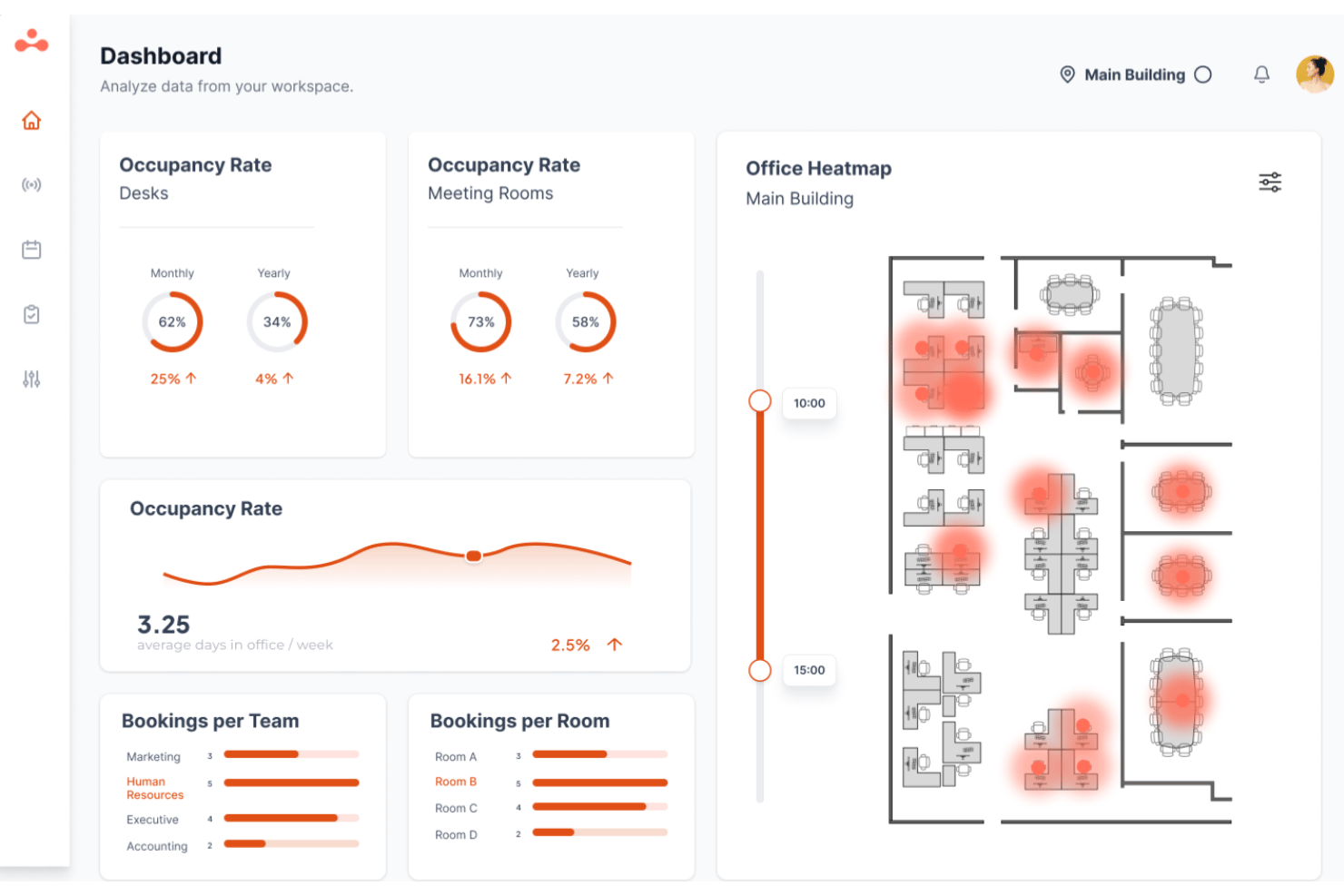
Dashboards and heatmaps combine bookings and real usage for better space planning
cons
-
Hardware costs extra beyond the software plan
-
Fewer prebuilt integrations than larger workplace management platforms
-
Cloud only, with no self-hosted or on-premise option
Is elia Right For Your Needs?
Who Would be a Good Fit for elia?
elia is a good fit for mid-sized and enterprise organizations that need to manage shared offices, desk booking, meeting rooms, visitors, service requests, occupancy data, and workplace hardware. It works best for teams with physical workplaces that need better coordination across HR, facilities, IT, and office operations.
-
Mid-Sized and Enterprise Organizations
elia supports growing and large organizations that need more structure for shared desks, meeting rooms, visitors, workplace resources, and space usage across one or more offices.
-
Professional Services and Legal Firms
elia helps office-based firms manage hybrid schedules, client visits, meeting rooms, and shared workplace resources.
-
Insurance and Financial Services
elia supports teams that need structured workplace access, visitor logs, space visibility, and office coordination.
-
Manufacturing and Engineering Offices
Corporate and office-based teams can use elia to manage desks, rooms, requests, lockers, and occupancy data.
-
Public Sector, Healthcare, Education, and Nonprofits
elia fits organizations that need workplace management, audit-ready records, health and safety tools, and English/French support.
-
Media and Telecommunications Companies
elia works for organizations with shared offices, distributed teams, changing occupancy needs, and workplace resource planning.
Who Would be a Bad Fit for elia?
elia may not suit organizations without a physical office, teams with simple office needs, or companies that need deep facilities management beyond workplace coordination. It is also not designed for coworking payment workflows or self-hosted deployment.
-
Small Simple Offices
Small offices with little coordination complexity may be fine with the free tier, a spreadsheet, or a shared calendar.
-
Fully Remote Organizations
Teams with no physical office will not need elia’s desk, room, visitor, or occupancy management tools.
-
Deskless or Frontline-Only Workforces
Factory floor, retail floor, and field teams will likely need tools built for frontline scheduling or workforce operations.
-
IT Teams Requiring Self-Hosted Deployment
elia is cloud-based, so it is not a fit for teams that require on-premise or self-hosted deployment.
-
Enterprise Facilities Teams
Facilities teams that need lease administration, capital project planning, or full CAFM tools may need a more specialized platform.
-
Coworking Spaces
elia is not designed for coworking use cases that require gated payment or coworking-specific billing workflows.
Wie wir unsere Tools testen und bewerten
Wir haben jahrelang unser System zur Überprüfung und Bewertung von Software aufgebaut, verfeinert und verbessert. Das Bewertungsschema ist darauf ausgelegt, die Nuancen der Softwareauswahl und die Wirksamkeit eines Tools abzubilden, wobei der Fokus auf wesentlichen Aspekten des Entscheidungsprozesses liegt. Unten sehen Sie genau, wie unsere Tests und Bewertungen anhand von sieben Kriterien funktionieren. Damit können wir eine unvoreingenommene Bewertung der Software hinsichtlich zentraler Funktionen, herausragender Merkmale, Benutzerfreundlichkeit, Onboarding, Kundensupport, Integrationen, Kundenrezensionen und Preis-Leistungs-Verhältnis bieten.
Kernfunktionen (25% der Endnote)
Der Ausgangspunkt unserer Beurteilung ist immer die Kernfunktionalität des Tools. Verfügt es über die grundlegenden Funktionen, die ein Benutzer erwarten würde? Sind einige dieser Funktionen in teureren Tarifen eingeschlossen? Im Kern erwarten wir, dass ein Tool den grundlegenden Fähigkeiten seiner Mitbewerber standhält.
Herausragende Funktionen (25% der Endnote)
Danach bewerten wir außergewöhnliche Funktionen, die über das Übliche hinausgehen, das normalerweise in ähnlicher Software zu finden ist. Eine hohe Punktzahl spiegelt spezialisierte oder einzigartige Funktionen wider, die das Produkt schneller, effizienter oder für den Benutzer wertvoller machen. Wir bewerten auch, wie einfach es ist, sich mit anderen im technischen Ökosystem üblichen Tools zu integrieren, um die Funktionalität und Nützlichkeit der Software zu erweitern. Tools mit vielen nativen Integrationen, Drittanbieter-Anbindungen und API-Zugängen für individuelle Integrationen erhalten die beste Bewertung.
Benutzerfreundlichkeit (10% der Endnote)
Wir betrachten, wie schnell und einfach die Aufgaben im Bereich der Kernfunktionen mit dem Tool erledigt werden können. Hoch bewertete Software ist gut designt, intuitiv zu bedienen, bietet mobile Apps, Vorlagen und macht komplexe Aufgaben einfach.
Onboarding (10% der Endnote)
Uns ist bewusst, wie wichtig eine schnelle Einführung eines neuen Systems im Team ist. Deshalb bewerten wir, wie leicht ein Tool mit minimalem Training erlernt und genutzt werden kann. Wir prüfen, wie schnell ein Teammitglied ohne Vorerfahrung mit dem Tool starten kann. Lösungen mit hoher Bewertung erfordern wenig bis keine Unterstützung.
Kundensupport (10% der Endnote)
Wir überprüfen, wie schnell und einfach Hilfe telefonisch, per Live-Chat oder Wissensdatenbank erhalten werden kann. Tools und Unternehmen, die Echtzeit-Support bieten, schneiden am besten ab – Chatbots am schlechtesten.
Kundenrezensionen (10% der Endnote)
Zusätzlich zu unseren eigenen Tests berücksichtigen wir den Net Promoter Score aktueller und ehemaliger Kunden. Wir prüfen, wie wahrscheinlich sie, falls es zur Wahl käme, das Tool für die Kernfunktionen erneut wählen würden. Eine hohe Bewertung der Software spiegelt einen hohen Net Promoter Score wider.
Preis-Leistungs-Verhältnis (10% der Endnote)
Abschließend berücksichtigen wir unter Einbeziehung aller anderen Kriterien den durchschnittlichen Preis der Einstiegstarife im Vergleich zu den Kernfunktionen und zum Wert der anderen Bewertungskriterien. Software, die mehr für weniger bietet, erhält höhere Bewertungen.
Core Features
Desk Booking
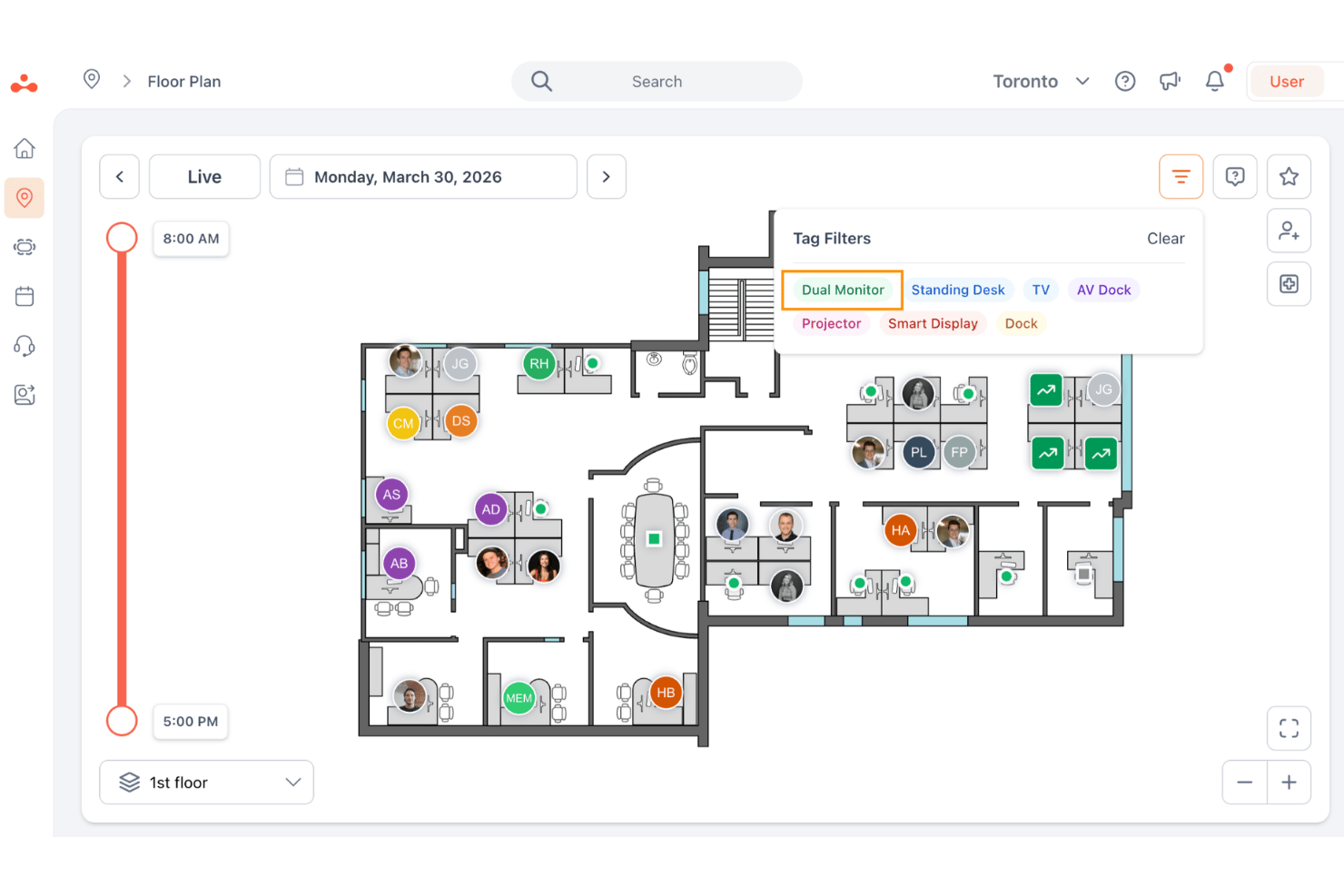
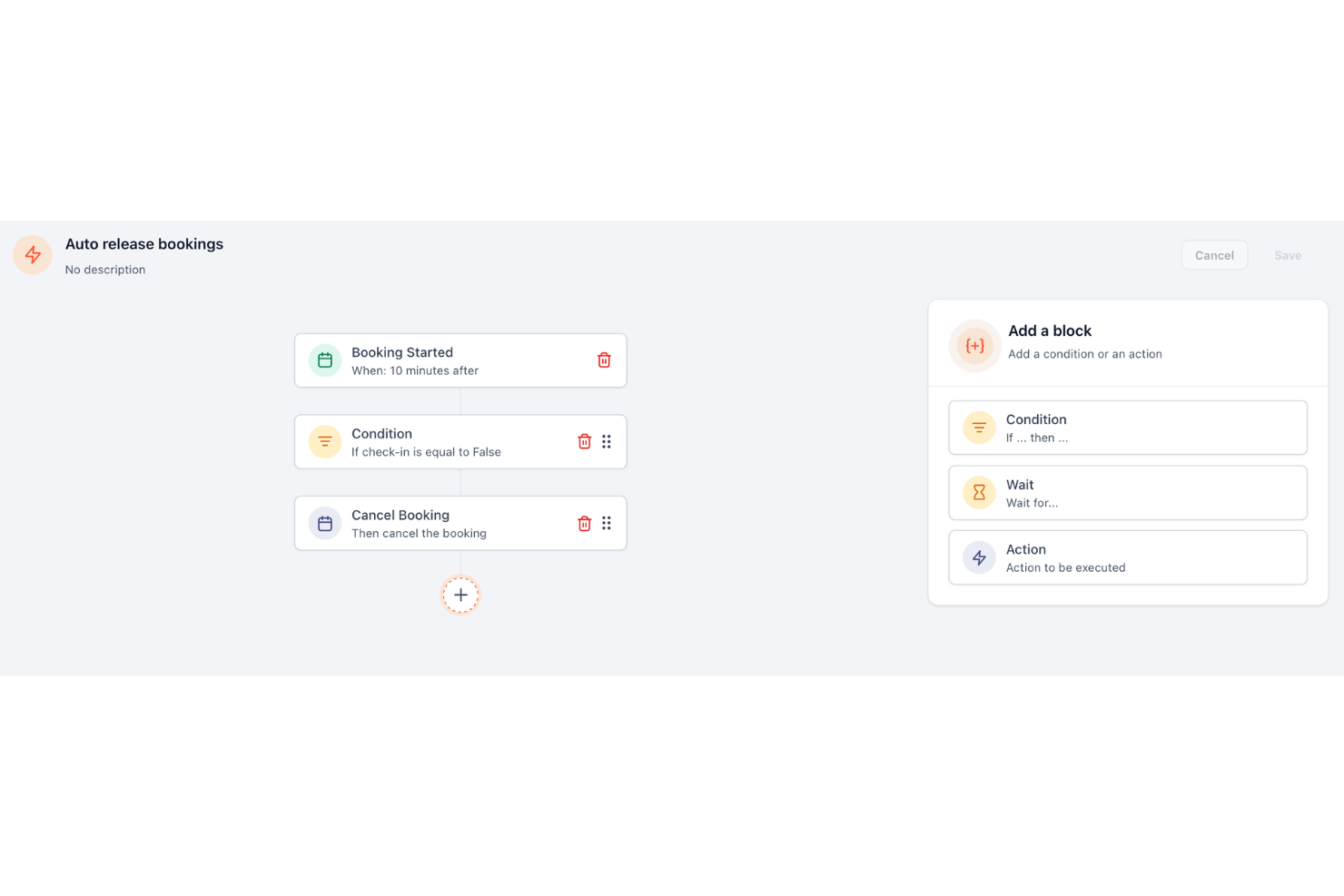
elia lets employees reserve desks from an interactive floor plan, see where colleagues are sitting, and book near their team. Admins can set booking rules by zone, group, or time window, and unclaimed desks can be released automatically.
Meeting Room Booking
elia supports meeting room booking with Outlook and Google Calendar sync, booking rules, permissions, and room screens. Employees can book or release rooms on the spot, while teams can connect room services like AV, setup, or catering to each booking.
Occupancy Management
elia combines booking data with anonymous occupancy sensors and analytics to show how spaces are actually used. Its desk and room sensors feed real-time data into dashboards and heatmaps for better space planning, without using cameras or collecting personal data.
Hybrid Office Management
elia helps teams manage shared seating, flexible office schedules, and workplace resources across hybrid environments. It also supports smart locks and lockers, so employees can access assigned, shared, or reserved lockers using a card, phone, or Apple or Google Wallet.
Visitor Management
elia provides self-service visitor check-in, custom visitor flows, NDA and document signing, badge printing, and host notifications through email, Slack, or Teams. It also keeps digital visitor logs for audit-ready onsite records.
Health & Safety Management
elia includes tools for first responder tracking, incident reporting, and certification management. Teams can use renewal reminders and audit-ready records to support workplace safety and compliance needs.
Standout Features
Request Management
elia connects workplace service requests to room and office bookings, so teams can manage needs like catering, AV, room setup, and facilities support. If a meeting changes, related service requests can update with the booking.
Workplace Automation
elia includes an automation engine with triggers, conditions, and actions, letting admins create workflows that match their office policies. Teams can automate booking rules, task assignments, reminders, and workplace processes without relying on manual follow-up.
Ease of Use
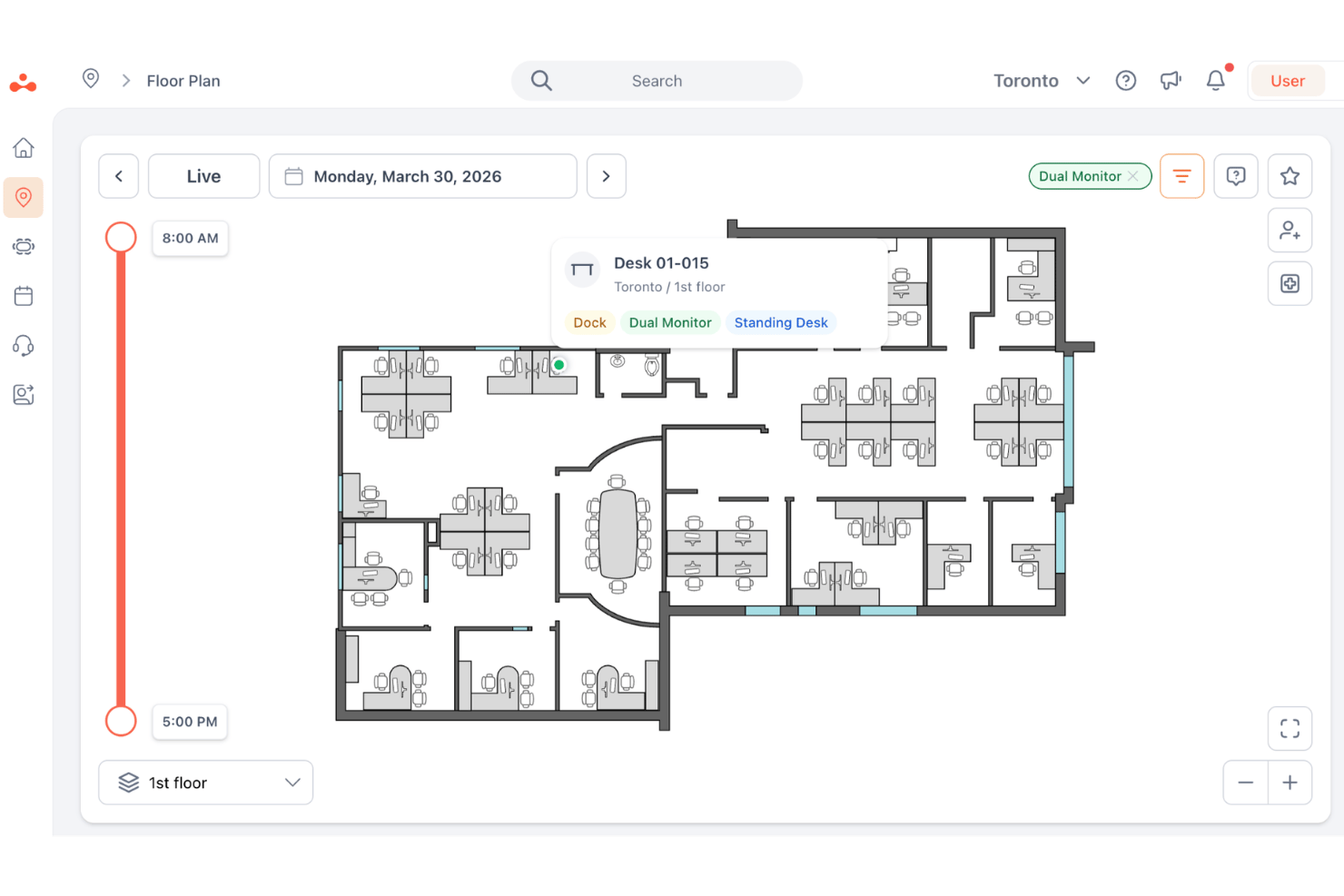
elia is designed to be easy for employees and workplace teams to use, with visual floor plans, clear booking flows, and dashboards for managing desks, rooms, visitors, requests, and space usage. Employees can quickly book desks or rooms, check workplace availability, and navigate shared office resources without needing much training.
Onboarding
elia onboarding scales based on the customer’s plan, with Free and Basic users getting self-serve setup, while Business customers receive guided onboarding and training, and Enterprise customers get turn-key deployment. Implementation typically centers on preparing the interactive floor plan, configuring booking rules, and rolling the system out within a few days.
Customer Support
elia offers help center access on the Free plan, while Basic adds email and chat support. Business customers get training, onboarding, and a dedicated account manager, while Enterprise customers receive turn-key deployment support for larger or more complex rollouts.
Integrations
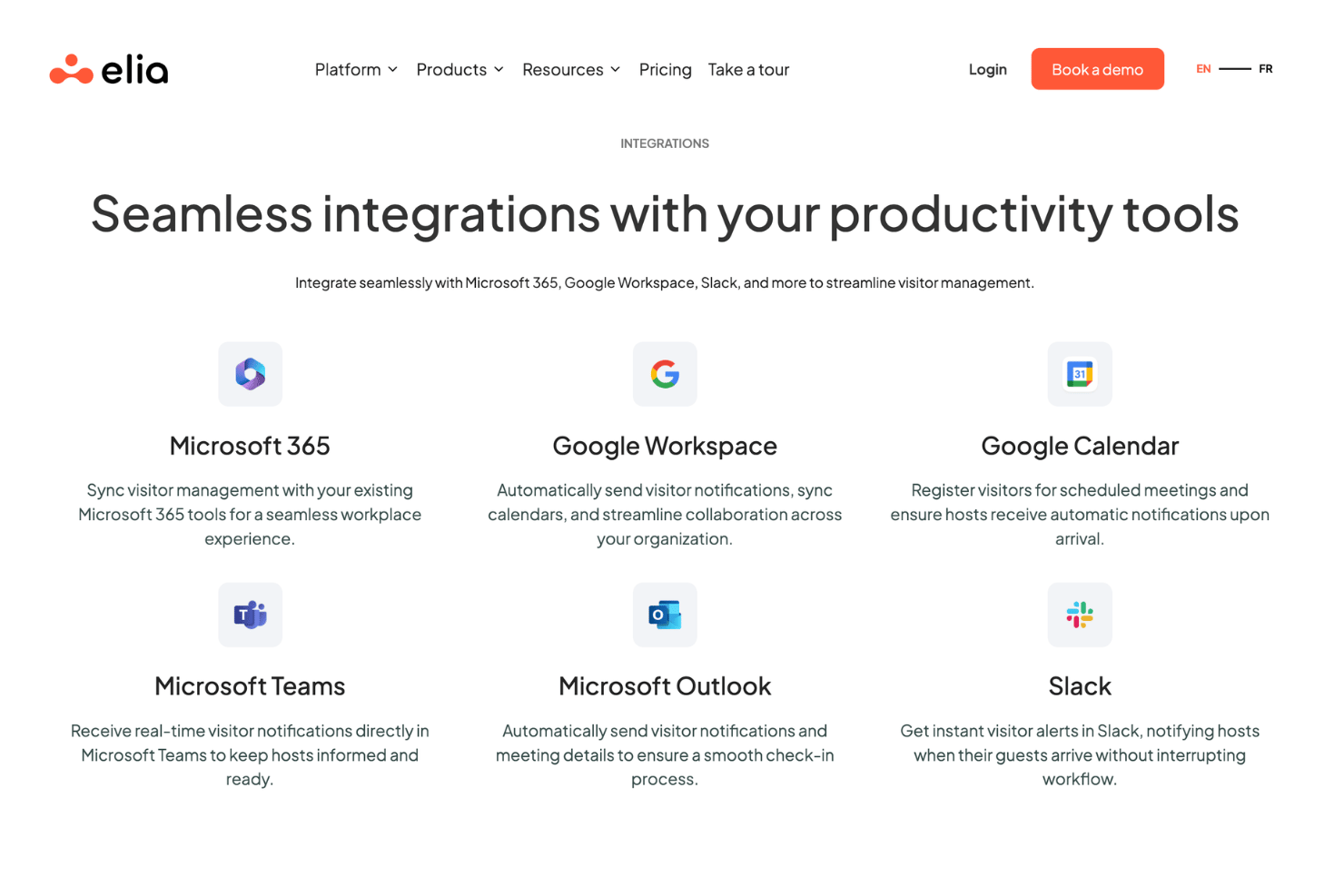
elia integrates with Microsoft 365, Microsoft Outlook, Microsoft Teams, Google Workspace, Google Calendar, and Slack. It also supports SSO, while higher-tier plans add user provisioning, API access, and a custom IoT and software integration builder for more advanced integration needs.
Value for Money
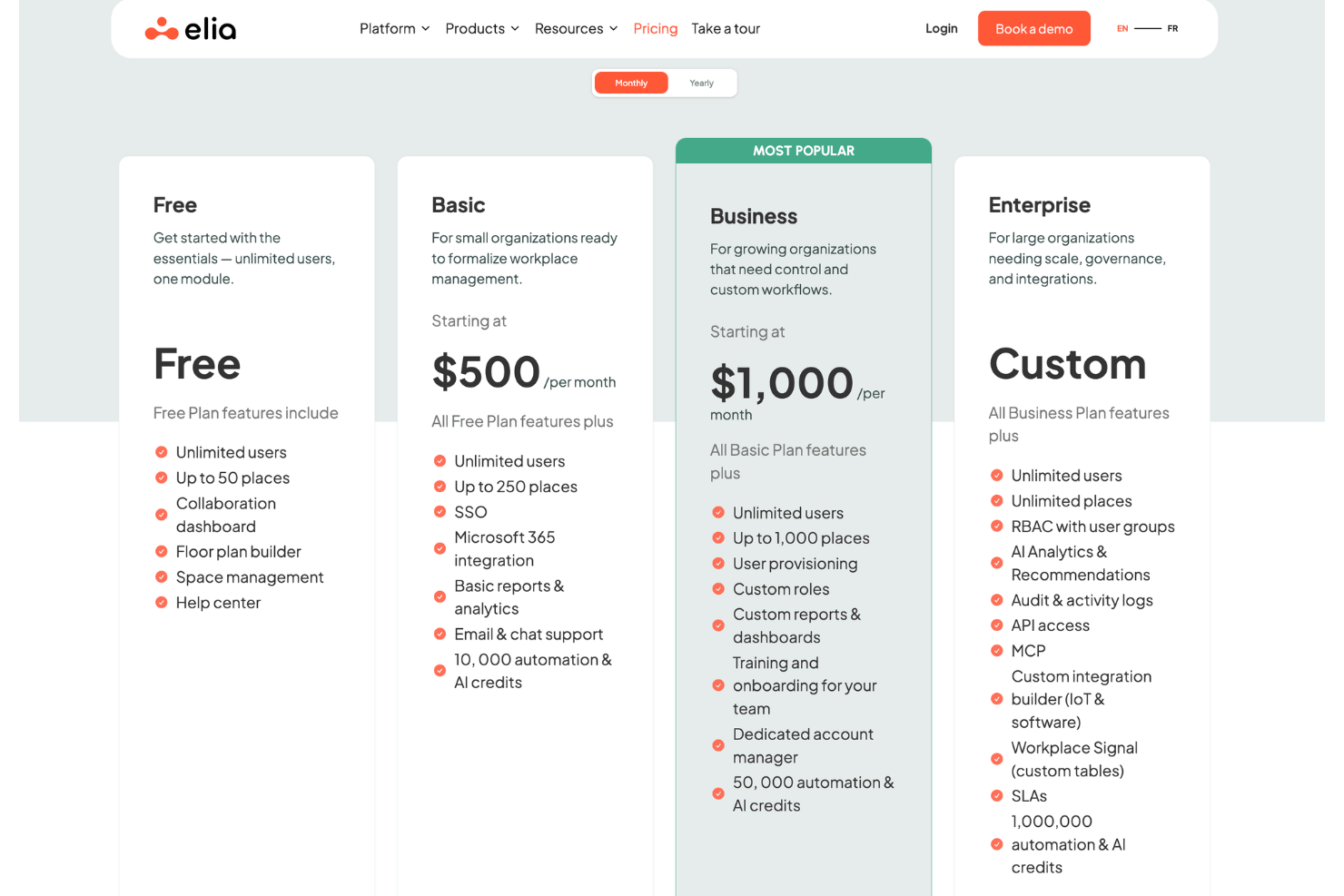
elia offers strong value for organizations that want workplace management software with unlimited users and pricing based on places rather than headcount. The free plan makes it accessible for smaller teams starting with one module, while paid plans add more capacity, integrations, reporting, automation credits, onboarding, governance, and customization. However, teams that want occupancy sensors, kiosks, meeting room screens, IoT gateways, or smart locks should expect additional hardware costs beyond the software plan.
- Free: Includes unlimited users, one module, up to 50 places, collaboration dashboard, floor plan builder, space management, and help center access.
- Basic: Adds more places, SSO, Microsoft 365 integration, basic reports and analytics, email and chat support, and automation and AI credits.
- Business: Adds more capacity, user provisioning, custom roles, custom reports and dashboards, team training, onboarding, a dedicated account manager, and higher automation and AI credits.
- Enterprise: Adds unlimited places, RBAC with user groups, AI analytics and recommendations, audit and activity logs, API access, custom IoT and software integrations, SLAs, and the highest automation and AI credit allowance.
- Optional Hardware Add-Ons: Teams can add desk and room occupancy sensors, meeting room display screens, touchscreen kiosks, IoT gateways, and smart locks depending on their office setup.
elia Specs
- Access Management
- API
- Appointment Scheduling
- Batch Permissions & Access
- Calendar Management
- Chat
- Click-to-Dial
- Contact Management
- Custom Data Forms
- Custom Reports
- Customer Management
- Dashboard
- Dashboards
- Data Export
- Data Import
- Data Visualization
- Email Integration
- External Integrations
- Forecasting
- Google Apps Integration
- Lead Management
- Map Visualization
- Marketing Automation
- Mobile App
- Multi-User
- Notifications
- Resource Management
- Scheduling
- Self-service Portal
- Workflow Management
elia FAQs
How quickly can we get elia up and running?
Is elia only for desk booking?
Is elia’s hardware required?
Where is elia data hosted?
What security standards does elia meet?
Does elia support English and French?
Can elia support larger organizations?
What support options does elia offer?
elia Company Overview & History
elia is a workplace operations platform based in Québec, Canada, and founded in 2023. Developed by GPHY, elia brings together desk and meeting room booking, interactive office maps, visitor management, health and safety, service requests, occupancy management, workplace automation, and optional workplace hardware.
The company serves mid-sized and enterprise organizations that need to manage shared offices, hybrid work, visitors, space usage, and workplace resources. elia is privately held and supports organizations across sectors such as professional services, legal, insurance, financial services, manufacturing, engineering, media, telecommunications, government, public healthcare, education, and nonprofits.
elia Major Milestones
- 2023: elia was founded in Québec, Canada, as a workplace operations platform.
- 2023: Québecor piloted elia in two Montreal offices before expanding the platform more broadly.
- 2024: Québecor rolled out elia company-wide across its headquarters and subsidiaries.
- 2026: elia continues to position itself as a workplace operations platform for desk and room booking, service requests, space management, occupancy data, and workplace hardware.