

10 Mejores Software para la Experiencia del Empleado en 2026

10 Lista de los mejores programas para la experiencia del empleado


Las mejores herramientas para la experiencia del empleado ayudan a los profesionales de RRHH a ir más allá de las hojas de cálculo y las corazonadas, proporcionando información basada en datos sobre compromiso, reconocimiento y retención. Ya sea que tengas dificultades con empleados desmotivados, alta rotación o procesos manuales engorrosos, el software adecuado facilita la captura de comentarios en tiempo real, el reconocimiento de contribuciones y la creación de una cultura donde las personas quieran quedarse y dar lo mejor de sí mismas.
Estas herramientas te ayudan a realizar las tareas más importantes: medir la satisfacción, seguir el desempeño, administrar los programas de reconocimiento y convertir los resultados de las encuestas en acciones significativas. También eliminan las conjeturas a la hora de elegir prioridades mostrando tendencias que de otro modo podrías pasar por alto.
Como revisor de software de RRHH con más de 3 años de experiencia en People Managing People, he analizado cientos de plataformas para encontrar las mejores herramientas disponibles hoy para la experiencia del empleado. En esta guía, iré al grano para que encuentres una solución que realmente se adapte a tu equipo y te ayude a construir una cultura laboral próspera.
Por qué confiar en nuestras reseñas de software
Nuestro equipo lleva probando y evaluando software desde 2012. Como expertos en RR. HH., sabemos lo difícil —y lo importante— que es elegir el software adecuado.
Para esta guía, evaluamos las herramientas mediante pruebas prácticas e investigación independiente, puntuando las herramientas según nuestros criterios de selección. También nos basamos en la experiencia de líderes de opinión del sector y de profesionales de RR. HH. en activo.
Nuestras reseñas reflejan nuestro criterio editorial humano, no un discurso de ventas.
Mejor software para la experiencia del empleado: tabla comparativa
Esta tabla comparativa resume los detalles de precios, pruebas y demos de mis principales selecciones de software para la experiencia del empleado, para ayudarte a encontrar el mejor programa para tu presupuesto y necesidades empresariales.
| Tool | Best For | Trial Info | Price | ||
|---|---|---|---|---|---|
| 1 | Ideal para evaluar competencias individuales y dirigir el desarrollo de habilidades futuras | Demo gratuita disponible | Desde $2 a $7/empleado/mes | Website | |
| 2 | Mejor para el reconocimiento entre compañeros | Demostración gratuita disponible | Desde $2 a $5/usuario/mes (mínimo $3,000/año) | Website | |
| 3 | Ideal para obtener información sobre compromiso y desempeño de empleados basada en datos | Demo gratuita disponible | Precio bajo petición | Website | |
| 4 | Mejor herramienta de experiencia para empleados para desafíos y recompensas personalizables | Demo gratuita disponible | Desde $3/usuario/mes | Website | |
| 5 | Ideal para incentivar a los empleados con reconocimiento y recompensas | Plan gratuito disponible | Desde $2/usuario/mes | Website | |
| 6 | El mejor software de experiencia del empleado para un sistema de recompensas basado en puntos | Demostración gratuita disponible | Precios bajo solicitud | Website | |
| 7 | Mejor para beneficios competitivos para empleados | Demo gratuita disponible | Precio a consultar | Website | |
| 8 | Ideal para plantillas de evaluación personalizables | Prueba gratuita de 30 días + demo gratis disponible | Desde $2.50/usuario/mes (facturado anualmente) | Website | |
| 9 | Ideal para RR. HH., compromiso y desempeño en pymes | Prueba gratuita + demostración gratuita disponibles | Desde $8/usuario/mes | Website | |
| 10 | Ideal para el acceso a conocimiento del empleado impulsado por IA | Demo gratuita disponible | Precio a consultar | Website |

Reseñas del mejor software para la experiencia del empleado
A continuación, encontrarás descripciones breves de cada sistema de software para la experiencia del empleado, que destacan los mejores casos de uso y características relevantes de cada uno. También he incluido capturas de pantalla para que puedas ver su interfaz de usuario.
Ideal para evaluar competencias individuales y dirigir el desarrollo de habilidades futuras
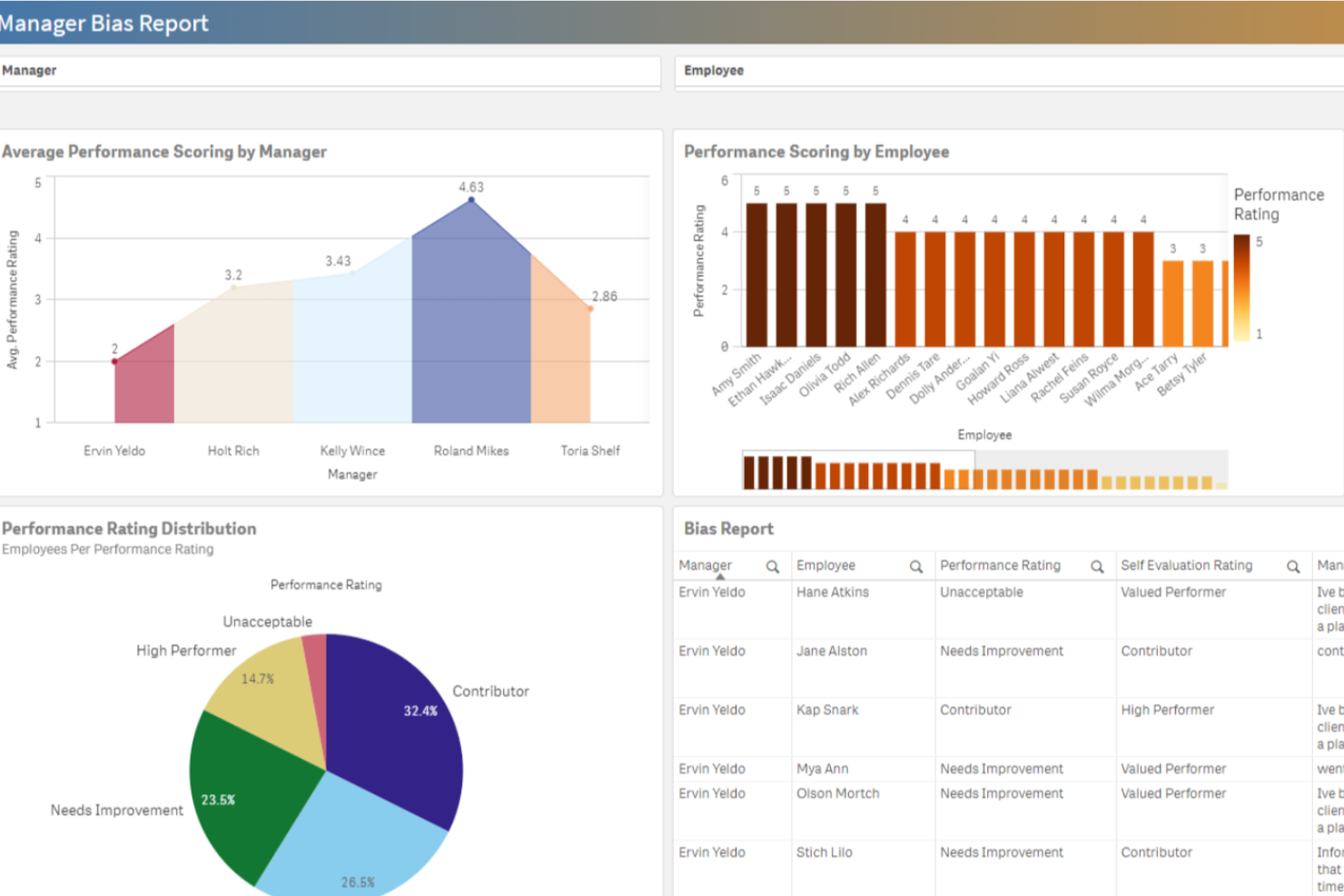
Performance Pro es una plataforma de gestión del desempeño diseñada para equipos de RRHH y gerentes que buscan impulsar la implicación de los empleados, fomentar la retroalimentación continua y alinear los objetivos individuales con los objetivos organizacionales.
¿Para quién es mejor Performance Pro?
Performance Pro es ideal para organizaciones medianas donde los equipos de RRHH necesitan un enfoque estructurado y personalizable para las evaluaciones de desempeño y los planes de desarrollo de los empleados.
Por qué elegí Performance Pro
Performance Pro se gana su lugar en mi lista porque gestiona el desarrollo basado en competencias de manera eficiente. Me gusta que vincula las brechas de competencias identificadas directamente con actividades de aprendizaje mediante su sistema integrado de gestión del aprendizaje, de modo que los empleados no solo son evaluados y luego deben averiguar por sí mismos los siguientes pasos. Los planes para desarrollar competencias actuales y futuras del puesto permiten mapear dónde está hoy alguien frente a dónde necesita estar, y luego asignar automáticamente los cursos relevantes para cerrar esa brecha. También encuentro útil el seguimiento centralizado para monitorizar el progreso del desarrollo y detectar candidatos internos para vacantes.
Características clave de Performance Pro
- Herramientas de alineación de objetivos: Establezca objetivos individuales y vincúlelos directamente con estrategias corporativas mediante una biblioteca configurable de objetivos con seguimiento de progreso.
- Paga por desempeño: Automatice aumentos por mérito y gestione la asignación del presupuesto según el logro de metas del empleado.
- Evaluaciones 360 grados: Ejecute procesos de evaluación multiobservador y revisiones 360 junto con evaluaciones estándar para recopilar comentarios desde múltiples perspectivas.
- Análisis de compromiso en tiempo real: Supervise datos de compromiso de los empleados a través del complemento integrado para la aplicación Microsoft Teams.
Integraciones de Performance Pro
Las integraciones incluyen Microsoft Teams y sistemas principales de nómina o HRIS mediante API o SFTP.

Mejor para el reconocimiento entre compañeros
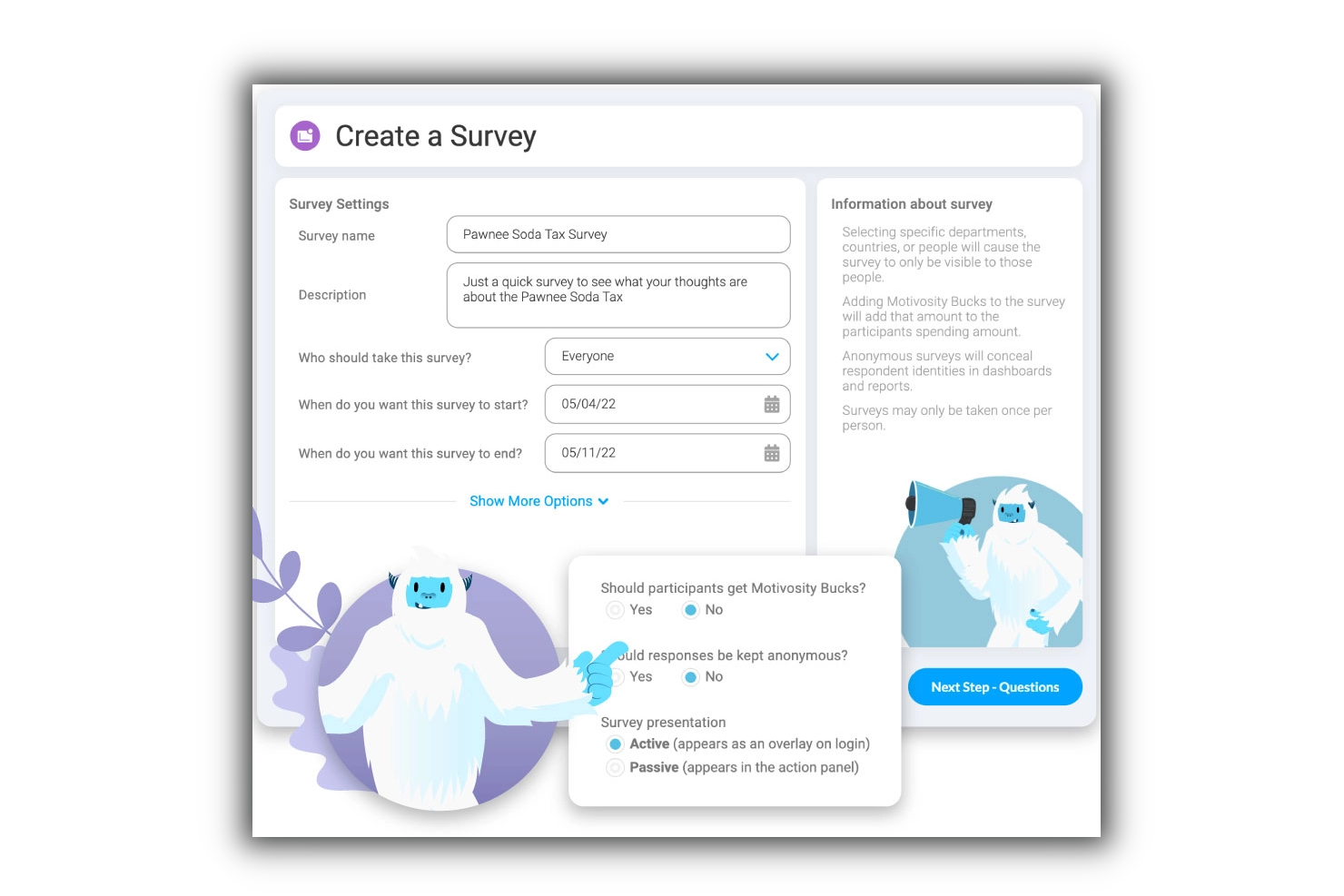
Motivosity ayuda a los equipos de RR. HH. y a los líderes empresariales a aumentar el compromiso y el rendimiento de los empleados, facilitando el reconocimiento de logros, la recopilación de opiniones y el seguimiento del sentimiento laboral en tiempo real.
¿Para quién es mejor Motivosity?
Motivosity es ideal para empresas medianas que desean construir una cultura de reconocimiento y conexión entre equipos y departamentos.
Por qué elegí Motivosity
Motivosity está en mi lista corta porque hace que el reconocimiento entre colegas sea natural en lugar de forzado. Me encanta el modelo de reconocimiento basado en valores: cada muestra de agradecimiento que un empleado envía se asocia a uno de los valores fundamentales de la empresa, por lo que no solo se registra un momento de 'buen trabajo', sino que también se refuerzan activamente los comportamientos importantes. Además, cada empleado recibe una asignación monetaria mensual para reconocer a sus compañeros junto con su agradecimiento, lo que le da un valor real al reconocimiento sin dejar el control total del presupuesto solo en manos de los gerentes. El feed social a nivel empresa muestra toda esta actividad de manera pública, por lo que el reconocimiento no queda enterrado en un mensaje privado, sino que es visible, comentable y genuinamente contagioso en toda la organización.
Funciones clave de Motivosity
- Encuestas de compromiso de los empleados: Envía encuestas breves para medir el sentir del equipo y hacer seguimiento a las tendencias de compromiso a lo largo del tiempo.
- Herramientas para gerentes: Ofrece a los managers un espacio dedicado para registrar notas de 1 a 1, definir objetivos y hacer seguimiento de los hitos de sus reportes directos.
- Catálogo de recompensas: Permite a los empleados canjear los fondos obtenidos en un catálogo integrado de tarjetas regalo y productos de marca.
- Panel de análisis de personas: Visualiza datos de compromiso de toda la organización, actividad de reconocimiento y tasas de participación en un solo informe.
Integraciones de Motivosity
Actualmente no se enumeran integraciones nativas.
New Product Updates from Motivosity

Motivosity Launches Appreciation Intelligence With AI Coaching and Automation
Motivosity introduces Appreciation Intelligence™ with Appreciation Coach, Insights AI, Motivosity Agents, and an MCP Connector. The new capabilities help teams improve recognition, automate routine tasks, and access employee recognition insights faster. For more information, visit Motivosity's official site.

Ideal para obtener información sobre compromiso y desempeño de empleados basada en datos
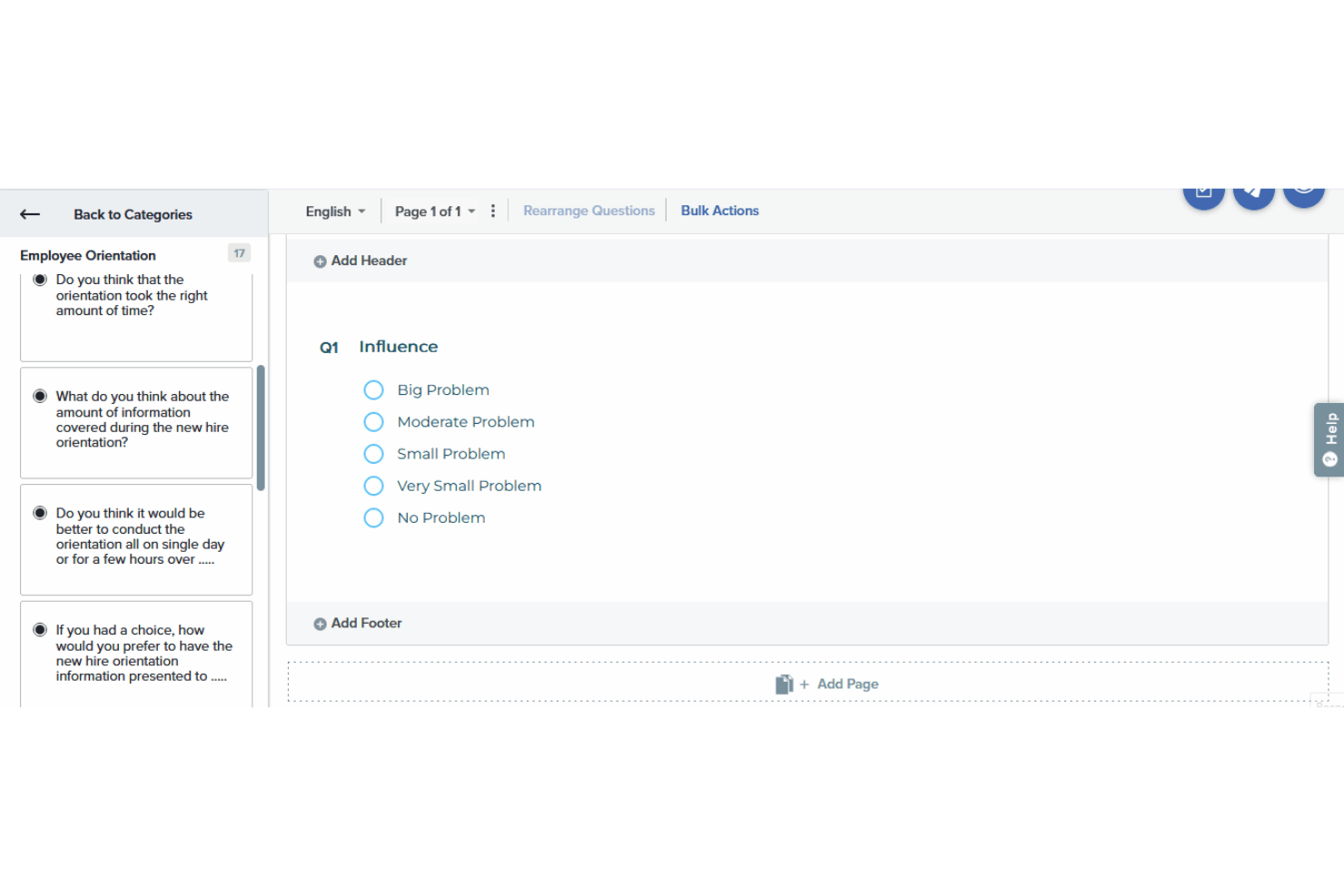
Sogolytics ofrece a los equipos de RR. HH. y líderes empresariales una plataforma para recopilar, analizar y actuar sobre el feedback de los empleados, ayudando a las organizaciones a descubrir los impulsores del compromiso y abordar desafíos de desempeño con ideas respaldadas por datos.
¿Para quién es mejor Sogolytics?
Sogolytics es ideal para organizaciones medianas y grandes donde los equipos de RR. HH. necesitan análisis detallados para comprender y mejorar el compromiso de los empleados en todos los departamentos.
Por qué elegí Sogolytics
Elegí Sogolytics como uno de los mejores por la manera en que conecta la recopilación de feedback con análisis concretamente aplicables. Lo que me parece más convincente es la función de Análisis de Factores Clave, que va más allá de las puntuaciones superficiales para identificar los factores específicos que realmente impulsan el compromiso o la desconexión en los equipos. También me gusta la capacidad de Informes con IA, que automáticamente destaca planes de acción prioritarios a partir de respuestas abiertas; así, en lugar de pasar horas leyendo datos cualitativos, mi equipo obtiene próximos pasos claros. El panel EX dedicado reúne eNPS, ESAT y tendencias de bienestar en una sola vista en tiempo real, lo que facilita mucho la detección de patrones y la presentación de recomendaciones respaldadas por datos a la dirección.
Funciones clave de Sogolytics
- Encuestas pulse para empleados: Envíe encuestas pulse automáticas y programadas para rastrear cambios en el sentimiento de los equipos a lo largo del tiempo.
- Automatización del recorrido del empleado: Active encuestas de ciclo de vida en hitos clave—onboarding, entrevistas de permanencia y salida—usando Directorios enlazados a fechas.
- Experience Navigator: Un copiloto basado en IA que genera un programa EX completo, incluyendo encuestas de ciclo de vida, revisiones pulse y manuales para gerentes, según sus objetivos definidos.
- Seguimiento del bienestar del empleado: Supervise indicadores de bienestar junto con métricas de compromiso y satisfacción dentro del panel EX.
Integraciones de Sogolytics
Las integraciones incluyen Microsoft Teams, Slack, Google Workspace, Salesforce, Zapier, ADP, BambooHR, Workday, Okta y Microsoft Azure Active Directory.
New Product Updates from Sogolytics
Sogolytics Adds Teams and Slack Surveys and Custom Automations
Sogolytics adds native Microsoft Teams and Slack survey distribution, a Custom Automations Builder, Derived Fields, PointClickCare integration, and authenticator-based MFA. These updates expand survey distribution and workflow automation while adding new data management and security capabilities. For more information, visit Sogolytics’ official site.
 .
.
Nectar
Mejor herramienta de experiencia para empleados para desafíos y recompensas personalizables
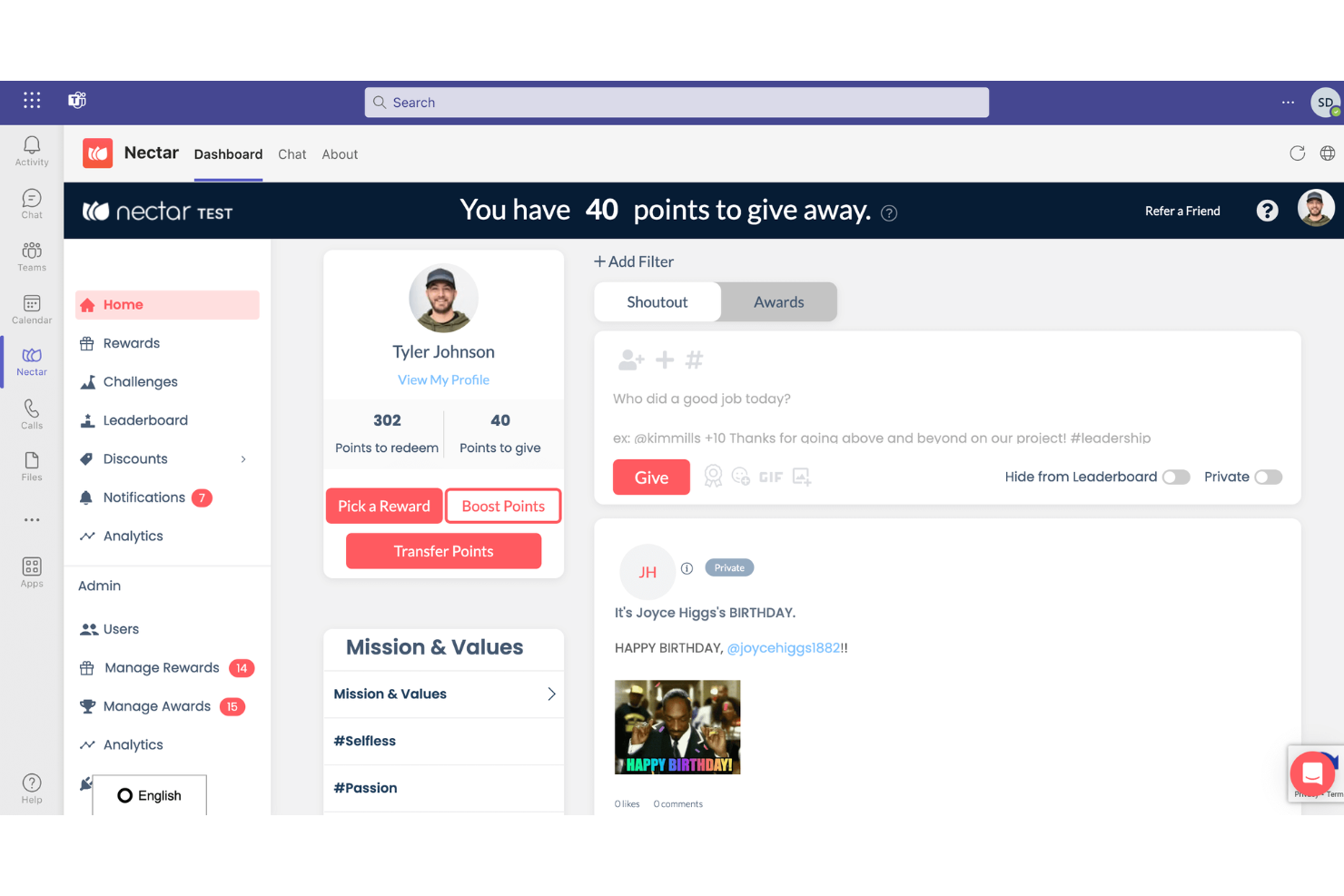
Nectar es una plataforma de reconocimiento y recompensas para empleados diseñada para aumentar la moral y el compromiso en el lugar de trabajo al simplificar el proceso de reconocimiento. Ofrece una interfaz fácil de usar, recompensas personalizables y sólidas capacidades de informes, lo que la hace adecuada para una amplia variedad de empresas.
Por qué elegí Nectar: Su plataforma de reconocimiento y recompensas permite a los empleados reconocer los esfuerzos y logros de sus compañeros, promoviendo una cultura de agradecimiento y trabajo en equipo. La completa suite de recompensas de la plataforma incluye opciones como artículos de Amazon, productos de marca, tarjetas de regalo digitales y la posibilidad de crear recompensas personalizadas, brindando a los empleados una variedad de incentivos que pueden adaptarse a sus preferencias. Esta flexibilidad en las recompensas ayuda a mantener a los empleados motivados y comprometidos, ya que pueden escoger premios que sean significativos para ellos.
Además, Nectar ofrece funciones como bonificaciones automáticas por cumpleaños y aniversarios laborales, descuentos exclusivos para empleados y desafíos personalizables que se alinean con los objetivos de la organización. Estas características no solo ayudan a agilizar el proceso de reconocimiento, sino que también contribuyen a un entorno laboral más cohesionado y solidario.
Integraciones incluyen BambooHR, ADP, Namely, Paylocity, Zenefits, Workday, Rippling, Gusto, Netsuite, G Suite, Okta, OneLogin y Azure AD.
New Product Updates from Nectar

Nectar Enhances Clara AI With Live Platform Data
Nectar introduces live platform data access and expanded knowledge coverage for Clara AI. The updates improve response accuracy and speed while enabling Clara AI to answer questions across more recognition and rewards features. For more information, visit Nectar's official site.
 .
.
Bonusly
Ideal para incentivar a los empleados con reconocimiento y recompensas
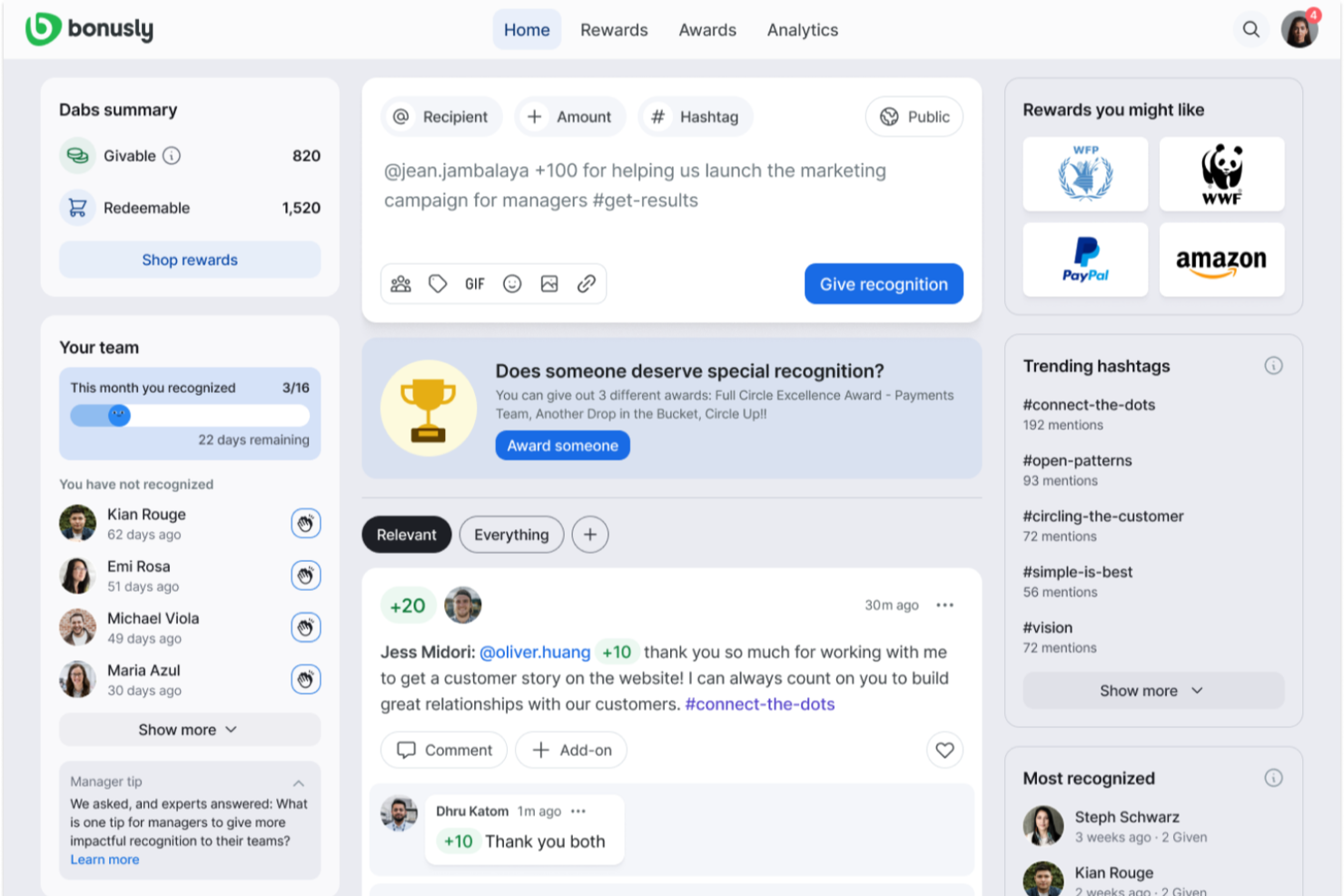
Bonusly es un software de reconocimiento y recompensas para empleados que se basa en un modelo de reconocimiento entre pares. Permite a los empleados intercambiar créditos de recompensas y canjear sus puntos por diferentes tipos de premios. También puede automatizar mensajes de celebración para hitos de los empleados y facilitar programas de incentivos. La plataforma cuenta con un panel de análisis para rastrear el éxito de tus programas de recompensas e incentivos.
En lugar de depender de un modelo de reconocimiento jerárquico, el software anima a los empleados a compartir el reconocimiento entre pares mediante el intercambio de puntos. Cada miembro del equipo tiene un presupuesto de puntos que puede usar para reconocer a sus colegas junto con un mensaje personalizado. Los puntos de recompensa se pueden canjear en forma de tarjetas de regalo, donaciones benéficas, opciones de retiro en efectivo o recompensas personalizadas implementadas por la organización.
El software funciona un poco como un feed de redes sociales, y los empleados pueden agregar comentarios y puntos adicionales a los mensajes de reconocimiento públicos. Esto promueve una cultura de reconocimiento y la celebración del alto rendimiento entre compañeros. Puedes añadir hashtags de valores de la empresa al sistema para hacer que los reconocimientos sean más significativos y estén relacionados con la cultura de tu organización.
El software se integra con herramientas de comunicación en el trabajo como Microsoft Teams y Slack, así como con varias plataformas de recursos humanos como SAP, ADP y BambooHR. Los planes comienzan desde $2.70 por usuario al mes, y se ofrece una prueba gratuita de 60 días.

Awardco
El mejor software de experiencia del empleado para un sistema de recompensas basado en puntos
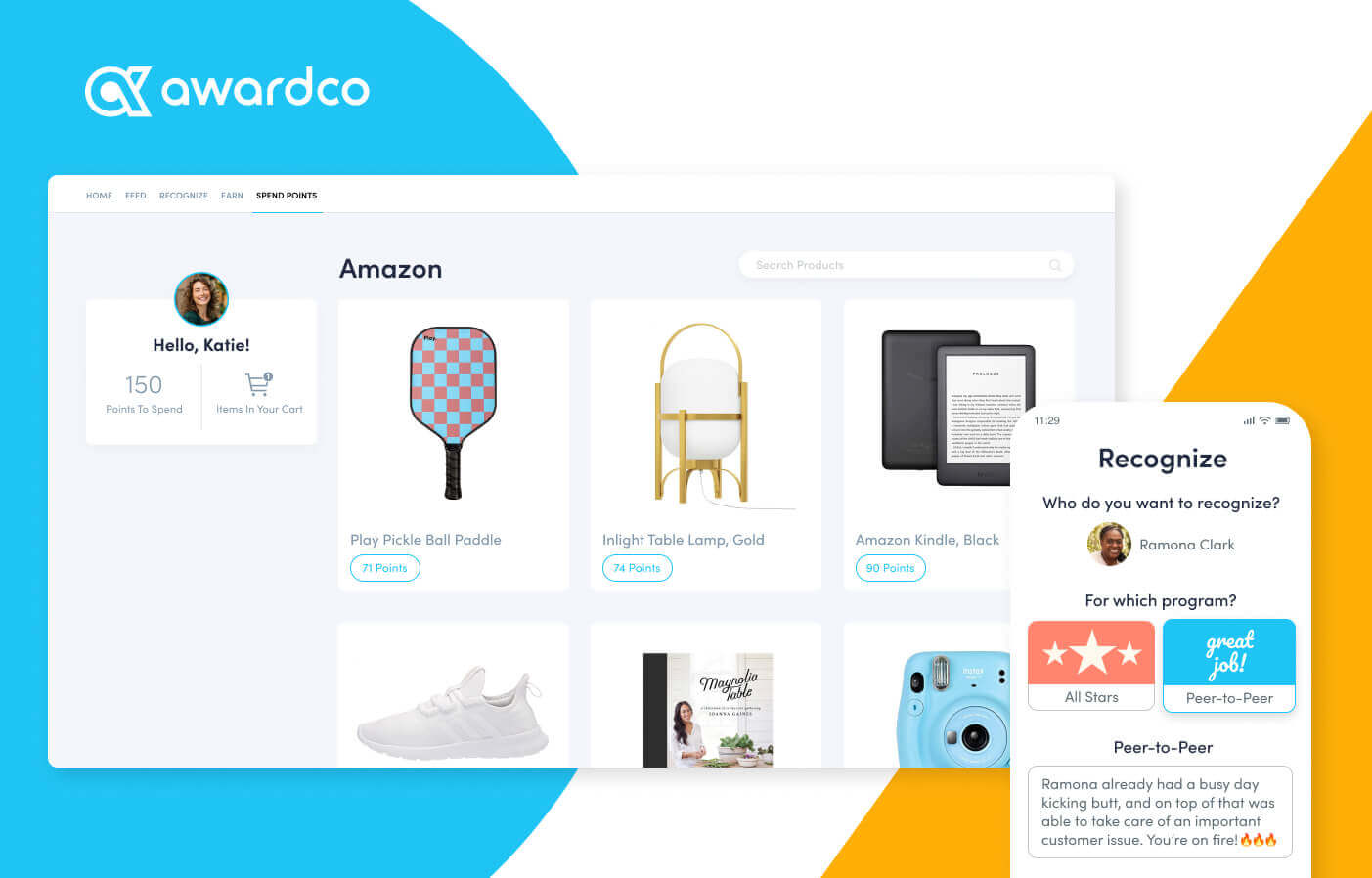
Awardco ayuda a los equipos de RR. HH. y a los líderes empresariales a crear programas de reconocimiento para empleados atractivos con recompensas personalizables, facilitando el aumento de la motivación, la celebración de logros y el impulso del rendimiento en organizaciones de cualquier tamaño.
¿Para quién es mejor Awardco?
Awardco es una excelente opción para equipos de RR. HH. de tamaño medio a empresarial que buscan crear programas de reconocimiento estructurados y escalables, vinculados a resultados de compromiso medibles.
Por qué elegí Awardco
Incluí Awardco en mi lista porque su sistema de recompensas basado en puntos es uno de los más flexibles que he visto. Cuando mi equipo reconoce a un empleado, esos puntos no se quedan simplemente en un catálogo cerrado; pueden canjearse en toda la gama de productos de Amazon, miles de tarjetas de regalo, reservas de viajes a través de Priceline y experiencias mediante Viator, todo sin comisiones adicionales que reduzcan el valor de la recompensa. También me gusta la función de micro incentivos, que permite vincular los premios en puntos a comportamientos específicos como completar una capacitación de seguridad o alcanzar un objetivo de bienestar, de modo que el reconocimiento se conecta directamente con los resultados de rendimiento. La tarjeta A-Pay® permite a los empleados cargar puntos en una tarjeta Visa física o digital y gastarlos en muchos comercios, reduciendo la fricción de tener un catálogo de canje limitado.
Características clave de Awardco
- Reconocimiento entre colegas: Envía mensajes de reconocimiento a compañeros directamente desde la plataforma, con visibilidad en el feed del equipo.
- Nominaciones: Gestiona programas estructurados de nominación a premios para empleados con criterios personalizables y flujos de aprobación.
- Cuentas de gastos de estilo de vida: Permite a los empleados disponer de presupuestos flexibles y pre-cargados que pueden utilizar en bienestar, trabajo remoto o desarrollo personal.
- Awardco Engage™: Recoge opiniones y datos de escucha de los empleados en la misma plataforma que se utiliza para el reconocimiento y las recompensas.
Integraciones de Awardco
Las integraciones incluyen Slack, Microsoft Teams, Outlook, Okta, Workday, ADP, BambooHR, UKG y SAP SuccessFactors.
TriNet
Mejor para beneficios competitivos para empleados
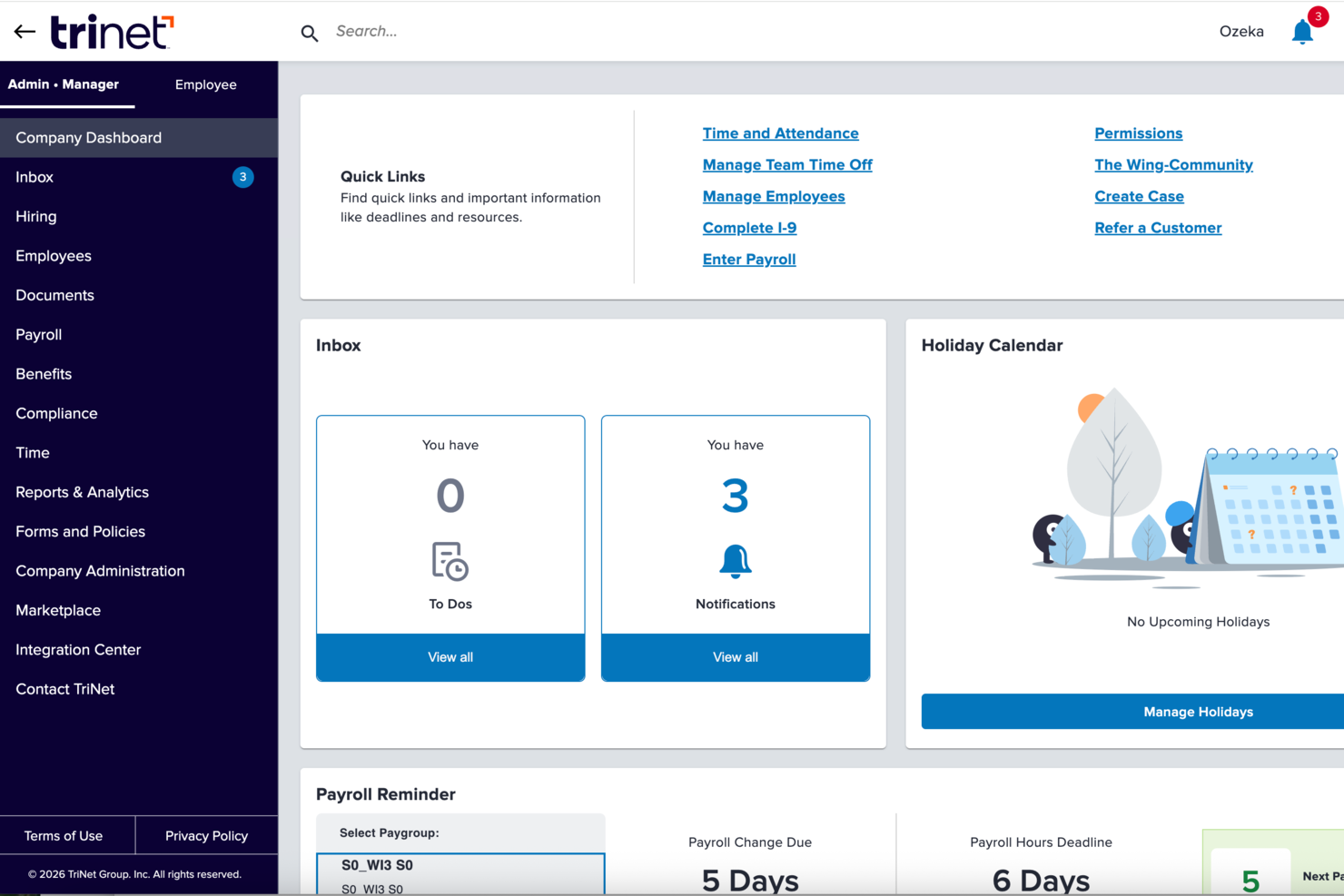
TriNet es una plataforma integral de recursos humanos diseñada para pequeñas y medianas empresas que desean mejorar el compromiso de los empleados, optimizar los procesos de RR. HH. y ofrecer una experiencia moderna al empleado con herramientas integradas para nómina, beneficios y gestión del desempeño.
¿Para quién es mejor TriNet?
TriNet es una excelente opción para pequeñas y medianas empresas que necesitan una infraestructura de RR. HH. a nivel empresarial sin tener que formar un gran equipo interno de recursos humanos.
Por qué elegí TriNet
TriNet destaca porque permite a las pequeñas y medianas empresas acceder a beneficios que normalmente solo están disponibles para grandes empresas. Me gusta especialmente que TriNet agrupe a los empleados de sus empresas clientes para negociar tarifas grupales en seguros médicos, dentales, de visión y de vida—de modo que incluso un equipo de 20 personas puede ofrecer una cobertura competitiva frente a un empleador Fortune 500. El portal de autoservicio para empleados es útil: los empleados pueden revisar y gestionar la selección de beneficios sin tener que consultar cada pregunta a RR. HH.
Características principales de TriNet
- Herramientas de gestión del desempeño: Establece objetivos, realiza evaluaciones y haz seguimiento del progreso de los empleados directamente en la plataforma TriNet.
- Incorporación digital y firmas electrónicas: Completa la documentación de nuevos empleados, recopila firmas electrónicas y configura a los empleados sin imprimir ni un solo formulario.
- Automatización de seguimiento de tiempo y ausencias: Controla horas, descansos y permisos en tiempo real, con flujos de trabajo automáticos que se integran directamente en la nómina.
- Monitoreo de cumplimiento multiestatal: Rastrea cambios normativos en los 50 estados, con orientación de expertos en RR. HH. sobre leyes laborales específicas por ubicación.
Integraciones de TriNet
Las integraciones se ofrecen a través del Marketplace de TriNet. No se muestran integraciones nativas específicas.
Pros and Cons
Pros:
- Acceso a beneficios competitivos para grandes grupos
- Profesionales de soporte de RR. HH. dedicados disponibles
- El modelo ASO mantiene el estatus de empleador
Cons:
- Control limitado bajo el modelo PEO
- La interfaz puede parecer anticuada

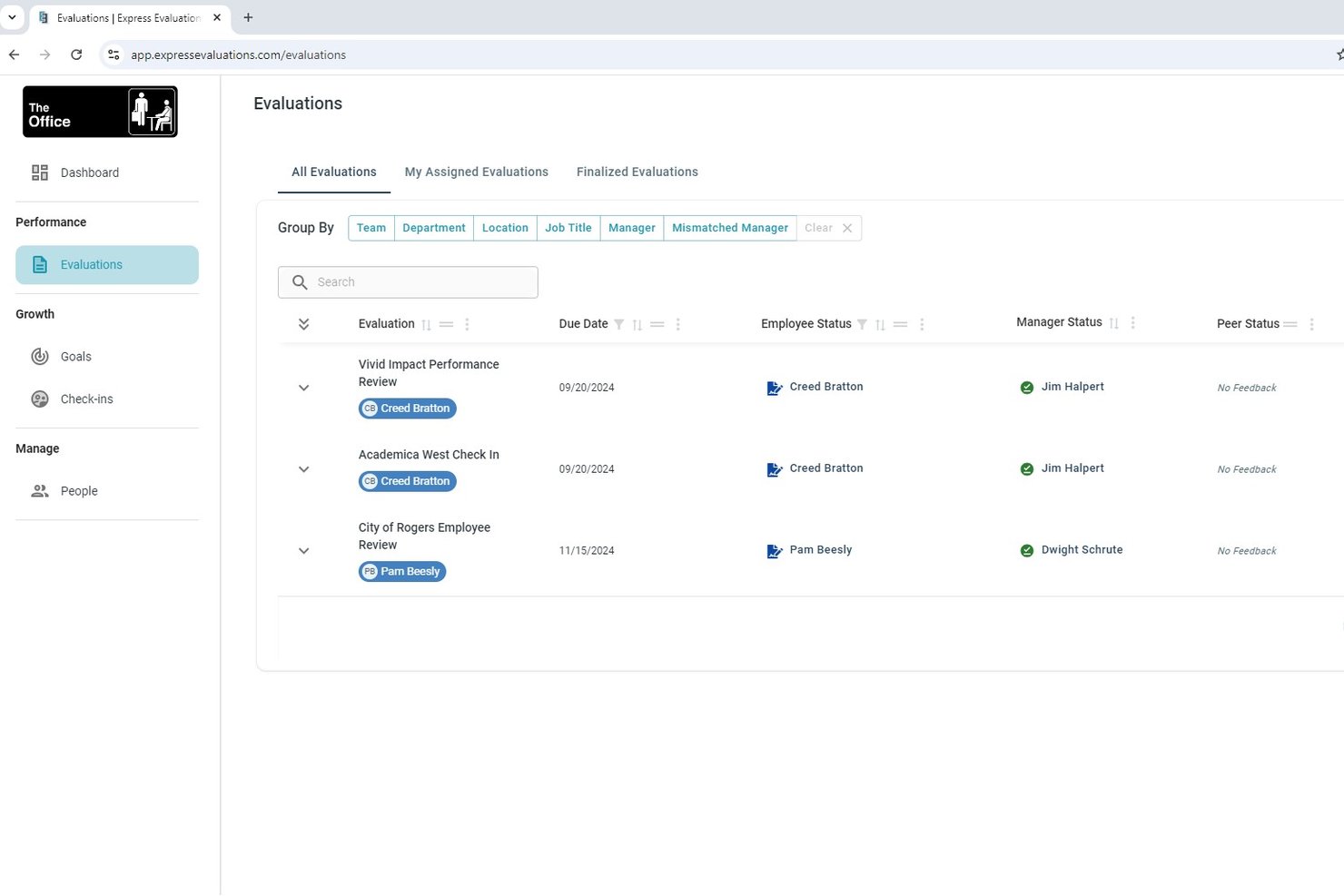
Express Evaluations es una plataforma de gestión del rendimiento que combina plantillas de evaluación personalizables, retroalimentación de 360 grados, encuestas de pulso, seguimiento de objetivos y reuniones de seguimiento con los gerentes para apoyar el crecimiento y la implicación de los empleados.
¿Para quién es mejor Express Evaluations?
Es una excelente opción para organizaciones pequeñas y medianas—especialmente en gobiernos locales, organizaciones sin fines de lucro y sectores similares—que necesitan flujos de trabajo estructurados para la evaluación del desempeño sin la complejidad ni el costo de nivel empresarial.
Por qué elegí Express Evaluations
Elegí Express Evaluations como una de las mejores porque permite construir y lanzar ciclos de evaluación rápidamente usando su biblioteca de plantillas listas para usar. Me gustan especialmente las escalas de calificación personalizadas y la ruta de revisión por varios gerentes, que permiten a los equipos de RR. HH. llevar a cabo retroalimentación de 360 grados sin tener que reconstruir el proceso desde cero en cada ciclo. Los módulos de reconocimiento entre compañeros y de encuestas de pulso integran el compromiso en la misma plataforma donde se realiza el seguimiento del desempeño.
Características clave de Express Evaluations
- Módulo de encuesta de pulso: Lanza encuestas de pulso anónimas en tiempo real para captar el sentir de los empleados a intervalos regulares.
- Análisis de sentimientos con IA: Utiliza herramientas de IA para analizar las respuestas a las encuestas y detectar tendencias organizacionales.
- Flujos de aprobación por varios gerentes: Envía revisiones y comentarios a varios gerentes para mejorar la supervisión y colaboración.
- Bóveda de documentos del empleado: Almacena registros de desempeño, formularios de evaluación y documentos relacionados en un lugar seguro y centralizado.
Integraciones de Express Evaluations
Express Evaluations ofrece integraciones nativas con Employee Navigator. Soporta SSO y está disponible la carga de CSV para la importación de datos de empleados. Hay una API disponible para integraciones personalizadas.
Pros and Cons
Pros:
- Lanzamiento rápido de ciclos de retroalimentación de 360 grados
- Reconocimiento entre compañeros integrado junto a las evaluaciones de desempeño
- Plantillas listas para usar que reducen el tiempo de configuración manual
Cons:
- Análisis limitado en comparación con plataformas empresariales
- Sin análisis predictivo de desvinculación ni perspectivas impulsadas por IA

Ideal para RR. HH., compromiso y desempeño en pymes
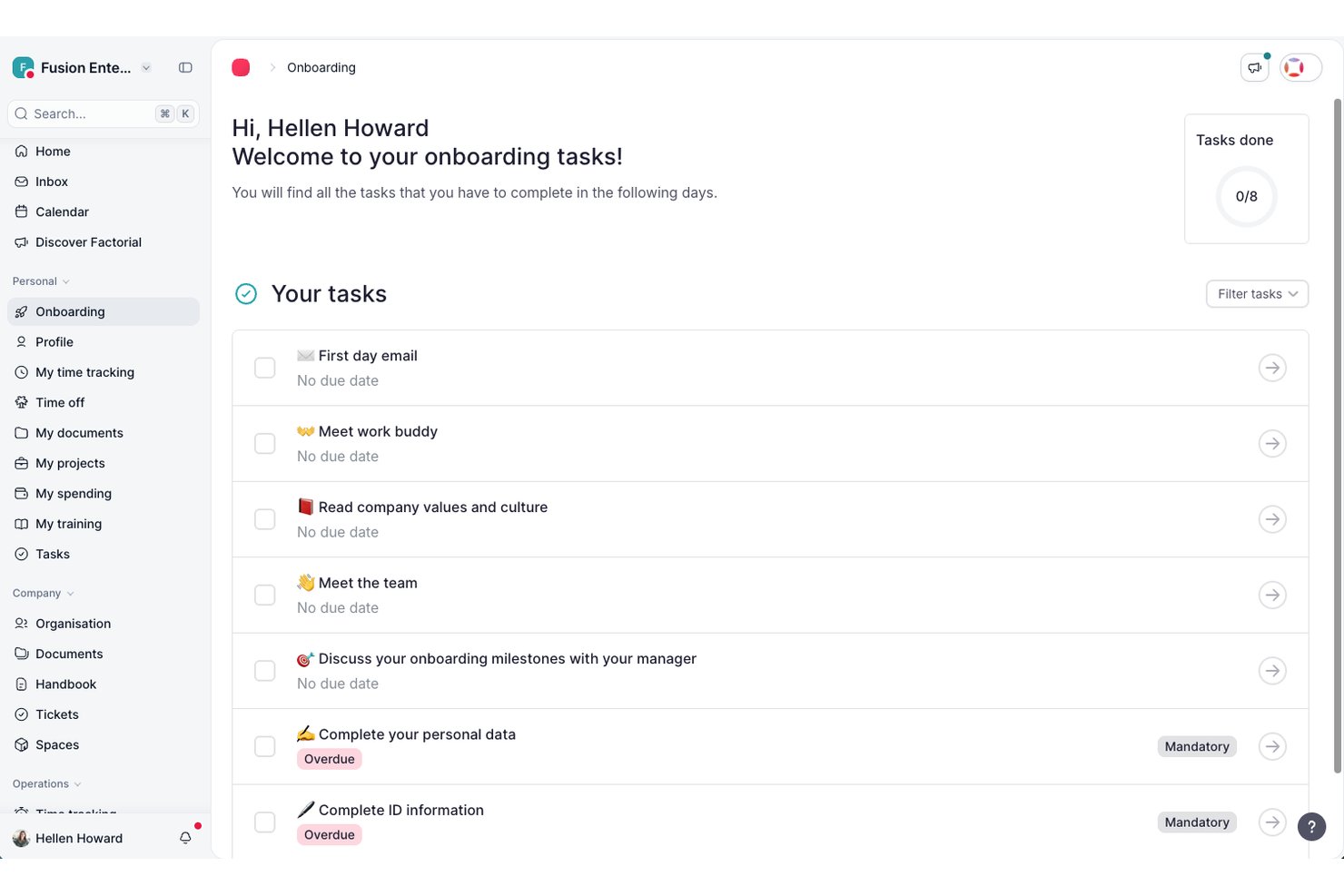
Factorial es una plataforma de RR. HH. todo en uno para pymes que combina encuestas de compromiso (eNPS, pulso y clima), evaluaciones de desempeño, seguimiento de OKR, reuniones individuales impulsadas por IA y análisis de personal en un solo sistema.
¿Para quién es más adecuado Factorial?
Factorial es una opción excelente para pymes con entre 15 y 800 empleados que quieren gestionar los RR. HH., el compromiso y el desempeño en una sola plataforma en lugar de tener que usar varias herramientas.
Por qué elegí Factorial
He incluido Factorial entre mis principales opciones porque es una de las pocas plataformas en las que las pymes pueden realizar encuestas eNPS, evaluaciones del clima, evaluaciones de desempeño de 360° y seguimiento de OKR sin cambiar de herramienta. Me gusta especialmente la función de reuniones individuales impulsada por IA, que ofrece a los responsables toma de notas en tiempo real, reconocimiento de voz y transcripciones multilingües en un único flujo de trabajo. El asistente de IA Factorial One, integrado directamente en Microsoft Teams, también permite a los responsables consultar informes sobre el sentimiento del equipo o comprobar el progreso de los OKR sin salir de su espacio de trabajo habitual.
Funciones principales de Factorial
- Panel de información sobre el compromiso: Una vista unificada que reúne los datos de las encuestas eNPS y de clima en un solo panel para que los equipos de RR. HH. supervisen el sentimiento de la plantilla.
- Matriz de 9 casillas: Una herramienta de mapeo del talento que sitúa a los empleados según las dimensiones de desempeño y potencial para orientar el desarrollo y la planificación de la sucesión.
- Evaluaciones de desempeño de 360° y 180°: Flujos de trabajo de evaluación con múltiples fuentes que recopilan comentarios estructurados de empleados, responsables y compañeros dentro de la misma plataforma.
- Encuestas de pulso del equipo: Encuestas ligeras, configurables y recurrentes que hacen un seguimiento del estado de ánimo y el bienestar del equipo con la frecuencia que establezcas.
Integraciones de Factorial
Las integraciones de Factorial incluyen Microsoft Teams, Slack, Google Workspace, Microsoft Power BI, Okta, Microsoft Outlook y Figures para flujos de trabajo de responsables, SSO, análisis y comparativas de compensación. También ofrece una API pública abierta y conexión con Zapier.
Pros and Cons
Pros:
- Flujos de trabajo unificados de RR. HH., compromiso y desempeño
- Reuniones individuales impulsadas por IA con automatización de notas
- Compromiso y desempeño controlados en un solo panel
Cons:
- No ofrece análisis predictivo de la rotación ni análisis DEIB
- Carece de análisis automatizado del sentimiento en las encuestas

Staffbase
Ideal para el acceso a conocimiento del empleado impulsado por IA
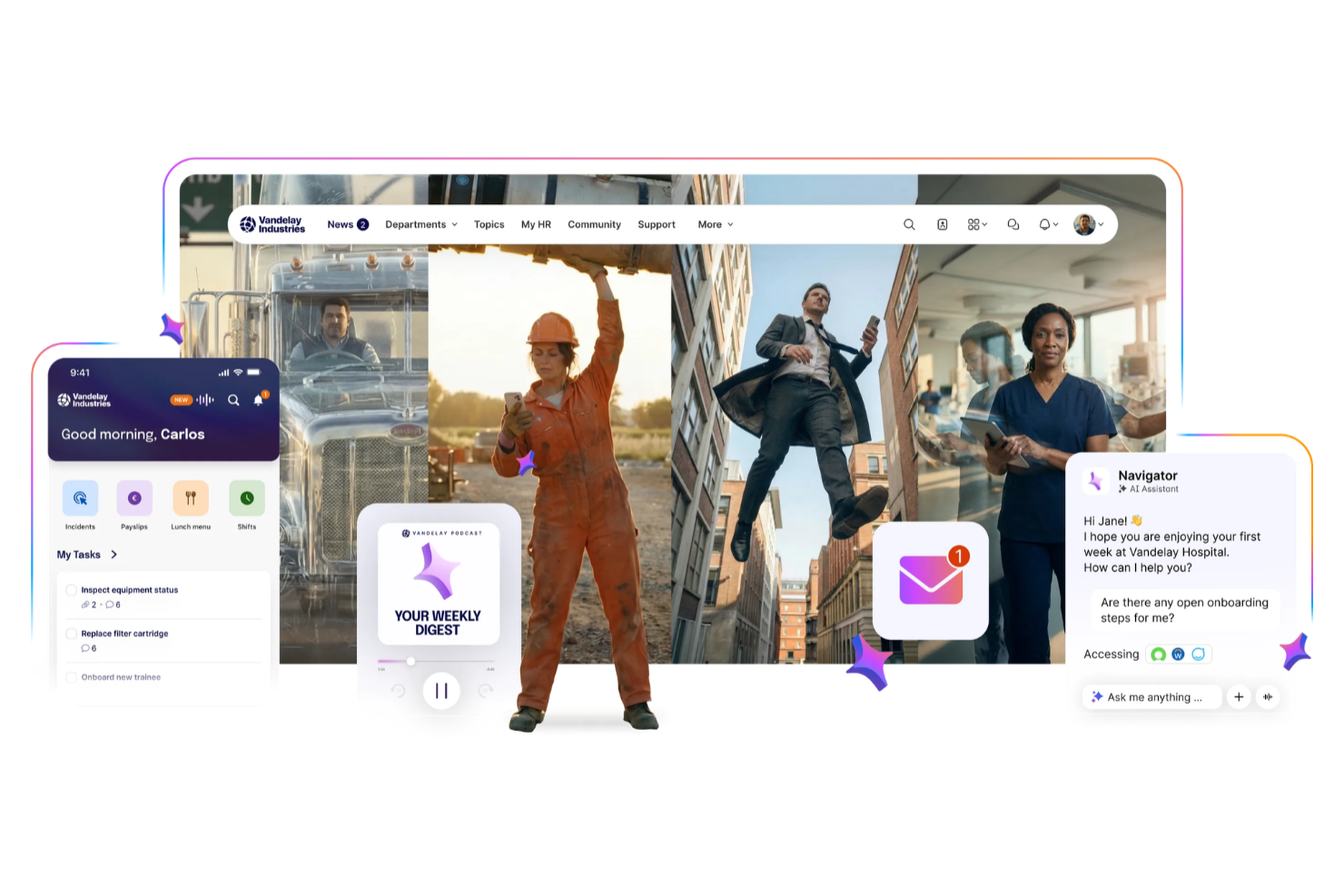
Staffbase es una plataforma de experiencia del empleado diseñada para organizaciones que desean conectar a los empleados con información y recursos confiables de la empresa. Es ideal para equipos de RR. HH., profesionales de comunicaciones internas y líderes en industrias con fuerzas laborales dispersas o sin escritorio. Staffbase te ayuda a centralizar actualizaciones, mejorar el acceso al conocimiento de la empresa y llegar a los empleados dondequiera que trabajen.
¿Para quién es Staffbase?
Staffbase es adecuado para equipos de comunicaciones internas, RR. HH., operaciones y TI en organizaciones medianas y grandes, especialmente aquellas con fuerzas laborales distribuidas o sin escritorio.
Por qué elegí Staffbase
Para las organizaciones que necesitan facilitar el acceso al conocimiento corporativo, elegí Staffbase por su asistente Navigator AI. Los empleados pueden hacer preguntas utilizando voz o texto y obtener respuestas basadas en conocimiento verificado de la empresa, con soporte para más de 100 idiomas. Me gusta especialmente que Navigator está diseñado para llegar a empleados de primera línea que pueden no tener una licencia de Microsoft o correo electrónico corporativo. Esto facilita proporcionar información coherente y relevante tanto para equipos de escritorio como de primera línea.
Características clave de Staffbase
Otras funciones de Staffbase respaldan una plataforma de experiencia del empleado completa:
- Staffbase Navigator: Da acceso conversacional a los empleados al conocimiento verificado de la empresa mediante voz o texto, con detección automática de idioma en más de 100 idiomas.
- Acceso móvil para empleados de primera línea: Llega a empleados sin escritorio a través de una app móvil de marca sin requerir correo electrónico corporativo, con opciones de incorporación que incluyen códigos QR o identificaciones de empleado.
- Segmentación y personalización de contenido: Entrega noticias, actualizaciones y recursos a grupos específicos de empleados según ubicación, departamento o función.
- Analítica y seguimiento de participación: Monitorea el alcance de la comunicación, tasas de participación y desempeño del contenido con paneles de analíticas integrados.
Integraciones de Staffbase
Staffbase se integra con sistemas laborales y de RR. HH., incluyendo Workday, SAP, ADP Workforce, Oracle, Okta, Microsoft Entra ID, Microsoft 365, Google Workspace, ServiceNow, ScreenCloud y más. También hay APIs disponibles para integraciones personalizadas.
Pros and Cons
Pros:
- Publicación multicanal desde un único panel
- Analítica avanzada para seguimiento del compromiso con las comunicaciones
- Herramientas de encuestas integradas para retroalimentación en tiempo real
Cons:
- Las opciones de personalización de marca requieren planes de nivel superior
- Algunas funciones requieren complementos o módulos adicionales
Otras herramientas para la experiencia del empleado
Aquí tienes otras opciones interesantes que no llegaron a la lista principal del mejor software para la experiencia del empleado, pero que aún así valen la pena considerar:
- ThriveSparrow
Mejor para la gestión de la experiencia del empleado impulsada por IA
- Mitratech Perform
Mejor para vincular el compromiso de los empleados y el desempeño
- Connecteam
Mejor para actualizaciones y anuncios internos
- PerformYard
El mejor software de experiencia del empleado para fomentar la retroalimentación continua
- Small Improvements
La mejor opción para vincular los datos de compromiso con las evaluaciones del desempeño
- Sloneek
Ideal para retroalimentación de 360 grados
- Confetti
Mejor para eventos de team building en vivo con anfitrión
- Workvivo
Ideal para crear un ambiente social que fomente el reconocimiento de los empleados
- Kudoboard
Ideal para celebraciones colaborativas de empleados
- Enboarder
Ideal para flujos de comunicación orientados a la experiencia


Reseñas relacionadas de software de RRHH
Si aún no has encontrado lo que buscas aquí, revisa estas otras herramientas relacionadas que hemos probado y evaluado:
- Software de RRHH
- Software de nómina
- Software de reclutamiento
- Servicios de Employer of Record
- Sistemas de seguimiento de candidatos
- Software de gestión de la fuerza laboral
Wie ich Software für Mitarbeitererfahrung im Hinblick auf Engagement und Performance bewerte
Ich teile meine Bewertung in zwei Ebenen auf: die Kernfunktionen, die ein Tool bieten muss, um überhaupt infrage zu kommen, und die Differenzierungsmerkmale – wie beispielsweise Fluktuationsmodelle oder Manager-Nudges –, die die besten Tools von anderen abheben.
Kernfunktionen (Mindestanforderungen für diese Liste)
Bei der Auswahl der Tools für meine Liste bewerte ich jedes einzelne auf einer Skala von 0 (Funktion nicht vorhanden) bis 5 (exzellente Umsetzung in diesem Bereich) hinsichtlich der unten aufgeführten Kernfunktionen. Anschließend berechne ich die Gesamtpunktzahl des Tools in Prozent. Jedes Tool muss mindestens eine Gesamtpunktzahl von 65 % erreichen, um berücksichtigt zu werden.
- Engagement- & Pulsbefragungen: Ich achte auf konfigurierbare Umfrage-Builder mit validierten Fragenpools, Verzweigungslogik und die Flexibilität, jährliche Engagement-Tests mit kurzen wöchentlichen Pulsbefragungen zu kombinieren.
- Leistungsmanagement-Tools: Die Plattform sollte Zielsetzungen, OKRs oder Bewertungszyklen mit Engagement-Daten verknüpfen, sodass Manager nachvollziehen können, wie sich Stimmungsänderungen auf die Teamleistung und den Fortschritt bei Meilensteinen auswirken.
- Feedback & Anerkennung: Ich prüfe, ob das Tool kontinuierliches Feedback, Peer-to-Peer-Anerkennung und strukturierte 1:1-Gespräche unterstützt – und den Austausch nicht nur auf ein jährliches Review beschränkt.
- People Analytics & Reporting: Dashboards sollten Treiber für Engagement sichtbar machen, Daten nach Team oder Standort segmentieren und die Ergebnisse im Branchenvergleich einordnen, damit HR-Verantwortliche die Hintergründe der Werte verstehen können.
- Funktionen zur Manager-Stärkung: Ich schaue nach Team-spezifischen Einblicke-Ansichten, vorgeschlagenen Aktionsplänen und Coaching-Impulse, die Führungskräfte unterstützen, auf Engagement-Daten zu reagieren, ohne dass die HR-Abteilung zur Interpretation hinzugezogen werden muss.
- HRIS- & Kollaborationsintegrationen: Das Tool sollte sich mit zentralen HR-Systemen wie Workday oder BambooHR synchronisieren und in Alltagstools wie Slack oder Microsoft Teams für die Umfragezustellung und Erinnerungen integrieren lassen.
Wenn ich eine Liste von Tools habe, die die Kriterien erfüllen, prüfe ich, wodurch sich jede Plattform besonders auszeichnet.
Differenzierungsmerkmale (Was Anbieter voneinander unterscheidet)
So vergleiche ich verschiedene Anbieter und arbeite Unterschiede heraus:
Hervorstechende Funktionen
KI-gestützte Kommentaranalysen sind ein echtes Alleinstellungsmerkmal. Plattformen, die Themen aus Tausenden von Freitext-Antworten herausfiltern, sparen HR-Teams viele Stunden manueller Auswertung. Ich bewerte auch prädiktive Fluktuationsmodelle, die frühzeitig Risiken identifizieren, indem Engagement-Werte mit Leistungs- und Verhaltensdaten kombiniert werden – bevor die Kündigung auf dem Schreibtisch liegt. Die Abbildung des Mitarbeiter-Lebenszyklus ist relevant für Teams, die Onboarding-, Meilenstein- und Exit-Umfrageergebnisse mit Performance-Trends im Zeitverlauf verknüpfen möchten.
Mehr als Funktionen
Sicherheit und Compliance verdienen besondere Aufmerksamkeit, da Engagement-Daten sensible Mitarbeiterstimmungen enthalten. Ich prüfe auf SOC 2 Typ II-Zertifizierung, individuell einstellbare Anonymitätsgrenzen und regionale Datenaufbewahrung. Wissenschaftliche Fundierung ist ebenso entscheidend: Plattformen mit Validierung durch Arbeits- und Organisationspsychologen, etablierten Fragenpools und Branchenbenchmarks liefern HR-Führungskräften belastbare Daten für die Argumentation gegenüber dem Top-Management. Zudem berücksichtige ich internationale Einsatzfähigkeit, insbesondere mehrsprachige Umfragen und lokalisierte Benchmarks, für Organisationen mit verteilten Teams in verschiedenen Regionen.
¿Qué es el software para la experiencia del empleado?
El software para la experiencia del empleado es una herramienta digital que ayuda a los equipos y gerentes de RRHH a mejorar el involucramiento, la satisfacción y la retención de los empleados. Centraliza comentarios, reconocimientos y datos de rendimiento para que las organizaciones puedan comprender las necesidades de su equipo y actuar rápidamente sobre ellas.
Estas herramientas reemplazan los procesos manuales y las encuestas dispersas por un sistema eficiente para seguir el ánimo, recopilar retroalimentación y abordar los desafíos del lugar de trabajo. Al hacer que los empleados se sientan escuchados y respaldados, ayudan a reducir la rotación, aumentar la productividad y construir una cultura laboral más fuerte.
Características de las herramientas para la experiencia del empleado
El software de experiencia del empleado sigue siendo una categoría emergente en el mercado, por lo que estas plataformas varían un poco en su funcionalidad principal. Teniendo esto en cuenta, aquí están las funciones más importantes a buscar, que aparecieron repetidamente en mi investigación:
- Encuestas a empleados: Herramientas de encuestas de compromiso para recopilar opiniones de los empleados y medir métricas de compromiso como el bienestar y las relaciones entre compañeros.
- Comentarios en tiempo real: Comunicación bidireccional rápida para profundizar en los comentarios y obtener conclusiones accionables para mejorar la cultura de la empresa.
- Feedback de 360 grados: La capacidad de recoger comentarios sobre el desempeño del empleado por parte de los compañeros, para ayudar a informar las evaluaciones y la definición de metas.
- Gestión del rendimiento: Algunas plataformas ofrecen herramientas de seguimiento de objetivos, estructuras de evaluación del desempeño y otras características relacionadas con el rendimiento.
- Herramientas de reconocimiento: Foros para facilitar el reconocimiento entre compañeros, tableros de elogios y reconocimiento automático de aniversario y logros, a veces disponibles.
- Recompensas para empleados: La capacidad de otorgar recompensas como bonificaciones en efectivo, tarjetas de regalo, productos de la empresa y otros incentivos.
- Gestión del ciclo de vida del empleado: Algunas herramientas te ayudan a gestionar temas como pruebas previas al empleo, la incorporación de nuevos empleados y bajas laborales. Esto incluye el seguimiento de la retención y rotación del personal.
- Herramientas de informes: Normalmente se incluyen paneles de análisis para ayudarte a medir y monitorizar los niveles de compromiso, tasas de satisfacción de los empleados, puntuaciones eNPS y otros indicadores clave de experiencia del empleado. Algunas herramientas de compromiso basadas en IA incluso pueden incluir análisis de sentimiento.
- Integraciones de software: Es importante que tu solución de experiencia del empleado se conecte con tus otras herramientas de RRHH, incluidos los sistemas de información de recursos humanos (HRIS), software de compromiso de empleados, sistemas de gestión de empleados y otras herramientas habituales de RRHH y comunicación. Muchas plataformas de experiencia y compromiso del empleado también se integran con plataformas de gestión de proyectos como Jira y Asana, y herramientas de intranet como Confluence y Notion.
Al elegir una plataforma con estas características, obtendrás un conjunto completo de herramientas para gestionar todos los aspectos de la experiencia de tus empleados, incluyendo la recogida de feedback, recompensas y gestión del desempeño.
Lectura relacionada: Reseñas del Mejor Software de Incentivos para Empleados
Costos y Precios de Software de Experiencia del Empleado
El software de experiencia del empleado ofrece planes de precios escalonados diseñados para diferentes tamaños y necesidades de empresas. El coste del software de RRHH suele depender del número de empleados, el nivel de personalización requerido y la profundidad de las funciones incluidas.
A continuación se muestra un resumen de las opciones de plan más comunes y sus precios, para ayudarte a identificar cuál opción se ajusta mejor a tu organización.
Tabla Comparativa de Planes para Software de Experiencia del Empleado
| Plan | Precio Promedio | Funciones Comunes |
|---|---|---|
| Plan Gratuito | $0 | Encuestas básicas, análisis limitados, recogida de comentarios de empleados y hasta 10 usuarios. |
| Plan Básico | $2-$5 por usuario/mes | Encuestas de pulso a empleados, seguimiento del compromiso, evaluaciones del desempeño y soporte por correo electrónico. |
| Plan Estándar | $6-$10 por usuario/mes | Paneles personalizables, análisis de sentimiento, informes para managers y soporte prioritario. |
| Plan Premium | $12-$15 por usuario/mes | Informes avanzados, integraciones con sistemas de RRHH, programas de reconocimiento y acceso a API. |
| Plan Empresarial | Precio personalizado (varía) | Gestor de cuenta dedicado, análisis avanzado con IA, soporte multilingüe y onboarding personalizado. |
Al seleccionar un plan, ten en cuenta el tamaño de tu organización, tu presupuesto y las funciones específicas que necesitas. Puede ser conveniente comenzar con un plan gratuito o básico para probar la funcionalidad y luego aumentar a medida que crecen tus requerimientos. Sin embargo, aunque los planes gratuitos pueden ser un buen punto de partida, los planes de pago ofrecen funcionalidades avanzadas que responden mejor a las necesidades de organizaciones en crecimiento.
Preguntas frecuentes: Respondiendo dudas sobre la experiencia del empleado (EX)
Aquí tienes algunas preguntas que suelen surgir cuando se trata de la experiencia del empleado:
¿Cuáles son los beneficios de un software de experiencia del empleado?
El software de experiencia del empleado te ayuda a captar opiniones a través de encuestas, monitorizar el compromiso en tiempo real y detectar áreas de mejora utilizando análisis de datos. Centraliza la información sobre el sentimiento de los empleados, facilitando la identificación de patrones que afectan la moral, la productividad y la retención. Muchas plataformas también automatizan los programas de reconocimiento y agilizan la comunicación, creando un entorno laboral más reactivo y comprometido para equipos de cualquier tamaño.rnrnDependiendo del tipo de solución que elijas, estos son algunos de los beneficios que puedes obtener:rnu003culu003ern tu003cliu003eMedir, comprender y hacer seguimiento a los KPIs de experiencia del empleado con encuestas pulse.u003c/liu003ern tu003cliu003eAnalizar el feedback de los empleados y detectar tendencias en los sentimientos a lo largo del tiempo.u003c/liu003ern tu003cliu003eContar con datos que respalden nuevas iniciativas de RR. HH., como actualizaciones de políticas, mejoras del espacio de trabajo, eventos de empresa, y más.u003c/liu003ern tu003cliu003eAutomatizar tareas como la recopilación y gestión de datos para los profesionales de RR. HH.u003c/liu003ern tu003cliu003eConfigurar notificaciones inteligentes para cuando fluctúen los indicadores clave de compromiso, de modo que puedas actuar rápidamente.u003c/liu003ern tu003cliu003eEstructurar evaluaciones de desempeño claras, orientando a los managers sobre cómo realizar revisiones de desempeño de manera eficaz.u003c/liu003ernu003c/ulu003e
¿Cómo puede el software de experiencia del empleado ayudar a reducir la rotación?
Al utilizar un software de experiencia del empleado, puedes detectar las primeras señales de desvinculación y actuar de forma proactiva. El software recopila opiniones frecuentes y saca a la luz los problemas que impulsan la rotación, como la mala gestión o la falta de oportunidades de crecimiento. Las alertas en tiempo real, el análisis de sentimientos y los resultados de encuestas anónimas te permiten hacer cambios a tiempo—ya sea lanzando nuevos programas de desarrollo o atendiendo inquietudes del entorno laboral—lo que conduce a una mayor retención.
¿Cómo mido el ROI de un software de experiencia del empleado?
Para medir el retorno de la inversión, compara las tasas de rotación, los resultados de encuestas de compromiso y los indicadores de productividad de antes y después de la implementación. Calcula el ahorro procedente de la reducción de las bajas laborales y del aumento de la satisfacción de los empleados. Puedes utilizar los análisis del software para seguir estos KPIs a lo largo del tiempo, combinando datos cuantitativos como la retención o los puntajes de encuestas con opiniones cualitativas de los empleados para demostrar el valor ante la dirección.
¿Cómo interviene la experiencia del empleado en las evaluaciones y el desempeño?
La experiencia del empleado influye en cómo perciben su desarrollo, apoyo y oportunidades en el trabajo. Con un software especializado, puedes recabar feedback habitual, ayudando a los managers a abordar problemas o reconocer logros antes de las evaluaciones formales. Esta información constante permite crear planes de desarrollo más específicos, mejorar las conversaciones sobre desempeño y garantizar evaluaciones justas e integrales.rnrnCuando los empleados tienen experiencias positivas—como sentirse valorados, contar con comunicación clara y recibir apoyo—es más probable que estén motivados, comprometidos y sean productivos. Esto puede derivar en mejores revisiones de desempeño, ya que están enfocados y comprometidos con su labor. En cambio, experiencias negativas, como la falta de feedback o sentirse poco apreciados, pueden afectar el desempeño y reflejarse en las evaluaciones.
¿Qué características debo buscar en plataformas de experiencia del empleado para equipos distribuidos?
Prioriza plataformas con compatibilidad móvil, herramientas de encuesta personalizables e integraciones con aplicaciones de comunicación diarias como Slack o Microsoft Teams. Busca soporte multilingüe, paneles fáciles de usar y encuestas pulse en tiempo real. Para equipos internacionales o remotos, características como feedback anónimo, registros asincrónicos e informes automáticos te ayudan a entender y actuar sobre el compromiso, sin importar dónde estén tus empleados.
¿Qué integraciones deben admitir las plataformas de experiencia del empleado?
Busca plataformas que se conecten perfectamente con tu HRIS, nóminas, gestión del desempeño y herramientas de comunicación. Las integraciones con onboarding, sistemas de gestión del aprendizaje y plataformas de recompensas facilitan el flujo de datos y reducen el trabajo administrativo manual. Esto asegura que tu organización tenga una visión unificada de los datos del empleado y pueda automatizar procesos como la realización de encuestas o la entrega de reconocimientos, aumentando la eficiencia y adopción.
¿Cómo se fomenta la adopción constante de herramientas de experiencia del empleado en todos los departamentos?
La adopción constante comienza educando tanto a los líderes como al personal sobre los beneficios prácticos de la herramienta. Lanza la plataforma con sesiones de capacitación claras, soporte continuo y recursos fácilmente accesibles. Comparte primeros éxitos—como mejores puntajes de compromiso u opiniones positivas—para generar impulso. Anima a las áreas a personalizar la plataforma según sus necesidades y recopila regularmente opiniones sobre la facilidad de uso, para adaptar su implementación y maximizar la participación con el tiempo.
Creando una experiencia excepcional para el empleado
Crear la experiencia que los empleados tendrán con tu organización lleva tiempo. El uso de software puede ayudarte a entender qué tipo de experiencia de empleado estás ofreciendo actualmente. A partir de ahí, puedes reforzar lo que está funcionando muy bien y abordar lo que no lo está.
Esperamos que ahora tengas una mejor comprensión de qué tipo de software de experiencia del empleado estás buscando y cómo lo vas a utilizar.
¿Qué sigue?
Si estás en proceso de investigar software de experiencia del empleado, conéctate con un asesor de SoftwareSelect para recibir recomendaciones gratuitas.
Llenas un formulario y tienes una breve charla donde profundizan en las especificaciones de tus necesidades. Luego recibirás una lista corta de software para revisar. Incluso te acompañarán durante todo el proceso de compra, incluidas las negociaciones de precios.