

10 Best AI Meeting Assistant Tools Reviewed in 2026

10 Best AI Meeting Assistant Shortlist


Running effective meetings has become increasingly difficult as teams deal with packed calendars, remote collaboration, and fast-moving projects. Many people spend more time coordinating, capturing notes, and following up than actually discussing the work. AI meeting assistants can help by handling tasks like transcription, note capture, action-item extraction, and agenda management, so your team can stay focused on the conversation.
I’ve tested and reviewed a wide range of AI meeting assistant tools to understand which ones truly save time and which ones simply add noise. The tools in this guide support clearer documentation, smoother follow-ups, and more efficient meeting routines across any team or industry.
In this article, you’ll find my top recommendations, along with insights into their features, strengths, and ideal use cases. By the end, you’ll have a clear sense of which AI meeting assistants can meaningfully improve how you plan, run, and review your meetings.
Why Trust Our Software Recommendations
Our team has been testing and reviewing software since 2012. As HR experts ourselves, we know how difficult—and important—it is to choose the right software.
For this guide, we evaluated tools using hands-on testing and independent research, scoring tools using our selection criteria. We also draw on insights from industry thought leaders and practicing HR experts.
Our reviews reflect our human editorial judgment, not a sales pitch.
Expert reviewers:
AI Meeting Assistant Comparison Table
This comparison table summarizes pricing details for my top AI meeting assistant selections:
| Tool | Best For | Trial Info | Price | ||
|---|---|---|---|---|---|
| 1 | Best for syncing action items to boards | Free plan available; 14-day free trial | From $9/user/month (billed annually) | Website | |
| 2 | Best for team feedback | Free plan available | From $7/user/month (billed annually) | Website | |
| 3 | Best for meeting insights | 14-day free trial + free demo available | From $19/user/month (billed annually) | Website | |
| 4 | Best for project scheduling | Free trial available | From $19/seat/month (billed annually) | Website | |
| 5 | Best for task automation | Free plan + free demo available | From $10/user/month (billed annually) | Website | |
| 6 | Best for real-time transcription | Free plan available | From $8.33/user/month (billed annually) | Website | |
| 7 | Best for noise cancellation | Free plan + trial available | From $8/user/month (billed annually) | Website | |
| 8 | Best for meeting analytics | Free plan available | From $15/month (billed annually) | Website | |
| 9 | Best for note-taking | Free plan available | From $15/user/month | Website | |
| 10 | Best for meeting summaries | Free plan available | From $10/user/month (billed annually) | Website |

Best AI Meeting Assistant Review
Below are my detailed summaries of the best AI meeting assistant tools that made it onto my shortlist. My reviews offer a detailed look at the key features, pros & cons, integrations, and ideal use cases of each tool to help you find the best one for you.

Best for syncing action items to boards
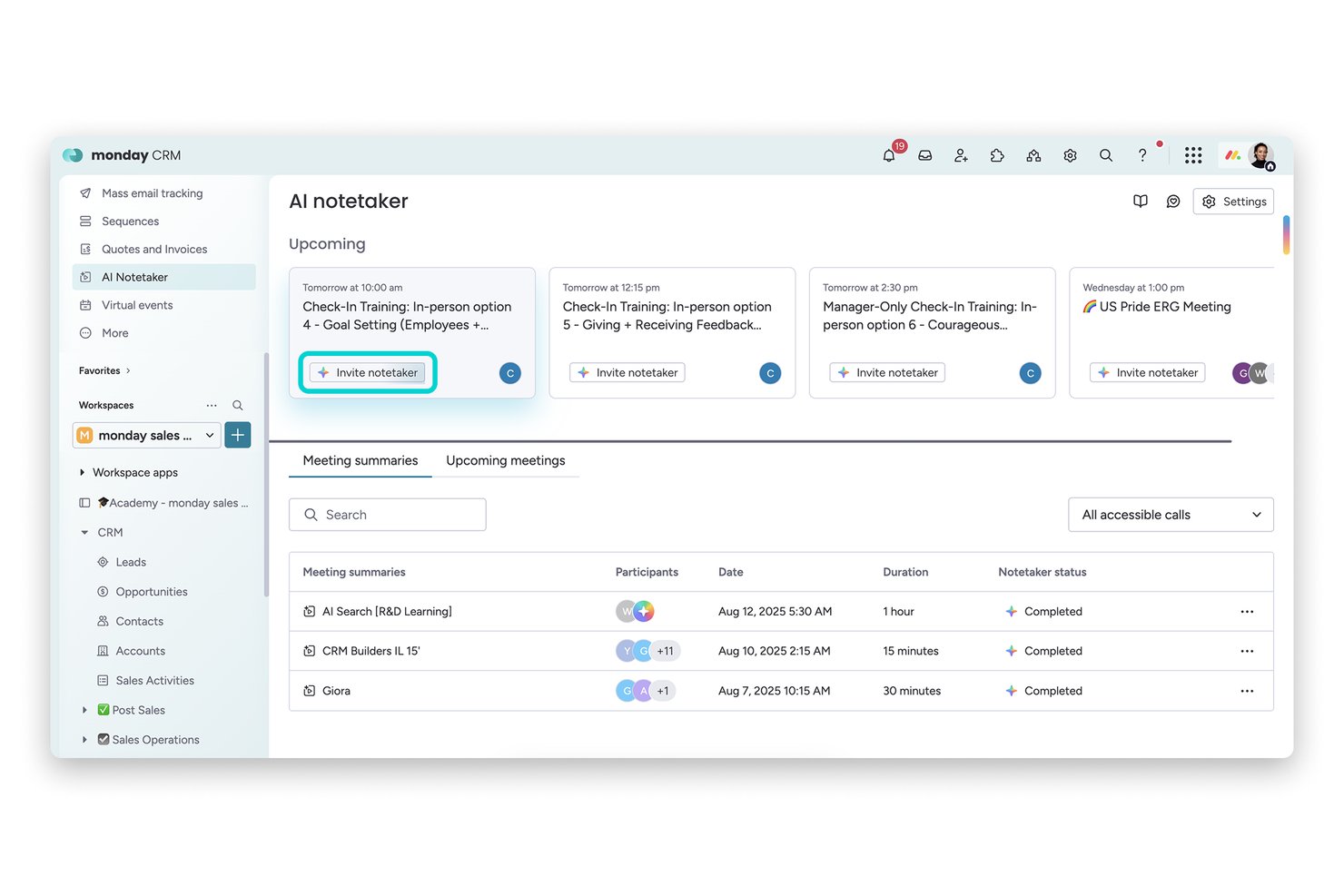
monday AI Workspace is a work management platform with a built-in AI meeting assistant that transcribes calls on Zoom, Teams, and Google Meet, generates summaries, and converts meeting action items directly into board tasks.
Who Is monday AI Workspace Best For?
It's a strong fit for project-driven teams that already run their work inside monday.com and want meeting action items to land directly in their boards.
Why I Picked monday AI Workspace
monday AI Workspace earns its spot on my shortlist because no other meeting assistant connects conversation to tracked work as directly. When AI Notetaker captures action items from a call, I can push them straight to any monday board as subitems in just a few clicks. I also like that the bot auto-joins scheduled meetings two minutes early, so nothing gets missed before the conversation even starts.
monday AI Workspace Key Features
- AI-powered meeting transcriptions: Transcribes Zoom, Teams, and Google Meet calls with speaker attribution in real time.
- AI-generated meeting summaries: Creates structured overviews of meeting content using built-in AI tools.
- Integrated board automations: Lets you automate workflow actions based on meeting outputs or changes to items.
- Multi-platform workspace templates: Provides customizable templates for different meeting and task types within the platform.
monday AI Workspace Integrations
monday AI Workspace offers over 200 native integrations, including Zoom, Microsoft Teams, Google Meet, Google Workspace, Slack, Salesforce, and Outlook. It also supports Zapier and provides an API for custom integrations.
Pros and Cons
Pros:
- AI-generated summaries available within workspace boards
- Auto-joins meetings and transcribes with speaker labels
- Syncs meeting tasks to monday boards instantly
Cons:
- Lacks conversation analytics or sentiment tracking
- No interview or HR-specific summary templates
New Product Updates from monday AI Workspace
monday AI Workspace Adds Human Approval Routing
monday AI Workspace adds a human-in-the-loop approval block to AI Workflows, sending approval requests and routing workflow paths based on responses. For more information, visit monday AI Workspace's official site.

Fellow
Best for team feedback
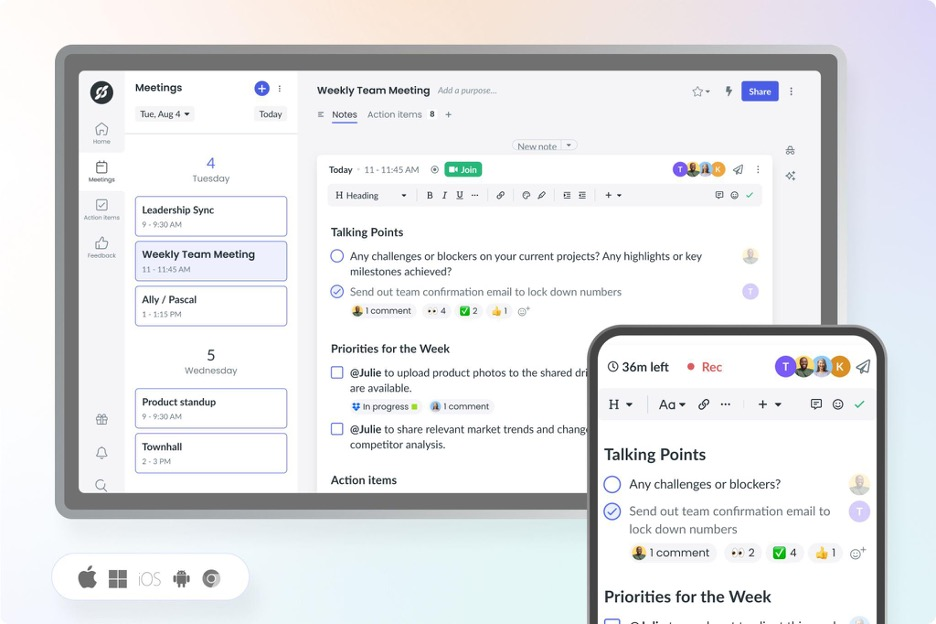
Fellow earns a spot here because it's built for feedback-driven cultures, not just meeting notes. Its feedback features tie in directly with AI meeting summaries, so teams can capture decisions and peer input right as they're made. I like that you can request feedback in context and pull insights into one place, which makes follow-ups much more actionable.
Fellow’s Best For
- Teams prioritizing feedback and action items from meetings
- Managers who want to connect meetings directly to performance reviews
Fellow’s Not Great For
- Those needing detailed automated transcriptions or voice-based AI actions
- Teams seeking a pure scheduling or calendar assistant
What Sets Fellow Apart
Fellow stands out by making feedback and meeting follow-up a central part of the workflow, not an afterthought. Unlike tools like Otter.ai that focus mainly on recording and transcribing, Fellow expects you to start and end meetings with defined outcomes and actionable feedback. This works best when you want meeting notes to connect directly to growth conversations and performance reviews.
Tradeoffs with Fellow
Fellow optimizes for feedback and meeting outcomes, but that emphasis means you lose out on full voice transcription and some AI-driven automation that other meeting assistants provide.
Pros and Cons
Pros:
- Meeting analytics with talk-time data
- Built-in team feedback and action tracking
- Collaborative agendas for structured meetings
Cons:
- Setup needed for workflow automation
- Limited offline functionality

Avoma
Best for meeting insights

Avoma makes my shortlist because it goes beyond basic transcription with meeting intelligence I haven't seen elsewhere. I recommend Avoma when you want to capture exact action items, sentiment, and speaker insights you can actually use after the call. What I like is how quickly teams can search and review specific topics or trends from recorded meetings—nothing gets lost in the shuffle.
Avoma’s Best For
- Sales, customer success, and recruiting teams needing meeting insights
- Teams that want searchable conversation records and sentiment analysis
Avoma’s Not Great For
- Organizations with strict data residency or privacy requirements
- Those prioritizing real-time meeting collaboration over post-call analysis
What sets Avoma apart
Avoma organizes meeting information around searchable highlights, action items, and topics so you don’t lose insights in lengthy call recordings. It expects you to reference conversations later, not just during live meetings. Unlike Google Meet’s built-in summaries or tools like Otter, Avoma gives you event-based navigation and speaker insights that make finding meaning fast, especially for teams reviewing high-stakes customer calls.
Tradeoffs with Avoma
Avoma optimizes for post-meeting analysis and insights, but that means you give up real-time editing and collaboration during meetings. Teams expecting dynamic in-call whiteboarding or simultaneous note-taking often still use a second tool.
Pros and Cons
Pros:
- Offers real-time transcription
- Includes AI call scoring and topic tracking
- Provides detailed meeting analytics
Cons:
- Requires internet connection
- Advanced analytics require paid add-ons

Motion
Best for project scheduling

Motion earns its spot here because it uniquely blends project scheduling with smart AI to automate meeting planning. When I tested its AI calendar assistant, I saw it dynamically rearrange tasks and meetings based on shifting project priorities.
What I appreciate most is how Motion keeps calendars, deadlines, and meetings in sync for teams that juggle frequent project-based meetings. It saves time by automatically finding and booking the best meeting slots around existing project work.
Motion’s Best For
- Teams with frequent project-based meetings needing dynamic scheduling
- Managers who want AI to automate calendar updates
Motion’s Not Great For
- Simple teams without shifting meeting priorities
- Organizations expecting detailed meeting transcripts and recording
What sets Motion apart
Motion stands out by using AI to constantly reorganize meetings and tasks in real time. Unlike traditional AI assistants that just summarize or record, Motion expects you to let the tool actively manage calendar conflicts and shifting priorities as project needs change. In practice, I see this working best when schedules are unpredictable and meetings compete with project deadlines.
Tradeoffs with Motion
Motion optimizes for adapting to shifting schedules, but you give up advanced meeting note-taking and recording. This means teams who need detailed meeting documentation should look elsewhere.
Pros and Cons
Pros:
- Supports multiple meeting platforms
- High transcription accuracy
- Converts notes to tasks
Cons:
- Limited customization in templates
- Limited offline functionality

Best for task automation

Fireflies.ai earns a spot on my list because its AI meeting assistant doesn’t just transcribe, but actively automates meeting outcomes. I like that you can instantly highlight action items and set automated follow-ups directly from transcripts, so nothing falls through the cracks after a call. This works best when your team is overwhelmed by manual note-taking or repetitive post-meeting tasks—Fireflies.ai turns those into click-and-go actions that save you real time.
Fireflies.ai’s Best For
- Teams wanting automated meeting summaries and follow-ups
- Managers who track action items from recurring calls
Fireflies.ai’s Not Great For
- Organizations needing highly secure, on-premise storage
- Teams with complex privacy or sensitive compliance demands
What sets Fireflies.ai apart
Fireflies.ai expects your meetings to generate actionable outcomes, not just notes. Unlike Otter.ai, which mainly focuses on transcription and data capture, Fireflies.ai leans into automating what happens after the call. In practice, this suits managers and project leads who want action items automatically surfaced and followed up, instead of moving tasks around after every meeting.
Tradeoffs with Fireflies.ai
Fireflies.ai optimizes for automation and fast follow-ups, but you lose some manual control over privacy and storage, which can be a dealbreaker if your process requires on-premise recording or tight data governance.
Pros and Cons
Pros:
- AI Apps for follow-up tasks
- Supports many recording workflows
- Automated action item creation
Cons:
- Can slow down with long recordings
- Accuracy varies with audio quality


Otter earns a spot on my list because its live transcription keeps up with fast-paced meetings without missing speaker changes or key details. This is the first tool I go to when real-time capture is essential, especially in environments where you can't afford to pause for notes or review recordings later.
What I appreciate is how it instantly generates searchable, shareable transcripts and highlights action items live as the conversation unfolds. If you're in meetings that move quickly or handle lots of speakers, Otter handles the workload reliably and gives you a full, accurate record right away.
Otter’s Best For
- Teams needing live, searchable meeting transcriptions
- Fast-paced meetings with multiple, quickly changing speakers
Otter’s Not Great For
- Sensitive conversations needing advanced privacy controls
- Teams requiring meeting summaries or advanced analytics
What sets Otter apart
Otter focuses on capturing conversations as they happen, making live transcription its core workflow. Instead of structured collaboration like you see with Google Workspace or meeting summaries like Fireflies, it expects teams to use transcripts as a single source of truth, often in high-velocity or multi-speaker meetings.
You get transcripts you can search and reference almost immediately, which helps when topics move fast.
Tradeoffs with Otter
Otter optimizes for speed and live accuracy, but you give up deep built-in meeting insights or summaries, so teams spend more time digging through transcripts for decisions or action items.
Pros and Cons
Pros:
- Syncs notes to major platforms
- Action item identification
- Voice command functionality
Cons:
- May struggle with accents
- Audio transcription may require some manual review


Krisp makes the cut for best AI meeting assistant because it uses advanced voice AI to remove background noise in real time, something I haven’t seen matched by other meeting tools. I usually recommend Krisp when teams or individuals work from noisy environments and can’t risk distractions bleeding into meetings.
What I really like is how Krisp’s noise cancellation can be toggled on for both input and output, so you never have to worry about what’s happening in your space or the other person’s. In practice, I’ve found meetings are just less stressful with it on, especially with kids, pets, or city noise nearby.
Krisp’s Best For
- Remote workers in noisy environments needing distraction-free calls
- Teams that join meetings from shared or unpredictable workspaces
Krisp’s Not Great For
- Users who want AI-driven note-taking and meeting summaries
- Teams that require built-in scheduling or collaboration tools
What Sets Krisp Apart
Krisp is focused on making remote meetings quieter by blocking background sounds before they reach the call. It assumes you value having a clean audio channel over capturing and processing meeting content. In practice, I’ve noticed this suits people who work from busy or unpredictable spaces, rather than teams who want deep collaboration tools bundled in. Unlike Otter.ai, Krisp doesn’t emphasize transcripts or searchable notes.
Tradeoffs with Krisp
Krisp optimizes for real-time audio clarity, but you sacrifice meeting notes and searchable content, so you’ll need a second tool if note capture is essential.
Pros and Cons
Pros:
- Minimal impact on system resources
- Works across multiple platforms
- Improves call clarity
Cons:
- Performance varies with device setup
- Limited features beyond audio processing


Read AI is on my shortlist because it gives meeting analytics you can act on, not just raw notes or transcripts. When I tested it, I found the automated sentiment and talk-time breakdowns actually change how teams review engagement and speaking balance. I like how you can spot when meetings drift off track, then use the analytics to coach teams and improve future sessions.
Read AI's Best For
- Teams that want actionable meeting analytics and insights
- Organizations focused on improving meeting engagement and participation
Read AI's Not Great For
- Anyone looking for full-featured AI note-taking or summaries
- Teams that rarely analyze or follow up on meeting data
What sets Read AI apart
Read AI takes a meeting analytics approach instead of just capturing transcripts or action items like Otter or Fireflies. It assumes you want to understand how meetings actually run, not just what gets said. In practice, I see the value when you want to fix common issues like team members dominating the agenda or overall disengagement. Unlike note-taking tools, it shows you where your meeting structure can improve.
Tradeoffs with Read AI
Read AI optimizes for analytics and meeting diagnostics, so you give up strong AI note-taking or summary-focused features. That means you may still need another tool to capture action items or provide detailed written recaps.
Pros and Cons
Pros:
- AI search across meetings and messages
- Automatic recaps and insights
- Engagement and participation analytics
Cons:
- Advanced features only on paid plans
- Setup may require onboarding
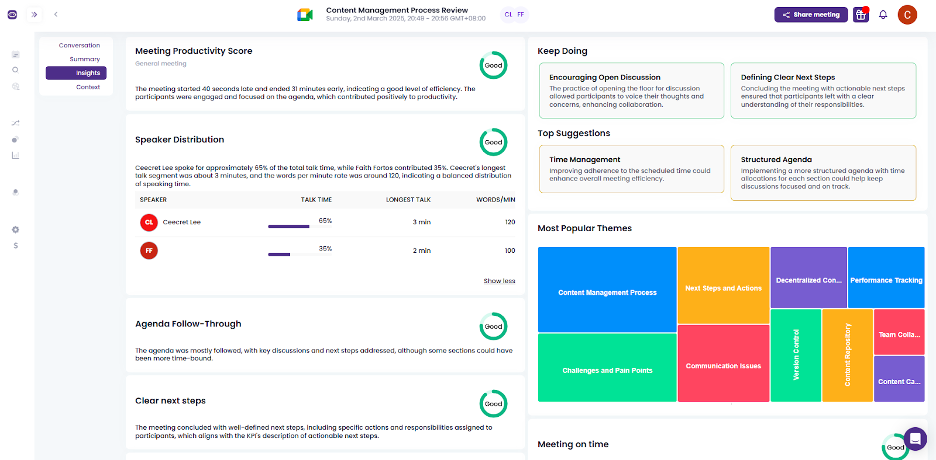
Meetgeek.ai earns a spot on my shortlist for its focus on automatic, structured meeting note-taking that stays accurate as conversations evolve. This isn’t just about live transcription—Meetgeek.ai generates shareable summaries, highlights decisions, and even picks up on action items as people talk.
What I like most is how you can search, review, and revisit notes instantly, which solves the "what did we agree on?" headache right away. It fits well when you need reliable, searchable meeting records for recurring team syncs and client calls.
Meetgeek.ai’s Best For
- Teams that need accurate, automatic meeting notes
- Organizations tracking decisions and action items across calls
Meetgeek.ai’s Not Great For
- Teams needing advanced video conferencing or collaboration features
- Groups that want full meeting management or scheduling
What sets Meetgeek.ai apart
Meetgeek.ai flips the script on meeting documentation by actively capturing and structuring key moments while conversations are happening. Unlike Otter.ai, which focuses mainly on transcription, Meetgeek.ai organizes highlights and action items in real time so you can reference outcomes quickly without trawling through full transcripts.
I see this working best when meetings move fast and decisions need to be recalled without extra manual cleanup.
Tradeoffs with Meetgeek.ai
Meetgeek.ai optimizes for automation and clarity in note capture, but that comes at the cost of broader meeting management features. If you want one platform for video calls, scheduling, and deep collaboration, you’ll need to pair this with another tool.
Pros and Cons
Pros:
- Browser-based recording option
- Automatic call-type summaries
- Detailed and searchable transcripts
Cons:
- Limited offline functionality
- Limited customization options


Sembly earns a spot on my list for how well it turns conversations into clear, smart summaries you can actually use. When meeting notes need to be accurate and shareable—no more messy transcriptions or missed details—I’ve found Sembly’s AI-generated summaries catch people up fast and with important context. What I appreciate most is how action items, speaker highlights, and key decisions are neatly organized so teams can follow up without chasing down recordings.
Sembly’s Best For
- Teams needing fast, actionable meeting summaries
- Organizations handling a high volume of virtual meetings
Sembly’s Not Great For
- Users needing in-depth voice analytics or sentiment analysis
- Teams preferring manual note-taking or highly formatted outputs
What sets Sembly apart
Sembly approaches meetings by automatically breaking conversations into usable summaries and turning long calls into short, action-focused recaps. Unlike tools like Otter.ai, which mostly emphasize transcription accuracy, Sembly highlights context, decisions, and next steps in a concise, digestible format. This works well if you want clarity without sifting through long transcripts.
Tradeoffs with Sembly
Sembly optimizes for quick, summary-focused outputs, but this means you lose detailed capturing of every spoken nuance. In practice, teams that need full verbatim transcripts or extensive analytics may feel limited.
Pros and Cons
Pros:
- Saves time on meeting reviews
- Generates actionable insights
- Offers keyword search functionality
Cons:
- Complexity in advanced features
- Limited customization options
Other AI Meeting Assistant
Here are some additional AI meeting assistant options that didn’t make it onto my shortlist, but are still worth checking out:
- Jamie
For bot-free note-taking
- Board Intelligence
With AI-driven board governance tools
- Cluely
For team collaboration
- Meeting.ai
For agenda management
- Gong
For sales team insights
- Tactiq
For real-time captions
- Notta
For language translation
- Bubbles
For asynchronous collaboration
- tl;dv
For timestamped meeting highlights
- Zoom AI Companion
For integrated video conferencing


How I Evaluate AI Meeting Assistants
Any tool can join a call and hit record, but I look for AI that gives HR teams something back—like walking out of a candidate debrief with a ready-made summary instead of scattered notes. I evaluate each tool on two levels: the core functionality it needs to qualify and the differentiating factors that set one option apart from the rest.
Core Functionality (Table Stakes For This List)
When I'm selecting tools for my list, I rank each one on a scale from 0 (does not offer the functionality) to 5 (excels in this area) for each core functionality listed below. Then, I calculate the tool's total score into a percentage. Each tool needs to achieve a minimum total score of 65% to be considered for inclusion.
- Automated Meeting Transcription: I evaluate transcript accuracy, speaker attribution, and language support—especially in fast-paced panel interviews where multiple voices overlap.
- AI-Generated Summaries: Good summaries should go beyond raw bullet points. I look for structured recaps tailored to the meeting type, like a candidate interview debrief or 1:1 check-in.
- Action Item Extraction: I check whether the tool picks up on next steps organically from conversation, like a hiring manager agreeing to send a take-home assignment by Friday.
- Video Conferencing Integrations: Each tool should connect natively with Zoom, Microsoft Teams, and Google Meet at a minimum, with smooth calendar-based auto-join.
- Searchable Meeting Repository: I look for organized storage where an HR team can search past transcripts by speaker, keyword, or date—useful when revisiting notes across a full interview loop.
- Conversation Intelligence & Analytics: Metrics like talk-time ratios, sentiment tracking, and topic trends help HR teams spot patterns across recurring meetings such as stay interviews or skip-levels.
Once I have a list of tools that meet this criteria, I consider what sets each platform apart.
Differentiating Factors (What Sets Vendors Apart)
Here's how I compare and contrast different vendors:
Standout Features
ATS and HRIS integrations matter a lot here. I look for tools that push interview notes or meeting summaries directly into platforms like Greenhouse or Workday, saving recruiters from manual copy-paste after every call. Bias detection and PII redaction are equally valuable—especially when documenting employee relations conversations where sensitive details need to stay protected. I also check for AI-generated interview scorecards that help hiring panels evaluate candidates consistently across a full loop.
Beyond Features
Compliance and data privacy top my list. HR meetings often touch sensitive topics like terminations or accommodation requests, so I check for SOC 2 Type II certification, configurable data residency, and consent management workflows. Security goes hand-in-hand here—role-based access controls matter when an employee relations specialist's recordings shouldn't be visible to the broader team. I also evaluate pricing structures to understand whether per-seat models work for a small recruiting team or if volume-based enterprise plans better fit an organization-wide rollout.
How to Choose AI Meeting Assistant
It’s easy to get bogged down in long feature lists and complex pricing structures. To help you stay focused as you work through your unique software selection process, here’s a checklist of factors to keep in mind:
| Factor | What to Consider |
| Scalability | Can the tool grow with your team? Consider how well it handles increased users or meetings without performance issues. Look for flexible plans that accommodate growth. |
| Integrations | Does it connect with your existing tools? Check if it integrates with your current platforms like Zoom, Slack, or Google Calendar to avoid workflow disruptions. |
| Customizability | Can you tailor the tool to your needs? Look for options to adjust settings, templates, or workflows that align with your team's processes. |
| Ease of use | Is it user-friendly? Evaluate the interface and navigation. A tool that's intuitive reduces learning time and adoption barriers for your team. |
| Implementation and onboarding | How easy is it to get started? Consider the resources and support provided during setup. Look for training materials or product tours to speed up onboarding. |
| Cost | Does it fit your budget? Compare pricing structures and look for hidden fees. Ensure the cost aligns with the value it brings to your team. |
| Security safeguards | Are data protections in place? Verify if the tool follows industry standards for data encryption and compliance to protect sensitive meeting information. |
| Support availability | Is help accessible when needed? Check the availability of support channels like chat, email, or phone, and ensure they align with your team's needs. |
What Is an AI Meeting Assistant?
An AI meeting assistant is a tool designed to help automate and improve the management of meetings. These tools are commonly used by professionals in roles like project management, sales, and HR, providing value through improved efficiency and organization.
Features like real-time transcription, automated note-taking, and task assignment support users in capturing meeting details accurately and ensuring follow-up actions are clear. Overall, these tools save time and reduce the administrative burden of managing meetings.
Features of AI Meeting Assistant
When selecting an AI meeting assistant, keep an eye out for the following key features:
- Real-time transcription: Captures spoken words during meetings, allowing for accurate and immediate documentation.
- Automated note-taking: Generates detailed notes automatically, saving time and ensuring nothing is missed.
- Meeting summaries: Provides concise overviews of discussions, helping users quickly understand key points.
- Task assignment: Automatically creates and assigns tasks from meeting discussions, ensuring follow-up actions are clear.
- Keyword tagging: Allows users to tag important topics for easy reference and searchability.
- Voice command activation: Enables hands-free control of the tool, improving multitasking during meetings.
- Language translation: Supports multilingual teams by translating meetings in real-time.
- Sentiment analysis: Evaluates the emotional tone of discussions, offering insights into participant engagement.
- Integration capabilities: Connects with existing tools like Zoom, Slack, and Google Calendar to maintain workflow continuity.
- Security safeguards: Protects sensitive data through encryption and compliance with industry standards.
Benefits of AI Meeting Assistant
Implementing an AI meeting assistant provides several benefits for your team and your business. Here are a few you can look forward to:
- Time savings: Automated note-taking and task assignment reduce the time spent on administrative tasks, allowing your team to focus on more important work.
- Improved accuracy: Real-time transcription ensures that meeting details are captured accurately, minimizing misunderstandings.
- improved collaboration: Integration capabilities allow seamless connection with tools like Zoom and Slack, keeping your team's workflow intact.
- Better organization: Keyword tagging and meeting summaries help keep information organized and easily accessible, improving productivity.
- Increased accessibility: Language translation features support multilingual teams, making meetings inclusive for all participants.
- Actionable insights: Sentiment analysis and meeting analytics provide valuable insights into team dynamics and engagement levels.
Costs and Pricing of AI Meeting Assistant
Selecting an AI meeting assistant requires an understanding of the various pricing models and plans available. Costs vary based on features, team size, add-ons, and more. The table below summarizes common plans, their average prices, and typical features included in AI meeting assistant solutions:
Plan Comparison Table for AI Meeting Assistant
| Plan Type | Average Price | Common Features |
| Free Plan | $0 | Basic transcription, limited meeting minutes, and essential integrations. |
| Personal Plan | $7-$19.99/user/month | Unlimited transcription, meeting summaries, and basic integrations. |
| Business Plan | $29-$50/user/month | Advanced analytics, task assignments, and improved integrations. |
| Enterprise Plan | $60-$100/user/month | Customizable features, dedicated support, and premium security safeguards. |
AI Meeting Assistant FAQs
Here are some answers to common questions about AI meeting assistants:
Can AI take notes during an in-person meeting?
Yes, many AI meeting assistants can take notes during in-person meetings. They often use mobile apps to capture audio and transcribe it into notes. This feature can be helpful for lengthy discussions where manual note-taking might miss important details. Ensure the app supports in-person functionality.
What are the risks of AI meeting assistants?
Using AI meeting assistants can pose risks like inhibiting open conversation. Some participants might feel uncomfortable knowing their words are being transcribed or recorded. Consider setting guidelines on how and when to use these tools to maintain a comfortable environment for all attendees.
Is it safe to use an AI assistant?
AI assistants can introduce safety concerns, particularly around privacy. They often require access to sensitive information like emails and calendars. Ensure your chosen tool complies with privacy regulations and has strong security measures in place to protect your data.
How do AI meeting assistants handle multiple speakers?
Most AI meeting assistants can identify and differentiate between multiple speakers using advanced algorithms. This feature ensures that transcriptions are accurate and that each participant’s contributions are correctly attributed. Before choosing a tool, check its accuracy in speaker identification.
Can AI meeting assistants integrate with other tools?
Yes, many AI meeting assistants offer integrations with platforms like Zoom, Slack, and Google Calendar. These integrations help maintain seamless workflows by syncing meeting data across your tools. Check the compatibility of your preferred AI assistant with your existing software stack.
Do AI meeting assistants offer language translation?
Some AI meeting assistants provide real-time language translation, which is beneficial for multilingual teams. This feature can improve communication by translating spoken words into different languages during meetings. Verify the languages supported by the tool to ensure it meets your team’s needs.