
23 Best Employee Pulse Survey Tools Reviewed in 2026

Best Employee Pulse Survey Tools Shortlist
Here’s my shortlist of the best employee experience pulse survey tools:


In HR, keeping a pulse on your team's morale can be tough. You likely face challenges with engagement, turnover, and understanding what your employees truly think. Employee pulse survey tools can help by giving you real-time insights into your team’s mood and concerns.
I've tested and reviewed these employee survey tools independently, drawing from my extensive experience in the HR software market to give you an unbiased view of the top solutions available.
In this article, you’ll find a well-researched list of the best employee pulse survey tools that can help you tackle your HR challenges. Let's dive into how these tools can make your work life easier and more effective.
Why Trust Our Software Reviews
Best Employee Pulse Survey Tools Summary
This comparison chart summarizes pricing details for my top employee pulse survey tool selections to help you find the best one for your budget and business needs.
| Tool | Best For | Trial Info | Price | ||
|---|---|---|---|---|---|
| 1 | Best for rewards integration | Free demo available | Pricing upon request | Website | |
| 2 | Best for large enterprises | Free demo available | Pricing upon request | Website | |
| 3 | Best for small teams | Free demo available | From $4/user/month (billed annually) | Website | |
| 4 | Best for engagement insights | Free demo available | Pricing upon request | Website | |
| 5 | Best for continuous feedback | Free demo available | Pricing upon request | Website | |
| 6 | Best for payroll integration | 30-day free trial + free demo available | Pricing upon request | Website | |
| 7 | Best for compliance focus | Free demo available | Pricing upon request | Website | |
| 8 | Best for team engagement | Free trial + free demo available | From $5/user/month (billed annually) | Website | |
| 9 | Best for simple setup | 21-day free trial + free demo available | From $6/employee/month (billed annually) | Website | |
| 10 | Best for culture benchmarks | Free demo available | Pricing upon request | Website | |
| 11 | Best for real-time analytics | Free demo available | Pricing upon request | Website | |
| 12 | Best for survey design | Free 14-day trial + free demo available | Pricing upon request | Website |
-

Checkr
Visit WebsiteThis is an aggregated rating for this tool including ratings from Crozdesk users and ratings from other sites.4.5 -
Kudoboard
Visit WebsiteThis is an aggregated rating for this tool including ratings from Crozdesk users and ratings from other sites.4.8 -
Native Teams
Visit WebsiteThis is an aggregated rating for this tool including ratings from Crozdesk users and ratings from other sites.4.9





Best Employee Pulse Survey Tool Reviews
Below are my detailed summaries of the best employee pulse survey tools that made it onto my shortlist. My reviews offer a detailed look at the key features, pros and cons, integrations, and ideal use cases of each tool to help you find the best one for you.


Vantage Circle is a workplace engagement platform designed to enhance employee recognition and wellness. It mainly serves organizations looking to boost employee morale through recognition, wellness solutions, and corporate discounts.
Why I picked Vantage Circle: The platform excels in integrating rewards with employee engagement, letting you acknowledge employee contributions in different ways. Vantage Fit supports corporate wellness, encouraging healthy habits, and the Vantage Perks program provides discounts, adding value to your team's benefits package.
Standout features and integrations:
Features include vantage recognition for rewarding employees with diverse options. Vantage Fit promotes employee wellness through fitness challenges, while Vantage Perks offers corporate discounts to enhance employee benefits.
Integrations include Microsoft Teams, Slack, BambooHR, Workday, ADP, Google Workspace, Oracle, Salesforce, and more.
Pros and Cons
Pros:
- Supports global rewards and gift cards
- Easy interface for everyday recognition
- Strong peer recognition and rewards tools
Cons:
- Some users note inconsistent reward fairness
- Limited engagement analytics versus competitors
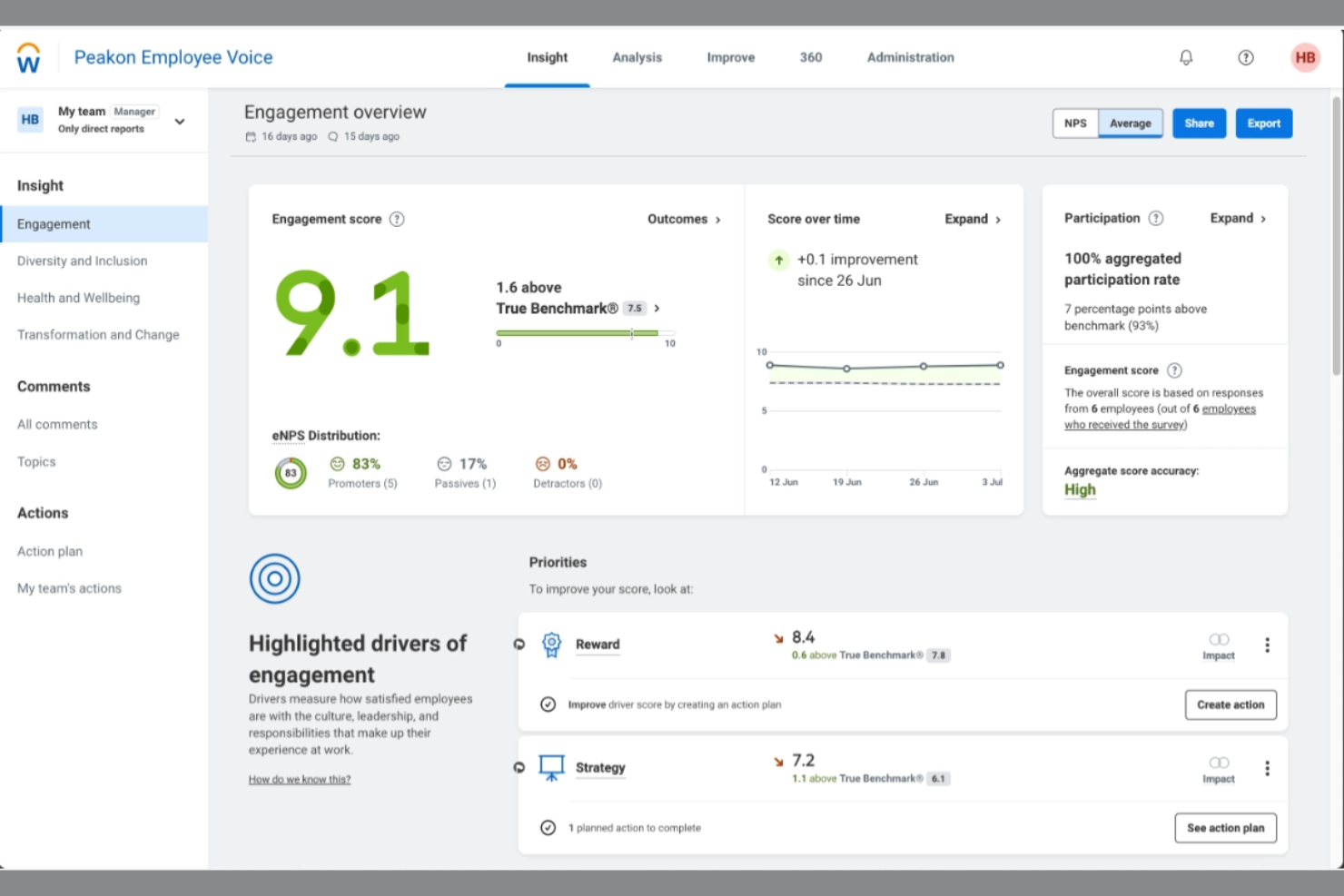
Workday Peakon is an employee engagement platform tailored for large enterprises seeking to gain insights into employee sentiment. It provides tools for collecting feedback and measuring engagement across different departments and locations.
Why I picked Workday Peakon: With its ability to handle complex organizational structures, the platform excels in serving large enterprises. It offers customizable surveys that can be tailored to specific teams or departments and an analytics dashboard that delivers insights into employee engagement, helping you identify trends.
Standout features and integrations:
Features include sentiment analysis to understand employee feelings, multilingual surveys, making it accessible to global teams, and real-time reporting to track engagement metrics.
Integrations include Microsoft Teams, Slack, BambooHR, Workday, Personio, HiBob, and more.
Pros and Cons
Pros:
- Integrates tightly with Workday HR data
- Powerful dashboards for engagement insights
- Continuous listening with frequent pulse surveys
Cons:
- Pricing is higher than that of some competitor survey tools
- Configuration can feel complex for admins
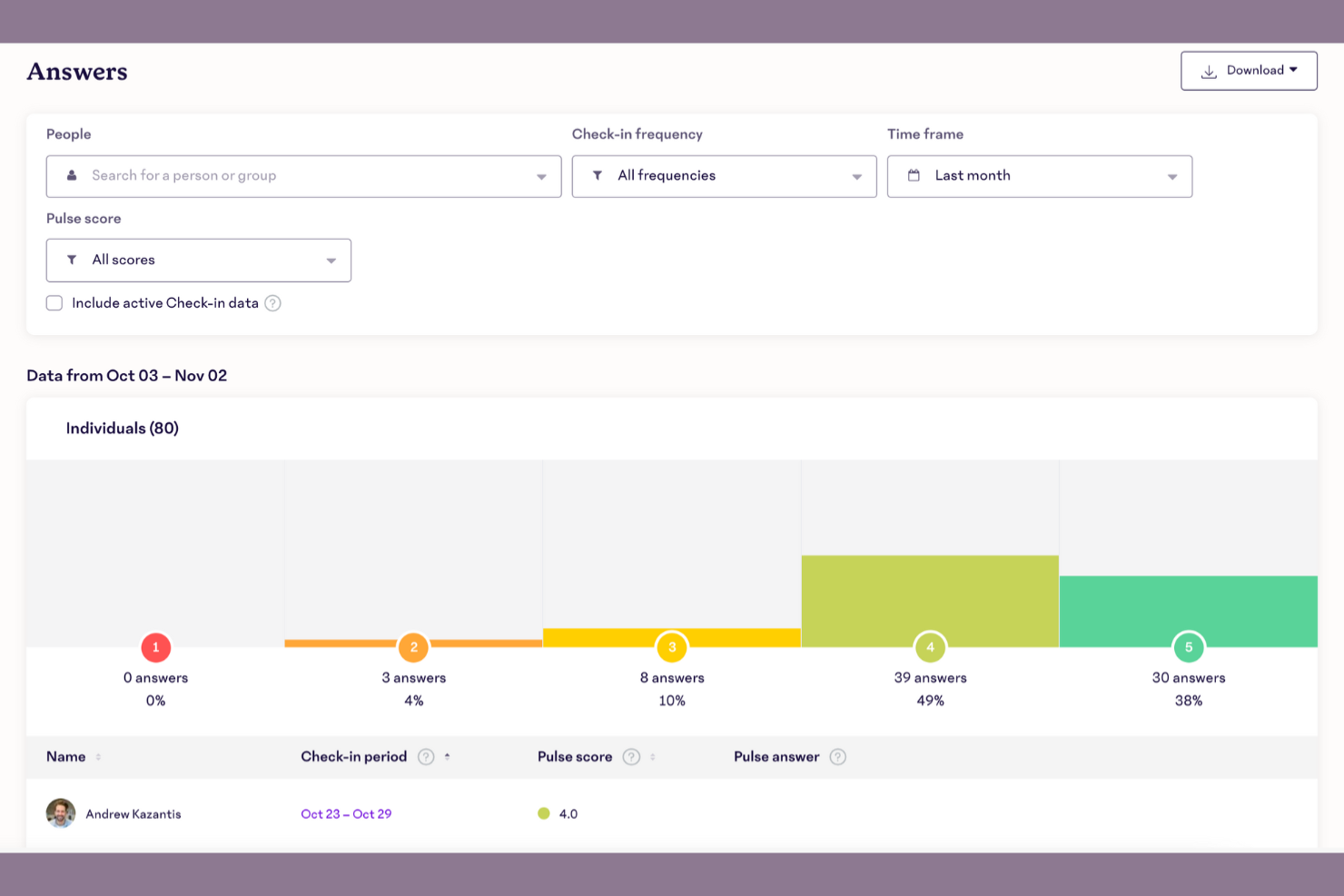
15five is an employee engagement and performance management tool tailored for small teams. It helps organizations boost productivity by facilitating regular check-ins, feedback, and performance reviews.
Why I picked 15five: It's designed with small teams in mind, offering features that foster communication and growth. Weekly check-ins allow your team to share updates and challenges, while performance reviews help align individual goals with company objectives. Its simplicity makes it easy for smaller teams to adopt and integrate into their daily workflows.
Standout features and integrations:
Features include goal tracking to help your team stay focused on employee performance priorities, one-on-one meeting templates to facilitate meaningful conversations, and a recognition feature that lets team members acknowledge each other's efforts.
Integrations include Slack, BambooHR, Google Calendar, ADP, Salesforce, Jira, and more.
Pros and Cons
Pros:
- Helps structure one-on-one conversations
- Built-in tools for goals and OKRs
- Weekly check-ins encourage continuous feedback
Cons:
- Survey customization options feel limited
- Deeper analytics require higher-tier plans

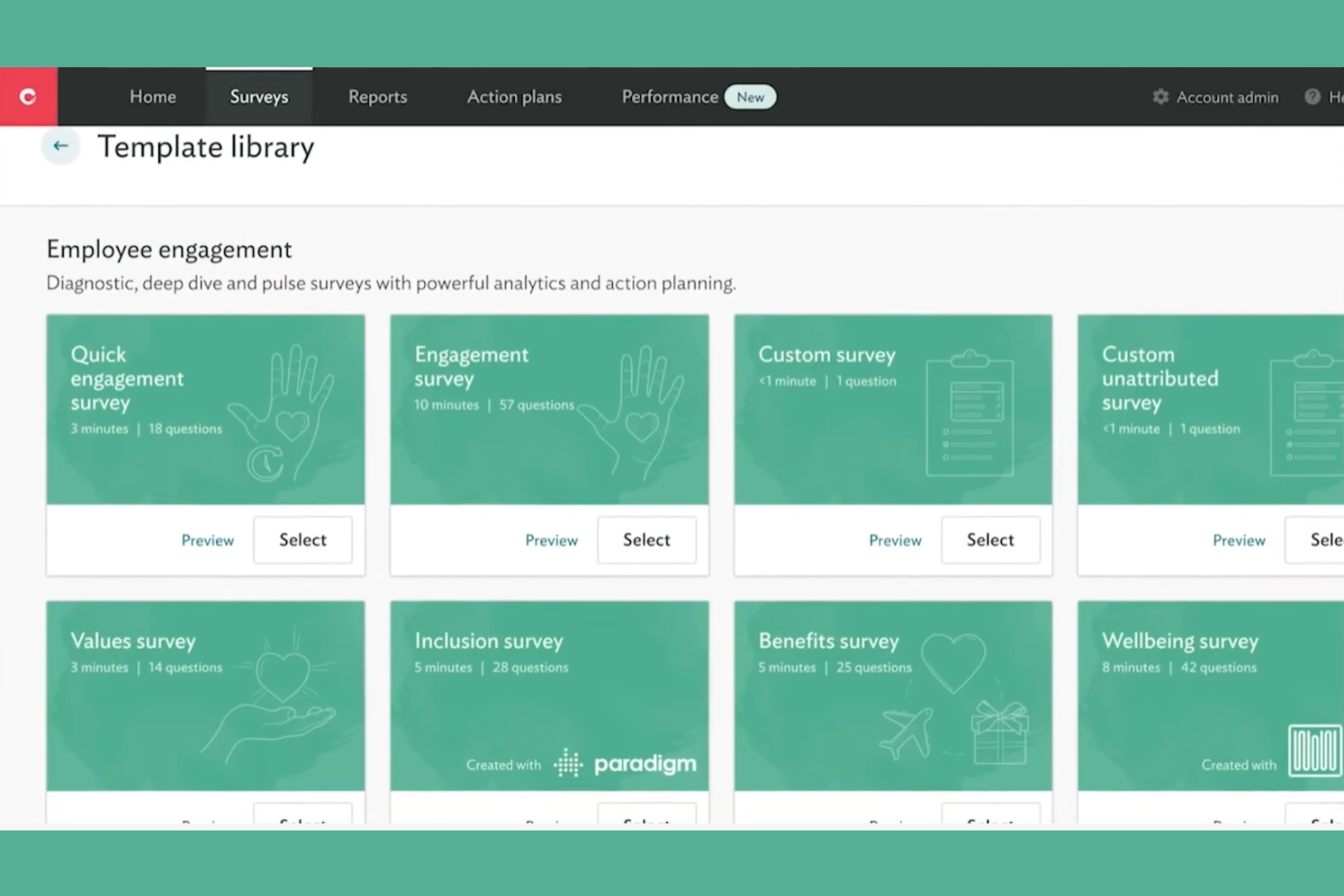
Culture Amp is an employee engagement platform designed for organizations seeking data-driven insights to improve workplace culture and company culture. It serves HR professionals and team leaders by offering tools to collect and analyze employee feedback.
Why I picked Culture Amp: The platform excels in providing data-driven insights, making it ideal for organizations focused on evidence-based decision-making. It offers customizable surveys that enable you to gather specific feedback from your team and an analytics dashboard to help you identify trends and areas for improvement. Its focus on data ensures you can make informed decisions about your workplace culture.
Standout features and integrations:
Features include pulse surveys that allow you to regularly check in with your team, heatmaps to highlight areas that need attention, and actionable insights to guide you in implementing changes based on feedback.
Integrations include Slack, Microsoft Teams, BambooHR, ADP, SAP SuccessFactors, and more.
Pros and Cons
Pros:
- Supports complex, global organizational structures
- Rich analytics and benchmark comparisons
- Strong engagement surveys with expert templates
Cons:
- Pricing may challenge smaller organizations
- Setup and configuration can be complex

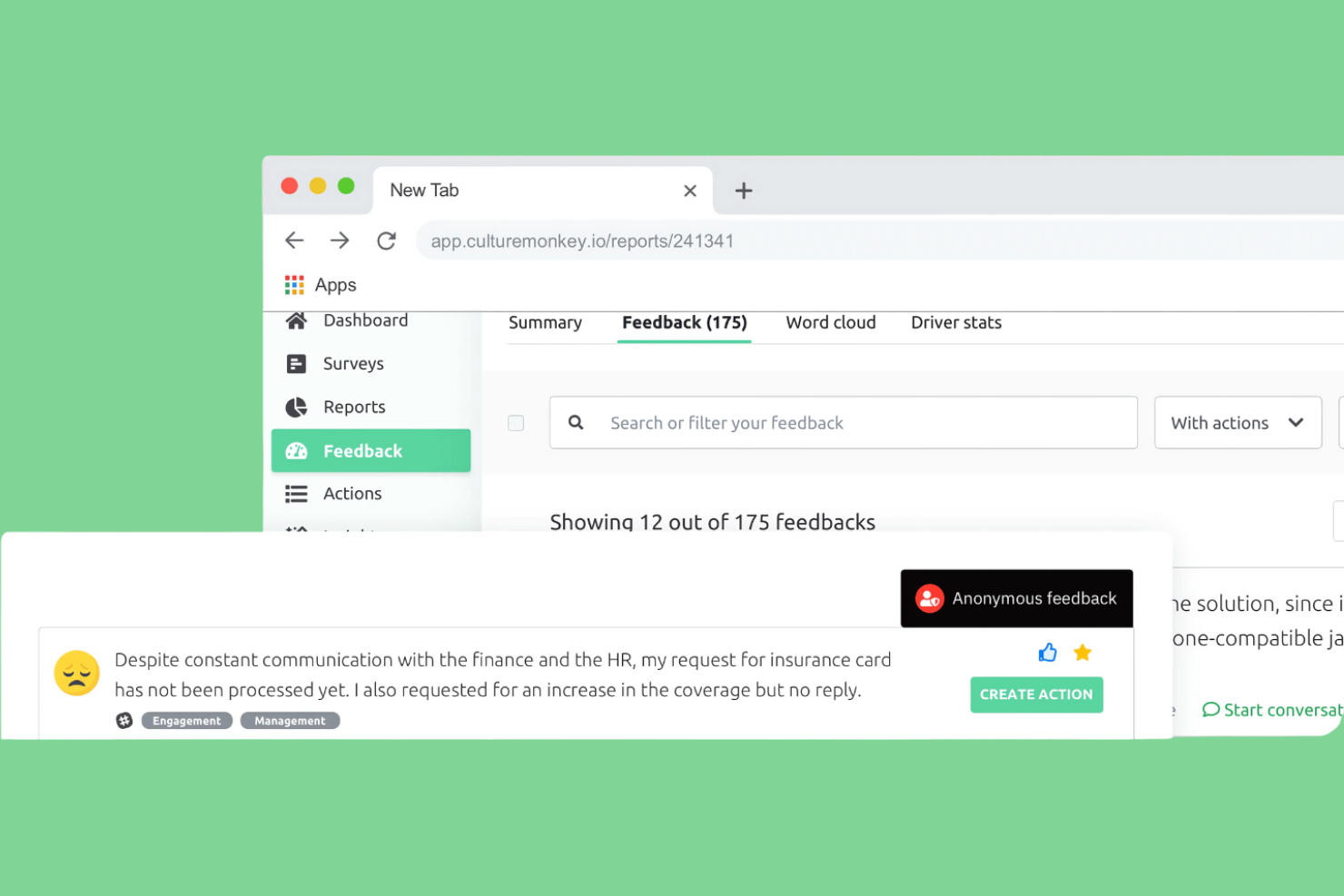
CultureMonkey is an employee engagement platform designed for companies looking to enhance team morale and productivity. It caters to a wide range of industries, providing tools for collecting feedback and measuring engagement metrics.
Why I picked CultureMonkey: This platform stands out for its continuous feedback capabilities and customizable surveys that allow you to gather real-time insights from your team. Anonymous feedback tools ensure candid responses, which can be crucial for understanding employee sentiments, while analytics help track engagement trends over time, fostering ongoing communication within your organization.
Standout features and integrations:
Features include customizable surveys that allow you to tailor questions to fit your team's needs. Real-time analytics provide insights into engagement metrics, helping you make informed decisions, while anonymous feedback ensures your team can share their thoughts openly.
Integrations include Workday, SuccessFactors, Darwinbox, Oracle, and more.
Pros and Cons
Pros:
- Includes a helpful survey templates library
- Pulse surveys provide timely insights
- Anonymous feedback encourages honest responses
Cons:
- New admins report initial learning curve
- Limited integrations versus larger suites

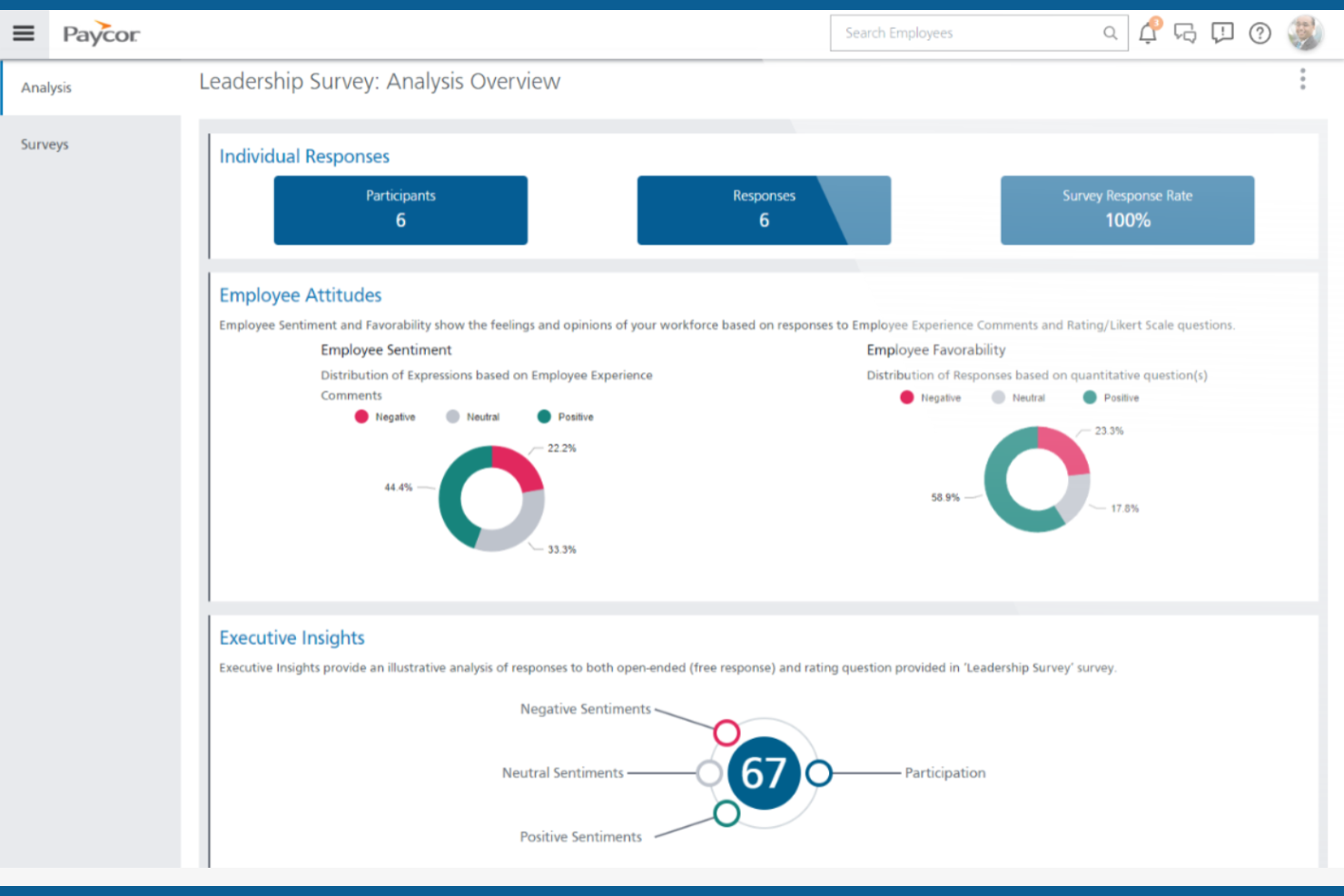
Paycor is a human capital management platform designed for businesses seeking efficient payroll and HR solutions. It primarily serves HR managers and payroll specialists by offering tools for managing payroll, benefits, and employee data within a unified HRIS.
Why I picked Paycor: The platform offers strong payroll integration, making it a go-to choice for businesses focused on efficient payroll processing, with automated calculations and compliance checks. It also offers a unified interface for handling HR tasks, reducing the need for multiple systems, and detailed reporting features to provide insights into workforce management.
Standout features and integrations:
Features include automated tax filing, ensuring compliance with the latest regulations, employee self-service that lets your team access their information anytime, and an onboarding feature that simplifies bringing new hires into your organization.
Integrations include QuickBooks, Timeero, Guusto, 15five, Listo, and more.
Pros and Cons
Pros:
- Links engagement insights to payroll data
- Templates cover engagement and leadership topics
- Pulse surveys built into HR platform
Cons:
- Requires regular updates
- Reporting and dashboards can feel complex

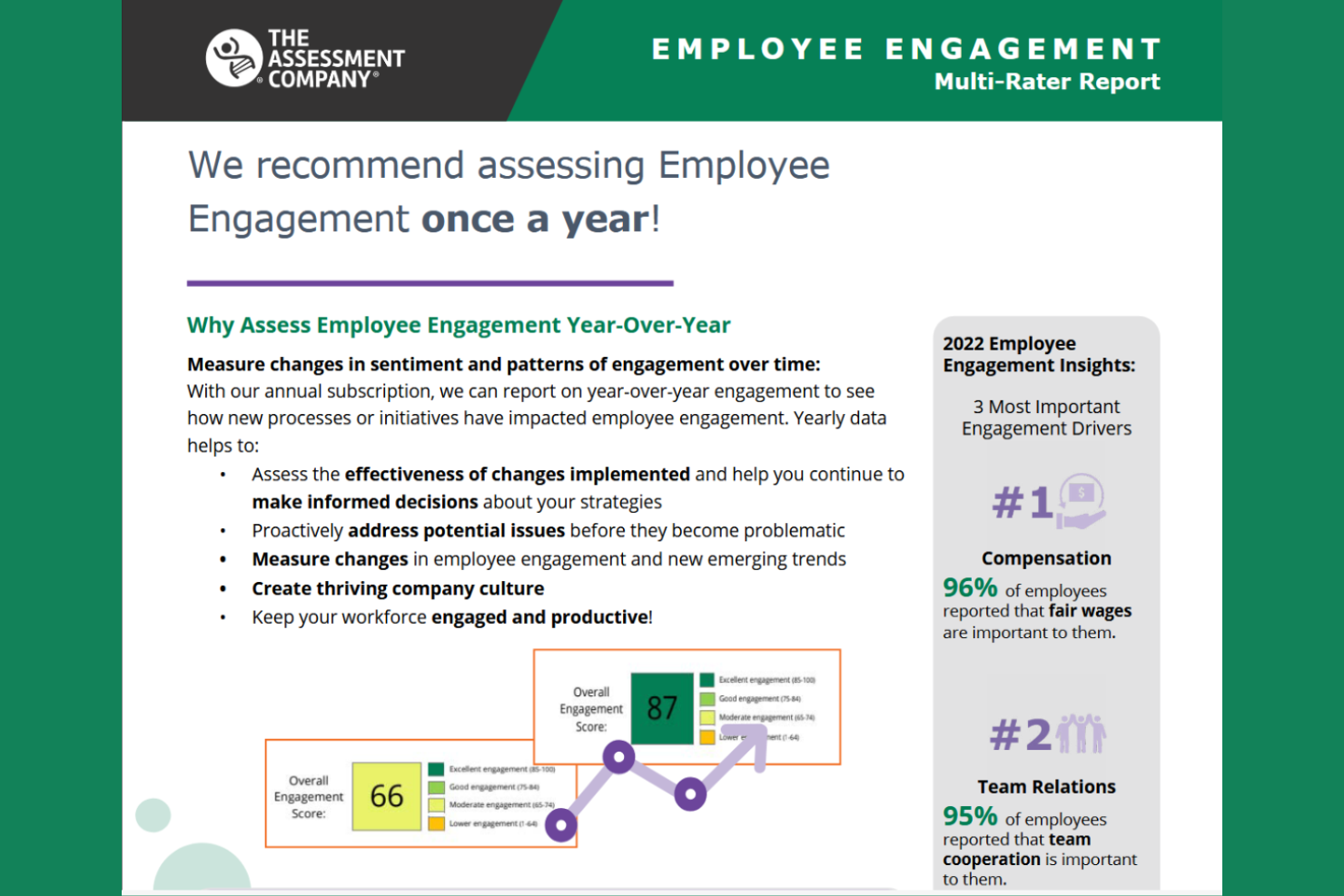
The Assessment Company offers a suite of assessment tools to help organizations ensure compliance and optimize talent management. It primarily serves HR departments and compliance officers by providing assessments that align with industry regulations and standards.
Why I picked The Assessment Company: This tool is focused on compliance, making it ideal for organizations in highly regulated industries. It offers a variety of assessments that help you ensure your team meets necessary standards and compliance-focused reports that provide insights into areas that require attention. Its ability to align with industry regulations sets it apart for organizations prioritizing compliance.
Standout features and integrations:
Features include detailed compliance reports that help you track adherence to industry standards, customizable assessments to fit your specific compliance needs, and an analytics dashboard that provides insights into assessment results, supporting your decision-making.
Integrations are not publicly listed.
Pros and Cons
Pros:
- Detailed reports support risk-focused decisions
- Good for compliance-driven industries
- 360-degree feedback and assessment tools
Cons:
- Advanced features need training
- Less emphasis on everyday engagement pulses

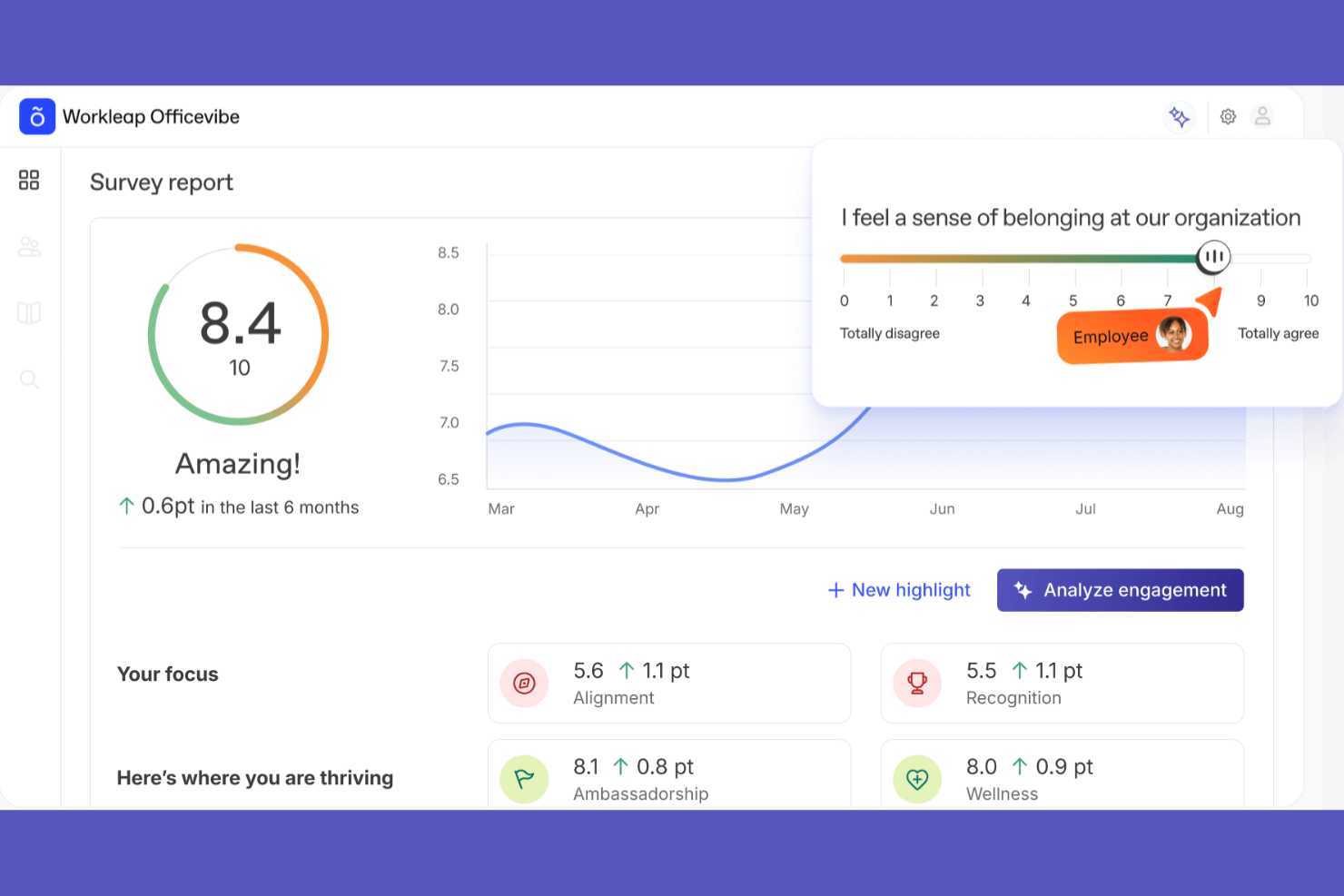
Officevibe is an employee engagement platform designed for teams looking to improve communication and collaboration. It serves managers and HR professionals by offering tools to collect feedback and enhance team dynamics through regular surveys and check-ins.
Why I picked Officevibe: This tool is ideal for boosting team engagement, focusing on creating open lines of communication. It provides weekly pulse surveys that help you gather insights into team morale and one-on-one meeting features to facilitate meaningful conversations. Its feedback system encourages continuous improvement and collaboration within teams.
Standout features and integrations:
Features include detailed analytics to track team engagement, customizable survey questions to fit your team's specific needs, and an anonymous feedback option so your team can share their honest thoughts.
Integrations include Slack, Microsoft Teams, BambooHR, ADP, Workday, SAP SuccessFactors, PeopleHR, and more.
Pros and Cons
Pros:
- Supports structured manager one-on-one meetings
- Very simple interface for busy managers
- Anonymous pulse surveys encourage candid feedback
Cons:
- Basic feature set
- Limited reporting depth for enterprises

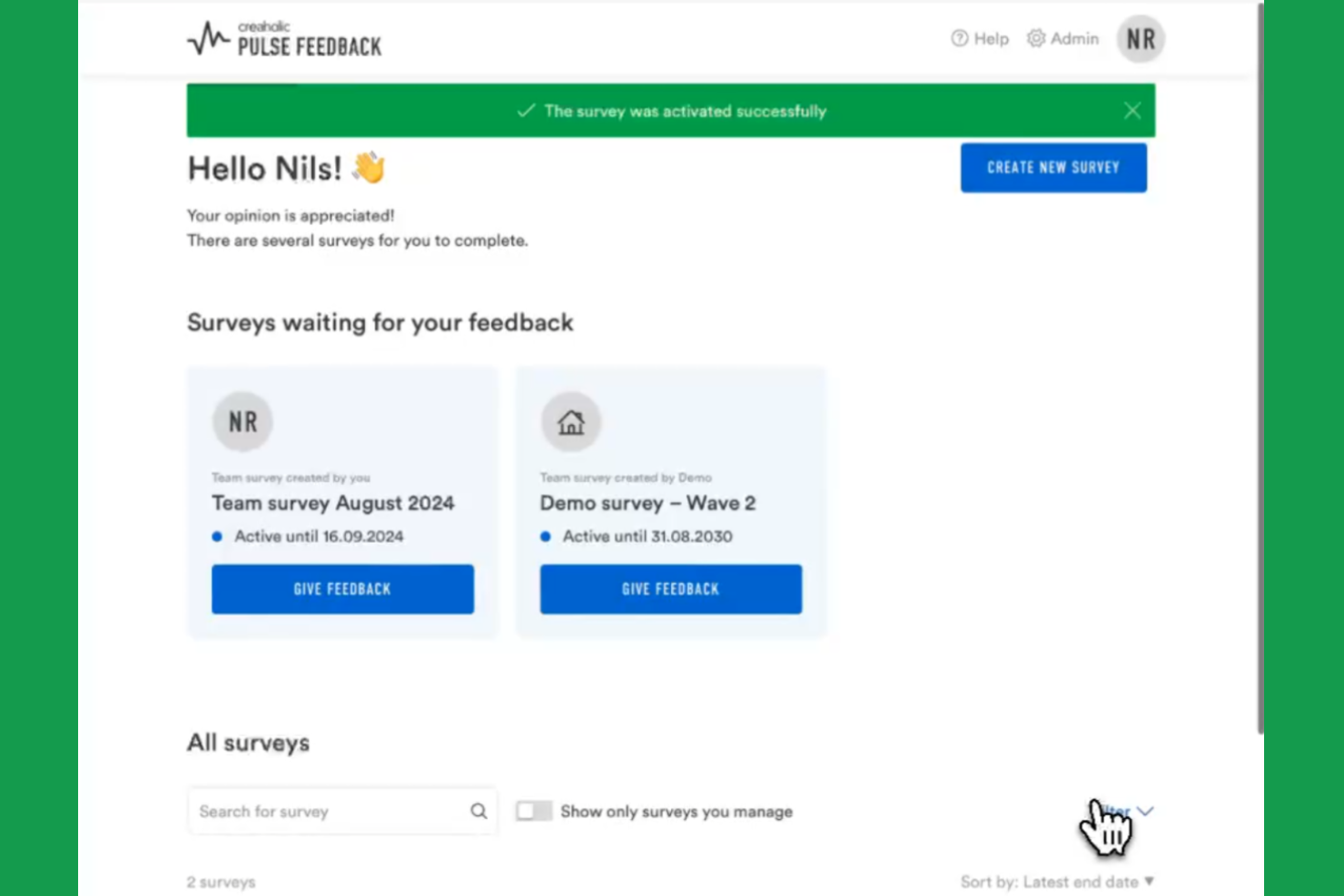
Pulse Feedback is an employee engagement tool designed for organizations seeking straightforward methods to gather and analyze employee sentiment. It caters to teams and HR professionals who want to understand and improve workplace dynamics through regular feedback.
Why I picked Pulse Feedback: This tool excels in providing a simple setup, making it accessible for teams without extensive technical expertise. It offers user-friendly survey templates that allow you to quickly gather feedback and real-time analytics to help you track engagement levels. Its intuitive dashboard ensures that you can easily interpret the data and make informed decisions.
Standout features and integrations:
Features include customizable survey templates that make it easy to tailor questions to your team's needs, real-time analytics to help you understand engagement trends, and automated reporting features.
Integrations include Slack, Microsoft Teams, BambooHR, Workday, ADP, Google Workspace, Office 365, SAP SuccessFactors, Oracle, and Salesforce.
Pros and Cons
Pros:
- Clear dashboards highlight engagement trends quickly
- Short surveys encourage higher participation rates
- Designed specifically for pulse-style surveys
Cons:
- Fewer integrations than larger survey platforms
- Focus on feedback only, with limited HR

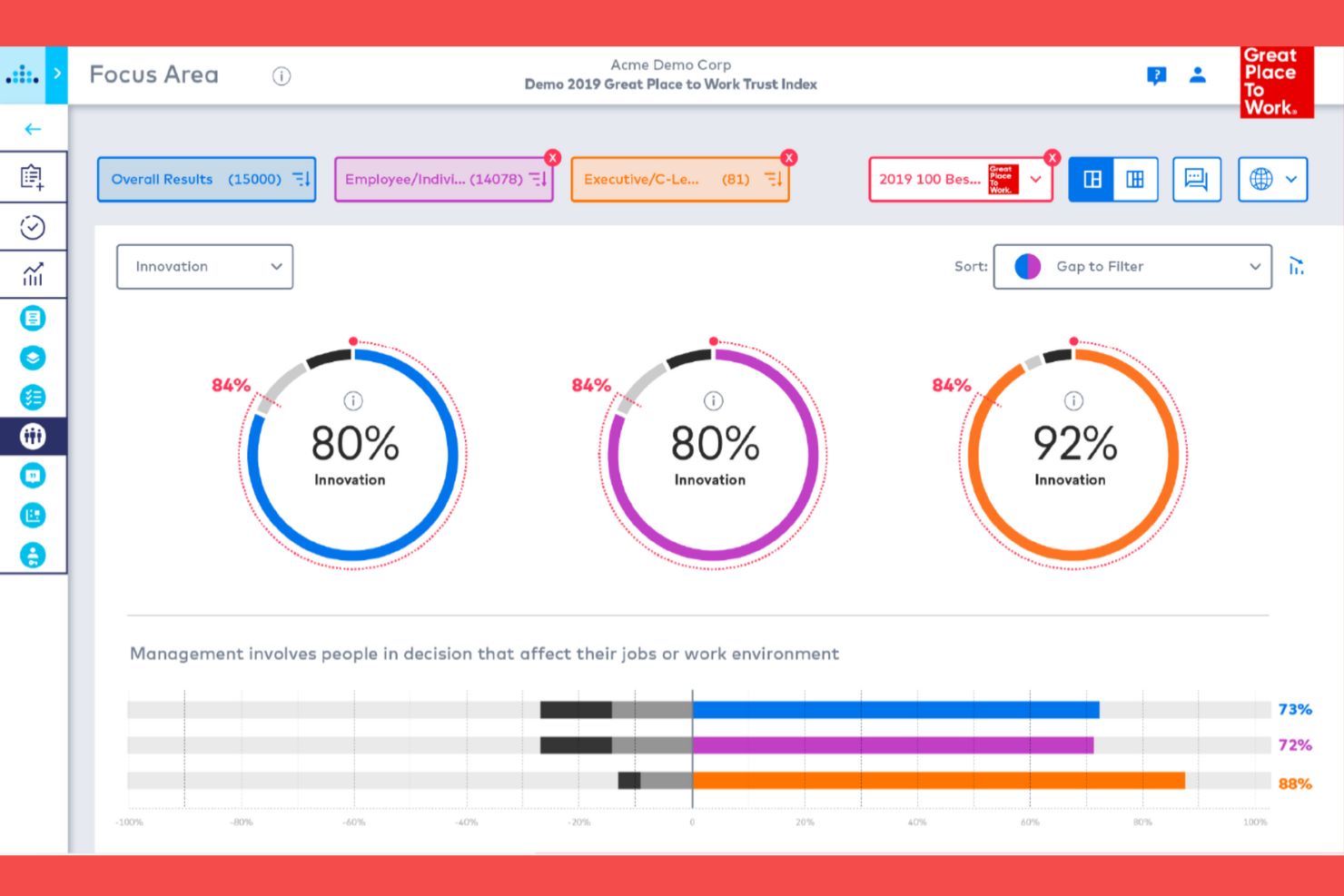
Great Place To Work is an employee survey platform for organizations to benchmark workplace culture against industry standards. It serves HR leaders and managers by providing tools to collect comprehensive employee feedback and improve organizational culture and company values.
Why I picked Great Place To Work: The tool is tailored for benchmarking, allowing you to compare your workplace culture with industry standards, identify areas for improvement, and celebrate successes. It offers detailed survey templates that cover various aspects of employee engagement and analytics to provide insights into how your organization compares to others.
Standout features and integrations:
Features include customizable survey templates, detailed analytics to help you understand employee sentiment, and benchmarking reports that give you a clear picture of how your culture compares to industry standards.
Integrations are not publicly listed.
Pros and Cons
Pros:
- Surveys focused on trust and culture
- Strong benchmarks across industries and sizes
- Trusted methodology with long-term benchmark data
Cons:
- May feel heavy for smaller teams
- Geared to certification over everyday pulses

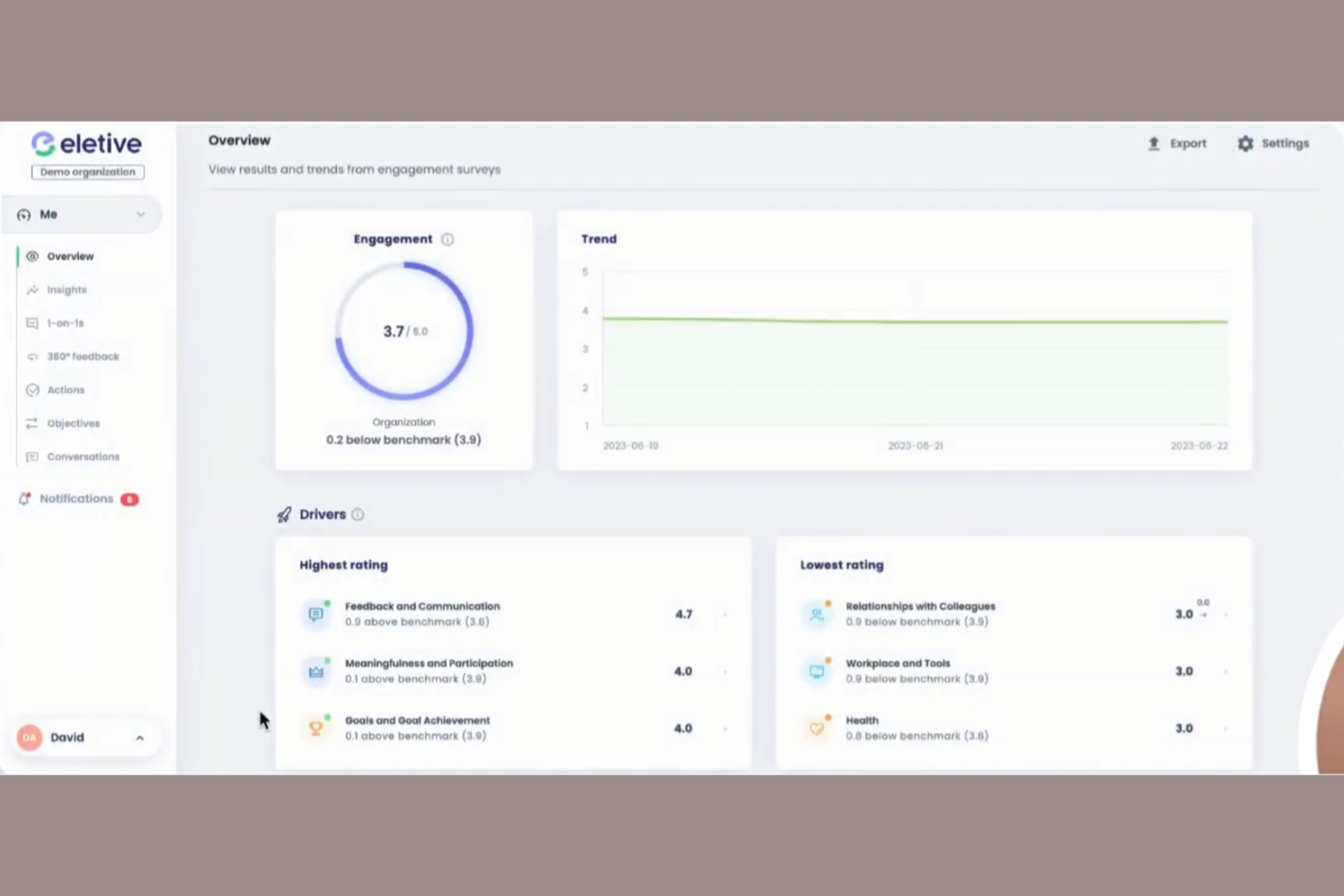
Eletive is an employee engagement platform for organizations that want to leverage real-time analytics and improve workplace culture. It serves managers and HR teams by providing tools to gather and analyze employee feedback effectively.
Why I picked Eletive: The platform's real-time analytics provide instant insights into employee engagement. It features customizable surveys, enabling you to tailor questions to your specific needs, and a dashboard that displays data in an easy-to-understand format, helping you identify trends quickly. These capabilities make it a strong choice for those who want immediate feedback and actionable insights.
Standout features and integrations:
Features include pulse surveys that allow for frequent check-ins with your team, heatmaps that provide a visual representation of engagement levels across different departments, and sentiment analysis that helps you understand the underlying mood of your team.
Integrations include Slack, Microsoft Teams, BambooHR, Workday, ADP, Google Workspace, SAP SuccessFactors, and more.
Pros and Cons
Pros:
- Intuitive dashboards aid non-technical managers
- Real-time analytics highlight engagement trends
- Frequent pulse surveys support continuous feedback
Cons:
- Limited survey customization options
- Navigation can feel confusing at first

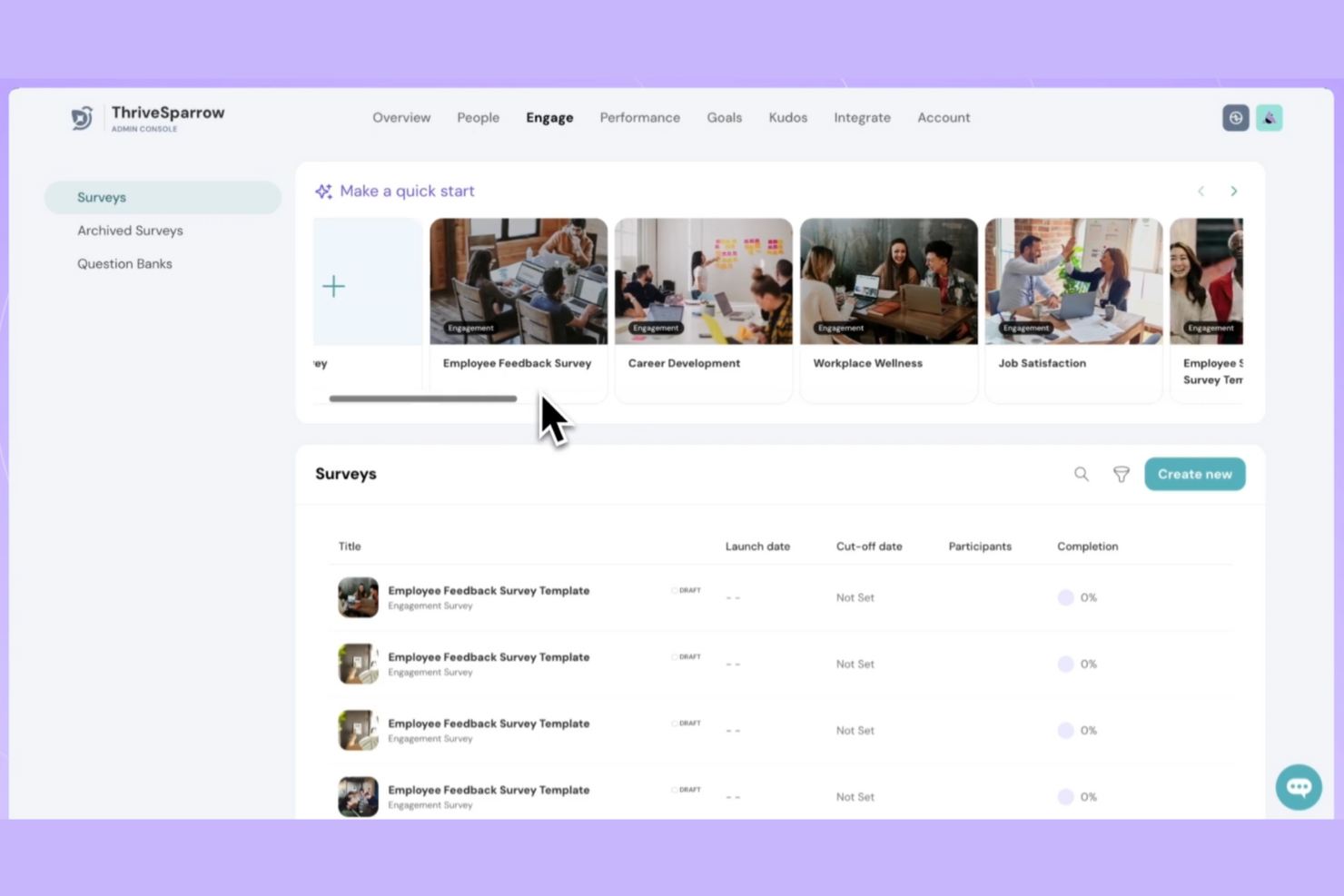
ThriveSparrow is an AI-powered performance management platform tailored for organizations looking to boost employee engagement and performance. It provides tools for 360-degree performance reviews, goal tracking, and employee engagement surveys, focusing on enhancing team dynamics and alignment.
Why I picked ThriveSparrow: This platform excels in offering custom surveys, making it ideal for organizations needing tailored feedback solutions. It includes multilingual surveys, allowing you to reach a global workforce effectively, while the 360-degree feedback feature supports comprehensive performance evaluations. Automated recognition tools help boost morale and acknowledge achievements.
Standout features and integrations:
Features include automated recognition with a wide range of global gift cards, AI-driven sentiment analysis to gauge employee mood, and QR code sharing for surveys to facilitate easy distribution and participation.
Integrations include BambooHR, ADP, Google, Slack, Workday, SAP SuccessFactors, Freshteam, Namely, and more.
Pros and Cons
Pros:
- Clean interface
- Built-in peer recognition via Kudos
- Quick pulse surveys with useful analytics
Cons:
- Limited language support
- Advanced features need training
Other Employee Pulse Survey Tools
Here are some additional employee pulse survey tool options that didn’t make it onto my shortlist, but are still worth checking out:
- ProProfs Survey Maker
For quiz features
- SurveySparrow
For conversational surveys
- Lattice
For goal management
- Connecteam
For mobile teams
- Motivosity
For peer recognition
- Paycom
For HR integration
- Qualtrics
For advanced analytics
- Quantum Workplace
For survey automation
- Zoho Survey
For multilingual support
- Explorance
For feedback dashboards
- Gallup
For research benchmarks


Employee Pulse Survey Tool Selection Criteria
When selecting the best employee pulse survey tools to include in this list, I considered common buyer needs and pain points such as gathering accurate employee feedback and improving engagement metrics. I also used the following framework to keep my evaluation structured and fair:
Core Functionality (25% of total score)
To be considered for inclusion in this list, each solution had to fulfill these common use cases:
- Collecting anonymous employee feedback
- Conducting regular pulse surveys and pulse checks
- Monitoring engagement trends over time
- Providing actionable insights
- Supporting customizable survey templates
Additional Standout Features (25% of total score)
To help further narrow down the competition, I also looked for unique features, such as:
- Real-time analytics dashboards
- Multilingual survey support
- AI-driven sentiment analysis
- Benchmarking against industry standards
- Integration with performance management tools
Usability (10% of total score)
To get a sense of the usability of each system, I considered the following:
- Intuitive user interface
- Easy navigation and accessibility
- Minimal learning curve
- Responsive design for mobile use
- Clear and concise reporting tools
Onboarding (10% of total score)
To evaluate the onboarding experience for each platform, I considered the following:
- Availability of training videos
- Interactive product tours
- Access to ready-to-use templates and survey creation tools
- Supportive chatbots and FAQs
- Regular webinars for new users
Customer Support (10% of total score)
To assess each software provider’s customer support services, I considered the following:
- 24/7 customer support availability
- Access to a dedicated account manager
- Multiple support channels (email, phone, chat)
- Comprehensive online knowledge base
- Quick response times to inquiries
Value For Money (10% of total score)
To evaluate the value for money of each platform, I considered the following:
- Competitive pricing compared to features offered
- Transparent pricing structure
- Availability of free trials or demos
- Discounts for long-term commitments
- Cost-effectiveness for various team sizes
Customer Reviews (10% of total score)
To get a sense of overall customer satisfaction, I considered the following when reading customer reviews:
- Positive feedback on feature effectiveness
- Consistent praise for ease of use
- Satisfaction with customer support
- Reports on ROI and value realization
- User recommendations and endorsements
How To Choose Employee Pulse Survey Tools
It’s easy to get bogged down in long feature lists and complex pricing structures. To help you stay focused as you work through your unique software selection process, here’s a checklist of factors to keep in mind:
| Factor | What to Consider |
|---|---|
| Scalability | Can the tool grow with your team? Make sure it supports your current size and can handle future growth without extra costs or complexity. |
| Integrations | Does it connect with your existing systems? Check if it integrates with HR software, communication tools, and other platforms you already use. |
| Customizability | Can you tailor it to fit your needs? Look for features that let you customize surveys and reports to match your specific requirements. |
| Ease of use | Is it user-friendly? Ensure team members can navigate the tool easily without needing extensive training or support. |
| Implementation and onboarding | How quickly can you get started? Evaluate the time and resources needed to implement the tool and onboard your team effectively. |
| Cost | Does it fit your budget? Consider the total cost, including any hidden fees, and whether the pricing aligns with the value you expect to gain. |
| Security safeguards | Is your data safe? Verify the tool offers robust security measures like encryption, access controls, and compliance with data protection regulations. |
| Support availability | What support options are offered? Check if there’s 24/7 support, dedicated account managers, and multiple contact channels like chat or phone. |
What Are Employee Pulse Survey Tools?
Employee pulse survey tools are survey software applications designed to gather quick, regular feedback from employees to gauge workplace sentiment and engagement. HR professionals, managers, and team leaders generally use these tools to understand employee morale and identify areas for improvement. Real-time feedback, customizable surveys, and analytics capabilities help with tracking engagement trends across the employee lifecycle, addressing concerns, and making data-driven decisions. These tools provide value by enhancing communication, generating valuable insights, and fostering a positive work environment.
Features
When selecting employee pulse survey tools, keep an eye out for the following key features:
- Real-time feedback: Allows instant collection and analysis of survey responses and employee sentiments, helping you address issues promptly.
- Customizable survey option: Enables tailoring of questions to fit your organization's specific needs, ensuring relevant and actionable insights.
- Analytics dashboard: Provides visual representations of data trends in survey results, making it easier to track engagement and identify areas for improvement.
- Sentiment analysis: Analyzes employee feedback to gauge overall mood and morale, aiding in understanding workplace dynamics.
- Benchmarking reports feature: Compares your organization’s engagement metrics against industry standards, helping you identify strengths and weaknesses across different demographics.
- Multilingual support: Offers surveys in multiple languages, ensuring accessibility for a diverse workforce.
- Automated reporting: Generates reports automatically, saving time and ensuring consistent data presentation.
- Integration: Connects with existing HR and communication systems, streamlining data flow and enhancing functionality.
- Mobile accessibility: Allows employees to participate in surveys from any device, increasing response rates and convenience.
- Security safeguarding: Ensures data protection through encryption and compliance with data privacy regulations, safeguarding sensitive survey data and employee information.
Benefits
Implementing employee pulse survey tools provides several benefits for your team and your business. Here are a few you can look forward to:
- Improved communication: Facilitating open dialogue between employees and management fosters a more transparent workplace.
- Increased engagement: Receiving regular feedback helps identify engagement issues, allowing for timely interventions and engagement initiatives to boost morale.
- Data-driven decisions: Reporting and analytics provide insights that guide strategic decision-making and policy adjustments.
- Enhanced productivity: Understanding employee needs and concerns leads to a more motivated and efficient workforce.
- Better retention: Identifying and addressing dissatisfaction early can reduce turnover and improve employee satisfaction.
- Cultural insights: Benchmarking against industry standards helps you understand your workplace culture in context and make necessary improvements.
Costs and Pricing
Selecting employee pulse survey tools requires an understanding of the various pricing models and plans available. Costs vary based on features, team size, add-ons, and more. The table below summarizes common plans, their average prices, and typical features included in employee pulse survey tools solutions:
Plan Comparison Table for Employee Pulse Survey Tools
| Plan Type | Average Price | Common Features |
|---|---|---|
| Free Plan | $0 | Basic surveys, limited analytics, and community support. |
| Personal Plan | $5-$25/user/month | Customizable surveys, basic reporting, and email support. |
| Business Plan | $30-$60/user/month | Advanced analytics, integration capabilities, and priority customer support. |
| Enterprise Plan | $70-$100/user/month | Full customization, dedicated account management, and comprehensive security measures. |
Employee Pulse Survey Tools FAQs
Here are some answers to common questions about employee pulse survey tools:
How often should I conduct employee pulse surveys?
Conducting employee pulse surveys regularly, such as monthly, quarterly, or even annual surveys, is good practice. It helps you keep track of changes in employee sentiment and engagement over time. The frequency might depend on your organization’s size and specific needs. Smaller teams might benefit from more frequent surveys, while larger organizations might choose a quarterly schedule. Consistency is key, as it establishes a routine and makes employees more comfortable with providing feedback.
Can employee pulse surveys be anonymous?
Yes, most employee pulse survey tools allow for anonymous responses. Anonymity encourages honest feedback, as employees feel safer sharing their true thoughts without fear of repercussions. When setting up your surveys, ensure the anonymity feature is enabled. This builds trust and leads to more accurate insights into your team’s morale and concerns.
How can I increase employee participation in pulse surveys?
Clearly communicate the survey’s purpose, keep surveys short, and share results and follow-up actions with your team. Let employees know their input leads to real changes. Reminders and an easy-to-use interface also boost response rates.
What types of questions should I include in a pulse survey?
Include questions that focus on employee engagement, satisfaction, and well-being. Ask about their workload, team dynamics, and overall job satisfaction. Use a mix of open-ended questions and multiple-choice questions to gather both quantitative and qualitative data. Tailor questions to suit your company’s specific goals and challenges. Regularly updating your questions keeps them relevant and engaging.
What types of insights can I expect from pulse survey analytics?
You’ll get real-time data on employee engagement, morale, areas of concern, and trends over time. Many platforms offer dashboards that highlight top issues, heatmaps by department, and automated suggestions for improvement. Use these insights for data-driven decisions.
How should I act on the feedback from pulse surveys?
Acting on feedback involves analyzing the data to identify trends and areas for improvement. Share the results with your team and discuss potential action plans. Prioritize issues that can have a significant impact on employee morale, changes, and monitor their effectiveness in subsequent surveys. Showing your team that their feedback leads to tangible improvements, builds trust, and encourages continued participation.
What’s Next:
If you're in the process of researching employee pulse survey tools, connect with a SoftwareSelect advisor for free recommendations.
You fill out a form and have a quick chat where they get into the specifics of your needs. Then you'll get a shortlist of software to review. They'll even support you through the entire buying process, including price negotiations.