
22 Best Org Chart Tools to Visualize Teams in 2026

20 Best Org Chart Tools Shortlist
Here's my pick of the 20 best software from the 22 tools reviewed.


The best org chart tools help HR professionals quickly visualize team structures, map reporting lines, and adapt to organizational changes without the hassle of clunky spreadsheets or outdated diagrams. Whether you're still managing org charts manually or stuck with software that can’t keep up with evolving roles, these tools offer real-time visibility into your workforce so you can plan confidently, communicate clearly, and scale smarter.
As a former HR administrator, I’ve wrestled with the pain of trying to keep an org chart current (in Excel, no less!)—only to have it become outdated the moment someone changes roles, joins, or leaves the company. Since then, I’ve tested and reviewed dozens of HR tools, and in this article, I’ll walk you through the best org chart tools available today.
These tools eliminate tedious updates, support transparency across your organization, and help you confidently align talent with business goals—whether you’re navigating growth, restructuring, or simply improving internal communication.
Why Trust Our Software Reviews
We've been testing and reviewing HR software since 2019. As HR professionals ourselves, we know how critical and difficult it is to make the right decision when selecting software.
We invest in deep research to help our audience make better software purchasing decisions. We've tested more than 2,000 tools for different HR use cases and written over 1,000 comprehensive software reviews. Learn how we stay transparent, and take a look at our software review methodology.
Best Org Chart Tools: Comparison Chart
This comparison chart summarizes pricing, trial, and demo details for my top org chart software selections to help you find the best tool for your budget and business needs.
| Tool | Best For | Trial Info | Price | ||
|---|---|---|---|---|---|
| 1 | Best for up-to-date org charts that boost team connection | Free trial available | From $1.50/user/month | Website | |
| 2 | Best for visualizing employee data | Free demo + free plan available | From $8/user/month | Website | |
| 3 | Best for tagging profiles with skills and expertise | Free demo available | Pricing upon request | Website | |
| 4 | Best for creating org charts from existing data | Free plan available | From $9/user/month (billed annually) | Website | |
| 5 | Best for an org chart within an LMS | Free 30-day trial | From $3.58/user/month (billed annually) | Website | |
| 6 | Best org chart maker within a collaborative whiteboard platform | Free plan available | From $8/user/month (billed annually) | Website | |
| 7 | Best org chart tool that also helps you manage your OKRs within the same workspace | Free trial available | From $10/user/month | Website | |
| 8 | Best org chart tool for real-time collaboration features | Free plan available | From $5/user/month (billed annually) | Website | |
| 9 | Best org chart tool for intelligent formatting | Free trial available | From $7.95/user/month (billed annually) | Website | |
| 10 | Best for automated org chart creation | Free demo available | From $1.05/user/month (billed annually) | Website | |
| 11 | Best for tailoring org charts for different user groups | Free demo + free trial available | Pricing upon request | Website | |
| 12 | Best for resource planning | 28-day free trial | From $5/user/month | Website | |
| 13 | Best organizational planning tool for human resources and sales teams | 14-day free trial | From $20/month (3 users) | Website | |
| 14 | Best for diverse org chart templates | 30-day free trial | From $5/user/month (billed annually) | Website | |
| 15 | Best for creating interactive org charts and flowcharts | 14-day free trial | Pricing upon request | Website | |
| 16 | Best for using existing Active Directory and Microsoft 365 profile data | 14-day free trial | From $299/month | Website | |
| 17 | Best org chart tool for workforce optimization | 22-day free trial | From $72/month for 3 users (billed annually) | Website | |
| 18 | Best for real-time org chart updates | 15-day free trial + free demo | Starting at $299/month | Website | |
| 19 | Best org chart software for analytics and performance metrics | Free demo available | From $7/user/month | Website | |
| 20 | Best for dynamic AI org charts | 30-day free trial | From $199/seat/month | Website |


-

Checkr
Visit WebsiteThis is an aggregated rating for this tool including ratings from Crozdesk users and ratings from other sites.4.5 -
Kudoboard
Visit WebsiteThis is an aggregated rating for this tool including ratings from Crozdesk users and ratings from other sites.4.8 -
Native Teams
Visit WebsiteThis is an aggregated rating for this tool including ratings from Crozdesk users and ratings from other sites.4.9





Reviews of the Best Org Chart Tools
Here’s a brief description of each org chart tool that explains each system’s best use case, some noteworthy features, and pros & cons. I’ve also included screenshots to give you a snapshot of their user interface too.


Sift is built for organizations that need up-to-date org charts and connected people profiles—ideal for mid-to-large teams where locating skills, relationships, or structure fast makes a difference. It lets you visualise your workforce, tap into hidden expertise and keep chart data in sync with your HR/IT systems.
Who Is Sift Best For?
Organizations that want a live, automatically updated org chart to help employees quickly understand reporting structures, team connections, and internal expertise.
Why I Picked Sift
I picked Sift because it gives your team a living org chart that updates itself from HR data while you spend your time getting work done. You can dive into a colleague’s profile and see skills, interests, and even project history—not just their job title.
You’ll also find indirect “dotted-line” relationships, letting you explore networks beyond the formal hierarchy. Since it embeds into tools like Microsoft Teams, your people stay connected in the apps they already use, not in a separate directory.
Lastly, because it pulls from existing systems, you avoid creating a siloed “who-knows-what” list and build a living resource your team will actually use.
Sift Key Features
Here are some standout features worth highlighting:
- Dynamic Org Chart: Auto-built and updated with your HR/IT data, giving a current view of reporting lines and teams.
- Advanced People Search: Filter by skills, interests, languages or project history—find the right person even if you don’t know their name.
- Customisable Profiles: Members can add name pronunciation, pronouns, interests and more, so you learn who they are not just what they do.
- Embedded Workflow: Access Sift from Teams, Outlook or your intranet—so directory lookup lives where your team already works.
Sift Integrations
Integrations include Azure Active Directory, LDAP agents, Microsoft 365 (Teams & Outlook), Google Workspace, Workday (HRIS), SuccessFactors, intranet widgets and mobile apps (iOS/Android).
Pros and Cons
Pros:
- Custom profiles help build employee understanding and connection
- Search by more than name/job title
- Automatically syncs org chart with HR/IT systems
Cons:
- Advanced customisation may require extra training
- Some integrations still require setup and IT time
New Product Updates from Sift

Sift Introduces Organizational Nodes for Org Chart Clarity
Sift introduces Organizational Nodes, adding high-level structural layers like departments and teams directly into org charts. This update helps users better understand company structure without being overwhelmed by individual profiles. For more information, visit Sift’s official site.
 .
.

ChartHop helps you visualize every part of your workforce in one place, making it ideal for HR and People Ops teams that need an org chart that reflects real-time data—not static diagrams. Its core strength is unifying profiles, reporting lines, locations, and historical changes so you can understand how your organization looks today and how it’s evolving.
Who Is ChartHop Best For?
HR and people operations teams that need to visualize workforce data, track headcount changes, and connect org charts with compensation and planning insights.
Why I Picked ChartHop
I picked ChartHop because it gives you an org chart that stays accurate by syncing directly with your HRIS, payroll, and ATS. You can filter views by team, location, or tenure and jump straight into each person’s profile to see job details, compensation history, and changes over time.
The timeline slider helps you understand past org shifts and preview how upcoming hires will reshape your structure. I also like that you can map where employees are located worldwide, which is especially helpful for distributed companies. And if you're planning future growth, its scenario-planning tools let you model headcount and budget changes before you commit.
ChartHop Key Features
Here are some standout features worth highlighting:
- Historic timeline slider: View past or projected org structure changes in a single interactive timeline.
- Drag-and-drop scenario modeling: Restructure teams or add roles and instantly see headcount or budget impact.
- Map view of locations: Display global or remote team distribution visually.
- Data sheet interface: Explore people data in a spreadsheet-like view with advanced filtering and sorting.
ChartHop Integrations
Integrations include ADP Run, BambooHR, Gusto, Greenhouse, Lever, Jobvite, Carta, UKG Ready, and QuickBooks Online.
Pros and Cons
Pros:
- Scenario planning supports headcount and budget forecasting
- Filters reveal structure by tenure, compensation, or geography
- Syncs with HRIS/payroll
Cons:
- Some users note a learning curve for advanced features
- Initial setup and data mapping can take time


If you’re managing a growing team across locations or time-zones and need a clear view of who does what and who reports to whom, Deel Org Chart makes that easier. It turns your employee directory into a searchable, tagged map of skills, roles and reporting lines—ideal for teams that use Slack and want fast access to the right person.
Who Is Deel Best For?
Global organizations that want org charts integrated with international hiring data, role tagging, and compliance management.
Why I Picked Deel Org Chart
I picked Deel Org Chart because it gives your team visibility into reporting structure and key milestones without manual updates. For example, you can search profile tags like “Python” or “UX researcher” to instantly find expertise across the org, which helps when you’re building cross-team projects.
It pushes notifications in Slack when someone joins, leaves or moves roles, so your org structure stays current without spreadsheets. I also like that it hooks into your HR or IT system to auto-update profiles, saving you from uploading static charts. And because it sits inside Slack (via the plugin), you don’t force users into a separate tool—your team stays where they already work.
Deel Org Chart Key Features
Here are some standout features worth highlighting:
- Tagged Employee Directory: Search and filter by skills, expertise, department or location.
- Automated Notifications: Receive real-time alerts in Slack when hires join, roles change or anniversaries hit.
- Data Sync with HRIS/IT Systems: Automatically updates org chart when backend records change.
- Exportable Org Views: Download high-quality org chart layouts for presentations or leadership reviews.
Deel Org Chart Integrations
Integrations include Slack, BambooHR, Workday, Okta, OneLogin, Netsuite, Expensify, SCIM.
Pros and Cons
Pros:
- Supports remote/multi-location teams
- Auto-updates org data
- Searchable by skill tags
Cons:
- Visualization layouts less customizable
- Primarily built for hierarchical structures
New Product Updates from Deel HR

Deel Expands Workplace Integrations With Microsoft Teams and Slack Alerts
Deel introduces Microsoft Teams HR approvals and consolidated Slack alerts for payouts, security, and compliance notifications. These updates help teams act faster and stay informed without leaving their communication tools. For more information, visit Deel’s official site.
 .
.
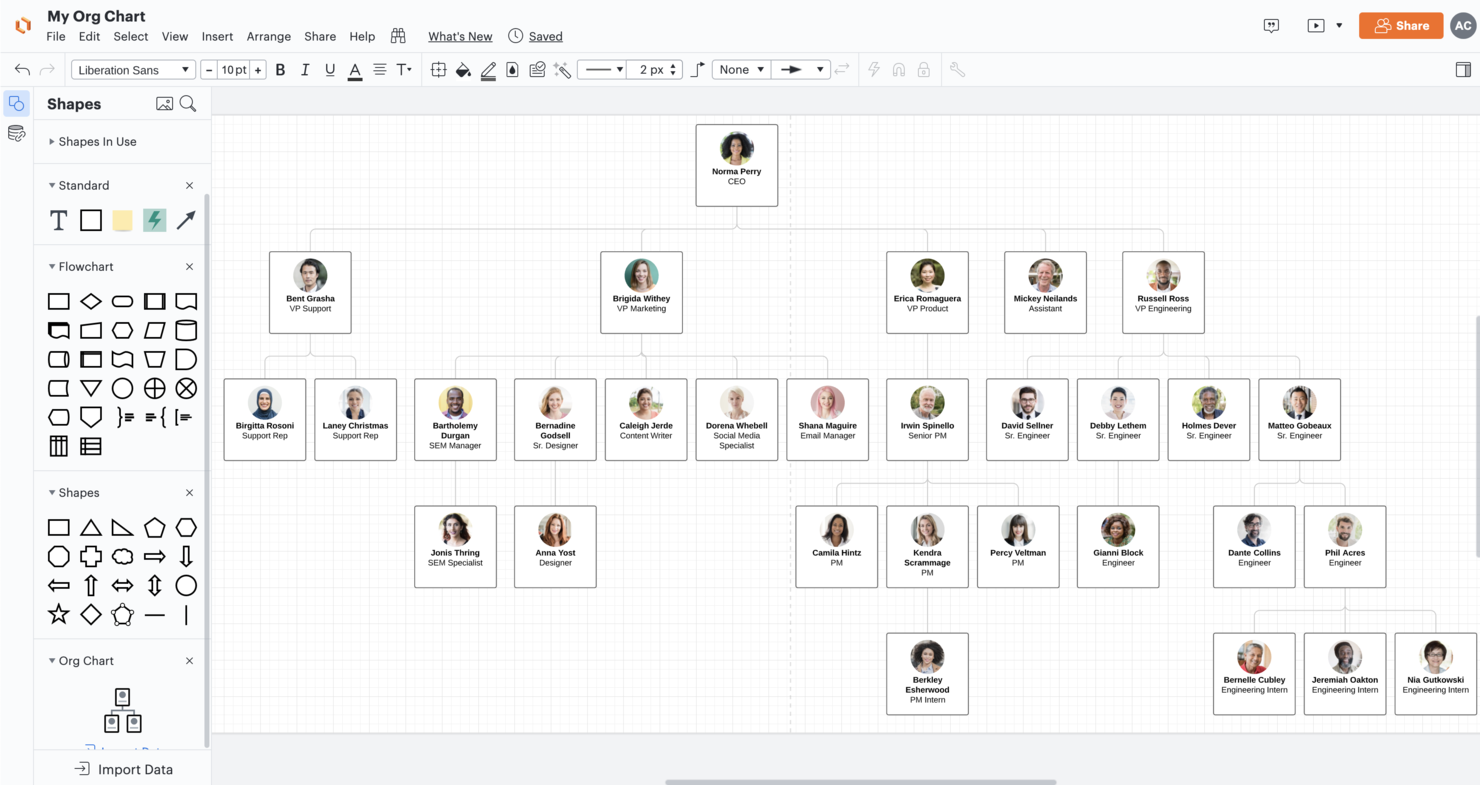
Lucidchart is designed so you don't have to map out and maintain your organisational structures from scratch. It lets you transform Excel, CSV or Google Sheet data into a visual org chart, making it especially useful for HR teams, team leads, or business managers handling dynamic workforce structures.
Who Is Lucidchart Best For?
Teams that want to build org charts from existing data sources while leveraging a flexible diagramming tool for broader business visualization needs.
Why I Picked Lucidchart
I picked Lucidchart because it helps you build and update org charts quickly by importing your existing employee data (like a CSV or spreadsheet) instead of drawing every box manually. Its layout engine then keeps reporting lines clear and readable, so your team can focus on structure instead of formatting.
You can apply grouping filters (for example, by department or location) to view different parts of your organisation at-a-glance, giving better visibility to leadership or cross-functional teams. I also like that you and your colleagues can collaborate in real time on the same chart—adding feedback or editing together—so your chart stays current and reflective of actual roles.
Lucidchart Key Features
Here are some standout features worth highlighting:
- Data Import & Auto-Layout: Upload your employee data (CSV, Excel or Google Sheets) and the chart builds & arranges itself.
- Group View & Filters: View your org chart by role, location, department or other criteria with just a few clicks.
- Customisable Templates: Choose from 1,000+ org chart templates and then tailor colours, fonts, and styles to match your brand or preferences.
- Real-time Collaboration: Multiple users can edit in the same document, add comments, revise shapes, and see updates instantly.
Lucidchart Integrations
Integrations include Google Workspace (Docs, Sheets, Slides, Gmail), Microsoft 365 (Teams, Office, SharePoint), Slack, Atlassian (Jira, Confluence), Box, Dropbox, and BambooHR.
Pros and Cons
Pros:
- Supports multiple users editing the same chart in real-time
- Enables you to filter and view by team, role or location
- Lets you import existing employee data for fast chart creation
Cons:
- Free version limits number of shapes/documents before upgrades needed
- Data-linking features may require higher-tier plan


iSpring LMS is designed for organizations that want to map their company’s structure within a training platform and tailor learning paths accordingly. If your team works across multiple departments or locations and you need an org-chart view to assign training by role or manager, iSpring LMS fits the bill.
Who Is iSpring LMS Best For?
Organizations that want to embed org chart visibility directly within a learning management system to support onboarding and employee training.
Why I Picked iSpring LMS
I picked iSpring LMS because you can recreate your entire company hierarchy and link training assignments to that structure. For example, you can use its built-in org chart to display departments, managers, and team members with contact details.
You can also set visibility rules so that interns or specific departments are excluded from the chart if needed, and since that org chart syncs with user profiles and user groups, you can assign an onboarding or compliance course by department or manager automatically.
Another feature I like is how the tool allows you to upload a large number of users via spreadsheet and create user roles like administrator, author or user, so you don’t have to manage everything manually.
iSpring LMS Key Features
Here are some standout features worth highlighting:
- Interactive Org Chart: Visual diagram showing your company’s departments, teams and their supervisory links
- Bulk User and Role Management: Import users via XLSX, assign roles and deactivate users when needed.
- Group-based Assignments: Filter users by department, job title or country to enrol them into specific courses or tracks.
- Offline Mobile Learning: Learners can access the platform via mobile app, take courses offline and sync when online.
iSpring LMS Integrations
Integrations include Microsoft Teams, Zoom, LinkedIn Learning, Azure AD, Shopify, Google Sheets, Outlook Calendar, and Single Sign-On (SSO) solutions.
Pros and Cons
Pros:
- Filter users by job title, department or location to assign training
- Bulk user import simplifies set up
- Lets you map your org structure directly in the LMS
Cons:
- Pricing tiers can be confusing, especially for smaller teams
- Some integrations may be limited or require custom work

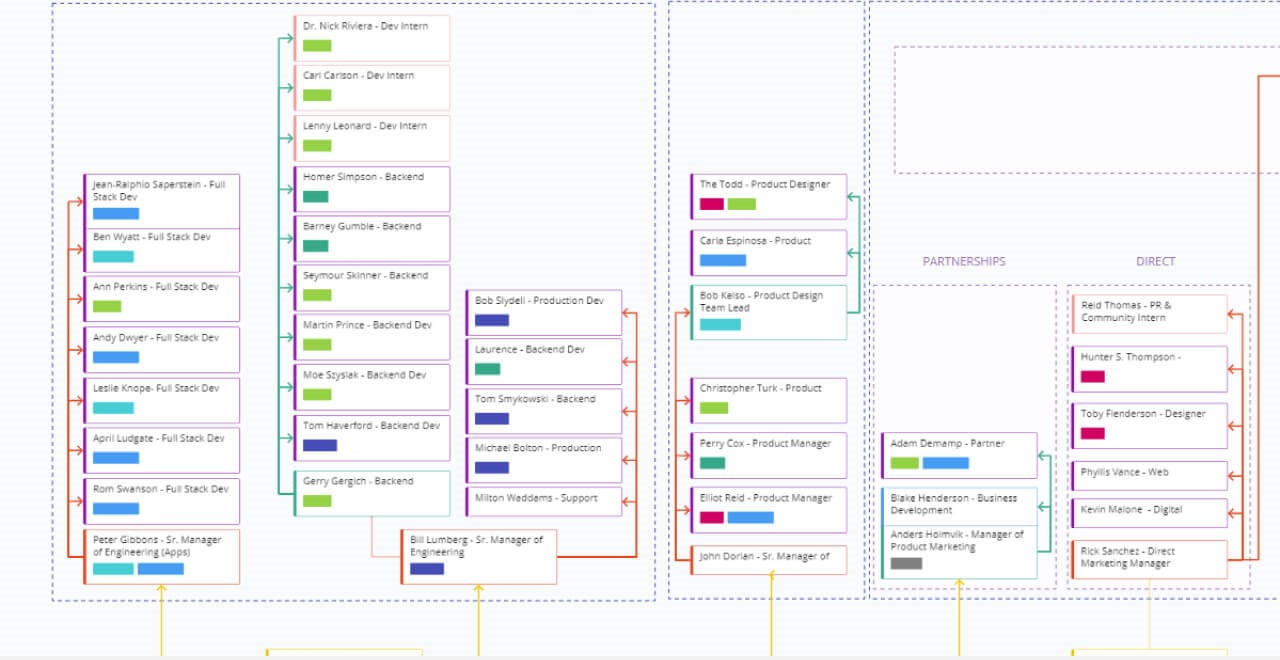
For teams that want to build org charts together in real time, Miro offers a flexible whiteboard platform with drag-and-drop charting tools. It’s a strong fit for distributed HR teams, project leads, and consultants who need to map out structures visually and collaborate live. Miro stands out by letting multiple users co-create, comment, and iterate on org charts in a shared digital workspace.
Who Is Miro Best For
Teams that need to create org charts collaboratively within a broader visual whiteboard environment for workshops, planning sessions, and brainstorming.
Why I Picked Miro
What sets Miro apart for org chart creation is its collaborative whiteboard environment, which makes it easy for multiple people to build and edit charts together. I picked Miro because it supports real-time co-authoring, sticky notes, and commenting, so HR teams and stakeholders can work through organizational changes visually and interactively. The platform’s drag-and-drop shapes and connectors let you quickly map out reporting lines and restructure teams as needed. For organizations that value live collaboration and flexible charting, Miro offers a unique approach compared to traditional org chart tools.
Miro Key Features
Some other features that make Miro useful for org chart creation include:
- Org chart templates: Start with pre-built templates designed specifically for organizational structures.
- Image and logo uploads: Add photos or company branding directly to chart elements.
- Presentation mode: Share and walk through org charts with teams in a guided, full-screen view.
- Version history: Review and restore previous versions of your org chart as changes are made.
Miro Integrations
Integrations are available with key business platforms such as Airtable, Asana, monday.com, Notion, ClickUp, and Smartsheet.
New Product Updates from Miro

Miro Enhances AI Workflows and Tables for Task Planning
Miro enhances AI workflows and Tables with AI-generated planning boards and web-aware automation. These updates help teams organize tasks faster and analyze external content within workflows. For more information, visit Miro’s official site.
Hirebook
Best org chart tool that also helps you manage your OKRs within the same workspace
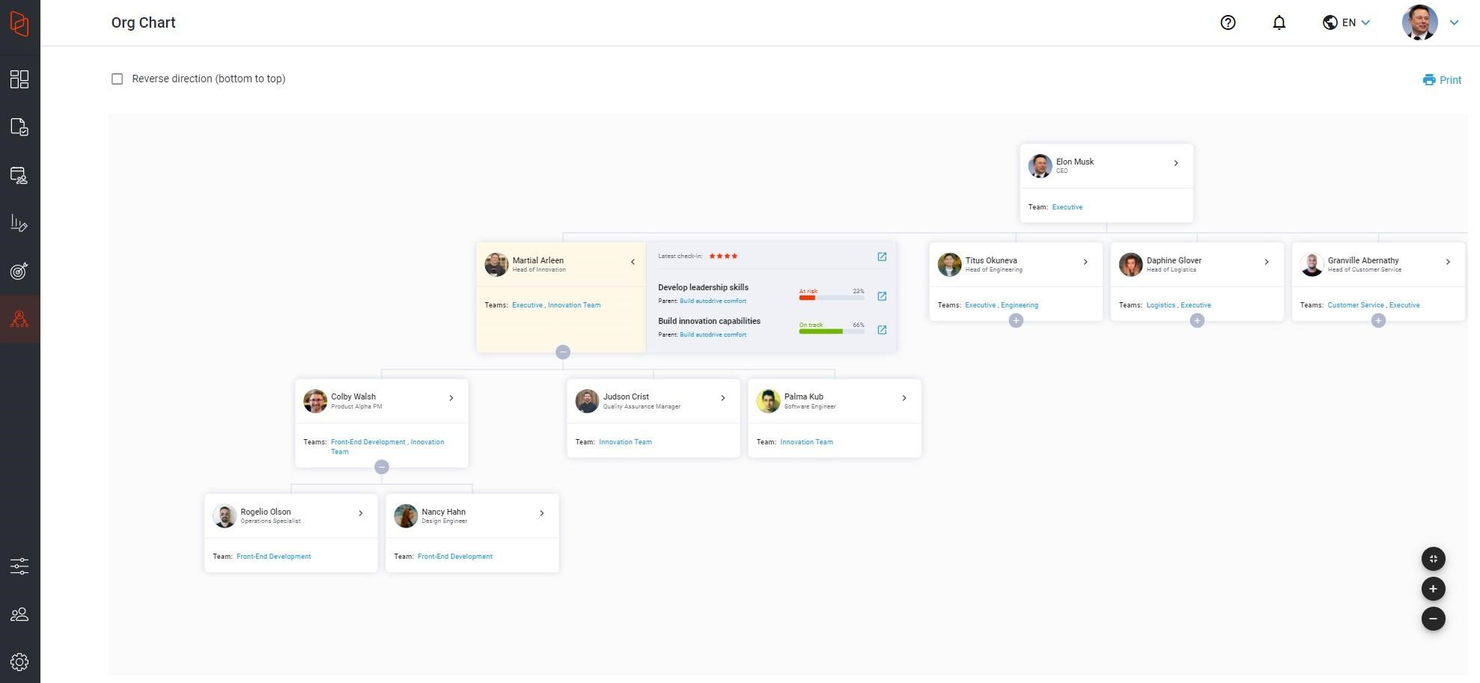
Hirebook is a people-focused platform designed to connect meetings, goals, and performance through structured OKR management. It integrates objectives and actions directly into daily workflows to help organizations align strategy across teams and individuals.
Who Is Hirebook Best For
Organizations that want their org chart tied directly to strategic alignment, performance management, and OKR tracking across teams.
Why I Picked Hirebook
Hirebook stands out for embedding OKRs directly into its organizational structure. The org chart is presented as a hierarchical tree diagram based on your reporting structure, allowing employees to easily understand team relationships. Its “Trace Me” feature makes it simple to locate colleagues and view their objectives, responsibilities, and alignment within the company strategy.
What differentiates Hirebook is how it connects cascading OKRs to teams and individuals directly within the org chart view. This gives leaders visibility into how goals roll up across departments and helps identify gaps or misalignment early. By combining org visualization with performance tracking, Hirebook turns the org chart into a strategic alignment tool rather than just a reporting map.
Hirebook Key Features
- Hierarchical org chart view: Visualize reporting structures in a structured tree diagram.
- “Trace Me” employee search: Quickly locate team members and view roles, objectives, and responsibilities.
- Integrated OKRs: Connect team and individual objectives directly within the org chart.
- Goal cascading visualization: See how company goals roll down across departments and teams.
- Org chart analysis tools: Review alignment and performance across organizational levels.
Hirebook Integrations
Integrations are available with Asana, BambooHR, Google BigQuery, Google Sheets, Jira, Microsoft 365, Microsoft Teams, Namely, Rippling, Slack, and Workday.


If you’re looking for an org chart tool that supports real-time teamwork, Creately offers a visual workspace built for live collaboration. It’s especially useful for HR teams, department heads, and consultants who need to map out structures and update charts together. With features like simultaneous editing and in-app chat, Creately helps groups quickly align on organizational changes.
Who Is Creately Best For?
Teams that prioritize real-time collaboration when building org charts and organizational diagrams across distributed environments.
Why I Picked Creately
Creately stands out for org chart creation because it’s built with real-time collaboration at its core. I picked Creately for teams that need to co-edit charts, leave comments, and discuss changes as they happen, all within the same workspace. The tool’s live cursors and in-app chat make it easy for multiple users to work together and resolve questions on the spot. For HR professionals and managers who want to keep everyone in sync during org design sessions, Creately’s collaboration features are a strong fit.
Creately Key Features
In addition to its collaboration tools, Creately offers several other features for org chart creation:
- Org chart templates: Choose from a library of ready-made templates to quickly start building your chart.
- Data linking: Connect chart elements to live data sources for up-to-date information.
- Drag-and-drop interface: Rearrange roles and reporting lines with simple mouse actions.
- Export options: Download org charts in formats like PDF, PNG, or SVG for sharing or printing.
Creately Integrations
Integrations include Google Drive, Slack, Confluence, and Microsoft Teams.


SmartDraw is designed for HR teams and business leaders who want to create polished org charts with minimal manual adjustments. Its intelligent formatting automatically arranges roles and reporting lines as you add or remove positions. This makes it a strong choice for organizations that frequently update structures or need to present clear, professional charts to stakeholders.
Who is SmartDraw Best For?
Users who want intelligent formatting and automation features to quickly generate structured org charts with minimal manual design work.
Why I Picked SmartDraw
What sets SmartDraw apart for org chart creation is its intelligent formatting engine, which automatically adjusts layouts as you add, remove, or move positions. I picked SmartDraw because it eliminates the need for manual alignment and spacing, saving time when updating complex organizational structures. The tool also supports automatic branch balancing, so charts stay readable even as teams grow or change. For HR professionals and managers who want consistently polished org charts without constant tweaking, SmartDraw’s formatting features are a clear advantage.
SmartDraw Key Features
Some other features that make SmartDraw useful for org chart creation include:
- Org chart import from Excel: Upload employee data from Excel to generate org charts automatically.
- Role-based access controls: Assign different editing and viewing permissions to team members.
- Cloud and desktop versions: Choose between working online or installing the software locally.
- One-click export options: Export org charts to PDF, PNG, or Microsoft Office formats for easy sharing.
SmartDraw Integrations
Integrations include Microsoft Office, Microsoft Teams, and Google Workspace.

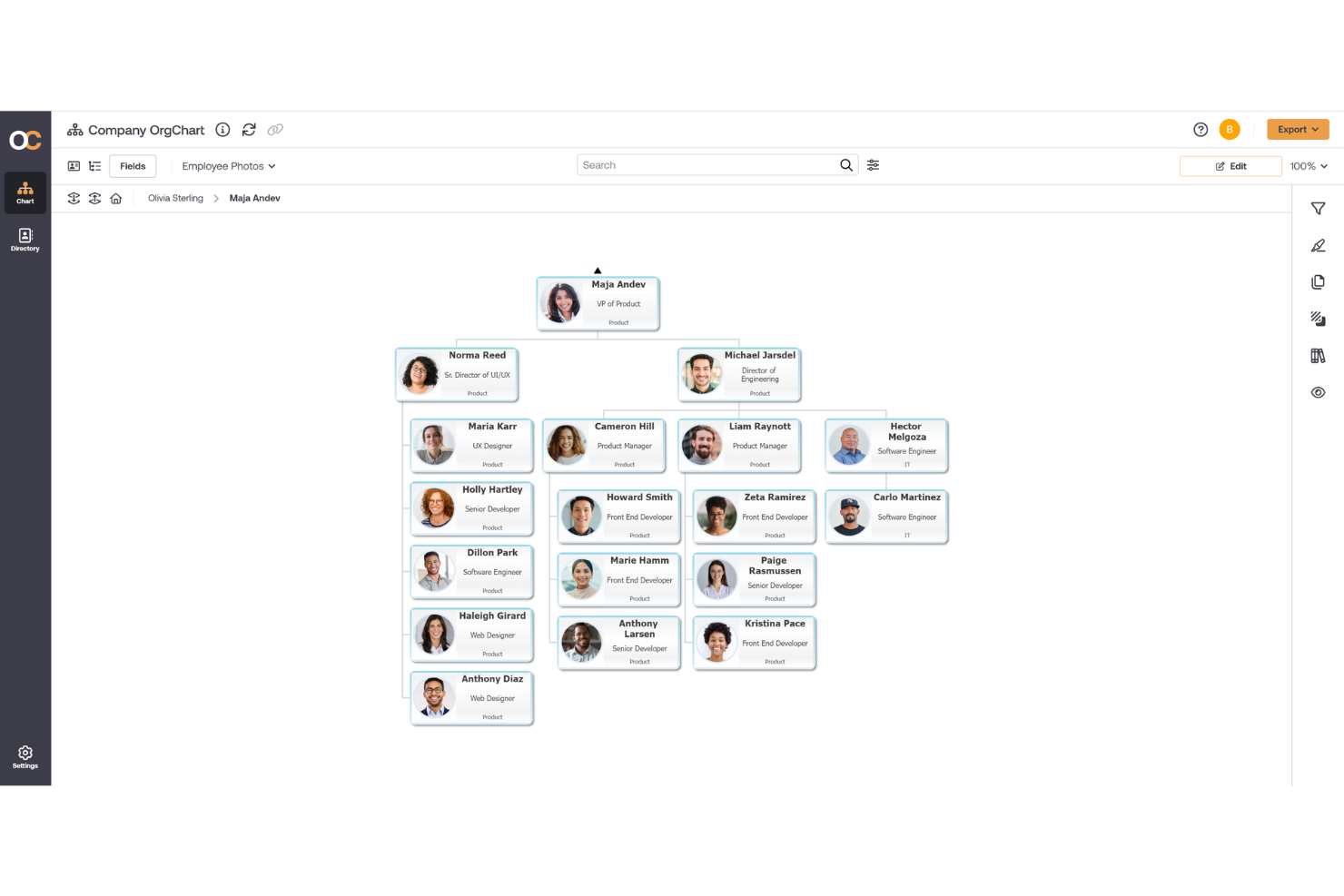
OrgChart is designed for HR professionals and operations teams who need to automate org chart creation from existing data sources. It’s especially useful for organizations that want to generate, update, and share org charts without manual formatting or data entry. With OrgChart, you can quickly visualize reporting structures and workforce changes using data imported from spreadsheets or HR systems.
Who Is OrgChart Best For
Enterprises that need automated org chart creation from HRIS or workforce data systems, especially those managing large employee populations.
Why I Picked OrgChart
For teams that want to eliminate manual org chart building, OrgChart stands out for its automated approach. I picked OrgChart because it can pull data directly from spreadsheets or HR systems and instantly generate up-to-date org charts. The tool also supports scheduled data refreshes, so your charts always reflect the latest organizational changes. If you need to quickly visualize reporting lines and workforce structure without repetitive formatting, OrgChart is purpose-built for that need.
OrgChart Key Features
Some other features that make OrgChart useful for HR and operations teams include:
- Customizable chart templates: Choose from a variety of pre-built layouts to match your organization’s needs.
- Role-based access controls: Assign different viewing and editing permissions to users based on their roles.
- Drag-and-drop editing: Rearrange positions and reporting lines directly within the chart interface.
- Export to PDF and PowerPoint: Download org charts in multiple formats for sharing or presentations.
OrgChart Integrations
Integrations include Workday, ADP, UKG, Paychex, BambooHR, Oracle Cloud, Greenhouse, Lever, SAP, Salesforce, Paycor, Sage, Paycom, Google Directory, and more.

Best for tailoring org charts for different user groups

If you need to present different org chart views for various teams or stakeholders, Ingentis org.manager is built for that flexibility. This tool lets HR professionals and business leaders customize chart layouts and data displays for specific user groups or scenarios. It’s especially useful for organizations with complex structures or unique reporting needs that go beyond standard org chart templates.
Who Is Ingentis org.manager Best For?
Enterprises that need highly tailored org charts for different audiences, including leadership, HR, and operational teams.
Why I Picked Ingentis org.manager
Unlike many org chart tools that offer a single static view, Ingentis org.manager stands out for its ability to tailor charts for different user groups. I picked this tool because it lets you create multiple custom views, each with its own data fields, filters, and visualizations, so you can present relevant information to HR, executives, or department heads. The platform also supports conditional formatting, which means you can highlight specific roles or metrics based on the audience’s needs. For organizations that need to communicate structure differently to various stakeholders, this level of customization is a major advantage.
Ingentis org.manager Key Features
Some other features that make Ingentis org.manager valuable for org chart creation include:
- Automated data synchronization: Connects directly to HR systems for up-to-date org charts.
- Drag-and-drop chart editing: Lets you quickly rearrange positions and reporting lines.
- Scenario modeling tools: Simulate reorganizations or workforce changes before making them live.
- Export to PDF and image formats: Share org charts easily with non-users or external stakeholders.
Ingentis org.manager Integrations
Integrations include SAP SuccessFactors, SAP ERP HCM, Workday, UKG Pro, Oracle HCM, ADP, Cornerstone OnDemand, Personio, Microsoft Active Directory, and LDAP.


Workleap Pingboard is designed for teams that need to manage people, roles, and resources in one place. It’s especially useful for HR professionals and operations leads who want to visualize team structures while also tracking skills, availability, and project assignments. If you’re looking for an org chart tool that doubles as a resource planning hub, this platform brings those functions together.
Who Is Workleap Pingboard Best For?
Growing organizations that want org charts connected to resource planning and employee engagement tools.
Why I Picked Workleap Pingboard
What sets Workleap Pingboard apart is its focus on resource planning alongside org chart visualization. I picked this tool because it lets you map out not just reporting lines, but also employee skills, availability, and project assignments directly within the org chart. The platform’s built-in directories and customizable profiles make it easy to see who’s working on what and where there might be resource gaps. For teams that need to align people planning with organizational structure, this combination is especially valuable.
Workleap Pingboard Key Features
Some other features that make Workleap Pingboard useful for org chart management include:
- Automated org chart updates: Syncs with HR systems to keep charts current as teams change.
- Employee onboarding workflows: Guides new hires through introductions and key information.
- Customizable org chart templates: Lets you choose from different layouts and visual styles.
- Mobile app access: Allows users to view org charts and directories on the go.
Workleap Pingboard Integrations
Integrations include ADP, Azure Active Directory, BambooHR, Ceridian Dayforce, Slack, Microsoft Teams, Okta, Google Workspace, OneLogin, Workday, Salesforce, and Zapier.

Organimi
Best organizational planning tool for human resources and sales teams

Organimi is designed for HR and sales teams that need flexible, interactive org charts for planning and collaboration. It’s especially useful for organizations managing frequent changes or complex reporting structures. With features like scenario planning and easy sharing, Organimi helps teams visualize and adapt their workforce structure as needs evolve.
Who Is Organimi Best For?
HR and sales teams that need organizational planning tools to model team structures and future workforce scenarios.
Why I Picked Organimi
What sets Organimi apart is its focus on organizational planning for HR and sales teams that need to visualize and adapt their structures quickly. I picked Organimi because it offers scenario planning, which lets you map out potential changes before making them live. The tool also supports custom fields and tags, so you can track roles, skills, or other attributes that matter to your team. For organizations with shifting teams or complex hierarchies, Organimi’s planning features make it a strong fit.
Organimi Key Features
Some other features that make Organimi stand out for org chart creation include:
- Photo boards: Display employee photos alongside names and titles for a more visual directory.
- Drag-and-drop editor: Rearrange roles and reporting lines directly within the chart.
- Customizable templates: Start with pre-built org chart templates tailored to different organization types.
- Printable and shareable charts: Export charts as PDFs or share them via unique web links.
Organimi Integrations
Integrations include Google Workspace, Microsoft Teams, Azure Active Directory, SharePoint, Salesforce and more via its Organimi Connect platform.


If you need a wide range of org chart templates and diagramming options, Microsoft Visio is a strong choice. It’s well-suited for HR professionals, IT teams, and business managers who want to create detailed, visually consistent org charts for organizations of any size. Visio stands out for its extensive template library and advanced customization tools that help teams map out even the most complex structures.
Who Is Microsoft Visio Best For?
Organizations that rely on Microsoft tools and want access to diverse org chart templates within an established diagramming ecosystem.
Why I Picked Microsoft Visio
I chose Microsoft Visio because it offers one of the most extensive libraries of org chart templates available. For teams that need to represent different organizational structures—whether hierarchical, matrix, or flat—Visio provides ready-made templates that save time and ensure consistency. I appreciate that you can customize every element, from shapes to connectors, to match your organization’s branding or reporting needs. Its template variety and flexible design tools make it a strong fit for anyone who needs to visualize complex or unique org structures.
Microsoft Visio Key Features
Some other features that make Microsoft Visio useful for org chart creation include:
- Data-linked diagrams: Connect org charts to Excel or other data sources for automatic updates.
- Collaboration tools: Multiple users can work on the same diagram in real time.
- Shape data fields: Add custom data fields to each org chart shape for tracking roles, departments, or other details.
- Export options: Save org charts as PDFs, images, or web pages for easy sharing.
Microsoft Visio Integrations
Integrations include Microsoft Teams, OneDrive, Outlook, Azure, Dynamics 365, Microsoft Power Platform, Power BI, Power Automate, Microsoft Excel, Microsoft PowerPoint, Microsoft Word, and iManage.


Built For Teams gives HR leaders and operations managers a way to build interactive org charts and flowcharts that go beyond static visuals. The platform is designed for organizations that want to visualize reporting lines, plan for growth, and explore “what-if” scenarios in real time. Its interactive features help teams quickly update structures and share changes across departments.
Who Is Built For Teams Best For?
HR teams that need interactive org charts combined with workforce planning and succession modeling capabilities.
Why I Picked Built For Teams
What sets Built For Teams apart is its focus on interactive org charts and flowcharts that let you do more than just visualize static structures. You can drag and drop to reorganize teams, explore different reporting scenarios, and instantly see the impact of changes. I like that the tool allows you to click into roles for more details and even simulate future growth or restructuring. These interactive features make it especially useful for HR teams and leaders who need to plan, communicate, and adapt organizational changes quickly.
Built For Teams Key Features
In addition to its interactive charting capabilities, I also found these features valuable:
- Position management: Track open, filled, and future positions directly within the org chart.
- Employee directory: Access a searchable directory with detailed employee profiles.
- Time-off tracking: Manage and visualize employee leave and absences alongside org structures.
- Custom fields: Add organization-specific data fields to roles or employees for tailored reporting.
Built For Teams Integrations
Integrations are available with platforms like NetSuite, QuickBooks, SAP, and Workday.

OneDirectory
Best for using existing Active Directory and Microsoft 365 profile data

OneDirectory is designed for organizations that want to build org charts and directories using their existing Active Directory or Microsoft 365 profile data. It’s especially useful for IT teams and HR professionals in Microsoft-based environments who need a visual, always-updated view of their workforce. The tool helps eliminate manual data entry by syncing directly with your current directory systems.
Who Is OneDirectory Best For?
Companies that want to generate org charts using existing Active Directory or Microsoft 365 profile data without duplicating employee records.
Why I Picked OneDirectory
What makes OneDirectory stand out is its ability to automatically generate org charts and directories from your existing Active Directory and Microsoft 365 profile data. This approach means you don’t have to manually update employee information or organizational changes—everything syncs directly from your source of truth. I appreciate that you can search, filter, and explore your organization visually, with up-to-date details pulled straight from your Microsoft environment. For teams already invested in Microsoft tools, this seamless connection saves time and reduces errors in org chart management.
OneDirectory Key Features
Some other features that make OneDirectory appealing include:
- Interactive map view: Visualize office locations and employee distribution on a global map.
- Custom profile fields: Add organization-specific data fields to employee profiles.
- Org chart export: Download org charts as PDF or image files for sharing.
- Employee photo gallery: Browse a visual directory of staff with profile photos.
OneDirectory Integrations
Integrations are available with Azure Active Directory, and Microsoft 365, including SharePoint.


Functionly is built for leaders and HR teams who want to go beyond static org charts and actively optimize their workforce. The platform lets you map roles, responsibilities, and skills to visualize gaps and overlaps in your organization. It’s especially useful for businesses focused on strategic planning, restructuring, or scaling teams with clarity.
Who Is Functionly Best For?
Organizations focused on workforce optimization, role clarity, and structural planning to improve operational efficiency.
Why I Picked Functionly
Functionly takes org chart tools a step further by focusing on workforce optimization, not just visualization. I picked it because you can map out roles, responsibilities, and accountabilities directly onto your org chart, making it easier to spot gaps or overlaps in your structure. The scenario planning feature lets you model changes before making them, which is valuable for organizations going through growth or restructuring. For HR teams and business leaders who want to align people with strategy, Functionly offers a more dynamic approach than traditional org chart tools.
Functionly Key Features
Some other features that make Functionly useful for org chart planning include:
- Drag-and-drop org chart builder: Quickly rearrange teams and reporting lines with a visual editor.
- Role library: Access a database of pre-defined roles to speed up org design.
- Collaboration tools: Invite colleagues to comment and contribute to org chart drafts.
- Org chart export: Download charts as PDF or image files for sharing and presentations.
Functionly Integrations
Integrations include BambooHR, HiBob, Google Workspace, Microsoft 365, ADP, Personio, UKG, Deel, Rippling, and Workday.


If you need org charts that update automatically as your team grows, Workable offers a solution built for real-time accuracy. This platform suits HR teams and hiring managers who want to connect hiring, onboarding, and org chart management in one place. Workable helps you visualize reporting lines and team structures without manual updates.
Who Is Workable Best For?
Companies that need org charts that update in real time alongside recruiting and hiring workflows.
Why I Picked Workable
I picked Workable because its real-time org chart updates help HR teams keep pace with constant personnel changes. The platform automatically syncs org charts with hiring and onboarding activity, so you always see an accurate picture of your organization. I appreciate how Workable visualizes reporting lines and team structures as soon as new hires are added or roles shift. This makes it a strong choice for businesses that need up-to-date org charts without manual intervention.
Workable Key Features
Some other features that make Workable useful for org chart management include:
- Bulk import tools: Upload employee data in batches to quickly build or update your org chart.
- Role-based permissions: Control who can view or edit org chart information based on user roles.
- Customizable org chart views: Filter and display org chart data by department, location, or other criteria.
- Integration with HRIS platforms: Sync employee records from systems like BambooHR and HiBob to keep org charts current.
Workable Integrations
Integrations include Slack, LinkedIn, Indeed, Google Calendar, Microsoft Outlook, BambooHR, Zapier, Namely, ADP, Greenhouse, Checkr, Sapling, Hibob, and Docusign.

Peoplebox.ai
Best org chart software for analytics and performance metrics

Peoplebox.ai is designed for HR teams and business leaders who want to connect org charts with real-time analytics and performance metrics. The platform helps you visualize reporting structures while layering in goal progress, engagement, and productivity data. If you need more than just a static org chart and want actionable insights tied to your people data, Peoplebox.ai is built for you.
Who Is Peoplebox.ai Best For?
HR and leadership teams that want org charts tied to performance metrics, OKRs, and analytics dashboards.
Why I Picked Peoplebox.ai
I picked Peoplebox.ai because it goes beyond basic org chart visualization by embedding analytics and performance metrics directly into your org structure. With features like real-time overlays for goal tracking and engagement scores, you can see how teams are performing right from the org chart view. I appreciate that you can drill down into individual or team metrics without leaving the chart, making it easier to connect people data with business outcomes. This approach is especially valuable for organizations that want actionable insights, not just static diagrams.
Peoplebox.ai Key Features
Some other features that make Peoplebox.ai stand out for org chart management include:
- Automated org chart generation: Build and update org charts automatically using synced data from your HRIS or spreadsheets.
- Customizable access controls: Set granular permissions for who can view or edit different parts of the org chart.
- Bulk employee data import: Upload and manage large employee lists to quickly populate or restructure your org chart.
- Org chart version history: Track changes and view previous versions of your org chart for auditing or planning purposes.
Peoplebox.ai Integrations
Integrations include Jira, Microsoft Teams, Slack, Asana, Notion, HubSpot, Google Analytics, Outlook, BambooHR, Darwinbox, Zoho People, and more.


Agentnoon uses AI to keep your org charts accurate as your workforce changes. It’s a strong fit for HR teams and business leaders who need to visualize shifting team structures without manual updates. If you’re managing frequent reorganizations or rapid growth, Agentnoon helps you stay on top of reporting lines and team changes in real time.
Who Is Agentnoon Best For?
Organizations seeking AI-driven, dynamic org charts that support scenario planning and workforce modeling.
Why I Picked Agentnoon
Agentnoon stands out for its dynamic AI-driven approach to org charts, which is especially valuable for organizations experiencing frequent changes. I picked Agentnoon because it automatically updates org charts as your workforce evolves, removing the need for manual adjustments. Its scenario planning feature lets you visualize potential reorganizations before making changes, which is helpful for HR teams managing growth or restructuring. The ability to import employee data in bulk also makes it practical for larger businesses that need to keep org charts current at scale.
Agentnoon Key Features
Some other features make Agentnoon a flexible option for org chart management:
- Custom org chart templates: Choose from multiple templates to match different organizational structures and reporting styles.
- Role-based access controls: Set permissions for who can view or edit specific org charts or sections.
- Bulk employee data import: Upload large sets of employee information to quickly build or update charts.
- Audit trail tracking: Monitor changes made to org charts with a detailed activity log.
Agentnoon Integrations
Integrations include BambooHR, ADP Workforce Now, BambooHR, SAP SuccessFactors, Sage, Workday, Deel, Culture Amp, Remote, Xero, Rippling, Lattice, Google Sheets, Excel, Paycor, Paychex, and dozens of others. An API is also available to build custom integrations.
Other Org Chart Tools
Here are a few more options that didn’t make the best org chart software list:
- SimplyHired HRIS
Free org chart tool that updates automatically
- Org Chart Pro
Professional charting solution for ease of use


Related HR Software Reviews
If you still haven't found what you're looking for here, check out these other related tools that we've tested and evaluated:
- HR Software
- Payroll Software
- Recruiting Software
- Employer of Record Services
- Applicant Tracking Systems
- Workforce Management Software
Selection Criteria for Org Chart Tools
Selecting the best org chart software is a nuanced process that hinges on matching your specific needs and challenges with the features and functionalities that will help you address them effectively. My approach to evaluating these tools is grounded in personal trials and in-depth research, ensuring a comprehensive understanding of each platform's capabilities.
Here’s a summary of the evaluation criteria I used to make my final selections:
Core Org Chart Functionalities (25% of total score): To be considered for inclusion in this list, each tool had to fulfill the following use cases first:
- Efficiently create and update org charts with minimal effort
- Enable collaboration across departments to ensure accuracy and completeness
- Offer scalability to accommodate growth and structural changes within the organization
- Facilitate the distribution and access of org charts across the organization through various platforms
Additional Standout Features (25% of total score): To help me narrow in on the best org chart tools out of the numerous options available, I also took note of any unique features, including:
- Tools that offer unique data visualization options beyond standard hierarchical views, such as matrix and flat structures
- Solutions with advanced analytics features that help users gain insights into the organizational structure and employee metrics
- Products that incorporate AI to suggest optimizations in the organizational structure based on trends and data analysis
- Platforms that provide exceptional security features, such as advanced encryption and privacy settings, to protect sensitive organizational data
- Tools that offer real-time synchronization with HR software, enabling automatic updates to the org chart as personnel changes occur
Usability (10% of total score): To evaluate the usability of each org chart tool, I considered the following:
- A clear and intuitive user interface that simplifies the creation of complex organizational charts and structures, requiring minimal training
- A balance between powerful features and a user-friendly experience to accommodate users with different levels of technical proficiency.
- A responsive design that ensures functionality across operating systems (Windows and Mac), devices (Android and iOS), and screen sizes
- Either a dedicated mobile app or a mobile-friendly user interface
Onboarding (10% of total score): To get a sense of each software provider's customer onboarding process, I considered the following factors:
- Quick setup processes and clear guidance for first-time users
- Comprehensive training materials such as videos, interactive tutorials, chatbots, or other documentation
- Pre-loaded templates that you can customize to your specific needs, including adding your company branding, to speed up onboarding
- Support for migrating employee data into the new platform
Customer Support (10% of total score): To evaluate the level of customer support each vendor offered, I considered the following:
- The availability of multi-channel support, including email, phone, and live chat
- The existence of a self-service knowledge base, FAQ repository, or other self-help resources to speed up troubleshooting
- The overall quality, responsiveness, and helpfulness of the support team during customer onboarding and post-purchase, as inferred from customer reviews
Value for Price (10% of total score): To gauge the value of each software, I considered the following factors:
- The availability of free trials or demos to test the software before purchasing
- Competitive and transparent pricing models that reflect the software's feature depth and explain which features are included at each level
- Tiered pricing plans that cater to different business sizes, from small to medium-sized businesses (SMBs) up to enterprise-level organizations
Customer Reviews (10% of total score): Evaluating customer reviews is the final element of my selection process, which helps me understand how well a product performs in the hands of real users. Here are the factors I considered:
- Whether a product has consistently high ratings across multiple review platforms, indicating a broad level of user satisfaction
- Specific praises, criticisms, or trends in customer feedback that indicate the software's strengths or areas for improvement
- Whether customer feedback specifically mentions issues with ease of use, customer support responsiveness, or lacking features
Using this assessment framework helped me identify the org chart software that goes beyond basic requirements to offer additional value through unique features, intuitive usability, smooth onboarding, effective support, and overall value for price.
How to Choose an Org Chart Tool
Org chart tools can help you clarify the reporting hierarchy of your company and visualize how your workforce is distributed. To help you figure out which org chart tool best fits your needs, you need to pinpoint your key users and document their specific challenges first.
As you work through your own unique software selection process, keep the following points in mind:
What organizational problems are you trying to solve? To help you clarify the features and functionalities you need, start by identifying the challenges you're trying to overcome. These challenges may include:
- A lack of visibility into your team structure,
- A confusing onboarding experience for your new hires due to your company size,
- Trouble restructuring teams to improve operational efficiency, or
- Challenges with succession planning and workforce management.
By plotting out your organization's structure in detail and playing around with all the moving pieces, you'll gain greater clarity on existing roles and areas for possible improvements.
Who are your main users? Consider who will use the software and how many licenses you'll need. Once that's clear, it's also useful to rank the needs of your different users to identify the key priorities for your power users, managers, and employees, to ensure they're all met.
- For an org chart tool, you can likely limit access to your HR administrators. However, other people in your organization may also benefit from the features that org chart tools offer (like digital whiteboards and brainstorming tools).
What is your budget? To evaluate cost, consider how many staff will need access to the org chart software. Since most software charges a monthly fee per user, this will help you proactively estimate your monthly costs.
- Determining a realistic budget for your new org chart tool up-front is crucial, so you don't waste time considering software that's too expensive.
What outcomes are important? Review the capabilities you want to gain or improve, and how you will measure success. Being clear on your desired outcomes upfront is crucial to avoid wasting valuable time. Key outcomes you may want to measure include:
- Improved process efficiency by relying on automation to update your org chart in real-time each time you add a new employee to your HRIS system,
- Improved internal clarity regarding reporting lines and who is responsible for what, or
- Greater insight into structural gaps in your organization, improving your long-term strategic planning.
Ultimately, implementing new org chart software will improve organizational clarity, simplify workforce planning, and facilitate easier strategic planning around team structures and succession.
Do you require specific software integrations? Clarify whether your new org chart builder will replace any existing tools or need to integrate with them.
- Key systems to integrate with include HR management systems or work operating systems like Microsoft Office 365 or Google Workspace.
- Are all the integrations you need available, or can they be custom-configured using an API?
Does the org chart software satisfy your technical requirements? Consider the software selection alongside your existing workflows and systems. Evaluate what's working well, and any areas that need to be addressed.
- Does the new system offer security features that meet your needs (e.g., two-factor authentication (2FA), etc.)?
- Is it easy to export different org chart designs to share with key stakeholders who won't have access to the org chart builder directly?
Remember, every business is different — don’t assume that an org chart tool will work for your organization just because it's popular.
Trends in Org Chart Tools
The feature depth of org chart tools has expanded to incorporate modern technologies such as artificial intelligence (AI), machine learning (ML), and other enhanced technological developments to improve accessibility and the user experience. Here are the most notable trends impacting how modern org chart tools are evolving currently:
- AI and ML for Dynamic Structure Recommendations: AI and ML functionalities are being increasingly incorporated to suggest organizational structure optimizations. This innovation addresses the need for agility in organizational design, allowing companies to quickly adapt to staff changes or shifting organizational needs.
- Integration with Workforce Analytics Platforms: There's a growing trend of org chart tools integrating with broader workforce analytics platforms. This reflects a shift towards data-driven decision-making in HR, where insights from org chart dynamics can inform broader talent management and organizational planning strategies.
- Enhanced Collaboration and Accessibility Features: The emphasis on collaboration tools and multi-platform accessibility has also grown. Features that support real-time updates across different devices are in high demand, reflecting the need for tools that support a distributed workforce.
- Customization and Branding Options: There's a notable increase in the availability of deep customization and branding options within org chart tools. This trend speaks to the desire of organizations to align internal tools with their corporate identity, enhancing user engagement and adoption.
- Security and Privacy Enhancements: With the rising concern over data breaches and privacy, org chart tools are adding more advanced security features, such as end-to-end encryption and customizable access controls. This development is crucial for HR departments that handle sensitive employee data.
These trends indicate a move towards more sophisticated, integrated, and customizable org chart tools that support dynamic organizational structures and distributed teams. As this technology continues to advance, keep an eye out for forward-looking tools that offer insights and flexibility to shape your future workforce in addition to standard diagramming tools.
What is Org Chart Software?
Org chart software is a tool that helps HR teams and business leaders visualize and manage a company’s reporting structure in a clear, interactive chart.
It’s used to automatically map out team hierarchies, track changes in real time, and improve organizational transparency. These tools eliminate the need for manual updates in spreadsheets and help employees understand roles, relationships, and growth paths.
Features of Org Chart Tools
When selecting org chart tools, keep an eye out for the following key features:
- Drag-and-drop interface: This feature lets you easily rearrange positions and departments by clicking and dragging, so you can quickly adjust your org chart as your organization changes. It’s all about streamlining updates with minimal hassle.
- Customizable templates: With ready-to-use templates you can tweak to match your company’s structure, you can get started fast. Personalizing templates helps you visualize your team's unique hierarchy without building everything from scratch.
- Collaboration tools: Share your org chart with other team members or stakeholders for real-time feedback and editing. This is perfect when you need input from others or when teams need to work together to keep charts up to date.
- Integration capabilities: Link your org chart software with HR systems, project management apps, or directory tools. Integrations pull in data automatically, keeping info fresh and eliminating double work.
- Permission controls: Set who can view, edit, or comment on your org chart. This means you can share high-level visibility with the broader team, but reserve editing power for certain roles, keeping sensitive changes under control.
- Version history: Easily review previous versions of your org chart, so you can see what changed and when. If something goes wrong (or if a new hire’s name was spelled creatively), you can always roll back to a previous version.
- Export options: Download your org chart in multiple formats like PDF, PNG, or even PowerPoint. This makes it easy to share info with people who prefer emails, slide decks, or printed handouts.
- Search and filter functionality: Instantly find people, departments, or job titles within a large organizational structure. This is a lifesaver when you’re hunting for one person in a sea of names.
Common Org Chart Tools AI Features
Beyond the standard org chart tools features listed above, many of these solutions are incorporating AI with features like:
- Automated notifications: Get AI-powered alerts when significant changes—like team reshuffles or manager updates—happen within your org structure. You’re always in-the-know without having to manually review the chart every day.
- Automated org chart generation: AI can build an org chart for you by pulling data from HR systems or spreadsheets. This saves you from hours of manual data entry and keeps your chart current as your team grows.
- Predictive workforce planning: By analyzing workforce trends and historical data, AI suggests future hiring needs or identifies gaps in your structure, helping you plan ahead with confidence.
- Role and responsibility analysis: AI reviews job descriptions, skill sets, and reporting lines to recommend adjustments for role clarity or efficiency. You can use this to spot overlap and improve team performance.
- Attrition risk detection: AI analyzes employee patterns to flag teams or individuals who might be at risk of leaving, so you can intervene early and retain top talent.
Benefits of Using Org Chart Tools
Understanding the benefits that org chart tools have to offer can help you get buy-in for your financial investment into this type of software. Here are several benefits you can expect to gain by implementing org chart software in your organization:
- Automated Updates & Improved Efficiency: The ability to integrate org chart tools with HR systems ensures that the organizational chart is always up-to-date with the latest personnel changes, reducing administrative overhead. This saves a considerable amount of time if your current org chart management requires manual processes, such as updating a chart in PowerPoint.
- Enhanced Organizational Clarity: By providing a clear visual representation of the company's structure, org chart tools help employees understand their position in the organization and how they fit into the broader picture.
- Improved Communication Flow: These tools facilitate better communication by making it easy to identify who to reach out to for specific information or approvals, reducing bottlenecks and improving clarity. Many also offer employee directory features, making it even easier for colleagues to connect directly through the software.
- Efficient Onboarding Processes: New hires can quickly familiarize themselves with the organization's structure, key personnel, and their own role within the team, accelerating the onboarding process and integration into the company.
- Simplified Planning and Reorganization: Org chart software enables leaders to plan and implement structural changes with ease, allowing for the simulation of scenarios before any real changes are made.
The right org chart software can simplify administrative tasks, promote transparency, and improve information flow. Focusing on solutions that deliver these benefits can also lead to more informed decisions and, ultimately, a more cohesive and agile organization.
Costs & Pricing for Org Chart Tools
Org chart tools pricing offers a variety of pricing plans, catering to different business types and sizes, from small businesses to large enterprises. The pricing and features included in each plan can significantly affect your decision-making process.
To help you arm yourself with information, I've prepared the average costs for each pricing plan into a comparison table.
Plan Comparison Table for Org Chart Tools
| Plan Type | Average Price | Common Features |
|---|---|---|
| Free | $0 | Basic org chart creation, limited number of charts, and basic support |
| Basic | $5 - $10 per user/month | Enhanced org chart creation, unlimited charts, integration with HR software, and email support |
| Professional | $10 - $20 per user/month | Advanced customization, enhanced integrations, collaboration tools, and priority support |
| Enterprise | Custom Pricing | Full customization, advanced analytics and reporting, dedicated support, and custom integrations |
When considering organizational chart tools, it's essential to weigh the cost against the most important features for your organization. A free plan is a good starting place for small businesses or startups.
However, as your needs grow, investing in a paid plan can unlock valuable features that facilitate better planning and collaboration, plus integration with other HR systems.
Here are several reasons why you may want to start with a more advanced plan:
- Integration with Other Systems: The most common reason to upgrade your plan is to access integrations with your HR or payroll system. By drawing your employee data directly from these systems, you'll ensure your org chart is always up-to-date and accurate without requiring manual updates. Based on my personal experience, it's absolutely a feature worth paying a little bit more for!
- Complex Organizational Structure: If your company develops multiple departments, locations, or subsidiaries, a more sophisticated tool may be necessary. More advanced plans will allow you to create detailed and layered charts that reflect your complex structure.
- Enhanced Collaboration: If you plan to use your org chart tool for strategic planning purposes, you may want to allow multiple users to edit and update the org chart simultaneously. This feature is typically not available in free or basic plans, meaning you'll need to scale up to unlock this benefit.
- Customization and Branding: If you publish your org chart externally or include it in customer-focused proposals, you may want to incorporate your corporate branding elements to present a cohesive picture of your organization. Higher-tier plans typically offer more design flexibility, including customized templates and branding options, to make this process easier.
- Advanced Reporting and Analytics: Org chart tools can offer more than simple drawing tools if you sign up for a more advanced plan. Upgraded plans provide insights into organizational trends, employee distribution, and more to help teams monitor workforce planning and make informed strategic decisions.
Ultimately, it's important to secure a plan that offers the features you require to satisfy your current needs and solve your challenges without exceeding your budget.
Frequently Asked Questions about Org Chart Tools
If you still have some unanswered questions about org chart tools and how they can help you, these answers to popular questions should clear things up.
Can org chart tools integrate with my existing HRIS or payroll system?
Yes, most org chart tools integrate with major HRIS and payroll systems. This lets you sync employee data automatically and ensures your charts stay up-to-date without manual input. Check that your chosen tool supports your current HR software to avoid duplicate work.
How do I keep my org chart up to date without extra admin work?
Many org chart tools automate updates by connecting to your HRIS or directory. You can set rules for syncing changes, so when someone joins, leaves, or changes roles, the chart refreshes. This saves you manual effort and reduces errors.
Can org chart tools generate reports or analytics on organizational metrics?
Yes, most org chart platforms let you run reports on headcount, team size, reporting lines, and other workforce metrics, including diversity statistics. By turning raw data into actionable insights, org chart tools can help you spot gaps, identify growth areas, and support strategic HR planning.
How can organizational charts help with succession planning?
Org charts highlight reporting structures and role vacancies, making it easier to see potential successors and internal talent pools. Use them to track readiness, plan development strategies, and communicate succession options to leadership.
When you use org chart tools in conjunction with succession planning software, you have a powerful combination at your fingertips. This helps you ensure that exactly the right person is appointed as a successor.
How do these tools handle changes in organizational structure?
These tools update charts as you add, remove, or move employees. Automated integrations make big changes smoother, but you can also adjust manually if needed. This flexibility helps your org chart reflect your current structure.
For specifics on how each tool handles updates, check their documentation or reach out to the provider directly.
Are there tools that allow employees to update their own profiles?
Yes, some org chart tools include self-service features. Employees can update photos, contact details, and job titles, subject to admin review. This not only saves HR time but also improves chart accuracy.
How do org chart tools protect sensitive employee data?
Most org chart tools use secure encryption, role-based access, and audit controls to keep employee data safe. You can also use role-based access to limit who sees certain details, reducing the risk of data breaches.
Make sure the tool meets your company’s privacy standards and compliance needs. In addition, many tools also undergo regular security audits and compliance checks to maintain high standards of data protection, giving organizations confidence that their employee data is secure.
What are the different types of org charts?
Using an org chart builder, you can create several different types of org charts, including ones that are hierarchical, flat, divisional, functional, network-based, matrix-based, or circular.
- Hierarchical Org Chart: This is the most common type or org chart, where employees are grouped by department or function. Using this design, there is a clear chain of command from top-level executives down to individual contributors.
- Matrix Org Chart: A matrix org chart is used for situations where employees report to multiple managers for different projects or functions. This design is used most often by companies with cross-functional teams or complex project management structures.
- Flat (Horizontal) Org Chart: Often used by smaller organizations or startups, a flat org structure has few or sometimes no layers between staff and leadership.
- Divisional Org Chart: This design organizes employees into divisions based on product lines, geographies, or markets, making it ideal for large companies with multiple brands, product lines, or regional offices.
- Functional Org Chart: A functional org chart groups employees by specific functions, such as marketing, finance, or IT. It’s often used in traditional business models (sometimes in conjunction with a hierarchical org chart) to provide a clear structure of specialized departments.
- Network Org Chart: A network design is useful for representing the relationships between various teams or external partners in more fluid or decentralized structures. Its commonly used in organizations that rely heavily on collaboration with external entities like contractors or partners.
- Circular Org Chart: This design is similar to the hierarchy format, but it displays the information in a circular format, with higher-level positions at the center and lower-level positions radiating outward. It’s used to emphasize equal importance across different teams and a more collaborative culture.
Using an org chart builder, you can take your existing workforce data and play around with it in different formats to help you gain deeper insights into your data and where their may be gaps.
Final Thoughts
I hope you found my summary of the top organization chart tools useful. Organization charts are great for keeping everyone accountable and aligned with overall goals. By taking advantage of org chart tools, you can be sure you’re charting your enterprise completely and correctly.
For more information about org charts and other people management topics, be sure to sign up for our newsletter, too.