
25 Best Remote Employee Monitoring Software in 2026

20 Best Remote Employee Monitoring Software Shortlist
Here's my pick of the 20 best software from the 25 tools reviewed.


The best remote employee monitoring software gives you the visibility and control you need to manage distributed teams without disrupting trust or productivity.
Whether you're juggling manual timesheets, struggling to identify underperformance, or just tired of constantly asking for updates, these tools can automate monitoring, track output, and generate actionable insights—so your team stays aligned, accountable, and efficient.
In this article, I’ve reviewed the top remote monitoring tools based on real-world usability, key features for HR leaders, and how well they address common pain points like manual reporting, lack of transparency, and burnout caused by micromanagement.
With years of experience researching and writing about HR technology, I’ll help you find a better-fit solution that supports your goals—whether you’re upgrading from a basic tool or just getting started with monitoring software for the first time.
Why Trust Our Software Reviews
We've been testing and reviewing HR software since 2019. As HR professionals ourselves, we know how critical and difficult it is to make the right decision when selecting software.
We invest in deep research to help our audience make better software purchasing decisions. We've tested more than 2,000 tools for different HR use cases and written over 1,000 comprehensive software reviews. Learn how we stay transparent, and take a look at our software review methodology.
Table of Contents
- Best Remote Employee Monitoring Software Shortlist
- Why Trust Us
- Compare Specs
- Reviews
- Other Remote Employee Monitoring Software
- Related HR Software Reviews
- Selection Criteria
- How to Choose
- Trends in Remote Employee Monitoring Software
- What is Remote Employee Monitoring Software?
- Features
- Benefits
- Costs & Pricing
- FAQs
Best Remote Employee Monitoring Software: Comparison Chart
This comparison chart summarizes pricing, trial, and demo details for my top remote employee monitoring software selections to help you find the best online monitoring software for your budget and remote team needs.
| Tool | Best For | Trial Info | Price | ||
|---|---|---|---|---|---|
| 1 | Best for app and URL monitoring | Free 14-day trial + free demo available | From $4.99/seat/month (billed annually) | Website | |
| 2 | Best for employee monitoring with customizable settings | Free 10-day trial + free demo available | From $6.49/user/month (billed annually) | Website | |
| 3 | Best for insights into employee performance | Free demo available | From $19.99/user/month | Website | |
| 4 | Best for employee productivity monitoring | Free 7-day trial | From $6.40/seat/month (billed annually) | Website | |
| 5 | Best for privacy-conscious productivity monitoring | 14-day free trial + free plan + free demo available | From $10/user/month (billed annually) | Website | |
| 6 | Best for GPS tracking capabilities | Free plan + free demo available | From $29/month | Website | |
| 7 | Best for AI-powered productivity reports | Free 14-day trial available | From $3.99/user/month | Website | |
| 8 | Best for geofencing for clock-ins | Free demo + free 14-day trial available | From $4.49/user/month | Website | |
| 9 | Best for ensuring remote employee complianc | Free trial available | From $6.67/user/month (billed annually) | Website | |
| 10 | Best for monitoring employees in regulated environments | Free demo available | Contact for pricing | Website | |
| 11 | Best for non-intrusive employee monitoring | Free trial + free demo available | From $6.42/user/month (billed annually) | Website | |
| 12 | Best for auditing employee activity | Free demo available | From $25/user/month | Website | |
| 13 | Best for advanced user behavior analytics | Free trial + free demo available | From $14/user/month (billed annually) | Website | |
| 14 | Best for employee monitoring software with extensive integrations | Free 14-day trial + free demo available | From $6.67/user/month (billed annually) | Website | |
| 15 | Best for visual monitoring tools | Free trial available | From $5/user/month | Website | |
| 16 | Best for tracking messenger communications | Free trial available | From $11/PC/month | Website | |
| 17 | Best for improving email response time | 14-day free trial | From $15/user/month | Website | |
| 18 | Best for employee monitoring with proactive alerts | Free demo available | From $25/user/month (5 user minimum) | Website | |
| 19 | Best for remote workforce intelligence | Free demo available | From $10/user/month | Website | |
| 20 | Best for employee monitoring with automatic backup | 15 days free trial | From $79.95/user/month | Website |


-

Checkr
Visit WebsiteThis is an aggregated rating for this tool including ratings from Crozdesk users and ratings from other sites.4.5 -
Kudoboard
Visit WebsiteThis is an aggregated rating for this tool including ratings from Crozdesk users and ratings from other sites.4.8 -
Native Teams
Visit WebsiteThis is an aggregated rating for this tool including ratings from Crozdesk users and ratings from other sites.4.9





Best Remote Employee Monitoring Software Reviews
Here’s a brief description of each remote employee monitoring software that showcases each system’s best use case, their noteworthy features, and some pros & cons. I’ve also included screenshots to give you a snapshot of their user interface too.
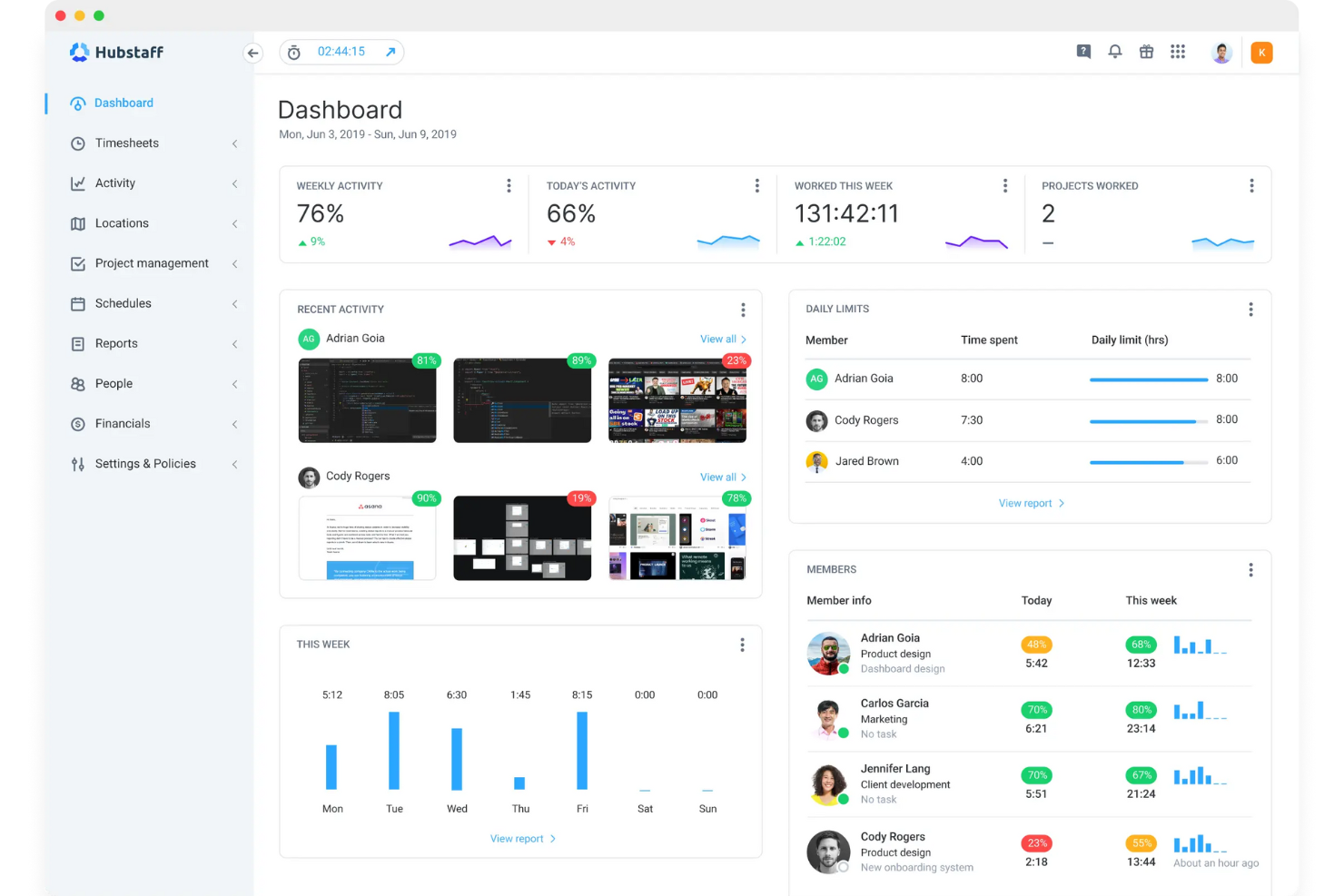
Hubstaff gives remote teams and managers a way to track work hours, monitor productivity, and gain visibility into daily activities, helping businesses manage distributed workforces and ensure accountability.
Who Is Hubstaff Best For?
Hubstaff is a strong fit for small to mid-sized businesses managing remote or hybrid teams who need clear visibility into how work time is being spent.
Why I Picked Hubstaff
Hubstaff earns its spot on my shortlist because of how detailed its app and URL monitoring is. When my team tracks time, Hubstaff automatically logs every app and website visited—including the name, duration, number of sessions, and the project it's tied to. I also like the Insights add-on, which categorizes AI tool usage (think ChatGPT, Claude, Gemini) by team or role, so I can see exactly how those tools factor into daily work. I can generate scheduled app and URL reports filtered by member, project, or time period and export them as PDF or CSV for client reporting or internal reviews.
Hubstaff Key Features
- Screenshots: Capture periodic screenshots of employee screens at set intervals to verify work activity during tracked hours.
- GPS tracking: Monitor the real-time location of field or remote workers directly within the Hubstaff dashboard.
- Payroll automation: Calculate pay based on tracked hours and send payments to team members through integrated payroll tools.
- Idle time detection: Automatically pause time tracking when no keyboard or mouse activity is detected for a set period.
Hubstaff Integrations
Integrations include Asana, ClickUp, Jira, Trello, Slack, QuickBooks, PayPal, Gusto, Salesforce, and Zendesk.
Pros and Cons
Pros:
- Accurate GPS tracking for remote and field teams
- Very customizable
- Excellent idle time management
Cons:
- Occasional syncing issues reported between devices
- Range of monitoring features may raise privacy concerns
New Product Updates from Hubstaff

Hubstaff Enhances Productivity and Team Management Features
Hubstaff’s latest updates introduce new tools to simplify workforce management and improve visibility into team productivity. Highlights include the new Insights Timeline, manual time approval, enhanced reports, and smarter activity detection. For more information, visit Hubstaff's official site.
 .
.
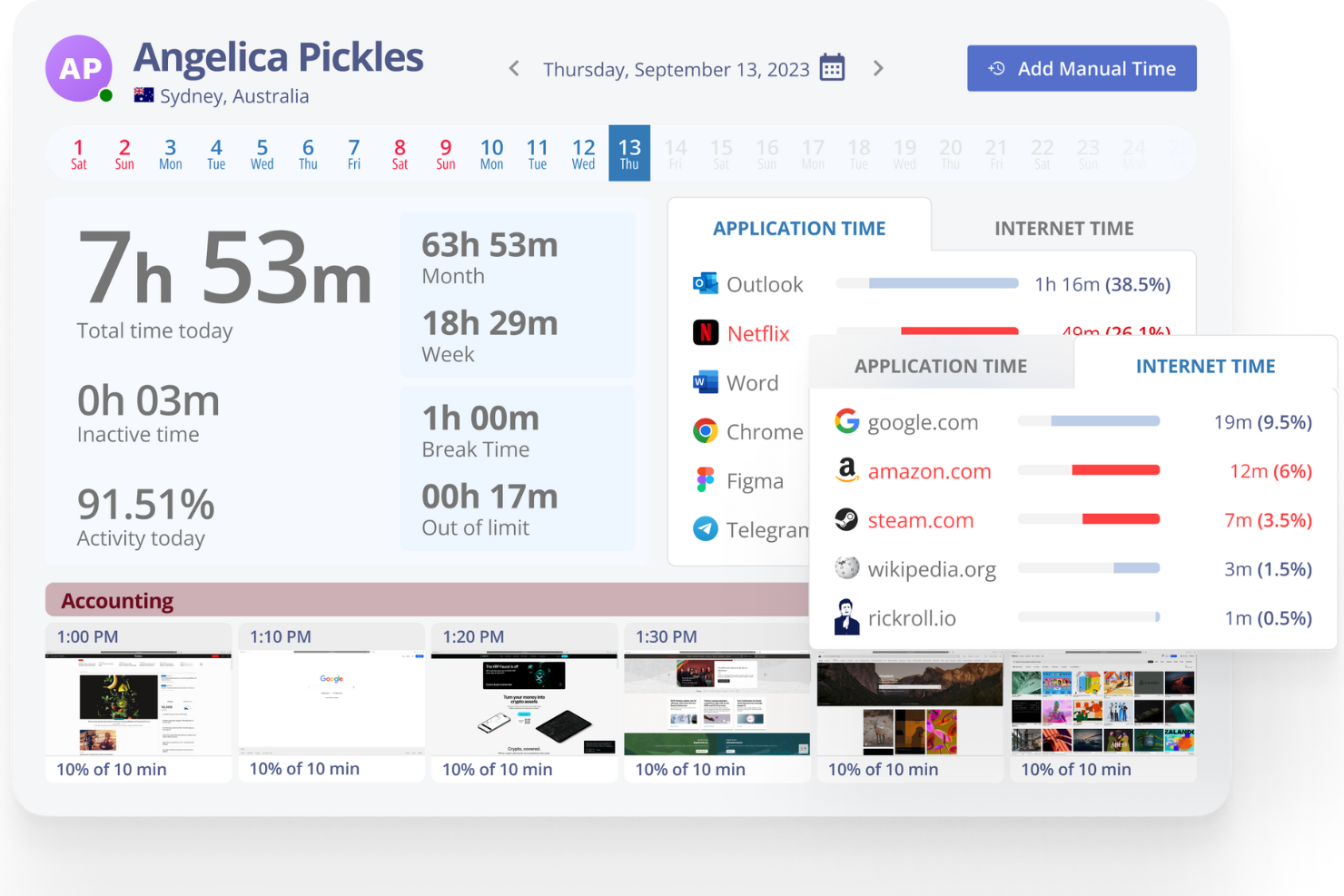
Monitask lets managers and business owners track remote employee productivity, monitor activity, and gain insights into work habits with features designed for distributed teams who need clear visibility into daily operations.
Who Is Monitask Best For?
Monitask is a good fit for small to mid-sized businesses managing remote or hybrid teams who need straightforward activity monitoring without a steep learning curve.
Why I Picked Monitask
I picked Monitask as one of the best because of how much control it gives you over monitoring settings at a granular level. I like that you can adjust screenshot frequency, blur sensitive content in captures, and set different monitoring rules for individual employees or teams—so oversight fits the actual work context rather than applying a one-size-fits-all approach. My team is able to track app and website usage alongside active time, which helps spot patterns without micromanaging every hour.
Monitask Key Features
- Real-time employee monitoring: View live screenshots and activity data for remote employees as they work throughout the day.
- Productivity reports: Generate detailed reports on employee work hours, activity levels, and task completion across your team.
- Project and task tracking: Assign tasks and track time spent on specific projects to keep remote work organized and accountable.
- Attendance and work session logs: Automatically record when employees start and stop work, including break times and total hours logged.
Monitask Integrations
Integrations include Slack, Jira, Asana, Basecamp, Trello, ClickUp, Freshdesk, HubSpot, QuickBooks, and Zoho CRM.
Pros and Cons
Pros:
- Keeps everyone productive
- Offline time tracking
- Easy to set up
Cons:
- Limited history logs
- Huge number of integrations


Prodoscore gives HR teams and business leaders a clear view of remote employee productivity by analyzing activity across cloud-based tools, helping organizations spot trends, support engagement, and make data-driven decisions about their distributed workforce.
Who Is Prodoscore Best For?
Prodoscore is a strong fit for mid-sized to enterprise businesses that need visibility into how remote and hybrid teams are spending their time across tools like Google Workspace, Microsoft 365, and Salesforce.
Why I Picked Prodoscore
Prodoscore earns its spot on my shortlist because of how it translates raw activity data into a single, easy-to-read productivity score for each employee. I like that it pulls signals from tools my team already uses—like Gmail, Salesforce, and Zoom—to surface patterns that would otherwise go unnoticed. For example, I can see whether a dip in someone's score correlates with reduced CRM activity or fewer calls, which makes performance conversations much more grounded in data. The daily scoring and trend reports give me a consistent baseline to track over time, not just a one-off snapshot.
Prodoscore Key Features
- Manager alerts: Get notified when an employee's productivity score drops below a set threshold, so you can follow up before issues escalate.
- Historical benchmarking: Compare individual or team productivity scores against historical averages to identify long-term performance shifts.
- Department-level reporting: View aggregated productivity data by team or department to spot group-wide trends across your remote workforce.
- Google Workspace and Microsoft 365 activity tracking: Monitor activity signals across calendar, email, and collaboration tools without installing software on employee devices.
Prodoscore Integrations
Integrations include Google Workspace, Microsoft 365, Salesforce, RingCentral, Slack, Zoom, HubSpot, Cisco Webex, Microsoft Teams, and ServiceNow.
Pros and Cons
Pros:
- AI-driven insights for proactive coaching
- Deep integrations across core business tools
- Objective productivity metrics without surveillance
Cons:
- Pricing not publicly disclosed
- No real-time screen monitoring
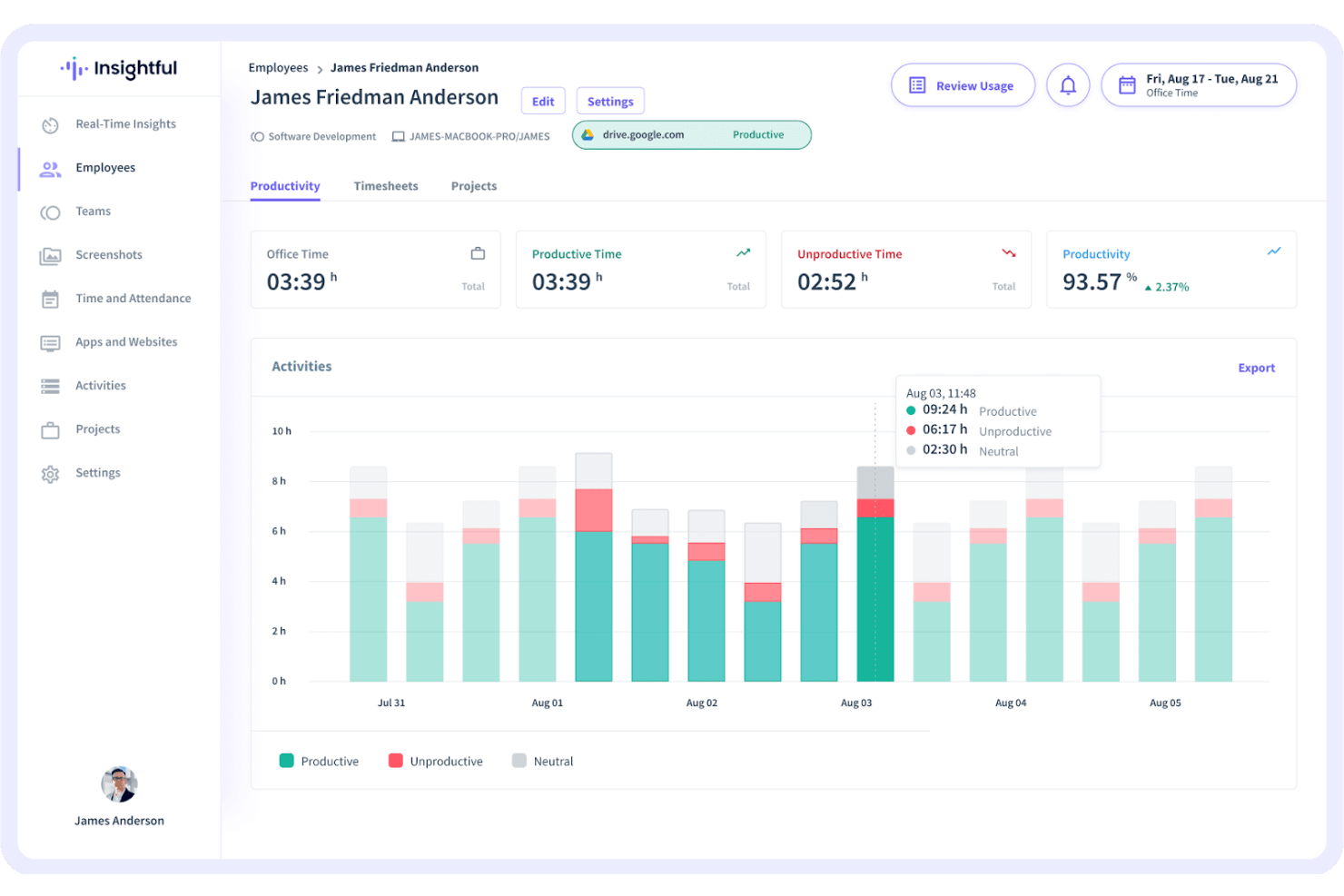
Insightful gives HR teams and business leaders a way to monitor remote employee activity, track productivity trends, and manage distributed teams with real-time data and detailed reporting.
Who Is Insightful Best For?
Insightful is a good fit for mid-sized to large businesses managing remote or hybrid teams who need visibility into how work time is actually being spent.
Why I Picked Insightful
Insightful earns its spot as one of the best on my shortlist because of how it approaches employee productivity monitoring — as more than activity logging; it helps you understand how work actually happens. I like that it lets you categorize apps and websites as productive, unproductive, or neutral, so you see not only what employees are doing but whether it's moving the needle. The technology usage tracking is particularly useful when you're trying to figure out whether your team's tool stack is helping or getting in the way. I also appreciate the location insights feature, which lets you compare productivity across remote, hybrid, and in-office setups — useful when you're building a work model based on real data rather than assumptions.
Insightful Key Features
- Automated time tracking: Automatically records time spent on tasks and projects without requiring manual input from employees.
- Real-time activity monitoring: Displays a live view of what each employee is working on at any given moment.
- Screenshots: Captures periodic screenshots of employee screens to provide visual context alongside activity data.
- Attendance tracking: Logs employee work hours, breaks, and shift patterns to give managers a clear picture of availability.
Insightful Integrations
Integrations include Jira, Trello, Asana, Aha, ClickUp, Zoho BugTracker, Azure DevOps, Basecamp, BitBucket, and GitHub.
Pros and Cons
Pros:
- Project budgeting helps control labor costs
- Reliable attendance verification for remote team
- Automatic activity tracking with detailed app and website data
Cons:
- Limited number of screenshots
- More integration options needed
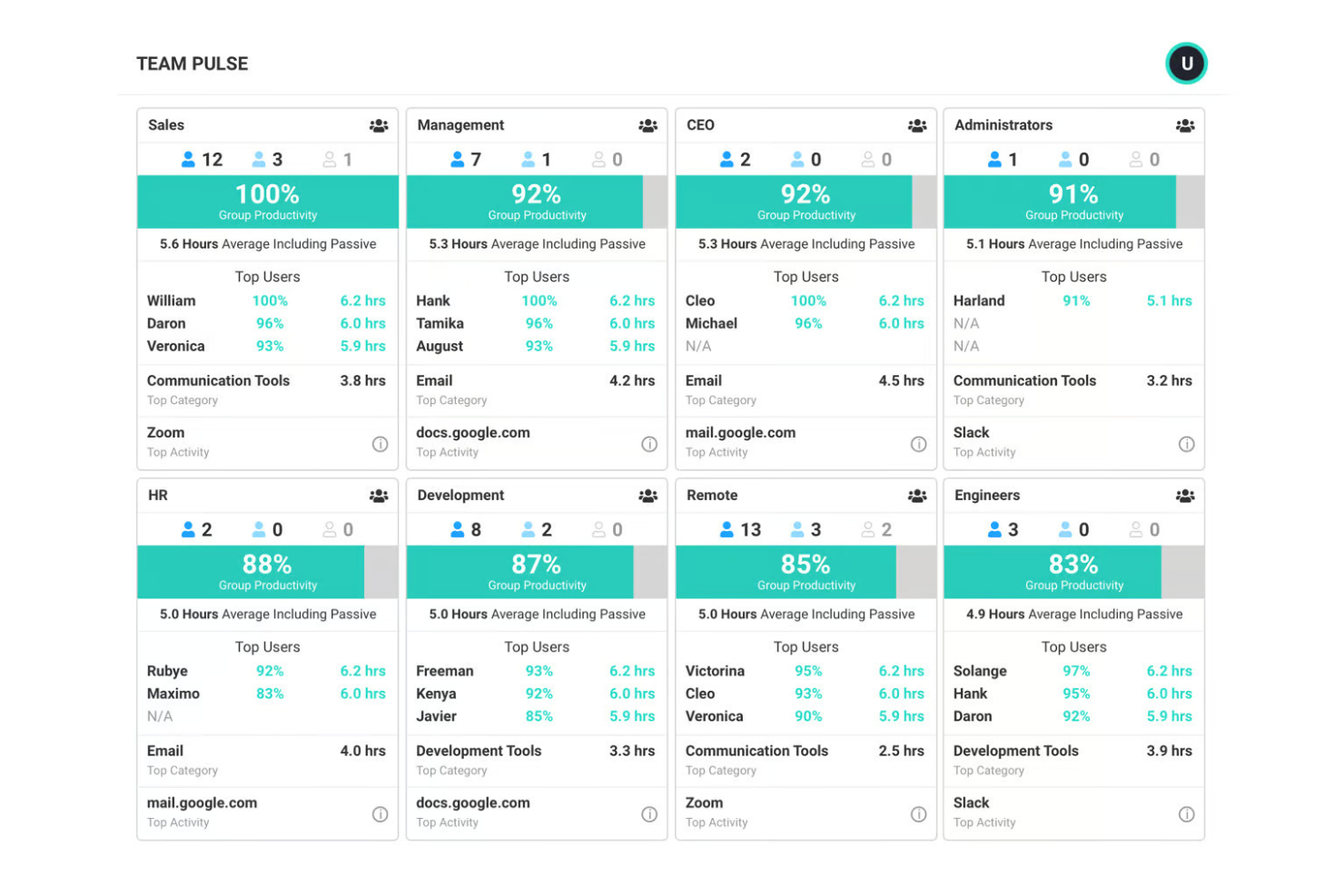
ActivTrak allows HR teams and business leaders to monitor remote employee productivity, track application and website usage, and gain actionable insights without sacrificing employee trust or privacy.
Who Is ActivTrak Best For?
ActivTrak suits mid-sized businesses and distributed teams that need visibility into remote workforce productivity without invasive surveillance.
Why I Picked ActivTrak
ActivTrak earns its spot on my shortlist because it's deliberately built around privacy-first monitoring. Most employee monitoring tools collect everything by default and leave it to admins to dial things back. ActivTrak flips that—it excludes non-business activity from reporting, doesn't log keystrokes, doesn't access cameras, and doesn't record video. I also like the role access configuration, which lets you control exactly who sees what data, so a frontline manager isn't looking at the same level of detail as an HR director. The private personal insights feature lets employees view their own productivity data, which helps build trust when rolling out monitoring to a remote team.
ActivTrak Key Features
- Productivity benchmarking: Compare individual and team productivity scores against historical baselines to identify performance trends over time.
- Workload balance reports: View workload distribution across your remote team to spot employees who are overworked or underutilized.
- Real-time activity monitoring: See which applications and websites employees are actively using at any given moment during the workday.
- Automated alerts: Set custom alerts that trigger when specific applications are used or productivity drops below a defined threshold.
ActivTrak Integrations
Integrations include Salesforce, Microsoft Teams, Slack, ServiceNow, Zendesk, Zoom, Microsoft Viva, Lattice, Qualtrics XM, and Jira Software.
Pros and Cons
Pros:
- Useful alarm feature
- Compatible with anti-virus software
- Invisible to the user
Cons:
- Historical records are clunky
- No keystroke logging

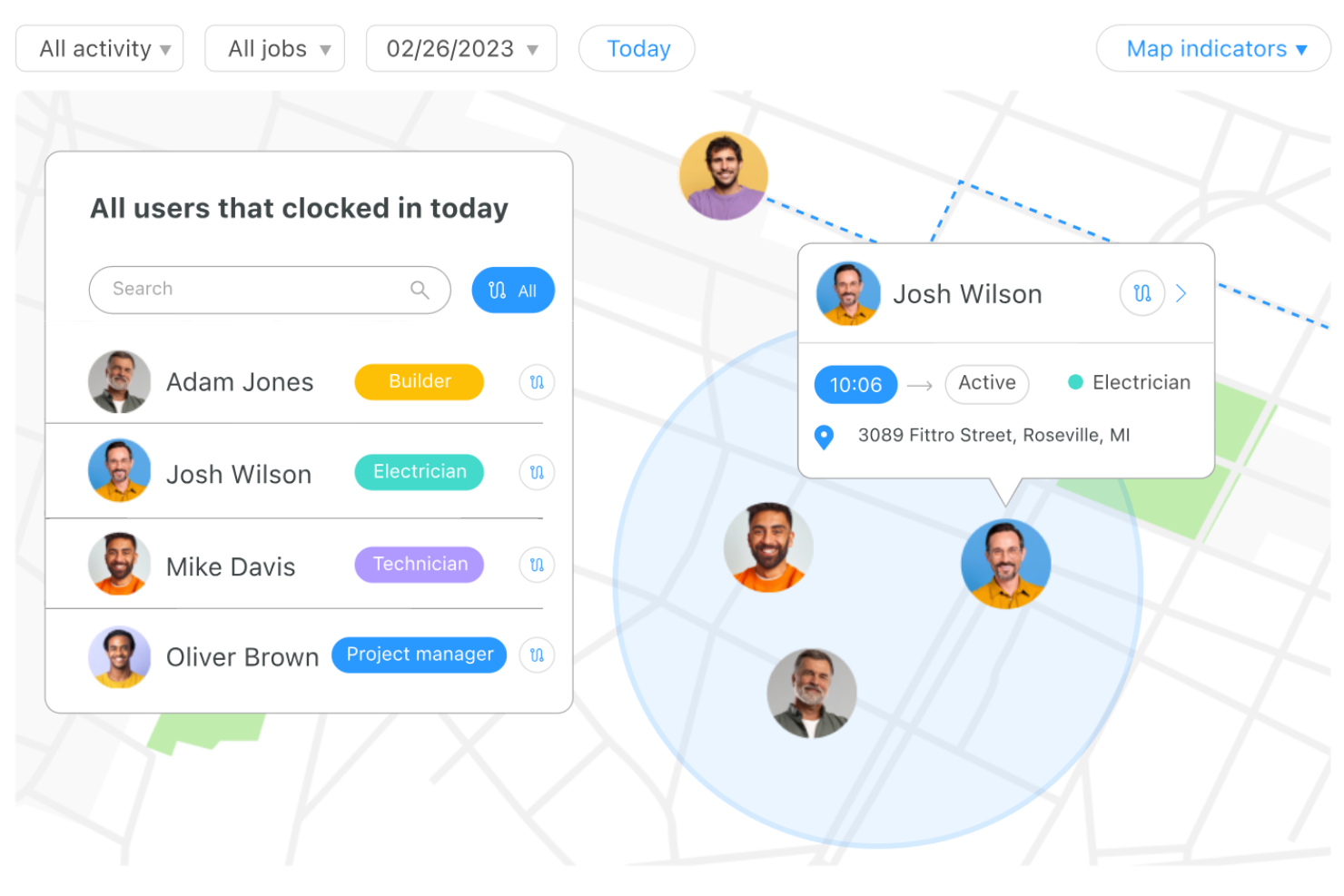
Connecteam is a mobile-first platform built for businesses with remote, mobile, or field-based teams who need to monitor employee activity, track work hours, and manage daily operations from anywhere.
Who Is Connecteam Best For?
Connecteam is a strong fit for small to mid-sized businesses in industries like construction, retail, and logistics that rely on deskless or field-based workforces.
Why I Picked Connecteam
Connecteam earns its spot as one of the best on my shortlist because of how far its GPS tracking capabilities go beyond a simple location stamp. I particularly like the Breadcrumbs feature, which records a live trail of an employee's movement throughout their entire shift—not just where they clocked in. That's useful when you're managing field teams across multiple job sites and need to verify that someone actually stayed on location. The geofencing tool lets you set a customizable radius around a worksite (anywhere from 500 to 2,500 feet), so employees can only clock in and out when they're physically present—automatically cutting off buddy punching at the source.
Connecteam Key Features
- Digital timesheets: Automatically generate timesheets from tracked hours that managers can review, edit, and export for payroll.
- Task management: Create and assign tasks to individual employees with due dates, checklists, and image attachments.
- Employee scheduling: Build and publish shift schedules that employees can view and confirm directly from their mobile devices.
- In-app chat: Send direct or group messages to remote employees without needing a separate messaging tool.
Connecteam Integrations
Integrations include QuickBooks, Gusto, Xero, ADP, Zapier, Wix, Lightspeed, PrismHR, Square, and BambooHR.
Pros and Cons
Pros:
- GPS location tracking
- Automatic reporting feature
- All-in-one software for employee management
Cons:
- Features are limited on basic plans
- Limited integrations
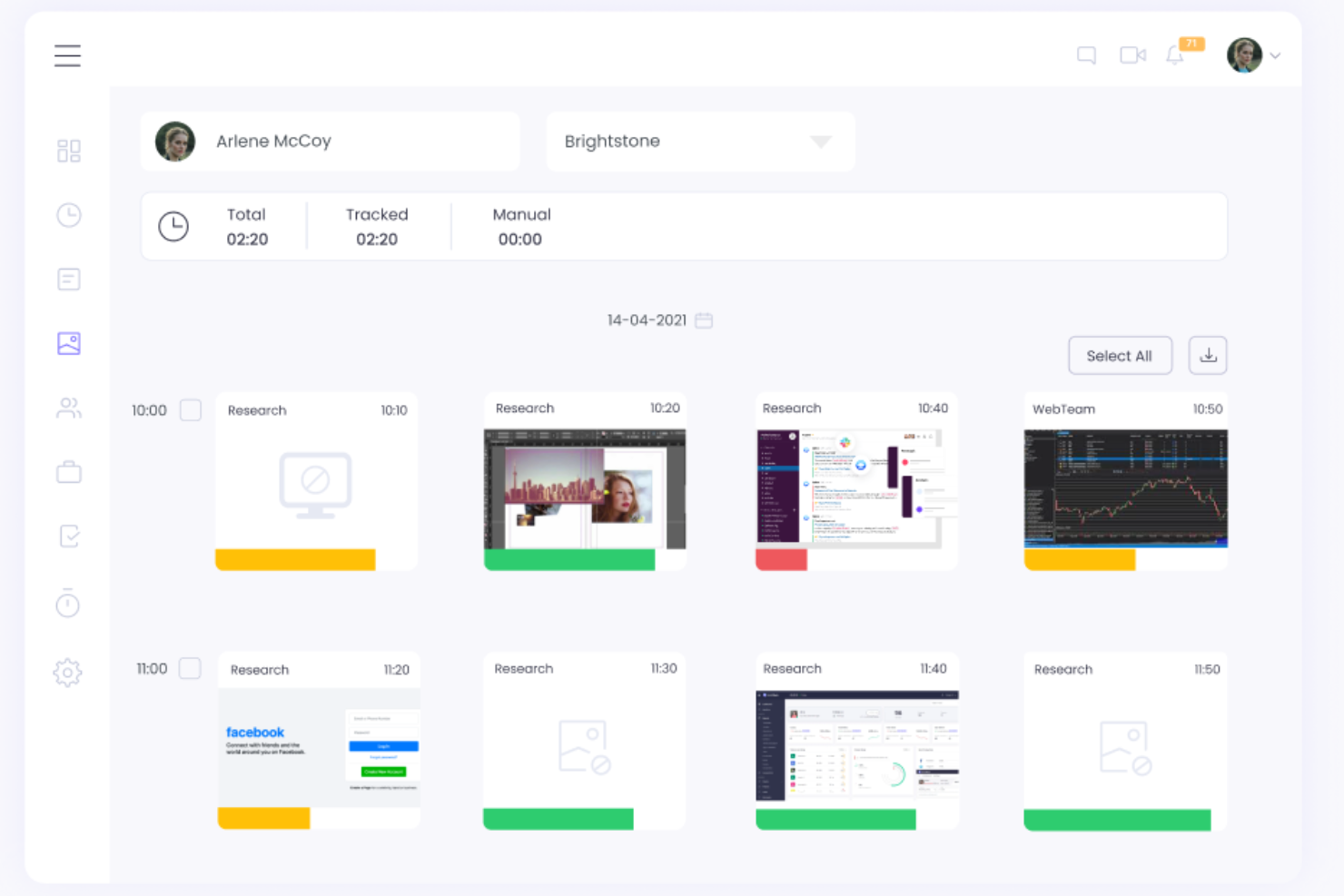
WebWork Time Tracker gives remote teams and businesses a way to monitor productivity, track work hours, and manage projects with real-time insights and detailed activity reports.
Who Is WebWork Time Tracker Best For?
WebWork Time Tracker is a strong fit for small to mid-sized businesses managing remote or hybrid teams who need visibility into how work time is spent across projects.
Why I Picked WebWork Time Tracker
WebWork Time Tracker earns its spot as one of the best on my shortlist because of how its AI goes beyond surface-level data. I love that the agentic AI assistant doesn't just summarize reports—it actively analyzes each employee's work patterns, flags burnout risks, and delivers personalized productivity strategies tailored to individual performance. In practice, that means my team can ask questions like "Who's at risk of burnout this week?" and get a data-driven answer in seconds, without digging through dashboards. The Smart Monitoring add-on takes it further by automatically categorizing each team member's performance into five labels—Positive, Neutral, Attention Needed, Negative, and Irregular Activity Risk—so I know exactly where to focus without reviewing every screenshot manually.
WebWork Time Tracker Key Features
- Screenshot monitoring: Captures screenshots at set intervals during work hours so you can review activity across your remote team.
- App and website tracking: Logs which applications and websites employees use during tracked time, categorized as productive or unproductive.
- Attendance and shift management: Tracks clock-in and clock-out times and lets you set work schedules and monitor attendance across time zones.
- Project and task time tracking: Assigns tracked time directly to specific projects and tasks so you can see where hours are actually going.
WebWork Time Tracker Integrations
Integrations include Asana, Bitbucket, Azure DevOps, ClickUp, Deel, GitHub, Google Workspace, Gusto, Jira, Notion, and Slack.
Pros and Cons
Pros:
- Attendance and leave management features
- Real-time monitoring
- Accurate time tracking and detailed productivity reports
Cons:
- Reporting tools could benefit from more customization options
- The leave balancing feature could be improved
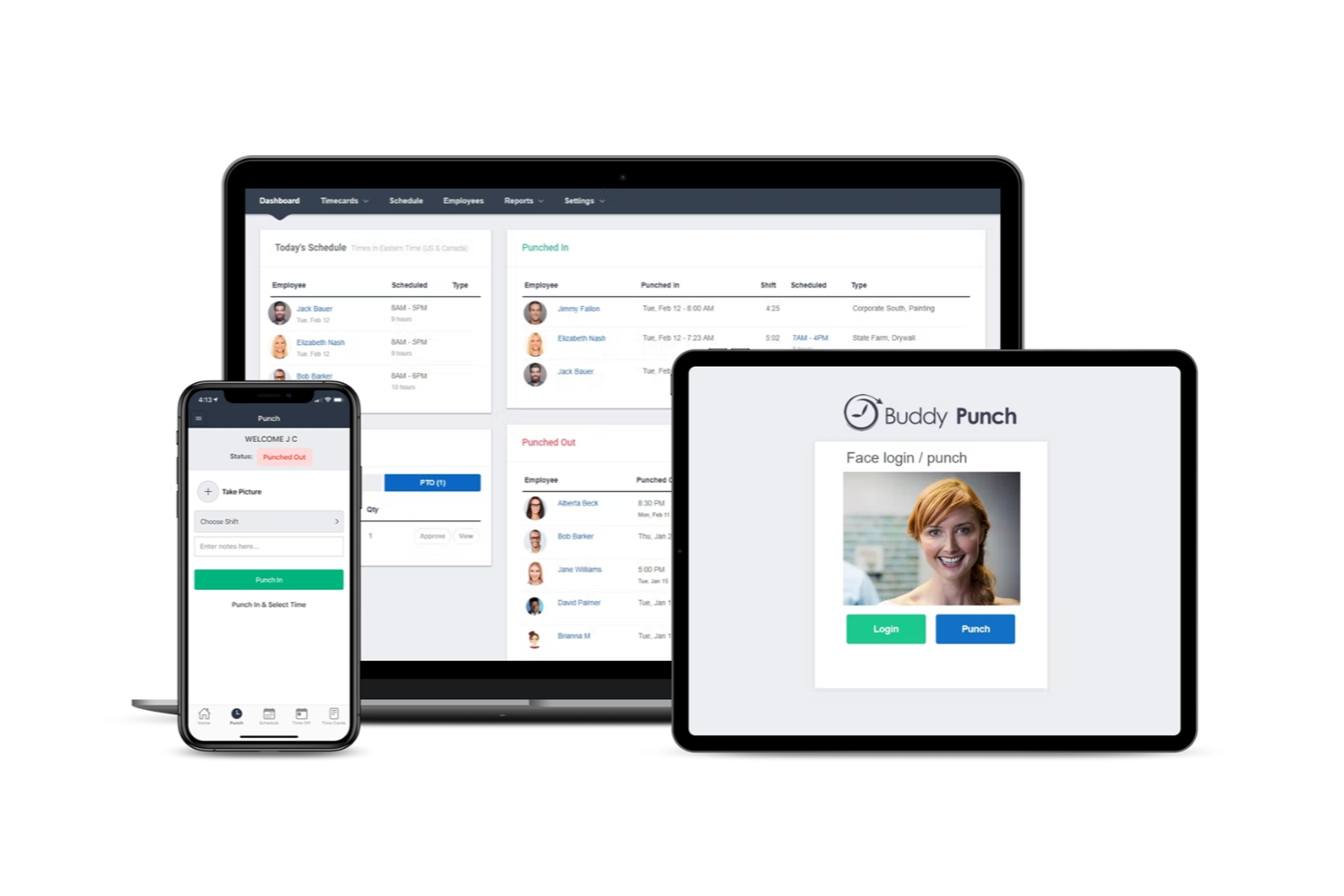
Buddy Punch is a cloud-based time tracking and attendance platform for businesses with remote or mobile teams that need to monitor employee hours, manage scheduling, and ensure accurate payroll data.
Who Is Buddy Punch Best For?
Buddy Punch is a strong fit for small to mid-sized businesses managing hourly, field-based, or distributed workforces across industries like construction, retail, and healthcare.
Why I Picked Buddy Punch
I picked Buddy Punch as one of the best because of how much control it gives you over location-based clock-ins. You can set up geofences for every worksite using an address or GPS coordinates, then dial in the boundary radius anywhere from 50 to 1,500 meters. If a remote or field employee tries to punch in outside that boundary, the app blocks the attempt and shows them exactly where they are versus where they need to be. I also like that you can attach job codes directly to geofences, so hours are automatically assigned to the right project the moment someone clocks in. The offsite punching attempt reports show who tried to clock in from the wrong location and when.
Buddy Punch Key Features
- Facial recognition clock-in: Employees verify their identity with a selfie photo before clocking in, reducing buddy punching on remote and distributed teams.
- Real-time dashboard: View who's currently clocked in, their location, and their hours worked in a live overview across your entire workforce.
- Overtime alerts: Set custom overtime thresholds and receive automatic notifications when employees are approaching or exceeding their limits.
- Drag-and-drop scheduling: Build and publish employee schedules visually, with the ability to assign shifts by role, location, or individual.
Buddy Punch Integrations
Integrations include QuickBooks Online, QuickBooks Desktop, ADP Workforce Now, Gusto, Paychex, Paycor, Paylocity, Rippling, Workday, and Justworks.
Pros and Cons
Pros:
- Photo-on-punch improves identity verification
- Geofencing restricts punches to approved job sites
- GPS-based clock-ins provide verifiable location data
Cons:
- Basic mobile app
- No offline mode

Controlio gives HR teams and business leaders a way to monitor remote employee activity in real time, track productivity, and address compliance needs with detailed reporting and automated alerts.
Who Is Controlio Best For?
Controlio suits small to mid-sized businesses that need to monitor distributed or remote teams and maintain clear records of employee activity for compliance purposes.
Why I Picked Controlio
Controlio earns its spot on my shortlist because of how well it handles the compliance side of remote employee monitoring. I like that it captures detailed audit logs and generates automated alerts when employees visit restricted sites or use unauthorized applications—exactly the kind of paper trail you need when demonstrating policy adherence. My team also uses the video recording and screenshot features to document activity during specific time windows, which makes it straightforward to investigate incidents after the fact.
Controlio Key Features
- AI-powered productivity scoring: Automatically calculates productivity scores for individual users and departments based on tracked app and website activity.
- Keystroke logging: Records keystrokes across applications so you can review typed content as part of activity or security investigations.
- Stealth mode monitoring: Runs the client agent in the background without icons or processes shown in Task Manager.
- On-premises deployment: Lets you host Controlio on your own infrastructure to meet strict security and compliance standards like HIPAA.
Controlio Integrations
Integrations are available through the Controlio API for custom connections with your applications and services. No native integrations are listed.
Pros and Cons
Pros:
- Easy-to-understand dashboard
- End-to-end encryption
- Advanced features for compliance monitoring
Cons:
- No native integrations
- Only available for PCs

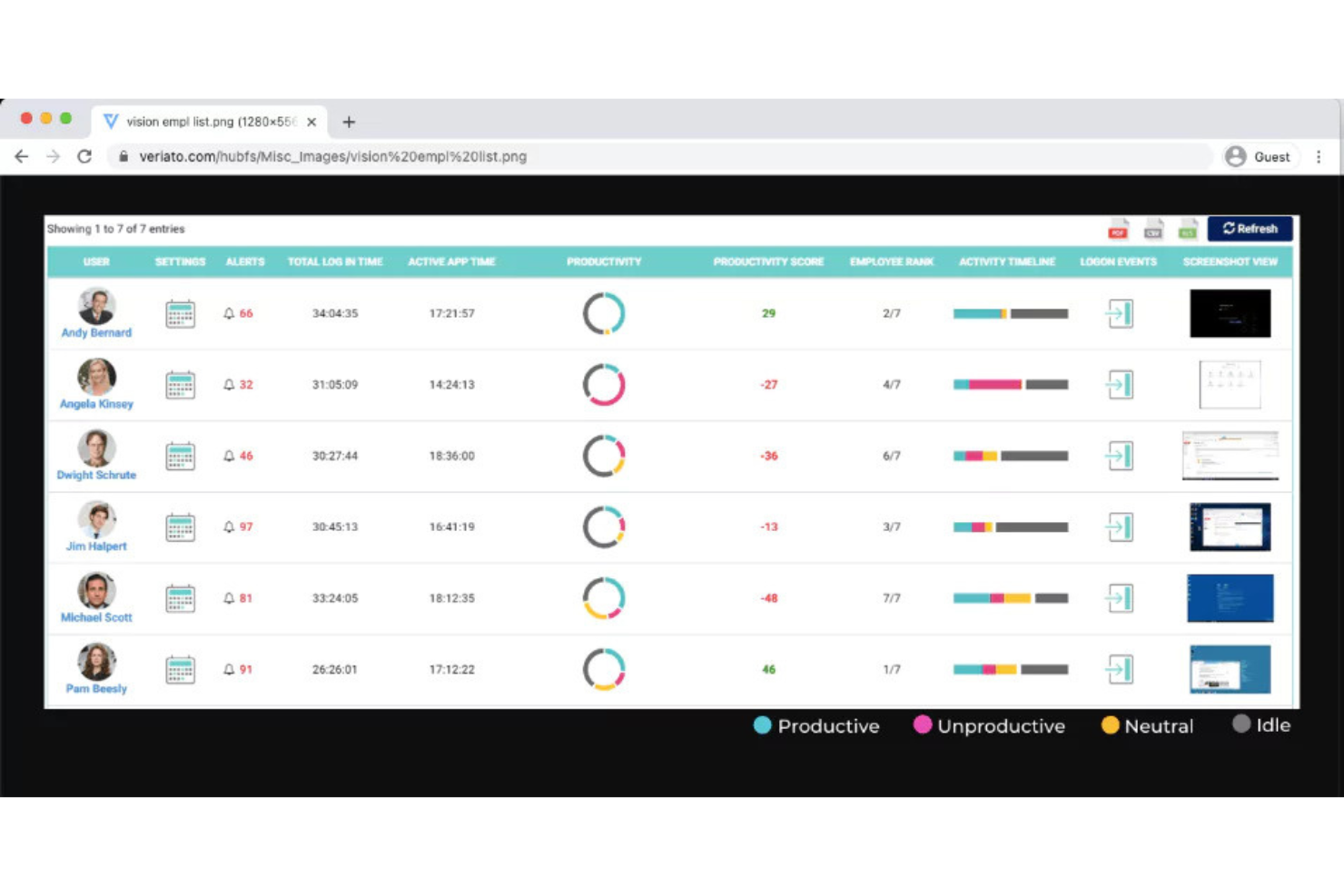
Veriato gives HR teams and IT leaders detailed visibility into remote employee activity, helping organizations monitor productivity, detect insider threats, and maintain compliance with industry regulations.
Who Is Veriato Best For?
Veriato is a strong fit for security-conscious organizations in regulated industries like finance, healthcare, and government that need detailed audit trails and behavioral monitoring for remote workforces.
Why I Picked Veriato
I picked Veriato as one of the best because of how well it handles the compliance and audit requirements that regulated industries face. I like that it automatically tracks unauthorized access to PII and generates detailed logs and screenshots that can be used directly in compliance investigations—that's the kind of evidence trail that matters in a HIPAA or financial services audit. I also use the keyword-triggered screenshot feature to capture activity around sensitive documents without running continuous surveillance, which keeps monitoring proportionate. The SIEM integration means my team can fold Veriato's behavioral data into our broader security stack without running parallel systems.
Veriato Key Features
- Email and chat monitoring: Track employee communications across email clients and messaging apps, including content and frequency of exchanges.
- Idle and active time tracking: Measure how long an employee's computer is active versus idle throughout the workday to surface productivity patterns.
- File and document tracking: Monitor file creation, editing, deletion, and renaming across local, removable, and cloud storage, as well as print operations.
- Fully customizable settings: Set monitoring schedules by team or department, including flexible work hours that control when tracking starts and stops each day.
Veriato Integrations
Integrations include Data Loss Prevention (DLP) solutions, Security Information and Event Management (SIEM) platforms, and an API for custom integrations.
Pros and Cons
Pros:
- Descriptive reporting
- Can be customized extensively
- Comprehensive overview of activity
Cons:
- Needs better screenshot archives
- Takes time to set up

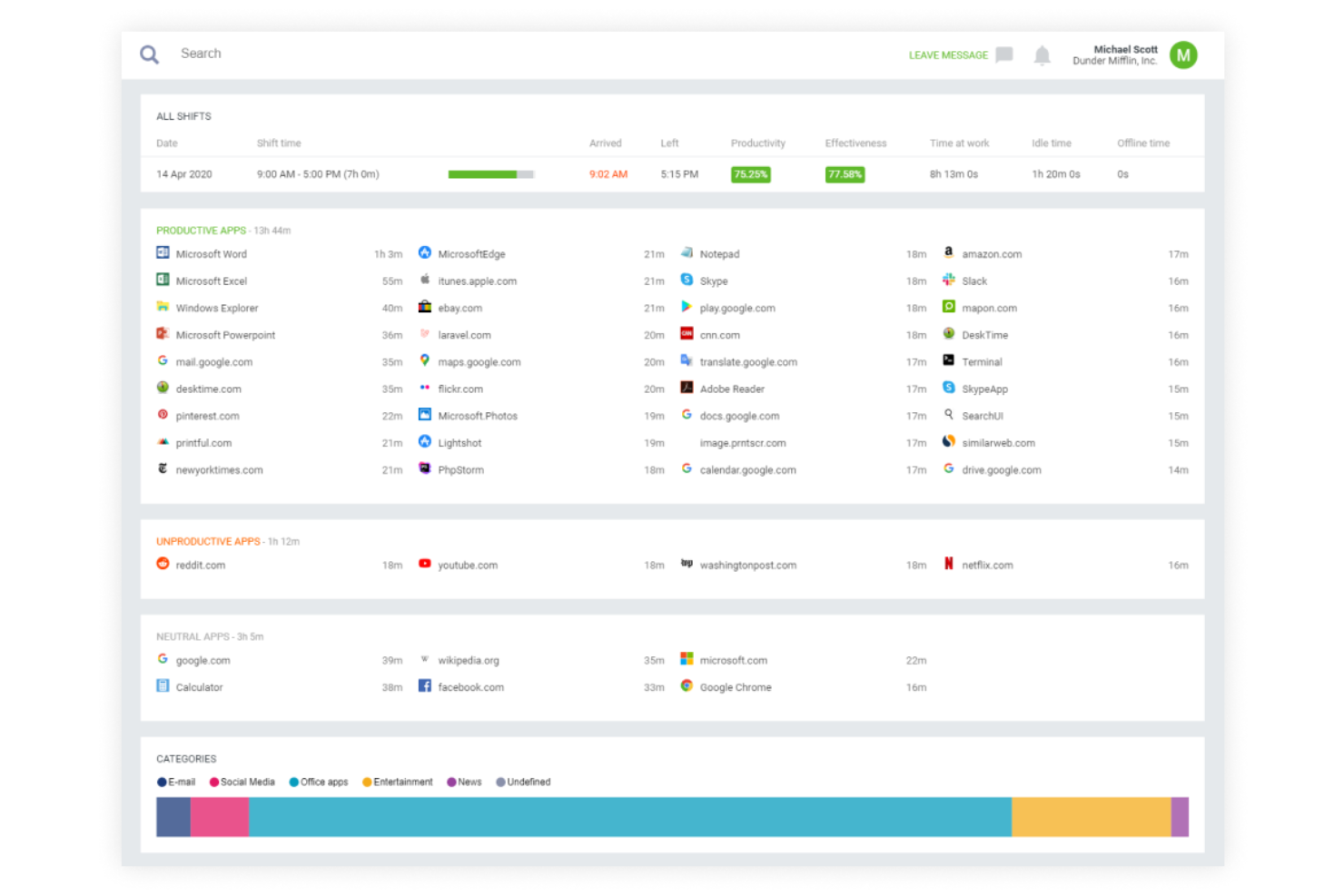
DeskTime is a time tracking and productivity monitoring tool designed for businesses managing remote or hybrid teams who want to understand work habits, track project hours, and optimize team performance without invasive oversight.
Who Is DeskTime Best For?
DeskTime is a strong fit for small to mid-sized businesses that need straightforward productivity visibility across remote or hybrid teams without complex setup.
Why I Picked DeskTime
DeskTime earns its spot on my shortlist because it tracks productivity without crossing into surveillance territory. I like that it automatically categorizes apps and websites as productive, unproductive, or neutral—so I get a clear picture of how work time is spent without manually reviewing screenshots or keystrokes. The optional screenshot feature can be set to blur sensitive content, which I find genuinely useful for maintaining trust with remote employees. DeskTime also tracks idle time automatically, flagging gaps without requiring managers to micromanage check-ins.
DeskTime Key Features
- Project time tracking: Log and assign time spent on specific projects and tasks directly within the platform.
- Absence calendar: Track employee time off, sick days, and scheduled absences in a shared calendar view.
- Shift scheduling: Build and manage employee work schedules to monitor expected vs. actual hours worked.
- Private time option: Employees can pause tracking manually for personal browsing, keeping non-work activity private.
DeskTime Integrations
Integrations include Google Calendar, Outlook Calendar, Asana, Basecamp, Jira, Trello, Zapier, GitLab, GitHub, and custom integrations via API.
Pros and Cons
Pros:
- Can be accessed from mobile devices
- Simple onboarding process
- Easy to assess productivity
Cons:
- Integrations need improvement
- Gap management could be improved

Syteca is a security-focused monitoring solution that helps organizations gain visibility into employee activity across desktops and servers. It’s designed for IT administrators, compliance officers, and security teams who need to oversee user actions, investigate incidents, and maintain data protection. The platform supports a range of business needs, from productivity analysis to insider risk prevention.
Why I picked Syteca: You can use Syteca to watch user sessions in real time or replay them later through indexed screenshots or full-motion video recordings.
The platform helps your team identify risky or inefficient behaviors while keeping privacy in check through flexible monitoring settings. Its role-based access controls, tamper-proof agents, and military-grade encryption protect sensitive data and audit logs.
You’ll also appreciate how the system adapts to your specific compliance or security goals without slowing down your endpoints.
Syteca Standout Features and Integrations:
Features include offline monitoring for when users are disconnected from the network, real-time alerts that flag suspicious behavior, and actionable reports that help you understand patterns in employee activity.
You can also export data for forensic analysis and track activity across USB devices, applications, and file uploads. A privacy-first design ensures monitoring remains transparent and compliant with data protection standards.
Integrations include Splunk, IBM QRadar, ServiceNow, Jira, Okta, Azure Active Directory, and Active Directory.
Pros and Cons
Pros:
- Supports granular role-based access
- Offers strong data encryption standards
- Works offline without losing data
Cons:
- Limited direct integration management options
- Real-time video recording can strain bandwidth


Teramind gives HR teams and IT leaders a way to monitor remote employee activity, track productivity, and detect risky behavior with detailed analytics and real-time alerts.
Who Is Teramind Best For?
Teramind is a strong fit for mid-size to enterprise security, compliance, and IT teams that need deep visibility into remote employee behavior.
Why I Picked Teramind
Teramind earns its spot as one of the best on my shortlist because its user behavior analytics go well beyond basic activity logs. I like that it builds behavioral baselines for each employee, so when a remote worker suddenly starts bulk-downloading files or accessing systems outside their normal hours, Teramind flags it as an anomaly rather than just logging it. That distinction matters a lot when you're trying to catch real risk early. I also find the OMNI alert feed useful—it groups related behavioral signals into a prioritized news-style feed, so my team doesn't have to wade through hundreds of raw alerts to find the ones that need attention. Teramind's OCR detects sensitive content on a user's screen in real time, including screenshots and shared meeting content—a capability most monitoring tools lack.
Teramind Key Features
- Session recording: Capture full video recordings of remote employee desktop sessions for review and audit purposes.
- Productivity tracking: Monitor active vs. idle time, application usage, and website visits across your remote workforce.
- Remote desktop control: Access and control a remote employee's screen in real time to investigate incidents or provide support.
- Data loss prevention (DLP): Set rules to detect and block unauthorized transfers of sensitive data via email, USB, or cloud storage.
Teramind Integrations
Integrations include ServiceNow, Splunk, HP ArcSight, IBM QRadar, McAfee, LogRhythm, NetIQ, Microsoft Purview Information Protection, Jira, Zendesk, and Redmine.
Pros and Cons
Pros:
- Supports both cloud-based and on-premises deployments
- Real-time alerts and automated responses to policy violations
- Detailed user behavior analytics to detect anomalies
Cons:
- Limited support for mobile device monitoring
- Minimum of 5 seats
Time Doctor
Best for employee monitoring software with extensive integrations
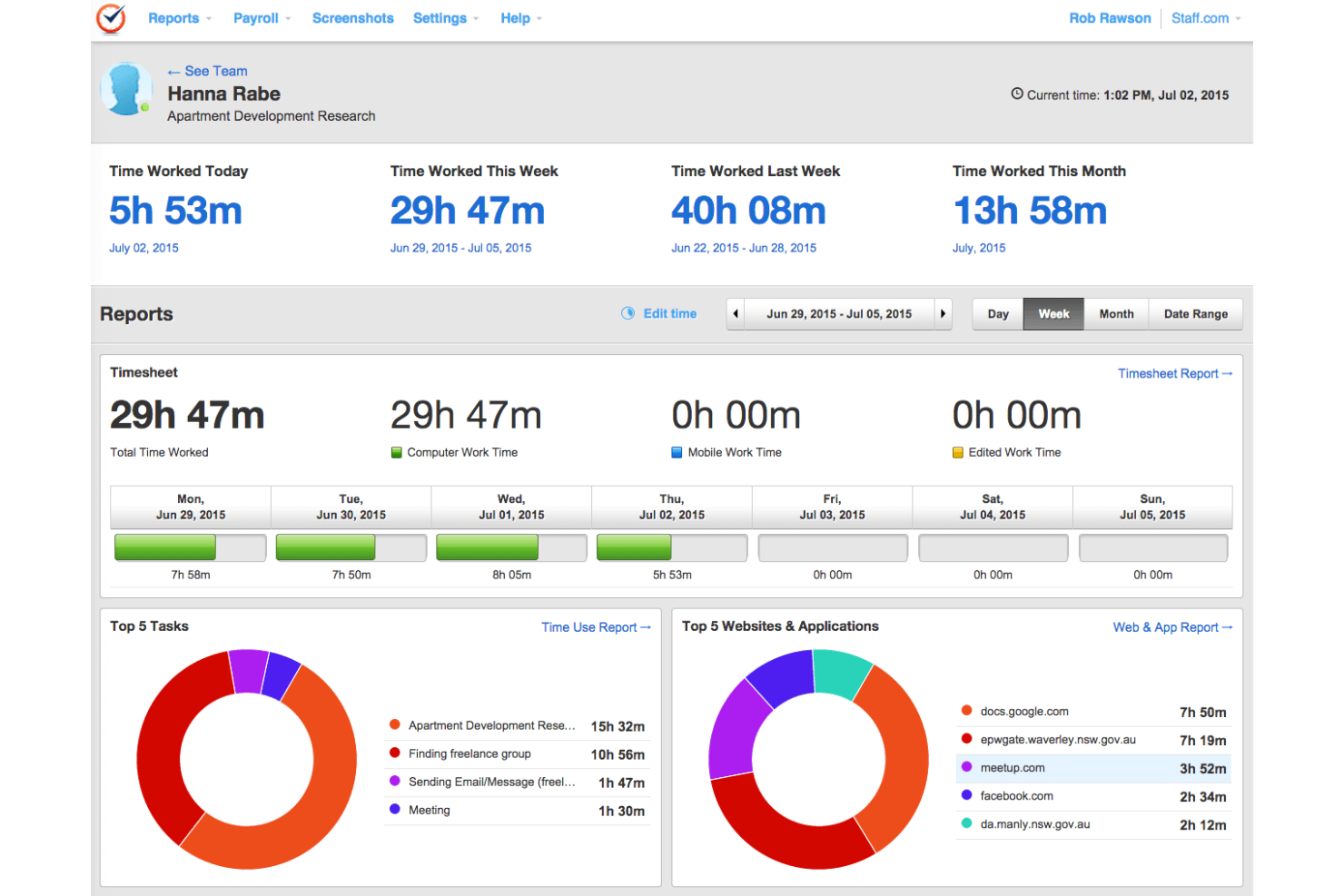
Time Doctor gives remote teams and businesses a way to track work hours, monitor productivity, and analyze employee activity, helping managers address accountability and workflow challenges in distributed work environments.
Who Is Time Doctor Best For?
Time Doctor is a good fit for small to mid-sized businesses managing remote or hybrid teams who need detailed visibility into how work time is being spent.
Why I Picked Time Doctor
I picked Time Doctor as one of the best because of how extensive its integration library is. With 60+ native connections spanning project management tools like Jira and Asana, payroll platforms like Gusto, Deel, and ADP, and HR systems like BambooHR and Workday, time tracking data flows directly into the tools my team already uses. That means I'm not manually exporting timesheets or reconciling hours across systems. I also like that the Unusual Activity Report automatically flags inconsistencies in time entries before they hit payroll, which prevents a major audit headache.
Time Doctor Key Features
- Automated screenshots: Captures periodic screenshots of employee screens during work sessions to give managers visibility into active tasks.
- Website and app usage tracking: Logs which websites and applications employees visit during tracked hours, categorizing them as productive or unproductive.
- Attendance and shift scheduling: Tracks clock-in and clock-out times and flags late arrivals or absences against scheduled shifts.
- Work-life balance widget: Monitors after-hours activity and alerts managers when employees are consistently working outside their scheduled hours.
Time Doctor Integrations
Integrations include Jira, Asana, monday.com, Trello, BambooHR, Gusto, ADP, Salesforce, HubSpot, and Workday.
Pros and Cons
Pros:
- Reduces wasted time
- Improves billing
- Accurate time-tracking
Cons:
- Occasional tracking glitches
- Redundant notifications
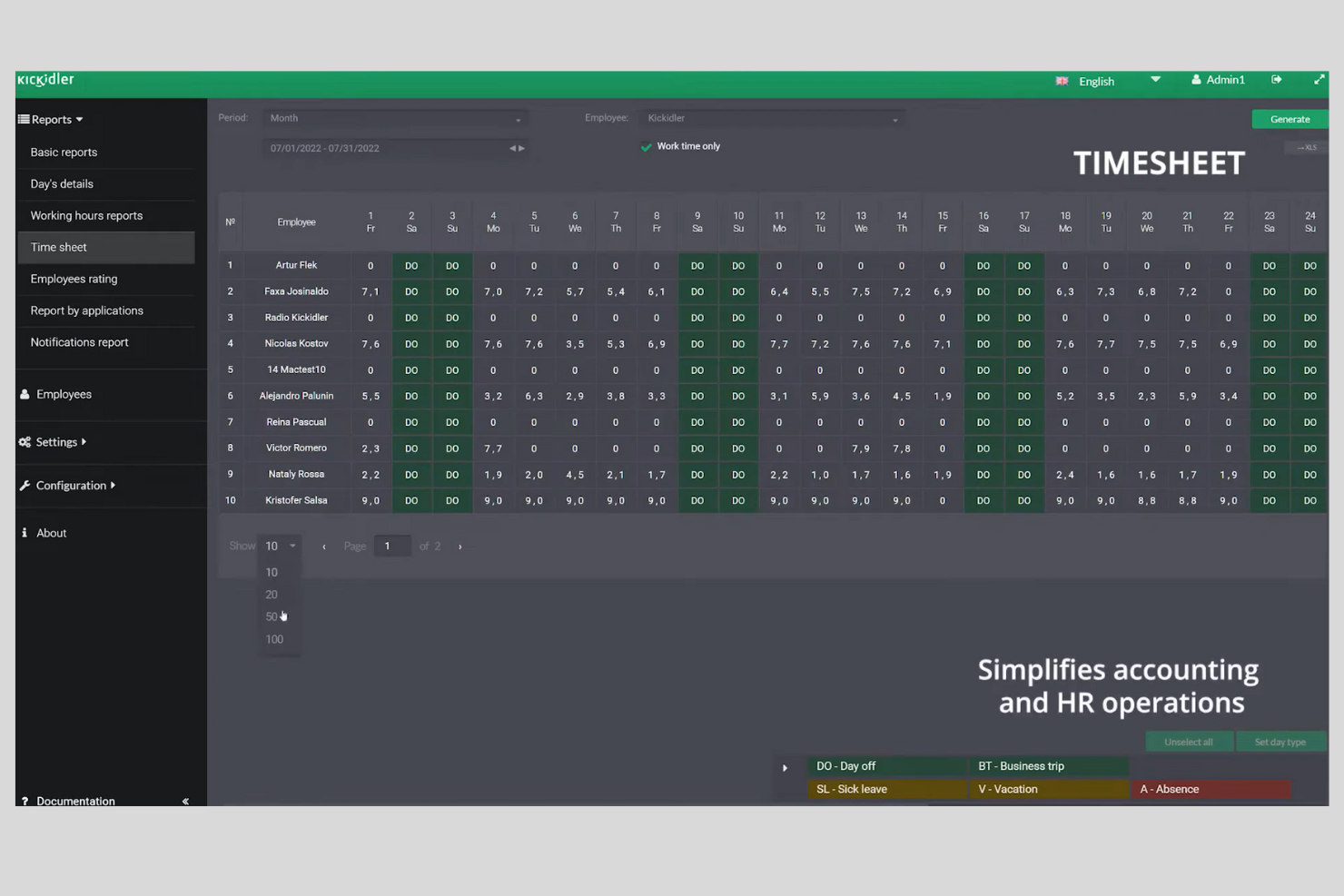
Keepactive is a remote employee monitoring platform designed for businesses that need detailed oversight of distributed teams, offering tools to track productivity, monitor activity, and ensure compliance with company policies.
Who Is Keepactive Best For?
Keepactive is a strong fit for mid-sized to large businesses with remote or hybrid teams that need granular visibility into how employees spend their working hours.
Why I Picked Keepactive
Keepactive stands out for its visual monitoring tools, which go beyond most remote monitoring platforms. The live screen grid view lets me watch an unlimited number of employee desktops simultaneously in a CCTV-style layout—color-coded frames instantly show who's active, idle, or away, without clicking through individual profiles. The event-based video recording is useful: rather than storing hours of footage for every employee, recordings can be configured to trigger only when a specific violation occurs, such as an extended period of inactivity or access to a non-work-related site. This keeps storage manageable while still providing a full visual record of what happened and when.
Keepactive Key Features
- Keystroke and mouse activity tracking: Logs keyboard and mouse input to measure real engagement levels throughout the workday.
- Automated productivity reports: Generates scheduled reports that break down time spent on productive vs. non-productive applications and websites.
- Employee self-monitoring dashboard: Gives employees access to their own activity data so they can review and manage their own productivity.
- Flexible alert system: Sends automated notifications to managers when predefined rule violations or unusual activity patterns are detected.
Keepactive Integrations
Integrations include Salesforce, Microsoft Dynamics 365, QuickBooks, Xero, Jira, Trello, Slack, Microsoft Teams, ADP, and BambooHR.
Pros and Cons
Pros:
- Self-monitoring tools empower individual users
- Strong data-leak prevention (DLP) support
- Activity classification into productive/neutral/unproductive
Cons:
- Less native integration list compared to some peers
- Windows/PC-centric features may limit Mac/Linux coverage


CleverControl is a software tool designed to help organizations monitor the activity of their employees, especially those working remotely or on distributed teams.
It’s aimed primarily at businesses that need insight into how work is being done, what applications and communications are being used, and whether company policies are being followed — including use of messaging and chat tools.
Why I picked CleverControl: I like that you can track messaging apps and chat conversations in a way that gives you visibility into internal communications — which means you and your team can see what is being said, when, and by whom. For example, you can view two-way chat logs, capture keystrokes in messenger windows, and get screenshots triggered by messaging events.
You also get live-screen viewing and video/audio capture options so you’re not only seeing the written text but the context around it. The software includes reporting and analytics dashboards so you and your management team can act on trends in messaging use rather than just raw data.
CleverControl Standout Features and Integrations:
Features include continuous screen recording so you can playback what employees were doing, alert triggers when specific keywords appear in chats or messenger windows, and external storage & printer tracking to flag potential data leaks. These features help you monitor not just messaging but also related behaviours that may impact security or workflow.
Integrations include none publicly listed as ‘native’ (no extensive list available on the vendor site) so you’ll want to check with them directly for integration with tools like Slack, Microsoft Teams, Google Workspace and so on.
Pros and Cons
Pros:
- Extensive tracking of messenger and chat communications
- On-premise option so you can keep data in-house
- Supports stealth mode (agent runs hidden)
Cons:
- Large volume of data can be hard for your team to manage/interpret
- Can feel overly invasive to employees if not communicated properly
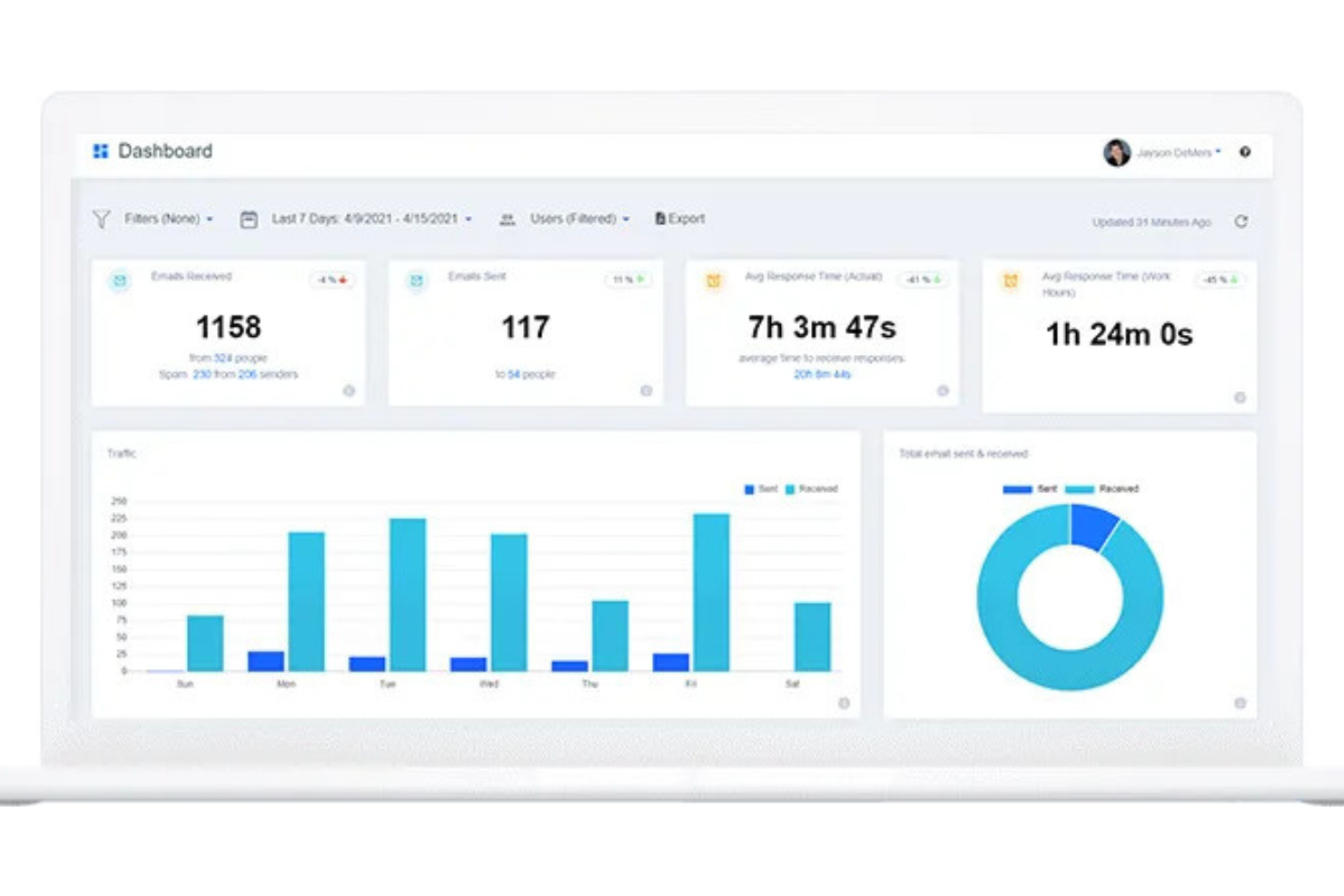
EmailAnalytics gives you visibility into daily email activity and unlocks insights into how your team members respond to email inquiries.
Why I picked EmailAnalytics: This tool shows your sales team’s email activity in an email analytics dashboard, so you can see how many emails are sent and received each day. You get insights into how many people your team corresponds with and the number of spam complaints received. You can also drill down into any metric to get further information.
It’s easy to see who sends the most emails, which clients team members respond to, and the average response time for each recipient. You can also check how many unread emails are in each person’s inbox or how many are labeled ‘important.’ The system also analyzes emails by time of day, so you can see when people are most active.
EmailAnalytics Standout Features and Integrations
Features include emails sent & received, email traffic by day of the week, top senders & recipients, traffic by hour of the day, email response time, and team management.
Integrations include Gmail, HubSpot, and Outlook.
Pros and Cons
Pros:
- Comprehensive email insights
- Gives complete team reports
- No software to install
Cons:
- Designed for sales teams only
- Only tracks email
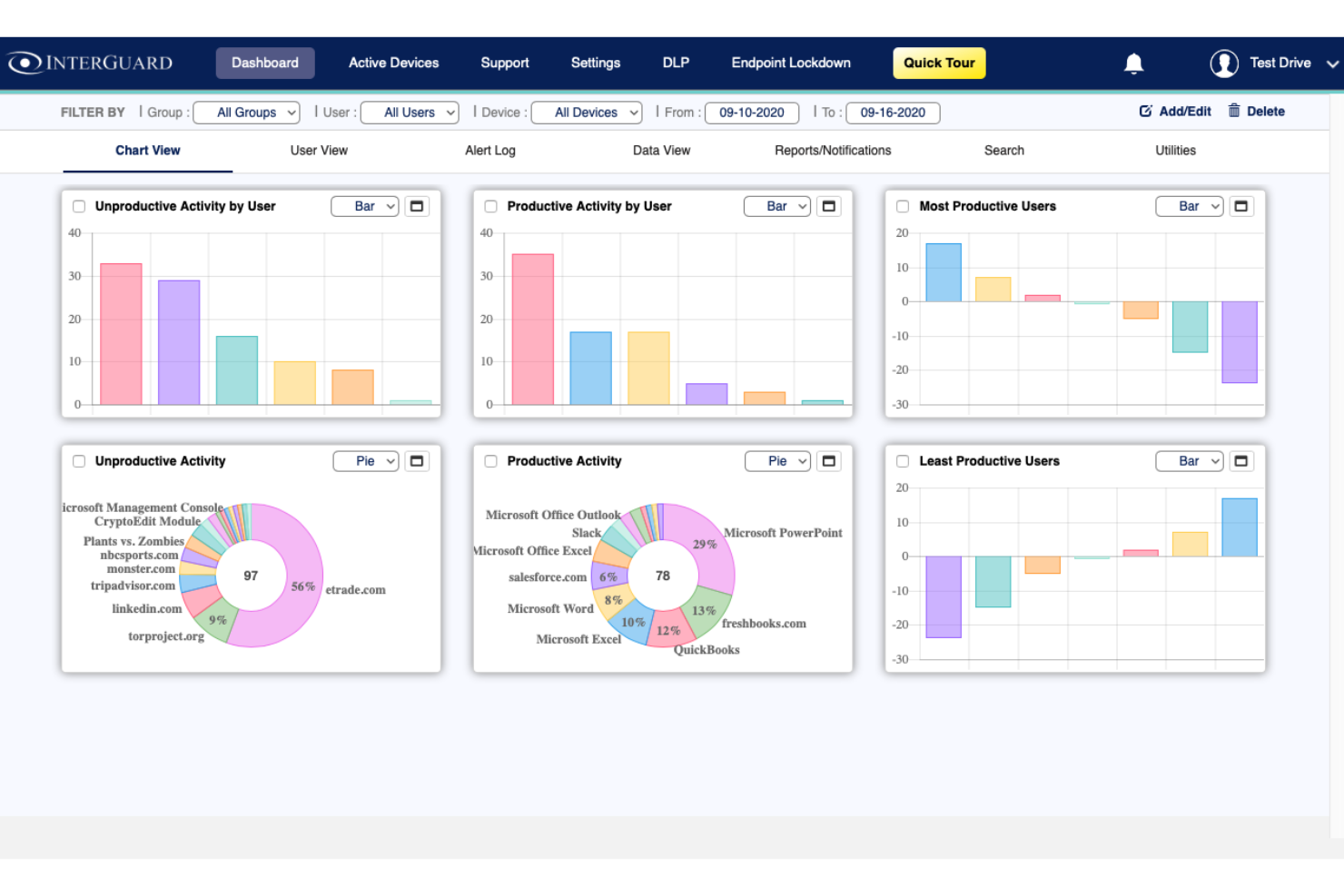
Interguard helps you monitor remote and work-from-home employees, keeping your business safe and productive wherever your team members are located.
Why I picked InterGuard: This software application will alert you if employees break rules, such as by exporting your customer list from your CRM. You can also go beyond monitoring and set up policies to block sensitive data from being sent by email, uploaded to the cloud, or copied to an external storage device. If employees are suspected of committing fraud or theft, you can lock down their computers remotely.
The software also monitors employee productivity to ensure you get the best value on your investment. It helps you eliminate distractions and keep projects on track. You can also track the time spent on a project and identify potential delays that slow work down.
InterGuard Standout Features and Integrations
Features include email monitoring, website blocking, chat monitoring, file tracking, screenshot taking, cell phone monitoring, keystroke logging, insider threat detection, and active time tracking.
Integrations are available through Zapier.
Pros and Cons
Pros:
- Runs in the background
- Keyword capture
- Easy to set up
Cons:
- Dated interface
- Reports are not intuitive
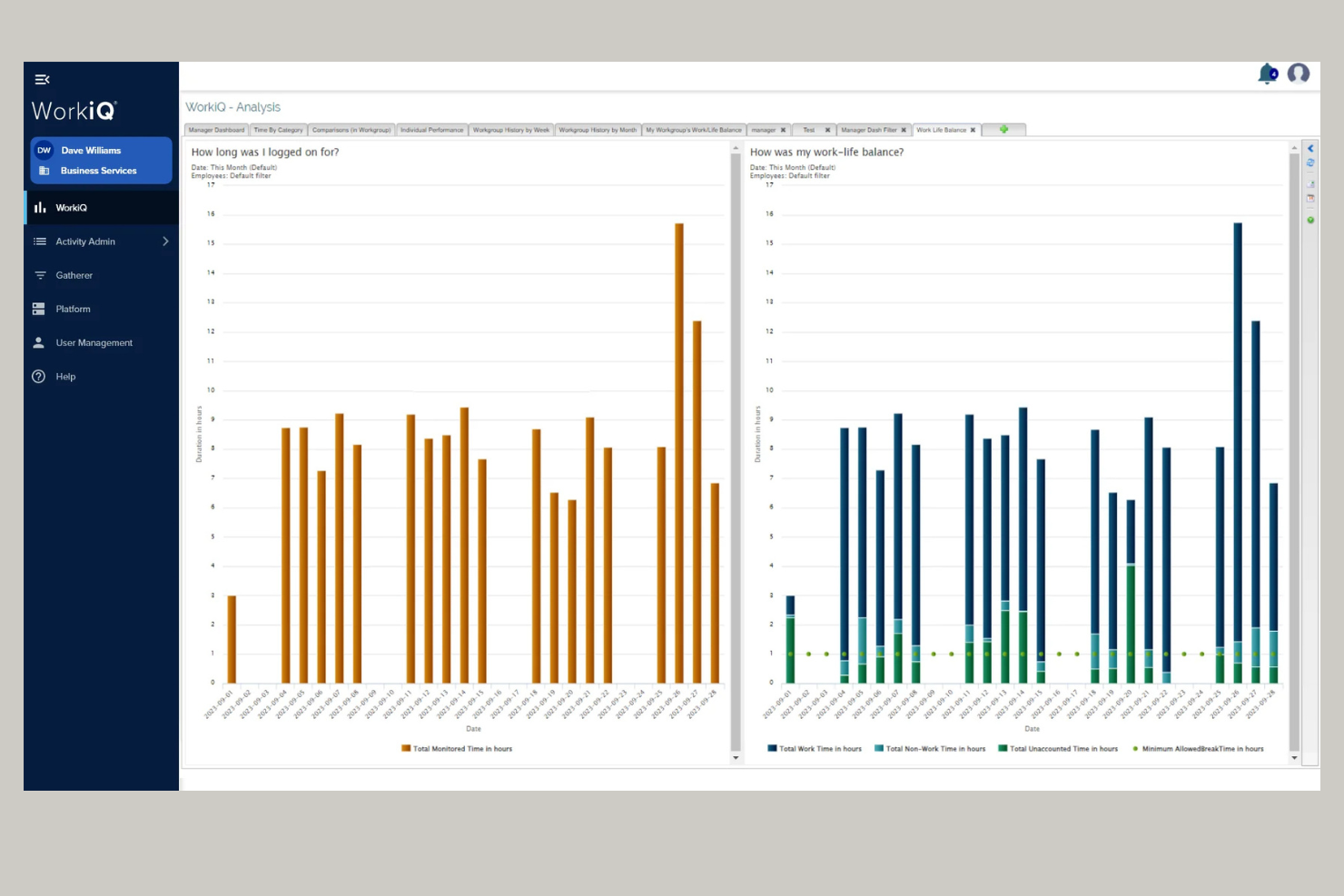
ActiveOps WorkiQ is a workforce intelligence solution designed to give organizations clear visibility into how their people work across office, remote, and hybrid environments. It helps managers and teams understand work patterns, balance workloads, and make data-driven decisions that support performance and well-being.
Why I picked ActiveOps WorkiQ: This software focuses on providing fair and privacy-conscious workforce insights, helping you understand activity levels without invasive tracking. You can monitor employee work routines, identify burnout risks, and assess efficiency through features like transparent team activity, hybrid workforce management, and flexible reporting.
WorkiQ also enables you to use the data constructively—so you can spot early warning signs of overwork or underload, support healthy work habits, and encourage engagement across your team. The tool’s ability to show real-time visibility into how, when, and where your teams work makes it practical for improving decision-making and performance conversations.
WorkiQ Standout Features and Integrations:
Features include detailed visibility into work patterns across hybrid teams, the ability to identify inefficiencies and spot burnout risks, and flexible reporting tools that let you analyze workload balance and time usage.
You can use it to help your team maintain healthy work-life balance, track excess hours, and detect inconsistent work patterns before they impact productivity. The system’s fair measurement model also gives your people access to their own performance data, encouraging ownership and accountability.
Integrations include ControliQ, CaseworkiQ, Microsoft Teams, Slack, Salesforce, ServiceNow, Oracle, SAP, Zoom, and Google Workspace.
Pros and Cons
Pros:
- Lets you see hybrid work patterns clearly
- Supports team engagement and accountability
- Helps you detect burnout early
Cons:
- Cloud version may not fit all infrastructure needs
- Limited custom visualization options

iMonitor Employee Activity Monitor is an all-in-one, centralized employee computer monitoring software solution, designed primarily for enterprises, education orgs, and governments.
Why I picked iMonitor EAM: This tool automatically detects and tracks inappropriate behavior such as copying, deleting, or sending sensitive documents. Smart rules and real-time alerts identify employee fraud and help with data loss prevention. The software is capable of backing up all employee files automatically to ensure data security. Rules can be set to encrypt confidential files and eliminate the risk of a data breach.
iMonitor EAM also monitors and controls user activity, filtering websites and apps to reduce non-work related activity in the workplace. It provides regular employee productivity reports showing the applications used, websites visited, keystrokes made, and active working time.
iMonitor EAM Standout Features and Integrations
Features include screen snapshots, websites visited, emails sent, chats initiated, documents opened, devices used, and documents printed.
Integrations are available through Zapier.
Pros and Cons
Pros:
- Strong data security
- Suitable for enterprise organizations
- Well-established application
Cons:
- Outdated interface
- Sometimes conflicts with anti-virus software
Other Remote Employee Monitoring Software
Here are a few more worthwhile options that didn’t make the best remote employee monitoring software list:
- Apploye
For monitoring keystrokes
- Intelogos
For providing AI-driven insights
- RescueTime
Remote employee monitoring software for winning back unproductive time
- Timely
Remote employee monitoring software for background time tracking
- ControlUp
Remote employee monitoring software for digital work experience management


Related HR Software Reviews
If you still haven't found what you're looking for here, check out these other related tools that we've tested and evaluated:
- HR Software
- Payroll Software
- Recruiting Software
- Employer of Record Services
- Applicant Tracking Systems
- Workforce Management Software
Selection Criteria for Remote Employee Monitoring Software
Selecting the right remote employee monitoring software requires a deep dive into the specific functionalities that align with your unique needs. My approach to choosing the best tools for this list is grounded in extensive research into these systems and how they can address common pain points related to tracking and assessing the productivity of remote workforces.
Here's a summary of the selection criteria I used to create this list:
Core Remote Employee Monitoring Software Functionalities (25% of total score): Some employee monitoring systems track employee time by monitoring employee work, while others are focused on measuring employee performance. To be considered for inclusion in this list, each solution had to support the following use cases first:
- Time tracking to understand work habits and verify hours worked
- Monitoring websites and applications for productivity versus time theft
- Capturing screenshots for task engagement verification
- Tools to manage tasks to ensure team alignment and deadline adherence
- The ability to generate real-time reports for quick decision-making as well as more in-depth analyses
Additional Standout Features (25% of total score): To help me uncover the best remote employee monitoring software, I also took note of any unique features, including:
- Innovations in privacy controls that balance monitoring with respect for employee privacy
- Advanced analytics for deeper insights into productivity trends
- Customizable alert systems for proactive management, including insider threat detection
- Enhanced data security measures to protect sensitive information from breaches or improper use
- Integration capabilities with other business tools for a seamless workflow
Usability (10% of total score): To evaluate the usability of each monitoring system, I considered the following:
- An intuitive user interface and user-friendly design that simplifies navigation and complex information
- Clear and concise dashboard layouts for at-a-glance insights
- Role-based access control that's straightforward to configure
- Systems that offer cross-device compatibility, including versions for Mac, Windows, Linux, Android, and iOS devices
Customer Onboarding (10% of total score): To get a sense of each software provider's customer onboarding process, I considered the following factors:
- Quick setup processes and clear guidance for first-time users
- The availability of training materials such as videos or interactive tutorials
- Support systems like chatbots and webinars to guide new users through the initial learning curve
- Support for implementing the new software discreetly from an IT perspective
Customer Support (10% of total score): To evaluate the level of customer support each vendor offered, I considered the following:
- The availability of multiple support channels, including email, phone, and chat
- The existence of a self-service knowledge base, FAQ repository, or other self-help resources to speed up troubleshooting
- The overall quality, responsiveness, and helpfulness of the support team during customer onboarding and post-purchase, as inferred from customer reviews
Value for Price (10% of total score): To gauge the value of each software, I considered the following factors:
- The availability of free trials or demos to test the software before purchasing
- Transparent pricing models that clearly explain which payroll features are included at each level, with no additional hidden costs for training or set-up
- Tiered pricing plans that cater to different business sizes, from small to medium-sized businesses (SMBs) up to enterprise-level organizations
Customer Reviews (10% of total score): Evaluating customer reviews is the final element of my selection process, which helps me understand how well a product performs in the hands of real users. Here are the factors I considered:
- Whether a product has consistently high ratings across multiple review platforms, indicating a broad level of user satisfaction
- Specific praises, criticisms, or trends in customer feedback that indicate the software's strengths or areas for improvement
- Whether customer feedback specifically mentions issues with ease of use, customer support responsiveness, or lacking features
By using this assessment framework, I was able to identify the remote employee monitoring software that goes beyond basic requirements to offer additional value through unique features, intuitive usability, smooth onboarding, effective support, and overall value for price.
How to Choose Remote Employee Monitoring Software
The right monitoring software helps you track productivity, improve focus, and protect your business, but not all tools are created equal. Here’s how to narrow down your options:
- Start with your biggest challenge: Are you trying to boost productivity, gain visibility, or prevent data breaches? Let your pain points guide your feature checklist—like activity tracking for time management or threat detection for security.
- Define what success looks like: Know your goals from the start. Do you want time data to improve project planning? Better oversight for distributed teams? Set clear outcomes so you can avoid bloated tools with features you don’t need.
- Consider your users: Who’ll use the platform? Most companies limit access to managers, HR, and IT, but make sure each group’s needs are covered, from user permissions to reporting tools.
- Check for integrations: Choose software that connects easily with your existing stack (think Microsoft 365, Google Workspace, or time-tracking tools) to keep workflows seamless.
- Make sure it fits your flow: Will it run quietly in the background or disrupt your team’s day? The best tools support your team without adding friction.
Pro tip: Just because a platform is popular doesn’t mean it’s right for you. Choose the one that aligns with your goals, not the hype.
Trends in Remote Employee Monitoring Software
As organizations continue to adapt to remote and hybrid work models, the technology underpinning remote employee monitoring software has advanced to meet these needs. Here are several key trends that are shaping the future of remote employee monitoring software:
Evolving and In-Demand Features
- Enhanced Privacy Controls: There's a clear trend towards more sophisticated privacy controls, balancing the need for monitoring with respecting employee privacy. Tools are introducing features that allow employees to pause monitoring or work in a privacy mode during breaks, addressing privacy concerns and regulatory compliance.
- Comprehensive Time Tracking: Time tracking remains a core feature, with enhancements that allow for more granular tracking of tasks and projects. This feature is crucial for billing, payroll, and assessing productivity at the individual and team levels.
- User Activity Monitoring: Monitoring the active use of applications and websites is highly demanded to ensure that work hours are focused on productive tasks. This feature has evolved to provide more nuanced data, distinguishing between productive and non-productive activity.
Unique and Unusual Features
- Emotion Recognition Technology: One of the most novel developing features is the use of AI-driven emotion recognition technology to gauge employee morale and engagement through their interactions with the software. While innovative, this trend raises questions about privacy and the accuracy of such measures.
- Predictive Analytics: Leveraging AI to predict potential productivity dips and employee burnout before they happen is another cutting-edge feature. This proactive approach aims to help managers intervene early, promoting a healthier work-life balance and preventing burnout.
Features Declining in Importance
- Screenshot Capture: While still used, the demand for continuous screenshot capture is declining. Companies are seeking less intrusive methods to ensure productivity, reflecting a growing emphasis on trust and autonomy in the remote workplace.
- Keystroke Logging: Once a common feature, keystroke logging is becoming less popular and even removed in some software updates. This shift is due to privacy concerns and the recognition that high keystroke counts do not necessarily correlate with high productivity.
These trends reflect a broader shift towards creating a more balanced, respectful, and efficient remote work environment. As these tools continue to evolve, they are becoming more sophisticated in how they track and analyze productivity, emphasizing employee well-being and privacy alongside organizational needs.
HR professionals seeking to implement or update their remote monitoring tools should consider these trends to ensure they choose software that aligns with modern work practices and ethics.
What is Remote Employee Monitoring Software?
Remote employee monitoring software is a digital tool that helps employers track activity, productivity, and performance of remote or hybrid workers during work hours.
HR teams and managers use it to monitor tasks, log time spent on projects, detect security risks, and gather insights to improve accountability and resource allocation. It solves common challenges like lack of visibility, manual time tracking, and performance uncertainty.
Features of Remote Employee Monitoring Software
Remote employee monitoring software helps managers track and assess the performance of their teams. Identifying the right features in such software can significantly enhance your ability to manage your team efficiently. Here are the most important features to look for:
- Time tracking: This feature shows how much time employees spend on tasks, helping you understand work habits, spot inefficiencies, and improve productivity. Employees can log hours manually through timesheets or rely on automatic time tracking based on computer activity.
- User activity monitoring: By measuring keyboard and mouse activity levels, the software can gauge engagement and productivity throughout the day. These activity insights help managers verify whether employees are actively engaged with their assigned tasks.
- Screenshot capture & screen recording: Periodic screenshots or session recordings offer visibility into employees’ on-screen work processes. This helps ensure tasks are being completed, work hours are being used productively, and company expectations are met.
- Website and application monitoring: Monitoring which websites and applications employees use during work hours helps identify distractions, enforce internet-use policies, and uncover productivity leaks that may be affecting output.
- Productivity monitoring & task tracking: Productivity tools analyze active versus idle time, behavioral patterns, and task progression. Systems with built-in task management make it easy to track initiatives, align team efforts, and keep deadlines on track.
- Reporting and analytics: Most monitoring platforms generate detailed reports on productivity, activity trends, workloads, attendance, and potential bottlenecks. These insights help managers identify issues early and make data-driven decisions.
- Security features: Effective monitoring software must balance visibility with privacy. Look for secure data storage, access controls, audit trails, and compliance with privacy regulations to protect sensitive information and maintain legal compliance.
- Hybrid monitoring capabilities: Tools should support monitoring for both remote team members and on-premise employees, ensuring consistent oversight and fair performance evaluation across all work environments.
- Insider threat detection: For organizations handling sensitive data, monitoring tools can detect risky behaviors—such as large file downloads, copying files to USB drives, or unauthorized system access—to help prevent data breaches.
- Mobile app: Mobile compatibility allows monitoring of usage on smartphones or tablets. Features like geofencing, app usage tracking, and alert-based monitoring help managers address productivity concerns quickly, even for mobile-first teams.
Common Remote Employee Monitoring AI Features
Many remote monitoring platforms are incorporating AI features to improve accuracy, efficiency, and security, for example:
- AI-based productivity scoring: AI analyzes patterns of activity, task completion, idle time, and engagement levels to generate real-time productivity scores, helping managers understand performance more objectively.
- Smart anomaly detection: AI detects unusual behaviors—like sudden spikes in idle time, drastic drops in activity levels, unexpected logins, or atypical software usage—and surfaces them as alerts for review.
- Predictive performance insights: By analyzing historical work patterns, AI predicts burnout risks, identifies employees who may need support, and highlights workflow inefficiencies that could impact team performance.
- Intelligent screenshot filtering: Instead of managers reviewing every screenshot manually, AI can identify relevant screenshots based on productivity patterns, unusual activity, or non-work-related behavior.
- Automated compliance monitoring: AI helps ensure monitoring practices remain compliant with regional and international privacy laws, notifying employers when practices may violate regulations such as GDPR.
- AI-assisted insider threat detection: AI can detect high-risk actions—large file transfers, unusual network activity, or access to sensitive data—and escalate threats immediately before damage occurs.
- Natural language log analysis: Some advanced systems use AI to analyze chat logs, email metadata, or file labels (without reading private content) to identify workflow trends or potential security concerns.
- AI-powered reporting: AI generates digestible summaries of productivity trends, workflow bottlenecks, and risk patterns—saving managers hours of manual analysis.
Benefits of Remote Employee Monitoring Software
Remote employee monitoring software can help organizations both enhance operational efficiency and deepen employee engagement in their tasks. By implementing the best remote employee monitoring software for your needs, you can expect to gain the following benefits:
- Improved Time Management & Productivity: Remote employee monitoring software provides insights into how employees spend their work hours, enabling managers to identify and address inefficiencies. This visibility can help managers reallocate resources and tasks more effectively, while also deepening employees' awareness of how they spend their time, boosting overall productivity.
- Increased Transparency: With real-time insights into work activities, remote employee monitoring software fosters an environment of transparency within remote teams. This openness builds trust between managers and employees, which is crucial for remote work dynamics.
- Enhanced Security: Monitoring software can also play a critical role in securing sensitive company data. By overseeing access to information and applications, organizations can mitigate the risk of data breaches and ensure compliance with data protection regulations.
- Cost Efficiency: By identifying underperforming areas and optimizing resource allocation, the software contributes to cost savings. Reduced wasted time and improved operational efficiency directly impact the bottom line positively.
- Data-Driven Employee Development: Through tracking performance and productivity trends, the software provides valuable feedback for employee development. This feedback can be used to tailor training programs, set personalized goals, and support career growth within the organization.
As you can see, adopting remote employee monitoring software offers a strategic advantage in managing remote teams effectively. It can help you use workforce analytics to enhance operational efficiency and productivity, while also improving security and reducing overhead costs.
Costs & Pricing for Remote Employee Monitoring Software
Employee monitoring tools are designed to help organizations track and assess the productivity of their remote workforce, offering a range of features from time tracking to detailed productivity analytics. The pricing and plan options vary widely, catering to different sizes of businesses and their specific needs.
Understanding the common pricing structures and what each plan typically includes will help you make an informed decision that aligns with your organization's requirements and budget.
Plan Comparison Table for Remote Employee Monitoring Software
| Plan Type | Average Price | Common Features |
|---|---|---|
| Free* | $0 | Basic time tracking, limited screenshot capture, and activity level monitoring for a small number of users |
| Basic | $5-10 per user/month | Time tracking, screenshot capture, activity level monitoring, basic reporting, and a limited number of users |
| Standard | $10-20 per user/month | Website and application monitoring, project and task management, real-time reporting, user activity alerts, and integration capabilities |
| Premium | $20-30 per user/month | Advanced analytics, enhanced privacy controls, unlimited users, customizable reports, and priority customer support |
| Enterprise | Custom pricing | All Premium features plus advanced security measures, full customization, personal account manager, and onboarding assistance |
*Based on my research, free plans generally aren't available. However many providers do offer a free trial.
When deciding on the best plan for you, consider your immediate and future needs. I recommend requesting a free trial to test a product before you commit, but a paid plan will always offer more advanced features to effectively monitor and enhance your team's productivity.
Always weigh the cost against the potential return on investment in terms of improved efficiency and productivity.
Frequently Asked Questions
Here are answers to the most common questions people tend to have about remote employee monitoring software and how it works:
How does employee monitoring software work?
Employee monitoring software tracks computer activity, productivity metrics, and application usage to give you insights into employee performance. These tools can record keystrokes, take screenshots, and log time spent on tasks, helping you understand work habits and identify productivity trends in your remote team.
You can use it for the following purposes:
- to gain visibility into staff activity during work hours
- to track specific tasks employees are working on
- to assess how effective staff are with their time (time per task)
- to monitor activity levels via mouse movements and keyboard strokes
- to record which websites or apps employees are using
- to detect possible data breaches or insider threats
- to take periodic screenshots or view live feeds of employee screens
The resulting data can help increase team productivity by making employees more accountable for their time and promoting better time management practices. It can also help managers make better data-driven decisions about employee performance and workload distribution, and prevent security breaches by monitoring compliance and how sensitive company data is handled.
What are the risks of monitoring remote employees?
Employee monitoring can introduce risks like damaging trust, lowering morale, and raising legal concerns if not handled transparently. If you over-monitor or don’t communicate policies clearly, this can lead to pushback or even legal trouble. Always involve employees in the process and follow privacy laws to minimize risks.
How do these software ensure employee privacy?
Reputable monitoring software lets you customize what you track, limit screenshots, and anonymize data. Most vendors offer privacy controls compliant with regional laws so you can balance business goals with employee privacy.
Here are some specific ways monitoring tools protect privacy:
-
Allowing customizable transparency so employees can see what’s being tracked.
-
Focusing on productivity, not surveillance. Emphasis is on outcomes, not constant screen monitoring.
-
Using secure data practices like encryption and access controls to safeguard sensitive data.
-
Requiring clear policies and communicating what’s being monitored and why.
Always notify staff and set policies that respect privacy to avoid legal issues.
What impact do these tools have on employee morale?
Monitoring software can affect morale, especially if it feels invasive or isn’t explained well. When you introduce monitoring honestly and focus on productivity, not surveillance, employees are more likely to accept it. Give clear reasons for monitoring and invite feedback to maintain trust.
When used thoughtfully, monitoring tools can boost morale by recognizing achievements and providing clear performance metrics, fostering a culture of transparency and fairness. However, if implemented without clear communication or consideration for privacy, they can lead to feelings of mistrust and surveillance, negatively affecting morale.
It’s crucial for organizations to strike a balance, ensuring the tools are used to support employees’ growth and productivity rather than solely for oversight. Engaging employees in the implementation process and focusing on positive outcomes can help mitigate potential downsides.
Does your employer have to tell you if your computer is being monitored?
Yes, in most regions, employers are required to inform employees about monitoring. HR managers should provide written notice and get consent where needed. Check your local laws regarding employee monitoring to ensure you’re compliant and update your employee handbook with clear policies. You can also consult with an employment lawyer or legal expert in your jurisdiction to determine your rights and obligations.
How do these tools integrate with existing HR systems?
Remote employee monitoring tools are typically designed with integration capabilities to smoothly blend into existing HR systems. They commonly offer APIs and plug-and-play features that allow for seamless data transfer between systems, such as time tracking, performance management, and payroll services.
These integrations enable HR professionals to maintain a unified system for employee management, consolidating data for easier access, analysis, and reporting. The focus is on minimizing disruption to current workflows while enhancing the organization’s ability to manage remote teams effectively.
How can HR ensure compliance with remote employee monitoring laws?
Stay compliant by researching regulations in your country or state and working with legal counsel. Put monitoring policies in writing, clearly communicate them to your team, and collect consent where required. Regularly review your practices to keep up with legal changes.
What best practices help HR implement monitoring tools successfully?
Start by explaining the goals of monitoring to your team and emphasizing trust, not surveillance. Offer training, collect feedback, and set clear boundaries around what’s monitored. Adjust settings to limit data collection to what’s necessary, and review practices regularly for fairness.
How do you balance monitoring with employee trust in remote teams?
Be transparent about why and how you’re monitoring from the start. Focus on productivity outcomes instead of micromanagement. Let employees know how you’ll use the data and create space for their input. This builds trust and helps everyone feel respected.
Which remote employee monitoring tools support hybrid and flexible work models?
Many top monitoring tools, such as ActivTrak, Teramind, and Hubstaff, are built for both remote and hybrid teams. They let you track in-office and at-home work while offering flexible settings for part-time or rotating schedules. When you compare software, look for tools that support device-agnostic tracking, customizable permissions, and location-aware features to fit your team’s structure.
Build Stronger Teams
Using the recommendations in this article, you can build stronger remote teams that are both productive and efficient. If you’d like a few more options to consider, take a look at our list of the best employee monitoring software too.
We’ll bring you more articles on related topics soon, so be sure to sign up for our People Managing People newsletter. That way, we can keep you up-to-date with the latest news and insights regarding people management.
New technology is making it possible to build effective remote teams like never before. So be ready to take advantage of the opportunities to take your organization to the next level.