Bordro için en iyi İK yazılımı, ekibinize doğru ve mevzuata uygun ödeme yapmanızı sağlar, bunu stres yaşamadan gerçekleştirmenize yardımcı olur ve manuel hesaplamalarla evrak işleri için harcadığınız saatleri azaltır.
Bordro, sorunsuz ilerlediğinde nadiren takdir gören, ancak bir şeyler ters gittiğinde çalışanlar ve düzenleyici kurumlarla büyük sorunlara yol açan kritik görevlerden biridir. Manuel süreçler zaman alıcı ve hataya açık olabilir; ekibiniz büyüdükçe yönetilmeleri de zorlaşır.
Bu nedenle doğru bordro çözümünü seçmek çok önemlidir. Bu rehberde, işletmeniz için en iyi çözümü bulmanıza yardımcı olmak amacıyla bugün piyasadaki en iyi İK ve bordro yazılımı seçeneklerini; fiyatlandırma, temel özellikler ve benzersiz avantajlar açısından inceledim.
Why Trust Our Software Recommendations
6,700+
Reviews
20
Industry experts
16+
Evaluation factors
14
Years
Our team has been testing and reviewing software since 2012. As HR experts ourselves, we know how difficult—and important—it is to choose the right software.
For this guide, we evaluated tools using hands-on testing and independent research, scoring tools using our selection criteria. We also draw on insights from industry thought leaders and practicing HR experts.
Our reviews reflect our human editorial judgment, not a sales pitch.
Expert reviewers:
- Phil GrayCOO
 Kim BehnkeHR Tech Editor & Analyst
 Josh BarkerPeople Ops Manager

Karşılaştırma Tablosu: Bordro için İK Yazılımı
Bu karşılaştırma tablosu, bordro için en iyi İK yazılımı seçimlerimin her biriyle ilgili temel ayrıntıları özetlemektedir.
Score legend (out of 5)
- Excellent4.5–5
- Good4–4.4
- Average3–3.9
- Below average2–2.9
- Poor1–1.9
Sorted by: Default
| Tool | Starting Price | Website | |||||||
|---|---|---|---|---|---|---|---|---|---|
Best with employee-managed payroll automation | 4.2 out of 5 | 4 | 4 | 4 | 5 | 4 | 4 | Pricing upon request Free demo available | Book Demo |
Best for globally distributed teams | 3.8 out of 5 | 4 | 4 | 4 | 4 | 4 | 3 | $29/user/month Free demo available | Website |
Best for international payroll in 170+ countries | 2.3 out of 5 | 1 | 2 | 3 | 3 | 3 | 2 | $199/user/month Free plan + free demo available | Website |
Best for full-service payroll | 4.0 out of 5 | 4 | 3 | 4 | 5 | 4 | 4 | $49/month Free trial + free demo available | Book Demo |
Best for US-based enterprises | 3.5 out of 5 | 3 | 4 | 3 | 5 | 3 | 3 | $10.25/user/month 7-day free trial + demo available | Website |
Best for controlled pay-run approvals | 3.8 out of 5 | 4 | 4 | 4 | 3 | 4 | 4 | $8/user/month Free trial + free demo available | Book Demo |
Best for HR-led payroll with benefits sync | 3.3 out of 5 | 3 | 4 | 3 | 3 | 3 | 4 | Pricing upon request Free demo available | Website |
Best for HR records, policies and training | 3.5 out of 5 | 4 | 3 | 4 | 3 | 4 | 3 | $17/month 30-day free trial + free demo available | Website |
Best for integrations and employee experience | 3.3 out of 5 | 3 | 3 | 4 | 4 | 3 | 3 | Pricing upon request Free demo available | Website |
Best for centralized payroll management | 3.0 out of 5 | 3 | 4 | 3 | 2 | 3 | 3 | Pricing upon request Free demo available | Website |


Bordro için En İyi İK Yazılımı İncelemeleri
Aşağıda, günümüzde piyasadaki bordro için en iyi 10 İK yazılımına ilişkin ayrıntılı özetlerimi bulacaksınız. Her çözümün temel özelliklerinin özeti, bu listeye neden dahil ettiğime dair açıklama, ekran görüntüleri ve denemeler ile fiyatlandırma bilgileri bir karşılaştırma tablosunda sunuluyor. Ayrıca, değerlendirebileceğiniz daha fazla seçenek isterseniz aşağıda 14 ekstra bonus seçenek de bulunuyor.
Bordro özellikli en iyi İK yazılımlarının her biri hakkındaki görüşlerim şöyle:
 Best with employee-managed payroll automation
- Free demo available
- Pricing upon request
Visit WebsiteCustomer Rating:4.3/5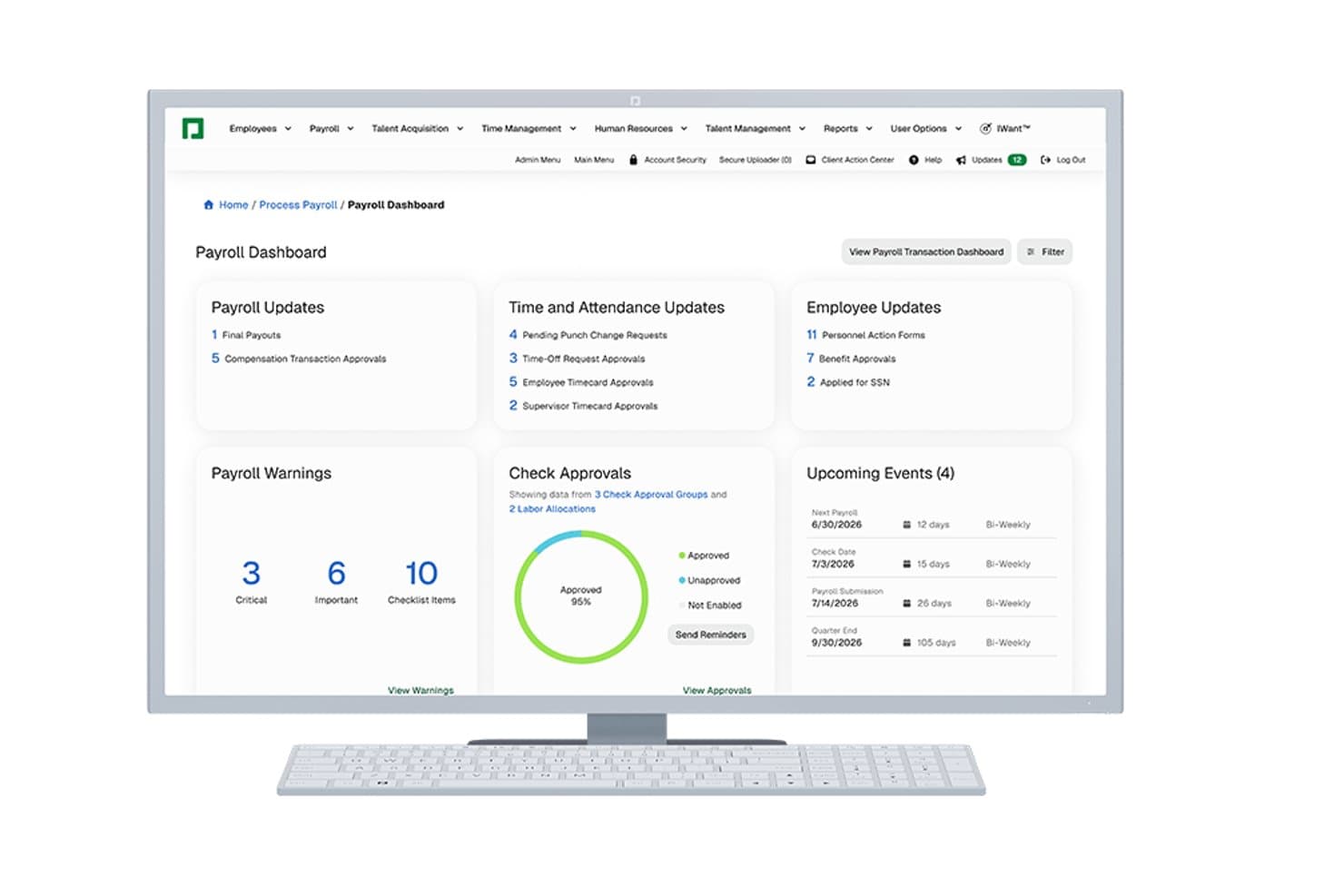
Paycom offers a centralized Payroll Dashboard displaying payroll updates, time and attendance, employee updates, warnings, check approvals, and upcoming payroll events. Paycom is a single-database HCM platform that handles payroll processing, tax filing, time and attendance, benefits administration, and employee records management in one unified system.
Who Is Paycom Best For?
Paycom is a strong fit for mid-to-large U.S.-based organizations where HR and payroll teams manage complex, multi-state workforces from a single system.
Why I Picked Paycom
I've included Paycom in my top picks because of Beti®, its employee-driven payroll automation that genuinely separates it from the field. Beti self-starts each payroll run and guides employees to review, troubleshoot, and approve their own pay before submission, catching errors before they require corrections. I also like GONE®, which automates time-off approvals so PTO flows directly into payroll without manual touchpoints.
Paycom Key Features
- Single-database HRIS: All HR, payroll, and benefits data is stored in one unified system without the need for third-party syncs.
- Advanced time-off automation: GONE® automatically approves or denies PTO requests based on configurable rules.
- ACA and compliance tools: Built-in modules manage ACA reporting, labor rule monitoring, and document management for audits.
- Custom analytics dashboards: Direct Data Exchange® enables HR teams to track usage, compliance, and employee data trends in real time.
Paycom Integrations
Native integrations are not clearly documented. Paycom provides an API for custom integrations.
Pros and Cons
Pros:
- Strong automated multi-state tax filing
- Single database eliminates manual data syncing
- Beti® catches payroll errors before submission
Cons:
- Implementation timeline longer than some competitors
- Report customization options are somewhat limited
 Best for globally distributed teams
- Free demo available
- From $29/user/month
Visit WebsiteCustomer Rating:4.9/5
Here's Deel's interface for managing employee and contractor data. Deel is an HR and global payroll platform that enables hiring in over 150 countries. It allows you to hire anyone as a contractor or employee without worrying about local laws, complicated tax systems, or international payroll, which is why I think it's one of the best tools for global HR teams.
Why I picked Deel: Deel offers features for expense reimbursements, managing contractor and employee contract and pay data, doing payroll, and handling off-cycle adjustments. Local country experts provide consultation for each location you hire from, ensuring your contracts are properly worded, while helping you avoid contractor misclassification. Employees and contractors can also self-manage their pay and personal data, which reduces admin load.
An advantage of going with Deel is that it's one of the largest international payroll solutions—it's a reputable company with 24/7 online customer support and dedicated account managers. It also complies with SOC2 and ISO 27001 security standards.
Deel Standout Features & Integrations:
Features that make Deel especially great for global payroll include international payroll, local compliance monitoring, global mobility support, and dedicated account managers to help you navigate any complexities in managing a global workforce. You can also compare different country costs and see what benefits and withholdings are required.
Integrations are available with popular accounting platforms, including NetSuite, Quickbooks, and Xero. Deel also uses major payment providers like Wise, PayPal, Payoneer, and Revolut to offer flexible withdrawal options and reduce unnecessary international transfer fees.
Pros and Cons
Pros:
- You can access Deal-owned EOR entities to hire internationally
- Handles contractor and employee payments
- Great for international payroll
Cons:
- More expensive than most basic payroll software
- Not much selection in available employee healthcare plans
Learn more about Deel Payroll: Best for international payroll in 170+ countries
- Free plan + free demo available
- From $199/user/month
Visit WebsiteCustomer Rating:4.5/5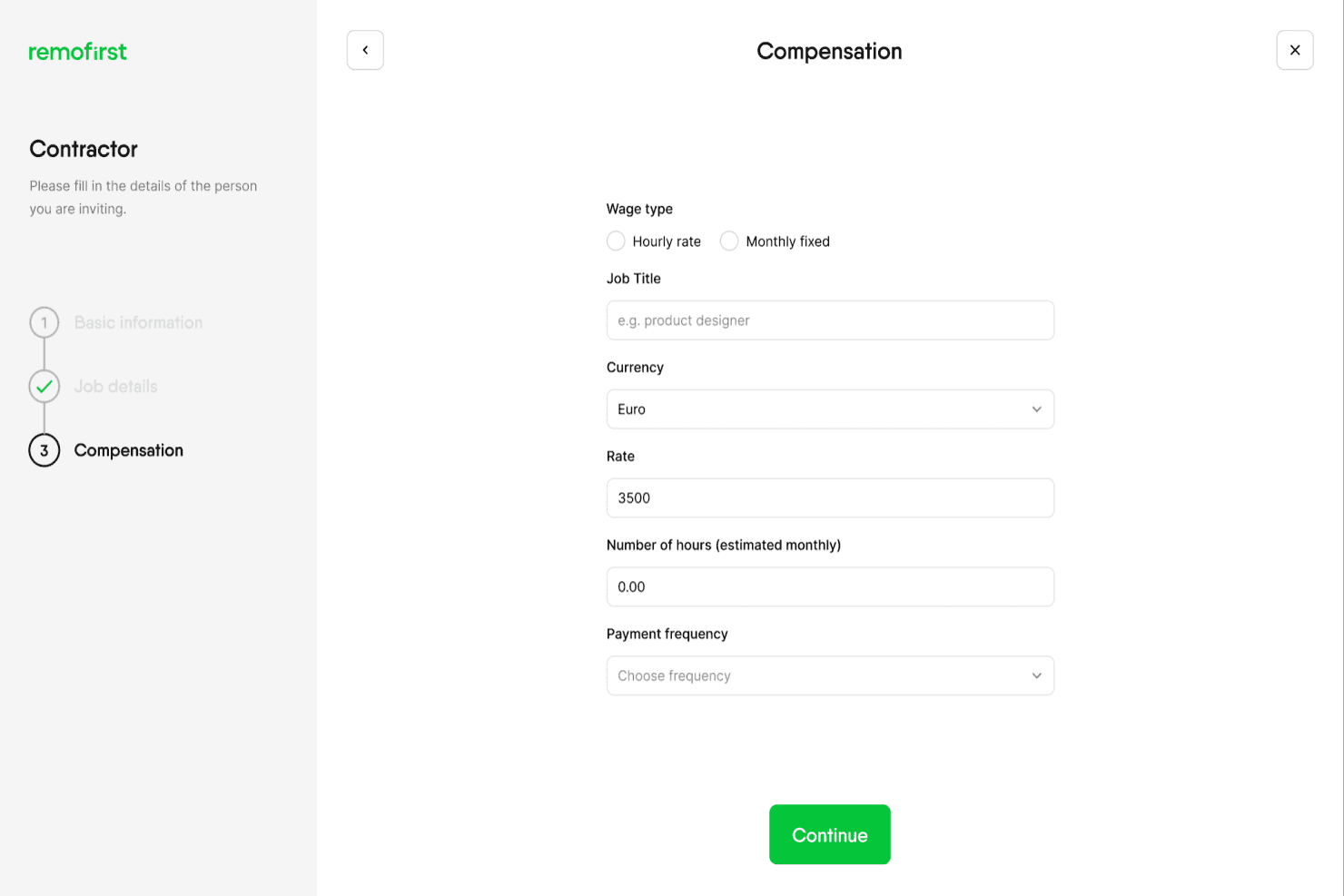
RemoFirst lets users set contractor compensation details and payment frequency. RemoFirst is an employer of record platform that handles international hiring, payroll processing, tax administration, and benefits management across 185+ countries.
Who Is RemoFirst Best For?
RemoFirst is a strong fit for companies hiring full-time employees across multiple countries who need a single platform to handle payroll, compliance, and local contracts without setting up foreign entities.
Why I Picked RemoFirst
I picked RemoFirst as one of the best because it handles the full employment lifecycle across 185+ countries without requiring you to set up a local entity. What I find genuinely useful is how RemoFirst acts as the legal employer on your behalf, taking on direct responsibility for local contracts, payroll calculations, statutory contributions, and compliant terminations. Its Payroll Agent also reconciles payroll data across partners and flags discrepancies in near real time, which matters a lot when you're managing pay runs across multiple jurisdictions simultaneously.
RemoFirst Key Features
- Localized contract creation: RemoFirst generates employment contracts aligned with local labor laws for each country where you hire.
- BambooHR data sync: Core employee data, including new-hire information and approved time-off requests, syncs hourly from BambooHR into RemoFirst for payroll processing.
- Multi-currency invoicing: Customer invoices can be issued in USD, EUR, GBP, CAD, or SGD, while employees are paid in their local currency.
- Compliant offboarding guidance: RemoFirst provides country-specific termination support covering notice periods, severance calculations, documentation, and final payouts.
RemoFirst Integrations
RemoFirst offers native integrations with Workday, BambooHR, ADP Workforce Now, and GoCardless. HR integrations connect workforce data and lifecycle events, while GoCardless funds payroll and contractor payments by Direct Debit.
Pros and Cons
Pros:
- Creates locally compliant employment contracts
- Users report punctual, local-currency payments
- Handles payroll across 185+ countries
Cons:
- Payroll schedules and off-cycle pay aren’t documented
- Payroll reporting options are limited
 Best for full-service payroll
- Free trial + free demo available
- From $49/month
Visit WebsiteCustomer Rating:4.6/5
Gusto has an easy-to-learn interface and offers a wide range of essential features. Gusto offers a user-friendly payroll and HR software solution that caters primarily to small and medium-sized businesses. Designed to simplify complex payroll processes, Gusto automatically handles tax calculations and compliance, allowing you to focus on your core business activities. Its intuitive features make it an appealing choice for business owners and HR professionals seeking an efficient way to manage their workforce needs.
Why I Picked Gusto
I picked Gusto because it treats payroll as a full-service process — you get automated calculation, withholding, and filing of taxes for employees and contractors across different pay schedules, which reduces burdensome manual work. I appreciate that Gusto supports unlimited payroll runs (including off-cycle or bonus payments) without extra fees, letting your team get paid exactly when needed. And its deep integration between HR data, payroll, and benefits ensures deductions (like health, retirement, garnishments) are handled correctly, helping keep compliance in check while you scale.
Gusto Key Features
In addition to its core payroll automation and tax handling, you get useful HR and workforce tools that support growing teams:
- Employee Onboarding: Streamlines the process of bringing new hires on board with customizable onboarding tools.
- Time Tracking: Allows employees to clock in and out using their mobile devices, ensuring accurate timekeeping.
- Benefits Administration: Manages a variety of employee benefits, integrating seamlessly with payroll for deductions.
- Compliance Tools: Provides alerts and resources to help your business stay compliant with ever-changing regulations.
Gusto Integrations
Integrations include QuickBooks, Xero, FreshBooks, Clover, TSheets, Deputy, When I Work, Boomr, Google Workspace, and Slack.
Pros and Cons
Pros:
- Payroll, benefits, and HR in one unified platform.
- Automatic tax filings and direct deposit simplify payroll compliance.
- Employee self-service portal empowers staff to access pay and forms.
Cons:
- SMBs that need advanced compliance or niche industry-specific HR modules may find Gusto limiting.
- Great for simple pay and HR management but not customizable enough to handle large, complex orgs
 Best for US-based enterprises
- 7-day free trial + demo available
- From $10.25/user/month
Visit WebsiteCustomer Rating:3.9/5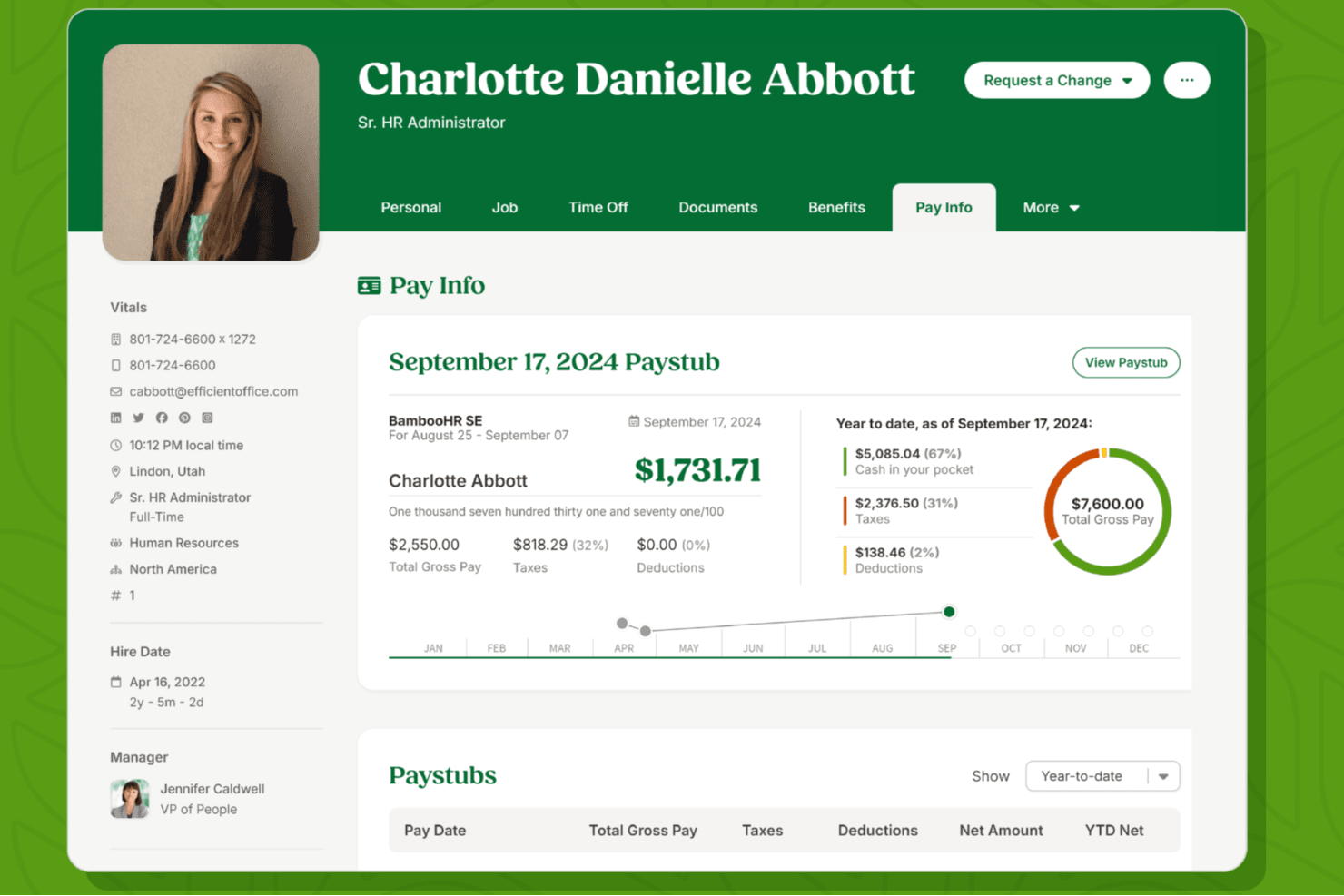
A BambooHR pay info screen showing a detailed paystub, year to date earnings breakdown, and a visual summary of gross pay, taxes, and deductions. BambooHR is an HR platform for US-based businesses that combines centralized employee records, payroll processing, applicant tracking, benefits administration, and time and attendance management in one system.
Who Is BambooHR Best For?
BambooHR is a strong fit for US-based small to mid-sized businesses that want HR, payroll, and hiring managed in one place without a large HR team.
Why I Picked BambooHR
BambooHR earns its spot on my list because it's one of the few platforms where HR data and payroll genuinely live together—employee record changes, PTO, and benefits deductions sync directly into payroll without manual re-entry. I particularly like the on-demand pay feature, which lets employees access earned wages before payday at no extra cost to the employer. For US-based businesses running payroll in-house, the Payroll Assistant also flags unusual changes and compares each run against the previous one, catching discrepancies before approval.
BambooHR Key Features
- Tax filing for federal, state, and local jurisdictions: BambooHR Payroll handles tax calculations and filings across federal, state, and local levels for US-based employees.
- Custom journal entry reports: Payroll data can be mapped to accounting workflows and exported as custom journal entries for tools like QuickBooks, Xero, NetSuite, and Sage Intacct.
- Benefits enrollment and deduction sync: The Benefits Administration add-on lets employees enroll in medical, dental, vision, HSA, FSA, and other plans, with deductions syncing automatically to payroll.
- Payroll audit trail and garnishment tracking: Each payroll run generates an audit trail, and the system supports garnishment tracking alongside standard deduction processing.
BambooHR Integrations
BambooHR lists 150+ prebuilt integrations, including QuickBooks Online, Xero, NetSuite, Sage Intacct, Human Interest, 401GO, and The Work Number from Equifax. An API is available for custom integrations.
Pros and Cons
Pros:
- Payroll reports help admins check numbers
- HR and payroll records sync together
- Employee pay access reduces routine HR requests
Cons:
- Employers must configure tax IDs and schedules
- Payroll still needs approval each cycle
 Best for controlled pay-run approvals
- Free trial + free demo available
- From $8/user/month
Visit WebsiteCustomer Rating:4.9/5
Here's where you can manage employee payroll, deductions, commissions, and bonuses in Rippling-Brand. Rippling-Brand is a dynamic HR software solution that might just be what your business needs for effective payroll management. Designed for companies that aim to simplify their HR and payroll processes, Rippling-Brand offers a range of features that cater to diverse business types, from small startups to large enterprises. Whether you're handling domestic or international payroll, Rippling-Brand provides the tools to automate and streamline payments, ensuring compliance and accuracy.
Why I Picked Rippling-Brand
I picked Rippling-Brand because it addresses the complexities of payroll with its global payroll capabilities, allowing you to manage payments for employees and contractors worldwide. The automatic tax calculation feature ensures compliance with local regulations, reducing the risk of errors. Additionally, Rippling-Brand’s customizable payment options cater to the specific needs of your business, making it a versatile choice for companies of all sizes.
Rippling-Brand Key Features
In addition to its global payroll capabilities, here are some other features that make Rippling-Brand stand out:
- Advanced Workflow Automation: Streamlines repetitive tasks, freeing up time for your team to focus on strategic initiatives.
- Employee Self-Service Portals: Empowers employees to access pay stubs and tax forms, reducing the administrative burden on HR.
- Integration with Accounting Software: Ensures seamless data flow between systems, enhancing overall efficiency.
- Customizable App Development: Allows you to tailor the platform to meet your unique business needs.
Rippling-Brand Integrations
Integrations include QuickBooks, Xero, Gusto, Slack, Microsoft Teams, Google Workspace, Dropbox, Salesforce, Zoom, and Asana.
Pros and Cons
Pros:
- Robust, enterprise grade tool with additional IT and Finance modules available
- Has much more advanced HR workflow management than most other tools
- Advanced and comprehensive HR features
Cons:
- Built-in time tracking system is not very customizable
- Complex feature set creates a steeper learning curve for employees learning to use it
 7Best for HR-led payroll with benefits sync
GoCo
- Free demo available
- Pricing upon request
Visit WebsiteCustomer Rating:4.6/5
GoCo's payroll dashboard provides access to payroll data, employee details, and payroll processing statuses. GoCo is a comprehensive, cloud-based HR software platform designed to alleviate the administrative burden on small and mid-sized businesses handling various human resources processes. The platform offers a solution that consolidates essential HR functions such as onboarding, benefits administration, payroll management, and compliance tracking.
Why I picked GoCo: GoCo's embedded payroll feature allows for automatic syncing of employee information such as hours worked, new hires, and changes in employee status, therefore reducing the need for manual data entry and minimizing the risk of errors. I especially like that GoCo automates payroll tax filings and ensures compliance with various regulations.
GoCo Standout Features & Integrations:
Features include employee onboarding with customizable workflows and document management, ensuring a smooth transition for new hires. The employee self-service tool is another crucial aspect, allowing employees to manage their personal information and benefits independently. Additionally, the compliance management feature is essential for helping organizations stay up-to-date with labor laws and regulations
Integrations include Slack, Microsoft Teams, Zapier, QuickBooks Online, Greenhouse, and Gusto.
Pros and Cons
Pros:
- Emphasis on compliance
- Self-service benefits administration
- Good onboarding for new employees
Cons:
- Lacks a good range of customization options
- Mobile app could be more robust
Learn more about GoCo: Best for HR records, policies and training
- 30-day free trial + free demo available
- From $17/month
Visit WebsiteCustomer Rating:5/5
Patriot Payroll simplifies your payroll process into three easy steps and outlines a straightforward approval process. Patriot Payroll is an online payroll service provider geared towards small-to-midsize (500 employees) businesses with a focus on business in the US.
Why I picked Patriot Payroll: I like that they offer free payroll setup and really good, USA-based customer support. They've got a strong focus on supporting customers, and it's especially great for businesses in the US who've never used an online platform to process their own payroll before.
Patriot Payroll Standout Features & Integrations:
Standout features include a host payroll reports covering tax credits, tax filings and deposits, payroll registers, pay check histories, time-off reports, W-2 summaries, and payroll tax liabilities. It also takes care of local, state, and federal taxes.
This product is great if you mostly want a payroll solution with some basic HR tools—the main product is the full-service payroll platform, and you pay for optional add-ons for HR (managing employee data) and time tracking (helping employees log hours) if you want those capabilities.
Integrations are available with Intuit QuickBooks Online, GoCo, Plaid, Workforce.com, and WorkforceHub Time & Attendance.
Pros and Cons
Pros:
- Modern, intuitive interface that's easy to navigate
- Very low price for the quality of features and service
- Excellent, responsive customer support
Cons:
- It can handle basic tax filings, but not very complicated ones
- The time tracking tool is a little cumbersome to use
Learn more about Patriot Software: Best for integrations and employee experience
- Free demo available
- Pricing upon request
Visit WebsiteCustomer Rating:4.3/5
Paylocity offers a self-service portal for employees to manage their personal data, view pay stubs, and request time off. Paylocity is an HR and payroll software designed to help midsize and large companies scale, simplifying how they manage employee data and payments.
Why I picked Paylocity: I chose Paylocity because it not only simplifies complex payroll tasks but also enhances the overall employee experience. Its payroll tools include automated tax filing, real-time compliance checks, and multi-jurisdiction support, which makes it a strong fit for growing and distributed teams. What sets Paylocity apart, though, is how it weaves these backend efficiencies into a better front-end experience for employees. Features like on-demand pay, mobile access, and self-service portals empower employees to manage their own financial data, submit time-off requests, and view pay stubs anytime.
On top of that, Paylocity's extensive integration ecosystem makes it easy to sync with your existing tools across HR, finance, project management, and communication. Whether you're using tools like Microsoft Dynamics 365, Slack, Greenhouse, or Google Workspace, Paylocity fits right into your workflow.
Paylocity Standout Features & Integrations:
Standout features include garnishment management, ensuring that any legally required deductions are applied without manual intervention. It also provides expense management tools, allowing employees to submit expenses directly through the platform.
Integrations include ClearStar, Microsoft Dynamics 365, 7shifts, AirMason, APA Benefits, Azure, Atlassian, Asana, Box, ClearCompany, Dropbox, Freshdesk, Google Workspace, Greenhouse, HubSpot, Slack, Salesforce, Trakstar, and Zoho People.
Pros and Cons
Pros:
- Benefits administration features
- Includes tax compliance services
- Global payroll services
Cons:
- Setup can be time consuming
- Lacks support for independent contractor payments
 10Best for centralized payroll management
HiBob
- Free demo available
- Pricing upon request
Visit WebsiteCustomer Rating:4.5/5
HiBob Payroll Hub shows multiple payroll cycles with real-time status and reporting options. HiBob is a human resources (HR) and payroll platform built for fast-growing companies that need flexible and integrated workforce management. It centralizes HR and payroll functions in one system, covering everything from employee data to time tracking, onboarding, and compensation.
Why I picked HiBob: I chose HiBob for its Payroll Hub, which consolidates payroll processes and reduces errors through real-time updates and visual tracking. This makes it a strong choice for businesses that want better payroll accuracy without relying on manual adjustments. HiBob also integrates with leading global payroll providers like ADP, Trinet, and Paylocity, ensuring smooth data transfers and compliance support. For companies managing multiple payroll cycles, HiBob’s flexible setup helps maintain accuracy while adapting to unique organizational needs.
HiBob Standout Features & Integrations:
Features include compensation benchmarking to align pay structures with market standards, a sandbox environment to test HR processes before rollout, and a built-in learning management system to support employee training and development.
Integrations are available with Slack, Zoom, Xero, Workday, ADP, Greenhouse, LinkedIn Learning, Zapier, Microsoft Teams, NetSuite, Salesforce, and Google Calendar.
Pros and Cons
Pros:
- Market benchmarking features
- Broad integration ecosystem
- Clear payroll accuracy tools
Cons:
- Reporting module less comprehensive
- Limited payroll outside core regions
Bordro Yürütmek için Diğer İK Yazılımları
Araştırmam sırasında birkaç araç daha kısa listeye aldım—bunlar bordro işlemleri için İK yazılımı alanında ilk 10'umda yer almıyor, ancak yine de göz atmaya değer:
- 11PaycorBest for automating payroll tasks
- 12JustworksBest with IRS-certified PEO services
- 13RUN Powered by ADP®Best for small business payroll and tax compliance
- 14OnPayBest for small businesses in the US
- 15Paychex FlexBest for midsize to enterprise companies
- 16BambeeBest for employee-file compliance reviews
- 17TimeTrexBest for AI-powered shift scheduling
- 18Square PayrollBest for seasonal businesses pausing payroll
- 19TrinetBest for benefits deductions tied to pay
- 20InsperityBest for self-service across pay and benefits
İlgili İK Yazılımı İncelemeleri
Aradığınızı hâlâ bulamadıysanız, test edip değerlendirdiğimiz şu diğer ilgili araçlara göz atın:
- İK Yazılımı
- Bordro Yazılımı
- İşe Alım Yazılımı
- Kayıtlı İşveren Hizmetleri
- Aday Takip Sistemleri
- İşgücü Yönetimi Yazılımı
How I Evaluate HR Software for Payroll
I split my evaluation into three parts, giving the most weight to core tasks: schedule accurate pay runs and calculate and file payroll taxes. Then I look for differentiators such as employee self-service. Finally, I consider onboarding, support, and pricing value beyond the feature set.
Core Functionality (Table Stakes For This List)
When I'm selecting tools for my list, I score each one on a scale from 0 (does not offer the functionality) to 5 (excels in this area) for each core functionality listed below. I then convert the total into a percentage to help assess each tool's overall fit, with extra weight on any functionalities I’ve deemed essential.
- Automated Payroll (Essential): I look for scheduled runs that calculate wages, deductions, and net pay across varied pay types, including overtime and off-cycle adjustments.
- Tax Calculation And Filing (Essential): I assess how tools calculate, file, and remit payroll taxes across jurisdictions, and how they reflect changing rules.
- Core HR Data: I check whether changes to pay, role, or employment status flow into payroll without duplicate entry or manual rekeying.
- Employee Payments: I look for dependable electronic payments and flexible pay runs, including support for employees who split pay across accounts.
- Benefits And Deductions: I evaluate whether benefit selections and deduction changes carry into payroll accurately when plans or employee eligibility change.
- Payroll Reporting: I review whether teams can access useful pay registers, tax summaries, and labor cost reports for reconciliation and audits.
Once I have a list of tools that meet the criteria, I consider what sets each platform apart.
Differentiating Factors (What Sets Vendors Apart)
Here's how I compare and contrast different vendors:
Standout Features
I look for unified HRIS-payroll workflows where a new hire or termination in HR automatically updates payroll without rekeying data. AI-driven error detection matters too—I check whether the system flags anomalies like duplicate entries before you finalize a run. For distributed teams, I evaluate multi-country payroll support, focusing on how each tool handles local tax rules and currency conversion.
Beyond Features
I check whether vendors back their tax filings with accuracy guarantees and penalty coverage, since a single missed deadline can mean fines your team has to chase down. Integration depth matters just as much—I look for native connections to time tracking, accounting, and benefits carriers so payroll data doesn't live in a silo that requires manual reconciliation every cycle. I also evaluate support responsiveness during peak periods like payroll run days, where reaching a dedicated payroll specialist versus a general queue can make or break a deadline.
Bordro için İK Yazılımı Nasıl Seçilir?
Bordro için doğru İK yazılımını seçmek yalnızca fiyata bağlı değildir—ekibinizin ihtiyaçlarına uyan ve işletmenizle birlikte ölçeklenebilen bir çözüm bulmakla ilgilidir. Seçeneklerinizi değerlendirirken göz önünde bulundurmanız gereken temel faktörler şunlardır.
| Faktör | Dikkat Edilmesi Gerekenler |
|---|---|
| FaktörKullanım Kolaylığı | Dikkat Edilmesi GerekenlerMinimum eğitim gerektiren sezgisel arayüzler arayın. Çalışanların maaş bordrolarına kolayca erişip kendi bilgilerini güncelleyip güncelleyemeyeceğini değerlendirin. |
| FaktörÖzellikler ve İşlevsellik | Dikkat Edilmesi GerekenlerYazılımın bordro işlemlerini, vergi hesaplamalarını, mevzuata uyumluluk raporlamasını, yan hak yönetimini ve diğer İK araçlarıyla entegrasyonları destekleyip desteklemediğini kontrol edin. |
| FaktörMevzuata Uyumluluk | Dikkat Edilmesi GerekenlerUyumluluk risklerini azaltmak için yazılımın bulunduğunuz konumlardaki vergi yasaları ve iş mevzuatındaki değişikliklere otomatik olarak güncellendiğinden emin olun. |
| FaktörÖlçeklenebilirlik | Dikkat Edilmesi Gerekenlerİşletmeniz büyüdükçe daha fazla çalışanı, konumu ve karmaşıklığı yönetebilecek bir çözüm seçin. |
| FaktörEntegrasyon | Dikkat Edilmesi GerekenlerYazılımın mevcut İK bilgi sisteminizle, muhasebe yazılımınızla veya zaman takip araçlarınızla entegre olduğunu doğrulayın. |
| FaktörMaliyet ve Fiyatlandırma Modeli | Dikkat Edilmesi GerekenlerFiyatlandırma yapılarını (çalışan başına, sabit ücret, kademeli planlar) karşılaştırın ve maliyetin bütçenizle uyumlu olduğundan emin olun. |
| FaktörMüşteri Desteği | Dikkat Edilmesi GerekenlerHızlı yanıt veren destek, eğitim kaynakları ve açık işe alıştırma desteği sunan sağlayıcıları arayın. |
| FaktörOtomasyon Yetenekleri | Dikkat Edilmesi GerekenlerBordro sürecinin ne kadarının otomatikleştirilebileceğini değerlendirin; buna doğrudan para yatırma, vergi bildirimleri ve yinelenen ödemeler dahildir. |
| FaktörVeri Güvenliği | Dikkat Edilmesi GerekenlerHassas çalışan bilgilerini korumak için yazılımın şifreleme ve güvenli veri işleme yöntemlerini kullandığını doğrulayın. |
| FaktörRaporlama ve Analiz | Dikkat Edilmesi GerekenlerPlatformun ayrıntılı bordro raporları, vergi özetleri ve karar alma süreçlerine yönelik içgörüler sunup sunmadığını kontrol edin. |

Author's Tip
Satış personelinin vaatlerine dikkat edin! Bir şey “yol haritasında” yer alıyorsa gerçekleşmesi pek olası değildir. Seçim yapmadan önce, aramalarınızı yanıtlayacak uygulama ekibiyle ve hizmet danışmanlarıyla tanıştığınızdan emin olun. Hatta mümkünse hizmet merkezlerini ziyaret edin!
2025'te Bordro İçin İK Yazılımındaki Trendler
Bordro için İK yazılımı ortamı, değişen kurumsal ihtiyaçları karşılamak ve yapay zekâ (AI) gibi teknolojik gelişmeleri bünyesine katmak üzere gelişmeye devam ediyor.
İK ve bordro yazılımı geliştirmesini şu anda etkileyen yeni ortaya çıkan trendlerden bazıları şunlardır:
- Yapay Zekâ Destekli Bordro Süreçleri: Bordro sistemleri rutin görevleri otomatikleştirmek, anormallikleri tespit etmek, mevzuata uyumluluğu izlemek, hataları azaltmak ve zamandan tasarruf etmek için yapay zekâ (AI) kullanmaya başladı. Bordro teknolojisindeki bu gelişme, bordro mevzuatının giderek karmaşıklaşmasına bir yanıt niteliğinde olup bordro süreçlerinin daha verimli hâle getirilmesine yardımcı oluyor.
- Küresel Bordro Yetenekleri: İşletmeler daha küresel hâle geldikçe, farklı para birimleriyle birden fazla ülkedeki bordroyu yönetebilen bordro yazılımlarına duyulan ihtiyaç kritik hâle geldi. Papaya Global ve Deel gibi araçlar bu alanda lider olarak ortaya çıktı ve küresel bordro, vergi ve mevzuata uyumluluk sorunlarının karmaşıklığını basitleştiren çözümler sunuyor.
- Gelişmiş Veri Güvenliği Özellikleri: Yeni siber güvenlik tehditleri ortaya çıkmaya devam ederken İK ve bordro yazılımı sağlayıcıları, kuruluşların hassas çalışan verilerini korumasına yardımcı olmak için iki faktörlü kimlik doğrulama veya biyometrik tanımlama özellikleri gibi gelişmiş veri güvenliği özellikleri ekledi.
- Esnek Ödeme Seçenekleri: Modern bordro yazılımları banka transferleri, dijital cüzdanlara yapılan ödemeler ve kripto para birimiyle yapılan ödemeler de dâhil olmak üzere daha esnek ödeme seçeneklerini bünyesine katmaya başladı. Erken ücret erişimi veya kazanılmış ücret erişimi de giderek popülerleşiyor; bu sayede çalışanlarınız ödeme dönemleri arasında ücretlerini çekebiliyor, nakit akışlarını iyileştiriyor ve çalışan memnuniyetlerini artırıyor.
Teknoloji gelişmeye devam ettikçe İK profesyonelleri, bordro yazılımının daha sezgisel ve çalışan odaklı hâle gelmesini, bordro yönetiminin karmaşıklıklarını daha da basitleştirmesini bekleyebilir.
Bordro İçin İK Yazılımı Nedir?
Bordro için İK yazılımı, çalışan ücretlerinin ödenmesi sürecinin büyük bölümünü otomatikleştirmek üzere tasarlanmış dijital bir araçtır.
Temel özellikler arasında otomatik ücret hesaplamaları, vergi uyumluluğu araçları, doğrudan para yatırma, zaman ve devam takibi entegrasyonu, yan hak yönetimi, bordro raporlaması ve çalışanların ücret bilgilerini güncelleyip bunlara erişebileceği self servis portalları bulunur.
Bordro işleme özellikleri genellikle performans yönetimi ve çalışan refahı gibi diğer İK sorumluluklarına yönelik araçları içeren daha kapsamlı bir yetenek yönetimi sisteminin parçası olarak sunulur.
Bordro İçin İK Yazılımının Özellikleri
Yukarıda ana hatlarıyla açıkladığım temel işlevleri sunmak için bordroyu yönetmeye yönelik bir kurumsal İK sisteminde önemli olduğunu düşündüğüm bazı özellikler şunlardır:
- Bordro İşleme ve Yönetim Otomasyonu: Bu birleştirilmiş özellikler, İK departmanınızın ücretleri, vergileri ve kesintileri hesaplamak da dahil olmak üzere bordro yürütmenin birçok unsurunu otomatikleştirmesine olanak tanır. Ayrıca maaşları, ikramiyeleri, teşvikleri, maaş bordrolarını, masraf iadelerini ve daha fazlasını yönetmek için araçlar da içerir.
- Uyumluluk Yönetimi: İK ve bordro yazılımları, en güncel vergi oranlarını ve düzenlemeleri referans alacak şekilde sürekli güncellenir. Bu, devlet yasalarına uyumu sürdürmek ve cezalardan kaçınmak için hayati önem taşır.
- Vergi Beyannamesi Verme: Kurumsal vergi yükümlülüklerinizi yerine getirmenize yardımcı olmak için İK ve bordro yazılımları, T4, W-2 ve 1099 formları gibi yıllık vergi belgelerini hazırlamaya yönelik araçları da içerir.
- Doğrudan Para Yatırma: Bu listedeki her bordro sisteminin, çalışanlarınızın ücretlerini doğrudan banka hesaplarına yatırmanıza olanak tanıdığını söylemeye bile gerek yok. Bazıları maaş kartları veya kazanılmış ücrete erken erişim gibi ek ödeme seçenekleri de sunar.
- Zaman ve Devam Takibi: Çalışanlarınızın çalışma saatlerini doğrulamadan ücret ödemelerinin doğru olduğundan emin olmak zordur. Bordro için en iyi İK yazılımı, bordro hesaplamalarının doğru olmasını sağlamak için ekibinizin çalıştığı saatleri, fazla mesaiyi, ücretli izinleri (PTO) ve ücretsiz izinleri takip eder.
- Özelleştirilebilir Bordro Raporları: Verileri yorumlayamıyorsanız veri toplamanın bir anlamı yoktur. İK çözümü, finansal planlama, uyumluluk raporlaması ve denetim amaçları doğrultusunda yönetim ekibinize sunabilmeniz için İK departmanınızın özelleştirilebilir bordro raporları oluşturmasına yardımcı olmalıdır.
- Yetenek Yönetimi: Yazılım; çalışan yaşam döngüsü durumları, çalışan yan haklarına kayıt, çalışan bağlılığı ve çalışan devir oranları gibi çalışan verilerini toplamalı ve yorumlamalıdır; böylece yetenek yönetimi ekibiniz geleceğe yönelik planlama yapabilir.
- Çalışanlar için Self Servis Portalı: Bu özellik, çalışanlara bordro bilgilerine, maaş bordrolarına ve vergi belgelerine erişim sağlar. Bu, çalışanları güçlendirir ve soruları en aza indirerek İK departmanının iş yükünü azaltır.
- Veri Güvenliği ve Gizliliği: Bu özellik, tüm bordro verilerinin güvenli bir şekilde depolanmasını ve yönetilmesini sağlayarak hassas çalışan bilgilerini korur. Bu, veri koruma yasalarına uymak ve çalışanların güvenini sürdürmek açısından kritik öneme sahiptir.
- Ölçeklenebilirlik: Ölçeklenebilirlik, büyümeyi planlayan işletmeler için önemlidir; çünkü bordro sisteminin performanstan ödün vermeden artan çalışan sayısını yönetebilmesini sağlar.
Bordro sistemi özellikleri hakkında daha ayrıntılı bilgi veren bu makalede daha fazla ayrıntı bulabilirsiniz.
Bordro için İK Yazılımının Faydaları
Bordro için İK yazılımı, bordro sürecinizin tüm unsurlarını daha verimli hâle getirmek üzere tasarlanmıştır.
Modern İK ve bordro yazılımına yatırım yaparak idari yükleri azaltabilir, veriye dayalı daha iyi kararlar alabilir ve iş gücünüzü daha etkili bir şekilde stratejik olarak yönetmenize yardımcı olacak uygulanabilir içgörüler elde edebilirsiniz.
Özel işletme ihtiyaçlarınıza en uygun İK ve bordro yazılımını seçerek aşağıdaki faydaları elde etmeyi bekleyebilirsiniz:
- Artan Verimlilik: Bordro özelliklerine sahip İK yazılımı, rutin bordro görevlerini otomatikleştirerek bordroyu işlemek için gereken zamanı ve çabayı önemli ölçüde azaltır. Bu, İK personelinizin daha stratejik görevlere odaklanmasını sağlayarak verimliliği artırır.
- Geliştirilmiş Doğruluk: Veri girişi ve manuel bordro hesaplamalarından kaynaklanan insan hatalarını en aza indiren İK ve bordro yazılımı, geriye dönük düzeltmelere gerek kalmadan doğru bordro işlemesini sağlar.
- Geliştirilmiş Uyumluluk: Bu yazılım sistemleri, vergi oranlarını ve uyumluluk gerekliliklerini sizin adınıza otomatik olarak güncelleyerek uyumsuzluk nedeniyle ceza alma riskini azaltır.
- Çalışanlar için Geliştirilmiş Bilgi Şeffaflığı: Çalışanların self servis portalları aracılığıyla maaş bordrolarına, vergi belgelerine ve yan hak bilgilerine erişmesini sağlayarak bilgi şeffaflığını artırır, İK'ya yöneltilen soruları azaltır ve daha iyi bir çalışan deneyimi oluşturur.
- Daha İyi Raporlama ve Analiz: Bu yazılım sistemleri; bordro giderleri, çalışan ücretleri ve vergi yükümlülükleri hakkında içgörüler sunan kapsamlı raporlama ve analiz araçları içerir. Bu içgörüler, daha iyi stratejik işletme kararları alınmasına ve daha sağlam finansal planlama yapılmasına katkı sağlayabilir.
Bordro için İK Yazılımı Maliyetleri ve Fiyatlandırması
İK ve bordro yazılımının fiyat aralığı, sunulan bordro özelliklerinin ve hizmetlerinin türüne bağlı olarak değişir.
Aralarından seçim yapabileceğiniz geniş bir seçenek yelpazesi sunmak için bu listede temel İK ve bordro sistemlerinden daha karmaşık küresel platformlara kadar çeşitli bordro yazılımı yapılandırmaları yer alır. Bunların tümü SaaS (hizmet olarak yazılım) modeliyle çalışır; yani bordro hizmetlerini aylık abonelik modeli üzerinden sunarlar.
Temel bordro ve İK sistemleri için bu tür bordro giderlerinin aylık bir temel ücretin yanı sıra çalışan başına ek bir ücreti de içermesini bekleyebilirsiniz. Temel ücretler için tipik aralık aylık $10 ile $99 arasında, çalışan başına ücret ise $2 ile $10 arasındadır.
Aşağıda tipik plan seçeneklerinin ve fiyatlandırmalarının dökümü yer almaktadır:
Bordro için İK Yazılımı Planları Karşılaştırma Tablosu
| Plan Türü | Ortalama Aylık Ücret | Çalışan Başına Ortalama Fiyat | Yaygın Özellikler |
| Ücretsiz | $0 | $0 | Sınırlı sayıda çalışan için temel bordro işlemleri, temel vergi hesaplama ve sınırlı sayıda rapor. |
| Temel | $10 - $25 aylık | Çalışan başına aylık $2 - $4 | Sınırlı sayıda çalışan için bordro işlemleri, temel vergi beyannamesi gönderimi, standart raporlar, çalışan self servis portalı |
| Profesyonel | $25 - $40 aylık | Çalışan başına aylık $4 - $6 | Birden fazla eyalet veya il için bordro, ek raporlar, İK özellikleri, uyumluluk raporu + Temel plandaki tüm özellikler. |
| Gelişmiş | $40 - $99 aylık | Çalışan başına aylık $5 - $10 | Özelleştirilebilir raporlar, gelişmiş İK araçları, entegrasyonlar, güçlendirilmiş güvenlik + Profesyonel plandaki tüm özellikler. |
| Kurumsal | Özel fiyatlandırma | Özel fiyatlandırma | Çok sayıda çalışan için ölçeklenebilirlik, özel destek, gelişmiş analizler, özel entegrasyonlar + Gelişmiş plandaki tüm özellikler. |
| Küresel Bordro | Genellikle çalışan başına fiyatlandırılır | Çalışan başına aylık $25 - $500 | Çalışanlara birden fazla para biriminde ödeme yapabilme, uluslararası doğrudan para yatırma, uluslararası uyumluluk izleme, özel destek + gerekli Temel plan özellikleri veya daha üstü. |
Gerekli özellik düzeyine bağlı olarak bordro planlarının ve fiyatlandırma ayrıntılarının dökümü.
Küresel bordro ve kayıtlı işveren (EOR) hizmetleri sunan daha karmaşık sistemler size biraz daha pahalıya mal olacaktır.
Bu platformlar için, tercih ettiğiniz hizmet yapılandırmasına bağlı olarak çalışan başına $25 ile $500 arasında (ek aylık ücret olmadan) ödeme yapmayı bekleyebilirsiniz.
Bordro için İK Yazılımı SSS
Bordro için en iyi İK yazılımı hangisidir?
\u003carticle class=\u0022text-token-text-primary w-full focus:outline-none scroll-mt-[calc(var(–header-height)+min(200px,max(70px,20svh)))]\u0022 dir=\u0022auto\u0022 data-testid=\u0022conversation-turn-12\u0022 data-scroll-anchor=\u0022true\u0022 data-turn=\u0022assistant\u0022\u003e
\u003cdiv class=\u0022text-base my-auto mx-auto pb-10 [–thread-content-margin:–spacing(4)] @[37rem]:[–thread-content-margin:–spacing(6)] @[72rem]:[–thread-content-margin:–spacing(16)] px-(–thread-content-margin)\u0022\u003e
\u003cdiv class=\u0022[–thread-content-max-width:32rem] @[34rem]:[–thread-content-max-width:40rem] @[64rem]:[–thread-content-max-width:48rem] mx-auto max-w-(–thread-content-max-width) flex-1 group/turn-messages focus-visible:outline-hidden relative flex w-full min-w-0 flex-col agent-turn\u0022\u003e
\u003cdiv class=\u0022flex max-w-full flex-col grow\u0022\u003e
\u003cdiv class=\u0022min-h-8 text-message relative flex w-full flex-col items-end gap-2 text-start break-words whitespace-normal [.text-message+\u0026]:mt-5\u0022 dir=\u0022auto\u0022 data-message-author-role=\u0022assistant\u0022 data-message-id=\u0022ebbb56ac-94a7-4b75-b1e3-0cd6f1e385e5\u0022 data-message-model-slug=\u0022gpt-4o\u0022\u003e
\u003cdiv class=\u0022flex w-full flex-col gap-1 empty:hidden first:pt-[3px]\u0022\u003e
\u003cdiv class=\u0022markdown prose dark:prose-invert w-full break-words light\u0022\u003e
\u003cp data-start=\u00220\u0022 data-end=\u0022572\u0022 data-is-last-node=\u0022\u0022 data-is-only-node=\u0022\u0022\u003eBordro için en iyi İK yazılımı, doğru bordro işlemlerini; yan hak yönetimi, mevzuata uyum desteği ve çalışanların kendi işlemlerini yapabilmesi gibi kapsamlı İK özellikleriyle birleştirendir. Gusto, Paychex ve ADP gibi önde gelen seçenekler kullanım kolaylığı, otomasyon yetenekleri ve vergi ile iş kanunlarına uyumu sürdürme becerileriyle öne çıkar. Bu platformlar ücretlerin hesaplanması ve vergilerin beyan edilmesinden yan hakların ve çalışma süresi takibinin yönetilmesine kadar her şeyi kolaylaştırır. \u003cstrong\u003eAncak doğru seçim bütçenize, ekip büyüklüğünüze ve bordronun diğer İK işlevleriyle ne ölçüde entegre olmasını istediğinize bağlıdır\u003c/strong\u003e.\u003c/p\u003e
\u003c/div\u003e
\u003c/div\u003e
\u003c/div\u003e
\u003c/div\u003e
\u003c/div\u003e
\u003c/div\u003e
\u003c/article\u003e
\u003cdiv class=\u0022pointer-events-none h-px w-px\u0022 aria-hidden=\u0022true\u0022 data-edge=\u0022true\u0022\u003e\u003c/div\u003e
İK bordro yazılımını muhasebe sistemimle entegre edebilir miyim?
Evet, önde gelen İK bordro yazılımı platformlarının çoğu QuickBooks, Xero ve NetSuite gibi popüler muhasebe sistemleriyle entegrasyon sunar. Bu sayede bordro verilerini otomatik olarak senkronize edebilir, raporlama ve mutabakat işlemlerini ekibiniz için çok daha kolay hâle getirebilirsiniz.
İK bordro yazılımı uzaktan çalışan veya uluslararası ekipleri olan şirketler için uygun mudur?
Evet, birçok İK bordro aracı çok ülkeli bordro işlemlerini gerçekleştirerek, birden fazla para birimini destekleyerek ve yerel vergi kanunlarına uyumu sağlayarak uzaktan çalışan ve küresel ekipleri destekler. Ekibiniz uluslararasıysa yazılımın uygun yerel desteği ve belgeleri sunduğunu kontrol edin.