


Officevibe(Workleap) Mitarbeiterengagement-Software Testbericht für 2026



Workleap is an employee engagement software built for teams that need pulse surveys, manager insights, and employee feedback tools without a bloated feature set getting in the way. I'd consider it if you want something more focused than Lattice, which wraps engagement inside a broader performance, compensation, and OKR platform, and what you actually need is a dedicated engagement layer your managers will use without a steep learning curve.
Workleap Evaluation Summary
- From $4,999/year
- Free demo available
Warum Sie unseren Software-Bewertungen vertrauen können
Unser Team testet und bewertet Software seit 2012. Als HR-Experten wissen wir selbst, wie schwierig – und wichtig – es ist, die richtige Software auszuwählen.
Für diesen Leitfaden haben wir Tools mithilfe von praktischen Tests und unabhängiger Recherche bewertet und dabei unsere Bewertungskriterien angewendet. Zudem greifen wir auf Erkenntnisse von Branchenvordenkern und praktizierenden HR-Experten zurück.
Unsere Bewertungen spiegeln unser menschliches redaktionelles Urteilsvermögen wider, keine Verkaufsstrategie.
Expertenprüfer:
Workleap Overview
pros
-
You can get real-time feedback from your team with ease.
-
The software's analytics provide actionable insights that help you improve team dynamics.
-
It's user-friendly, making it easy for your team to adopt and engage with.
cons
-
Some users find the customization options limited for specific team needs.
-
The reporting features could be more comprehensive for deeper analysis.
-
You might experience occasional delays with customer support responses.
-

Justworks
Visit WebsiteThis rating combines scores from multiple user review sites to reflect overall customer sentiment about the product.4.6 -
Prevue Assessments
Visit WebsiteThis rating combines scores from multiple user review sites to reflect overall customer sentiment about the product.4.6 -
Small Improvements
Visit WebsiteThis rating combines scores from multiple user review sites to reflect overall customer sentiment about the product.4.3





Wie wir unsere Tools testen und bewerten
Wir haben jahrelang unser System zur Überprüfung und Bewertung von Software aufgebaut, verfeinert und verbessert. Das Bewertungsschema ist darauf ausgelegt, die Nuancen der Softwareauswahl und die Wirksamkeit eines Tools abzubilden, wobei der Fokus auf wesentlichen Aspekten des Entscheidungsprozesses liegt. Unten sehen Sie genau, wie unsere Tests und Bewertungen anhand von sieben Kriterien funktionieren. Damit können wir eine unvoreingenommene Bewertung der Software hinsichtlich zentraler Funktionen, herausragender Merkmale, Benutzerfreundlichkeit, Onboarding, Kundensupport, Integrationen, Kundenrezensionen und Preis-Leistungs-Verhältnis bieten.
Kernfunktionen (25% der Endnote)
Der Ausgangspunkt unserer Beurteilung ist immer die Kernfunktionalität des Tools. Verfügt es über die grundlegenden Funktionen, die ein Benutzer erwarten würde? Sind einige dieser Funktionen in teureren Tarifen eingeschlossen? Im Kern erwarten wir, dass ein Tool den grundlegenden Fähigkeiten seiner Mitbewerber standhält.
Herausragende Funktionen (25% der Endnote)
Danach bewerten wir außergewöhnliche Funktionen, die über das Übliche hinausgehen, das normalerweise in ähnlicher Software zu finden ist. Eine hohe Punktzahl spiegelt spezialisierte oder einzigartige Funktionen wider, die das Produkt schneller, effizienter oder für den Benutzer wertvoller machen. Wir bewerten auch, wie einfach es ist, sich mit anderen im technischen Ökosystem üblichen Tools zu integrieren, um die Funktionalität und Nützlichkeit der Software zu erweitern. Tools mit vielen nativen Integrationen, Drittanbieter-Anbindungen und API-Zugängen für individuelle Integrationen erhalten die beste Bewertung.
Benutzerfreundlichkeit (10% der Endnote)
Wir betrachten, wie schnell und einfach die Aufgaben im Bereich der Kernfunktionen mit dem Tool erledigt werden können. Hoch bewertete Software ist gut designt, intuitiv zu bedienen, bietet mobile Apps, Vorlagen und macht komplexe Aufgaben einfach.
Onboarding (10% der Endnote)
Uns ist bewusst, wie wichtig eine schnelle Einführung eines neuen Systems im Team ist. Deshalb bewerten wir, wie leicht ein Tool mit minimalem Training erlernt und genutzt werden kann. Wir prüfen, wie schnell ein Teammitglied ohne Vorerfahrung mit dem Tool starten kann. Lösungen mit hoher Bewertung erfordern wenig bis keine Unterstützung.
Kundensupport (10% der Endnote)
Wir überprüfen, wie schnell und einfach Hilfe telefonisch, per Live-Chat oder Wissensdatenbank erhalten werden kann. Tools und Unternehmen, die Echtzeit-Support bieten, schneiden am besten ab – Chatbots am schlechtesten.
Kundenrezensionen (10% der Endnote)
Zusätzlich zu unseren eigenen Tests berücksichtigen wir den Net Promoter Score aktueller und ehemaliger Kunden. Wir prüfen, wie wahrscheinlich sie, falls es zur Wahl käme, das Tool für die Kernfunktionen erneut wählen würden. Eine hohe Bewertung der Software spiegelt einen hohen Net Promoter Score wider.
Preis-Leistungs-Verhältnis (10% der Endnote)
Abschließend berücksichtigen wir unter Einbeziehung aller anderen Kriterien den durchschnittlichen Preis der Einstiegstarife im Vergleich zu den Kernfunktionen und zum Wert der anderen Bewertungskriterien. Software, die mehr für weniger bietet, erhält höhere Bewertungen.
Core Features
Real-Time Feedback: You can gather instant feedback from your team, allowing you to address issues as they arise. This feature helps you maintain a pulse on employee morale.
Pulse Surveys: These quick and easy surveys let you measure engagement regularly. You can customize questions to fit your team's unique needs.
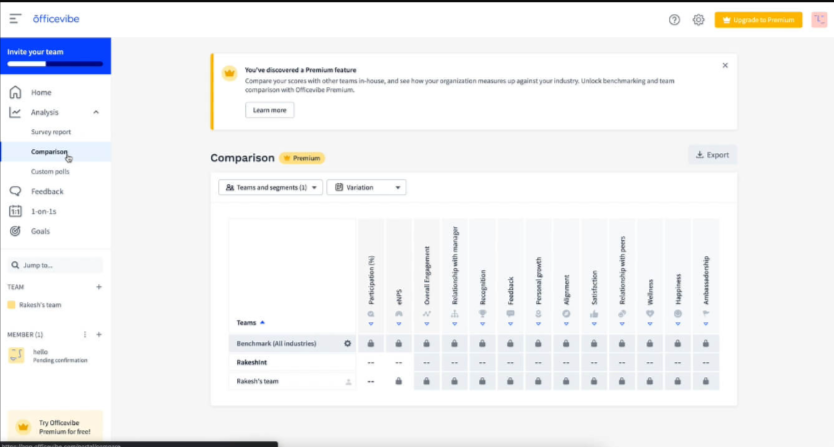
Analytics Dashboard: The dashboard provides clear insights into team dynamics and engagement levels. It helps you make informed decisions with visual data representations.
Actionable Insights: You receive specific recommendations on improving team engagement. This feature turns data into practical steps for your team.
Anonymous Feedback: Team members can share their thoughts without fear, promoting honest communication. This builds trust within your team.
Goal Setting: You can align team objectives with company goals, enhancing focus and productivity. This feature supports your strategic planning efforts.

Ease of Use
Officevibe stands out for its intuitive design, making it easy for you and your team to navigate its features without a steep learning curve.
The straightforward interface ensures you can quickly access feedback and analytics, streamlining your engagement efforts.
Users appreciate how the platform simplifies collecting and analyzing employee sentiment, saving you time and effort. With clear visuals and simple navigation, Officevibe helps you focus on improving team dynamics rather than wrestling with complex software.
Workleap Specs
- 360 Degree Feedback
- API
- Cloud Deployment
- CRM Integration
- Data Export
- Data Import
- Data Visualization
- Database
- Employee Database
- Employee Engagement
- Employee Incentive Management
- Employee Training
- External Integrations
- Feedback Management
- Google Apps Integration
- Health Management
- Migration to Cloud
- Multi-Source Feedback
- Multi-User
- Performance Appraisal
- Process Reporting
- Resource Management
- Rewards & Recognition
- Social-Media Integration
- Software Integration
- Task Scheduling/Tracking
- Third-Party Plugins/Add-Ons
- Workflow Management




Häufig gestellte Fragen zu Officevibe
Wie geht Officevibe mit Datensicherheit und Compliance um?
Officevibe stellt Datensicherheit in den Vordergrund, indem branchenübliche Verschlüsselung und sichere Speicherpraktiken eingesetzt werden. Die Teamdaten werden gemäß DSGVO und weiteren relevanten Vorschriften gespeichert, um Datenschutz und Schutz Ihrer Daten zu gewährleisten. Regelmäßige Audits und Updates sorgen für eine sichere Plattform, sodass Sie Ihrer Informationssicherheit vertrauen können.
Kann Officevibe Remote-Teams effektiv unterstützen?
Ja, Officevibe eignet sich hervorragend für Remote-Teams. Es bietet Echtzeit-Feedback und Pulsbefragungen, mit denen Sie die Teamstimmung unabhängig vom Standort im Blick behalten. Die Analysen der Plattform ermöglichen Einblicke in die Dynamik verteilter Teams und helfen Ihnen, Engagement-Probleme zügig zu erkennen und anzugehen. Das Tool ist darauf ausgelegt, Kommunikation und Zusammenarbeit auch auf Distanz zu fördern.
Welche Art von Feedback kann ich mit Officevibe sammeln?
Mit Officevibe können Sie anonymes Feedback mittels Pulsbefragungen, individueller Umfragen und Echtzeit-Feedback-Tools einholen. Diese Funktionen ermöglichen es Ihrem Team, ihre Meinungen offen zu teilen und somit eine Kultur der Transparenz und des Vertrauens zu etablieren. Die Plattform liefert umsetzbare Erkenntnisse, damit Sie auf Anliegen angemessen eingehen und die Mitarbeiterbindung stärken können.
Wie anpassbar ist Officevibe auf die Bedürfnisse meines Teams?
Officevibe bietet eine Vielzahl von Anpassungsmöglichkeiten, sodass Sie Pulsbefragungen und Feedback-Tools auf die spezifischen Bedürfnisse Ihres Teams zuschneiden können. Auch wenn sich einige Nutzer mehr erweiterte Anpassungen wünschen, reichen die vorhandenen Optionen in der Regel für die meisten mittelgroßen Teams aus. Sie können Fragen und Feedback-Einstellungen auf Ihre Unternehmensziele abstimmen. Prüfen Sie die Officevibe-Preise, um zu erfahren, ob individuelle Anpassungen mit Zusatzkosten verbunden sind.
Wie hilft Officevibe dabei, das Mitarbeiterengagement zu verbessern?
Officevibe trägt zur Steigerung des Engagements bei, indem es Einblicke in die Stimmung und Moral des Teams liefert. Mithilfe der Feedback-Tools und Analysen lassen sich Probleme schnell erkennen und angehen. Durch die Förderung einer offenen Kommunikation und die Bereitstellung umsetzbarer Empfehlungen unterstützt Officevibe Sie aktiv, ein engagiertes und motiviertes Team zu schaffen.
Kann Officevibe mehrsprachige Teams unterstützen?
Ja, Officevibe unterstützt mehrere Sprachen und eignet sich daher gut für multilinguale Teams. So wird sichergestellt, dass alle Teammitglieder Umfragen und Feedbacks in ihrer bevorzugten Sprache ausfüllen können. Diese Funktion fördert Inklusivität und sorgt für klare Kommunikation in diversen Teams.
Wie häufig sollte ich die Pulsbefragungen von Officevibe nutzen?
Sie können die Pulsbefragungen von Officevibe so oft einsetzen, wie es nötig ist, um die Teamstimmung im Blick zu behalten. Viele Teams wählen einen wöchentlichen oder zweiwöchentlichen Rhythmus, um kontinuierlich ein Bild vom Engagement zu bekommen. Die regelmäßige Nutzung von Pulsbefragungen hilft Ihnen, stets auf dem Laufenden zu bleiben und auf die Bedürfnisse des Teams schnell zu reagieren.
Welche Ressourcen stehen neuen Officevibe-Nutzer:innen zur Verfügung?
Officevibe stellt neuen Nutzern zahlreiche Ressourcen bereit, darunter Tutorials, FAQ-Bereiche und ein dediziertes Support-Team. Diese Unterstützung erleichtert den Einstieg und hilft Ihnen, auftretende Fragen schnell zu klären.
Der Onboarding-Prozess ist darauf ausgelegt, besonders einfach zu sein, damit Sie die Plattform effizient nutzen können. Leider habe ich keine spezifischen Details zum Unternehmensprofil und zur Geschichte von Officevibe gefunden. Bei weiteren Fragen oder wenn Sie zusätzliche Unterstützung benötigen, lassen Sie es mich gerne wissen!
Officevibe Unternehmensübersicht & Geschichte
Officevibe, jetzt Teil von Workleap, hat seinen Sitz in Montreal, Kanada. Das Unternehmen unterstützt über 20.000 Firmen dabei, die Mitarbeitendenbindung mit benutzerfreundlichen Tools für Feedback, Anerkennung und Umfragen zu stärken.
Officevibe gehört zu Workleap Technologies, das auch andere HR-Tools wie Pingboard und eine Lösung für Leistungsmanagement besitzt.
Bekannt für seine intuitive Plattform und den Fokus auf das Wohlbefinden der Mitarbeitenden, wird Officevibe von Unternehmen wie CSL Group, Rablab und Sharethrough geschätzt.
Wichtige Meilensteine von Officevibe
2013: Officevibe wurde eingeführt, um Teams dabei zu helfen, Mitarbeiterfeedback zu sammeln und die Mitarbeitendenbindung zu verbessern.
2022: Officevibe wird Teil von Workleap und erweitert sein Produktportfolio um Lösungen für Leistungsmanagement und Onboarding.
2023: Officevibe erreicht über 20.000 globale Nutzer, darunter Führungskräfte und HR-Teams.
2024: Erweiterte Integrationen mit Tools wie Slack, Teams und wichtigen HRIS-Plattformen.
Wie geht es weiter?
Um stets über die aktuellen Entwicklungen im Bereich People Management informiert zu bleiben, abonnieren Sie unseren Newsletter für Führungskräfte und Manager. Sie erhalten Einblicke und Angebote, die speziell auf Führungskräfte und HR-Profis zugeschnitten sind, direkt in Ihr Postfach.