

Payroll Integration: A Complete Guide


In this guide, I’ll explain how payroll integration works and how it can streamline operations by keeping your payroll data connected, accurate, and easier to manage.
What Is Payroll Integration?
Payroll integration is the process of connecting your payroll system with other business tools so payroll data moves between them automatically instead of being entered by hand.
Payroll software systems cover different aspects of compensation administration, such as time tracking, HR management, accounting, and expense reporting. The goal is to create a reliable flow to reduce manual data entry and improve accuracy.

Payroll integration is commonly used in two ways:
- Internal operations: Your company connects its payroll system to tools like an HRIS, accounting platform, or time tracking system to keep employee hours, tax details, benefits, deductions, and reimbursements consistent across platforms.
- Customer-facing SaaS products: Your software product lets customers connect their own payroll provider, so payroll data can flow into your platform without manual uploads or duplicate entry.
Examples of Payroll Integrations
In both internal operations and customer-facing SaaS products, the basic idea is the same: payroll data from one system needs to appear accurately in another system.
For example, an integrated payroll setup can:
- Pull approved hours from a time tracking tool
- Sync deductions from a benefits platform
- Send wage data to accounting software
- Add approved expenses for reimbursement
- Keep employee records updated across HR and payroll systems
Psst. This article will only make sense if you have already covered the basics. Start by understanding how payroll software works.
How Payroll Integration Works
Payroll integration connects your systems so employee information, pay data, and financial records can move between them without constant manual updates.
Most integrations follow the same basic process: one system sends information, an integration translates it into the correct format, and another system receives it. How that happens depends on your software, the data you're transferring, and how frequently it needs updating.
Here's what goes on behind the scenes and how to determine which setup makes sense for your business.
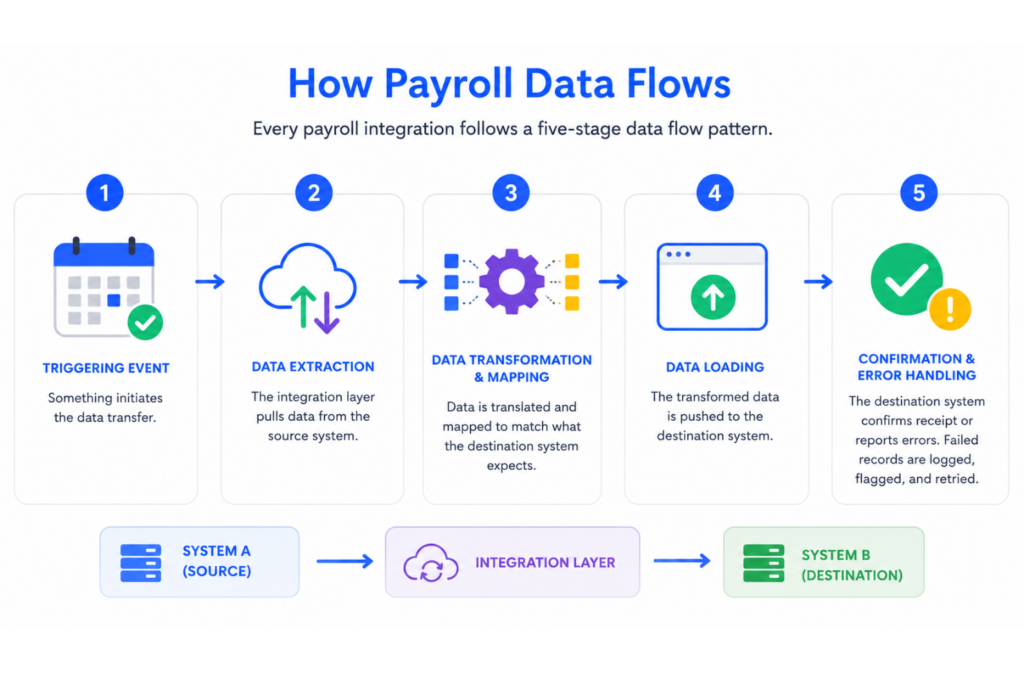
1. Understand How Payroll Data Flows
Every payroll integration follows five basic stages:
Source system → Integration layer → Destination system
- Trigger: An event starts the transfer, such as an approved timesheet, a new hire, or a scheduled update.
- Data extraction: Information is retrieved from the source system through an API, file export, or another supported connection.
- Data mapping: Fields are translated into the format the receiving system expects. For example, an annual salary recorded in your HRIS may need to be converted into a per-pay-period amount.
- Data transfer: The information is sent to the destination system, where it can be processed or stored.
- Validation and error handling: The receiving system confirms the transfer, while failed or incomplete records are flagged for review.
That last step deserves particular attention. An integration that transfers incorrect data without flagging the problem can be worse than a manual process, especially when the error affects an entire pay run.
2. Establish Data Ownership and Sync Direction
Before connecting your systems, establish which platform is responsible for maintaining each type of information.
For example, your HRIS might be the source of truth for employee records, your time tracking platform for approved hours, and payroll for finalized earnings and deductions.
You'll also need to decide whether information should move in one direction or both.
- One-way integration (sometimes called 180-degree syncing): Data travels from one system to another without being written back. For example, payroll sends labor costs to your accounting platform for financial reporting, but accounting doesn't change employee pay.
- Two-way integration (sometimes called 360-degree syncing): Both systems can exchange updates. For example, approved compensation changes made in an HR platform can update payroll, while payroll sends finalized payment information back to HR.
Two-way syncing isn't automatically better. It introduces more opportunities for conflicting updates if data ownership isn't clearly defined.
My advice: Decide which system has the final say before enabling two-way updates. You don't want an outdated employee record overwriting a recently approved salary change.
3. Choose Your Payroll Integration Method
There are several ways to connect payroll with other business software. The right approach depends on your existing systems, IT resources, budget, and need for automation.
| Integration method | How it works | Best suited for |
|---|---|---|
| Native integrations | Prebuilt connections supported by your software vendors | Common HR and payroll platforms with compatible connectors |
| File-based integration | Transfers CSV, XML, or other structured files manually or on a schedule | Legacy systems, straightforward data transfers, or periodic updates |
| API integration | Applications exchange information through defined interfaces | Businesses needing more frequent updates, custom workflows, or greater control |
| iPaaS (Integration Platform as a Service) | Middleware connects multiple applications, maps data, and manages workflows | Organizations managing several connected systems |
| RPA (Robotic Process Automation) | Software bots perform repetitive tasks through an application's interface | Older systems without suitable APIs or connectors |
For most HR teams, native integrations are the best starting point because they generally require less development and maintenance.
If your software doesn't offer a suitable connection, APIs or iPaaS platforms such as Boomi and MuleSoft can provide more flexibility. RPA can help bridge older systems, although automations that depend on screen layouts and interface controls can be more fragile.
File-based integration also remains a legitimate option. Scheduled, automated file transfers can work well for established payroll cycles and don't necessarily require someone to upload spreadsheets manually.
The important distinction is whether your chosen method can transfer the required data accurately, securely, and at the right time.
4. Decide Between Batch and Real-Time Syncing
Not every payroll integration needs to operate in real time.
Batch syncing transfers information at scheduled intervals, such as daily, weekly, or before a payroll run. It works well for approved timesheets, general ledger entries, and other information that doesn't need to update immediately.
Real-time or event-driven syncing transfers changes as they occur, often through APIs and webhooks. This can be useful for employee record updates, onboarding workflows, or changes that need to reach several systems promptly.
However, faster isn't necessarily better.
For example, automatically transferring every timesheet adjustment into payroll could introduce errors if managers haven't approved those changes. In that situation, a scheduled sync of approved hours may be safer.
The goal is to make sure the right information reaches payroll before processing deadlines, not to synchronize every field every few seconds.
5. Secure and Test Your Integration
Payroll integrations handle sensitive employee and financial information, so security needs to be part of the setup rather than an afterthought.
Whether you're connecting two platforms or using a third-party integration provider, check for the following safeguards:
- Encryption: Protect employee information in transit using TLS and ensure stored data is appropriately encrypted.
- Authentication and access controls: Use secure authentication methods, such as OAuth where supported, and restrict access to the information each integration actually needs.
- Data validation: Check that transferred records are complete, correctly formatted, and haven't been duplicated or altered unexpectedly.
- Error monitoring: Make sure failed transfers are logged, flagged, and investigated before they affect payroll.
- Vendor security: Review how integration providers handle employee data, including retention policies, access permissions, and applicable privacy requirements.
Before going live, test the integration against real payroll scenarios, including new hires, salary changes, overtime, terminations, and retroactive adjustments.
These checks should form part of your broader payroll software implementation process.
My advice: Ask vendors what happens when a transfer fails halfway through. Can the integration retry safely without duplicating payments or employee records? A reliable recovery process matters just as much as a successful connection.
If you're still comparing providers, prioritize the payroll software features that support your existing workflows rather than choosing a platform based solely on how many integrations it advertises.
Benefits of Integrated Payroll
Integrating payroll systems brings a host of advantages to an organization. There are no shortage of payroll solutions on the market, but generally speaking the best ones will help you improve or maintain performance in some key areas.
Here are the key benefits to integrating payroll systems with core HR systems:
- Labor Costs: Better tracking of labor costs through detailed salary reporting and analytics helps align HR strategies with business goals. This enables informed decision-making and optimizes budget allocation, minimizing unnecessary expenditure.
- Flexibility: Allows you to choose the best tools for different functions rather than being locked into a single vendor's suite.
- Efficiency: Automates data flow between systems, reducing manual data entry and ensuring accuracy and transparency.
- Compliance: Enhances data accuracy, helping you meet regulatory requirements and manage payroll taxes effectively. For organizations paying employees across borders, that accuracy becomes especially important for global payroll compliance, where tax and reporting requirements vary by jurisdiction.
- Employee Experience: Ensures employees are paid correctly and on time, improving overall satisfaction and morale.
- Value: You invest in expensive technology solutions to operational problems because you want to make the work easier. Just make sure the payroll software costs are offset by time saved and errors reduced.
For HR professionals, it’s about reducing manual payroll work, as it gets messy. The more automation and workflow integration you can get, the better.

The Challenges of Integrating Payroll
Payroll integrations can eliminate plenty of manual work, but getting different systems to communicate isn't always straightforward. Even established vendors can have compatibility limitations, and connecting multiple platforms introduces new opportunities for data errors.
Here are three challenges worth planning for before implementation.
1. Limited Access to Testing Environments
Not every payroll vendor provides access to a sandbox environment where you can test integrations before going live. Without one, you risk discovering incorrect calculations, missing employee records, or broken data transfers during an actual payroll run.
When comparing payroll software options, ask whether vendors provide sandbox access, sample data, and support for testing common scenarios like new hires, salary changes, and terminations.
My advice: Don't just test whether data transfers successfully. Test what happens when it doesn't, including duplicate records, failed updates, and missing fields.
2. Incompatible Systems and Data Formats
Not all payroll and HR platforms use the same data formats, APIs, or synchronization methods. A connection that works well for basic employee information might struggle with more complex data, such as bonuses, deductions, or retroactive adjustments.
For multinational businesses, global payroll integration introduces another challenge: country-specific requirements and local payroll providers that may use different systems.
Before committing to a provider, compare its integration capabilities against the features of a payroll software that your team actually needs. Confirm which fields sync automatically, which require manual intervention, and whether middleware or custom development is necessary.
My advice: Ask vendors to demonstrate your most complicated payroll workflow, not just a standard employee record transfer.
3. Implementation Costs and Ongoing Maintenance
Payroll integrations require more than an initial connection. HR, IT, payroll, and finance teams may need to map data fields, configure permissions, test workflows, and resolve errors before launch.
These tasks add to the broader implementation process, particularly when custom integrations are involved. And the work doesn't necessarily end at go-live. Software updates, API changes, and new business requirements can create ongoing maintenance demands.
When evaluating payroll software costs, account for integration setup fees, middleware subscriptions, internal IT time, and vendor support.
This matters especially when choosing a global payroll provider, where integration support may vary by country or local partner. Even providers offering global payroll solutions with prebuilt connections may require additional configuration.
Here’s the truth: without integration, you’re likely stuck juggling disconnected systems—manually transferring hours, tax details, benefits, and deductions between tools. This not only eats up your time but also increases the risk of costly payroll errors and compliance issues.
5 Payroll Integration Best Practices
A successful payroll integration isn't just about getting your systems connected. It's about making sure they continue exchanging accurate information as your workforce, software, and payroll requirements change.
Here are five practices I'd recommend:
- Audit your existing data first. Identify duplicate employee records, inconsistent naming conventions, and outdated information before migrating or syncing anything. Integrating messy data just means making the same mistakes faster.
- Start with your highest-impact workflows. Prioritize integrations that eliminate the most manual work or reduce payroll errors, such as approved timesheets or employee compensation changes. You can add less urgent connections later.
- Test a full payroll cycle before going live. Run parallel payroll calculations using your existing and integrated processes. Compare gross pay, deductions, taxes, and net pay, including tricky cases like overtime and retroactive adjustments.
- Build in checks and clear ownership. Assign someone to monitor failed transfers, review exceptions, and approve sensitive changes. Automation shouldn't mean nobody is checking the results.
- Review integrations after every major change. New pay structures, software updates, acquisitions, or expansion into new jurisdictions can affect how data flows. Revisit your mappings and validation rules whenever those changes occur.
Key Systems To Integrate With Payroll
Not every business needs the same payroll integrations. The priority is connecting systems that directly affect employee pay, deductions, financial reporting, or compliance.
Here are the most useful connections to consider and what each contributes to your payroll process.
1. HRIS, HRMS, and HCM Software
Your HR system typically manages employee information, including job titles, salaries, employment status, and department assignments. Connecting it to payroll reduces duplicate data entry and keeps employee records consistent.
What to sync: New hires, terminations, salary changes, employee details, and organizational updates.
What to watch: Establish whether HR or payroll owns each field. Changes to compensation should still follow an approval process before affecting pay.
2. Time Tracking and Scheduling Software
For businesses with hourly employees, variable shifts, or overtime, time tracking software is often one of the most valuable integrations. Approved hours flow directly into payroll instead of being transferred manually.
What to sync: Regular hours, overtime, paid leave, shift differentials, and approved timesheets.
What to watch: Make sure hours are approved before they're transferred and that payroll applies the correct overtime and pay rules.
3. Accounting and ERP Software
Payroll affects far more than employee bank accounts. Finance teams need accurate records of wages, employer taxes, benefits expenses, and outstanding liabilities.
Connecting payroll to your accounting or ERP platform helps automate journal entries and improve reconciliation.
What to sync: Payroll expenses, tax liabilities, deductions, department allocations, and general ledger entries.
What to watch: Check that payroll categories map to the correct accounts and cost centers. Incorrect mappings can create reconciliation problems even when employees are paid correctly.
4. Applicant Tracking Systems (ATS)
An ATS integration connects recruiting with payroll onboarding. Once a candidate is hired, their information can move into the appropriate HR or payroll system without someone entering it all over again.
What to sync: New-hire details, start dates, agreed compensation, and employment type.
What to watch: Only transfer confirmed hiring information. In most organizations, the ATS should feed the HRIS, which then passes approved employee data to payroll.
5. Benefits and Retirement Platforms
Benefits integrations help keep employee contributions and deductions aligned with payroll, particularly during enrollment periods or when an employee changes coverage.
What to sync: Insurance premiums, retirement contributions, benefit elections, and deduction changes.
What to watch: Check deduction effective dates, contribution limits, and how changes are handled when employees join or leave partway through a pay period.
6. Expense Management and Equity Platforms
Expense platforms such as Ramp, Brex, and Expensify can pass approved reimbursements into payroll. Equity management platforms, such as Carta, may also provide information about taxable compensation events.
What to sync: Approved reimbursements, taxable allowances, and relevant equity compensation data.
What to watch: Reimbursements and taxable compensation aren't treated the same way. Make sure the integration distinguishes between them so withholding and reporting are calculated correctly.
7. Identity and Access Management Systems
Identity tools such as Okta and Microsoft Entra ID can connect employee lifecycle events with IT access management.
This isn't usually a payroll calculation priority, but it helps coordinate onboarding, role changes, and offboarding.
What to sync: Employment status, start dates, termination dates, and approved role changes.
What to watch: Use the authoritative HR system to trigger access changes rather than relying solely on payroll status, which may not reflect employment changes immediately.
Which Payroll Integrations Should You Prioritize?
Start with the connections that create the greatest risk or manual workload.
For an hourly workforce, that might mean time tracking and payroll. For a growing international business, HRIS and finance integrations may take priority because of the volume of employee changes, currencies, and reporting requirements.
You don't need to integrate everything at once. Identify where data is being re-entered, where errors are occurring, and which disconnected processes are slowing down payroll. Fix those first. OR, consider switching to an all-in-one HR software to consolidate a fragmented tech stack.
Stay Up To Date On All Things Payroll
Want to keep up with the latest trends in payroll technology and processes? Sign up for the People Managing People newsletter and you’ll get the latest insights, trends and analysis straight to your inbox.


