

Set for Growth: The Ins and Outs of the HR Payroll Software Market


Automation is changing the way nearly every professional does their work in the modern world.
One look at the HR payroll software market, and it becomes obvious that payroll is no different as new software solutions are making the task of a payroll run easier than ever before.
In this article, I'm going to dig into the growth of the HR payroll software market, where it’s headed and take a look at some of the best solutions that are out there.

HR Payroll Software Market
Differing analysis of any market will leave with you quite a range of valuations and projections for market growth or decline.
Current size
For example, in 2023, the HR payroll software market was valued somewhere between $7.3 billion and $27 billion depending on which report you read. That number is expected to grow to somewhere between $8.1 billion and $33 billion in 2024.
Rather than get lost in the valuation, perhaps the more important thing to note is the compound annual growth rate (CAGR) for this market, which by all accounts is set for growth with the average estimate being somewhere in the ballpark of 10% annual growth.
Projected Size
At that growth rate, the HR payroll software market will grow to be worth somewhere between $19 billion and $60 billion by 2030.
In any case, the estimates are realistic given the implementation of AI into payroll processing and the increased reliability of payroll software platforms to tackle any compliance concern.
Importance of Payroll Software
Payroll software is of increasing importance for employers as practices around pay transparency and equity have become increasingly important to employees and are examined by state and national governments. For those looking for comprehensive solutions, exploring the best enterprise payroll software can be beneficial.
Other business factors making payroll software a major factor in organizational success include:
- Improving data security
- Creating efficiency that replaces manual processes
- Improved analytics and reporting
- Scalability for growing businesses
- Flexibility that suits technology capabilities
- Cost savings
Types of Payroll Software
Different types of payroll software cater to different business needs, providing solutions that range from comprehensive, all-in-one systems to specialized, industry-focused applications.
Here, we’ll focus on five of the most common types.
1. On-Premises Payroll Software
- Description: Installed directly on the company’s local servers and computers.
- Advantages: Offers full control over data security, customization, and integration with other on-premises systems.
- Ideal For: Large organizations with dedicated IT staff and specific customization needs.
2. Cloud-Based Payroll Software
- Description: Hosted on remote servers and accessed via the internet.
- Advantages: Provides flexibility, automatic updates, and remote access. Reduces the need for extensive IT infrastructure.
- Ideal For: Small to medium-sized businesses, remote teams, and companies looking for scalable solutions.
3. Integrated HR and Payroll Software
- Description: Combines payroll functions with broader human resources management tasks. Often comes in the form of an HRIS that has payroll functionality.
- Advantages: Streamlines HR processes, enhances data accuracy, and improves overall employee management.
- Ideal For: Organizations seeking a unified solution for HR and payroll management.
4. Industry-Specific Payroll Software
- Description: Tailored to meet the unique needs of specific industries, with specialized options such as payroll software for trucking companies as well as systems designed for construction, healthcare, or retail.
- Advantages: Offers specialized features and compliance tools relevant to the industry.
- Ideal For: Businesses requiring industry-specific payroll functionalities and compliance requirements.
Related read: Reviews of the best payroll software for construction companies
5. Outsourced Payroll Services
- Description: Outsourced payroll is managed by third-party providers who handle all payroll-related tasks, such as a professional employer organization or employer of record.
- Advantages: The pros of using a payroll service include reduced administrative burden, ensured compliance, and allowing businesses to focus on core activities.
- Ideal For: Small businesses without dedicated payroll staff and companies looking to outsource non-core functions.
This is especially true for companies managing payroll across borders, where providers with built-in support for multi-country compliance, tax, and currency handling—like those offering global payroll solutions—can reduce both overhead and legal exposure.
Drivers of Payroll Software Market Growth
The payroll software market’s growth is driven by several key factors that are reshaping how businesses manage their payroll and HR functions. Let’s take a look at some of the most important ones.
Cloud vs. On-Premises Solutions
One of the biggest trends is the shift from traditional on-premises payroll software to cloud-based solutions. Cloud-based payroll software offers flexibility, scalability, and cost-effectiveness.
Businesses no longer need to maintain extensive IT infrastructure or worry about regular updates and security patches. With cloud solutions, everything is handled remotely, making it easier for businesses to scale their operations and access their payroll data from anywhere, at any time.
Artificial Intelligence (AI)
AI is revolutionizing the payroll software market by introducing advanced features that enhance accuracy and efficiency. AI-driven tools can automate complex calculations, predict payroll trends, and identify discrepancies before they become issues.
For example, AI can flag unusual patterns in payroll data that might indicate fraud or errors, helping businesses maintain payroll compliance and avoid costly mistakes.
Additionally, AI-powered chatbots can provide instant support to employees, answering common payroll queries and reducing the burden on HR teams.
Increased Automation of HR Processes
Modern payroll software integrates seamlessly with other HR systems, automating a wide range of processes from time tracking to benefits administration.
This automation reduces manual work, minimizes errors, and ensures that payroll processing is faster and more reliable.
For instance, automated time tracking systems can directly feed into payroll calculations, ensuring employees are paid accurately for the hours they've worked without manual data entry.
Regulatory Compliance and Reporting
Staying compliant with ever-changing labor laws and tax regulations is a major challenge for businesses. Payroll software simplifies compliance by automatically updating to reflect new laws and generating accurate tax reports.
This not only saves time but also helps businesses avoid penalties and legal issues. The ability to generate detailed reports and analytics also supports better decision-making and strategic planning.
Employee Self-Service
Modern payroll software often includes employee self-service portals, where employees can access their pay stubs, tax forms, and personal information. This feature improves transparency and empowers employees to manage their own payroll-related tasks, reducing the workload for HR departments.
Cost Efficiency
For many businesses, especially small and medium-sized enterprises, the cost is a significant factor when looking at payroll services or software.
Payroll technology can reduce the need for a large in-house HR team by automating many routine tasks. The shift to subscription-based models also means businesses can spread the cost over time, rather than making a large upfront investment.
Future Trends and Predictions
Employee expectations around pay are changing and with it, payroll systems will have to evolve to meet those expectations. Here are some areas where your payroll service or software providers will be looking to up their game in the coming years.
Flexible pay
Payroll is now predominantly a digital function, with only about 3% of U.S. employees still receiving paper checks. Offering diverse payment options will become essential as employees increase their financial literacy and begin to manage their money in new ways.
According to research from ADP, 76% of all employees say that it’s important to them that their employer offer flexible pay, sometimes called Earned Wage Access (EWA), or the ability to pull from accrued wages whenever they want rather than only receiving funds on a specific day within the pay period.
This also sometimes referred to as "on demand pay".
There are now systems that let employees manage their own payment schedules, with vendors and apps allowing them to choose when they get paid without disrupting their employer’s payroll processes.
Growth of cryptocurrency
And how those payments are received will likely change as well.
Cryptocurrency payments are becoming more popular, for example. A report from Statista shows that over 39% of American adults would consider using Bitcoin for transactions and purchases they make. It’s not unlikely then that more people will warm to the idea of receiving their paycheck via crypto in the future.
However, many employers are still unfamiliar with cryptocurrency and the associated risks and regulations. Issues like taxes, international laws, and the definition of “legal tender” need careful consideration.
For instance, Bitcoin isn't recognized as legal tender in countries like Belgium, Finland, and Sweden, but it isn't banned either. Payroll software can help manage these complexities with automated compliance, enabling employers to adopt Bitcoin payments smoothly.
More AI
There are some remarkable capabilities around AI for payroll. Whether that’s detecting anomalies, predicting employee requests or streamlining compliance, and avoiding errors through the automation of time-consuming tasks that are prone to error. But it also will drive improvement in some other key areas.
Real time analysis
AI-powered payroll systems can instantly analyze vast amounts of data, providing real-time insights and identifying patterns that human analysts might miss.
For example, AI can monitor payroll data for discrepancies, such as overtime inconsistencies or unusual payment patterns, and flag these issues immediately.
This level of instant analysis could help businesses address problems before they escalate, ensuring payroll accuracy and compliance with labor laws.
Predictive Analytics
AI can also use historical payroll data to predict future trends. By analyzing past payroll records, AI algorithms can forecast labor costs, budget needs, and potential financial risks.
This predictive capability allows businesses to plan more effectively and make informed decisions about hiring, budgeting, and resource allocation.
Conversational experience
The days of manual payroll reporting are coming to an end. Earlier this year, UKG announced it was deploying generative AI in its "Pro" platform to create a question-and-answer experience to streamline the payroll reporting process.
In other words, no more combing through datasets or manually reviewing employee profiles. A user of the platform can simply ask a text-based question such as “Show me all employees who have a wage garnishment” or “Create a list of all employees paying into multiple retirement accounts.”
“Payroll reporting often feels like seeking a needle in a haystack, and by the time the frantic search for information is over, it’s often too late to take action on,” said Hugo Sarrazin, chief product and technology officer at UKG in a press release. “With generative AI, we’re making critical payroll data easily searchable and accessible through conversational experiences, while also putting that information into actionable context for payroll teams.”
Enhanced security protocols
Advanced algorithms can identify unusual patterns and potential breaches instantly, allowing for swift action to protect sensitive data. AI also ensures continuous monitoring and updates, keeping payroll systems secure against evolving cyber threats.
This proactive approach minimizes risks and maintains the integrity of payroll information.
The Gig Economy Impact
More than one-third of the U.S. workforce is made of gig workers and that number is expected to grow to more than half of the workforce by 2027.
This trend presents an interesting question for our society about how these workers receive benefits with more insurance companies now offering policies and services specifically tailored to independent contractors.
In the future, it’s likely that payroll software will have to account for this and streamline payment of premiums to the contractors desired healthcare provider.
Best Solutions on the Market
At this point, you might be wondering about the best solutions on the market. We’re here to help.
Clicks on the links below may earn a commission, which supports our independent testing and review of software and services. Learn more about how we stay transparent.
Paycom
Best for employee‑driven error prevention
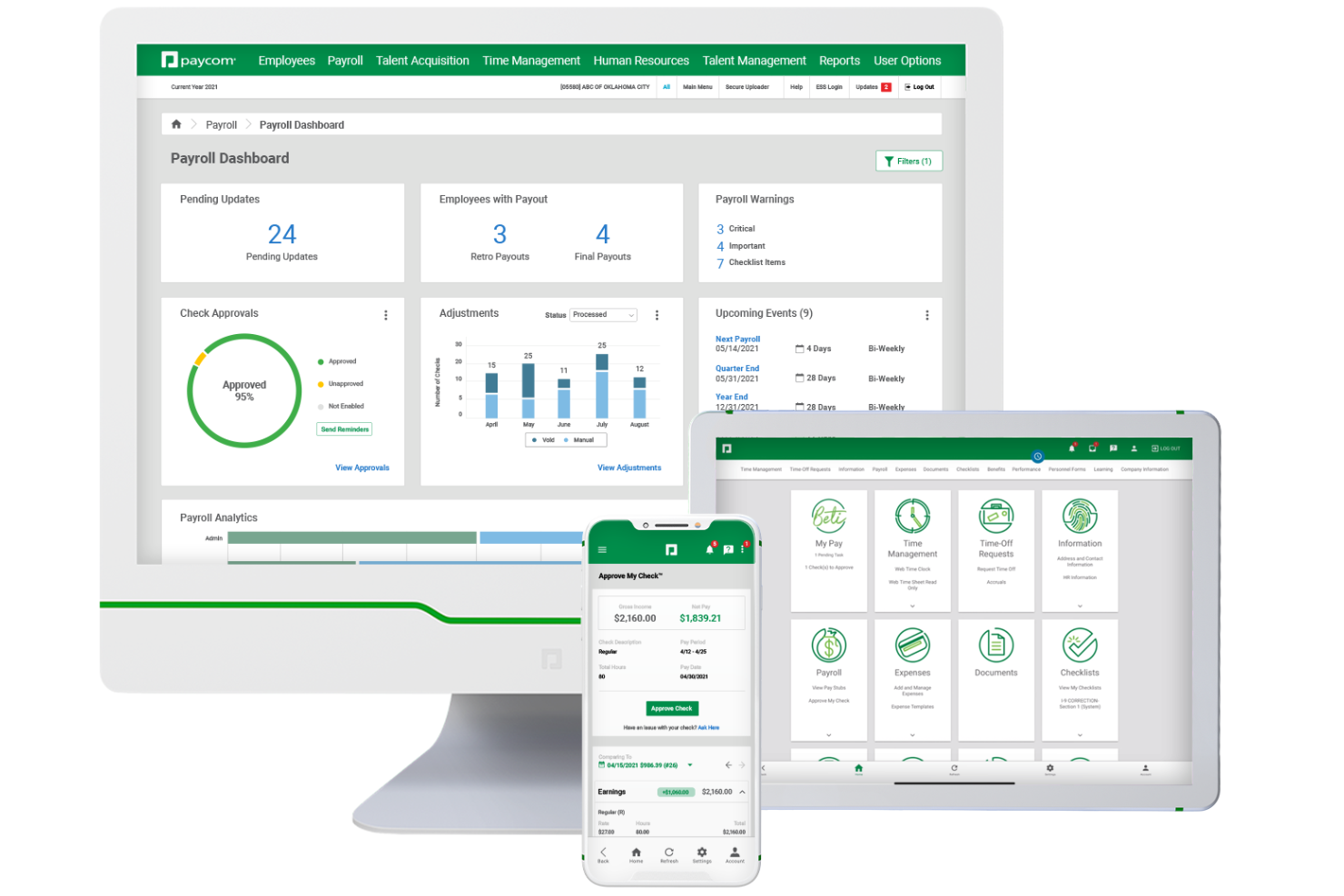
If you’re looking for payroll software that puts employees in control of their own data, Paycom is worth considering. The platform’s employee-driven payroll model helps reduce errors and manual work for HR teams. Paycom is a strong choice for organizations that want to improve payroll accuracy and empower staff to manage their own information.
Who is Paycom Best For?
HR leaders, payroll administrators, and finance teams at mid-sized to enterprise organizations that want employees to participate directly in payroll data accuracy and updates. It suits companies managing complex payroll environments that require centralized oversight while reducing administrative correction workflows.
Why I Picked Paycom
Paycom stands out for its employee-driven payroll, which shifts payroll data entry and verification to the people who know it best—your employees. I picked Paycom because this model helps reduce payroll errors and gives staff more ownership over their pay information. Employees can review and approve their own paychecks before payroll runs, which helps catch mistakes early. This approach is especially useful for organizations that want to improve payroll accuracy and accountability without adding extra steps for HR.
Paycom Key Features
In addition to employee-driven payroll, Paycom offers several other features for payroll management:
- Tax Management: Automates payroll tax calculations, filings, and payments for federal, state, and local jurisdictions.
- Garnishment Administration: Manages wage garnishments and deductions directly within the payroll process.
- Expense Management: Lets employees submit expenses for approval and reimbursement through the same platform.
- Custom Reporting: Provides configurable payroll and HR reports to support audits, compliance, and business analysis.
Paycom Integrations
Integrations are not available.
Pros and cons
Pros
- Strong payroll compliance support
- Customizable payroll and HR reporting options
- Single system means time cards, benefits, payroll share same data
Cons
- Occasional issues in regions outside the U.S.
- Some features are locked behind expensive add‑ons

Deel Payroll
Best for compliant payroll in 150+ countries

Deel Payroll serves businesses and HR teams managing international workforces, offering a platform that simplifies global payroll, compliance, and payments for employees and contractors across multiple countries.
Who Is Deel Payroll Best For?
Deel Payroll is a strong fit for mid-size to enterprise companies hiring across borders who need localized payroll compliance without building in-house expertise in every country.
Why I Picked Deel Payroll
I picked Deel Payroll as one of the best because it handles something most payroll tools can't: running compliant payroll across 150+ countries without requiring your team to become local tax experts in every market. The built-in compliance engine automatically applies local tax rules, statutory requirements, and filings before each payroll run. AI flags anomalies and missing data before approval, catching issues early. I also like the Payroll Connect feature, which lets you view Deel-managed payroll and third-party payrolls side by side in one dashboard—useful when you're mid-transition and still running payroll through multiple vendors.
Deel Payroll Key Features
- Employer of record (EOR) services: Deel acts as the legal employer in countries where you don't have an entity, so you can hire and pay workers without setting up a local subsidiary.
- Contractor payments: Pay independent contractors in their local currency across 150+ countries, with built-in contract generation and localized payment methods.
- Payroll reporting and analytics: Access detailed payroll reports broken down by country, department, or employee to support audits, budgeting, and workforce planning.
- HRIS integration: Sync employee data between Deel and your existing HR systems to keep headcount, compensation, and role changes consistent across platforms.
Deel Payroll Integrations
Integrations include FaceUp, Snowflake, DefensX, Microsoft Finance, Kintsugi, ReFresh OS, Revo.ai, Keeper, Human Interest, and Everyminute.
Pros and cons
Pros
- Allows off-cycle payments and flexibility for global payroll scenarios
- Built-in compliance monitoring
- Supports payroll in 130 + countries
Cons
- Limited invoice customization
- Contract templates could be simplified

Rippling
Best for global payroll with tons of integrations
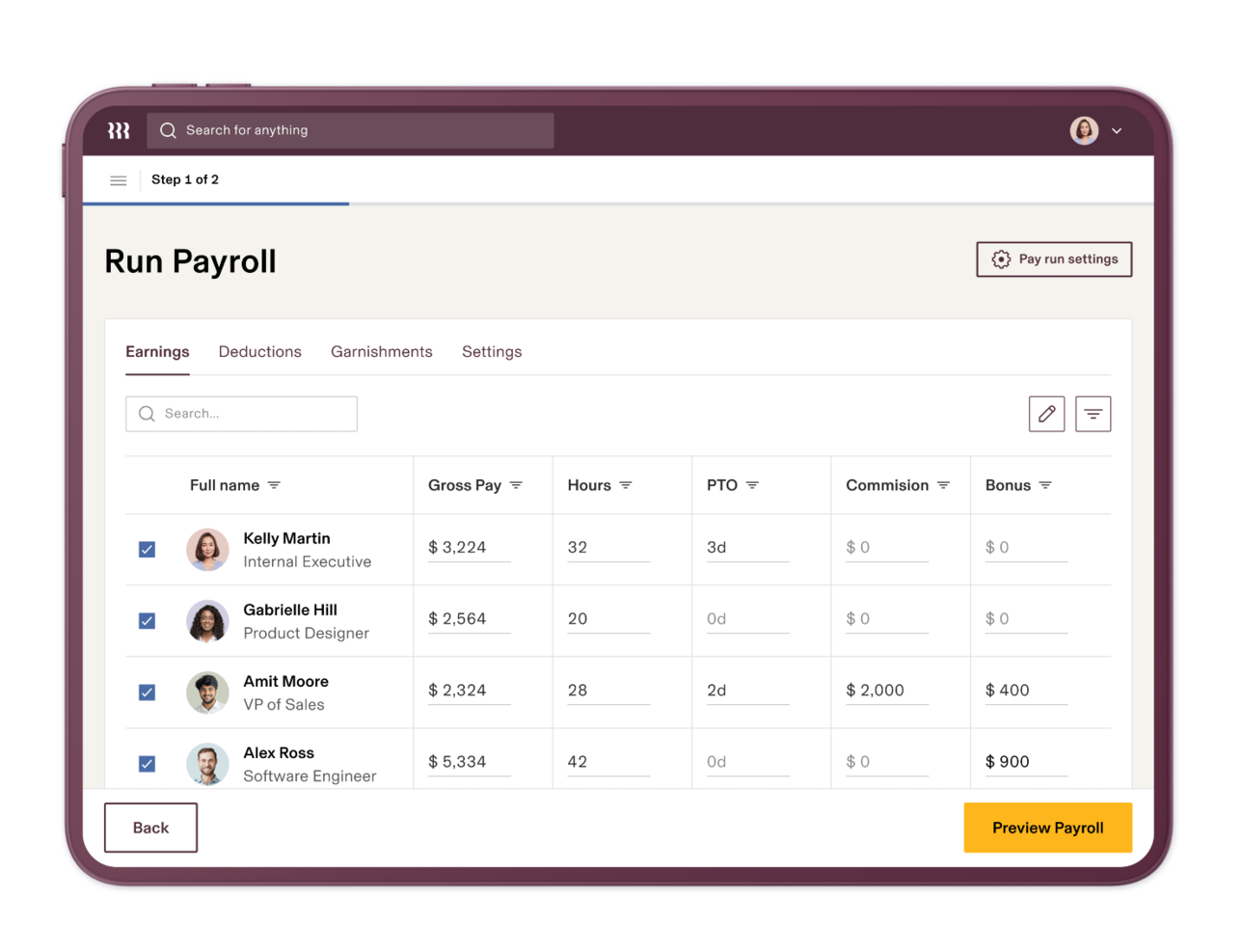
Rippling is a payroll platform designed for businesses that need to manage payroll across multiple countries, automate compliance, and connect payroll with HR, IT, and finance systems in one place.
Who Is Rippling Best For?
Rippling is a strong fit for mid-sized to enterprise businesses managing distributed or international workforces across multiple countries and systems.
Why I Picked Rippling
Rippling stands out for how it handles global payroll in a single, unified system. Many platforms require stitching together separate tools for domestic and international payroll, but Rippling runs payroll across multiple countries, pays workers in their local currency, and automatically calculates and files taxes worldwide—all from one place. Rippling also scales with your entity structure: you can pay global contractors with no entity required, run payroll through Rippling's own entities, or use your own. The country-specific compliance automation is useful, since it flags infractions across every jurisdiction without manual monitoring.
Rippling Key Features
- Benefits administration: Manage health insurance, retirement plans, and other benefits in one integrated system that syncs directly with payroll.
- Time and attendance tracking: Track hours for hourly employees with automatic compliance checks that sync time card data straight into payroll.
- Pay run comparison: Compare your current pay run against previous ones to catch discrepancies in gross pay, taxes, and deductions before final approval.
- Rippling AI for payroll: Use AI prompts to add bonuses, fix discrepancies, and schedule pay runs without manually navigating the platform.
Rippling Integrations
Integrations include Slack, Google Workspace, Microsoft 365, Salesforce, Zoom, Asana, Jira, GitHub, PayPal, and Checkr.
Pros and cons
Pros
- Multi-state and international payroll in one workflow
- Workflow automation reduces repeat admin tasks
- Tight integration of payroll with benefits and HR data
Cons
- Limited customer support options
- Complex initial setup
New Product Updates from Rippling

Rippling AI Adds Plugins, Skills, and Automations
Rippling AI now supports plugins, skills, and automations so employees can connect approved third-party tools, package repeatable work into reusable AI instructions, and run recurring workflows under existing Rippling policies and permissions. For more information, visit Rippling's official site.
 .
.
RemoFirst
Best for global teams in 170+ countries

RemoFirst is a payroll platform built for companies managing employees and contractors across multiple countries, helping HR teams handle global payroll, compliance, and onboarding from a single dashboard.
Who Is RemoFirst Best For?
RemoFirst is a strong fit for HR teams at small to mid-sized companies that are hiring or scaling internationally and need a single platform to manage payroll and compliance across borders.
Why I Picked RemoFirst
RemoFirst earns its spot on my shortlist because it covers global payroll and compliance in 185+ countries at a flat, predictable rate with no hidden fees. It handles multi-country payroll in a single aggregated payment—instead of managing dozens of individual transactions, my team can consolidate the entire global payroll into one. The localized employment contracts feature automatically generates contracts that align with each country's labor laws, removing a significant legal burden when onboarding someone in a new market.
RemoFirst Key Features
- Contractor management: Pay and manage international contractors across 150+ countries, including identity checks, contract generation, and expense reimbursements.
- Compliant offboarding: Manage employee terminations in line with each country's notice periods, severance rules, and legal documentation requirements.
- Visa and immigration support: Handle work permit and visa applications in 85+ countries directly through the platform.
- Background checks: Run global background screening on international hires to verify identity and support compliant hiring decisions.
RemoFirst Integrations
Integrations include BambooHR, GoCardless, and ADP Workforce Now.
Pros and cons
Pros
- Dedicated account managers
- Customizable dashboards
- Multi-currency abilities within a single payroll run
Cons
- Lacks extensive integrations
- No mobile app available

Paycor
Best for automating payroll tasks

Paycor is a payroll software platform built for HR teams and business leaders who want to simplify payroll processing, manage compliance, and give employees easy access to pay and tax information.
Who Is Paycor Best For?
Paycor is a good fit for small to mid-sized businesses that need a unified platform to handle payroll, HR, and compliance without relying on multiple disconnected tools.
Why I Picked Paycor
Paycor earns its spot on my shortlist because of how far it takes payroll automation. The AutoRun feature is what I keep coming back to—it lets you schedule payroll to process on a specific day and time without anyone needing to log in, which is a real difference-maker for teams running lean. I also like the real-time calculations, which means any last-minute changes to hours or deductions update instantly instead of waiting on batch processing. The compliance dashboard also surfaces proactive alerts for things like missing tax IDs and invalid direct deposit info right on the homepage, so issues get caught before they become problems.
Paycor Key Features
- Paystub preview: Employees can view their paystub up to three days before payday to catch errors before they become issues.
- OnDemand Pay (EWA): Gives employees access to wages they've already earned before their scheduled payday.
- Wage garnishment management: Paycor automatically deducts employee garnishments from paychecks on your behalf.
- Payroll reporting: Run reports covering tax liability, cash requirements, labor distribution, deduction registers, and more.
Paycor Integrations
Integrations include QuickBooks, NetSuite, JazzHR, DailyPay, 15Five, Timeero, Spark Hire, Procurify, HR Geckos, and OrgChart.
Pros and cons
Pros
- Direct deposit setup for multiple employee accounts
- Payroll analytics with customizable reporting options
- Automated new hire reporting for compliance
Cons
- Time cards are a bit simplistic
- UX can be a little clunky at times

RemotePeople
Best for global payroll management
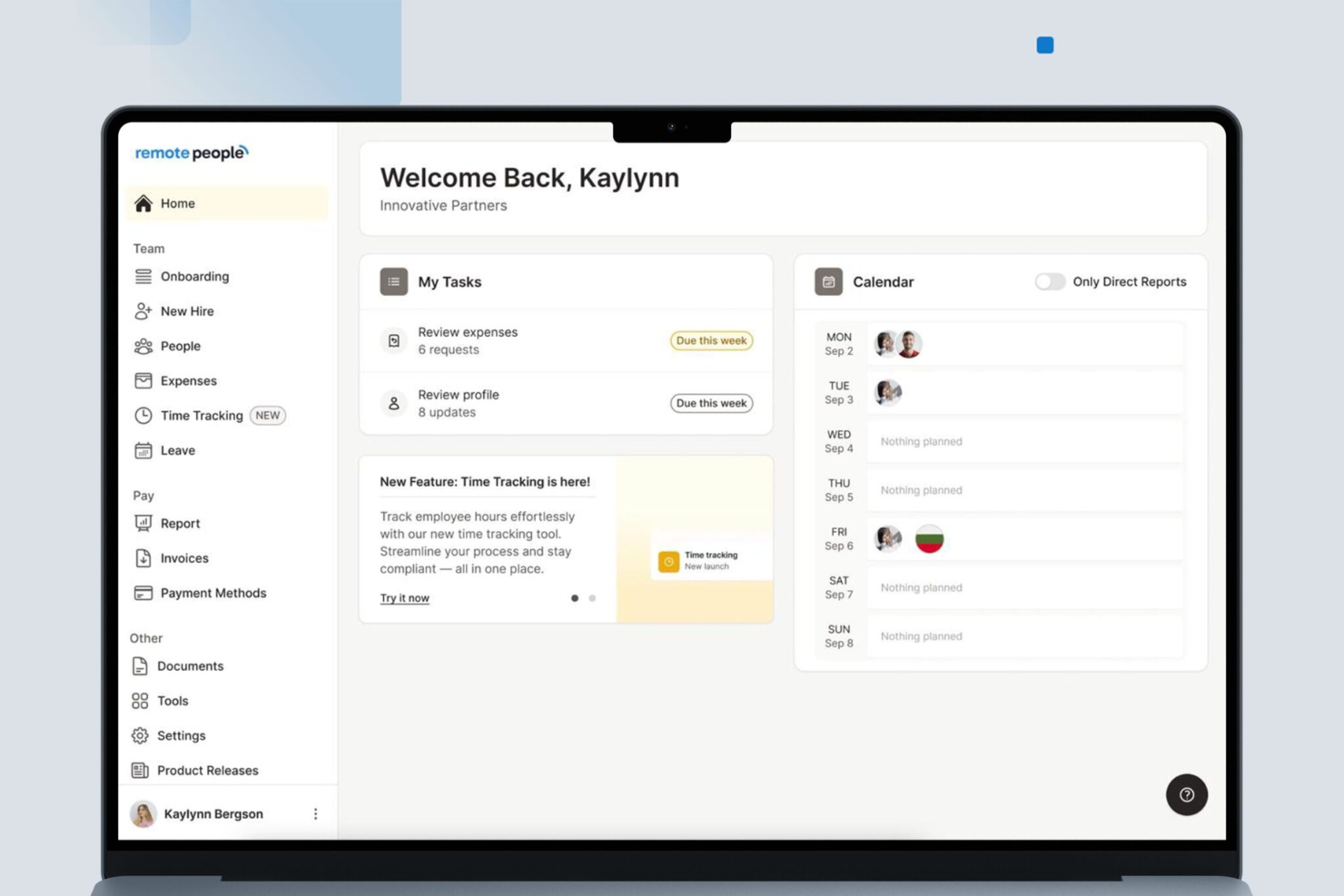
RemotePeople is a payroll platform built for businesses with distributed teams, helping HR professionals and finance leads manage payroll, compliance, and payments across multiple countries and currencies.
Who Is RemotePeople Best For?
RemotePeople is a strong fit for companies hiring internationally who need a single platform to handle payroll across multiple countries without setting up local entities.
Why I Picked RemotePeople
RemotePeople earns its spot on my shortlist because of how well it handles the complexity of paying employees and contractors across different countries. I like that it manages local tax compliance, in-country payroll calculations, and multi-currency payments without requiring your business to set up legal entities abroad. In practice, that means my team can onboard international hires and run payroll in countries like Brazil, India, or Germany without needing a local HR or legal team on the ground. Built-in compliance coverage provides a clear advantage for global payroll management.
RemotePeople Key Features
- Contractor of record: RemotePeople takes on the legal and compliance risk for contractor engagements, covering misclassification liability across 150+ countries.
- Expense approval workflow: Team members submit expenses directly in the platform, you approve them in one click, and RemotePeople processes the payment.
- Leave management tracking: Annual leave, sick days, and local public holidays are tracked and approved in a single dashboard, with rules applied per country.
- Locally drafted employment contracts: Each contract is written by in-country legal experts rather than generated from templates, reflecting local labor law requirements.
RemotePeople Integrations
Integrations include Workday, SAP SuccessFactors, BambooHR, HiBob, NetSuite, QuickBooks, and more.
Pros and cons
Pros
- Dedicated client support contact
- Provides global payroll, contractor, and relocation support
- Includes Employer of Record and PEO services
Cons
- Some services available only in certain regions
- No publicly listed integrations

Homebase
Best for managing hourly teams

If you manage hourly teams in retail, hospitality, or service industries, Homebase brings payroll and team management together in one platform. The tool is designed for businesses that need to track hours, handle shift scheduling, and pay employees accurately without juggling multiple systems. Homebase stands out by connecting time tracking, scheduling, and payroll, so you can run payroll directly from timesheets and reduce manual entry errors.
Who is Homebase Best For?
Operations managers, store managers, and HR administrators at small to mid-sized businesses that manage hourly or shift-based employees. It suits companies in retail, hospitality, and service industries that require centralized scheduling, time tracking, and team communication across locations.
Why I Picked Homebase
Homebase is built specifically for businesses with hourly workforces, which makes it a strong fit for payroll needs in industries like retail, restaurants, and hospitality. The platform connects time tracking, scheduling, and payroll, so you can run payroll directly from employee timesheets without manual calculations. I appreciate that Homebase automatically calculates wages, overtime, and taxes based on real-time clock-ins and outs. For teams that rely on shift work and need accurate payroll tied to hours worked, Homebase offers a focused solution that addresses those challenges head-on.
Homebase Key Features
Some other features in Homebase help round out its payroll capabilities:
- Direct Deposit and Paper Check Options: Pay employees through direct deposit or print paper checks as needed.
- Automated Tax Filings: Homebase automatically files federal, state, and local payroll taxes for you.
- Employee Self-Service Portal: Employees can access pay stubs, tax forms, and update personal information online.
- Wage Garnishment Processing: Manage and process wage garnishments directly within the payroll system.
Homebase Integrations
Integrations include Square, Restaurant365, Wells Fargo, Paychex, Clover, Rippling, Toast, Shopify, ADP RUN, and QuickBooks Online.
Pros and cons
Pros
- Automated payroll and tax processes
- Offers direct deposit into bank accounts or printable checks
- Time tracking for accurate payroll
Cons
- Payroll functions are only available as an add-on
- No details on customization for specific business needs

Employment Hero
Best for Canadian SMBs

Employment Hero brings together HR, payroll, and employee benefits in a single platform designed for growing businesses. It’s especially useful for organizations that want to automate payroll while also managing onboarding, contracts, and compliance from one place. If you’re looking to reduce manual admin and keep HR and payroll tightly connected, this tool offers a unified approach.
Who is Employment Hero Best For?
HR leaders, payroll administrators, and business owners at small to mid-sized organizations that want an integrated platform for managing people operations. It suits Canadian SMBs that need localized HR, payroll, and compliance workflows aligned to regional employment requirements.
Why I Picked Employment Hero
What sets Employment Hero apart is its all-in-one approach to HR and payroll, which is especially valuable for growing businesses that want to keep everything connected. The platform lets you automate payroll runs, manage employee records, and handle leave requests without switching between different systems. I appreciate how Employment Hero links payroll directly to onboarding and contract management, so you can keep employee data consistent from day one. This unified setup helps reduce errors and saves time for teams managing both HR and payroll tasks.
Employment Hero Key Features
Some other features that make Employment Hero useful for payroll management include:
- Automated Tax Filing: The platform automatically calculates and files payroll taxes based on current regulations.
- Employee Self-Service App: Employees can view payslips, submit leave requests, and update personal details from their mobile devices.
- Timesheet Management: Track employee hours and approve timesheets directly within the system.
- Customizable Pay Run Schedules: Set up pay runs to match your business’s preferred payroll frequency and timing.
Employment Hero Integrations
Integrations include QuickBooks, Ameego, Go1, Slack, Google Workspace, and Microsoft 365.
Pros and cons
Pros
- Supports single touch payroll submissions
- Integrated timesheets sync with payroll runs
- Automated award interpretation for compliance
Cons
- Some payroll reports lack export options
- Limited global payroll coverage outside Australia

BambooHR®
Best for employee self-service
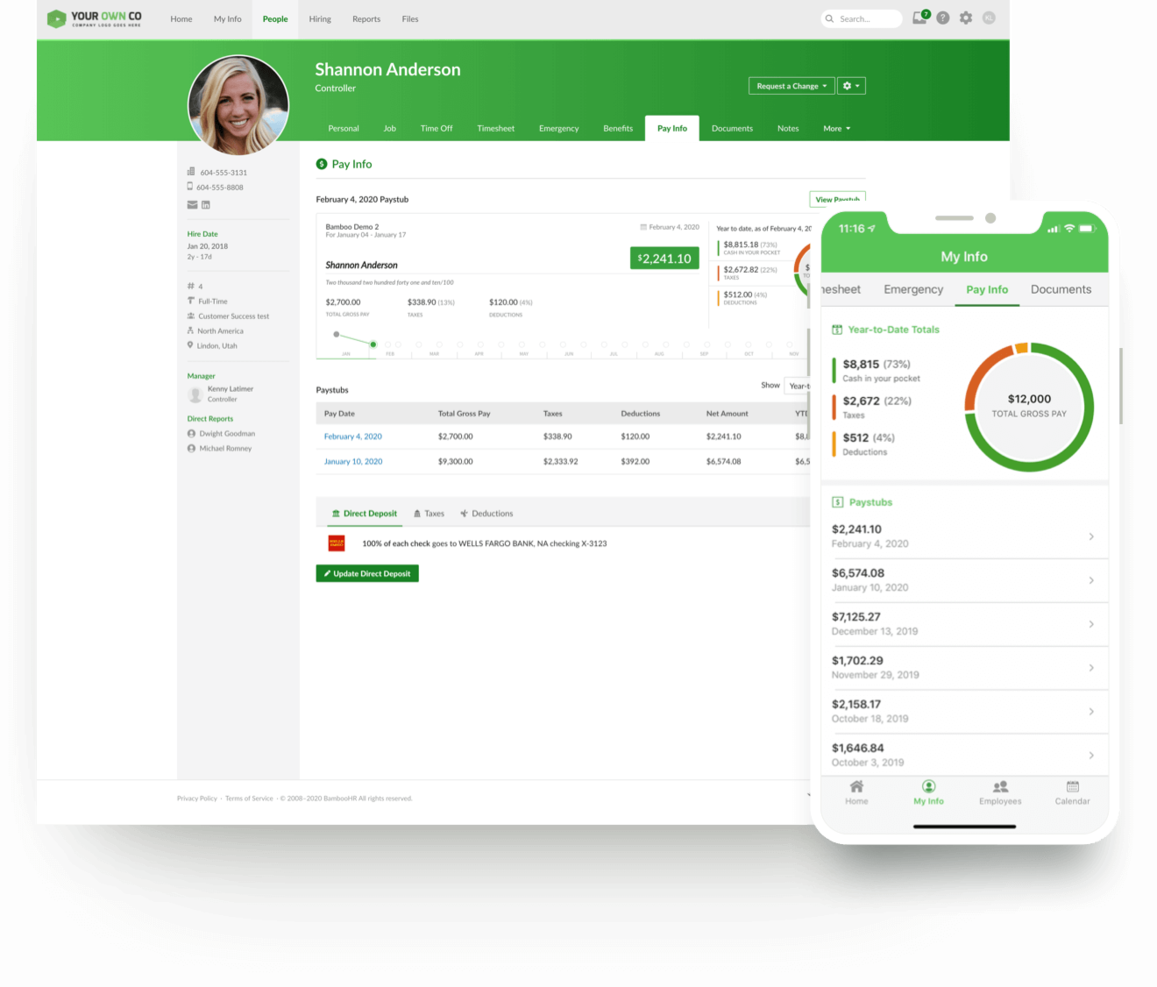
BambooHR now offers payroll as an add-on to its HR software, alongside features like benefits tracking, document storage, time-off management, an employee directory and organizational chart, applicant tracking, onboarding, electronic signatures, and training tracking. It is designed specifically for U.S.-based organizations and includes both federal and state tax filing. The platform also includes BambooHR On-Demand Pay, an embedded earned wage access feature powered by Clair, which allows employees to access a portion of their earned wages before payday.
The platform has a clean, modern interface that prioritizes ease of use. Employees can manage their own profiles, track PTO, update direct deposit information, sign tax forms or other documents, and request earned wage advances directly from their dashboard or mobile app. Eligible employees can access a portion of earned wages per pay period, with limits that may increase over time based on repayment history. Standard transfers (1–3 business days) are free, while instant transfers incur a small fee. Because advances are based on earned wages, there are no interest charges, credit checks, or late fees.
BambooHR integrates with more than 60 commonly used programs, including Slack, Greenhouse, HireRight, Indeed, 15Five, PayScale, Pingboard, NetSuite, Spark Hire, and Zapier. It also offers an open API to support custom integrations. On-Demand Pay is included at no additional cost for employers, does not require manual approvals or advance funding, and is currently unavailable for employees residing in Nevada, Connecticut, New Mexico, South Dakota, Minnesota, and Massachusetts. Employers may choose to opt out of the feature.
New Product Updates from BambooHR®

BambooHR Adds Enrollment Waivers and Plan Year Continuity
BambooHR adds automatic enrollment waivers and plan year continuity for Benefits Administration. These updates help admins handle missed deadlines and prepare benefit renewals with less manual work. For more information, visit BambooHR’s official site.
 .
.
Gusto
Best for hands-off tax filing

Gusto is a cloud-based payroll platform built for small and midsize businesses that want to automate payroll, manage benefits, and stay compliant with tax regulations.
Who Is Gusto Best For?
Gusto is a great fit for small business owners and HR teams who need a straightforward way to run payroll, handle taxes, and manage employee benefits without dedicated payroll expertise.
Why I Picked Gusto
Gusto earns its spot on my shortlist because of how thoroughly it handles tax filing with minimal effort on your part. Every time payroll runs, Gusto automatically calculates, files, and pays federal, state, and local taxes directly with the right government agencies—something other providers charge extra for. I also like that it tracks changing tax laws and handles auto-calculations to reduce errors, so my team isn't scrambling to stay current. W-2s, 1099s, and I-9s are stored and organized online, making year-end filing far less painful.
Gusto Key Features
- AutoPilot™ payroll: Set payroll to run on a schedule so your team is paid without manual intervention.
- Employee self-onboarding: New hires enter their own personal and banking details directly in Gusto, reducing manual data entry for HR.
- Multi-state pay schedules: Run payroll across multiple states and pay schedules simultaneously, with state tax registration support in all 50 states.
- Contractor payments: Pay contractors in more than 120 countries directly through the platform, with 1099s handled automatically at year-end.
Gusto Integrations
Integrations include QuickBooks Online, Xero, FreshBooks, 7shifts, Asana, Bench, Aplos, Accelo, ApplicantPro, and Box.
Pros and cons
Pros
- Automatic federal, state, and local tax filing
- Direct deposit with multiple pay schedule options
- Built-in benefits administration for multiple states
Cons
- Health benefits limited to certain states
- No native support for tip reporting
New Product Updates from Gusto
Gusto Adds Solo Advisory Tools and Mobile Money Features
Gusto adds Solo S-Corp Advisory Tools and Gusto Money on Mobile for tax guidance, invoicing, and bill payments. These updates help accountants advise solopreneurs and let users manage business finances from their phones. For more information, visit Gusto’s official site.
 .
.


Competitive Landscape
The competition for payroll software is fierce, including some of the biggest names in HR related software solutions. You’ll recognize some of these names and will have likely interacted with several of them if you’ve been in HR for a long period of time. They include the likes of:
- ADP
- Papaya Global
- Paychex
- Paycor
- BambooHR
- Deel
- Quickbooks
All of these payroll companies have cloud-based solutions and most are in some stage of implementing AI into their payroll solutions. Additionally, they all typically integrate with the most popular HRIS systems.
Some, like Deel, have fully embraced the flexible pay trend and are offering cryptocurrency pay-ins. Others, like ADP, have set themselves apart on the self-service front. Finding the right payroll solution for your business just depends on your needs, size and goals.
Familiarize yourself with the key features of payroll software that your business needs in a solution and establish a step-by-step process for selection.
FAQs
How do I select the right payroll software?
Essentially, the answer to this question will be much clearer once you follow a four step process.
- Define what requirements you have of the software
- Set a budget
- Evaluate features and functionality
- Make a pros and cons list to help you decide.
How much does payroll software cost?
Base plans for payroll software can start as low as $17 per month, while more established payroll service providers provide enterprise plans starting at $140 per month. You’ll want to check out our guide to payroll software costs to learn more.
Are some payroll software or service providers better for small businesses?
Yes. Different sized businesses have different needs and capabilities. Those with customizable features that can evolve as your company scales, a high level of affordability and a user friendly interface that someone in either HR or accounting can use with similar ease are best. Check out our favorites for best payroll services for small businesses.
How can I learn more about changes and trends in payroll software?
To stay up to date on changes and trends in payroll software, it’s important to regularly follow industry publications, payroll blogs, and product update announcements from leading payroll software providers. Subscribing to newsletters from trusted sources like the IRS or national payroll associations can also help you keep pace with evolving regulations, compliance updates, and best practices.
Another effective way to stay informed is by taking a payroll software training course. These courses often include modules on the latest technology trends, automation features, and regulatory changes, helping you build both practical skills and strategic insights. Many are updated regularly to reflect current industry standards, making them a reliable resource for continuous learning.
Stay in Touch
To remain up to date on all the latest in people management, from payroll to performance tracking, subscribe to our newsletter for leaders and managers. You'll receive insights and offerings tailored to leaders and HR professionals straight to your inbox.


