

Gerir os recursos humanos numa pequena empresa não é tarefa fácil, especialmente quando tem de acumular várias funções e responsabilidades. Poderá estar a debater-se com folhas de cálculo intermináveis, a passar horas a processar salários ou a lidar com erros nos dados dos colaboradores que podem dar origem a riscos de conformidade. Além disso, escolher o software HRMS adequado pode parecer avassalador, com tantas ferramentas a prometerem resolver os seus problemas — mas qual delas o fará realmente?
As ferramentas HRMS foram concebidas para simplificar funções essenciais de RH, como a gestão dos dados dos colaboradores, a automatização do processamento salarial, o recrutamento e a administração de benefícios. Ajudam a poupar tempo, a minimizar erros e a criar uma experiência de RH mais simples e eficiente para si e para a sua equipa.
Com base na minha experiência como especialista de RH numa equipa pequena, criei esta lista dos melhores HRMS para pequenas empresas. O meu objetivo é facilitar a procura de uma solução que se adapte às suas necessidades específicas, para que possa passar menos tempo a lidar com problemas de RH e mais tempo a gerir a sua empresa.
Why Trust Our Software Recommendations
6,700+
Reviews
20
Industry experts
16+
Evaluation factors
14
Years
Our team has been testing and reviewing software since 2012. As HR experts ourselves, we know how difficult—and important—it is to choose the right software.
For this guide, we evaluated tools using hands-on testing and independent research, scoring tools using our selection criteria. We also draw on insights from industry thought leaders and practicing HR experts.
Our reviews reflect our human editorial judgment, not a sales pitch.
Expert reviewers:
- Phil GrayCOO
 Kim BehnkeHR Tech Editor & Analyst
 Josh BarkerPeople Ops Manager

Tabela de Comparação de Preços de HRMS para Pequenas Empresas
Esta tabela compara os detalhes de preços das minhas principais escolhas de HRMS para pequenas empresas.
| Tool | Best For | Trial Info | Price | ||
|---|---|---|---|---|---|
| 1 | Best free all-in-one HRMS for small businesses | Free demo available | From $5/user/month | Website | |
| 2 | Best with 24/7 expert HR and payroll support | Free demo available | From $8/user/month | Website | |
| 3 | Best for payroll-to-benefits coordination | Free demo available | From $49/month | Website | |
| 4 | Best for flexible HR processes | Free demo available | Pricing upon request | Website | |
| 5 | Best for centralized HR documentation | 14-day free trial | From $32/month (billed annually) | Website | |
| 6 | Best HRMS to support growing international teams in 170+ countries | Free plan + free demo available | From $199/user/month | Website | |
| 7 | Best for payroll automation and integrations | Free demo available | Pricing upon request | Website | |
| 8 | Best for automation and simplified workflows | Free demo available | From $10/user/month | Website | |
| 9 | Best as AI for business | Free trial + Free demo available | From $8/user/month | Website | |
| 10 | Best for industry-specific payroll features | Free demo available | From $99/month | Website |


Avaliações dos Melhores HRMS para Pequenas Empresas
Eis uma breve descrição de cada HRMS para pequenas empresas, apresentando o caso de utilização mais adequado para cada ferramenta, algumas funcionalidades dignas de nota e capturas de ecrã que oferecem uma visão geral da interface do utilizador. Continue a ler para descobrir escolhas adicionais no final da lista.
 Best free all-in-one HRMS for small businesses
- Free demo available
- From $5/user/month
Visit WebsiteCustomer Rating:4.8/5
Deel's self-service platform lets small business owners professionally manage a growing team. Deel HR is an HR management system for small businesses that covers employee onboarding, document management, time off tracking, and org chart management in one platform.
Who Is Deel HR Best For?
Deel HR is a strong fit for small businesses and startups that need a free, centralized HR system to manage a growing workforce without investing in paid software.
Why I Picked Deel HR
Deel HR earns a spot on my shortlist because it's one of the few HRMS platforms that offers a genuinely free core HR tier for small businesses. The free plan isn't a stripped-down trial—it includes worker profiles, time off tracking, document management, and an org chart, covering the day-to-day needs of a small team without requiring a paid upgrade. When you're ready to grow, you can add modules like recruiting or performance management as a paid add-on without rebuilding anything. Its modular design lets my team start with what we need now and layer in compensation cycles or headcount planning later, all on the same data foundation.
Deel HR Key Features
- Workforce planning: Forecast headcount, model scenarios, and track hiring costs using live workforce data instead of spreadsheets.
- AI-powered applicant tracking: Source candidates automatically, manage interviews, and move new hires directly into onboarding from a single pipeline.
- 360° performance reviews: Run configurable review cycles with quantitative and qualitative feedback, OKRs, and review calibration across your team.
- Anonymous reporting: Built-in whistleblowing tools let employees flag concerns securely, supporting compliance and a speak-up culture.
Deel HR Integrations
Deel HR offers native integrations with Greenhouse, BambooHR, HiBob, Workday, Lever, Ashby, and Personio. An API is available for custom integrations.
 Best with 24/7 expert HR and payroll support
- Free demo available
- From $8/user/month
Visit WebsiteCustomer Rating:4.6/5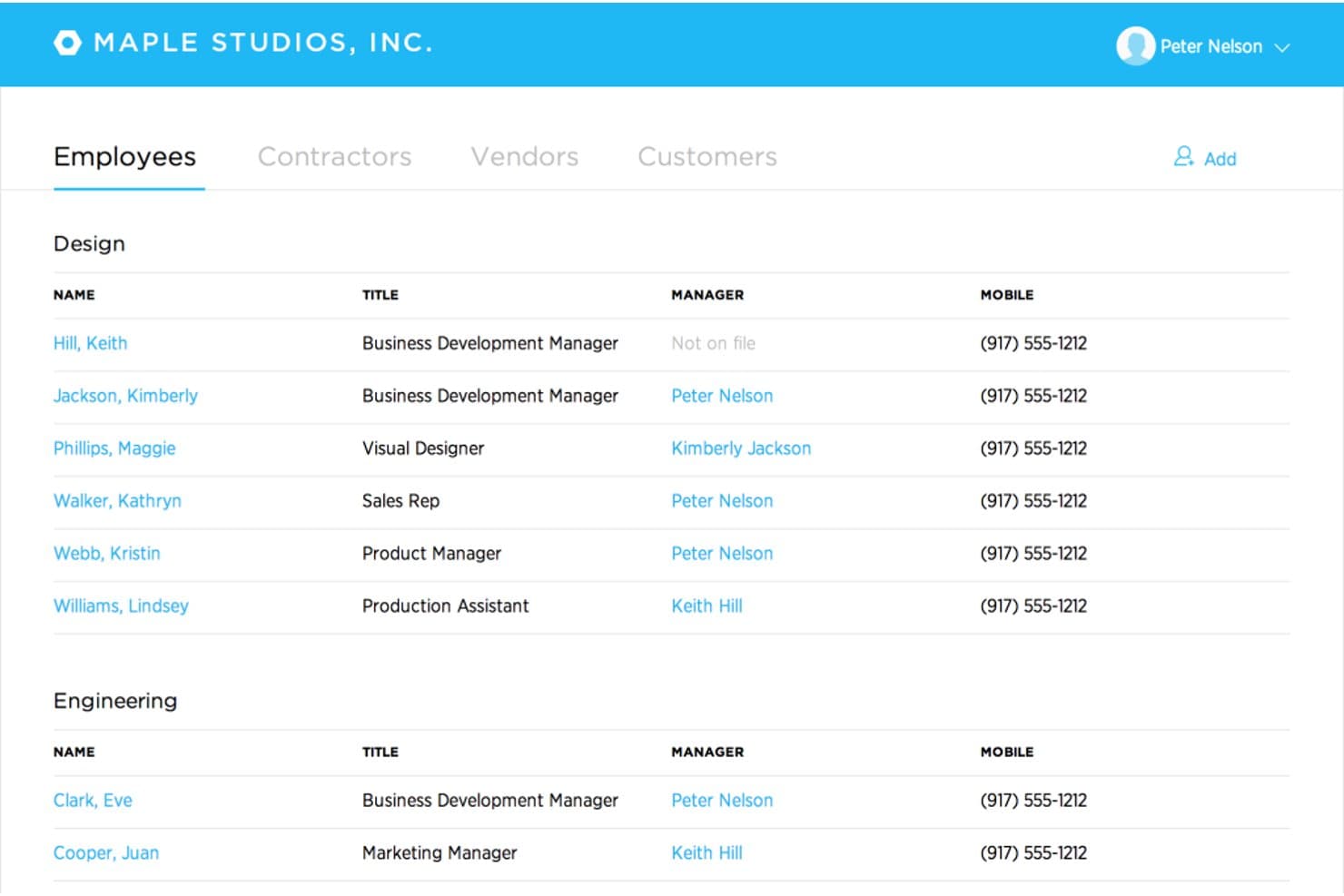
Justworks offers an employee directory organized by department, displaying names, titles, managers, and mobile numbers in a clean list view. Justworks is a cloud-based HRMS designed for small businesses, combining payroll, benefits administration, HR management, compliance support, and automated tax filings in one platform.
Who Is Justworks Best For?
Small businesses and startups that need simple, compliant payroll and HR management across multiple states or locations.
Why I Picked Justworks
I picked Justworks as one of the best because I rely on their 24/7 expert HR and payroll support for urgent compliance questions and quick troubleshooting. I also appreciate their automated payroll and multi-state tax filings for distributed teams.
Justworks Key Features
- Time tracking add-on: Built-in time tracking integrates directly with payroll for hourly teams.
- Employee self-service portal: Team members can manage their own documents, benefits, and paystubs online.
- Benefits administration: Centralized system to enroll, update, and track benefits for all employees.
- Document storage: Secure, cloud-based repository for company policies and required HR documents.
Justworks Integrations
Native integrations are not clearly documented. An API is available for custom integrations.
Pros and Cons
Pros:
- Offers access to large-group employee benefits
- Multi-state payroll compliance is automated
- 24/7 live HR and payroll support
Cons:
- Custom workflow options are minimal
- Limited built-in performance management tools
Learn more about Justworks: Best for payroll-to-benefits coordination
- Free demo available
- From $49/month
Visit WebsiteCustomer Rating:4.6/5
Gusto simplifies payroll by automating tax calculations, payments, and employee benefit management through an easy-to-use online platform. Gusto is an HRMS platform for small businesses that brings together payroll, benefits administration, onboarding, compliance tools, and employee management in one system.
Who Is Gusto Best For?
Gusto is a good fit for small business owners and HR generalists who need to manage payroll and benefits together without a dedicated HR team.
Why I Picked Gusto
Gusto earns its spot on my shortlist because payroll and benefits are woven into a single workflow. When you add a new hire, benefits enrollment starts within the onboarding flow—medical, dental, vision, and 401(k) deductions are calculated and synced with payroll. Gusto also handles open enrollment renewals in-platform, submitting paperwork to carriers so my team doesn't have to chase signatures or track deadlines. The paycheck splitter and Gusto Wallet features add flexibility, letting employees direct portions of each paycheck into savings accounts without extra administrative work.
Gusto Key Features
- Applicant tracking system: Post jobs and track candidates through the hiring pipeline within Gusto, without a separate recruiting tool.
- Mobile time tracking with geolocation: Employees can clock in and out from their phones, with location data captured to verify on-site attendance.
- Performance review templates: Run structured employee reviews using built-in templates, with feedback requests sent to appropriate reviewers on schedule.
- Anonymous feedback surveys: Collect employee input through built-in surveys that keep responses anonymous to encourage candid feedback.
Gusto Integrations
Gusto offers 140+ native integrations, including QuickBooks, Xero, 15Five, 7Shifts, Asana, Bench, Betterment at Work, Box, ApplicantPro, and Checkr. An API is available for custom integrations.
Pros and Cons
Pros:
- Offers self-service onboarding and online storage of tax forms and pay stubs for contractors and employees.
- Payroll, benefits, and HR in one unified platform.
- Payroll runs unlimited times per month without extra fees.
Cons:
- Limited flexibility in customizing tax withholdings or non-standard payroll setups.
- SMBs that need advanced compliance or niche industry-specific HR modules may find Gusto limiting.
 Best for flexible HR processes
- Free demo available
- Pricing upon request
Visit WebsiteCustomer Rating:4.5/5
HiBob's HRMS homepage provides quick access to employee engagement features, workforce statuses, and more. HiBob is an HR management platform designed for small businesses, offering core HR, onboarding, time off tracking, performance management, and customizable workflows.
Who Is HiBob Best For?
HiBob is a strong fit for small and mid-sized businesses that need adaptable HR processes to support fast-changing team structures and people operations.
Why I Picked HiBob
HiBob earns its spot on my shortlist because of how flexible its HR processes are. I love that you can build custom workflows and approval chains that match how your team actually operates, rather than forcing your processes into a rigid system structure. The sandbox environment is especially useful—you can test changes to compensation cycles, automation rules, or performance reviews before they go live, which reduces the risk associated with adjusting HR processes on the fly. The modular setup lets you start with Core HR and add talent, payroll, or workforce planning as your needs grow.
HiBob Key Features
- People analytics: Track headcount, retention, absenteeism, and growth with real-time reports you can schedule and share directly with leadership.
- Onboarding workflows: Automate onboarding tasks and sequences so new hires get a consistent, structured experience from day one.
- Time off management: Employees request and managers approve time off directly within the platform, with visibility into who's in and who's out.
- Employee surveys: Run lifecycle or engagement surveys to collect feedback at key milestones and view results in a built-in dashboard.
HiBob Integrations
HiBob offers native integrations with Slack, Microsoft Teams, Google Workspace, DocuSign, Greenhouse, Okta, and Workable. An API is available for custom integrations.
 Best for centralized HR documentation
- 14-day free trial
- From $32/month (billed annually)
Visit WebsiteCustomer Rating:4.3/5
Breathe HR lets you log and manage employee time entries by project, date, and duration, all in one place. Breathe HR is an HR management system for small businesses that brings together employee records, document management, time off tracking, and performance management in one platform.
Who Is Breathe HR Best For?
Breathe HR is a good fit for small UK-based businesses that need a straightforward way to manage HR admin without a dedicated HR team.
Why I Picked Breathe HR
Breathe HR earns its spot as one of the best on my shortlist because of how well it handles centralized HR documentation for small teams. I love that you can store unlimited documents—contracts, compliance policies, performance reviews—all in one GDPR-compliant location, without worrying about hitting a storage cap. What I find especially useful is the e-signature feature: you can send a contract directly within Breathe, add multiple signees, and get an automatic audit trail with timestamps and IP addresses logged for every signature. There's also a read-tracking feature that shows you exactly who has and hasn't opened a shared company document, so you can send targeted reminders without any manual follow-up.
Breathe HR Key Features
- Holiday and absence tracking: Manage holiday requests, sickness records, and leave balances with a shared calendar view and instant approval workflows.
- Sickness trigger alerts: Set custom Bradford Factor score thresholds or sickness instance limits, and Breathe automatically notifies you when an employee reaches them.
- Performance management: Schedule one-to-ones, run appraisal meetings, and assign goals and tasks to employees directly within the platform.
- Payroll-ready data export: Export HR data in a payroll-ready format to reduce manual data entry when running payroll.
Breathe HR Integrations
Breathe HR offers native integrations with Xero and Google Workspace. An API is available for custom integrations.
Learn more about Breathe HR: Best HRMS to support growing international teams in 170+ countries
- Free plan + free demo available
- From $199/user/month
Visit WebsiteCustomer Rating:4.5/5
Remofirst's dashboard lets you manage, onboard, and pay employees from a central platform. RemoFirst is an HRMS platform for small businesses that need to hire, onboard, and manage employees and contractors across multiple countries, with features for global payroll, compliance, and document management.
Who Is RemoFirst Best For?
RemoFirst is a strong fit for small businesses hiring remote employees or contractors across borders who need localized compliance and payroll without setting up legal entities abroad.
Why I Picked RemoFirst
I've included RemoFirst in my top picks because it solves one of the trickiest challenges for small businesses going global: hiring full-time employees in new countries without setting up a legal entity. RemoFirst acts as the Employer of Record across 185+ countries, handling localized employment contracts, multi-country payroll, tax filings, and pension contributions through a single platform. The contractor-to-employee conversion feature lets my team transition international contractors into compliant full-time hires without rebuilding the employment relationship. The flat-rate pricing with no minimums or long-term contracts makes it accessible for small businesses that are scaling headcount one country at a time.
RemoFirst Key Features
- Workforce management: Track and manage time off, bonuses, and benefits for international employees in line with each country's local labor laws.
- Compliant offboarding: Handle employee terminations across countries, including notice periods, severance calculations, and required documentation based on local law.
- Background checks: Run global background screening on international hires to verify identity and support compliant hiring decisions.
- Visa and immigration support: Manage visa applications and work permits for employees in 85+ countries directly through the platform.
RemoFirst Integrations
Native integrations are not clearly documented. RemoFirst provides an API for custom integrations.
 Best for payroll automation and integrations
- Free demo available
- Pricing upon request
Visit WebsiteCustomer Rating:4.3/5
Paylocity gives employees and HR teams a centralized hub to manage time tracking, pay, benefits, and communication. Paylocity is an HRMS platform for small businesses that combines payroll processing, HR management, time tracking, benefits administration, and compliance tools in one system.
Who Is Paylocity Best For?
Paylocity is a good fit for small to mid-sized businesses that need a unified HR and payroll platform with room to scale.
Why I Picked Paylocity
Paylocity earns its spot on my shortlist because of how well its payroll automation handles the details that trip up small HR teams. I particularly like the Payroll Readiness Dashboard, which surfaces critical tasks before processing day and runs 40+ audits to flag issues like unexpected pay spikes before you submit. Hours and labor allocations flow directly from Time & Labor into payroll, so there's no manual re-entry between systems. On the integrations side, Paylocity connects to ATS platforms, benefits and 401(k) providers, ERP systems, and identity tools like Okta and Microsoft Entra—plus open APIs for custom connections.
Paylocity Key Features
- Benefits decision support: Paylocity's Benefits Decision Support tool gives employees personalized plan recommendations based on their individual preferences and situations during open enrollment.
- Tax geolocation: Paylocity audits each employee's location to verify they're paying the correct taxes, with support from a registered IRS Reporting Agent team across all 50 states.
- On demand payment: Employees can access earned wages before payday, giving small businesses a recruiting and retention tool with no impact on payroll cash flow.
- General ledger mapping: Configure GL settings, create journal entries, and generate customized reports directly in the platform without needing to contact Paylocity support.
Paylocity Integrations
Paylocity offers native integrations with ADP, QuickBooks, NetSuite, Okta, Microsoft Entra, and several benefits and 401(k) providers. An API is available for custom integrations.
 Best for automation and simplified workflows
- Free demo available
- From $10/user/month
Visit WebsiteCustomer Rating:3.9/5
BambooHR’s pay info dashboard showing detailed paystubs and year-to-date earnings on both desktop and mobile. BambooHR is an HR management system for small businesses that covers employee records, onboarding, time-off tracking, workflow automation, and reporting in one platform.
Who Is BambooHR Best For?
BambooHR is a good fit for small to mid-sized businesses that need a dedicated HR system without the complexity of enterprise-grade software.
Why I Picked BambooHR
I picked BambooHR as one of the best because of how well its automated workflows handle the approval bottlenecks that slow small HR teams down. When a time-off request or promotion comes in, BambooHR routes it to the right approver automatically—no email chains, no manual follow-up. I also like the automated onboarding checklists, which assign tasks to the right internal team members the moment a new hire is added, so nothing slips through the cracks before day one. For a small business where one person is often managing all of HR, that kind of built-in structure makes a real operational difference.
BambooHR Key Features
- Applicant tracking system: Manage job postings, review candidates, and move applicants through a hiring pipeline directly within BambooHR.
- Employee self-service portal: Employees can update their own personal information, view pay stubs, and request time off without going through HR.
- Performance management: Run performance review cycles, set goals, and collect peer feedback from within the platform.
- Custom reporting and dashboards: Build real-time reports on workforce data and visualize trends using configurable dashboards.
BambooHR Integrations
BambooHR offers native integrations with ADP, Paylocity, QuickBooks, Slack, Greenhouse, Checkr, and Indeed. It also provides an API for custom integrations.
 Best as AI for business
- Free trial + Free demo available
- From $8/user/month
Visit WebsiteCustomer Rating:4.4/5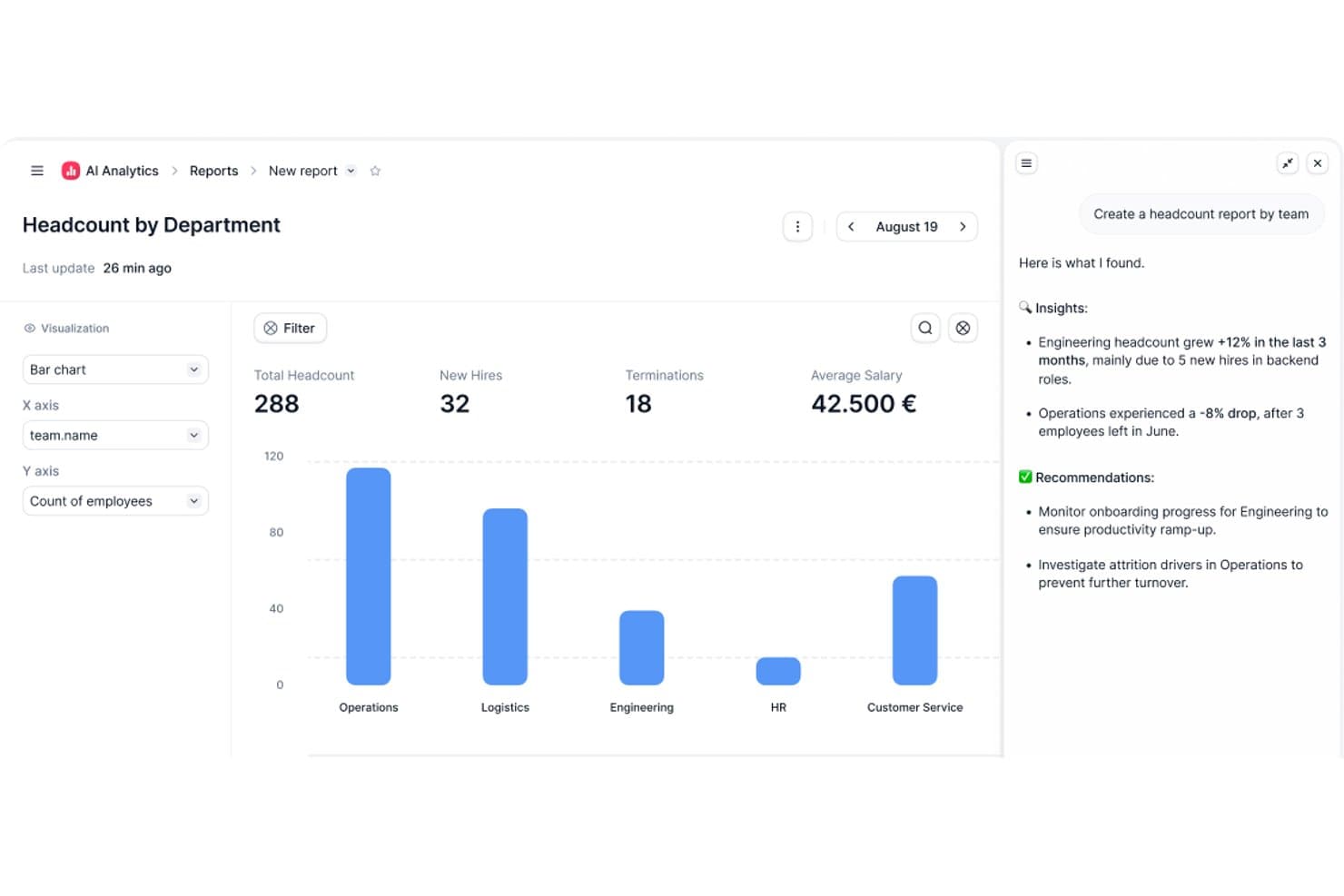
Factorial's AI analytics turns headcount data into actionable insights. Factorial is an AI-powered HRMS built for small and mid-sized businesses that covers core HR, time tracking, leave management, onboarding, performance, and employee engagement in one platform.
Who Is Factorial Best For?
Factorial is a strong fit for small and mid-sized businesses that want AI to handle everyday operations—from scheduling and reporting to answering employee policy questions.
Why I Picked Factorial
I picked Factorial as one of the best because its AI for business positioning goes beyond a tagline. In practice, the One AI agent actively handles the operational work that eats up HR time in small teams, from answering employee policy questions through AI Ticketing to generating reports and preparing contracts for review. I also like that shift scheduling and absence management get AI assistance built in, so a lean HR team isn't manually piecing together timetables or chasing approvals.
Factorial Key Features
- 360-degree performance reviews: Employees, peers, and managers can submit structured feedback within a single review cycle.
- eNPS and climate surveys: The Engagement module lets you run employee net promoter score surveys and Team Pulse checks to track sentiment over time.
- Expense tracking with OCR: The Expenses module reads and categorizes receipts automatically using smart document scanning.
- Legal e-signature on documents: Contracts, payslips, and HR documents can be sent and signed digitally without leaving the platform.
Factorial Integrations
Marketplace integrations include Google Workspace, Slack, Recruitee, Silae, Microsoft Power BI, and Okta. Factorial also supports a public API, webhooks, SDKs, OAuth 2.0, and Zapier.
Pros and Cons
Pros:
- Leave visibility reduces manual follow-up
- Employee records and documents stay centralized
- AI supports policy questions, reports, and timetables
Cons:
- Complex payroll still needs manual validation
- Module costs can strain very small teams
 10Best for industry-specific payroll features
Paycor
- Free demo available
- From $99/month
Visit WebsiteCustomer Rating:4.3/5
Paycor's payroll dashboard lets decision-makers access key HR insights via web browser or on any mobile device. Paycor is an HRMS platform for small businesses that brings together payroll, HR management, time tracking, benefits administration, and talent management in one system.
Who Is Paycor Best For?
Paycor is a strong fit for small businesses in industries like healthcare, manufacturing, and retail that need payroll and HR tools built around their specific workforce needs.
Why Paycor Is a Top Pick
Paycor is a top pick because it builds industry-specific payroll logic directly into the product rather than treating every business the same. For manufacturing teams, that means automated blended overtime and piece-rate calculations are handled natively—not through manual workarounds. For healthcare, Paycor supports PBJ (Payroll-Based Journal) reporting and lets you copy and paste shifts between days while filtering by nurse certifications. I also like that each industry gets its own implementation blueprint, so the setup process is led by consultants who already understand your payroll structure before they walk in the door.
Paycor Key Features
- Benefits Advisor: An open enrollment tool that lets employees self-select benefits with built-in decision support, while giving HR teams benchmarking and reporting capabilities.
- Pulse surveys: A built-in employee feedback tool that collects responses and surfaces insights directly within the platform.
- Recruiting software: A candidate tracking and communication tool that lets you post jobs, text candidates, and track applicants through every stage of the hiring pipeline.
- Reporting and analytics: Pre-built and configurable reports covering turnover, headcount, and gender pay equity, all pulling from a single unified data source.
Paycor Integrations
Paycor offers native integrations with QuickBooks, JazzHR, 15Five, DailyPay, OrgChart, Timeero, Spark Hire, Mitratech AssureHire, Tilt, and Procurify. An API is available for custom integrations.
Outros HRMS para PME
Segue-se uma lista de HRMS adicionais para pequenas empresas que não entraram na minha lista das 10 melhores opções, mas que ainda assim vale a pena conhecer:
- 11TriNetBest for HR outsourcing and compliance
- 12AgendrixBest HRMS for workforce time tracking
- 13SloneekBest for centralizing employee management
- 14LatticeBest for real-time feedback and performance management
- 15HR CloudBest for an automated yet engaging employee onboarding process
- 16EddyBest for a detailed employee directory
- 17Sage HRBest for managing employee scheduling
- 18TrinetBest for its robust mobile app
- 19InsperityBest HRMS software for US-based small businesses
- 20QandleCreate company policies with a flexible HR software
Avaliações de Software de RH Relacionado
Se ainda não encontrou aqui o que procura, consulte estas outras ferramentas relacionadas que testámos e avaliámos:
- Software de RH
- Software de Processamento Salarial
- Software de Recrutamento
- Serviços de Empregador Legal
- Sistemas de Acompanhamento de Candidatos
- Software de Gestão da Força de Trabalho
How I Evaluate HRMS for Small Business
I split my evaluation into baseline requirements every HRMS for small business must meet—like employee records, PTO tracking, and payroll sync—and differentiators that set the best tools apart.
Core Functionality (Table Stakes For This List)
When I'm selecting tools for my list, I rank each one on a scale from 0 (does not offer the functionality) to 5 (excels in this area) for each core functionality listed below. Then, I calculate the tool's total score into a percentage. Each tool needs to achieve a minimum total score of 65% to be considered for inclusion.
- Employee Database: I check whether the system stores job history, emergency contacts, documents, and custom fields in one searchable hub rather than scattered spreadsheets.
- Onboarding & Offboarding: Each tool should let you build automated workflows—like sending offer letters, collecting e-signatures, and assigning Day 1 tasks—without manual follow-up emails.
- Time Off & Attendance: I evaluate how PTO requests, accrual policies, and approval chains work, especially for teams juggling different leave types across multiple office locations.
- Payroll Integration or Processing: Whether the tool runs payroll natively or syncs with providers like Gusto or QuickBooks, I look for how cleanly hours, deductions, and tax data flow between systems.
- Benefits Administration: Small teams still need to manage health plans and retirement options, so I look for enrollment workflows, carrier connections, and clear employee-facing plan details.
- Compliance & Reporting: I evaluate built-in compliance forms, audit trails, and reporting—things like generating headcount reports or tracking document completion rates across your workforce.
Once I have a list of tools that meet the criteria, I consider what sets each platform apart.
Differentiating Factors (What Sets Vendors Apart)
Here's how I compare and contrast different vendors:
Standout Features
An employee self-service portal makes a real difference for small teams—when staff can update their own addresses, download pay stubs, and submit PTO requests from their phones, it takes routine questions off your plate. I also look at whether a tool includes built-in performance reviews and goal tracking, since most small businesses outgrow informal feedback quickly. Applicant tracking is another differentiator I evaluate; tools that let you post jobs, screen candidates, and convert them into employee records in one system save a lot of duplicate data entry.
Beyond Features
Pricing transparency matters a lot for small businesses, so I check whether vendors offer clear per-employee-per-month rates and low-commitment entry points that scale as you hire. Integration support is equally important—your HRMS needs to connect with tools like QuickBooks, Xero, Slack, or Google Workspace without custom development. I also evaluate onboarding support, especially whether the vendor offers guided setup wizards or data migration templates, since most small teams are moving off spreadsheets and can't afford a months-long implementation.
Como Escolher um HRMS para uma PME
Um HRMS pode ajudá-lo a reunir todas as suas principais funções de RH num único sistema, para obter a máxima eficiência. Para determinar qual o HRMS que melhor se adapta às necessidades da sua pequena empresa, deve começar por identificar os principais utilizadores e registar os seus desafios específicos.
Ao avançar no seu próprio processo de seleção de software, tenha em conta os seguintes pontos:
- Que problema está a tentar resolver - Comece por identificar os desafios que está a tentar ultrapassar. Isto irá ajudá-lo a esclarecer as funcionalidades e capacidades que o HRMS deve disponibilizar.
- Quem irá precisar de o utilizar - Para avaliar os custos e os requisitos, considere quem irá utilizar o software e de quantas licenças irá precisar. No caso de um HRMS, é provável que pretenda acesso ao nível dos colaboradores para toda a sua força de trabalho, com acesso especial para os administradores e gestores de RH. Quando isso estiver claro, também será útil hierarquizar as necessidades dos seus diferentes utilizadores para identificar as principais prioridades dos utilizadores avançados, gestores e colaboradores, garantindo que todas são satisfeitas.
- Com que outras ferramentas precisa de funcionar - Esclareça que ferramentas está a substituir, que ferramentas irá manter e com que ferramentas precisará de integrar, como software de gestão da formação, aplicações de início de sessão único ou sistemas operativos de trabalho, como o Microsoft 365 ou o Google Workspace. Terá de decidir se as ferramentas precisarão de ser integradas entre si ou, em alternativa, se poderá substituir várias ferramentas por uma plataforma de RH completa.
- Que resultados são importantes - Analise as capacidades que pretende obter ou melhorar e a forma como irá medir o sucesso. Por exemplo, poderá querer obter capacidades de autosserviço para os colaboradores, de modo a reduzir os pedidos administrativos, ou digitalizar vários processos de acompanhamento baseados em papel ou Excel. Poderia comparar funcionalidades de software até mais não, mas, se não estiver a pensar nos resultados que pretende alcançar, poderá desperdiçar muito tempo valioso.
- Como funcionaria na sua organização - Considere a seleção do software em conjunto com os seus fluxos de trabalho e sistemas existentes. Avalie o que está a funcionar bem e as áreas que estão a causar problemas e que precisam de ser resolvidas.
Lembre-se de que cada empresa é diferente — não parta do princípio de que um HRMS irá funcionar na sua organização apenas porque é popular.
O que é um HRMS?
Os sistemas de gestão de recursos humanos (HRMS) são ferramentas de software concebidas para simplificar e automatizar várias funções de RH, como a gestão de dados dos colaboradores, o processamento de salários, a administração de benefícios e os processos de recrutamento. Disponibilizam uma plataforma centralizada para armazenar e aceder às informações dos colaboradores, simplificando as tarefas de RH e melhorando a tomada de decisões.
Este software ajuda as pequenas empresas a gerir eficazmente uma força de trabalho reduzida, garantindo o cumprimento da legislação laboral e reduzindo a carga de trabalho manual sem implicar custos elevados. Ao utilizarem um HRMS, as pequenas empresas podem concentrar-se mais no crescimento estratégico e menos nos encargos administrativos.
Funcionalidades de um HRMS
A escolha do Sistema de Gestão de Recursos Humanos (HRMS) adequado é crucial para as pequenas empresas que pretendem manter a conformidade, melhorar a gestão dos colaboradores e concentrar-se no crescimento. O papel dos RH nas pequenas empresas e nas grandes organizações depende fortemente da eficiência dos sistemas HRIS, garantindo operações e gestão de dados simplificadas.
Um HRMS eficaz pode simplificar várias tarefas de RH, garantindo que as empresas funcionam de forma fluida e eficiente. Eis dez funcionalidades essenciais a considerar:
- Gestão da Base de Dados dos Funcionários: O seu HRMS funcionará como uma base de dados centralizada para armazenar todas as informações dos seus funcionários. Isto garante que todos os dados dos funcionários estão organizados e facilmente acessíveis, facilitando o cumprimento dos regulamentos relativos à manutenção de registos.
- Gestão de Salários: A automatização do processamento salarial reduz os erros e a necessidade de introdução manual de dados, tornando o processo de processamento salarial muito menos moroso.
- Registo de Horas e Assiduidade: Esta funcionalidade ajuda as organizações a acompanhar as horas dos funcionários, gerir os custos laborais e cumprir a legislação laboral relativa a horas extraordinárias e ao número de dias consecutivos trabalhados.
- Gestão de Benefícios: Uma gestão eficiente dos benefícios ajuda a atrair e reter talento, contribuindo para o crescimento geral da empresa. Além disso, com os custos mensais dos benefícios diretamente associados ao seu módulo de processamento salarial, reduzirá a introdução manual de dados.
- Gestão do Desempenho: Esta funcionalidade diz respeito a ferramentas para definir objetivos e avaliar o desempenho dos funcionários. As avaliações regulares de desempenho ajudam a melhorar a produtividade e a identificar áreas de desenvolvimento, impulsionando o sucesso da empresa.
- Recrutamento e Acompanhamento de Candidatos: Um recrutamento e um acompanhamento de candidatos eficientes garantem que a empresa atrai rapidamente os melhores talentos. Muitos sistemas utilizam agora funcionalidades apoiadas por IA que tornam as comparações entre as competências dos candidatos e as descrições das funções muito mais eficientes e equitativas.
- Gestão da Conformidade: Os sistemas HRMS incluem ferramentas para monitorizar e assegurar o cumprimento da legislação. Esta funcionalidade ajuda a evitar sanções e problemas jurídicos, mantendo a empresa a funcionar sem problemas.
- Portal de Autoatendimento dos Funcionários: Esta importante funcionalidade permite aos funcionários aceder e gerir as suas próprias informações de RH, como dados de contacto, dados bancários e informações sobre benefícios. Dar aos funcionários autonomia para gerirem os seus próprios dados aumenta o envolvimento e reduz a carga administrativa.
- Relatórios e Análises: Os sistemas HRMS disponibilizam modelos integrados de relatórios e análises para ajudar as equipas a tomar decisões informadas, otimizar as estratégias de RH e apoiar o crescimento da empresa.
- Formação e Desenvolvimento: Isto diz respeito a ferramentas para alojar e monitorizar programas internos de formação dos funcionários, incluindo frequentemente um sistema interno de gestão da aprendizagem (LMS). Para uma pequena empresa, investir no desenvolvimento dos funcionários promove uma força de trabalho qualificada, criando as condições para a expansão da empresa ao longo do tempo.
Para as empresas que procuram mais opções de personalização, explorar software avançado de RH pode proporcionar uma gama mais ampla de funcionalidades adaptadas às suas necessidades.
Ajude a Sua Pequena Empresa a Crescer com Soluções HRMS
Fazer crescer uma pequena empresa é complicado, porque há muitas coisas às quais os proprietários têm de estar atentos. Mas as soluções HRMS e outro software de RH concebido para pequenas empresas tornam o processo mais fácil. Muitos destes recursos ajudam a automatizar tarefas repetitivas de RH, permitindo-lhe concentrar-se noutros aspetos da sua empresa. Também ajudam a poupar tempo no recrutamento, na gestão de talento, na integração e na gestão da força de trabalho.
Mas, acima de tudo, o software HRMS pode ajudar a si e à sua equipa a compreender como crescer. Mary Karamanos, Vice-Presidente Sénior de Recursos Humanos na BDC, afirmou “Um erro comum cometido pelas empresas em crescimento é não dedicarem tempo suficiente ao planeamento das suas necessidades de RH. […] A boa notícia é que as pequenas empresas atraem frequentemente os melhores funcionários, porque podem muitas vezes oferecer responsabilidades desafiantes, boas oportunidades de aprendizagem e crescimento pessoal.”