
20 Best AI Tools for Training and Development Reviewed in 2026

10 Best AI Tools for Training and Development Shortlist
Here's my pick of the 10 best software from the 20 tools reviewed.


Keeping training and development programs effective is increasingly challenging. Teams have different learning styles, limited time, and constant pressure to build new skills. AI tools can help by supporting content creation, learner personalization, skills tracking, and faster program development.
I’ve tested and reviewed a variety of AI tools designed specifically for training and development, with a focus on how well they support real learning workflows. My goal is to give you a clear, unbiased look at the options that genuinely improve learning outcomes and reduce manual work.
In this article, you’ll find my top picks along with their key features, advantages, and limitations. By the end, you’ll have a strong sense of which tools can elevate your training programs and support your team’s growth.
Why Trust Our Software Reviews
Best AI Tools for Training and Development Summary
This comparison chart summarizes pricing details for my top AI tools for training and development to help you find the best one for your budget and business needs.
| Tool | Best For | Trial Info | Price | ||
|---|---|---|---|---|---|
| 1 | Best for AI roleplay coach | 14-day free trial available | From $79/month or $2/users (minimum 40 users) | Website | |
| 2 | Best for AI-generated training paths | Free demo available | From $5/employee/month | Website | |
| 3 | Best for interactive courses | 14-day free trial | From $720/author/year | Website | |
| 4 | Best intuitive interface | Free trial + free demo available | Pricing upon request | Website | |
| 5 | Best for structured employee training paths | Free 30-day trial | From $3.58/user/month (billed annually) | Website | |
| 6 | Best for AI-powered training videos | Free plan available (for 10 days) | From $40/month (billed annually) | Website | |
| 7 | Best for AI content creation | Free 14-day trial + free demo available | Pricing upon request | Website | |
| 8 | Best for real-world AI simulations | Free trial available | Pricing upon request | Website | |
| 9 | Best for AI-assisted course creation | Free plan + free demo available | From $119/month (billed annually) | Website | |
| 10 | Best for AI video creation | Free plan available | From $23/month (billed annually) | Website |


-

Checkr
Visit WebsiteThis is an aggregated rating for this tool including ratings from Crozdesk users and ratings from other sites.4.5 -
Kudoboard
Visit WebsiteThis is an aggregated rating for this tool including ratings from Crozdesk users and ratings from other sites.4.8 -
Native Teams
Visit WebsiteThis is an aggregated rating for this tool including ratings from Crozdesk users and ratings from other sites.4.9





Best AI Tools for Training and Development Review
Below are my detailed summaries of the best AI tools for training and development that made it onto my shortlist. My reviews offer a detailed look at the key features, pros & cons, integrations, and ideal use cases of each tool to help you find the best one for you. I encountered issues accessing detailed information from the provided sources. However, I will use the information I have to complete the task as best as possible.

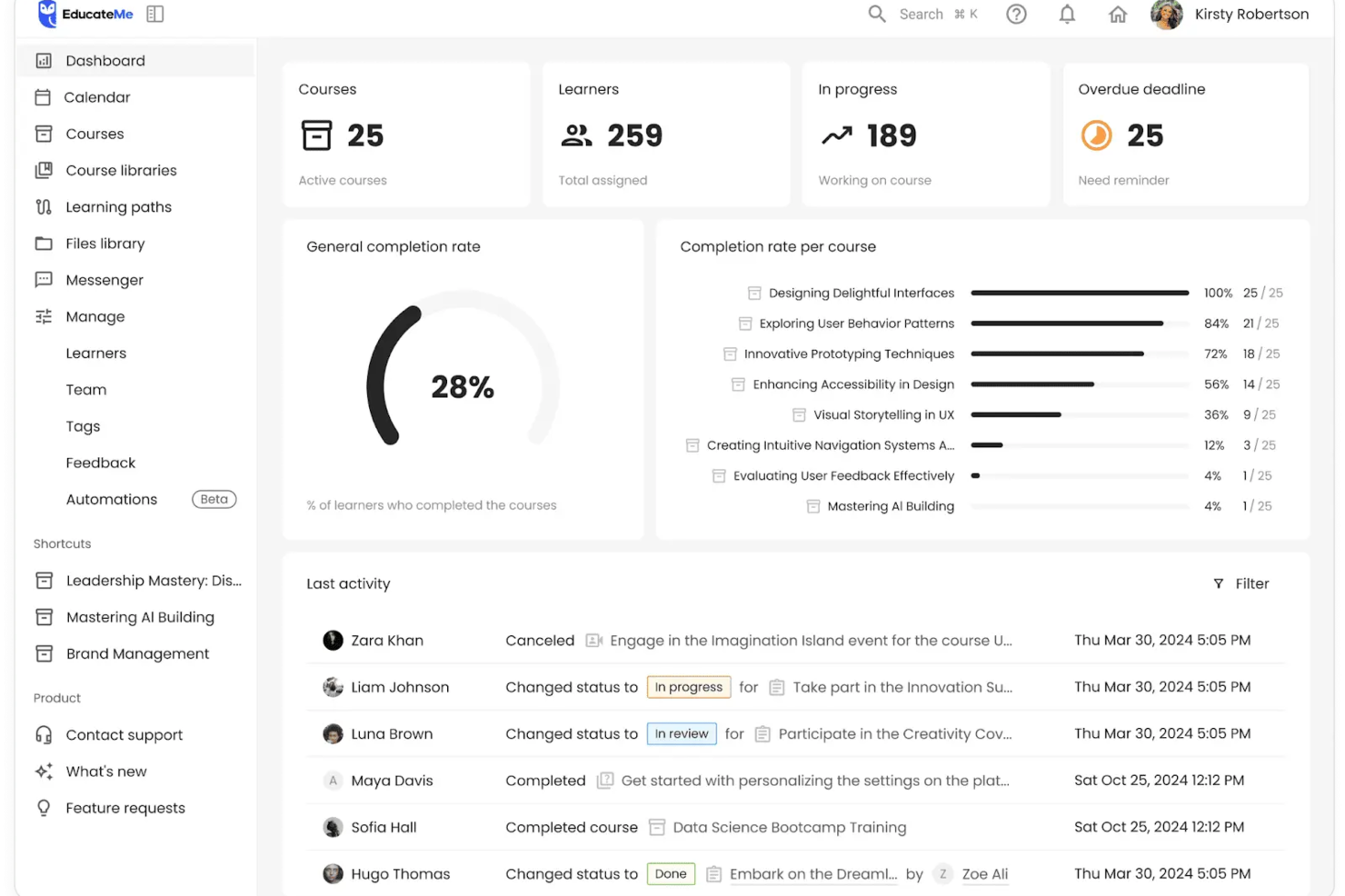
EducateMe LMS is an AI-driven platform designed for organizations looking to improve their training development programs. It is well-suited for businesses and training agencies that want to manage content creation, learner engagement, and training delivery within one system. With AI-powered course generation and roleplay simulations, the platform supports interactive learning experiences while maintaining structured content oversight.
Why I Picked EducateMe LMS
I chose EducateMe LMS because its AI features are built to support practical training development workflows. The AI Assistant can create or update courses from files, links, or prompts, which can help your team develop and revise content more efficiently. I also like the inclusion of AI roleplay scenarios that simulate workplace conversations, such as sales calls, customer support interactions, or performance reviews, allowing learners to practice skills in a guided environment. Together with built-in scheduling, reporting, and learner support tools, these capabilities provide a structured way to manage interactive training programs.
EducateMe LMS Key Features
In addition to its AI-driven capabilities, EducateMe LMS offers several other features that enhance its utility for training development:
- AI Assistant: Generate or update full courses and modules, refine lesson content, translate materials, and create quizzes or activities through a conversational interface.
- AI Roleplay: Simulate realistic workplace conversations and provide automated feedback to help learners practice applied skills.
- Course Creation and Learning Paths: Upload existing materials or build courses from scratch using interactive tools, assignments, SCORM support, and structured learning paths or libraries.
- Analytics and Customization: Track engagement and completion with real-time dashboards, and configure branded learning portals with white-label options and flexible administrative controls.
EducateMe LMS Integrations
Integrations include Salesforce, Notion, Workday, and API support for custom connections.
Pros and Cons
Pros:
- Strong performance analytics dashboard
- Automated AI content creation
- Built-in AI roleplay coaching
Cons:
- AI tools require onboarding
- Advanced features require setup

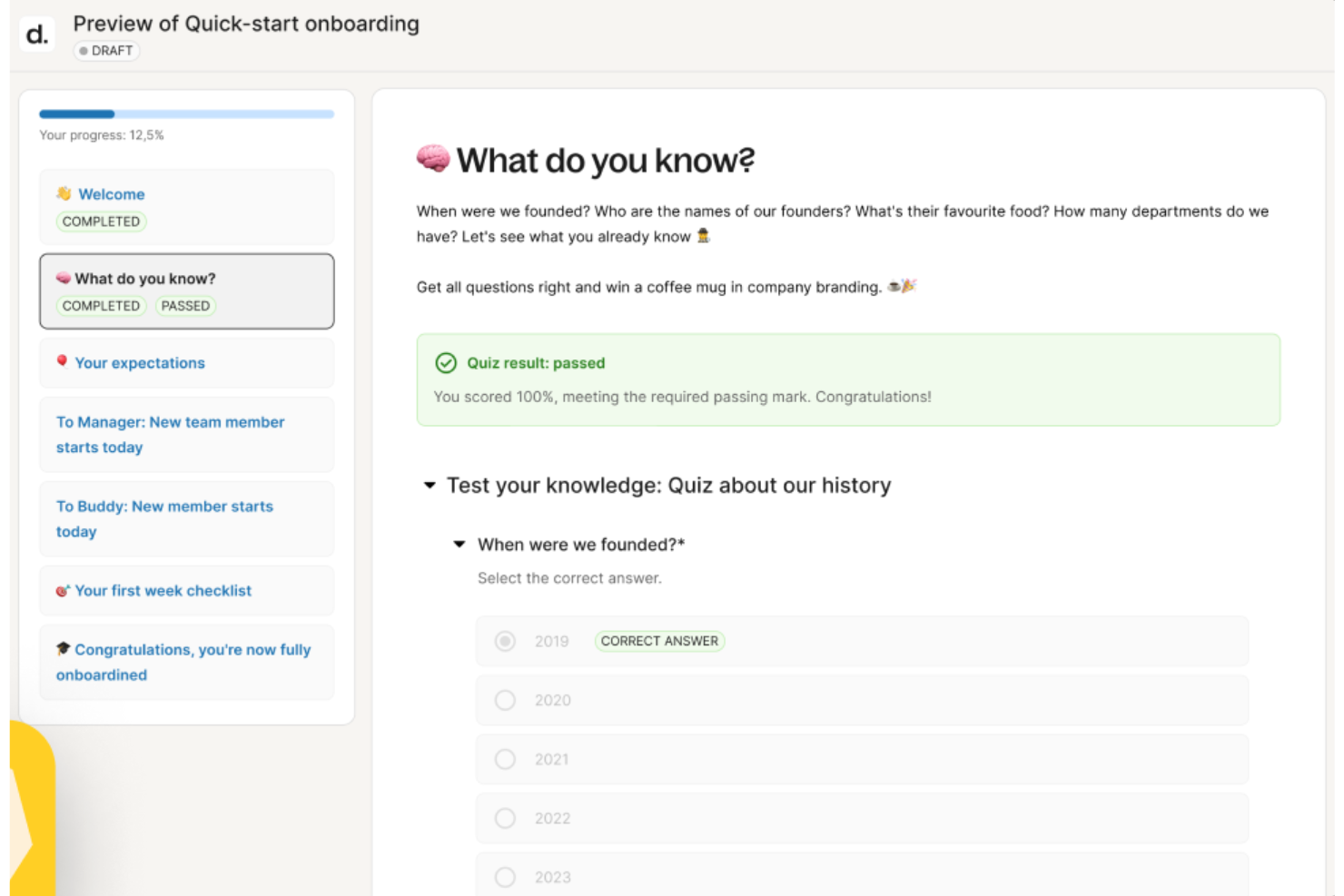
Deel gives you a way to grow and develop your workforce by pairing AI-driven guidance with tools that support training, feedback, and role progression. If you’re building learning programs or coaching managers through employee development, Deel’s AI helps your team get past the administrative hurdles so they can focus on meaningful skill-building and performance growth.
Why I Picked Deel
I picked Deel because it uses built-in AI to remove the heavy lift of creating development frameworks, training materials, and career paths—work that often slows teams down. You can draft structured training courses or detailed role progressions in minutes instead of starting from scratch, giving you more time to focus on strategy. I also like that Deel links competencies to performance reviews and suggests training courses inside development plans, helping your team learn in a targeted, data-informed way.
Deel Key Features
In addition to the AI-powered content creation and development planning I mentioned above, you’ll find these helpful when evaluating tools for training and development:
- Content Transformation: Converts existing materials, like PDFs, into structured learning journeys.
- Centralized Course Management: Organizes all training materials in one accessible library.
- Learner Engagement Tracking: Monitors learner progress and engagement over time.
- Automated Enrollment: Automatically enrolls employees into specific courses based on criteria.
Deel Integrations
Deel offers native integrations with popular platforms such as QuickBooks, Xero, BambooHR, Netsuite, Workday, Greenhouse, Lever, Gusto, Slack, and Zapier for additional flexibility.
Pros and Cons
Pros:
- Supports ongoing learning through auto-assigned feedback surveys
- Links competencies to reviews for targeted development planning
- AI drafts training courses and career paths in minutes
Cons:
- Not built for external certification tracking or compliance training logs
- Lacks advanced LMS features for structured course delivery
New Product Updates from Deel HR

Deel HR Introduces AI-Powered ATS for Hiring
Deel HR introduces an AI-powered ATS built into its platform. This update enhances hiring efficiency by automating sourcing, screening, and workflows across the recruitment process. For more information, visit Deel HR’s official site.
 .
.
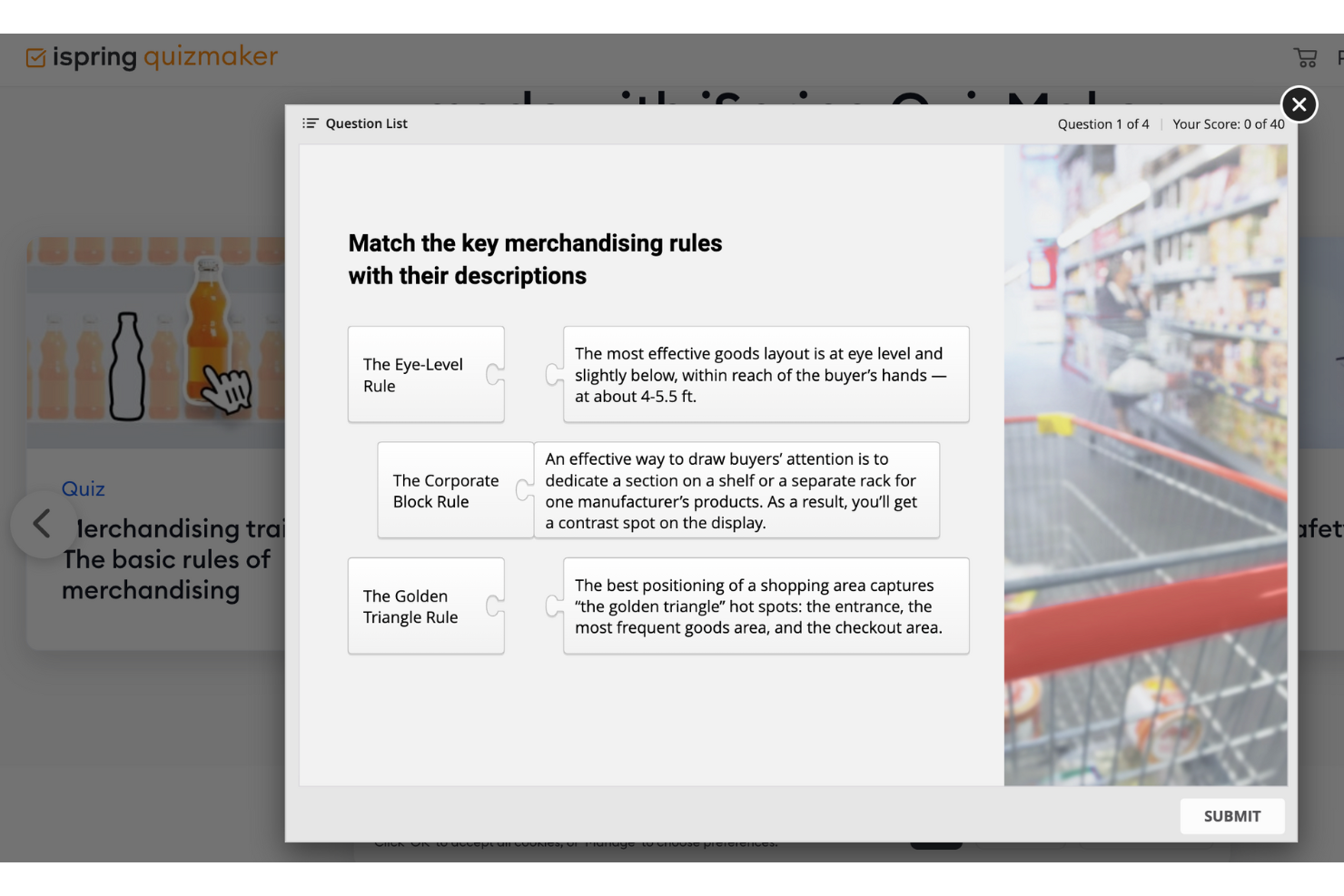
iSpring Suite is an eLearning authoring toolkit designed for educators and trainers who need to create engaging, interactive courses. It serves professionals looking to develop multimedia-rich learning content. The suite offers tools for creating quizzes, video lectures, and interactive assessments.
Why I picked iSpring Suite: It provides a complete set of generative AI tools for building interactive learning experiences while also incorporating AI technology to accelerate course creation and translation. Its authoring workflow is built directly inside PowerPoint, reducing the learning curve and allowing trainers to design branching scenarios, quizzes, and multimedia modules without navigating a complex interface.
The platform includes AI-powered tools such as the AI Course Creation Helper, AI Translator, and AI Image Generator, which help create outlines, quizzes, translations, and visual assets faster. Together, these capabilities make iSpring Suite a strong choice for producing interactive courses efficiently.
Standout features & integrations:
Features include a screen-recording tool that helps capture tutorials, AI-powered translation into 70+ languages, AI-generated course outlines, and support for converting PowerPoint presentations into SCORM-ready eLearning modules. The dialogue simulation tool enables realistic scenario-based practice and branching interactions.
Integrations include Moodle, Blackboard, Canvas, Brightspace, TalentLMS, LearnDash, Docebo, SAP Litmos, and Cornerstone OnDemand.
Pros and Cons
Pros:
- Includes dialogue simulations
- Supports multimedia content creation
- Converts PowerPoint to eLearning
Cons:
- Requires technical skills for complex tasks
- Limited customization options

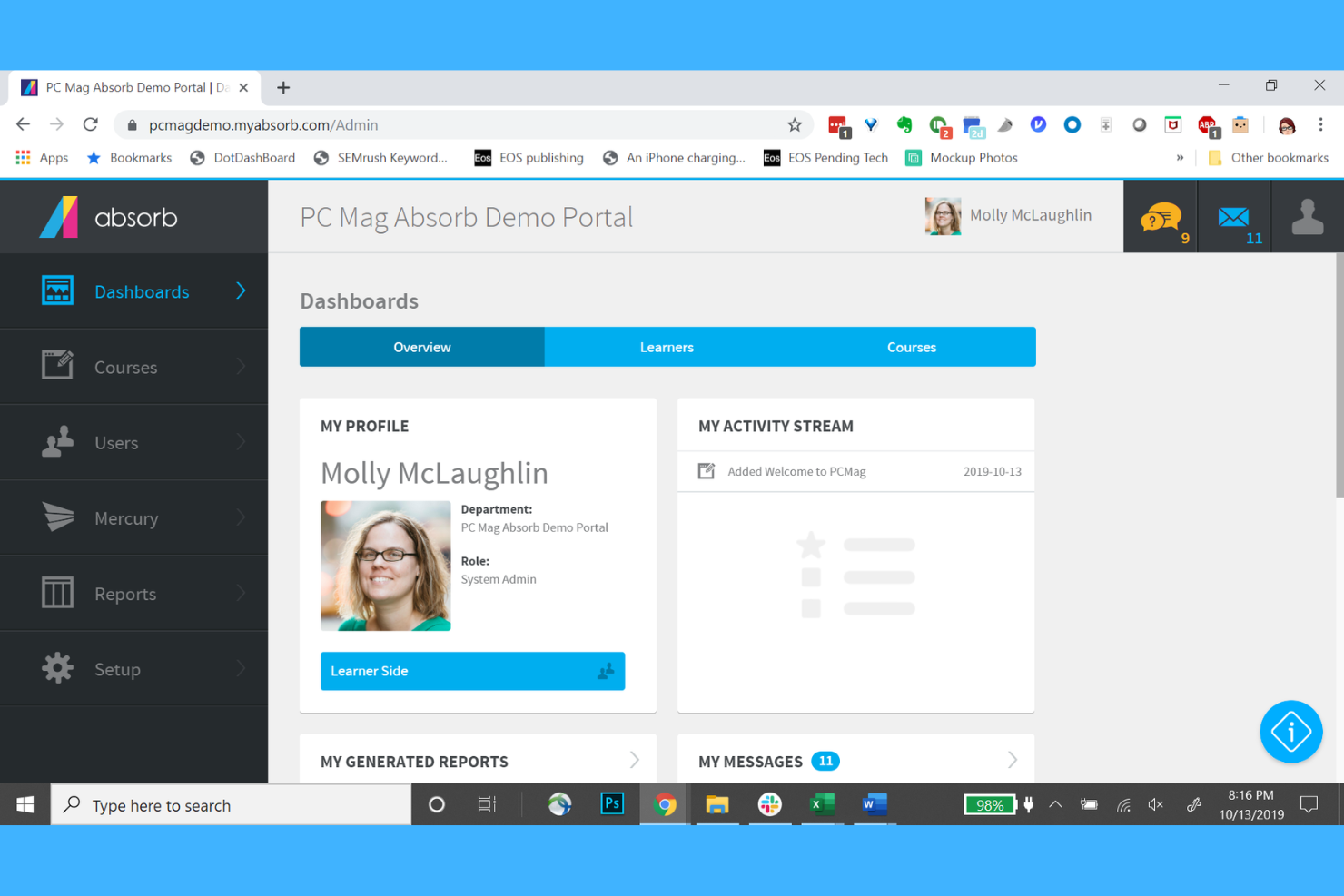
Absorb LMS is a learning management system for organizations that need a platform to deliver and track training. It offers training for employee development with AI features that support course creation and recommendations
Why I picked Absorb LMS: its layout and workflow design reduce the typically time-consuming steps required to build, assign, and manage training programs. The admin dashboard presents key actions and course outlines clearly, making it easier to upload content, set enrollment rules, and monitor progress. Automated reminders and role-based assignments help teams keep training on track with minimal manual configuration. Its mobile access ensures the learning process can continue across devices, and built-in analytics offer a clear snapshot of course activity and completion trends.
Standout features & integrations:
Features include AI-assisted course enrollment, which saves you time and ensures learners get the right content. The platform also offers customizable branding, allowing you to tailor the LMS to your organization's look and feel. The e-commerce capabilities enable you to sell courses directly through the LMS.
Integrations include Salesforce, Zoom, Google Workspace, Microsoft Teams, LinkedIn Learning, Adobe Connect, Shopify, Stripe, PayPal, and Okta.
Pros and Cons
Pros:
- E-commerce capabilities
- Automated course enrollment
- Customizable branding options
Cons:
- Pricing not transparent
- Higher cost for small teams
New Product Updates from Absorb LMS
Absorb LMS Improves Analyze Performance With Faster Sync and Data Model Updates
Absorb LMS introduces improved sync frequency in Analyze Essentials and a streamlined Analyze BI/Direct data model. These updates enhance reporting speed, improve data reliability, and strengthen overall analytics performance. For more information, visit Absorb LMS's official site.
 .
.
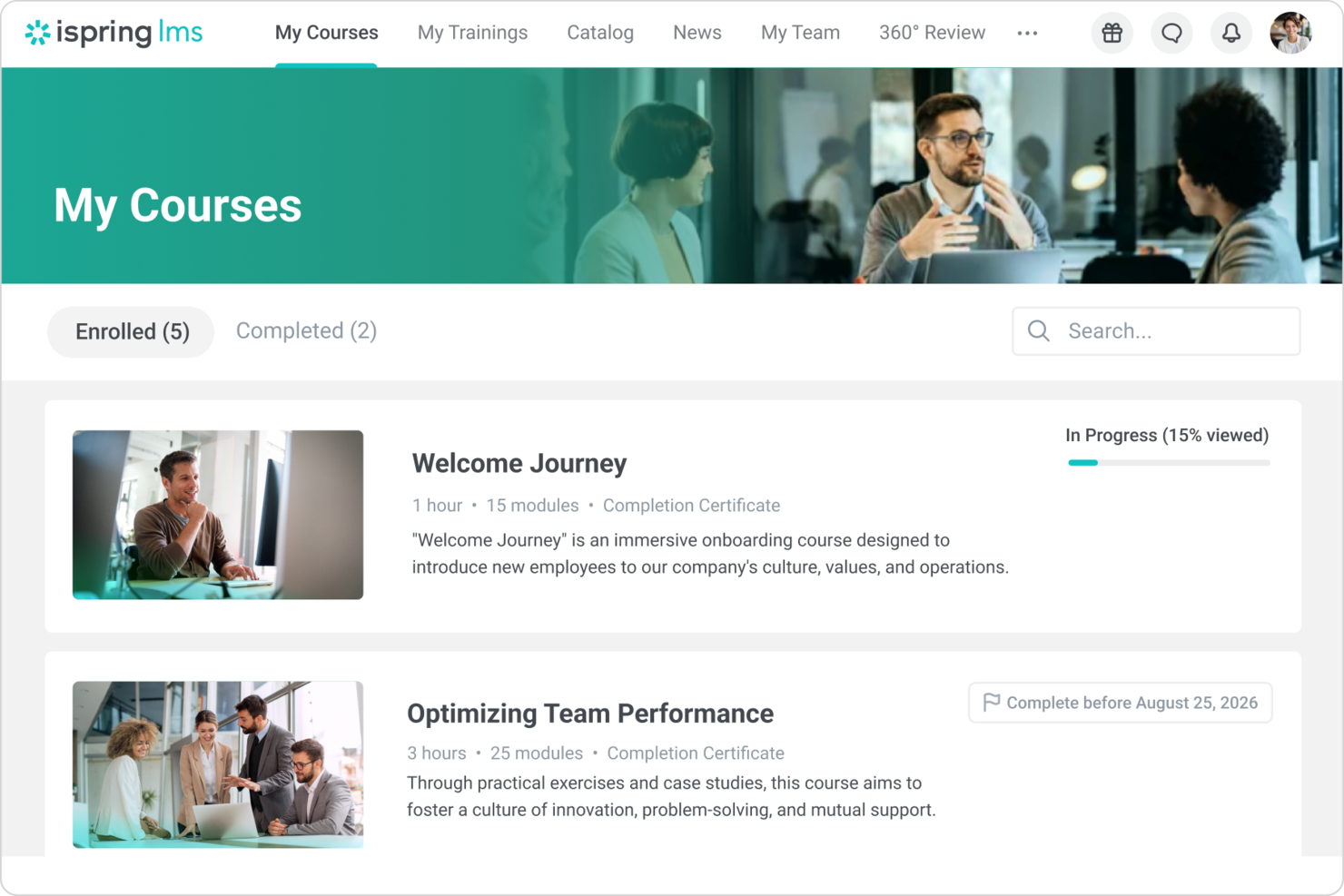
For organizations seeking a reliable solution in AI tools training development, iSpring LMS serves as a versatile corporate learning management system. It appeals to businesses focused on enhancing employee training and development across various industries. With features like fast onboarding, integrated knowledge retention, and seamless integration with popular course libraries, iSpring LMS addresses the need for consistent training quality and effective knowledge management, making it a valuable asset for your training initiatives.
Why I Picked iSpring LMS
I picked iSpring LMS because it helps you build structured, role-based training paths without relying too heavily on automation. The platform uses AI to support course organization and enrollment, but you still shape the learning experience. This makes it a good fit if you want predictable, repeatable training outcomes across teams. It is especially useful when you need to guide employees through clear development paths over time.
iSpring LMS Key Features
In addition to its AI integration capabilities, I also found several other noteworthy features that enhance its utility for AI tools training development:
- Integrated Knowledge Retention Tools: This feature ensures that your team retains critical information, reducing the need for repetitive training sessions.
- Digital Employee Profiles: By building comprehensive profiles, iSpring LMS reduces reliance on key personnel and facilitates personalized training experiences.
- Pre-Built Courses: Offers a variety of ready-to-use courses, allowing your team to start learning immediately without the need for extensive course creation.
- Dedicated Customer Support: Includes access to a success manager and 24/7 assistance from product experts, ensuring any issues are promptly addressed.
iSpring LMS Integrations
Integrations include Salesforce, MS Azure, Udemy, and LinkedIn Learning.
Pros and Cons
Pros:
- Strong compliance and progress reporting
- Automated enrollment reduces admin effort
- Clear role-based learning paths
Cons:
- No real-time skills benchmarking
- Limited advanced workflow customization

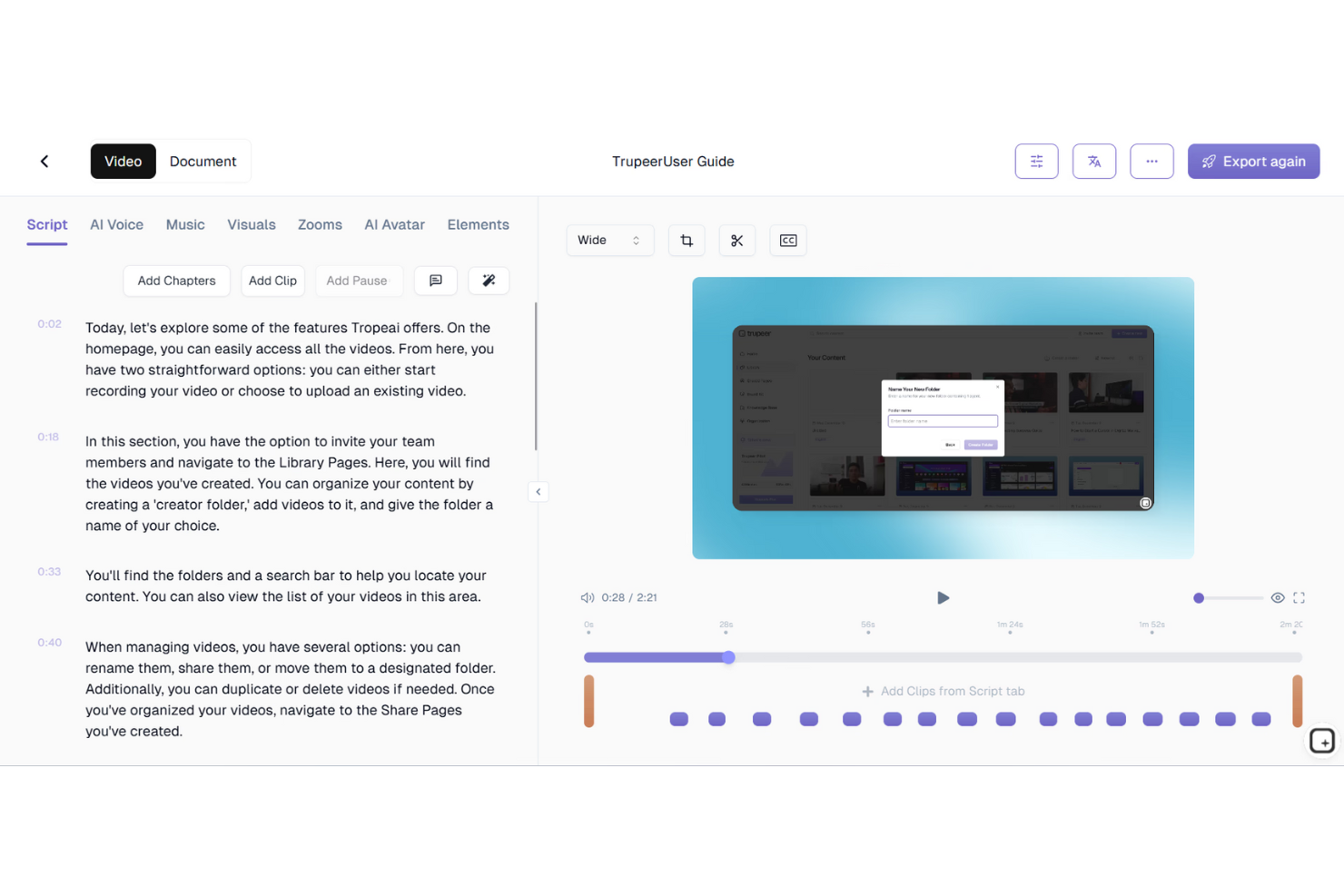
TruPeer offers a transformative solution for those seeking to enhance their training development processes with AI-powered tools. Designed for HR managers, Learning and Development teams, and team leaders, TruPeer turns existing content into interactive and engaging training materials, addressing the resource-intensive nature of traditional training methods. With features like AI avatars, voiceovers, and quizzes, TruPeer ensures that your team receives standardized and scalable training solutions, effectively bridging the gap between content creation and learner engagement.
Why I Picked TruPeer
I picked TruPeer for its unique ability to automate and enhance the training development process, particularly through its AI-powered Employee Training Generator. This platform stands out by converting text or scripts into polished training videos, complete with customizable avatars and branding. Its multi-language support caters to global teams, and the ease of editing and updating content ensures that training materials remain current and relevant. These features collectively address the common challenges in training development, offering a streamlined solution for creating engaging and effective training programs.
TruPeer Key Features
In addition to the standout features already mentioned, I also found the following capabilities valuable for training development:
- Automated Curriculum Design: Generates structured modules and learning paths based on provided goals or scripts.
- Role-Based Personalization: Allows customization of training programs to suit specific roles within an organization.
- Integration with LMS: Facilitates seamless sharing and tracking of training programs within existing Learning Management Systems.
- Multi-Format Support: Supports various input formats, enabling easy editing and branding of training materials.
TruPeer Integrations
Native integrations are not currently listed by TruPeer.
Pros and Cons
Pros:
- Multilingual support for global teams
- Interactive videos with avatars
- AI-generated training from scripts
Cons:
- Native integrations not clearly listed
- Limited advanced video editing

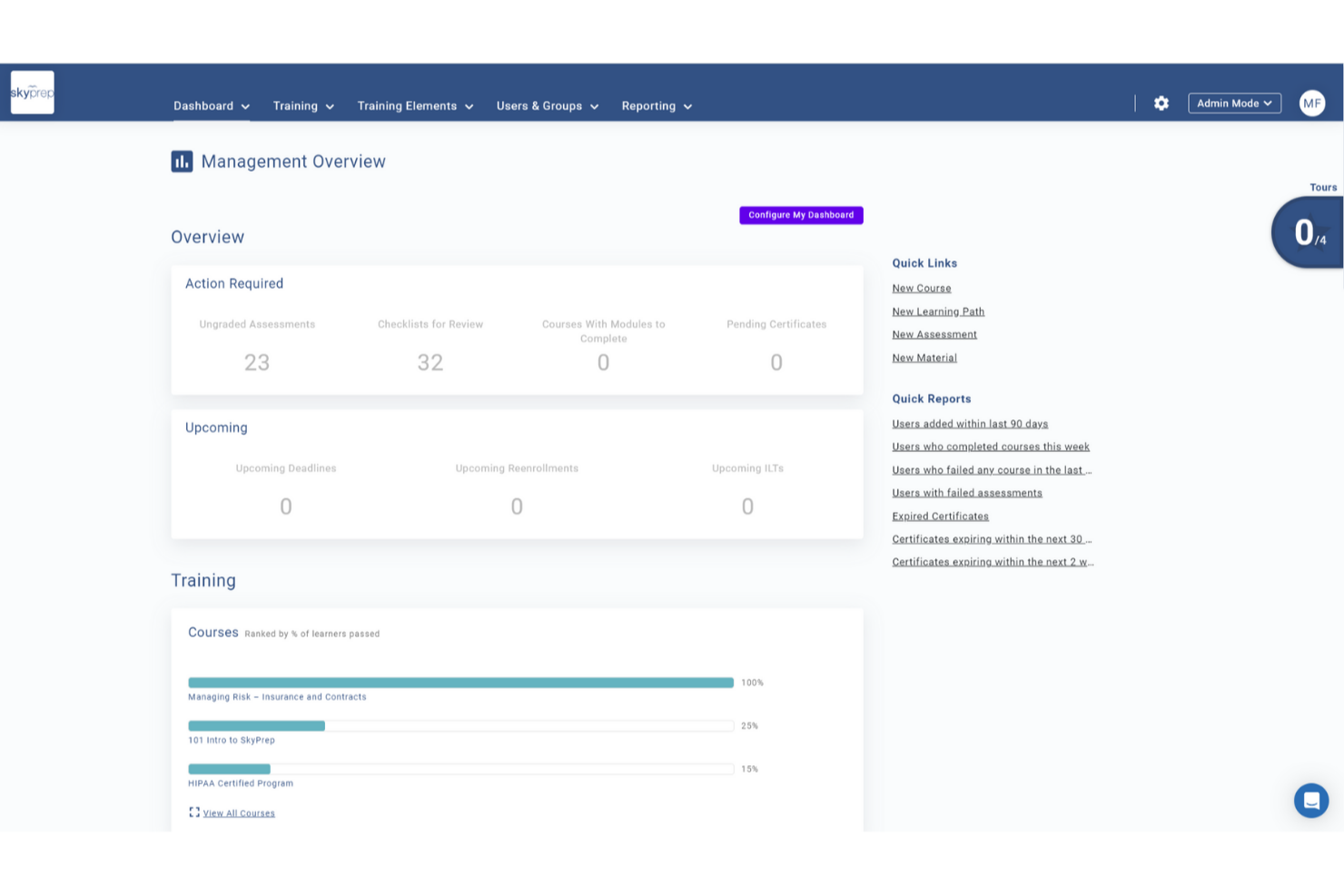
SkyPrep is an intuitive online training platform designed to meet the evolving needs of organizations looking to enhance their AI tools training development. Tailored for businesses across various industries, it simplifies the creation and management of training programs, making it an ideal choice for professionals seeking efficient learning solutions. Whether you aim to streamline employee onboarding or improve continuous learning, SkyPrep addresses these challenges with its robust features and user-friendly interface.
Why I Picked SkyPrep
I picked SkyPrep for its exceptional ability to integrate AI-powered tools into training development, which can significantly enhance your team's learning experience. With features like the AI Assessment Builder, you can create tailored assessments that accurately measure learner comprehension. Additionally, the AI Scenario Blocks offer interactive learning experiences that simulate real-world situations, ensuring your team is well-prepared for practical challenges. These features not only save time but also improve the effectiveness of your training programs.
SkyPrep Key Features
In addition to its AI-powered capabilities, SkyPrep offers several features that can transform your training development.
- Learner Engagement: Provides gamification and social learning tools to maintain interest and motivation.
- Course Creation: Features a drag-and-drop interface and customizable templates for easy course development.
- User Management: Automates administrative tasks, such as course enrollments and notifications.
- Reporting and Analytics: Delivers insights into learner progress and course effectiveness.
SkyPrep Integrations
Integrations include Salesforce, HubSpot, Zoom, Microsoft Teams, Slack, Office365, G Suite, ADP, Workday, and Twilio.
Pros and Cons
Pros:
- Gamification increases learner participation
- AI content generation boosts engagement
- AI assessment builder saves time
Cons:
- Some integrations require manual setup
- Reporting depth limited for analytics

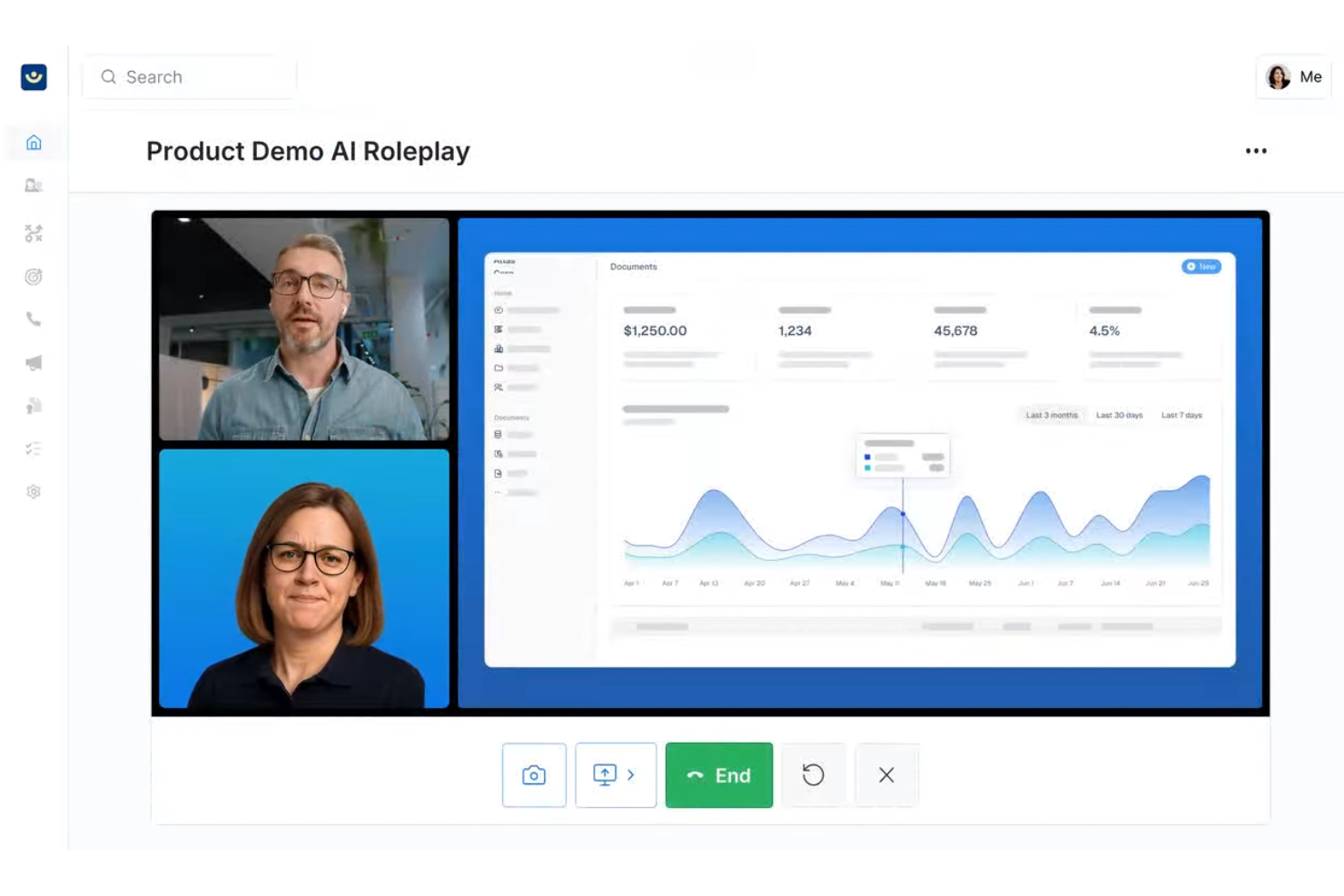
Exec offers AI-driven training solutions aimed at enhancing employee performance through realistic simulations and stress-response learning. For those in Learning and Development (L&D) roles, particularly within mid-to-large organizations, Exec addresses the challenge of bridging the gap between training and real-world application by emphasizing measurable behavior change.
Why I Picked Exec
I picked Exec for its unique ability to transform traditional training methods into engaging, real-world simulations that drive measurable behavior change. The platform's voice-based AI simulations allow your team to practice unpredictable conversations, building confidence and skill in high-pressure environments.
Additionally, Exec's real-time performance metrics and immediate feedback loops ensure that your training efforts translate into improved business outcomes. These features make Exec an ideal choice for organizations looking to enhance leadership communication and sales performance through AI-driven learning.
Exec Key Features
In addition to its standout voice-based simulations, Exec offers several other features tailored to AI tools training development:
- Adaptive Learning Paths: Exec customizes training scenarios to align with individual skill gaps and organizational needs, ensuring relevant and targeted learning experiences.
- Real-Time Behavioral Feedback: This feature provides immediate insights into performance, allowing learners to adjust and improve on the spot.
- Scenario Customization: Organizations can tailor learning scenarios to specific business objectives, enhancing the relevance and impact of training.
- Manager Dashboard: Get visibility into individual and team progress with analytics and insights.
Exec Integrations
Integrations include integration with LMS systems, CMS platforms, HRIS tools, and LXP platforms — and an API is available for custom integrations.
Pros and Cons
Pros:
- Customizable scenarios align with specific business objectives.
- Provides instant feedback to reinforce learning and skill retention.
- Realistic AI roleplays enhance communication skills in high-pressure situations.
Cons:
- Initial setup and scenario design can be complex and time-consuming.
- Primarily optimized for English-speaking organizations, limiting global reach.

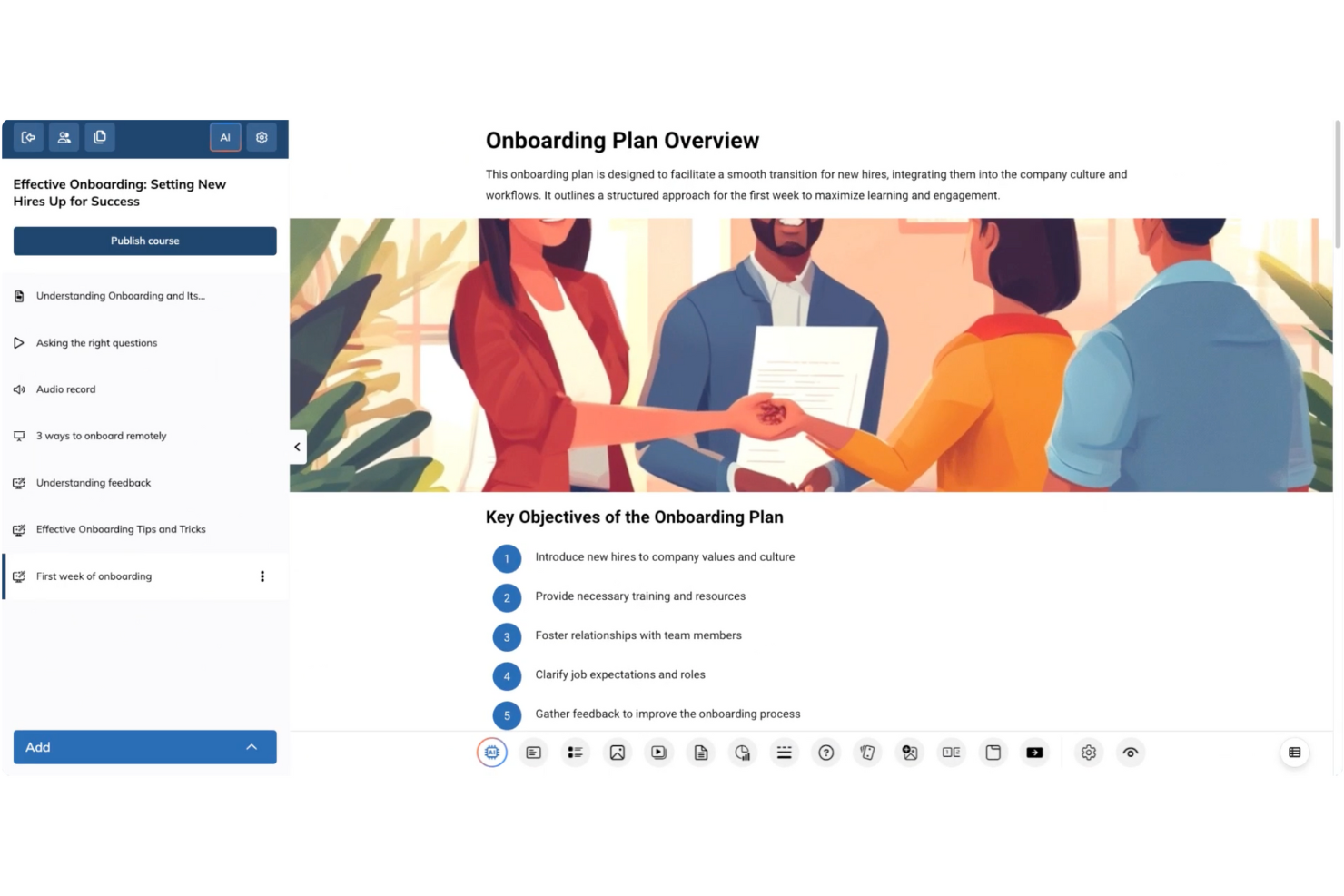
TalentLMS is a versatile learning management system tailored for those seeking to develop training solutions for AI tools. It offers a cloud-based platform that simplifies course creation and deployment, appealing to businesses across industries looking to enhance their training programs. With its focus on AI-assisted course design and skills-based learning, TalentLMS addresses the challenge of efficiently delivering specialized knowledge to diverse teams.
Why I Picked TalentLMS
I picked TalentLMS for its AI-assisted course creation, which is particularly beneficial for AI tool training development. The platform's AI course creator lets you generate content quickly, reducing the time and effort typically required for course design. Furthermore, its skills-based learning tools enable personalized learning paths, ensuring that your team acquires the necessary competencies in AI tools. This combination of features addresses the need for tailored and efficient training solutions, making TalentLMS a compelling choice for organizations focused on AI tools training.
TalentLMS Key Features
In addition to its AI-assisted course creation, TalentLMS offers:
- TalentLibrary™: Access over 1,000 curated courses that cover essential skills, providing up-to-date content for your learners.
- Mobile-Friendly Design: Enables global teams to engage in training without the need for software installation, ensuring accessibility and convenience.
- Automated Assessments: Streamline the evaluation process with automated testing and grading, allowing you to focus on training outcomes.
TalentLMS Integrations
Integrations include BambooHR, Salesforce, HubSpot, Intercom, Slack, PayPal, Stripe, WooCommerce, Zoom, and Microsoft Teams.
Pros and Cons
Pros:
- AI-assisted content suggestions help build courses faster
- Onboarding and training templates reduce setup time
- Gamification features increase learner engagement
Cons:
- Customization options might not meet all specific needs
- Advanced interactive course creation may require additional tools
New Product Updates from TalentLMS
TalentLMS Introduces Save Course Feature
TalentLMS now lets learners bookmark their courses so they can easily revisit them at any time. For more information, visit TalentLMS's official site.


Elai.io is a video creation platform catering to businesses and educators who need to produce engaging video content efficiently. It serves users looking for tools to create professional-looking videos without needing extensive technical skills. The platform enables the creation of videos using AI-generated avatars and voiceovers.
Why I picked Elai.io: It specializes in AI video creation, allowing you to produce videos quickly and easily. The platform offers customizable avatars, which can be tailored to fit your brand's needs. Text-to-speech technology and customization offer voice cloning in 28 languages and over 450 accents. Elai.io simplifies the video production process, making it accessible even for those with limited video editing experience.
Standout features & integrations:
Features include a user-friendly interface that lets you create videos in minutes. The platform supports over 75 languages and translation within a few minutes, expanding your audience reach. You can also use pre-designed templates to speed up the video creation process.
Integrations include Zapier, Thinkific, uQualio, Tolstoy, PowerPoint, Medium, Pexels, GIPHY, Moodle, LottieFiles, Articulate 360, Udemy, and 360Learning.
Pros and Cons
Pros:
- Supports over 75 languages
- Customizable AI avatars
- Quick video creation process
Cons:
- Limited offline functionality
- Limited customization options
Other AI Tools for Training and Development
Here are some additional AI tools for training and development options that didn’t make it onto my shortlist, but are still worth checking out:
- Docebo
For enterprise scalability
- Valamis
For workforce development
- Paradiso LMS
For multilingual support
- TalentCards
For mobile training
- Coursebox AI
For course management
- Arist
For text-based learning
- Fuse Universal
For continuous learning
- 5Mins.ai
For microlearning
- Virti
For VR training
- Cornerstone OnDemand
For enterprise learning needs


AI Tools for Training and Development Selection Criteria
When selecting the best AI tools for training and development to include in this list, I considered common buyer needs and pain points like content customization and ease of integration. I also used the following framework to keep my evaluation structured and fair:
Core Functionality (25% of total score)
To be considered for inclusion in this list, each solution had to fulfill these common use cases:
- Delivering online courses
- Tracking learner progress
- Providing assessments and quizzes
- Offering multimedia support
- Enabling learner feedback
Additional Standout Features (25% of total score)
To help further narrow down the competition, I also looked for unique features, such as:
- Adaptive learning paths
- Gamification elements
- Virtual reality training modules
- AI-driven analytics
- Customizable learning paths
Usability (10% of total score)
To get a sense of the usability of each system, I considered the following:
- Intuitive interface design
- Easy navigation
- Minimal learning curve
- Consistent user experience
- Responsive design for mobile devices
Onboarding (10% of total score)
To evaluate the onboarding experience for each platform, I considered the following:
- Availability of training videos
- Interactive product tours
- Access to templates and guides
- Webinars and live demos
- Supportive chatbots for assistance
Customer Support (10% of total score)
To assess each software provider’s customer support services, I considered the following:
- 24/7 availability
- Multichannel support options
- Knowledgeable support staff
- Quick response times
- Extensive help center resources
Value For Money (10% of total score)
To evaluate the value for money of each platform, I considered the following:
- Competitive pricing
- Transparent pricing structure
- Flexible subscription plans
- Discounts for bulk purchases
- Alignment of features with pricing
Customer Reviews (10% of total score)
To get a sense of overall customer satisfaction, I considered the following when reading customer reviews:
- Overall satisfaction ratings
- Feedback on ease of use
- Comments on customer support
- User experiences with onboarding
- Value for money assessments
How to Choose AI Tools for Training and Development
It’s easy to get bogged down in long feature lists and complex pricing structures. To help you stay focused as you work through your unique software selection process, here’s a checklist of factors to keep in mind:
| Factor | What to Consider |
| Scalability | Will the tool grow with your organization? Consider the number of users it can support and if it can handle increased data volume as your training needs expand. |
| Integrations | Does the tool work with your existing systems? Check for compatibility with your HR software, communication tools, and other platforms to ensure smooth workflows. |
| Customizability | Can you tailor the tool to fit your specific needs? Look for options to adjust branding, course content, and user roles without needing extensive technical knowledge. |
| Ease of use | Is the interface user-friendly? Ensure your team can navigate the tool easily without needing constant support, which can save time and reduce frustration. |
| Implementation and onboarding | How long does it take to get started? Evaluate the setup process, availability of training resources, and support during the transition to ensure a smooth adoption. |
| Cost | What’s the total cost of ownership? Consider subscription fees, hidden costs, and the ROI you expect. Compare pricing plans to find one that fits your budget. |
| Security safeguards | How does the tool protect your data? Look for encryption, access controls, and compliance with data protection regulations to keep your information secure. |
| Support availability | What support options are available? Check for 24/7 support, response times, and the quality of assistance offered to ensure you can get help when needed. |
What Are AI Training and Development Tools?
AI training and development tools are software solutions that use artificial intelligence to improve learning and skill-building processes. These tools are typically used by HR professionals, trainers, and educators to deliver personalized and efficient training programs. Automated content delivery, adaptive learning paths, and real-time analytics help with tailoring training to individual needs and tracking progress. Overall, these tools make training more effective and engaging for users.
Features of AI Training and Development Tools
When selecting AI-powered training and development tools, keep an eye out for the following key features:
- Adaptive learning paths: Adjust content to fit individual learner needs, ensuring personalized training experiences.
- Automated content delivery: Schedules and delivers training materials automatically, saving time and reducing manual effort.
- Real-time analytics: Provides insights into learner progress and engagement, helping you make data-driven decisions.
- Gamification elements: Use points and badges to motivate learners and increase engagement.
- Multimedia support: Allows incorporation of videos, images, and audio to enrich learning content.
- Virtual reality modules: Offer immersive learning experiences by simulating real-world scenarios.
- Customizable course templates: Speed up course creation by providing ready-made structures that can be tailored to your needs.
- Translation management: Facilitates multilingual course offerings, making training accessible to a global workforce.
- Integration capabilities: Ensures compatibility with existing systems, enabling data flow and workflow efficiency.
- Security safeguards: Protects sensitive data through encryption and access controls, ensuring compliance with privacy regulations.
Benefits of AI in Training and Development Tools
Implementing AI tools for training and development provides several benefits for your team and your business. Here are a few you can look forward to:
- Personalized learning experiences: AI tailors training to each learner's needs, increasing engagement and retention.
- Time efficiency: Automated content delivery reduces the workload on trainers, allowing them to focus on more strategic tasks.
- Increased engagement: Gamification elements and multimedia support make learning interactive and enjoyable.
- Improved decision-making: Real-time analytics offer insights that help you refine training programs for better outcomes.
- Global accessibility: Translation management makes training materials available in multiple languages, reaching a wider audience.
- Cost-effectiveness: By optimizing training processes and outcomes, AI tools can lead to cost savings over time.
- Improved security: With security safeguards in place, your data remains protected and compliant with regulations.
Costs and Pricing of AI Tools for Training and Development
Selecting AI tools for training and development requires an understanding of the various pricing models and plans available. Costs vary based on features, team size, add-ons, and more. The table below summarizes common plans, their average prices, and typical features included in AI tools for training and development solutions:
Plan Comparison Table for AI Tools for Training and Development
| Plan Type | Average Price | Common Features |
| Free Plan | $0 | Basic course creation, limited user access, and community support. |
| Personal Plan | $10-$100/user/month | Standard course creation, basic reporting, and email support. |
| Business Plan | $75-$720/user/month | Advanced analytics, integrations with other tools, and priority support. |
| Enterprise Plan | $100-$1290/user/month | Customizable features, dedicated account manager, and full API access. |
AI Tools for Training and Development FAQs
Here are some answers to common questions about AI tools for training and development:
How can AI be used in training and development?
AI can track learner progress and provide insights that help refine training strategies. By leveraging AI-generated data, you can identify performance trends and recommend necessary training improvements. This ensures your team receives relevant and timely training to improve their skills.
What is the 30% rule for AI?
The 30% rule suggests balancing AI and human input, where AI handles about 70% of a task, and humans manage the remaining 30%. This approach ensures efficiency while maintaining human oversight and creativity in tasks, especially in training and development environments.
How to use AI in training courses?
AI can forecast skill gaps and training needs using predictive analytics. By analyzing performance and learning habits, AI recommends relevant training programs. This proactive approach helps your organization upskill its workforce, keeping it competitive in the industry.
How to use AI tools for development?
Consider the problems you’re solving and how AI can make them more efficient. AI can automate repetitive tasks, analyze large datasets, and make predictions. Experiment with different AI tools to find those that best fit your development needs and workflow.
What are the benefits of using AI in training?
AI personalizes learning experiences, making them more engaging and effective. It automates administrative tasks, freeing up time for trainers. AI also offers real-time analytics, providing insights into training effectiveness and helping you make data-driven decisions to improve outcomes.
How do AI tools improve learner engagement?
AI tools use features like gamification, multimedia support, and adaptive learning paths to boost engagement. These elements create interactive and personalized learning experiences that keep learners motivated and invested in their training journey.
What’s Next:
If you're in the process of researching AI tools for training and development, connect with a SoftwareSelect advisor for free recommendations.
You fill out a form and have a quick chat where they get into the specifics of your needs. Then you'll get a shortlist of software to review. They'll even support you through the entire buying process, including price negotiations.