
15 Best Contractor Compliance Software Reviewed in 2026

Best Contractor Compliance Software Shortlist
Here's my pick of the 10 best software from the 15 tools reviewed.


Managing contractor compliance can be a headache. You face constant challenges, from keeping up with regulations to managing endless paperwork. Contractor compliance software can ease these burdens, helping your team stay on top of requirements and avoid costly mistakes.
In my experience, finding the right tool can make all the difference in your day-to-day operations. I've independently tested various software and understand what works best for HR professionals like you.
In this article, I'll share my top picks for contractor compliance software, offering unbiased insights to help you make informed decisions. Get ready to explore solutions that can simplify your compliance processes and free up your time.
Why Trust Our Software Reviews
Best Contractor Compliance Software Summary
This comparison chart summarizes pricing details for my top contractor compliance software selections to help you find the best one for your budget and business needs.
| Tool | Best For | Trial Info | Price | ||
|---|---|---|---|---|---|
| 1 | Best for automated worker classification | Free demo available | From $5/employee/month | Website | |
| 2 | Best for audit management | Free plan available | From $24/seat/month (billed annually) | Website | |
| 3 | Best for construction tracking | Free 30-day trial + free demo available | From $32/user/month (billed annually) | Website | |
| 4 | Best for digital forms | Free demo available | Pricing available upon request | Website | |
| 5 | Best for chemical safety | Free demo available | Pricing upon request | Website | |
| 6 | Best for EHS compliance | Free demo available | Pricing upon request | Website | |
| 7 | Best for large enterprises | Free demo available | Pricing upon request | Website | |
| 8 | Best for cost management | Free demo available | Pricing upon request | Website | |
| 9 | Best for financial institutions | Free demo available | Pricing upon request | Website | |
| 10 | Best for government projects | Free demo available | Pricing upon request | Website |
-

Checkr
Visit WebsiteThis is an aggregated rating for this tool including ratings from Crozdesk users and ratings from other sites.4.5 -
Kudoboard
Visit WebsiteThis is an aggregated rating for this tool including ratings from Crozdesk users and ratings from other sites.4.8 -
Native Teams
Visit WebsiteThis is an aggregated rating for this tool including ratings from Crozdesk users and ratings from other sites.4.9





Best Contractor Compliance Software Reviews
Below are my detailed summaries of the best contractor compliance software that made it onto my shortlist. My reviews offer a detailed look at the key features, pros and cons, integrations, and ideal use cases of each tool to help you find the best one for you.


For businesses managing an international workforce, Deel provides the infrastructure to hire, onboard, and pay contractors and employees across multiple countries. The platform helps companies navigate local labor laws, tax regulations, and worker classification requirements without setting up their own legal entities. As a global workforce management solution, Deel can reduce the operational complexity that often comes with expanding into new markets.
Why I Picked Deel
I picked Deel because it simplifies global compliance in a way that feels practical for growing teams. Its automated worker classification and localized contract generation help you align with country-specific regulations without relying on manual legal processes. I also like that Deel supports compliant hiring in over 150 countries, which can make international expansion more accessible. If you are building a distributed team, Deel gives you the compliance framework needed to hire confidently across borders.
Deel Key Features
In addition to its standout compliance capabilities, Deel offers several other features that enhance its functionality as contractor compliance software.
- Automated Payroll Processing: Deel handles payroll across multiple currencies, ensuring timely and accurate payments to your international contractors.
- Localized Contract Generation: Create contracts that comply with local laws in over 150 countries, reducing the risk of non-compliance.
- Tax Document Management: Deel assists in generating the necessary tax documents, simplifying the complexities of international tax compliance.
- HR Management Tools: Manage benefits and other HR-related tasks within the platform, streamlining the administration of your global team.
Deel Integrations
Integrations include QuickBooks, Xero, NetSuite, BambooHR, Greenhouse, Ashby, Rippling, Gusto, HiBob, and SAP SuccessFactors, and an API is available for custom integrations.
Pros and Cons
Pros:
- Integrates with major HR systems
- Built-in compliance and contract management
- Global payroll across 150 countries
Cons:
- Limited directory customization options
- Reporting features lack advanced filtering
New Product Updates from Deel HR

Deel HR Introduces AI-Powered ATS for Hiring
Deel HR introduces an AI-powered ATS built into its platform. This update enhances hiring efficiency by automating sourcing, screening, and workflows across the recruitment process. For more information, visit Deel HR’s official site.
 .
.
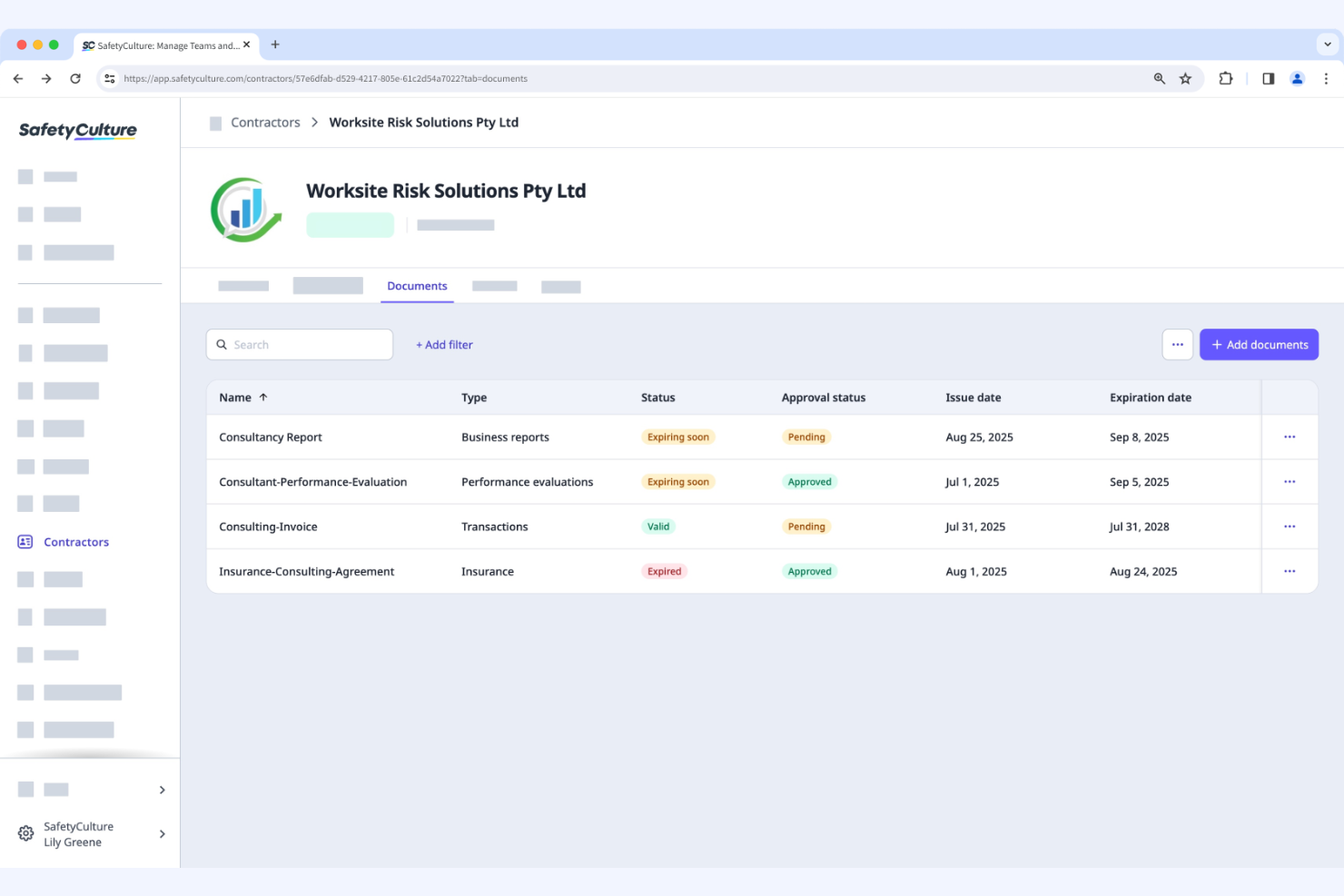
SafetyCulture is a quality management and safety software used by businesses to conduct audits and inspections. It helps teams manage safety protocols and maintain compliance with industry standards.
Why I picked SafetyCulture: This tool focuses on audit management, offering features such as digital inspections and checklists. Your team can conduct audits efficiently with customizable templates. Its real-time reporting feature provides immediate insights into safety compliance. These functionalities make it ideal for organizations that prioritize thorough and efficient audit processes.
Standout Features and Integrations:
Features include digital inspections, customizable checklists, and real-time reporting. These features help your team simplify safety audits and track compliance effectively. The platform also provides analytics to help you identify trends and improve safety measures.
Integrations include Google Workspace, Zapier, Power BI, Tableau, BambooHR, Atlassian Jira, and more.
Pros and Cons
Pros:
- Real-time safety insights
- Customizable inspection templates
- Efficient audit management
Cons:
- Built on a linear checklist model
- No native AI insights


PlanRadar is a construction management tool designed for project managers and construction teams. It helps manage project documentation, task tracking, and communication on construction sites.
Why I picked PlanRadar: This tool focuses on construction tracking, offering features such as task management and project documentation. The real-time communication feature allows your team to collaborate effectively on-site. It also offers digital blueprints, which simplify managing construction tasks. These functionalities make it ideal for construction teams looking to boost project tracking and communication.
Standout Features and Integrations:
Features include digital blueprint management, real-time communication, and task tracking. These features help your team stay organized and manage construction projects efficiently. The tool also provides a mobile app for on-site access to project details.
Integrations include Oracle, Sage, Salesforce, Google Drive, Dropbox, Microsoft OneDrive, and more.
Pros and Cons
Pros:
- Mobile app for site access
- Digital blueprint management
- Real-time project communication
Cons:
- Rigid permissions
- Annotation limits
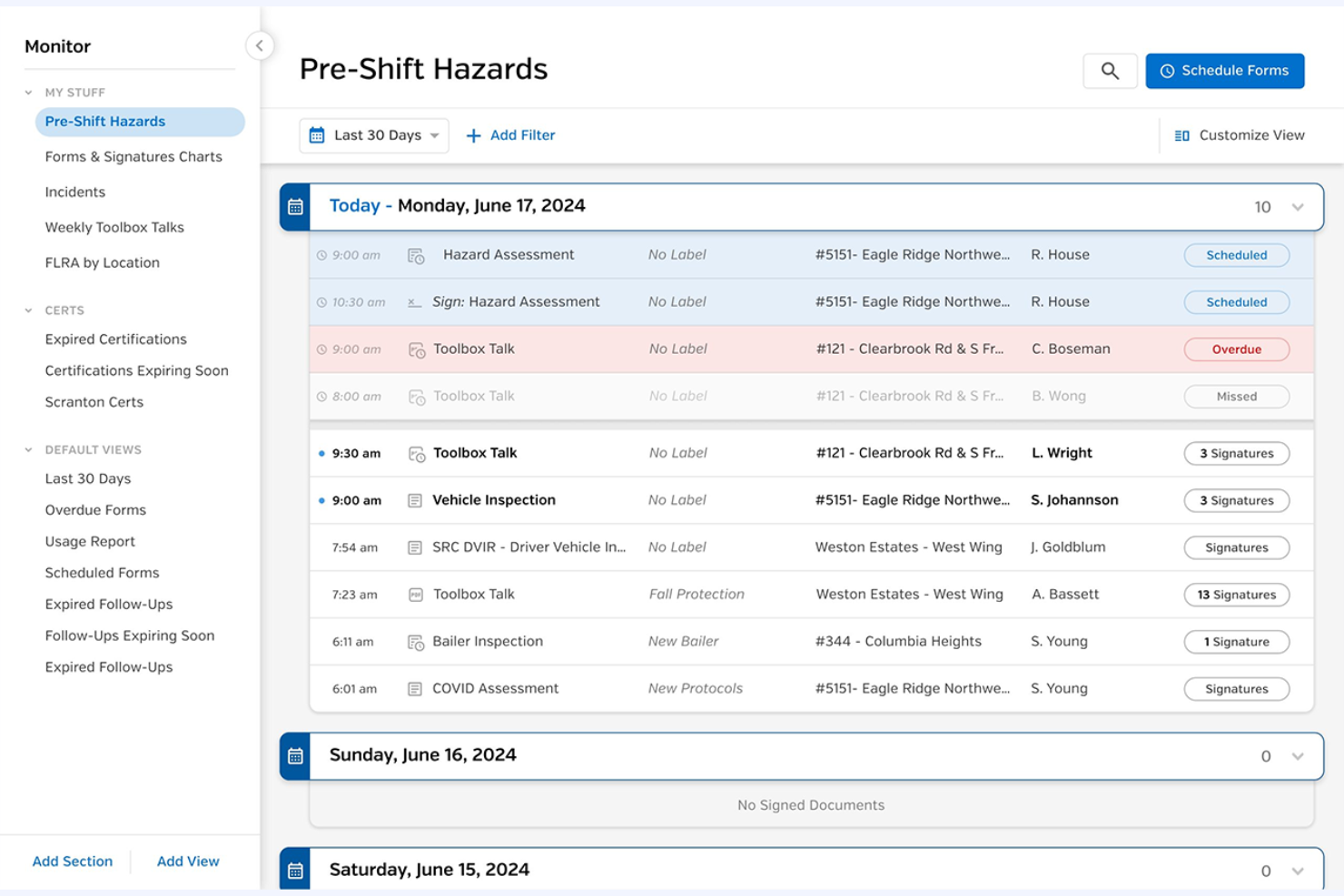
SiteDocs is a safety management software designed for general contractors, focusing on digital forms and compliance tracking. It helps manage contractor safety and offers real-time visibility into compliance protocols.
Why I picked SiteDocs: This tool excels in providing digital forms for compliance, making it suitable for teams that need efficient documentation and tracking. Its incident management feature allows you to handle safety reports smoothly. Hazard management helps your team identify and mitigate risks effectively. Its emphasis on digital forms makes it ideal for contractors looking to modernize their compliance processes.
Standout Features and Integrations:
Features include digital compliance forms, contractor and incident management, and hazard management. These features enable your team members to keep track of health and safety protocols efficiently. The tool also provides automation capabilities to reduce manual work.
Integrations include SAP, QuickBooks, Microsoft Dynamics, Salesforce, BambooHR, and more.
Pros and Cons
Pros:
- Reduces administrative costs
- Real-time compliance tracking
- Efficient incident reporting
Cons:
- Weak analytics
- Limited logic


EcoOnline is an EHS management tool designed to support businesses in managing chemical safety and compliance. It serves industries that handle hazardous materials and provides tools to maintain workplace safety and regulatory adherence.
Why I picked EcoOnline: This tool is tailored for chemical safety, offering features such as Safety Data Sheet (SDS) management and chemical inventory tracking. It helps your team maintain up-to-date safety documentation and maintain compliance with chemical regulations. The risk assessment feature allows for proactive management of potential hazards. These capabilities make it ideal for industries focused on chemical management and regulatory requirements.
Standout Features and Integrations:
Features include risk assessment tools, incident reporting, and learning management. These features help your team identify and mitigate potential hazards effectively. The platform also provides dashboards for monitoring safety metrics and tracking compliance performance.
Integrations include SAP, Oracle, Microsoft Dynamics, Xero, Salesforce, BambooHR, and more.
Pros and Cons
Pros:
- Detailed SDS management
- Effective risk assessment tools
- Focused on chemical safety
Cons:
- No custom-weighted scoring system
- Time-consuming hazard database maintenance
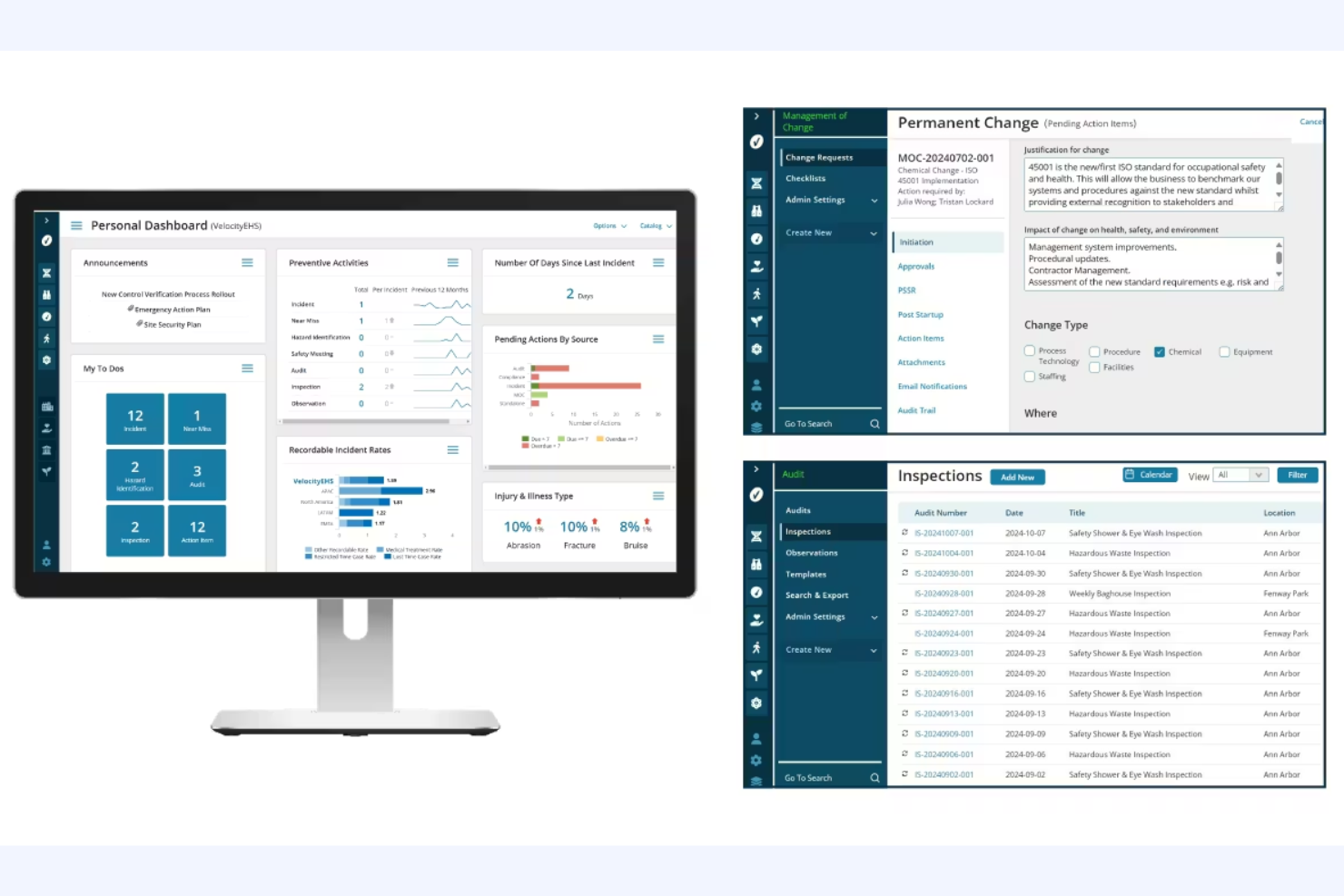
VelocityEHS Compliance Management is a contractor compliance software designed for organizations focused on environmental, health, and safety (EHS) management. It supports businesses in managing contractor safety and compliance tasks efficiently.
Why I picked VelocityEHS Compliance Management: This software is tailored for EHS compliance, offering features such as Permit to Work and Contractor Safety management. It includes advanced AI features to improve safety management processes, making it a fit for organizations that prioritize EHS compliance. The Certificate of Insurance management further differentiates it, providing an in-depth approach to compliance tracking. These functionalities make it ideal for teams needing a strategic platform for regulatory risk management.
Standout Features and Integrations:
Features include a compliance calendar, automated notifications, and task management. These features help you stay organized and maintain timely compliance. The tool also offers real-time insights for regulatory verification.
Integrations include SAP, Oracle, Microsoft Dynamics, Procore, QuickBooks, ADP, Sage Intacct, and more.
Pros and Cons
Pros:
- Strategic EHS platform
- Real-time regulatory insights
- Detailed compliance tracking
Cons:
- Mobile sync issues
- Rigid reporting


ISNetworld is a contractor management platform designed for large enterprises. It helps businesses manage contractor safety, compliance, and risk efficiently.
Why I picked ISNetworld: The tool caters to large enterprises with features such as contractor prequalification and performance monitoring. It offers a centralized platform for managing documentation and safety protocols, which is essential for large-scale operations. Its risk management tools help with contractor compliance management across multiple locations, and its ability to handle complex compliance requirements makes it suitable for big organizations in need of rigorous oversight.
Standout Features and Integrations:
Features include contractor performance monitoring, prequalification processes, and risk management tools. These features help you manage compliance at scale and promote contractor safety. The platform also provides a centralized document management system to keep everything organized.
Integrations include SAP, Microsoft Dynamics, Xero, Procore, and more.
Pros and Cons
Pros:
- Suitable for large-scale operations
- Centralized document management
- Handles complex compliance requirements
Cons:
- Review delays
- Repetitive data entry
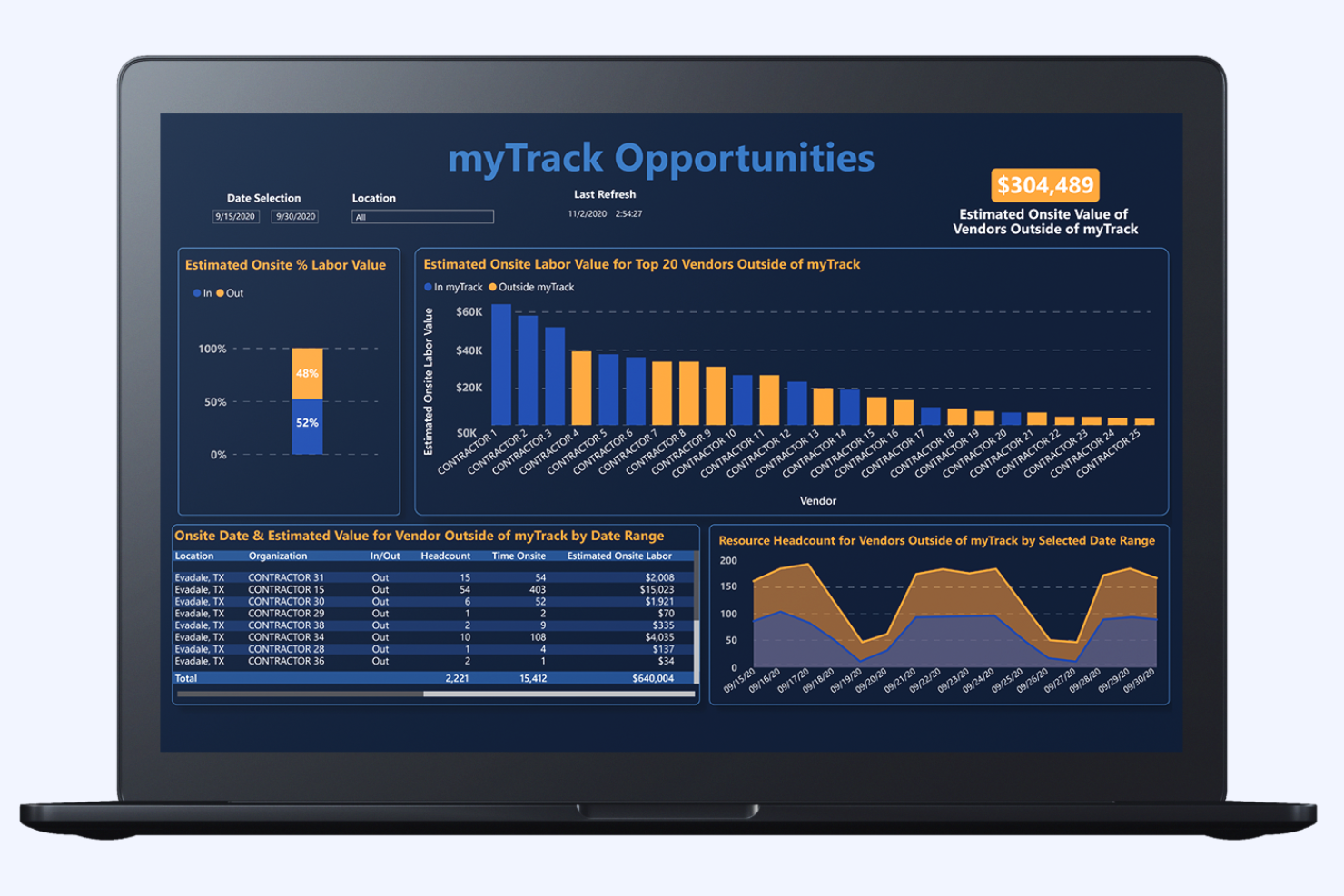
Management Controls myTrack offers a contractor management solution primarily used for cost management and project controls. It assists large enterprises in managing contractor costs and optimizing project expenditures.
Why I picked Management Controls myTrack: This tool focuses on cost management, providing detailed project controls that help your team monitor and manage expenses. Its real-time data insights allow you to track project costs effectively. An automated reporting feature allows your team to access accurate financial data whenever needed. These capabilities make it ideal for organizations looking to maintain tight control over project budgets.
Standout Features and Integrations:
Features include real-time data insights, automated reporting, and detailed project controls. These features help you manage expenses efficiently and maintain accurate financial tracking. The tool also offers customizable dashboards to visualize cost data.
Integrations include SAP, Oracle, Microsoft Dynamics, QuickBooks, Sage, and more.
Pros and Cons
Pros:
- Automated financial reporting
- Real-time expense tracking
- Focused on cost management
Cons:
- Audit trail density
- Hardware dependency
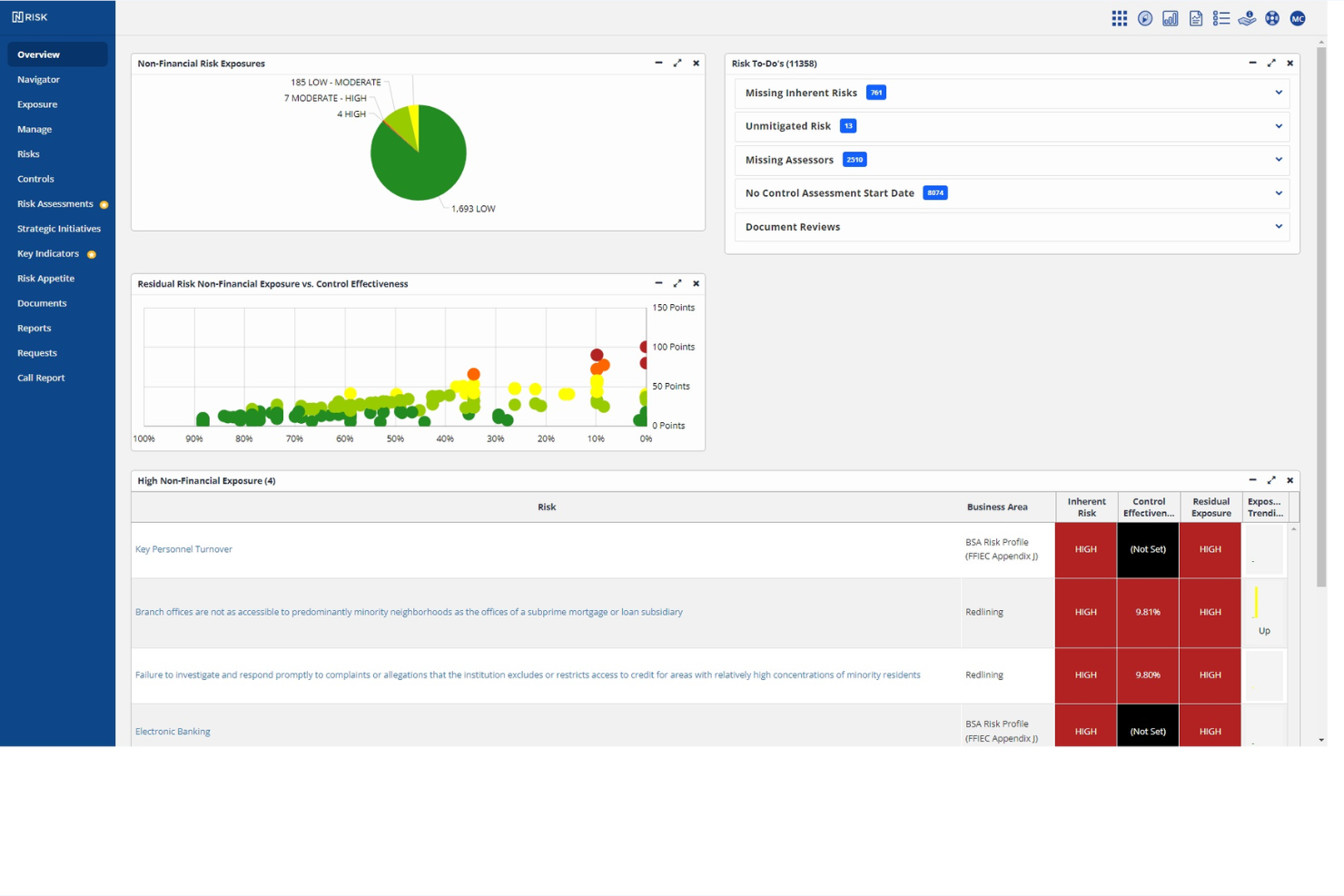
Ncontracts Ncomply is a risk management and regulatory compliance software specifically designed for financial institutions. It helps manage vendor risk, compliance, and contract management, supporting regulatory adherence and operational efficiency.
Why I picked Ncontracts Ncomply: This tool is tailored for financial institutions, with features such as vendor risk management and compliance tracking. It offers contract management tools to help your team maintain regulatory compliance. Its automated alert system notifies you of compliance updates and changes in regulations. These modules make it suitable for banks and financial organizations that need to improve their risk management processes.
Standout Features and Integrations:
Features include vendor risk assessments, compliance alert systems, and subcontractor management. These features help your team stay on top of regulatory changes and manage vendor relationships effectively. The tool also offers audit trails for thorough compliance tracking.
Integrations include ADP Workforce Now and more.
Pros and Cons
Pros:
- Automated compliance alerts
- Extensive vendor risk management
- Designed for financial compliance
Cons:
- Weak SSO support
- Click-heavy UI
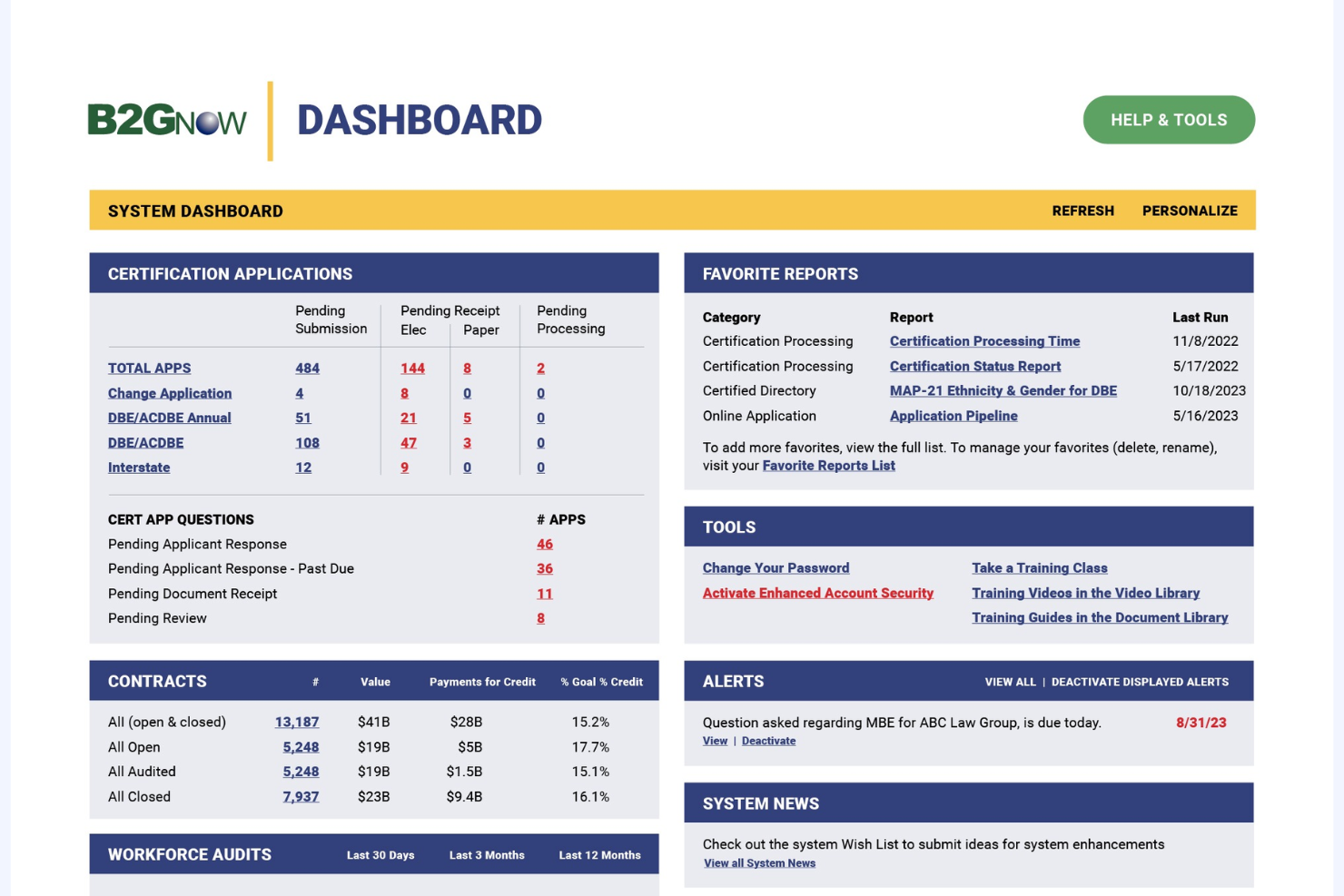
B2Gnow is a compliance management platform designed for government agencies and public sector projects. It helps manage compliance tracking, reporting, and diversity management for government contracts.
Why I picked B2Gnow: This tool is tailored for government projects, offering features such as diversity tracking and contract compliance management. It provides tools to support adherence to government regulations and reporting requirements. Its automated compliance reporting helps your team save time and maintain accuracy. These features make it ideal for public-sector organizations focused on compliance and diversity in contracting.
Standout Features and Integrations:
Features include automated compliance reporting, diversity tracking, and contract management. These features help your team manage government contracts efficiently and comply with public-sector regulations. The tool also offers detailed analytics to track compliance performance.
Integrations include SAP, Oracle, Microsoft Dynamics, Procore, and more.
Pros and Cons
Pros:
- Supports public sector requirements
- Effective diversity tracking
- Tailored for government compliance
Cons:
- Manual supplier updates
- Limited live training
Other Contractor Compliance Software
Here are some additional contractor compliance software options that didn’t make it onto my shortlist but are still worth checking out:
- LCPtracker Pro
For payroll reporting
- Venminder
For vendor assessments
- Remote
For businesses prioritizing flat-rate pricing
- Quantivate Compliance Solution
For risk management
- VIVE
For vendor performance


Contractor Compliance Software Selection Criteria
When selecting the best contractor compliance software to include in this list, I considered common buyer needs and pain points, such as managing compliance documentation and maintaining regulatory adherence. I also used the following framework to keep my evaluation structured and fair:
Core Functionality (25% of total score)
To be considered for inclusion in this list, each solution had to fulfill these common use cases:
- Manage compliance documentation
- Track contractor performance
- Automate compliance workflows
- Maintain regulatory adherence
- Provide audit trails
Additional Standout Features (25% of total score)
To help further narrow down the competition, I also looked for unique features, such as:
- Advanced risk assessment tools
- Real-time compliance alerts
- Customizable reporting dashboards
- Integration with IoT devices
- AI-driven data analytics
Usability (10% of total score)
To get a sense of the usability of each system, I considered the following:
- Intuitive user interface
- Easy navigation
- Minimal learning curve
- Responsive design
- Clear and concise instructions
Onboarding (10% of total score)
To evaluate the onboarding experience for each platform, I considered the following:
- Availability of training videos
- Interactive product tours
- Access to templates
- Supportive chatbots
- Scheduled webinars
Customer Support (10% of total score)
To assess each software provider’s customer support services, I considered the following:
- Availability of live chat
- 24/7 customer service
- In-depth knowledge base
- Responsive email support
- Dedicated account managers
Value for Money (10% of total score)
To evaluate the value for money of each platform, I considered the following:
- Competitive pricing
- Flexibility in pricing plans
- Transparency in costs
- Features offered per pricing tier
- Discounts for long-term contracts
Customer Reviews (10% of total score)
To get a sense of overall customer satisfaction, I considered the following when reading customer reviews:
- Overall satisfaction ratings
- Commonly mentioned advantages
- Frequently reported issues
- Feedback on customer service
- User recommendations
How To Choose Contractor Compliance Software
It’s easy to get bogged down in long feature lists and complex pricing structures. To help you stay focused as you work through your unique contractor management software selection process, here’s a checklist of factors to keep in mind:
| Factor | What To Consider |
|---|---|
| Scalability | Can the software grow with your business? Consider future needs and verify that the tool can handle increased data and users without performance issues. |
| Integrations | Does it integrate with your existing systems? Check compatibility with current software, such as payroll and HR systems, to avoid data silos and extra manual work. |
| Customizability | Can you tailor it to fit your workflows? Look for flexibility in settings and configurations to match your processes without needing custom development. |
| Ease of use | Is it user-friendly for your team? Assess the interface and navigation. Avoid tools that require extensive training or have a steep learning curve. |
| Implementation and onboarding | How quickly can you get up and running? Consider the time and resources needed for setup, and look for vendors that offer full-featured onboarding support. |
| Cost | Does the pricing fit your budget? Compare the total cost of ownership, including subscriptions, setup fees, and potential hidden costs. Look for pricing that aligns with your financial constraints. |
| Security safeguards | Does it meet your security standards? Implement data encryption, user access controls, and compliance with relevant regulations to protect sensitive information. |
| Support availability | Is help readily available when you need it? Check the vendor’s support hours and channels. 24/7 support can be key for resolving issues quickly and minimizing downtime. |
What Is Contractor Compliance Software?
Contractor compliance software is a tool that helps businesses manage contractor adherence to legal and safety regulations. These tools are generally used by HR professionals, compliance officers, and project managers to maintain regulatory compliance and reduce risks. Document management, compliance tracking, and automated workflows help with organizing contracts, monitoring compliance status, and reducing manual tasks. Overall, these tools offer value by simplifying compliance processes and improving workplace and jobsite safety.
Features
When selecting contractor compliance software, keep an eye out for the following key features:
- Document management: Helps organize and store compliance documents, making it easy to access and update them when needed.
- Compliance tracking: Monitors contractor adherence to regulations and alerts you to any issues or lapses in compliance.
- Automated workflows: Reduce manual tasks by automating processes such as document collection and compliance verification.
- Risk assessment tools: Identify potential risks and provide strategies to mitigate them, improving workplace safety.
- Real-time reporting: Offers immediate insights into compliance status, helping you make informed decisions quickly.
- Customizable templates: Allow you to tailor forms and documents to fit your specific compliance needs and workflows.
- Audit trails: Keep a detailed record of compliance activities, providing transparency and accountability.
- Integration capabilities: Maintains smooth data flow between different systems, reducing the need for manual data entry.
- Training management: Helps manage and track contractor training to meet necessary compliance standards.
- Mobile access: Provides on-the-go access to compliance information, allowing you to manage tasks from anywhere.
Benefits
Implementing contractor compliance software provides several benefits for your team and your business. Here are a few you can look forward to:
- Improved compliance: Automated workflows and compliance tracking help your contractors consistently meet legal and safety regulations.
- Time savings: Automated processes reduce the time spent on manual tasks, allowing your team to focus on more strategic activities.
- Reduced risk: Risk assessment tools help identify and mitigate potential compliance issues, boosting workplace safety.
- Better organization: Document management keeps all compliance documents in one place, making them easy to access and update.
- Increased transparency: Audit trails provide a clear record of compliance activities, promoting accountability within your team.
- Improved decision-making: Real-time reporting offers immediate insights into compliance status, helping you make informed decisions quickly.
- Flexibility and accessibility: Mobile access and customizable templates allow you to manage compliance tasks from anywhere and tailor processes to fit your needs.
Costs and Pricing
Selecting contractor compliance software requires an understanding of the various pricing models and plans available. Costs vary based on features, team size, add-ons, and more. The table below summarizes common plans, their average prices, and the typical features included in contractor compliance software solutions:
Plan Comparison Table for Contractor Compliance Software
| Plan Type | Average Price | Common Features |
|---|---|---|
| Free Plan | $0 | Basic compliance tracking, limited document management, and basic reporting. |
| Personal Plan | $24-$40/user/month | Upgraded document management, compliance alerts, and customizable templates. |
| Business Plan | $32-$85/user/month | Advanced risk assessment, real-time reporting, and integration capabilities. |
| Enterprise Plan | $107-$350/user/month | Full customization, dedicated support, and detailed analytics. |
Contractor Compliance Software FAQs
Here are some answers to common questions about contractor compliance software.
How do I know if my business needs contractor compliance software?
If your business regularly works with contractors and struggles to manage compliance documentation, then contractor compliance software could be beneficial. It helps keep track of regulations and helps all contractors meet necessary standards. For example, if you’re managing multiple contracts and find it challenging to maintain compliance, this software can automate many of those processes, reducing the administrative burden on your team. Evaluate your current compliance management processes to see if automation and tracking could improve efficiency and accuracy.
Can contractor compliance software integrate with my existing systems?
Yes, most contractor compliance software solutions offer integration capabilities with popular systems. Before purchasing, check if the software integrates with your current HR, payroll, or project management tools. Integration is essential for smooth data flow and minimizing manual data entry. For instance, if you’re using QuickBooks for payroll, verify that the software can sync with it to automatically update contractor records. Review the integration options provided by each vendor to make sure they align with your existing tech stack.
Is contractor compliance software difficult to implement?
No, many software solutions are designed for straightforward implementation. However, the ease of implementation can vary based on the complexity of your existing systems and the software’s flexibility. Look for vendors that offer dedicated onboarding support, such as training videos or webinars, to ease the transition. In my experience, having a clear implementation plan and involving key stakeholders early can make the process smoother. Assess the resources available from the vendor to support a successful rollout.
What should I look for in vendor support options?
Look for vendor support options that include 24/7 availability, multiple contact channels, and an in-depth knowledge base. Reliable support can make a big difference if you encounter issues or need assistance with the software. For example, if you prefer live chat over phone support, make sure the vendor offers it. Check reviews and testimonials to gauge the quality of support provided. Having access to prompt and knowledgeable support can save your team time and prevent disruptions.
What’s Next:
If you're in the process of researching contractor compliance software, connect with a SoftwareSelect advisor for free recommendations.
You’ll fill out a form and have a quick chat where they get into the specifics of your needs. Then you'll get a shortlist of software to review. They'll even support you through the entire buying process, including price negotiations.