

The 10 HR Software For Law Firms in 2026

10 Best HR Software For Law Firms Shortlist


Seeking an HR software tool for your law firm? The right tool can manage employee records, track billable hours, cut down on administrative HR tasks, and carve back precious time. With years of experience in HR, I've used and evaluated many software and workplace management tools. I’ve put together my top software options with useful features like centralizing employee data, time tracking, and HR compliance to help you choose the best fit for your firm’s needs. Here are my picks for the best HR software for law firms.
Why Trust Our Software Recommendations
Our team has been testing and reviewing software since 2012. As HR experts ourselves, we know how difficult—and important—it is to choose the right software.
For this guide, we evaluated tools using hands-on testing and independent research, scoring tools using our selection criteria. We also draw on insights from industry thought leaders and practicing HR experts.
Our reviews reflect our human editorial judgment, not a sales pitch.
Expert reviewers:
HR Software for Law Firms Comparison Table
This comparison table summarizes pricing details for my top HR software for law firms selections.
| Tool | Best For | Trial Info | Price | ||
|---|---|---|---|---|---|
| 1 | Best for customizable workflow automation | Not available | Pricing upon request | Website | |
| 2 | Best for integrated time tracking | Not available | From $599/employee/month | Website | |
| 3 | Best for law firms with cross-border HR needs | Free demo available | From $5/user/month | Website | |
| 4 | Best for payroll management | Free demo available | From $49/month + $6/month/user | Website | |
| 5 | Best for complex compensation planning | Free demo available | Contact for pricing | Website | |
| 6 | Best for enterprise finance and HR for law firms | Free demo available | Pricing upon request | Website | |
| 7 | Best for mid-market law firm HR and payroll | Free demo available | Pricing upon request | Website | |
| 8 | Best for mid-market payroll and HR compliance | Free demo available | Pricing upon request | Website | |
| 9 | Best for Am Law 100-scale HR infrastructure | Free demo available | Pricing upon request | Website | |
| 10 | Best for unified legal software solutions | Free demo available | Pricing upon request | Website |


Best HR Software for Law Firms Reviews
Below are my detailed summaries of the best HR software for law firms that made it onto my shortlist. My reviews offer a detailed look at the key features, pros & cons, integrations, and ideal use cases of each tool to help you find the best one for you.

Paycom
Best for customizable workflow automation
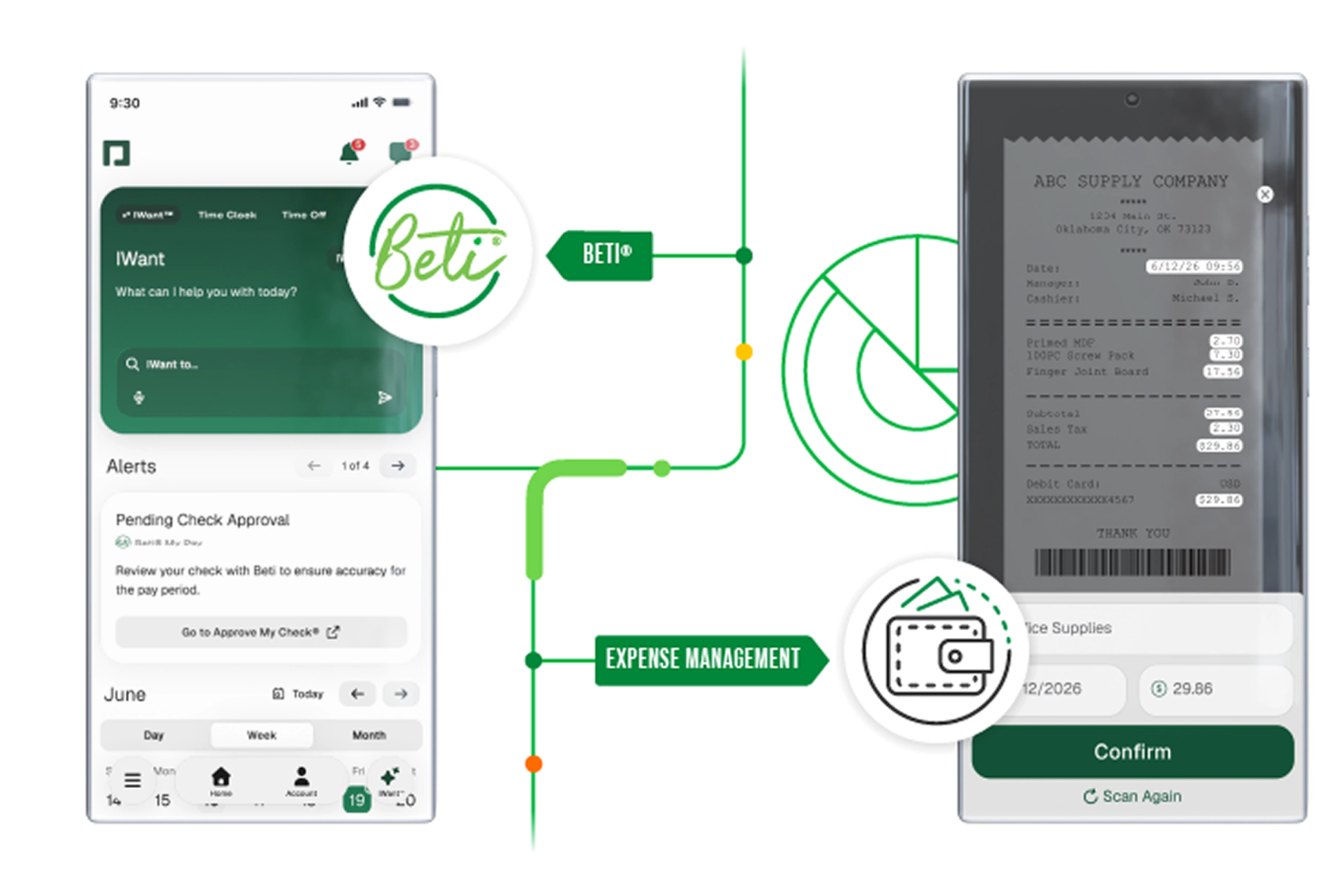
An HR and payroll platform powered by a single database, Paycom gives law firms tools for payroll automation, time tracking, benefits management, performance, and learning in one place.
Who Is Paycom Best For?
Paycom is a strong fit for mid-to-large law firms that need a single platform to manage HR, payroll, and workforce data without juggling multiple disconnected systems.
Why I Picked Paycom
I've included Paycom in my top picks because of how far it takes workflow automation across the entire HR lifecycle. Personnel action forms (PAFs) update automatically across the system the moment a change is made, so there's no manual follow-up when a firm promotes an associate or adjusts compensation. I also like GONE, which auto-approves or denies time-off requests based on your firm's staffing rules, removing a decision that would otherwise land on a manager's desk every time someone requests a Friday off.
Paycom Key Features
- Beti® payroll: Employees verify and approve their own payroll data before processing, catching errors before they become corrections.
- Benefits enrollment: Employees self-manage benefits elections directly in the platform, with eligibility rules applied automatically.
- Ask Here: A built-in employee communication tool that routes HR questions to the right person and logs every interaction.
- Performance management: Structured review templates support goal tracking, self-assessments, and manager evaluations in one place.
Paycom Integrations
Integrations are primarily delivered through Paycom's native HR and payroll suite, which includes built-in tools for talent management, time tracking, benefits administration, and employee self-service within a single database.
Pros and Cons
Pros:
- Single database eliminates duplicate data entry
- Built-in compliance reports like EEO-1 and OSHA
- Beti® lets employees review paychecks pre-submission
Cons:
- Implementation process can be lengthy and complex
- Custom reporting often requires extra Excel work

Best for integrated time tracking
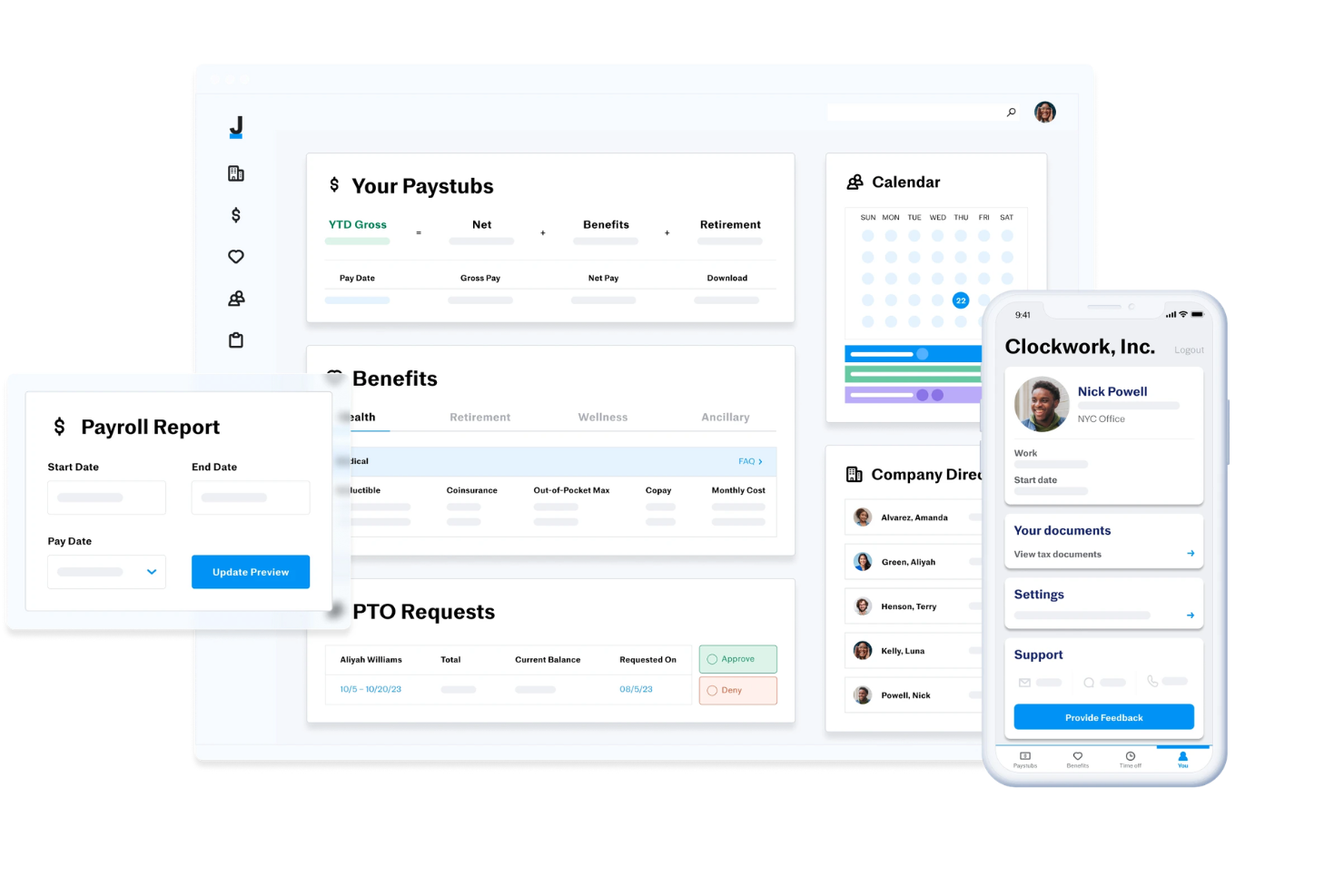
Justworks is a cloud-based HR and payroll platform designed for law firms that need payroll processing, benefits administration, compliance support, and integrated time tracking in one system.
Who Is Justworks Best For?
Justworks is a fit for small to midsize law firms that want a unified HR, payroll, and compliance platform.
Why I Picked Justworks
I picked Justworks as one of the best because I can manage payroll and HR tasks while tracking employee hours in the same platform. The built-in time tracking lets my team monitor billable and non-billable hours for attorneys and staff. I like that I can review timesheets and sync them directly with payroll, which helps keep everything accurate and audit-ready.
Justworks Key Services
- Automated payroll processing: Run payroll for salaried and hourly employees with automated tax filings.
- Benefits administration: Manage health insurance, 401(k), and other employee benefits from one dashboard.
- HR document storage: Store and organize employee handbooks, policies, and compliance documents securely.
- Onboarding workflows: Digitally onboard new hires with customizable checklists and e-signature support.
Justworks Integrations
Native integrations are not clearly documented. The tool supports integrations via API for custom connections.
Pros and Cons
Pros:
- Access to large-group health insurance plans
- Handles multi-state payroll and tax filings
- Built-in time tracking for hourly staff
Cons:
- Cannot manage billable hours for client invoicing
- No built-in document management for case files

Deel HR
Best for law firms with cross-border HR needs

Deel is a global payroll and compliance platform designed to simplify hiring and managing remote employees. It enables businesses to hire workers from anywhere in the world while ensuring compliance with local labor laws and regulations.
Why I Picked Deel:
As an HR software for law firms, Deel stands out for its comprehensive compliance management and HR features tailored to the needs of globally operating firms. Law firms often deal with complex regulations across different jurisdictions, making compliance a top priority. Deel's platform ensures that all hiring practices adhere to local laws, reducing the risk of legal issues. Additionally, its robust contract creation and management tools help law firms streamline the onboarding process.
Standout features & integrations:
Standout features include automated payroll, local benefits, multi-currency support, compliance documentation management, time off and expense reports, in-house visa support, tax handling, and EOR services.
Integrations include Outlook, QuickBooks, Xero, BambooHR, Slack, Brex, Google Workspace, Ashby, Carta, Confirm, Greenhouse, JazzHR, Jira, Okta, Pangea, and more.
Pros and Cons
Pros:
- Customizable reporting options
- Automated invoicing features
- Global compliance features
Cons:
- No mobile app for on-the-go HR management
- Initial learning curve to maximize the platform's features
New Product Updates from Deel HR

Deel Expands Stablecoin Wallet to 80+ Countries
Deel expands its Stablecoin Wallet to 80+ countries with dollar-backed balances and optional rewards. This gives eligible contractors more ways to hold and manage earnings inside Deel. For more information, visit Deel’s official site.
 .
.
Gusto
Best for payroll management

Gusto offers a streamlined way for small to medium-sized firms — including law firms without a dedicated HR department — to handle payroll, benefits, and basic HR operations through a single platform. If you’re running a law practice with employees or contractors, Gusto makes it easier to get payroll done right, manage benefits, and track time or PTO — all without needing deep HR expertise.
Why I Picked Gusto
I picked Gusto for its tailored approach to solving HR challenges faced by law firms. One standout feature is its payroll processing, which includes automatic tax calculations and direct deposit options, essential for ensuring accurate and timely payments. Additionally, Gusto's benefits administration feature allows you to manage employee benefits seamlessly, a critical aspect for retaining top legal talent. These features, combined with its compliance support, make Gusto a reliable choice for law firms looking to enhance their HR operations.
Gusto Key Features
In addition to its payroll and benefits administration, Gusto offers several other features that can benefit your law firm:
- Employee Self-Service Portals: Employees can access and update their personal information, reducing the administrative workload on your HR team.
- Time Tracking: Keep track of billable hours and employee attendance, crucial for managing your practice's productivity and payroll.
- Compliance Alerts: Receive real-time notifications about regulatory changes and deadlines, ensuring your firm stays compliant with legal requirements.
- Customizable Onboarding Checklists: Streamline the onboarding process for new hires with tailored checklists that suit your firm's specific needs.
Gusto Integrations
Integrations include QuickBooks, Xero, FreshBooks, Clover, TSheets, When I Work, Deputy, Homebase, Trainual, and Expensify.
Pros and Cons
Pros:
- Payroll, benefits, and HR in one unified platform.
- Built-in time tracking and PTO features simplify hourly billing.
- Offers self-service onboarding and online storage of tax forms and pay stubs for contractors and employees.
Cons:
- Limited customization for complex payroll scenarios or non-standard billing structures.
- Reporting and analytics capabilities may be less flexible than specialized HR or finance platforms.
New Product Updates from Gusto
Gusto Adds Solo Advisory Tools and Mobile Money Features
Gusto adds Solo S-Corp Advisory Tools and Gusto Money on Mobile for tax guidance, invoicing, and bill payments. These updates help accountants advise solopreneurs and let users manage business finances from their phones. For more information, visit Gusto’s official site.

Aeqium
Best for complex compensation planning

Aeqium is a compensation planning software designed to help complex legal organizations manage salaries, bonuses, and equity with greater accuracy and efficiency. By automating workflows and eliminating the need for spreadsheets, Aeqium simplifies the compensation process for HR and finance teams.
Why I Picked Aeqium:
I picked Aeqium as a good HR software for law firms because of its focus on customizable compensation planning tools. Its compensation cycle management feature lets you automate reviews with logic tailored to your firm, track changes, and make mid-cycle adjustments. This is especially helpful for legal teams with evolving roles or billable hour models. Aeqium also provides compensation insights by integrating with your HRIS, allowing you to visualize salary trends, monitor historical changes, and flag equity gaps. These tools help maintain transparency, support fair pay practices, and give law firm HR teams better control over compensation strategy.
Standout features & integrations:
Standout features include compensation bands, an employee portal, interactive offer letters, real-time data integration, customizable review cycles, pay equity analysis, historical compensation tracking, automated workflows, change tracking, and budget distribution methods.
Integrations include ADP Workforce Now, BambooHR, Gusto, Justworks, Paylocity, Quickbooks, Run Powered by ADP, and DocuSign.
Pros and Cons
Pros:
- Pay equity modeling tools
- Customizable templates for offer letters
- Flexibility in configuring pay bands
Cons:
- No built-in ATS or recruiting tie-ins
- Limited HR analytics beyond compensation

Workday
Best for enterprise finance and HR for law firms

Workday is a comprehensive enterprise software solution that integrates finance, HR, and planning functionalities. It is best for law firms seeking a unified system to manage both financial and human resources efficiently.
Why I Picked Workday:
I chose Workday for its robust integration of finance and HR capabilities, which is crucial for law firms that need to manage complex financial transactions and a diverse workforce. Workday stands out for its ability to provide real-time insights and simplify operations, making it the best choice for enterprise finance and HR management.
Standout features & integrations:
Standout features include human capital management, financial management, spend management, and analytics & reporting. It also provides tools for workforce planning, talent management, and payroll.
Workday integrates natively with several tools including Salesforce, Microsoft Azure, Google Cloud, Slack, ServiceNow, Okta, Workday Adaptive Planning, Workday Peakon, Workday Extend, and Workday Prism Analytics.
Pros and Cons
Pros:
- Robust reporting capabilities
- Real-time analytics
- Comprehensive HR and finance integration
Cons:
- Requires training for full utilization
- Complex implementation
Best for mid-market law firm HR and payroll
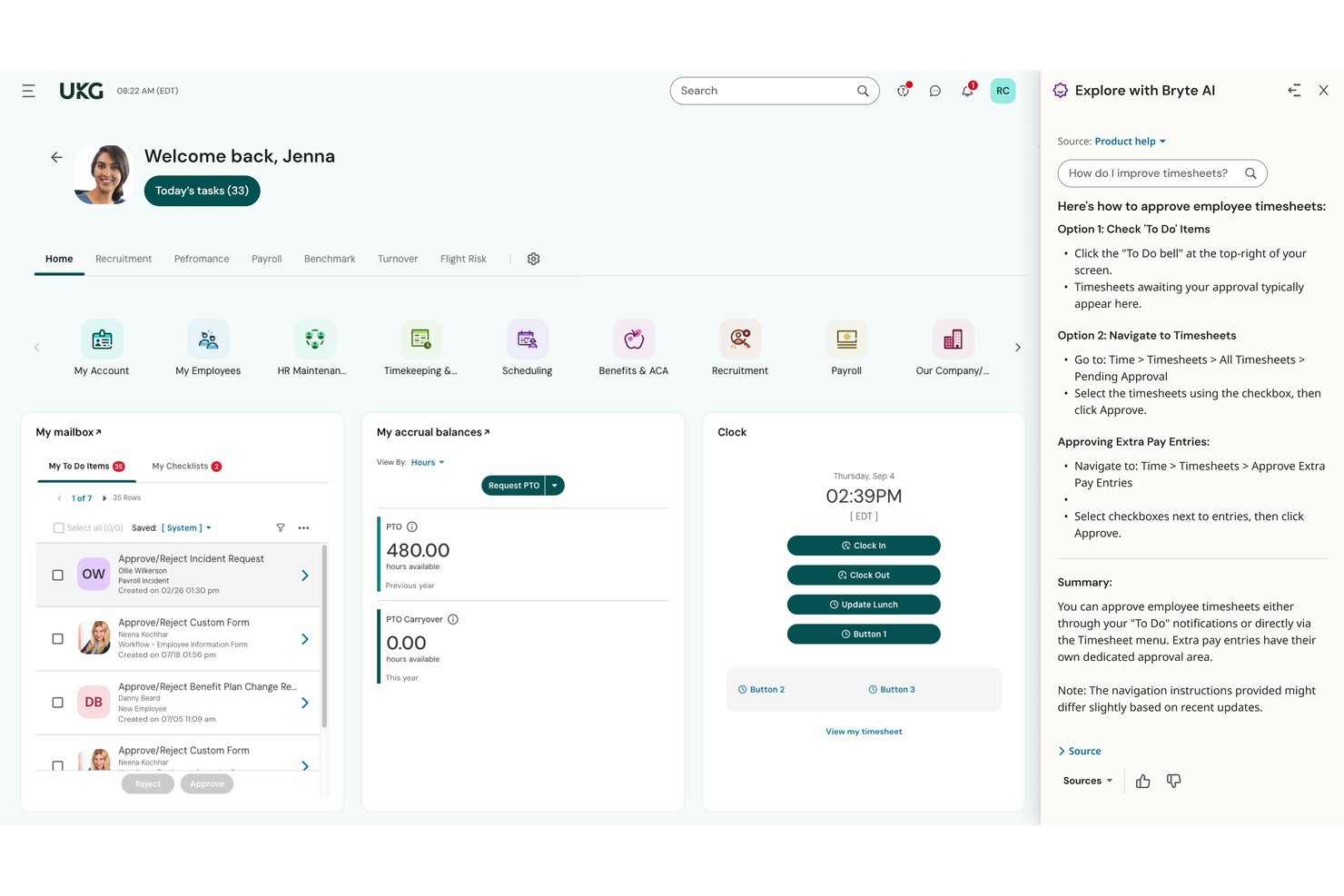
UKG Ready is an all-in-one HR platform that combines payroll, benefits administration, time and attendance, recruiting, onboarding, and performance management in a single system for mid-market organizations.
Who Is UKG Ready Best For?
UKG Ready is a strong fit for mid-market law firms with up to around 2,500 employees that need a unified HR, payroll, and benefits platform without managing multiple disconnected tools.
Why I Picked UKG Ready
I picked UKG Ready because it's the only tool on this list with a documented law firm deployment, and the results at Mike Morse Law Firm speak for themselves: onboarding time dropped 40% and turnover fell from 33% to 7%. Its native continuous payroll engine handles multi-EIN structures and automated multi-state tax filing, which mid-market firms with multiple office locations genuinely need. The Compliance Hub also automates ACA, FMLA, and leave management in one place, cutting the manual compliance work that bogs down lean HR teams.
UKG Ready Key Features
- Bryte AI™ assistant: An embedded AI tool that flags payroll anomalies, surfaces manager coaching prompts, and predicts flight risk across HR, payroll, and talent modules.
- Compliance Hub: A centralized dashboard that automates ACA, FMLA, GDPR, and CCPA compliance tasks and delivers regulatory update alerts.
- Nine-box succession planning: A visual talent grid that maps employee performance against potential to support associate and staff career progression decisions.
- Smart Forms™ benefits enrollment: Guided digital forms that walk employees through plan selection, life events, and passive enrollment without HR intervention.
UKG Ready Integrations
UKG Ready offers marketplace integrations with QuickBooks, NetSuite, Sage, Indeed, Deel, Flexspring, and iPaaS.com. It has no documented native integrations with Clio, Aderant, Elite 3E, iManage, or NetDocuments, but supports API and custom integrations.
Pros and Cons
Pros:
- AI assistant flags payroll and HR issues
- Real-time payroll handles multi-EIN structures
- Law firm deployment success with onboarding results
Cons:
- No native law practice management integrations
- No partner compensation or CLE tracking tools
Best for mid-market payroll and HR compliance
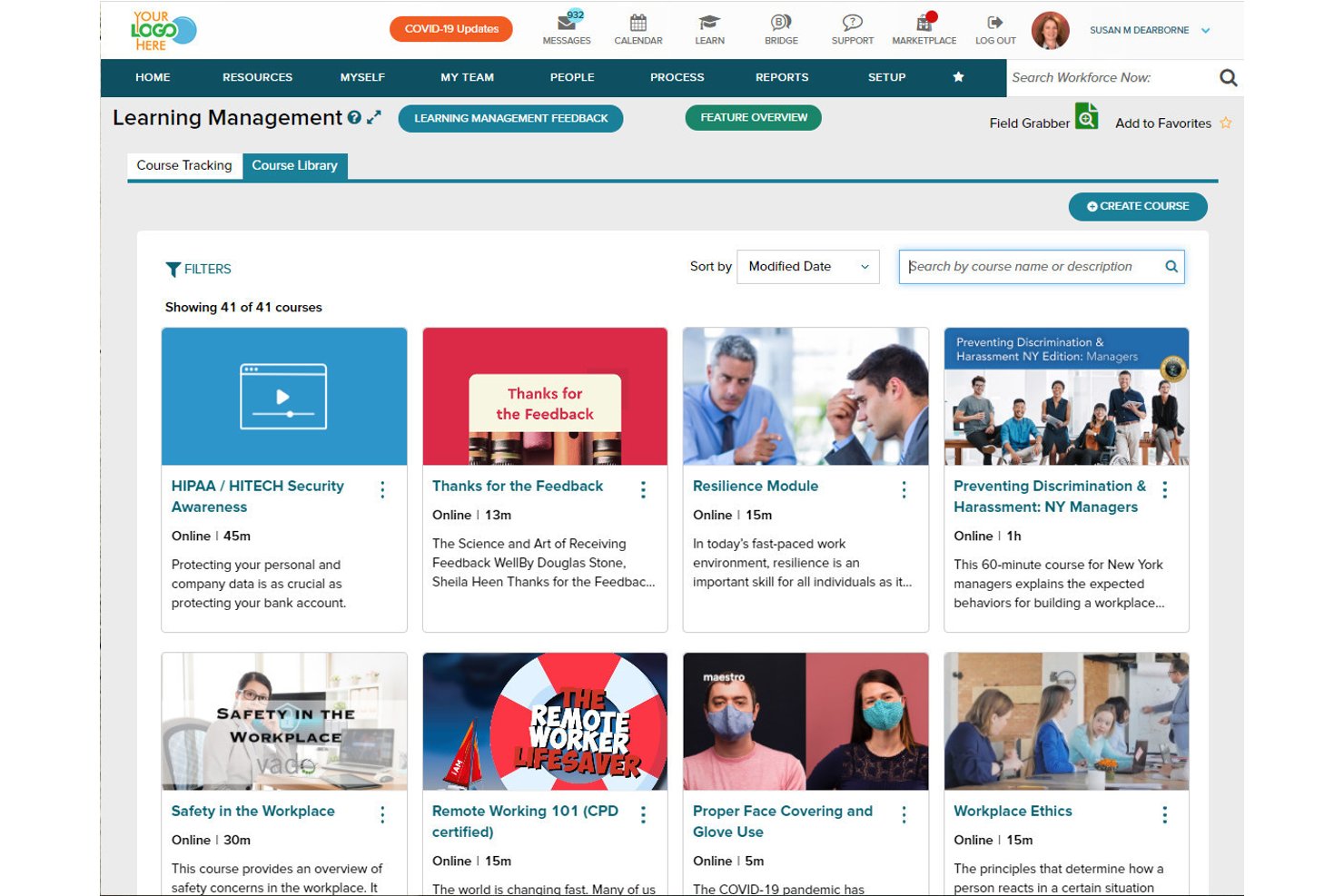
ADP Workforce Now is a mid-market HCM platform that combines payroll, benefits administration, time and attendance, talent acquisition, and HR recordkeeping in a single unified system.
Who Is ADP Workforce Now Best For?
ADP Workforce Now is a strong fit for mid-market law firms with 50+ employees that need enterprise-grade payroll, multi-state tax compliance, and benefits administration as their HR backbone.
Why I Picked ADP Workforce Now
ADP Workforce Now earns its spot on my shortlist because no other platform matches its depth in multi-state payroll compliance, which is a real pressure point for mid-market law firms operating across multiple offices and jurisdictions. I like that SmartCompliance handles automatic tax withholding, W-2 and 1099 filings, and wage garnishments across federal, state, and local levels without manual intervention. ADP Assist also flags payroll errors before they process, which matters when attorney pay structures involve retroactive adjustments or complex deductions.
ADP Workforce Now Key Features
- AI-powered payroll error detection: ADP Assist scans each payroll run and flags anomalies before processing, reducing costly corrections for firms with complex pay structures.
- ADP DataCloud benchmarking: Compares your firm's compensation and workforce data against 39+ million worker records to support competitive salary decisions.
- Digital I-9 and e-signature onboarding: Collects new hire documents, signatures, and acknowledgements through a configurable digital portal without paper-based workflows.
- Role-based access controls with audit trails: Restricts data visibility by role and logs every record change, supporting the confidentiality standards law firms are required to maintain.
ADP Workforce Now Integrations
ADP Workforce Now offers hundreds of Marketplace integrations, including Sage, QuickBooks, Xero, Workday, PeopleInsight, and Payroll Integrations. It has no documented native integrations with Clio, Aderant, Elite 3E, iManage, or NetDocuments, but API Central supports custom connections.
Pros and Cons
Pros:
- AI-driven benchmarking for compensation decisions
- Enterprise security certifications meet legal needs
- Payroll accuracy for multi-state law firms
Cons:
- No connections to legal practice management systems
- No legal-specific compliance tracking features
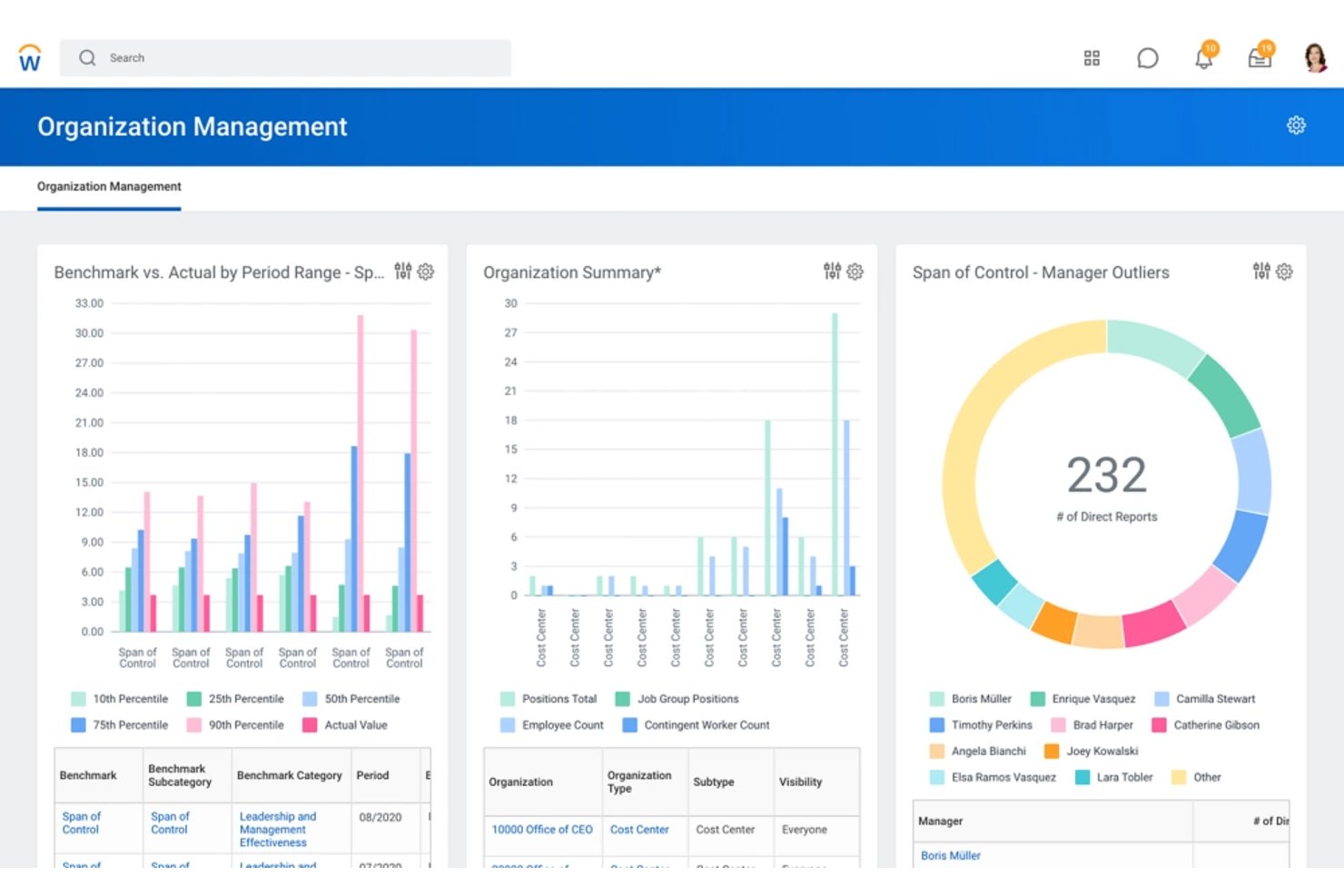
Workday HCM is an enterprise HR platform that centralizes employee records, payroll, talent acquisition, workforce management, and people analytics across large, multi-office organizations.
Who Is Workday HCM Best For?
Workday HCM is built for large law firms—think Am Law 100 scale—that need a single, enterprise-grade system to manage HR, payroll, talent, and workforce analytics across multiple offices.
Why I Picked Workday HCM
Workday HCM earns its spot on my shortlist because 64% of Am Law 100 firms already run on it, which tells you something about how well it maps to the operational complexity of large law firms. I particularly like its unified data model, which keeps attorney records, payroll, and workforce analytics in one system of record rather than spread across disconnected tools. Its enterprise-grade security posture, including SOC 2 Type II, ISO 27001, and HIPAA attestation, meets the confidentiality standards that partner compensation data genuinely demands.
Workday HCM Key Features
- AI-powered candidate screening: HiredScore AI automatically reviews and ranks applicants, cutting sourcing time from hours to minutes.
- Multi-jurisdiction payroll processing: A continuous calculation engine handles automated tax compliance across multiple states and countries in one system.
- Configurable performance and succession planning: Supports 360-degree reviews, goal cascading, and succession workflows tailored to firm hierarchies and seniority tiers.
- Prism Analytics for external data integration: Pulls in data from outside Workday so you can build unified workforce reports alongside billing or operational data.
Workday HCM Integrations
Workday HCM supports integrations with Strada, CloudPay, Deel, and PwC for global payroll, plus Azure AD and Okta for SSO. REST APIs, Workday Web Services, RaaS, XML, XSLT, and JSON support custom connections to legal systems such as Aderant and Elite 3E.
Pros and Cons
Pros:
- Enterprise-grade security and compliance certifications
- Unified employee data across all offices
- Used by 64% of Am Law 100 firms
Cons:
- Customization needed for legal workflows
- No native CLE or bar tracking


The Access Group provides comprehensive legal software solutions designed to improve efficiency and productivity for law firms. It is best for unified legal software solutions because it integrates various aspects of legal practice management into one seamless platform.
Why I Picked The Access Group:
I chose The Access Group for its ability to offer a unified platform that covers all essential aspects of legal practice management. This tool stands out because it integrates case management, practice management, compliance, HR, and financial management into one cohesive system. I believe it is best for unified legal software solutions due to its comprehensive approach, which allows law firms to manage all their operations from a single platform.
Standout features & integrations:
Standout features include case management, practice management, compliance software, HR management, and financial management. It also offers cloud hosting, client portals, and document management.
Integrations include Microsoft Office, Docusign, iManage, NetDocuments, QuickBooks, Xero, Sage, Clio, LexisNexis, and Adobe Sign.
Pros and Cons
Pros:
- Strong compliance tools
- Cloud hosting available
- Comprehensive feature set
Cons:
- Initial setup may have slight learning curve
- May require training
Other HR Software For Law Firms
Here are some additional HR software for law firms options that didn’t make it onto my shortlist, but are still worth checking out:
- Rippling
For automating HR, IT, and finance processes
- Breathe HR
For secure HR data management
- BambooHR®
For core HR at boutique law firms
- Paylocity
For multi-state payroll at growing firms
- Paychex Flex
For hiring and employee lifecycle management
- Namely
For all-in-one HR in professional services firms
- GoCo
For technology-driven HR solutions
- Paycor
For professional services integration
- Cezanne
For HR software tailored to law firms
- Paychex
For ABA-endorsed payroll and HR compliance


How I Evaluate HR Software for Law Firms
When a platform needs to handle everything from bar admission tracking to partner draws, I split my evaluation into baseline functionality and the differentiators that separate good from great.
Core Functionality (Table Stakes For This List)
When I'm selecting tools for my list, I rank each one on a scale from 0 (does not offer the functionality) to 5 (excels in this area) for each core functionality listed below. I then calculate the tool's total score into a percentage, using 65% as a benchmark to help assess its overall fit for the list.
- HR Information System: I need a centralized database that securely manages attorney, paralegal, and staff records, including firm-specific details like practice groups, bar status, and timekeeper IDs.
- Payroll & Benefits: I look for tools that handle law-firm-specific payroll complexities such as partner draws, multi-entity payrolls, and jurisdictional tax filings, alongside standard salary and benefits processing.
- Time, PTO & Leave Tracking: I want tracking that captures billable and non-billable hours, PTO, sick leave, and absences with approval workflows aligned to firm hierarchies and integration to billable time systems.
- Talent Acquisition & Onboarding: I require recruiting tools that support attorney and staff credential verification, bar admission checks, and conflicts reviews, combined with structured onboarding workflows.
- Performance & Compliance: I prioritize performance review systems tied to billable hour targets, goal tracking, and compliance monitoring for CLE credits, licensing, and confidentiality attestations.
- Security & Reporting: I insist on granular, role-based access controls and detailed audit logs to protect sensitive compensation and personnel data consistent with partnership governance and confidentiality standards.
Once I have a list of tools that meet the criteria, I consider what sets each platform apart.
Differentiating Factors (What Sets Vendors Apart)
Here's how I compare and contrast different vendors:
Standout Features
I look for native practice management integrations that sync HR data with billing platforms like Clio or Elite 3E, so timekeeper records stay accurate without manual re-entry. Ethical wall automation is another key differentiator—I check whether the HRIS can enforce information barriers tied to specific matters or clients. I also evaluate partnership track analytics, specifically dashboards that map associate progress against billable hour targets, origination credits, and review scores to support promotion decisions.
Beyond Features
I evaluate how deeply each platform integrates with legal billing systems like Elite 3E or Clio, since a broken sync between HR and timekeeper records creates billing errors that hit firm revenue. Security posture matters just as much—I check for SOC 2 Type II attestations, granular role-based access, and audit logs that satisfy confidentiality obligations around partner compensation data. I also look at whether the vendor offers implementation consultants who understand law firm hierarchies, origination credit structures, and bar admission data migration.
How to Choose HR Software for Law Firms
It’s easy to get bogged down in long feature lists and complex pricing structures. To help you stay focused as you work through your unique software selection process, here’s a checklist of factors to keep in mind:
| Factor | What to Consider |
|---|---|
| Scalability | Can the software grow with your firm? Consider whether it can handle more users or expanded functionality as your firm grows. |
| Integrations | Does it connect with your existing tools, like legal management software or payroll systems? Ensure smooth data flow to avoid manual data entry. |
| Customizability | Can you tailor the software to fit your specific workflows? Look for options to adjust fields and processes to match your firm's needs. |
| Ease of use | Is the interface intuitive for your team? Avoid tools with steep learning curves that could slow down adoption. |
| Implementation and onboarding | How long will it take to get up and running? Check if the vendor offers support, training, or resources to make the transition smoother. |
| Cost | Does it fit your budget? Watch out for hidden fees and compare pricing plans to ensure they align with your financial constraints. |
| Security safeguards | Does it protect sensitive data? Verify compliance with data protection regulations and look for features like encryption and user access controls. |
| Compliance requirements | Does it help you meet legal and industry standards? Consider features that assist with maintaining compliance in your jurisdiction. |
Trends for HR Software for Law Firms
HR software for law firms is evolving rapidly. Here are some key trends to watch in the near future as you consider your software options for your law firm:
- AI-Powered Recruitment Tools: AI is being used to screen resumes and match candidates to job descriptions. This reduces the time spent on manual sorting. It also helps in identifying the best talent more efficiently.
- Cloud-Based HR Systems: Cloud-based systems offer flexibility and remote access. They allow HR teams to manage tasks from anywhere. This is crucial for law firms with multiple locations.
- Employee Wellness Programs: HR software now includes features for mental health and wellness. These programs are important for maintaining employee morale. They also help in reducing burnout and turnover.
- Data Analytics for Performance Management: Advanced analytics are being used to track employee performance. This helps in making informed decisions about promotions and training. It also provides insights into workforce productivity.
- Mobile Accessibility: HR software is increasingly mobile-friendly. This allows employees to access HR services on their smartphones. It is particularly useful for on-the-go legal professionals.
HR software for law firms is evolving in notable ways. AI-powered recruitment tools enhance efficiency, while cloud-based systems offer flexibility and remote access. Integrated employee wellness programs help maintain morale and reduce turnover. Advanced analytics provide valuable insights into performance, aiding informed decision-making. Mobile accessibility enables legal professionals to access HR services on the go. Keep an eye on these trends to stay ahead in the competitive landscape of law firm management.
What Is HR Software for Law Firms?
HR software for law firms is a specialized tool designed to manage human resources tasks within legal practices. It is used by HR professionals, office managers, and firm administrators to handle recruitment, employee records, payroll, compliance, and performance management. This software helps ensure that the firm operates smoothly by managing staff efficiently and adhering to legal industry standards.
Components of HR software for law firms include modules for applicant tracking, employee onboarding, time and attendance tracking, benefits administration, and legal compliance management. These features allow firms to improve HR processes, maintain accurate records, and ensure compliance with employment laws specific to the legal industry.
Features
When selecting HR software for law firms, it's crucial to focus on features that cater to the unique needs of the legal industry. The right software can help manage the complexities of legal HR tasks efficiently and ensure compliance with industry standards.
- Compliance Management: Ensures the firm adheres to legal regulations and industry standards, reducing the risk of legal issues.
- Document Management: Centralizes storage and management of employee documents, making it easier to access and maintain records.
- Time and Attendance Tracking: Monitors employee hours and attendance, which is essential for accurate billing and payroll.
- Performance Management: Tracks and evaluates employee performance, helping to identify areas for improvement and development.
- Recruitment and Onboarding: Streamlines the hiring process and ensures new hires are integrated smoothly into the firm.
- Payroll Management: Automates payroll processing, ensuring employees are paid accurately and on time.
- Employee Self-Service: Allows employees to access and manage their own HR information, reducing administrative workload.
- Benefits Administration: Manages employee benefits programs, ensuring employees receive the benefits they are entitled to.
- Training and Development: Provides tools for employee training and professional development, which is crucial for maintaining a skilled workforce.
- Reporting and Analytics: Generate reports and analytics to help make informed HR decisions and track key metrics.
Choosing HR software with these features will help law firms manage their HR tasks more effectively and ensure they remain compliant with industry standards.
Benefits
Implementing HR software in law firms can significantly improve efficiency, accuracy, and overall management of human resources. Here are five primary benefits that law firms can gain from using HR software:
- Improved Time Management: HR software automates routine tasks, allowing HR professionals to focus on more strategic activities, thus saving time and increasing productivity.
- Enhanced Compliance: The software helps ensure that the firm adheres to legal and regulatory requirements by keeping track of necessary documentation and deadlines.
- Centralized Data Management: All employee information is stored in a single, easily accessible location, reducing the risk of data loss and making it easier to manage and retrieve information.
- Improved Recruitment Process: HR software simplifies the recruitment process through features also found in legal recruiting software, including automated job postings, applicant tracking, and communication, making it easier to find and hire the best talent.
- Employee Self-Service: Employees can access and update their personal information, request time off, and view benefits, reducing the administrative burden on HR staff.
Adopting HR software can lead to significant improvements in the management of human resources within law firms, ultimately contributing to a more efficient and compliant workplace.
Costs and Pricing
When considering HR software for law firms, it's essential to understand the various pricing models and features available. HR software can streamline many administrative tasks, such as payroll, employee onboarding, and compliance management, making it a valuable tool for law firms of all sizes. Here are the different plan options and their pricing to help you make an informed decision.
Plan Comparison Table for HR Software for Law Firms
| Plan Type | Average Price | Common Features |
|---|---|---|
| Free Plan | $0 | Basic employee management, limited user access, basic reporting, self-service portal |
| Basic Plan | $40/month + $6/user | Automated payroll, tax filings, employee self-service, basic HR tools, integrations with accounting software |
| Standard Plan | $99/month + $8/user | Advanced HR management, performance tracking, onboarding tools, compliance management, time and attendance tracking |
| Premium Plan | $150/month + $10/user | Full HR suite, advanced analytics, custom workflows, dedicated support, benefits administration, multi-state payroll |
When selecting an HR software plan, consider the size of your firm, the complexity of your HR needs, and your budget. Free plans can be a good starting point, but as your firm grows, investing in more comprehensive plans can provide significant benefits in terms of efficiency and compliance.
HR Software for Law Firms FAQs
Here are some commonly asked questions about HR software for law firms.
How does HR software help with compliance in law firms?
HR software helps law firms stay compliant by automating the tracking of employee certifications, managing legal documents, and ensuring adherence to labor laws. It can also provide audit trails and reporting features that make it easier to demonstrate compliance during audits.
Can HR software integrate with other tools used in law firms?
Yes, many HR software solutions offer integration capabilities with other tools commonly used in law firms, such as case management systems, billing software, and document management systems. This integration helps line up workflows and ensures that all systems work together efficiently.
Is it possible to customize HR software to fit the specific needs of a law firm?
Many HR software solutions offer customization options to fit the unique needs of a law firm. This can include custom workflows, tailored reporting, and specific compliance features. Customization ensures that the software aligns with the firm’s processes and requirements.
How does HR software improve employee management in law firms?
HR software improves employee management by centralizing employee information, automating routine tasks, and providing tools for performance management and development. This helps HR professionals and managers focus on strategic initiatives rather than administrative tasks, leading to better employee engagement and productivity.
What should law firms consider when choosing an HR software vendor?
When choosing an HR software vendor, law firms should consider factors such as the vendor’s experience in the legal industry, customer support quality, scalability of the software, and the availability of training resources. It’s also important to evaluate the vendor’s reputation and read reviews from other law firms to ensure they have a track record of reliability and customer satisfaction.
How can HR software assist with recruitment in law firms?
HR software can assist with recruitment by automating job postings, tracking applicants, and managing the hiring process. It can also provide tools for screening candidates, scheduling interviews, and onboarding new hires. This helps law firms attract and retain top talent while reducing the time and effort required for recruitment.