

Finding the right recruitment analytics software for your needs can be time-consuming.
You're looking for a way to simplify your hiring process and make data-driven decisions, but the long list of options can be overwhelming. Don’t worry, you’ve come to the right place.
In this post, I’ll help you make this process easier by drawing on my extensive experience using and researching recruitment analytics software to guide you through the selection process.
Why Trust Our Software Recommendations
6,700+
Reviews
20
Industry experts
16+
Evaluation factors
14
Years
Our team has been testing and reviewing software since 2012. As HR experts ourselves, we know how difficult—and important—it is to choose the right software.
For this guide, we evaluated tools using hands-on testing and independent research, scoring tools using our selection criteria. We also draw on insights from industry thought leaders and practicing HR experts.
Our reviews reflect our human editorial judgment, not a sales pitch.
Expert reviewers:
- Phil GrayCOO
 Kim BehnkeHR Tech Editor & Analyst
 Josh BarkerPeople Ops Manager

Recruitment Analytics Software Pricing Comparison Table
The table below compares pricing details for my top recruitment analytics software selections.
| Tool | Best For | Trial Info | Price | ||
|---|---|---|---|---|---|
| 1 | Best for comparing recruiting agency performance | Free demo available | From $599/employee/month | Website | |
| 2 | Best for programmatic job advertising automation | Free demo available | Pricing upon request | Website | |
| 3 | Best for data-driven decision-making | Free demo available | Pricing upon request | Website | |
| 4 | Best for comparing sources by placement fees | Free demo available | From $599/employee/month | Website | |
| 5 | Best as an AI for business | Free trial + Free demo available | From $8/user/month | Website | |
| 6 | Best for customizable analytics and reporting | 14-day free trial + free demo available | From $15/user/month (billed annually) | Website | |
| 7 | Best for collaborative hiring processes | Free demo available | Pricing upon request | Website | |
| 8 | Best for comprehensive talent acquisition and people analytics | 30-day free trial + free demo | Pricing upon request | Website | |
| 9 | Best for comprehensive talent insights | Free demo available | Pricing upon request | Website | |
| 10 | Best recruitment analytics software for staffing agencies | Free demo available | From $99/user/month | Website |


Best Recruitment Analytics Software Reviews
Here are my detailed summaries of the best recruitment analytics tools that made it into my top 10 list, including notes on why I picked them. Each review offers a detailed look at the key features, pros & cons, integrations, and ideal use cases to help you find the best tool for you.
 Best for comparing recruiting agency performance
- Free demo available
- From $599/employee/month
Visit WebsiteCustomer Rating:4.9/5
Deel's talent sourcing suite lets you define roles, set budgets, and upload job specs in one place. Deel is a cloud-based hiring platform that helps companies source and onboard talent across borders. It connects you with vetted staffing agencies, handles compliance, and centralizes your recruiting activity in one place.
Why I picked Deel: I picked Deel because it gives you detailed visibility into how each staffing agency performs. You can track key metrics like applicant volume, time-to-hire, spend, and time saved, all in one place. This helps your team evaluate what’s working and adjust quickly. Instead of managing data across spreadsheets or email, Deel centralizes everything so you can make faster, data-backed hiring decisions.
Standout features & integrations:
Standout features include a requisition builder, candidate CV management, job spec uploads, cross-border compliance, role-based access control, multi-agency management, global hiring support, contractor and employee onboarding, and centralized reporting.
Integrations include Hubstaff, QuickBooks, Slack, Google Workspace, JIRA, Brex, Expensify, NetSuite, BambooHR, Skovik, Workday, and Xero.
Pros and Cons
Pros:
- Great visibility into recruiter performance
- Helps hire quickly across multiple countries
- Strong compliance support built in
Cons:
- No internal candidate database feature
- You need to rely entirely on partner agencies
Learn more about Deel Hire: Best for programmatic job advertising automation
- Free demo available
- Pricing upon request
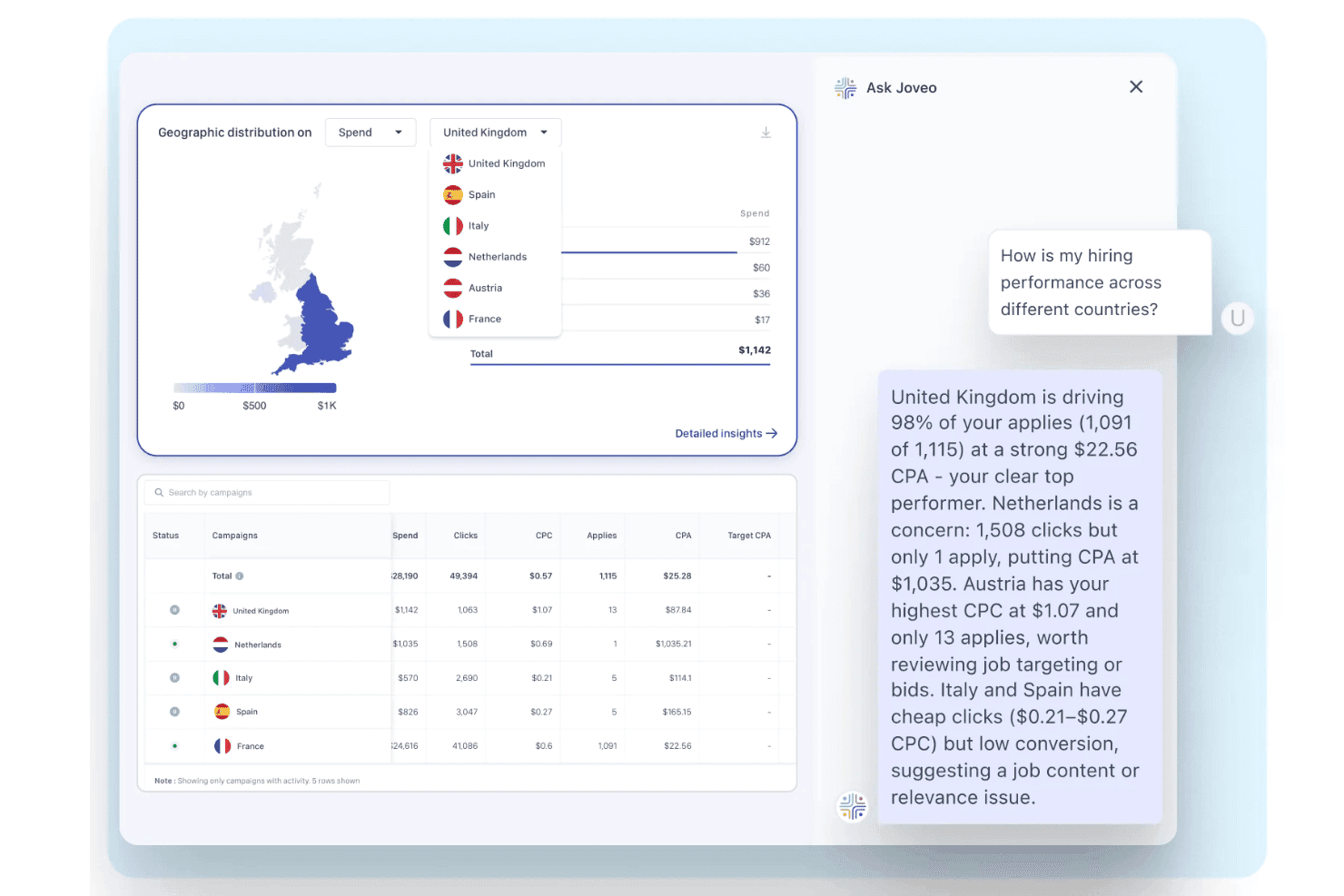
Joveo provides a candidate relationship management dashboard with AI-powered hiring insights, campaign analytics, and geographic recruitment performance. Joveo is an agentic recruiting platform that combines programmatic job advertising, full-funnel analytics, career site building, conversational AI screening, and ATS-integrated data reporting in one place.
Who Is Joveo Best For?
Joveo is a strong fit for talent acquisition teams at mid-to-large enterprises managing high-volume hiring across multiple sourcing channels and job boards.
Why I Picked Joveo
I've included Joveo in my top picks because its programmatic job advertising automation (MOJO Pro) connects directly to source-of-hire analytics in a way most platforms don't. I can trace spend from a specific job board click all the way through to hire, with cost-per-hire broken down by publisher. The Ask Joveo AI layer lets me query that data in plain English instead of digging through dashboards.
Joveo Key Features
- Conversational analytics interface: Users can type questions in plain English to query recruiting data and get immediate visual answers.
- Real-time anomaly detection: The platform automatically highlights outliers or unexpected hiring funnel changes for faster resolution.
- Configurable, role-based dashboards: Teams can create custom dashboards and scheduled reports tailored to each recruitment stakeholder's needs.
- Native integrations with ATS and HR platforms: Connects directly with over 100 applicant tracking systems to unify jobs, candidates, and performance data.
Joveo Integrations
Joveo offers native integrations with ATS platforms including iCIMS, Greenhouse, Workday, Bullhorn, SAP SuccessFactors, Oracle Recruiting Cloud, and Cornerstone. An API is also available for custom integrations.
Pros and Cons
Pros:
- AI surfaces funnel anomalies without manual steps
- Source-of-hire data tracks spend all the way to hire
- Automates spend across 500+ job publishers
Cons:
- Setup and onboarding can take significant time
- Reporting depth is limited
Learn more about Joveo: Best for data-driven decision-making
- Free demo available
- Pricing upon request
Visit WebsiteCustomer Rating:4.4/5
Greenhouse is a recruitment analytics software that empowers data-driven decision-making in talent acquisition processes for optimized hiring outcomes. Greenhouse is a recruitment analytics tool with robust reporting and analytics capabilities. It enables recruiters and hiring managers to optimize their talent acquisition strategies effectively.
Why I picked Greenhouse: I chose Greenhouse for its comprehensive approach to data-driven decision-making in recruitment, which sets it apart from other tools in the market. I believe Greenhouse is the best for data-driven decision-making due to its advanced reporting capabilities that help identify bottlenecks and improve critical KPIs like time to hire and cost of hire.
Standout features & integrations:
Standout features include customizable reporting dashboards, advanced analytics tools for tracking key recruitment metrics, and predictive modeling for identifying top candidates.
Greenhouse integrates with various tools to enhance its functionality, including LinkedIn, Slack, Microsoft Teams, Zoom, Google Calendar, Zapier, Greenhouse Onboarding, Greenhouse CRM, Indeed, and Glassdoor.
Pros and Cons
Pros:
- Offers a full-feature mobile app
- Predictive modeling for identifying top candidates
- Robust reporting and analytics capabilities for data-driven decision-making
Cons:
- Pricing details are not transparent
- Business intelligence tools are only available in their top-tier paid plan
 Best for comparing sources by placement fees
- Free demo available
- From $599/employee/month
Visit WebsiteCustomer Rating:4.2/5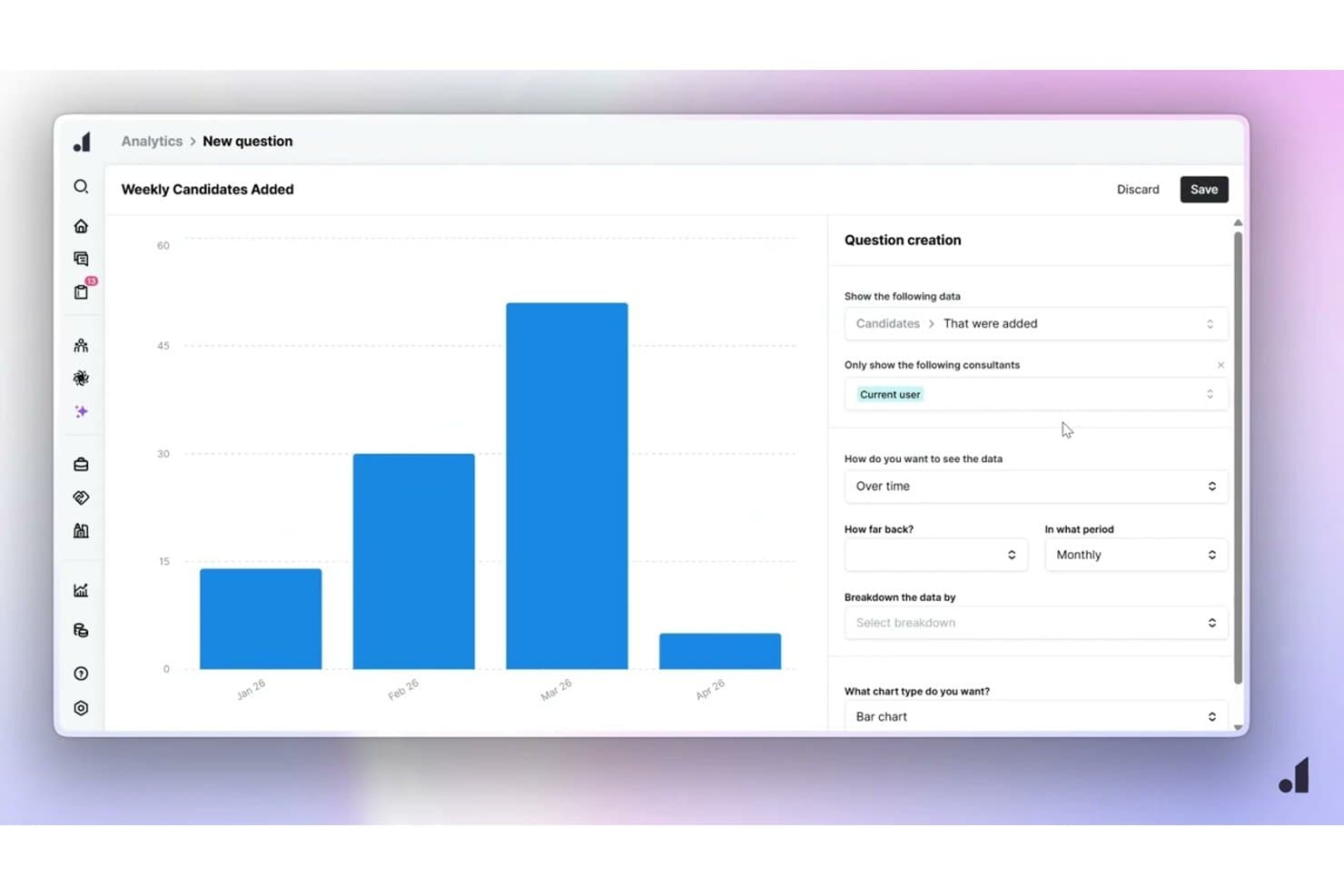
Atlas lets users build custom recruitment analytics charts by period. Atlas is an AI-powered recruitment platform built for agencies that combines CRM, pipeline tracking, sourcing, and real-time analytics dashboards for measuring recruiter performance, placements, and revenue.
Who Is Atlas Best For?
Atlas is built for recruitment agencies—particularly multi-office or growing firms that want real-time visibility into recruiter performance, pipeline health, and placement revenue.
Why I Picked Atlas
I picked Atlas as one of the best because its source-of-hire reporting lets you compare channels directly by placements and fees, not just application volume. That distinction matters when you're deciding whether to renew a job board contract or double down on LinkedIn sourcing. I also like that you can build consultant leaderboards and filter dashboards by desk or period using plain-language prompts, so performance reviews don't require a separate reporting tool.
Atlas Key Features
- Real-time pipeline dashboards: Atlas tracks pipeline stages, funnel conversions, pacing, and pipeline health with live data updates across your team.
- Prompt-built dashboard creation: Describe the view you need in plain language and Atlas builds the dashboard, including chart type, filters, and date range.
- Consultant leaderboards: Rank recruiters by business metrics and display leaderboards on office screens for team-wide visibility.
- AI-powered analytics summaries: Atlas analyzes recruitment data to surface patterns, performance gaps, and suggestions based on historical outcomes.
Atlas Integrations
Atlas lists integrations with Broadbean, idibu, and OneUp Sales for applicant capture, job posting, and reporting. It also offers an Open API for custom connections, although sync frequency and two-way ATS or HRIS data flows aren't documented.
Pros and Cons
Pros:
- Users praise visibility across recruitment operations
- Real-time pipeline and funnel visibility
- Compares sourcing channels by placements and fees
Cons:
- No demographic funnel or bias reporting
- ATS/HRIS analytics connections remain unclear
Learn more about Atlas: Best as an AI for business
- Free trial + Free demo available
- From $8/user/month
Visit WebsiteCustomer Rating:4.4/5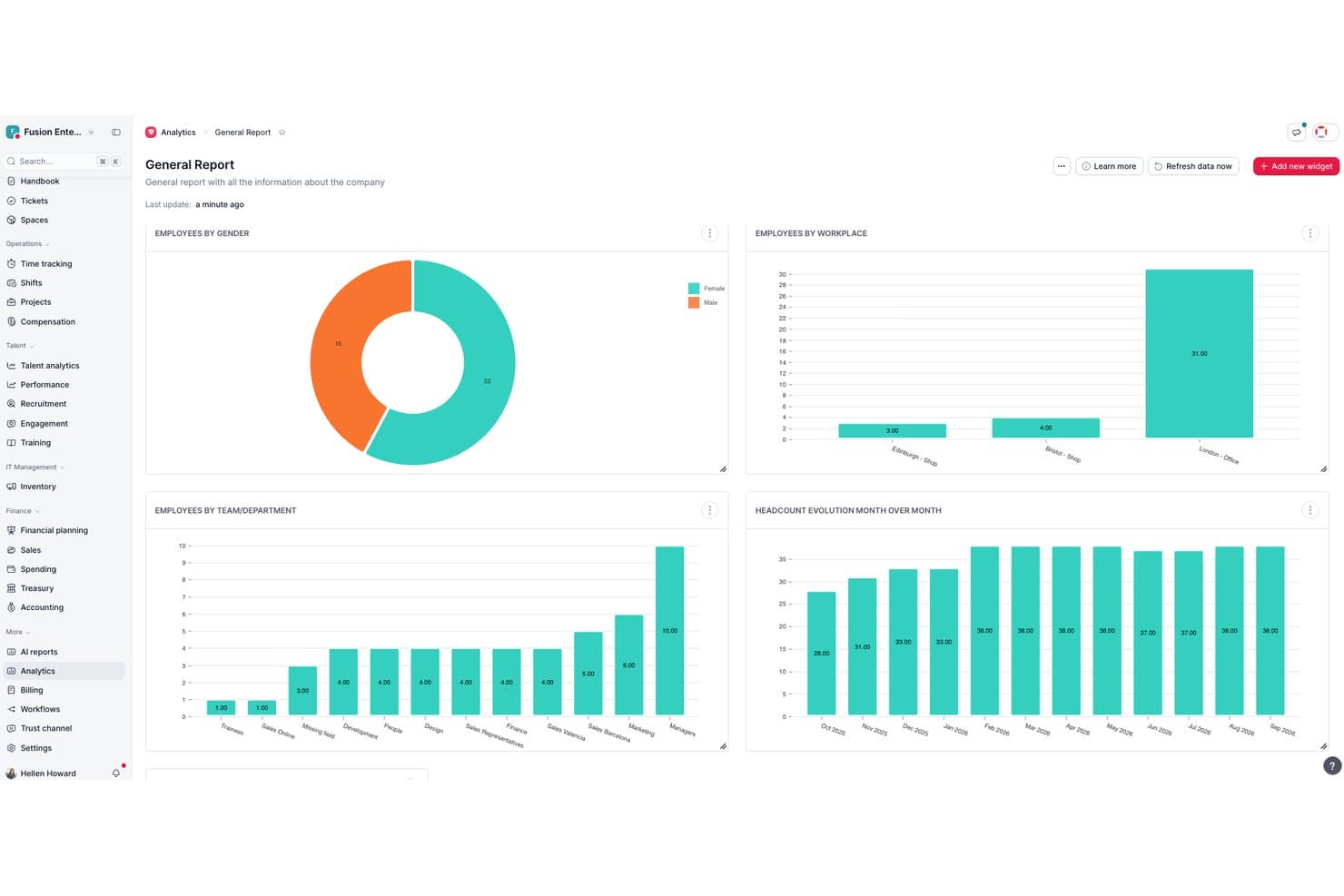
Factorial centralizes HR analytics into visual workforce reports. Factorial is an all-in-one HR platform repositioned as an AI for business, combining an built-in ATS, recruitment insights, and AI-driven reporting to track hiring funnel metrics, source effectiveness, and time-to-hire.
Who Is Factorial Best For?
Factorial suits small and mid-sized businesses that want AI-driven HR and recruitment tools in one platform, without managing multiple disconnected systems.
Why I Picked Factorial
I've included Factorial in my top picks because its AI for business positioning goes well beyond a standard ATS, using AI to handle day-to-day operations like generating reports, answering employee policy questions, and planning timetables alongside recruitment. I particularly like Factorial One, the built-in AI agent that automates report creation and surfaces hiring insights directly from your HR data. Its Recruitment Insights module tracks source effectiveness and time-to-hire in the same platform where payroll, performance, and onboarding data live.
Factorial Key Features
- AI-generated reports: Factorial One, the platform's built-in AI agent, creates HR and recruitment reports automatically from your existing data without manual configuration.
- Customizable hiring pipeline stages: Recruiters can add, rename, and reorder funnel stages and set up automatic candidate communications triggered at each transition.
- Multi-board job posting: Through the JOIN integration, a single job post distributes across 10+ free and 100+ premium job boards, including LinkedIn and Indeed.
- Power BI integration: Syncs Factorial data directly with Microsoft Power BI for interactive, live dashboards that go beyond the platform's native reporting views.
Factorial Integrations
Factorial lists 16 recruitment and ATS marketplace integrations, including Greenhouse, Workable, Teamtailor, Recruitee, Breezy, LinkedIn, and JOIN. It integrates with Microsoft Power BI and Zapier, and offers a public API for custom connections.
Pros and Cons
Pros:
- Hiring data links with broader HR metrics
- Recruitment insights track source effectiveness
- AI-generated reports connect hiring insights
Cons:
- No recruiter productivity or DEI metrics
- Funnel analytics omit detailed stage conversions
 Best for customizable analytics and reporting
- 14-day free trial + free demo available
- From $15/user/month (billed annually)
Visit WebsiteCustomer Rating:4.8/5
Manatal is a recruitment analytics software that streamlines hiring processes with AI-driven insights and customizable reporting for optimized talent acquisition. Manatal is a cloud-based recruitment solution designed to optimize recruitment analytics. It provides in-depth analysis and detailed performance reports.
Why I picked Manatal: I chose Manatal for its comprehensive analytics suite that offers actionable insights into the entire recruitment process. Its ability to customize dashboards and generate detailed reports makes it stand out from other recruitment analytics tools. I believe Manatal is the best for recruitment analytics optimization due to its advanced reporting capabilities that help identify bottlenecks and improve critical KPIs like time to hire and cost of hire.
Standout features & integrations:
Standout features include a customizable dashboard that provides a complete snapshot of recruiting data and KPIs, a full reporting and analytics suite, and candidate reports that help optimize sourcing strategies. The tool also offers job reports for individual or overall analysis and hiring performance reports with over 20 pre-built KPIs (key performance indicators).
Manatal integrates with various tools to enhance its functionality, including LinkedIn, Indeed, Glassdoor, Google Calendar, Microsoft Outlook, Slack, Zapier, Mailchimp, Google Drive, and Microsoft Teams.
Pros and Cons
Pros:
- Responsive and helpful customer support
- Comprehensive analytics suite with over 20 pre-loaded KPIs
- Customizable dashboards and detailed reporting
Cons:
- No multi-lingual user interface abilities
- Could use more native software integrations
 Best for collaborative hiring processes
- Free demo available
- Pricing upon request
Visit WebsiteCustomer Rating:4.4/5
Recruitee is a recruitment analytics software that simplifies hiring processes with intuitive tools and actionable insights for efficient talent acquisition. Recruitee enhances team involvement throughout the hiring process. It stands out for enabling a collaborative approach to recruitment.
Why I picked Recruitee: I chose Recruitee for its distinct focus on team collaboration in recruitment. It differentiates itself by fostering a shared hiring environment, which is crucial for companies that value collective input. I believe Recruitee is the best for collaborative hiring processes because it provides tools that promote teamwork and transparency, making the recruitment process a unified effort.
Standout features & integrations:
Standout features include customizable pipelines, automated task management, and comprehensive reporting tools. These features aim to enhance hiring efficiency and provide insights into recruitment activities.
Recruitee integrates natively with Google Meet, Teams, Zoom, DocuSign, HelloSign, SignRequest, and HRIS systems like Sympa.
Pros and Cons
Pros:
- Advanced reporting and analytics
- Team collaboration features
- Customizable recruitment pipelines
Cons:
- Offer letters could support more customization
- Limited customization options for your reports
 Best for comprehensive talent acquisition and people analytics
- 30-day free trial + free demo
- Pricing upon request
Visit WebsiteCustomer Rating:4.4/5
Visier is a recruitment analytics software providing comprehensive insights to optimize hiring strategies and improve talent acquisition outcomes effectively. Visier Talent Acquisition Insights is a tool that enhances talent acquisition strategies and improves hiring quality. It provides a complete view of the talent acquisition process and helps companies hire high-quality people faster and more efficiently.
Why I picked Visier: I chose Visier for its ability to analyze the full employee lifecycle, which sets it apart from other recruitment analytics software. Its comprehensive approach to talent acquisition allows for a deeper understanding of hiring quality and recruiter efficiency. I believe Visier is the best for comprehensive talent acquisition because it provides end-to-end insights covering the entire recruitment pipeline, offering a 360° view of the workforce and enabling better decision-making.
Standout features & integrations:
Standout features include a dynamic pipeline view, people analytics, talent retention, learning analytics, and workforce planning. These features give a unified picture of workforce data crucial for making informed hiring decisions.
Visier integrates with various tools to enhance its functionality, including Workday, Oracle HCM Cloud, SAP SuccessFactors, ADP Workforce Now, Ceridian Dayforce, Ultimate Software UltiPro, Kronos Workforce Ready, IBM Kenexa, Cornerstone OnDemand, and BambooHR.
Pros and Cons
Pros:
- User-friendly interface that empowers leaders with insights
- Analyzes the full employee lifecycle
- Provides a 360° view of the workforce
Cons:
- Limited customization options for reporting templates
- Learning curve for mastering advanced analytics features
Learn more about Visier: Best for comprehensive talent insights
- Free demo available
- Pricing upon request
Visit WebsiteCustomer Rating:4.3/5
Phenom People is a recruitment analytics software that leverages AI to optimize talent acquisition, enhance candidate experiences, and improve hiring processes. Phenom People uses AI and machine learning to provide organizations with deep insights to optimize talent acquisition, enhance candidate experiences, and drive hiring success.
Why I picked Phenom People: I chose Phenom People for its robust AI-driven analytics capabilities. It stands out for its focus on providing comprehensive talent insights tailored specifically for the recruitment team, making it the best choice for organizations seeking to leverage data-driven strategies for hiring success.
Standout features & integrations:
Standout features include AI-powered talent insights, predictive analytics for identifying top candidates, and personalized candidate experiences.
Phenom People integrates natively with various tools to enhance its functionality, including LinkedIn, Greenhouse, Workday, SAP SuccessFactors, Oracle Taleo, Microsoft Dynamics 365, Salesforce, Slack, Microsoft Teams, and Zoom.
Pros and Cons
Pros:
- Personalized candidate experiences
- Predictive analytics for uncovering top talent
- AI-driven analytics for deep talent insights
Cons:
- Potential complexity in implementation and integration with existing systems
- Pricing details are nottransparent
Learn more about Phenom : 10Best recruitment analytics software for staffing agencies
Bullhorn
- Free demo available
- From $99/user/month
Visit WebsiteCustomer Rating:4.1/5
Bullhorn is a staffing and recruitment analytics platform that provides comprehensive insights to help staffing agencies optimize their entire recruitment process from candidate sourcing to job placement. Bullhorn Analytics is a comprehensive staffing and recruitment analytics platform that provides end-to-end recruitment insights across all stages of the hiring process.
Why I picked Bullhorn: I included Bullhorn in this list because of its unique focus on staffing agencies and its robust analytics capabilities that offer deep insights into the recruitment process.
Its ability to provide end-to-end insights makes it a standout choice for businesses seeking a thorough understanding of their recruitment activities. Bullhorn offers end-to-end recruitment insights anddelivers a holistic view of the recruitment lifecycle, from sourcing to hiring, which is critical for strategic decision-making.
Standout features & integrations:
Standout features that enhance recruitment processes, including individualized dashboards, performance management analytics, real-time self-serve reporting, and job pipeline management. These tools help recruiters visualize trends, manage data quality, and gamify recruitment to drive engagement and productivity.
Bullhorn integrates natively with various tools, including Bullhorn ATS/CRM, Salesforce, Invenias Executive Search, Copilot, SourceBreaker, Bullhorn Healthcare, VMS Automation, Time & Expense, Invoicing, and Bullhorn One.
Pros and Cons
Pros:
- Integrations with a wide range of tools for enhanced functionality
- Customizable dashboards and reporting for data-driven decision-making
- Comprehensive end-to-end recruitment insights
Cons:
- User interface can feel clunky when performing candidate searches
- Pricing information is nottransparent
Other Recruitment Analytics Software
Below is a list of additional recruitment analytics software that didn’t make it into my top 10 list, but are still worth checking out:
- 11JobviteBest for actionable hiring insights
- 12GemBest for strategic recruiting analytics
- 13Recruit CRMBest for intelligent alerts
- 14PinpointBest for real-time insights
- 15Zoho RecruitBest for predictive hiring analytics
- 16JourneyfrontBest for custom skills testing with analytics
- 17JazzHRBest for SMB recruiting efficiency
- 18SmartRecruitersBest for data-driven hiring strategies
- 19LeverBest for proactive recruiting analytics
- 20ClearCoBest for streamlined hiring processes
Related HR Software Reviews
If you still haven't found what you're looking for here, check out these other related tools that we've tested and evaluated:
- HR Software
- Payroll Software
- Recruiting Software
- Employer of Record Services
- Applicant Tracking Systems
- Workforce Management Software
How I Evaluate Recruitment Analytics Software
I split my evaluation into three parts, with the most weight on core functionality: connect ATS/HRIS data and show funnel conversion and sourcing outcomes. Next, I look for standout features such as predictive hiring forecasts. Finally, I consider implementation support, onboarding, data governance, and pricing value.
Core Functionality (Table Stakes For This List)
When I'm selecting tools for my list, I score each one on a scale from 0 (does not offer the functionality) to 5 (excels in this area) for each core functionality listed below. I then convert the total into a percentage to help assess each tool's overall fit, with extra weight on any functionalities I’ve deemed essential.
- Recruiting Data Visualization (Essential): I look for dashboards that show stage-by-stage conversion and let me filter a role's pipeline to spot where candidates stall.
- ATS/HRIS Integration (Essential): I assess how the tool connects to ATS or HRIS data, including candidate and requisition records, so reporting reflects active hiring workflows.
- Hiring Metrics: I check whether reports track time-to-fill, time-to-hire, cost-per-hire, and offer acceptance rates across roles and periods.
- Custom Reporting: I look for configurable fields, filters, and views that let HR teams answer specific questions, such as comparing hiring stages across departments.
- Source Performance: I evaluate whether teams can compare channel outcomes, from referrals to job boards, and see where candidates progress or drop off.
- Diversity Analytics: I check for demographic reporting across pipeline stages, which can help reveal where representation shifts during screening and selection.
Once I have a list of tools that meet the criteria, I consider what sets each platform apart.
Differentiating Factors (What Sets Vendors Apart)
Here's how I compare and contrast different vendors:
Standout Features
Quality-of-hire tracking is the feature I weight most heavily. I look for tools that connect post-hire retention and performance data back to the source channel or recruiter who brought the candidate in. That closes the loop between recruiting spend and actual outcomes. I also evaluate bias detection alerts—specifically, whether a tool flags statistically significant drop-offs for underrepresented groups at each pipeline stage, not just top-of-funnel diversity counts. Finally, I check for a natural language query interface so hiring managers and TA leads can pull their own answers without waiting on a report build.
Beyond Features
I evaluate data governance first—role-based access controls matter when diversity and compensation-adjacent data sit in the same platform. A mis-scoped permission can expose sensitive demographic reporting to hiring managers who shouldn't see it. I also check implementation support, because time-to-value depends on how well the vendor helps map your ATS fields and migrate historical data. Teams without dedicated data engineers need hands-on customer success resources, not just documentation. Finally, licensing flexibility is important: tools should scale with requisition volume and headcount rather than locking you into rigid tiers that penalize seasonal hiring surges or M&A activity.
How to Choose Recruitment Analytics Software
As you work through your unique software selection process, keep the following points in mind:
- Analytical Depth and Reporting: The software should provide in-depth recruitment analytics and customizable reporting options to help stakeholders identify trends and make data-driven decisions. For example, a company facing high turnover rates might use recruitment analytics to pinpoint stages in the hiring process where candidates drop out or to analyze the characteristics of successful long-term employees.
- Data Integration Capabilities: Recruitment analytics software should be able to integrate with existing human resources systems and data sources. This integration allows a comprehensive view of recruitment metrics and streamlines data analysis. For instance, if your organization uses multiple platforms for job postings, the software should be able to consolidate data from all these sources to provide meaningful insights.
- Customization and Scalability: The software should offer customization options to cater to the specific needs of your organization and be scalable to accommodate growth. A startup might require different functionalities compared to a multinational corporation. The ability to customize dashboards and reports is crucial for addressing the unique recruitment challenges of each business.
- User-Friendly Interface: A user-friendly interface ensures HR professionals can navigate the software efficiently without extensive training. This is particularly important for organizations with a small HR team that may not have dedicated data analytics specialists. The ease of use can significantly reduce the time it takes to gain valuable insights for recruiters.
- Compliance and Security: The software must adhere to data protection regulations and ensure the security of sensitive candidate information. For industries with strict compliance standards, such as healthcare or finance, maintaining data privacy and meeting legal requirements is an important consideration.
Remember, every business is different — don’t assume that a recruitment analytics tool will work for your organization just because it's popular.
Trends for Recruitment Analytics Software
Recruitment analytics software is continuously evolving to meet the demands of modern hiring practices. Here are several trends that are impacting this software space:
- AI-Driven Innovations in Hiring: Artificial intelligence is revolutionizing analytics for recruitment. AI algorithms can now predict candidate success, automate repetitive tasks, and enhance candidate engagement. This trend in predictive hiring analytics is significant as it helps speed up the hiring process and improve the quality of hires.
- Skills-Based Hiring Movement: There's a growing emphasis on skills over traditional credentials in hiring analytics. Software now assesses candidates' skills directly, enabling a more accurate match with job requirements. This shift is important as it broadens the talent pool and reduces hiring biases.
- Automation vs. Human Experience Design: Recruitment analytics software balances automation with human-centric design. While automation increases efficiency, focus on human experiences ensures that the recruitment process remains personal and candidate-friendly. This balance is crucial for candidate-facing features as it helps maintain a positive employer brand.
- Data-Centric Recruiting: Advanced analytics are enabling a data-centric approach to recruitment. Software now provides strategic metrics that inform business outcomes, not just recruitment activities. This trend is interesting as it aligns recruitment more closely with the overall business strategy.
- Recruitment Chatbots: Chatbots are becoming a staple in hiring analytics software, offering 24/7 interaction with candidates. They screen applicants, schedule interviews, and even perform background checks. This trend is important for its potential to enhance candidate experience and operational efficiency.
As these trends illustrate, recruitment analytics software is becoming more sophisticated, with a strong focus on AI, skills-based hiring, and data-driven decision-making.
What is Recruitment Analytics Software?
Recruitment analytics software is a specialized tool designed to analyze and improve the hiring process. HR professionals and recruitment teams use it to gain insights into their recruitment strategies and make data-driven decisions.
The software is the basis for data-driven recruitment, assisting in identifying trends, measuring the effectiveness of recruitment channels, and optimizing the hiring lifecycle.
Recruitment analytics software comprises data collection, analysis algorithms, and reporting tools. It collects data from various stages of the recruitment process, applies analytical techniques to interpret this data, and provides actionable reports that help make informed recruitment decisions.
Features of Recruitment Analytics Software
Recruitment analytics software has become an indispensable tool for HR professionals, providing insights that help make data-driven hiring decisions. These tools offer a range of features that can significantly improve the recruitment process. Here are some of the most important features to consider when selecting recruitment analytics software:
- Data Integration: This feature is crucial as it enables HR professionals to consolidate information from multiple data sources to create a comprehensive view of all recruitment metrics in one place.
- Customizable Dashboards: Customizable dashboards are important because they allow users to focus on the metrics that matter most to their recruitment goals.
- Real-Time Analytics: Having real-time analytics is essential for making timely decisions throughout the recruitment process.
- Predictive Analytics: Predictive analytics tools can help forecast future hiring needs and estimate how new hires will do in future roles based on their skills and experience compared to the job description. This is important for planning and ensuring recruitment strategies are aligned with future business needs.
- Applicant Tracking System (ATS) Integration: Integration with an ATS (or inherent ATS capabilities) are important for a holistic approach to recruitment, ensuring all candidate information is easily accessible.
- Talent Pool Analytics: Talent pool analytics are important for understanding the strengths and weaknesses of the candidates available to the organization.
- Performance Monitoring: Monitoring performance is important for analyzing the effectiveness of recruitment campaigns, and understanding which strategies work and which need improvement.
- Compliance Tracking: Compliance tracking is important to avoid legal issues and maintain fair hiring practices.
- Diversity and Inclusion Metrics: Monitoring diversity metrics is important for fostering a workplace that values diversity and inclusivity and ensuring hiring practies are fair and free from unconscious bias.
- Cost Analysis: Cost analysis is important for budgeting and ensuring that the recruitment process is cost-effective.
Recruitment analytics software with these features provides a robust foundation for making informed hiring decisions, ensuring recruitment strategies are effective and aligned with your organization's goals.
Benefits of Recruitment Analytics Software
Recruitment analytics software has become an indispensable tool for HR professionals and organizations looking to improve their hiring processes.
By leveraging data, these tools offer insights that can lead to more informed decision-making and strategic improvements in talent acquisition. Here are several benefits you can expect to gain from implementing recruitment analytics software:
- Improved Quality of Hire: By analyzing data on successful hires, recruitment analytics software helps identify the characteristics of top performers. This information enables businesses to refine their hiring criteria and processes and leads to an improved quality of recruits.
- Efficient Recruitment Processes: Recruitment data analysis provides hiring teams with insight into the most efficient sources of new hires and pinpoints bottlenecks in the recruitment process. This allows organizations to allocate resources more effectively and reduce time-to-hire.
- Data-Driven Decision Making: With access to real-time data and trends, recruiters can make evidence-based decisions. This reduces reliance on intuition and helps to align recruitment strategies with business objectives.
- Cost Reduction: By identifying the most cost-effective recruitment channels and streamlining the hiring process, recruitment analytics software can significantly reduce the cost per hire.
- Enhanced Candidate Experience: Analytics can track candidate feedback and behavior throughout the recruitment process. This insight helps organizations improve their communication and interaction with candidates, leading to a more positive experience.
Recruitment analytics software equips HR teams and businesses with the tools to refine their hiring practices. By understanding and acting on recruitment data, organizations can save time and money and attract and retain higher-quality talent, ultimately giving them a competitive edge in the talent marketplace.
Costs & Pricing for Recruitment Analytics Software
Recruitment analytics software offers different pricing plans to suit the needs of different business sizes, from small businesses all the way up to enterprise organizations. Understanding the different pricing and plan options can help you make an informed decision that aligns with your business needs and budget. To help you get a better understanding of the pricing models out there, I’ve summarized the different plan options in the following table.
Plan Comparison Table for Recruitment Analytics Software
| Plan Type | Average Price | Common Features |
| Free Plan | $0 | Basic features, limited job postings, essential analytics, and community support |
| Small Business | $50 - $200 per user | Job posting, career pages, interview scheduling, and popular integrations (LinkedIn/Indeed, etc.) |
| Medium Business | $150 - $400 per user | More user seats, advanced reporting, robust applicant tracking, and customization |
| Large Business | $400 - $1,000 per user | Comprehensive solutions, high-level security, and complex HR system integrations |
| Enterprise | Custom Pricing | Highly specialized, fully customizable, advanced AI features, and global support |
A breakdown of plan types, costs, and features for recruitment analytics software.
To determine the best software for you, evaluate the features against your business needs and budget. Also, watch out for potential additional costs such as fees for implementation, customization, and support.
Recruitment Analytics Software FAQs
Here are some answers to frequently asked questions you may have about recruitment analytics software and how it works:
How does recruitment analytics software improve the hiring process?
By leveraging data, recruitment analytics software helps HR teams make evidence-based decisions. It can pinpoint where candidates drop out of the recruitment process, which sourcing channels yield the best candidates, and how long it takes to fill a position. This information can be used to adjust recruitment strategies, reduce time-to-hire, and increase the quality of hires.
Can recruitment analytics software predict candidate success?
Some advanced recruitment analytics platforms incorporate predictive analytics, which can forecast a candidate’s potential success in a role based on historical data and performance indicators. However, the accuracy of these predictions depends on the quality and quantity of data available and the sophistication of the algorithms used.
Is recruitment analytics software suitable for companies of all sizes?
Yes, companies of all sizes can benefit from recruitment analytics software. Small businesses can use it to streamline their hiring processes, while larger organizations can manage recruitment at scale and make data-driven decisions to improve their talent acquisition strategies.
How does recruitment analytics software handle data privacy?
Reputable recruitment analytics software providers comply with data protection regulations such as GDPR and ensure that candidate data is stored securely. They often provide features like access controls, data encryption, and audit trails to maintain data privacy and security.
What is the difference between recruitment analytics software and applicant tracking systems (ATS)?
While an applicant tracking system (ATS) is primarily used to manage the application and selection process, recruitment analytics software focuses on analyzing the data generated throughout the recruitment cycle. However, many ATS solutions now come with built-in analytics capabilities, blurring the lines between the two types of software.
How can I measure the ROI of recruitment analytics software?
To measure the ROI of recruitment analytics software, consider key metrics such as the reduction in time-to-hire, improvement in the quality of hires, decrease in recruitment costs, and increase in retention rates. By comparing these metrics before and after implementation, organizations can assess the impact of the software on their recruitment process.