

10 Best Retail Workforce Management Software in 2026

Best Retail Workforce Management Software Shortlist


Retail workforce management software helps you handle scheduling, attendance, and labor needs for your stores, all in one place. If you're looking for a smarter way to manage shifts, boost employee engagement, keep up with hourly compliance, and support your frontline teams, you're in the right spot. With so much pressure to meet changing customer traffic, elevate the overall customer experience, and keep employees engaged, finding the right tool can make all the difference. In this guide, you’ll see which software stands out for 2026, so you can pick the best fit for your retail operations and team needs.
Why Trust Our Software Recommendations
Our team has been testing and reviewing software since 2012. As HR experts ourselves, we know how difficult—and important—it is to choose the right software.
For this guide, we evaluated tools using hands-on testing and independent research, scoring tools using our selection criteria. We also draw on insights from industry thought leaders and practicing HR experts.
Our reviews reflect our human editorial judgment, not a sales pitch.
Expert reviewers:
Retail Workforce Management Software Comparison Table
The table below compares pricing details for my top retail workforce management software selections.
| Tool | Best For | Trial Info | Price | ||
|---|---|---|---|---|---|
| 1 | Best for AI scheduling with earned wage access | Free demo available | From $500/month | Website | |
| 2 | Best for quick frontline shift swapping | 14-day free trial + free demo available | From $5/user/month | Website | |
| 3 | Best for integrating workforce insights with payroll | Free demo available | Pricing upon request | Website | |
| 4 | Best for real-time workforce data unification | Free demo available | Pricing upon request | Website | |
| 5 | Best for highly configurable labor rules | Free demo available | Pricing upon request | Website | |
| 6 | Best for adaptive demand forecasting in stores | Free demo available | Pricing upon request | Website | |
| 7 | Best for combining frontline communication with tasks | Free demo available | Pricing upon request | Website | |
| 8 | Best for global hourly compliance | Free trial + free demo available | Pricing upon request | Website | |
| 9 | Best mobile scheduling for floor teams | Free demo available | Pricing upon request | Website | |
| 10 | Best AI-driven platform for shift scheduling | Free demo available | Pricing upon request | Website |
Best Retail Workforce Management Software Reviews
Below are my detailed summaries of the best retail workforce management software that made it onto my shortlist. My reviews offer a detailed look at the features, best use cases, and integrations of each platform to help you find the best one for you.

Rotageek
Best for AI scheduling with earned wage access
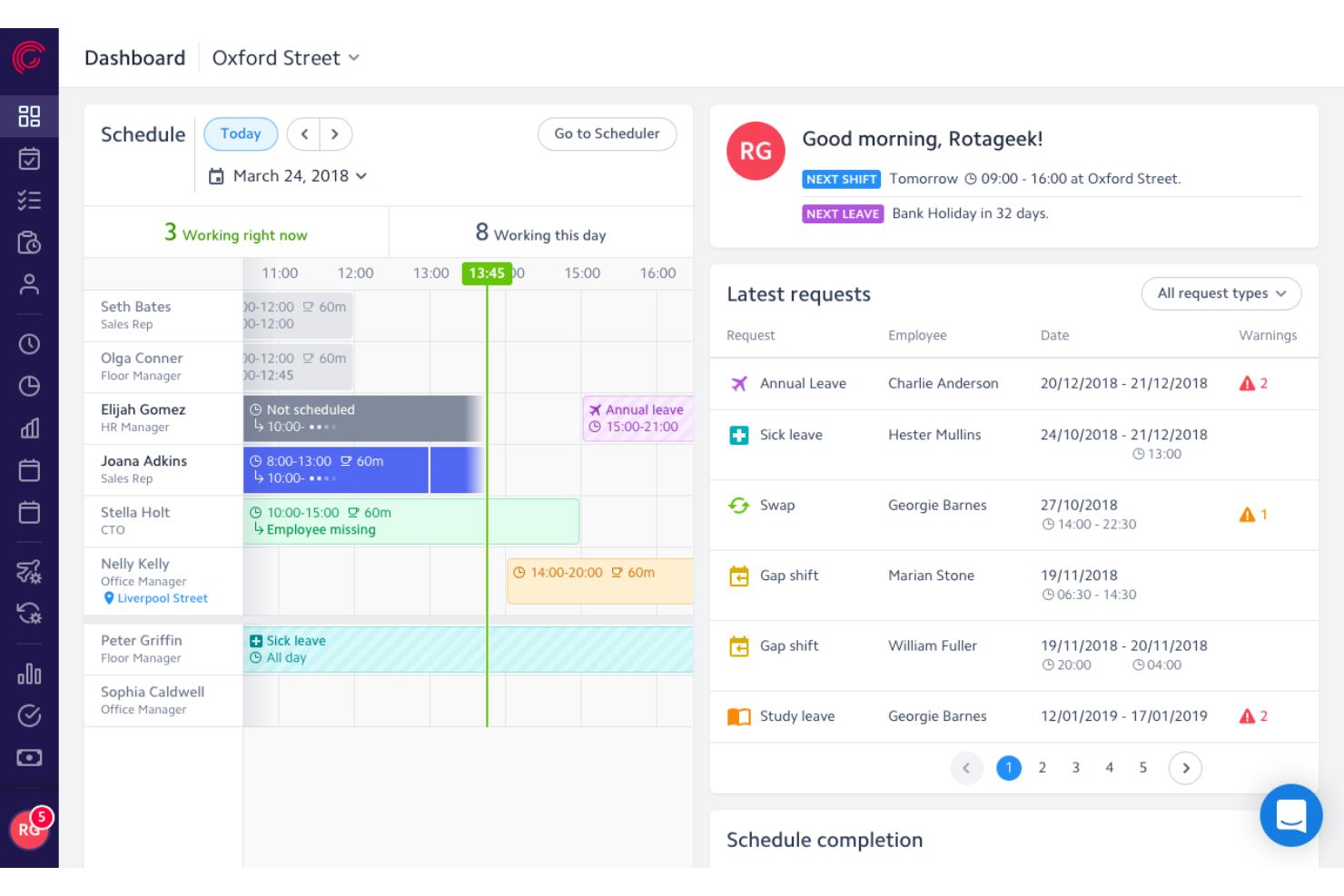
Rotageek is a retail workforce management platform with AI-driven shift scheduling, ML-based demand forecasting in 15-minute increments, time and attendance tracking, and earned wage access integrations.
Who Is Rotageek Best For?
Rotageek is a strong fit for mid-market to enterprise retailers in the UK and Europe managing hourly workforces across multiple locations.
Why I Picked Rotageek
Rotageek earns its spot on my shortlist because of how tightly its AI scheduling engine connects to earned wage access partners like Wagestream and Hastee. I love that Auto Scheduling generates compliant rotas in roughly 30 seconds while factoring in demand forecasts built on 15-minute ML increments, pulling in real footfall data from RetailNext. That combination means hourly associates get schedules that reflect actual store traffic, and they can access earned pay between paydays without HR lifting a finger.
Rotageek Key Features
- Labour modelling: Run "what-if" scenarios to test how volume changes, new store hours, or cost pressures affect headcount before committing to a plan.
- Multi-location schedule view: See and manage rotas across individual stores or as a merged view, making it easy to spot gaps and overstaffing across your entire estate.
- Geo-fenced time clock: Employees clock in and out via the mobile app with location verification and photo capture, creating a clear audit trail for wage and hour compliance.
- Natural language workforce insights: Query your labor data in plain language and get instant AI-backed answers without waiting on a BI team to pull reports.
Rotageek Integrations
Rotageek supports integrations with RetailNext, Wagestream, Hastee, Level, Zellis, ADP, SAP, Oracle, Sage, and Yoobic. It also supports custom connectivity through APIs, webhooks, and SFTP transfers.
Pros and Cons
Pros:
- Demand forecasting uses real footfall data
- Earned wage access built for hourly staff
- AI auto-scheduling generates rotas in seconds
Cons:
- Occasional mobile app stability issues
- No explicit US labor law compliance

Deputy
Best for quick frontline shift swapping
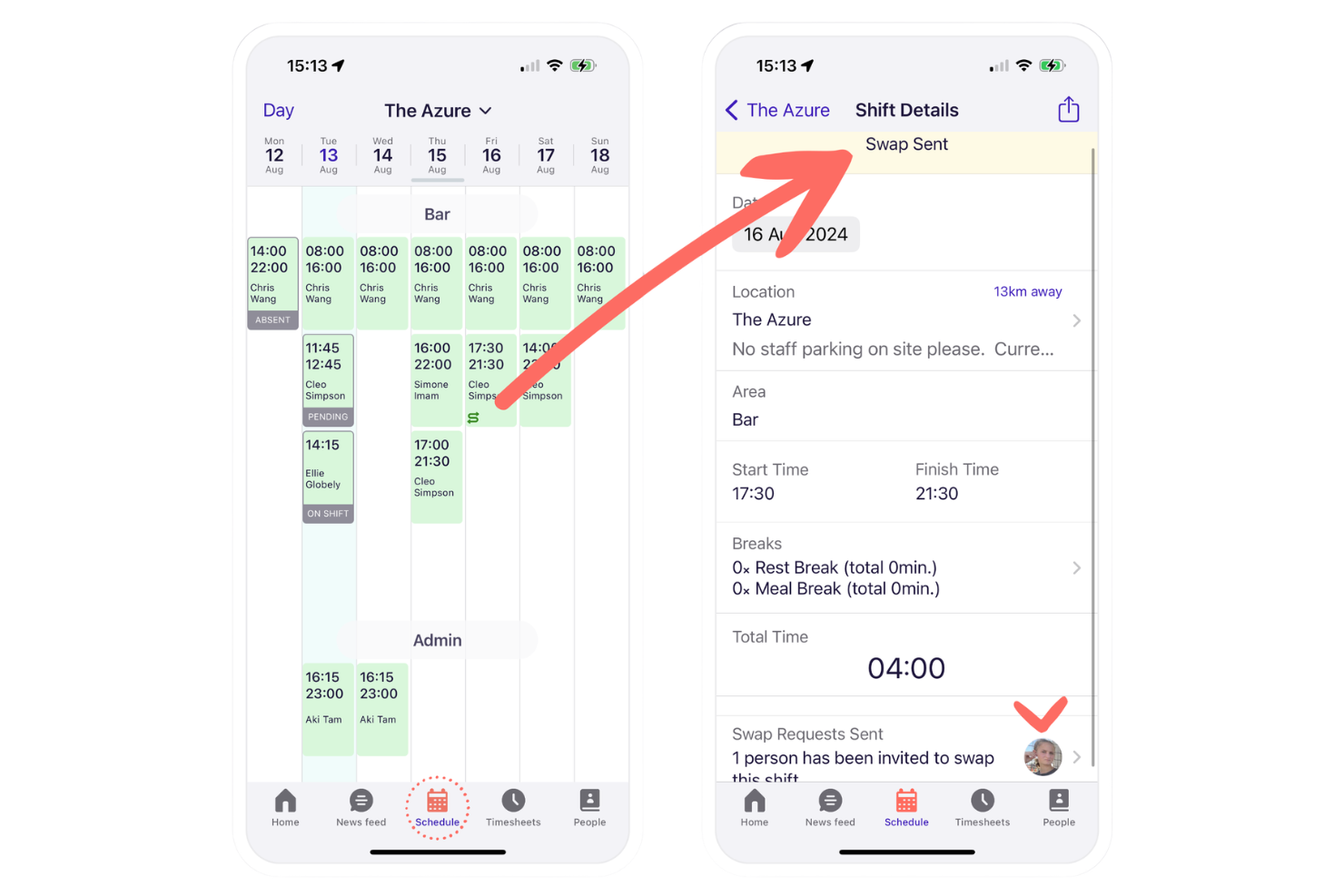
Deputy is a retail workforce management platform that offers employee scheduling, time tracking, attendance, shift swapping, and tasking tools designed for fast-moving retail environments.
Who Is Deputy Best For?
Retailers and restaurant chains with hourly staff who need quick shift adjustments and a mobile-friendly scheduling solution.
Why I Picked Deputy
I picked Deputy as one of the best because I see frontline teams use its mobile shift swapping daily, where managers approve swaps in seconds, and staff can pick up extra shifts instantly, keeping retail coverage flexible and responsive.
Deputy Key Features
- Timesheet approvals: Managers review and approve digital timesheets for payroll processing.
- Break planning: Schedule legally compliant meal and rest breaks for staff.
- Labor cost reporting: View real-time wage costs compared to sales data.
Deputy Integrations
Deputy offers native integrations with ADP, Gusto, QuickBooks Online, Xero, Square, BambooHR, Paychex, Netsuite, CloudPayroll, MYOB, and Zapier. An API is available for custom integrations.
Pros and Cons
Pros:
- Real-time attendance and location tracking
- Smart scheduling based on sales data
- Fast mobile shift swapping for retail teams
Cons:
- Strict break-enforcement blocks early clock-ins
- Manual data-mapping errors or API disconnects can stall exports

Workday
Best for integrating workforce insights with payroll
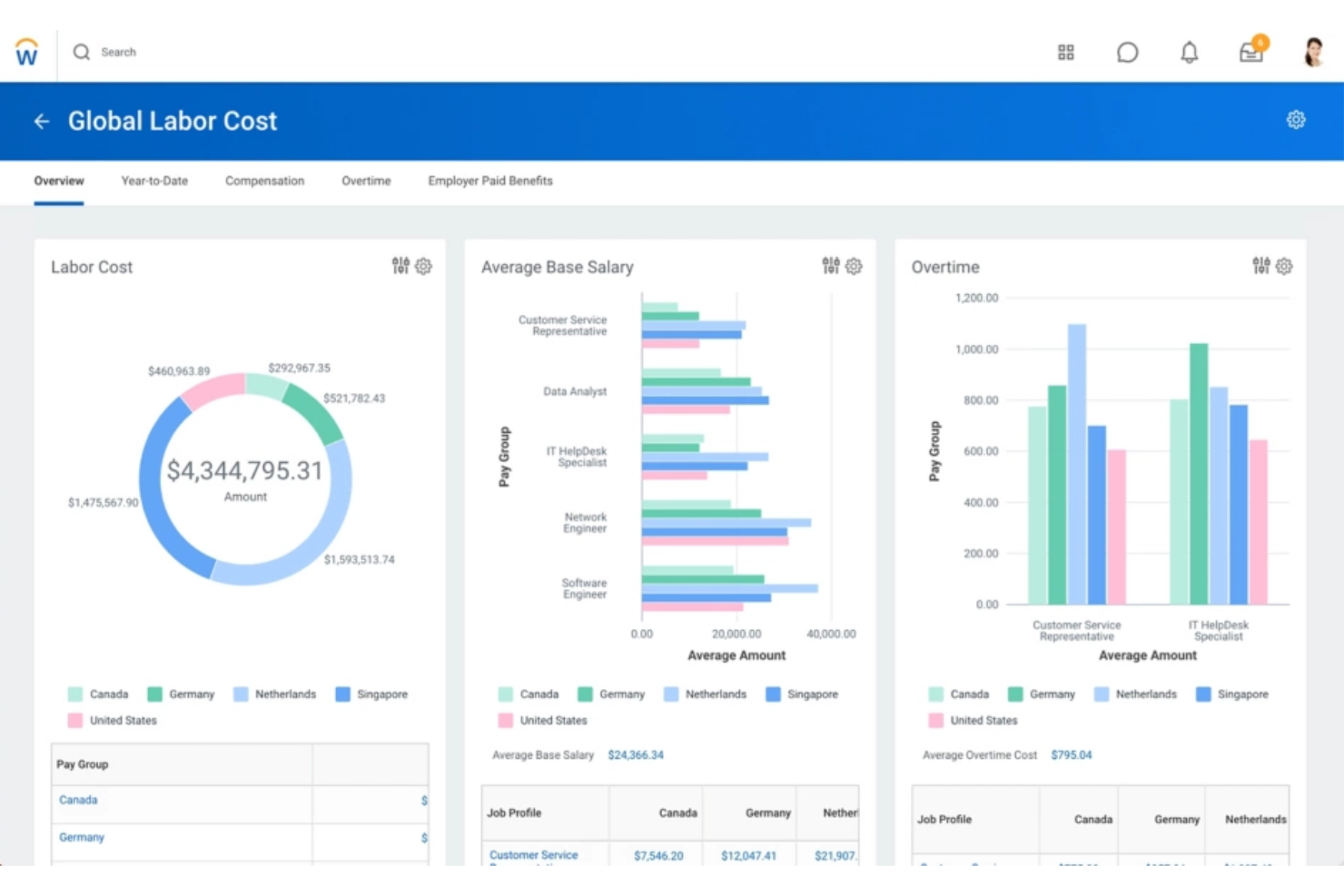
Workday is a retail workforce management platform designed for staff scheduling, attendance tracking, workforce analytics, and integration with finance, HR, and broader WFM functions.
Who Is Workday Best For?
Workday suits large retail organizations and HR teams that need unified workforce, HR, and payroll management across multiple locations.
Why I Picked Workday
I picked Workday as one of the best because I can pull workforce and payroll data together at the right time in real time. I use its unified reporting to align staffing metrics with payroll processes, which makes labor and compensation analysis much more actionable.
Workday Key Features
- Mobile time tracking: Allows employees to clock in and out through a mobile app.
- Absence management: Tracks all types of employee leave and automates approvals.
- Labor compliance monitoring: Monitors labor law compliance for multiple regions and business units.
Workday Integrations
Workday offers native integrations with platforms like Salesforce, Microsoft 365, Oracle, ADP, and Okta, and provides an API for custom integrations.
Pros and Cons
Pros:
- Advanced compliance monitoring for retail operations
- Automates scheduling based on real-time demand
- Consolidates HR, payroll, and staffing data
Cons:
- User friction with mobile UX and session timeouts
- System configuration can be time-consuming

Dayforce
Best for real-time workforce data unification
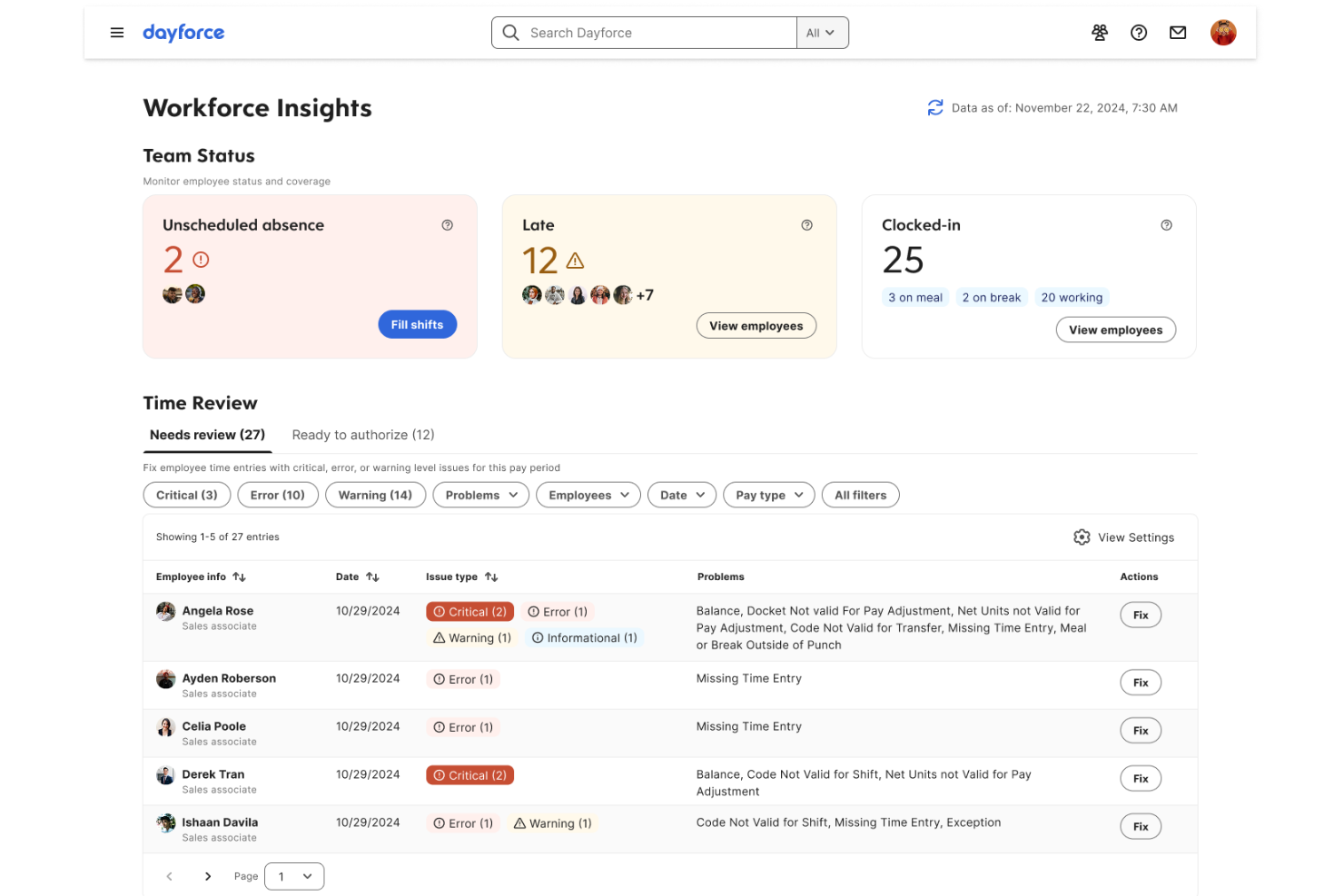
Dayforce is a cloud-based retail workforce management software that combines scheduling, time and attendance, payroll, and HR functionality with centralized data management.
Who Is Dayforce Best For?
Dayforce is well-suited for large retailers and HR teams managing distributed hourly workforces needing unified workforce data across locations.
Why I Picked Dayforce
I picked Dayforce because I need real-time workforce data across all my retail locations, not after the fact. My team uses the single HR/payroll database to track attendance, scheduling, and pay updates as they happen.
Dayforce Key Features
- Self-scheduling tools: Employees can select and swap available shifts directly in the app.
- Mobile clock-in: Staff can clock in or out using their mobile devices with geo-fencing.
- Compliance rule engine: Built-in rules enforce labor laws and company policies for every location.
Dayforce Integrations
Dayforce offers native integrations with Workday, Oracle, and SAP SuccessFactors. An API is available for custom integrations.
Pros and Cons
Pros:
- Mobile app enables shift changes and approvals
- Payroll and HR data unified in one system
- Real-time scheduling and time tracking tools
Cons:
- Initial setup can be time-intensive
- Customization often requires vendor involvement

Infor
Best for highly configurable labor rules

Infor is a workforce management software for retailers that combines labor forecasting, scheduling, time tracking, real-time analytics, and attendance management in a modular suite.
Who Is Infor Best For?
Infor suits large retail organizations and operations leaders managing complex labor scheduling and compliance requirements across multiple locations.
Why I Picked Infor
I picked Infor because I can fine-tune labor rules at the region, role, or union level and match the realities of retail compliance. My team uses workload modeling and rule-based scheduling, so we don’t get limited by one-size-fits-all templates.
Infor Key Features
- Time and attendance tracking: Captures punches and exceptions in real time.
- Mobile self-service portal: Lets employees view schedules, swap shifts, and request time off.
- Compliance monitoring dashboard: Flags potential violations of work hours, breaks, or overtime rules.
Infor Integrations
Native integrations are not publicly listed. Infor provides an API for custom integrations.
Pros and Cons
Pros:
- Mobile app supports employee shift swaps
- Flexible scheduling for complex workforces
- Extensive labor and compliance rule engine
Cons:
- Custom configurations requires heavy IT administrative overhead
- Reporting setup can be time-consuming

Legion
Best for adaptive demand forecasting in stores
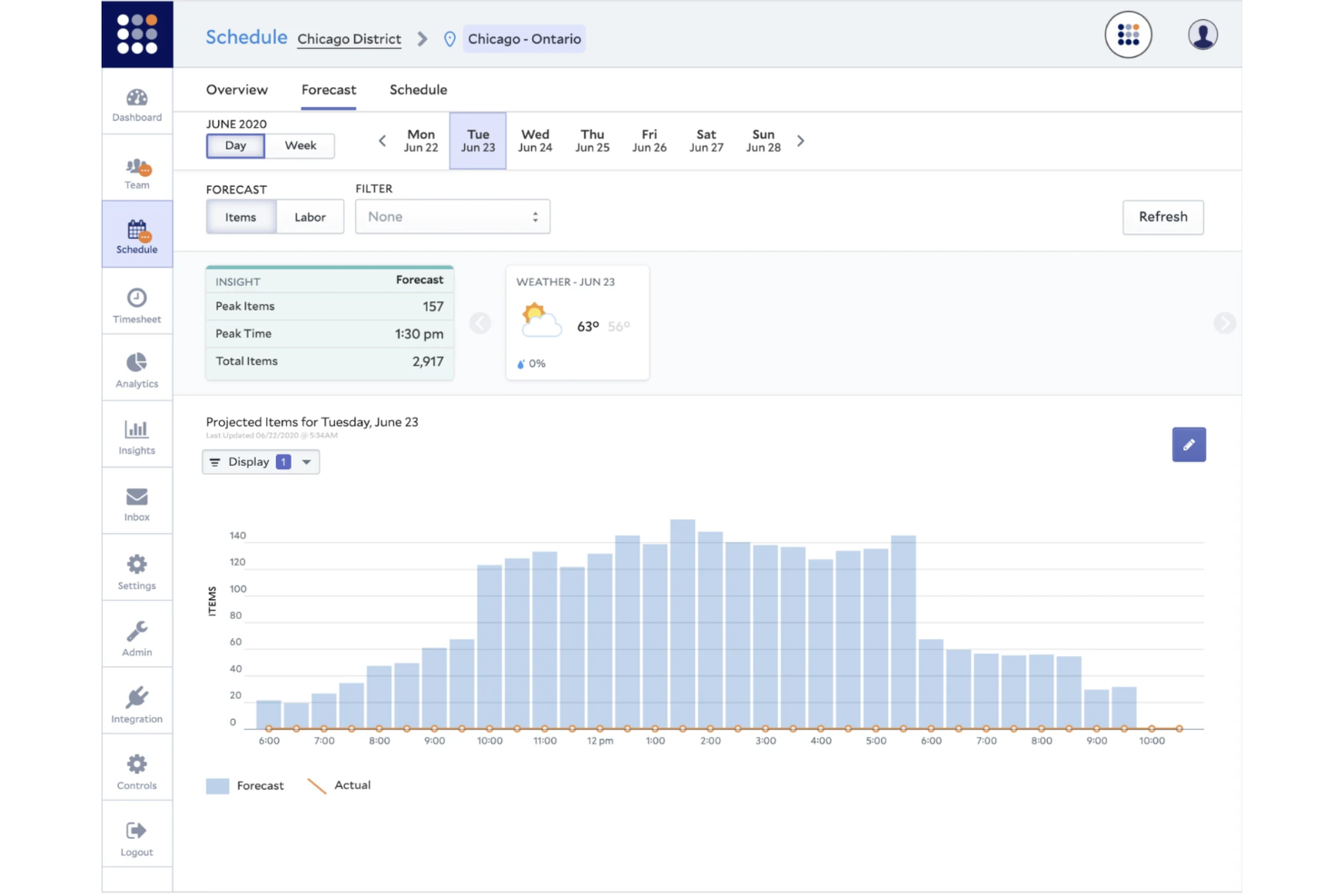
Legion is a cloud-based retail workforce management platform with features for staff scheduling, demand forecasting, labor optimization, time tracking, and real-time communications.
Who Is Legion Best For?
Legion suits large retailers and multi-location businesses that need AI-powered demand forecasting and optimized scheduling for hourly store staff.
Why I Picked Legion
I picked Legion because I see its adaptive demand forecasting handles fluctuating store traffic with high precision. I use its machine learning models to align staffing to predicted peaks, and the automated schedule builder supports quick realignment on short notice.
Legion Key Features
- Time and attendance management: Track employee hours and attendance using web or mobile access.
- Mobile app for staff: Employees can view schedules, request shifts, and receive notifications.
- Compliance monitoring tools: Built-in controls flag potential labor law or policy violations.
Legion Integrations
Legion offers native integrations with ADP, SAP SuccessFactors, and Workday, and provides an API for custom integrations.
Pros and Cons
Pros:
- Mobile shift swapping for hourly staff
- Automated compliance with labor regulations
- Adaptive scheduling powered by AI
Cons:
- Occasional location-tracking (geofencing) errors
- Enterprise-level rollouts can face delays during complex data integrations
WorkJam
Best for combining frontline communication with tasks
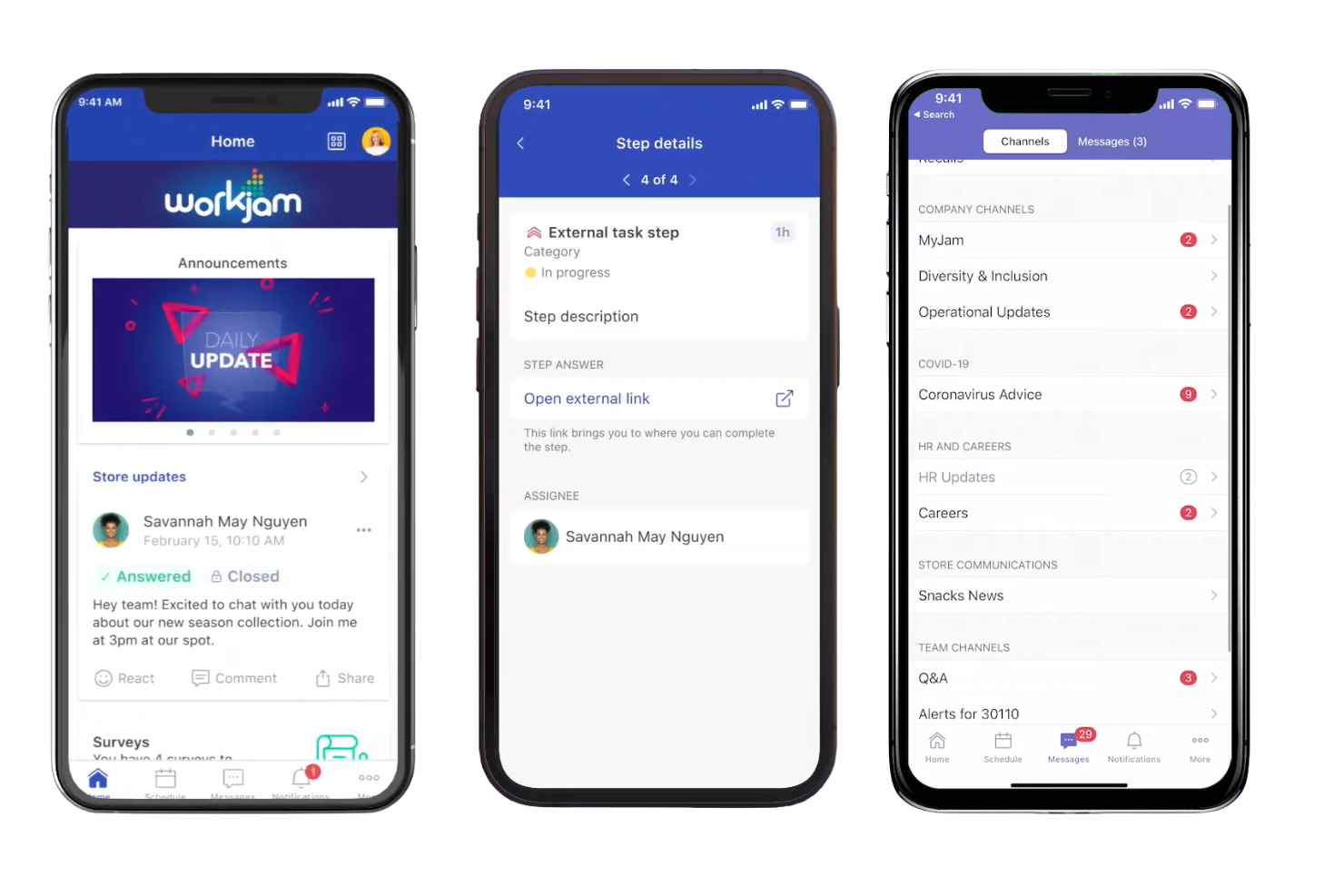
WorkJam is a retail workforce management platform that brings together frontline employee communication, task management, shift scheduling, and training in one mobile-first solution.
Who Is WorkJam Best For?
Frontline retailers and multi-site operation managers who need to unify communications, task execution, and shift management in a mobile platform.
Why I Picked WorkJam
I picked WorkJam as one of the best because I can connect frontline teams through chat, announcements, and task checklists tied directly to daily workflows. My team uses its mobile task management so employees get clear instructions alongside schedule updates.
WorkJam Key Features
- Surveys and polls: Managers can gather feedback directly from frontline staff.
- Microlearning modules: Deliver short, targeted training sessions within the app.
- Recognition and rewards: Enable managers to acknowledge employee achievements digitally.
WorkJam Integrations
WorkJam offers native integrations with Google Cloud, UKG, Microsoft Teams, Azure Services, ADP, Blue Yonder, Honeywell, Xoxoday, and more. An API is available for custom integrations.
Pros and Cons
Pros:
- Real-time communication with task assignments
- Mobile-first microlearning for frontline staff
- Shift swapping and open shift claiming in-app
Cons:
- App lag during heavy media loads
- Configuring workflows can require vendor support

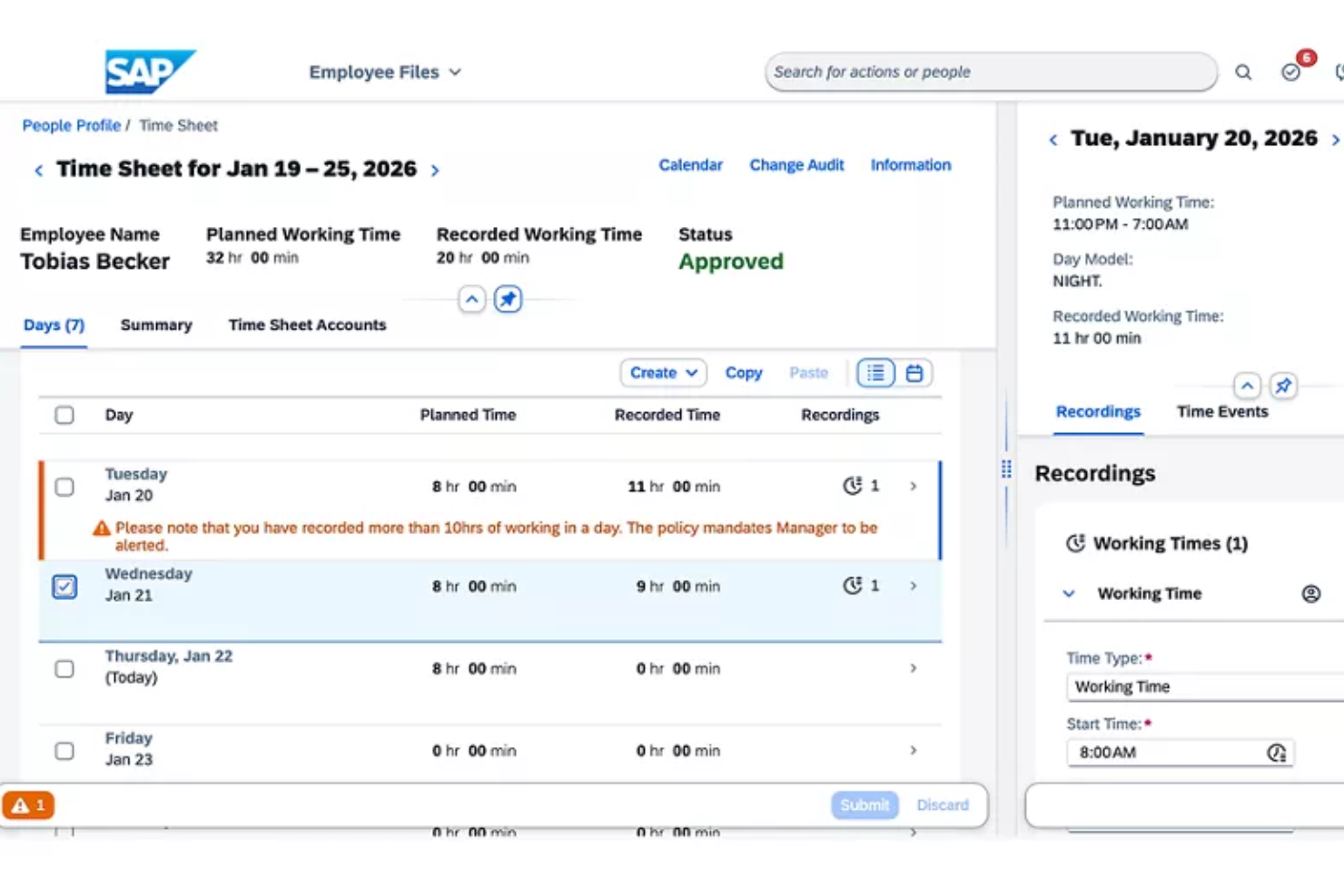
SAP Workforce Management is an enterprise workforce management platform that offers advanced scheduling, time and attendance tracking, labor compliance, and global workforce analytics for retail organizations.
Who Is SAP Best For?
Large global retailers and HR teams managing complex hourly workforces across multiple countries and compliance requirements.
Why I Picked SAP
I picked SAP because I need built-in compliance with global labor regulations for my international retail teams. I regularly configure complex pay rules and automate wage calculations across multiple regions. I rely on SAP’s audit and reporting tools to meet changing requirements.
SAP Key Features
- Shift planning tools: Build, adjust, and visualize workforce schedules for retail teams.
- Mobile manager dashboards: Enable on-the-go management and real-time decision-making from mobile devices.
- Employee self-service portal: Let staff request time off, view schedules, and swap shifts.
SAP Integrations
SAP Workforce Management offers native integrations with SAP SuccessFactors and SAP S/4HANA and has native integrations across the Microsoft ecosystem, including Microsoft 365 and Azure. An API is available for custom integrations.
Pros and Cons
Pros:
- Scalable for multi-country enterprise deployments
- Detailed scheduling and shift planning options
- Advanced global compliance management tools
Cons:
- User friction stemming from slow loading times
- Configuration requires SAP technical expertise
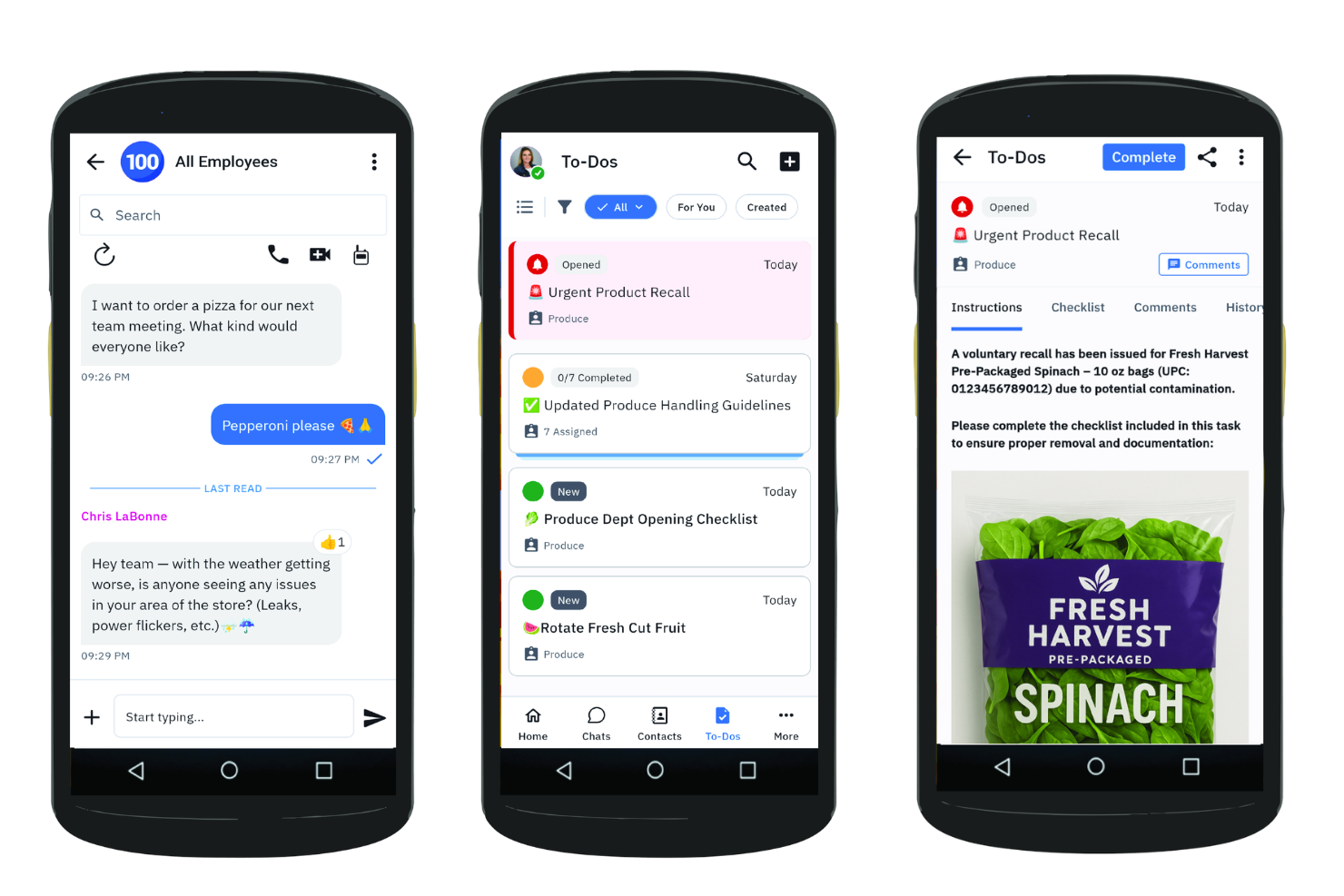
Zebra Technologies Workcloud Workforce Optimization Suite is a retail workforce management software that offers mobile scheduling, time and attendance, labor forecasting, and analytics for retail floor teams.
Who Is Zebra Technologies Best For?
Store operations leaders and regional managers in large retail chains needing advanced mobile shift scheduling and labor oversight for floor-based teams.
Why I Picked Zebra Technologies
I picked Zebra Technologies because my team can manage floor staff schedules from our phones and track attendance in real time. I like how the tool lets us send shift updates instantly and match labor to forecasted demand with built-in analytics.
Zebra Technologies Key Features
- Compliance tracking: Enforce labor policies and manage certifications for staff.
- Employee self-service portal: Let employees request time off and manage availability.
- Multi-location support: Manage scheduling and reporting across several retail locations.
Zebra Technologies Integrations
Zebra Technologies Workcloud Workforce Optimization Suite offers native integrations with Oracle, SAP SuccessFactors, Tulip, Scalefusion, SOTI Connect, TinyMDM, Clyd EMM, and more. An API is available for custom integrations.
Pros and Cons
Pros:
- Mobile app designed for shift workers
- Smart labor forecasting for in-store operations
- Shift swapping is supported within the platform
Cons:
- Security protocols trigger frequent user logouts
- Workflow setup can require technical assistance

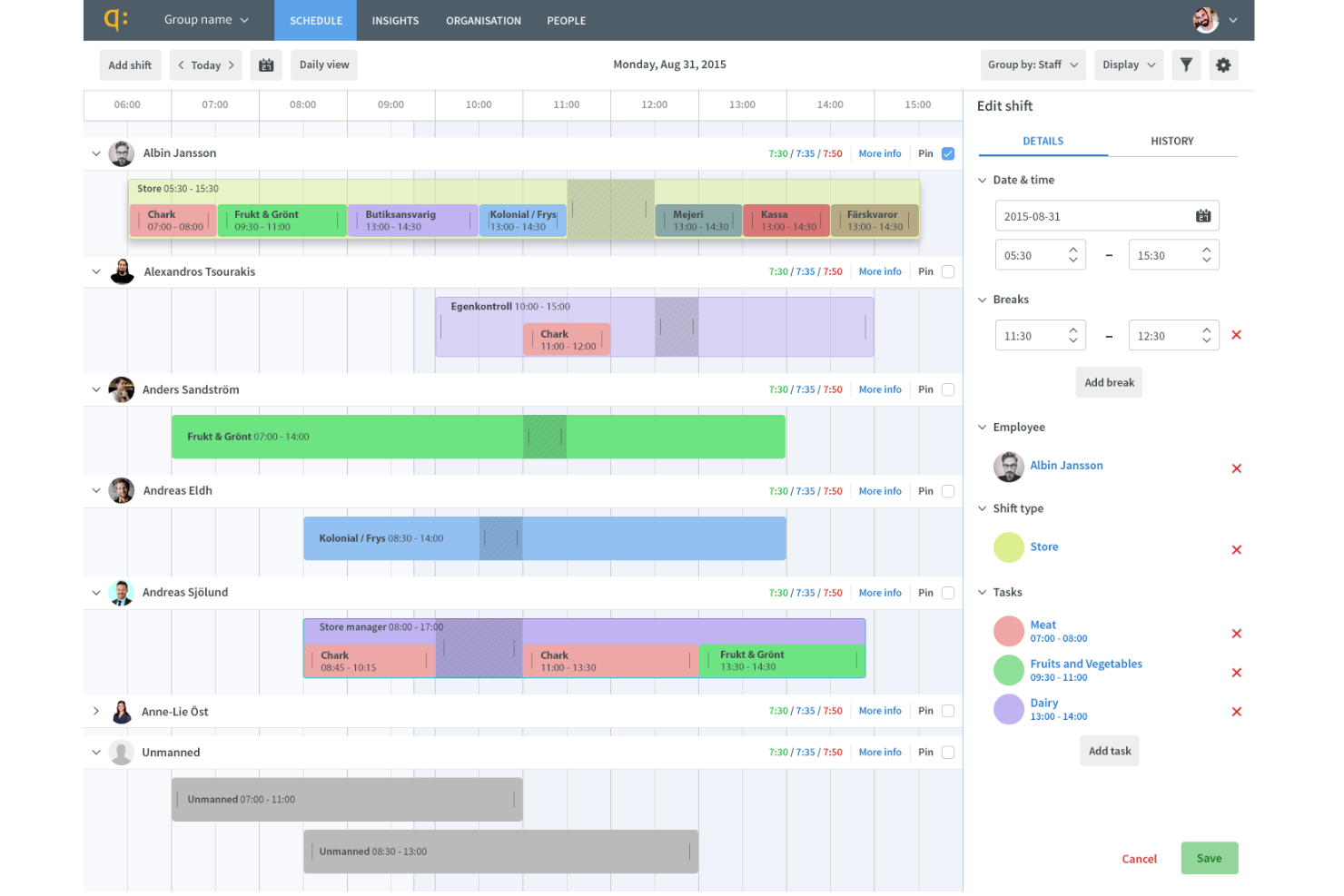
Quinyx is a workforce management platform for retail teams that delivers staff scheduling, absence management, communication tools, demand forecasting, and compliance features.
Who Is Quinyx Best For?
Quinyx fits large retailers and shift-based organizations that need a comprehensive workforce management solution for automated scheduling and real-time workforce optimization across multiple sites.
Why I Picked Quinyx
I picked Quinyx as one of the best because I see its AI-driven scheduling quickly match staff to business needs, even when demand shifts fast. I use the rules-based engine to honor staff preferences and handle compliance, making shift management less manual.
Quinyx Key Features
- Mobile app for staff: Employees can view schedules, swap shifts, and request time off.
- Time and attendance tracking: Tracks worked hours, overtime, and breaks directly in-app.
- Analytics dashboard: Presents workforce data, including labor costs and scheduling trends.
Quinyx Integrations
Quinyx offers native integrations with SAP SuccessFactors, Deloitte, ADP, Sage, EY, Paylocity, and Paychex and provides an API for custom integrations.
Pros and Cons
Pros:
- Mobile app supports staff shift swaps
- Advanced compliance and labor law monitoring
- AI auto-scheduling adapts to changing demand
Cons:
- Some users report app stability issues
- Complex backend rules can require deep configuration
Other Retail Workforce Management Software
Here are some additional retail workforce management software options that didn’t make it onto my shortlist, but are still worth checking out:
- Blue Yonder
For omnichannel labor forecasting
- Homebase
For SMB retail scheduling and shift ops
- ADP Workforce Now
For all-in-one payroll integration
- Oracle HCM Cloud
For global labor compliance tracking
- Connecteam
Mobile scheduling for frontline operations
- UKG
Analytics for large enterprise teams
- When I Work
For hourly shift swaps and drops


How I Evaluate Retail Workforce Management Software
I split my evaluation into baseline criteria—like multi-location scheduling and labor cost tracking—and differentiators that separate tools built for retail from generic workforce platforms.
Core Functionality (Table Stakes For This List)
When I'm selecting tools for my list, I rank each one on a scale from 0 (does not offer the functionality) to 5 (excels in this area) for each core functionality listed below. Then, I calculate the tool's total score into a percentage. Each tool needs to achieve a minimum total score of 65% to be considered for inclusion.
- Retail Shift Scheduling: I check whether the tool handles multi-location, role-based scheduling—like splitting coverage between cashiers, floor staff, and back-of-house across a dozen stores.
- Labor Demand Forecasting: Forecasting should pull from retail-specific signals like sales volume and seasonal trends, not just repeat last week's schedule with minor edits.
- Time & Attendance Tracking: I evaluate how clock-in/out, break tracking, and pay rule enforcement work for hourly associates—especially across shift types and store locations.
- Mobile Employee Self-Service: Frontline retail workers need to swap shifts, set availability, and request time off from their phones, so I look for a purpose-built mobile experience.
- Labor Cost Management: I look for real-time visibility into labor spend vs. sales and budget targets, so store managers can course-correct staffing mid-week instead of after the fact.
- Compliance & Labor Law Support: The tool should enforce rules like predictive scheduling, minor labor restrictions, and mandated break periods based on configurable location-level policies.
Once I have a list of tools that meet the criteria, I consider what sets each platform apart.
Differentiating Factors (What Sets Vendors Apart)
Here's how I compare and contrast different vendors:
Standout Features
AI-powered auto-scheduling is a major differentiator. I look for tools that balance labor budgets, employee preferences, and demand forecasts to generate schedules managers can publish with minimal edits. Earned wage access is another feature I evaluate, since giving hourly associates early access to earned pay can meaningfully reduce turnover. I also consider built-in team communication, which lets store managers push announcements or task updates directly to associates' phones instead of relying on group texts.
Beyond Features
Retail-specific integrations matter a lot here. I check whether the platform connects natively to POS systems and payroll providers, since that's what drives sales-based scheduling and clean pay runs. Scalability is another factor I evaluate closely—a tool that works for five stores should also handle a franchise network with location-specific rules and seasonal hiring spikes. Pricing structure counts too. Per-employee-per-month models with modular packaging give retailers more flexibility, especially when headcount swings dramatically between peak and off-peak seasons.
How to Choose Retail Workforce Management Software
It’s easy to get bogged down in long feature lists and complex pricing structures. To help you stay focused as you work through your unique software selection process, here’s a checklist of factors to keep in mind:
| Factor | What to Consider |
|---|---|
| Scalability | Will the software still fit if you grow to dozens or hundreds of stores? Look for flexible user limits and multi-site management. |
| Integrations | Does it connect natively with your HR, payroll, and POS systems? Confirm vendor documentation to avoid custom workarounds. |
| Customizability | Can you configure rules, roles, and compliance alerts for your store’s specific labor laws or agreements? |
| Ease of use | Will hourly staff and store managers learn it quickly? Request live demos or trials for non-technical users to test core workflows. |
| Implementation and onboarding | How long does it take to get up and running? Ask about migration support, admin training, and standard rollout timelines. |
| Cost | Is pricing based on active users, locations, or modules? Find out what's included, what's extra, and calculate the total annual spend. |
| Security safeguards | How are employee data and timesheets protected? Ask about role-based access, encryption, audits, and vendor compliance certifications. |
| Compliance requirements | Does the system monitor labor regulations specific to your city, state, or country? Check for auto-updates on law changes. |
What Is Retail Workforce Management Software?
Retail workforce management software is a tool designed to automate scheduling, time tracking, labor compliance, and task assignments for retailers. These platforms help you manage hourly staff, support multi-location operations, and ensure compliance with labor laws. Using this software gives you better visibility into employee availability, reduces scheduling conflicts, and streamlines daily workforce administration for retail teams.
Features of Retail Workforce Management Software
When selecting retail workforce management software, keep an eye out for the following key features:
- Automated scheduling: Generates staff schedules based on sales forecasts, employee availability, and business rules to help ensure shift coverage and reduce manual planning.
- Time and attendance tracking: Records employee clock-ins, breaks, and hours worked, helping managers maintain accurate payroll data and monitor overtime.
- Mobile access: Allows managers and employees to view schedules, swap shifts, and request time off from their mobile devices, supporting flexible workforce management on the go.
- Labor compliance monitoring: Flags potential violations of labor laws or store policies, tracking regulated breaks, overtime, and working hour limits so you stay audit-ready.
- Payroll integration: Connects time and attendance data directly to your payroll system, reducing data entry errors and saving payroll processing time.
- Shift swapping and bidding: Enables employees to trade, give up, or bid on available shifts within assigned rules, minimizing staffing emergencies and covering last-minute changes.
- Forecasting and demand planning: Uses historical data and projected sales to help you anticipate staffing needs during peak seasons, promotions, or holidays.
- Task and communication tools: Centralize daily checklists, assign tasks, and enable messaging between managers and staff for coordination beyond just scheduling.
- Reporting and analytics: Provides insights on labor costs, schedule adherence, employee attendance, and other metrics to help managers make informed staffing decisions.
- Role-based permissions: Let you control access so managers, supervisors, and employees see and act only on relevant data and workflows according to their position.
Benefits of Retail Workforce Management Software
Implementing retail workforce management software provides several benefits for your team, your business, and your overall operational efficiency. Here are a few you can look forward to:
- Simplified scheduling: Automated systems generate error-free schedules aligned with business demand and employee availability.
- Labor compliance confidence: Built-in compliance monitoring helps ensure your store adheres to relevant labor, break, and overtime regulations.
- Real-time team coordination: Mobile tools and messaging features keep managers and staff connected and responsive across multiple locations.
- Reduced payroll errors: Integrated time and attendance feeds accurate data directly to payroll, eliminating costly manual entry mistakes.
- Faster shift coverage: Shift swapping and bidding features empower employees to cover or exchange shifts without manager intervention.
- Actionable workforce insights: Reporting and analytics features provide the data you need to optimize labor costs and identify attendance or productivity trends.
- Better employee experience: Self-service scheduling and communication tools give staff more control and flexibility, supporting retention and engagement.
Costs and Pricing of Retail Workforce Management Software
Selecting retail workforce management software requires an understanding of the various pricing models and plans available. Costs vary based on features, team size, add-ons, and more. The table below summarizes common plans, their average prices, and typical features included in retail workforce management software solutions:
Plan Comparison Table for Retail Workforce Management Software
| Plan Type | Average Price | Common Features |
|---|---|---|
| Free Plan | $0 | Basic scheduling, limited users, core time tracking, and email support. |
| Personal Plan | $5-$10/user/month | Scheduling tools, mobile access, time and attendance, limited reporting, and shift swap functionality. |
| Business Plan | $15-$25/user/month | Advanced scheduling, payroll integration, compliance monitoring, analytics, and multi-location support. |
| Enterprise Plan | $30-$50/user/month | Custom rules, dedicated account management, advanced integrations, onboarding tools, priority support, and custom reports. |
Retail Workforce Management Software FAQs
Here are some answers to common questions about retail workforce management software:
How does retail workforce management software help reduce labor costs?
It helps reduce labor costs by forecasting demand, automating schedules, and tracking time to prevent unnecessary overtime or understaffing. These controls allow you to optimize shifts and avoid compliance penalties.
Can retail workforce management software handle multi-location businesses?
Yes, most retail workforce management software offers tools to manage scheduling, reporting, and compliance across multiple store locations from a centralized system. This makes it easier for regional managers to supervise staff and allocate resources.
What are the typical onboarding timelines for new users?
Typical onboarding for new retail scheduling software ranges from a few days to a few weeks. Timelines depend on data migration, team size, complexity of existing workflows, and the availability of training resources or vendor support.
Is retail workforce management software user-friendly for hourly employees?
Yes, many platforms are designed with easy-to-use mobile apps that allow hourly employees to check schedules, swap shifts, and communicate with managers. This self-service approach helps staff engage with the tool daily.
What integration options are important for retail teams?
Important integration options include payroll systems, HR platforms, and point-of-sale software. Syncing these systems reduces manual data entry, ensures scheduling accuracy, and helps maintain up-to-date employee records.