

Küçük bir işletmede İK yönetmek, özellikle birden fazla rol ve sorumluluğu aynı anda üstleniyorsanız hiç kolay değildir. Sürekli uzayan elektronik tablolarla uğraşıyor, bordro işlemlerine saatler harcıyor veya çalışan verilerindeki uyum risklerine yol açabilecek hatalarla karşılaşıyor olabilirsiniz. Bunun yanı sıra, sorunlarınızı çözmeyi vadeden çok sayıda araç varken doğru HRMS yazılımını seçmek de bunaltıcı gelebilir—peki hangisi gerçekten bunu başaracak?
HRMS araçları; çalışan veri yönetimi, bordro otomasyonu, işe alım ve yan haklar yönetimi gibi temel İK işlevlerini basitleştirmek için tasarlanmıştır. Zamandan tasarruf etmenize, hataları en aza indirmenize ve hem sizin hem de ekibiniz için daha düzenli bir İK deneyimi oluşturmanıza yardımcı olurlar.
Küçük bir ekipte İK uzmanı olarak edindiğim deneyimden yararlanarak küçük işletmeler için en iyi HRMS seçeneklerinden oluşan bu kısa listeyi hazırladım. Amacım, benzersiz ihtiyaçlarınıza uyan bir çözüm bulmanızı kolaylaştırmak; böylece İK sorunlarıyla daha az zaman harcayıp işletmenizi yönetmeye daha fazla zaman ayırabilmenizi sağlamak.
Why Trust Our Software Recommendations
6,700+
Reviews
20
Industry experts
16+
Evaluation factors
14
Years
Our team has been testing and reviewing software since 2012. As HR experts ourselves, we know how difficult—and important—it is to choose the right software.
For this guide, we evaluated tools using hands-on testing and independent research, scoring tools using our selection criteria. We also draw on insights from industry thought leaders and practicing HR experts.
Our reviews reflect our human editorial judgment, not a sales pitch.
Expert reviewers:
- Phil GrayCOO
 Kim BehnkeHR Tech Editor & Analyst
 Josh BarkerPeople Ops Manager

Küçük İşletmeler için HRMS Fiyat Karşılaştırma Tablosu
Bu tablo, küçük işletmeler için öne çıkardığım HRMS seçeneklerinin fiyatlandırma ayrıntılarını karşılaştırır.
Sorted by: Default
| Tool | Starting Price | Website | |
|---|---|---|---|
Best free all-in-one HRMS for small businesses | 4.8 out of 5 | $5/user/month Free demo available | Website |
Best with 24/7 expert HR and payroll support | 4.6 out of 5 | $79/user/month Free demo available | Book Demo |
Best for payroll-to-benefits coordination | 4.6 out of 5 | $49/month Free trial + free demo available | Book Demo |
Best for flexible HR processes | 4.5 out of 5 | Pricing upon request Free demo available | Website |
Best for centralized HR documentation | 4.3 out of 5 | £24/month 14-day free trial available | Website |
Best HRMS to support growing international teams in 170+ countries | 4.5 out of 5 | $199/user/month Free plan + free demo available | Website |
Best for payroll automation and integrations | 4.3 out of 5 | Pricing upon request Free demo available | Website |
Best for automation and simplified workflows | 3.9 out of 5 | $10.25/user/month 7-day free trial + demo available | Website |
Best as AI for business | 4.4 out of 5 | $8/user/month Free trial + Free demo available | Website |
Best for industry-specific payroll features | 4.3 out of 5 | $99/month Free demo available | Website |


Küçük İşletmeler için En İyi HRMS İncelemeleri
Her bir aracın en uygun kullanım alanını, dikkat çekici bazı özelliklerini ve kullanıcı arayüzüne genel bir bakış sunan ekran görüntülerini göstermek için küçük işletmelere yönelik her HRMS’in kısa bir açıklamasını burada bulabilirsiniz. Listenin sonunda yer alan ek önerileri keşfetmek için okumaya devam edin.
 Best free all-in-one HRMS for small businesses
- Free demo available
- From $5/user/month
Visit WebsiteCustomer Rating:4.8/5
Deel's self-service platform lets small business owners professionally manage a growing team. Deel HR is an HR management system for small businesses that covers employee onboarding, document management, time off tracking, and org chart management in one platform.
Who Is Deel HR Best For?
Deel HR is a strong fit for small businesses and startups that need a free, centralized HR system to manage a growing workforce without investing in paid software.
Why I Picked Deel HR
Deel HR earns a spot on my shortlist because it's one of the few HRMS platforms that offers a genuinely free core HR tier for small businesses. The free plan isn't a stripped-down trial—it includes worker profiles, time off tracking, document management, and an org chart, covering the day-to-day needs of a small team without requiring a paid upgrade. When you're ready to grow, you can add modules like recruiting or performance management as a paid add-on without rebuilding anything. Its modular design lets my team start with what we need now and layer in compensation cycles or headcount planning later, all on the same data foundation.
Deel HR Key Features
- Workforce planning: Forecast headcount, model scenarios, and track hiring costs using live workforce data instead of spreadsheets.
- AI-powered applicant tracking: Source candidates automatically, manage interviews, and move new hires directly into onboarding from a single pipeline.
- 360° performance reviews: Run configurable review cycles with quantitative and qualitative feedback, OKRs, and review calibration across your team.
- Anonymous reporting: Built-in whistleblowing tools let employees flag concerns securely, supporting compliance and a speak-up culture.
Deel HR Integrations
Deel HR offers native integrations with Greenhouse, BambooHR, HiBob, Workday, Lever, Ashby, and Personio. An API is available for custom integrations.
 Best with 24/7 expert HR and payroll support
- Free demo available
- From $79/user/month
Visit WebsiteCustomer Rating:4.6/5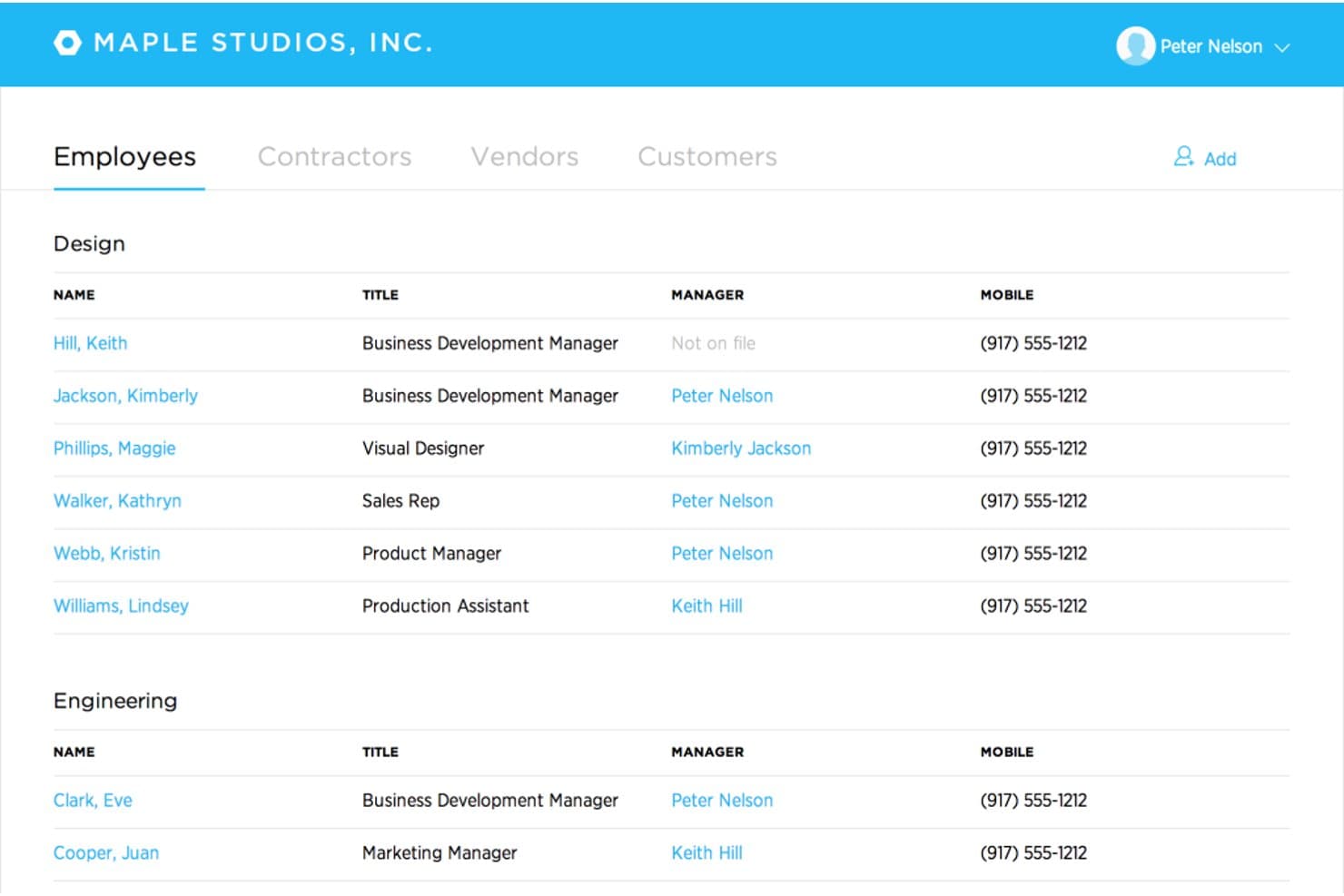
Justworks offers an employee directory organized by department, displaying names, titles, managers, and mobile numbers in a clean list view. Justworks is a cloud-based HRMS designed for small businesses, combining payroll, benefits administration, HR management, compliance support, and automated tax filings in one platform.
Who Is Justworks Best For?
Small businesses and startups that need simple, compliant payroll and HR management across multiple states or locations.
Why I Picked Justworks
I picked Justworks as one of the best because I rely on their 24/7 expert HR and payroll support for urgent compliance questions and quick troubleshooting. I also appreciate their automated payroll and multi-state tax filings for distributed teams.
Justworks Key Features
- Time tracking add-on: Built-in time tracking integrates directly with payroll for hourly teams.
- Employee self-service portal: Team members can manage their own documents, benefits, and paystubs online.
- Benefits administration: Centralized system to enroll, update, and track benefits for all employees.
- Document storage: Secure, cloud-based repository for company policies and required HR documents.
Justworks Integrations
Native integrations are not clearly documented. An API is available for custom integrations.
Pros and Cons
Pros:
- Offers access to large-group employee benefits
- Multi-state payroll compliance is automated
- 24/7 live HR and payroll support
Cons:
- Custom workflow options are minimal
- Limited built-in performance management tools
Learn more about Justworks: Best for payroll-to-benefits coordination
- Free trial + free demo available
- From $49/month
Visit WebsiteCustomer Rating:4.6/5
Gusto simplifies payroll by automating tax calculations, payments, and employee benefit management through an easy-to-use online platform. Gusto is an HRMS platform for small businesses that brings together payroll, benefits administration, onboarding, compliance tools, and employee management in one system.
Who Is Gusto Best For?
Gusto is a good fit for small business owners and HR generalists who need to manage payroll and benefits together without a dedicated HR team.
Why I Picked Gusto
Gusto earns its spot on my shortlist because payroll and benefits are woven into a single workflow. When you add a new hire, benefits enrollment starts within the onboarding flow—medical, dental, vision, and 401(k) deductions are calculated and synced with payroll. Gusto also handles open enrollment renewals in-platform, submitting paperwork to carriers so my team doesn't have to chase signatures or track deadlines. The paycheck splitter and Gusto Wallet features add flexibility, letting employees direct portions of each paycheck into savings accounts without extra administrative work.
Gusto Key Features
- Applicant tracking system: Post jobs and track candidates through the hiring pipeline within Gusto, without a separate recruiting tool.
- Mobile time tracking with geolocation: Employees can clock in and out from their phones, with location data captured to verify on-site attendance.
- Performance review templates: Run structured employee reviews using built-in templates, with feedback requests sent to appropriate reviewers on schedule.
- Anonymous feedback surveys: Collect employee input through built-in surveys that keep responses anonymous to encourage candid feedback.
Gusto Integrations
Gusto offers 140+ native integrations, including QuickBooks, Xero, 15Five, 7Shifts, Asana, Bench, Betterment at Work, Box, ApplicantPro, and Checkr. An API is available for custom integrations.
Pros and Cons
Pros:
- Offers self-service onboarding and online storage of tax forms and pay stubs for contractors and employees.
- Payroll, benefits, and HR in one unified platform.
- Payroll runs unlimited times per month without extra fees.
Cons:
- Limited flexibility in customizing tax withholdings or non-standard payroll setups.
- SMBs that need advanced compliance or niche industry-specific HR modules may find Gusto limiting.
 Best for flexible HR processes
- Free demo available
- Pricing upon request
Visit WebsiteCustomer Rating:4.5/5
HiBob's HRMS homepage provides quick access to employee engagement features, workforce statuses, and more. HiBob is an HR management platform designed for small businesses, offering core HR, onboarding, time off tracking, performance management, and customizable workflows.
Who Is HiBob Best For?
HiBob is a strong fit for small and mid-sized businesses that need adaptable HR processes to support fast-changing team structures and people operations.
Why I Picked HiBob
HiBob earns its spot on my shortlist because of how flexible its HR processes are. I love that you can build custom workflows and approval chains that match how your team actually operates, rather than forcing your processes into a rigid system structure. The sandbox environment is especially useful—you can test changes to compensation cycles, automation rules, or performance reviews before they go live, which reduces the risk associated with adjusting HR processes on the fly. The modular setup lets you start with Core HR and add talent, payroll, or workforce planning as your needs grow.
HiBob Key Features
- People analytics: Track headcount, retention, absenteeism, and growth with real-time reports you can schedule and share directly with leadership.
- Onboarding workflows: Automate onboarding tasks and sequences so new hires get a consistent, structured experience from day one.
- Time off management: Employees request and managers approve time off directly within the platform, with visibility into who's in and who's out.
- Employee surveys: Run lifecycle or engagement surveys to collect feedback at key milestones and view results in a built-in dashboard.
HiBob Integrations
HiBob offers native integrations with Slack, Microsoft Teams, Google Workspace, DocuSign, Greenhouse, Okta, and Workable. An API is available for custom integrations.
 Best for centralized HR documentation
- 14-day free trial available
- From £24/month
Visit WebsiteCustomer Rating:4.3/5
Breathe HR lets you log and manage employee time entries by project, date, and duration, all in one place. Breathe HR is an HR management system for small businesses that brings together employee records, document management, time off tracking, and performance management in one platform.
Who Is Breathe HR Best For?
Breathe HR is a good fit for small UK-based businesses that need a straightforward way to manage HR admin without a dedicated HR team.
Why I Picked Breathe HR
Breathe HR earns its spot as one of the best on my shortlist because of how well it handles centralized HR documentation for small teams. I love that you can store unlimited documents—contracts, compliance policies, performance reviews—all in one GDPR-compliant location, without worrying about hitting a storage cap. What I find especially useful is the e-signature feature: you can send a contract directly within Breathe, add multiple signees, and get an automatic audit trail with timestamps and IP addresses logged for every signature. There's also a read-tracking feature that shows you exactly who has and hasn't opened a shared company document, so you can send targeted reminders without any manual follow-up.
Breathe HR Key Features
- Holiday and absence tracking: Manage holiday requests, sickness records, and leave balances with a shared calendar view and instant approval workflows.
- Sickness trigger alerts: Set custom Bradford Factor score thresholds or sickness instance limits, and Breathe automatically notifies you when an employee reaches them.
- Performance management: Schedule one-to-ones, run appraisal meetings, and assign goals and tasks to employees directly within the platform.
- Payroll-ready data export: Export HR data in a payroll-ready format to reduce manual data entry when running payroll.
Breathe HR Integrations
Breathe HR offers native integrations with Xero and Google Workspace. An API is available for custom integrations.
Learn more about Breathe HR: Best HRMS to support growing international teams in 170+ countries
- Free plan + free demo available
- From $199/user/month
Visit WebsiteCustomer Rating:4.5/5
Remofirst's dashboard lets you manage, onboard, and pay employees from a central platform. RemoFirst is an HRMS platform for small businesses that need to hire, onboard, and manage employees and contractors across multiple countries, with features for global payroll, compliance, and document management.
Who Is RemoFirst Best For?
RemoFirst is a strong fit for small businesses hiring remote employees or contractors across borders who need localized compliance and payroll without setting up legal entities abroad.
Why I Picked RemoFirst
I've included RemoFirst in my top picks because it solves one of the trickiest challenges for small businesses going global: hiring full-time employees in new countries without setting up a legal entity. RemoFirst acts as the Employer of Record across 185+ countries, handling localized employment contracts, multi-country payroll, tax filings, and pension contributions through a single platform. The contractor-to-employee conversion feature lets my team transition international contractors into compliant full-time hires without rebuilding the employment relationship. The flat-rate pricing with no minimums or long-term contracts makes it accessible for small businesses that are scaling headcount one country at a time.
RemoFirst Key Features
- Workforce management: Track and manage time off, bonuses, and benefits for international employees in line with each country's local labor laws.
- Compliant offboarding: Handle employee terminations across countries, including notice periods, severance calculations, and required documentation based on local law.
- Background checks: Run global background screening on international hires to verify identity and support compliant hiring decisions.
- Visa and immigration support: Manage visa applications and work permits for employees in 85+ countries directly through the platform.
RemoFirst Integrations
Native integrations are not clearly documented. RemoFirst provides an API for custom integrations.
 Best for payroll automation and integrations
- Free demo available
- Pricing upon request
Visit WebsiteCustomer Rating:4.3/5
Paylocity gives employees and HR teams a centralized hub to manage time tracking, pay, benefits, and communication. Paylocity is an HRMS platform for small businesses that combines payroll processing, HR management, time tracking, benefits administration, and compliance tools in one system.
Who Is Paylocity Best For?
Paylocity is a good fit for small to mid-sized businesses that need a unified HR and payroll platform with room to scale.
Why I Picked Paylocity
Paylocity earns its spot on my shortlist because of how well its payroll automation handles the details that trip up small HR teams. I particularly like the Payroll Readiness Dashboard, which surfaces critical tasks before processing day and runs 40+ audits to flag issues like unexpected pay spikes before you submit. Hours and labor allocations flow directly from Time & Labor into payroll, so there's no manual re-entry between systems. On the integrations side, Paylocity connects to ATS platforms, benefits and 401(k) providers, ERP systems, and identity tools like Okta and Microsoft Entra—plus open APIs for custom connections.
Paylocity Key Features
- Benefits decision support: Paylocity's Benefits Decision Support tool gives employees personalized plan recommendations based on their individual preferences and situations during open enrollment.
- Tax geolocation: Paylocity audits each employee's location to verify they're paying the correct taxes, with support from a registered IRS Reporting Agent team across all 50 states.
- On demand payment: Employees can access earned wages before payday, giving small businesses a recruiting and retention tool with no impact on payroll cash flow.
- General ledger mapping: Configure GL settings, create journal entries, and generate customized reports directly in the platform without needing to contact Paylocity support.
Paylocity Integrations
Paylocity offers native integrations with ADP, QuickBooks, NetSuite, Okta, Microsoft Entra, and several benefits and 401(k) providers. An API is available for custom integrations.
 Best for automation and simplified workflows
- 7-day free trial + demo available
- From $10.25/user/month
Visit WebsiteCustomer Rating:3.9/5
BambooHR’s pay info dashboard showing detailed paystubs and year-to-date earnings on both desktop and mobile. BambooHR is an HR management system for small businesses that covers employee records, onboarding, time-off tracking, workflow automation, and reporting in one platform.
Who Is BambooHR Best For?
BambooHR is a good fit for small to mid-sized businesses that need a dedicated HR system without the complexity of enterprise-grade software.
Why I Picked BambooHR
I picked BambooHR as one of the best because of how well its automated workflows handle the approval bottlenecks that slow small HR teams down. When a time-off request or promotion comes in, BambooHR routes it to the right approver automatically—no email chains, no manual follow-up. I also like the automated onboarding checklists, which assign tasks to the right internal team members the moment a new hire is added, so nothing slips through the cracks before day one. For a small business where one person is often managing all of HR, that kind of built-in structure makes a real operational difference.
BambooHR Key Features
- Applicant tracking system: Manage job postings, review candidates, and move applicants through a hiring pipeline directly within BambooHR.
- Employee self-service portal: Employees can update their own personal information, view pay stubs, and request time off without going through HR.
- Performance management: Run performance review cycles, set goals, and collect peer feedback from within the platform.
- Custom reporting and dashboards: Build real-time reports on workforce data and visualize trends using configurable dashboards.
BambooHR Integrations
BambooHR offers native integrations with ADP, Paylocity, QuickBooks, Slack, Greenhouse, Checkr, and Indeed. It also provides an API for custom integrations.
 Best as AI for business
- Free trial + Free demo available
- From $8/user/month
Visit WebsiteCustomer Rating:4.4/5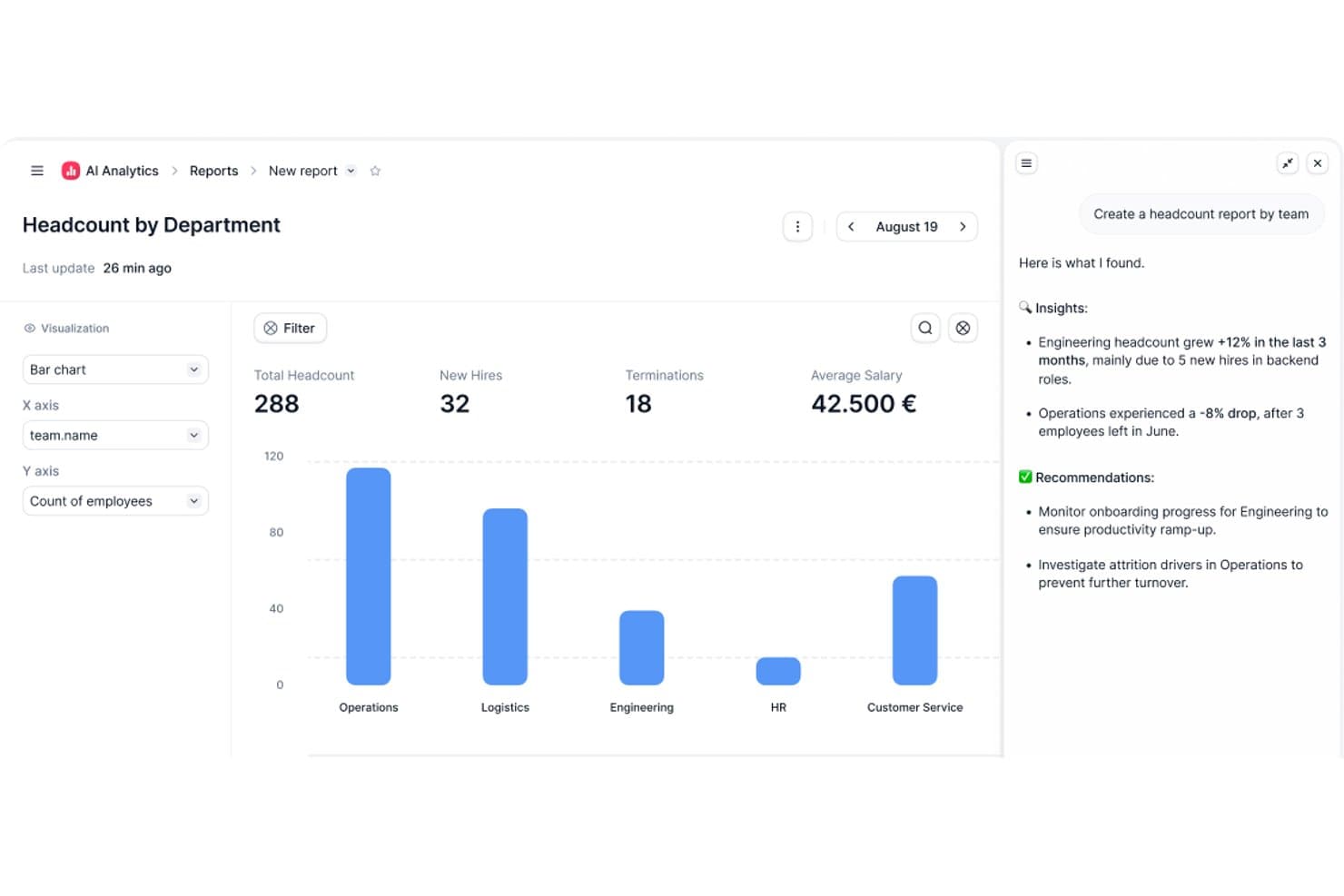
Factorial's AI analytics turns headcount data into actionable insights. Factorial is an AI-powered HRMS built for small and mid-sized businesses that covers core HR, time tracking, leave management, onboarding, performance, and employee engagement in one platform.
Who Is Factorial Best For?
Factorial is a strong fit for small and mid-sized businesses that want AI to handle everyday operations—from scheduling and reporting to answering employee policy questions.
Why I Picked Factorial
I picked Factorial as one of the best because its AI for business positioning goes beyond a tagline. In practice, the One AI agent actively handles the operational work that eats up HR time in small teams, from answering employee policy questions through AI Ticketing to generating reports and preparing contracts for review. I also like that shift scheduling and absence management get AI assistance built in, so a lean HR team isn't manually piecing together timetables or chasing approvals.
Factorial Key Features
- 360-degree performance reviews: Employees, peers, and managers can submit structured feedback within a single review cycle.
- eNPS and climate surveys: The Engagement module lets you run employee net promoter score surveys and Team Pulse checks to track sentiment over time.
- Expense tracking with OCR: The Expenses module reads and categorizes receipts automatically using smart document scanning.
- Legal e-signature on documents: Contracts, payslips, and HR documents can be sent and signed digitally without leaving the platform.
Factorial Integrations
Marketplace integrations include Google Workspace, Slack, Recruitee, Silae, Microsoft Power BI, and Okta. Factorial also supports a public API, webhooks, SDKs, OAuth 2.0, and Zapier.
Pros and Cons
Pros:
- Leave visibility reduces manual follow-up
- Employee records and documents stay centralized
- AI supports policy questions, reports, and timetables
Cons:
- Complex payroll still needs manual validation
- Module costs can strain very small teams
 10Best for industry-specific payroll features
Paycor
- Free demo available
- From $99/month
Visit WebsiteCustomer Rating:4.3/5
Paycor's payroll dashboard lets decision-makers access key HR insights via web browser or on any mobile device. Paycor is an HRMS platform for small businesses that brings together payroll, HR management, time tracking, benefits administration, and talent management in one system.
Who Is Paycor Best For?
Paycor is a strong fit for small businesses in industries like healthcare, manufacturing, and retail that need payroll and HR tools built around their specific workforce needs.
Why Paycor Is a Top Pick
Paycor is a top pick because it builds industry-specific payroll logic directly into the product rather than treating every business the same. For manufacturing teams, that means automated blended overtime and piece-rate calculations are handled natively—not through manual workarounds. For healthcare, Paycor supports PBJ (Payroll-Based Journal) reporting and lets you copy and paste shifts between days while filtering by nurse certifications. I also like that each industry gets its own implementation blueprint, so the setup process is led by consultants who already understand your payroll structure before they walk in the door.
Paycor Key Features
- Benefits Advisor: An open enrollment tool that lets employees self-select benefits with built-in decision support, while giving HR teams benchmarking and reporting capabilities.
- Pulse surveys: A built-in employee feedback tool that collects responses and surfaces insights directly within the platform.
- Recruiting software: A candidate tracking and communication tool that lets you post jobs, text candidates, and track applicants through every stage of the hiring pipeline.
- Reporting and analytics: Pre-built and configurable reports covering turnover, headcount, and gender pay equity, all pulling from a single unified data source.
Paycor Integrations
Paycor offers native integrations with QuickBooks, JazzHR, 15Five, DailyPay, OrgChart, Timeero, Spark Hire, Mitratech AssureHire, Tilt, and Procurify. An API is available for custom integrations.
KOBİ'ler için Diğer HRMS'ler
Aşağıda, en iyi 10 listeme giremeyen ancak yine de göz atmaya değer küçük işletmelere yönelik ek HRMS seçeneklerinin bir listesini bulabilirsiniz:
- 11TriNetBest for HR outsourcing and compliance
- 12AgendrixBest HRMS for workforce time tracking
- 13SloneekBest for centralizing employee management
- 14LatticeBest for real-time feedback and performance management
- 15HR CloudBest for an automated yet engaging employee onboarding process
- 16EddyBest for a detailed employee directory
- 17Sage HRBest for managing employee scheduling
- 18TrinetBest for its robust mobile app
- 19InsperityBest HRMS software for US-based small businesses
- 20QandleCreate company policies with a flexible HR software
İlgili İK Yazılımı İncelemeleri
Aradığınızı hâlâ burada bulamadıysanız, test edip değerlendirdiğimiz şu diğer ilgili araçlara göz atın:
- İK Yazılımı
- Bordro Yazılımı
- İşe Alım Yazılımı
- Kayıtlı İşveren Hizmetleri
- Aday Takip Sistemleri
- İş Gücü Yönetimi Yazılımı
How I Evaluate HRMS for Small Business
I split my evaluation into baseline requirements every HRMS for small business must meet—like employee records, PTO tracking, and payroll sync—and differentiators that set the best tools apart.
Core Functionality (Table Stakes For This List)
When I'm selecting tools for my list, I rank each one on a scale from 0 (does not offer the functionality) to 5 (excels in this area) for each core functionality listed below. Then, I calculate the tool's total score into a percentage. Each tool needs to achieve a minimum total score of 65% to be considered for inclusion.
- Employee Database: I check whether the system stores job history, emergency contacts, documents, and custom fields in one searchable hub rather than scattered spreadsheets.
- Onboarding & Offboarding: Each tool should let you build automated workflows—like sending offer letters, collecting e-signatures, and assigning Day 1 tasks—without manual follow-up emails.
- Time Off & Attendance: I evaluate how PTO requests, accrual policies, and approval chains work, especially for teams juggling different leave types across multiple office locations.
- Payroll Integration or Processing: Whether the tool runs payroll natively or syncs with providers like Gusto or QuickBooks, I look for how cleanly hours, deductions, and tax data flow between systems.
- Benefits Administration: Small teams still need to manage health plans and retirement options, so I look for enrollment workflows, carrier connections, and clear employee-facing plan details.
- Compliance & Reporting: I evaluate built-in compliance forms, audit trails, and reporting—things like generating headcount reports or tracking document completion rates across your workforce.
Once I have a list of tools that meet the criteria, I consider what sets each platform apart.
Differentiating Factors (What Sets Vendors Apart)
Here's how I compare and contrast different vendors:
Standout Features
An employee self-service portal makes a real difference for small teams—when staff can update their own addresses, download pay stubs, and submit PTO requests from their phones, it takes routine questions off your plate. I also look at whether a tool includes built-in performance reviews and goal tracking, since most small businesses outgrow informal feedback quickly. Applicant tracking is another differentiator I evaluate; tools that let you post jobs, screen candidates, and convert them into employee records in one system save a lot of duplicate data entry.
Beyond Features
Pricing transparency matters a lot for small businesses, so I check whether vendors offer clear per-employee-per-month rates and low-commitment entry points that scale as you hire. Integration support is equally important—your HRMS needs to connect with tools like QuickBooks, Xero, Slack, or Google Workspace without custom development. I also evaluate onboarding support, especially whether the vendor offers guided setup wizards or data migration templates, since most small teams are moving off spreadsheets and can't afford a months-long implementation.
Bir KOBİ için HRMS Nasıl Seçilir?
Bir HRMS, maksimum verimlilik için tüm temel İK işlevlerinizi tek bir sistemde düzenlemenize yardımcı olabilir. Küçük işletmenizin ihtiyaçlarına en uygun HRMS'i belirlemek için önce temel kullanıcılarınızı ve onların karşılaştığı belirli zorlukları saptayıp belgelemelisiniz.
Kendinize özgü yazılım seçme sürecinizi yürütürken aşağıdaki noktaları göz önünde bulundurun:
- Hangi sorunu çözmeye çalışıyorsunuz - Aşmaya çalıştığınız zorlukları belirleyerek başlayın. Bu, İKYS'nin sunması gereken özellikleri ve işlevleri netleştirmenize yardımcı olacaktır.
- Kimlerin kullanması gerekecek - Maliyeti ve gereksinimleri değerlendirmek için yazılımı kimlerin kullanacağını ve kaç lisansa ihtiyacınız olacağını göz önünde bulundurun. Bir İKYS için muhtemelen tüm çalışanlarınızın çalışan düzeyinde erişime sahip olmasını, İK yöneticileriniz ve yöneticileriniz için ise özel erişim tanımlanmasını isteyeceksiniz. Bu netleştikten sonra, tüm ihtiyaçların karşılandığından emin olmak için güçlü kullanıcılarınızın, yöneticilerinizin ve çalışanlarınızın temel önceliklerini belirlemek üzere farklı kullanıcılarınızın ihtiyaçlarını önem sırasına koymak da faydalı olacaktır.
- Hangi diğer araçlarla birlikte çalışması gerekecek - Hangi araçları değiştirdiğinizi, hangi araçları kullanmaya devam edeceğinizi ve eğitim yönetimi yazılımı, tek oturum açma uygulamaları veya Microsoft 365 ya da Google Workspace gibi iş işletim sistemleriyle hangi araçları entegre etmeniz gerekeceğini netleştirin. Araçların birbiriyle entegre edilmesinin gerekip gerekmediğine veya alternatif olarak birden fazla aracı tek bir hepsi bir arada İK platformuyla değiştirip değiştiremeyeceğinize karar vermeniz gerekecek.
- Hangi sonuçlar önemli - Kazanmak veya iyileştirmek istediğiniz yetenekleri ve başarıyı nasıl ölçeceğinizi gözden geçirin. Örneğin, yönetici taleplerini azaltmak veya çeşitli kâğıt ya da Excel tabanlı takip süreçlerini dijitalleştirmek için çalışanların kendi kendine hizmet olanaklarını kazanmak isteyebilirsiniz. Yazılım özelliklerini gözünüz kararana kadar karşılaştırabilirsiniz; ancak ulaşmak istediğiniz sonuçları düşünmüyorsanız çok değerli zamanınızı boşa harcayabilirsiniz.
- Kuruluşunuz içinde nasıl çalışacağı - Yazılım seçimini mevcut iş akışlarınız ve sistemlerinizle birlikte değerlendirin. Nelerin iyi çalıştığını ve ele alınması gereken sorunlara yol açan alanları değerlendirin.
Her işletmenin farklı olduğunu unutmayın — bir İKYS'nin yalnızca popüler olduğu için kuruluşunuzda işe yarayacağını varsaymayın.
İKYS nedir?
İnsan kaynakları yönetim sistemleri (HRMS), çalışan verilerinin yönetimi, bordro işlemleri, yan hakların yönetimi ve işe alım süreçleri gibi çeşitli İK işlevlerini kolaylaştırmak ve otomatikleştirmek için tasarlanmış yazılım araçlarıdır. Çalışan bilgilerini depolamak ve bunlara erişmek için merkezi bir platform sağlayarak İK görevlerini basitleştirir ve karar alma süreçlerini iyileştirir.
Bu yazılım, küçük işletmelerin küçük bir iş gücünü verimli bir şekilde yönetmesine, iş yasalarına uyumu sağlamasına ve yüksek maliyetlere yol açmadan manuel iş yükünü azaltmasına yardımcı olur. Küçük işletmeler HRMS kullanarak idari yüklerden çok stratejik büyümeye odaklanabilir.
İKYS'nin özellikleri
Doğru İnsan Kaynakları Yönetim Sistemini (HRMS) seçmek; uyumluluğu sürdürmeyi, çalışan yönetimini geliştirmeyi ve büyümeye odaklanmayı amaçlayan küçük işletmeler için kritik öneme sahiptir. Küçük işletmelerde ve büyük kuruluşlarda İK'nın rolü, operasyonların ve veri yönetiminin kolaylaştırılmasını sağlayan İKBS sistemlerinin verimliliğine büyük ölçüde bağlıdır.
Etkili bir HRMS, çeşitli İK görevlerini kolaylaştırarak işletmelerin sorunsuz ve verimli bir şekilde faaliyet göstermesini sağlayabilir. Göz önünde bulundurulması gereken on temel özellik şunlardır:
- Çalışan Veritabanı Yönetimi: HRMS'niz, tüm çalışan bilgilerinizin depolanması için merkezi bir veritabanı işlevi görecektir. Bu, tüm çalışan verilerinin düzenli ve kolayca erişilebilir olmasını sağlayarak kayıt tutma düzenlemelerine uyumu kolaylaştırır.
- Bordro Yönetimi: Bordronun otomatikleştirilmesi hataları ve manuel veri girişi gereksinimlerini azaltarak bordro sürecini çok daha az zaman alır hâle getirir.
- Çalışma Süresi ve Devam Takibi: Bu özellik, kuruluşların çalışanların çalışma saatlerini takip etmesine, iş gücü maliyetlerini yönetmesine ve fazla mesai ile art arda çalışılan gün sayısına ilişkin iş kanunlarına uymasına yardımcı olur.
- Yan Haklar Yönetimi: Verimli yan haklar yönetimi, yetenekleri çekmeye ve elde tutmaya yardımcı olarak genel işletme büyümesine katkıda bulunur. Ayrıca aylık yan hak maliyetleri doğrudan bordro modülünüzle ilişkilendirildiğinde manuel veri girişini azaltırsınız.
- Performans Yönetimi: Bu özellik, hedef belirleme ve çalışan performansını değerlendirmeye yönelik araçları ifade eder. Düzenli performans değerlendirmeleri, üretkenliğin artırılmasına ve gelişim alanlarının belirlenmesine yardımcı olarak işletmenin başarısını destekler.
- İşe Alım ve Aday Takibi: Verimli işe alım ve aday takibi, işletmenin en iyi yetenekleri hızlı bir şekilde çekmesini sağlar. Günümüzde birçok sistem, adayların becerilerini iş tanımlarıyla karşılaştırmayı çok daha verimli ve adil hâle getiren yapay zekâ destekli özelliklerden yararlanır.
- Uyumluluk Yönetimi: HRMS sistemleri, yasal uyumluluğu izlemek ve sağlamak için araçlarla birlikte gelir. Bu özellik, cezaların ve hukuki sorunların önlenmesine yardımcı olarak işletmenin sorunsuz bir şekilde faaliyet göstermesini sağlar.
- Çalışanların Kendi İşlemlerini Yapabildiği Portal: Bu önemli özellik, çalışanların iletişim bilgileri, banka bilgileri ve yan hak bilgileri gibi kendi İK bilgilerine erişmesine ve bunları yönetmesine olanak tanır. Çalışanların kendi verilerini yönetmesini sağlamak, bağlılığı artırır ve idari yükleri azaltır.
- Raporlama ve Analiz: HRMS sistemleri, ekiplerin bilinçli kararlar almasına, İK stratejilerini optimize etmesine ve işletme büyümesini desteklemesine yardımcı olmak için yerleşik raporlar ve analiz şablonları sunar.
- Eğitim ve Gelişim: Bu ifade, genellikle kurum içi bir öğrenme yönetim sistemi (LMS) de içeren, kurum içi çalışan eğitim programlarını barındırmaya ve izlemeye yönelik araçları ifade eder. Küçük bir işletme için çalışan gelişimine yatırım yapmak, zaman içinde işletmenin büyümesinin temelini oluşturan yetkin bir iş gücünü teşvik eder.
Daha fazla özelleştirme seçeneği arayan işletmeler için gelişmiş İK yazılımlarını incelemek, ihtiyaçlarınıza göre uyarlanabilecek daha geniş bir özellik yelpazesi sunabilir.
HRMS Çözümleriyle Küçük İşletmenizin Büyümesine Yardımcı Olun
Küçük bir işletmeyi büyütmek karmaşıktır; çünkü işletme sahiplerinin dikkat etmesi gereken pek çok şey vardır. Ancak HRMS çözümleri ve küçük işletmeler için tasarlanmış diğer İK yazılımları süreci kolaylaştırır. Bunların birçoğu, tekrarlayan İK görevlerini otomatikleştirmenize yardımcı olur; böylece işletmenizin diğer yönlerine odaklanabilirsiniz. Ayrıca işe alım, yetenek yönetimi, işe alıştırma ve iş gücü yönetiminde zamandan tasarruf etmenize yardımcı olurlar.
Ancak en önemlisi, HRMS yazılımı sizin ve ekibinizin nasıl büyüyeceğinizi anlamasına yardımcı olabilir. BDC İnsan Kaynaklarından Sorumlu Kıdemli Başkan Yardımcısı Mary Karamanos, şunları söyledi “Büyüyen şirketlerin yaptığı yaygın bir hata, İK ihtiyaçlarını planlamak için yeterli zaman ayırmamaktır. […] İyi haber şu ki küçük işletmeler, zorlu sorumluluklar, iyi öğrenme fırsatları ve kişisel gelişim sunabildikleri için çoğu zaman en iyi çalışanları kendilerine çekebilir.”