

I 10 migliori software per l’esperienza dei dipendenti del 2026

10 Migliori Software per l’Employee Experience: Lista Ristretta


I migliori strumenti per l’employee experience aiutano i professionisti HR ad andare oltre i fogli di calcolo e le semplici intuizioni, fornendo dati concreti su coinvolgimento, riconoscimento e fidelizzazione. Che tu stia affrontando problemi di dipendenti poco coinvolti, alto turnover o processi manuali macchinosi, il software giusto semplifica la raccolta di feedback in tempo reale, il riconoscimento dei contributi e la creazione di una cultura in cui le persone desiderano restare e dare il meglio di sé.
Questi strumenti ti aiutano a svolgere i compiti più importanti: misurare la soddisfazione, monitorare le performance, gestire i programmi di riconoscimento e trasformare i risultati dei sondaggi in azioni concrete. Eliminano anche le incertezze nella scelta delle priorità, facendo emergere tendenze che altrimenti potresti non notare.
Come recensore di software HR con oltre 3 anni di esperienza presso People Managing People, ho analizzato centinaia di piattaforme per trovare i migliori strumenti di employee experience oggi disponibili. In questa guida vado dritto al punto, così potrai trovare una soluzione davvero adatta al tuo team e costruire una cultura aziendale di successo.
Perché fidarsi delle nostre recensioni sui software
Il nostro team testa e recensisce software dal 2012. In quanto esperti HR noi stessi, sappiamo quanto sia difficile — e importante — scegliere il software giusto.
Per questa guida, abbiamo valutato gli strumenti attraverso test pratici e ricerche indipendenti, assegnando un punteggio agli strumenti in base ai nostri criteri di selezione. Ci basiamo inoltre sulle competenze di leader di pensiero del settore e di professionisti HR attivi.
Le nostre recensioni riflettono il nostro giudizio editoriale umano, non un discorso di vendita.
Revisori esperti:
Migliori Software per l’Employee Experience: Tabella di Confronto
Questa tabella riassume prezzi, prove gratuite e demo dei migliori software per l’employee experience selezionati, per aiutarti a trovare la soluzione più adatta al tuo budget e alle esigenze aziendali.
| Tool | Best For | Trial Info | Price | ||
|---|---|---|---|---|---|
| 1 | Ideale per valutare le competenze individuali e indirizzare lo sviluppo delle competenze future | Demo gratuita disponibile | Da $2 a $7/dipendente/mese | Website | |
| 2 | Ideale per il riconoscimento tra pari | Demo gratuita disponibile | Da $2 a $5/utente/mese (minimo $3.000/anno) | Website | |
| 3 | Il miglior strumento per l'esperienza dei dipendenti con sfide e premi personalizzabili | Demo gratuita disponibile | Da $3/utente/mese | Website | |
| 4 | Ideale per approfondimenti su coinvolgimento e performance dei dipendenti guidati dai dati | Prova gratuita + demo gratuita disponibili | Da $66/utente/mese | Website | |
| 5 | Ideale per collegare i dati sul coinvolgimento alle valutazioni delle performance | Prova gratuita di 30 giorni + demo gratuita disponibile | A partire da $3/utente/mese (fatturato annualmente) | Website | |
| 6 | Ideale per incentivare i dipendenti con riconoscimento e premi | Piano gratuito disponibile | Da $2/utente/mese | Website | |
| 7 | Il miglior software per l'esperienza dei dipendenti con un sistema di premi a punti | Demo gratuita disponibile | Prezzo su richiesta | Website | |
| 8 | Ideale per benefit aziendali competitivi | Demo gratuita disponibile | Prezzo su richiesta | Website | |
| 9 | Ideale per modelli di valutazione personalizzabili | Prova gratuita di 30 giorni + demo gratuita disponibile | A partire da $2,50/utente/mese (fatturazione annuale) | Website | |
| 10 | Ideale per HR, coinvolgimento e prestazioni nelle PMI | Prova gratuita + demo gratuita disponibili | A partire da $8/utente/mese | Website |

Recensioni dei Migliori Software per l’Employee Experience
Qui sotto trovi una breve descrizione di ciascun software per l’employee experience, con i principali casi d’uso e le funzionalità più interessanti. Ho incluso anche screenshot per darti un’idea della loro interfaccia.
Ideale per valutare le competenze individuali e indirizzare lo sviluppo delle competenze future
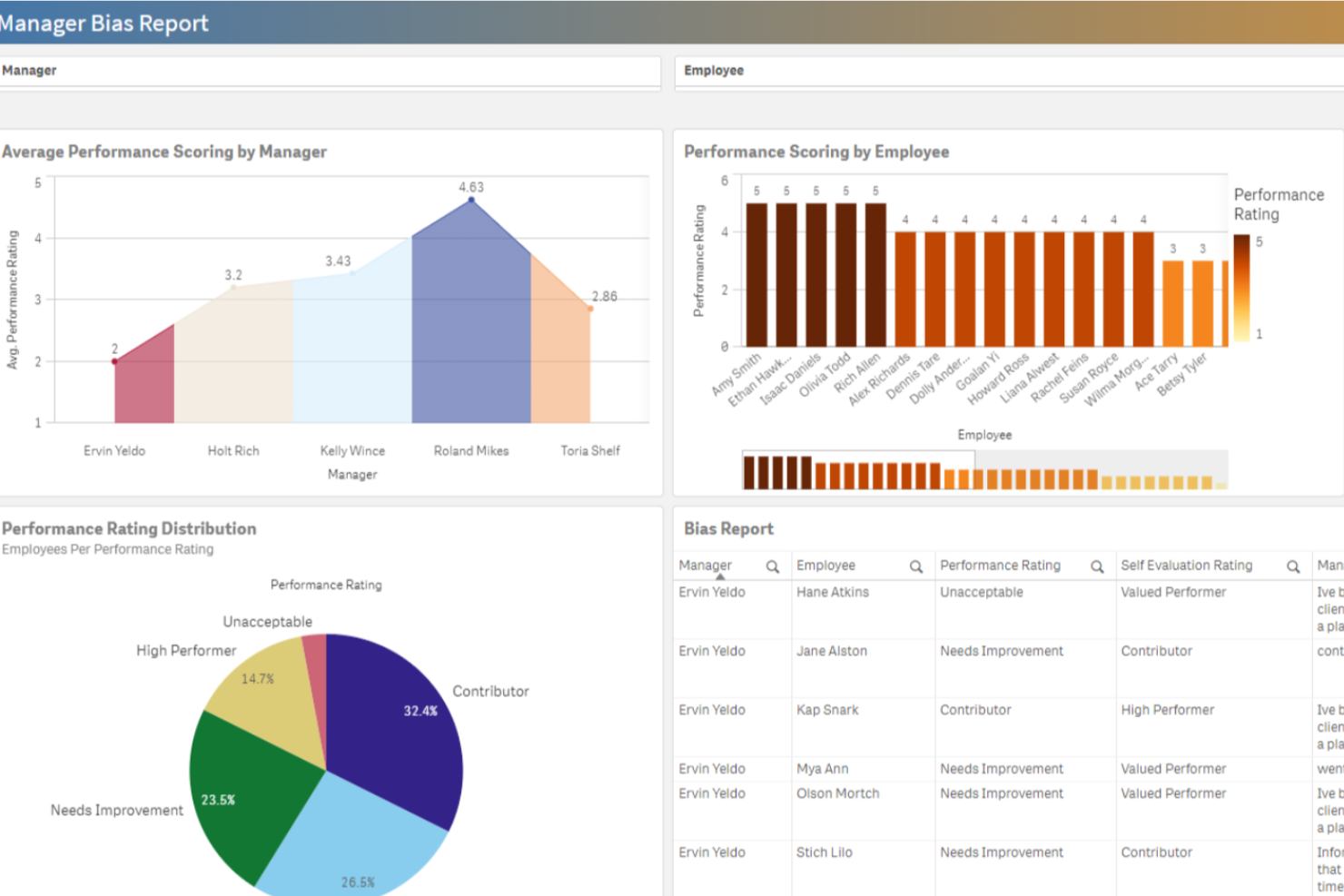
Performance Pro è una piattaforma di gestione delle prestazioni progettata per team HR e manager che desiderano aumentare il coinvolgimento dei dipendenti, supportare il feedback continuo e allineare gli obiettivi individuali con quelli organizzativi.
Per chi è ideale Performance Pro?
Performance Pro è particolarmente adatto per organizzazioni di medie dimensioni in cui i team HR necessitano di un approccio strutturato e personalizzabile per le valutazioni delle prestazioni dei dipendenti e la pianificazione dello sviluppo.
Perché ho scelto Performance Pro
Ho selezionato Performance Pro nella mia lista per il modo in cui gestisce lo sviluppo basato sulle competenze. Mi piace che colleghi direttamente le lacune di competenze individuate alle attività formative tramite il suo sistema integrato di gestione dell'apprendimento, così i dipendenti non vengono solo valutati e lasciati a capire da soli i passi successivi. I piani per lo sviluppo delle competenze per ruoli attuali e futuri consentono di mappare la situazione attuale rispetto a quella desiderata, assegnando automaticamente i corsi pertinenti per colmare il divario. Trovo anche utile il monitoraggio centralizzato per seguire i progressi di sviluppo e individuare candidati interni per ruoli vacanti.
Caratteristiche principali di Performance Pro
- Strumenti di allineamento degli obiettivi: Imposta obiettivi individuali e collegali direttamente alle strategie aziendali tramite una libreria di obiettivi configurabile con tracciamento dei progressi.
- Retribuzione per prestazione: Automatizza gli aumenti salariali per merito e gestisci l'allocazione del budget per il merito legato al raggiungimento degli obiettivi.
- Valutazioni a 360 gradi: Esegui processi di valutazione multi-valutatore e a 360 gradi insieme a quelle standard per raccogliere feedback da più prospettive.
- Analisi in tempo reale sul coinvolgimento: Monitora i dati sul coinvolgimento dei dipendenti attraverso l'app integrata per Microsoft Teams.
Integrazioni con Performance Pro
Le integrazioni includono Microsoft Teams e sistemi core di payroll o HRIS tramite API o SFTP.

Ideale per il riconoscimento tra pari
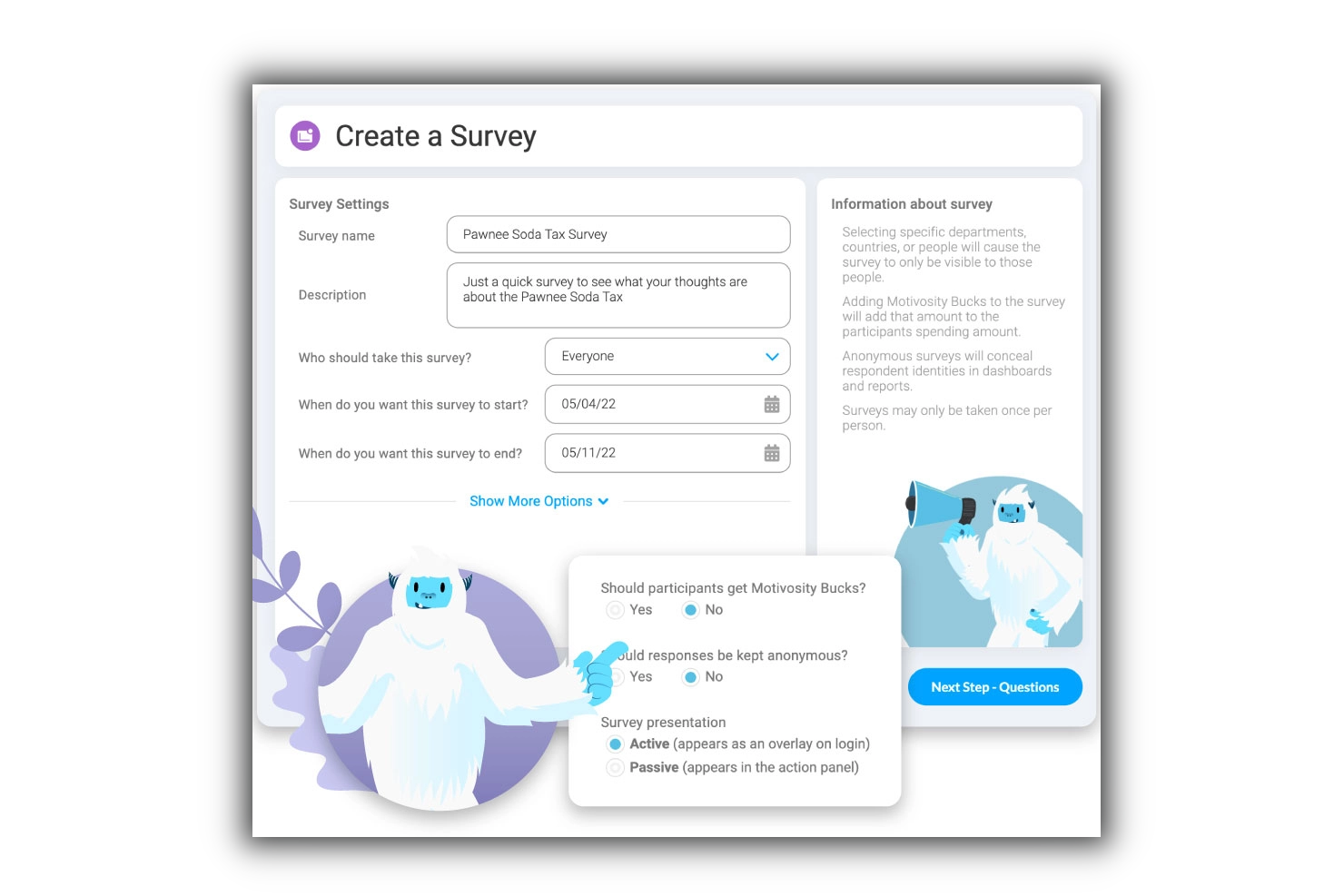
Motivosity aiuta i team HR e i leader aziendali a migliorare il coinvolgimento e le prestazioni dei dipendenti facilitando il riconoscimento dei successi, la raccolta di feedback e il monitoraggio in tempo reale del sentiment sul luogo di lavoro.
Per chi è Motivosity?
Motivosity è adatto alle aziende di medie dimensioni che desiderano costruire una cultura di riconoscimento e connessione tra team e reparti.
Perché ho scelto Motivosity
Motivosity è nella mia shortlist perché rende il riconoscimento tra pari naturale, non artificiale. Amo il modello di riconoscimento basato sui valori: ogni attestazione inviata da un dipendente è legata a uno dei valori fondamentali dell'azienda, quindi non si tratta soltanto di registrare un momento di 'bel lavoro', ma di rafforzare attivamente i comportamenti che contano. Ogni dipendente riceve inoltre una somma mensile da destinare ai colleghi insieme al ringraziamento, il che aggiunge vero valore al riconoscimento senza lasciare il controllo del budget solo ai manager. Il feed sociale aziendale mette poi in evidenza tutte queste attività pubblicamente, quindi il riconoscimento non resta nascosto in un messaggio privato: è visibile, commentabile e davvero contagioso in tutta l'organizzazione.
Funzionalità principali di Motivosity
- Sondaggi sul coinvolgimento dei dipendenti: Invia sondaggi rapidi per misurare il sentiment del team e monitorare l'andamento del coinvolgimento nel tempo.
- Strumenti per i manager: Fornisci ai manager uno spazio dedicato per annotare appunti sui 1-to-1, fissare obiettivi e tracciare le tappe fondamentali dei collaboratori diretti.
- Catalogo premi: Permetti ai dipendenti di riscattare i fondi guadagnati tramite un catalogo integrato di buoni regalo e merchandize con il brand.
- Dashboard di people analytics: Visualizza i dati sull’engagement a livello aziendale, sulle attività di riconoscimento e sui tassi di partecipazione in un’unica schermata di report.
Integrazioni Motivosity
Le integrazioni native attualmente non sono elencate.
New Product Updates from Motivosity

Motivosity Launches Appreciation Intelligence With AI Coaching and Automation
Motivosity introduces Appreciation Intelligence™ with Appreciation Coach, Insights AI, Motivosity Agents, and an MCP Connector. The new capabilities help teams improve recognition, automate routine tasks, and access employee recognition insights faster. For more information, visit Motivosity's official site.

Nectar
Il miglior strumento per l'esperienza dei dipendenti con sfide e premi personalizzabili

Nectar è una piattaforma per il riconoscimento e la premiazione dei dipendenti progettata per migliorare il morale e il coinvolgimento sul posto di lavoro semplificando il processo di riconoscimento. Offre un'interfaccia intuitiva, premi personalizzabili e robuste funzionalità di reportistica, rendendola adatta a una vasta gamma di aziende.
Perché ho scelto Nectar: la sua piattaforma di riconoscimento e premi consente ai dipendenti di riconoscere gli sforzi e i risultati degli altri, promuovendo una cultura di apprezzamento e lavoro di squadra. L'ampia suite di premi della piattaforma include opzioni come articoli Amazon, gadget aziendali, buoni regalo digitali e la possibilità di creare premi personalizzati, offrendo ai dipendenti una varietà di incentivi che possono essere adattati alle loro preferenze. Questa flessibilità nei premi aiuta a mantenere alta la motivazione e il coinvolgimento, dato che i dipendenti possono scegliere premi significativi per loro.
Inoltre, Nectar offre funzionalità come bonus automatici per compleanni e anniversari di lavoro, sconti esclusivi per i dipendenti e sfide personalizzabili in linea con gli obiettivi dell'organizzazione. Queste funzionalità non solo aiutano a semplificare il processo di riconoscimento, ma contribuiscono anche a creare un ambiente di lavoro più coeso e solidale.
Integrazioni includono BambooHR, ADP, Namely, Paylocity, Zenefits, Workday, Rippling, Gusto, Netsuite, G Suite, Okta, OneLogin e Azure AD.
New Product Updates from Nectar

Nectar Enhances Clara AI With Live Platform Data
Nectar introduces live platform data access and expanded knowledge coverage for Clara AI. The updates improve response accuracy and speed while enabling Clara AI to answer questions across more recognition and rewards features. For more information, visit Nectar's official site.
 .
.
Ideale per approfondimenti su coinvolgimento e performance dei dipendenti guidati dai dati

Sogolytics offre ai team HR e ai leader aziendali una piattaforma per raccogliere, analizzare e agire sui feedback dei dipendenti, aiutando le organizzazioni a scoprire i fattori di coinvolgimento e affrontare le sfide di performance con insight supportati dai dati.
Per chi è ideale Sogolytics?
Sogolytics è particolarmente adatto per organizzazioni di medie e grandi dimensioni dove i team HR necessitano di analisi dettagliate per comprendere e migliorare il coinvolgimento dei dipendenti tra i vari dipartimenti.
Perché ho scelto Sogolytics
Ho scelto Sogolytics tra i migliori per come collega profondamente la raccolta del feedback ad analytics azionabili. Trovo particolarmente interessante la funzione Key Driver Analysis, che va oltre i punteggi di superficie per identificare i fattori specifici che realmente guidano il coinvolgimento o il disimpegno nei team. Mi piace anche la funzionalità AI Reports, che individua automaticamente piani di azione prioritari dalle risposte aperte—così, invece di passare ore a leggere dati qualitativi, il mio team ottiene chiari prossimi passaggi. Il dashboard EX dedicato riunisce eNPS, ESAT e trend di benessere in una singola visualizzazione in tempo reale, rendendo più facile identificare schemi e portare raccomandazioni fondate sui dati alla leadership.
Funzionalità principali di Sogolytics
- Sondaggi periodici ai dipendenti: Invia sondaggi programmati e automatizzati per monitorare nel tempo i cambiamenti di percezione tra i team.
- Automazione del percorso del dipendente: Avvia sondaggi nei momenti chiave—onboarding, interviste di permanenza ed exit—utilizzando Directory collegate alle date.
- Experience Navigator: Un co-pilota AI che genera un programma EX completo, includendo sondaggi di percorso, pulse check e manuali per manager, in base agli obiettivi definiti.
- Monitoraggio del benessere dei dipendenti: Monitora indicatori di benessere insieme alle metriche di coinvolgimento e soddisfazione all'interno del dashboard EX.
Integrazioni Sogolytics
Le integrazioni includono Microsoft Teams, Slack, Google Workspace, Salesforce, Zapier, ADP, BambooHR, Workday, Okta e Microsoft Azure Active Directory.
New Product Updates from Sogolytics
Sogolytics Adds Teams and Slack Surveys and Custom Automations
Sogolytics adds native Microsoft Teams and Slack survey distribution, a Custom Automations Builder, Derived Fields, PointClickCare integration, and authenticator-based MFA. These updates expand survey distribution and workflow automation while adding new data management and security capabilities. For more information, visit Sogolytics’ official site.
 .
.
Ideale per collegare i dati sul coinvolgimento alle valutazioni delle performance
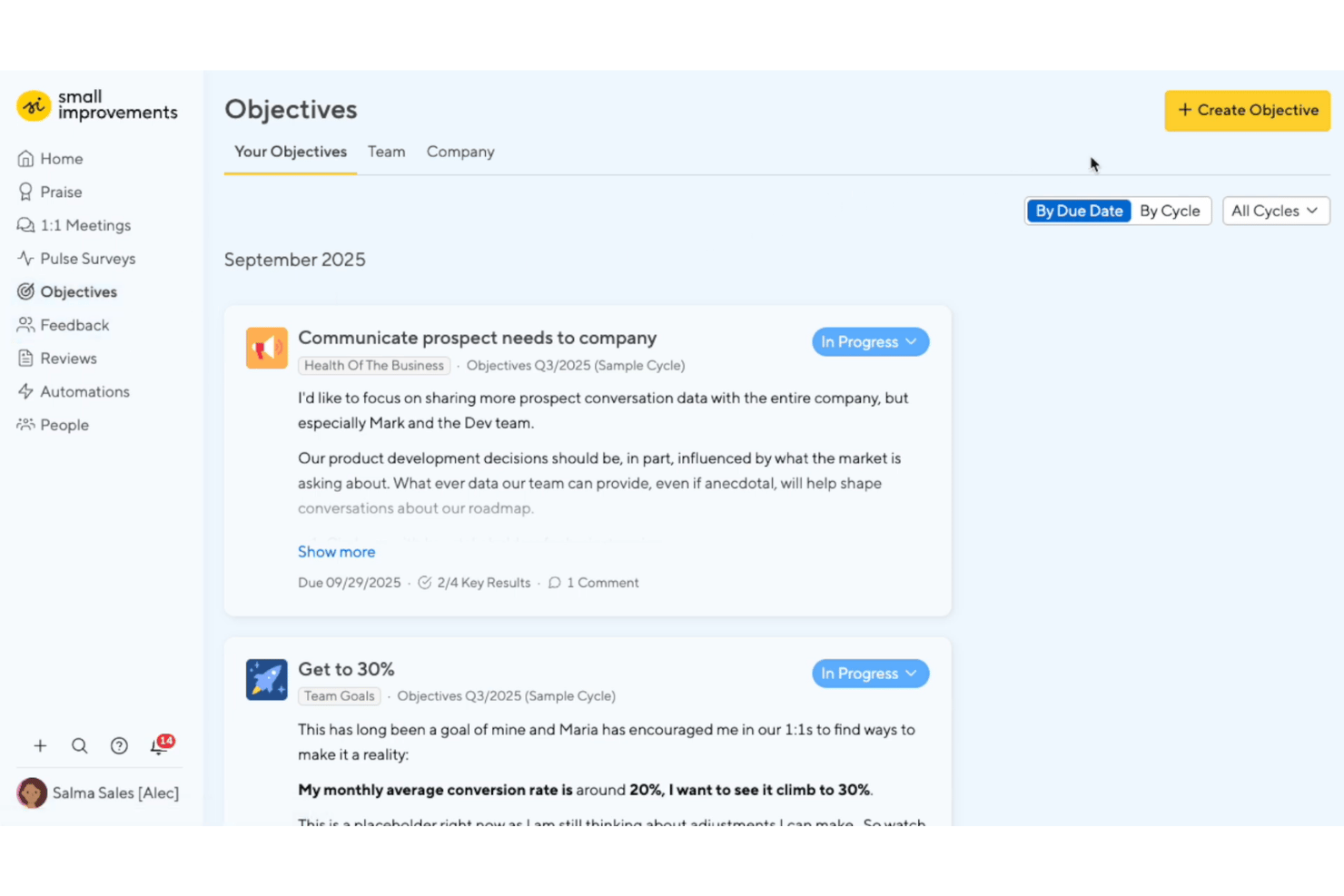
Small Improvements è una piattaforma per la gestione delle performance e il coinvolgimento dei dipendenti che combina sondaggi periodici, feedback a 360 gradi, valutazioni delle performance, obiettivi e incontri 1:1 strutturati in un unico strumento progettato per team piccoli e di medie dimensioni.
Per chi è più indicato Small Improvements?
Small Improvements è adatto ai responsabili HR e ai team che si occupano delle persone presso aziende in crescita con 50–750 dipendenti, che desiderano riunire valutazioni delle performance, sondaggi periodici e feedback continui in un unico luogo senza la complessità delle soluzioni aziendali.
Perché ho scelto Small Improvements
Small Improvements si è guadagnato un posto nella mia selezione perché è l'unico strumento che ho trovato che consente di filtrare i risultati dei sondaggi periodici in base ai punteggi delle valutazioni delle performance, rendendo concreto, anziché presunto, il legame tra coinvolgimento e performance. Mi piace il fatto che sia possibile segmentare le mappe di calore dei sondaggi per reparto o team e poi incrociare questi risultati con il punteggio ottenuto dalle persone in una domanda della valutazione del tipo 'Test del collaboratore indispensabile'. Questa combinazione offre ai responsabili HR una connessione diretta tra ciò che le persone provano e il modo in cui lavorano.
Funzionalità principali di Small Improvements
- Automazione dei sondaggi periodici: I sondaggi vengono eseguiti secondo una pianificazione continua, così è possibile raccogliere dati sul coinvolgimento senza avviare manualmente ogni ciclo.
- Feedback a 360 gradi: Dipendenti e manager possono richiedere e fornire feedback strutturati da più colleghi in qualsiasi momento del ciclo di valutazione.
- Ordini del giorno condivisi per gli incontri 1:1: Manager e collaboratori diretti creano insieme gli ordini del giorno, con elementi di azione tracciati e sincronizzati con Google Calendar e Office 365.
- Valutazioni per la calibrazione delle performance: I team possono rappresentare e confrontare le performance dei dipendenti senza dover forzare i risultati in una distribuzione a campana.
Integrazioni di Small Improvements
Small Improvements offre integrazioni documentate con BambooHR, Workday, Personio, Rippling, Namely, Kallidus, Workable, Okta, OneLogin, Google Workspace, Slack, Google Calendar e Office 365.
Pros and Cons
Pros:
- Collega i risultati dei sondaggi periodici ai punteggi delle valutazioni
- Gli ordini del giorno condivisi per gli incontri 1:1 tengono traccia delle azioni
- La calibrazione evita le distribuzioni a campana forzate
Cons:
- Il coinvolgimento non include benchmark e raccolte di domande validate
- Nessuna analisi predittiva del rischio di abbandono
Bonusly
Ideale per incentivare i dipendenti con riconoscimento e premi
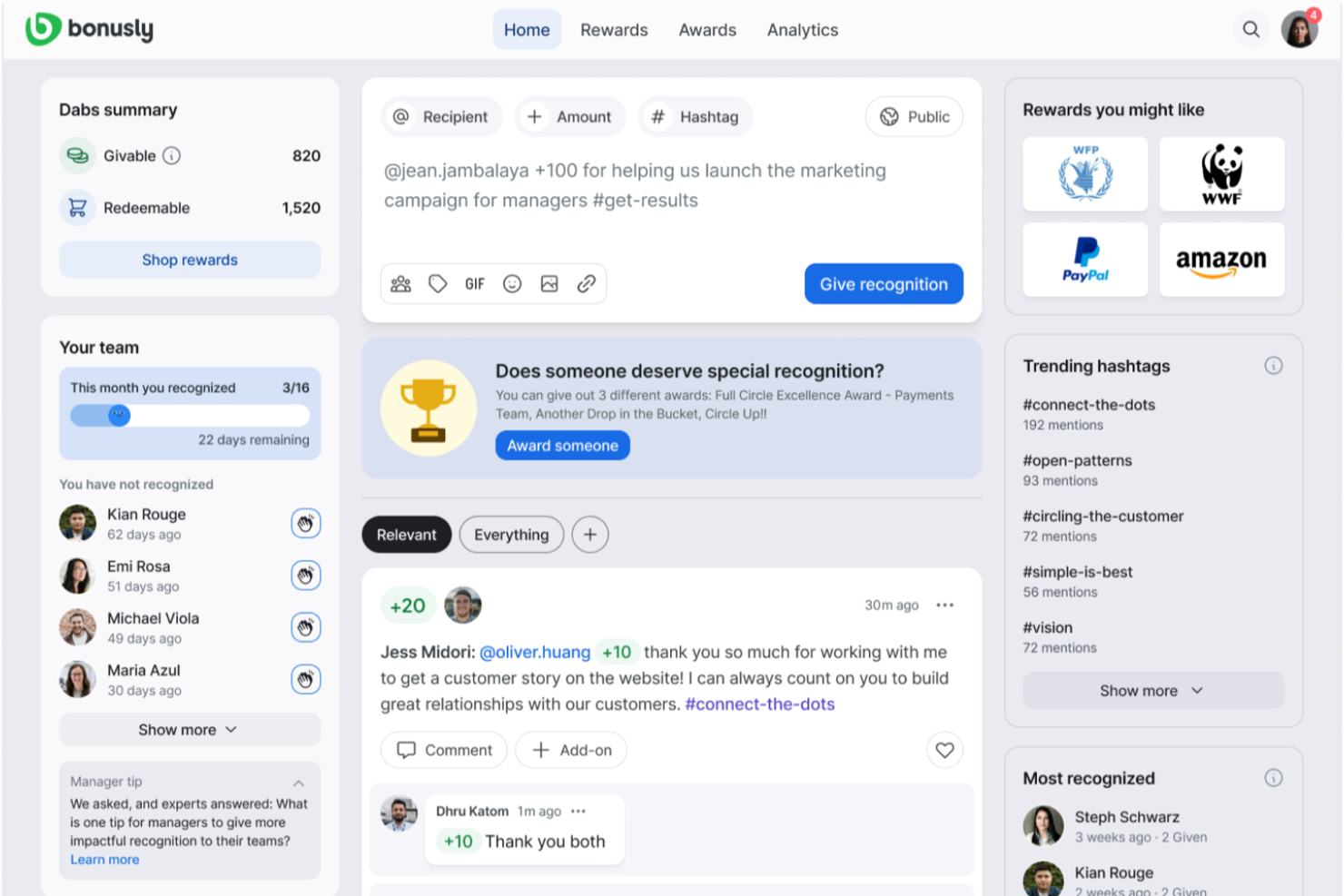
Bonusly è un software di riconoscimento e premi per i dipendenti, basato su un modello di riconoscimento tra pari. Permette ai dipendenti di scambiarsi crediti premio e convertire i propri punti in diversi tipi di ricompense. Può anche automatizzare messaggi di congratulazioni per traguardi dei dipendenti e facilitare programmi di incentivazione. La piattaforma dispone di una dashboard di analisi per monitorare il successo dei tuoi programmi di premi e incentivi.
Invece di affidarsi a un modello di riconoscimento dall'alto verso il basso, il software incoraggia i dipendenti a condividere il riconoscimento tra pari attraverso lo scambio di punti. Ogni membro del team dispone di un budget di punti da utilizzare per inviare riconoscimenti ai colleghi, accompagnati da un messaggio personalizzato. I punti premio possono essere riscattati sotto forma di buoni regalo, donazioni benefiche, opzioni di conversione in denaro o premi personalizzati implementati dall'organizzazione.
Il software funziona un po' come un feed di social media, e i dipendenti possono aggiungere commenti e punti aggiuntivi ai messaggi di riconoscimento pubblici. Questo favorisce una cultura del riconoscimento e della celebrazione delle alte prestazioni tra colleghi. Puoi aggiungere hashtag dei valori aziendali al sistema per rendere il riconoscimento più significativo e legato alla cultura aziendale.
Il software si integra con strumenti di comunicazione aziendale come Microsoft Teams e Slack, oltre a diverse piattaforme HR come SAP, ADP e BambooHR. I piani partono da $2.70 per utente al mese ed è disponibile una prova gratuita di 60 giorni.

Awardco
Il miglior software per l'esperienza dei dipendenti con un sistema di premi a punti

Awardco aiuta i team HR e i leader aziendali a creare programmi di riconoscimento dei dipendenti coinvolgenti con premi personalizzabili, facilitando l'aumento della motivazione, la celebrazione dei risultati e il miglioramento delle performance in organizzazioni di qualsiasi dimensione.
Per chi è ideale Awardco?
Awardco è particolarmente adatto ai team HR di medie e grandi aziende che desiderano creare programmi di riconoscimento strutturati e scalabili legati a risultati di coinvolgimento misurabili.
Perché ho scelto Awardco
Ho inserito Awardco nella mia selezione perché il suo sistema di premi a punti è uno dei più flessibili che abbia mai visto. Quando il mio team riconosce un dipendente, quei punti non restano confinati in un catalogo chiuso—possono essere riscattati sull'intera gamma di prodotti Amazon, migliaia di gift card, prenotazioni di viaggi tramite Priceline ed esperienze tramite Viator, tutto senza costi aggiuntivi che riducono il valore del premio. Apprezzo anche la funzione di micro incentivi, che permette di assegnare punti al raggiungimento di specifici comportamenti come il completamento della formazione sulla sicurezza o il conseguimento di obiettivi di benessere, collegando così il riconoscimento direttamente ai risultati di performance. La carta A-Pay® consente ai dipendenti di caricare i punti su una carta Visa fisica o digitale e spenderli presso molti rivenditori, riducendo i limiti di un catalogo di riscatto ristretto.
Caratteristiche principali di Awardco
- Riconoscimento peer-to-peer: Invia messaggi di riconoscimento ai colleghi direttamente dalla piattaforma, con visibilità nel feed del team.
- Nomination: Gestisci programmi strutturati di nomination per premi ai dipendenti con criteri personalizzabili e flussi di approvazione.
- Conti di spesa lifestyle: Offri ai dipendenti budget di benefit flessibili e pre-caricati che possono essere spesi per benessere, lavoro da remoto o sviluppo personale.
- Awardco Engage™: Raccogli feedback e dati di ascolto dei dipendenti nella stessa piattaforma utilizzata per riconoscimenti e premi.
Integrazioni Awardco
Le integrazioni includono Slack, Microsoft Teams, Outlook, Okta, Workday, ADP, BambooHR, UKG e SAP SuccessFactors.
TriNet
Ideale per benefit aziendali competitivi
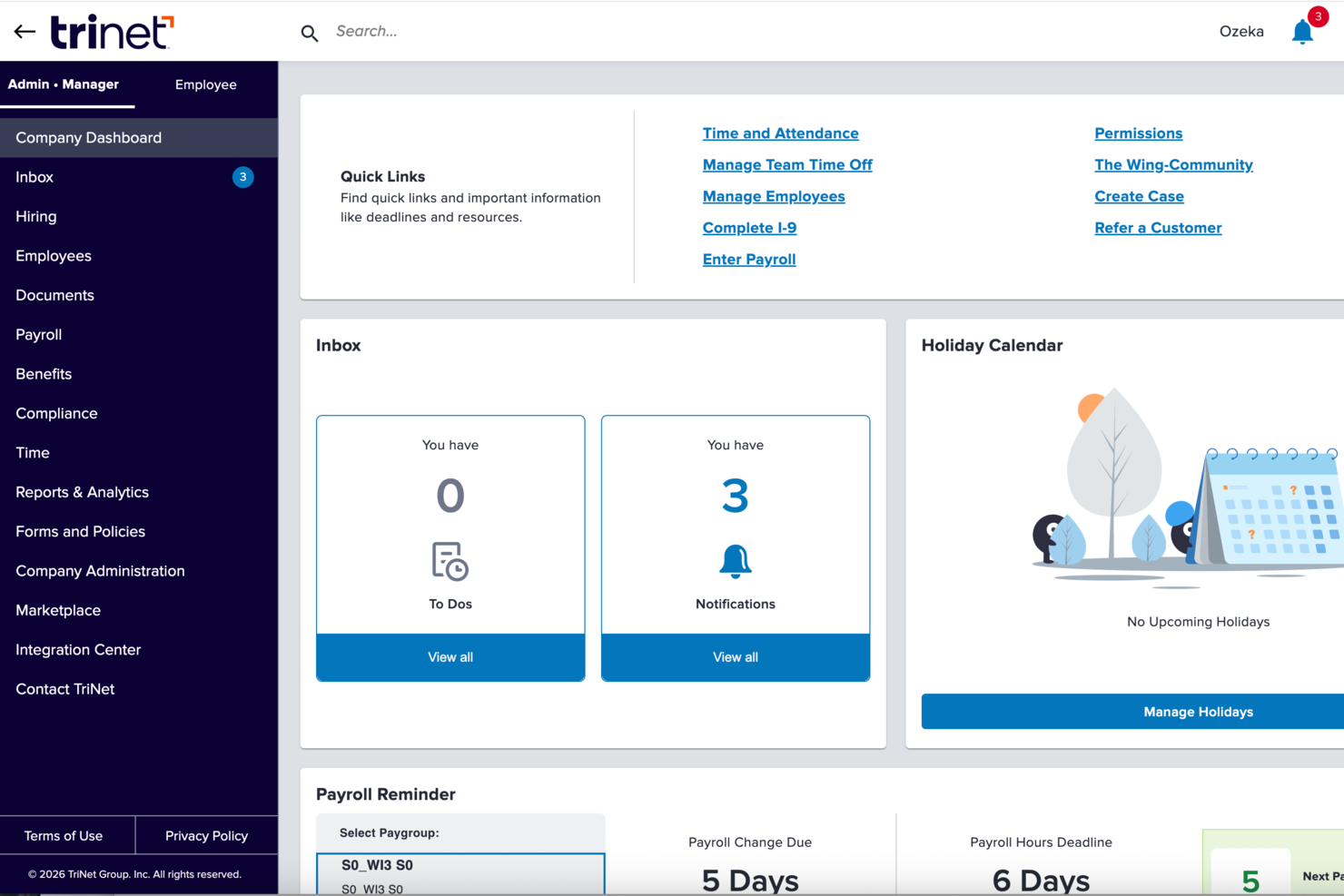
TriNet è una piattaforma completa di gestione delle risorse umane studiata per le piccole e medie imprese che desiderano migliorare il coinvolgimento dei dipendenti, semplificare i processi HR e offrire un'esperienza di lavoro moderna grazie all'integrazione di strumenti per paghe, benefit e gestione delle performance.
Per Chi è Ideale TriNet?
TriNet è perfetta per piccole e medie imprese che hanno bisogno di un'infrastruttura HR di livello aziendale senza dover costruire un grande team HR interno.
Perché Ho Scelto TriNet
TriNet è tra le migliori perché offre a piccole e medie imprese l’accesso a vantaggi solitamente riservati alle grandi aziende. Apprezzo in particolare il fatto che TriNet raggruppa i dipendenti delle aziende clienti per negoziare tariffe di gruppo su assicurazioni sanitarie, dentali, oculistiche e sulla vita—così anche un team di 20 persone può proporre benefit competitivi rispetto a un datore di lavoro Fortune 500. Il portale self-service per i dipendenti è utile: consente di rivedere e gestire le scelte dei benefit senza dover passare ogni richiesta dall’ufficio HR.
Caratteristiche Principali di TriNet
- Strumenti per la gestione delle performance: Imposta obiettivi, gestisci le valutazioni delle performance e monitora i progressi dei dipendenti direttamente sulla piattaforma TriNet.
- Onboarding digitale e firme elettroniche: Completa tutta la modulistica per i nuovi assunti, raccogli le firme digitali e inserisci i dipendenti senza stampare alcun modulo.
- Automazione delle ferie e rilevazione presenze: Registra ore lavorate, pause e PTO in tempo reale, con flussi di lavoro automatici che si integrano direttamente con le paghe.
- Monitoraggio della conformità multi-stato: Tieni traccia dei cambiamenti normativi in tutti i 50 stati con supporto di esperti HR sulle leggi per l’occupazione specifiche per ciascuna sede.
Integrazioni di TriNet
Le integrazioni sono disponibili tramite il TriNet Marketplace. Non vengono elencate integrazioni native specifiche.
Pros and Cons
Pros:
- Accesso a benefit competitivi da grandi gruppi
- Professionisti HR dedicati sempre disponibili
- Il modello ASO mantiene lo status di datore di lavoro
Cons:
- Controllo limitato con il modello PEO
- L’interfaccia può risultare datata

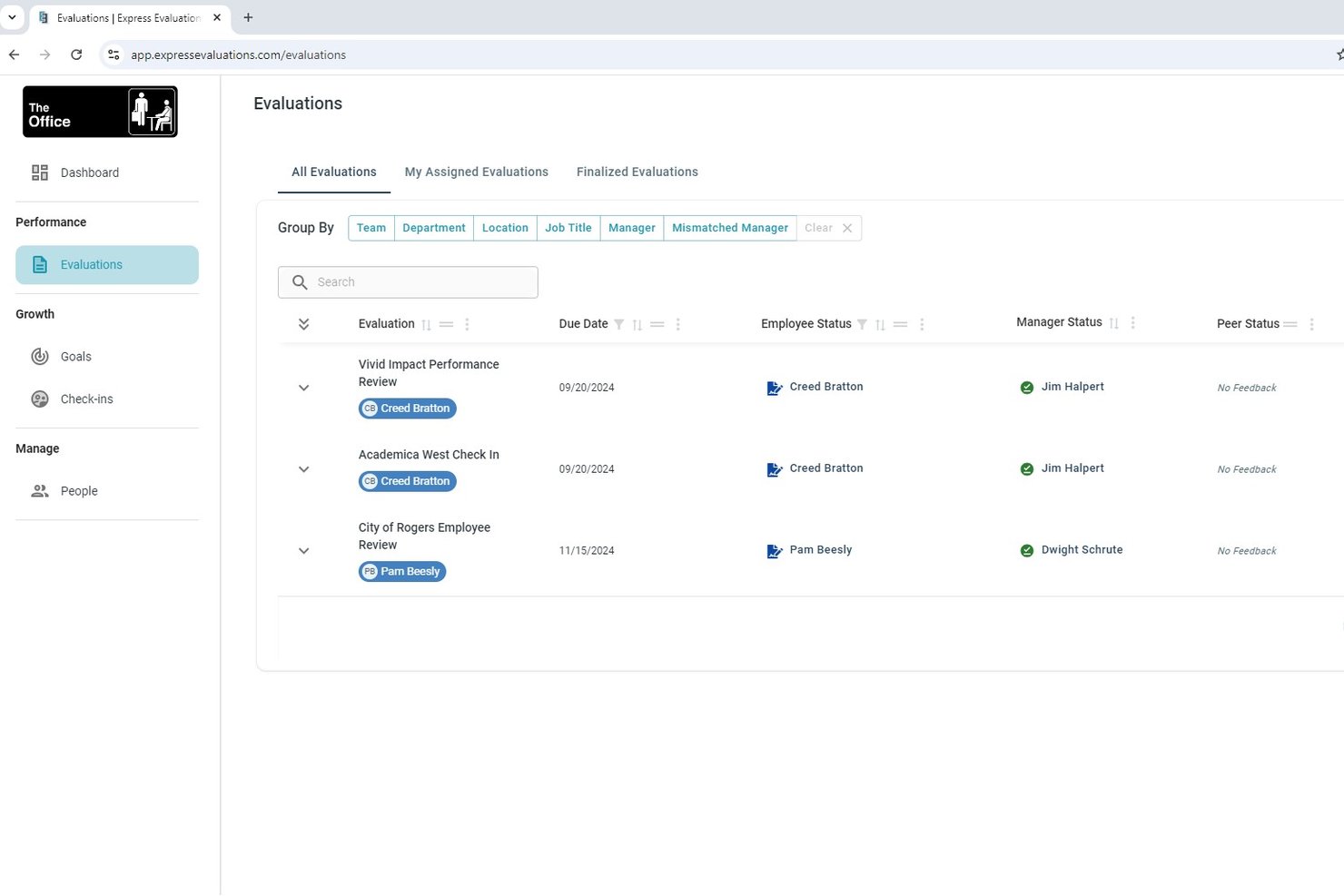
Express Evaluations è una piattaforma di gestione delle prestazioni che combina modelli di valutazione personalizzabili, feedback a 360 gradi, sondaggi a intervalli regolari (pulse survey), monitoraggio degli obiettivi e incontri periodici tra manager e dipendenti per supportare la crescita e il coinvolgimento dei collaboratori.
Per chi è ideale Express Evaluations?
È particolarmente adatta a organizzazioni di piccole e medie dimensioni—in particolare enti locali, organizzazioni non profit e settori simili—che necessitano di flussi di lavoro strutturati per la valutazione delle prestazioni senza la complessità o i costi di soluzioni enterprise.
Perché ho scelto Express Evaluations
Ho scelto Express Evaluations come una delle migliori soluzioni perché consente di creare e lanciare rapidamente cicli di valutazione utilizzando la sua libreria di modelli pronti all'uso. Apprezzo in particolare le scale di valutazione personalizzabili e la possibilità di coinvolgere più responsabili nel processo di revisione, che permette ai team HR di gestire feedback a 360 gradi senza dover ricreare ogni volta la procedura. I moduli di riconoscimento tra pari e i sondaggi a intervalli regolari portano il coinvolgimento dei dipendenti sulla stessa piattaforma del monitoraggio delle prestazioni.
Caratteristiche principali di Express Evaluations
- Modulo di pulse survey: Avvia sondaggi anonimi in tempo reale per rilevare periodicamente il sentiment dei dipendenti.
- Analisi del sentiment tramite AI: Utilizza strumenti di intelligenza artificiale per analizzare le risposte ai sondaggi e individuare le tendenze organizzative.
- Flussi di approvazione multi-manager: Inoltra revisioni e feedback a più responsabili per una maggiore supervisione e collaborazione.
- Archivio documenti dei dipendenti: Conserva registri delle prestazioni, moduli di valutazione e documenti correlati in un'area sicura e centralizzata.
Integrazioni di Express Evaluations
Express Evaluations offre integrazioni native con Employee Navigator. Il Single Sign-On (SSO) è supportato e il caricamento di dati dei dipendenti tramite file CSV è disponibile. Un'API è disponibile per integrazioni personalizzate.
Pros and Cons
Pros:
- Lancio veloce di cicli di feedback a 360 gradi
- Riconoscimento tra pari integrato alle valutazioni delle prestazioni
- Modelli pronti all'uso che riducono il tempo di configurazione manuale
Cons:
- Analisi limitate rispetto alle piattaforme enterprise
- Nessuna funzionalità predittiva sul rischio di abbandono o insight guidati da AI

Factorial
Ideale per HR, coinvolgimento e prestazioni nelle PMI
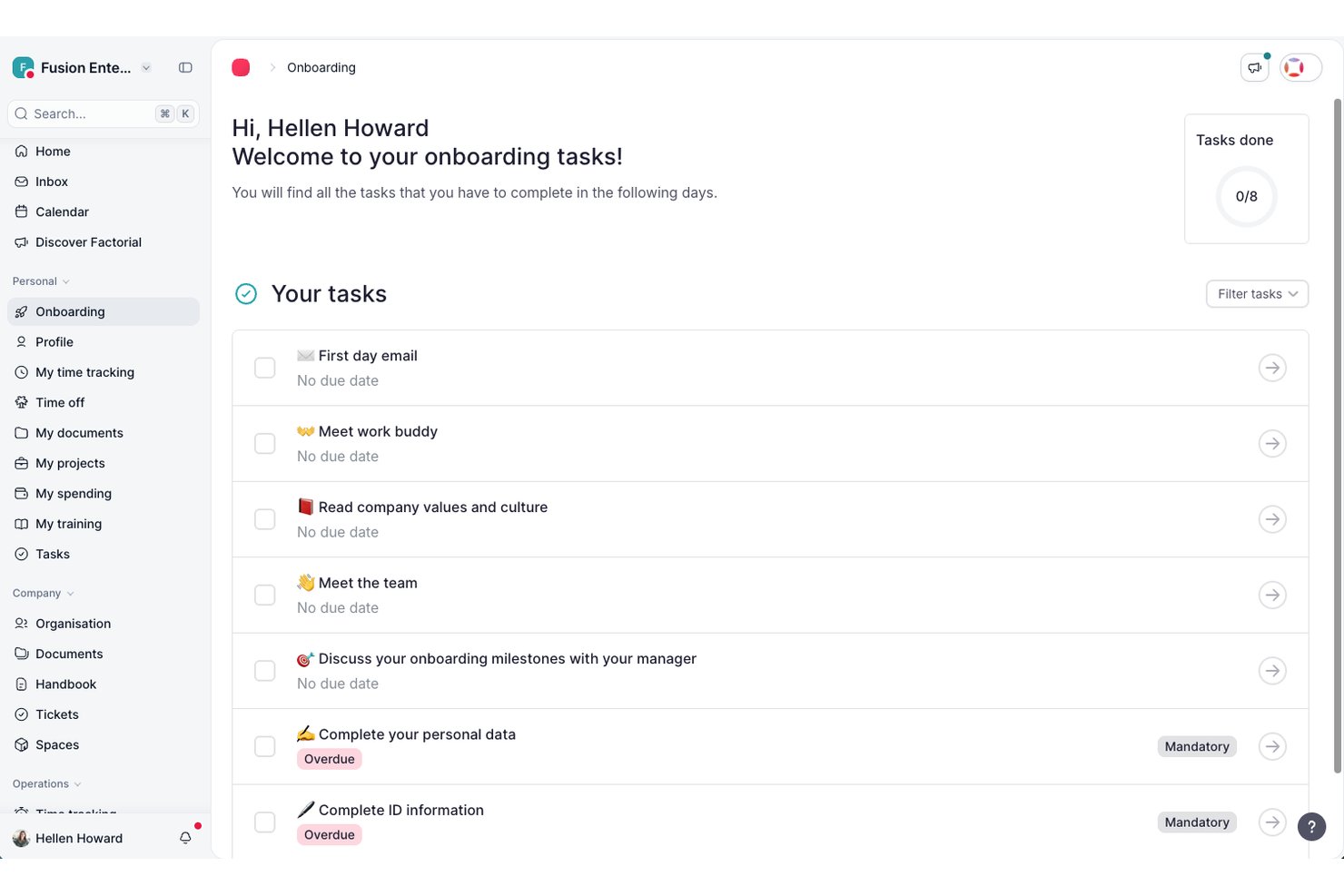
Factorial è una piattaforma HR completa per le PMI che combina sondaggi sul coinvolgimento (eNPS, sondaggi rapidi e sul clima), valutazioni delle prestazioni, monitoraggio degli OKR, riunioni 1:1 basate sull'IA e analisi delle persone in un unico sistema.
Per chi è più adatto Factorial?
Factorial è particolarmente adatto alle PMI con 15–800 dipendenti che desiderano gestire HR, coinvolgimento e prestazioni in un'unica piattaforma, invece di dover utilizzare diversi strumenti.
Perché ho scelto Factorial
Ho incluso Factorial tra le mie scelte principali perché è una delle poche piattaforme in cui le PMI possono condurre sondaggi eNPS, check-in sul clima, valutazioni delle prestazioni a 360° e monitorare gli OKR senza passare da uno strumento all'altro. Apprezzo particolarmente la funzionalità per le riunioni 1:1 basata sull'IA, che offre ai responsabili la presa di note in tempo reale, il riconoscimento vocale e trascrizioni multilingue in un unico flusso di lavoro. L'assistente IA Factorial One, integrato direttamente in Microsoft Teams, consente inoltre ai responsabili di ottenere report sul sentiment della squadra o verificare i progressi degli OKR senza abbandonare l'ambiente di lavoro che già utilizzano.
Caratteristiche principali di Factorial
- Pannello delle informazioni sul coinvolgimento: Una visualizzazione unificata che raccoglie i dati dei sondaggi eNPS e sul clima in un unico pannello, consentendo ai team HR di monitorare il sentiment della forza lavoro.
- Griglia a 9 caselle: Uno strumento di mappatura dei talenti che posiziona i dipendenti in base alle dimensioni delle prestazioni e del potenziale, per orientare lo sviluppo e la pianificazione della successione.
- Valutazioni delle prestazioni a 360° e 180°: Flussi di lavoro per valutazioni multi-valutatore che raccolgono riscontri strutturati da dipendenti, responsabili e colleghi all'interno della stessa piattaforma.
- Check-in periodici sul clima della squadra: Sondaggi leggeri, configurabili e ricorrenti che monitorano l'umore e il benessere della squadra con la frequenza impostata dall'utente.
Integrazioni di Factorial
Le integrazioni di Factorial includono Microsoft Teams, Slack, Google Workspace, Microsoft Power BI, Okta, Microsoft Outlook e Figures per i flussi di lavoro dei responsabili, l'accesso unico (SSO), l'analisi e il confronto delle retribuzioni. Offre inoltre un'API pubblica e aperta e la connettività con Zapier.
Pros and Cons
Pros:
- Flussi di lavoro unificati per HR, coinvolgimento e prestazioni
- Riunioni 1:1 basate sull'IA con automazione delle note
- Coinvolgimento e prestazioni monitorati in un unico pannello
Cons:
- Nessuna analisi predittiva del turnover o della DEIB
- Manca l'analisi automatizzata del sentiment per i sondaggi
Altri Strumenti per l’Employee Experience
Ecco alcune altre opzioni valide che non sono entrate nella lista ristretta dei migliori software per l’employee experience, ma che meritano comunque attenzione:
- Staffbase
Ideale per l'accesso alle conoscenze aziendali tramite AI
- ThriveSparrow
Ideale per la gestione dell'esperienza dei dipendenti basata sull'intelligenza artificiale
- Mitratech Perform
Ideale per collegare engagement e performance dei dipendenti
- Connecteam
Ideale per aggiornamenti e annunci interni
- PerformYard
Il miglior software per l'esperienza dei dipendenti nel favorire il feedback continuo
- Sloneek
Ideale per feedback a 360 gradi
- Confetti
Ideale per eventi di team building condotti in diretta
- Workvivo
Ideale per creare un ambiente sociale che favorisca il riconoscimento dei dipendenti
- Kudoboard
Ideale per celebrazioni collaborative dei dipendenti
- Enboarder
Ideale per flussi di comunicazione guidati dall’esperienza


Recensioni Correlate di Software HR
Se non hai ancora trovato quello che cerchi qui, dai un’occhiata a questi altri strumenti affini che abbiamo testato e valutato:
- Software HR
- Software Payroll
- Software Recruiting
- Servizi Employer of Record
- Sistemi di Tracciamento dei Candidati
- Software Gestione Forza Lavoro
Come valuto i software per l’Employee Experience per le prestazioni di engagement
Divido la mia valutazione in due livelli: la funzionalità di base che uno strumento deve avere per qualificarsi e gli elementi distintivi, come la modellazione dell’attrito o i promemoria per i manager, che distinguono i migliori.
Funzionalità di base (requisiti minimi per questa lista)
Quando seleziono gli strumenti per la mia lista, valuto ciascuno su una scala da 0 (non offre la funzionalità) a 5 (eccelle in quest’area) per ognuna delle funzionalità di base elencate di seguito. Successivamente, calcolo il punteggio totale convertendolo in percentuale. Ogni strumento deve raggiungere un punteggio minimo totale del 65% per essere considerato per l’inclusione.
- Sondaggi di engagement & pulse: Cerco generatori di sondaggi configurabili con banche di domande validate, logica ramificata e la flessibilità di eseguire sia sondaggi annuali di engagement sia rapide rilevazioni settimanali pulse.
- Strumenti di performance management: La piattaforma dovrebbe collegare la definizione degli obiettivi, gli OKR o i cicli di revisione ai dati sull’engagement, così i manager possono vedere come i cambiamenti nel sentiment si relazionano all’output del team e al progresso dei traguardi.
- Feedback & riconoscimento: Valuto se lo strumento supporta il feedback continuo, il riconoscimento tra pari e incontri 1 a 1 strutturati invece di limitare l’interazione a un’unica finestra di revisione annuale.
- People analytics & reporting: Le dashboard dovrebbero mettere in evidenza i driver dell’engagement, segmentare i dati per team o sede e confrontare i risultati con i benchmark di settore per offrire ai leader HR un contesto sui punteggi.
- Funzionalità di abilitazione dei manager: Verifico la presenza di viste dettagliate a livello di team, piani d’azione suggeriti e suggerimenti di coaching che aiutano i manager ad agire sui dati di engagement senza dover coinvolgere l’HR per l’interpretazione.
- Integrazioni con HRIS & strumenti di collaborazione: Lo strumento dovrebbe sincronizzarsi con i principali sistemi HR come Workday o BambooHR e integrarsi con strumenti quotidiani come Slack o Microsoft Teams per la consegna dei sondaggi e i promemoria.
Una volta che dispongo di una lista di strumenti che soddisfano i criteri, considero cosa distingue ciascuna piattaforma.
Fattori differenzianti (cosa distingue i fornitori)
Ecco come confronto e metto a confronto diversi fornitori:
Funzionalità distintive
L’analisi dei commenti alimentata dall’IA è un vero fattore differenziante. Le piattaforme che individuano i temi da migliaia di risposte testuali aperte fanno risparmiare ore di codifica manuale ai team HR. Valuto anche la modellazione predittiva dell’attrito, che segnala i rischi di abbandono combinando i punteggi di engagement con i dati sulle prestazioni e i segnali comportamentali prima che una lettera di dimissioni arrivi sulla vostra scrivania. La mappatura del percorso di vita del dipendente è importante per i team che vogliono collegare i dati dei sondaggi di onboarding, dei traguardi e di uscita alle tendenze di performance nel tempo.
Oltre le funzionalità
Sicurezza e conformità meritano particolare attenzione poiché i dati sull’engagement includono informazioni sensibili sul sentiment dei dipendenti. Verifico la certificazione SOC 2 Type II, soglie di anonimato configurabili e opzioni di residenza dei dati regionali. Il rigore scientifico è altrettanto importante. Le piattaforme supportate da psicologi del lavoro con banche di domande validate e benchmark di settore offrono ai leader HR dati difendibili da presentare ai dirigenti. Considero anche la prontezza globale, in particolare la disponibilità di sondaggi in più lingue e benchmark localizzati, per le organizzazioni con team distribuiti in più regioni.
Cos’è un Software per l’Employee Experience?
Il software per l’employee experience è uno strumento digitale che aiuta i team HR e i manager a migliorare il coinvolgimento, la soddisfazione e la fidelizzazione dei dipendenti. Centralizza feedback, riconoscimenti e dati sulle performance, così le organizzazioni possono comprendere le esigenze dei dipendenti e agire rapidamente.
Questi strumenti sostituiscono processi manuali e sondaggi sparsi con un sistema ottimizzato per monitorare il morale, raccogliere feedback e affrontare le sfide sul posto di lavoro. Facendo sentire i dipendenti ascoltati e supportati, aiutano a ridurre il turnover, aumentano la produttività e rafforzano la cultura aziendale.
Funzionalità dei Software per l’Employee Experience
Il software per l'esperienza dei dipendenti è ancora una categoria emergente sul mercato, quindi queste piattaforme possono differire un po' nelle loro funzionalità principali. Tenendo presente questo aspetto, ecco le caratteristiche più importanti da cercare, che sono emerse spesso nella mia ricerca:
- Sondaggi per i dipendenti: Strumenti per sondaggi sull'engagement utili per raccogliere feedback dei dipendenti e misurare metriche di coinvolgimento come benessere e relazioni tra colleghi.
- Feedback in tempo reale: Comunicazione rapida bidirezionale per approfondire il feedback e ottenere informazioni utili per migliorare la cultura aziendale.
- Feedback a 360 gradi: La possibilità di raccogliere feedback sulle prestazioni dei dipendenti da parte dei pari, per aiutare nella valutazione delle performance e nella definizione degli obiettivi.
- Gestione delle performance: Alcune piattaforme offrono strumenti per il monitoraggio degli obiettivi, strutture di valutazione delle performance e altre funzionalità legate alle prestazioni.
- Strumenti di riconoscimento: Forum per favorire il riconoscimento tra colleghi, bacheche di congratulazioni e riconoscimento automatico di anniversari e traguardi sono talvolta disponibili.
- Premi per i dipendenti: La possibilità di distribuire premi come bonus in denaro, buoni regalo, gadget aziendali e altri incentivi.
- Gestione del ciclo di vita dei dipendenti: Alcuni strumenti aiutano a gestire aspetti come test pre-assuntivi, onboarding dei nuovi assunti e offboarding. Questo include anche il monitoraggio di retention e turnover.
- Strumenti di reportistica: Di solito sono inclusi dashboard di analisi per misurare e monitorare livelli di engagement, tassi di soddisfazione dei dipendenti, punteggi eNPS e altre metriche chiave dell'esperienza lavorativa. Alcuni strumenti AI per il coinvolgimento dei dipendenti possono includere anche l'analisi del sentiment.
- Integrazioni software: È importante che la soluzione per l'esperienza dei dipendenti si colleghi con gli altri strumenti HR, compresi i sistemi informativi delle risorse umane (HRIS), software per il coinvolgimento dei dipendenti, sistemi di gestione dei dipendenti e altri strumenti HR e di comunicazione. Molte piattaforme di employee experience e engagement si integrano anche con piattaforme di project management come Jira e Asana e strumenti intranet come Confluence e Notion.
Scegliendo una piattaforma con queste funzionalità, otterrai un set completo di strumenti per gestire tutti gli aspetti dell'esperienza dei tuoi dipendenti, dai feedback alla gestione delle performance fino ai riconoscimenti e ai premi.
Lettura correlata: Recensioni dei migliori software per incentivi ai dipendenti
Costi e prezzi dei software per l'esperienza dei dipendenti
I software per l'esperienza dei dipendenti offrono piani tariffari a livelli, pensati per differenti dimensioni aziendali e esigenze. Il prezzo degli strumenti HR dipende spesso dal numero di dipendenti, dal grado di personalizzazione richiesto e dal livello di funzionalità incluse.
Qui sotto trovi una panoramica delle opzioni più comuni di piano e della loro fascia di prezzo, per aiutarti a scegliere quella più adatta alla tua organizzazione.
Tabella comparativa dei piani per i software di employee experience
| Piano | Prezzo medio | Caratteristiche comuni |
|---|---|---|
| Piano gratuito | $0 | Sondaggi base, analisi limitate, raccolta feedback dai dipendenti e fino a 10 utenti. |
| Piano base | $2-$5 per utente/mese | Sondaggi a impulso, tracciamento del coinvolgimento, valutazione delle performance e supporto via email. |
| Piano standard | $6-$10 per utente/mese | Dashboard personalizzabili, analisi del sentiment, insight per manager e supporto prioritario. |
| Piano premium | $12-$15 per utente/mese | Report avanzati, integrazioni con sistemi HR, programmi di riconoscimento e accesso API. |
| Piano enterprise | Prezzo personalizzato (variabile) | Account manager dedicato, analisi avanzata guidata dall'AI, supporto multilingue e onboarding personalizzato. |
Quando scegli un piano, valuta le dimensioni, il budget e le esigenze specifiche della tua organizzazione. Potresti iniziare con un piano gratuito o base per testare la funzionalità, e passare a uno superiore man mano che crescono le tue necessità. Tuttavia, sebbene i piani gratuiti siano un buon punto di partenza, quelli a pagamento offrono funzionalità più avanzate per soddisfare meglio le esigenze delle organizzazioni in crescita.
FAQ: Rispondere alle Domande sull'Employee Experience (EX)
Ecco alcune domande che vengono spesso poste riguardo all’employee experience:
Quali sono i benefici di un software per l'employee experience?
Un software per l’employee experience ti aiuta a raccogliere feedback tramite sondaggi, monitorare il coinvolgimento in tempo reale e individuare aree di miglioramento utilizzando l’analisi dei dati. Centralizza i dati sul sentiment dei dipendenti, rendendo più facile identificare schemi che influenzano il morale, la produttività e la retention. Molte piattaforme automatizzano anche i programmi di riconoscimento e semplificano la comunicazione, creando un ambiente di lavoro più reattivo e coinvolto per team di qualsiasi dimensione.rnrnA seconda del tipo di soluzione scelta, ecco alcuni benefici che potresti riscontrare:rnu003culu003ern tu003cliu003eMisurazione, comprensione e monitoraggio dei KPI dell’employee experience con sondaggi pulse.u003c/liu003ern tu003cliu003eAnalisi dei feedback dei dipendenti e individuazione delle tendenze nel sentiment nel tempo.u003c/liu003ern tu003cliu003eDisporre di dati a sostegno di nuove iniziative HR come aggiornamenti delle policy, miglioramenti agli spazi di lavoro, eventi aziendali e altro ancora.u003c/liu003ern tu003cliu003eAutomatizzazione di attività quali raccolta e gestione dei dati per i tuoi professionisti HR.u003c/liu003ern tu003cliu003eImpostazione di notifiche intelligenti per quando i principali indicatori di coinvolgimento fluttuano, così puoi intervenire rapidamente.u003c/liu003ern tu003cliu003eStrutturazione di processi chiari di valutazione delle performance, guidando i manager su come condurre efficacemente le revisioni delle prestazioni.u003c/liu003ernu003c/ulu003e
In che modo il software per l'employee experience può aiutare a ridurre il turnover?
Utilizzando un software per l’employee experience, puoi rilevare i primi segnali di disimpegno e affrontarli in modo proattivo. Il software raccoglie feedback frequenti e fa emergere problemi che causano turnover, come una cattiva gestione o mancanza di opportunità di crescita. Avvisi in tempo reale, analisi del sentiment e risultati di sondaggi anonimi ti consentono di apportare rapidamente modifiche—che si tratti di offrire nuovi programmi di sviluppo o affrontare problematiche lavorative—aumentando così la retention.
Come misuro il ROI di un software per l'employee experience?
Per misurare il ROI, confronta tassi di turnover, risultati dei sondaggi di coinvolgimento e metriche di produttività prima e dopo l’implementazione. Calcola i risparmi dai costi ridotti di abbandono e dal miglioramento della soddisfazione dei dipendenti. Puoi usare l’analisi del software per monitorare questi KPI nel tempo, combinando dati quantitativi come la retention o i punteggi dei sondaggi con i feedback qualitativi dei dipendenti per dimostrare valore alla leadership.
In che modo l'employee experience influisce sulle valutazioni e le prestazioni dei dipendenti?
L’employee experience influenza il modo in cui i dipendenti percepiscono la crescita, il supporto e le opportunità nel lavoro. Con un software dedicato, puoi raccogliere feedback regolari, aiutando i manager ad affrontare i problemi o a riconoscere i successi prima delle valutazioni formali. Questo input continuo permette di creare piani di sviluppo più mirati, migliorare le conversazioni sulle prestazioni e garantire valutazioni più eque e complete.rnrnQuando i dipendenti vivono esperienze positive sul lavoro—come sentirsi valorizzati, avere una comunicazione chiara e ricevere il supporto necessario—sono più motivati, coinvolti e produttivi. Questo può portare a valutazioni delle prestazioni migliori perché sono più concentrati e impegnati nel loro ruolo. Al contrario, esperienze negative come mancanza di feedback o sentirsi poco apprezzati possono compromettere le prestazioni e riflettersi nelle valutazioni.
Quali funzionalità dovrei cercare nelle piattaforme di employee experience per una forza lavoro distribuita?
Dai priorità a piattaforme compatibili con dispositivi mobili, strumenti per sondaggi personalizzabili e integrazioni con app di comunicazione quotidiana come Slack o Microsoft Teams. Cerca il supporto multilingue, dashboard intuitive e sondaggi pulse in tempo reale. Per team internazionali o da remoto, funzionalità come feedback anonimi, check-in asincroni e reportistica automatizzata aiutano a comprendere e agire sull’engagement ovunque siano i dipendenti.
Quali integrazioni dovrebbe supportare una piattaforma di employee experience?
Scegli piattaforme che si connettono facilmente con HRIS, payroll, gestione delle performance e strumenti di comunicazione. Le integrazioni con onboarding, sistemi di gestione della formazione e piattaforme di premi consentono una fluida circolazione dei dati e riducono il lavoro manuale amministrativo. In questo modo la tua organizzazione avrà una visione unificata dei dati dei dipendenti e potrà automatizzare processi come sondaggi o riconoscimenti, aumentando l’efficienza e l’adozione da parte degli utenti.
Come promuovere l'adozione costante degli strumenti di employee experience tra i reparti?
L’adozione costante inizia con la formazione di leader e dipendenti sui benefici e gli usi pratici dello strumento. Avvia la piattaforma con sessioni di formazione chiare, supporto continuo e risorse facilmente accessibili. Condividi i primi successi—come il miglioramento degli score di engagement o feedback positivi—per creare entusiasmo. Incoraggia personalizzazioni specifiche dei reparti e raccogli regolarmente feedback sull’usabilità dello strumento, così da poter adattare l’implementazione e massimizzare il coinvolgimento nel tempo.
Creare un'Employee Experience Eccezionale
Creare l'esperienza che i dipendenti vivranno nella tua organizzazione richiede tempo. Utilizzare un software può aiutarti a capire quale tipo di esperienza stai attualmente offrendo ai tuoi dipendenti. Da lì, puoi rafforzare ciò che funziona bene — e risolvere ciò che non va.
Ora, si spera, hai una comprensione più chiara del tipo di software per l'esperienza dei dipendenti che stai cercando e di come intendi utilizzarlo.
Cosa succede dopo:
Se sei nella fase di ricerca di un software per l'esperienza dei dipendenti, collegati gratuitamente con un consulente SoftwareSelect per ricevere raccomandazioni.
Compili un modulo e fai una breve chiacchierata nella quale verranno approfondite le tue esigenze specifiche. Riceverai poi una lista ristretta di software da valutare. Ti supporteranno anche durante l'intero processo d'acquisto, comprese le trattative sui prezzi.