

10 Best Accounting Software With Payroll Features in 2026

Best Accounting Software With Payroll Features Shortlist


Accounting software with payroll features combines core financial management tools with integrated employee pay processing. As a result, you can manage your books, run payroll, and record payroll expenses and liabilities in one system. If you’re looking for ways to keep numbers accurate, save time, and stay compliant, finding the right solution is essential.
In this guide, I compare accounting software with payroll features for businesses ranging from small teams to complex enterprises. You’ll see which options work best for integrated payroll and accounting, payroll-to-GL automation, tax support, and different business sizes.
Why Trust Our Software Recommendations
Our team has been testing and reviewing software since 2012. As HR experts ourselves, we know how difficult—and important—it is to choose the right software.
For this guide, we evaluated tools using hands-on testing and independent research, scoring tools using our selection criteria. We also draw on insights from industry thought leaders and practicing HR experts.
Our reviews reflect our human editorial judgment, not a sales pitch.
Expert reviewers:
Accounting Software With Payroll Features Comparison Table
| Tool | Best For | Trial Info | Price | ||
|---|---|---|---|---|---|
| 1 | Best for project-based payroll cost tracking | Free demo available | Pricing upon request | Website | |
| 2 | Best for enterprise finance and global payroll | 30-day free trial + free demo available | Pricing upon request | Website | |
| 3 | Best for open-source accounting and payroll | Free plan available; 14-day free trial | From $5/month | Website | |
| 4 | Best for modular accounting and payroll apps | Free plan available | From $8.95/user/month (billed annually) | Website | |
| 5 | Best for payroll postings to enterprise ledgers | Free demo available | Pricing upon request | Website | |
| 6 | Best for payroll data in real-time financials | Free demo available | Pricing upon request | Website | |
| 7 | Best for automatic payroll journal entries | 30-day free trial | From $40/month | Website | |
| 8 | Best for accounting and payroll under one login | 30-day free trial | From $17/month | Website | |
| 9 | Best for desktop accounting with payroll | 30-day free trial | Pricing upon request | Website | |
| 10 | Best for desktop payroll with tax tables | 30-day free trial | From $40/month with payroll | Website |
Accounting Software With Payroll Features Reviews
Below are my detailed summaries of the best accounting software with payroll features that made it onto my shortlist. My reviews offer a detailed look at the features, pricing, and best use cases of each software to help you find the best one for you.
Best for project-based payroll cost tracking
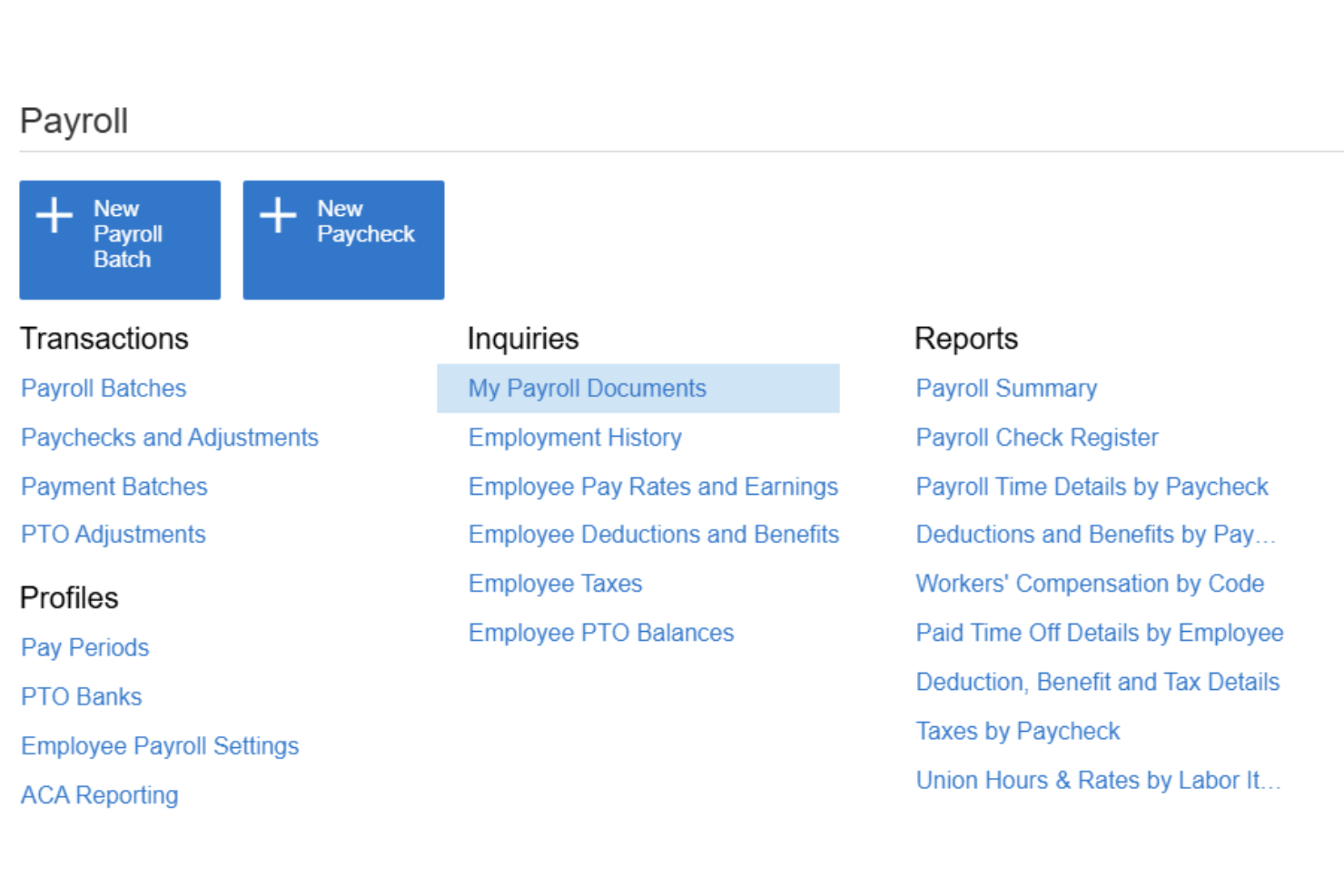
Acumatica is a cloud ERP platform for mid-market businesses that integrates full-cycle payroll processing, general ledger accounting, project cost tracking, and time management in a single system.
Who Is Acumatica Best For?
Acumatica is a strong fit for mid-market construction, manufacturing, and professional services companies that need payroll costs tied directly to projects and job codes.
Why I Picked Acumatica
I picked Acumatica as one of the best because no other accounting platform I've used lets you slice payroll costs by project, task, cost code, union, and shift simultaneously. When my team runs payroll, those costs post automatically to the GL with mapping that mirrors how the project is structured, not just a generic wage account. I also rely on the certified payroll reporting, which is a must-have for construction jobs with prevailing wage requirements.
Acumatica Key Features
- Employee self-service portal: Employees can access pay stubs, tax forms, direct deposit details, and PTO requests online or from a mobile device.
- Payroll tax and compliance: Supports current federal, FICA, state, and local tax information, electronic payroll filings, compliance dashboards, and payroll audit trails.
- Multi-entity accounting: Manage payroll and accounting across multiple companies or locations from one central platform.
- Native time entry integration: Time data imports directly into payroll runs with approval workflows and missing-time reminders.
Acumatica Integrations
Acumatica offers native integrations with Microsoft 365, DocuSign, Avalara, ADP, and Tableau. An API is available for custom integrations.
Pros and Cons
Pros:
- Certified payroll reporting for prevailing wage jobs
- Supports payroll across multiple entities simultaneously
- Project-level payroll cost allocation built in
Cons:
- No self-serve implementation without a partner
- Complex configuration for smaller payroll teams

Workday
Best for enterprise finance and global payroll
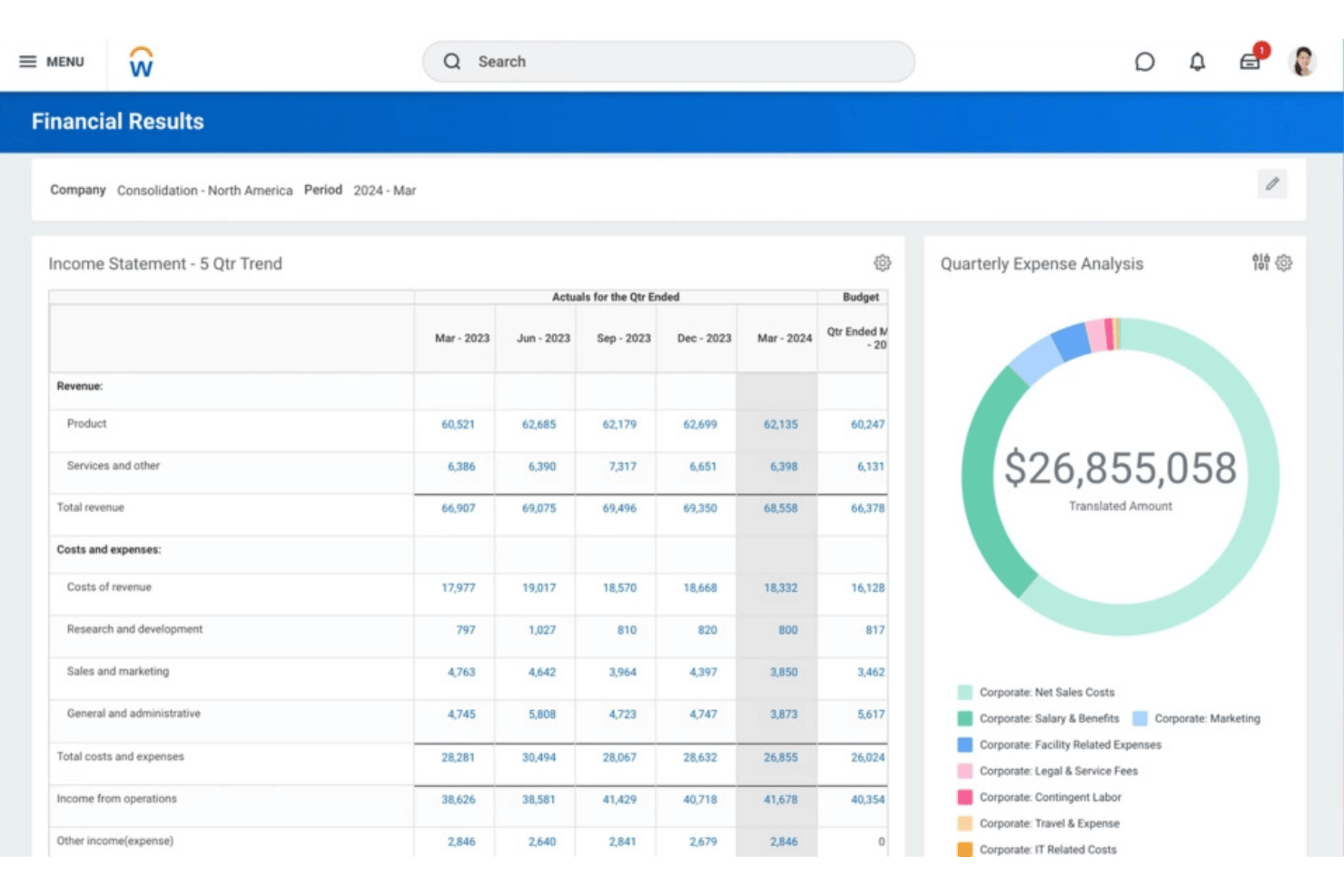
Workday is an enterprise-grade platform that unifies payroll processing, financial management, and HCM in a single system, with a native general ledger, continuous payroll calculation, and global payroll capabilities supported by Workday and its partner ecosystem.
Who Is Workday Best For?
Workday is built for large and enterprise organizations that need to manage complex, multi-entity finance and payroll operations across multiple countries from one platform.
Why I Picked Workday
I picked Workday because it connects enterprise payroll directly with financial management. Payroll results can generate accounting entries and feed labor costs into the general ledger, while Workday Financial Management handles core accounting functions such as the general ledger, accounts payable and receivable, fixed assets, and consolidation.
Workday Key Features
- Payroll accounting: Workday automatically generates accounting entries based on payroll results and supports labor-cost allocation.
- General ledger integration: Payroll results can flow into Workday Financial Management using account posting rules, fiscal schedules, ledger types, and other accounting configurations.
- Continuous payroll: Workday supports continuous payroll processing rather than treating payroll solely as a discrete end-of-period process.
- Global payroll: Native/direct payroll coverage is supplemented by Workday's global partner ecosystem and bidirectional integrations.
- Employee self-service: Employees can access payroll information through Workday's mobile-first experience; Workday documentation specifically supports employee access to payslips on mobile.
- Time-to-payroll: Approved time can feed payroll calculations by associating time calculation tags with earnings or deductions.
Workday Integrations
Workday offers native integrations with ADP, Kronos, Salesforce, Microsoft 365, SAP, ServiceNow, and Oracle, and provides an API for custom integrations.
Pros and Cons
Pros:
- Employee self-service reduces HR admin workload
- Native payroll coverage across 180+ countries
- Payroll and finance live in one system
Cons:
- Requires significant IT involvement during setup
- Overkill for businesses under 500 employees

ERPNext
Best for open-source accounting and payroll
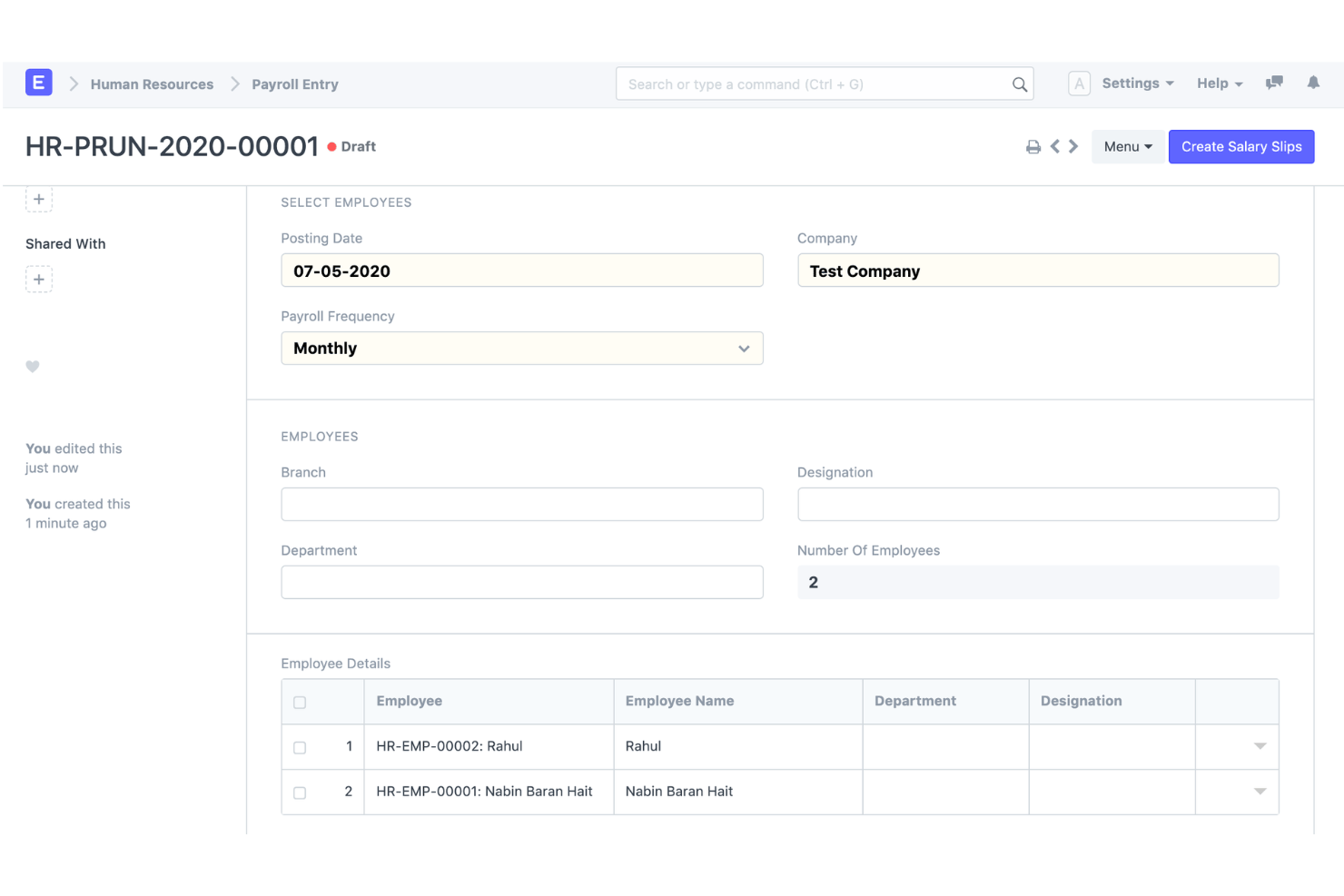
ERPNext is an open-source ERP platform that combines double-entry accounting, native payroll processing, HR management, and inventory tracking in a single self-hosted or cloud-deployed system.
Who Is ERPNext Best For?
ERPNext suits technically resourceful SMBs and growing mid-market companies that need a full-featured ERP without per-user licensing costs.
Why I Picked ERPNext
ERPNext earns its spot on my shortlist because the payroll module posts directly to the general ledger using the same chart of accounts and cost centers you configure for the rest of your books. I like that because you're working from a single codebase, there's no middleware syncing payroll data to a separate accounting system. The open-source license also means I can modify salary components or GL account mappings to match a specific structure, without waiting on a vendor roadmap.
ERPNext Key Features
- Integrated payroll: Salary structures, earnings and deductions, payroll periods, salary slips, and bulk payroll processing.
- Payroll accounting: Payroll expenses/payments can be connected to the accounting system rather than maintained in a completely separate payroll product.
- General ledger: ERPNext provides a full double-entry GL and automatically generates ledger entries from submitted accounting transactions.
- Cost centers and projects: Payroll can be associated with projects, while ERPNext accounting supports cost centers, projects and other accounting dimensions.
- Multi-company/multi-currency accounting: ERPNext supports multiple companies, subsidiaries, branches and currencies with consolidated reporting.
- Customization: ERPNext is open source and built on the Frappe framework, with low-code/no-code customization capabilities.
ERPNext Integrations
ERPNext offers native integrations with PayPal, Razorpay, Amazon S3, Slack, Dropbox, Shopify, and WooCommerce. An API is available for custom integrations.
Pros and Cons
Pros:
- Strong payroll-to-accounting connection
- Open-source accounting and payroll
- Broad ERP functionality beyond finance
Cons:
- Payroll compliance/localization varies by country
- More setup and configuration than turnkey SMB accounting/payroll products

Odoo
Best for modular accounting and payroll apps
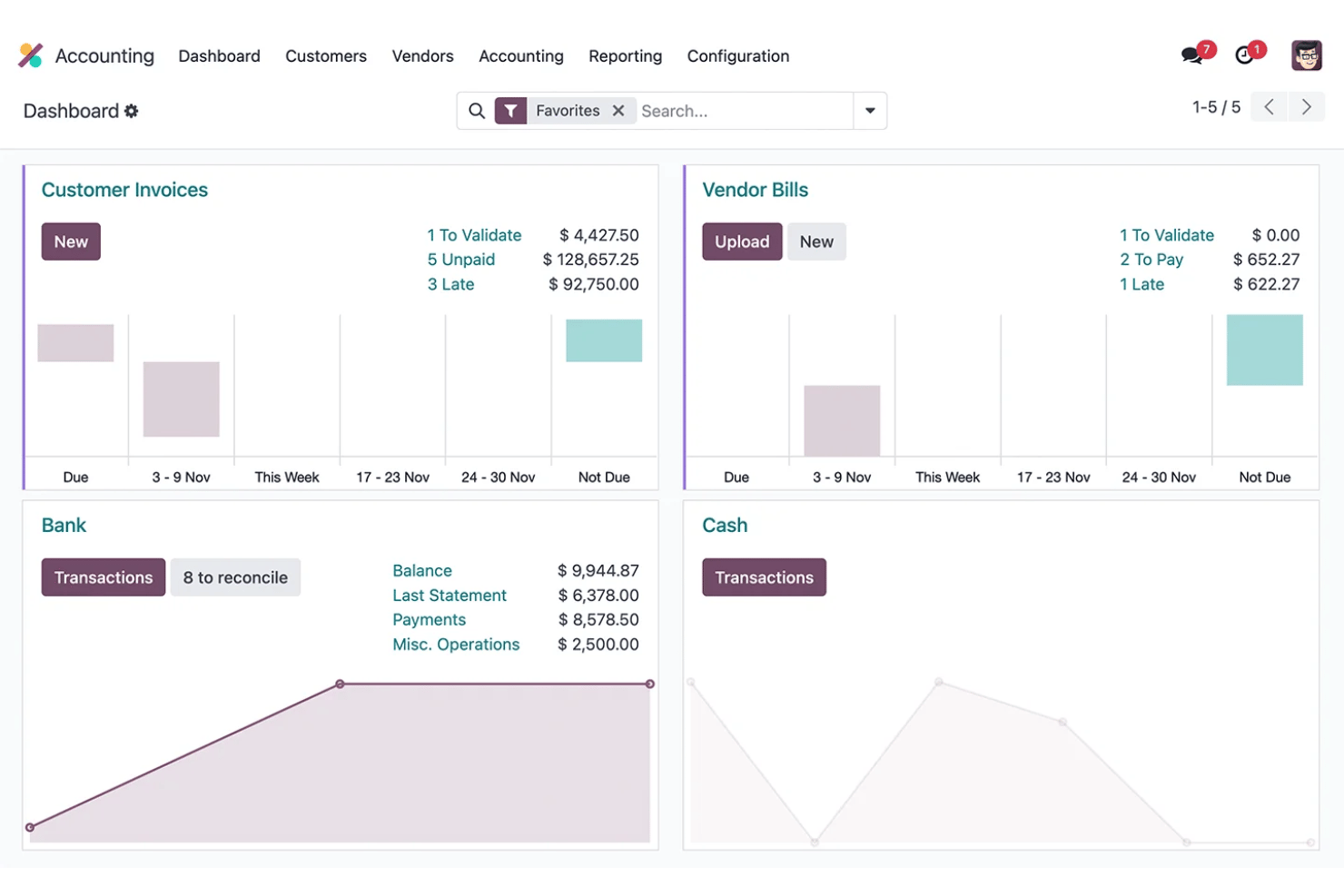
Odoo is an open-source ERP platform that combines modular accounting, payroll, HR, and expense management in a single shared database.
Who Is Odoo Best For?
Odoo is a strong fit for growing SMBs with 6–250 employees that want to consolidate accounting, payroll, and HR into one platform without managing multiple disconnected tools.
Why I Picked Odoo
I picked Odoo because businesses can combine its full accounting application with payroll and other business apps in one modular platform. When Accounting and Payroll are used together, payroll salary rules can be mapped to debit and credit accounts, helping connect employee pay with the general ledger without relying on a completely separate accounting system.
Odoo Key Features
- Accounting: Full double-entry accounting with AP/AR, reconciliation, financial reporting, assets and budgets.
- Payroll accounting: Salary rules can be mapped to debit and credit accounts, connecting payroll calculations with accounting journals.
- Pay runs: Businesses can generate and process multiple payslips together, including grouping payroll by salary structure, department or job position.
- Time-to-payroll: Payroll uses employee work entries to calculate worked time before applying salary structures and rules.
- Payroll localization: Country-specific payroll configurations account for local taxes, fees, allowances and regulatory requirements where supported.
- Multi-company accounting: Odoo supports multiple companies, with different fiscal localizations where appropriate.
Odoo Integrations
Odoo offers native integrations with Stripe, Plaid, PayPal, Authorize.Net, and Shopify, with an API available for custom integrations.
Pros and Cons
Pros:
- Open-source codebase allows deep customization
- Payroll posts automatically to the general ledger
- Modular apps scale with your business needs
Cons:
- Initial setup demands significant technical configuration
- Payroll tax filing requires third-party support
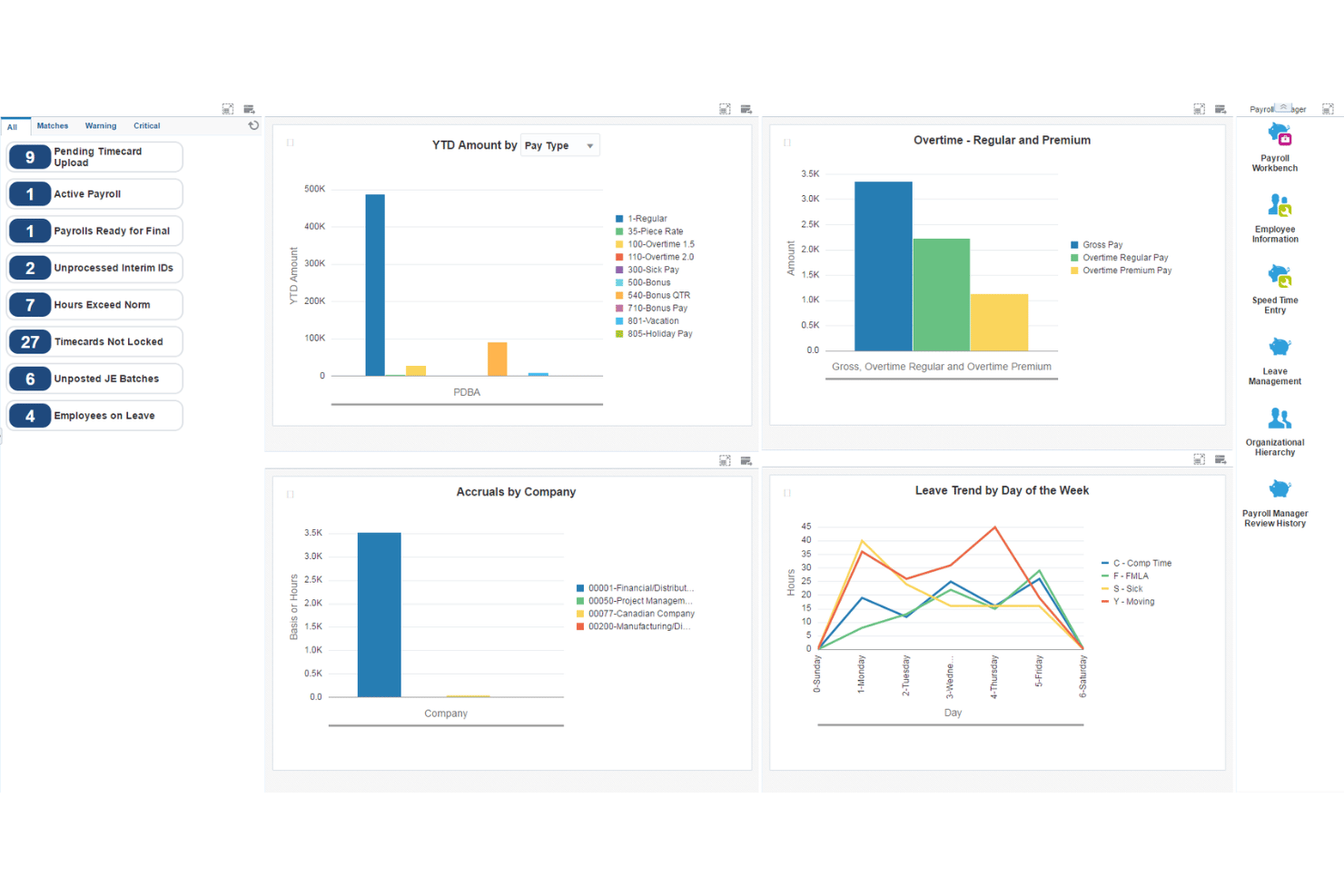
JD Edwards EnterpriseOne is an enterprise ERP suite from Oracle that combines full-cycle payroll, general ledger accounting, AP/AR, fixed assets, and human capital management across on-premises, cloud, and hybrid deployments.
Who Is JD Edwards EnterpriseOne Best For?
JD Edwards EnterpriseOne is built for large enterprises in manufacturing, distribution, and asset-heavy industries that need integrated payroll and financial management at scale.
Why I Picked JD Edwards EnterpriseOne
I picked JD Edwards EnterpriseOne because its payroll system connects deeply with enterprise financial management. Payroll can generate and post journal entries to the general ledger using configurable Automatic Accounting Instructions, while payroll liabilities such as taxes and insurance can flow into Accounts Payable.
JD Edwards EnterpriseOne Key Features
- Payroll-to-GL integration: Payroll can generate journal entries and update the EnterpriseOne general ledger, with automatic or manual posting options.
- Automatic Accounting Instructions: AAIs determine how generated accounting entries are distributed across GL accounts, giving larger organizations considerable control over payroll accounting.
- Payroll liabilities and AP: EnterpriseOne can automatically create vouchers for payroll taxes, insurance premiums, and other third-party payroll liabilities through its Accounts Payable integration.
- Labor costing: Payroll supports labor and labor-burden distributions, including wages, taxes, insurance, hours, and account information. Those transactions can flow into the Account Ledger.
- US payroll: EnterpriseOne supports federal, state, and local withholding/reporting requirements, with Vertex used for tax-withholding calculations.
- Canadian payroll: There's also dedicated Canadian payroll functionality covering earnings, deductions, taxes, gross-to-net/net-to-gross calculations, leave accruals, and government-regulated tax information.
JD Edwards EnterpriseOne Integrations
JD Edwards EnterpriseOne offers native integrations with Oracle Cloud Infrastructure, Oracle Analytics Cloud, Oracle Database, and has an API for custom integrations.
Pros and Cons
Pros:
- Configurable GL account mapping for payroll runs
- Handles multi-entity payroll and accounting natively
- Granular labor cost posting by department
Cons:
- Not suited to small or mid-sized businesses
- Implementation requires significant IT and consulting resources
NetSuite
Best for payroll data in real-time financials
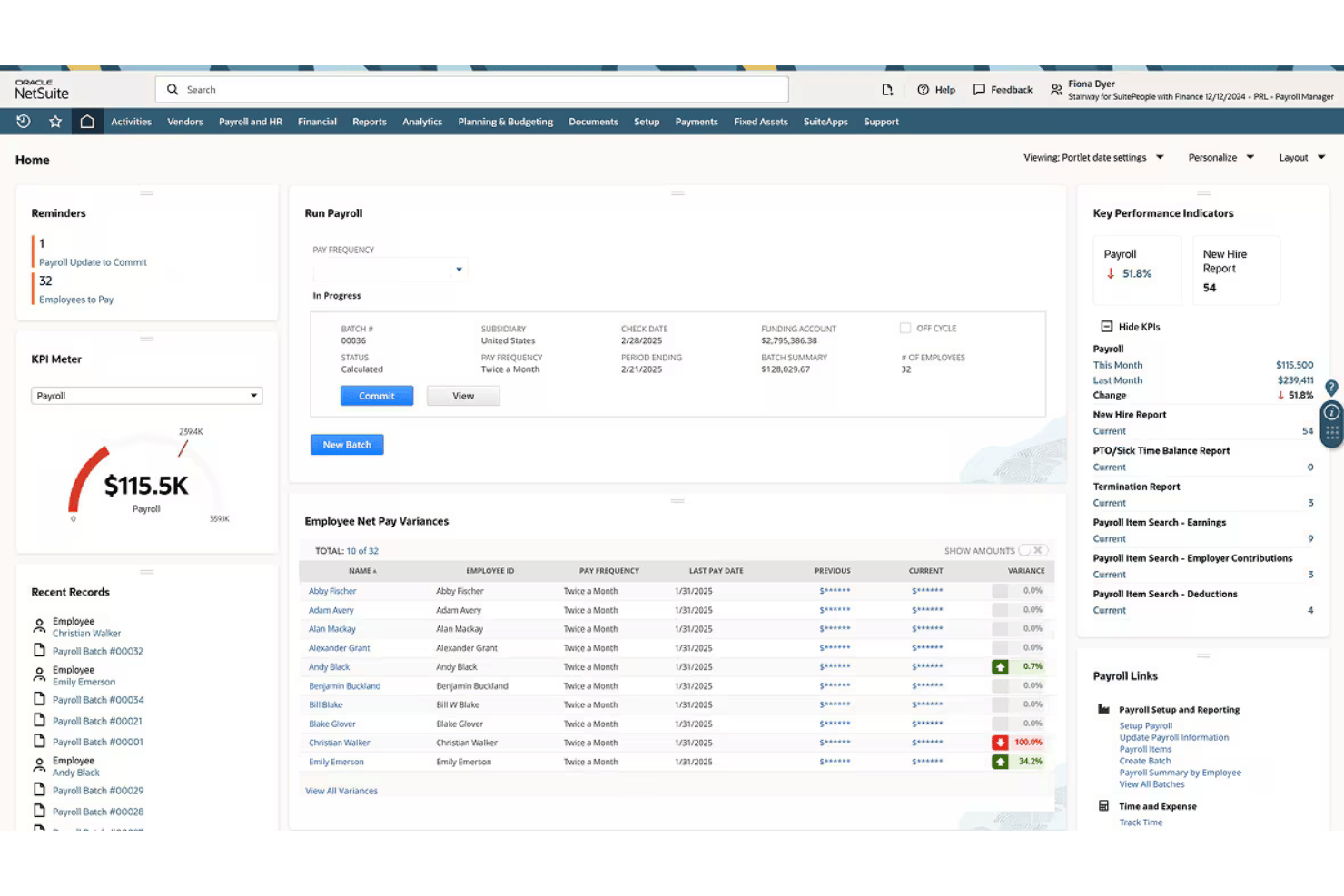
NetSuite is a cloud-based ERP platform that combines full-cycle US payroll processing with a complete general ledger, where every payroll run posts directly to financial accounts in real time.
Who Is NetSuite Best For?
NetSuite is a strong fit for mid-market companies that need payroll, accounting, and HR managed within a single ERP rather than across disconnected tools.
Why I Picked NetSuite
I picked NetSuite as one of the best because the moment a payroll run completes, every wage, tax, and deduction posts to the general ledger automatically. I love that I can drill down from a trial balance directly to an individual paycheck, which makes payroll audits far less painful. The dashboards also break down payroll expenses by department, location, or subsidiary, giving finance and HR a shared view of labor costs without manual reconciliation.
NetSuite Key Features
- Multi-subsidiary payroll: Run payroll across multiple business entities with consolidated or subsidiary-specific reporting.
- Employee self-service portal: Let employees view pay stubs, tax forms, and update their own personal and banking details.
- Automated ACA compliance: Prepare, file, and manage Affordable Care Act (1095-C/1094-C) forms within the platform.
- Custom payroll dashboards: Access over 100 standard payroll reports and interactive dashboards for payroll analytics.
NetSuite Integrations
NetSuite offers native integrations with SuitePeople HR, SuiteTime, and other NetSuite business management modules. An API is available for custom integrations.
Pros and Cons
Pros:
- Built-in HR, time tracking, and payroll
- Supports multi-entity and multi-subsidiary payroll
- Payroll posts directly to the GL
Cons:
- US-only payroll limits global workforce management
- Implementation takes months for most businesses
Wave
Best for automatic payroll journal entries
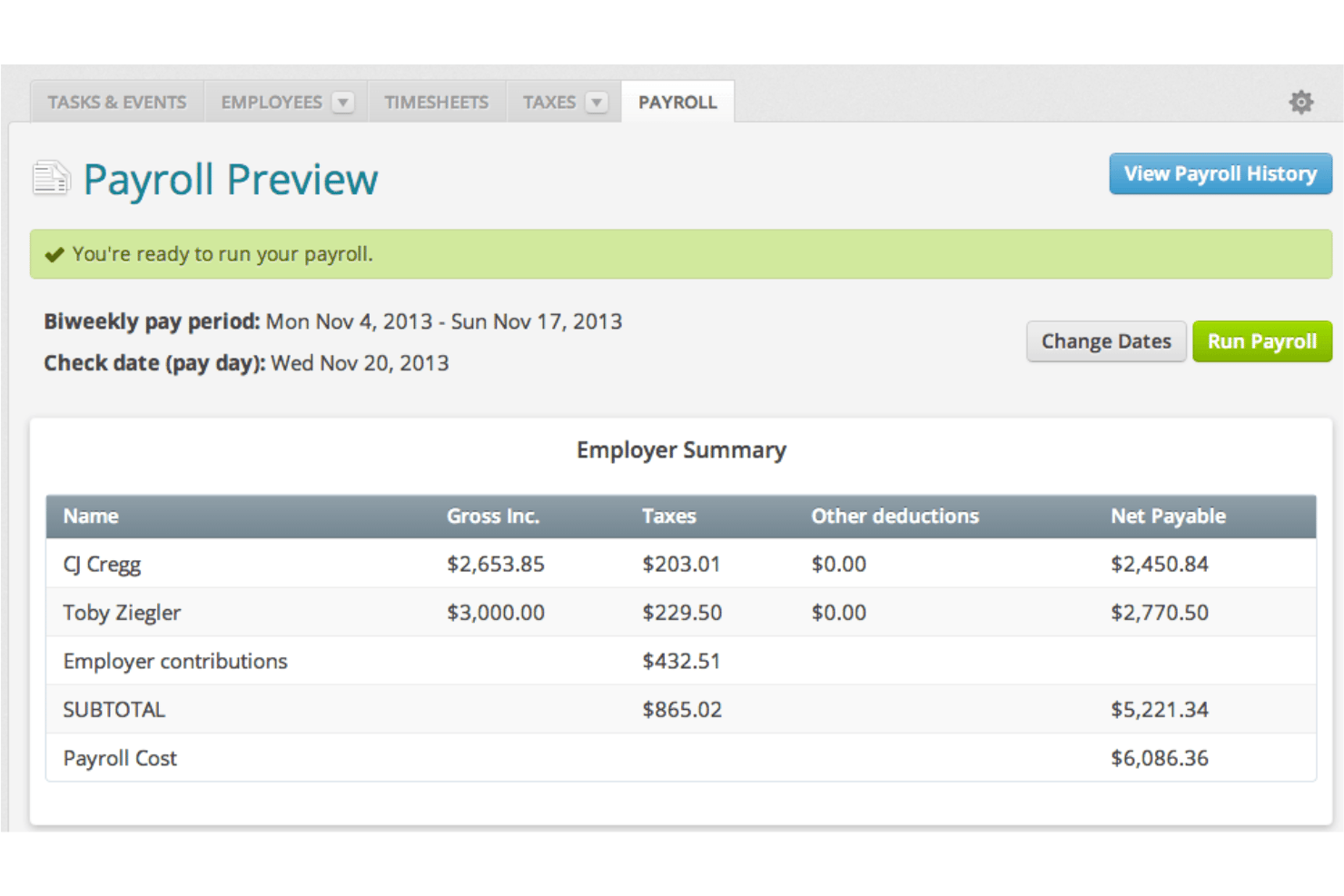
Wave is a small business accounting and payroll platform that combines double-entry bookkeeping, invoicing, and full-cycle payroll processing in a single system.
Who Is Wave Best For?
Wave is built for owner-operators and small businesses that need payroll and accounting in one place without paying for features they won't use.
Why I Picked Wave
I picked Wave as one of the best because each payroll run automatically posts as journal entries into the accounting ledger, with wages, taxes, and deductions mapped to the correct accounts in real time. Because payroll and accounting share one data model, there's no manual export or reconciliation. I also like that W-2s, 1099-NECs, and wage reports are all generated from within that same system.
Wave Key Features
- Direct deposit payments: Send paychecks straight to employee and contractor bank accounts at no additional cost.
- Employee self-service portal: Let team members securely view pay stubs and manage personal information online.
- Automatic payroll tax filing: Calculate, withhold, and file federal and state payroll taxes for US-based businesses.
- Year-end tax form generation: Create and deliver W-2 and 1099-NEC forms for employees and contractors within the system.
Wave Integrations
Native integrations are not clearly documented. An API is available for custom integrations.
Pros and Cons
Pros:
- W-2 and 1099-NEC forms generated in-platform
- Automatic journal entries after every payroll run
- Payroll and accounting share one data model
Cons:
- Limited support for growing teams beyond 10 employees
- Payroll only available in the US and Canada, excluding Quebec

Best for accounting and payroll under one login
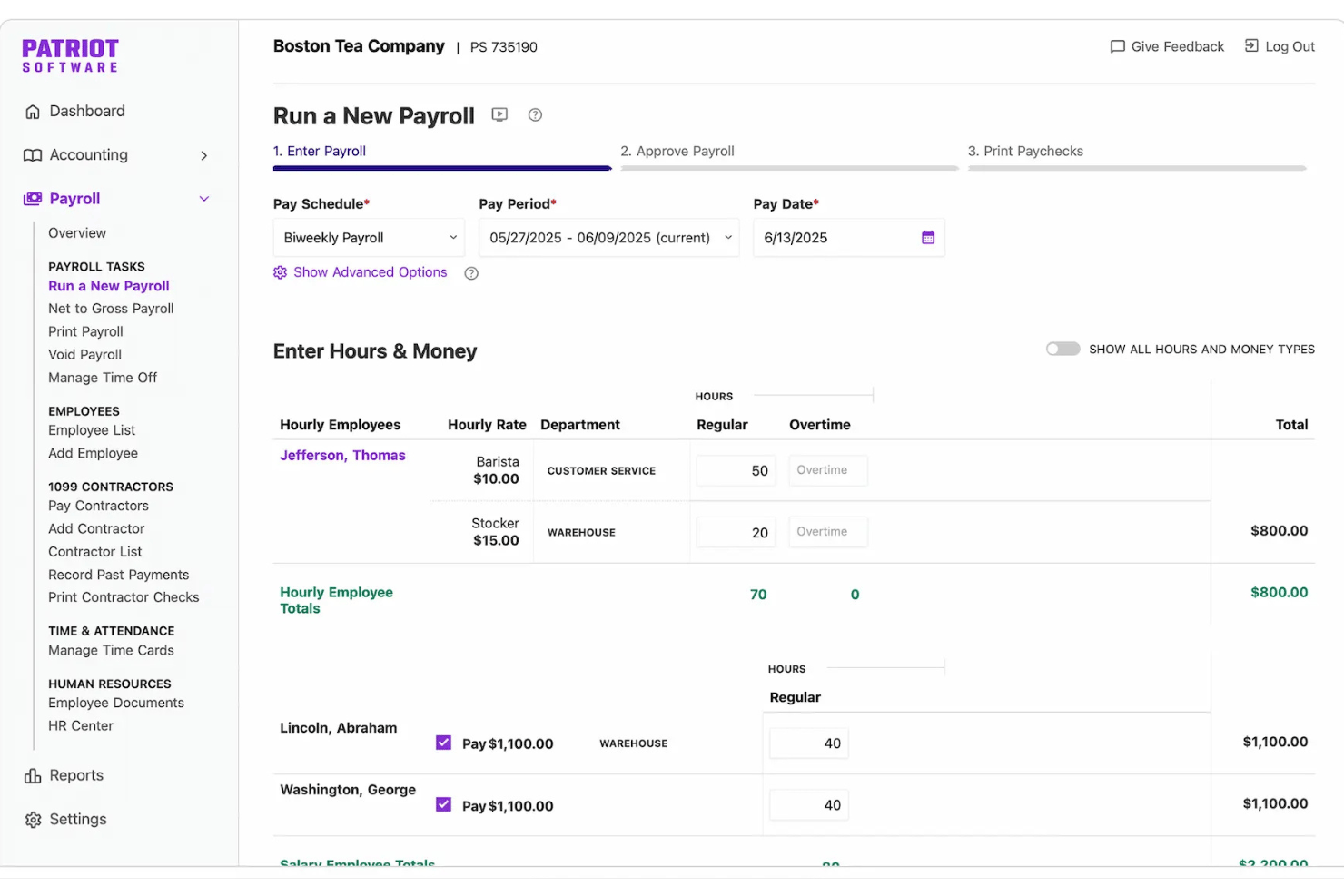
Patriot Software is a small business accounting and payroll platform that combines double-entry bookkeeping, invoicing, direct deposit, and payroll processing in a single login, with payroll tax filing available through its Full Service Payroll plan.
Who Is Patriot Software Best For?
Patriot Software is a strong fit for small business owner-operators and payroll administrators who need to manage books and run payroll without juggling two separate systems.
Why I Picked Patriot Software
I picked Patriot Software as one of the best because both payroll and accounting live under a single login, and the connection between them is automatic. Every time I run payroll, Patriot posts a journal entry directly to the general ledger, mapping wages, tax withholdings, and deductions to the correct accounts without any manual work. I also like the dual-ledger system, which lets me toggle between cash and accrual accounting without switching tools or duplicating records.
Patriot Software Key Features
- Multi-state payroll tax filing: Full Service Payroll calculates, files, and deposits federal, state, and local payroll taxes on your behalf.
- Employee self-service portal: Employees can access pay stubs, tax documents, and update their direct deposit information online.
- Time and attendance add-on: Track employee hours and time-off accruals that sync directly to payroll with a dedicated module.
- Contractor and 1099 processing: Issue payments to contractors and generate 1099 forms within the same platform as employee payroll.
Patriot Software Integrations
Patriot Software offers native integrations with Vestwell for 401(k) plans, SimplyInsured for health insurance, and ERGO NEXT for workers' compensation. An API is available for custom integrations. Native integrations with other accounting or payroll tools are not clearly documented.
Pros and Cons
Pros:
- Full Service Payroll automates payroll tax filing
- Supports both cash and accrual accounting
- Payroll auto-posts to the general ledger
Cons:
- No native HR or benefits administration features
- Reporting tools lack depth for advanced users
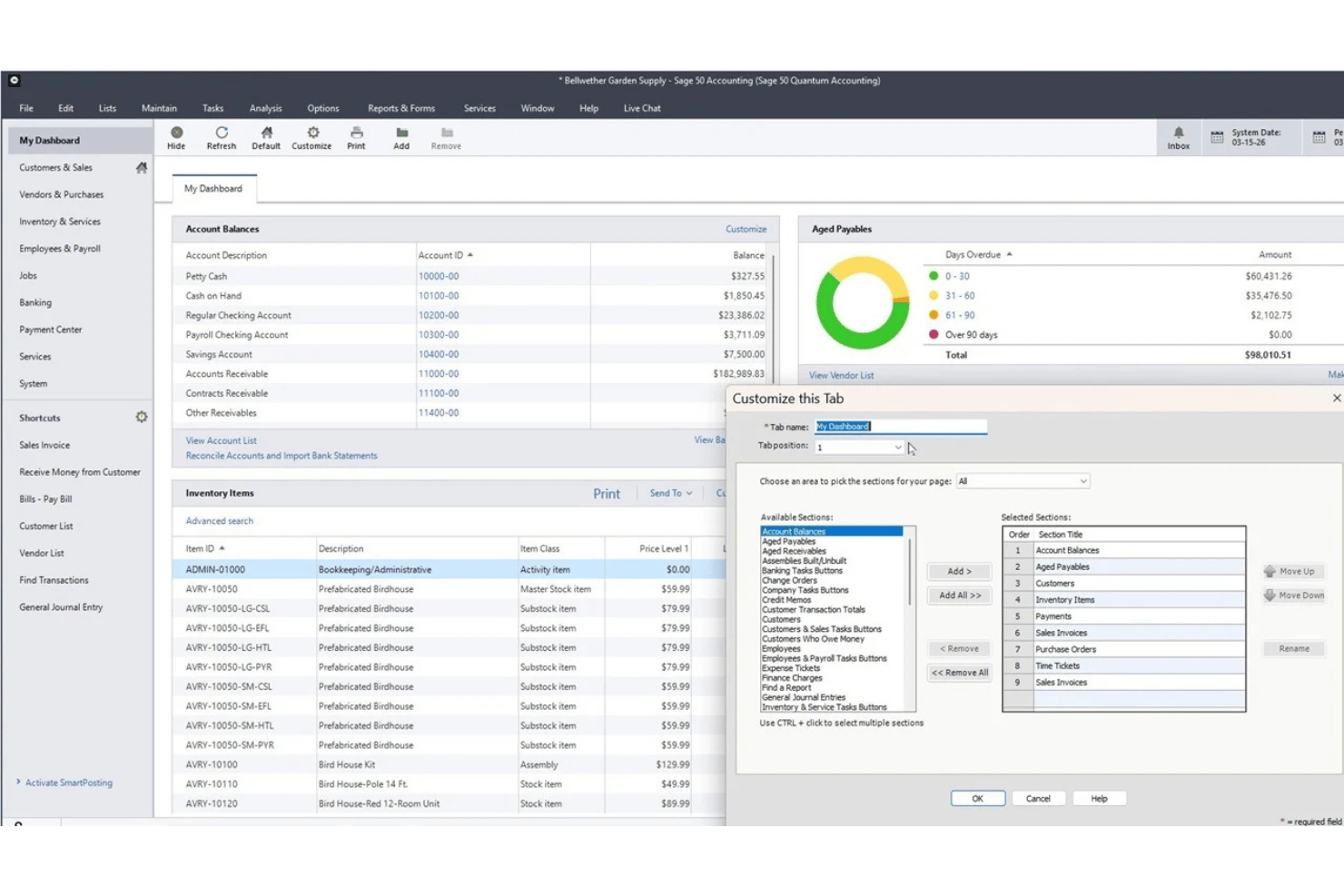
Sage 50 Accounting is a small business accounting platform available in cloud and desktop editions, combining financial management, inventory, job costing, and an integrated payroll module.
Who Is Sage 50 Accounting Best For?
Sage 50 is a strong fit for small businesses and in-house bookkeepers that need detailed accounting, job costing, and payroll functionality in one system.
Why I Picked Sage 50 Accounting
I've included Sage 50 Accounting in my top picks because the payroll module is built directly into the accounting system, not bolted on as a third-party integration. I like that payroll runs automatically post as journal entries to the general ledger, mapping wages, taxes, and deductions without any manual reconciliation. The combination of job costing and payroll in one desktop environment is where Sage 50 really stands apart, letting you see whether a project turned a profit after labor costs are fully accounted for.
Sage 50 Accounting Key Features
- Job costing module: Track labor, materials, and overhead by job or project for full job profitability.
- Multi-company management: Manage transactions and reporting across multiple business entities in a single system.
- Inventory management: Monitor stock levels, serial numbers, vendors, and assemblies directly within the accounting platform.
- Advanced reporting tools: Access over 150 reports covering areas such as payables, receivables, expenses, profits, inventory, payroll, and jobs, with options to customize and drill down into transactions.
Sage 50 Accounting Integrations
Sage 50 Accounting offers native integrations with Microsoft 365, AutoEntry, and Sage Payroll. An API is available for custom integrations.
Pros and Cons
Pros:
- Strong audit trail for payroll transactions
- Deep job costing built into accounting
- Payroll posts directly to the general ledger
Cons:
- Payroll and e-filing require separate subscriptions
- Payroll requires an additional subscription

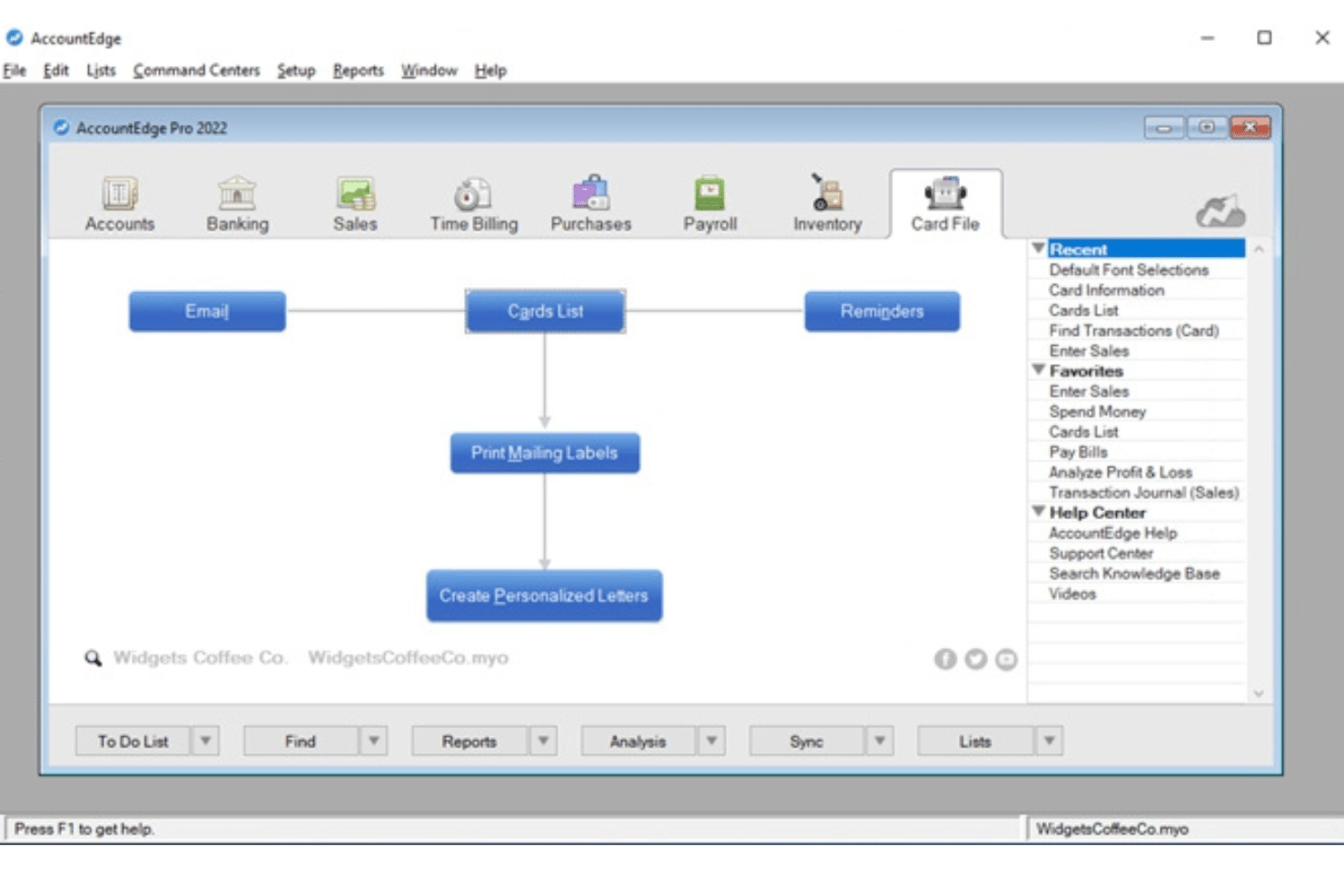
AccountEdge is a desktop-based accounting platform for small businesses that combines double-entry bookkeeping, inventory, and invoicing with an optional payroll add-on for unlimited employees and access to current federal, state/provincial, and local payroll tax rates.
Who Is AccountEdge Best For?
It's a strong fit for owner-operators and small business payroll admins who prefer desktop accounting software and want to process payroll for unlimited employees without per-employee fees.
Why I Picked AccountEdge
AccountEdge earns its spot on my shortlist because of how it handles payroll tax tables. Rather than relying on a cloud service for tax updates, AccountEdge lets you download and apply federal, state, and local tax tables directly in the desktop software. I also like that payroll runs post automatically as journal entries to the GL. Wages, taxes, and deductions map to the correct accounts with no manual re-entry.
AccountEdge Key Features
- Double-entry general ledger: Provides a full accounting suite with chart of accounts, journal entries, AP/AR, and financial reports.
- Inventory and item tracking: Monitors inventoried and non-inventoried items, assemblies, and manages multiple locations and custom variations.
- Customizable reporting: Offers hundreds of standard financial, payroll, and compliance reports, plus advanced analytics via Power BI exports.
- Integrated time billing: Enables entry of timesheets, applies custom billing rates by employee or project, and links hours directly to payroll.
AccountEdge Integrations
AccountEdge offers add-ons for bank feeds, direct deposit, payroll forms and e-filing, AccountEdge Connect, Web Pay, and payment processing. AccountEdge Connect adds browser-based access for sales, purchases, time billing, and employee timesheets that sync back to the desktop software.
Pros and Cons
Pros:
- Handles unlimited employee payroll runs
- Payroll entries post automatically to GL
- Downloadable tax tables update payroll calculations
Cons:
- Tax filing not automated by vendor
- Direct deposit and payroll e-filing cost extra
Other Accounting Software With Payroll Features
Here are some additional accounting software with payroll features options that didn’t make it onto my shortlist, but are still worth checking out:
- Striven
For payroll in operational workflows
- QuickBooks Workforce
For connected payroll, HR, and books
- Microsoft Dynamics GP
For advanced payroll deductions and benefits
- SAP S/4HANA
For global payroll with SAP finance


How I Evaluate Accounting Software With Payroll Features
When payroll data doesn't flow cleanly into the general ledger, I know the tool is missing one of the biggest benefits of combining payroll and accounting. So, I separate must-haves from the features that truly set platforms apart.
Core Functionality (Table Stakes for This List)
When I'm selecting tools for my list, I rank each one on a scale from 0 (does not offer the functionality) to 5 (excels in this area) for each core functionality listed below. I then calculate the tool's total score into a percentage, using 65% as a benchmark to help assess its overall fit for the list.
- Integrated Payroll Processing: I look for built-in or tightly integrated pay runs with direct deposit and flexible schedules, so businesses can process employee and contractor payments without manually moving payroll data between systems.
- General Ledger Accounting: I evaluate whether the GL supports AP/AR, journal entries, and customizable reports—like pulling a P&L broken out by department.
- Payroll Tax Automation: Tax requirements change often, so I evaluate how the tool calculates withholdings, supports tax payments and filings, and generates year-end forms like W-2s, where available.
- Employee Records & Deductions: Each profile should store wage rates, withholdings, benefits, and garnishments—details you'd otherwise track in a separate system.
- Payroll-to-GL Sync: After every pay run, wages and tax liabilities should post to the correct GL accounts automatically, with an audit trail for quarter-end review.
- Time & PTO Tracking: Built-in timesheets and PTO accrual policies that feed directly into payroll save you from re-keying hours every pay period.
Once I have a list of tools that meet the criteria, I consider what sets each platform apart.
Differentiating Factors (What Sets Vendors Apart)
Here's how I compare and contrast different vendors:
Standout Features
An employee self-service portal cuts down on HR requests—staff can pull their own pay stubs, update direct deposit details, and submit time-off requests without a back-and-forth. I also evaluate contractor and 1099 management, especially if your team mixes W-2 employees with freelancers who need 1099-NEC forms at year end. Multi-state tax filing matters too, particularly for distributed teams where each new hire may trigger additional jurisdiction requirements.
Beyond Features
Pricing transparency is a big one—I check whether payroll fees are bundled with the accounting subscription or charged as a per-employee add-on, since those costs add up fast as your team grows. Migration support also matters, especially if you're switching mid-year and need to import YTD wages and tax withholdings accurately. I look at accountant collaboration features too, like role-based permissions that let your bookkeeper access the ledger without touching payroll approvals.
How to Choose Accounting Software With Payroll Features
The right accounting software with payroll features comes down to how each platform handles your unique mix of compliance, automation, and HR tasks. Before choosing a platform, decide how tightly you need payroll and accounting connected. An all-in-one system can reduce reconciliation work, while accounting software with a payroll add-on may offer more flexibility. If you already have a payroll provider, a reliable integration may be enough—as long as payroll expenses and liabilities flow accurately into your general ledger.
| If your priority is... | Look for... |
|---|---|
| Accurate payroll tax filings | Automated tax calculations, filing support, and compliance updates |
| Seamless payroll-to-accounting sync | Native, automated GL journal entry mapping |
| Managing hourly and salaried staff | Flexible time tracking and blended payroll runs |
| Handling multi-jurisdiction payroll | Tax support for every state and locality where you have employees |
| Easy transition from your old system | Assisted payroll data migration and YTD imports |
How to Vet Your Shortlist
- Verify year-end tax support: Confirm which W-2 and 1099 forms the software generates or files. Also, check which jurisdictions it supports and whether year-end filing costs extra.
- Run a simulated pay cycle trial: Set up a test pay run with your typical pay schedules, earnings, deductions, and contractors. Then, check how the resulting expenses and liabilities post to the general ledger.
- Submit a support ticket for a migration scenario: Describe needing to import YTD payroll data mid-year and track response thoroughness and timelines.
- Clarify tax filing responsibility: Confirm whether the vendor calculates, files, and pays payroll taxes on your behalf. In addition, check which jurisdictions the vendor covers and who handles errors or late filings.
- Weigh control vs. convenience: Decide if you want highly customizable accounting tools with connected payroll, or a payroll-first system with basic bookkeeping.
What Is Accounting Software With Payroll Features?
Accounting software with payroll features combines core financial tools with built-in or integrated payroll processing. For example, these tools can include general ledger accounting, accounts payable and receivable, invoicing, and financial reporting. These platforms let you calculate employee pay, manage deductions and taxes, and record payroll expenses and liabilities in your accounting system without manually transferring data between separate tools.
Unlike standalone payroll software, these platforms connect payroll activity directly with your financial records. Depending on the software, completed payroll runs can automatically generate journal entries, update expense and liability accounts, allocate labor costs to departments or projects, and feed payroll data into financial reports.
Features
When selecting accounting software with payroll features, keep an eye out for the following key features:
- Integrated payroll processing: Run payroll, calculate gross-to-net pay, and connect employee wages, deductions, and payroll liabilities with your accounting records.
- Payroll tax management: Calculate and withhold applicable payroll taxes, with options for tax payments, filings, and year-end forms such as W-2s and 1099s depending on the platform and plan.
- General ledger synchronization: Automatically map payroll transactions to the correct chart of accounts, so wage expenses and tax liabilities are always up to date.
- Employee records management: Store wage rates, tax withholdings, benefit deductions, and employment details in individual employee profiles.
- Contractor and 1099 payments: Pay contractors alongside employees and streamline year-end 1099-NEC filing within the same system.
- Time and PTO tracking: Capture worked hours and paid time off, feeding that data directly into payroll runs for accurate paychecks.
- Direct deposit and pay options: Offer employees and contractors flexible payment options, like direct deposit, pay cards, or printed checks.
- Self-service employee portals: Let employees access pay stubs, view tax forms, request time off, and manage personal information without HR intervention.
- Custom reporting and analytics: Build payroll and financial reports that highlight labor costs, overtime, and benefit utilization for better business decisions.
- Security and permission controls: Set user access levels, enforce approvals, and create audit trails to safeguard payroll and financial data.
Benefits
Implementing accounting software with payroll features provides several benefits for your team and your business. Here are a few you can look forward to:
- Reduced manual data entry: Automatic syncing between payroll and the general ledger eliminates duplicate entry and helps prevent costly errors.
- Improved payroll tax compliance: Automated calculations and compliance tools can help keep payroll taxes and year-end reporting aligned with applicable federal, state, and local requirements.
- Faster payroll cycles: Integrated time tracking and direct deposit features speed up every pay run, from wage calculation to paycheck delivery.
- Greater transparency for employees: Self-service portals let employees view pay stubs, tax forms, and time-off balances without HR bottlenecks.
- More accurate financial reporting: Real-time payroll-to-GL posting ensures that wage, tax, and benefit data is always reflected in business reports.
- Easier contractor and multi-state payroll: Platforms that support contractors and multiple tax jurisdictions can reduce the manual work involved in paying different worker types across locations. Businesses expanding internationally can also explore our guide to global payroll in Mexico.
- Enhanced security and control: Role-based permissions and audit trails keep sensitive payroll and financial data protected from unauthorized access.
Costs & Pricing
Selecting accounting software with payroll features requires an understanding of the various pricing models and plans available. Costs vary widely depending on whether payroll is included, sold as an add-on, or purchased as part of a larger ERP suite. Small business products often combine a monthly accounting subscription with a base payroll fee and per-worker charges, while enterprise platforms typically use custom pricing based on modules, users, company size, and implementation needs. The table below summarizes the most common pricing models:
Common Pricing Models for Accounting Software With Payroll Features
| Plan Type | Average Price | Common Features |
|---|---|---|
| Free accounting | $0 base plan; payroll usually costs extra | Basic bookkeeping, invoicing, financial reports, and optional paid payroll |
| Accounting + payroll add-on | Monthly accounting fee + payroll base fee and/or per-worker fee | Integrated accounting, payroll processing, direct deposit, and payroll-to-GL posting |
| Per-user or modular software | Monthly or annual fees based on users and selected modules | Accounting and payroll modules with additional HR, inventory, project, or operational tools |
| Enterprise ERP | Custom quote | Advanced financial management, payroll, multi-entity support, permissions, integrations, and implementation services |
Accounting Software With Payroll Features FAQs
Here are some answers to common questions about accounting software with payroll features:
Can I pay both employees and contractors with accounting software that includes payroll?
Many accounting platforms with payroll features support both W-2 employees and 1099 contractors, but contractor payment and tax-form capabilities vary by product and plan. If you use both worker types, check whether the software supports contractor payments and generates or files the required W-2 and 1099-NEC forms.
How does payroll tax filing work in these systems?
Payroll tax support varies by platform and plan. Some systems calculate withholdings but leave filing and payments to you, while full-service payroll products may calculate, file, and pay federal, state, and local payroll taxes on your behalf. Check which jurisdictions and year-end forms are supported before choosing a system.
What kind of support is available when migrating payroll data from a previous provider?
Most vendors offer onboarding assistance, with some providing dedicated migration specialists to help import year-to-date payroll information and ensure a smooth transition.
Can employees access pay stubs and tax forms on their own?
Yes, employee self-service portals are common, letting staff retrieve pay stubs, view tax documents, and update personal details without involving HR.
Is advanced time tracking included or do I need third-party tools?
Some solutions feature built-in time tracking, while others offer seamless integrations with time-clock applications—either way, these keep hours accurate for payroll runs.