

10 Best AI Decision-Making Software Reviewed in 2026

10 Best AI Decision-Making Software Shortlist


HR professionals face constant challenges in making informed decisions. You need tools to analyze data, predict outcomes, and make decisions that benefit your team and organization. AI decision-making software can offer these features, helping you to process data efficiently and make better decisions.
These tools are a must-have for those looking to improve decision accuracy and operational efficiency. In this article, I'll share my top picks for AI decision-making software, focusing on their unique features and capabilities, to help you choose the right tool for your needs.
Why Trust Our Software Recommendations
Our team has been testing and reviewing software since 2012. As HR experts ourselves, we know how difficult—and important—it is to choose the right software.
For this guide, we evaluated tools using hands-on testing and independent research, scoring tools using our selection criteria. We also draw on insights from industry thought leaders and practicing HR experts.
Our reviews reflect our human editorial judgment, not a sales pitch.
Expert reviewers:
AI Decision-Making Software Comparison Table
This comparison table summarizes pricing details for my top AI decision-making software selections:
| Tool | Best For | Trial Info | Price | ||
|---|---|---|---|---|---|
| 1 | Best for AI-powered global workforce decisions | Free demo available | From $5/employee/month | Website | |
| 2 | Best for early executive talent identification | Free demo available | Pricing upon request | Website | |
| 3 | Best for data visualization | 14-day free trial | Pricing upon request | Website | |
| 4 | Best for business planning | Free demo available | Pricing upon request | Website | |
| 5 | Best for customer engagement | Free demo available | Pricing upon request | Website | |
| 6 | Best for AI model deployment | Free plan available | Pricing upon request | Website | |
| 7 | Best for AI research | Free demo available | Included in Google’s existing subscriptions and developer tools | Website | |
| 8 | Best for real-time insights | Free demo available upon request | Pricing upon request | Website | |
| 9 | Best for non-technical users | Free trial available | From $20/user/month for a 10 user minimum | Website | |
| 10 | Best for decision management | 14-day free trial | Pricing upon request | Website |
Best AI Decision-Making Software Review
Below are my detailed summaries of the best AI decision-making software that made it onto my shortlist. My reviews look at each tool’s key features, pros & cons, integrations, and ideal use cases.

Deel HR
Best for AI-powered global workforce decisions
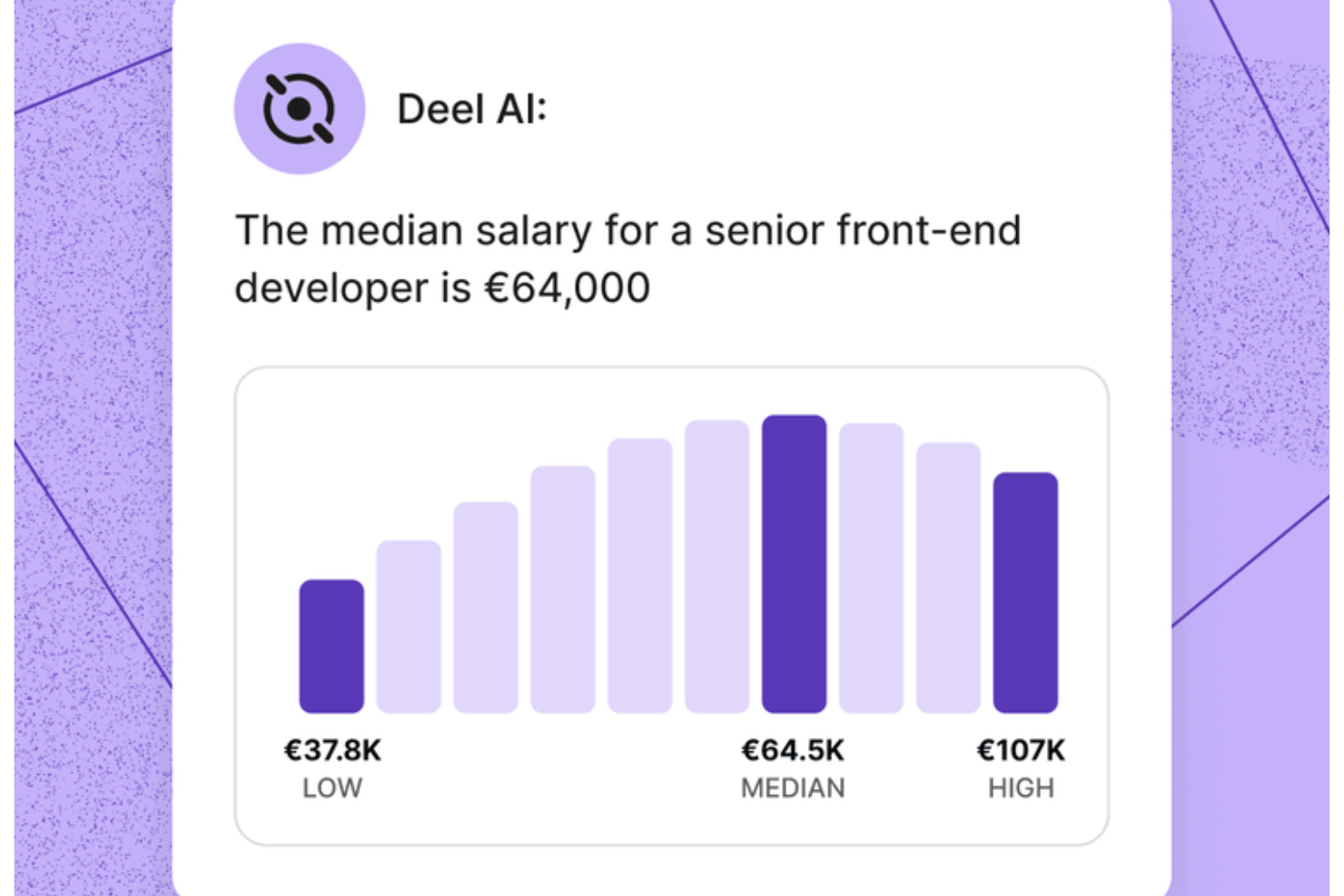
Deel AI gives you a way to handle HR and legal questions with confidence by pairing your team’s data with expert-backed insights from 150+ countries. If you manage a distributed workforce or support teams across regions, you get an always-available assistant that helps you understand compliance requirements, workforce details, and day-to-day HR tasks without digging through documents or waiting on support.
Why I Picked Deel
I picked Deel because its AI assistant acts as a built-in compliance and HR expert that continuously interprets your data and global employment rules. You get features like contextual, page-aware insights that surface summaries, key details, and compliance considerations right where you're working. I also like that Deel AI answers nuanced HR questions — from payslips to local regulations — pulling from a Knowledge Hub built by legal and HR experts across 150+ countries. This makes it a strong fit for anyone needing AI decision support grounded in real workforce and compliance data.
Deel Key Features
In addition to the AI-driven compliance and insight capabilities I highlighted above, you’ll find these helpful if you're choosing AI decision-making software:
- Instant Q&A for employees: Workers can ask Deel AI about payslips, time off, and internal policies so your team spends less time handling repetitive questions.
- HR insights from your people data: The system combines your existing data with Deel’s Knowledge Hub to deliver insights tailored to your workforce.
- AI-generated reports and org insights: Lets you create organization summaries, view key data, and receive compliance suggestions using your internal context.
- 24/7 AI support: Provides always-available guidance on HR tasks and product questions, helping you keep work moving in any time zone.
Deel Integrations
Integrations include BambooHR, Workday, Xero, QuickBooks, Expensify, Netsuite, Greenhouse, Okta, Slack, and Microsoft 365. An API is available for custom integrations.
Pros and Cons
Pros:
- Employees can self-serve HR questions without manager involvement
- Context-aware insights summarize HR pages as you view them
- AI offers instant answers on local labor laws in 150+ countries
Cons:
- Heavy dependence on proprietary Knowledge Hub for accuracy
- AI guidance may require human review for complex legal scenarios
New Product Updates from Deel HR

Deel Expands Stablecoin Wallet to 80+ Countries
Deel expands its Stablecoin Wallet to 80+ countries with dollar-backed balances and optional rewards. This gives eligible contractors more ways to hold and manage earnings inside Deel. For more information, visit Deel’s official site.
 .
.
Best for early executive talent identification
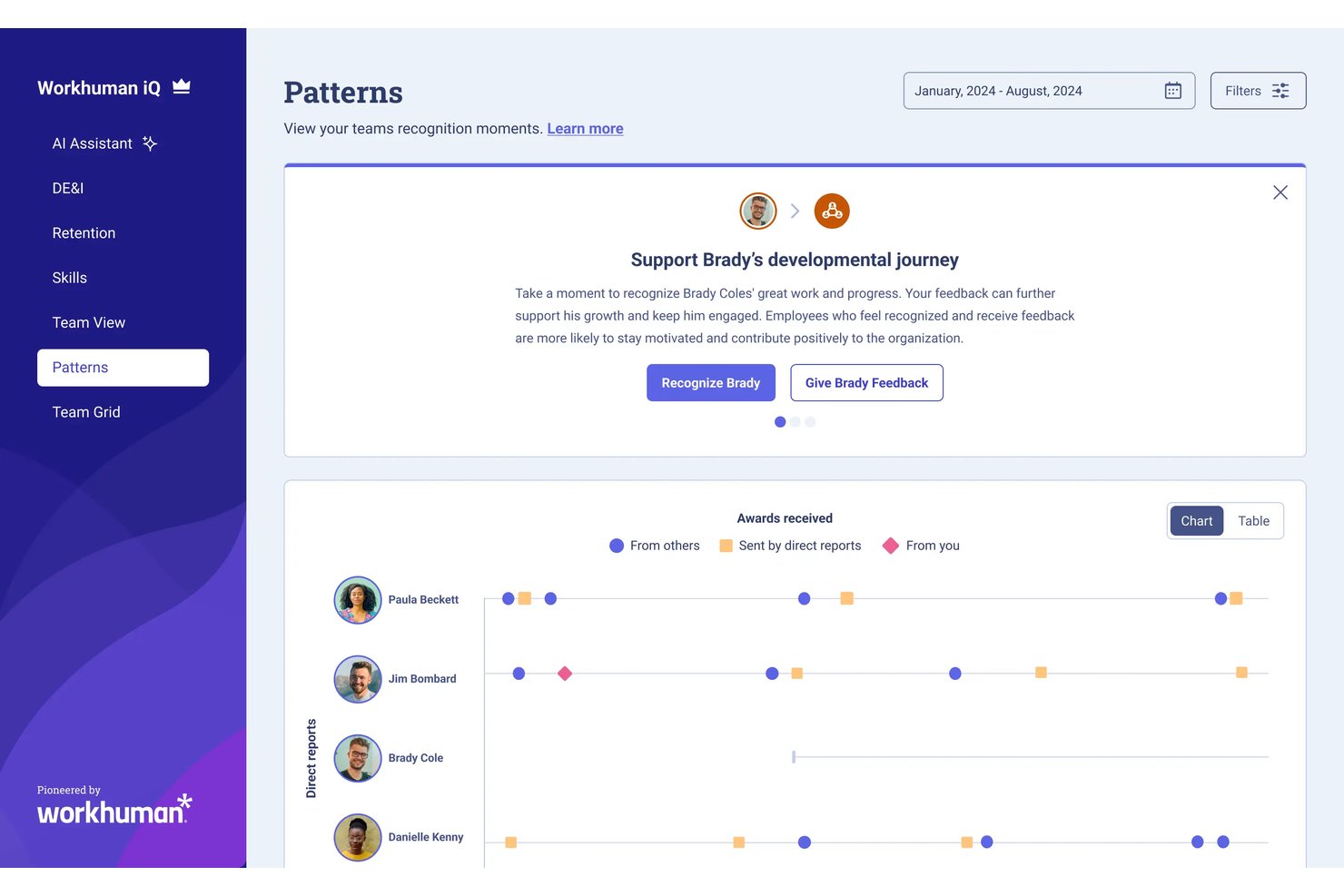
Workhuman Future Leaders is an AI-powered succession planning tool that uses recognition and behavioral data to identify high-potential employees on a path to senior leadership.
Who Is Workhuman Future Leaders Best For?
It's a strong fit for large enterprises with established recognition programs that need a data-driven approach to succession planning and leadership pipeline development.
Why I Picked Workhuman Future Leaders
Workhuman Future Leaders earns its spot on my shortlist because the Ascend AI engine identifies high-potential employees three to five years before they're ready for senior roles. I like that it learns each organization's unique leadership signals from real recognition and behavioral data, not manager nominations or gut feel. Its self-learning models recalibrate in real time as leaders advance and roles shift, so the talent signals stay current.
Workhuman Future Leaders Key Features
- Behavior pattern analysis: Surfaces employees whose behavior matches leadership traits using recognition and HR data.
- Workday HCM integration: Syncs user recognition and rewards activity with core HR records for seamless data flow.
- Microsoft Teams and Slack apps: Lets users give and receive recognition directly within popular collaboration tools.
- Culture Hub feed: Centralizes recognition, celebrations, and interactive engagement in a unified digital workspace.
Workhuman Future Leaders Integrations
Pros and Cons
Pros:
- Provides organizational culture heatmaps for succession
- Uncovers high-potential talent before promotion cycles
- Recognizes leadership signals from real-world behavior
Cons:
- Limited visibility into model decision logic
- Setup requires existing recognition program data
Tableau
Best for data visualization

Tableau is a data visualization tool for data analysts, business intelligence professionals, and decision-makers. It transforms raw data into interactive, shareable metrics, providing insights through visual analytics to support informed decision-making.
Why I picked Tableau: It's renowned for data visualization, offering AI-driven analytics and natural language processing. These features allow you to explore data through intuitive visual formats. Tableau's drag-and-drop interface simplifies complex data analysis, making it accessible for your team. While Tableau isn’t strictly an AI decision-making platform, its AI-assisted analytics and industry-leading visualization capabilities make it a great tool for uncovering the insights that drive smarter business decisions.
Standout features & integrations:
Features include interactive dashboards that allow for deep data exploration. The platform also supports real-time data updates, ensuring your analyses remain up to date. Its storytelling feature helps you present data insights to stakeholders.
Integrations include Salesforce, AWS, Google Cloud, Microsoft Excel, SAP, Oracle, IBM, Alteryx, Snowflake, and Dropbox.
Pros and Cons
Pros:
- Storytelling feature for presentations
- Supports real-time data updates
- Interactive data dashboards
Cons:
- Requires training for advanced features
- Can be resource-intensive

Anaplan
Best for business planning

Anaplan is a cloud-based platform for business planning and performance management. It is used by finance, sales, and operations teams and provides AI-driven modeling and forecasting capabilities to improve strategic planning and decision-making.
Why I picked Anaplan: It's ideal for business planning with its advanced modeling and forecasting tools. With Anaplan's AI capabilities, you can simulate various business scenarios and optimize resources. Its collaborative features enable your team to align on strategic goals and track performance in real-time. The flexibility to customize models ensures that your planning processes are tailored to your specific business needs.
Standout features & integrations:
Features include its in-memory Hyperblock engine, which recalculates complex models instantly across departments. Connected Planning links finance, sales, supply chain, and workforce models, keeping teams aligned on shared assumptions. Finally, multi-dimensional modeling lets you build granular scenarios across products, regions, customers, or time periods, giving you deeper insights into the drivers behind business performance.
Integrations include Salesforce, Microsoft Excel, Workday, Tableau, SAP, Oracle, Google Cloud, AWS, and Microsoft Azure.
Pros and Cons
Pros:
- Collaborative tools for team alignment
- Real-time data updates
- Customizable modeling for specific needs
Cons:
- Rigid structure for ad-hoc use
- Slow initial model setup

Best for customer engagement

Pega Decision Hub is an AI-driven platform for marketers and customer experience teams to support customer engagement through real-time decisioning and predictive analytics. It offers capabilities to personalize customer interactions and optimize marketing strategies.
Why I picked Pega Decision Hub: It excels at customer engagement by leveraging AI to analyze customer data in real time. This allows your team to personalize interactions based on current customer behavior. Pega's predictive analytics help anticipate customer needs and guide decision-making. Its ability to integrate with existing marketing systems ensures easy transition and maximizes your team's efficiency.
Standout features & integrations:
Features include adaptive learning that refines decision-making processes over time. The platform provides a centralized dashboard for monitoring customer interactions. Additionally, it supports omnichannel engagement, ensuring consistent communication across various platforms.
Integrations include Salesforce, Adobe, Microsoft Dynamics, AWS, Google Cloud, and Twilio.
Pros and Cons
Pros:
- Adaptive learning for improved decisions
- Supports omnichannel engagement
- Real-time data processing
Cons:
- Complexity may overwhelm small teams
- Requires technical expertise for setup

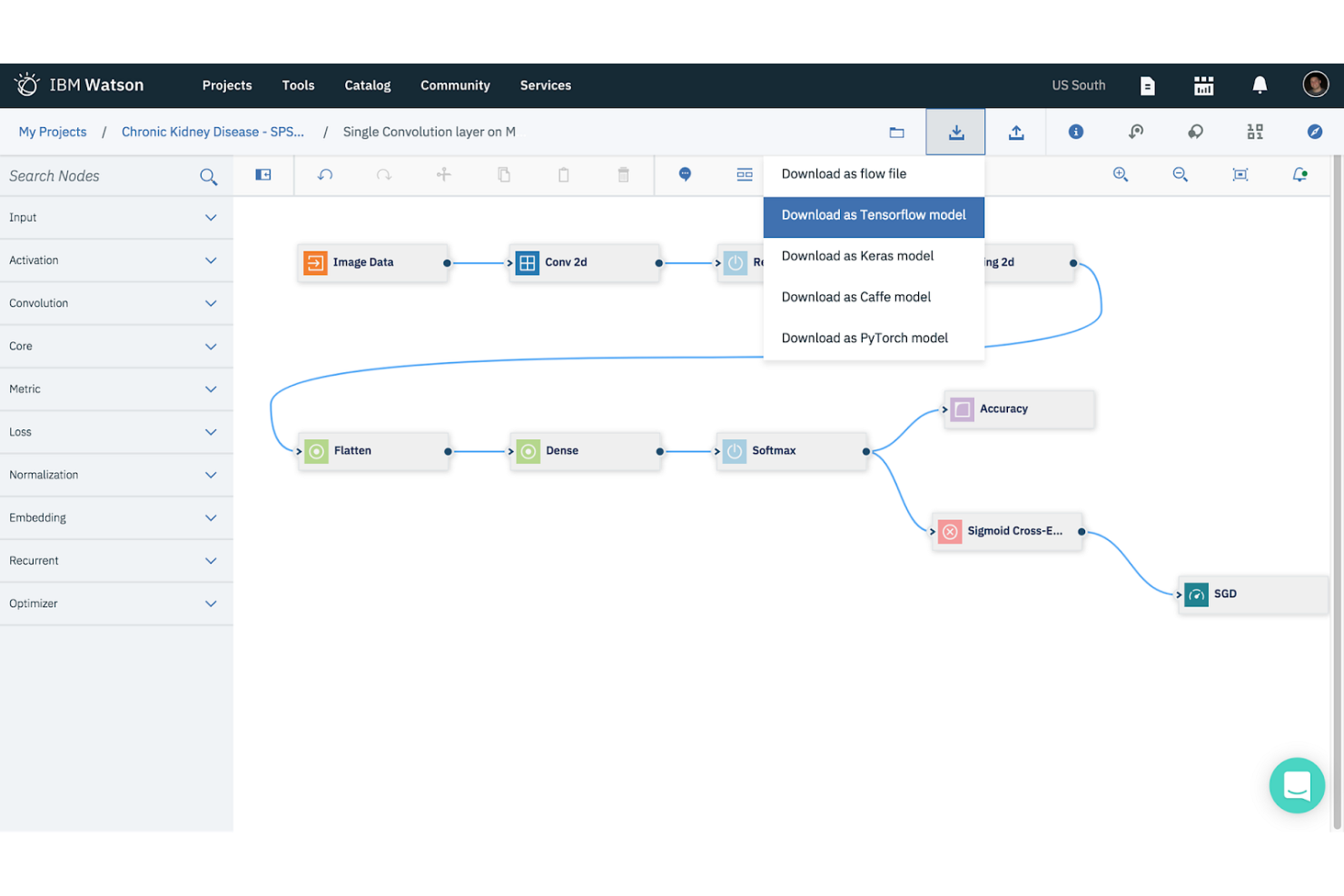
IBM Watson Studio is a data science and AI platform for data scientists, developers, and analysts. It facilitates the building, training, and deployment of AI models, enabling users to derive insights and make data-driven decisions.
Why I picked IBM Watson Studio: It's tailored for AI model deployment with features like automated model building and deployment pipelines. These tools help your team quickly create and deploy AI solutions without deep technical expertise. Watson Studio's collaboration features allow multiple users to work on projects simultaneously. Its support for open-source frameworks ensures flexibility and adaptability for various AI projects.
Standout features & integrations:
Features include a user-friendly interface that simplifies data preparation and model training. The platform supports automated machine learning, allowing you to build models with minimal manual intervention. Watson Studio also offers tools for data visualization and analysis.
Integrations (frameworks) include popular platforms such as IBM Cloud, Apache Spark, Hadoop, Python, R, TensorFlow, and Keras.
Pros and Cons
Pros:
- Offers automated machine learning
- Facilitates collaboration among users
- Supports open-source frameworks
Cons:
- Complex initial setup
- Requires technical expertise


Google DeepMind is a research-focused AI lab that advances AI through both research and applications. It serves researchers, AI developers, and organizations looking to push the boundaries of AI technology and applications.
Why I picked Google DeepMind: It's a leader in AI research, offering capabilities like reinforcement learning and neural network development. These features help you understand and develop cutting-edge AI solutions. DeepMind's focus on ethical AI ensures that your projects align with best practices in AI safety and responsibility. Its research outputs advance fields such as healthcare and energy efficiency, demonstrating its impact and innovation.
Standout features & integrations:
Features include research breakthroughs in reinforcement learning, generative models, and neural network architectures. DeepMind’s work on systems like AlphaFold, AlphaZero, and advanced planning agents demonstrates what state-of-the-art AI can achieve in complex decision environments.
Integrations include frameworks that DeepMind uses in research, such as Google's ecosystem, TensorFlow, PyTorch, JAX, Scikit-learn, NumPy, OpenAI Gym, Pandas, and Matplotlib.
Pros and Cons
Pros:
- Contributions to diverse fields
- Focus on ethical AI practices
- Pioneering AI research and development
Cons:
- Requires advanced technical expertise
- Primarily research-focused, not for commercial use


Oracle RTD is an AI-powered decision management tool for enterprises needing real-time data analysis and decision-making. It enables businesses to make immediate, data-driven decisions by analyzing customer interactions and other data points in real time.
Why I picked Oracle RTD: It focuses on real-time insights, with features such as real-time data processing and predictive analytics. These capabilities allow your team to respond to market changes and customer behaviors. Oracle RTD's machine learning algorithms predict outcomes and optimize decisions. Finally, its ability to process data in real time sets it apart for businesses that need to act fast.
Standout features & integrations:
Features include adaptive learning, which improves decision accuracy over time, and a user-friendly interface that simplifies complex data analysis. Additionally, its scenario-based modeling prepares you for a range of business situations.
Integrations include APIs and web services that allow Oracle RTD to connect with customer-facing applications, CRM systems, websites, and back-office data sources.
Pros and Cons
Pros:
- Scenario-based modeling for planning
- Adaptive learning improves over time
- Supports real-time data analysis
Cons:
- Complex rule-model setup
- Heavy integration requirements
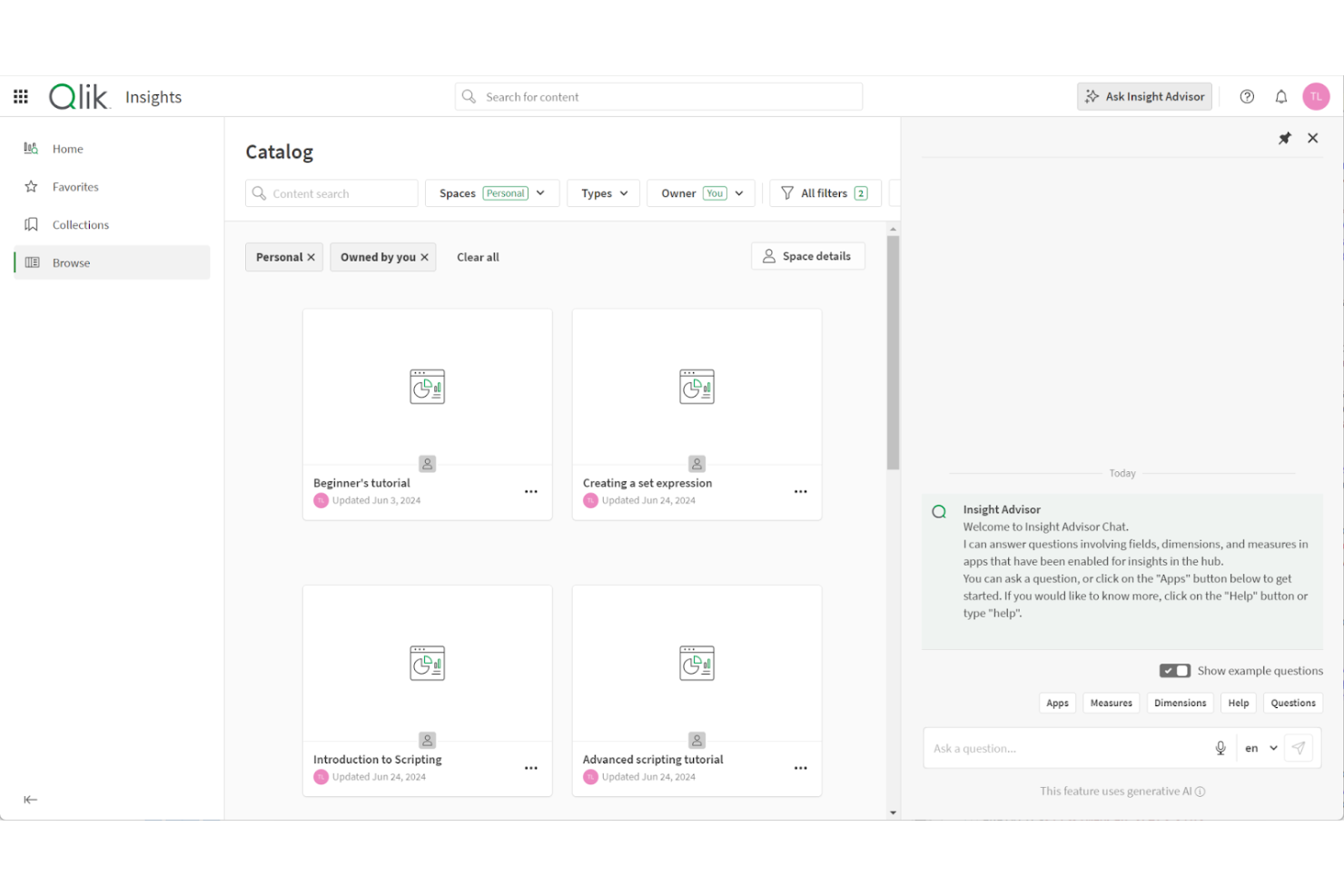
Qlik Analytics is a cloud-based data analytics platform for exploring and understanding data across multiple sources. It’s for businesses that want to turn raw data into insights without requiring advanced technical skills.
Why I picked Qlik Analytics: It lets your team ask questions in natural language and receive instant AI-driven insights. Its associative analytics engine lets you explore data relationships without writing queries or code, helping uncover patterns that traditional tools miss. Insight Advisor generates dashboards, spreadsheets, visualizations, and predictions, making advanced analysis accessible even to non-technical users.
Standout features & integrations:
Features include conversational analytics for natural-language queries, adaptive visualizations that surface hidden data relationships, and built-in storytelling tools that turn insights into shareable presentations.
Integrations include Microsoft Excel, Google Sheets, Snowflake, Amazon Redshift, Databricks, Salesforce, Google BigQuery, Oracle, SAP, and Microsoft Power BI.
Pros and Cons
Pros:
- Offers guided AI-assisted insights
- Works well for cross-department collaboration
- Lets you explore data without coding
Cons:
- Requires setup for complex data
- May feel limited for data engineers


SAS Intelligent Decisioning is a decision management platform for business analysts and decision makers, offering tools to automate and optimize decision processes. It provides AI-driven capabilities for data analysis and decision management to help with business operations.
Why I picked SAS Intelligent Decisioning: It excels at decision management, with features such as model management and business rule automation. These allow you to implement and manage decision logic across your organization. The platform supports real-time decision-making, which is essential for dynamic business environments. For example, fast-moving markets or high-volume customer service operations. Additionally, its ability to integrate machine learning models ensures that you leverage advanced analytics for informed decisions.
Standout features & integrations:
Features include intuitive dashboards, automated business rules, and scenario analysis. These features help your team visualize data insights and make informed decisions.
Integrations with the SAS Viya ecosystem and major enterprise platforms, including cloud services and CRM/ERP systems.
Pros and Cons
Pros:
- Provides advanced analytics
- Customizable decision logic
- Supports real-time decision making
Cons:
- Requires training for full utilization
- Limited data-type flexibility
Other AI Decision-Making Software
Here are some additional AI decision-making software options that didn’t make it onto my shortlist, but are still worth checking out:
- GiniMachine
For credit scoring
- DataRobot
For automated machine learning
- Movable Ink
For personalized marketing
- Aera Technology
For enterprise analytics
- Braze
For personalized customer journeys
- High Touch Technologies
For data sync across platforms


How I Evaluate AI Decision Making Software
I look for tools that go beyond dashboards and reports to deliver AI outputs HR teams can actually act on—like flagging flight risks before they resign or recommending equitable pay adjustments across roles. My evaluation splits into two layers: the core functionality a tool needs to qualify and the differentiating factors that separate good options from great ones.
Core Functionality (Table Stakes For This List)
When I'm selecting tools for my list, I rank each one on a scale from 0 (does not offer the functionality) to 5 (excels in this area) for each core functionality listed below. Then, I calculate the tool's total score into a percentage. Each tool needs to achieve a minimum total score of 65% to be considered for inclusion.
- AI-Powered Recommendations: I evaluate whether the tool generates actionable next steps—like suggesting which candidates to advance or flagging compensation misalignments—rather than just presenting charts.
- Predictive Analytics Models: Tools should include ML models that forecast outcomes like attrition risk or quality of hire, and I look for visible accuracy metrics and retraining capabilities.
- HR Data Integration: I check for native connectors to major HRIS, ATS, and payroll platforms so HR teams can feed real employee data into models without manual CSV wrangling.
- Explainability & Bias Controls: Each tool should surface why it made a recommendation—feature importance, audit trails, and fairness dashboards that help HR teams answer compliance questions.
- Scenario Modeling & Simulation: I look for the ability to run what-if analyses, such as modeling how a restructuring or merit cycle change would impact headcount costs and retention.
- Decision Workflow Automation: The tool should let HR teams act on AI outputs through triggered workflows, approval chains, or write-backs into existing HR systems.
Once I have a list of tools that meet the criteria, I consider what sets each platform apart.
Differentiating Factors (What Sets Vendors Apart)
Here's how I compare and contrast different vendors:
Standout Features
A skills intelligence graph adds real depth to succession and mobility decisions by mapping what employees can do today against what the org will need tomorrow. I also look for a generative AI copilot that lets HR leaders ask natural-language questions—like "which teams have the highest attrition risk this quarter?"—and get plain-language answers instead of raw reports. External benchmarking data matters too, since comp and talent recommendations are far more useful when contextualized against market norms.
Beyond Features
Compliance and ethical AI governance carry extra weight in this category—I check whether vendors offer bias audit reports and alignment with emerging regulations like the EU AI Act, since automated HR decisions carry real legal exposure. Data privacy is closely tied; I evaluate PII masking, role-based access controls, and whether the vendor trains its models on customer data across tenants. Time-to-value also matters. I look for prebuilt HR use case templates that let teams start generating insights within weeks rather than months.
How to Choose AI Decision-Making Software
It’s easy to get bogged down in long feature lists and complex pricing structures. To help you stay focused as you work through your unique software selection process, here’s a checklist of factors to keep in mind:
| Factor | What to Consider |
|---|---|
| Scalability | Can the software grow with your business? Consider if it can handle increased data volume or user count without performance issues. |
| Integrations | Does it connect with your existing tools? Check whether it supports integrations such as CRM, ERP, or data analytics platforms. |
| Customizability | Can you tailor it to fit your workflows? Look for options to adjust settings and features to match your team's processes. |
| Ease of use | Is it user-friendly for your team? Evaluate the interface and required training to ensure smooth adoption by non-technical users. |
| Implementation and onboarding | How quickly can you get started? Consider the time and resource allocation needed for setup, and look for available training or support during the transition. |
| Cost | Does it fit your budget? Compare the software's price against its features and benefits, and consider any hidden costs. |
| Security safeguards | Does it protect your data? Ensure it has high-level security measures, such as encryption and access controls, to keep your information safe. |
| Support availability | Can you get help when you need it? Check for 24/7 support options and the vendor's customer service responsiveness. |
What Is AI Decision-Making Software?
AI decision-making software is a tool that uses artificial intelligence to analyze data, predict outcomes, and support decision-making processes. These tools are commonly used by business analysts, data scientists, and managers who need to make data-driven decisions quickly and accurately.
Its features include predictive analytics, real-time data processing, and automated reporting that help identify trends, optimize strategies, and improve efficiency. Overall, these tools provide valuable insights that enhance decision-making and drive better business outcomes.
Features
When selecting AI decision-making software, keep an eye out for the following key features:
- Predictive analytics: Makes use of AI to forecast future trends and outcomes, helping you make informed decisions.
- Real-time data processing: Analyzes data instantly, allowing for timely and relevant decision-making.
- Automated reporting: Generates reports automatically, saving time and ensuring accuracy in data presentation.
- Machine learning integration: Incorporates machine learning models to support data analysis and predictions.
- Data visualization: Presents data in easy-to-understand visual formats, enabling quick insight generation.
- Scenario planning: Simulates different scenarios to evaluate potential strategies and outcomes.
- Adaptive learning: Data-driven decision-making processes improve the overall system constantly.
- Customizable dashboards: Let you tailor the interface to fit your specific needs and workflows.
- Omnichannel engagement: Ensures consistent communication across multiple platforms.
- Security safeguards: Protects sensitive data with encryption and access controls, ensuring data integrity.
Benefits
Implementing AI decision-making software provides several benefits for your team and your business. Here are a few you can look forward to:
- More consistent decisions: AI algorithms apply the same logic every time, reducing guesswork and ensuring decisions stay aligned across teams.
- Better cross-team alignment: Shared data and centralized decision models keep departments working from the same assumptions and priorities.
- Higher ROI on data: AI turns raw, historical, and real-time data into actionable recommendations that drive measurable business outcomes.
- Fewer operational bottlenecks: Automated decision steps streamline workflows and eliminate delays caused by manual approvals or reviews.
- Faster response to market changes: Adaptive AI models update fast, helping your team react to shifting customer behavior or business conditions.
- Improved customer experiences: Personalized recommendations and faster decision cycles lead to more relevant, satisfying interactions.
- Stronger governance and compliance: AI platforms log decision paths and provide transparency, making audits and regulatory reporting easier.
- Reduced business risk: Early detection of anomalies, compliance issues, or performance drops helps prevent costly problems before they escalate.
Costs & Pricing
Selecting AI decision-making software requires understanding the available pricing models and plans. Costs vary based on features, team size, add-ons, and more. The table below summarizes standard plans, their average prices, and typical features included in AI tools:
Plan Comparison Table for AI Decision-Making Software
| Plan Type | Average Price | Common Features |
|---|---|---|
| Free Plan | $0 | Basic analytics, limited data processing, and community support. |
| Personal Plan | $10-$30/user/month | Data visualization, predictive analytics, and email support. |
| Business Plan | $50-$100/user/ month | Real-time data processing, customizable dashboards, and priority support. |
| Enterprise Plan | $150-$300/user/ month | Advanced machine learning, full integration capabilities, and dedicated support. |
AI Decision-Making Software FAQs
Here are some answers to common questions about AI decision-making software:
Can AI decision-making software integrate with existing systems?
Yes, most AI decision-making tools can integrate with your existing systems. Look for tools that offer API access and support popular platforms like CRM, ERP, and data analytics tools. This ensures you can maintain your current workflows while leveraging AI capabilities. Check the integration options before purchasing to avoid compatibility issues.
How do I evaluate the scalability of AI decision-making software?
To evaluate scalability, assess whether the software can handle increased data volume and user count without performance issues. Look for features like cloud-based infrastructure and flexible pricing plans that accommodate growth. If your business plans to expand, ensure the software can grow with you.
What training resources are available for AI decision-making software?
Most platforms offer a variety of training resources, including video tutorials, webinars, and documentation. Some may provide interactive product tours or a knowledge base for self-guided learning. Before choosing software, explore the training materials to ensure your team can get up to speed and maximize capabilities by using AI.
How important is customer support when choosing AI decision-making software?
Good support helps resolve issues quickly, minimizing downtime when choosing AI decision-making software. Look for providers offering 24/7 support, live chat, and dedicated account managers. Assess the responsiveness and expertise of the support team by reading customer reviews or contacting them with pre-purchase inquiries.
Are there security concerns with AI decision-making software?
Yes, security is a key consideration. Ensure the software includes strong encryption, access controls, and compliance with data protection regulations such as GDPR. Verify the provider’s security certifications and inquire about their historical data collection practices. Protecting sensitive information is vital for maintaining trust and compliance.