

10 Best Business Travel Management Software in 2026

Best Business Travel Management Software Shortlist


Business travel management softwares help your team book trips, track expenses, and manage company travel policies in one place. If your company is growing or managing frequent traveller requests, you know how quickly flights, hotels, and spend can spin out of control. The right platform gives you clear oversight, from approvals and real-time alerts to automated reporting, so you can keep travel safe, budgets accurate, and employees happy on the road. In this guide, you’ll find the top tools you need to simplify travel management, stay compliant, and get the best value for every business trip in 2026.
Why Trust Our Software Recommendations
Our team has been testing and reviewing software since 2012. As HR experts ourselves, we know how difficult—and important—it is to choose the right software.
For this guide, we evaluated tools using hands-on testing and independent research, scoring tools using our selection criteria. We also draw on insights from industry thought leaders and practicing HR experts.
Our reviews reflect our human editorial judgment, not a sales pitch.
Expert reviewers:
Business Travel Management Software Comparison Table
The table below compares pricing details for my top business travel management software selections.
| Tool | Best For | Trial Info | Price | ||
|---|---|---|---|---|---|
| 1 | Best for card-based travel spend controls | Free plan + free demo available | From $15/user/month | Website | |
| 2 | Best rapid implementation for growing teams | Free plan available | From $49/month | Website | |
| 3 | Best for redeeming points on business travel | Free plan available | From $12/user/month | Website | |
| 4 | Best unified travel and expense dashboards | Free demo available | Pricing upon request | Website | |
| 5 | Best for built-in rewards and incentives | Free demo available | Pricing upon request | Website | |
| 6 | Best for real-time duty of care monitoring | Free plan available | Pricing upon request | Website | |
| 7 | Best for connected enterprise travel and expense | Free demo available | Pricing upon request | Website | |
| 8 | Best customizable policy controls | Free demo available | Pricing upon request | Website | |
| 9 | Best for broad global travel inventory | Free plan available | From $99/month | Website | |
| 10 | Best for multi-level approval workflows | Free demo available | Pricing upon request | Website |
Best Business Travel Management Software Reviews
Below are my detailed summaries of the best business travel management software that made it onto my shortlist. My reviews offer a detailed look at the features, integrations, and best use cases of each platform to help you find the best one for you.

Ramp
Best for card-based travel spend controls
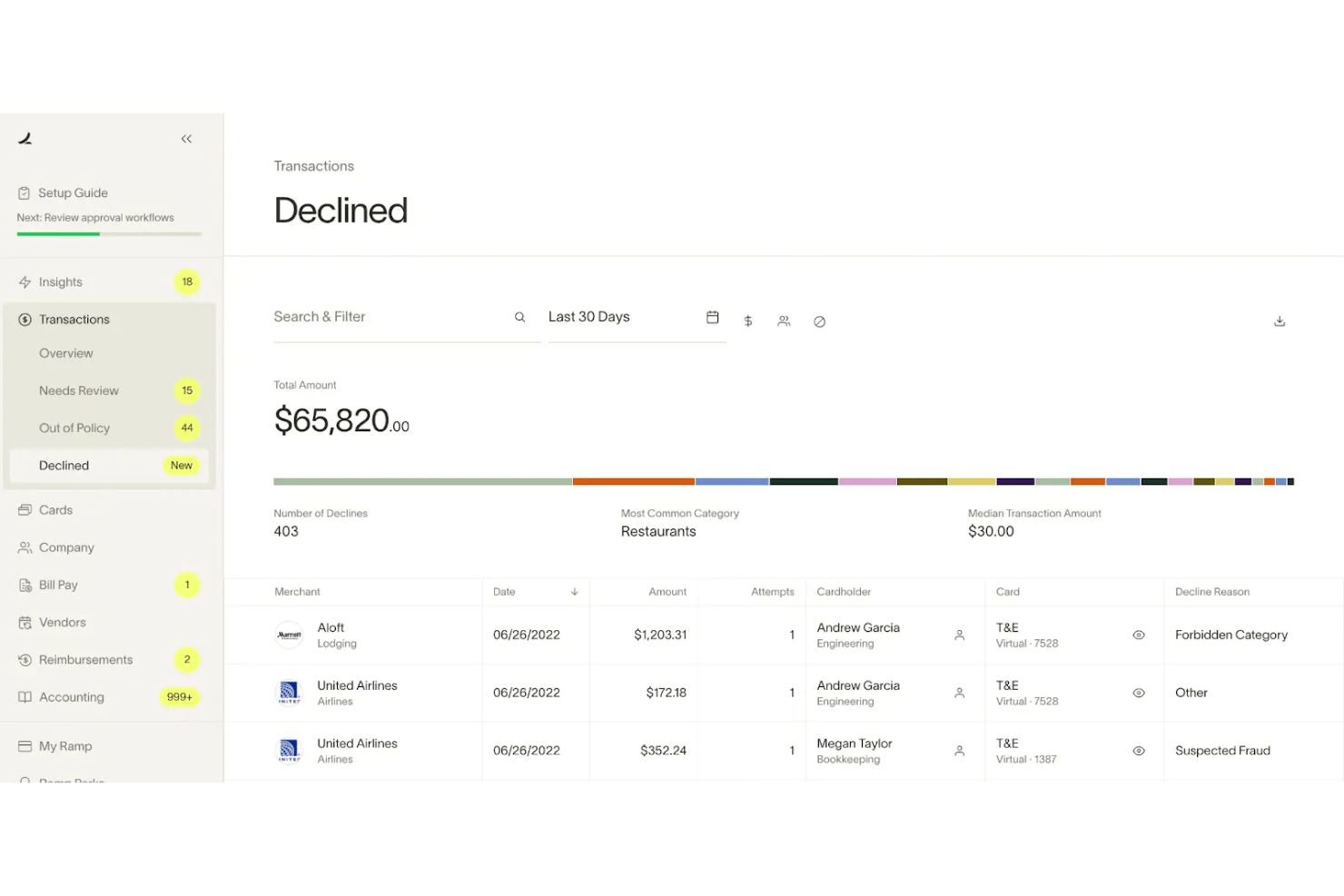
Ramp is a corporate card and expense management platform that extends into business travel booking, with integrated policy enforcement, automated receipt capture, and spend controls applied directly at the card level.
Who Is Ramp Best For?
Ramp is a strong fit for finance-led teams at SMBs and mid-market companies that want tight spend controls built into their corporate card program.
Why I Picked Ramp
Ramp earns its spot on my shortlist because of how it enforces travel policy directly at the card level. Instead of chasing violations after the fact, Ramp applies spend guardrails at the point of purchase, blocking out-of-policy transactions before they happen. I also like that the booking interface shows real-time policy status on each flight or hotel option, so travelers know what's approved without having to consult a PDF or ask a manager.
Ramp Key Features
- Integrated travel booking portal: Lets employees book flights, hotels, and car rentals within the same platform.
- Policy-compliant booking display: Shows policy status on each travel option while employees search and book.
- Automatic receipt capture: Matches receipts to transactions without manual entry or expense reports.
- HRIS and accounting integrations: Syncs with systems like Workday, NetSuite, QuickBooks, and Xero for unified data management.
Ramp Integrations
Ramp offers native integrations with QuickBooks, Xero, NetSuite, Sage Intacct, Acumatica, Workday, Microsoft Dynamics 365, and Slack, and provides an API for custom integrations.
Pros and Cons
Pros:
- Policy compliance visible while searching flights
- Receipts auto-match without manual expense reports
- Card-level controls block out-of-policy purchases
Cons:
- Travel inventory limited to Priceline content only
- No real-time traveler risk alerts available
New Product Updates from Ramp

Ramp Adds VAT-Compliant Reimbursement Statements
Ramp added VAT and entity address details to reimbursement statements, helping teams in the EU, UK, and Canada reclaim VAT with less manual paperwork. For more information, visit Ramp’s official site.
 .
.
Best rapid implementation for growing teams
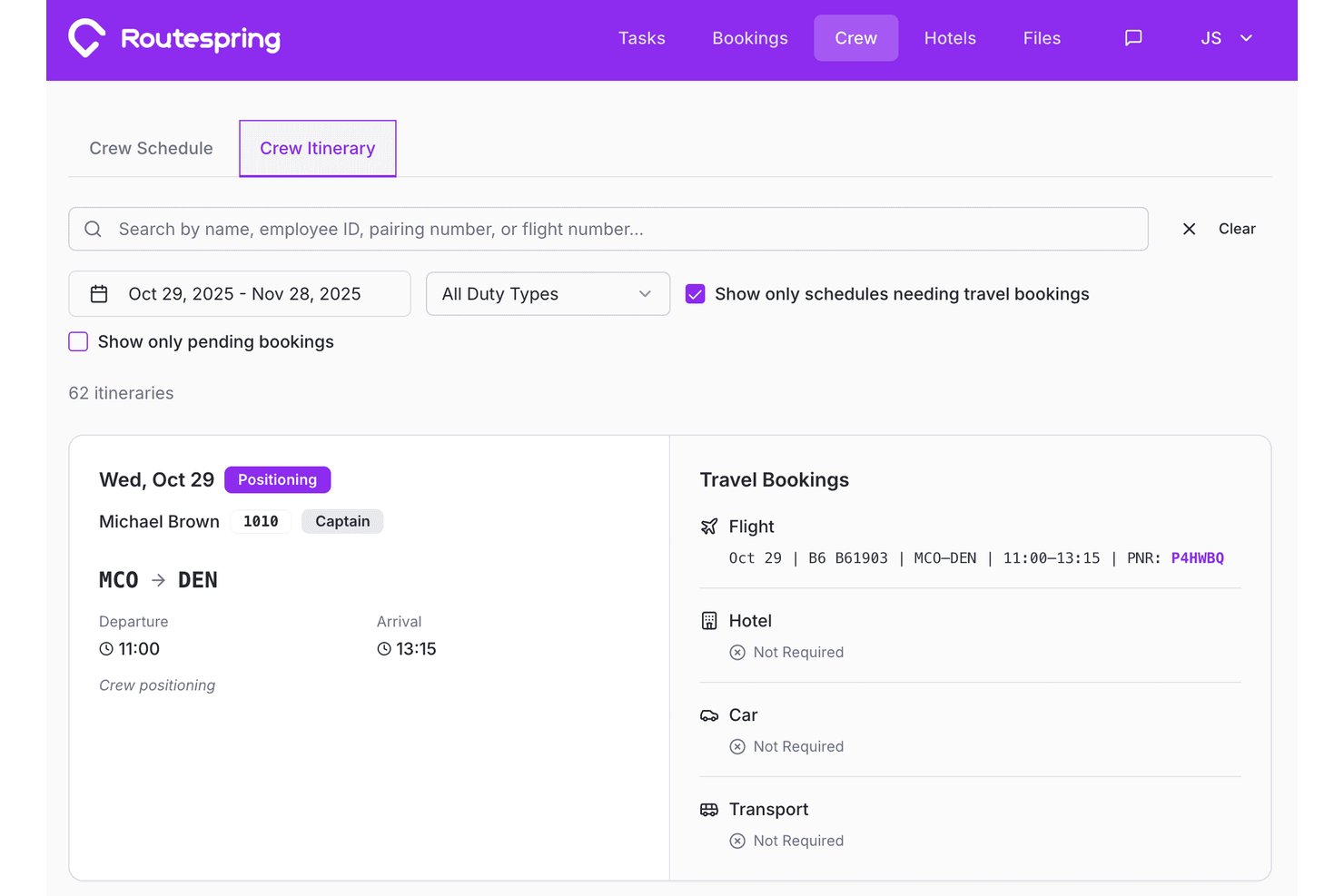
Routespring is a corporate travel management platform with self-service booking for flights, hotels, and ground transport, centralized payments, multi-level approval workflows, and travel spend analytics.
Who Is Routespring Best For?
Routespring is a strong fit for mid-market companies and growing teams that need a travel management program up and running quickly without a lengthy implementation.
Why I Picked Routespring
Routespring earns its spot on my shortlist because of how fast a team can go from sign-up to booking. I've seen policy configuration, traveler invitations, and approval workflows set up in a single session. One G2 reviewer rolled it out to 200 employees with just a 30-minute training. I also like the centralized payment model, where every traveler books on a shared corporate card with no expense reports needed.
Routespring Key Features
- Real-time inventory search: Access flights, hotels, and ground transport from a global pool of providers within one booking interface.
- Multi-level approval workflows: Set up tailored approval structures based on department, traveler role, or trip criteria.
- Centralized payments integration: Book all trips using a shared company payment method, eliminating individual card use and reimbursement.
- Live analytics dashboard: Gain instant visibility into travel spend, compliance, and booking patterns across the entire organization.
Routespring Integrations
Routespring offers native integrations with QuickBooks, NetSuite, Oracle Fusion Cloud, Zoho Books, Brex, and Ramp. An API is available for custom integrations.
Pros and Cons
Pros:
- Policy compliance rates are consistently high
- Centralized payments eliminate expense reimbursements
- Fast setup with no lengthy implementation
Cons:
- Reporting dashboard customization is limited
- Lacks real-time traveler safety tracking

Brex
Best for redeeming points on business travel
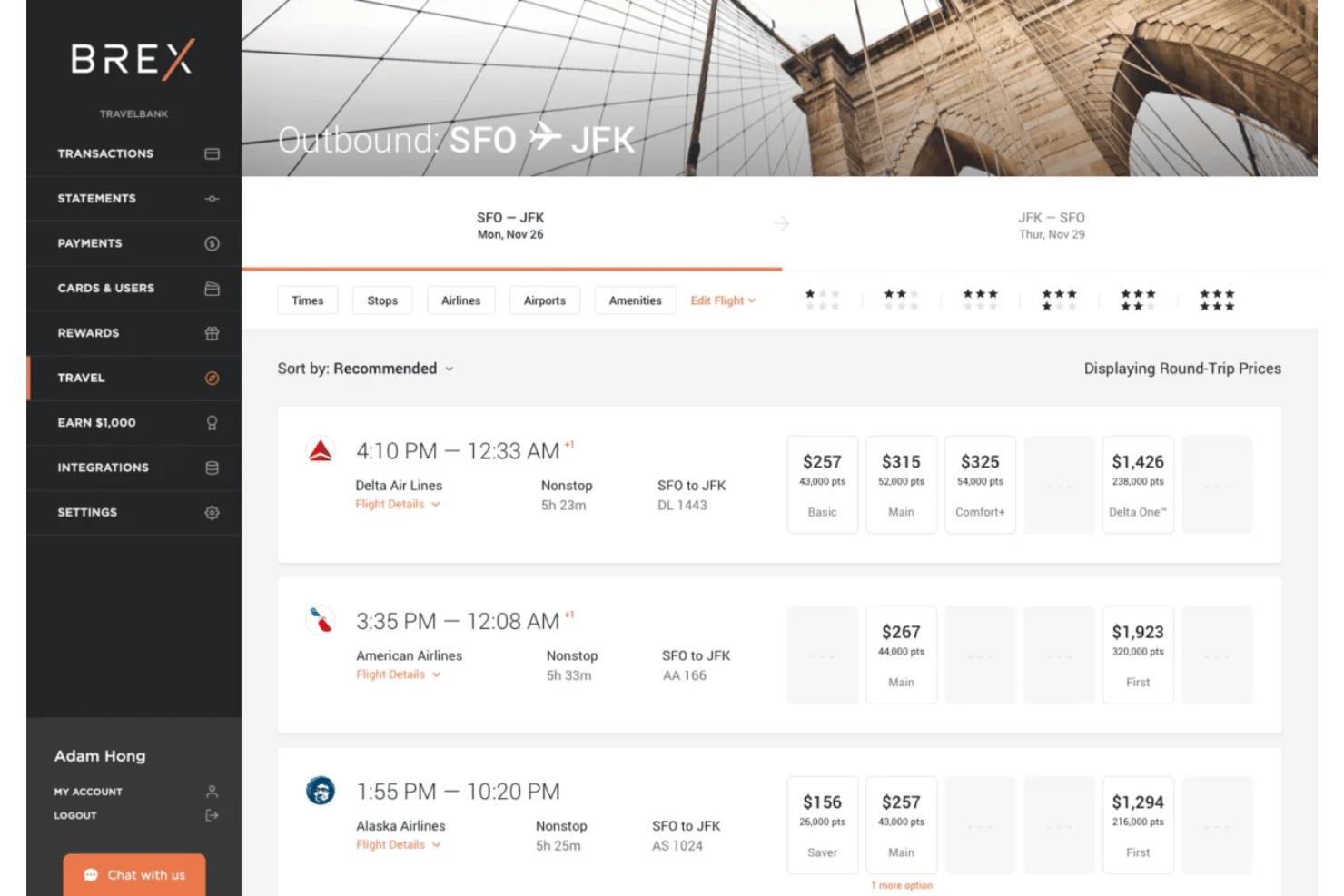
Brex is a unified spend platform that combines corporate card management, travel booking, expense automation, and reimbursements in a single system built for startups and mid-market companies.
Who Is Brex Best For?
Brex is a strong fit for VC-backed startups and mid-market companies that want finance-led control over travel booking and expense spending in one place.
Why I Picked Brex
I picked Brex as one of the best because the rewards structure is genuinely built around travel spending. Startups booking through Brex Travel earn 4x points per dollar, and those points redeem directly against travel costs inside the same platform. Brex also gives startups access to negotiated corporate rates typically reserved for large enterprises, so the rewards stack on top of already-reduced pricing.
Brex Key Features
- Multi-modal booking engine: Book flights, hotels, rail, and car rentals with a single search and checkout.
- Embedded policy controls: Set configurable spend limits and enforce travel policies at the point of booking.
- Integrated HRIS and ERP sync: Sync employee profiles, approval chains, and cost centers with major HR and accounting systems.
- 24/7 live travel support: Access experienced travel agents via phone, chat, or email for help with bookings and disruptions.
Brex Integrations
Brex offers native integrations with NetSuite, Sage Intacct, QuickBooks, Rillet, Campfire, Workday, Rippling, ADP, and Gusto. An API is available for custom integrations.
Pros and Cons
Pros:
- Startups access enterprise-level negotiated rates
- Travel and expense managed in one platform
- Earns 4x rewards points on travel bookings
Cons:
- Not available to traditional small businesses
- Limited duty of care tracking capabilities

Happay
Best unified travel and expense dashboards
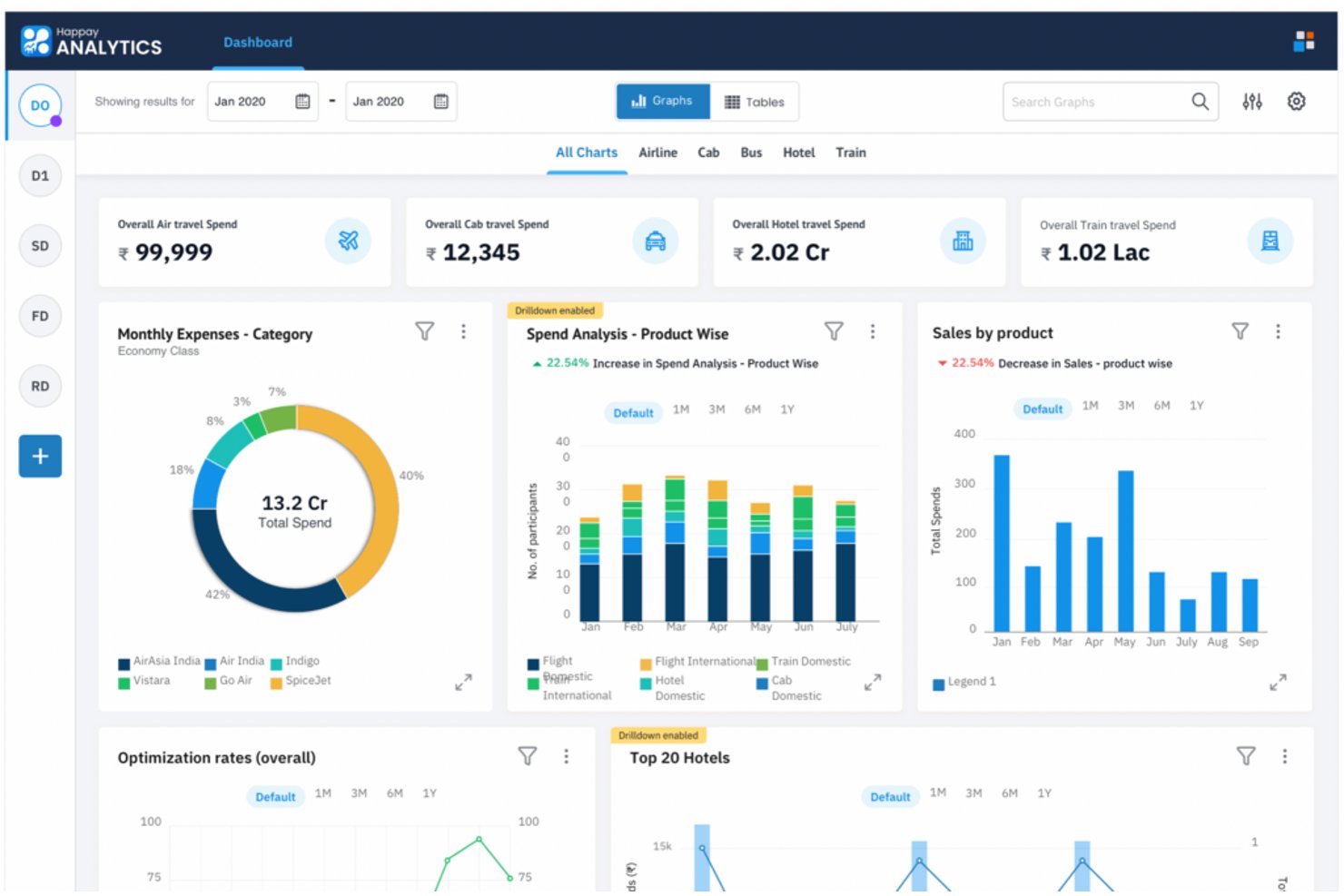
Happay is an enterprise travel and expense management platform that combines a self-booking tool for flights, hotels, trains, and cabs with multi-level approval workflows, automated expense capture, and real-time spend dashboards.
Who Is Happay Best For?
Happay is a strong fit for enterprise finance and T&E teams in India and APAC markets managing high-volume corporate travel across multiple departments.
Why I Picked Happay
Happay earns its spot as one of the best on my shortlist because of how tightly it connects booking data and expense data inside a single dashboard view. I love the DeepAnalyze feature, which breaks spend down by department, cost center, and booking lead time in real time. I also like that policy violation tracking and cancellation behavior are surfaced in the same view, so I'm not toggling between separate reports to understand where the budget is going.
Happay Key Features
- Self-booking tool: Lets employees book flights, hotels, cabs, trains, and buses directly from one interface.
- AI fare optimization: Uses algorithms to present lowest available fares and lock in prices to prevent surges.
- Credit card integration: Captures and reconciles business expenses automatically from card statements within the platform.
- Multi-vendor inventory: Connects with multiple TMCs and travel suppliers to consolidate travel options in a single system.
Happay Integrations
Happay offers native integrations with leading travel management companies like MakeMyTrip, Riya, Thomas Cook, and FCM Travels, as well as ERP, HRMS, and project management systems. An API is available for custom integrations.
Pros and Cons
Pros:
- Pre-trip approval workflows with fare lock-in
- Multi-modal booking across five transport types
- Unified booking and expense data in one view
Cons:
- Limited global inventory outside India and APAC
- No duty-of-care or traveler safety tracking

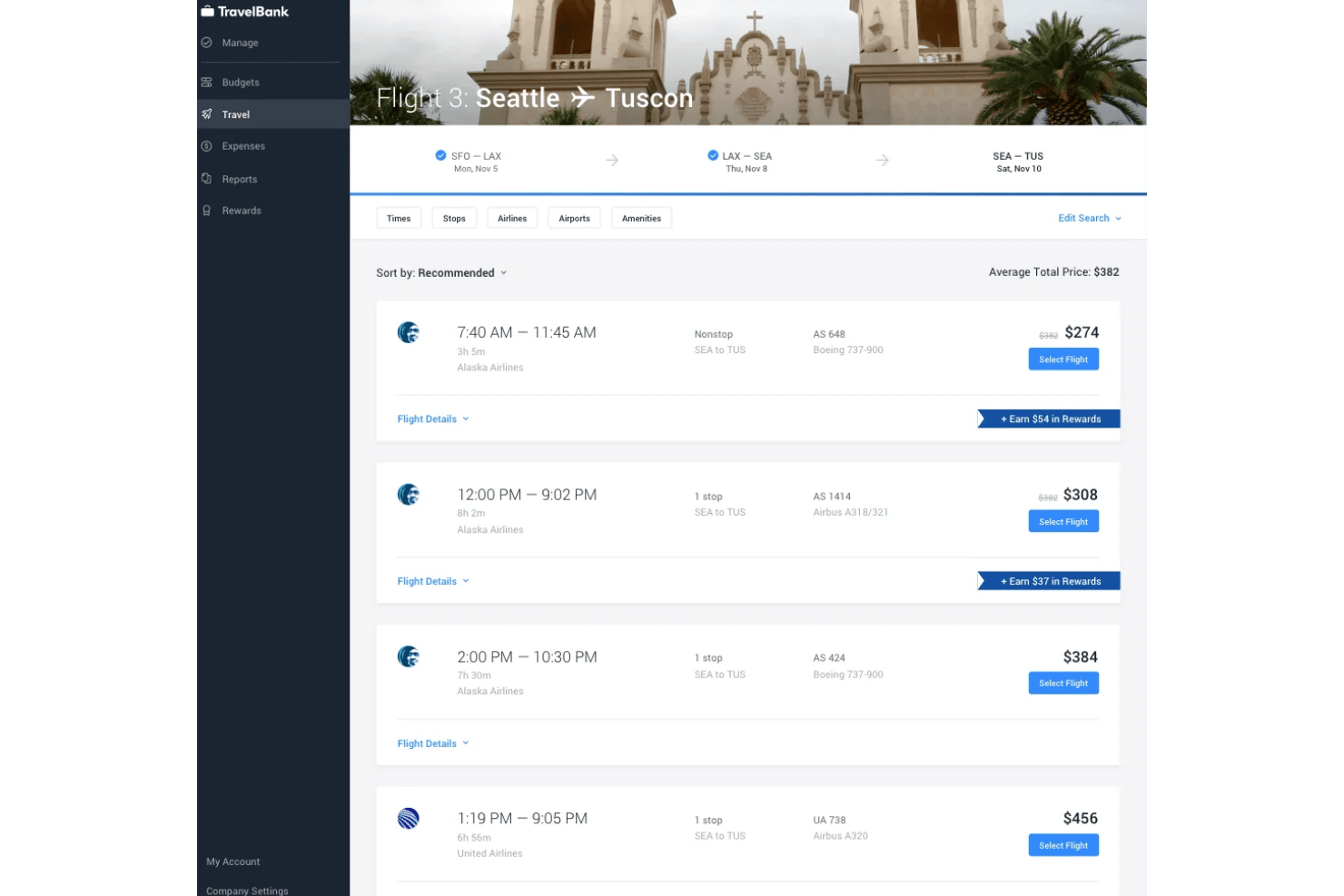
TravelBank is an all-in-one travel and expense management platform that combines self-service trip booking, corporate policy enforcement, card reconciliation, and spend reporting in a single interface.
Who Is TravelBank Best For?
TravelBank is a strong fit for mid-market finance and HR teams that manage both travel booking and expense reimbursement and want to consolidate them in one platform.
Why I Picked TravelBank
TravelBank earns its spot on my shortlist because the rewards program is genuinely built into the booking experience, not bolted on. When a traveler books below their policy cap, they earn credits, which means cost-conscious choices get reinforced by real incentives. I also like that policy rules surface at the point of search, prompting users while they're browsing flights and hotels rather than flagging violations after booking.
TravelBank Key Features
- All-in-one travel booking: Book flights, hotels, and car rentals in a unified interface with company policy built in.
- Automated expense tracking: Automatically capture receipts, reconcile card transactions, and create reports from business travel activity.
- Premium insights dashboard: Access customizable reporting on spend, policy compliance, and travel booking trends.
- ERP and accounting integrations: Sync with accounting platforms like QuickBooks Online and NetSuite for expense data transfer.
TravelBank Integrations
TravelBank offers native integrations with QuickBooks Online, QuickBooks Enterprise, NetSuite, Brex, and U.S. Bank. It also integrates with HR systems, supports single sign-on, and provides an API for custom integrations.
Pros and Cons
Pros:
- Policy enforcement at the point of booking
- Unified travel and expense in one platform
- Built-in rewards incentivize under-budget bookings
Cons:
- Named HRIS integrations not clearly documented
- Limited duty of care tracking tools

Navan
Best for real-time duty of care monitoring
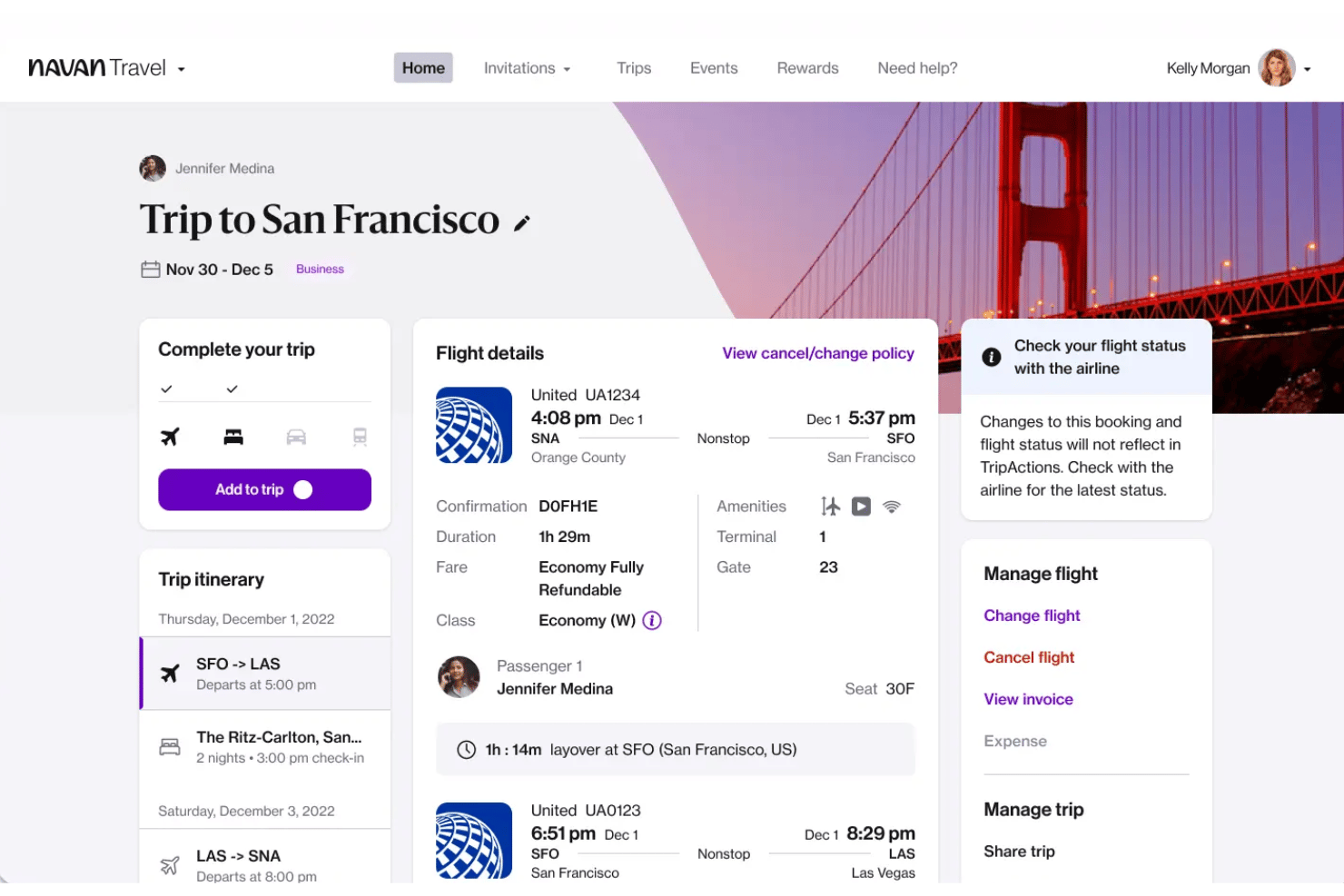
Navan is an all-in-one corporate travel and expense platform that covers flight, hotel, rail, and car booking, travel policy enforcement, real-time traveler tracking, and expense reconciliation in a single system.
Who Is Navan Best For?
Navan is a strong fit for travel and expense administrators at mid-size to enterprise companies managing frequent business travel across distributed or global teams.
Why I Picked Navan
I picked Navan as one of the best because its live traveler map gives me real-time visibility into where every employee is at any given moment. When a disruption hits, I can send targeted notifications directly to affected travelers and restrict future bookings to flagged locations without leaving the platform. The native integrations with providers like International SOS and Crisis24 layer in global risk intelligence, so I'm not relying on a separate tool to know when a traveler needs help.
Navan Key Features
- AI-powered booking recommendations: Suggests policy-compliant flight, hotel, and ground transport options tailored to each traveler’s history and preferences.
- Virtual payment card issuance: Generates single-use cards for travel bookings, improving control and transaction reconciliation.
- Unused ticket management: Tracks, applies, and reports on unused airline credits and voided tickets to reduce waste.
- Carbon emissions tracking: Calculates trip-specific CO2 output and displays greener alternatives for sustainability reporting.
Navan Integrations
Navan offers 30+ native integrations with tools like Workday, BambooHR, ADP, Gusto, HiBob, Oracle NetSuite, Sage Intacct, Xero, Concur, and Slack. An API is available for custom integrations.
Pros and Cons
Pros:
- Navan Rewards incentivizes on-policy bookings
- Travel and expense managed in one system
- Built-in live traveler location tracking
Cons:
- Full expense features require a Navan card
- Hotel inventory thinner outside major markets
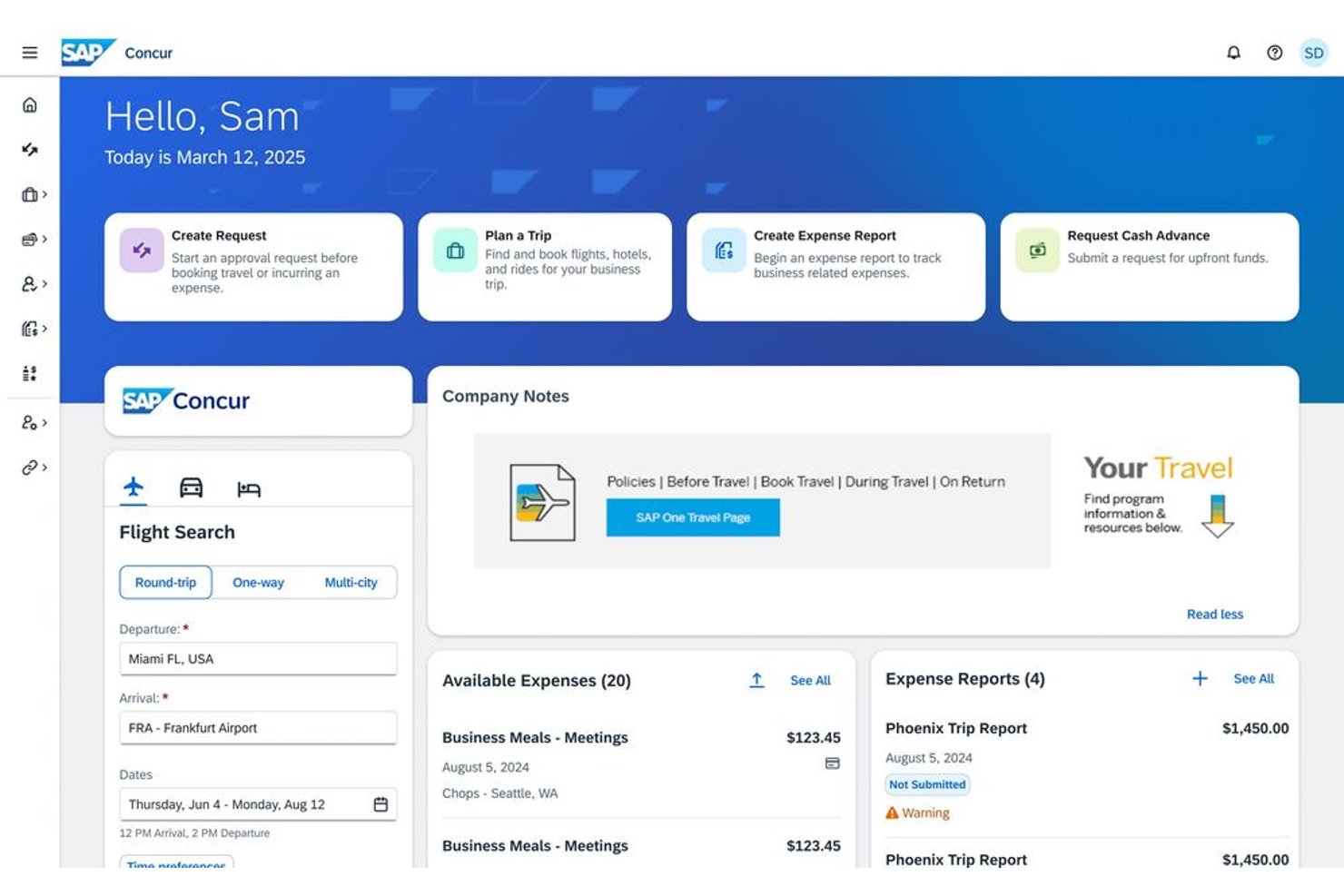
SAP Concur is an enterprise travel and expense management suite that connects corporate travel booking, expense reporting, invoice processing, and spend analytics into a single platform.
Who Is SAP Concur Best For?
SAP Concur is a strong fit for mid-size to large enterprises with complex, global travel programs and dedicated T&E administrators managing multi-entity spend.
Why I Picked SAP Concur
SAP Concur earns its spot on my shortlist because of how tightly it connects the full travel and expense cycle in one place. What I find genuinely useful is Concur TripLink, which pulls bookings made outside the platform (like direct hotel reservations) back into the managed travel program so nothing falls through the cracks. On the expense side, ExpenseIt with Joule AI auto-captures receipts and flags out-of-policy spend before it ever hits the approval queue.
SAP Concur Key Features
- Multi-modal booking platform: Book flights, hotels, rail, and car rentals from a single interface with real-time global inventory.
- Dynamic travel policy engine: Set rules, tiered approvals, and restrictions that are enforced during booking and expense submission.
- Traveler tracking and safety alerts: Monitor employee locations, send notifications, and support duty of care in emergencies.
- Customizable spend analytics dashboards: Visualize spend, compliance, and booking behavior with configurable data views and reporting tools.
SAP Concur Integrations
SAP Concur offers over 300 native integrations, including QuickBooks, SAP, ADP, Sage, Microsoft Teams, Workday, Xero, and Infor, with an API available for custom integrations.
Pros and Cons
Pros:
- Joule AI flags policy violations before approval
- Concur Intelligence offers deep spend visibility
- TripLink captures out-of-channel bookings automatically
Cons:
- Implementation requires significant IT and admin resources
- Dated interface frustrates frequent business travelers

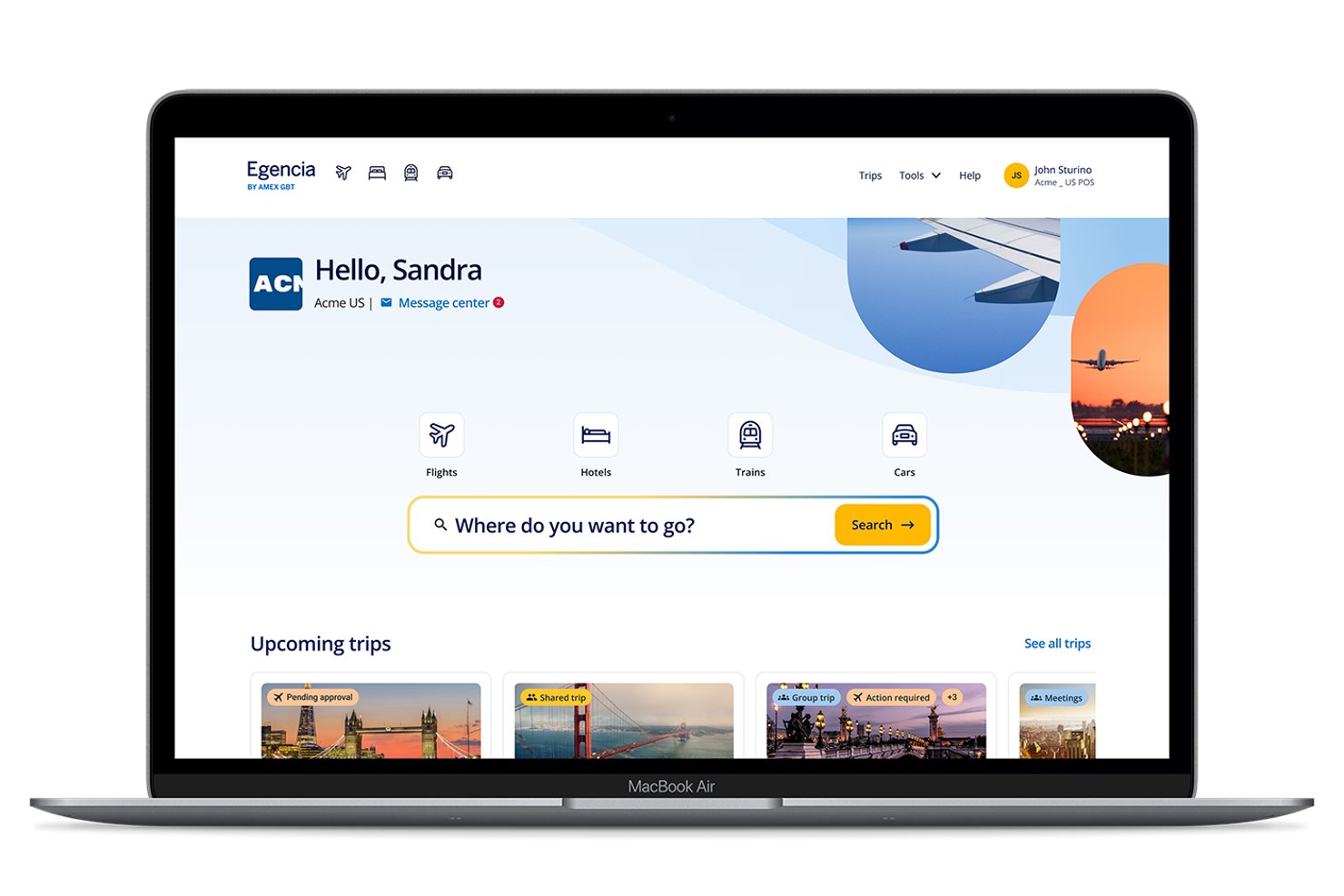
Egencia is a B2B business travel management platform that covers flight, hotel, rail, and car rental booking alongside travel policy enforcement, expense integration, duty of care tracking, and spend reporting.
Who Is Egencia Best For?
Egencia is a strong fit for mid-market and enterprise companies that manage high volumes of employee travel across multiple countries and need strict, auditable policy controls.
Why I Picked Egencia
I picked Egencia as one of the best because its policy controls go well beyond basic spend caps. I particularly like the dynamic hotel pricing feature, which uses AI to adjust rate caps based on local market medians rather than fixed limits. Travel managers can also mix dynamic and static caps by city, country, or traveler group, and the platform flags any out-of-policy bookings for manager approval before they're confirmed.
Egencia Key Features
- Multi-modal booking engine: Book flights, hotels, rail, and car rentals from a single platform with real-time inventory updates.
- Duty of care dashboard: Monitor traveler locations and receive safety alerts for potential disruptions worldwide.
- Automated expense sync: Integrate with SAP Concur and Payhawk for instant reconciliation of booking data and receipts.
- Custom analytics reporting: Create dashboards for travel spend, policy compliance, unused tickets, and sustainability metrics.
Egencia Integrations
Egencia offers over 50 native integrations, including SAP Concur, Payhawk, and Celigo. An open API and a developer center are available for custom integrations.
Pros and Cons
Pros:
- 24/7 live agent support for disruptions
- Real-time traveler tracking and risk alerts
- AI-driven dynamic hotel pricing caps
Cons:
- HRIS native sync requires custom API work
- Reporting dashboards can feel cluttered

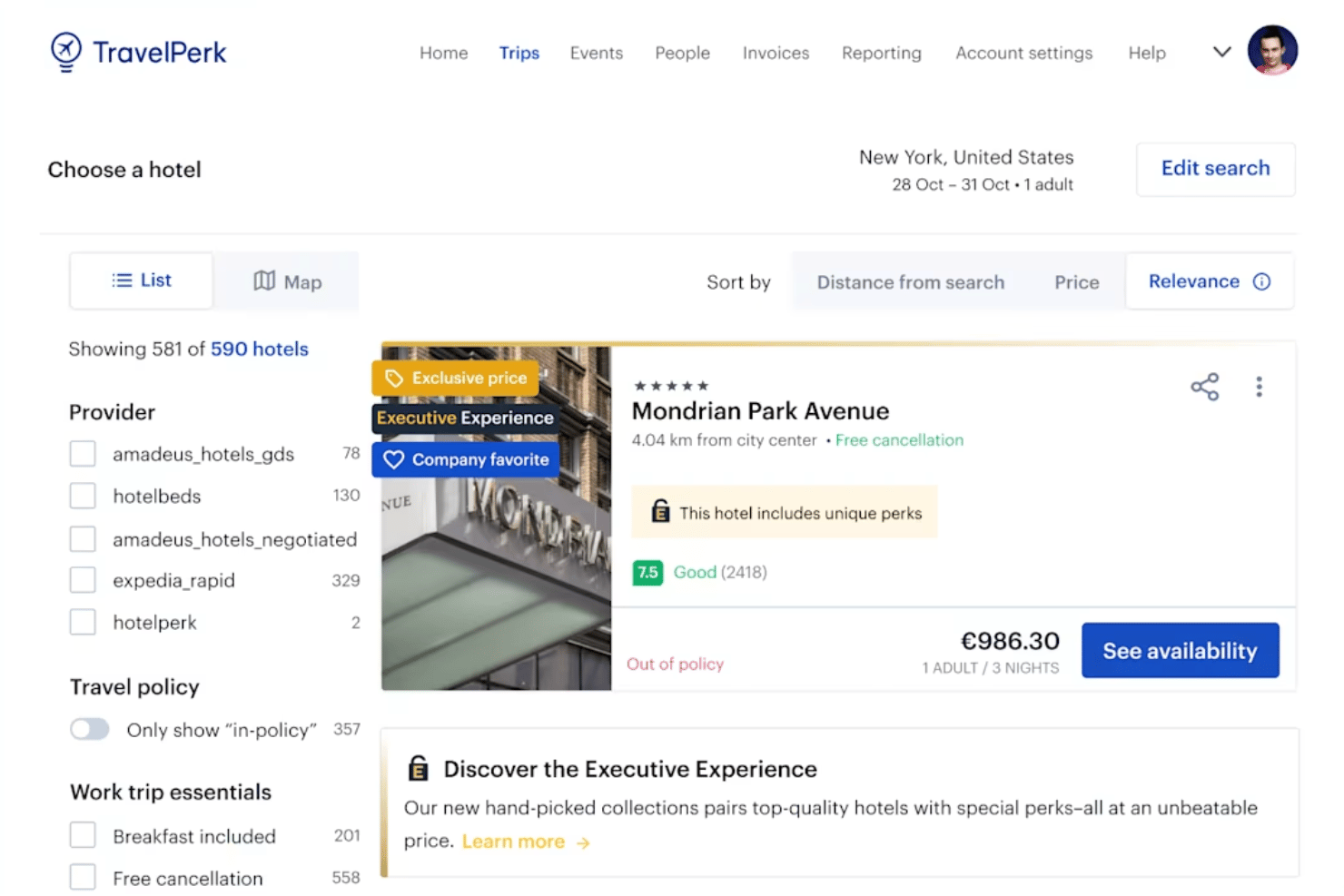
TravelPerk is a business travel management platform that combines multi-modal booking across flights, hotels, rail, and cars with built-in policy controls, approval workflows, duty of care tools, and an integrated spend and expense management layer.
Who Is TravelPerk Best For?
TravelPerk suits travel and expense administrators at mid-market companies managing frequent cross-border employee travel across multiple regions.
Why I Picked TravelPerk
TravelPerk earns its spot because it pulls content from Amadeus, Skyscanner, Booking.com, and Expedia into a single itinerary checkout, covering flights, hotels, trains, and rental cars in one place. I particularly like that TravelPerk layers negotiated rates on top of that aggregated inventory, so the pricing goes beyond what you'd find booking direct. Billing in seven currencies is a detail I've found genuinely useful when managing travel across multiple countries.
TravelPerk Key Features
- Duty of care center: Provides real-time traveler tracking, risk alerts, and global emergency assistance tools.
- Automated invoice processing: Uses AI to capture, process, and reconcile invoices and receipts from every trip.
- Virtual and physical Perk Cards: Issues spend-enabled Visa cards for travelers with policy controls and automated expense categorization.
- HRIS and ERP integrations: Connects natively with major HR and finance systems for automated employee sync and accounting.
TravelPerk Integrations
TravelPerk offers 60+ native integrations, including NetSuite, Xero, BambooHR, HiBob, SAP SuccessFactors, Ramp, Expensify, Spendesk, Slack, and International SOS. An API is available for custom integrations.
Pros and Cons
Pros:
- Real-time duty of care tracking for travelers
- FlexiPerk allows cancellation on nearly any booking
- Broadest inventory across flights, hotels, and rail
Cons:
- Customer support quality varies by subscription level
- Advanced reporting locked behind higher-tier plans

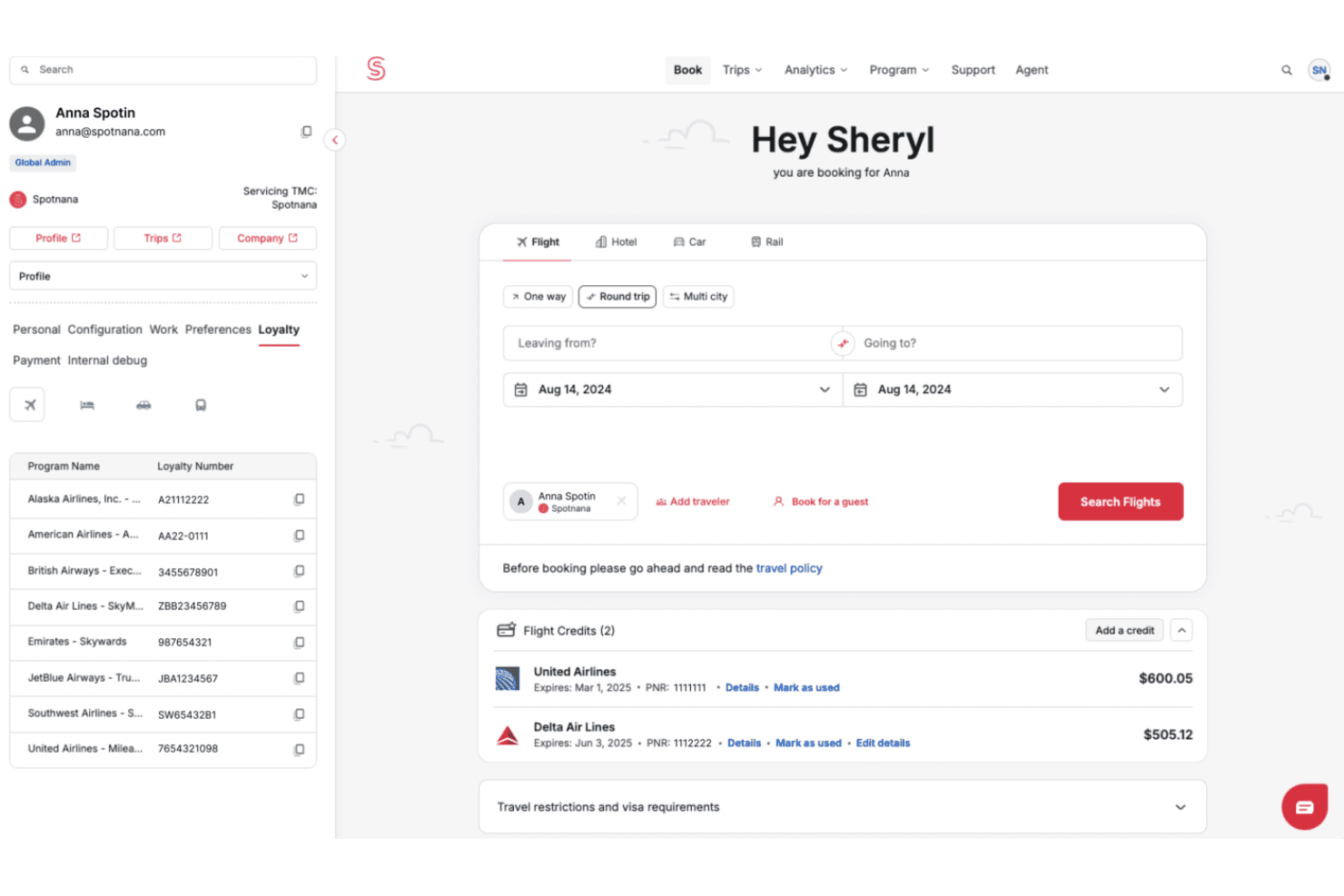
Spotnana is a Travel-as-a-Service platform built on a single global infrastructure that connects travelers, travel managers, agents, and TMC operators across multi-modal booking, policy management, duty of care, and real-time analytics.
Who Is Spotnana Best For?
Spotnana is a strong fit for large, multinational organizations running complex global travel programs that need centralized control across multiple countries and regions.
Why I Picked Spotnana
Spotnana earns its spot on my shortlist because of how granularly its approval workflows can be configured. I like that you can set no, soft, or hard approval per trip type and assign multiple approvers in a single policy. The "show but do not allow booking" option is particularly useful when you need to block out-of-policy fares without hiding them from travelers, keeping the experience transparent while keeping spend in check.
Spotnana Key Features
- Multi-modal booking engine: Book flights, hotels, rail, and rental cars with global inventory from one unified platform.
- Duty of care integration: Track traveler locations in real time and receive security alerts through partners like International SOS and Crisis24.
- HRIS and expense integrations: Sync employee profiles, cost centers, and trip data with tools like Workday, BambooHR, Brex, and Expensify.
- Real-time analytics dashboard: Monitor travel spend, policy compliance, and booking patterns with customizable reporting and business intelligence.
Spotnana Integrations
Spotnana offers native integrations with Workday, BambooHR, ADP, Brex, Center, Expensify, AirPlus, Conferma, International SOS, and Crisis24, and provides an API for custom integrations.
Pros and Cons
Pros:
- NDC airline content with negotiated corporate rates
- Real-time traveler tracking across global trips
- Granular multi-level approval workflow configuration
Cons:
- Implementation complexity for smaller travel programs
- No built-in native expense management module
Other Business Travel Management Software
Here are some additional business travel management software options that didn’t make it onto my shortlist, but are still worth checking out:
- ITILITE
AI-driven travel recommendations
- Emburse
For granular spend compliance
- Zoho Expense
For localized per diem management
- Engine
For group and crew travel


How I Evaluate Business Travel Management Software
I split my evaluation into two layers: the core booking, policy, and duty of care controls every platform needs to qualify, and the differentiators that separate the best from the rest.
Core Functionality (Table Stakes For This List)
When I'm selecting tools for my list, I rank each one on a scale from 0 (does not offer the functionality) to 5 (excels in this area) for each core functionality listed below. Then, I calculate the tool's total score into a percentage. Each tool needs to achieve a minimum total score of 65% to be considered for inclusion.
- Travel Booking Engine: I look for a self-service interface that covers flights, hotels, rail, and car rentals with real-time inventory from multiple sources.
- Policy & Approval Controls: The tool should let admins set spend limits by trip type or role and enforce multi-level approvals before booking confirms.
- Traveler Tracking & Duty of Care: I evaluate whether the platform gives admins real-time visibility into where employees are, with safety alerts during disruptions.
- Expense Integration: Each tool should capture receipts and itinerary data, then reconcile trip costs against corporate cards or reimbursement workflows.
- Reporting & Analytics: I check for dashboards that break down travel spend by department, policy compliance rates, and booking patterns across the org.
- HRIS & Employee Data Sync: The platform should sync employee profiles, cost centers, and departments from your HR system to keep traveler data current.
Once I have a list of tools that meet the criteria, I consider what sets each platform apart.
Differentiating Factors (What Sets Vendors Apart)
Here's how I compare and contrast different vendors:
Standout Features
Duty of care tools are a key differentiator. I look for platforms that offer real-time risk alerts and two-way messaging with travelers. That way, you can locate and reach employees during flight cancellations or regional emergencies. AI-powered recommendations also matter. The best platforms suggest policy-compliant options based on past booking patterns, saving travelers time and keeping spend in line. I also check for unused ticket management, since expired airline credits are easy to lose track of and can quietly drain your travel budget.
Beyond Features
Inventory breadth matters. I evaluate whether platforms pull from multiple GDS sources alongside NDC fares and low-cost carriers. Limited content pushes travelers to book outside the system. 24/7 traveler support is equally important, since a midnight flight cancellation requires live agents who can rebook on the spot.
I also check how well each tool connects to your finance and HR stack. Syncing cost centers from your HRIS or reconciling charges in your ERP keeps travel data from living in a silo.
How to Choose Business Travel Management Software
It’s easy to get bogged down in long feature lists and complex pricing structures. To help you stay focused as you work through your unique software selection process, here’s a checklist of factors to keep in mind:
| Factor | What to Consider |
|---|---|
| Scalability | Will this platform support your team as you grow across regions, departments, and new types of travellers? |
| Integrations | Can it connect smoothly with your HRIS, expense, and accounting systems without manual data transfers? |
| Customizability | Are policy workflows, reporting, and approval chains adaptable to your internal controls and org structure? |
| Ease of use | Can all employees, including infrequent travellers, easily book trips, submit expenses, and manage profiles? |
| Implementation and onboarding | What level of vendor guidance, data migration, and policy setup help will you need before launching? |
| Cost | How clear is the total pricing—including transaction, support, and integration fees—compared to your travel volume? |
| Security safeguards | Does the tool offer data encryption, access controls, and compliance with your company and legal standards? |
| Support availability | Is live customer support available 24/7, and what channels—chat, phone, or email—can travellers use in emergencies? |
What Is Business Travel Management Software?
Business travel management software is a platform that helps organizations plan, book, and oversee employee business trips in line with company policies. These tools provide a centralized space for booking travel, managing approvals, tracking expenses, and monitoring traveller safety, all while simplifying compliance and reporting for HR and finance teams.
Features of Business Travel Management Software
When selecting business travel management software, keep an eye out for the following key features:
- Travel booking engine: Lets employees book flights, hotels, rail, and car rentals in one centralized platform with up-to-date inventory and negotiated rates.
- Policy enforcement: Applies your organization's travel rules and approvals during booking, helping prevent out-of-policy trips and unauthorized expenses.
- Multi-level approvals: Supports configurable workflows so managers, finance, and other stakeholders can review and approve trip requests before booking.
- Expense integration: Captures receipts and connects directly to your expense management system, simplifying reimbursement and accounting.
- Traveller tracking: Monitors employee locations during trips and provides real-time updates, which is essential for safety during emergencies or disruptions.
- Duty of care alerts: Delivers risk notifications, travel advisories, and emergency messaging to help keep travellers informed and supported.
- Reporting and analytics: Offers dashboards that track spend, compliance, and travel patterns to inform policy updates and budgeting decisions.
- HRIS and directory sync: Integrates with your HR system to keep employee profiles, departments, and cost centers up to date for accurate policy and reporting.
- Mobile access: Enables users to manage bookings, approvals, and expenses from their smartphones, ensuring flexibility on the go.
Benefits of Business Travel Management Software
Implementing business travel management software provides several benefits for your team and your business. Here are a few you can look forward to:
- Policy compliance: Automated rules and approval workflows help ensure every booking aligns with company travel policies.
- Improved safety: Real-time traveller tracking and duty of care alerts make it easier to locate and assist employees if disruptions or emergencies arise.
- Centralized visibility: Dashboards and analytics provide a holistic view of travel spend, patterns, and policy compliance across your workforce.
- Simplified expenses: Direct integration with expense systems allows for easy receipt capture and faster, more accurate reimbursement.
- Employee convenience: A single self-service platform for booking and managing trips saves time for both frequent and occasional travellers.
- Administrative efficiency: Automated data syncing with HRIS and accounting tools reduces the manual overhead involved in travel management.
- Cost control: Centralized oversight and negotiated rates help you monitor budgeting and reduce unnecessary travel spend.
Costs and Pricing of Business Travel Management Software
Selecting business travel management software requires an understanding of the various pricing models and plans available. Costs vary based on features, team size, add-ons, and more. The table below summarizes common plans, their average prices, and typical features included in business travel management software solutions:
Plan Comparison Table for Business Travel Management Software
| Plan Type | Average Price | Common Features |
|---|---|---|
| Free Plan | $0 | Basic travel booking interface, simple policy enforcement, limited reporting, and manual expense export. |
| Personal Plan | $10-$20/user/month | Self-service booking, basic approval flows, policy settings, limited support, and standard reporting. |
| Business Plan | $25-$40/user/month | Multi-level approvals, real-time traveller tracking, duty of care alerts, HRIS integration, and spend analytics. |
| Enterprise Plan | $50-$100/user/month | Advanced policy engines, inventory from multiple sources, global support, ERP integrations, and custom analytics. |
Business Travel Management Software FAQs
Here are some answers to common questions about business travel management software:
How does business travel management software support employee safety?
These tools provide real-time tracking and send alerts about delays, disruptions, or emergencies. Admins can locate and communicate with traveling employees and activate support quickly.
Can business travel management software handle global travel policies?
Yes, most platforms allow you to set multi-country policies, handle different currencies and languages, and manage compliance for regional tax and data privacy regulations.
What types of integrations should I expect from travel management software?
Look for integrations with HRIS, expense, and accounting tools. These connections ensure smooth provisioning, cost center syncing, and automated expense reconciliation.
Is it difficult to migrate travel data when switching providers?
Migration varies. Some vendors offer onboarding support, data import tools, or can work directly with your HR or finance systems to minimize disruption.
Are there options for tracking unused tickets or credits?
Yes, many platforms now include features to automatically track unused tickets and apply available credits or refunds, helping to prevent lost value.