

10 Best Fire Department Scheduling Software in 2026

Best Fire Department Scheduling Software Shortlist


Fire department scheduling software lets you automate, organize, and track crew rosters, time-off requests, overtime, and complex shift assignments in one place. If you're searching for solutions that save you hours on scheduling, keep your agency compliant, and ensure every shift is covered, you’re likely balancing unpredictable call volumes with staffing constraints and labour rules. In this guide, you’ll find my top picks for 2026—tools designed to meet the day-to-day realities of fire service, reduce manual errors, and keep your teams focused on what matters most.
Why Trust Our Software Recommendations
Our team has been testing and reviewing software since 2012. As HR experts ourselves, we know how difficult—and important—it is to choose the right software.
For this guide, we evaluated tools using hands-on testing and independent research, scoring tools using our selection criteria. We also draw on insights from industry thought leaders and practicing HR experts.
Our reviews reflect our human editorial judgment, not a sales pitch.
Expert reviewers:
Fire Department Scheduling Software Comparison Table
This comparison table summarizes pricing details for my top fire department scheduling software selections.
| Tool | Best For | Trial Info | Price | ||
|---|---|---|---|---|---|
| 1 | Best for 24/7 rotational shift coverage | Free demo available | Pricing upon request | Website | |
| 2 | Best for overtime and leave automation | Free demo available | Pricing upon request | Website | |
| 3 | Best for on-premise scheduling scalability | 30-day free trial | From $450/scheduler/year (billed annually) | Website | |
| 4 | Best for automatic emergency shift filling | Free demo available | Pricing upon request | Website | |
| 5 | Best for all-in-one incident and staffing management | Free demo available | Pricing upon request | Website | |
| 6 | Best for compliance with complex shift laws | 30-day free trial available | From $6/user/month | Website | |
| 7 | Best for detailed audit trails and reporting | Free demo available | Pricing upon request | Website | |
| 8 | Best for enterprise-grade public sector integration | Free demo available | Pricing upon request | Website | |
| 9 | Best for scalable use across department sizes | Free trial available | Pricing upon request | Website | |
| 10 | Best for rank-based position filling | Free trial + free demo available | From $50/user/year | Website |
Best Fire Department Scheduling Software Reviews
Below are my detailed summaries of the best fire department scheduling software that made it onto my shortlist. My reviews offer a detailed look at the features, best use cases, and integrations of each software to help you find the best one for you.

Aladtec
Best for 24/7 rotational shift coverage
My Evaluation Score
- Fire Shift Rotations
- 4/5
- Shift Trades & Time-Off
- 4/5
- Payroll & FLSA Compliance
- 1/5
- Overtime & Callback Management
- 3/5
- Minimum Staffing & Vacancy Fill
- 4/5
- Certification & Training Tracking
- 4/5
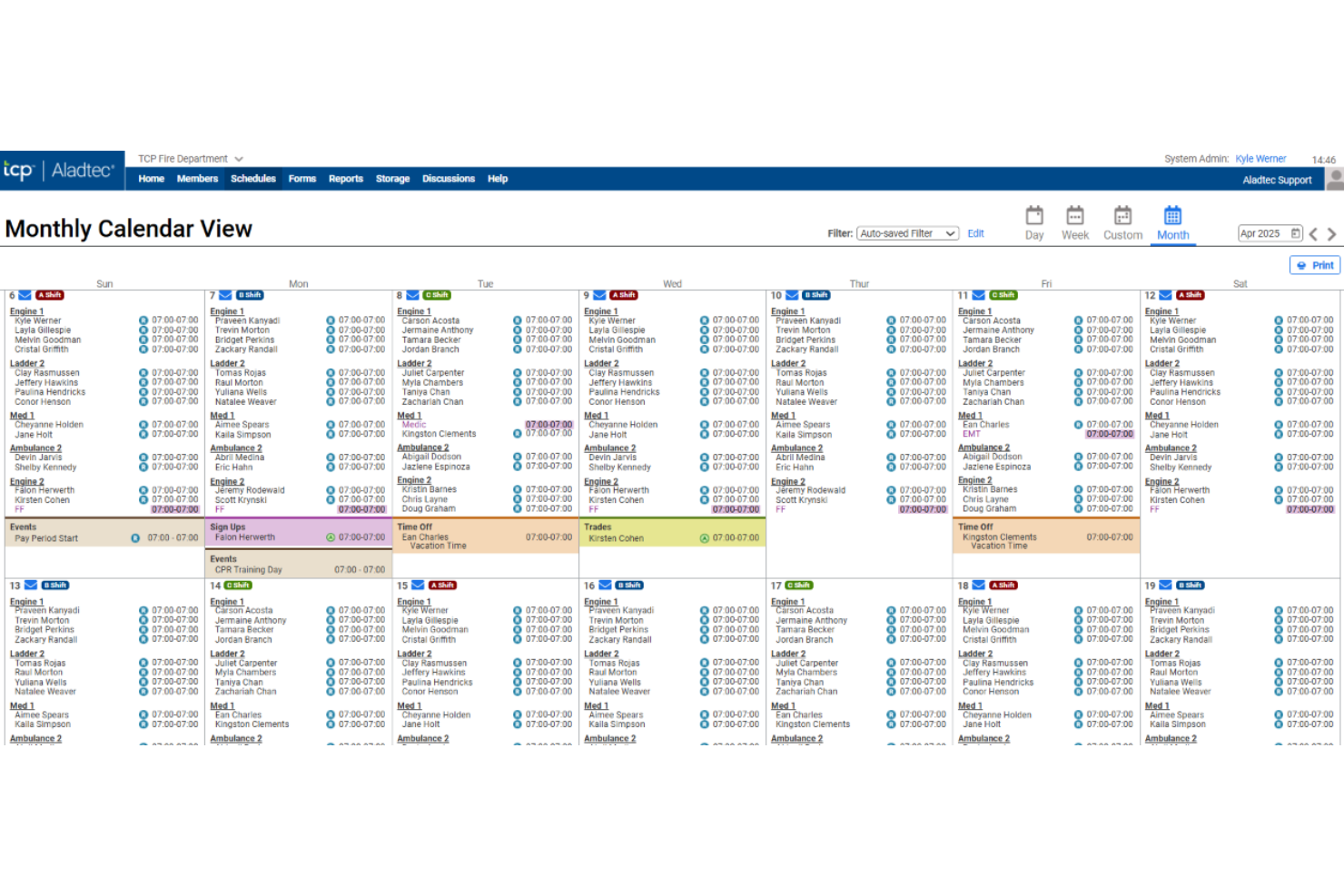
Aladtec is a cloud-based fire department scheduling software built for managing crew rosters, automating shift assignments, and tracking staff availability for fire and EMS agencies.
Who Is Aladtec Best For?
Fire departments and EMS agencies need a centralized system for managing multiple rotating shifts and staffing large teams.
Why I Picked Aladtec
I picked Aladtec as one of the best because I can quickly assign and manage 24/7 shift patterns, set custom rotation templates, and handle real-time schedule changes without gaps—crucial for non-stop fire and EMS coverage.
Aladtec Key Features
- Time-off request management: Staff can submit and track paid or unpaid leave directly through the platform.
- Certification tracking: Managers monitor crew certifications and receive alerts for upcoming expirations.
- Mobile scheduling app: Schedulers and firefighters access and update schedules from any smartphone or tablet.
- Shift trade approval workflows: Team members can request shift swaps with built-in manager approval controls.
Aladtec Integrations
Integrations include Workday, Oracle, ADP, PeopleSoft, Ellucian, BambooHR, Paycor, Paychex, QuickBooks, and Sage.
Pros and Cons
Pros:
- Mobile alerts for expiring
- Flags shifts that violate labour law rules
- Supports unlimited rotating shift settings
Cons:
- Schedule templates require manual initial setup
- Requires manual approval for all trades

My Evaluation Score
- Fire Shift Rotations
- 4/5
- Shift Trades & Time-Off
- 4/5
- Payroll & FLSA Compliance
- 2/5
- Overtime & Callback Management
- 4/5
- Minimum Staffing & Vacancy Fill
- 3/5
- Certification & Training Tracking
- 4/5
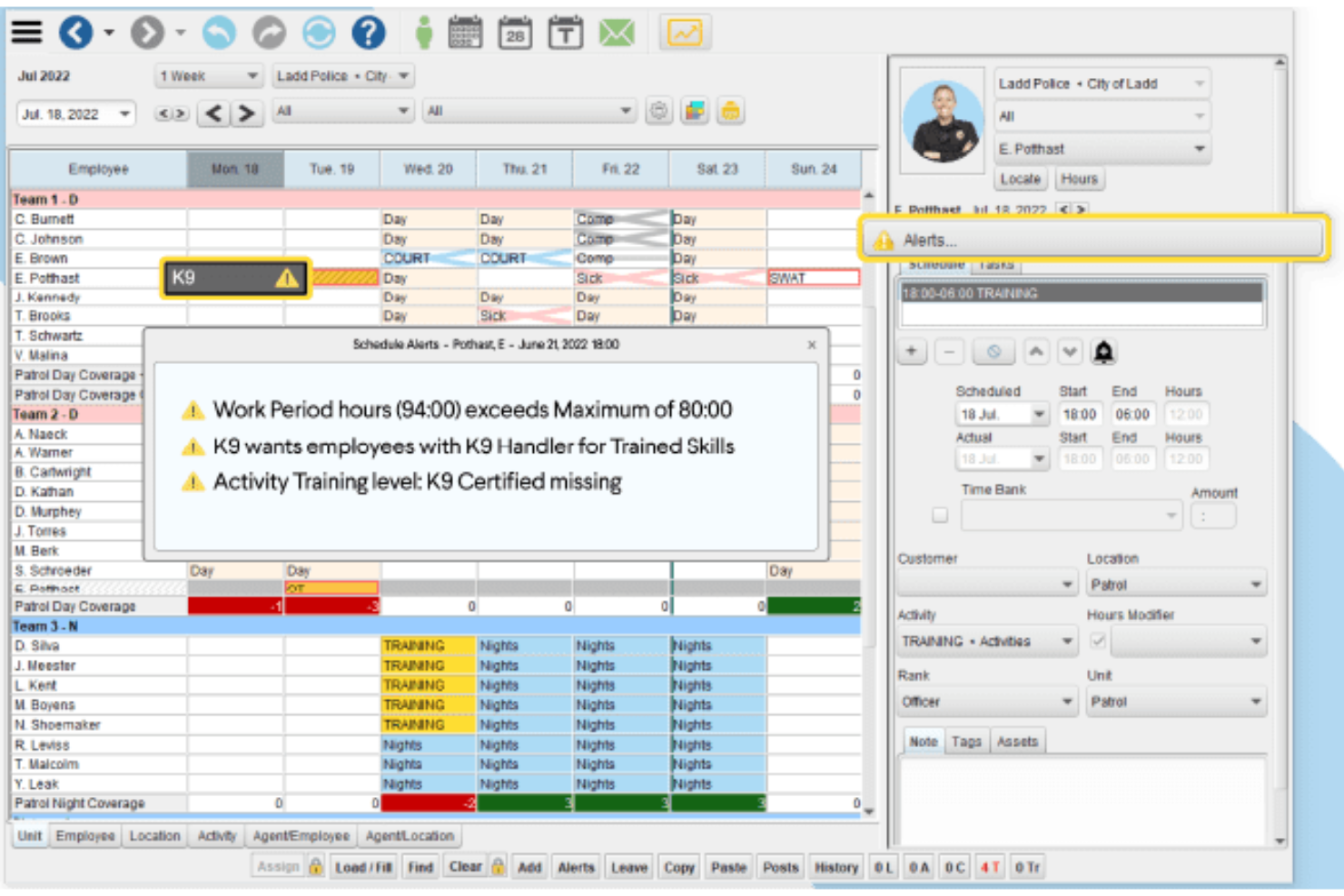
InTime is a fire department scheduling platform for managing shift assignments, automating overtime and leave, handling time tracking, and controlling complex staffing rules.
Who Is InTime Best For?
Fire chiefs, operations managers, and HR teams at large or mid-sized fire departments seeking advanced control over shift, overtime, and leave policies.
Why I Picked InTime
I picked InTime as one of the best because I can set complex overtime rules, automate leave approval, and use the automated callback system to handle backfills right away. My team relies on these workflows to keep shift coverage compliant and predictable.
InTime Key Features
- Real-time shift bidding: Let staff submit shift requests directly within the platform.
- Mobile app: Access schedules and notifications on Android and iOS devices.
- Payroll export tools: Generate payroll data formatted for popular accounting systems.
- Audit trail tracking: Monitor all schedule edits and approvals for compliance.
InTime Integrations
Integrations include PeopleSoft, Munis, Eden, Tyler, ADP, QuickBooks, SAP, Ceridian, Springbrook Software, and Greentree.
Pros and Cons
Pros:
- Automates overtime equalization calculations
- Blocks unqualified staff from bidding on shifts
- Auto-callbacks to backfill open shifts
Cons:
- Requires custom coding for non-seniority bidding
- Requires separate modules for asset tracking

My Evaluation Score
- Fire Shift Rotations
- 4/5
- Shift Trades & Time-Off
- 4/5
- Payroll & FLSA Compliance
- 2/5
- Overtime & Callback Management
- 5/5
- Minimum Staffing & Vacancy Fill
- 4/5
- Certification & Training Tracking
- 4/5
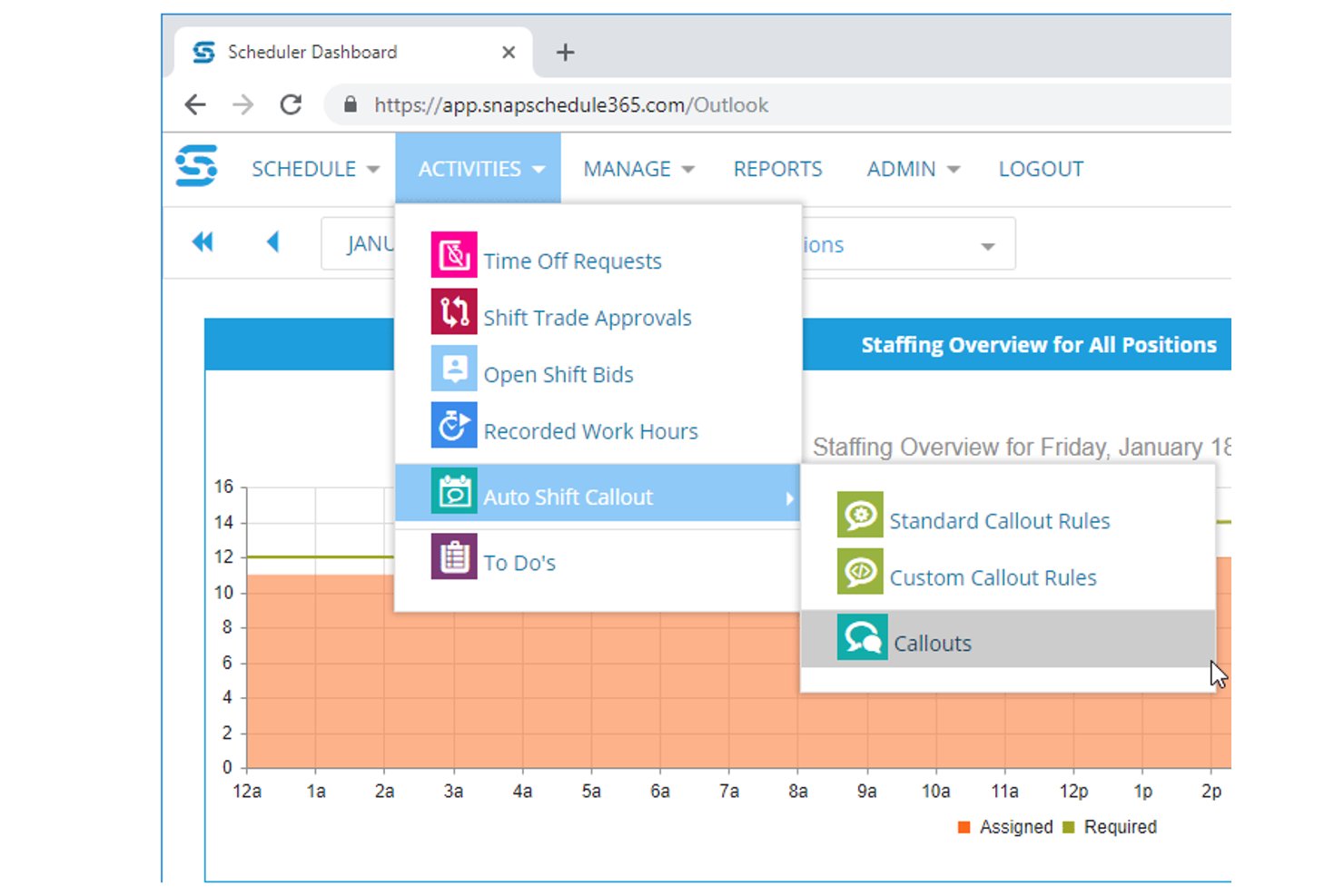
Snap Schedule is a cross-industry shift scheduling platform with dedicated fire department support, offering shift rotation management, automated callout workflows, certification tracking, time-off management, and labor compliance tools across both cloud and on-premise deployments.
Who Is Snap Schedule Best For?
Snap Schedule is a strong fit for municipal fire departments that need on-premise deployment options and highly configurable, rules-based callback automation to match union contract requirements.
Why I Picked Snap Schedule
Snap Schedule earns its spot on my shortlist because it's one of the few platforms that offers a genuine on-premise deployment option alongside its cloud product, which matters for departments with strict data sovereignty requirements. I particularly like its automated callout engine, which lets you encode your actual CBA language, including seniority ordering, overtime equalization, and mandatory recall escalation, directly into the system. That level of configurability means a department running a 48/96 rotation can automate a callback list that would otherwise take a supervisor an hour to work through manually.
Snap Schedule Key Features
- Skill and certification tracking: Maintains centralized certification records with expiration alerts and ties qualifications directly to scheduling eligibility for specialized roles.
- Mobile self-service app: Lets employees view schedules, submit PTO requests, bid on open shifts, and punch in/out via iOS or Android with GPS/geofencing support.
- Compliance and labor management: Enforces union rules like overtime limits, rest periods, and shift-length caps, with real-time alerts when a schedule would breach a configured threshold.
- Shift trade and bidding workflows: Lets employees initiate shift trades, giveaways, and open-shift bids through the portal, with configurable manager approval rules built in.
Snap Schedule Integrations
Snap Schedule doesn't have native integrations with ADP Workforce Now, Workday, or SAP. It supports file exports and custom connections through its documented Snap Schedule 365 v2 API.
Pros and Cons
Pros:
- On-premise deployment supports departmental control
- Certifications restrict specialized shift assignments
- Contract-driven callback rules with audit trails
Cons:
- Interface feels dated to reviewers
- Generalist terminology misses apparatus-specific workflows
My Evaluation Score
- Fire Shift Rotations
- 3/5
- Shift Trades & Time-Off
- 5/5
- Payroll & FLSA Compliance
- 4/5
- Overtime & Callback Management
- 5/5
- Minimum Staffing & Vacancy Fill
- 3/5
- Certification & Training Tracking
- 5/5
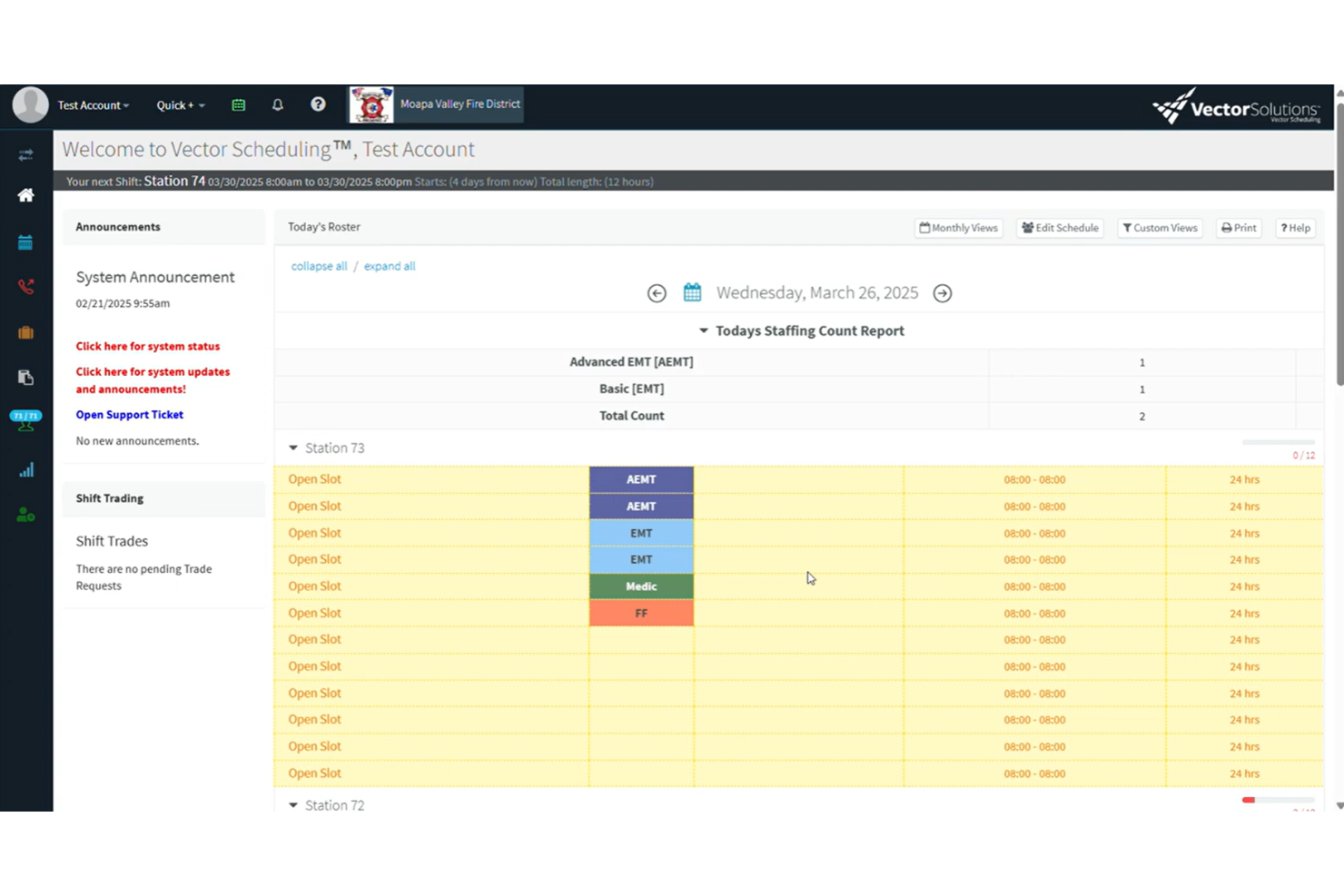
Vector Scheduling is a cloud-based fire department scheduling software that provides automated shift scheduling, dynamic roster management, real-time notifications, and configurable staffing rules for first responder teams.
Who Is Vector Scheduling Best For?
Vector Scheduling is a strong match for medium-to-large fire departments and EMS agencies that need automated shift management and configurable staffing rules.
Why I Picked Vector Scheduling
Vector Scheduling earns its spot as one of the best on my shortlist because I can automate complex staffing workflows by applying custom rules for roles, skills, and minimum staffing levels. It’s truly best for automated rule-based staffing workflows.
Vector Scheduling Key Features
- Real-time notifications: Instantly alert staff to shift changes or open assignments via SMS, email, or app push notifications.
- Mobile app access: Enable team members to view schedules, make requests, and receive updates from any device.
- Time-off request workflow: Let staff submit, track, and manage leave requests directly within the platform.
- Overtime tracking: Automatically log and report overtime for each user, aligning with department policies and payroll needs.
Vector Scheduling Integrations
Integrations include ImageTrend and Emergency Reporting.
Pros and Cons
Pros:
- Sends instant callback alerts to fill gaps
- Real-time notifications for staffing changes
- Enforces minimum staffing automatically
Cons:
- Lacks advanced human resources management features
- Occasional delays for reported time-off request approvals
My Evaluation Score
- Fire Shift Rotations
- 4/5
- Shift Trades & Time-Off
- 4/5
- Payroll & FLSA Compliance
- 3/5
- Overtime & Callback Management
- 3/5
- Minimum Staffing & Vacancy Fill
- 4/5
- Certification & Training Tracking
- 5/5
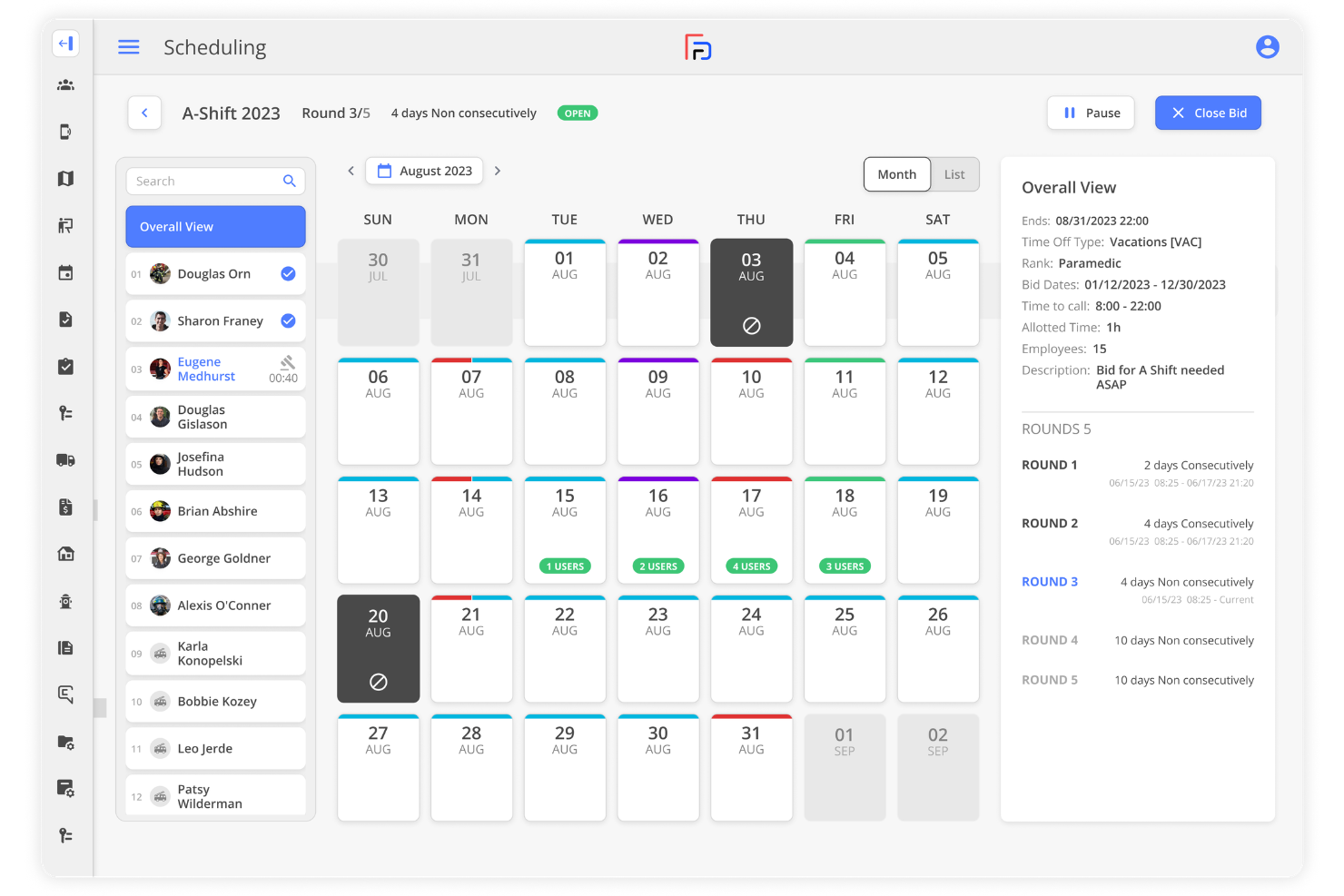
First Due is a fire department scheduling and personnel management platform that brings together incident tracking, time-off management, overtime, certifications, and live response data in one system.
Who Is First Due Best For?
First Due fits mid-sized and larger public safety agencies that want scheduling, incident reporting, and response tracking in one integrated suite.
Why I Picked First Due
I picked First Due as one of the best because I can coordinate staff schedules, track live incident data, and manage certifications within a single platform. I rely on its native integration between personnel availability and incident management for real-time deployment decisions.
First Due Key Features
- Automated shift notifications: Send alerts for shift assignments and changes via mobile and web.
- Time-off request workflows: Let team members request time off through configurable approval flows.
- Overtime management: Tracks and manages overtime eligibility, assignments, and records.
- Certification tracking: Monitors expiring, current, and required certifications for personnel.
First Due Integrations
Integrations include Pulsara, Hexagon, Esri, CentralSquare, GeoComm, OneDose, CRG, TargetSolutions, Action Training Systems, and E-9 Corporation.
Pros and Cons
Pros:
- Automatically generates pre-filled fire incident reports
- Links fire inspections to staff schedules
- Built-in incident management alongside scheduling
Cons:
- Lacks global contact syncing
- Requires frequent updates

My Evaluation Score
- Fire Shift Rotations
- 4/5
- Shift Trades & Time-Off
- 5/5
- Payroll & FLSA Compliance
- 4/5
- Overtime & Callback Management
- 4/5
- Minimum Staffing & Vacancy Fill
- 3/5
- Certification & Training Tracking
- 4/5
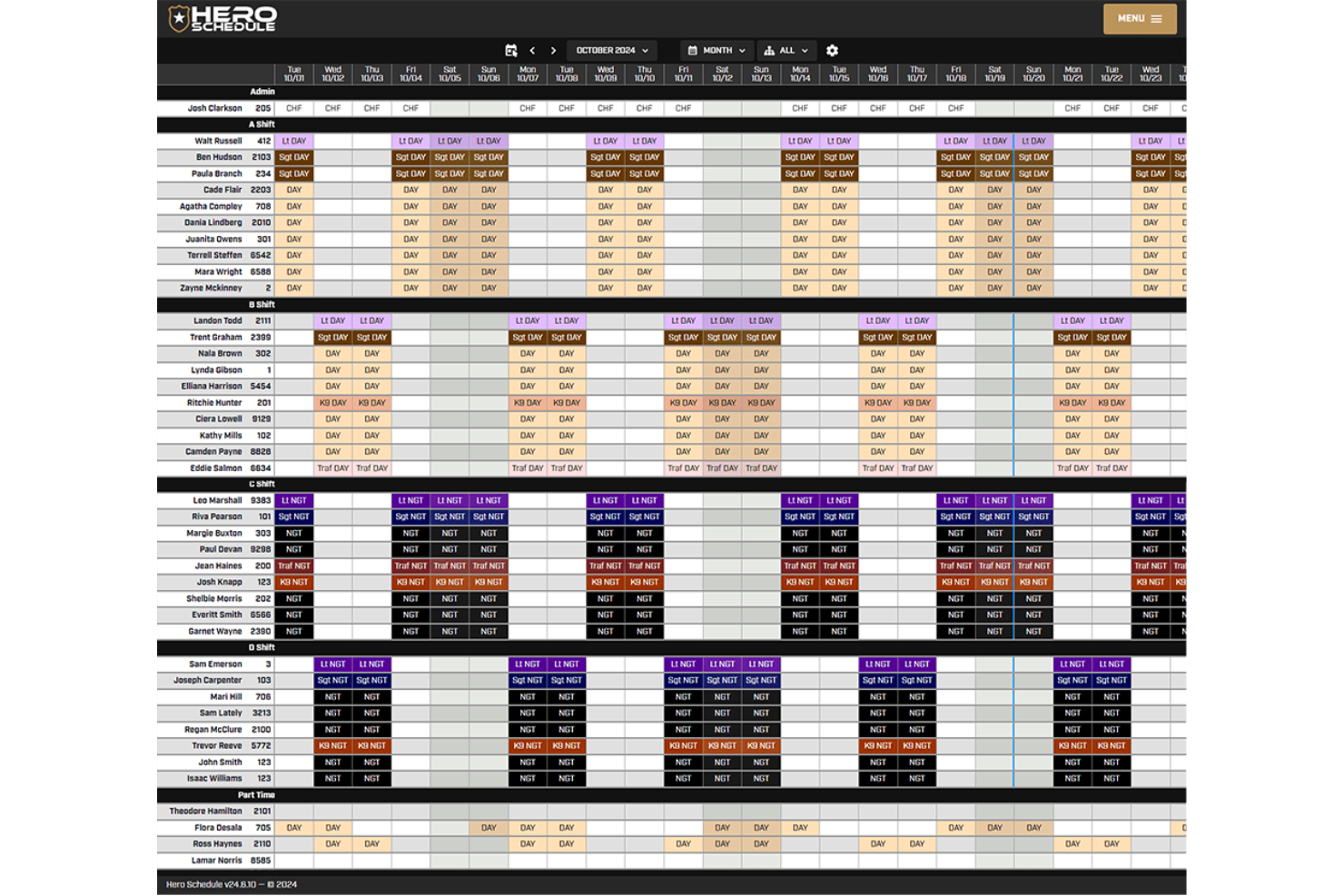
Hero Schedule is a cloud-based fire department scheduling software designed to handle crew scheduling, time-off requests, overtime management, payroll exports, event tracking, and custom shift rules.
Who Is Hero Schedule Best For?
Hero Schedule suits U.S.-based fire departments that need to manage labour laws and complex union agreements across multi-shift, around-the-clock operations.
Why I Picked Hero Schedule
I picked Hero Schedule as one of the best because I can set up shift structures that reflect complex labour and union rules. The tool lets me automate rule-based overtime, rest periods, and FLSA compliance right when building schedules.
Hero Schedule Key Features
- Shift swap approvals: Let admins review and approve swap requests from a single dashboard.
- Mobile notifications: Send real-time mobile alerts for schedule changes and time-off.
- Payroll export tools: Prepares pay data for upload to payroll software.
- Event calendar: Tracks training, meetings, and department events alongside schedules.
Hero Schedule Integrations
Supports custom integrations through APIs.
Pros and Cons
Pros:
- Unlimited custom shift templates
- Displays average weekly workload for shift bidding
- Calculates overtime based on FLSA rules
Cons:
- No built-in vehicle tracking
- No native individual performance tracking
My Evaluation Score
- Fire Shift Rotations
- 5/5
- Shift Trades & Time-Off
- 4/5
- Payroll & FLSA Compliance
- 4/5
- Overtime & Callback Management
- 4/5
- Minimum Staffing & Vacancy Fill
- 4/5
- Certification & Training Tracking
- 1/5
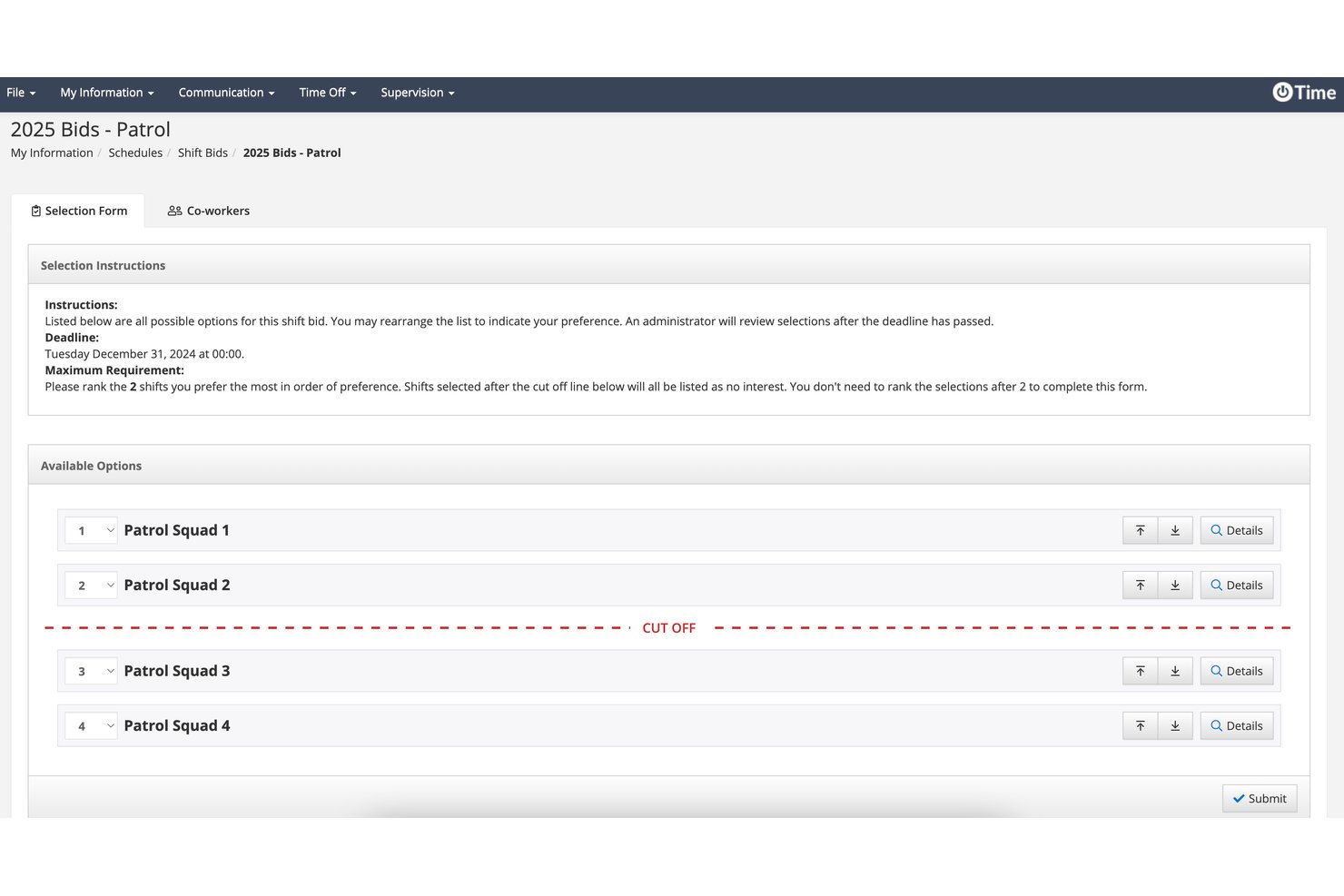
PowerTime is a public-safety-focused scheduling and workforce management platform that handles rotating shift patterns, overtime tracking, timesheets, leave management, and minimum staffing enforcement across multiple stations and apparatus.
Who Is PowerTime Best For?
PowerTime is a strong fit for fire chiefs and municipal workforce coordinators who need ironclad audit trails and defensible records of every scheduling decision.
Why I Picked PowerTime
PowerTime earns its spot on my shortlist because of how seriously it treats audit trails. Every schedule change, approval, and override is time-stamped and logged in an uneditable record, which matters when a grievance gets filed or a union arbitration requires you to prove who approved what and when. I also like that overtime sign-ups are time-stamped the moment a firefighter submits them, creating a defensible equalization record without any manual tracking. Pair that with 200-plus configurable reports, and you have a real paper trail.
PowerTime Key Features
- Rotating shift templates: Supports pre-built and custom templates for 24/48, 48/96, Kelly Day, and platoon rotations across multiple stations and apparatus.
- Mobile schedule access: Native iOS and Android apps let firefighters view schedules, request time off, swap shifts, and sign up for open shifts from anywhere.
- Minimum staffing enforcement: Real-time alerts notify supervisors when coverage drops below required levels and automatically post open shifts for personnel to request.
- Fatigue management rules: Automated rest-rule enforcement blocks scheduling that would put personnel below minimum rest thresholds between shifts.
PowerTime Integrations
PowerTime has documented integrations with PowerDMS Policy Management, Accreditation Management, Training Management, PowerReady, and PowerDetails. Payroll exports are supported, but named payroll, CAD, RMS, and NFIRS integrations aren't documented.
Pros and Cons
Pros:
- Time-stamped overtime sign-ups support fairness
- Handles complex firefighter rotation patterns
- Detailed audit trails support grievance defense
Cons:
- PowerTime-specific review volume remains limited
- Certification tracking requires separate modules

My Evaluation Score
- Fire Shift Rotations
- 4/5
- Shift Trades & Time-Off
- 4/5
- Payroll & FLSA Compliance
- 3/5
- Overtime & Callback Management
- 5/5
- Minimum Staffing & Vacancy Fill
- 5/5
- Certification & Training Tracking
- 4/5
UKG TeleStaff is a fire department scheduling and workforce management platform designed for public sector agencies, offering automated shift assignments, leave management, and compliance tracking.
Who Is UKG TeleStaff Best For?
Large public sector fire departments and EMS agencies need automated, policy-driven scheduling and strong integration with HR or payroll systems.
Why I Picked UKG TeleStaff
I picked UKG TeleStaff because I can sync scheduling with payroll and HR databases, apply union and agency rules automatically, and handle multi-location public sector workforce management at enterprise scale.
UKG TeleStaff Key Features
- Automated shift bidding: Let personnel submit shift preferences digitally.
- Credential tracking: Monitor firefighter certifications and renewal dates.
- Real-time roster updates: Instantly reflect schedule changes for all staff.
- Vacation and leave management: Enable staff to request and view time off securely.
UKG TeleStaff Integrations
Integrations include NetSuite, Equifax, Salesforce, Cornerstone, Deltek, Microsoft, QuickBooks, Concur, Jobvite, and IBM.
Pros and Cons
Pros:
- Auto-fills vacancies using seniority-based rules
- Applies union and agency rules automatically
- Syncs scheduling with HR databases
Cons:
- Lacks custom report builder
- High initial training time for admins

My Evaluation Score
- Fire Shift Rotations
- 4/5
- Shift Trades & Time-Off
- 4/5
- Payroll & FLSA Compliance
- 3/5
- Overtime & Callback Management
- 4/5
- Minimum Staffing & Vacancy Fill
- 3/5
- Certification & Training Tracking
- 2/5
FireRoster is a cloud-based fire department scheduling software that supports automated shift management, crew availability tracking, event scheduling, time off requests, and compliance reporting.
Who Is FireRoster Best For?
FireRoster is a fit for fire departments and emergency services teams of any size that need flexible scheduling and real-time crew oversight.
Why I Picked FireRoster
I picked FireRoster because I can set up scheduling rules for small or multi-station departments, view and manage shift swaps in real time, and customize communications for shifting needs—making it work for agencies of any size.
FireRoster Key Features
- Automated overtime management: Tracks, calculates, and displays eligible overtime for each firefighter.
- Personnel skills tracking: Keeps records of individual certifications and qualification expirations.
- Time off and leave workflow: Let staff submit, approve, and manage leave within the app.
- Incident mapping integration: Attaches incident locations and mapping data to event records.
FireRoster Integrations
Supports custom integrations through APIs.
Pros and Cons
Pros:
- Updates digital station boards in real time
- Sorts daily personnel by assigned unit
- Displays live station rosters on dashboards
Cons:
- Requires manual data entry for external payroll
- No offline access for mobile users

My Evaluation Score
- Fire Shift Rotations
- 3/5
- Shift Trades & Time-Off
- 4/5
- Payroll & FLSA Compliance
- 2/5
- Overtime & Callback Management
- 5/5
- Minimum Staffing & Vacancy Fill
- 4/5
- Certification & Training Tracking
- 4/5
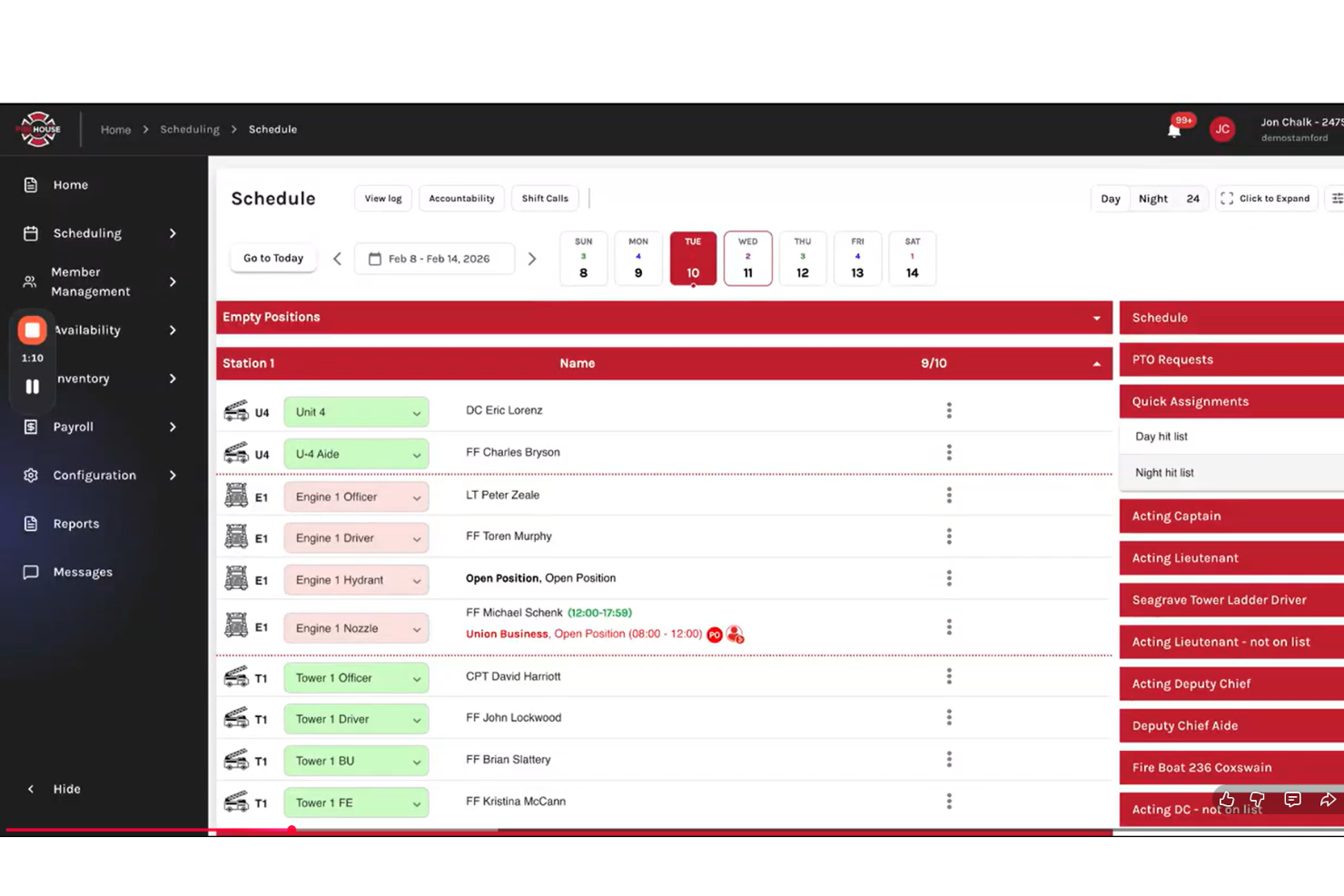
Firehouse247 is a cloud-based fire department scheduling solution that brings together crew scheduling, resource coverage, accountability tracking, mobile access, and on-call shift management in one platform.
Who Is Firehouse247 Best For?
Firehouse247 suits fire departments that need granular rank-based scheduling tools to manage roles, positions, and coverage for career and volunteer crews.
Why I Picked Firehouse247
I picked Firehouse247 because I can quickly assign open shifts based on rank, seniority, or qualifications and automatically fill positions for both career and volunteer crews. The system makes it easy for my team to maintain rank coverage and compliance.
Firehouse247 Key Features
- Time off requests: Let staff submit and track leave requests online.
- Mobile app access: Schedule management and alerts are available from any device.
- Firefighter availability tracking: View and update who is available or unavailable for shifts in real time.
- Duty status notifications: Sends instant notifications for shift changes and assignments.
Firehouse247 Integrations
Integrations include CAD, Payroll, RMS, EMS, and NFIRS.
Pros and Cons
Pros:
- Automated assignments cover both rank and qualification
- Flags expired gear inspections alongside training
- Real-time tracking of firefighter availabilityFlags expired gear inspections alongside training
Cons:
- No built-in equipment maintenance tracking
- Interface lacks a dark mode option
Other Fire Department Scheduling Software
Here are some additional fire department scheduling software options that didn’t make it onto my shortlist, but are still worth checking out:
- When I Work
For real-time multi-site coordination
- Parim
For mobile-first open shift filling
- Deputy
For AI-optimized labour cost control
- Connecteam
For quick self-service onboarding
- ESO
For integrated certification tracking
- ImageTrend
For incident data integration
- D4H
For customizable emergency features
- eSchedule
For mixed volunteer staffing
- Pace Scheduler
For in-app shift bidding workflows
- VCS
For integrated payroll with scheduling


How I Evaluate Fire Department Scheduling Software
I split my evaluation into baseline criteria—like platoon rotation support and FLSA 7(k) compliance—and differentiators that set one tool apart from another.
Core Functionality (Table Stakes For This List)
When I'm selecting tools for my list, I rank each one on a scale from 0 (does not offer the functionality) to 5 (excels in this area) for each core functionality listed below. Then, I calculate the tool's total score into a percentage. Each tool needs to achieve a minimum total score of 55% to be considered for inclusion.
- Fire Shift Rotation Support: I check whether a platform can auto-generate platoon rotations like 24/48, 48/96, and Kelly Day cycles across multiple stations.
- Overtime & Callback Management: Equitable overtime distribution matters, so I look for automated callback lists that follow seniority and union equalization rules.
- Shift Trades & Time-Off Requests: Firefighters need to swap shifts and bid on vacation slots, so the tool should handle self-service requests with approval workflows.
- Minimum Staffing & Vacancy Fill: I evaluate how well each tool enforces daily minimums by rank and apparatus, and whether it flags or auto-fills open slots.
- Certification & Training Tracking: Expiring EMT or hazmat certifications affect who's eligible to work, so I look for tools that tie cert status to scheduling.
- Payroll & FLSA Compliance: Fire departments operate under FLSA 7(k) work periods, and I check that the tool calculates overtime accruals and exports payroll data accordingly.
Once I have a list of tools that meet the criteria, I consider what sets each platform apart.
Differentiating Factors (What Sets Vendors Apart)
Here's how I compare and contrast different vendors:
Standout Features
An automated callback engine saves hours when a firefighter calls in sick at 2 a.m.—tools that auto-dial or text off-duty personnel in rank order until the slot fills are a clear step up from manual phone trees. I also look for a union contract rule engine that lets you codify seniority tiers and equalization formulas without custom development. A strong mobile app matters too, since crews need to view schedules, accept overtime, and submit trade requests from anywhere on shift.
Beyond Features
I evaluate whether a vendor specializes in public safety or just bolts fire scheduling onto a generic workforce tool. A vendor with deep fire service roots understands platoon structures and rank hierarchies out of the box. Integrations also matter—the platform should connect with municipal payroll systems and CAD/RMS platforms like ESO or ImageTrend so data flows without manual re-entry. Pricing flexibility is another factor I consider, since a three-person volunteer department and a 500-member metro agency need very different contract structures.
How to Choose Fire Department Scheduling Software
It’s easy to get bogged down in long feature lists and complex pricing structures. To help you stay focused as you work through your unique software selection process, here’s a checklist of factors to keep in mind:
| Factor | What to Consider |
| Scalability | Will the software handle your department as it grows? Check limits for users, locations, and schedule volume. |
| Integrations | Does it connect with payroll, incident reporting, or HR systems you already use? Confirm native integrations. |
| Customizability | Can schedules, roles, and notifications be tailored to your department’s policies and union rules? |
| Ease of use | Will your team adopt it quickly? Try hands-on demos to see if the interface feels intuitive for everyone. |
| Implementation and onboarding | How long will it take to get up and running? Ask about migration help, training resources, and setup steps. |
| Cost | Are pricing tiers transparent and predictable? Look for extra charges for features you might eventually need. |
| Security safeguards | Does the platform protect shift data and personal info with encryption, audit trails, and access controls? |
| Support availability | Is real-time help available when shift emergencies hit? Confirm support hours, response times, and escalation. |
What is Fire Department Scheduling Software?
Fire department scheduling software is a digital tool that automates crew scheduling, manages shift assignments, tracks certifications, and monitors time-off requests for fire departments. It helps ensure proper staffing, adherence to departmental policies, and improved communication among team members for both career and volunteer crews.
Features
When selecting fire department scheduling software, keep an eye out for the following key features:
- Shift scheduling automation: Allows you to set up rotating, fixed, or custom schedules and automatically manage recurring and ad hoc shifts for all staff.
- Availability tracking: Let team members submit their availability in advance, making it easier to fill shifts and reduce scheduling conflicts.
- Shift swap management: Supports peer-to-peer or admin-approved shift swaps while maintaining compliance with department rules and coverage needs.
- Time-off request management: Provides a workflow for staff to request, track, and approve vacation, sick leave, or other types of absence.
- Rank and qualification checks: Ensures only qualified or ranked personnel are assigned to specific positions or critical shifts based on certifications or seniority.
- Real-time notifications: Delivers important alerts for open shifts, schedule changes, and urgent staffing needs via mobile app, text, or email.
- Reporting and analytics: Generates detailed reports on scheduling patterns, overtime, attendance, and compliance for leadership review and audits.
- Mobile access: Gives both managers and staff the ability to view and manage schedules, submit requests, and receive alerts from any device.
- Credential and certification tracking: Monitors staff licenses and certifications, alerting when renewals are needed or requirements change.
- Compliance safeguards: Helps ensure scheduling adheres to labour laws, contract obligations, and departmental regulations.
Benefits
Implementing fire department scheduling software provides several benefits for your team and your business. Here are a few you can look forward to:
- Improved shift coverage: Automated scheduling helps make sure you always have the right staff assigned to each shift and reduces manual gaps.
- Faster shift filling: Availability tracking and mobile notifications help fill open shifts quickly, even during last-minute changes.
- Greater compliance assurance: Built-in checks help maintain compliance with labour laws, union contracts, and department rules.
- Reduced administrative workload: Automated workflows for swaps, time-off requests, and overtime reduce time spent on manual scheduling tasks.
- Clearer communication: Real-time alerts and mobile access keep everyone updated on schedule changes, assignments, and urgent staffing needs.
- Better credential management: Certification tracking helps you assign only qualified personnel to required positions and keeps records up to date.
- Actionable data insights: Reporting and analytics provide leadership with valuable information for resource planning, budget management, and compliance audits.
Costs and Pricing
Selecting fire department scheduling software requires an understanding of the various pricing models and plans available. Costs vary based on features, team size, add-ons, and more. Moving away from a manual spreadsheet to a digital time clock can improve retention and staff wellness by providing a better user experience. The table below summarizes common plans, their average prices, and typical features included in fire department scheduling software solutions:
Plan Comparison Table
| Plan Type | Average Price | Common Features |
| Free Plan | $0 | Basic shift scheduling, limited user count, mobile access, and simple reporting. |
| Personal Plan | $5-$15/user/month | Shift swaps, time-off requests, mobile notifications, and basic availability tracking. |
| Business Plan | $20-$40/user/month | Advanced scheduling, credential tracking, overtime management, reporting tools, and role-based assignments. |
| Enterprise Plan | $40-$80/user/month | Custom workflows, API access, compliance features, dedicated support, priority onboarding, and advanced analytics. |
Fire Department Scheduling Software FAQs
Here are some answers to common questions about fire department scheduling software:
How does fire department scheduling software handle 24/7 coverage?
Fire department scheduling software creates automated, rotating, or fixed shift patterns that help maintain continuous coverage. You can set up advanced rules for overtime, callbacks, and ensure qualified staff are always assigned to each shift, even for complex or multi-station operations. The right management system can optimize how you handle employee scheduling for long shifts.
Can fire department scheduling software track certifications and training?
Yes, most solutions let you upload, monitor, and set alerts for expiring certifications and training records. This helps you assign only properly qualified personnel to required positions and stay prepared for audits or compliance checks. Managing these accruals of training hours ensures fire protection standards are always met.
Is it possible to integrate scheduling software with payroll or incident reporting systems?
Yes, many platforms offer native integrations or API access for syncing scheduling data with payroll software and incident reporting tools. This simplifies timekeeping and helps save time by reducing manual data entry. Always confirm compatibility with your current systems before committing.
What kind of support should I expect from vendors?
You should expect multiple support channels like live chat, email, and a direct phone number, along with in-depth FAQs. Ask about response times, 24/7 support availability for emergency response, and resources for onboarding and troubleshooting.
Do these tools work for both volunteer and career fire departments?
Yes, fire department scheduling software can be used by both volunteer and career departments. Most platforms allow you to create different staffing models, manage varying levels of availability, and tailor permissions or roles as needed.