

10 Best Free Time Clock App in 2026

Best Free Time Clock App Shortlist


A free time clock app lets teams track work hours without paying for a subscription, offering either a free plan or a free trial. If you’re looking to log time, manage attendance, or monitor shifts—without straining your budget—these options are for you.
As HR demands grow and compliance pressures rise, finding a no-cost time clock tool that actually works is essential. In this list, you’ll find the top free time clock apps for 2026, so you can compare their features and pick one that works for your team’s real needs.
Why Trust Our Software Recommendations
Our team has been testing and reviewing software since 2012. As HR experts ourselves, we know how difficult—and important—it is to choose the right software.
For this guide, we evaluated tools using hands-on testing and independent research, scoring tools using our selection criteria. We also draw on insights from industry thought leaders and practicing HR experts.
Our reviews reflect our human editorial judgment, not a sales pitch.
Expert reviewers:
Free Time Clock App Comparison Table
This comparison table summarizes pricing details for my free time clock app:
| Tool | Best For | Trial Info | Price | ||
|---|---|---|---|---|---|
| 1 | Best for scheduling hourly staff | Free plan + 14-day free trial available | From $24/location/month (billed annually) | Website | |
| 2 | Best for client billing accuracy | Free plan + 14-day free trial + free demo available | From $4/user/month (billed annually) | Website | |
| 3 | Best for managing unlimited users | Free plan + free download available | From $39/user/month | Website | |
| 4 | Best for location-verified remote teams | Free plan + free trial + free demo available | From $9/user/month (billed annually) | Website | |
| 5 | Best for automated shift rostering | Free plan + 30-day free trial + free demo available | From $9.60/user/month (billed annually) | Website | |
| 6 | Best for GPS-based activity mapping | Free plan + 7-day free trial available | From $4.99/user/month | Website | |
| 7 | Best for facial recognition check-ins | Free plan + free demo available | Pricing upon request | Website | |
| 8 | Best for detailed reporting and analytics | 14-day free trial + free plan + free demo available | From $3.99/user/month (billed annually) | Website | |
| 9 | Best for restaurants and hospitality | 14-day free trial + free plan available | From $39.99/month | Website | |
| 10 | Best for construction and field crews | 14-day free trial + free demo + free plan available | From $9.99/user/month (billed annually) | Website |
Free Time Clock App Reviews
Below are my detailed summaries of the free time clock apps that made it onto my shortlist. My reviews offer a detailed look at the features, pricing, and best use cases of each tool to help you find the best one for you.

Homebase
Best for scheduling hourly staff
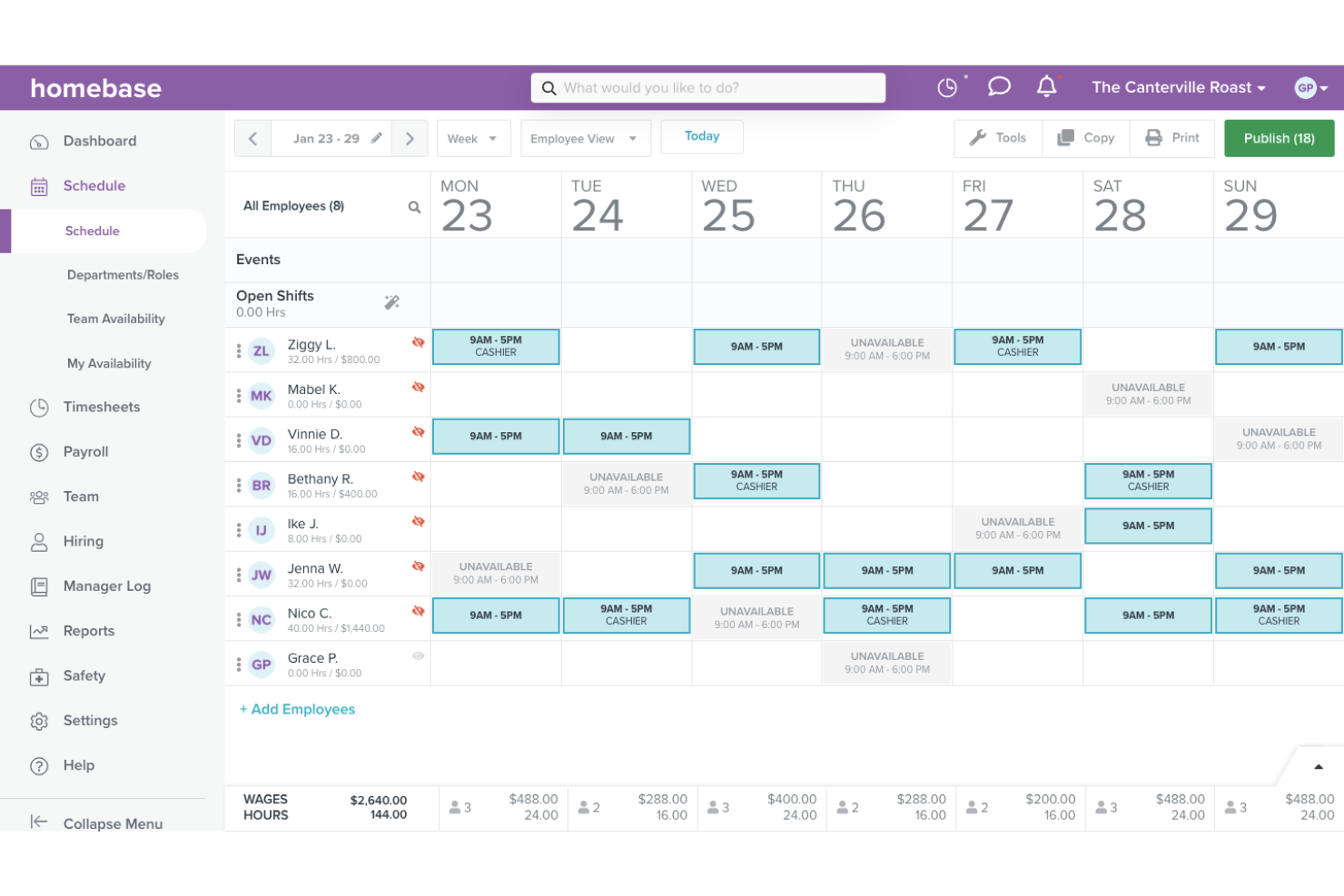
Homebase is a free time clock app built for hourly teams, combining clock-in/out tracking, break management, overtime alerts, GPS-enabled punch-ins, and scheduling in one place.
Who Is Homebase Best For?
Homebase is a natural fit for small businesses with hourly, shift-based teams in industries like retail, food service, and hospitality.
Why I Picked Homebase
Homebase earns its spot on my shortlist because of how tightly its time clock and scheduling tools connect. I picked it specifically for teams managing hourly staff across rotating shifts, where schedule visibility and punch accuracy matter most.
I like that scheduled vs. actual hours appear side by side, so I can immediately flag discrepancies. The built-in overtime alerts and break tracking also make it easier to stay compliant without manually checking every timecard.
Homebase Key Features
- Kiosk mode: Turn any shared tablet or device into a punch station so employees can clock in and out from a central location.
- Photo capture at clock-in: Homebase takes a photo of the employee clocking in, helping you verify the right person is logging time.
- Labour cost tracking by role or department: Monitor labour spend in real time, broken down by team or job type, so you can catch overages before they become a problem.
- PTO tracking and requests: Employees can submit time-off requests directly in the app, and managers can approve or deny them with blackout dates and advance notice controls.
Homebase Integrations
Homebase offers native integrations with POS and payroll tools, including Square, Clover, Toast, Shopify, Lightspeed, GoDaddy, QuickBooks, Gusto, ADP, and Paychex. A read-only API is also available for retrieving data for custom use.
What's Free?
Homebase offers a free-forever Basic plan for one location with up to 10 employees, which includes basic scheduling, basic time tracking, and POS integrations. New users also get a 14-day free trial of the All-in-One plan, which automatically downgrades to Basic when the trial ends.
Pros and Cons
Pros:
- Team-wide messaging built into the app
- Built-in break enforcement and waiver tracking
- Copy-from-past-week scheduling saves time
Cons:
- Advanced features locked behind paid tiers
- Geofencing options are limited and inflexible

My Hours
Best for client billing accuracy
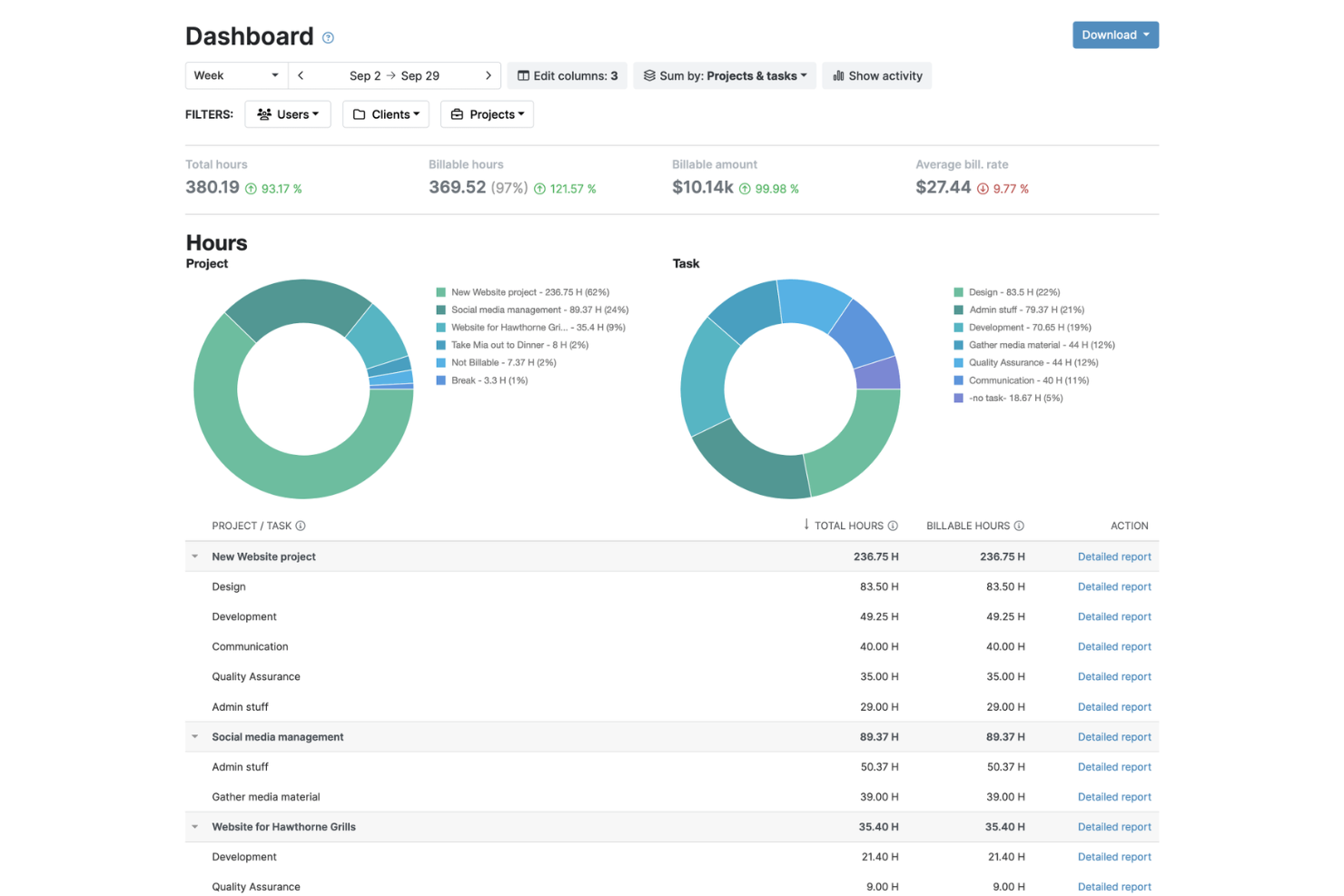
My Hours is a time tracking and client billing platform that lets teams log hours against projects, set billing rates, track expenses, and generate invoices from time data.
Who Is My Hours Best For?
My Hours works well for professional services firms at the small to mid-size stage that need project-level time visibility without the overhead of a full project management suite.
Why I Picked My Hours
I picked My Hours as one of the best because it treats billing accuracy as a core function, not an afterthought. What I find most useful is the timesheet approval workflow, where managers can review and sign off on hours before anything gets sent to a client.
I also like that you can attach billable expenses directly to a project, so your invoice reflects the full scope of work, not just logged hours.
My Hours Key Features
- Billing rate configuration: Set different hourly rates per user, project, or task to match your actual client contracts.
- Billable vs. non-billable hour tagging: Mark individual time entries as billable or non-billable directly on the log.
- Detailed time reports: Filter logged hours by client, project, team member, or date range for granular reporting.
- Manual time entry: Log hours retroactively without requiring a running timer.
My Hours Integrations
My Hours offers native integrations with Jira, Microsoft Teams, Asana, Basecamp, monday.com, ClickUp, QuickBooks, Xero, and Microsoft Power BI. It connects with Zapier and has an API for custom integrations.
What's Free?
My Hours offers a free-forever plan for up to five active users with unlimited projects and clients, basic time tracking, a single billable rate per project, and detailed reports. The Pro plan includes a 14-day free trial with no credit card required.
Pros and Cons
Pros:
- Generates invoices directly from time logs
- Built-in billable and non-billable hour tracking
- Free plan includes unlimited projects and clients
Cons:
- Approval workflows are locked behind paid plans
- No GPS or location-based clock-in tracking

Best for managing unlimited users
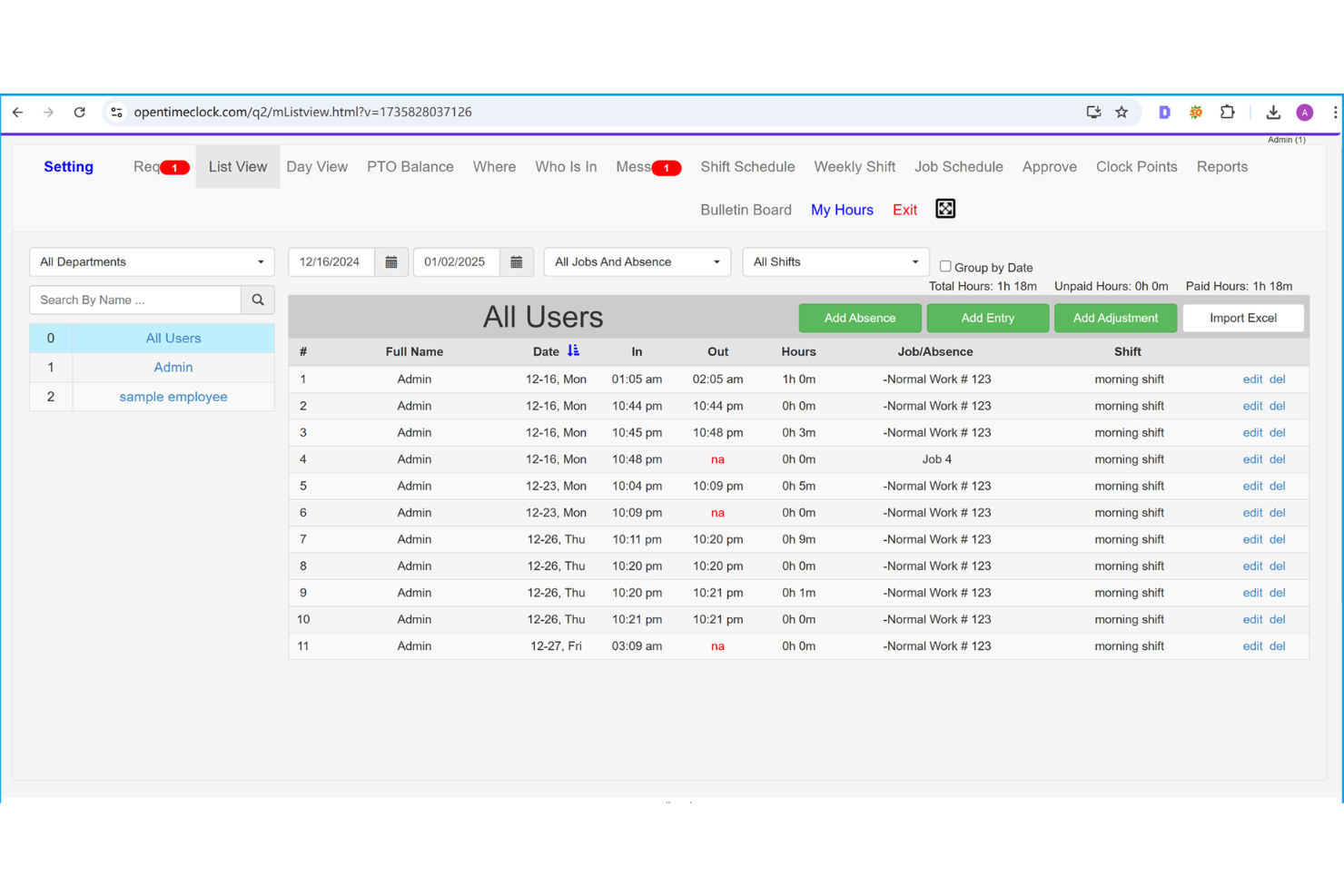
Built for teams of any size, Open Time Clock is a free time clock solution with clock-in and clock-out tracking, GPS verification, PTO management, shift scheduling, and payroll export tools.
Who Is Open Time Clock Best For?
Open Time Clock suits operations and HR managers in industries like retail, construction, and hospitality, where tracking large numbers of hourly and field-based workers is a daily requirement.
Why I Picked Open Time Clock
I've included Open Time Clock in my top picks because it's one of the only free time clock apps that doesn't cap your headcount. What I find genuinely useful is the department and group management feature, which lets you organize hundreds of employees into separate units so managers only see their own teams' hours.
I also like the automatic overtime calculation, which flags hours beyond daily or weekly thresholds without any manual review.
Open Time Clock Key Features
- GPS location tracking: Records the employee's GPS coordinates at the time of each clock-in and clock-out for location verification.
- Facial recognition clock-in: Employees can verify their identity using facial recognition to prevent buddy punching.
- Shift scheduling: Managers can create and assign shifts to employees directly within the platform.
- PTO request management: Employees submit leave requests through the app, and managers approve or deny them from the admin panel.
Open Time Clock Integrations
Open Time Clock offers a smaller set of native integrations compared to other time clock apps, connecting with payroll and accounting tools like QuickBooks, ADP, Gusto, Paychex, and Xero. It also has a developer API for custom integrations with HR and project management tools like Asana and Trello.
What's Free?
Open Time Clock offers a free-forever plan that includes unlimited users, free support, and access to all core features. The main limitation is that PDF and Excel report downloads aren't included, though you do get 30 days of free access to those reporting features when you first sign up.
Pros and Cons
Pros:
- GPS and Wi-Fi-based location restrictions
- Supports facial recognition and RFID clock-in
- Free tier allows unlimited employee profiles
Cons:
- Standard templates limit data visibility
- System lacks native invoice creator menus

Best for location-verified remote teams
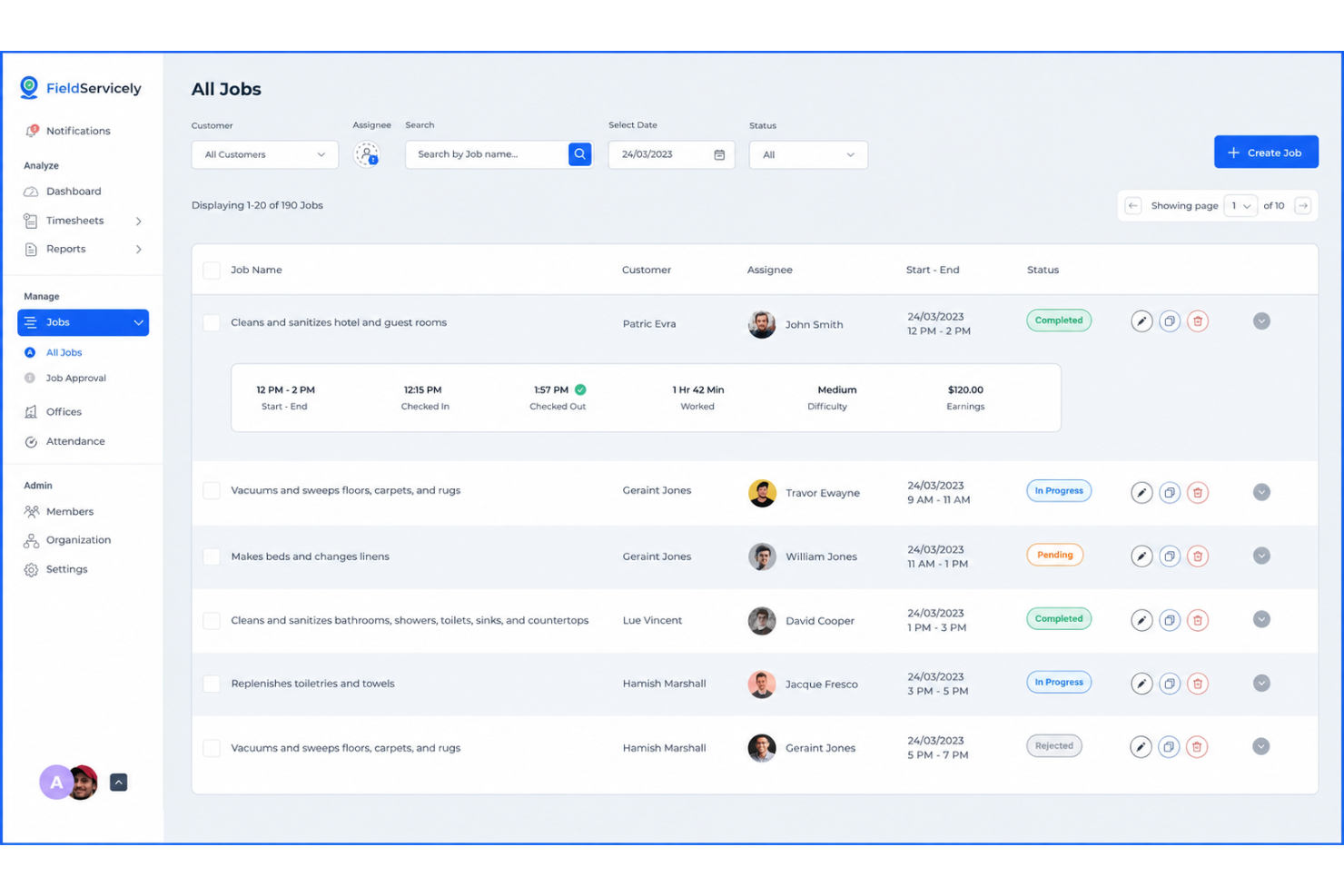
FieldServicely is a GPS-based time clock app built for field service and remote teams, with geofencing, photo-verified clock-ins, live location tracking, offline time recording, and job management tools.
Who Is FieldServicely Best For?
FieldServicely works well for operations managers and HR teams who need to verify attendance for employees who work across multiple job sites each day.
Why I Picked FieldServicely
FieldServicely earns its spot on my shortlist because I love how it creates a full location history for every shift, not just a single clock-in point. GPS breadcrumb tracking records movement throughout the workday, so I can confirm an employee was on-site at 2 pm just as easily as at 8 am.
The real-time location dashboard also lets my team monitor exactly where everyone is across multiple active job sites at once.
FieldServicely Key Features
- Geofence clock-in restrictions: Set a defined radius around a job site so employees can only clock in when they're physically within the approved boundary.
- Photo clock-in verification: Require employees to take a selfie at clock-in to confirm identity at the time of the punch.
- Offline time recording: Employees can clock in and out without a signal, with punches syncing automatically once connectivity is restored.
- Overtime tracking: Automatically flag hours that exceed daily or weekly thresholds based on configured overtime rules.
FieldServicely Integrations
FieldServicely offers an API for custom integrations to connect with payroll and accounting software.
What's Free?
FieldServicely offers a free-forever plan that includes basic features like geofencing, route map tracking, time tracking, timesheets, and job management. New users also get a 10-day free trial with full access to all premium features on their selected plan, with no credit card required.
Pros and Cons
Pros:
- GPS breadcrumb tracking across multiple sites
- Drag and drop timelines speed up team scheduling
- Includes geofencing and selfie verification
Cons:
- No live native integrations available
- Limited reporting and analytics customization
Shifton
Best for automated shift rostering

Shifton is a workforce management platform that pairs GPS-verified mobile time clocking with automated shift scheduling, timesheet generation, and payroll export.
Who Is Shifton Best For?
Shifton is a good fit for operations managers in shift-based industries like retail, logistics, and field services who need to automate roster building alongside time tracking.
Why I Picked Shifton
I've included Shifton in my top picks because it's one of the few free time clock tools that ties automated scheduling directly to time tracking in a single platform. When you build a shift roster in Shifton, the schedule data feeds the clock-in workflow, so managers can spot planned-vs-actual variance without reconciling two separate systems.
I also like the overtime threshold alerts, which flag employees at 75%, 90%, or 100% of their weekly limit before payroll closes, giving you time to actually act on it.
Shifton Key Features
- Mobile time clock app: Employees clock in and out directly from their smartphones, with timestamps recorded in real time.
- Automatic timesheet generation: Shifton compiles clock-in and clock-out data into timesheets without manual entry from managers.
- Payroll export: Approved timesheets can be exported in formats compatible with external payroll processing.
- Employee availability management: Staff can submit their availability windows, which Shifton factors into the shift-building process.
Shifton Integrations
Shifton offers native integrations with QuickBooks, Xero, Google Calendar, Outlook, Apple Calendar, Slack, Microsoft Teams, BambooHR, Workday, Intercom, and Usedesk. It also connects with Zapier and provides a RESTful API with webhook support for custom integrations.
What's Free?
Shifton offers a free-forever plan for up to 10 team members with no credit card required. It includes shift scheduling, time clock and attendance, a mobile app for iOS and Android, unlimited schedules and locations, and reports and analytics.
Pros and Cons
Pros:
- Supports 41 languages for global teams
- Free plan includes GPS verification
- Schedule and time clock share one platform
Cons:
- Analytics lack granular custom data tracking
- Feature limits impact scaling for unique needs

Clockify
Best for GPS-based activity mapping

Clockify is a time clock app that covers employee time tracking, GPS clock-ins, project and task logging, and visual timeline reporting across unlimited users.
Who Is Clockify Best For?
Clockify is a strong fit for small to mid-sized businesses with field teams or remote workers spread across multiple job sites or locations.
Why I Picked Clockify
I picked Clockify as one of the best because of how it handles GPS-based activity mapping in a way that goes beyond a simple clock-in location stamp. I like that it records GPS coordinates throughout a shift, lets you replay a worker's route on a map, and shows all visited job sites in a single view.
For any team managing field workers across multiple locations in a day, that route replay feature gives you real visibility into how time and movement are distributed across sites.
Clockify Key Features
- Kiosk mode: Set up a shared tablet or device as a fixed clock-in terminal for an entire team.
- Break tracking: Log paid and unpaid breaks directly within a time entry to keep shift records accurate.
- Timesheet approval: Managers can review, approve, or reject submitted timesheets before payroll is processed.
- Overtime tracking: Automatically flag daily or weekly overtime based on configurable work hour thresholds.
Clockify Integrations
Clockify offers 100+ integrations through its browser extension, including QuickBooks, Xero, Jira, Asana, Trello, Salesforce, Google Calendar, Outlook, and Slack. It also has native integrations with Pumble and Plaky and connects with Zapier. An API is available for custom integrations.
What's Free?
Clockify offers a free-forever plan for up to five users that includes unlimited time tracking, timesheets, a time tracker, calendar view, mobile and desktop apps, and basic reporting. GPS tracking, kiosk mode, and break tracking are not available on the free plan and require a paid upgrade starting at the Basic tier.
Pros and Cons
Pros:
- Kiosk mode for shared device clock-ins
- GPS route tracking across multiple job sites
- Scales without headcount restrictions
Cons:
- Requires stable data transfer rates
- GPS tracking requires a paid plan upgrade
Jibble
Best for facial recognition check-ins

Jibble is a free time clock app with GPS-verified clock-ins, facial recognition, geofencing, live location tracking, and automated timesheets for field and distributed teams.
Who Is Jibble Best For?
Jibble is a strong fit for businesses with deskless or frontline workers in industries like construction, retail, and hospitality where preventing time fraud is a priority.
Why I Picked Jibble
I picked Jibble as one of the best because its facial recognition clock-in is one of the most fraud-resistant I've seen in a free time clock app. When an employee clocks in, Jibble captures and matches their face against a registered photo, rejecting unrecognized attempts automatically. Paired with GPS verification, each clock-in logs both identity and location at the same time.
Jibble Key Features
- Geofencing: Set virtual boundaries around job sites so employees can only clock in when physically within a designated area.
- Kiosk mode: Turn a shared tablet or device into a central clock-in station for teams working from a single location.
- Automated timesheets: Jibble generates timesheets from clock-in and clock-out data, including break deductions and overtime calculations.
- Activity and project tracking: Employees can log time against specific projects or tasks during a shift, not just start and end times.
Jibble Integrations
Jibble offers 50+ integrations, including Slack, Microsoft Teams, QuickBooks Online, Xero, ADP, Gusto, BambooHR, Deel, Salesforce, and Jira Software Cloud. It also connects with Zapier and provides an API for custom integrations.
What's Free?
Jibble offers a free-forever plan for unlimited users that includes core time tracking, GPS clock-ins, automated timesheets, and basic reporting. No credit card is required to sign up.
Pros and Cons
Pros:
- GPS and geofencing verify clock-in locations
- Supports swift identity validation
- Unlimited users on the free plan
Cons:
- Requires reliable wireless connection
- Geofencing drains a phone's battery quickly

TimeCamp
Best for detailed reporting and analytics

TimeCamp is a time tracking platform that combines automatic time capture, attendance monitoring, timesheet management, and project-level reporting in a single tool.
Who Is TimeCamp Best For?
TimeCamp is a good fit for professional services teams—like consultants, agencies, and attorneys—who need to track billable hours across multiple clients and projects.
Why I Picked TimeCamp
I picked TimeCamp as one of the best because its reporting depth is genuinely hard to match at this price point. You get over a dozen pre-built report types, including margin reports, revenue breakdowns, and cost-per-user views, all filterable by task, employee, or project.
I also like the custom pivot-table report builder, which lets you drag and drop variables to create reports that fit your exact billing or audit needs.
TimeCamp Key Features
- Automatic time tracking: Tracks time based on computer activity, including visited websites and used apps, without manual input.
- Attendance management: Logs clock-in and clock-out times, absences, and time-off requests in a single attendance view.
- Timesheet approval workflow: Managers can review, approve, or reject submitted timesheets directly within the platform.
- Idle time detection: Automatically identifies and flags periods of inactivity so employees can decide whether to log or discard that time.
TimeCamp Integrations
TimeCamp offers 70+ integrations across project management, helpdesk, CRM, accounting, and development categories, including Asana, Trello, Jira, monday.com, Slack, QuickBooks, Xero, Salesforce, Microsoft Teams, and GitHub. It also connects with Zapier and provides an API for custom integrations.
What's Free?
TimeCamp offers a free-forever plan for unlimited users that includes timesheets, web, desktop, and mobile apps, unlimited projects, and two-factor authentication. The free plan doesn't include features like attendance tracking, invoicing, integrations, or reporting exports.
Pros and Cons
Pros:
- Invoices are generated directly from tracked time
- Automatic tracking captures more logged hours
- Accommodates large team deployments
Cons:
- No direct HR or payroll integrations
- The mobile app lacks offline functionality
7shifts
Best for restaurants and hospitality
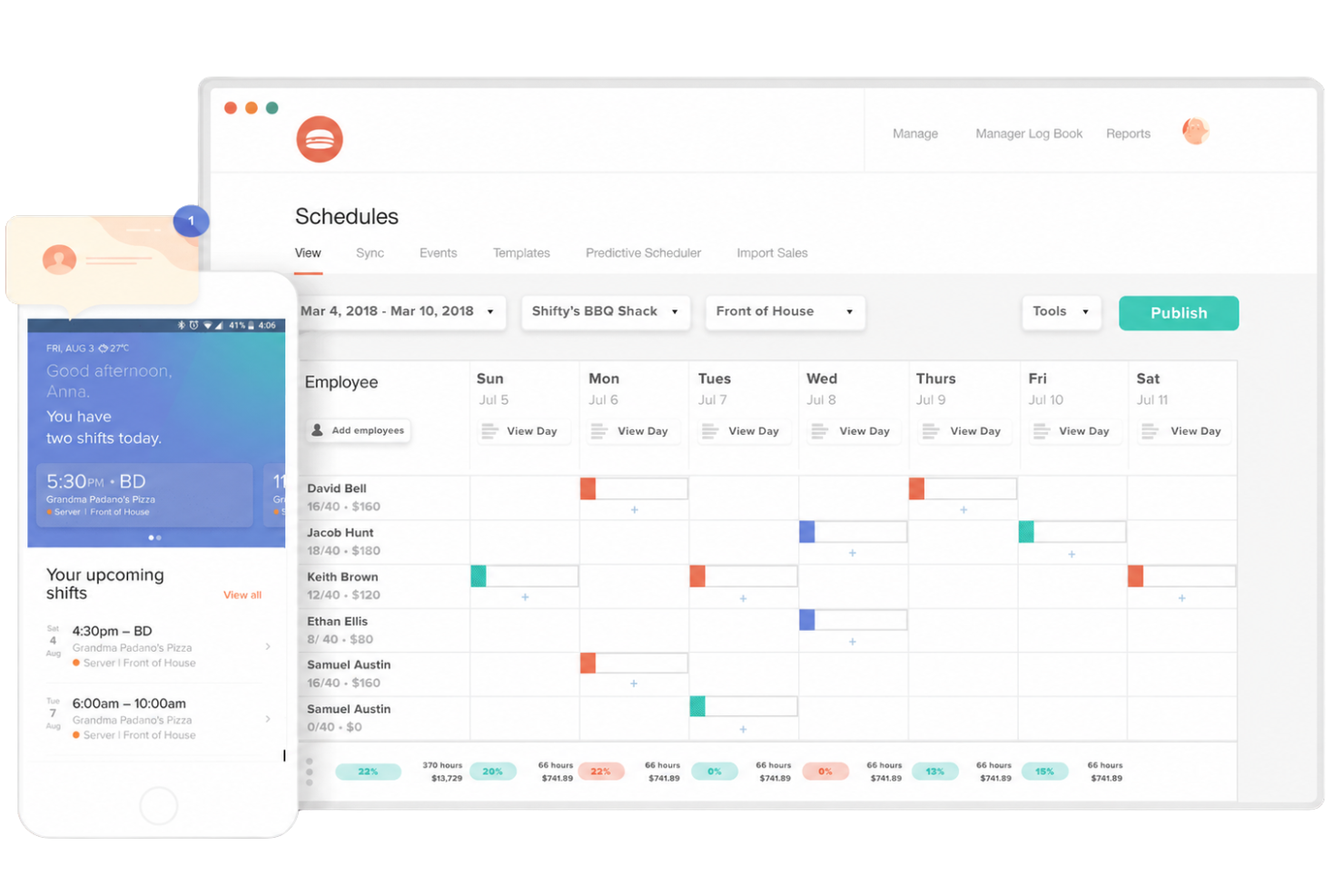
7shifts is a restaurant-focused workforce management platform with a dedicated time clocking app (7punches) that handles employee clock-ins, break tracking, overtime monitoring, and timesheet syncing with scheduling and payroll.
Who Is 7shifts Best For?
7shifts is a strong fit for restaurant owners and hospitality operators managing hourly, shift-based teams across single- or multi-location businesses.
Why I Picked 7shifts
I picked 7shifts as one of the best because it's purpose-built for restaurant operations in ways generic time clock tools aren't. I love that 7punches flags late or no-show clock-ins against the published schedule in real time, which is critical when you're running a dinner service short-staffed.
It also handles tip pooling calculations and break compliance tracking, two pain points that come up constantly in hospitality but rarely appear in standard time clock apps.
7shifts Key Features
- GPS clock-in verification: Employees clock in via mobile with GPS confirmation, so you can see exactly where each punch originated.
- Photo capture on clock-in: 7punches takes a photo at each clock-in to prevent buddy punching at shared devices.
- Overtime threshold alerts: Managers receive automatic notifications when an employee is approaching their overtime limit during a shift.
- Timesheet approval workflow: Managers can review, edit, and approve employee timesheets before they're sent to payroll.
7shifts Integrations
7shifts offers 50+ native integrations focused on the restaurant ecosystem, including POS systems like Toast, Square, Clover, Lightspeed, TouchBistro, and Revel, along with payroll providers like ADP, Gusto, Paychex, and QuickBooks Online. An API is also available for custom integrations.
What's Free?
7shifts offers a free-forever plan called Comp, designed for a single location with up to 30 employees. It includes basic scheduling, time clocking, and team communication, but doesn't include features like labour compliance tools, tip management, or advanced reporting.
Pros and Cons
Pros:
- Auto-applies state-specific overtime rules
- Schedule-synced clock-ins prevent time theft
- Free plan includes time clock and scheduling
Cons:
- Free plan limited to one location
- Time clocking requires a separate app

BusyBusy
Best for construction and field crews

BusyBusy is a GPS time clock app built specifically for construction and field-based industries, with tools for crew clock-ins, equipment tracking, job costing, daily project reports, and timecard management.
Who Is BusyBusy Best For?
BusyBusy is a strong fit for contractors and subcontractors managing hourly field crews across multiple job sites.
Why I Picked BusyBusy
I picked BusyBusy as one of the best because it's purpose-built for the realities of field work in a way that general time clock apps simply aren't. I really like the "Required Onsite" GPS feature, which blocks employees from clocking in unless they're physically within the project's geofence.
The supervisor clock-in tool also lets a crew lead clock in an entire team at once, which is a practical fix for job sites where workers don't have phones on them.
BusyBusy Key Features
- Equipment time tracking: Log hours on specific pieces of equipment alongside crew time entries to track usage by job.
- Job cost budgeting: Set labour cost budgets per project and monitor real-time spending as employees clock in and out.
- Daily project reports: Generate end-of-day field reports that capture crew hours, notes, and conditions directly from the job site.
- PTO and time-off tracking: Submit, approve, and record paid time off alongside regular timecards in one place.
BusyBusy Integrations
BusyBusy offers native integrations with QuickBooks Online, QuickBooks Desktop, Procore, Sage Intacct, Sage 100, Sage 300, Viewpoint Spectrum, ADP, Paychex, and Microsoft Dynamics, among others. It also connects with Zapier and supports file-based exports to additional accounting systems.
What's Free?
BusyBusy offers a free-forever plan that includes GPS time tracking, job costing, equipment tracking, and unlimited users. If you want to try advanced features like GPS breadcrumbing, supervisor tools, or scheduling, there's also a 14-day free trial of the Pro plan with no credit card required.
Pros and Cons
Pros:
- Supervisors can bulk clock in crews
- GPS geofence reminders at job sites
- Offline time tracking syncs when reconnected
Cons:
- No auto clock-out when leaving geofence
- GPS accuracy issues near water or obstructions
Other Free Time Clock App
Here are some additional free time clock app options that didn’t make it onto my shortlist, but are still worth checking out:
- Connecteam
For mobile workforce tracking
- Bitrix24
For team collaboration integration
- actiPLANS
For leave and absence management
- Time Clock Wizard
For custom payroll reporting


How I Evaluate Free Time Clock Apps
Core Functionality (Table Stakes For This List)
In addition to my free offer requirements, I also use a scoring system to select tools for my list. Here's how it works:
I rank each one on a scale from 0 (does not offer the functionality) to 5 (excels in this area) for each core functionality listed below. Then, I calculate the tool's total score as a percentage. Each tool needs to achieve a minimum total score of 65% to be considered for inclusion.
- Employee clock-in/out: I look for one-tap punch options that cover shift starts, stops, and breaks. A crew lead at a landscaping company should be able to clock out for lunch and back in without switching screens.
- Timesheet generation: The app should compile punch data into weekly or biweekly timesheets with total hours. I check whether managers can review and approve timesheets before exporting them for payroll.
- Mobile access: Most hourly workers clock in from a phone, so I evaluate whether the app offers a dedicated iOS and Android app or just a mobile browser experience. Tools like Connecteam and Homebase both provide native apps, for example.
- Multi-employee support: Free plans that cap at one or two users aren't practical for most teams. I look at how many employees the free tier supports, since even a small retail shop typically needs to track five or more staff members.
- GPS or location verification: I check whether the app stamps GPS coordinates on each punch or goes further with geofencing. A cleaning company sending crews to client sites, for instance, needs proof that employees clocked in at the right address.
- Payroll export/reporting: At minimum, I look for a CSV export so admins can pull hour totals into their payroll system. Some tools go further with PDF or Excel formats, which matters when you're handing reports to an accountant or bookkeeper.
Once I have a list of tools that meet these criteria, I consider what sets each platform apart.
Differentiating Factors (What Sets Vendors Apart)
Here's how I compare and contrast different vendors:
Standout Features
Photo verification at clock-in is a practical way to prevent buddy punching, and tools like Connecteam and FieldServicely include it on their free plans. Offline mode matters just as much—crews at construction sites or rural properties need to log hours even without cell service. I also evaluate whether employees can tag punches to specific job or project codes, since service businesses often need to tie labour costs back to individual client accounts.
Beyond Features
Payroll integrations on free plans range from basic CSV exports to direct connections with providers like QuickBooks or Xero. That gap matters when you're running biweekly payroll for a dozen hourly workers and want to avoid manual data entry. Onboarding speed is another factor I evaluate—a restaurant manager shouldn't need IT support to get their team clocking in. Self-serve resources like setup guides and knowledge base articles tell you a lot about how smooth the first week will be.
How to Choose a Free Time Clock App
It’s easy to get bogged down in long feature lists and complex pricing structures. To help you stay focused as you work through your unique software selection process, here’s a checklist of factors to keep in mind:
| Factor | What to Consider |
|---|---|
| Scalability | Will the tool suit your current team size and planned growth? Check for user caps, especially if you run seasonal or expanding teams. |
| Integrations | Does the app connect smoothly to your payroll and HR systems? Make sure preferred connections aren’t paywalled or limited in free plans. |
| Customizability | Can you tailor time rules, roles, or notifications to your business workflows? Avoid tools with rigid settings that limit flexibility. |
| Ease of use | Can non-technical staff learn it quickly? Try demos or setup guides to evaluate the real learning curve for both managers and staff. |
| Implementation and onboarding | Are support resources, guides, and self-serve help available for setup? Simpler onboarding reduces frustration and avoids delays. |
| Cost | Are free features truly enough, or is upgrading inevitable? Map costs to what you’ll realistically need over the next year. |
| Security safeguards | How does the platform protect timesheet data and employee identities? Look for encryption, access controls, and secure hosting. |
| Support availability | Is real-time help or troubleshooting available if you get stuck? Relying only on email or forums could slow down timely resolutions. |
What Are Free Time Clock Apps?
A free time clock app is a digital tool that lets employees clock in and out using computers or mobile devices at no cost. These apps record work hours, track attendance, and help manage basic timesheets for payroll.
Free plans typically support small teams and include simple reporting, location tracking, and break logging features.
Features of Free Time Clock App
Let’s go over the features commonly found in time clock app solutions and which ones are usually included in free vs. paid plans.
Typically Free Time Clock App Features
- Basic time tracking: Employees clock in and out using a mobile device or computer, accurately capturing work hours with digital records.
- Mobile access: Teams can access the app from iOS or Android devices, making it easy for field workers or distributed teams to log hours.
- GPS location tagging: Each clock event can be stamped with a GPS location, verifying where the punch was made for site-based jobs.
- Simple timesheet reporting: Download or view basic reports to see each employee’s total hours for a selected period, keeping payroll preparation straightforward.
- Break logging: Employees can log unpaid meal and rest breaks, supporting labour compliance and accurate payroll calculations.
- Export to CSV: Download recorded time data in a standard format for quick payroll import or backup.
- Manager dashboard: Managers can monitor who’s clocked in, view punch histories, and make basic adjustments to records from a single screen.
- Manual time corrections: Admins can fix errors or missing punches, ensuring accuracy even if someone forgets to clock in or out.
Typically Paid Time Clock App Features
- Geofencing: Automate clock-in and clock-out based on when employees enter or leave designated job site areas, reducing manual errors and buddy punching.
- Photo or selfie verification: Capture a photo at clock-in or out to confirm employee identity, improving accountability without requiring expensive hardware.
- Advanced scheduling: Build and manage employee shifts within the app, assign workers to specific jobs, and automate notifications for schedule changes.
- Payroll and HR integrations: Transfer time data directly to payroll or HR systems, eliminating double data entry and improving pay runs.
- Project and job costing: Allow employees to assign time to specific tasks, jobs, or clients, so you can track job profitability and support client billing.
- Custom reporting: Generate tailored reports by department, project, or pay period, providing deeper insight into labour trends and costs.
- Automated overtime calculation: The app automatically applies overtime rules based on set parameters, helping you stay compliant and simplify payroll.
- Approval workflows: Managers or supervisors can review and approve timesheets before export, adding an extra layer of control for audit and payroll accuracy.
- API access: Connect your time clock system to other business tools or develop custom integrations for unique process needs.
- Priority customer support: Get faster help through live chat, direct phone lines, or dedicated support teams, ensuring less downtime when issues arise.
Benefits of Free Time Clock App
Implementing a free time clock app provides several benefits for your team and your business. Here are a few you can look forward to:
- Accurate tracking: Digital clock-ins and outs help reduce manual errors and ensure reliable attendance records for payroll.
- Real-time oversight: Manager dashboards and live status features let you see who is working and where at any moment.
- Easy mobile access: Team members can clock in or out from mobile devices, which is ideal for remote or distributed workforces.
- Cost savings: Free plans help your business manage time and attendance without additional software expenses.
- Better compliance: Built-in break logging, overtime calculations, and basic reporting support labour law requirements.
- Quick setup and onboarding: Free apps usually have simple user interfaces so you can get teams started with minimal training.
- Location verification: GPS and geofencing tools verify where employees are clocking in, discouraging buddy punching and unauthorized shifts.
Costs and Pricing of Free Time Clock App
I realize you came to this article looking for the best time clock app options that are available for free. However, since free plans only offer limited features, there's a good chance you'll need to scale your plan up in the future.
The table below summarizes common plans, their average prices, and typical features included in time clock apps:
Plan Comparison Table for Time Clock Apps
| Plan Type | Average Price | Common Features |
|---|---|---|
| Free Plan | $0 | Basic time tracking, mobile access, GPS location tagging, simple timesheet reporting, and manual time corrections. |
| Personal Plan | $5–$10/user/month | All free features, photo verification, simple scheduling, basic support, and limited payroll integrations. |
| Business Plan | $10–$25/user/month | Advanced scheduling, geofencing, project and job costing, multi-location support, and custom reporting. |
| Enterprise Plan | $25+/user/month | API access, advanced compliance tracking, dedicated account manager, SSO, and tailored onboarding. |
Free Time Clock App FAQs
Here are some answers to common questions about the free time clock app:
Can a free time clock app handle multiple locations or remote teams?
Yes, most free time tracking apps support remote clock-ins, and some allow tracking across different sites. However, advanced tools for managing multiple locations may require an upgrade, so confirm location management options before adopting a tool for dispersed teams.
Are time entries from a free app secure and tamper-proof?
No, free apps often use basic security like password protection and audit trails, but may lack advanced safeguards such as multi-factor authentication. If business owners require strict data controls to track employee hours accurately and keep labour costs in check, check which protections are included before relying on a free tier.
What limits come with most free plans?
Most free time tracking software options place caps on user numbers, reporting options, or integrations. Some allow only basic exports or limit the number of administrators and specific user permissions. Always check the provider’s free plan details so you don’t hit a wall as your team grows.
Can I integrate a free time clock app with payroll systems?
You can sometimes export employee hours data, but full integrations with payroll or HR systems are usually locked behind paid plans. Free tiers may offer manual CSV exports instead of automated timekeeping, so factor this in if accurate payroll processing is important for your workflow.
How do I get support if I run into issues with a free plan?
Free plans usually come with self-serve resources like knowledge bases or community forums, and direct email or chat support for the web app or iPhone version is often limited or slow. Consider how much support your team might need, especially if replacing manual spreadsheets with an online hours tracker is business-critical.