10 Best Intranet Software Solutions of 2026

10 Best Intranet Software Solutions List


The best intranet software helps organizations create a centralized, digital workplace that keeps teams aligned, engaged, and informed.
If you're still relying on clunky spreadsheets, scattered email threads, or outdated platforms to manage internal communication, document sharing, and company culture, you're likely feeling the pressure to find a more modern, streamlined solution.
In this guide, I’ll share my top picks for intranet platforms that simplify communication, make resources easy to find, and improve collaboration across departments—all based on firsthand research, years of analyzing the HR tech landscape, and nine years working in HR directly, including managing intranet documents.
Why Trust Our Software Recommendations
Our team has been testing and reviewing software since 2012. As HR experts ourselves, we know how difficult—and important—it is to choose the right software.
For this guide, we evaluated tools using hands-on testing and independent research, scoring tools using our selection criteria. We also draw on insights from industry thought leaders and practicing HR experts.
Our reviews reflect our human editorial judgment, not a sales pitch.
Expert reviewers:
Intranet Software Solutions Comparison Table
This comparison table summarizes pricing, trial, and demo details for my top intranet software selections.
| Tool | Best For | Trial Info | Price | ||
|---|---|---|---|---|---|
| 1 | Best for unified knowledge access | Free demo available | Pricing upon request | Website | |
| 2 | Best AI-native employee experience platform | Free demo available | Pricing upon request | Website | |
| 3 | Best for a dynamic employee directory and efficient document management | Free trial available | From $75/month | Website | |
| 4 | Best for targeted user content | Free demo available | Pricing upon request | Website | |
| 5 | Best intranet solution for interactive engagement | 14-day free trial + free demo available | From $12/user/month | Website | |
| 6 | Best for content management features and customizable team Spaces | Free demo available | From $10/user/month | Website | |
| 7 | Best for mobile intranet for frontline teams | 14-day free trial | From $29/month (billed annually) | Website | |
| 8 | Best for people-first approach | Free trial available | From $1.50/user/month | Website | |
| 9 | Best social intranet with collaborative Spaces for deep employee engagement | Free demo available | Pricing upon request | Website | |
| 10 | Best mobile-first intranet solution for frontline or deskless workforces | Free trial available | From $3.75/user/month (billed annually) | Website |

Best Intranet Software Reviews
Here’s a brief description of each employee intranet software solution to showcase each tool’s best use case, plus some noteworthy features, and screenshots to give you a snapshot of the user interface.

Haystack
Best for unified knowledge access

Haystack is an intranet platform designed for organizations that want to centralize company knowledge, streamline internal communication, and make resources easy to find for distributed or hybrid teams.
Who Is Haystack Best For?
Haystack is a strong fit for mid-sized companies with remote or hybrid teams that need a central place to access company news, documents, and people information.
Why I Picked Haystack
Haystack earns its spot on my shortlist because of how well it handles unified knowledge access across a distributed workforce. I particularly like the enterprise search feature, which pulls results across connected third-party apps like Confluence, Guru, and Google Workspace, so my team isn't jumping between tabs to track down a single document. The Freshness Engine is another feature I rely on—it lets you set expiration dates on content like employee handbooks or compliance materials, so outdated information doesn't quietly linger in the knowledge base. The company glossary is a small but genuinely useful touch that helps new hires get up to speed without having to ask someone what every internal acronym means.
Haystack Key Features
- Must read: Mark posts as mandatory reads and send automated reminders to employees who haven't acknowledged them yet.
- Employee profiles and org chart: Rich profiles display work history, skills, and interests, alongside a visual org chart that maps team structures and reporting lines.
- Verified badges: Flag resources with a verified icon to signal that content has been officially approved by subject-matter owners.
- Group pages: Create dedicated spaces for teams, departments, or interest groups to surface targeted resources and content.
Haystack Integrations
Integrations include Google Workspace, Microsoft Teams, Slack, Atlassian Confluence, Jira, Guru, Zoom, Box, Dropbox, Tableau, and Looker.
Pros and Cons
Pros:
- Supports mobile apps so non-desk or remote workers can engage
- Strong employee directory helps distributed teams stay connected
- Reduces time spent searching by consolidating knowledge and tools
Cons:
- Large organizations with simple needs may find full functionality more than required
- Some users report a slight learning curve for less tech-savvy employees

Best AI-native employee experience platform
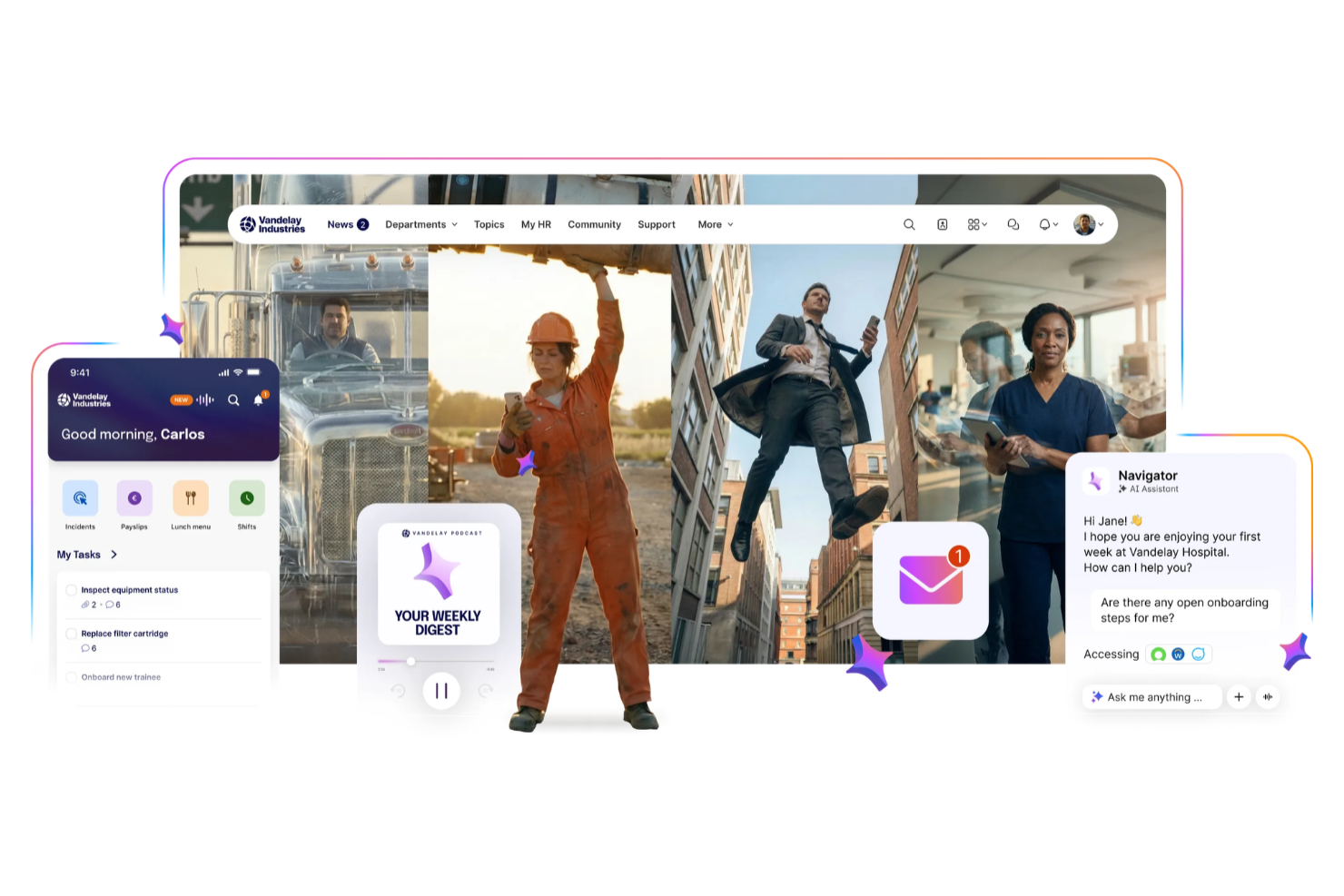
Staffbase is an intranet platform that connects deskless, frontline, and office teams through centralized communication, mobile access, and personalized employee experiences.
Who Is Staffbase Best For?
Staffbase is a strong fit for mid-size to enterprise organizations with large, distributed workforces that need a unified channel for internal communications.
Why I Picked Staffbase
I chose Staffbase as a top pick because AI is deeply integrated into the content creation and communication workflow. I particularly like the AI writing assistant, which helps my team draft, translate, and personalize internal communications without switching tools or spending time on manual editing. Staffbase also uses AI to surface relevant content to each employee based on their role, location, and language, so frontline workers aren't buried under updates that don't apply to them.
Staffbase Key Features
- Employee journeys: Automatically surface personalized content to employees based on milestones like onboarding, role changes, and other key moments.
- Pulse surveys: Collect employee feedback through quick pulse surveys or in-depth questionnaires directly within the platform.
- Live town halls: Broadcast real-time, interactive video to every employee screen, including frontline and deskless workers.
- Employee directory: Maintain customizable user profiles with contact details and other information to keep the workforce connected.
Staffbase Integrations
Integrations include Microsoft 365, Cornerstone, ServiceNow, Google Workspace, SAP, Workday, BambooHR, Salesforce, Confluence, and Box.
Pros and Cons
Pros:
- Provides engagement analytics across multiple channels
- Enables communication across frontline and office teams
- Supports AI-assisted content governance and targeting
Cons:
- Pricing not publicly disclosed
- Primarily designed for large organizations and enterprises

Jostle
Best for a dynamic employee directory and efficient document management
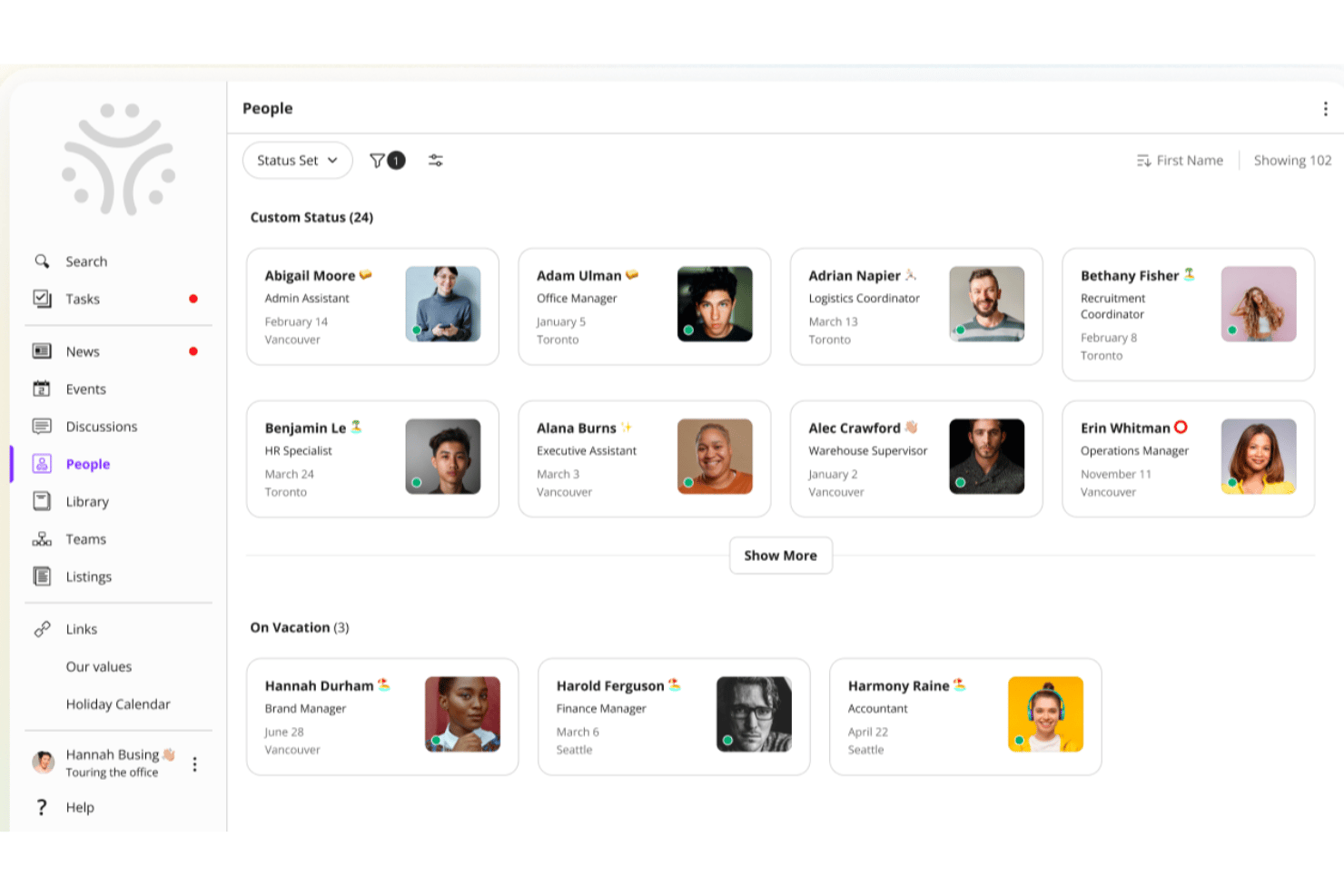
Jostle is an intranet platform designed for organizations that want to boost team connection, simplify internal communication, and make it easy for employees to find people, documents, and updates in one place.
Who Is Jostle Best For?
Jostle is a good fit for mid-sized organizations looking for a straightforward intranet that keeps employees connected without the complexity of enterprise-level platforms.
Why I Picked Jostle
Jostle earns its spot on my shortlist because of how well its People directory and Library work together as a knowledge-finding system. The People section lets employees search by role, location, department, or even a specific skill—so if I need to find someone who handles benefits compliance in a regional office, I can do that in seconds. On the document side, Jostle's Library assigns clear ownership to each volume, meaning subject matter experts manage their own files and everyone always knows which version is current. That combination of "find the right person" and "find the right document" is exactly what distributed teams need from an intranet.
Jostle Key Features
- News feed: Publish company-wide announcements and team updates that employees can react to and comment on.
- Events calendar: Create and share org-wide or team-specific events that employees can RSVP to directly in the platform.
- Shout-outs: Recognize individual employees publicly with peer-to-peer shout-outs visible across the intranet.
- Discussions: Host threaded conversations organized by topic or team to keep internal dialogue focused and searchable.
Jostle Integrations
Integrations include Google Workspace, Microsoft 365, Slack, Salesforce, Zoom, Dropbox, BambooHR, HubSpot, QuickBooks Online, and Zendesk.
Pros and Cons
Pros:
- Clear visual organizational charts
- Simplified file and document organization
- High user adoption rates
Cons:
- Limited third-party app marketplace
- Rigid layout customization options

Hub
Best for targeted user content

Hub is a modern intranet platform designed for organizations that want to boost internal communication, knowledge sharing, and collaboration with personalized experiences for every team.
Who Is Hub Best For?
Hub is a strong fit for mid-sized to large organizations with diverse teams that need to deliver relevant, role-specific content to different employee groups.
Why I Picked Hub
Hub earns its spot on my shortlist because of how well it handles targeted content delivery across different employee groups. I really like the audience targeting feature, which lets you push specific news, resources, and updates to defined groups based on role, department, or location—so a frontline worker in operations sees something completely different from a manager in finance. My team also uses Hub's customizable homepage layouts to surface the most relevant tools and content for each user segment without requiring them to dig for it. That level of personalization makes Hub well-suited to organizations managing diverse, distributed workforces.
Hub Key Features
- Pulse surveys: Send anonymous surveys to employees with hidden scoring to quantify responses and track wellbeing trends over time.
- Must reads: Mark content as mandatory so employees must confirm they've read it, with automated reminders sent to anyone who hasn't.
- Group forums: Create public, private, or hidden group spaces where members can access exclusive content and collaborate in threaded discussions.
- PWA mobile app: Give employees full intranet access on any mobile device without requiring an app store download, including push notifications for new content.
Hub Integrations
Integrations include Microsoft 365 and Google Workspace; an API is available for custom integrations.
Pros and Cons
Pros:
- News and announcement features
- Advanced search to find documents and people
- Personalized dashboards to tailor intranet experience
Cons:
- Restricted branding and design options
- Limited mobile app functionality

Best intranet solution for interactive engagement
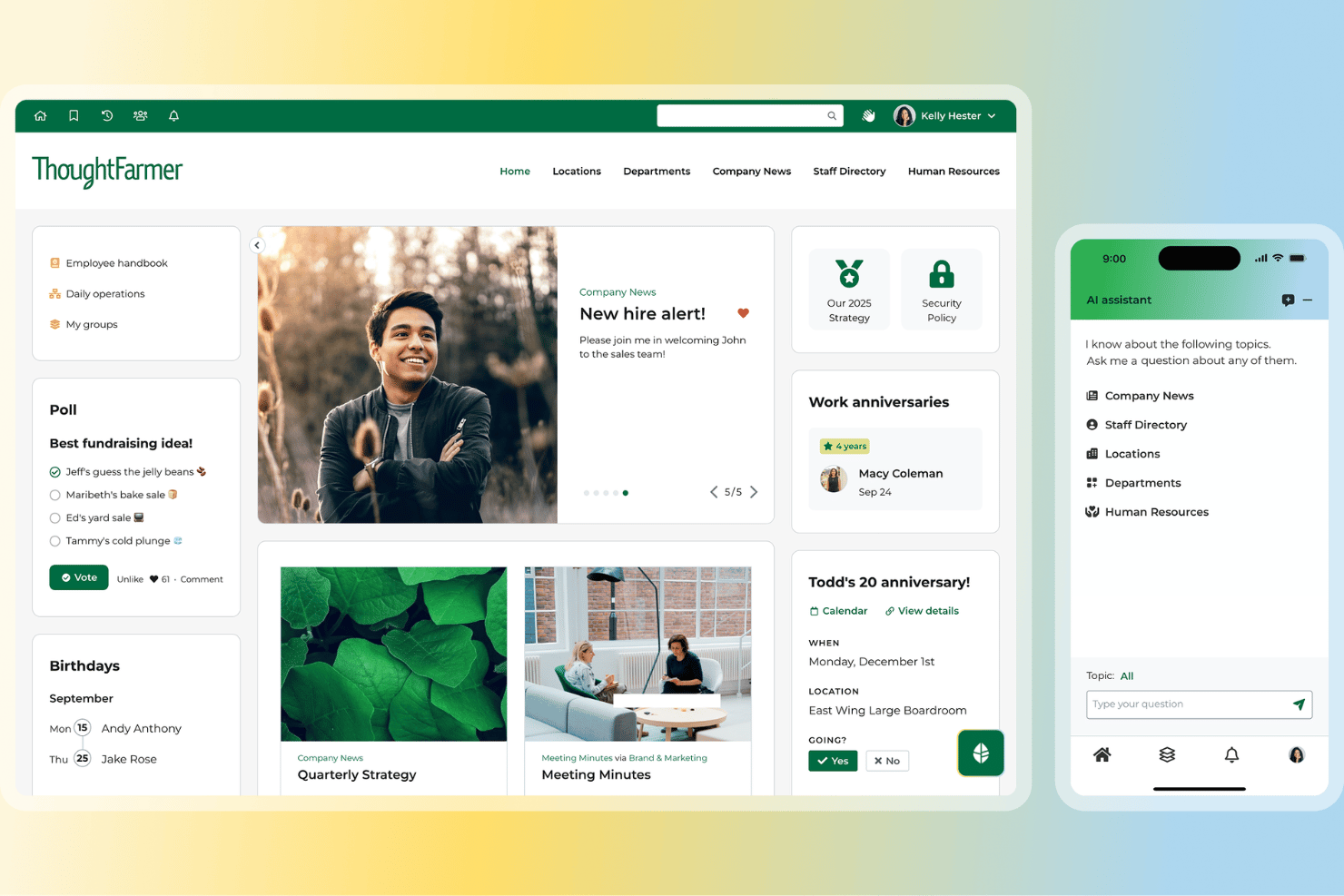
If you’re looking for an intranet platform that encourages employee participation and makes data collection easy, ThoughtFarmer is worth a closer look. It’s a strong fit for organizations that want to boost engagement through gamification and need customizable forms for gathering feedback or information. ThoughtFarmer stands out for its built-in tools that help teams connect, recognize contributions, and collect insights without relying on third-party add-ons.
Who Is ThoughtFarmer Best For?
Internal communications and HR leaders in mid-sized organizations across professional services and public sector environments. It suits companies that want to encourage engagement through gamified features and flexible internal data collection.
Why I Picked ThoughtFarmer
What drew me to ThoughtFarmer is its focus on making employee engagement both fun and measurable. The platform’s gamification features, like badges and leaderboards, help motivate participation and recognize contributions across teams. I also like that ThoughtFarmer includes flexible form-building tools, so you can create custom surveys, polls, or data collection forms right inside your intranet. These features make it a strong choice for organizations that want to foster a lively, interactive digital workplace while gathering valuable feedback and insights.
ThoughtFarmer Key Features
Some other features that make ThoughtFarmer stand out for intranet buyers include:
- Employee Directory: Quickly find colleagues and view organizational structure with searchable profiles.
- Content Approval Workflows: Set up multi-step review processes for publishing internal content.
- Mobile App: Access intranet features and updates from any mobile device.
- Document Management: Store, organize, and share files securely within the platform.
ThoughtFarmer Integrations
Integrations include Microsoft 365, Google Workspace, Slack, Okta, Azure AD, SAML, and more.
Pros and Cons
Pros:
- Automated profile updates across the site
- Simplified backend for non-technical administrators
- Highly intuitive and clean user interface
Cons:
- Notification system lacks granular control
- Pricing may challenge smaller SaaS startups
Axero
Best for content management features and customizable team Spaces

Axero is an intranet platform built for organizations that want to centralize communication, knowledge sharing, and collaboration across teams, making it easier for employees to find resources, connect, and work together in one digital space.
Who Is Axero Best For?
Axero is a good fit for mid-size to large organizations that need a structured intranet to manage internal content, connect distributed teams, and give departments their own dedicated digital workspace.
Why I Picked Axero
Axero earns its spot as one of the best on my shortlist because of how well it handles content management and team Spaces together in one place. I love that content workflows in Axero include version control, expiration dates, and required reading tracking—so when my team publishes a policy update or internal guide, I can set it to auto-notify authors when content ages and confirm that key employees have actually read it. The customizable Spaces are equally impressive: each department or project gets its own dedicated hub with targeted permissions, so HR, IT, and operations aren't wading through each other's content. I also use the page builder to tailor each Space's layout with drag-and-drop widgets, which means every team's hub looks and functions exactly the way they need it to.
Axero Key Features
- Employee directory: Search rich employee profiles with customizable fields that highlight skills, roles, and interests across the organization.
- AI chatbot (Axero Copilot): An AI assistant trained on your intranet's knowledge base that answers employee questions directly within the platform.
- Announcements and broadcasts: Send targeted updates to specific groups or the entire organization, with support for urgent news and top-level communications.
- Cases and tickets: A native help desk tool for managing employee questions, assigning tasks, tracking status, and setting due dates.
Axero Integrations
Integrations include Slack, Microsoft Office 365, Google Workspace, Twilio, Microsoft Teams, Zoom, and SharePoint Online Documents.
Pros and Cons
Pros:
- Spaces/Sub Spaces keep department content organized and easy to navigate
- Content expiration helps your intranet stay clean and up to date
- Required Reading ensures important posts are actually seen by employees
Cons:
- Analytics require initial setup to surface the most useful insights
- Space-permission setup may get complex as your intranet grows

Best for mobile intranet for frontline teams

Connecteam gives organizations with deskless and distributed teams a centralized platform to manage internal communication, share resources, and coordinate daily operations, making it easier to keep everyone connected and informed.
Who Is Connecteam Best For?
Connecteam is a great fit for small to mid-sized businesses in industries like retail, hospitality, construction, and healthcare that rely heavily on frontline or field-based workers.
Why I Picked Connecteam
Connecteam earns its spot as one of the best on my shortlist because it's built from the ground up for teams that don't sit at a desk. I picked it specifically for its mobile-first design—the app puts the company news feed, team chat, and document library right in a worker's pocket, which matters when your staff is on a job site or a shop floor. I also like the employee knowledge base feature, where my team can store and access SOPs, training materials, and HR documents without needing a laptop. The push notification system keeps everyone looped in on updates in real time, so nothing gets missed between shifts.
Connecteam Key Features
- Employee directory: Browse a searchable company directory with contact details and role information for every team member.
- Surveys and polls: Create and send surveys or polls through the app to gather team feedback.
- Task management: Assign, track, and manage tasks for individuals or groups with due dates and status updates.
- Scheduling: Build and share employee schedules, manage shift assignments, and handle shift swaps from within the platform.
Connecteam Integrations
Integrations include QuickBooks, Gusto, Xero, ADP, Wix, Lightspeed, PrismHR, Square, BambooHR, and Shopify.
Pros and Cons
Pros:
- Time-clock + geofencing gives site-based attendance tracking
- Combined communication + task tool avoids multiple separate apps
- Strong mobile app design for non-desk and frontline teams
Cons:
- Customization of forms and permissions may feel limited at scale
- Reporting and analytics features are less advanced than specialist platforms
New Product Updates from Connecteam

Connecteam Expands Break and Timesheet Controls
Connecteam adds flexible break thresholds, personalized policies, auto-end options, a centralized exceptions report, and improved timesheet issue visibility to help teams manage breaks and timesheets more effectively. For more information, visit Connecteam’s official site.
 .
.
Sift
Best for people-first approach

Sift is an intranet platform for organizations that need to connect employees, surface internal knowledge, and help teams find the right people and resources across the company.
Who Is Sift Best For?
Sift is a strong fit for mid-sized to large organizations where HR and internal communications teams need to help employees find colleagues, navigate org structures, and stay connected across departments.
Why I Picked Sift
Sift earns its spot on my shortlist because it puts people at the center of the intranet experience in a way that most platforms don't. I love how employee profiles go beyond basic contact info—team members can showcase their skills, interests, and areas of expertise, which makes it genuinely useful for finding the right person across a large org. I also like the dynamic org chart, which updates automatically and gives my team a clear picture of how the company is structured without anyone having to maintain it manually.
Sift Key Features
- Sift Pages: Create dedicated pages for departments, projects, remote teams, and employee resource groups to give every part of your org a searchable home.
- Certification showcasing: Display employee certifications on profiles so teams can quickly identify who has the expertise needed for specific projects or roles.
- Advanced search and filtering: Search and filter employees by any attribute—role, skills, experience, or location—to find the right person for any task.
- Analytics: Track how employees are engaging with the directory and people data across the organization.
Sift Integrations
Integrations include Azure Active Directory, Google Workspace, LDAP, Slack, and Microsoft Teams, with an API available for custom integrations.
Pros and Cons
Pros:
- Manages internal talent discovery
- Deeply integrates with existing HRIS
- Highly visual and interactive profiles
Cons:
- Requires consistent employee profile updates
- Limited native project management features
Workvivo
Best social intranet with collaborative Spaces for deep employee engagement

Workvivo is a modern intranet platform built for organizations that want to boost employee connection, simplify internal communications, and create a vibrant digital workplace for teams of all sizes.
Who Is Workvivo Best For?
Workvivo is a strong fit for mid-size to enterprise organizations with large, distributed, or frontline workforces that need more than a traditional intranet to keep employees informed and connected.
Why I Picked Workvivo
Workvivo earns its spot as one of the best on my shortlist because it approaches the intranet as a social experience rather than a static content repository. I particularly like the Spaces feature, which lets teams create dedicated hubs for departments, projects, or communities—complete with feeds, documents, and member lists in one place. I also find the social activity feed genuinely useful for surfacing recognition, announcements, and peer interactions in a format that feels more like a social network than a corporate bulletin board. That combination makes it much easier to build the kind of ongoing engagement that most traditional intranets simply don't support.
Workvivo Key Features
- Surveys and polls: Capture employee sentiment with built-in surveys and quick polls you can send to specific teams or the entire organization.
- Auto-translate: Automatically translate content into employees' native languages so global teams can access every update without language barriers.
- Knowledge base and wikis: Store and organize company information, policies, and documents in a searchable, centrally accessible location.
- Employee engagement analytics: Track how employees interact with content across the platform to understand what's resonating and where engagement is dropping off.
Workvivo Integrations
Integrations include Microsoft 365, Google Workspace, Slack, Zoom, BambooHR, Workday, Sage HR, Personio, HiBob, and Trello.
Pros and Cons
Pros:
- Simplified global company-wide broadcasts
- Strong mobile app for accessibility
- Familiar social media-style interface
Cons:
- Lacks advanced document co-authoring tools
- Higher price point for startups
Blink
Best mobile-first intranet solution for frontline or deskless workforces

Blink is a modern intranet platform built for organizations with distributed or deskless teams, connecting employees through mobile communication, document sharing, and real-time updates.
Who Is Blink Best For?
Blink is a strong fit for industries like retail, healthcare, logistics, and hospitality, where large portions of the workforce are on the move and rarely sit at a desk.
Why I Picked Blink
Blink earns its spot on my shortlist because it's purpose-built for the workers most intranets forget—the ones who don't have a company email or a desk. I picked it specifically for its mobile-first feed, which lets managers push targeted announcements directly to frontline staff by location, shift, or role. I also like the built-in digital forms and document hub, which means a warehouse worker or retail associate can pull up a policy or complete an onboarding checklist right from their phone without needing a laptop or a login to a separate system.
Blink Key Features
- Secure chat: Send direct and group messages to individuals or teams within the Blink app.
- Employee recognition: Give personalized recognition to colleagues with Blink Kudos.
- Surveys: Build and distribute single- or multi-question surveys directly to employees inside the app.
- Communities: Create shared virtual spaces where employees can connect around common interests or teams.
Blink Integrations
Integrations include Microsoft 365, Google Workspace, Workday, ADP, Okta, OneLogin, ServiceNow, Salesforce, Slack, and SAP. An API is available for custom integrations.
Pros and Cons
Pros:
- Effective digital forms and checklists
- Secure instant messaging for teams
- Single sign-on for frontline staff
Cons:
- Minimal advanced data visualization options
- Desktop version lacks mobile fluidity
Other Employee Intranet Software
Here’s a few more employee intranet software options that didn’t make the top list:
- Simpplr
Modern intranet software for prescriptive analytics and a dynamic people directory
- Xoxoday
Social intranet software for peer-to-peer recognition
- Happeo
Intranet solution for customized news feeds and engagement tools
- MyHub
Company intranet software for IT, HR, and marketing professionals
- Microsoft SharePoint
For targeted employee communication
- Noodle
Intranet software with SaaS and on-premise offerings
- Igloo
Digital workplace platform with pre-built templates for business challenges
- LumApps
For AI-powered intranet personalization
- Guru
Intranet software solution with AI-driven enterprise search
- Interact Software
For personalized content delivery
- Unily
Enterprise-level employee experience platform with communication, knowledge management, and extranet features
- Eleviant Tech
Mobile and web-based intranet for Microsoft 365 users
- IntranetPro
For sharing documents via Microsoft 365 and SharePoint
- Assembly
All-in-one intranet and employee communication platform for your people and tools
- Nectar
For crafting engaging announcements
- PeopleOne
Modern intranet solution for Microsoft 365 users
- Interact
Intranet platform that merges social features with a mobile intranet and extranet capabilities
- OnSemble
Intranet software for customer-oriented/service-oriented company cultures
- Claromentis
Intranet software with a unique Audit Management module for managing ISO 9001:2015 requirements
- Bitrix24
Intranet platform for collaboration, task management, and unlimited users
- Jive
Intranet software with an embedded machine learning framework for advanced user insights
- MangoApps
Cloud-based intranet solution for team collaboration and enterprise-grade security
- Friday
Intranet platform for organizing meetings, tasks and action items
- HCL Connections
Enterprise-level collaboration platform focused on employee engagement and networking
- IntelliEnterprise 15
Intranet solution with an AI-powered chatbot and integrated external app notifications


How I Evaluate Intranet Software
I split my evaluation into two layers: baseline capabilities a tool must offer to qualify—like document management and employee directories—and the differentiators that set the best options apart.
Core Functionality (Table Stakes For This List)
When I'm selecting tools for my list, I rank each one on a scale from 0 (does not offer the functionality) to 5 (excels in this area) for each core functionality listed below. Then, I calculate the tool's total score into a percentage. Each tool needs to achieve a minimum total score of 65% to be considered for inclusion.
- Content & Document Management: I look at how each platform handles HR policy pages, handbooks, and file libraries—especially version control and whether content authors can schedule or approve updates before publishing.
- Employee Directory & Profiles: A good directory goes beyond a contact list. I check for org chart views, custom profile fields like skills and certifications, and whether the directory syncs with an HRIS.
- Internal Communications Tools: I evaluate how each tool delivers company news, from broad announcements to posts targeted by department, location, or role, along with read tracking to confirm messages land.
- Social & Engagement Features: Platforms that support comments, reactions, community groups, and peer recognition give HR teams a way to build culture. I look at how naturally these features fit into daily use.
- Permissions & Access Control: HR teams manage sensitive content like compensation policies and benefits details. I check for role-based permissions, audience segmentation by attribute, and audit visibility.
- Search & Integrations: I evaluate whether the search spans pages, documents, and people in one query, and whether the tool connects with collaboration apps like Slack, Teams, and Microsoft 365 or Google Workspace.
Once I have a list of tools that meet the criteria, I consider what sets each platform apart.
Differentiating Factors (What Sets Vendors Apart)
Here's how I compare and contrast different vendors:
Standout Features
Mobile access matters when your workforce includes frontline or deskless employees who rarely sit at a desktop. I check whether the app delivers full functionality or just a stripped-down feed. Onboarding journeys are another differentiator—platforms with automated checklists and staged content for new hires save HR teams hours of manual follow-up. I also look for built-in pulse surveys and engagement analytics, which help you measure whether employees actually read policy updates and how content is landing across teams.
Beyond Features
HR tech stack integrations are a big deal here. If your intranet can't sync employee data from your HRIS—whether that's Workday, BambooHR, or ADP—you'll end up managing duplicate records. I also evaluate security and compliance posture, checking for SOC 2 Type II certification and data residency options, especially for organizations with employees across multiple regions. Implementation support is worth a close look too. Rolling out an intranet is a change management effort, and vendors that offer launch playbooks and adoption benchmarking tend to drive stronger long-term engagement.
What is Intranet Software?
Intranet software is a secure digital platform organizations use to centralize internal communication, resources, and collaboration tools. It helps teams share updates, manage documents, and access company knowledge in one place.
HR professionals and team leads use intranet platforms to streamline communication, reduce information silos, and improve employee engagement—especially across remote and hybrid teams.
Key Features of Intranet Software
When selecting intranet software, keep an eye out for the following key features:
- User interface: An intuitive and clean design helps you quickly find essential elements like your people directory, knowledge library, or key company documents. The best platforms also let you personalize your homepage to match your preferences, so starting your day feels a bit more like home than an endless maze.
- Usability: Easy navigation is a game-changer. A well-organized menu structure means you can skip the treasure hunt and jump straight to the resources you need—no endless clicking or mysterious drop-downs required.
- Software integrations: The top intranet solutions work smoothly with your other tools—think document management systems like Google Workspace and Microsoft SharePoint, email platforms, or employee engagement apps. This way, you don’t need to juggle tabs or switch platforms just to get your work done.
- Content management: You want the ability to easily create, organize, and update content. Effective content management keeps everyone on the same page and makes sure up-to-date information is always within reach for your team.
- Collaboration tools: Built-in chat, discussion forums, announcement boards, and file sharing features help your team communicate and collaborate without needing a dozen different tools. Everything you need to work together, all in one place.
- Access control and permissions: Reliable permission settings let you decide who can see or edit specific information. This protects sensitive content and ensures everyone only accesses what they actually need.
- Mobile accessibility: The best intranet software works smoothly on smartphones and tablets as well as desktops, making it easy for users to stay connected and informed from anywhere.
- Search functionality: A robust search feature lets you find people, documents, and company knowledge fast. Forget scrolling for ages—just type what you need and get there in seconds.
Common Intranet Software AI Features
Beyond the standard intranet software features listed above, many of these solutions are incorporating AI with features like:
- AI-powered search: Advanced search tools use AI to understand natural language queries and anticipate what you’re looking for, so you can find documents and resources—even if you’re not sure of the exact title or location.
- Automated content recommendations: AI suggests relevant articles, company updates, or team resources based on your previous activity or interests, making discovery a whole lot easier and more personalized.
- Smart notifications: Rather than bombard you with alerts, AI learns which updates are most important to you and delivers notifications when they’re actually useful, saving you from notification overload.
- Automated workflow management: AI can recognize repetitive processes and suggest automation for approvals, requests, or routine communications, helping you save time and avoid manual errors.
- Sentiment analysis: AI tools can scan internal forums or chat conversations to gauge team morale or spot emerging issues, so you can address them before they become big problems.
FAQs about Intranet Software
Here are some answers to frequently asked questions you may have about intranet software and how it works:
How do I choose the right intranet software for my organization?
Start by outlining your team’s unique communication, collaboration, and document management needs. List your must-have features, such as easy file sharing, news publishing, or employee directories. Compare several intranet platforms, focusing on usability, reliable customer support, and strong integration with your current systems. Read reviews from other HR managers and internal comms professionals for real-world insights. Request live demos or trial access, and involve both IT and end users in the evaluation process to see which software feels most intuitive and robust for your team.
What are the most common challenges when implementing intranet software?
The biggest challenges usually include low user adoption, unclear stakeholder goals, data migration headaches, and difficulty tailoring the platform to match your organization’s culture.
To tackle these, set clear objectives upfront, secure leadership support, and communicate consistently with employees about the benefits. Plan comprehensive onboarding and provide ongoing training sessions. Appoint internal champions from different departments to encourage participation, and gather feedback so you can fine-tune the rollout.
Strong IT and HR collaboration helps address both technical and change management issues.
How can intranet software improve employee engagement and communication?
Intranet software acts as a central hub for news, corporate updates, and resources, helping employees feel informed and included. Features like social feeds, polls, shout-out boards, and discussion forums empower staff to share feedback and connect with colleagues. Many platforms include event calendars, recognition programs, and tools for peer-to-peer networking.
For HR and internal comms leaders, these functions enable a vibrant, transparent dialogue and ensure everyone has access to important information regardless of location. Over time, you’ll see increased engagement, improved morale, and better alignment across teams.
Can intranet software integrate with other workplace tools like HRIS or Slack?
Yes, nearly all modern intranet platforms offer deep integration with popular workplace tools. That includes HR information systems (HRIS), communication apps like Slack or Microsoft Teams, project management platforms, and document storage services such as Google Drive or SharePoint.
Ask vendors for a list of built-in integrations or about the availability of open APIs for custom connections. Seamless integration allows employees to access everything from one portal, reduces data silos, and automates common HR or comms tasks—making daily work simpler for everyone.
What security features should I look for in intranet platforms?
Prioritize platforms with robust security essentials: role-based access control, multi-factor authentication, data encryption in transit and at rest, and options for single sign-on (SSO). Make sure the software provider keeps up with regular security updates and vulnerability patching.
For HR and internal communications use, granular permission settings are crucial to safeguard sensitive data like personnel files or company announcements. Also, check if the platform complies with privacy standards such as GDPR or HIPAA, based on your needs, and ask about auditing and reporting tools for added peace of mind.
Other Communication Software Reviews
With intranet software already on your mind, you may be interested in learning more about other types of internal communication software too. To save you hours of searching, take a look at some of my other specialty software lists instead:
- Employee Communication Software
- Employee Engagement Software
- Team Communication Apps
- Employee Recognition Platforms
- Remote Collaboration Software
- Remote Working Software