

10 Best Payroll Apps Reviewed in 2026

Best Payroll App Shortlist


Payroll is one of the few business processes where small mistakes can have immediate consequences for both employees and compliance. As payroll requirements become more complex, relying on manual processes or disconnected systems makes it harder to stay accurate and efficient. The right payroll app helps centralize payroll tasks, reduce administrative effort, and keep your team on schedule. In this guide, I’ll compare the top options and explain which ones are best suited to different business needs.
Why Trust Our Software Recommendations
Our team has been testing and reviewing software since 2012. As HR experts ourselves, we know how difficult—and important—it is to choose the right software.
For this guide, we evaluated tools using hands-on testing and independent research, scoring tools using our selection criteria. We also draw on insights from industry thought leaders and practicing HR experts.
Our reviews reflect our human editorial judgment, not a sales pitch.
Expert reviewers:
Payroll App Comparison Table
This comparison table summarizes pricing details for my top payroll app selections:
| Tool | Best For | Trial Info | Price | ||
|---|---|---|---|---|---|
| 1 | Best for employee self-service | Not available | Pricing upon request | Website | |
| 2 | Best with multi-state and international payroll | Not available | From $599/employee/month | Website | |
| 3 | Best for scheduling integration | Free plan available | From $30/location/month + payroll add-on | Website | |
| 4 | Best with unlimited collaborators | 30-day free trial | From $40/month | Website | |
| 5 | Best for unified attendance management | 14-day free trial + free demo available | From $29/month (billed annually) | Website | |
| 6 | Best for unlimited payroll runs | 6-month free promotion available | From $29/month | Website | |
| 7 | Best free unlimited employee management | Free plan available | Free to use | Website | |
| 8 | Best for chat-based payroll processing | 3-month free trial | From $39/month + $5/user/month | Website | |
| 9 | Best for no-cost payroll management | Free plan available | Pricing upon request | Website | |
| 10 | Best for contractor and employee payroll | Free demo available | From $49/month + $6/month/user | Website |


Best Payroll App Review
Below are my detailed summaries of the best payroll apps that made it onto my shortlist. My reviews offer a detailed look at the key features, pros and cons, integrations, and ideal use cases of each tool to help you find the best one for you.

Paycom
Best for employee self-service
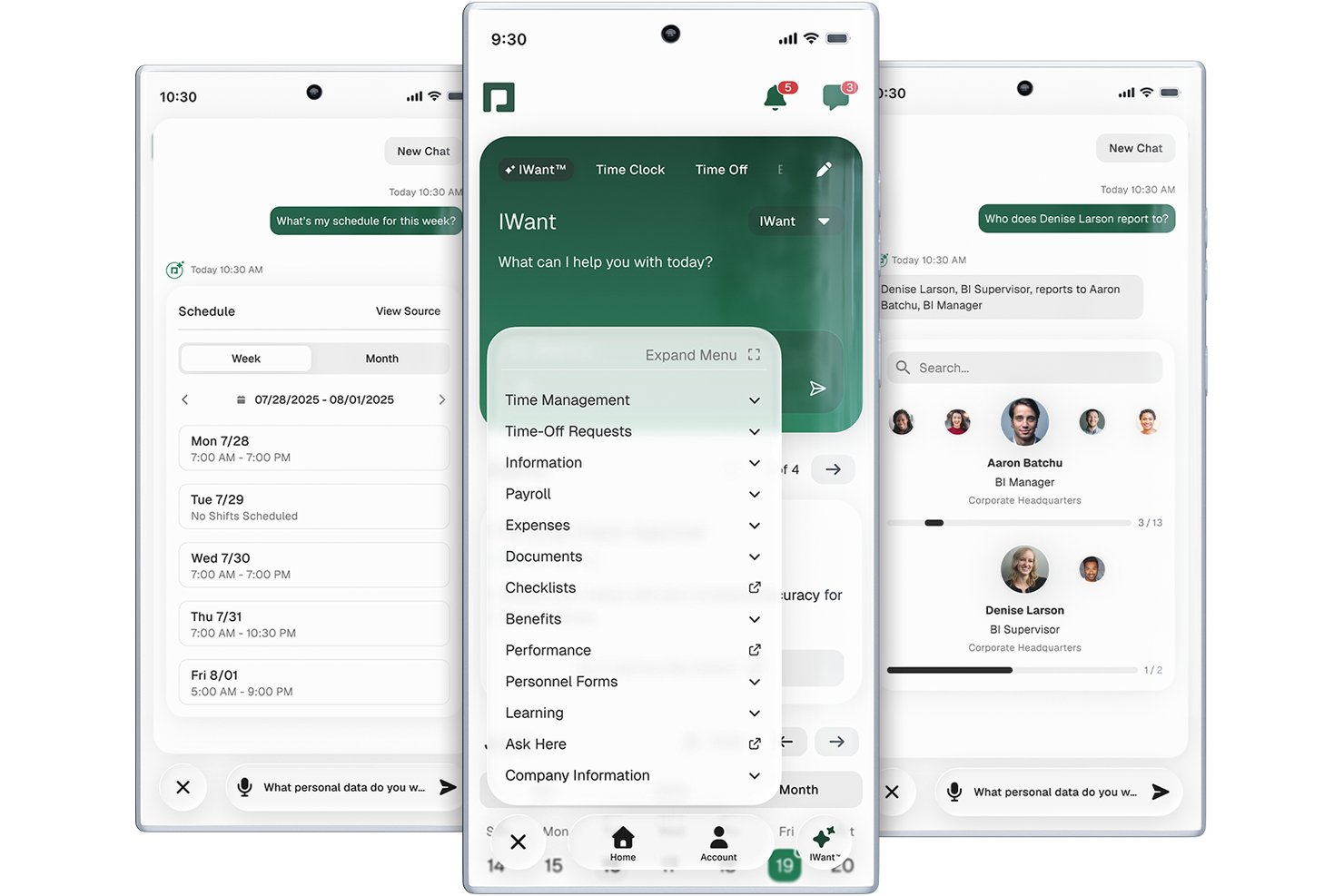
Paycom is a single-database payroll and HCM platform that covers automated payroll processing, tax filing, time and attendance, benefits administration, and employee self-service in one unified system.
Who Is Paycom Best For?
Paycom is a strong fit for mid-market U.S. companies with 50 or more employees that want payroll and HR managed in a single platform.
Why I Picked Paycom
Paycom earns its spot on my shortlist because its employee self-service goes deeper than most payroll apps. I particularly like Beti, which flips the traditional payroll model by having employees verify their own pay data before the run, catching errors before they become costly corrections. The self-service portal also gives workers direct access to pay stubs, tax forms, and time-off requests through GONE, which auto-approves or denies requests based on preset rules your team defines.
Paycom Key Features
- Direct Data Exchange dashboard: Delivers real-time visibility into ROI and software usage for admins.
- Native time and attendance module: Tracks employee hours, manages PTO, and syncs automatically with payroll.
- Dedicated implementation specialist: Assigns a named expert to guide setup and support, avoiding generic support tickets.
- Built-in benefits administration: Automates enrollment, deduction syncing, and compliance with health, vision, and retirement plans.
Paycom Integrations
Native integrations are not currently listed. However, Paycom provides an API for custom integrations.
Pros and Cons
Pros:
- Built-in time tracking syncs directly with payroll
- Single database connects HR and payroll
- Beti lets employees self-verify payroll data
Cons:
- U.S.-only, no international payroll support
- Limited native integrations with third-party tools

Best with multi-state and international payroll
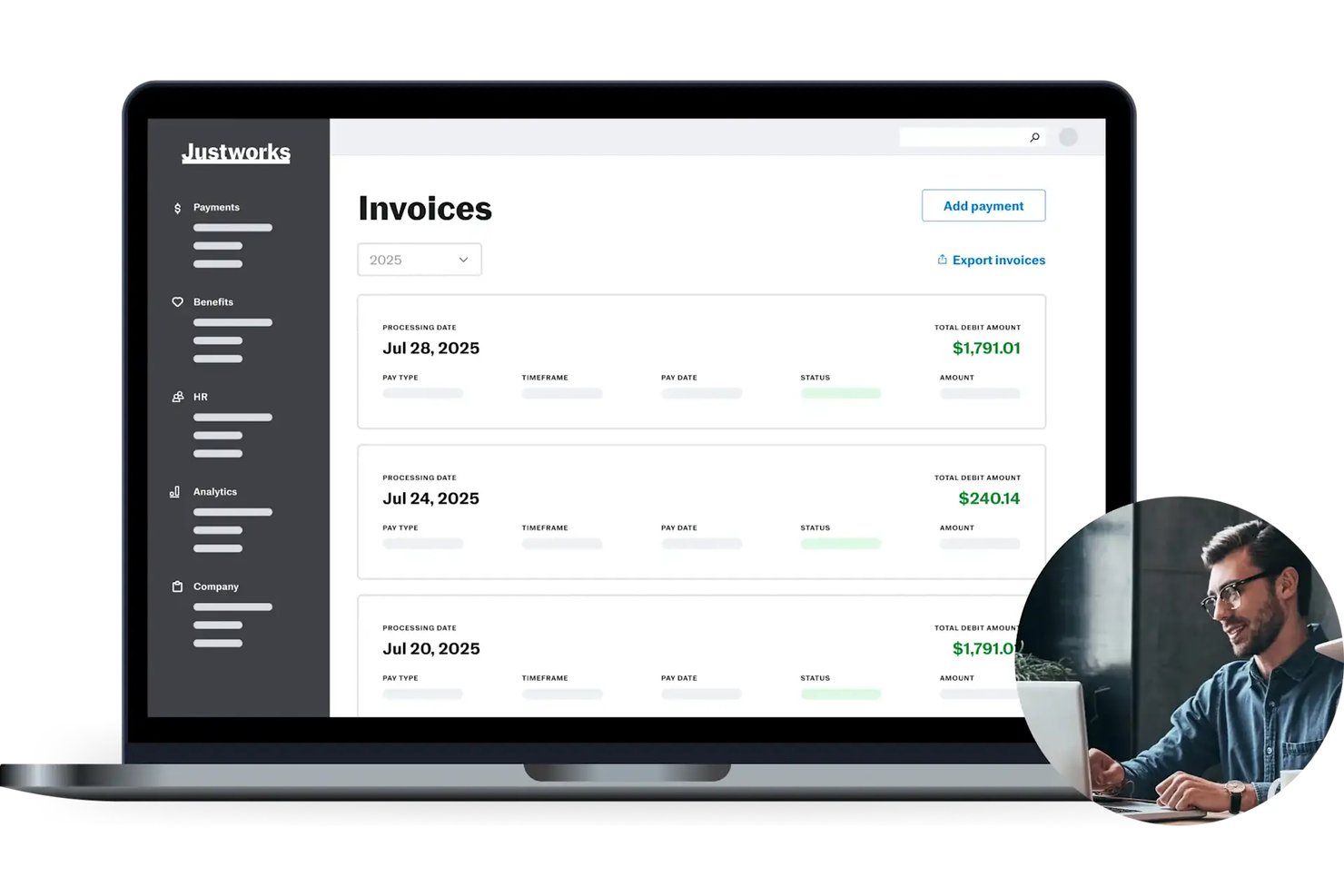
Justworks is a PEO and payroll platform that combines automated payroll processing, tax filing, benefits administration, and HR tools in a single system.
Who Is Justworks Best For?
Justworks is a strong fit for small to mid-sized businesses with distributed teams across multiple states who need payroll, compliance, and benefits managed in one place.
Why I Picked Justworks
I picked Justworks as one of the best because it handles the multi-state payroll complexity that trips up so many growing teams. It automatically files payroll taxes across 2,000+ tax localities, covering every state without requiring me to manage separate state registrations. On top of that, I can pay international contractors in 60+ countries and hire full-time global employees through its built-in Employer of Record service, all within the same platform.
Justworks Key Features
- Employee self-service portal: Lets employees update personal info, access pay stubs, and view tax documents online.
- Built-in benefits administration: Manages health insurance, 401(k), HSA/FSA, and more directly through the platform.
- Time tracking add-on: Offers mobile time tracking, geofencing, and automated shift syncing for payroll accuracy.
- Accounting integrations: Syncs payroll data with QuickBooks, Xero, NetSuite, and Sage Intacct.
Justworks Integrations
Justworks offers native integrations with QuickBooks Online, Xero, NetSuite, Sage Intacct, Greenhouse, JazzHR, Lever, 15Five, and Culture Amp.
Pros and Cons
Pros:
- Includes built-in benefits administration
- Pays international contractors in 60+ countries
- Handles multi-state payroll complexity for admins
Cons:
- Fewer third-party integrations than some competitors
- Limited custom reporting capabilities

Homebase
Best for scheduling integration
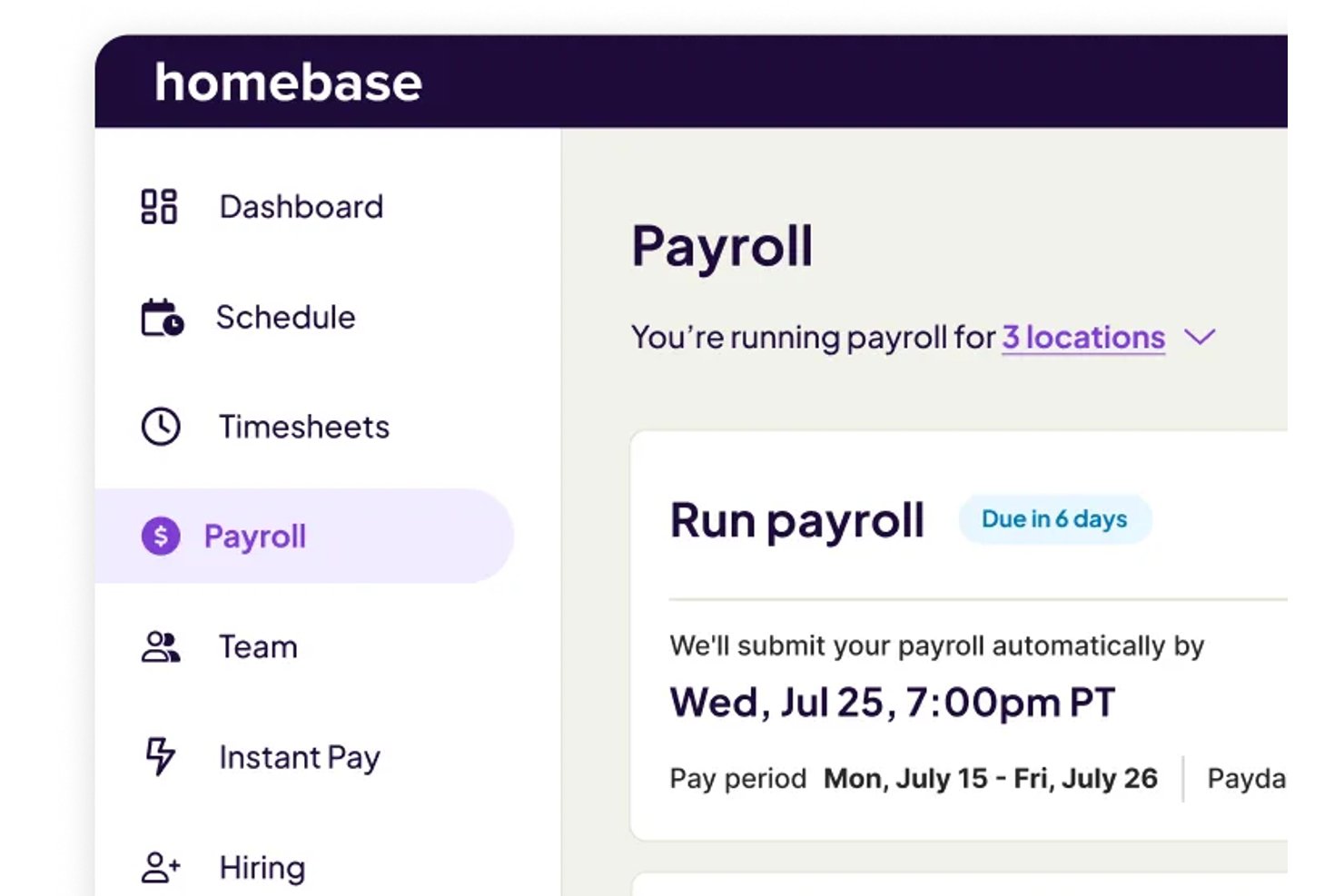
Homebase is a workforce management and payroll platform built for hourly teams that combines scheduling, time tracking, and payroll processing with automated tax filing and direct deposit.
Who Is Homebase Best For?
Homebase is a strong fit for small business owners in restaurants, retail, and service industries managing hourly workers across one or a few locations.
Why I Picked Homebase
I've included Homebase in my top picks because its scheduling and payroll tools share the same data layer. When my team builds a shift schedule, those hours flow directly into timesheets and then into payroll with no re-entry or reconciliation step in between. The AI Payroll Assistant also catches timecard gaps and conflicts before I run payroll, which cuts down on corrections mid-cycle and keeps pay runs on schedule.
Homebase Key Features
- Native mobile app: Lets admins run payroll and employees access pay stubs and tax forms from their phones.
- Employee self-service portal: Allows staff to update personal details and download pay documents online.
- Federal and state tax filing: Automatically handles payroll tax calculation, withholding, and submission for employees and contractors.
- QuickBooks Online integration: Syncs payroll data directly with QuickBooks for seamless accounting.
Homebase Integrations
Homebase offers 25+ native integrations, including QuickBooks Online, Gusto, ADP, Paychex, Square, Shopify, Toast, Heartland, and more. An API is available for custom integrations.
Pros and Cons
Pros:
- Employees can access pay stubs in app
- Built-in time clock with GPS geofencing
- Direct scheduling-to-payroll workflow for hourly teams
Cons:
- No international contractor payment support
- Reports of tax filing errors in reviews

Wave
Best with unlimited collaborators
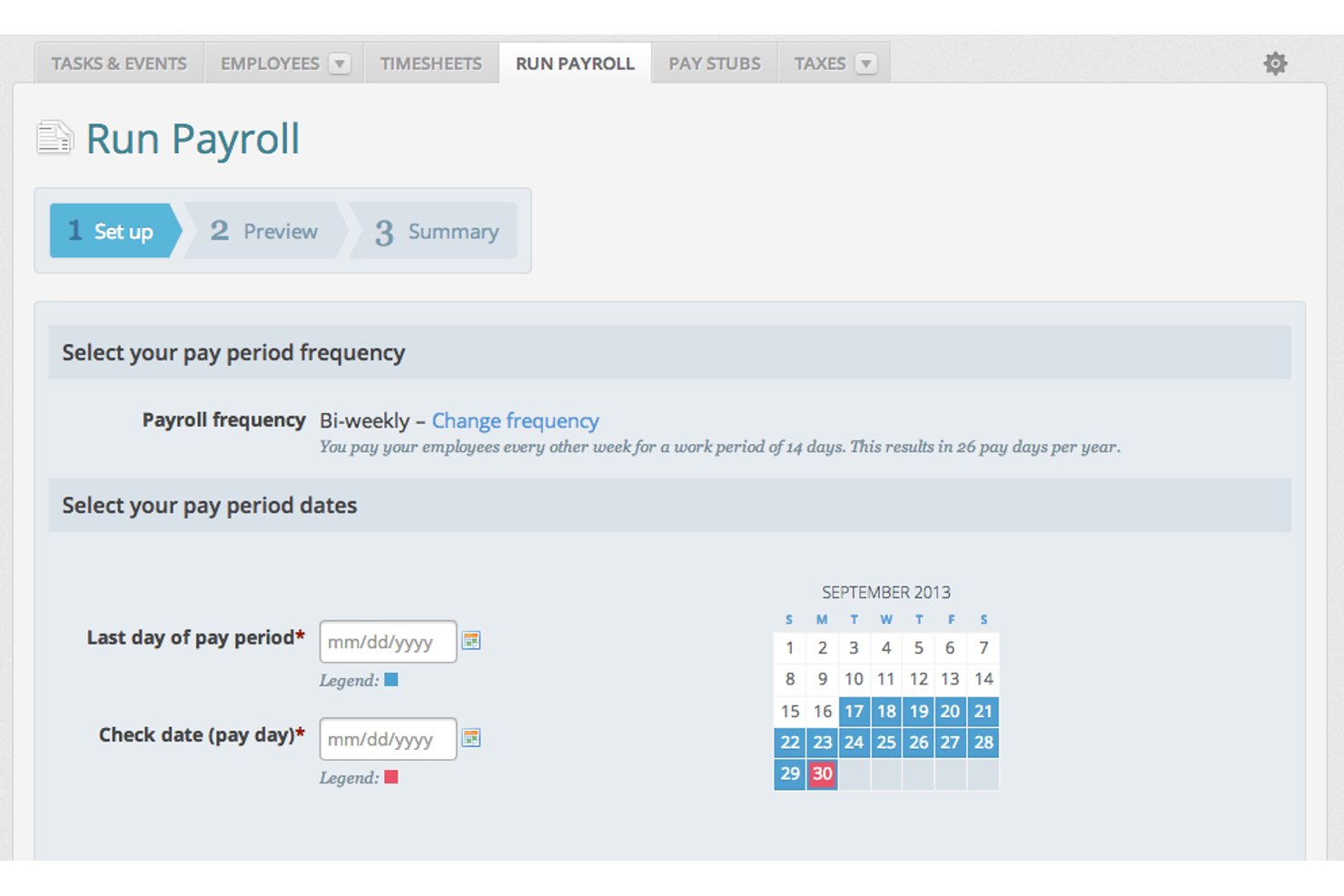
Wave is a payroll and accounting app built for small businesses and freelancers, covering automated payroll runs, direct deposit, tax filing, and contractor payments in one connected platform.
Who Is Wave Best For?
Wave suits sole proprietors and micro-business owners who handle payroll themselves without a dedicated HR or finance team.
Why I Picked Wave
I've included Wave in my top picks because no other payroll app on this list lets you add unlimited collaborators without charging per seat. You can assign specific roles (payroll manager, admin, editor, or viewer), which is genuinely useful when a business owner shares payroll access with an external bookkeeper but needs to restrict who can approve runs. The native sync between Wave Payroll and Wave Accounting means every collaborator is working from the same up-to-date financial picture.
Wave Key Features
- Automated tax form generation: Wave creates and stores W-2, W-3, and 1099-NEC forms for your payroll filings.
- Employee self-service portal: Employees can log in to view pay stubs, update information, and access tax documents anytime.
- Direct deposit payments: Payroll funds can be sent directly to employee and contractor bank accounts.
- Integrated accounting sync: Payroll expenses and transactions are automatically linked to the Wave accounting platform.
Wave Integrations
Wave offers native integrations within its own ecosystem, including Wave Accounting, Wave Invoicing, and Wave Payments. Other native integrations include Amazon, eBay, Etsy, and more.
Pros and Cons
Pros:
- Supports W-2 and 1099 processing
- Payroll data links directly to accounting
- Unlimited users without added cost
Cons:
- Limited third-party integrations outside Wave
- No native time tracking features
Best for unified attendance management
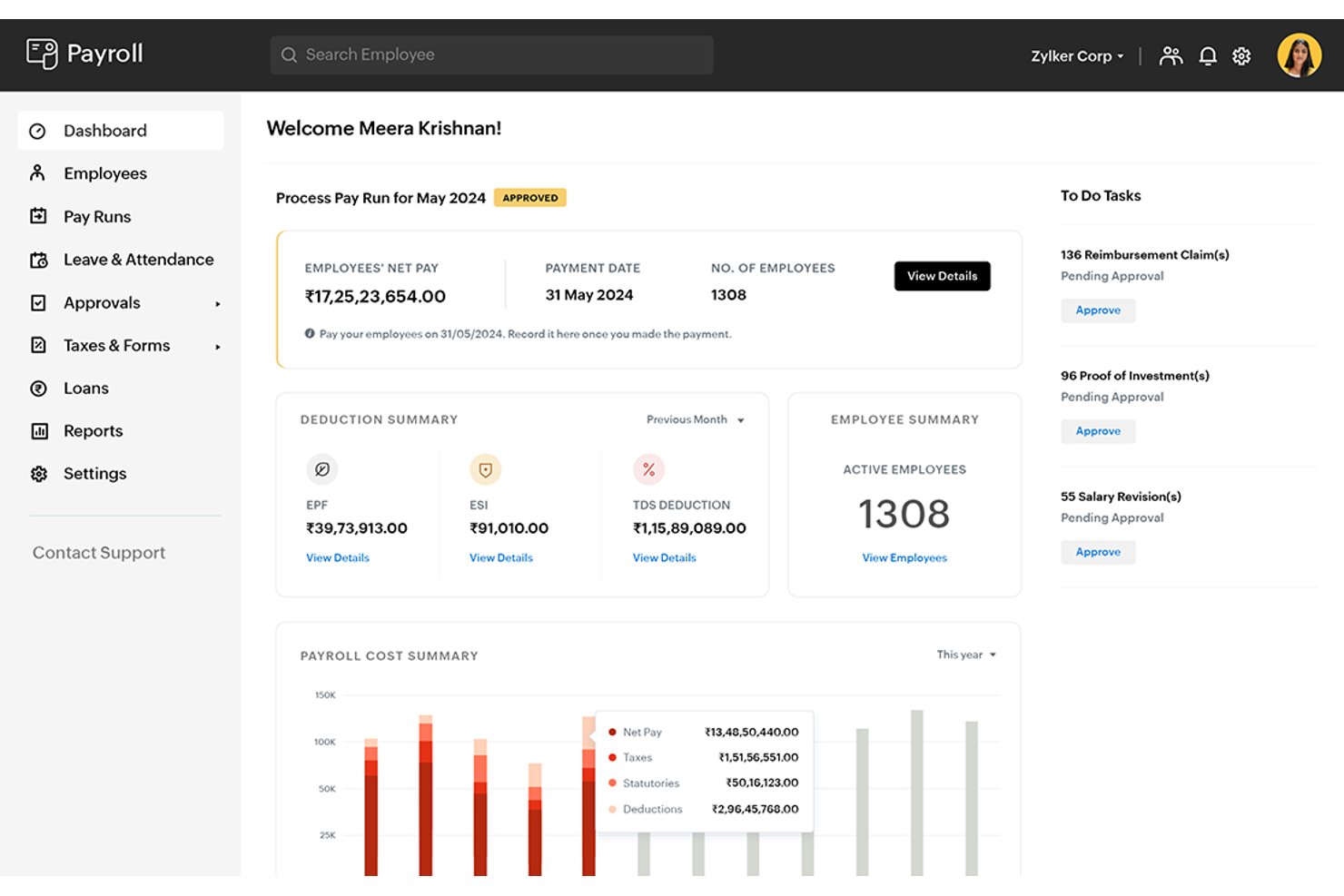
Zoho Payroll is a cloud-based payroll app that handles automated pay runs, statutory tax compliance, contractor payments, employee self-service, and leave and attendance tracking within a single platform.
Who Is Zoho Payroll Best For?
Small to mid-sized businesses already using Zoho tools will get the most value here, particularly those managing teams across India, the GCC, or the US.
Why I Picked Zoho Payroll
Zoho Payroll earns its spot on my shortlist because it's one of the few payroll apps that builds leave and attendance management directly into the payroll engine, rather than bolting it on as a separate HR product. I like that custom leave types, manager approval workflows, and attendance records all connect straight to pay run calculations. When an employee takes an unplanned leave day, the LOP adjustment flows automatically into the next pay run without any manual intervention.
Zoho Payroll Key Features
- Multi-level pay run approvals: Route pay runs through designated approvals before finalizing disbursements each cycle.
- Automated statutory compliance: Automatically generates and files tax forms such as TDS, PF, ESI, Form 16, and 24Q for Indian payroll.
- Contractor payroll management: Supports contractor onboarding, automated TDS handling, and payslip generation alongside employee payroll.
- Employee self-service portal: Employees can access digital payslips, tax worksheets, and submit expense claims from the web or mobile app.
Zoho Payroll Integrations
Zoho Payroll offers native integrations with Zoho Books, Zoho People, Zoho Expense, HSBC, and WhatsApp Business.
Pros and Cons
Pros:
- Dedicated contractor payroll module
- Automated multi-state tax compliance (India, US)
- Built-in leave and attendance tracking
Cons:
- Some state and local filings still manual
- Limited to Zoho ecosystem for integrations

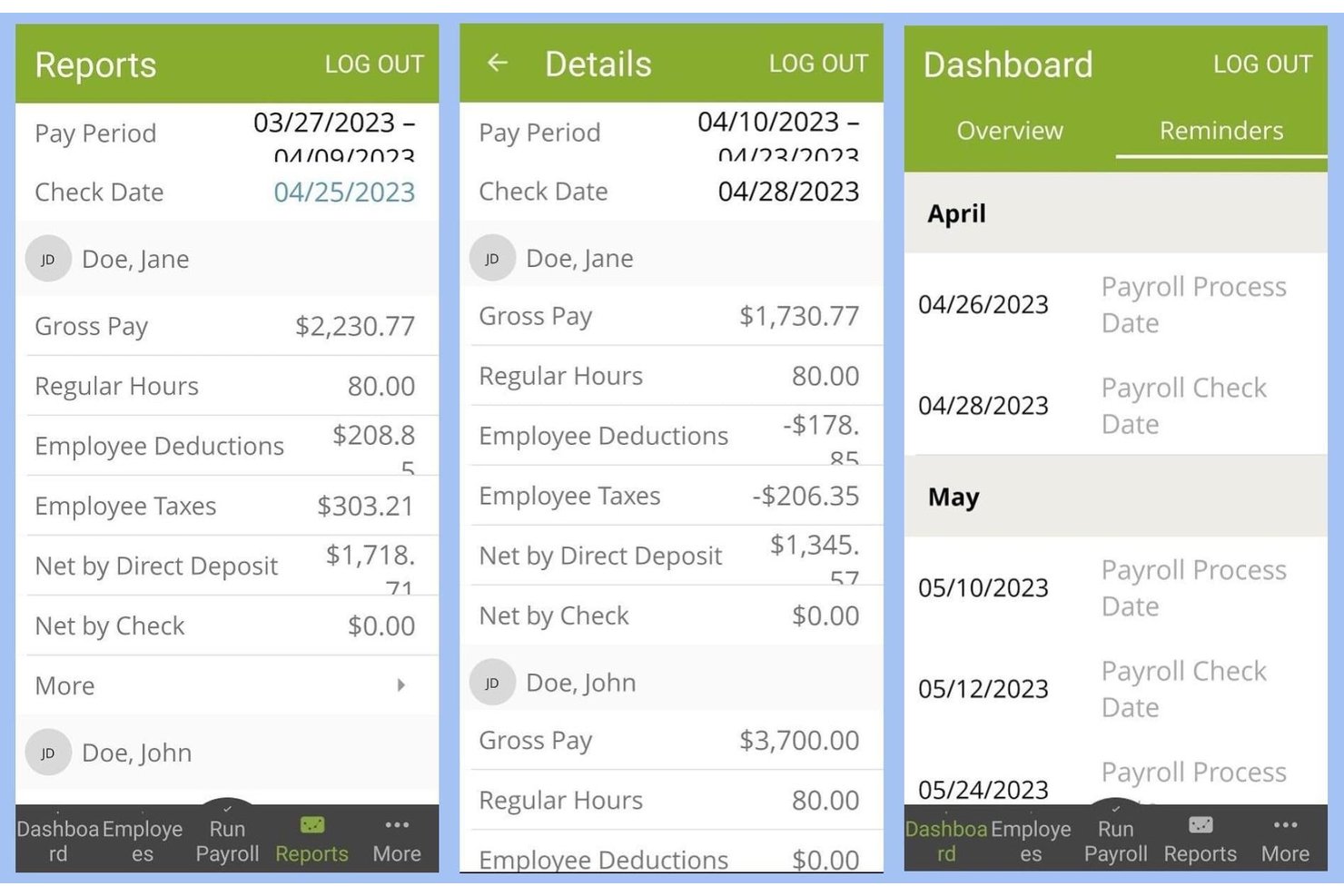
SurePayroll is a cloud-based payroll platform built for small businesses and household employers that handles automated payroll processing, tax filing, direct deposit, and W-2/1099 management for both employees and contractors.
Who Is SurePayroll Best For?
SurePayroll is a strong fit for small business owners who need a low-maintenance payroll solution without the complexity or cost of enterprise-grade platforms.
Why I Picked SurePayroll
SurePayroll earns its spot on my shortlist because the auto-scheduling feature genuinely removes payroll from my weekly to-do list. I set my pay schedule once, and SurePayroll runs it automatically, including off-cycle runs for bonuses or terminations at no extra charge. What I also like is the tax penalty guarantee: if SurePayroll makes a filing error, they cover the cost of any resulting penalty.
SurePayroll Key Features
- Employee self-service portal: Employees can access pay stubs, tax documents, and update personal or banking information online.
- Mobile payroll apps: Dedicated iOS and Android apps let admins and employees manage payroll and check pay details on the go.
- Accounting software integration: Syncs payroll data with QuickBooks, Xero, Zoho Books, and FreshBooks for easier bookkeeping.
- HR compliance add-on: Optional module provides HR and employment law resources, document templates, and phone support for compliance questions.
SurePayroll Integrations
SurePayroll offers native integrations with QuickBooks and Zoho Books, and supports third-party time tracking systems.
Pros and Cons
Pros:
- Tax penalty guarantee for payroll filings
- Auto-scheduling payroll for recurring cycles
- Unlimited payroll runs at no extra charge
Cons:
- No international contractor payments
- Limited reporting customization options

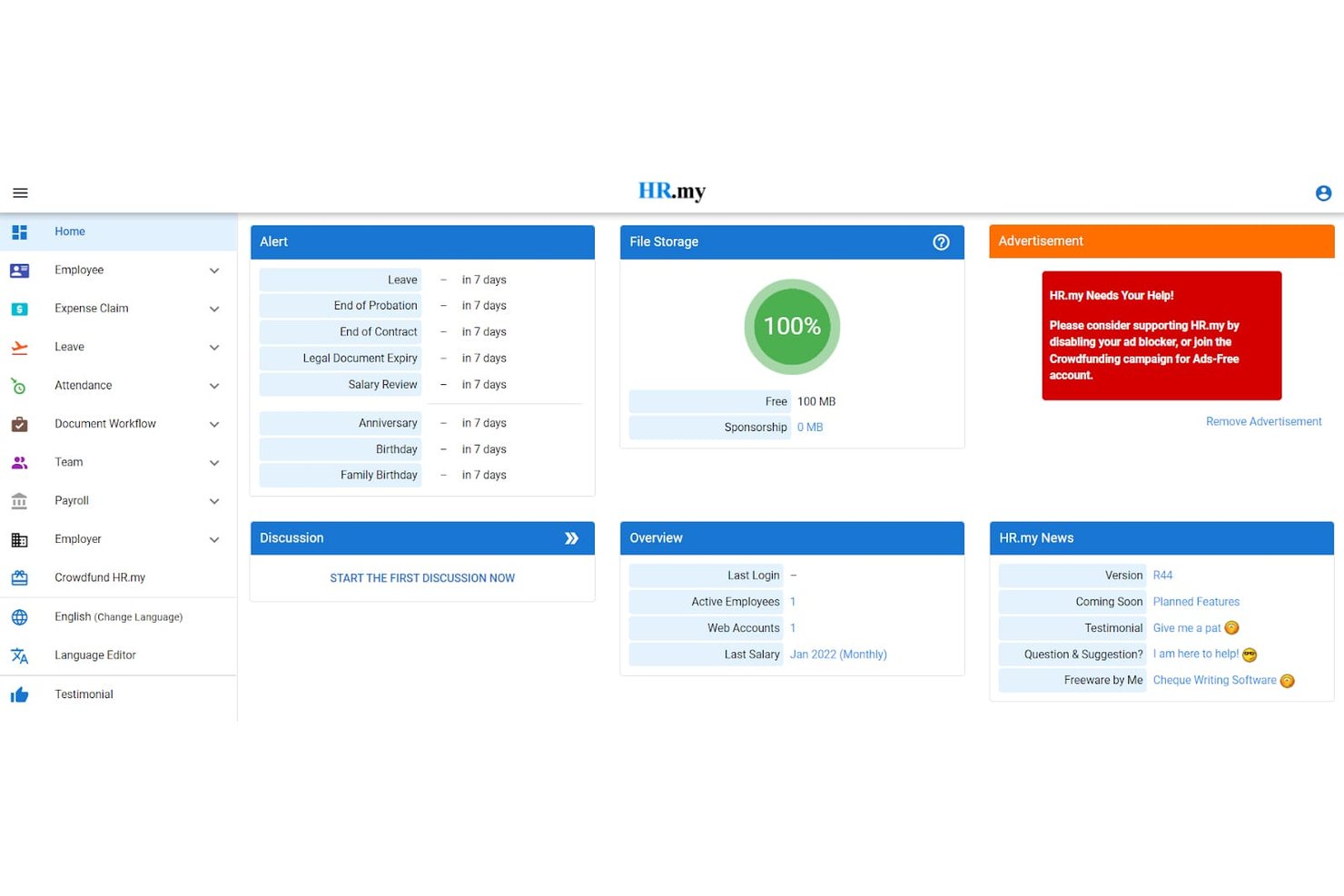
HR.my is a free, cloud-based HR and payroll platform that covers payslip generation, leave management, attendance tracking, and expense claims for unlimited employees.
Who Is HR.my Best For?
HR.my is a strong fit for small businesses and startups that need to manage payroll and HR tasks across a growing headcount without a software budget.
Why I Picked HR.my
HR.my earns its spot on my shortlist because it's one of the only payroll and HR platforms that places no cap on headcount at no cost. I particularly like the payroll batch processing and multi-schedule support (monthly, weekly, bi-weekly), which let growing teams run payroll across different employee groups in one system. The built-in selfie and geolocation clock-in for field workers is a genuinely useful feature I don't see bundled into free tools elsewhere.
HR.my Key Features
- Employee self-service portal: Employees can view payslips, update details, and submit claims or leave requests online.
- Expense claim tracking: Submit, review, and manage expense reimbursements directly within the platform.
- Multi-language support: Choose from over 60 languages for both admin and staff interfaces.
- Role-based access control: Assign custom HR permissions to managers or administrators for different workflows.
HR.my Integrations
Native integrations are not currently listed. The platform supports data export to Excel, but does not provide built-in accounting or third-party HR software integrations.
Pros and Cons
Pros:
- Multi-language support for global teams
- Built-in time tracking and leave management
- Unlimited employees on free web-based platform
Cons:
- Doesn’t handle US payroll tax filing
- No direct deposit payroll functionality

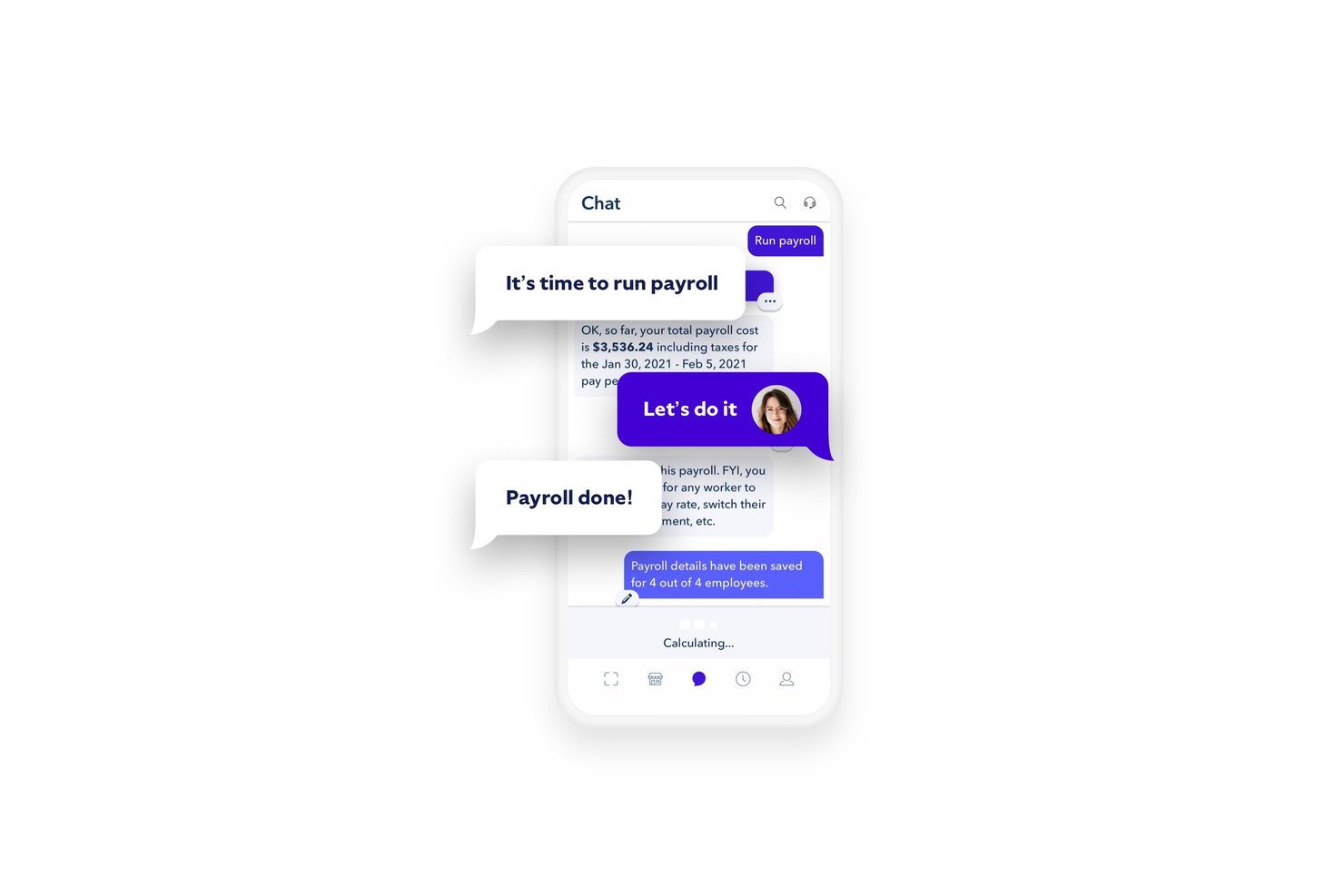
Roll by ADP is a mobile-first payroll app that lets you run payroll, pay W-2 employees and 1099 contractors, handle tax filing across all 50 states, and manage direct deposits through a conversational chat interface.
Who Is Roll by ADP Best For?
Roll by ADP is a strong fit for small business owners who handle payroll themselves and want a simple, low-overhead solution without a dedicated HR or payroll team.
Why I Picked Roll by ADP
Roll by ADP earns its spot on my shortlist because no other payroll app processes payroll the way it does, through a chat window where typing "Run payroll" is genuinely all it takes. I also like the real-time, AI-driven error checks built into the chat, which flag issues before payroll is submitted rather than after. On top of that, I can handle pay changes, direct deposit setup, and new hire info all through simple chat commands without navigating any menus.
Roll by ADP Key Features
- Unlimited payroll runs: Process payroll as often as you need for both employees and contractors.
- Automatic payroll tax payment and filing: Calculates, withholds, and files federal, state, and local payroll taxes for every run.
- Google and Apple sign-on: Log in quickly and securely using existing Google or Apple credentials.
- QuickBooks Online integration: Sync payroll data directly with your general ledger for accurate accounting.
Roll by ADP Integrations
Roll by ADP offers a native integration with QuickBooks Online. No additional native integrations are currently listed.
Pros and Cons
Pros:
- Supports W-2 employees and 1099 contractors
- Tax calculations and filings handled automatically
- Payroll runs through a conversational chat interface
Cons:
- Only integrates natively with QuickBooks Online
- No built-in time tracking module

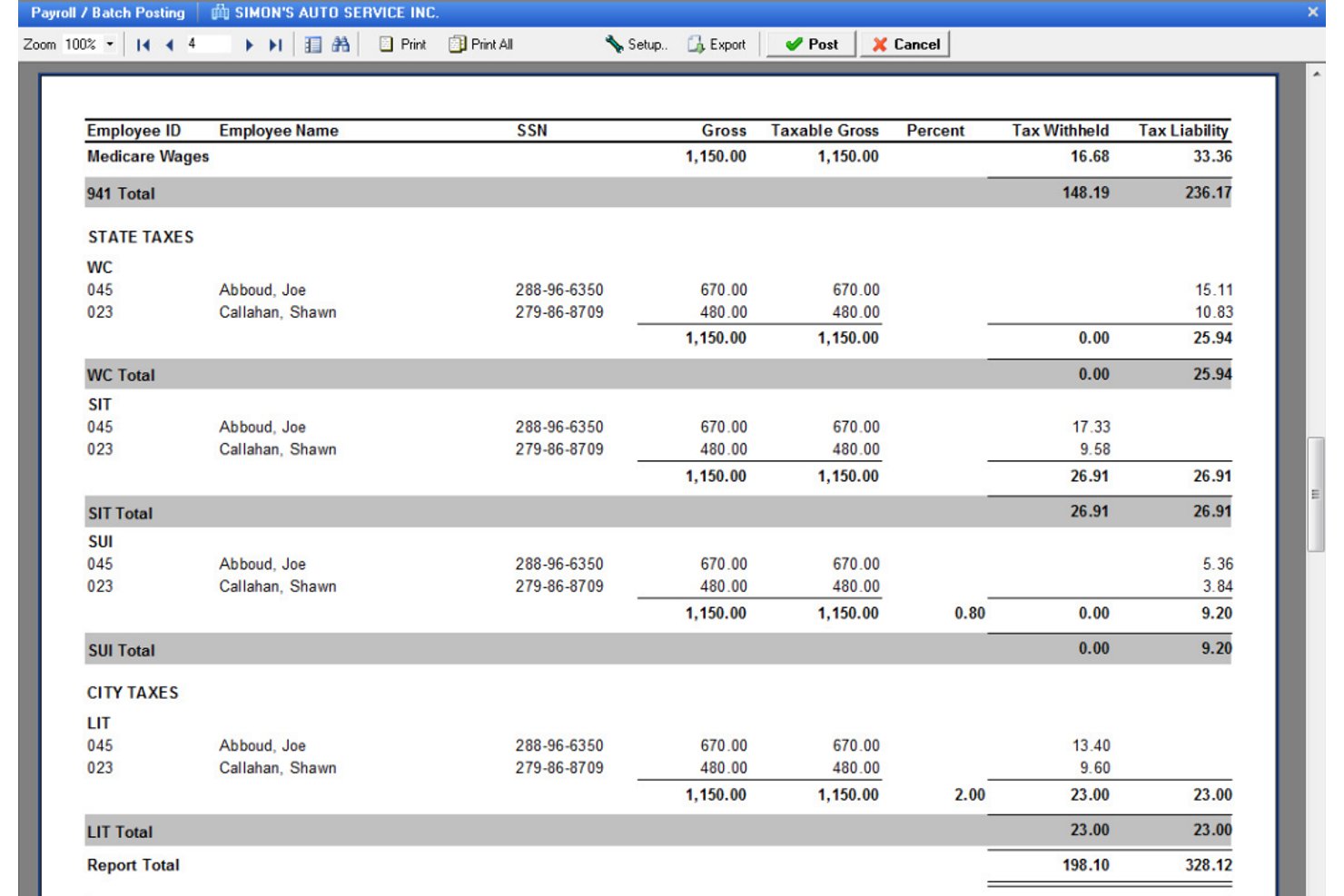
Payroll4Free is a small business payroll app that handles wage calculations, direct deposit, tax calculations, contractor and employee payments, and basic payroll reporting.
Who Is Payroll4Free Best For?
Payroll4Free is a natural fit for very small businesses and solo operators with fewer than 10 employees who need basic payroll without a monthly software bill.
Why I Picked Payroll4Free
I've included Payroll4Free in my top picks because it genuinely delivers on its free promise for teams of nine or fewer, which is rare in the payroll software space. I like that it handles both W-2 employees and 1099 contractors in the same system, with year-end W-2 and 1099 generation included. The employee portal lets your team pull their own paystubs and tax documents, and direct deposits run through your own bank at no added cost.
Payroll4Free Key Features
- QuickBooks integration: Sync payroll data directly with QuickBooks accounting software for streamlined bookkeeping.
- Vacation and PTO tracking: Configure and manage accrual rules for vacation, sick leave, and other paid time off within the payroll system.
- Payroll tax calculation: Calculates federal, state, and local payroll taxes automatically with each payroll run.
- Employee self-service portal: Lets employees access pay stubs, W-2s, personal info, and accrued vacation balances from any device.
Payroll4Free Integrations
Payroll4Free integrates with QuickBooks for accounting synchronization and Checkr for background checks. Other native integrations are not currently listed.
Pros and Cons
Pros:
- Generates W-2s and 1099s automatically
- Supports both employees and contractors together
- No monthly software fees for small teams
Cons:
- Windows-only app, no true web or mobile
- No native time tracking features

Gusto
Best for contractor and employee payroll
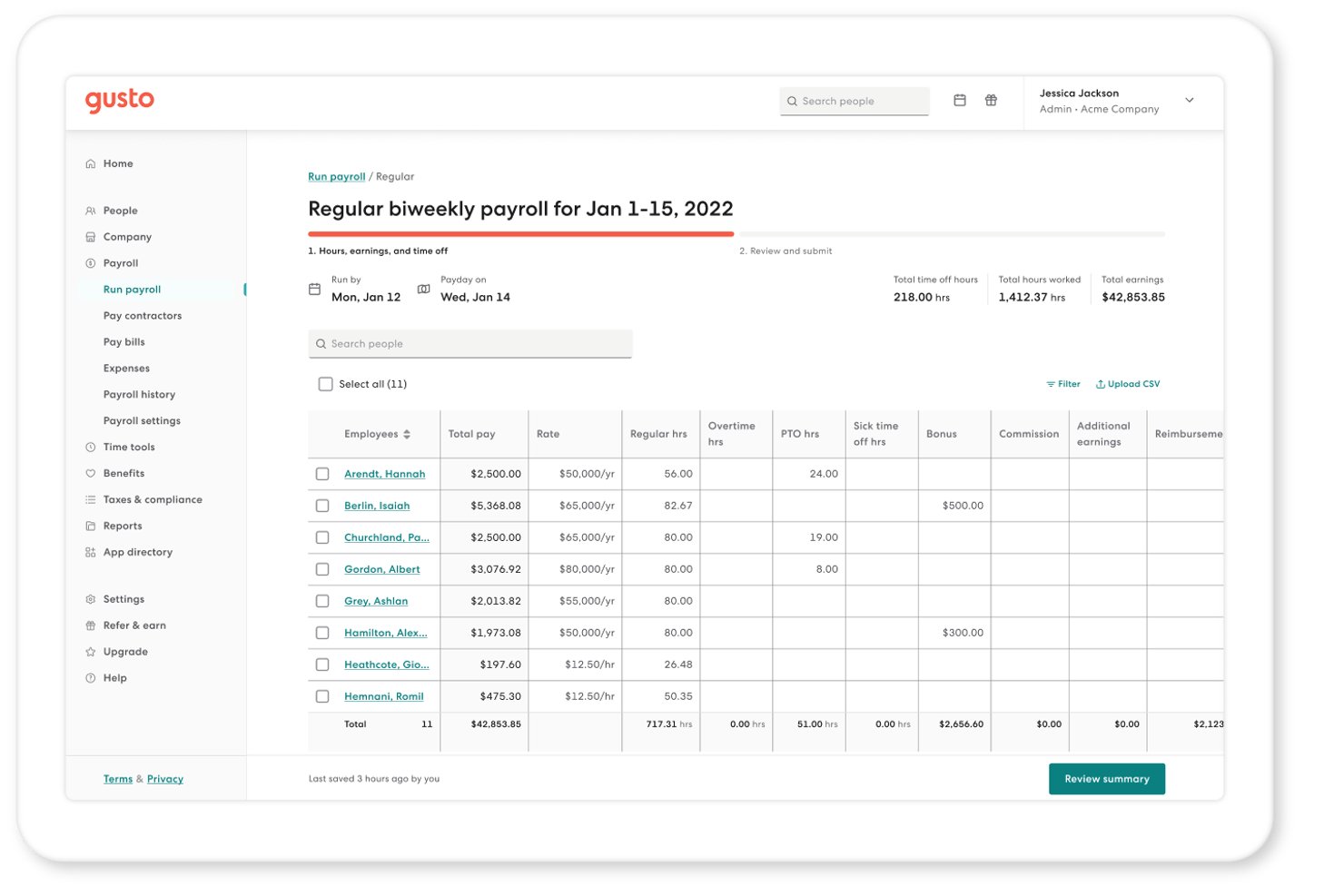
Gusto is a payroll and HR platform that handles automated payroll processing, tax filing, benefits administration, and contractor payments for small and mid-sized businesses.
Who Is Gusto Best For?
Gusto is a strong fit for small business owners and payroll administrators who manage a mix of W-2 employees and 1099 contractors without a dedicated HR team.
Why I Picked Gusto
Gusto earns its spot on my shortlist because no other payroll app handles unlimited runs as cleanly. I can process off-cycle payrolls for bonuses or corrections without any extra charges, and AutoPilot™ lets me schedule unattended payroll so nothing gets missed between regular pay periods. When timing is tight, Instant Pay gets funds into employee accounts within minutes of approval, which I've found genuinely useful for last-minute hires or corrections.
Gusto Key Features
- Mobile payroll app: Run payroll and access pay stubs, tax forms, and PTO balances from a dedicated iOS or Android app.
- Employee self-service portal: Employees update personal details, banking, and withholdings directly from their own login.
- Benefits administration: Manage health insurance, workers’ comp, and 401(k) plans with seamless payroll deduction syncing.
- Global contractor payments: Send payments to contractors in over 120 countries, all managed from the same dashboard.
Gusto Integrations
Gusto offers over native integrations with QuickBooks, Xero, FreshBooks, Homebase, 7shifts, 15Five, and Expensify. An API is available for custom integrations.
Pros and Cons
Pros:
- International contractor payments offered natively
- Automated multi-state payroll tax filing
- Unlimited payroll runs every month
Cons:
- Time tracking requires a higher-priced plan
- Custom payroll reporting is limited
New Product Updates from Gusto
Gusto Adds Solo Advisory Tools and Mobile Money Features
Gusto adds Solo S-Corp Advisory Tools and Gusto Money on Mobile for tax guidance, invoicing, and bill payments. These updates help accountants advise solopreneurs and let users manage business finances from their phones. For more information, visit Gusto’s official site.
Other Payroll Apps
Here are some additional payroll app options that didn’t make it onto my shortlist, but are still worth checking out:
- Paylocity
With built-in compliance automation
- Keka HR
For integrations with 100+ prebuilt apps
- QuickBooks Payroll
With same-day direct deposit
- OnPay
For tax filings
- Paychex Flex
For flexible payroll options
- Remote
For global payroll and compliance
- Sage Payroll
For collaborative accountant access
- Reckon One
For budget-friendly accounting
- Xero
For accounting and payroll sync
- Patriot Software
For simplified payroll setup


How I Evaluate Payroll Apps
I split my evaluation into two layers: the baseline every payroll app must clear—automated tax filing, direct deposit, W-2/1099 support—and the differentiators that separate good from great.
Core Functionality (Table Stakes For This List)
When I'm selecting tools for my list, I rank each one on a scale from 0 (does not offer the functionality) to 5 (excels in this area) for each core functionality listed below. Then, I calculate the tool's total score into a percentage. Each tool needs to achieve a minimum total score of 75% to be considered for inclusion.
- Automated Payroll Processing: I check whether a tool can handle scheduled runs with auto-calculated deductions and direct deposit, including off-cycle payments for things like bonuses or terminations.
- Tax Filing & Compliance: Each app should calculate, withhold, and file payroll taxes at multiple jurisdictional levels, plus generate year-end forms like W-2s and 1099s automatically.
- Employee & Contractor Payments: I look for clean support for both W-2 employees and 1099 contractors in one system, so teams aren't juggling separate workflows or platforms.
- Pay Stubs & Payroll Reporting: Accessible digital pay stubs and a solid report library matter here—things like payroll registers, tax liability summaries, and earnings breakdowns for audits or budgeting.
- Time & Attendance Integration: Whether it's native time tracking or a connection to tools like QuickBooks Time or Deputy, hours worked should flow into payroll without manual re-entry.
- Accounting & HR Integrations: I evaluate how well payroll data syncs with accounting platforms and broader HR systems, since disconnected data leads to reconciliation headaches every close cycle.
Once I have a list of tools that meet this criteria, I consider what sets each platform apart.
Differentiating Factors (What Sets Vendors Apart)
Here's how I compare and contrast different vendors:
Standout Features
Built-in benefits administration is a major separator. When health insurance, retirement, and workers' comp deductions sync directly with payroll, it removes a layer of manual reconciliation that trips up a lot of teams. I also evaluate multi-state and global payroll capabilities, especially for companies with remote hires spread across multiple jurisdictions. On-demand pay is another feature worth weighing, since early wage access is becoming a real draw for hourly and shift-based workforces.
Beyond Features
Pricing structure matters a lot here. Per-employee-per-month models can balloon quickly for growing teams, so I look at how costs scale and whether contractors or multi-state filings trigger extra fees. Implementation speed is another big one—switching payroll providers mid-year means migrating YTD wage and tax data, and I evaluate how much support each vendor offers during that transition. I also check whether a vendor backs its tax calculations with an error-resolution or penalty guarantee, since a missed filing can create real financial exposure.
How To Choose a Payroll App
It’s easy to get bogged down in long feature lists and complex pricing structures. To help you stay focused as you work through your unique software selection process, here’s a checklist of factors to keep in mind:
| Factor | What to Consider |
|---|---|
| Scalability | Will the software grow with your business? Consider if it can handle an increase in employees without extra costs or complications. |
| Integrations | Does it work with your existing tools? Look for compatibility with accounting, HR, and time-tracking systems to avoid manual data entry. |
| Customizability | Can you tailor it to your needs? Check if the app allows adjustments to fit your payroll processes, such as unique pay types or reporting formats. |
| Ease of use | Is it user-friendly for your team? Evaluate the interface and usability, ensuring minimal training is needed, and tasks are straightforward. |
| Implementation and onboarding | How fast can you start using it? Consider the time and resources required for setup and whether there are guided onboarding or support options available. |
| Cost | Is it within your budget? Examine pricing plans for hidden fees, and compare the cost against the features and benefits provided. |
| Security safeguards | How does it protect your data? Ensure the app has strong security measures, such as encryption and access controls, to safeguard sensitive payroll information. |
| Compliance requirements | Does it meet legal standards? Verify that the software adheres to local tax laws and payroll regulations to avoid compliance issues. |
Switching Payroll Apps: A Migration Checklist
Switching payroll apps is easier when you prepare before your first payroll run. A little planning can help reduce payroll disruptions, avoid data issues, and give your team confidence that everything is ready for launch.
| ✓ | Before switching payroll apps… |
|---|---|
| ☐ | Download historical payroll records and tax documents from your current provider. |
| ☐ | Verify employee information, tax details, and direct deposit information before importing data. |
| ☐ | Confirm your payroll schedules, pay groups, and deduction settings match your existing process. |
| ☐ | Check that your accounting, HR, time tracking, and benefits integrations are configured correctly. |
| ☐ | Tell employees when the new payroll system will go live and whether they need to take any action. |
| ☐ | Run your first payroll early if possible, allowing time to review reports and resolve any issues before payday. |
Which Payroll App Is Best for You?
The right payroll app depends less on your company size and more on how you pay your workforce. A freelancer paying themselves once a month has very different payroll needs than a growing business managing hourly employees across multiple states.
Use the guide below to identify the type of payroll solution that best fits your business.
| If you… | Prioritize… | Examples |
| Run a freelance or solo business | Simple payroll, owner compensation, and affordable pricing. | Wave, Patriot Software, Roll by ADP, Payroll4Free |
| Own a small business (1–20 employees) | Automated tax filing, direct deposit, and employee self-service. | Gusto, RUN Powered by ADP, QuickBooks Payroll |
| Manage hourly employees | Time tracking integrations, overtime calculations, and flexible pay schedules. | Homebase |
| Pay employees and contractors | Multiple worker types and tax reporting. | Xero |
| Operate across multiple states | Multi-state payroll and automated tax compliance. | Paycom, Paylocity, Proliant |
| Need payroll and HR together | Payroll, onboarding, benefits, and PTO management. | Justworks, Paychex Flex, HR.my |
| Hire internationally | Global payroll and localized compliance. | Remote, Reckon One |
| Manage payroll on the go | A fully featured mobile app. | Gusto, Paychex Flex |
When Free Payroll Software Isn’t Enough
Many of the best free payroll apps are a good fit for businesses with straightforward payroll needs. But as your business grows, manual processes, compliance requirements, and limited functionality can start creating more work than the software saves.
If you recognize any of the situations below, it may be time to upgrade to a paid payroll solution.
| If you’re… | It’s probably time to upgrade because… |
| Hiring your first employees | Payroll taxes, statutory deductions, and reporting become more complex than most free tools can support. |
| Managing employees and contractors | Different worker classifications often require separate payment workflows and tax reporting. |
| Expanding into multiple states | State tax registrations, withholding requirements, and compliance obligations become more difficult to manage manually. |
| Spending hours fixing payroll issues | Manual calculations and repetitive data entry can increase the risk of payroll errors. |
| Needing payroll reports for accounting | Finance teams often need more detailed reporting for reconciliation, budgeting, and tax preparation. |
| Growing your team quickly | Paid payroll platforms typically offer stronger automation, integrations, and support as headcount increases. |
What Is a Payroll App?
A payroll app is a software solution designed to automate and manage payroll processes for businesses. HR professionals, accountants, and small business owners typically use these tools to ensure accurate and timely employee payments. Automated tax calculations, direct deposit, and compliance tracking help minimize errors, save time, and reduce administrative burdens. Overall, these tools provide value by simplifying payroll tasks and improving efficiency.
Features
Here are the core features any great payroll apps software should have:
- Automated tax calculations: Support accurate state tax deductions and filings, reducing the risk of errors and penalties.
- Direct deposit: Allows employees to receive their earnings directly in their bank accounts, speeding up the payment process.
- Employee self-service portal: Empowers employees to access their pay stubs, tax forms, and personal information, reducing administrative workload.
- Compliance tracking: Helps keep your business aligned with local and federal payroll regulations, minimizing compliance risks.
- Customizable reporting: Provides tailored payroll data reports that offer insights into expenses and trends, aiding in better financial planning.
- Integration capabilities: Ensure data flows between payroll and other systems such as accounting or human resources, reducing time-consuming data entry.
- Mobile access: Allows pay period tasks to be managed on the go, providing flexibility for remote or busy managers.
- Time tracking integration: Connects with timesheet systems to ensure accurate pay rate calculations based on actual hours worked.
- Benefits administration: Simplifies the management of employee benefits, helping to optimize enrollment and deductions.
- Scalability: Supports business growth by easily adapting payroll software to an increasing number of employees without major changes.
Benefits
Implementing a payroll app provides several benefits for your team and your business. Here are a few you can look forward to:
- Time savings: Automated payroll processing reduces the time spent on manual calculations and paperwork, freeing up your team for other tasks.
- Improved accuracy: Online payroll features such as automated tax calculations and direct deposit help minimize errors in payroll and tax filings.
- Enhanced compliance: All-in-one tracking ensures your business adheres to payroll regulations, reducing the risk of fines and penalties.
- Employee empowerment: A self-service dashboard allows employees to access their information, reducing the need for HR intervention.
- Better financial insights: Customizable reporting provides valuable insights into payroll expenses, assisting in informed decision-making.
- Flexibility: Mobile access lets managers handle payday tasks from anywhere, accommodating remote work and busy schedules.
- Scalability: The ability to grow with your business ensures that payroll systems can handle more employees without disruption.
Costs and Pricing
Selecting a payroll app requires understanding the various pricing models and plans available. Costs vary based on features, team size, add-ons, and more. The table below summarizes common plans, their average prices, and typical features included in payroll app solutions:
Plan Comparison Table for Payroll Apps
| Plan Type | Average Price | Common Features |
|---|---|---|
| Free Plan | $0 | Basic payroll processing, limited support, and simple tax calculations. |
| Personal Plan | $5-$25/user/month | Payroll processing, direct deposit, employee self-service, and basic reporting. |
| Business Plan | $30-$75/user/month | Advanced reporting, automated tax filings, benefits administration, and integration capabilities. |
| Enterprise Plan | $100-$150/user/ month | Customizable solutions, dedicated account management, advanced compliance tracking, and extensive analytics. |
FAQs
Here are some answers to common questions about payroll apps:
Can AI tools like ChatGPT do payroll?
AI tools like ChatGPT can help explain payroll concepts, summarize payroll reports, draft employee communications, and answer general payroll questions. They can also help identify potential issues or explain payroll regulations in plain language.
However, AI can’t replace payroll software. It doesn’t calculate payroll taxes, process direct deposits, file tax forms, or maintain official payroll records. If you’re using AI, think of it as a research and productivity tool that complements your payroll app rather than a replacement for it.
Can payroll apps handle direct deposit and other payment methods?
Yes. Most payroll apps support direct deposit, which is the most common way to pay employees. Many platforms also support paper checks, manual payments, and pay cards, while some providers offer international payment options for global teams.
Payment methods and processing times vary by vendor. If fast payroll is important to your business, look for providers that offer same-day or next-day direct deposit alongside the payment options your workforce needs.
Can I run payroll entirely from my phone?
Many payroll apps let you review, approve, and run payroll from a mobile app. Depending on the provider, you may also be able to approve timesheets, access payroll reports, manage employee information, and let employees view payslips or tax documents.
That said, desktop versions often offer more advanced functionality. Initial payroll setup, tax configuration, and detailed reporting are usually easier to complete from a web browser. If mobile payroll is a priority, confirm that the provider supports full payroll processing rather than basic administrative tasks.
Which payroll app lets me pay myself through an owner’s draw?
Most payroll apps don’t process owner’s draws because they’re accounting transactions rather than payroll. Sole proprietors and many LLC owners typically pay themselves through owner’s draws, while S corporation and C corporation owners generally take wages through payroll.
If you take owner’s draws regularly, choose payroll software that integrates with your accounting platform. This allows you to manage payroll for employees while accurately recording owner distributions in your financial records.
What should I consider when switching payroll apps?
Beyond features and pricing, consider how the transition will affect your payroll schedule. Check whether the provider offers migration support for employee records, tax information, and historical payroll data. You’ll also want to confirm that the app integrates with your accounting, HR, and time-tracking systems, and understand how long implementation will take before your first live payroll.
How secure is payroll data in a payroll app?
#selection-criteriaPayroll systems store highly sensitive employee information, so security should be a priority. Look for features such as data encryption, multi-factor authentication, role-based access controls, and regular security audits. If your organization operates in a regulated industry, verify that the vendor meets any applicable compliance requirements for your region.
Can payroll apps handle employees in multiple countries?
Some payroll apps support global payroll, while others are designed for a single country. If you employ people internationally, confirm which countries the vendor supports, whether it manages local tax filings and statutory deductions, and if it can process payments in multiple currencies. In some cases, you’ll need a dedicated global payroll platform or employer of record (EOR) service instead.
What level of customer support should I expect from a payroll vendor?
Payroll issues often need immediate attention, especially around pay day. Look beyond the availability of chat or email and evaluate response times, support hours, onboarding assistance, and access to payroll specialists. Vendors that provide implementation guidance, knowledge bases, and dedicated account support can make a significant difference when you’re resolving payroll issues or adapting to regulatory changes.