
10 Best Performance Management Software of 2026

10 Best Performance Management Software Shortlist


Chasing managers for overdue reviews in messy spreadsheets isn’t just an admin headache—it leaves HR teams with very little actionable data when promotion and merit cycles roll around.
The right performance management software helps you automate review cycles, track goals and OKRs, and turn continuous 360° feedback into clear insights, so you spend less time wrangling forms and more time actually developing people.
To help you find the best fit for your team’s size and budget, we tested and compared the top options on the market based on ease of use, HRIS integrations, and user sentiment. Here are our top performance management tools for HR leaders.
Why Trust Our Software Recommendations
Our team has been testing and reviewing software since 2012. As HR experts ourselves, we know how difficult—and important—it is to choose the right software.
For this guide, we evaluated tools using hands-on testing and independent research, scoring tools using our selection criteria. We also draw on insights from industry thought leaders and practicing HR experts.
Our reviews reflect our human editorial judgment, not a sales pitch.
Expert reviewers:
Performance Management Software Comparison Table
The table below compares pricing, trial, and demo details for my top performance management software selections.
| Tool | Best For | Trial Info | Price | ||
|---|---|---|---|---|---|
| 1 | Best for engagement-led performance reviews | Free demo available | Pricing upon request | Website | |
| 2 | Best for evaluating individual competencies | Free demo available | Pricing upon request | Website | |
| 3 | Best for customized performance review processes | Free demo available | From $5/user/month (billed annually) | Website | |
| 4 | Best for organizations of all sizes | Free demo available | Pricing upon request | Website | |
| 5 | Best for continuous 1:1 performance feedback | Free demo available | From $5/user/month | Website | |
| 6 | Best for customizable employee development plans | Free demo available | From $5/user/month (billed annually) | Website | |
| 7 | Best for scalable review processes | Free trial + free demo available | Pricing upon request | Website | |
| 8 | Best for enterprise performance and goal-setting | Free demo available | From $8/user/month | Website | |
| 9 | Best as AI for business | Free trial + Free demo available | From $8/user/month | Website | |
| 10 | Best for performance management in Teams | Free plan + 30-day free trial + free demo available | From $7/user/month (billed annually) | Website |


Best Performance Management Software Reviews
Finding the right performance management tool can transform the way you track, evaluate, and support your team’s growth. In this section, I’ve carefully reviewed the top 10 tools that stood out from the rest.
Below, you’ll find an in-depth breakdown of their standout features, strengths, and potential drawbacks, along with insights on why each tool made the cut. Plus, I’ll highlight key integrations and ideal use cases to help you pinpoint the best fit for your organization. Now, let’s dive in!

Eletive
Best for engagement-led performance reviews
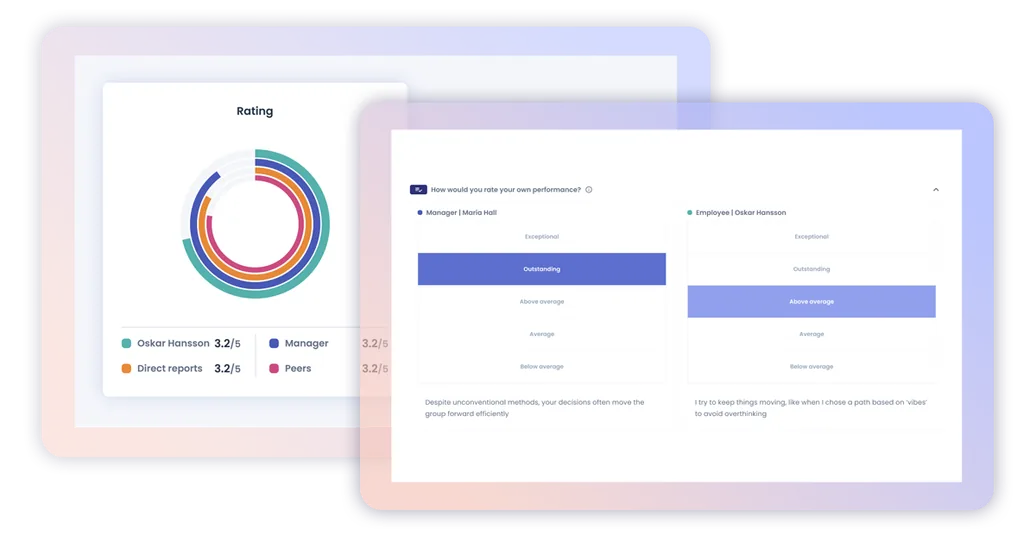
Eletive is a people-success platform that combines employee engagement surveys, pulse feedback, SMART goal and OKR tracking, performance reviews, 360° feedback, and 1:1 meeting tools.
Who Is Eletive Best For?
Eletive is a strong fit for mid-sized to large organizations where HR and people ops teams want performance reviews grounded in continuous engagement data.
Why I Picked Eletive
Eletive earns its spot on my shortlist because it treats engagement data as the foundation for performance conversations, not an afterthought. I love how review cycles pull in live pulse survey results alongside manager evaluations and self-assessments, so performance discussions are grounded in how employees are actually feeling day-to-day. The Eletive Copilot adds a layer I find genuinely useful: you can ask it to surface patterns across engagement reports, objectives, and heatmaps without digging through dashboards manually.
Eletive Key Features
- SMART goal and OKR tracking: Set individual, team, and organizational objectives with key results measured by percentage, currency, number, or completion status, and track progress continuously with On track, Behind, or At risk labels.
- 360° feedback surveys: Collect structured peer, direct-report, and manager feedback using configurable templates with multiple question types, including 1–5 scale, multiple choice, text, and NPS.
- 1:1 meeting tools: Schedule recurring or one-time manager–employee meetings with shared agendas, talking points, templates, private notes, and To Do items that carry over between sessions.
- Attrition risk insights: Surface early warning signals from engagement survey data to help managers and HR teams identify employees at risk of leaving before it becomes a retention problem.
Eletive Integrations
Eletive lists integrations with Workday, SAP SuccessFactors, Personio, HiBob, ADP Workforce Now, Bamboo HR, Slack, and Microsoft Teams. It offers an Export API for Professional customers, API 2.0 as an add-on, and custom SCIM 2.0 for user provisioning.
Pros and Cons
Pros:
- Goal progress stays visible across teams
- Structured 360° feedback supports reviews
- Engagement signals inform performance conversations
Cons:
- No documented calibration or compensation analytics
- Feedback isn’t linked to goals or reviews
Best for evaluating individual competencies
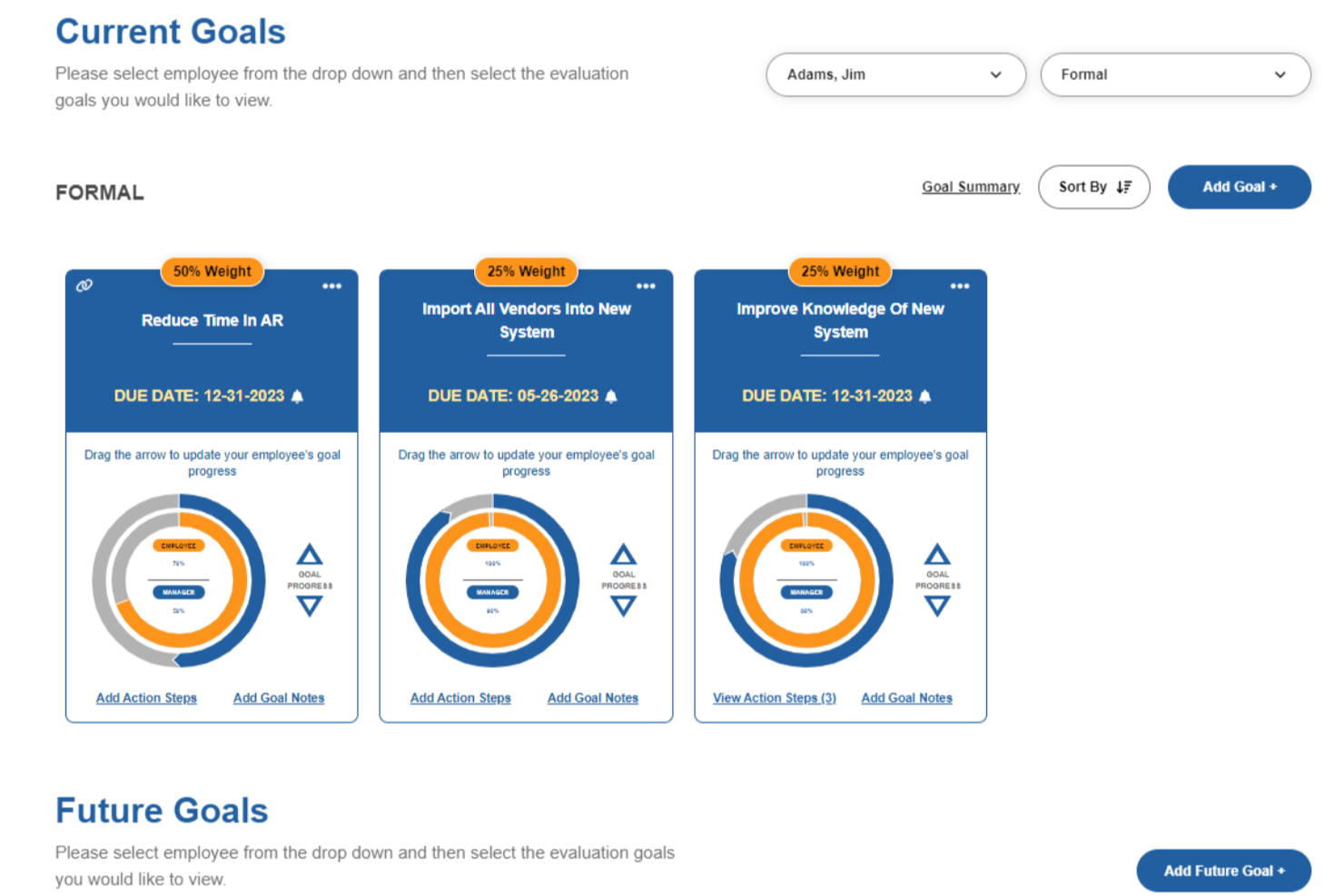
Performance Pro is a performance management platform designed for HR teams and managers who want to streamline employee evaluations, set clear goals, and support ongoing development across a range of industries.
Who Is Performance Pro Best For?
Performance Pro is a good fit for small to mid-sized organizations where HR teams need a structured, customizable approach to employee reviews and development.
Why I Picked Performance Pro
Performance Pro earns its spot on my shortlist because of how well it handles competency-based evaluations. I like that it lets you build competency libraries with customized weightings and ratings, so each employee's review reflects the specific skills that matter for their role. The link between competency assessments and learning activities is especially useful—when a gap appears in an evaluation, Performance Pro automatically assigns relevant development courses through its integrated learning management system. I also use the multi-rater and 360 review tools to get a fuller picture of where someone stands on a given competency, rather than relying on a single manager's perspective.
Performance Pro Key Features
- Goal management: Set, track, and align individual employee goals with broader organizational objectives throughout the review cycle.
- Automated review reminders: Schedule and send automated notifications to managers and employees to keep appraisal workflows on track.
- Performance dashboards: View real-time snapshots of review completion rates and employee performance data across the organization.
- Configurable appraisal forms: Build and customize review forms with flexible rating scales, sections, and question types to match your process.
Performance Pro Integrations
Integrations include Microsoft Teams and core payroll or HRIS systems via API or SFTP.
Pros and Cons
Pros:
- Integrations with learning and compensation drive development and rewards
- Visual goal-tracking keeps employees aligned with key objectives
- Customisable review forms tailor evaluation to each role
Cons:
- Some integrations may require admin effort
- Advanced analytics features may be less extensive vs enterprise platforms
Best for customized performance review processes
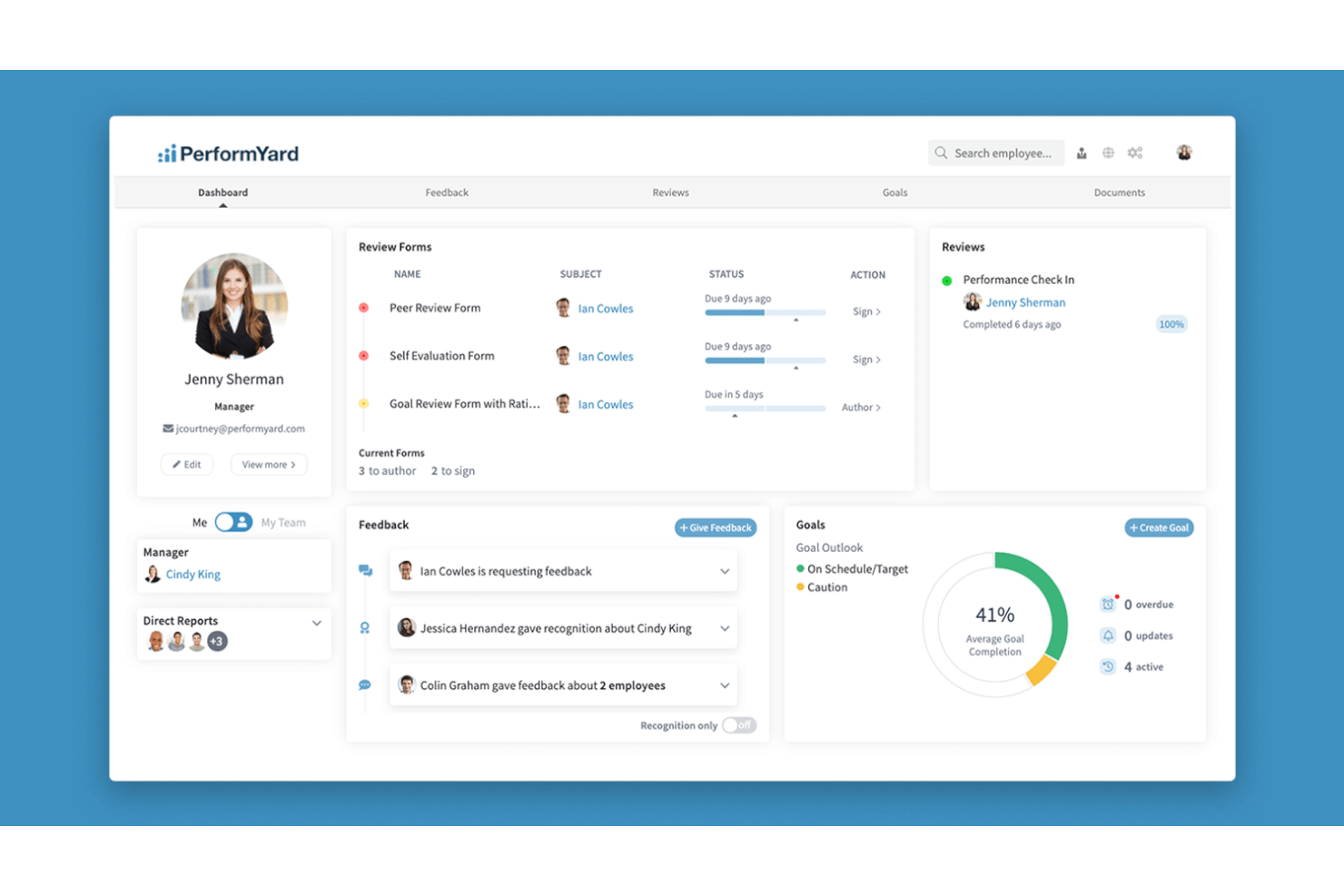
PerformYard gives HR teams and business leaders a flexible platform to manage performance reviews, set goals, and gather feedback, helping align employee development with organizational objectives.
Who Is PerformYard Best For?
PerformYard is a good fit for mid-sized organizations where HR teams need to tailor performance review cycles to match their existing processes and culture.
Why I Picked PerformYard
I chose PerformYard because it gives HR teams genuine control over how performance reviews are structured and run. I like that you can build review cycles from scratch—choosing the rating scales, question formats, and review frequency that match how your organization works, rather than forcing your process into a rigid template. Multi-directional feedback lets you combine self-assessments, manager reviews, and peer feedback within a single configurable cycle.
PerformYard Key Features
- Goal cascading: Links individual employee goals to team and company-wide objectives, with real-time visibility into progress at every level.
- Reporting and analytics dashboard: Generates visual charts and 9-box grids that track performance trends by individual, team, and department.
- Continuous feedback tools: Lets managers and employees send feedback, recognition, and performance notes outside of formal review cycles.
- AI-assisted writing: Helps managers draft and rephrase review comments, with tone elevation and multi-form summaries built into the review workflow.
PerformYard Integrations
Integrations include Microsoft Teams, Slack, HRIS systems, and SSO providers; an API is also available for custom integrations.
Pros and Cons
Pros:
- Strong syncing of employee data with HRIS tools
- Real-time goal-to-review linkage gives clearer performance tracking
- Lets you run multiple review cycles
Cons:
- Fewer native integrations beyond the major HRIS/SSO tools
- Some custom workflows can take time to configure
Best for organizations of all sizes
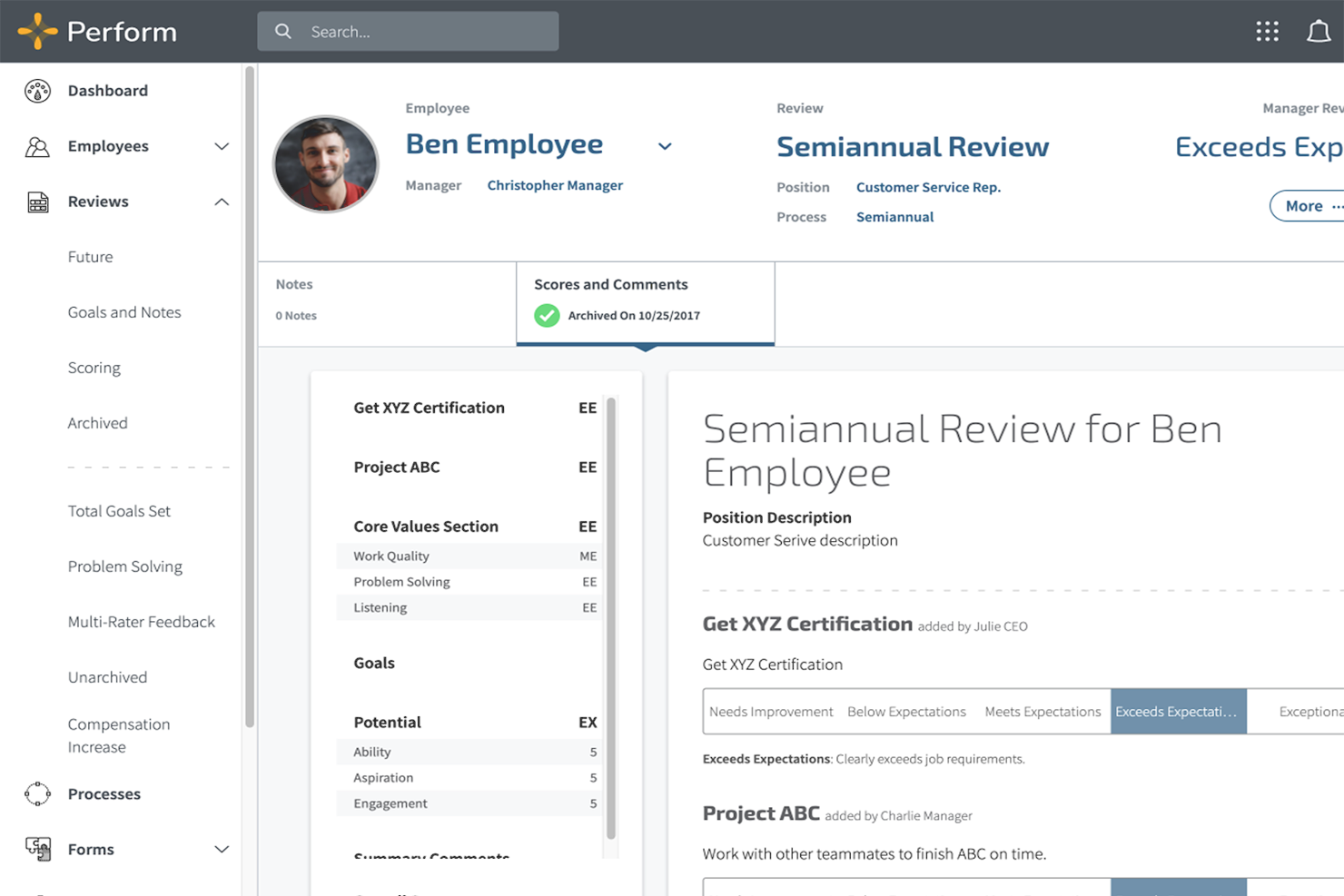
Mitratech Perform helps HR teams and managers drive employee growth with customizable performance reviews, goal tracking, and real-time feedback tools designed to support continuous improvement and align teams around business objectives.
Who Is Mitratech Perform Best For?
Mitratech Perform is a good fit for HR teams at companies of any size that need a structured, scalable approach to performance management.
Why I Picked Mitratech Perform
I picked Mitratech Perform as one of the best because its industry-leading configurability makes it adaptable across organizations of different sizes and structures. The 360-degree review feature is especially flexible—you can configure visibility, anonymity, and inclusion settings in combinations that most other tools don't support; that's important when managing reviews across multiple shifts or large distributed teams. I also like that Perform's automated review scheduling removes the administrative burden of planning appraisal cycles, so HR teams don't have to chase completions manually. The built-in distribution curve calculation is a strong differentiator—it performs the rating calculations, saving time during high-volume review periods.
Mitratech Perform Key Features
- Engagement surveys: Send pulse surveys to your workforce and break down results by department, question, or time period to track employee sentiment.
- Employee self-appraisals: Let employees reflect on their own performance and submit self-reviews as part of the formal review cycle.
- Competency assessment: Assign role-specific competencies to align expectations and evaluate employees against defined standards for their position.
- Benchmarking: Compare your talent management metrics against peer groups in real time to identify retention trends and workforce gaps.
Mitratech Perform Integrations
Native integrations are not currently listed.
Pros and Cons
Pros:
- Supports peer and upward feedback to increase fairness
- Customisable review templates suit different review cycles
- Enables alignment of employee goals with corporate strategy
Cons:
- Employee survey question-library appears limited compared to dedicated tools
- Some users report setup for advanced workflows takes time
Deel HR
Best for continuous 1:1 performance feedback

Deel HR gives HR teams and business leaders a way to manage performance, feedback, and employee growth in one platform, making it easier for distributed and global teams to keep everyone aligned and engaged.
Who Is Deel HR Best For?
Deel HR is a strong fit for HR teams managing global or remote workforces who need a single platform to handle performance and people operations across multiple countries.
Deel HR's performance management features include continuous feedback, 360° reviews, OKR tracking, and AI-assisted feedback drafting through Deel Engage.
Why I Picked Deel HR
I've included Deel HR in my top picks because I love how it treats continuous feedback as a built-in part of the performance cycle rather than a bolt-on feature. Through Deel Engage, my team can run 360° review cycles that gather both anonymous and open feedback using quantitative and qualitative methods. What I find especially useful is the AI-assisted feedback drafting, which helps managers and employees write meaningful, specific feedback instead of staring at a blank form. Pair that with OKR tracking that cascades company goals down to individual contributors, and you get a system where 1:1 conversations are grounded in real data.
Deel HR Key Features
- Career progression frameworks: Define role expectations and growth paths so employees can see exactly what's needed to advance within the organization.
- Employee pulse surveys: Build and send recurring surveys to measure engagement, satisfaction, and development needs, with results feeding into centralized analytics dashboards.
- Learning management system (LMS): Create and assign training content to support employee development and close skill gaps across teams.
- Performance review calibration: Standardize how managers assess employees across teams to reduce bias and keep evaluations consistent.
Deel HR Integrations
Integrations include FaceUp, Snowflake, DefensX, Microsoft Finance, Kintsugi, ReFresh OS, Revo.ai, Keeper, Human Interest, and Everyminute.
Pros and Cons
Pros:
- Lets you assign visibility and anonymity settings in review cycles, offering cultural flexibility
- Competency and growth frameworks are integrated, not stand-alone
- Real-time goal tracking reduces reliance on static annual reviews
Cons:
- May require change-management for teams used to annual reviews only
- Performance tools are part of the Engage add-on, so cost may increase
New Product Updates from Deel HR

Deel Expands Stablecoin Wallet to 80+ Countries
Deel expands its Stablecoin Wallet to 80+ countries with dollar-backed balances and optional rewards. This gives eligible contractors more ways to hold and manage earnings inside Deel. For more information, visit Deel’s official site.
 .
Best for customizable employee development plans
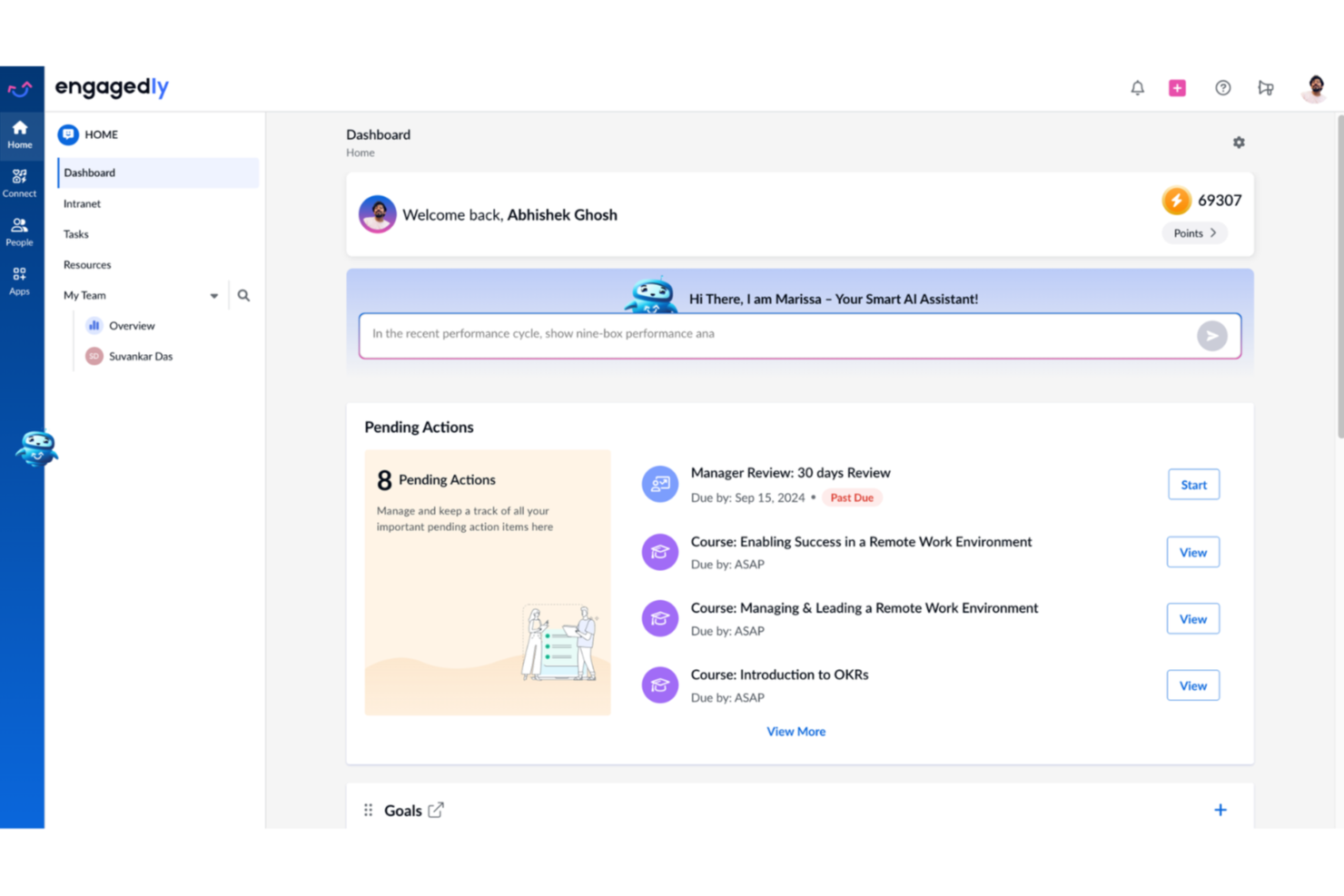
Engagedly is an AI-powered performance management platform that combines OKRs, 360-degree feedback, performance reviews, individual development plans, and succession planning in a single system.
Who Is Engagedly Best For?
Engagedly is a strong fit for mid-sized to enterprise HR teams that need a unified platform for managing performance, talent development, and succession in one place.
Why I Picked Engagedly
I've included Engagedly in my top picks because the Growth Hub is one of the more thoughtfully designed development planning tools I've seen. The AI assistant, Marissa, generates role-specific IDP recommendations based on a guided self-discovery questionnaire, so plans feel tailored rather than templated. I also like that IDPs connect directly to performance reviews and milestone tracking, meaning a manager can see exactly where an employee stands on their development goals during a check-in, without toggling between separate systems.
Engagedly Key Features
- 360-degree feedback: Collect structured feedback from peers, direct reports, and managers within a single review cycle.
- Customizable review templates: Build performance review forms with configurable rating scales, question types, and weightings to match your process.
- OKR tracking: Set, align, and monitor objectives and key results at the individual, team, and organizational level.
- Real-time feedback and check-ins: Enable ongoing feedback exchanges and scheduled one-on-one check-ins between managers and employees.
Engagedly Integrations
Engagedly offers integrations with HRIS, SSO, communication, learning, and goal-tracking tools, including BambooHR, ADP Workforce Now, Gusto, Paylocity, Personio, Slack, Microsoft Teams, Okta, Salesforce, and Jira. An API is available for custom integrations.
Pros and Cons
Pros:
- Supports 16 languages for global teams
- Gamification features for engagement and motivation
- Built-in LMS alongside performance reviews
Cons:
- Mobile app has limited features and speed
- Reporting lacks depth for advanced analysis
Best for scalable review processes
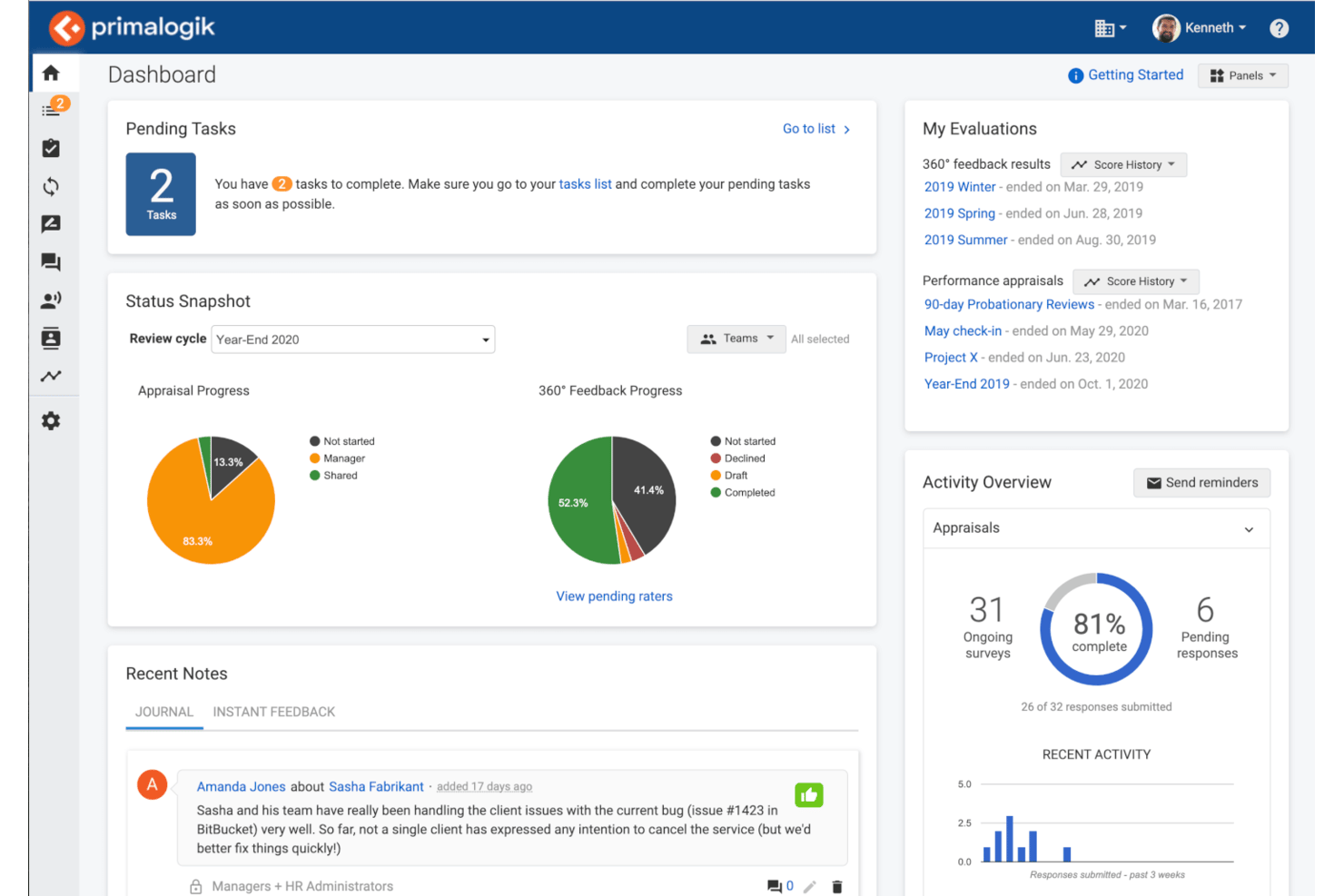
Primalogik is a performance management platform for HR teams and business leaders who want to simplify employee reviews, gather 360-degree feedback, and track goals in one place.
Who Is Primalogik Best For?
Primalogik is a strong fit for mid-sized organizations that need a structured, repeatable approach to running performance reviews across multiple teams or departments.
Why I Picked Primalogik
Primalogik earns its spot as one of the best on my shortlist because of how well it handles the operational side of running reviews at scale. I particularly like the appraisal workflow builder, which lets you define the exact sequence of self-reviews and manager assessments before launching a cycle—so every team follows the same structured process without HR having to manually coordinate each step. I also use the custom questionnaires feature to build role-specific review forms, so a sales team and an engineering team can each get a review that reflects their work. The assessment bias report flags differences in how managers score their teams, which helps keep evaluations consistent across departments.
Primalogik Key Features
- 360-degree feedback: Collect structured feedback from peers, direct reports, and managers in a single review cycle.
- Goal tracking: Set, monitor, and update individual or team goals and align them to broader organizational objectives.
- Employee engagement surveys: Run pulse surveys with pre-built or custom questions to measure team sentiment over time.
- Instant feedback: Allow employees and managers to share real-time, ongoing feedback outside of formal review cycles.
Primalogik Integrations
Integrations include Slack, Google Workspace, Microsoft 365, Okta, OneLogin, and Azure Active Directory.
Pros and Cons
Pros:
- Allows configurable review cycles and templates to match your process
- Supports a variety of review types
- Lets you compare self-ratings with peer/manager feedback for deeper insight
Cons:
- A few customization requests may require workarounds
- Integration options beyond major HR/SSO systems are somewhat limited
Best for enterprise performance and goal-setting
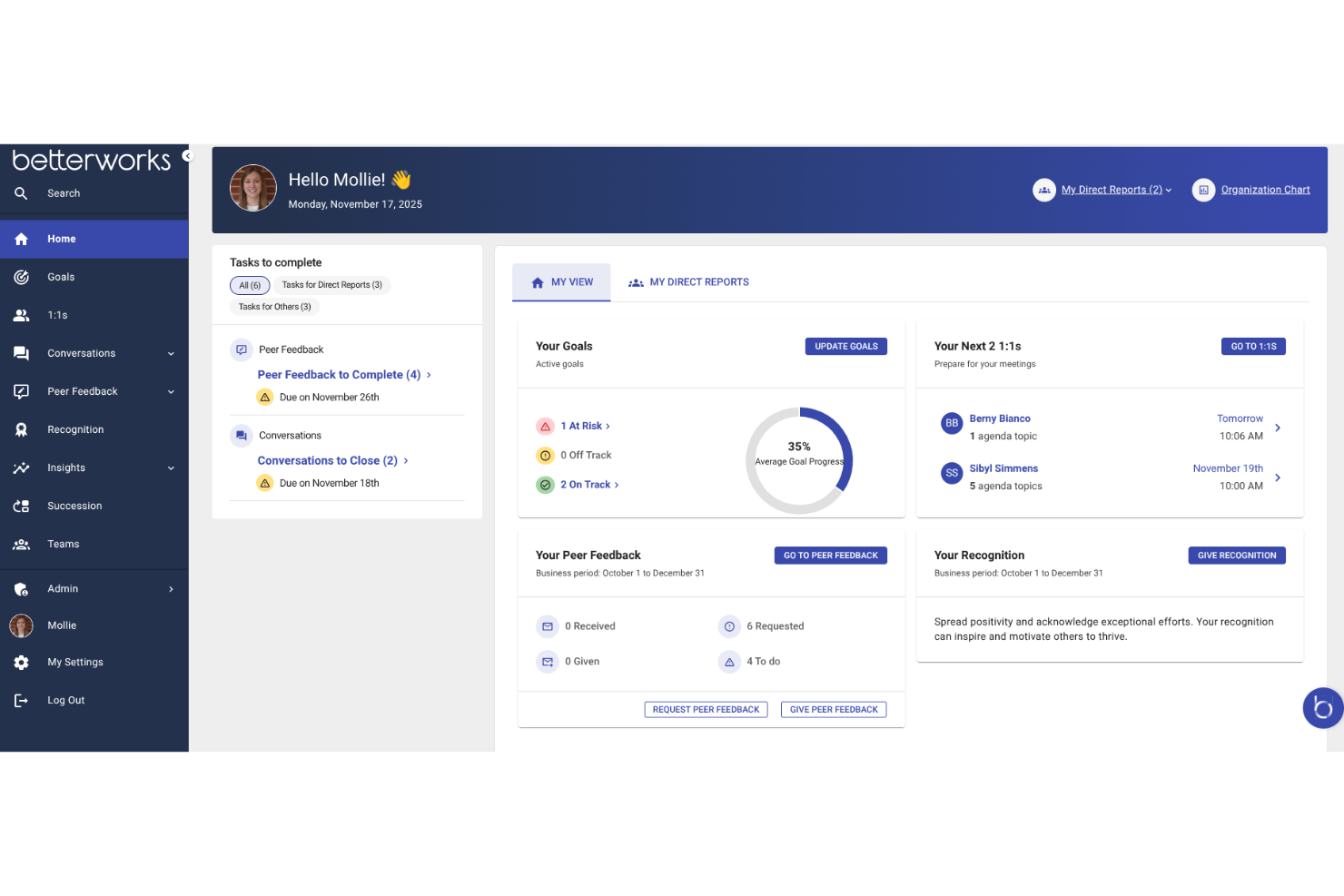
Betterworks is a performance management platform designed for large organizations that want to align teams, track goals, and foster ongoing feedback to drive business results.
Who Is Betterworks Best For?
Betterworks is a strong fit for mid-to-large enterprises that need a structured, scalable approach to connecting individual performance with company-wide goals.
Why I Picked Betterworks
Betterworks earns its spot on my shortlist because of how well it connects goal-setting to the full performance cycle at an enterprise scale. I particularly like the AI-powered Goal Assist feature, which reviews an employee's job title, past goals, and team priorities to suggest specific, strategically aligned goals—something especially useful when rolling this out across thousands of employees. I also use the cascading goals feature to push company OKRs down to team and individual levels with a few clicks, so when priorities shift, updates propagate across linked goals without manual changes. The fact that goal completion data surfaces directly into performance reviews means managers arrive with real context, not just memory.
Betterworks Key Features
- Performance calibration: Run structured calibration sessions to compare employee ratings across teams and reduce bias in evaluation outcomes.
- Continuous conversations: Launch instant check-ins and customize review templates by role, department, or region to keep feedback relevant and timely.
- 360-degree feedback: Collect peer, upward, and external feedback from clients or partners, which are included in performance reviews without manual consolidation.
- Employee engagement surveys: Build pulse surveys with anonymity controls and track sentiment trends like eNPS across teams and departments over time.
Betterworks Integrations
Integrations include Workday, ADP, BambooHR, SuccessFactors, UKG Pro, Jira, Asana, Slack, Microsoft Teams, and Salesforce.
Pros and Cons
Pros:
- Connects employee OKRs directly to business outcomes
- Built-in AI translates 1:1 transcripts into feedback
- Embeds real-time performance workflows inside chat tools
Cons:
- External HCM data requires manual API configuration
- Phone app lacks full desktop review tools
Best as AI for business
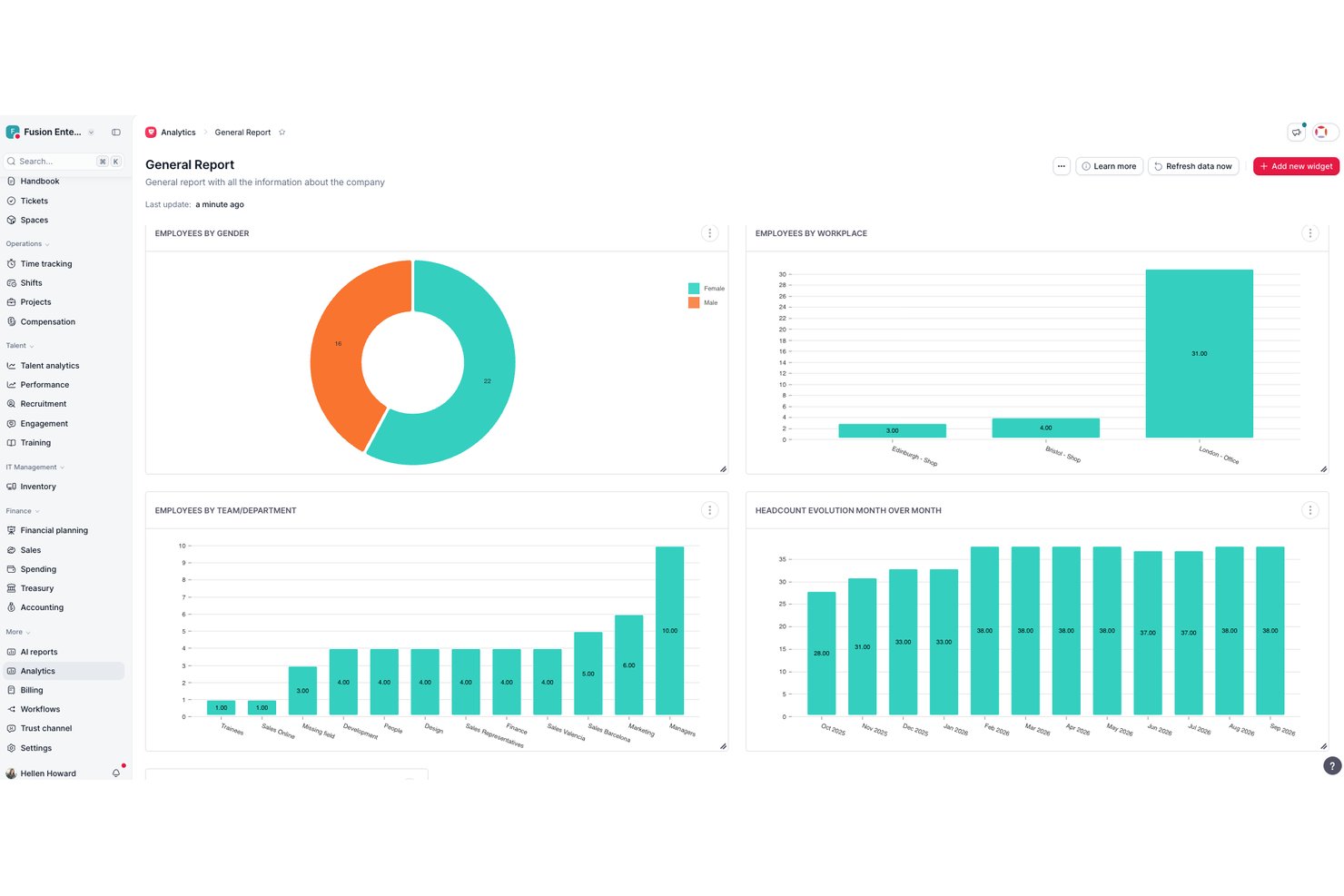
Factorial is an AI-powered HR and business platform that covers performance reviews, goal tracking, 1:1 meeting support, competency assessments, and workforce analytics within a broader suite that spans time tracking, payroll, and IT management.
Who Is Factorial Best For?
Factorial suits HR teams at small to mid-sized businesses that want performance reviews, goal tracking, and 1:1 support built into the same platform they use for time, payroll, and IT management.
Why I Picked Factorial
I picked Factorial as one of the best because its AI for business positioning isn't just a tagline—it runs through real workflows like generating performance reports, summarizing 1:1 notes, and suggesting follow-up actions after review cycles. I especially like how the AI agent, One, pulls in goals, past reviews, and competency data to help managers prepare structured review outlines without writing from scratch. The 9-box talent analytics and AI-generated charts also make it easier to spot patterns across a team before a talent conversation, rather than digging through raw exports.
Factorial Key Features
- Self, manager, peer, and upward reviews: Administrators can combine multiple reviewer types in a single cycle, including 180° and 360° formats, with customizable templates and participation reminders.
- Cascading goals with sub-goal rollups: Goals can be structured as parent and sub-goals, with parent progress automatically calculated from sub-goal averages when period frequencies align.
- Competency-based development plans: Competency levels assessed during reviews help identify skill gaps and inform structured development plans and follow-up conversations.
- 9-box talent analytics grid: Performance and potential scores from review cycles populate a 9-box visualization to help compare and categorize employees across the team.
Factorial Integrations
Factorial offers marketplace integrations with Microsoft Power BI, Slack, LinkedIn, and Recruitee, plus Zapier. It also provides a public REST API and webhooks for custom integrations.
Pros and Cons
Pros:
- AI summarizes reviews and suggests follow-ups
- Cascading goals connect team and employee progress
- Structured multi-rater reviews reduce cycle admin
Cons:
- Reporting customization and depth draw reviewer criticism
- Informal feedback lacks confirmed searchable capture
Teamflect
Best for performance management in Teams
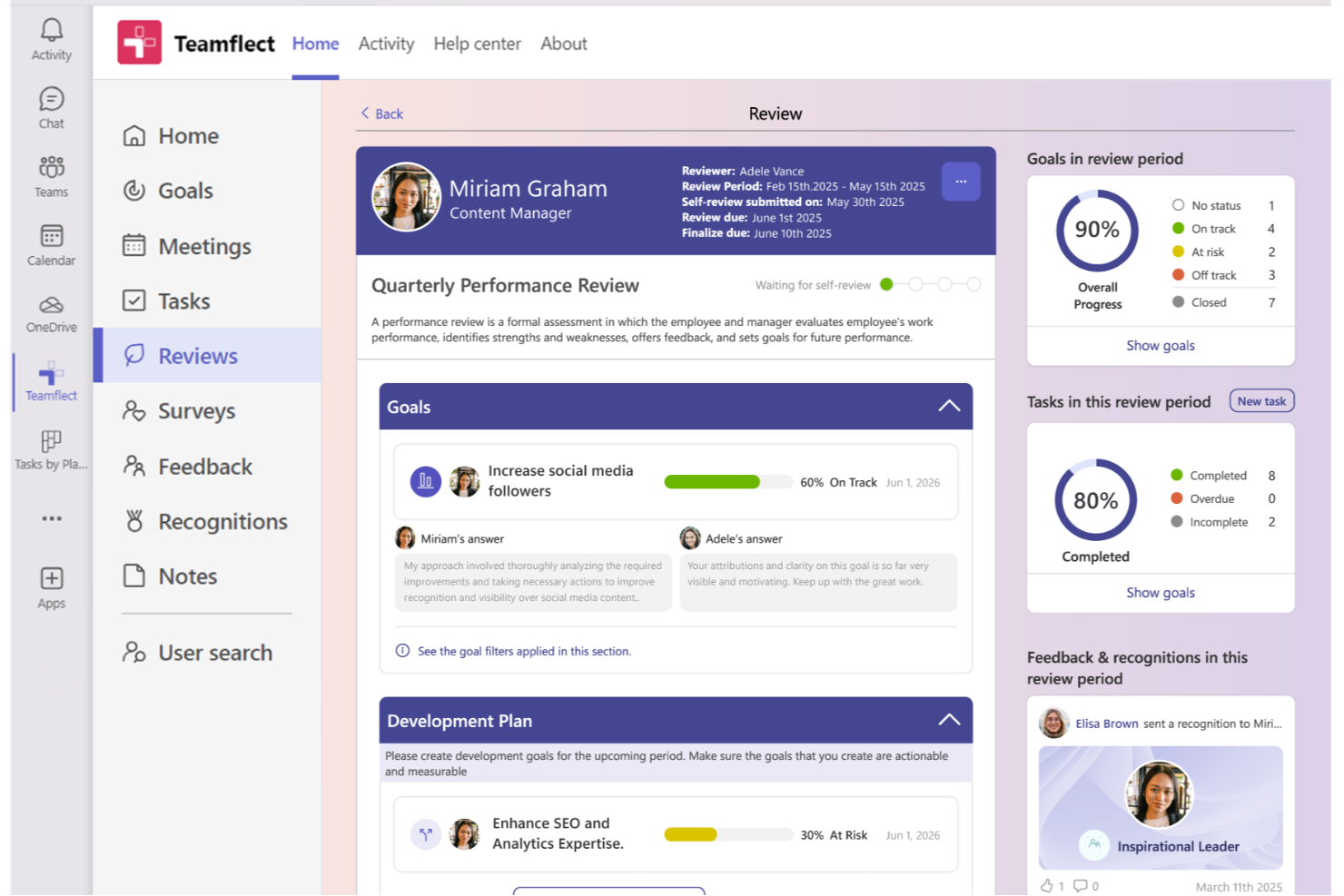
Teamflect is a performance management platform designed for organizations that use Microsoft Teams, helping HR teams and managers streamline reviews, feedback, and goal tracking directly within their existing workflow.
Who Is Teamflect Best For?
Teamflect is a great fit for mid-sized companies already using Microsoft 365 that want to manage performance without switching between tools.
Why I Picked Teamflect
I picked Teamflect as one of the best because it's the only performance management tool built to live natively inside Microsoft Teams—not just connected to it. I like that managers can run full review cycles, track goal progress, and exchange 360-degree feedback without ever leaving the Teams interface. This keeps my team from toggling between platforms during review cycles, improving adoption. The built-in AI assistant helps managers write stronger review comments, flags biased language in real time, and suggests personalized development goals after a review.
Teamflect Key Features
- 1:1 meeting templates: Run structured one-on-one meetings with pre-built agendas, talking points, and action item tracking directly inside Teams.
- Recognition and rewards: Send peer-to-peer recognition badges and awards within Teams to acknowledge employee contributions in real time.
- Task management: Assign, track, and update individual tasks tied to performance goals without leaving the Teams environment.
- Custom review templates: Build and deploy tailored performance review forms to match your organization's specific evaluation criteria and cycles.
Teamflect Integrations
Integrations include Microsoft Teams, Outlook, Power BI, BambooHR, Workday, UKG Pro, ADP, Gusto, Paylocity, and QuickBooks Payroll.
Pros and Cons
Pros:
- Review templates are highly customisable for your process
- Goal-setting tied directly to team workflows inside Teams chats and tasks
- Deep Microsoft 365 integration
Cons:
- Requires Microsoft 365 work accounts
- No support for Slack or Google tools
Other Performance Management Software
Still haven’t found the right performance management tool for your team? Here are some more worthwhile performance management software options that didn’t make it into the top 10 list but still deserve a special mention. Check them out!
- Small Improvements
For lightweight review processes
- Express Evaluations
For small business, government & nonprofits
- Leapsome
For development-focused performance
- Effy AI
For AI-first performance management in SMBs
- Workable HR
For multi-level performance feedback
- Spidergap 360˚ Feedback
For actionable development insights
- Insightful
For real-time employee monitoring
- Sloneek
For 360-degree feedback integration
- iSpring LMS
For learning-driven performance reviews
- Profit.co
For real-time performance tracking
- Lattice
For incorporating multiple feedback sources
- 15Five
For weekly check-in workflows
- GoCo
For HR-integrated review automation
- HiBob
For modern, global teams
- Mirro
For real-time recognition features
- Workleap
AI review drafting
- Kallidus Perform
For learning and performance integration
- Workday
For large enterprise HR ecosystems
- eloomi
For training and feedback in one
- Workleap
For flexible review cycles
- Synergita
For continuous performance conversations
- WorkDove
For customizable competency models
- PeopleFluent
For talent management integration
- SAP SuccessFactors
For multinational compliance support
- Insperity
For outsourced HR solutions
- Kazoo
For engagement and rewards programs
- Huckleberry
For AI-driven voice feedback
- Ascender HCM
For APAC payroll integration
- Rippling
For pay-linked performance calibration
- monday AI Workspace
For workflow and performance tracking


Related HR Software Reviews
If you still haven't found what you're looking for here, check out these other related tools that we've tested and evaluated:
- HR Software
- Payroll Software
- Recruiting Software
- Employer of Record Services
- Applicant Tracking Systems
- Workforce Management Software
How I Evaluate Performance Management Tools
I split my evaluation into three parts, with the most weight on core functionality: setting aligned goals and running structured reviews with employee, manager, and peer input. Next, I consider standout features such as AI-assisted review writing. Finally, I assess support, onboarding, and pricing value beyond the feature set.
Core Functionality (Table Stakes For This List)
When I'm selecting tools for my list, I score each one on a scale from 0 (does not offer the functionality) to 5 (excels in this area) for each core functionality listed below. I then convert the total into a percentage to help assess each tool's overall fit, with extra weight on any functionalities I’ve deemed essential.
- Goal & OKR Tracking (Essential): I look for progress updates and clear links between individual, team, and company goals, such as a project milestone contributing to a department objective.
- Performance Review Cycles (Essential): I assess whether teams can configure review cycles with self, manager, peer, or 360-degree input and adapt templates to different roles.
- Continuous Feedback: I check how employees and managers capture, retrieve, and connect feedback to goals or competencies between review cycles.
- One-on-One Support: I look for shared agendas, documented notes, and tracked action items that help managers follow up on commitments at recurring check-ins.
- Performance Analytics: I evaluate whether dashboards show review status, goal progress, and trends that HR can filter by team or time period.
- Development Planning: I consider how teams create and track development plans tied to review outcomes, skill gaps, or performance goals.
Once I have a list of tools that meet the criteria, I consider what sets each platform apart.
Differentiating Factors (What Sets Vendors Apart)
Here's how I compare and contrast different vendors:
Standout Features
AI-assisted writing is where I see the biggest time savings. I look for tools where managers can generate draft review narratives from collected feedback, then edit for tone and accuracy rather than starting from a blank page. Manager coaching nudges pair well here—automated prompts that guide a first-time manager through a difficult conversation make a real difference in review quality. I also evaluate how each platform handles recognition feeds, since praise walls that tie shoutouts to company values keep feedback visible between formal cycles.
Beyond Features
I check whether a vendor's onboarding includes ready-made review templates and manager training resources, since those extras determine how fast your team actually adopts a new feedback cadence. Integration depth matters too—I look for bidirectional syncs with your HRIS and calendar tools so 1:1s and review data stay connected without manual entry. Finally, I evaluate each platform's analytics for tying goal completion and feedback frequency to retention and promotion outcomes, which is what you need to justify the spend.
How to Choose a Performance Management Tool
When choosing performance management software, start with the parts of your performance process you need to improve, whether that’s running reviews, tracking goals, supporting employee development, or connecting performance data with your HR systems.
| If your priority is… | Look for… |
| Running consistent performance reviews | Custom review cycles and templates |
| Setting and tracking employee goals | Goal and OKR tracking |
| Supporting continuous feedback | 1:1s and real-time feedback tools |
| Developing employees | Career and development planning |
| Making fair performance decisions | Calibration and performance analytics |
| Connecting performance with HR data | Native HRIS integrations |
- What performance challenges are you trying to solve? Identifying your current challenges will guide you to select software with the features and functionalities you need to overcome them. These challenges may include:
- Difficulty tracking goals and development progress,
- Infrequent, inconsistent, or unclear feedback,
- Difficulty aligning team goals with company objectives, or
- Performance evaluations that are not transparent or consistent between teams.
- Who are your main users? Consider who will use the tool, who your different user groups are, and how many licenses you'll need. Once that's clear, it's also useful to list the needs of your different user groups (power users, managers, employees, etc.) to ensure they're all met.
- For performance management software, you'll need employee-level access for your entire workforce, and separate access roles for your managers and HR administrators.
- What is your budget? To evaluate cost, do a headcount of your existing workforce, plus your projections for the next 5 to 10 years. Since most performance management tools charge a monthly fee per employee, this will help you proactively estimate your monthly costs.
- Determining a realistic budget for your new performance management software up-front is crucial, so you don't waste time considering software that's too expensive.
- What outcomes are important? Review the capabilities you want to gain or improve, and how you will measure success. Being clear on your desired outcomes upfront is crucial to avoid wasting valuable time. Key outcomes you may want to measure include:
- Achieving a performance management cycle that is fully automated,
- Gaining the ability to compare current and previous employee reviews easily,
- Integrated goal tracking and progress monitoring tools, or
- Increased manager and employee satisfaction regarding your performance review cycle.
- Do you require specific software integrations? Clarify whether your new performance management tool will replace existing tools or need to integrate with them. Key systems to integrate with include learning management systems, training management software, or feedback collection tools.
- Can you reduce your monthly SaaS costs by replacing multiple tools with an all-in-one performance management tool?
- Are all the integrations you need available, or can they be custom-configured using an API?
- Does the performance evaluation tool satisfy your technical requirements? Consider the tool selection alongside your existing workflows and systems. Evaluate what's working well, and any problem areas that need to be addressed.
- Does the new system integrate with your corporate workspace (Microsoft SharePoint, Google Workspace, etc.)?
- Does the new system offer security features that meet your needs (e.g., two-factor authentication (2FA), etc.)?
Remember, every business is different — don’t assume that a performance management tool will work for your organization just because it's popular. Instead, focus on your specific needs and challenges and look for software that specifically addresses those gaps, so you'll get the most out of your new purchase.
How to Implement Performance Management Tools
Once you've chosen the winning performance management system for your needs, you'll need to develop an implementation plan to integrate the software into your employee review process.
To do this right, I recommend using the following approach:
- Develop an implementation strategy and timeline that defines the who, what, when, where, and why related to the new software implementation.
- Gather feedback from managers on their current challenges with the employee performance review process and how it could be improved.
- Gather feedback from employees on their experience of your current review process and how it could be improved.
- Form an internal implementation team that includes key stakeholders from all your user groups (i.e., your HR team, managers, employees, IT department, etc.)
- Review your existing performance management data and decide whether you need to migrate this information into the new system or not.
- If you do decide to migrate a lot of data, reach out to your software provider for assistance with this portion. They can often upload historical data in bulk as part of the customer onboarding process.
- Run some test reviews to help you understand how all the features work. This includes building workflow automations and setting up software integrations to pull data from other sources.
- This step is very important, and shouldn't be rushed. Run as many test scenarios as you can think of using different employee structures (i.e., full-time, part-time, post-leave, employees on probation, etc.) and reporting structures (i.e., employees with two managers, employees who support multiple teams, etc.). This will help you ensure the software covers all your needs once it's fully launched.
- Train your users on how to use the software. This should include role-specific training for managers and team leads who need to conduct performance reviews, as well as separate training for employees. You may also want to offer support documentation or create an internal wiki or repository for frequently asked questions. Doing so will proactively reduce the volume of administrative requests your HR staff will receive going forward.
- Launch the software and celebrate! This may sound a little cheesy, but it's actually really important. Celebrating the benefits of the new software can positively impact user adoption rates. If people are excited about the new software, they will be more likely to use it and have a positive association with it.
Trends in Performance Management Tools
Performance management looks pretty different today than it did a few years ago. More and more, organizations are opting to implement continuous performance discussions in place of annual reviews, and holistic 360-feedback forms in replace of top-down evaluations. And the software that runs these performance management tasks is keeping pace!
Today's performance management software not only streamlines performance evaluations but also directly impacts employee engagement, retention, and development.
Here's a look at the prominent trends and how they're shaping the future of performance management tools:
- Integration with AI and Machine Learning: Many AI performance management tools are incorporating AI to help with performance reviews by assisting with personalized performance insights, automated feedback suggestions, and predictive analytics. This trend underscores the growing need for data-driven decision-making and personalized development plans in performance management.
- Continuous Feedback and Real-Time Recognition: The move away from annual reviews towards continuous, real-time feedback mechanisms is evident. Tools are evolving to facilitate more frequent interactions, with features for instant recognition and feedback becoming standard. This reflects the shift towards a more dynamic, ongoing performance dialogue between employees and managers.
- Peer-to-Peer Feedback: In collaborative work environments where teamwork and cross-functional projects are common, gathering insights from peers is integral for effectively evaluating employee performance—not to mention eliminating bias. 360 feedback tools offer a more comprehensive view of an employee's performance and contributions.
- Enhanced Goal Setting and Tracking: There's a noticeable improvement in the sophistication of goal-setting features, including the integration of OKRs (Objectives and Key Results) and customizable goal templates. This trend highlights the importance of clear, measurable goals in aligning individual performance with organizational objectives.
These trends indicate a shift towards more personalized, continuous, and development-oriented performance management practices. To see these trendy features in action, I recommend reading our review of Betterworks or our review of Leapsome next.
Essentially, the expectations and demands of HR specialists and organizations are changing, which is driving the development of tools that are not only more effective in managing performance but also in enhancing employee engagement and development.
Some parts of the performance review that are data-driven can be assessed by AI, but interpersonal and soft skills require a human touch. Performance management is more than just the review itself—it’s about ongoing one-on-ones, managing relationships, and motivating employees.
What is Performance Management Software?
Performance management software, also called a performance management system, is a digital tool that helps HR teams evaluate employee performance, set goals, and facilitate continuous feedback. Performance review software typically focuses on formal employee evaluations, while broader performance management systems also support ongoing feedback, goal tracking, employee development, and performance analytics.
It’s used by HR professionals, managers, and team leads to streamline employee review cycles, track development, and align individual performance with company objectives.
These tools reduce manual effort, prevent missed reviews, and offer insights that support fair evaluations and strategic workforce planning.
Features of Performance Management Software
When selecting performance management software, keep an eye out for the following key features:
- Goal setting and tracking: This feature allows you to set clear, measurable objectives for each employee or team. You can track progress in real time, keep everyone aligned, and easily identify when goals need adjustment—all the while making achievements motivating and visible for everyone involved.
- Continuous feedback: With this, you can give and receive feedback in a timely, informal way—not just during annual reviews. It encourages regular conversations that help employees grow, course-correct faster, and feel more supported at work.
- Performance appraisal workflows: These automated workflows help you run performance reviews consistently and fairly, making the review process less tedious and more transparent. You can customize who reviews whom, schedule reminders, and ensure nothing falls through the cracks.
- Real-time analytics and dashboards: Get a quick, visual overview of employee performance trends and key metrics. These analytics help you spot patterns, make data-driven decisions, and confidently address performance issues before they become larger problems.
- Development and training plans: Easily create, assign, and monitor personalized development plans based on each employee’s strengths and areas for improvement. This helps you put growth at the center of performance conversations, showing your team you’re invested in their future.
- Customizable review templates: Use flexible templates to match your organization’s unique review process. You can set up questions and rating scales that matter most to your team, helping everyone focus on what really counts.
- Integration with HR systems: Seamlessly connect your performance management software to payroll, HRIS, and other essential tools. This minimizes manual entry, ensures accuracy, and makes cross-functional processes (like promotions or compensation changes) smoother.
- Data security and compliance: Protect your employee data with robust security measures and compliance with relevant regulations. This reassures everyone that their information is private and handled responsibly.
Common Performance Management Software AI Features
Beyond the standard performance management software features listed above, many of these solutions are incorporating AI with features like:
- Bias detection in reviews: AI flags potential biases in performance appraisals, encouraging fairer assessments and helping you foster an inclusive culture.
- Automated performance insights: AI analyzes feedback, reviews, and goals to highlight trends or potential issues before you spot them yourself. This helps you address needs early and take proactive action.
- Smart feedback prompts: AI suggests constructive feedback or recognition moments based on real-time data, helping you coach and support employees even when you’re busy.
- Sentiment analysis: AI processes written feedback to detect employee sentiment, giving you a deeper read on morale and team dynamics—without needing to read every comment yourself.
- Intelligent goal recommendations: AI recommends new goals or development paths based on individual progress and company objectives, making sure everyone moves in the right direction.
Performance management can motivate employees by showing how their goals connect to the company’s objectives. Without clear goals and alignment, it’s hard to foster a culture of performance and progression.
Benefits of Performance Management Software
Performance management tools offer a structured approach to evaluating and enhancing employee performance, aligning individual goals with organizational objectives. More specifically, here are several benefits you can expect to gain my implementing a performance management tool in your organization:
- Enhanced Goal Alignment: Ensures individual objectives are in sync with company goals. By aligning employee goals with organizational targets, performance management tools help ensure that every team member works towards the same overarching objectives, thereby improving overall productivity and focus.
- Continuous Feedback Loop: Facilitates real-time feedback and communication. This feature allows for immediate recognition and constructive criticism, enabling employees to adjust their performance proactively and managers to address issues as they arise, fostering a culture of continuous improvement.
- Increased Employee Engagement: Promotes a more engaged workforce. Performance management tools help in recognizing and rewarding employees' efforts, which significantly boosts morale and engagement, leading to higher job satisfaction and retention rates.
- Data-Driven Decisions: Provides actionable insights through analytics. With access to comprehensive data on employee performance, organizations can make informed decisions regarding promotions, training needs, and succession planning, ensuring the right talent is developed and retained.
- Streamlined Evaluation Process: Automates and organizes performance reviews. By standardizing the review process and making it more efficient, these tools save time and reduce the administrative burden on HR departments, allowing them to focus on strategic initiatives.
Performance management tools not only streamline administrative processes but also foster a culture of continuous improvement and engagement across your organization. Investing in the right performance management tools is a strategic move that can lead to significant improvements in organizational effectiveness and employee fulfillment.
Costs & Pricing for Performance Management Software
Pricing and plan options for performance management tools can vary widely based on features, scalability, and support levels, catering to the diverse needs of businesses of all sizes. Understanding the common plan options and their pricing helps you make an informed decision that aligns with your organization's requirements and budget.
Plan Comparison Table for Performance Management Software
Here's an overview of the types of pricing plans available for these tools, and their average costs:
| Plan Type | Average Price | Common Features |
|---|---|---|
| Free | $0 | Basic performance reviews, goal setting, limited number of users, self-service support |
| Basic | $5-10 per user/month | Enhanced performance reviews, goal tracking, real-time feedback, email support |
| Professional | $10-30 per user/month | Custom review cycles, 360-degree feedback, analytics and reporting, priority email support |
| Enterprise | $30-60 per user/month | Advanced analytics, succession planning, learning and development integration, dedicated support |
| Custom | Custom Pricing | All Enterprise features plus custom integrations, scalability options, personal account manager |
When considering which plan to choose, evaluate your specific needs and the value that each plan would bring to your performance management process. It's important to balance the need for advanced features against budget constraints, ensuring that the chosen solution provides the necessary tools to support and enhance employee performance effectively.
While it's understandable that you may want to start with free performance management tools or a basic plan initially, there are several reasons why you may want to opt for a more advanced plan, including:
While it's understandable that you may want to start with a basic plan initially, there are several reasons why you may want to opt for a more advanced plan, including:
- Enhanced Reporting Needs: Basic plans often lack in-depth analytics. Upgrading provides comprehensive reporting features to help you make better data-driven decisions.
- Goal Alignment and Tracking: If you need more robust goal-setting and tracking capabilities, you'll likely need to upgrade to access those features. However, it's worth it to ensure that employee goals align with company objectives and gain tools to monitor progress.
- Customizable Feedback Systems: As your organization matures, you might need more tailored feedback mechanisms. Advanced plans offer customizable feedback and review templates to suit your unique needs.
- Increased Number of Users: Most basic plans limit the number of users you can have (including admin users and managers). As your company expands, you'll need to scale up to gain more user seats, plus more extensive features.
Ultimately, it's important to secure a plan that offers the features you require to satisfy your current needs and solve your challenges without exceeding your budget.
What I’ve seen lately is this big consolidation of HR tools… companies are looking for platforms that can handle everything from hiring to performance management in one place.

Performance Management Frequently Asked Questions
Here are some answers to frequently asked questions related to performance management processes and appraisal software.
What factors should small companies consider when choosing performance management software?
For small teams, the right choice comes down to low administrative overhead, cost predictability, and ease of adoption. Look for intuitive tools that frontline managers and employees can navigate without weeks of training, transparent per-user pricing with no restrictive annual spend minimums, and automated reminders that keep review cycles moving without manual HR follow-up.
It is also critical to prioritize seamless integrations with your existing payroll system or daily communication apps like Slack and Microsoft Teams, ensuring evaluations happen within existing workflows rather than becoming another neglected portal.
How have performance management tools adapted for remote and hybrid teams?
Performance management software now prioritizes features that support distributed teams, such as mobile access, cloud-based dashboards, and asynchronous feedback tools. Many platforms allow goal tracking, pulse surveys, and recognition to be managed digitally so every employee—regardless of location—stays engaged and visible. Video call integrations, chat features, and notifications also help managers keep remote team members included in feedback cycles and ongoing conversations.
Look for solutions that make performance documentation accessible from anywhere and let you customize processes for both onsite and remote staff.
What is continuous feedback and how can software support it?
Continuous feedback is an ongoing process of sharing observations, praise, and constructive suggestions, rather than limiting feedback to formal review periods. Performance management software supports this with features like real-time feedback buttons, peer recognition, micro-surveys, and automated prompts that remind managers to give feedback frequently.
Continuous feedback fosters open communication, helps identify challenges early, and creates a more responsive workplace culture. Features that support anonymous feedback or cross-team input can also improve trust and adoption.
Research has shown that organizations that use a continuous feedback model outperformed their competition by 24%. Similarly, companies who use continuous feedback models are 39% better at attracting top talent, and 44% better at retention.
What are the 5 C's of performance management?
The 5 C’s define the foundation of a modern review framework: Clarity around job expectations and goals, ongoing Communication instead of once-a-year feedback, continuous Coaching to develop employee skills, Consistency in how evaluations and ratings are applied, and cross-team Collaboration that turns performance into a shared effort between managers and direct reports.
What is an EPM software?
EPM stands for Enterprise Performance Management, which is primarily a finance-focused software category used to plan, budget, forecast, and report on an entire organization’s financial and operational performance (using systems like Oracle Cloud EPM or Anaplan). In an HR context, it can sometimes refer to Employee Performance Management, which specifically centers on tracking individual staff goals, performance appraisals, skills development, and review cycles.
Other Performance Software Reviews
If you're looking for another type of performance-related software, look no further. To save you time, here are some links to my other performance-related reviews:
- Talent Management Software
- Employee Experience Software for Engagement & Performance
- Succession Planning Software to Develop Future Leaders
- Mentoring Software for Mentors and Mentees
- Employee Engagement Software
- Goal Setting Software for Keeping Teams on Track
- Productivity Tracking Software for Hybrid Teams
- OKR (Objectives and Key Results) Software