
10 beste HRMS-systemer for små bedrifter for å håndtere vekst i 2026

10 Beste HRMS for små bedrifter


Å håndtere HR i en liten bedrift er ingen enkel oppgave, særlig når du balanserer flere roller og ansvarsområder. Du sliter kanskje med endeløse regneark, bruker timevis på lønnskjøring eller håndterer feil i ansattdata som kan føre til risiko for manglende etterlevelse. I tillegg kan det føles overveldende å velge riktig HRMS-programvare, siden så mange verktøy lover å løse problemene dine – men hvilket gjør det egentlig?
HRMS-verktøy er utviklet for å forenkle viktige HR-funksjoner som håndtering av ansattdata, automatisering av lønn, rekruttering og administrasjon av frynsegoder. De hjelper deg med å spare tid, redusere feil og skape en mer effektiv HR-opplevelse for deg og teamet ditt.
Med utgangspunkt i min erfaring som HR-spesialist i et lite team har jeg laget denne kortlisten over de beste HRMS-løsningene for små bedrifter. Målet mitt er å gjøre det enklere for deg å finne en løsning som dekker dine unike behov, slik at du kan bruke mindre tid på HR-hodebry og mer tid på å drive virksomheten din.
Hvorfor du kan stole på våre programvareanbefalinger
Teamet vårt har testet og anmeldt programvare siden 2012. Vi er selv HR-eksperter, så vi vet hvor vanskelig og hvor viktig det er å velge riktig programvare.
I denne guiden har vi vurdert verktøyene gjennom praktisk testing og uavhengig research og gitt dem poeng ut fra våre utvelgelseskriterier. Vi bygger også på innsikt fra ledende eksperter i bransjen og erfarne HR-eksperter.
Anmeldelsene våre bygger på vår egen redaksjonelle vurdering. De er ikke et salgsargument.
Ekspertanmeldere:
Sammenligningstabell over priser på HRMS for små bedrifter
Denne tabellen sammenligner prisopplysningene for mine beste HRMS-utvalg for små bedrifter.
| Tool | Best For | Trial Info | Price | ||
|---|---|---|---|---|---|
| 1 | Best free all-in-one HRMS for small businesses | Free demo available | From $5/user/month | Website | |
| 2 | Best with 24/7 expert HR and payroll support | Free demo available | From $79/user/month | Website | |
| 3 | Best for payroll-to-benefits coordination | Free demo available | From $49/month | Website | |
| 4 | Best for flexible HR processes | Free demo available | Pricing upon request | Website | |
| 5 | Best for centralized HR documentation | 14-day free trial | From $32/month (billed annually) | Website | |
| 6 | Best for automation and simplified workflows | Free demo available | From $10/user/month | Website | |
| 7 | Best HRMS to support growing international teams in 170+ countries | Free plan + demo available | From $199/user/month | Website | |
| 8 | Best for payroll automation and integrations | Free demo available | Pricing upon request | Website | |
| 9 | Best as AI for business | Free trial + Free demo available | From $8/user/month | Website | |
| 10 | Best for industry-specific payroll features | Free demo available | From $99/month | Website |


Anmeldelser av de beste HRMS-løsningene for små bedrifter
Her er en kort beskrivelse av hver HRMS-løsning for små bedrifter, med informasjon om hva hvert verktøy egner seg best til, noen bemerkelsesverdige funksjoner og skjermbilder som gir et inntrykk av brukergrensesnittet. Les videre for å finne flere bonusvalg nederst på listen.
Deel HR
Best free all-in-one HRMS for small businesses
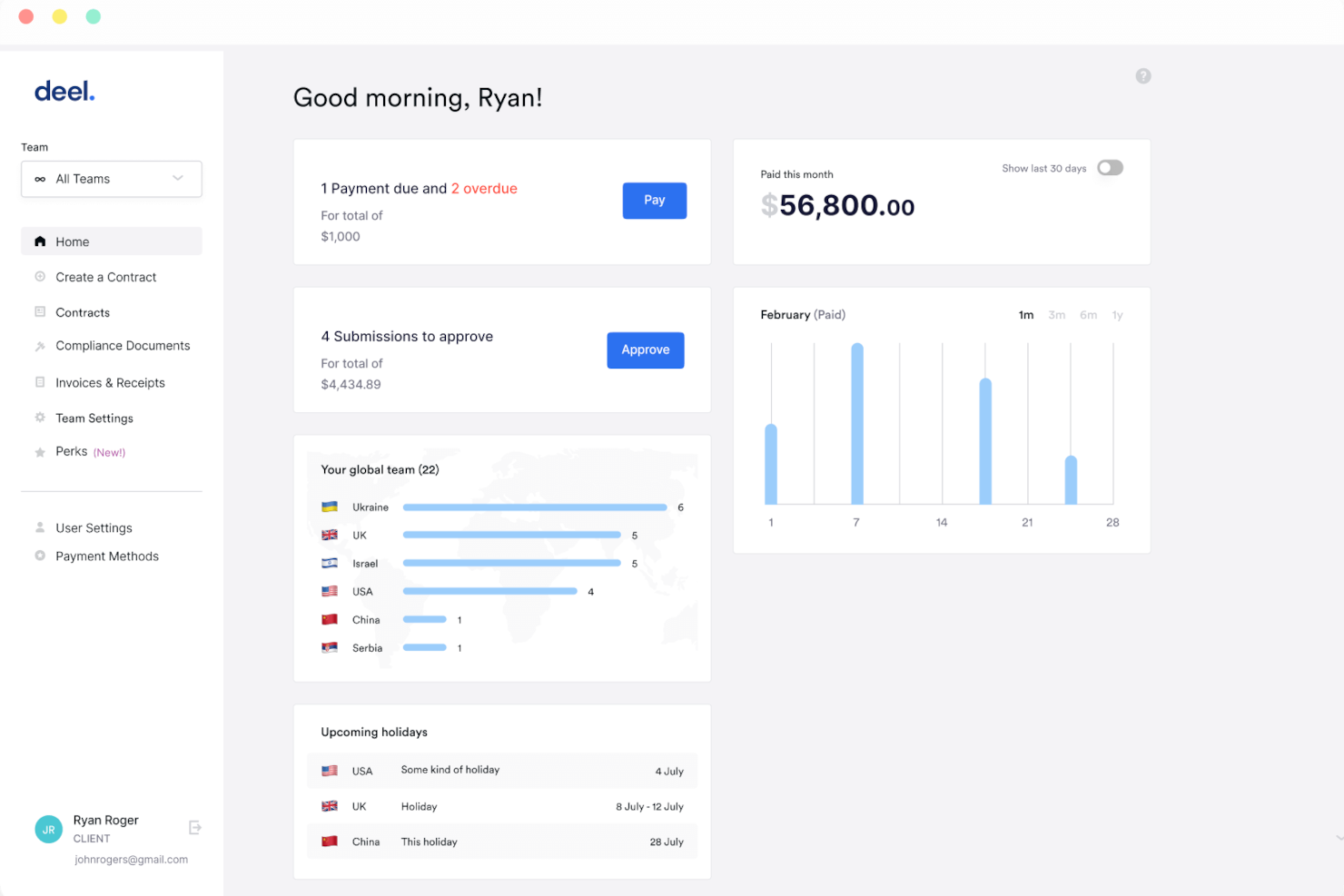
Deel HR is an HR management system for small businesses that covers employee onboarding, document management, time off tracking, and org chart management in one platform.
Who Is Deel HR Best For?
Deel HR is a strong fit for small businesses and startups that need a free, centralized HR system to manage a growing workforce without investing in paid software.
Why I Picked Deel HR
Deel HR earns a spot on my shortlist because it's one of the few HRMS platforms that offers a genuinely free core HR tier for small businesses. The free plan isn't a stripped-down trial—it includes worker profiles, time off tracking, document management, and an org chart, covering the day-to-day needs of a small team without requiring a paid upgrade. When you're ready to grow, you can add modules like recruiting or performance management as a paid add-on without rebuilding anything. Its modular design lets my team start with what we need now and layer in compensation cycles or headcount planning later, all on the same data foundation.
Deel HR Key Features
- Workforce planning: Forecast headcount, model scenarios, and track hiring costs using live workforce data instead of spreadsheets.
- AI-powered applicant tracking: Source candidates automatically, manage interviews, and move new hires directly into onboarding from a single pipeline.
- 360° performance reviews: Run configurable review cycles with quantitative and qualitative feedback, OKRs, and review calibration across your team.
- Anonymous reporting: Built-in whistleblowing tools let employees flag concerns securely, supporting compliance and a speak-up culture.
Deel HR Integrations
Deel HR offers native integrations with Greenhouse, BambooHR, HiBob, Workday, Lever, Ashby, and Personio. An API is available for custom integrations.
New Product Updates from Deel HR

Deel Expands Stablecoin Wallet to 80+ Countries
Deel expands its Stablecoin Wallet to 80+ countries with dollar-backed balances and optional rewards. This gives eligible contractors more ways to hold and manage earnings inside Deel. For more information, visit Deel’s official site.
 .
Best with 24/7 expert HR and payroll support
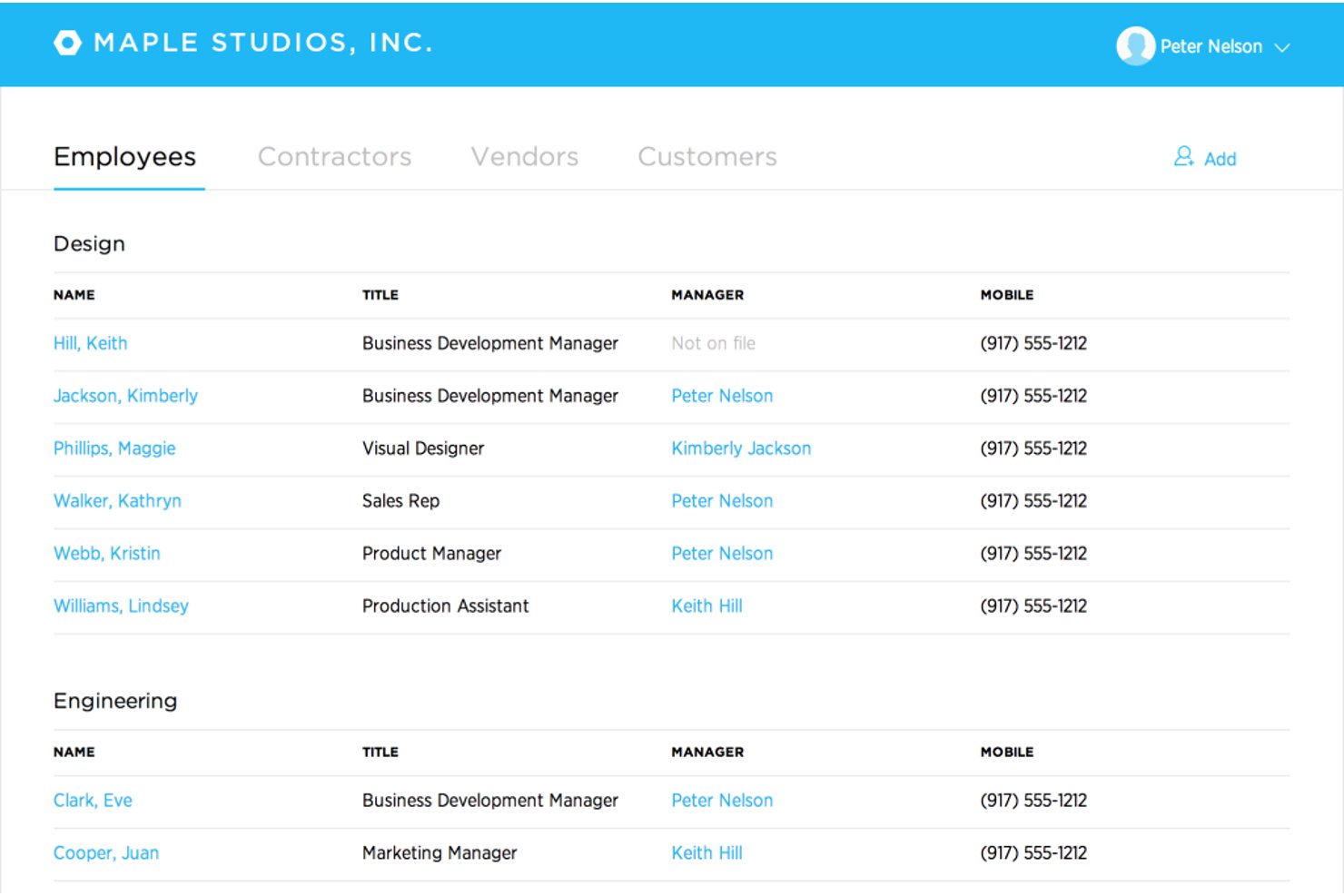
Justworks is a cloud-based HRMS designed for small businesses, combining payroll, benefits administration, HR management, compliance support, and automated tax filings in one platform.
Who Is Justworks Best For?
Small businesses and startups that need simple, compliant payroll and HR management across multiple states or locations.
Why I Picked Justworks
I picked Justworks as one of the best because I rely on their 24/7 expert HR and payroll support for urgent compliance questions and quick troubleshooting. I also appreciate their automated payroll and multi-state tax filings for distributed teams.
Justworks Key Features
- Time tracking add-on: Built-in time tracking integrates directly with payroll for hourly teams.
- Employee self-service portal: Team members can manage their own documents, benefits, and paystubs online.
- Benefits administration: Centralized system to enroll, update, and track benefits for all employees.
- Document storage: Secure, cloud-based repository for company policies and required HR documents.
Justworks Integrations
Native integrations are not clearly documented. An API is available for custom integrations.
Pros and Cons
Pros:
- Offers access to large-group employee benefits
- Multi-state payroll compliance is automated
- 24/7 live HR and payroll support
Cons:
- Custom workflow options are minimal
- Limited built-in performance management tools
Gusto
Best for payroll-to-benefits coordination
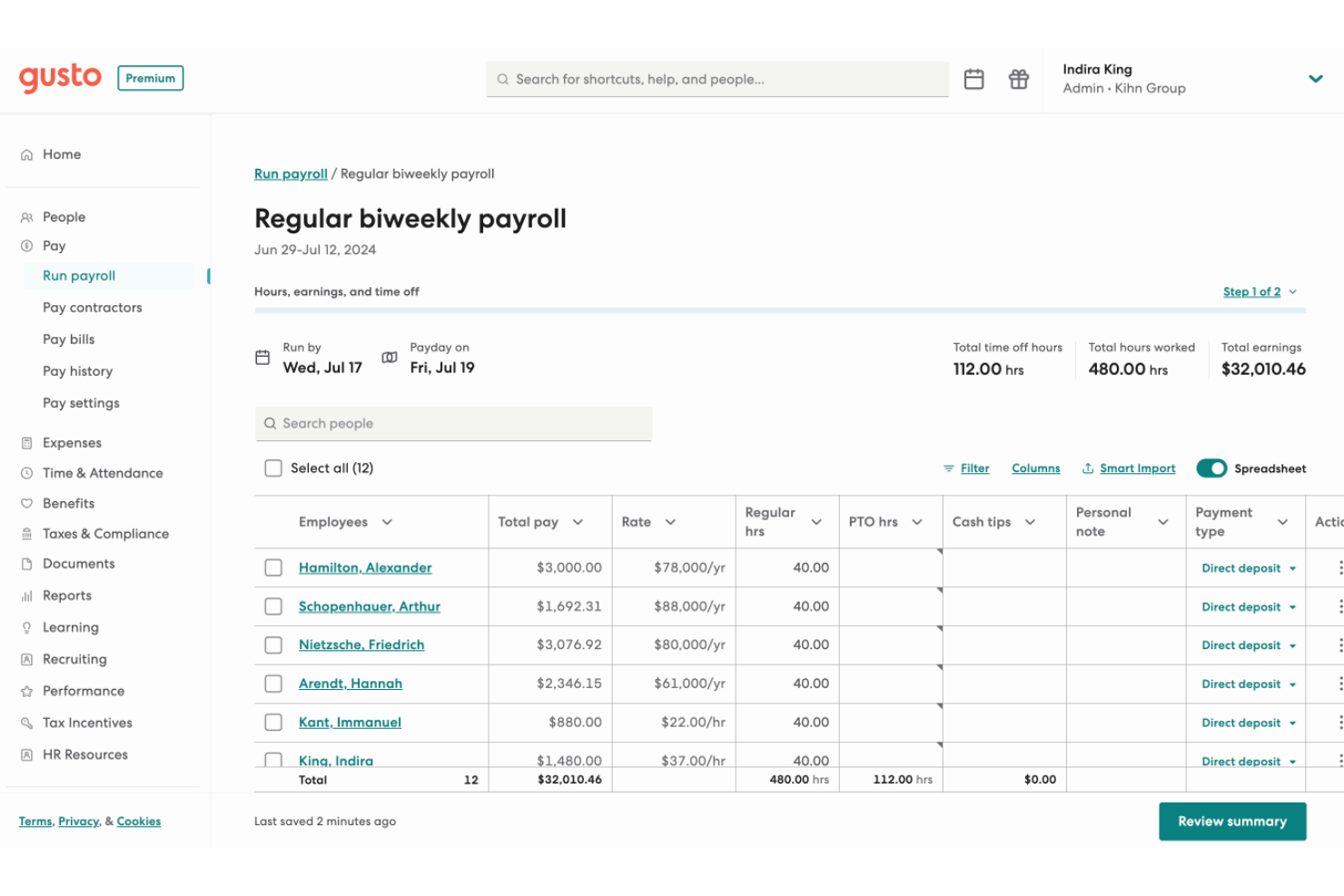
Gusto is an HRMS platform for small businesses that brings together payroll, benefits administration, onboarding, compliance tools, and employee management in one system.
Who Is Gusto Best For?
Gusto is a good fit for small business owners and HR generalists who need to manage payroll and benefits together without a dedicated HR team.
Why I Picked Gusto
Gusto earns its spot on my shortlist because payroll and benefits are woven into a single workflow. When you add a new hire, benefits enrollment starts within the onboarding flow—medical, dental, vision, and 401(k) deductions are calculated and synced with payroll. Gusto also handles open enrollment renewals in-platform, submitting paperwork to carriers so my team doesn't have to chase signatures or track deadlines. The paycheck splitter and Gusto Wallet features add flexibility, letting employees direct portions of each paycheck into savings accounts without extra administrative work.
Gusto Key Features
- Applicant tracking system: Post jobs and track candidates through the hiring pipeline within Gusto, without a separate recruiting tool.
- Mobile time tracking with geolocation: Employees can clock in and out from their phones, with location data captured to verify on-site attendance.
- Performance review templates: Run structured employee reviews using built-in templates, with feedback requests sent to appropriate reviewers on schedule.
- Anonymous feedback surveys: Collect employee input through built-in surveys that keep responses anonymous to encourage candid feedback.
Gusto Integrations
Gusto offers 140+ native integrations, including QuickBooks, Xero, 15Five, 7Shifts, Asana, Bench, Betterment at Work, Box, ApplicantPro, and Checkr. An API is available for custom integrations.
Pros and Cons
Pros:
- Offers self-service onboarding and online storage of tax forms and pay stubs for contractors and employees.
- Payroll, benefits, and HR in one unified platform.
- Payroll runs unlimited times per month without extra fees.
Cons:
- Limited flexibility in customizing tax withholdings or non-standard payroll setups.
- SMBs that need advanced compliance or niche industry-specific HR modules may find Gusto limiting.
New Product Updates from Gusto
Gusto Adds Solo Advisory Tools and Mobile Money Features
Gusto adds Solo S-Corp Advisory Tools and Gusto Money on Mobile for tax guidance, invoicing, and bill payments. These updates help accountants advise solopreneurs and let users manage business finances from their phones. For more information, visit Gusto’s official site.
HiBob
Best for flexible HR processes
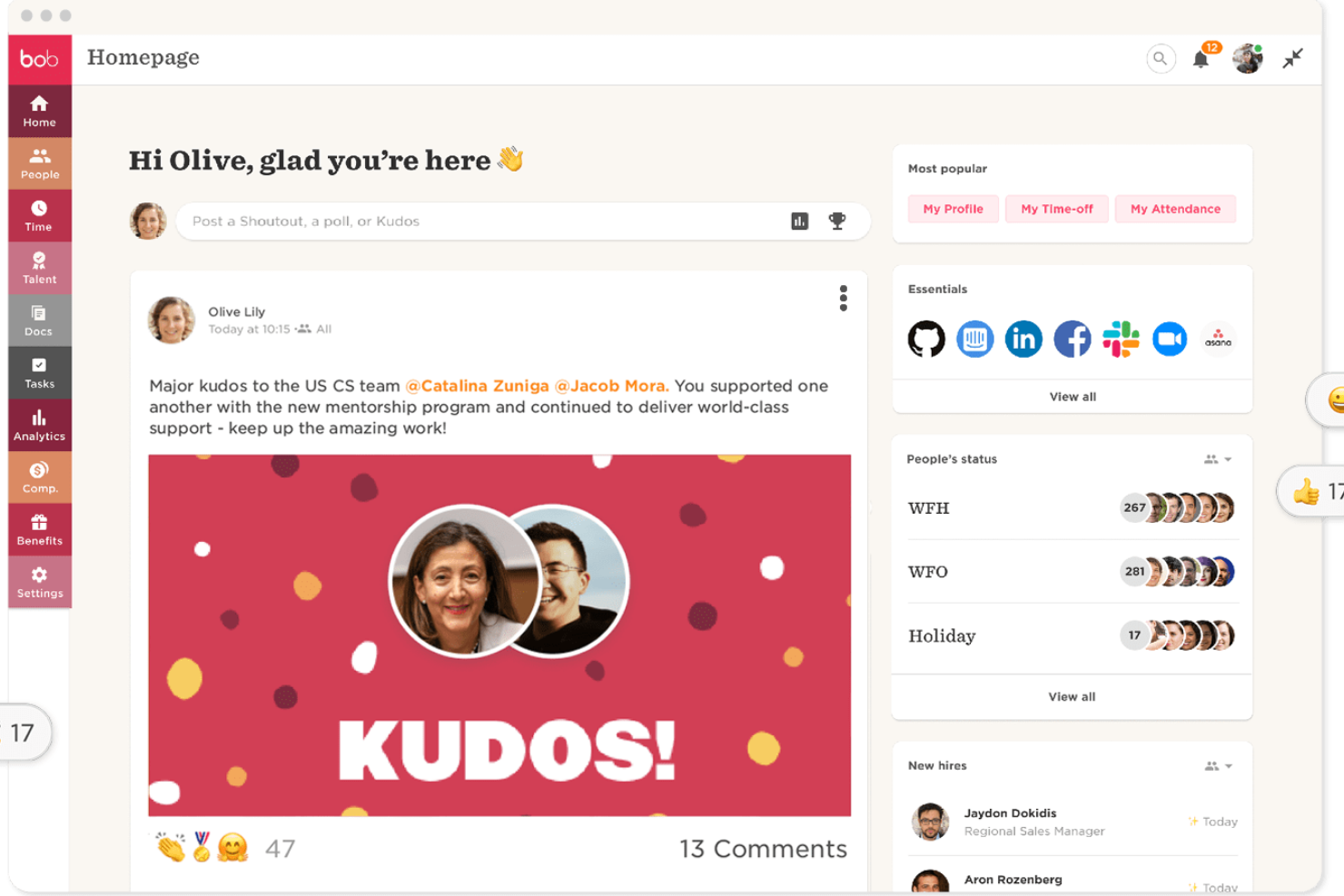
HiBob is an HR management platform designed for small businesses, offering core HR, onboarding, time off tracking, performance management, and customizable workflows.
Who Is HiBob Best For?
HiBob is a strong fit for small and mid-sized businesses that need adaptable HR processes to support fast-changing team structures and people operations.
Why I Picked HiBob
HiBob earns its spot on my shortlist because of how flexible its HR processes are. I love that you can build custom workflows and approval chains that match how your team actually operates, rather than forcing your processes into a rigid system structure. The sandbox environment is especially useful—you can test changes to compensation cycles, automation rules, or performance reviews before they go live, which reduces the risk associated with adjusting HR processes on the fly. The modular setup lets you start with Core HR and add talent, payroll, or workforce planning as your needs grow.
HiBob Key Features
- People analytics: Track headcount, retention, absenteeism, and growth with real-time reports you can schedule and share directly with leadership.
- Onboarding workflows: Automate onboarding tasks and sequences so new hires get a consistent, structured experience from day one.
- Time off management: Employees request and managers approve time off directly within the platform, with visibility into who's in and who's out.
- Employee surveys: Run lifecycle or engagement surveys to collect feedback at key milestones and view results in a built-in dashboard.
HiBob Integrations
HiBob offers native integrations with Slack, Microsoft Teams, Google Workspace, DocuSign, Greenhouse, Okta, and Workable. An API is available for custom integrations.
Best for centralized HR documentation
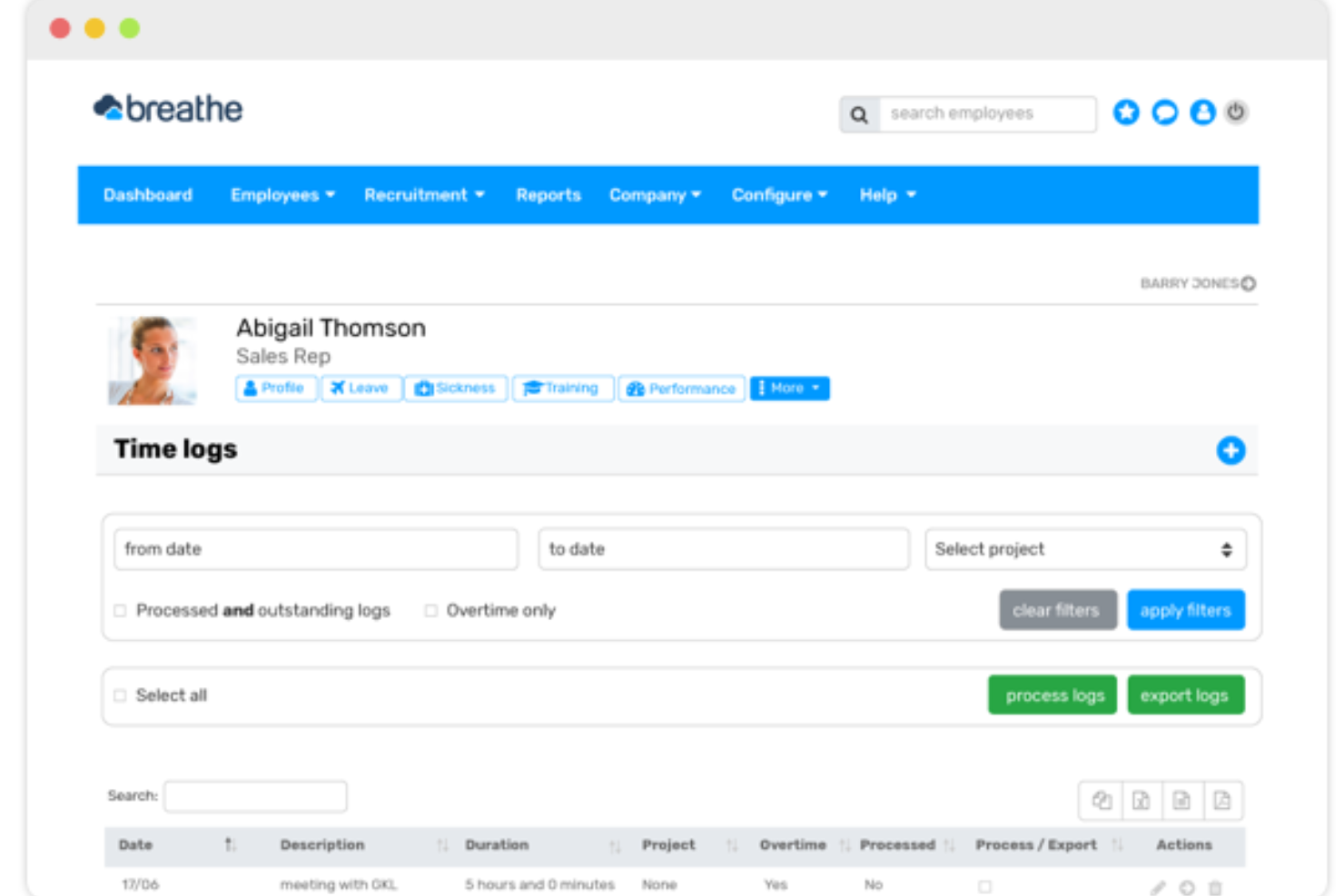
Breathe HR is an HR management system for small businesses that brings together employee records, document management, time off tracking, and performance management in one platform.
Who Is Breathe HR Best For?
Breathe HR is a good fit for small UK-based businesses that need a straightforward way to manage HR admin without a dedicated HR team.
Why I Picked Breathe HR
Breathe HR earns its spot as one of the best on my shortlist because of how well it handles centralized HR documentation for small teams. I love that you can store unlimited documents—contracts, compliance policies, performance reviews—all in one GDPR-compliant location, without worrying about hitting a storage cap. What I find especially useful is the e-signature feature: you can send a contract directly within Breathe, add multiple signees, and get an automatic audit trail with timestamps and IP addresses logged for every signature. There's also a read-tracking feature that shows you exactly who has and hasn't opened a shared company document, so you can send targeted reminders without any manual follow-up.
Breathe HR Key Features
- Holiday and absence tracking: Manage holiday requests, sickness records, and leave balances with a shared calendar view and instant approval workflows.
- Sickness trigger alerts: Set custom Bradford Factor score thresholds or sickness instance limits, and Breathe automatically notifies you when an employee reaches them.
- Performance management: Schedule one-to-ones, run appraisal meetings, and assign goals and tasks to employees directly within the platform.
- Payroll-ready data export: Export HR data in a payroll-ready format to reduce manual data entry when running payroll.
Breathe HR Integrations
Breathe HR offers native integrations with Xero and Google Workspace. An API is available for custom integrations.
BambooHR
Best for automation and simplified workflows
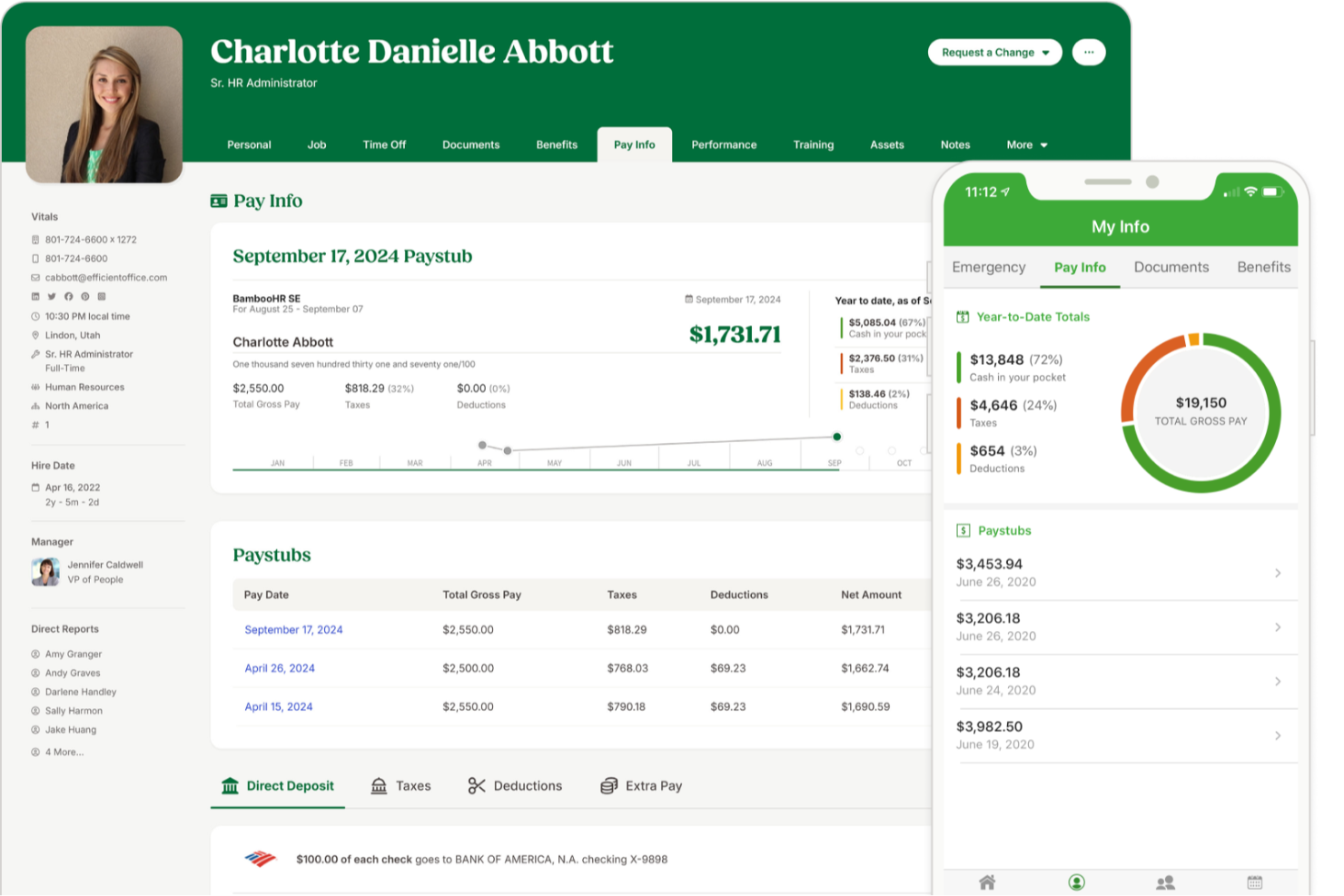
BambooHR is an HR management system for small businesses that covers employee records, onboarding, time-off tracking, workflow automation, and reporting in one platform.
Who Is BambooHR Best For?
BambooHR is a good fit for small to mid-sized businesses that need a dedicated HR system without the complexity of enterprise-grade software.
Why I Picked BambooHR
I picked BambooHR as one of the best because of how well its automated workflows handle the approval bottlenecks that slow small HR teams down. When a time-off request or promotion comes in, BambooHR routes it to the right approver automatically—no email chains, no manual follow-up. I also like the automated onboarding checklists, which assign tasks to the right internal team members the moment a new hire is added, so nothing slips through the cracks before day one. For a small business where one person is often managing all of HR, that kind of built-in structure makes a real operational difference.
BambooHR Key Features
- Applicant tracking system: Manage job postings, review candidates, and move applicants through a hiring pipeline directly within BambooHR.
- Employee self-service portal: Employees can update their own personal information, view pay stubs, and request time off without going through HR.
- Performance management: Run performance review cycles, set goals, and collect peer feedback from within the platform.
- Custom reporting and dashboards: Build real-time reports on workforce data and visualize trends using configurable dashboards.
BambooHR Integrations
BambooHR offers native integrations with ADP, Paylocity, QuickBooks, Slack, Greenhouse, Checkr, and Indeed. It also provides an API for custom integrations.
New Product Updates from BambooHR

BambooHR Adds Sage Intacct Integration for Payroll
BambooHR introduces a Sage Intacct payroll integration with direct journal-entry transfers, account mapping, and report previews. This update reduces manual data entry and simplifies payroll accounting workflows. For more information, visit BambooHR’s official site.
 .

Best HRMS to support growing international teams in 170+ countries
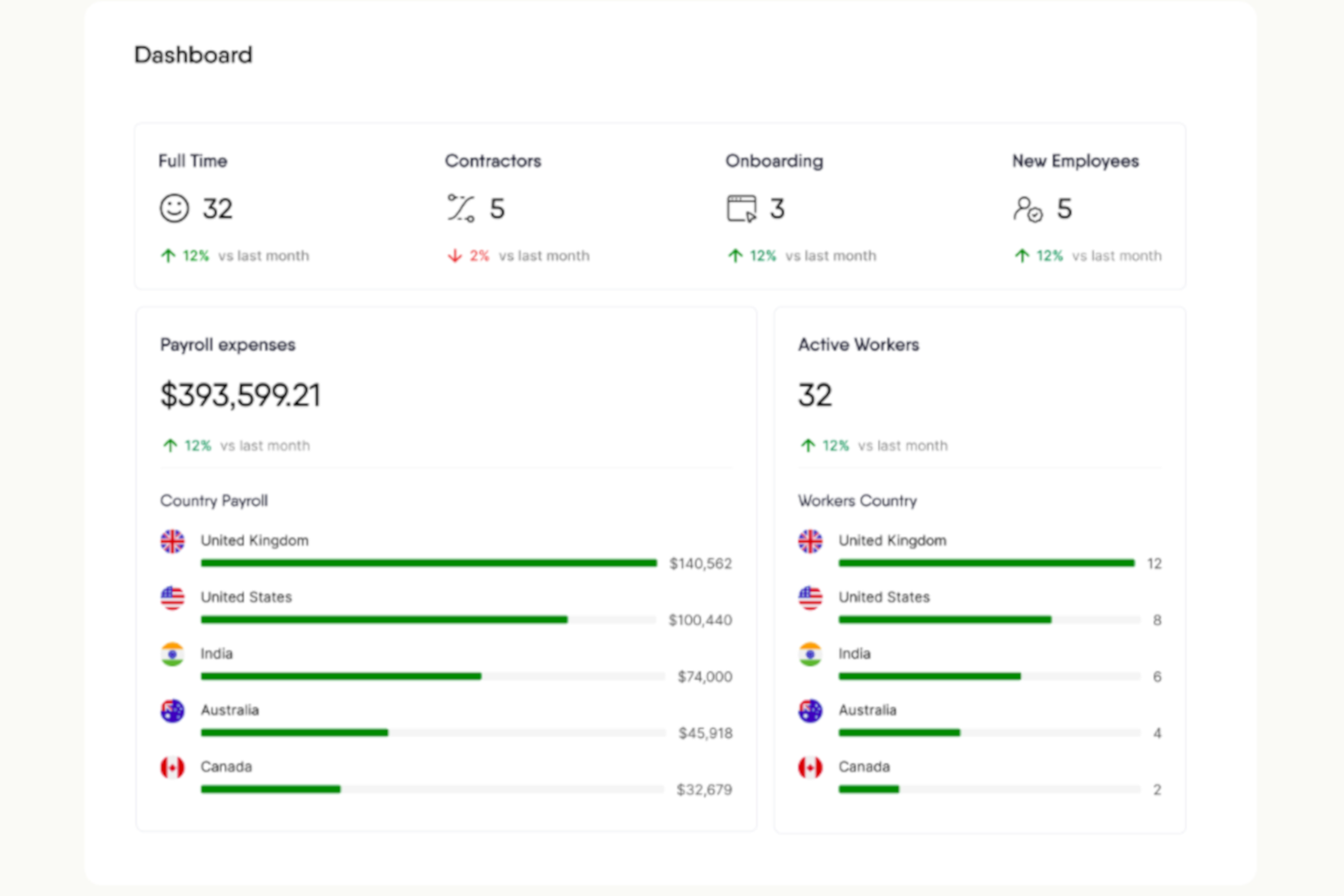
RemoFirst is an HRMS platform for small businesses that need to hire, onboard, and manage employees and contractors across multiple countries, with features for global payroll, compliance, and document management.
Who Is RemoFirst Best For?
RemoFirst is a strong fit for small businesses hiring remote employees or contractors across borders who need localized compliance and payroll without setting up legal entities abroad.
Why I Picked RemoFirst
I've included RemoFirst in my top picks because it solves one of the trickiest challenges for small businesses going global: hiring full-time employees in new countries without setting up a legal entity. RemoFirst acts as the Employer of Record across 185+ countries, handling localized employment contracts, multi-country payroll, tax filings, and pension contributions through a single platform. The contractor-to-employee conversion feature lets my team transition international contractors into compliant full-time hires without rebuilding the employment relationship. The flat-rate pricing with no minimums or long-term contracts makes it accessible for small businesses that are scaling headcount one country at a time.
RemoFirst Key Features
- Workforce management: Track and manage time off, bonuses, and benefits for international employees in line with each country's local labor laws.
- Compliant offboarding: Handle employee terminations across countries, including notice periods, severance calculations, and required documentation based on local law.
- Background checks: Run global background screening on international hires to verify identity and support compliant hiring decisions.
- Visa and immigration support: Manage visa applications and work permits for employees in 85+ countries directly through the platform.
RemoFirst Integrations
Native integrations are not clearly documented. RemoFirst provides an API for custom integrations.
Best for payroll automation and integrations
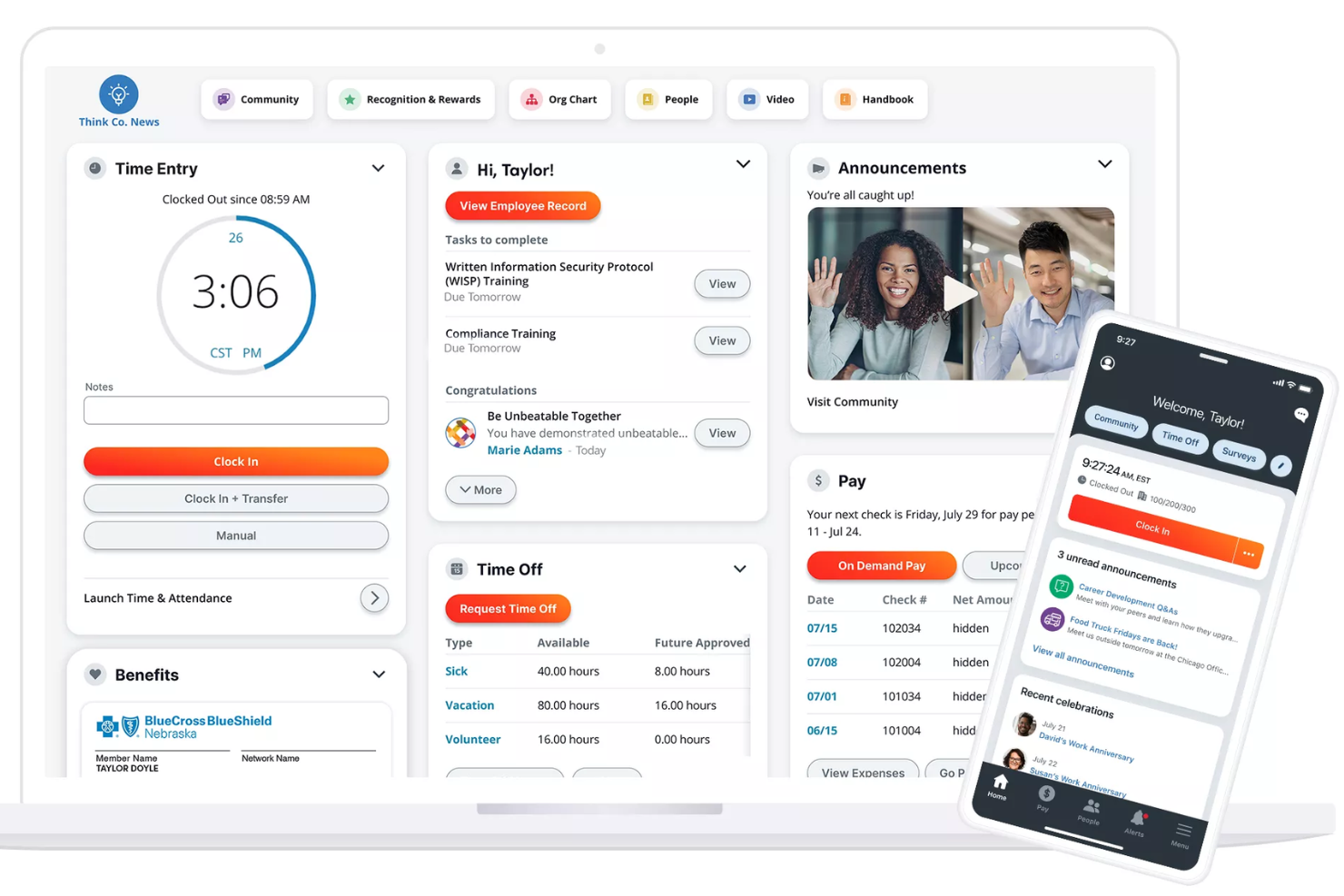
Paylocity is an HRMS platform for small businesses that combines payroll processing, HR management, time tracking, benefits administration, and compliance tools in one system.
Who Is Paylocity Best For?
Paylocity is a good fit for small to mid-sized businesses that need a unified HR and payroll platform with room to scale.
Why I Picked Paylocity
Paylocity earns its spot on my shortlist because of how well its payroll automation handles the details that trip up small HR teams. I particularly like the Payroll Readiness Dashboard, which surfaces critical tasks before processing day and runs 40+ audits to flag issues like unexpected pay spikes before you submit. Hours and labor allocations flow directly from Time & Labor into payroll, so there's no manual re-entry between systems. On the integrations side, Paylocity connects to ATS platforms, benefits and 401(k) providers, ERP systems, and identity tools like Okta and Microsoft Entra—plus open APIs for custom connections.
Paylocity Key Features
- Benefits decision support: Paylocity's Benefits Decision Support tool gives employees personalized plan recommendations based on their individual preferences and situations during open enrollment.
- Tax geolocation: Paylocity audits each employee's location to verify they're paying the correct taxes, with support from a registered IRS Reporting Agent team across all 50 states.
- On demand payment: Employees can access earned wages before payday, giving small businesses a recruiting and retention tool with no impact on payroll cash flow.
- General ledger mapping: Configure GL settings, create journal entries, and generate customized reports directly in the platform without needing to contact Paylocity support.
Paylocity Integrations
Paylocity offers native integrations with ADP, QuickBooks, NetSuite, Okta, Microsoft Entra, and several benefits and 401(k) providers. An API is available for custom integrations.
New Product Updates from Paylocity

Paylocity Adds Candidate Engagement and Talent Rediscovery Agents
Paylocity adds Candidate Engagement and Talent Rediscovery Agents to automate candidate outreach, scheduling, and re-engagement. This helps recruiting teams move candidates through hiring faster. For more information, visit Paylocity’s official site.
 .
Best as AI for business
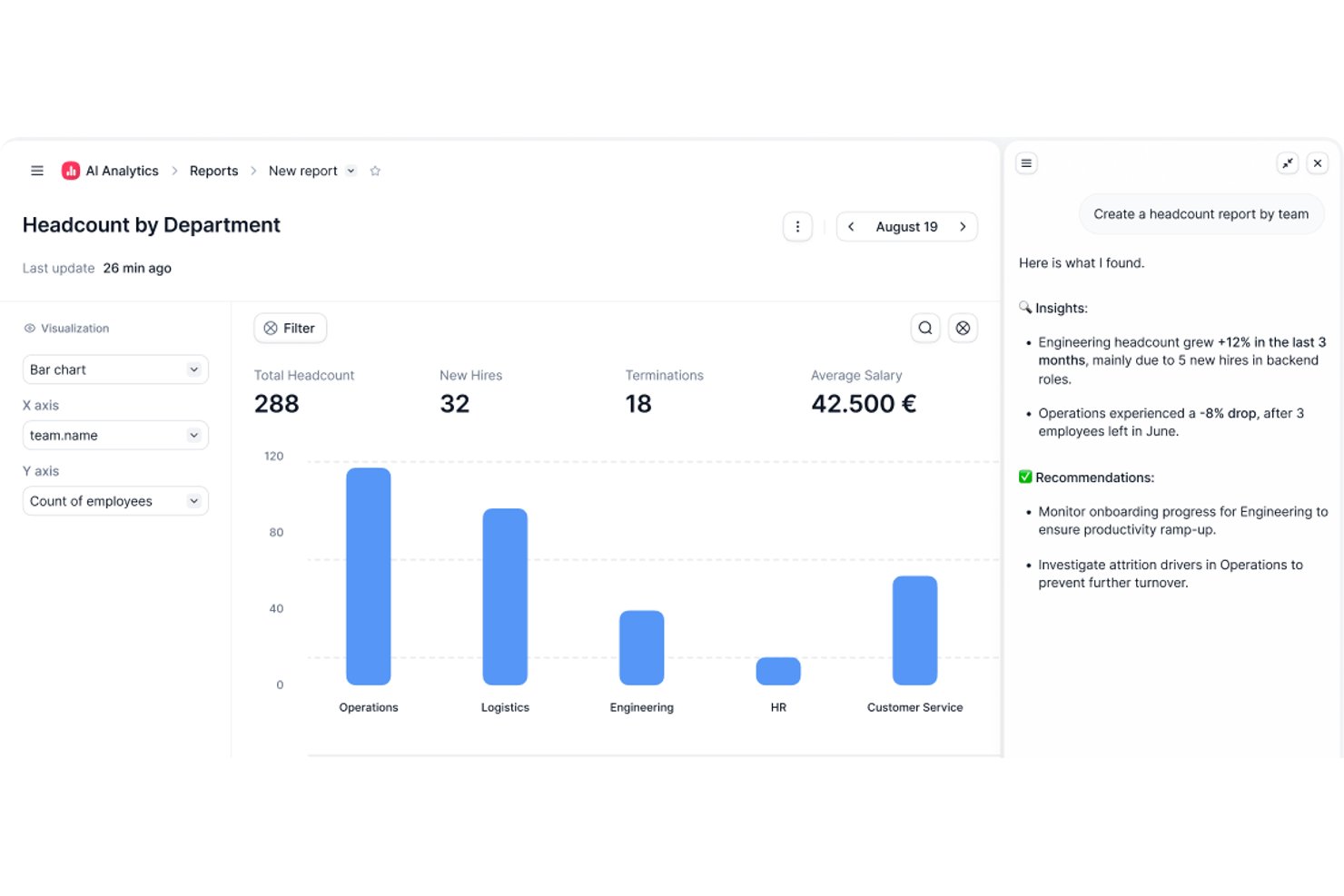
Factorial is an AI-powered HRMS built for small and mid-sized businesses that covers core HR, time tracking, leave management, onboarding, performance, and employee engagement in one platform.
Who Is Factorial Best For?
Factorial is a strong fit for small and mid-sized businesses that want AI to handle everyday operations—from scheduling and reporting to answering employee policy questions.
Why I Picked Factorial
I picked Factorial as one of the best because its AI for business positioning goes beyond a tagline. In practice, the One AI agent actively handles the operational work that eats up HR time in small teams, from answering employee policy questions through AI Ticketing to generating reports and preparing contracts for review. I also like that shift scheduling and absence management get AI assistance built in, so a lean HR team isn't manually piecing together timetables or chasing approvals.
Factorial Key Features
- 360-degree performance reviews: Employees, peers, and managers can submit structured feedback within a single review cycle.
- eNPS and climate surveys: The Engagement module lets you run employee net promoter score surveys and Team Pulse checks to track sentiment over time.
- Expense tracking with OCR: The Expenses module reads and categorizes receipts automatically using smart document scanning.
- Legal e-signature on documents: Contracts, payslips, and HR documents can be sent and signed digitally without leaving the platform.
Factorial Integrations
Marketplace integrations include Google Workspace, Slack, Recruitee, Silae, Microsoft Power BI, and Okta. Factorial also supports a public API, webhooks, SDKs, OAuth 2.0, and Zapier.
Pros and Cons
Pros:
- Leave visibility reduces manual follow-up
- Employee records and documents stay centralized
- AI supports policy questions, reports, and timetables
Cons:
- Complex payroll still needs manual validation
- Module costs can strain very small teams
Paycor
Best for industry-specific payroll features

Paycor is an HRMS platform for small businesses that brings together payroll, HR management, time tracking, benefits administration, and talent management in one system.
Who Is Paycor Best For?
Paycor is a strong fit for small businesses in industries like healthcare, manufacturing, and retail that need payroll and HR tools built around their specific workforce needs.
Why Paycor Is a Top Pick
Paycor is a top pick because it builds industry-specific payroll logic directly into the product rather than treating every business the same. For manufacturing teams, that means automated blended overtime and piece-rate calculations are handled natively—not through manual workarounds. For healthcare, Paycor supports PBJ (Payroll-Based Journal) reporting and lets you copy and paste shifts between days while filtering by nurse certifications. I also like that each industry gets its own implementation blueprint, so the setup process is led by consultants who already understand your payroll structure before they walk in the door.
Paycor Key Features
- Benefits Advisor: An open enrollment tool that lets employees self-select benefits with built-in decision support, while giving HR teams benchmarking and reporting capabilities.
- Pulse surveys: A built-in employee feedback tool that collects responses and surfaces insights directly within the platform.
- Recruiting software: A candidate tracking and communication tool that lets you post jobs, text candidates, and track applicants through every stage of the hiring pipeline.
- Reporting and analytics: Pre-built and configurable reports covering turnover, headcount, and gender pay equity, all pulling from a single unified data source.
Paycor Integrations
Paycor offers native integrations with QuickBooks, JazzHR, 15Five, DailyPay, OrgChart, Timeero, Spark Hire, Mitratech AssureHire, Tilt, and Procurify. An API is available for custom integrations.
Andre HRMS-løsninger for små og mellomstore bedrifter
Nedenfor finner du en liste over flere HRMS-løsninger for små bedrifter som ikke kom med på topp 10-listen min, men som likevel er verdt å se nærmere på:
- TriNet
For HR outsourcing and compliance
- Agendrix
HRMS for workforce time tracking
- Sloneek
For centralizing employee management
- Lattice
For real-time feedback and performance management
- HR Cloud
For an automated yet engaging employee onboarding process
- Eddy
For a detailed employee directory
- Sage HR
For managing employee scheduling
- Trinet
For its robust mobile app
- Insperity
HRMS software for US-based small businesses
- Qandle
Create company policies with a flexible HR software


Relaterte anmeldelser av HR-programvare
Hvis du fortsatt ikke har funnet det du leter etter her, kan du ta en titt på disse andre relaterte verktøyene som vi har testet og evaluert:
- HR-programvare
- Lønnsprogramvare
- Rekrutteringsprogramvare
- Tjenester for arbeidsgivere som står som formell arbeidsgiver
- Systemer for sporing av søkere
- Programvare for arbeidsstyrkestyring
How I Evaluate HRMS for Small Business
I split my evaluation into baseline requirements every HRMS for small business must meet—like employee records, PTO tracking, and payroll sync—and differentiators that set the best tools apart.
Core Functionality (Table Stakes For This List)
When I'm selecting tools for my list, I rank each one on a scale from 0 (does not offer the functionality) to 5 (excels in this area) for each core functionality listed below. Then, I calculate the tool's total score into a percentage. Each tool needs to achieve a minimum total score of 65% to be considered for inclusion.
- Employee Database: I check whether the system stores job history, emergency contacts, documents, and custom fields in one searchable hub rather than scattered spreadsheets.
- Onboarding & Offboarding: Each tool should let you build automated workflows—like sending offer letters, collecting e-signatures, and assigning Day 1 tasks—without manual follow-up emails.
- Time Off & Attendance: I evaluate how PTO requests, accrual policies, and approval chains work, especially for teams juggling different leave types across multiple office locations.
- Payroll Integration or Processing: Whether the tool runs payroll natively or syncs with providers like Gusto or QuickBooks, I look for how cleanly hours, deductions, and tax data flow between systems.
- Benefits Administration: Small teams still need to manage health plans and retirement options, so I look for enrollment workflows, carrier connections, and clear employee-facing plan details.
- Compliance & Reporting: I evaluate built-in compliance forms, audit trails, and reporting—things like generating headcount reports or tracking document completion rates across your workforce.
Once I have a list of tools that meet the criteria, I consider what sets each platform apart.
Differentiating Factors (What Sets Vendors Apart)
Here's how I compare and contrast different vendors:
Standout Features
An employee self-service portal makes a real difference for small teams—when staff can update their own addresses, download pay stubs, and submit PTO requests from their phones, it takes routine questions off your plate. I also look at whether a tool includes built-in performance reviews and goal tracking, since most small businesses outgrow informal feedback quickly. Applicant tracking is another differentiator I evaluate; tools that let you post jobs, screen candidates, and convert them into employee records in one system save a lot of duplicate data entry.
Beyond Features
Pricing transparency matters a lot for small businesses, so I check whether vendors offer clear per-employee-per-month rates and low-commitment entry points that scale as you hire. Integration support is equally important—your HRMS needs to connect with tools like QuickBooks, Xero, Slack, or Google Workspace without custom development. I also evaluate onboarding support, especially whether the vendor offers guided setup wizards or data migration templates, since most small teams are moving off spreadsheets and can't afford a months-long implementation.
Slik velger du en HRMS-løsning for en SMB
En HRMS-løsning kan hjelpe deg med å samle alle de viktigste HR-funksjonene dine i ett system for maksimal effektivitet. For å finne ut hvilken HRMS-løsning som passer best til behovene i den lille bedriften din, må du først identifisere de viktigste brukerne og kartlegge de spesifikke utfordringene deres.
Når du går gjennom din egen unike prosess for valg av programvare, bør du ha følgende punkter i bakhodet:
- Hvilket problem prøver du å løse - Begynn med å identifisere utfordringene du prøver å overvinne. Dette vil hjelpe deg med å avklare hvilke funksjoner og hvilken funksjonalitet HRMS-et må tilby.
- Hvem vil måtte bruke det - For å vurdere kostnader og krav bør du tenke over hvem som skal bruke programvaren, og hvor mange lisenser du vil trenge. For et HRMS vil du sannsynligvis ønske tilgang på ansattnivå for hele arbeidsstyrken, med særskilt tilgang for HR-administratorene og lederne dine. Når dette er avklart, er det også nyttig å rangere behovene til de ulike brukergruppene dine for å identifisere de viktigste prioriteringene for avanserte brukere, ledere og ansatte, slik at alle behovene deres blir dekket.
- Hvilke andre verktøy det må fungere sammen med - Avklar hvilke verktøy du erstatter, hvilke verktøy som skal beholdes, og hvilke verktøy du må integrere med, for eksempel programvare for opplæringsadministrasjon, applikasjoner for enkel pålogging eller operativsystemer for arbeid, som Microsoft 365 eller Google Workspace. Du må avgjøre om verktøyene skal integreres med hverandre, eller om du i stedet kan erstatte flere verktøy med én samlet HR-plattform.
- Hvilke resultater som er viktige - Gå gjennom funksjonene du ønsker å få eller forbedre, og hvordan du skal måle suksess. Det kan for eksempel være at du ønsker selvbetjeningsfunksjoner for ansatte for å redusere antallet administrative forespørsler, eller digitalisere flere papir- eller Excel-baserte sporingsprosesser. Du kan sammenligne programvarefunksjoner til du blir blå i ansiktet, men hvis du ikke tenker på resultatene du ønsker å oppnå, kan du kaste bort mye verdifull tid.
- Hvordan det vil fungere i organisasjonen din - Vurder valg av programvare sammen med de eksisterende arbeidsflytene og systemene dine. Evaluer hva som fungerer godt, og hvilke områder som skaper problemer og må håndteres.
Husk at alle virksomheter er forskjellige — ikke anta at et HRMS vil fungere for organisasjonen din bare fordi det er populært.
Hva er et HRMS?
Systemer for personaladministrasjon (HRMS) er programvareverktøy som er utviklet for å effektivisere og automatisere ulike HR-funksjoner, som administrasjon av ansattdata, lønnsbehandling, administrasjon av personalgoder og rekrutteringsprosesser. Det tilbyr en sentralisert plattform for lagring og tilgang til informasjon om ansatte, forenkling av HR-oppgaver og bedre beslutningstaking.
Programvaren hjelper små virksomheter med å administrere en liten arbeidsstyrke effektivt, sikre overholdelse av arbeidslovgivningen og redusere manuelt arbeid uten at det koster en formue. Ved å bruke HRMS kan små virksomheter fokusere mer på strategisk vekst og mindre på administrative byrder.
Funksjoner i et HRMS
Det er avgjørende for små virksomheter som ønsker å opprettholde samsvar, forbedre medarbeideradministrasjonen og fokusere på vekst, å velge riktig system for personaladministrasjon (HRMS). HR-arbeidet i små virksomheter og store foretak er i stor grad avhengig av hvor effektive HRIS-systemene er, slik at driften og dataadministrasjonen blir mer strømlinjeformet.
Et effektivt HRMS kan effektivisere ulike HR-oppgaver og sørge for at virksomheten drives smidig og effektivt. Her er ti viktige funksjoner du bør vurdere:
- Administrasjon av medarbeiderdatabase: HRMS-systemet ditt vil fungere som en sentralisert database for lagring av all informasjon om medarbeiderne dine. Dette sikrer at alle medarbeiderdata er organisert og lett tilgjengelige, noe som gjør det enklere å overholde regelverket for arkivering.
- Lønnsadministrasjon: Automatisering av lønn reduserer feil og behovet for manuell dataregistrering, noe som gjør lønnsprosessen langt mindre tidkrevende.
- Registrering av arbeidstid og fremmøte: Denne funksjonen hjelper organisasjoner med å registrere arbeidstimer, administrere arbeidskostnader og overholde arbeidslovgivningen når det gjelder overtid og antall sammenhengende arbeidsdager.
- Administrasjon av personalgoder: Effektiv administrasjon av personalgoder bidrar til å tiltrekke seg og beholde talentfulle medarbeidere, noe som bidrar til den samlede virksomhetsveksten. Når månedlige kostnader for personalgoder dessuten kobles direkte til lønnsmodulen, reduserer du behovet for manuell dataregistrering.
- Prestasjonsstyring: Denne funksjonen viser til verktøy for å sette mål og evaluere medarbeidernes prestasjoner. Regelmessige medarbeidersamtaler bidrar til å forbedre produktiviteten og identifisere utviklingsområder, noe som fremmer virksomhetens suksess.
- Rekruttering og søkersporing: Effektiv rekruttering og søkersporing sikrer at virksomheten raskt tiltrekker seg de beste talentene. Mange systemer benytter nå KI-baserte funksjoner som gjør sammenligninger av kandidatenes ferdigheter med stillingsbeskrivelser langt mer effektive og rettferdige.
- Håndtering av regelverksetterlevelse: HRMS-systemer leveres med verktøy for å overvåke og sikre overholdelse av lover og regler. Denne funksjonen bidrar til å unngå bøter og juridiske problemer, slik at virksomheten kan drives problemfritt.
- Selvbetjeningsportal for medarbeidere: Denne viktige funksjonen lar medarbeidere få tilgang til og administrere sin egen HR-informasjon, for eksempel kontaktopplysninger, bankopplysninger og informasjon om personalgoder. Når medarbeiderne får mulighet til å administrere sine egne data, øker engasjementet og den administrative belastningen reduseres.
- Rapportering og analyse: HRMS-systemer tilbyr innebygde rapporter og analysemaler som hjelper team med å ta informerte beslutninger, optimalisere HR-strategier og støtte virksomhetens vekst.
- Opplæring og utvikling: Dette viser til verktøy for å tilby og følge opp interne opplæringsprogrammer for medarbeidere, ofte inkludert et internt læringsstyringssystem (LMS). For en liten virksomhet legger investeringer i medarbeiderutvikling grunnlaget for en kompetent arbeidsstyrke, noe som over tid baner vei for virksomhetsutvidelse.
Virksomheter som ønsker flere muligheter for tilpasning, kan utforske avansert HR-programvare for å få tilgang til et bredere utvalg funksjoner som kan tilpasses behovene deres.
Hjelp småbedriften din med å vokse ved hjelp av HRMS-løsninger
Det er komplisert å utvikle en liten virksomhet fordi det er mange ting eierne må holde øye med. Men HRMS-løsninger og annen HR-programvare utviklet for små virksomheter gjør prosessen enklere. Mange av dem hjelper deg med å automatisere repetitive HR-oppgaver, slik at du kan fokusere på andre deler av virksomheten. De hjelper deg også med å spare tid på rekruttering, talentstyring, introduksjon av nyansatte og arbeidsstyring.
Men viktigst av alt kan HRMS-programvare hjelpe deg og teamet ditt med å forstå hvordan dere kan vokse. Mary Karamanos, senior visepresident for HR i BDC, sa «En vanlig feil voksende selskaper gjør, er at de ikke setter av nok tid til å planlegge HR-behovene sine. […] Den gode nyheten er at små virksomheter ofte tiltrekker seg dyktige medarbeidere fordi de ofte kan tilby utfordrende ansvarsområder, gode læringsmuligheter og personlig utvikling.»