

10 Best AI Employee Scheduling Software Reviewed in 2026

Best AI Employee Scheduling Software Shortlist


Managing employee schedules can be a real headache. As an HR professional, you're juggling countless variables like availability, skills, and compliance. That's where AI employee scheduling software steps in. These tools use AI to predict staffing needs, optimize shift planning, and reduce conflicts.
In my experience testing these solutions, I've found that AI capabilities make a world of difference. They help you save time, boost team productivity, and ensure everyone's in the right place at the right time.
In this article, I'll share my top picks for AI scheduling tools. You'll get an unbiased look at their features and how they can benefit your team. Let's make scheduling a breeze.
Why Trust Our Software Reviews
Our team has been testing and reviewing software since 2012. As HR experts ourselves, we know how difficult—and important—it is to choose the right software.
For this guide, we evaluated tools using hands-on testing and independent research, scoring tools using our selection criteria. We also draw on insights from industry thought leaders and practicing HR experts.
Our reviews reflect our human editorial judgment, not a sales pitch.
Expert reviewers:
AI Employee Scheduling Software Comparison Table
This comparison table summarizes pricing details for my top AI employee scheduling software selections:
| Tool | Best For | Trial Info | Price | ||
|---|---|---|---|---|---|
| 1 | Best for centralized employee record storage | Free demo available | From $8/user/month | Website | |
| 2 | Best for building custom automated schedules | Free plan available | From $9/user/month (billed annually) | Website | |
| 3 | Best for integrated desk and room booking | Free demo available | Pricing upon request | Website | |
| 4 | Best with integrated payroll add-on | Free plan available | From $30/location/month | Website | |
| 5 | Best for dynamic shift swapping | 14-day free trial + free demo available | From $5/user/month | Website | |
| 6 | Best for compliance-focused scheduling | Free demo available | Pricing upon request | Website | |
| 7 | Best for task-based scheduling | 7-day free trial | From $4.60/user/month (billed annually) | Website | |
| 8 | Best for enterprise-level HR integration | Free demo available | Pricing upon request | Website | |
| 9 | Best for AI task prioritization | Free trial available | From $19/user/month (billed annually) | Website | |
| 10 | Best for automated calendar syncing | Free plan available | From $10/seat/month | Website |

Best AI Employee Scheduling Software Reviews
Below are my detailed summaries of the best AI employee scheduling software that made it onto my shortlist. My reviews offer a thorough look at the key features, pros & cons, integrations, and ideal use cases of each tool, helping you find the best one for you.

Best for centralized employee record storage
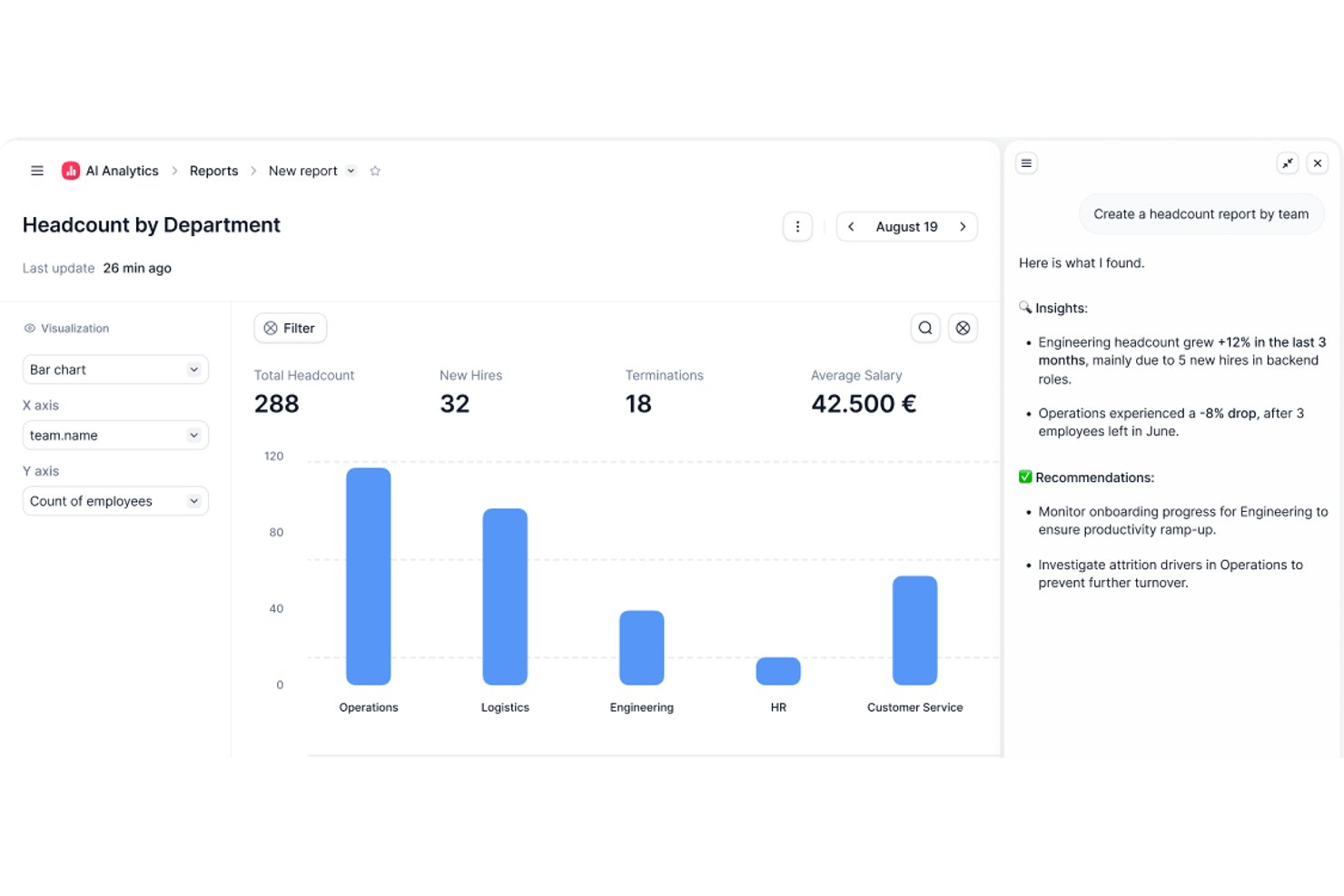
Factorial is an AI-powered HR and workforce management platform that covers employee scheduling, shift planning, time tracking, payroll, and talent management in a single system.
Who Is Factorial Best For?
Factorial is a good fit for mid-sized businesses that need to manage scheduling, time tracking, and HR administration across multiple teams or locations in one place.
Why I Picked Factorial
Factorial is one of my top picks because I love how tightly its document management ties into the rest of the platform. Every employee has a private digital hub where contracts, payslips, and compliance documents live in one place, alongside their schedule and time tracking data. I particularly like the bulk document request feature, which lets you send employees requests to upload files all at once rather than chasing them one by one. The auto-fill document variables system is a nice touch too, pulling existing employee data directly into forms so you're not re-entering the same information twice.
Factorial Key Features
- AI shift planner: Automatically generates weekly schedules based on employee availability, skills, and preset labor rules.
- Geolocation clock-in: Lets employees clock in and out from a mobile app using GPS or QR codes to verify on-site attendance.
- Time off calendar integration: Syncs approved leave requests directly into the shift schedule so managers can see real-time availability gaps.
- Labor law compliance alerts: Flags scheduling conflicts like insufficient rest periods or exceeded weekly hours before a schedule is published.
Factorial Integrations
Factorial offers 90+ integrations through its app marketplace, including Slack, Google Workspace, Microsoft Outlook, Microsoft Dynamics 365, Microsoft Azure, Microsoft Power BI, Okta, JumpCloud, LinkedIn, Teamtailor, and Workable. It also connects with Zapier and provides an API for custom integrations.
Pros and Cons
Pros:
- AI agent surfaces attendance gaps automatically
- Geofencing validates clock-ins per work site
- Shift conflict detection flags issues before publishing
Cons:
- Advanced reporting requires higher-tier plans
- Pay differentials are difficult to configure

Best for building custom automated schedules
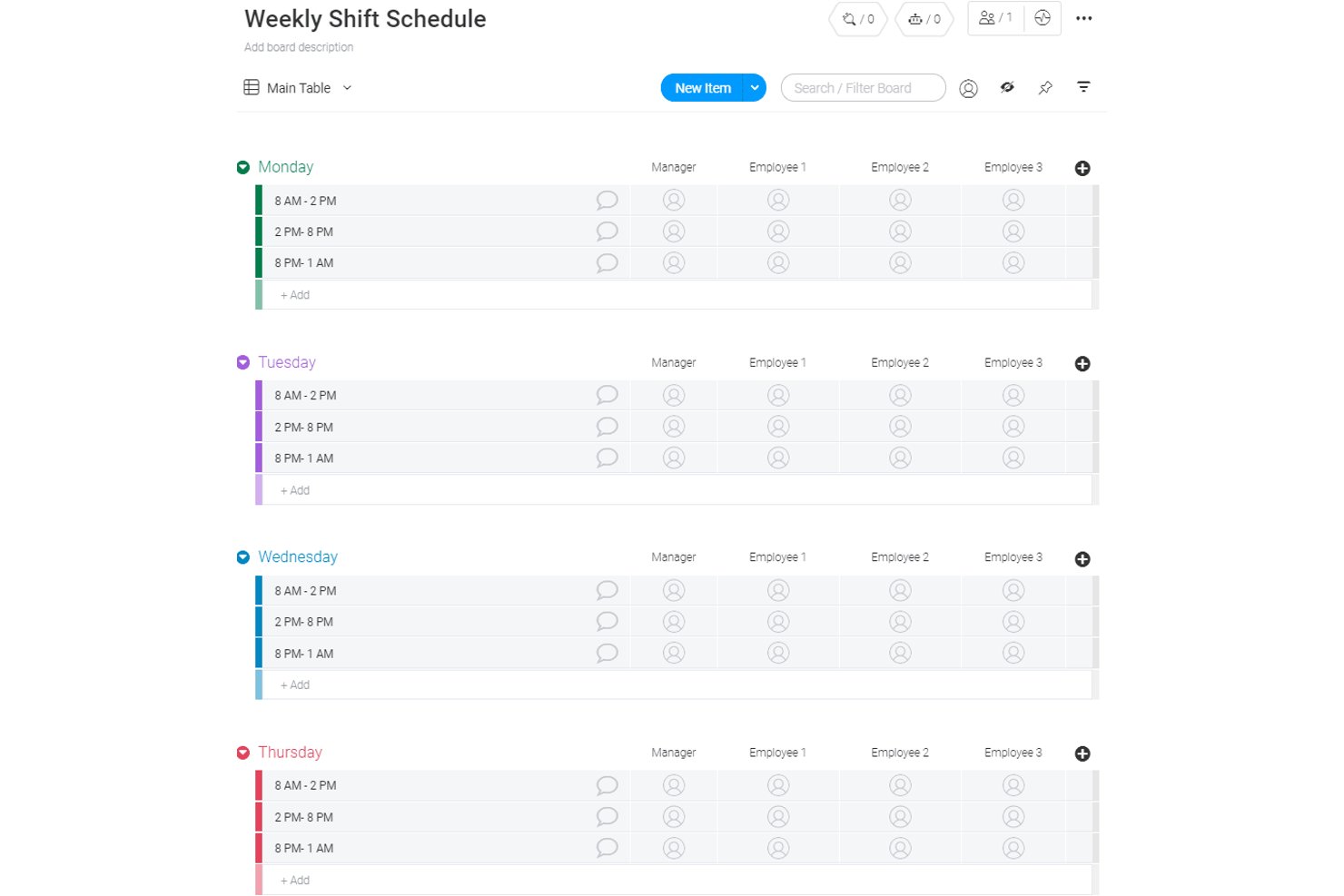
monday AI Workspace is a flexible work management platform that combines AI-powered automation, customizable scheduling boards, and timeline views to coordinate team workflows and operational planning.
Who Is monday AI Workspace Best For?
It's a strong fit for cross-functional teams and operations managers who need flexible, customizable workflows rather than rigid, shift-based scheduling structures.
Why I Picked monday AI Workspace
I picked monday AI Workspace because its AI workflow builder lets you orchestrate multi-step scheduling automations connecting boards, triggers, and AI agents without a single line of code. The AI columns feature handles repetitive scheduling tasks directly within boards, like automatically assigning owners when a shift status changes. What I find genuinely useful is the recurring task logic, which generates schedule entries at set intervals without requiring manual input each cycle.
monday AI Workspace Key Features
- Multiple board views: Switch between calendar, Kanban, Gantt, and timeline views to visualize team schedules in different formats.
- Custom automations: Set up if/then automation recipes to reduce manual work for task assignment or scheduling changes.
- API and integration options: Connect workflows to tools like Slack, Gmail, and Outlook, or use monday’s API for custom integrations.
- Mobile app access: Enable team members to stay updated and view scheduling boards on iOS and Android devices.
monday AI Workspace Integrations
monday AI Workspace offers native integrations with Slack, Google Drive, Gmail, Outlook, and GitHub. An API is available for custom integrations.
Pros and Cons
Pros:
- AI columns streamline task assignments
- Multiple board views for visualizing schedules
- Custom workflow automation for schedule coordination
Cons:
- Lacks shift swap and open shift features
- No auto-scheduling by demand or availability
New Product Updates from monday AI Workspace
monday AI Workspace Adds Human Approval Routing
monday AI Workspace adds a human-in-the-loop approval block to AI Workflows, sending approval requests and routing workflow paths based on responses. For more information, visit monday AI Workspace's official site.
Best for integrated desk and room booking
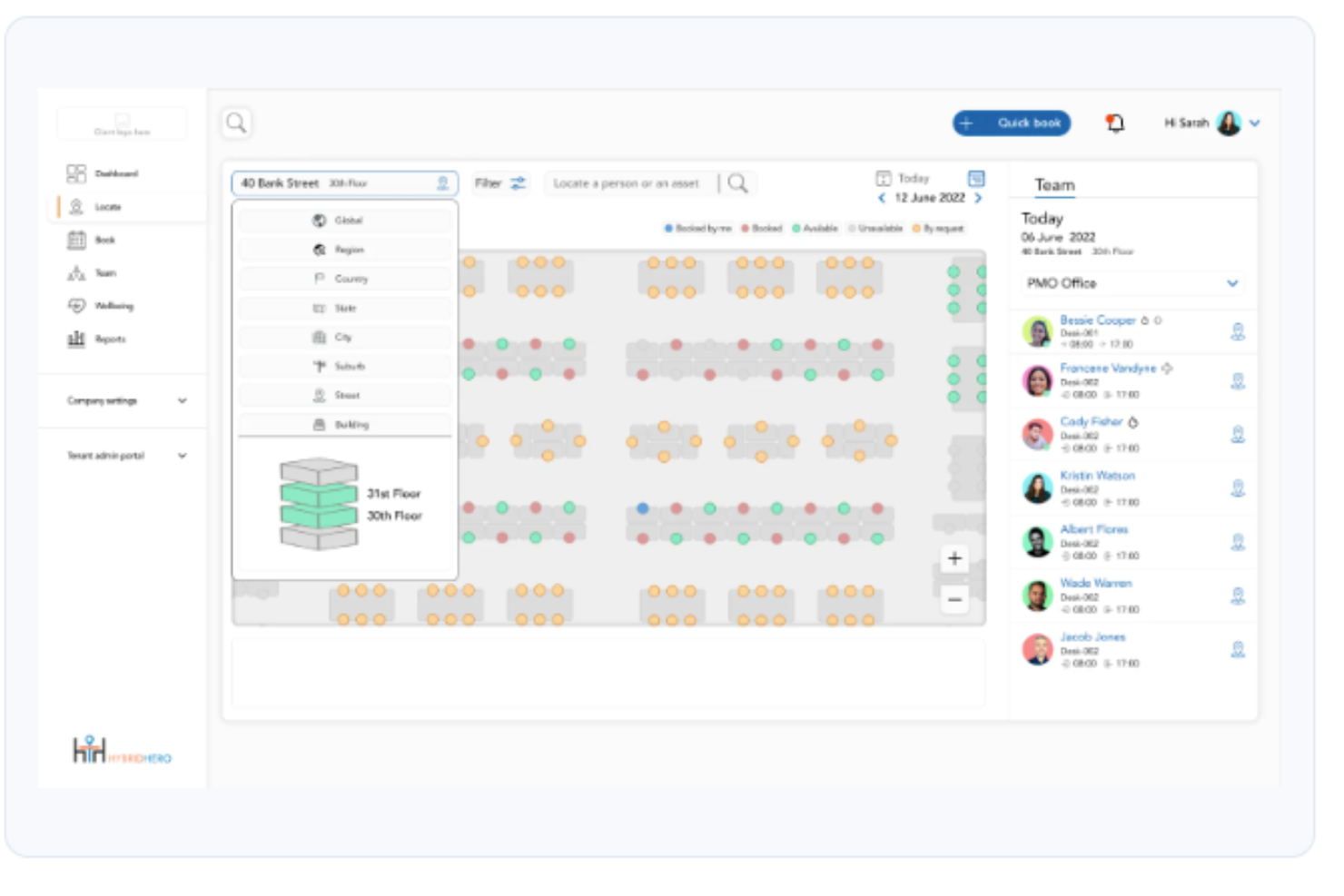
Hybrid Hero is a workplace management platform for hybrid offices that covers desk booking, meeting room reservations, visitor management, parking, interactive floor plans, and space utilization analytics.
Who Is Hybrid Hero Best For?
Hybrid Hero is a good fit for HR and workplace operations teams managing hybrid work policies across mid-size to enterprise organizations with shared office spaces.
Why I Picked Hybrid Hero
I've included Hybrid Hero in my top picks because it handles desk and room booking from a single platform, which removes the friction of managing two separate tools. I particularly like how meeting room booking includes auto-release of no-shows and real-time availability, so rooms don't sit idle when someone forgets to cancel. On the desk side, I can book hot desks, permanent desks, or team neighbourhoods in two clicks from web, iOS, or Android, with live floor plan visibility showing exactly who's sitting where across every floor.
Hybrid Hero Key Features
- Hybrid attendance tracking: View a daily schedule showing which team members are working from the office, remotely, or are out, across the entire organization.
- Visitor management: Register guests in advance, notify hosts on arrival, and maintain a digital visitor log.
- Parking space booking: Let employees reserve a parking bay alongside their desk booking for the same workday.
- Multi-location support: Manage bookings and space availability across multiple office sites from one admin dashboard.
Hybrid Hero Integrations
Hybrid Hero integrates with Microsoft 365, Teams, Google Workspace, Slack, and SSO providers, including Azure Active Directory and Okta. An API is available for custom integrations.
Pros and Cons
Pros:
- Built-in GDPR and ISO 27001 compliance
- Per-desk pricing suits hybrid headcounts
- Unified desk, room, visitor, parking booking
Cons:
- No free trial or self-serve onboarding
- Mobile app can be buggy at times

Homebase
Best with integrated payroll add-on
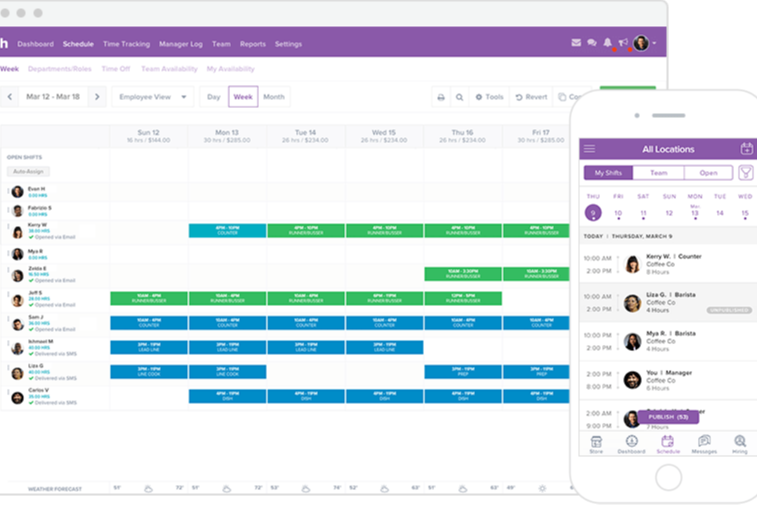
Homebase earns its spot here because it’s one of the few AI-driven scheduling tools with a native payroll add-on that actually speeds up close-of-period work. I tend to recommend it when you’re managing hourly teams and want payroll built right into your shift management flow.
I appreciate how payroll syncs instantly with timesheets, so you can move from scheduling to payday in one place. The automation for shift swaps and reminders is handled well, especially for service businesses with dynamic daily coverage needs.
Homebase’s Best For
- Hourly businesses needing scheduling and built-in payroll
- Restaurants, retail, and service organizations with frequent shift changes
Homebase’s Not Great For
- Teams with highly specialized or rotating project roles
- Organizations that require advanced workforce analytics or planning
What sets Homebase apart
Homebase centers its workflow around hourly shift management with payroll built right in, rather than treating scheduling and payroll as separate tasks like Deputy or When I Work. In practice, this works well for businesses where handling shift changes, tracking hours, and running payroll all blend into the same daily routine.
The tool expects you to make scheduling and payroll a single, continuous cycle instead of treating each as a standalone process.
Tradeoffs with Homebase
By focusing on shift management and payroll for hourly workers, Homebase limits what you can do for teams with complex hierarchies or specialized projects. This can make it feel rigid if you need to manage salaried roles or anything beyond straightforward scheduling.
Pros and Cons
Pros:
- Integrates payroll processing as an add-on
- Supports mobile time clock with GPS tracking
- Includes labor compliance alerts for scheduling
Cons:
- Occasional sync delays with certain POS systems
- Some integrations only available on paid plans

Deputy
Best for dynamic shift swapping

Deputy stands out to me for how it handles shift swapping in organizations where last-minute changes are common. I see teams with dynamic, unpredictable schedules using Deputy’s AI-driven matching to let staff quickly pick up or swap open shifts, right from their phones.
What I like is how fair and fast the process feels, thanks to rules that balance coverage, overtime, and employee preferences. Shift swaps rarely cause coverage issues in practice, which isn’t something I see with most scheduling platforms.
Deputy’s Best For
- Retail, hospitality, and healthcare teams with fast-changing shifts
- Organizations needing quick, mobile-friendly team shift swaps
Deputy’s Not Great For
- Teams with fixed, unchanging schedules
- Companies wanting granular, long-term resource planning
What sets Deputy apart
Deputy puts shift flexibility at the core of scheduling. Instead of expecting fixed plans, it’s designed for places where people need to swap, claim, or adjust shifts at the last minute. Unlike platforms like When I Work, Deputy assumes staffing changes happen all week and gives everyone tools to respond quickly.
This works great for on-site teams where reliability comes from agility, not strict schedules.
Tradeoffs with Deputy
Deputy optimizes for fluid, shift-based work, but that fluidity comes at the expense of advanced forecasting or complex resource planning. If you need long-range strategy or detailed analytics, you’ll find Deputy lacks depth in those areas.
Pros and Cons
Pros:
- Strong labor rule controls
- Helpful demand-based shifts
- Fast shift swap handling
Cons:
- Needs precise data to work
- Some features require initial learning

Oracle
Best for compliance-focused scheduling

Oracle earns a place on my list because its advanced scheduling features meet strict compliance and audit requirements out of the box. When I'm helping organizations in regulated industries, I see Oracle shine with granular controls over data access, scheduled task logging, and clear reporting for audits.
What I like here is how well Oracle surfaces scheduling records for inspection. I recommend it if you need policies and tracking that meet high-stakes regulatory standards.
Oracle’s Best For
- Enterprises in regulated industries with complex compliance needs
- Teams that require detailed audit trails on scheduling activities
Oracle’s Not Great For
- Small businesses with straightforward scheduling requirements
- Organizations looking for easy-to-configure, lightweight scheduling tools
What sets Oracle apart
Oracle sets itself apart by making strict auditing, compliance, and record-keeping a core part of scheduling—not an add-on. In practice, I see organizations with strong regulatory needs use it to schedule tasks, document steps, and monitor activity in detail. Compared to something like monday.com, Oracle assumes you work in environments where oversight and policy come first.
Tradeoffs with Oracle
Oracle optimizes for compliance and audit records, but that comes at the cost of setup time and ease of configuration. For teams that just want quick, simple scheduling, the workflow can feel slow and heavy.
Pros and Cons
Pros:
- Good risk spotting tools
- Helpful complex schedule modeling
- Strong compliance rule checks
Cons:
- Needs strong IT support
- Hard for smaller teams

TimeHero
Best for task-based scheduling

TimeHero lands on my list because it doesn’t just assign shifts, it schedules tasks for each employee based on priorities and workload. I've seen teams save hours once they start plugging their daily requirements in and let TimeHero auto-allocate work on the calendar.
What I appreciate most is how automation actually handles the back-and-forth of changing deadlines and tasks. For teams with lots of moving pieces day to day, its hands-off scheduling is a real time-saver.
TimeHero’s Best For
- Teams needing auto-scheduled, task-based employee shifts
- Managers handling frequent changes in team priorities
TimeHero’s Not Great For
- Businesses focused on pure shift scheduling without tasks
- Organizations with static, unchanging daily routines
What sets TimeHero apart
TimeHero is built around auto-scheduling tasks onto calendars so that planning shifts means defining what needs to get done, not just blocking out hours. In practice, this is nothing like standard shift-scheduling in When I Work or Homebase, where you’re focused on start and end times. Here, the schedule flexes as you add or change tasks, so the plan actually reflects real project needs.
Tradeoffs with TimeHero
TimeHero optimizes for managing shifting task demands, but that flexibility comes at the cost of limited support for strict, recurring shift structures. You miss out on traditional punch clock controls or patterns some industries rely on.
Pros and Cons
Pros:
- Strong project task flow
- Good deadline-driven planning
- Helpful auto task scheduling
Cons:
- Steep setup for managers
- Limited shift coverage logic

Workday
Best for enterprise-level HR integration

Workday hits my shortlist because it brings AI-driven scheduling right into a single HR system that most enterprise teams are already running. What I find unique is how it connects scheduling, time tracking, and workforce forecasting with talent management and payroll, so scheduling isn’t isolated from bigger workforce decisions.
When I see organizations navigating hourly staffing at scale, especially across regions or subsidiaries, Workday’s real-time labor insights make shift planning much more responsive. I’ve tested its Labor Optimization tools and appreciate how quickly you can spot gaps, deploy people, and factor compliance right into scheduling.
Workday’s Best For
- Large organizations with complex, global workforce scheduling needs
- Enterprises that want AI-driven scheduling integrated with HR systems
Workday’s Not Great For
- Small businesses or teams without formal HR systems
- Companies needing basic, standalone shift scheduling tools
What sets Workday apart
Workday treats scheduling as one piece of the larger workforce puzzle. Instead of handling shifts in isolation the way something like Deputy or When I Work does, it expects you to anchor scheduling decisions to everything happening in your HR system. In practice, this syncs scheduling with payroll, compliance, and workforce planning, giving you strong context across teams and regions.
Tradeoffs with Workday
Workday optimizes for organizations that want scheduling built into HR, so you give up a fast, standalone setup. This means if you want something rapid and lightweight, onboarding can feel heavy.
Pros and Cons
Pros:
- Helpful org-wide planning
- Strong enterprise rule support
- Scales with huge workforces
Cons:
- Needs ongoing admin effort
- Long implementation timeline

Motion
Best for AI task prioritization

Motion lands on my list for how it uses AI to automatically prioritize tasks and build out custom schedules. What sets it apart is how it constantly adapts team calendars as priorities shift, from last-minute reschedules to new urgent shifts.
I really appreciate that I can trust Motion to re-assign work in real time so teams don’t waste hours manually adjusting shifts and coverage. This makes it a smart pick when keeping employee schedules current is a moving target.
Motion’s Best For
- Teams needing AI-based task and shift prioritization
- Managers handling frequent schedule changes or urgent reassignments
Motion’s Not Great For
- Simple, static staff rosters with fixed shifts
- Organizations needing deep labor compliance or payroll features
What sets Motion apart
Motion is built to automate task and shift scheduling by continuously adjusting priorities based on real-time changes. Instead of a manual calendar or whiteboard approach, Motion pushes you to hand over scheduling decisions to its AI. I find that, compared to tools like Google Calendar or When I Work, Motion takes a more hands-off role where you set the rules and let the system shift things as needed.
In practice, this works best when rescheduling and shifting priorities are the norm.
Tradeoffs with Motion
Motion optimizes for automated adjustments, but you lose out on granular control over every schedule detail. If you want to manually fine-tune shifts or set complex compliance rules, it can feel limiting.
Pros and Cons
Pros:
- Good auto schedule updates
- Helpful deadline awareness
- Smart daily task plans
Cons:
- Needs clear task inputs
- Limited shift use cases

Reclaim
Best for automated calendar syncing

Reclaim earns its spot here for how it takes away the pain of juggling multiple work and personal calendars, making conflicts way less likely. I’ve found the automated calendar syncing especially helpful for fast-paced HR teams that manage flexible shifts, off-site work, or fluctuating schedules.
What stands out is how it can dynamically update meetings, focus time, and events across all your linked calendars. I appreciate that you can set smart rules to protect personal time or prioritize key meetings, without worrying about accidental double-booking.
Reclaim’s Best For
- HR teams juggling multiple calendars and shifting schedules
- Managers who need automated syncing for meetings and focus time
Reclaim’s Not Great For
- Teams seeking built-in time tracking or shift bidding
- Organizations needing advanced compliance or labor law controls
What sets Reclaim apart
Reclaim is designed for people who manage complex schedules and need their work and personal calendars to speak to each other automatically. Unlike Google Calendar or Outlook, it doesn’t just display overlapping events. It actively prevents double-bookings by reshuffling meetings and flexible tasks when conflicts pop up.
This works best if you want your calendar to act more like a living schedule and less like a static planner.
Tradeoffs with Reclaim
Reclaim optimizes for calendar syncing and automation, so you give up advanced shift management and labor compliance features found in full-scale scheduling platforms. If you rely on specific scheduling rules or shift coverage tracking, it probably won’t be enough on its own.
Pros and Cons
Pros:
- Great for busy calendars
- Helpful priority reshuffling
- Strong auto time blocking
Cons:
- Not ideal for large crews
- Hard for shift-heavy teams
Other AI Employee Scheduling Software
Here are some additional AI employee scheduling software options that didn’t make it onto my shortlist, but are still worth checking out:
- Sling
For team communication integration
- Timefold
For predictive scheduling analytics
- MakeShift
For real-time availability updates
- Workeen
For AI-driven shift recommendations
- SubItUp
For higher education scheduling
- Connecteam
For mobile workforce scheduling
- When I Work
For shift notification alerts
- Parim
For flexible shift planning
- WebWork Time Tracker
For visual time tracking
- Rotageek
For data-driven scheduling
- Shiftboard
For demand-driven scheduling
- Celayix
For AI-based overtime management
- SkedPal
For personal productivity scheduling
- Toki
For task and time management
- ShiftMate AI
For AI-driven shift matching
- Structured
For simple task organization


How I Evaluate AI Employee Scheduling Software
Every tool on this list needs to go beyond basic automation—I look for AI that actually reduces scheduling effort, like predicting demand spikes or resolving conflicts without manager intervention. I split my evaluation into core functionality every tool must deliver to qualify and differentiating factors that separate good options from great ones.
Core Functionality (Table Stakes For This List)
When I'm selecting tools for my list, I rank each one on a scale from 0 (does not offer the functionality) to 5 (excels in this area) for each core functionality listed below. Then, I calculate the tool's total score into a percentage. Each tool needs to achieve a minimum total score of 65% to be considered for inclusion.
- AI-Powered Auto-Scheduling: I check whether the tool generates full schedules from constraints like availability, roles, and labor budgets—not just auto-fills empty slots with templates.
- Demand Forecasting: The tool should predict staffing needs using historical trends and seasonality, so managers aren't guessing headcount for a holiday rush or slow period.
- Skills & Preference Matching: I look for AI that assigns shifts based on certifications, skill sets, and employee preferences rather than relying on managers to remember who's qualified.
- Labor Compliance Automation: Each tool should enforce overtime limits, mandatory rest periods, and break rules during schedule creation—not just flag violations after the fact.
- Employee Self-Service & Shift Swaps: Staff should be able to submit availability, request time off, and swap shifts from a mobile app with AI validating that swaps stay compliant.
- HR/Payroll System Integration: I evaluate whether the tool connects to major HRIS and payroll platforms so scheduled hours flow into pay runs without manual re-entry.
Once I have a list of tools that meet this criteria, I consider what sets each platform apart.
Differentiating Factors (What Sets Vendors Apart)
Here's how I compare and contrast different vendors:
Standout Features
Scenario simulation is a big differentiator—I look for tools that let a manager model a change like cutting weekend headcount and preview the downstream impact before publishing. Fatigue and burnout detection matters too, especially for 24/7 operations where back-to-back closing and opening shifts slip through the cracks. I also value predictive attrition insights that flag turnover risk tied to scheduling patterns, giving HR a window to step in before losing strong employees.
Beyond Features
AI transparency matters a lot here—I look for tools that show managers why a specific schedule was generated, not just the output. When employees question shift fairness, HR needs an audit trail. Implementation speed is another factor I weigh, since scheduling tools that take months to ingest historical data and configure rules delay ROI for teams that need relief now. I also evaluate industry fit, checking whether the platform supports the labor patterns of healthcare, retail, or hospitality rather than offering a one-size-fits-all approach.
How to Choose AI Employee Scheduling Software
It’s easy to get bogged down in long feature lists and complex pricing structures. To help you stay focused as you work through your unique software selection process, here’s a checklist of factors to keep in mind:
| Factor | What to Consider |
|---|---|
| Scalability | Will the software grow with your business? Consider the number of employees it supports and if it can handle your expansion plans. Look for tiered pricing models that align with your growth trajectory. |
| Integrations | Does it connect with your existing systems? Ensure compatibility with your HR, payroll, and communication tools. Check for APIs or pre-built integrations to minimize manual data entry. |
| Customizability | Can you tailor the software to fit your processes? Look for options to adjust scheduling rules, notifications, and dashboards to match your workflow. Avoid systems that offer a one-size-fits-all approach. |
| Ease of use | Is the interface intuitive for your team? Test the software's navigation and layout. A steep learning curve can lead to frustration and decreased productivity. Opt for user-friendly designs that your team can adopt quickly. |
| Implementation and onboarding | How fast can you get up and running? Evaluate the resources needed for setup and training. Look for vendors offering onboarding support, such as tutorials and live sessions, to ensure a smooth transition. |
| Cost | Does the pricing align with your budget? Compare the total cost of ownership, including subscription fees, setup costs, and any hidden charges. Consider the value provided against the price to ensure it fits your financial constraints. |
| Security safeguards | How secure is your data? Check for compliance with data protection regulations like GDPR. Look for features like encryption, user access controls, and regular security audits to keep your information safe. |
| Compliance requirements | Does the software meet industry-specific regulations? Ensure it supports compliance with labor laws and standards relevant to your sector. Verify if it offers tools to monitor and report on compliance metrics effectively. |
What Is AI Employee Scheduling Software?
AI employee scheduling software is a tool that automates the process of creating and managing employee schedules using artificial intelligence. HR professionals, managers, and team leaders commonly use these tools to optimize workforce management and reduce scheduling conflicts. Features like predictive analytics, automated shift assignments, and real-time adjustments help with efficient scheduling and resource allocation. These tools ultimately save time and enhance productivity by ensuring the right employees are in the right place at the right time.
Features
When selecting AI employee scheduling software, keep an eye out for the following key features:
- Predictive analytics: Analyzes historical and real-time data to forecast staffing needs, helping you make informed scheduling decisions.
- Automated shift assignments: Assigns shifts based on employee availability and preferences, reducing manual scheduling time.
- Real-time adjustments: Allows for dynamic changes to schedules in response to unexpected events or staffing needs.
- Demand forecasting: Uses AI to predict peak times and adjust staffing levels accordingly, ensuring optimal coverage.
- AI-driven compliance checks: Ensures schedules adhere to labor laws and regulations, minimizing compliance risks.
- Time and attendance tracking: Monitors employee hours and attendance patterns, providing accurate data for payroll and performance reviews.
- Shift swapping: Enables employees to swap shifts with minimal manager intervention, increasing flexibility and satisfaction.
- Mobile app accessibility: Allows employees to view and manage their schedules on the go, enhancing communication and engagement.
- Integration capabilities: Connects with existing HR, payroll, and communication systems for steady data flow and efficiency.
- Customizable reporting: Offers insights into scheduling efficiency, clock-in reports, and labor costs, helping you identify areas for improvement.
Benefits
Implementing AI employee scheduling software provides several benefits for your team and your business. Here are a few you can look forward to:
- Improved efficiency: Automated shift assignments and predictive analytics reduce manual scheduling time, allowing managers to focus on other tasks.
- Enhanced accuracy: Real-time adjustments and AI-driven compliance checks ensure schedules meet labor laws and minimize errors.
- Better resource allocation: Demand forecasting helps optimize staffing levels, ensuring you have the correct number of employees at peak times.
- Increased flexibility: Shift swapping and mobile app accessibility empower employees to manage their schedules, boosting satisfaction and engagement.
- Cost savings: Time and attendance tracking provides accurate payroll data, helping control labor costs and reduce overtime expenses.
- Data-driven insights: Customizable reporting offers valuable insights into scheduling efficiency and labor costs, aiding in strategic decision-making.
Costs & Pricing
Selecting AI employee scheduling software requires understanding the available pricing models and plans. Costs vary based on features, team size, add-ons, and more. The table below summarizes standard plans, their average prices, and typical features included in AI employee scheduling software solutions:
Plan Comparison Table for AI Employee Scheduling Software
| Plan Type | Average Price | Common Features |
|---|---|---|
| Free Plan | $0 | Basic scheduling, shift swapping, and limited reporting. |
| Personal Plan | $2-$15/user/month | Automated scheduling, mobile access, and time tracking. |
| Business Plan | $15-$40/user/month | Advanced analytics, compliance features, and integration capabilities. |
| Enterprise Plan | From $40/user/month or custom | Customizable reporting, AI-driven demand forecasting, and dedicated support. |
AI Employee Scheduling Software FAQs
Here are some answers to common questions about AI employee scheduling software:
How do AI employee scheduling tools handle unexpected staff shortages?
AI work-scheduling tools use AI-powered algorithms to scan availability, skill sets, and even employee preferences to recommend the right people to fill a dropped shift. Many platforms function like an AI assistant, sending instant alerts and updating the scheduling process in real time. This maintains coverage without disrupting employee satisfaction, while still respecting rules and labor requirements as the system generates optimized schedules.
What data should I review to assess the purchase value of AI employee scheduling software?
Review metrics such as recurring shift conflicts, overtime patterns, time-off requests, and the amount of time managers spend inside your current scheduling app or manual staff scheduling workflow. Also, look at improvements in employee satisfaction, reductions in errors, and fewer back-and-forth updates. If the AI tools genuinely simplify your scheduling process, optimize workloads, and save managers time, the software is delivering strong value.
How do I evaluate whether AI employee scheduling software fits my industry-specific rules?
Check whether the platform supports custom rules, rotating schedules, certification requirements, on-call patterns, and union constraints. Test a few real scenarios to see whether the system’s algorithms catch problems early and whether its AI-powered scheduling engine places the right people in compliant shifts. The best tools adapt to your workflow rather than forcing you into rigid spreadsheets or templates, making them a better long-term fit for teams with specialized needs.
What happens to existing scheduling data when I switch to AI employee scheduling software?
Most platforms let you import previous weekly schedules, historic availability, role data, and employee preferences so the AI can generate optimized schedules from day one. Some light cleanup may be required during onboarding, especially if you’re migrating from a legacy staff scheduling system. Ask how far back you can import and whether the platform integrates cleanly with your current all-in-one HR or operations tools.
How do I measure ongoing success after deploying AI employee scheduling software?
Track KPIs such as reduced conflicts, fewer last-minute changes, improved coverage, and lower overtime. Monitor how fast managers can build schedules and whether employees accept or swap shifts more easily, both indicators of stronger employee satisfaction. You can also evaluate whether the AI assistant or AI-powered scheduling features continue to improve the scheduling process over time by selecting the right people automatically and maintaining more predictable workloads.
How do AI employee scheduling tools prevent accidental rule violations?
Modern AI tools flag issues such as missed rest periods, certification mismatches, or role-based restrictions before the schedule is finalized. The system’s algorithms run compliance checks in the background, ensuring the scheduling app doesn’t approve shifts that violate your rules. This reduces administrative risk while keeping your staff scheduling accurate and your team’s experience consistent.