

10 Best SaaS Learning Management Systems Reviewed in 2026

10 Best SaaS Learning Management System Shortlist


Keeping your team's learning and development on track can feel like a lot. Between onboarding, training updates, and ongoing requirements, it's easy for things to pile up. A SaaS learning management system takes some of that weight off your shoulders by giving you a simple way to organize training and keep everything moving smoothly.
In my experience, the right SaaS-based software can transform how you handle training. I'll guide you through the best LMS solution options available, offering unbiased reviews based on thorough research. You'll discover which systems suit your needs, whether you're looking for ease of use or specific features.
By the end of this listicle, you'll have a clear idea of the top SaaS learning management systems and how they can benefit your team.
Why Trust Our Software Reviews
Our team has been testing and reviewing software since 2012. As HR experts ourselves, we know how difficult—and important—it is to choose the right software.
For this guide, we evaluated tools using hands-on testing and independent research, scoring tools using our selection criteria. We also draw on insights from industry thought leaders and practicing HR experts.
Our reviews reflect our human editorial judgment, not a sales pitch.
Expert reviewers:
Best SaaS Learning Management Systems Summary
This comparison chart summarizes pricing details for my top SaaS learning management system selections to help you find the best one for your budget and business needs.
| Tool | Best For | Trial Info | Price | ||
|---|---|---|---|---|---|
| 1 | Best for workflow integrations | Free demo available | Pricing upon request | Website | |
| 2 | Best for full-cycle employee training | Free trial available | From $6.91/user/month (billed annually) | Website | |
| 3 | Best for advanced e-signature verification | Free demo available | Pricing upon request | Website | |
| 4 | Best for intuitive course building | 14-day free trial | Pricing upon request | Website | |
| 5 | Best for ease of use | Free plan + free demo available | From $119/month (billed annually) | Website | |
| 6 | Best for collaborative learning | 30-day free trial + free demo available | From $8/user/month | Website | |
| 7 | Best for multi-portal management | Free demo available | Pricing upon request | Website | |
| 8 | Best for customer training | Free demo available | Pricing upon request | Website | |
| 9 | Best for AI-driven e-learning | Free demo available | Pricing upon request | Website | |
| 10 | Best for regulated industry compliance | Free demo + free trial available | From $525/month (up to 100 users) | Website |


Best SaaS Learning Management Systems Review
Below are my detailed summaries of the best SaaS learning management systems that made it onto my shortlist. My reviews offer a detailed look at the key features, pros and cons, integrations, and ideal use cases of each tool to help you find the best one for you.

Continu
Best for workflow integrations
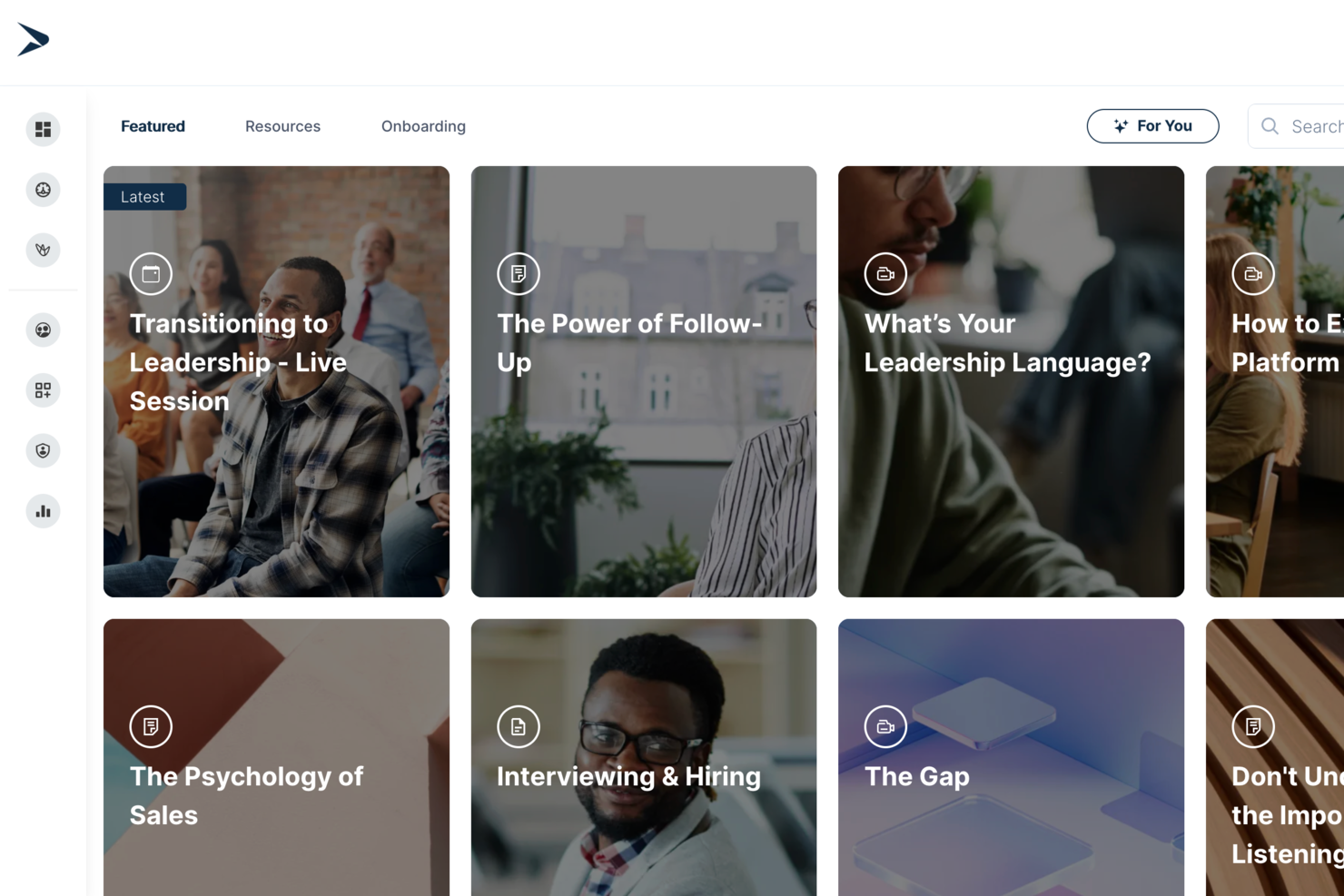
Continu is a cloud-based SaaS learning management system designed for teams who want to create, deliver, and track training with interactive modules, branded content, and advanced analytics.
Who Is Continu Best For?
Continu is a strong fit for mid-size to enterprise companies that need a scalable learning platform to train employees, onboard new hires, and upskill teams across departments.
Why I Picked Continu
I've included Continu in my top picks because its integration depth is genuinely hard to replicate. What I find especially useful is the Slack and Microsoft Teams integration: learners get training assignments and completion reminders directly in their chat apps, so training happens inside the tools people already use. The Workday and BambooHR connections also mean new hires are automatically provisioned and assigned the right learning paths on day one, with no manual admin work required.
Continu Key Features
- Content authoring tools: Build courses, workshops, and certifications directly in Continu using AI-assisted authoring with support for SCORM/xAPI file imports.
- Learning tracks and journeys: Organize content into structured course-style paths or sequential programs that guide learners through multi-step training programs.
- Smart Segmentation™: Set rules-based filters to automatically deliver targeted content to learners based on role, region, or product line.
- Badges and certifications: Award learners with digital badges and certificates upon completing courses or demonstrating skill proficiency.
Continu Integrations
Continu offers native integrations with Slack, Microsoft Teams, Workday, BambooHR, Google Workspace, Salesforce, Okta, OneLogin, and Zoom, and provides an API for custom integrations.
Pros and Cons
Pros:
- Granular reporting by team and department
- Centralized content management and storage
- Embedded live and on-demand training options
Cons:
- Reporting exports require manual formatting
- Course authoring tools lack advanced visuals
New Product Updates from Continu
Continu Adds Smarter Content Management
Continu adds Intelligent Tagging and Descriptions and richer content details to improve how learning content is organized and maintained. These updates reduce manual work and give teams more consistent, detailed content records. For more information, visit Continu’s official site.
 .
.
Best for full-cycle employee training
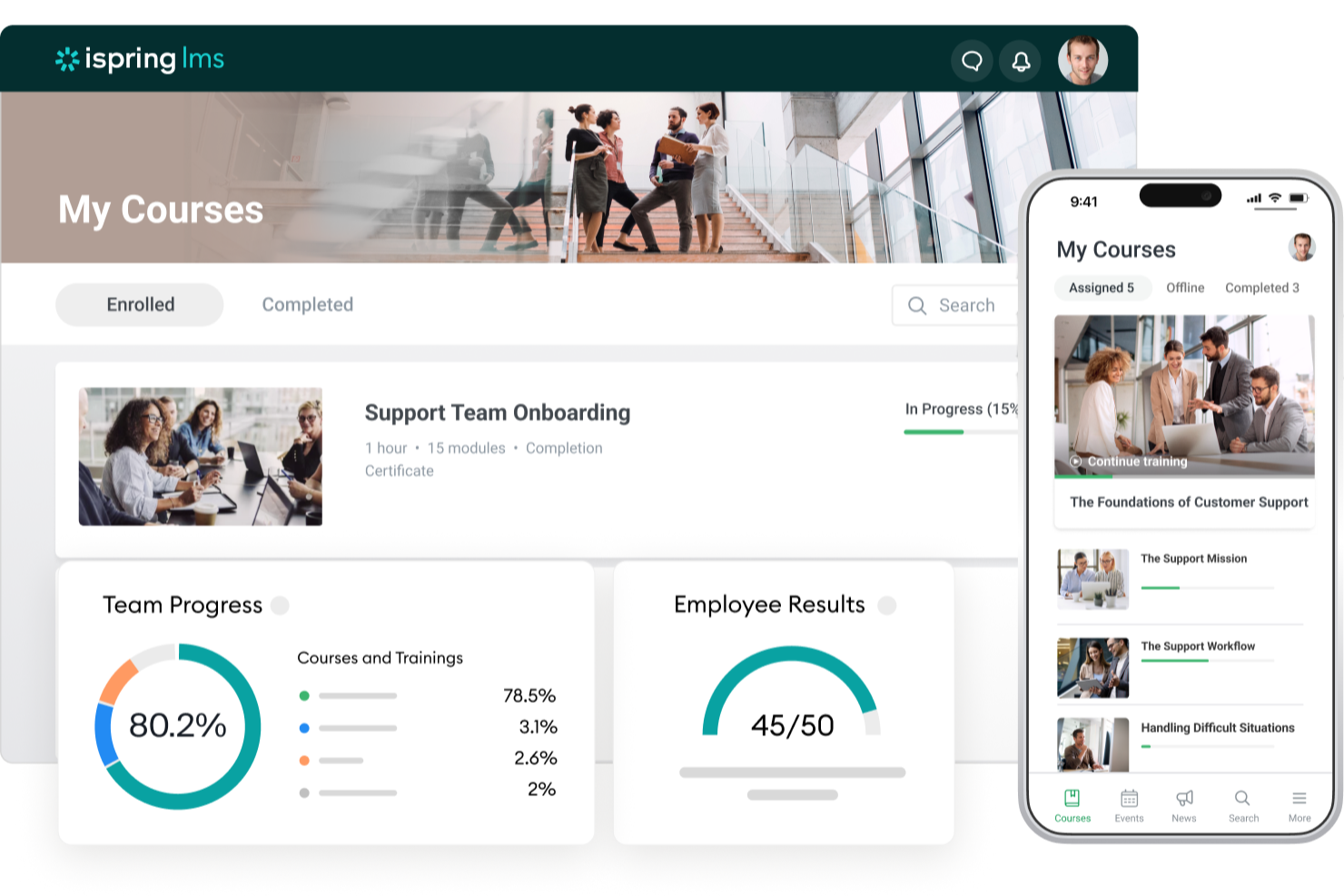
iSpring LMS is a learning management system designed for businesses and organizations to create, manage, and deliver online training programs. It provides tools for organizing courses, tracking learner progress, managing users, and supporting employee development within a centralized platform.
Why I picked iSpring: This platform supports training delivery through its structured course management capabilities and intuitive interface. It allows administrators to assign employee training, monitor completion, and generate reports to track performance. Its built-in course authoring capabilities, including AI-assisted content creation, help organizations develop and distribute learning materials efficiently.
Standout Features and Integrations:
Features include course management tools for organizing and assigning training programs, reporting and analytics for tracking learner progress, and user management capabilities for handling roles and permissions. The platform also supports AI-assisted course authoring, engagement mechanics, a customizable knowledge base, development planning tools, and on-the-job training capabilities.
Integrations include Zoom, Microsoft Teams, Salesforce, Google Analytics, LinkedIn Learning, Slack, Canvas, Moodle, Blackboard, and other third-party platforms.
Pros and Cons
Pros:
- Supports multimedia content and assessments
- Built-in reporting and learner tracking tools
- Easy-to-use interface for managing training programs
Cons:
- Analytics features are relatively basic compared to competitors
- Limited customization options for advanced use cases
New Product Updates from iSpring LMS

iSpring LMS Adds Multiple Observations to OJT Sessions
iSpring LMS now lets managers log multiple observations within one OJT session, grouping visits and auto-generating summary stats like averages, criterion results, and comparisons. For more information, visit iSpring LMS's official site.

Absorb
Best for advanced e-signature verification
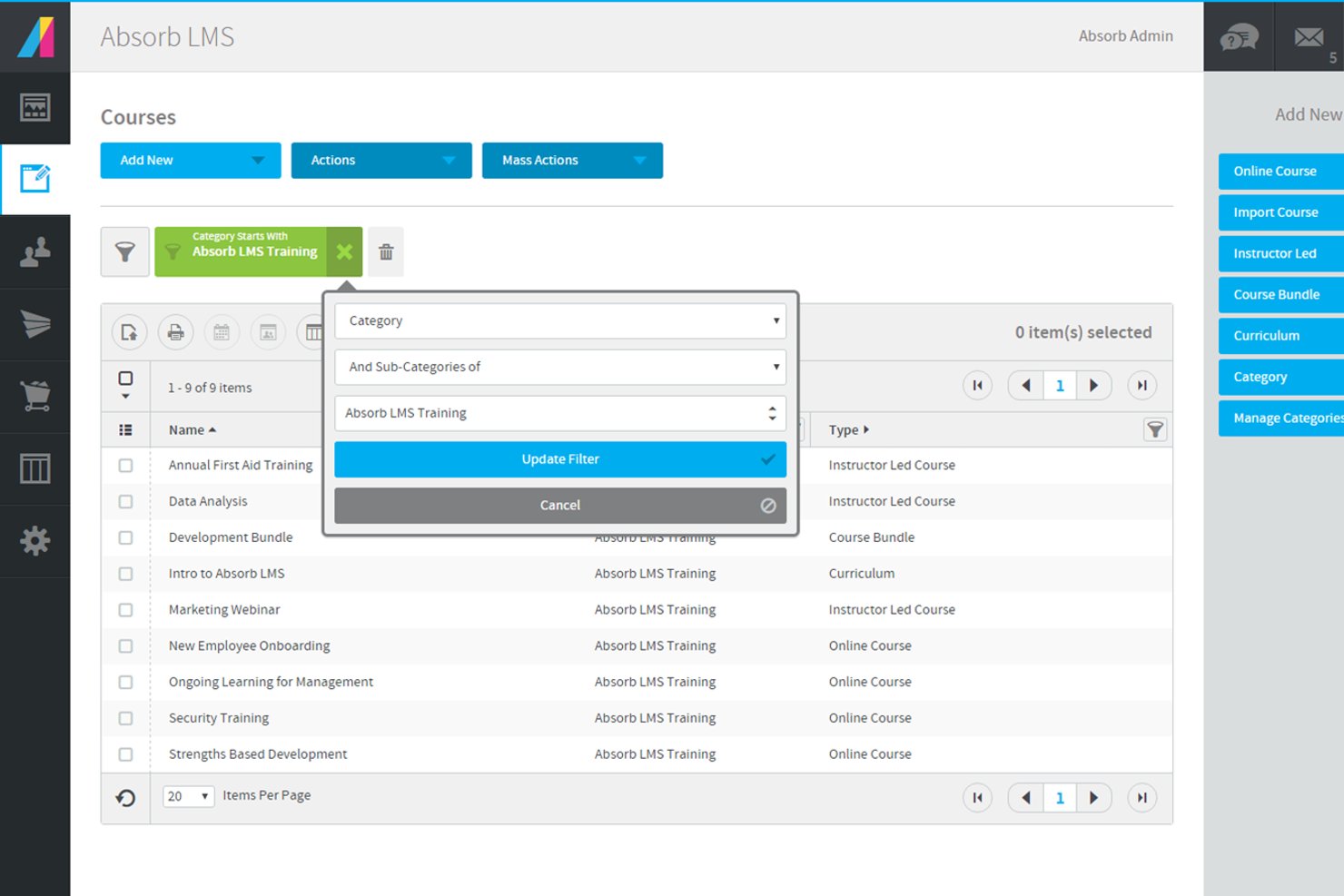
Absorb is a cloud-based learning management system for organizations that need course creation, learner tracking, e-commerce for training, and integration with HR and business tools.
Who Is Absorb Best For?
Absorb suits HR teams and learning leaders at mid-sized to large organizations that need scalable training and compliance management.
Why I Picked Absorb
Absorb earns its spot as one of the best on my shortlist because I can collect advanced e-signatures directly within course modules for compliance and policy training. I like that my team can set up signature requirements for specific lessons and track signed documents in audit-ready reports. In practice, that means I can verify learner acknowledgment on critical content without leaving the platform.
Absorb Key Features
- Mobile learning app: Learners can access courses and materials from any device using the dedicated mobile app.
- SCORM and xAPI support: Import and deliver industry-standard e-learning content packages for flexible course design.
- Blended learning management: Combine self-paced online modules with instructor-led sessions and track participation.
- Multi-language interface: Offer training in multiple languages with built-in localization options for global teams.
Absorb Integrations
Absorb offers 40+ native integrations, including ADP, Workday, Salesforce, and connectors for HRIS and CRM systems. An API is available for custom integrations.
Pros and Cons
Pros:
- Enables blended learning with virtual classroom support
- Includes robust reporting and analytics tools
- Provides 24/7 in-house customer support
Cons:
- Advanced automation features can be complex to configure
- Custom branding options require higher-tier plans
New Product Updates from Absorb
Absorb Aura Adds Claude and ChatGPT Connections
Absorb Aura now connects to Claude or ChatGPT via MCP, enabling users to ask questions about their learning and the LMS directly inside the AI tool after a simple setup. For more information, visit Absorb's official site.
 .
.
SkyPrep
Best for intuitive course building
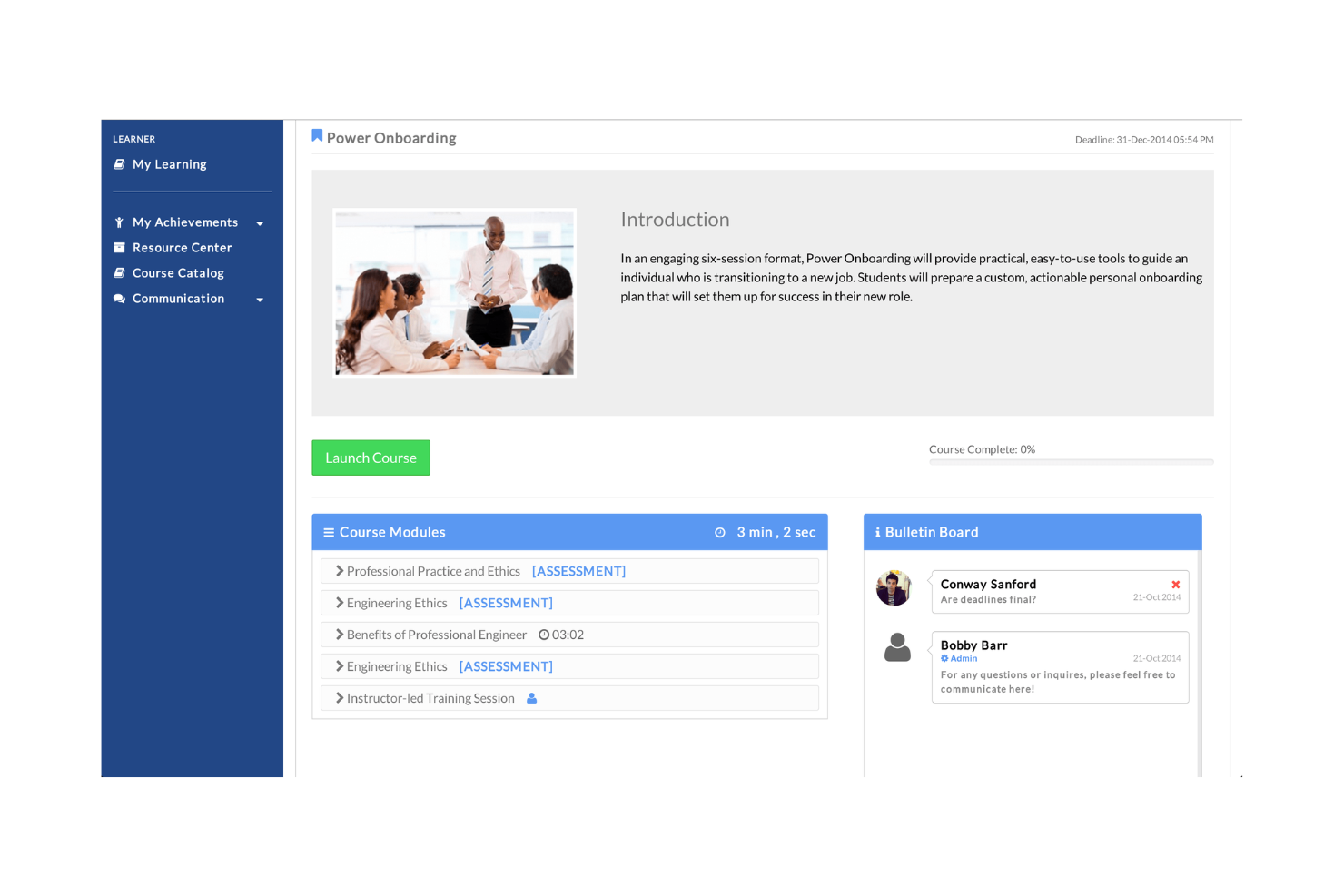
SkyPrep LMS is a learning management system tailored for organizations seeking an intuitive platform for course creation and delivery. It is designed to facilitate training by simplifying the process of building, managing, and tracking courses.
Why I picked SkyPrep LMS: This tool is known for its intuitive course-building capabilities. The drag-and-drop interface allows for quick setup and customization of courses, making it easy for your team to create engaging content. Its reporting features provide insights into learner progress and course effectiveness. SkyPrep LMS's ease of use ensures that even nontechnical users can navigate and manage training programs.
Standout Features and Integrations:
Features include a drag-and-drop interface and workflow automation. The platform offers out-of-the-box reporting features that give insights into learner progress and course effectiveness. You can also create quizzes and assessments to evaluate learner understanding.
Integrations include Zoom, Microsoft Teams, Google Workspace, Salesforce, Slack, LinkedIn Learning, PayPal, Stripe, Shopify, Mailchimp, and more.
Pros and Cons
Pros:
- Supports quiz and assessment creation
- Intuitive drag-and-drop interface
- Easy course creation process
Cons:
- Basic analytics features and somewhat slow reporting
- Limited customization

Best for ease of use
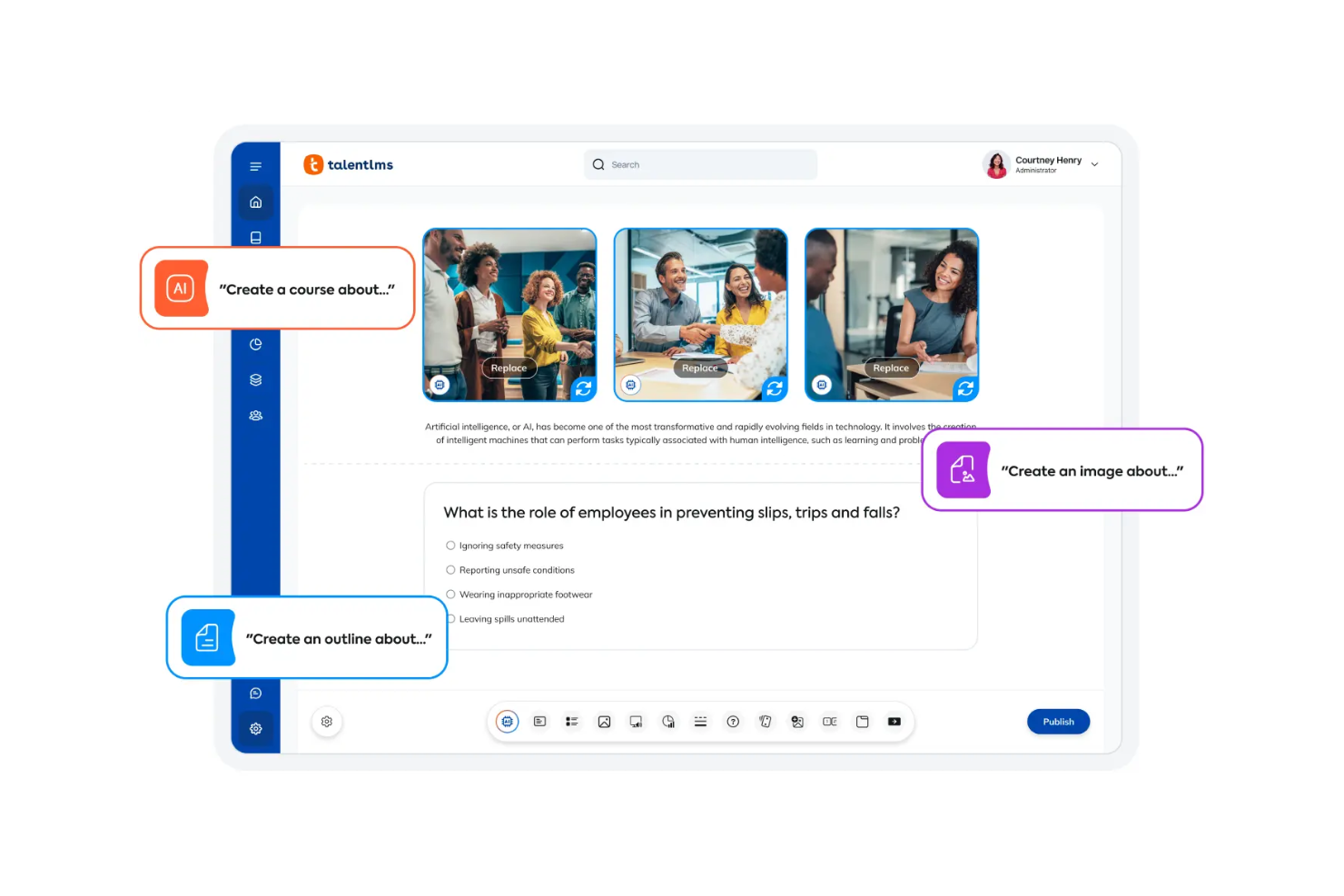
TalentLMS is a cloud-based learning management system designed for businesses and educational institutions seeking a user-friendly platform to deliver training. It supports course creation, management, and reporting to help you design learning experiences.
Why I picked TalentLMS: This tool is known for its ease of use, making it accessible for teams without technical expertise. The platform offers intuitive course creation tools that simplify the process for your team, with uncomplicated reporting features to provide insights into learner progress and engagement. TalentLMS focuses on simplicity so you can implement and manage training programs efficiently.
Standout Features and Integrations:
Features include AI-powered course creation and automation tools that assist you in designing engaging content. Blended learning, learning paths, and gamification elements support the training process. The platform also offers a mobile app, enabling your team to access training materials on the go.
Integrations include Salesforce, Zoom, Slack, Microsoft Teams, Zapier, Shopify, LinkedIn Learning, Google Calendar, Stripe, BambooHR, and more.
Pros and Cons
Pros:
- Mobile app available
- Intuitive course creation tools
- Easy to set up
Cons:
- Basic gamification features
- Limited customization options
New Product Updates from TalentLMS
TalentLMS Adds Learning Paths, AI Video, and Learner Experience Updates
TalentLMS introduced updates across learning management, content creation, and learner experience, including Learning Paths for Groups, AI video generation in TalentCraft, video bookmarking, and expanded administration tools. For more information, visit TalentLMS’s official site.

Best for collaborative learning

360Learning is an all-in-one collaborative learning management system designed for teams and organizations focused on peer learning and skill development. It facilitates course creation, sharing, and feedback to help grow collective knowledge within a company.
Why I picked 360Learning: This tool is centered around collaborative learning, making it ideal for teams that value peer-to-peer interaction. The co-authoring feature allows multiple team members to contribute to course content, fostering a sense of ownership and participation, and feedback loops enable learners to provide input on courses, ensuring continuous improvement. The platform's emphasis on social learning aligns with organizations aiming to build a culture of shared knowledge.
Standout Features and Integrations:
Features include co-authoring and feedback loops, which provide a way for learners to share insights and improve course content. The platform also supports mobile learning, allowing your team to access materials on the go.
Integrations include Salesforce, Slack, Microsoft Teams, Zoom, Google Drive, LinkedIn Learning, Okta, Loom, BambooHR, and more.
Pros and Cons
Pros:
- Supports mobile learning
- Co-authoring feature available
- Encourages peer-to-peer learning
Cons:
- Limited offline access
- Some users may find the interface complex
Best for multi-portal management

LearnUpon is a learning management system tailored for organizations that require multi-portal management to deliver training across different audiences. It serves businesses, universities, and training providers by simplifying the delivery and management of courses.
Why I picked LearnUpon: This platform is designed for managing multiple training portals, making it ideal for organizations with diverse training needs. It offers customizable branding for each portal, so you can maintain a distinct identity. Automated notifications keep your team informed about training updates, while detailed reporting provides insights into learner progress. These features make LearnUpon a versatile choice for businesses looking to manage multiple training initiatives under one system.
Standout Features and Integrations:
Features include customizable branding for each portal, AI-powered course creation tools, and gamification elements to support motivation. Detailed reporting provides valuable insights into learner engagement and progress.
Integrations include Salesforce, Zoom, Microsoft Teams, LinkedIn Learning, Shopify, Okta, Google Workspace, Slack, Stripe, HubSpot, and more.
Pros and Cons
Pros:
- Automated notifications feature
- Customizable branding options
- Supports multiple training portals
Cons:
- Pricing details are not transparent
- Limited mobile functionality
Skilljar
Best for customer training

Skilljar is a learning management system tailored for businesses aiming to provide effective customer training. It focuses on onboarding, educating, and engaging customers through detailed training materials.
Why I picked Skilljar: This tool is ideal for businesses that prioritize customer education, offering features that facilitate the onboarding process. The analytics dashboard provides insights into learner engagement, helping you track customer progress. Skilljar's course authoring tool allows you to create tailored content that meets specific training needs, and its emphasis on customer training ensures that your users gain the knowledge they need to succeed with your products.
Standout Features and Integrations:
Features include an analytics dashboard that gives you insights into learner engagement and progress. Automation tools help you design content that meets your training objectives, and certification management allows you to offer credentials to users who complete courses, boosting their motivation and engagement.
Integrations include Salesforce, Zapier, Marketo, Google Analytics, Slack, Zoom, Intercom, Mailchimp, Zendesk, Shopify, and more.
Pros and Cons
Pros:
- Supports certification management
- Customizable course authoring
- Focuses on customer education
Cons:
- Basic reporting features
- Limited customization
Docebo
Best for AI-driven e-learning

Docebo is an AI-driven learning management system aimed at businesses seeking to boost their e-learning capabilities. It supports corporate training with tools for content creation, management, and delivery.
Why I picked Docebo: This tool leverages AI to support e-learning experiences, providing personalized content recommendations and insights. The social learning feature encourages collaboration among your team, making training more interactive. Gamification elements help engage learners and improve retention through interactive challenges. These features are particularly beneficial for companies looking to innovate their training processes.
Standout Features and Integrations:
Features include social learning, which fosters collaboration among team members. Research-baked prebuilt templates are designed to keep learners engaged and growing new skills, and AI-driven analytics provide insights into learner behavior and content effectiveness.
Integrations include Salesforce, Zoom, Slack, Google Analytics, Shopify, LinkedIn, Microsoft Teams, PayPal, Stripe, Adobe Connect, and more.
Pros and Cons
Pros:
- Offers gamification features
- Supports social learning
- AI-driven content recommendations
Cons:
- May involve a learning curve
- Initial setup can be complex

GyrusAim
Best for regulated industry compliance

GyrusAim is a learning management system designed for compliance training across industries such as government, finance, manufacturing, and life sciences. It focuses on meeting regulatory requirements through assessments, certifications, and detailed reporting.
Why I picked GyrusAim: This tool excels in compliance training, providing features that ensure adherence to industry regulations. Its advanced reporting capabilities offer detailed analytics on training effectiveness, making it easier for your team to track compliance. Additionally, the system supports multilingual training, which is beneficial for global organizations. GyrusAim's ability to integrate various training methods with automation enhances its appeal for regulated industries.
Standout Features and Integrations:
Features include advanced reporting, a content library, and customizable learning paths. It supports over 15 languages, allowing your team to conduct training in multiple languages. The blended learning approach combines different training methods, offering flexibility and efficiency.
Integrations are not publicly listed.
Pros and Cons
Pros:
- Detailed reporting features
- Offers multilingual training
- Strong compliance capabilities
Cons:
- Slight learning curve
- Limited customization options
Other SaaS Learning Management Systems
Here are some additional SaaS learning management system options that didn’t make it onto my shortlist, but are still worth checking out:
- Paradiso LMS
For gamified learning
- Blackboard
For global educational institutions
- Cornerstone LMS
For enterprise-level learning
- SC Training
For safety training
- EducateMe
For personalized learning paths
- MoodleCloud
For open-source flexibility
- LatitudeLearning LMS
For partner training
- Connecteam
For remote and deskless teams
- EducateMe LMS
For cohort-based SaaS training programs
- Rippling
For integrated HR and learning
- LearnWorlds
For interactive video courses
- Adobe Learning Manager
For content-rich training
- CYPHER Learning
For AI-powered learning paths
- GoSkills
For small business training
- Schoox
For AI-powered frontline worker training
- Canvas LMS
For higher education institutions


How I Evaluate SaaS Learning Management Systems
I evaluate every SaaS LMS on two layers: the baseline features that qualify a platform—SCORM support, compliance tracking, HRIS integrations—and the differentiators that separate good from great.
Core Functionality (Table Stakes For This List)
When I'm selecting tools for my list, I rank each one on a scale from 0 (does not offer the functionality) to 5 (excels in this area) for each core functionality listed below. Then, I calculate the tool's total score into a percentage. Each tool needs to achieve a minimum total score of 75% to be considered for inclusion.
- Course Authoring & Content Management: I check whether you can build quizzes and upload SCORM/xAPI packages in one place, or if you're stuck importing everything from a third-party tool.
- Course Assignment & Learning Paths: I look for rule-based assignment by role or department and sequential learning paths, like a 90-day onboarding curriculum that auto-enrolls new hires.
- Progress Tracking & Reporting: Dashboards that show completion rates, assessment scores, and exportable reports matter here—especially for presenting training ROI to leadership.
- Compliance & Certification Management: I evaluate how each platform handles certificate expiration tracking and recertification reminders for recurring requirements like safety or data privacy training.
- Cloud-Based Multi-User Access: Every platform I consider needs to be fully cloud-hosted with distinct roles for admins, instructors, and learners accessible across desktop and mobile.
- HRIS & Workforce Tool Integrations: I look at native connectors to major HRIS and SSO providers so employee records sync automatically without manual CSV uploads every pay cycle.
Once I have a list of tools that meet this criteria, I consider what sets each platform apart.
Differentiating Factors (What Sets Vendors Apart)
Here's how I compare and contrast different vendors:
Standout Features
AI-powered personalization is a major differentiator. Platforms that recommend courses based on a learner's role and skill gaps save L&D teams hours of manual curation. I also evaluate skills and competency management, where the LMS maps content to a skills taxonomy so you can tie training directly to career pathing and internal mobility goals. For organizations with frontline or deskless workers, mobile learning with offline access matters—it lets warehouse or retail staff complete modules without a reliable connection.
Beyond Features
Pricing transparency matters. I evaluate whether a vendor charges per user, per active user, or offers flat-rate licensing, since a 50-person team and a 5,000-person org need very different models. Compliance and data security certifications like SOC 2 and GDPR readiness are especially important for teams handling sensitive employee records. I also consider implementation support, including whether the vendor provides pre-built content libraries that let you launch onboarding or compliance programs without building every course from scratch.
How To Choose a SaaS Learning Management System
It's easy to get bogged down in long feature lists and complex pricing structures. To help you stay focused as you work through your unique software selection process, here's a checklist of factors to keep in mind:
| Factor | What To Consider |
|---|---|
| Scalability | Can the system grow with your team? Check if it supports the number of users you'll need in the future without losing performance. |
| Integrations | Does it connect with your existing tools? Look for API integrations with software like HR systems, CRM, or communication platforms. |
| Customizability | Can you tailor the system to your needs? Consider if you can adjust the look, feel, and workflows of the learning platform to match your brand and processes. |
| Ease of Use | Is the interface intuitive for all users? Ensure minimal training is needed and that users can navigate without frustration. |
| Implementation and Onboarding | How quickly can you get started? Look for a system with easy setup, clear instructions, and support to get your team up and running fast. |
| Cost | Does the pricing fit your budget? Evaluate total costs, including any hidden fees or charges for add-ons and additional users. |
| Security Safeguards | Are your data and users protected? Verify that the system complies with data protection laws and offers encryption and secure access controls. |
| Support Availability | Will you get help when you need it? Check if the vendor provides 24/7 support, live chat, and dedicated account managers for ongoing assistance. |
What Is a SaaS Learning Management System?
A SaaS learning management system is a cloud-based platform designed to deliver, track, and manage training and educational courses. These tools are typically used by HR professionals, educators, and corporate trainers to enhance learning experiences and improve skill development.
Features such as course creation, learner tracking, and reporting help with managing learning programs, ensuring compliance, and measuring progress. Overall, these tools offer an efficient way to deliver and manage educational content at scale.
Features
When selecting a SaaS learning management system, keep an eye out for the following key features:
- Course creation: Enables you to design and organize training content, making it easy to deliver structured learning experiences.
- Learner tracking: Monitors progress and completion rates, helping you assess the effectiveness of your training programs.
- Reporting and analytics: Provide data insights and metrics on learner engagement and outcomes, allowing you to make data-driven decisions.
- Mobile access: Offers learners the flexibility to access courses on the go, increasing participation and convenience.
- Gamification: Incorporates game-like elements such as points and badges to motivate and engage learners.
- Customizable branding: Allows you to tailor the training platform's appearance to align with your organization's identity.
- Integrations: Connect with other tools such as CRM and HR systems to support workflows and data sharing.
- Certification management: Tracks and issues certificates for course completion, ensuring compliance and recognition.
- Social learning: Facilitates peer-to-peer interaction and collaboration, enhancing the learning experience.
- Security safeguards: Protect user data with encryption and access controls, ensuring compliance with data protection standards.
Benefits
Implementing a SaaS learning management system provides several benefits for your team and your business. Here are a few you can look forward to:
- Improved accessibility: Learners can access courses from anywhere, thanks to mobile and cloud-based features, enhancing flexibility and participation.
- Enhanced engagement: Gamification and social learning features help keep learners motivated and actively involved in their training.
- Time savings: Automating tasks such as tracking and reporting reduces administrative workload, allowing your team to focus on strategic activities and upskilling.
- Scalability: The system can grow with your organization, accommodating more users and courses as your needs expand.
- Cost efficiency: Cloud-based platforms reduce the need for physical infrastructure and maintenance by in-house IT teams, offering cost-effective training solutions.
- Customization: Tailoring the platform to fit your branding and course needs ensures a consistent learning experience aligned with your organization's goals.
- Compliance assurance: Certification management tracks compliance training and ensures learners meet industry or company standards.
Costs and Pricing
Selecting a SaaS learning management system requires an understanding of the various pricing models and plans available. Costs vary based on features, team size, add-ons, and more. The table below summarizes common plans, their average prices, and typical features included in SaaS learning management system solutions.
Plan Comparison Table for SaaS Learning Management Systems
| Plan Type | Average Price | Common Features |
|---|---|---|
| Free Plan | $0 | Access to basic courses, limited user support, and minimal storage. |
| Personal Plan | $5-$25/user/month | Customizable content, progress tracking, and basic analytics. |
| Business Plan | $30-$80/user/month | Advanced reporting, integrations with other tools, and user management. |
| Enterprise Plan | $100-$200/user/month | Custom branding, dedicated support, and comprehensive security features. |
SaaS Learning Management System FAQs
Here are some answers to common questions about SaaS learning management systems:
How long does it take to set up a SaaS learning management system?
Setup time varies based on how much content you already have and the complexity of your training programs. Most platforms offer quick onboarding tools, templates, and guided setup to get you started. Larger teams with custom workflows may need a bit more time to configure everything; in this case, consider checking with your prospective LMS vendor.
How do I migrate data to a new SaaS LMS?
You’ll often start by exporting data from your current system. Most SaaS LMS providers offer migration tools or services to import this data into the new system. It’s a good idea to consult with your provider’s support team to ensure a smooth transition. Make sure to back up your data beforehand and test the migration process with a small batch of data first.
Can I customize a SaaS LMS to fit my brand?
Yes, most SaaS LMS platforms offer customization options. You can typically adjust the look and feel to align with your company’s branding, including colors, logos, and fonts. Some systems also allow customization of user dashboards, learning modules, and course templates. Check with your provider to understand the extent of customization options available and any associated costs.
What kind of technical support is available for SaaS LMS?
The advantage of SaaS solutions compared to on-premise and self-hosted options is that you don’t necessarily need a dedicated IT team to handle maintenance and upgrades. Most SaaS LMS providers offer various levels of support, including online help centers, live chat, and email support.
Depending on your plan, you might also have access to phone support or a dedicated account manager. It’s important to assess your team’s needs and choose a provider that offers the level of support that fits your requirements.
What's Next:
If you're in the process of researching SaaS learning management systems, connect with a SoftwareSelect advisor for free recommendations.
You fill out a form and have a quick chat where they get into the specifics of your needs. Then you'll get a shortlist of software to review. They'll even support you through the entire buying process, including price negotiations.