
15 Best Workforce Management Apps in 2026

Workforce Management App Shortlist
Here's my pick of the 10 best software from the 15 tools reviewed.


A workforce management app is software that helps your team handle scheduling, attendance, time tracking, and labor planning in one place. If you’re searching for the best workforce management app, you likely need a reliable way to coordinate shifts, manage compliance, and keep up with changing workplace demands. Choosing the right tool can help you support your people, reduce manual work, and adapt to new workforce challenges. In this guide, you’ll find a clear comparison of top workforce management apps so you can confidently select the best fit for your organization’s needs.
Why Trust Our Software Reviews
We’ve been testing and reviewing HR software systems since 2019. As HR experts ourselves, we know how critical and difficult it is to make the right decision when selecting software.
We invest in deep research to help our audience make better software purchasing decisions. We’ve tested more than 2,000 tools for different HR management use cases and written over 1,000 comprehensive software reviews. Learn how we stay transparent & our software review methodology.
Best Workforce Management App Summary
This comparison chart summarizes pricing details for my top workforce management app selections to help you find the best one for your budget and business needs.
| Tool | Best For | Trial Info | Price | ||
|---|---|---|---|---|---|
| 1 | Best for real-time payroll calculations | Free demo available | Pricing upon request | Website | |
| 2 | Best for global workforce analytics | Free demo available | Pricing upon request | Website | |
| 3 | Best for multi-location workforce oversight | Free demo available | Pricing upon request | Website | |
| 4 | Best for intuitive time-off management | From $29/month | From $29/month | Website | |
| 5 | Best for unified HR and IT workflows | Free demo available | Pricing upon request | Website | |
| 6 | Best for automated onboarding workflows | Free account setup + free demo available | From $49/month + $6/person/month | Website | |
| 7 | Best for configurable compliance tools | Free demo available | Pricing upon request | Website | |
| 8 | Best for mobile-first employee scheduling | 14-day free trial and free plan available | From $29/month for up to 30 users | Website | |
| 9 | Best for shift-based labor forecasting | Free demo available | From $5/user/month (billed annually) | Website | |
| 10 | Best for customizable time tracking rules | Free demo available | Pricing upon request | Website |
-

Checkr
Visit WebsiteThis is an aggregated rating for this tool including ratings from Crozdesk users and ratings from other sites.4.5 -
Kudoboard
Visit WebsiteThis is an aggregated rating for this tool including ratings from Crozdesk users and ratings from other sites.4.8 -
Native Teams
Visit WebsiteThis is an aggregated rating for this tool including ratings from Crozdesk users and ratings from other sites.4.6





Workforce Management App Reviews
Below are my detailed summaries of the best workforce management app that made it onto my shortlist. My reviews offer a detailed look at the features, best use cases, and integrations of each platform to help you find the best one for you.

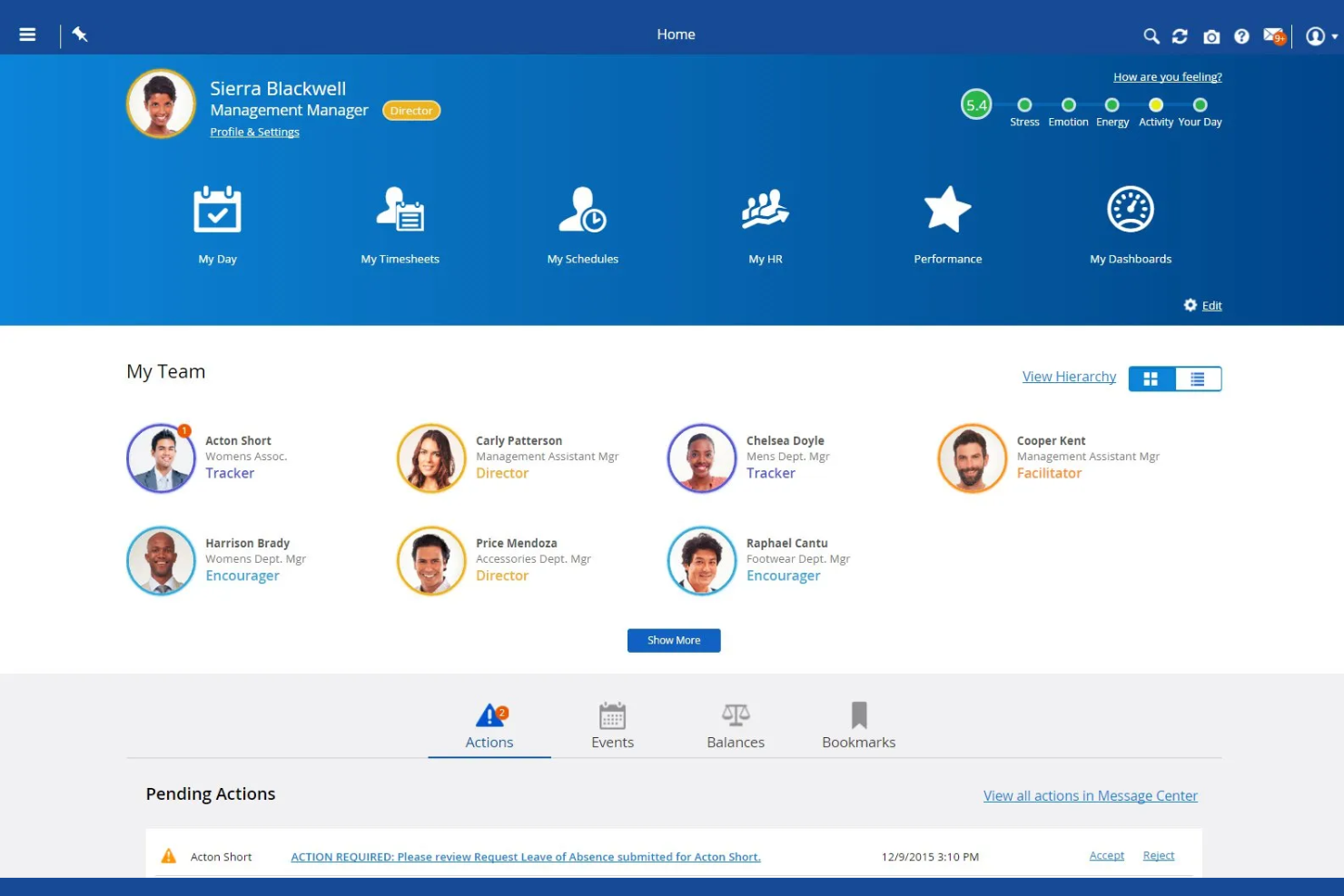
Dayforce is a workforce management platform designed for organizations that need unified HR, payroll, and time tracking in one system. It’s a strong fit for HR teams in industries with hourly or shift-based workforces, like retail, healthcare, and manufacturing. If you’re looking to simplify compliance and manage complex scheduling, Dayforce brings together the tools you need in a single platform.
Who Is Dayforce Best For?
Dayforce is a good fit for mid-sized to large organizations in industries like retail, healthcare, and manufacturing that need unified payroll and workforce management.
Why I Picked Dayforce
What stands out about Dayforce is its ability to calculate payroll in real time as employee data changes throughout the pay period. This means HR and payroll teams can see the immediate impact of schedule changes, overtime, or time-off requests on payroll costs, which helps reduce errors and surprises at the end of each cycle. I also like that Dayforce combines time tracking and payroll in a single system, so there’s no need to reconcile data between separate platforms. For organizations with complex pay rules or frequent schedule adjustments, this real-time approach to payroll management is a major advantage.
Dayforce Key Features
In addition to real-time payroll calculations, Dayforce offers several other features that support workforce management:
- Automated scheduling tools: Managers can create, adjust, and publish employee schedules based on business rules and labor demand.
- Mobile self-service app: Employees can view schedules, request time off, and swap shifts directly from their mobile devices.
- Compliance management: The platform monitors labor laws and internal policies, alerting managers to potential compliance issues.
- Analytics and reporting: Users can access dashboards and reports to track workforce trends, attendance, and productivity.
Dayforce Integrations
Integrations include Emburse, VidCruiter, DocuSign, Go1, HireRight, AdminaHealth, TELUS Health, Okta, Microsoft 365, and Oracle.
Pros and Cons
Pros:
- High volume handling
- All-in-one database
Cons:
- Complex admin portal
- Slow customer support
- Good shift scheduling

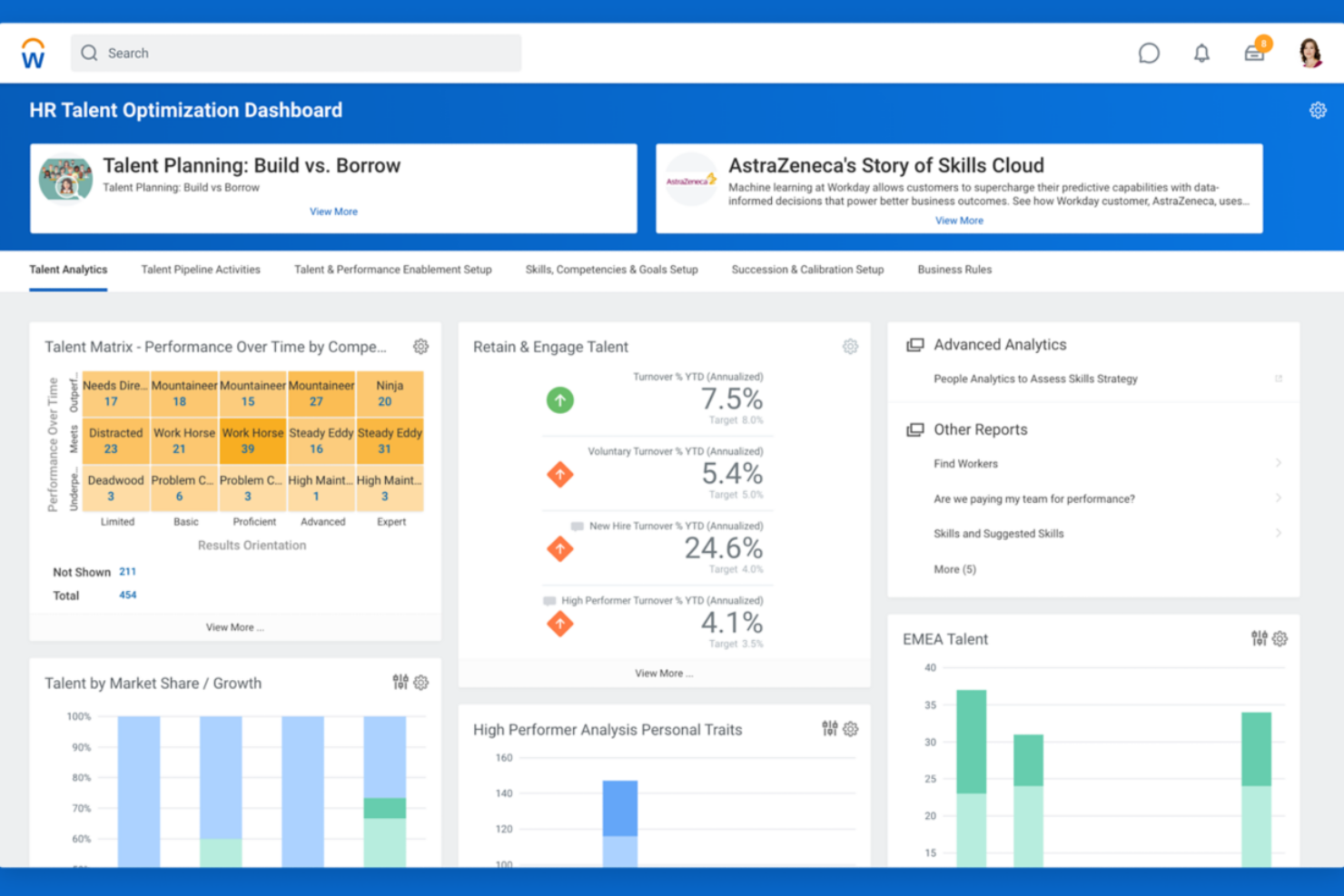
Workday is a workforce management platform designed for organizations with complex, distributed teams. It appeals to HR leaders and operations professionals who need unified tools for managing global schedules, labor costs, and compliance. If you’re looking to coordinate a large workforce across multiple regions, Workday brings together scheduling, time tracking, and analytics in one system.
Who Is Workday Best For?
Workday suits large enterprises and multinational organizations that need to manage workforce operations and analytics across multiple countries.
Why I Picked Workday
What drew me to Workday for workforce management is its advanced global workforce analytics capabilities. The platform brings together real-time data from scheduling, time tracking, and labor cost management, making it easier to spot trends and address issues across multiple countries or business units. I appreciate how Workday’s analytics dashboards let HR and operations teams drill down into workforce metrics by region, department, or role. This level of insight is especially valuable for organizations that need to make data-driven decisions about staffing, compliance, and resource allocation on a global scale.
Workday Key Features
Some other features that make Workday a strong choice for workforce management include:
- Automated scheduling tools: Managers can build, adjust, and publish employee schedules based on business rules and labor demand.
- Mobile time tracking: Employees can clock in and out, request time off, and view schedules from their mobile devices.
- Absence management: The platform tracks all types of leave, including vacation, sick time, and custom leave policies.
- Compliance monitoring: Workday helps organizations stay on top of labor regulations and internal policies with automated alerts and audit trails.
Workday Integrations
Integrations include ADP, Salesforce, Microsoft Teams, ServiceNow, Okta, Slack, SAP, Oracle, DocuSign, and Cornerstone OnDemand.
Pros and Cons
Pros:
- Complex labor tracking
- High data security
- Robust compliance rules
Cons:
- Needs dedicated admin
- Long deployment times

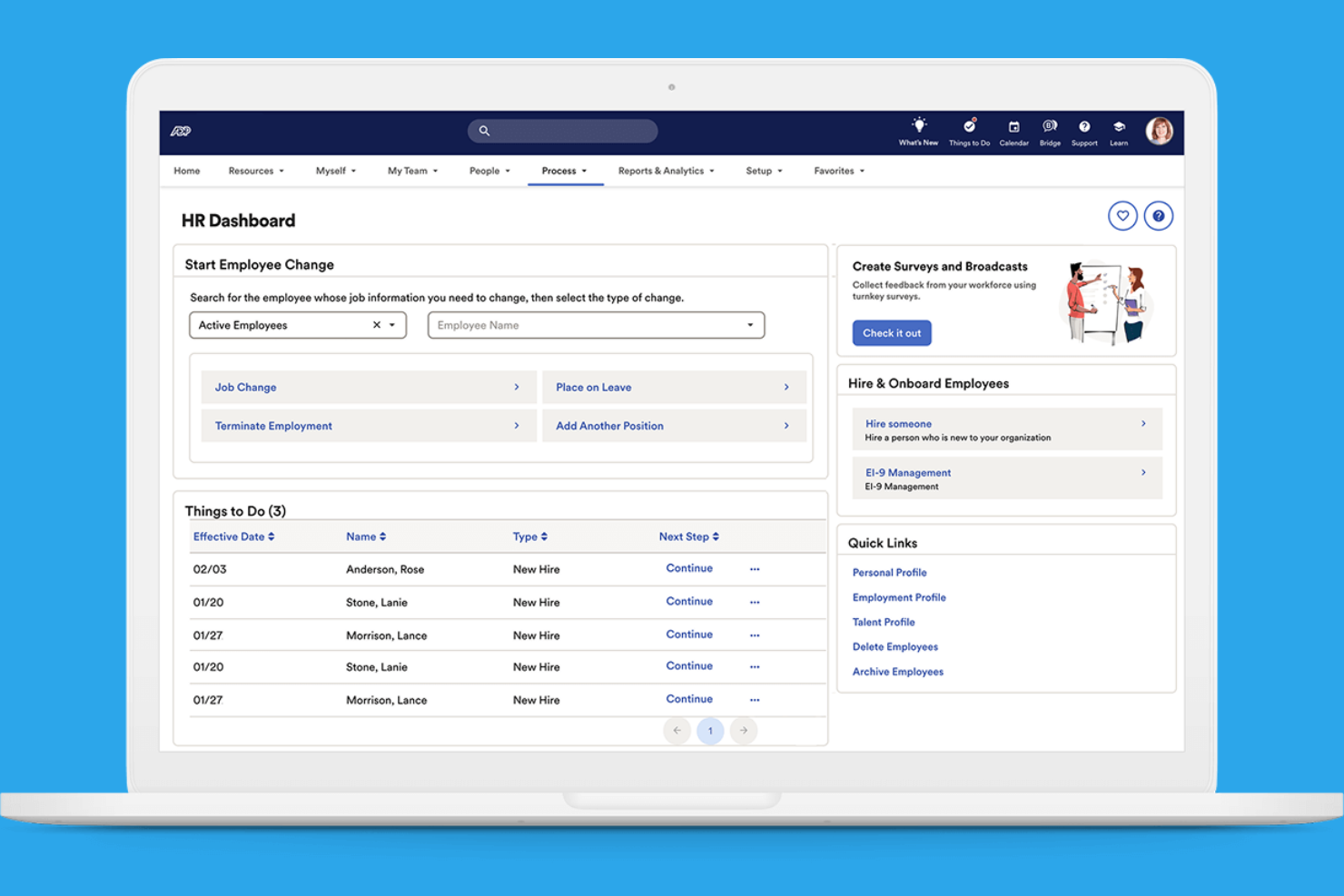
ADP offers a suite of workforce management tools designed for organizations with complex staffing needs. It’s a strong option for HR teams managing employees across multiple locations or jurisdictions. If you need centralized oversight and detailed labor tracking, ADP provides features to help you coordinate and control your workforce.
Who Is ADP Best For?
ADP is a good fit for large or multi-location organizations that need centralized workforce oversight and compliance management.
Why I Picked ADP
What makes ADP stand out for workforce management is its ability to handle oversight across multiple locations and jurisdictions. I picked ADP because it offers centralized dashboards for tracking labor costs, attendance, and compliance in real time, even when your workforce is spread out. The platform’s scheduling and time tracking tools are designed to accommodate complex organizational structures, letting you set location-specific rules and policies. For HR teams that need to coordinate staffing, reporting, and compliance across different sites, ADP’s multi-location management features are especially valuable.
ADP Key Features
Some other features that make ADP a strong workforce management option include:
Automated payroll processing: ADP calculates and processes payroll based on time and attendance data, reducing manual entry.
Employee self-service portal: Employees can view pay statements, update personal information, and manage time-off requests directly.
Compliance alerts: The system notifies HR teams of regulatory changes and potential compliance issues.
Customizable reporting tools: Users can generate detailed reports on workforce metrics, payroll, and attendance for better decision-making.
ADP Integrations
Integrations include QuickBooks, Xero, Wave, allGeo, Synerion, ClockShark, GP, Trusaic, Points North, and Wex.
Pros and Cons
Pros:
- Great compliance tools
- Highly secure platform
- Massive integration list
Cons:
- Too complex for SMBs
- Mobile app has bugs


If you’re looking for a workforce management app that puts people data and HR processes in one place, BambooHR is worth considering. It’s designed for small and mid-sized businesses that want to centralize employee records, automate HR workflows, and simplify everyday HR tasks. HR teams and managers use BambooHR to handle everything from onboarding to performance management in a single, easy-to-navigate platform.
Who Is BambooHR Best For?
BambooHR is a strong choice for small to mid-sized businesses that want to centralize HR management and automate time-off tracking.
Why I Picked BambooHR
What sets BambooHR apart for workforce management is how it handles time-off management with clarity and flexibility. I picked it because the platform lets employees request time off directly in the system, while managers can approve or decline requests with just a few clicks. The built-in calendar automatically updates to reflect absences, making it easy for teams to see who’s out and plan coverage. This approach helps reduce manual tracking and miscommunication around leave, which is a common challenge for HR teams.
BambooHR Key Features
Some other features that make BambooHR useful for workforce management include:
- Employee self-service portal: Employees can update personal information, view pay stubs, and access company documents without HR intervention.
- Onboarding workflows: Automate onboarding tasks and assign checklists to new hires to ensure a smooth start.
- Performance management tools: Set goals, conduct reviews, and gather feedback within the platform to support employee development.
- Document storage and e-signatures: Securely store HR documents and collect electronic signatures for important forms and agreements.
BambooHR Integrations
Integrations include Slack, Greenhouse, Culture Amp, Lattice, Remote, 15Five, Lever, DocuSign, QuickBooks, and ADP Workforce Now.
Pros and Cons
Pros:
- Built-in e-signatures for HR document workflows
- Performance review cycles are fully configurable
- Employee self-service portal updates records instantly
Cons:
- Custom roles and permissions are restricted
- No built-in scheduling or shift planning
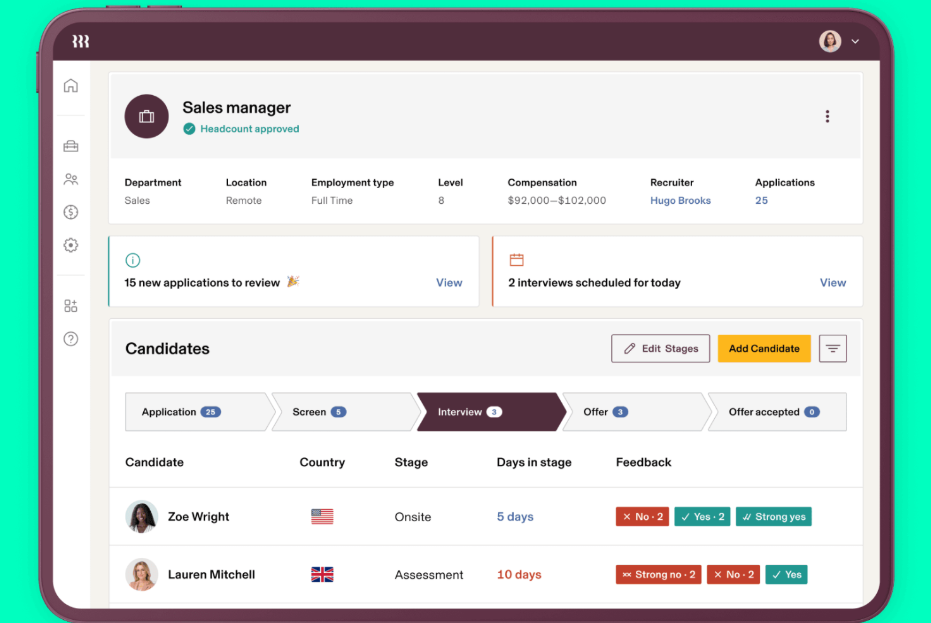
Rippling brings HR, IT, and workforce management together in one platform. It’s a good fit for businesses that want to manage employee data, payroll, and device provisioning from a single dashboard. If you’re looking to reduce manual work and keep people's operations tightly connected, Rippling offers a unified approach.
Who Is Rippling Best For?
Rippling suits mid-sized to large organizations that need to manage both HR and IT processes from a single platform.
Why I Picked Rippling
What drew me to Rippling for workforce management is how it connects HR and IT workflows in one place. The platform lets you onboard employees by automatically setting up payroll, benefits, and even provisioning devices and software access—all from a single dashboard. I find this unified approach especially valuable for organizations that need to coordinate people operations with technology management. By centralizing these processes, Rippling helps reduce manual handoffs and keeps employee data consistent across HR and IT systems.
Rippling Key Features
Some other features that make Rippling useful for workforce management include:
- Time and attendance tracking: Employees can clock in and out, track hours, and managers can approve timesheets directly in the platform.
- Global payroll processing: Run payroll for employees and contractors in multiple countries with built-in compliance tools.
- Custom workflow automation: Build automated workflows for approvals, notifications, and HR tasks without coding.
- Employee document management: Store, organize, and share HR documents securely with version control and access permissions.
Rippling Integrations
Integrations include Slack, Google Workspace, Microsoft 365, Salesforce, QuickBooks Online, Xero, Asana, Zoom, Jira, and HubSpot.
Pros and Cons
Pros:
- Supports global payroll and compliance needs
- Offers customizable workflow automation tools
- Automates onboarding across HR and IT
Cons:
- Reporting features are limited for analytics
- Payroll requires additional paid modules

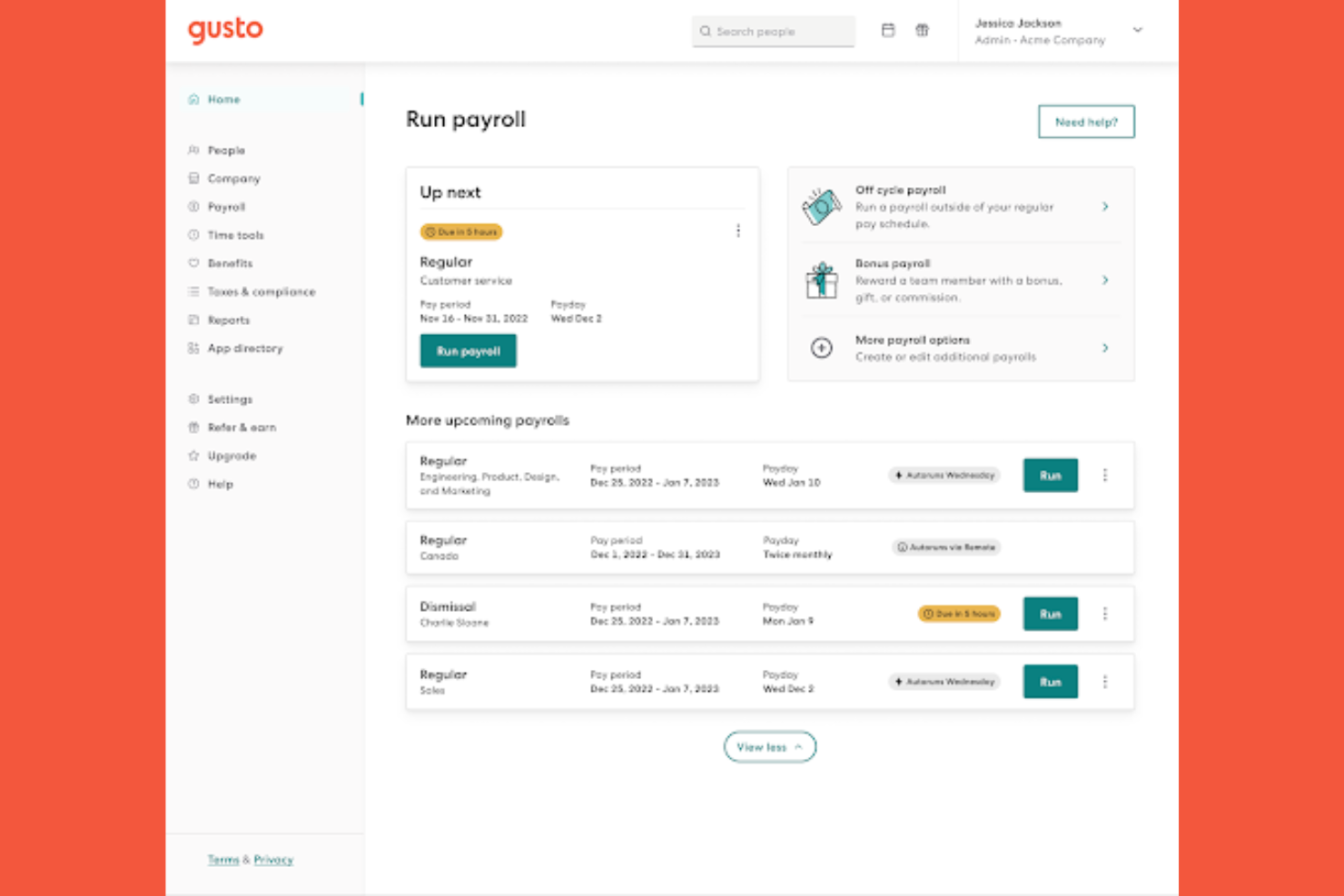
Gusto offers a workforce management platform designed for small and midsize businesses that want to simplify HR processes. The software brings together payroll, benefits administration, and employee management in one place. If you’re looking for a solution that reduces manual HR tasks and helps keep your team organized, Gusto is worth considering.
Who Is Gusto Best For?
Gusto is a strong choice for small to midsize businesses that want to automate HR and onboarding tasks.
Why I Picked Gusto
What drew me to Gusto for workforce management is how it automates and personalizes onboarding workflows. The platform lets you create custom onboarding checklists, send digital offer letters, and collect e-signatures, all from a single dashboard. I also appreciate that Gusto automatically sets up new hires in payroll and benefits, reducing manual data entry and compliance risks. For HR teams that want to make onboarding smoother and more consistent, Gusto’s automation tools are especially valuable.
Gusto Key Features
Some other features that make Gusto a strong workforce management option include:
Time tracking: Employees can clock in and out, track hours, and sync time data directly to payroll.
PTO management: The platform lets you set up, approve, and track paid time off policies and requests.
Org chart and directory: Gusto automatically generates a visual org chart and searchable employee directory.
Document storage: Store and manage important HR documents securely within the platform.
Gusto Integrations
Integrations include 15Five, 7Shifts, Accelo, Amalgam, Analytics by Syft, Aplos, ApplicantPro, Ardius, Arvo, and Asana.
Pros and Cons
Pros:
- Simple time tracking
- Clean mobile interface
- Great for small teams
Cons:
- Basic compliance rules
- Limited complex routing
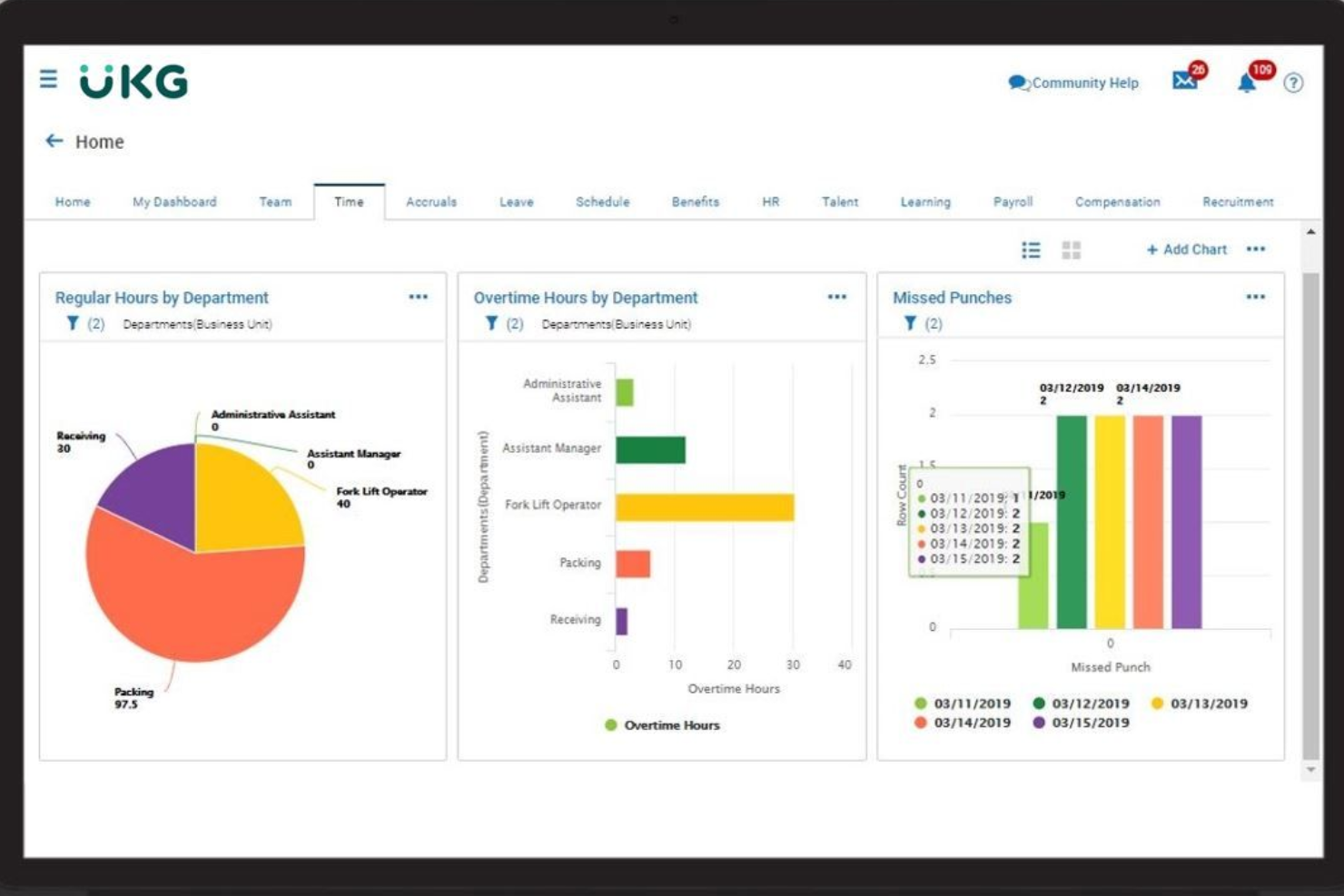
UKG Ready is a workforce management platform designed for organizations that need flexible HR, time, and payroll tools in one place. It’s a strong choice for HR teams in industries with complex scheduling and compliance needs, like healthcare, manufacturing, and public sector. If you’re looking for a solution that adapts to changing labor laws and unique business rules, UKG Ready offers the configurability to support your requirements.
Who Is UKG Ready Best For?
UKG Ready is a good fit for mid-sized to large organizations in regulated industries that need configurable compliance and workforce management tools.
Why I Picked UKG Ready
What drew me to UKG Ready is how deeply configurable its compliance tools are for workforce management. The platform lets you set up custom rules for timekeeping, scheduling, and pay policies to match your organization’s unique requirements and changing regulations. I appreciate that you can automate alerts and workflows for things like overtime, break compliance, and certification tracking, which helps reduce manual oversight. For HR teams managing complex compliance across multiple locations or jurisdictions, UKG Ready’s flexibility stands out.
UKG Ready Key Features
Some other features that make UKG Ready a strong workforce management option include:
- Employee self-service portal: Employees can view schedules, request time off, and update personal information directly from the platform.
- Mobile app access: Managers and staff can handle approvals, scheduling, and time tracking from their mobile devices.
- Document management: Store, organize, and share HR documents securely within the system.
- Performance management tools: Set goals, conduct reviews, and track employee progress all in one place.
UKG Ready Integrations
Integrations include QuickBooks, NetSuite, ADP, Employee Navigator, TurboTax, Indeed, DocuSign, Boomi, OpenSesame, and HireRight.
Pros and Cons
Pros:
- Solid biometric support
- Strong labor costing
- Great union rule sync
Cons:
- Support tickets lag
- Implementation is long

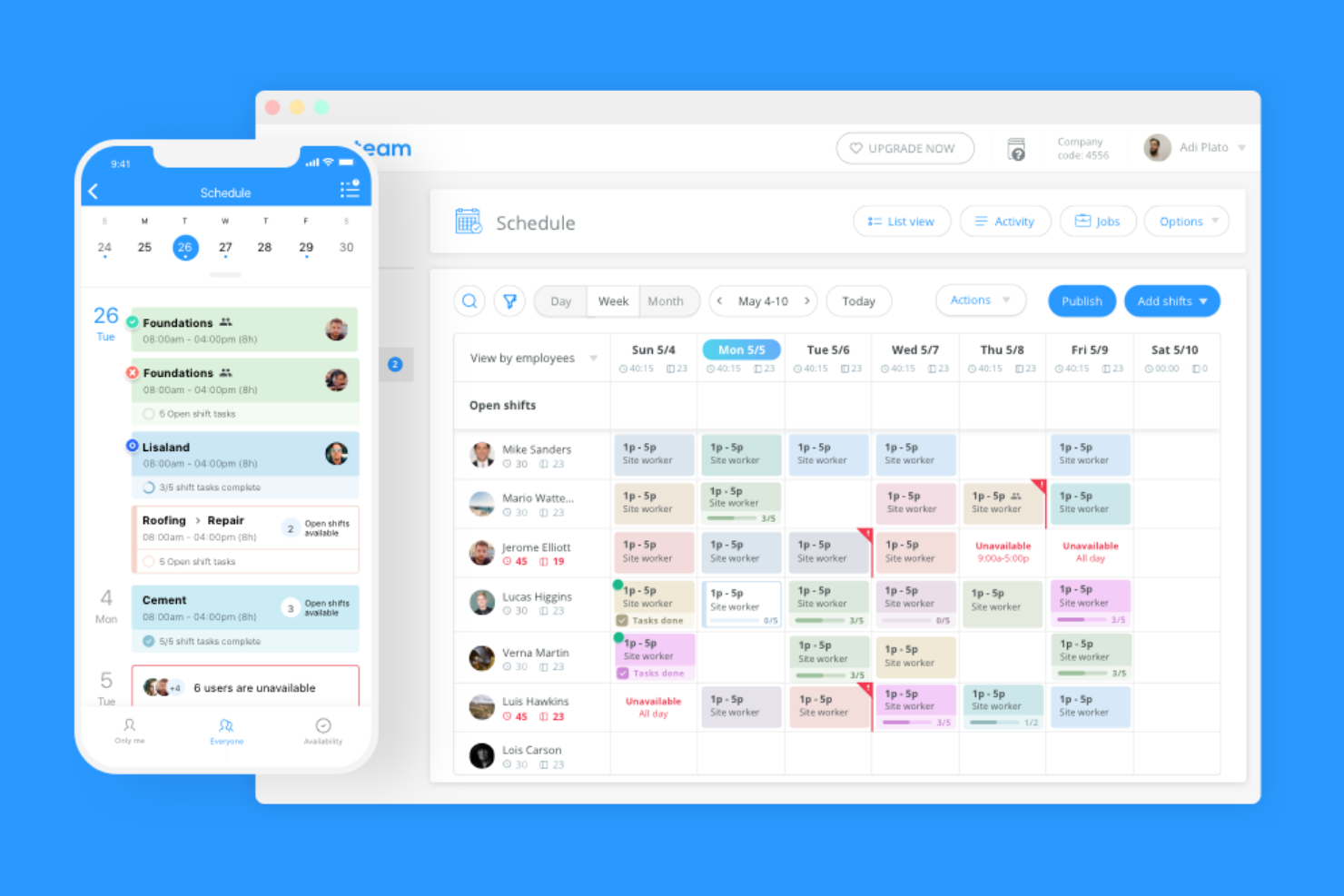
Connecteam is a workforce management app designed for teams that need to coordinate staff on the go. It’s a strong fit for businesses with deskless or mobile employees, such as retail, hospitality, or field services. If you’re looking for a way to centralize scheduling, communication, and task management in one mobile platform, Connecteam offers a focused solution.
Who Is Connecteam Best For?
Connecteam is a good fit for small to mid-sized businesses with mobile or deskless workforces in industries like retail, hospitality, construction, and field services.
Why I Picked Connecteam
I chose Connecteam because it’s built specifically for mobile-first employee scheduling, which is a top priority for many teams managing staff in the field or across multiple locations. The app lets managers create, update, and share shift schedules directly with employees’ smartphones, making last-minute changes and real-time notifications easy to handle. I also appreciate the built-in chat and task management tools that keep communication and daily operations in one place. These features make Connecteam especially useful for businesses that need to coordinate mobile or deskless teams without relying on paper schedules or desktop software.
Connecteam Key Features
Some other features that make Connecteam a strong workforce management app include:
- Time clock with GPS tracking: Employees can clock in and out from their mobile devices, and managers can verify locations using GPS data.
- Customizable forms and checklists: Create digital forms for daily checklists, incident reports, or compliance documentation.
- Document management: Store, share, and update important documents like policies, certifications, or onboarding materials within the app.
- Training and onboarding modules: Deliver training content and track employee progress directly through the mobile platform.
Connecteam Integrations
Integrations include Gusto, QuickBooks, Paychex, Xero, Wix, Lightspeed, PrismHR, Square, BambooHR, and Accu-Time Systems.
Pros and Cons
Pros:
- GPS tracking verifies employee clock-in locations
- Built-in chat keeps communication centralized
- Mobile app supports offline time tracking
Cons:
- No built-in payroll processing feature
- Limited reporting options for advanced analytics

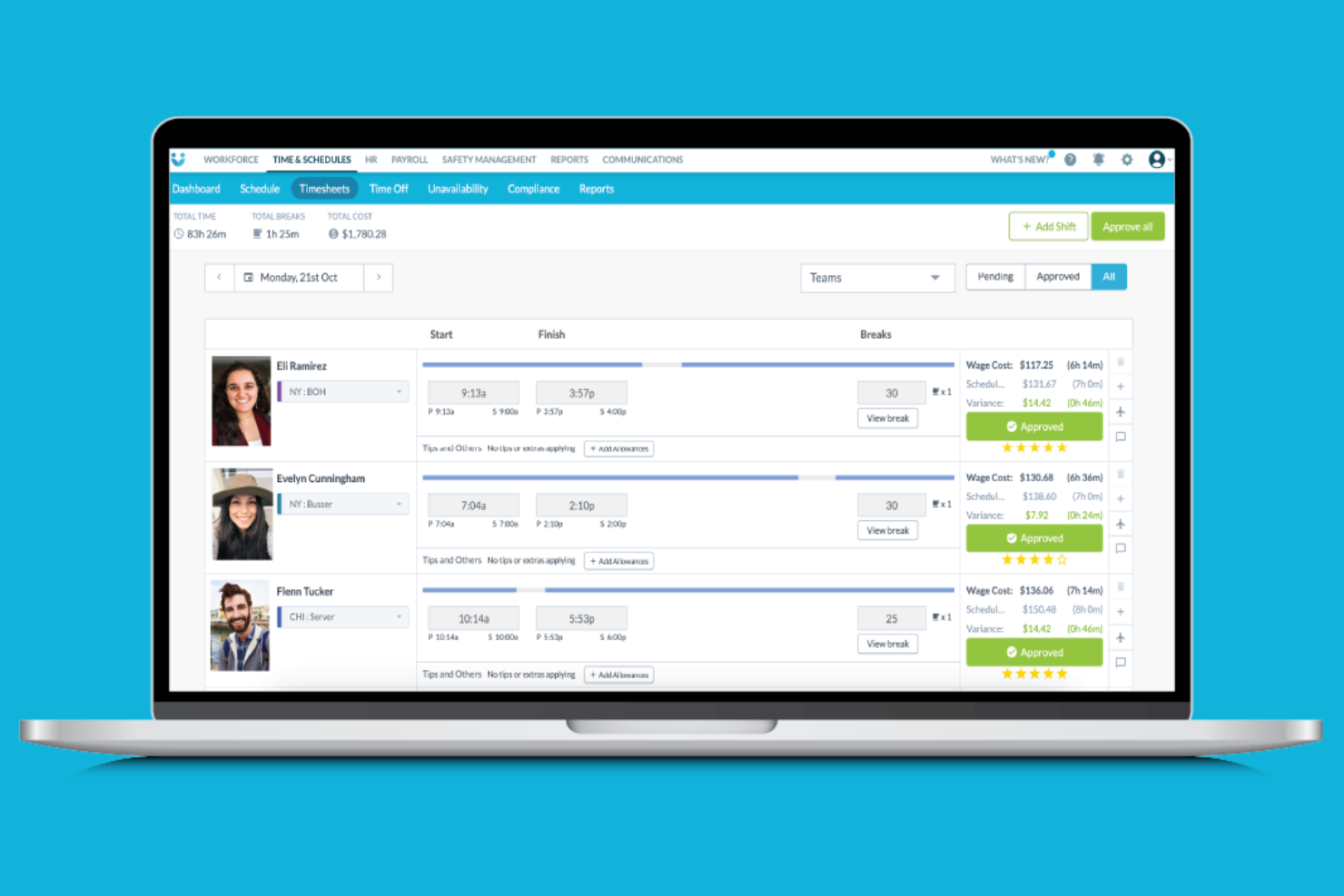
Workforce.com is a workforce management platform designed for businesses with hourly or shift-based teams. It’s a good fit for industries like retail, hospitality, and healthcare that need to coordinate complex schedules and compliance requirements. If you’re looking to reduce scheduling headaches and improve labor oversight, Workforce.com offers tools built for those needs.
Who Is Workforce.com Best For?
Workforce.com is a strong choice for shift-driven businesses in industries like retail, hospitality, and healthcare that need precise labor forecasting and scheduling.
Why I Picked Workforce.com
What stands out to me about Workforce.com is how it handles shift-based labor forecasting for businesses with variable staffing needs. The platform uses historical data and demand signals to help managers predict staffing requirements and build schedules that match real-world demand. I also like that it offers automated shift scheduling and real-time labor cost tracking, which helps reduce overstaffing and overtime. For organizations where labor costs and coverage fluctuate week to week, these forecasting and scheduling tools are especially valuable.
Workforce.com Key Features
Some other features that make Workforce.com useful for workforce management include:
Mobile time clock: Employees can clock in and out from their phones, with location verification for attendance accuracy.
Compliance alerts: The system flags potential labor law violations, such as missed breaks or overtime risks.
Employee self-service portal: Staff can view schedules, request time off, and swap shifts directly in the app.
Payroll integrations: Workforce.com connects with popular payroll providers to sync timesheets and pay data automatically.
Workforce.com Integrations
Integrations include ADP, Gusto, QuickBooks, Paychex, Workday, Oracle, Xero, Square, Clover, and Lightspeed.
Pros and Cons
Pros:
- Excellent mobile app
- Strong wage compliance
- Great shift management
Cons:
- Weak core HR features
- Niche deskless focus

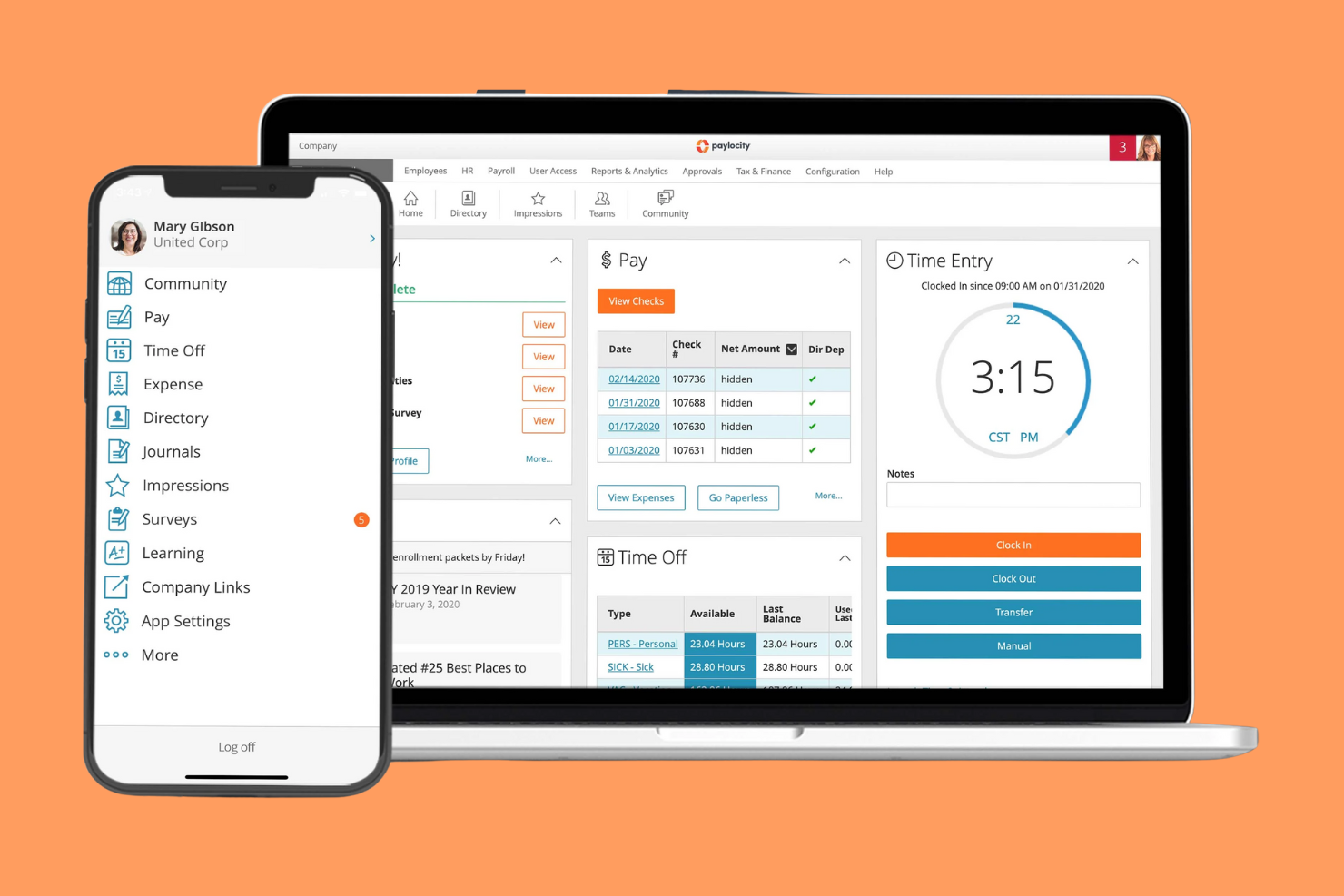
Paylocity offers a workforce management platform designed for businesses that need flexible HR and time tracking solutions. It’s a strong choice for HR teams in industries with complex scheduling or compliance needs. If you’re looking to manage employee time, attendance, and labor data in one place, Paylocity brings these functions together with a focus on customization.
Who Is Paylocity Best For?
Paylocity fits mid-sized businesses and HR teams in industries with complex time tracking and compliance requirements.
Why I Picked Paylocity
What stands out to me about Paylocity is how it lets you create highly customizable time tracking rules to match your organization’s unique policies. You can set up different pay codes, overtime calculations, and approval workflows that reflect your actual labor practices. I find this especially useful for businesses with union contracts, multiple locations, or varying shift requirements. By allowing you to tailor time and attendance tracking at a granular level, Paylocity helps ensure compliance and accurate payroll processing.
Paylocity Key Features
In addition to its customizable time tracking rules, Paylocity offers several other features that support workforce management:
- Employee self-service portal: Employees can view schedules, request time off, and access pay information directly from their own dashboard.
- Mobile time clock: Staff can clock in and out using a mobile app, which supports geofencing and photo capture for added accountability.
- Real-time labor cost tracking: Managers can monitor labor costs as shifts are scheduled and worked, helping control budgets and overtime.
- Automated compliance alerts: The system notifies HR and managers about potential compliance issues, such as missed breaks or approaching overtime limits.
Paylocity Integrations
Integrations include QuickBooks, NetSuite, Salesforce, Slack, and Microsoft Teams.
Pros and Cons
Pros:
- Helpful employee portal
- Solid mobile clock-in
- Good compliance tools
Cons:
- Occasional app crashes
- Implementation is slow
Other Workforce Management Apps
Here are some additional workforce management app options that didn’t make it onto my shortlist, but are still worth checking out:
- Tanda
For automated award interpretation in Australia
- ClockShark
For GPS-enabled mobile time tracking
- Assembled
For real-time support team scheduling
- Workforce Software
With configurable compliance management
- CommunityWFM
For contact center forecasting accuracy


Workforce Management App Selection Criteria
When selecting the best workforce management app to include in this list, I considered common buyer needs and pain points like managing complex shift schedules and ensuring compliance with labor laws. I also used the following framework to keep my evaluation structured and fair:
Core Functionality (25% of total score)
To be considered for inclusion in this list, each solution had to fulfill these common use cases:
- Create and manage employee schedules
- Track time and attendance
- Handle shift swaps and time-off requests
- Monitor labor costs and budgets
- Generate payroll-ready timesheets
Additional Standout Features (25% of total score)
To help further narrow down the competition, I also looked for unique features, such as:
- Automated labor forecasting based on demand
- Real-time compliance alerts for labor laws
- Mobile GPS time tracking
- Employee self-service portals
- Built-in analytics dashboards
Usability (10% of total score)
To get a sense of the usability of each system, I considered the following:
- Simple and intuitive navigation
- Clean and modern interface design
- Minimal steps to complete core tasks
- Responsive mobile app experience
- Customizable dashboard layouts
Onboarding (10% of total score)
To evaluate the onboarding experience for each platform, I considered the following:
- Availability of step-by-step product tours
- Access to training videos and webinars
- Pre-built templates for quick setup
- In-app chatbots for onboarding support
- Clear documentation and help center resources
Customer Support (10% of total score)
To assess each software provider’s customer support services, I considered the following:
- 24/7 live chat or phone support
- Fast response times to inquiries
- Knowledgeable and helpful support staff
- Access to a user community or forum
- Proactive communication about updates and outages
Value For Money (10% of total score)
To evaluate the value for money of each platform, I considered the following:
- Transparent and flexible pricing plans
- No hidden fees or surprise charges
- Features included at each pricing tier
- Free trial or demo availability
- Discounts for annual or volume commitments
Customer Reviews (10% of total score)
To get a sense of overall customer satisfaction, I considered the following when reading customer reviews:
- Positive feedback on scheduling and time tracking
- Reports of reliable system uptime
- Comments on ease of implementation
- User satisfaction with customer support
- Feedback on integration with payroll and HR systems
How to Choose Workforce Management Apps
It’s easy to get bogged down in long feature lists and complex pricing structures. To help you stay focused as you work through your unique software selection process, here’s a checklist of factors to keep in mind:
| Factor | What to Consider |
|---|---|
| Scalability | Will the app support your team size as you grow, including multiple locations or departments? |
| Integrations | Does it connect natively to your payroll, HRIS, and timekeeping systems without extra middleware? |
| Customizability | Can you tailor workflows, permissions, and reporting to match your organization’s policies? |
| Ease of use | Will managers and frontline staff adopt it quickly, or will training and support be a barrier? |
| Implementation and onboarding | How long will it take to get up and running, and what resources or vendor support are required? |
| Cost | Are pricing tiers clear, and do they align with your usage patterns and budget constraints? |
| Security safeguards | Does the vendor offer role-based access, data encryption, and compliance with relevant standards? |
| Compliance requirements | Can the app handle your specific labor laws, union rules, or industry mandates automatically? |
What Are Workforce Management Apps?
A workforce management app is a software tool that helps organizations schedule, track, and manage employee work hours, attendance, and shifts. These apps centralize tasks like time tracking, shift planning, leave requests, and labor cost monitoring. By automating routine workforce processes, they support compliance with labor regulations and help managers optimize staffing levels to meet business needs.
Features
When selecting workforce management app, keep an eye out for the following key features:
- Shift scheduling: Allows managers to create, assign, and adjust employee shifts, ensuring adequate coverage and minimizing scheduling conflicts.
- Time and attendance tracking: Records when employees clock in and out, tracks hours worked, and helps prevent time theft or buddy punching.
- Leave management: Enables employees to request time off and managers to approve or deny requests, with automatic updates to schedules and accrual balances.
- Labor cost tracking: Monitors wage expenses in real time, helping managers stay within budget and identify overtime risks.
- Compliance management: Flags potential violations of labor laws, union rules, or company policies, supporting legal and regulatory adherence.
- Employee self-service: Lets staff view schedules, request changes, and manage their availability directly from a web or mobile app.
- Payroll integration: Syncs timesheet data with payroll systems to reduce manual entry and ensure accurate, timely pay runs.
- Mobile access: Provides on-the-go functionality for both managers and employees, supporting remote or field-based teams.
- Reporting and analytics: Generates insights on attendance, labor costs, and scheduling trends to inform workforce planning decisions.
- Notifications and alerts: Sends automated reminders and updates about shift changes, approvals, or compliance issues to keep everyone informed.
Benefits
Implementing a workforce management app provides several benefits for your team and your business. Here are a few you can look forward to:
- Improved scheduling accuracy: Automated shift planning and real-time updates help reduce errors and ensure the right coverage for every shift.
- Greater compliance confidence: Built-in compliance checks and alerts help you stay aligned with labor laws, union rules, and internal policies.
- Reduced administrative workload: Centralized time tracking, leave management, and payroll integration minimize manual data entry and paperwork.
- Enhanced employee engagement: Self-service tools empower staff to manage their schedules, request time off, and swap shifts, increasing satisfaction and flexibility.
- Better labor cost control: Real-time labor cost tracking and overtime alerts help managers make informed decisions and avoid budget overruns.
- Faster onboarding and adoption: Intuitive interfaces and guided onboarding resources help new users get up to speed quickly and start realizing value sooner.
- Actionable workforce insights: Reporting and analytics features provide visibility into attendance patterns, labor costs, and scheduling trends to support strategic planning.
Costs & Pricing
Selecting a workforce management app requires an understanding of the various pricing models and plans available. Costs vary based on features, team size, add-ons, and more. The table below summarizes common plans, their average prices, and typical features included in workforce management app solutions:
Plan Comparison Table for Workforce Management App
| Plan Type | Average Price | Common Features |
|---|---|---|
| Free Plan | $0 | Basic shift scheduling, limited time tracking, and employee self-service for small teams. |
| Personal Plan | $4-$8/user/month | Shift scheduling, time and attendance tracking, leave management, and basic reporting. |
| Business Plan | $9-$18/user/month | Advanced scheduling, compliance tools, payroll integration, mobile access, and analytics dashboards. |
| Enterprise Plan | $20-$45/user/month | Custom workflows, API access, advanced security, dedicated support, and multi-location management. |
Workforce Management App FAQs
Here are some answers to common questions about workforce management app:
How do workforce management apps help with compliance?
Workforce management apps help with compliance by tracking labor laws, overtime rules, and break requirements automatically. They alert managers to potential violations and generate audit-ready records, reducing the risk of costly errors or penalties.
Can workforce management apps integrate with payroll systems?
Yes, most workforce management apps integrate with popular payroll systems. This allows you to transfer timesheet and attendance data directly, reducing manual entry and helping ensure accurate, timely payroll processing.
Are workforce management apps suitable for remote or mobile teams?
Yes, many workforce management apps offer mobile access and GPS tracking. This supports remote, field-based, or hybrid teams by allowing employees to clock in, view schedules, and request time off from anywhere.
What should I consider when choosing a workforce management app for a large organization?
For large organizations, consider scalability, multi-location support, advanced security, and custom workflow options. Also, check for robust reporting, integration capabilities, and dedicated customer support to handle complex needs.
How long does it take to implement a workforce management app?
Implementation time varies, but most cloud-based workforce management apps can be set up in a few days to a few weeks. Factors include data migration, integration needs, and the complexity of your scheduling and compliance requirements.