
25 Best AI HR Software of 2026

Best AI HR Software Shortlist
Here’s my shortlist of the best AI HR software:


The best AI HR software helps you automate routine tasks, uncover workforce insights, and manage people operations more efficiently—so you can spend less time on admin and more time supporting your team.
From recruitment and engagement to compliance and performance management, HR teams are expected to do more with less. AI-powered platforms simplify these responsibilities by automating workflows, analyzing trends, and delivering real-time insights that support better decision-making.
Drawing on years of hands-on experience testing HR technology, I’ve curated a list of the top AI HR software solutions available today. In this guide, you’ll find unbiased reviews of tools designed for different team sizes and industries—helping you choose a platform that makes HR management smarter, faster, and more effective.
Why Trust Our Software Reviews
Best AI HR Software: Pricing Comparison Chart
This comparison chart summarizes pricing details for my top AI HR software selections to help you find the best software for your budget and business needs.
| Tool | Best For | Trial Info | Price | ||
|---|---|---|---|---|---|
| 1 | Best for global payroll and compliance | Free demo available | From $5/employee/month | Website | |
| 2 | Best for AI-powered HR automation | Free demo available | Pricing upon request | Website | |
| 3 | Best for AI-powered people analytics | Free demo available | Pricing upon request | Website | |
| 4 | Best for predictive HR analytics | 30-day free trial available | Pricing upon request | Website | |
| 5 | Best for 360-degree feedback | Free 14-day trial | From $199/month (billed annually) | Website | |
| 6 | Best for AI-driven employee reviews | Free demo available | From $5/user/month (billed annually) | Website | |
| 7 | Best for employee relations management | Free demo available | Pricing upon request | Website | |
| 8 | Best for AI-powered insights & workflows | Free demo + free plan available | From $8/user/month | Website | |
| 9 | Best for employee performance and engagement AI | Free demo available | From $11/seat/month | Website | |
| 10 | Best for HR workflow guidance | Free demo available | Pricing upon request | Website | |
| 11 | Best for automating HR tasks | 14-day free trial | Pricing upon request | Website | |
| 12 | Best for AI-powered engagement insights | Free 14-day trial + free plan available | From $5/user/month (billed annually) | Website | |
| 13 | Best for connecting hiring and performance | Free demo available | Pricing upon request | Website | |
| 14 | Best for complex business compensation planning | Free demo available | Contact for pricing | Website | |
| 15 | Best for community-driven hiring | Free demo available | Pricing upon request | Website |


-

Checkr
Visit WebsiteThis is an aggregated rating for this tool including ratings from Crozdesk users and ratings from other sites.4.5 -
Kudoboard
Visit WebsiteThis is an aggregated rating for this tool including ratings from Crozdesk users and ratings from other sites.4.8 -
Native Teams
Visit WebsiteThis is an aggregated rating for this tool including ratings from Crozdesk users and ratings from other sites.4.9





Best AI HR Software Reviews
Below are my detailed summaries of the best AI HR software that made it onto my shortlist. My reviews offer a detailed look at the key features, pros & cons, integrations, and ideal use cases of each tool to help you find the best one for you.


Deel is built for companies managing globally distributed teams and looking to bring AI into their HR and payroll operations. It uses AI to help you answer workforce questions, surface compliance risks, and automate routine admin, making it ideal for organizations hiring across multiple countries.
Why I Picked Deel
I picked Deel because its AI tools make global workforce operations easier to manage without adding more systems or manual checks. You can ask Deel AI country-specific questions—like hiring rules, leave requirements, or payroll timelines—and get instant guidance instead of searching regulations yourself.
Its AI also flags potential compliance issues based on local laws, helping your team stay ahead of risks when hiring or paying employees in different regions. I like that Deel applies AI inside workflows you already use—such as document reviews, contract creation, and policy checks—so your HR team gets practical support rather than abstract insights. And because it connects your HR and finance data, the AI suggestions become more relevant as your workforce grows.
Deel Key Features
Here are some standout features worth highlighting:
- AI-Assisted Document Review: Highlights missing clauses or risky language in employment contracts.
- AI Knowledge Assistant: Answers questions about hiring rules, payroll timelines, time-off laws and regional requirements.
- Global Payroll Engine: Runs payroll across countries with automated calculations and localized tax handling.
- Compliance Monitoring: Tracks regulatory changes and alerts you when a worker or entity requires updated documentation.
Deel Integrations
Integrations include BambooHR, Workday, HiBob, Greenhouse, Lever, QuickBooks, Xero, Slack, Expensify, and Zapier.
Pros and Cons
Pros:
- Automated invoicing and payments
- Deel AI feature provides quick answers to users
- Simplifies international payroll and compliance
Cons:
- Mobile app doesn’t include the full admin feature set
- Limited customization options
New Product Updates from Deel HR

Deel HR Introduces AI-Powered ATS for Hiring
Deel HR introduces an AI-powered ATS built into its platform. This update enhances hiring efficiency by automating sourcing, screening, and workflows across the recruitment process. For more information, visit Deel HR’s official site.
 .
.
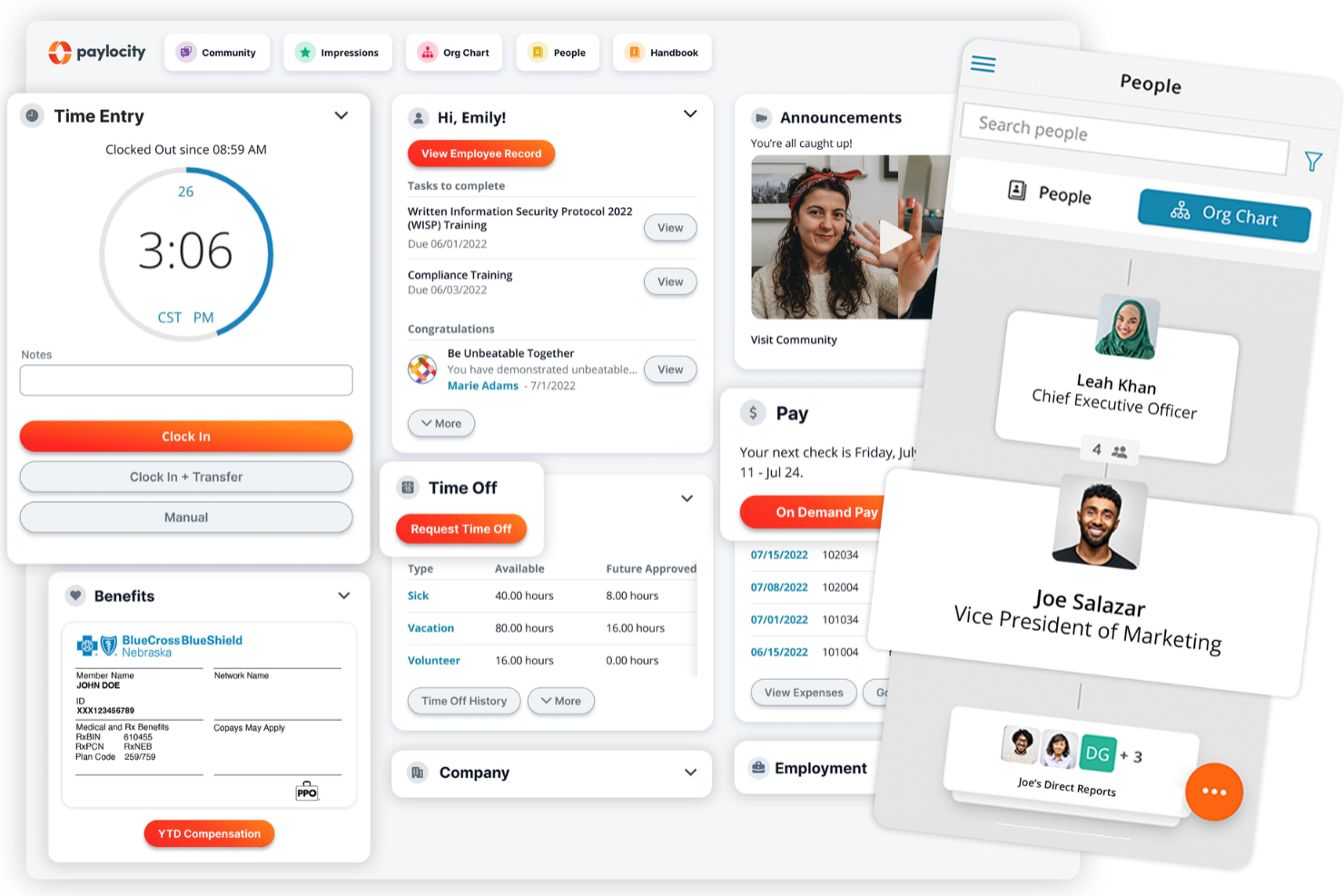
Paylocity is well-suited for mid-sized and larger organizations that want to bring more intelligence to everyday HR and payroll work. It helps your team handle core tasks—like payroll, scheduling, and employee management—while using AI to surface insights and automate repetitive steps.
Why I Picked Paylocity
I picked Paylocity because it gives HR teams practical AI tools that make daily administration easier without changing how they already work. For example, you get predictions for staffing needs based on historical patterns, along with auto-generated job descriptions and compensation recommendations that help you keep roles competitive.
I also like that it flags employees who may be at risk of leaving and shows you the drivers behind those trends, and its AI assistant can answer company-specific questions for employees, reducing routine HR inquiries. For teams that juggle compliance, payroll, and communication across multiple groups, Paylocity brings these workflows into one place with helpful automation behind the scenes.
Paylocity Key Features
Here are some standout features worth highlighting:
- On-Demand Pay: Gives employees early access to earned wages through native earned wage access tools.
- Employee Self-Service Hub: Lets employees update personal details, review pay, and submit time-off requests without HR involvement.
- AI-Assisted Benefits Communication: Drafts tailored benefits messages and helps employees compare plan options.
- Built-In Learning Management: Offers training assignment tools, progress tracking, and compliance reporting.
Paylocity Integrations
Integrations include BambooHR, Greenhouse, NetSuite, ADP, Oracle HCM, Workday, Salesforce, Microsoft Teams, HubSpot, Zendesk, Slack, and Microsoft SharePoint.
Pros and Cons
Pros:
- Auto-generated job descriptions speed up recruiting
- AI assistant reduces routine HR inquiries
- Predictive analytics highlight turnover risks
Cons:
- Limited customization options in certain modules
- Setup can be time consuming
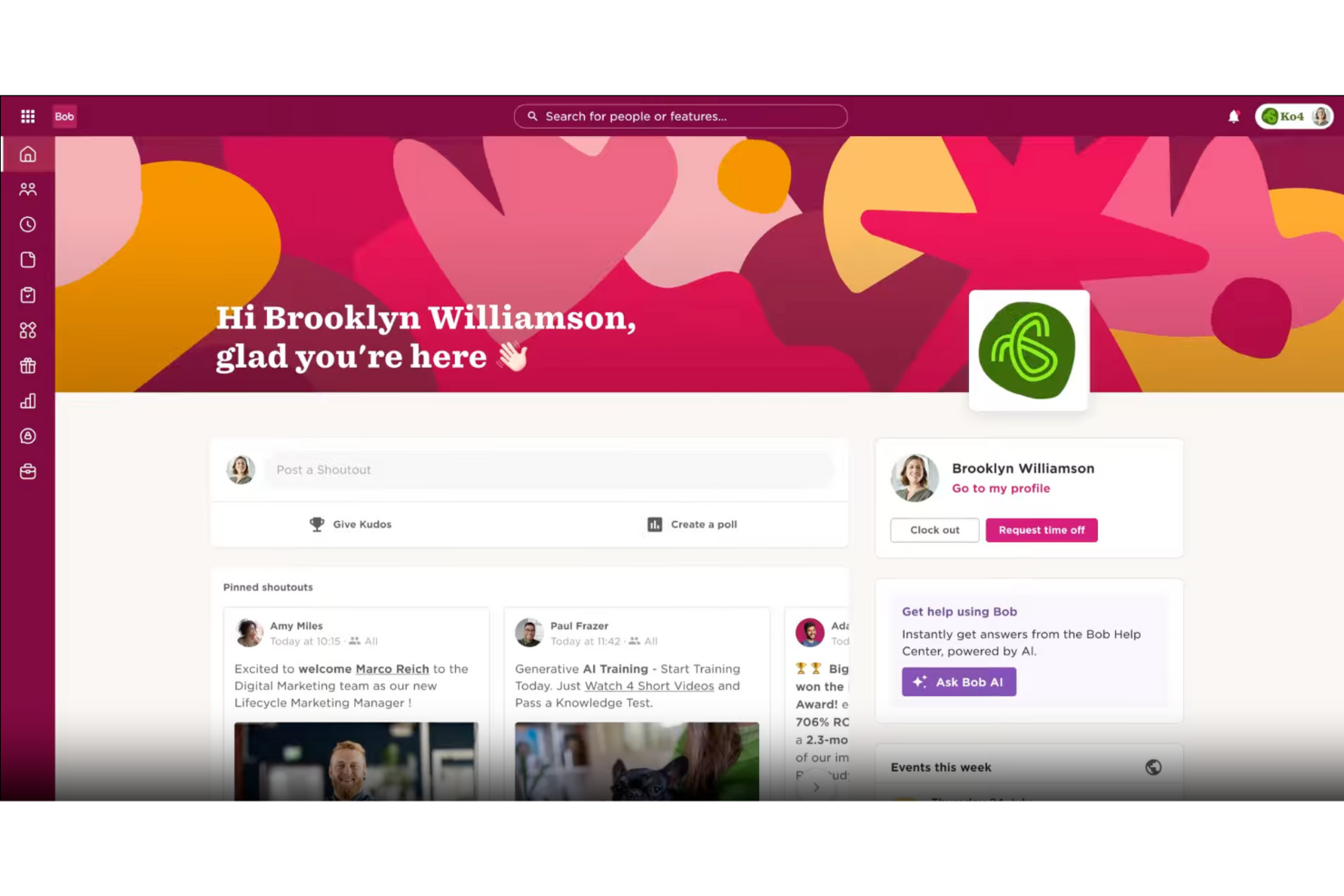
HiBob offers an HR platform designed for fast-growing companies, including AI-powered people analytics to help teams understand workforce data more clearly. It is suited for HR professionals and business leaders who want to improve people management and maintain a strong workplace culture. By using AI, HiBob helps teams manage recruitment, reduce manual administrative work, and review workforce data to support planning and everyday decision-making.
Why I Picked HiBob
I picked HiBob for its AI-powered people analytics, which help HR teams understand workforce data and spot trends more easily as companies grow. The platform also reduces manual HR work by automating routine administrative tasks, allowing teams to focus on planning and employee support. Its analytics support workforce planning and everyday decision-making, while tools for performance and development help teams improve employee experiences in a more structured way.
HiBob Key Features
In addition to AI-powered people analytics, HiBob offers:
- Onboarding: Simplifies the new hire process with automated workflows and personalized experiences.
- Time and Attendance Tracking: Accurately tracks employee hours and attendance to streamline payroll processing.
- Compensation Management: Offers tools for equitable pay programs and benchmarking compensation trends.
HiBob Integrations
Integrations include Aquera, Ashby, Auzmor Learn, Awardco, Basqo, Bonusly, Breezy, Brex, bswift, and Bucketlist.
Pros and Cons
Pros:
- Strong analytics provide useful insights into workforce data
- Clean design improves usability and employee self-service experience
- Comprehensive HR features support core employee management needs
Cons:
- Reporting and time-off configuration lack deeper customization options
- Some configurability issues limit flexibility

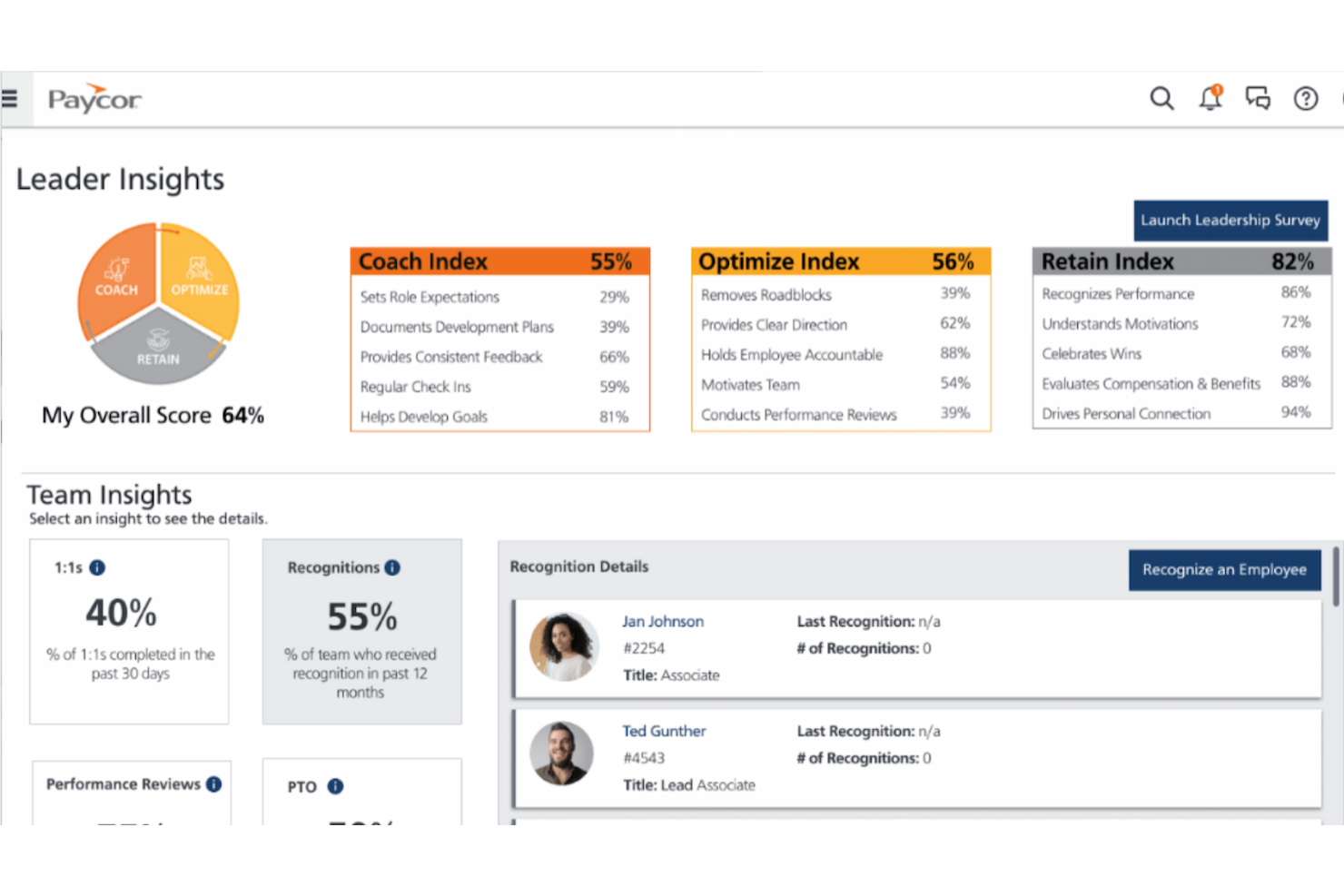
Paycor is a human capital management (HCM) platform built for small to mid-sized businesses that want to modernize their HR and payroll operations. The platform uses artificial intelligence to simplify core HR tasks and support smarter hiring, onboarding, and compliance workflows.
Why I picked Paycor: I picked Paycor because it embeds AI into key areas of HR—especially where day-to-day decisions and administrative tasks pile up. Its intelligent sourcing tool, for instance, can automatically surface candidate matches and promote hiring diversity. Meanwhile, the platform’s predictive analytics help HR teams make more confident decisions around retention, compensation, and planning. I also liked that Paycor approaches AI with a human-centered lens. It emphasizes transparency and ethical use in areas like performance tracking and hiring, which is increasingly important for teams implementing AI in sensitive HR processes.
Standout features and integrations:
Features include an AI-powered HCM suite that automates common HR tasks like onboarding, performance tracking, and employee development. Paycor also offers embedded analytics to surface workforce trends and provides tools to support engagement initiatives like pulse surveys and recognition. It’s especially helpful for businesses looking to consolidate multiple HR tools into one platform.
Integrations include QuickBooks, Xero, SAP Concur, Indeed, LinkedIn, Glassdoor, Zapier, Microsoft Teams, Slack, and DocuSign.
Pros and Cons
Pros:
- Wide range of integrations with popular tools
- Advanced employee performance tracking
- Industry-specific HR and payroll solutions
Cons:
- May require additional support for full customization
- UX can feel a bit clunky at times

Leapsome is designed for HR teams that want a single place to manage performance reviews, engagement insights, and employee development. It’s especially useful for growing companies that rely on ongoing feedback cycles and want clear visibility into team performance trends. With its AI-supported suggestions and centralized employee data, you can make people decisions more confidently and consistently.
Why I Picked Leapsome
I picked Leapsome because it helps you turn ongoing feedback into meaningful development by combining AI-generated recommendations with structured review workflows. For example, you can gather 360-degree feedback, run performance cycles, and align teams through goal tracking.
I also like that it provides tailored coaching tips during reviews, helping managers give clearer, more actionable guidance, and the platform can surface engagement patterns through pulse surveys to help you spot areas that need attention. For teams working across multiple locations or functions, its shared dashboards make it easier to keep everyone aligned.
Leapsome Key Features
Here are some standout features worth highlighting:
- Learning Paths: Build personalized training sequences tied to each employee’s skills or growth areas.
- Survey Library: Access pre-built engagement survey templates backed by organizational research.
- Goal Visibility: Track team and company OKRs with progress indicators and automated reminders.
- Review Templates: Create consistent review structures with reusable templates for each cycle.
Leapsome Integrations
Integrations include Workday, BambooHR, Personio, Slack, Microsoft Teams, Greenhouse, Lever, ADP, Azure Active Directory, and SAP SuccessFactors.
Pros and Cons
Pros:
- Goal tracking improves employee alignment
- Comprehensive performance review structure
- AI insights enhance HR decisions
Cons:
- Occasional integration setup challenges
- Limited customization for OKRs
New Product Updates from Leapsome

Leapsome Adds ADP Workforce Now Integration
Leapsome introduces ADP Workforce Now integration for payroll data synchronization. This update helps organizations keep employee data aligned between HR and payroll systems while reducing manual data transfers. For more information, visit Leapsome’s official site.
 .
.
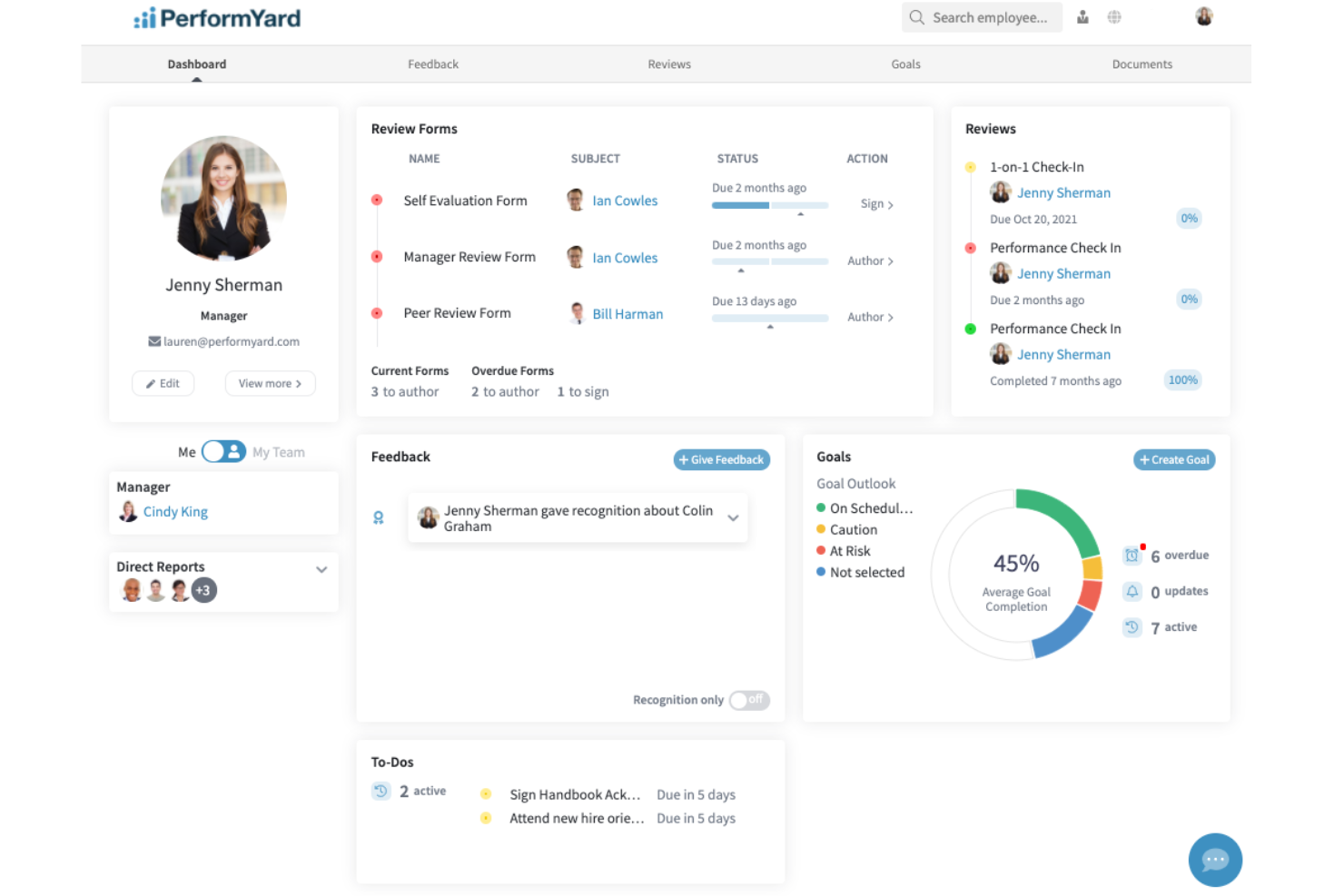
For businesses wanting to enhance their human resources operations with intelligent solutions, PerformYard offers a platform that addresses the complexities of performance management with its AI-assisted features. By streamlining reviews, goal management, and feedback processes, PerformYard helps transform employee engagement and decision-making, making it an ideal tool for organizations aiming to foster a high-performance culture.
Why I Picked PerformYard
I picked PerformYard for its unique AI-driven approach to performance management, which directly addresses the needs of businesses looking to enhance HR functions. The platform's AI-assisted reviews are particularly noteworthy, as they simplify the process of providing meaningful feedback, saving time for HR teams. Additionally, PerformYard's goal management feature allows organizations to align employee objectives with company goals, fostering a culture of accountability and achievement. Continuous feedback capabilities further ensure that employees receive timely insights into their performance, promoting ongoing development and engagement.
PerformYard Key Features
In addition to its standout AI-driven features, I also like that PerformYard offers:
- Performance Trend Analysis: This feature provides insights into employee performance over time, helping HR teams identify patterns and areas for improvement.
- Engagement Surveys: These surveys enable organizations to gauge employee satisfaction and engagement levels, informing strategies for improvement.
- Collaborative Meeting Tools: Facilitate effective communication and collaboration during performance reviews and goal-setting meetings.
- Survey Management: Offers customizable surveys to collect valuable feedback from employees, aiding in the continuous improvement of HR processes.
PerformYard Integrations
Integrations include Slack, Microsoft Teams, G Suite, BambooHR, ADP, Paylocity, Rippling, Namely, Workday, and Zenefits.
Pros and Cons
Pros:
- Continuous feedback fosters ongoing employee development and engagement.
- Goal management aligns employees' objectives with company goals effectively.
- PerformYard's AI-driven reviews simplify performance management processes.
Cons:
- Limited integrations with other HR systems and may require workarounds.
- AI reliance may not suit all organizational cultures.


HR Acuity is an AI-driven platform that helps you manage employee relations and workplace investigations. It offers tools to document, track, and analyze employee issues, aiming to create a fair and consistent work environment.
Why I picked HR Acuity: HR Acuity's AI, olivER, assists in identifying patterns and trends in employee relations data, helping you proactively address potential issues. This predictive approach allows for timely interventions, fostering a healthier workplace culture. Additionally, the platform offers a centralized repository for all case documentation, ensuring easy access and improved compliance. The platform includes built-in templates and best practices for conducting workplace investigations. These resources guide you through each step, promoting thorough and consistent investigations.
Standout features and integrations:
Features include employee workplace reporting, case management, workplace investigations, analytics, documentation, managER for people leaders, an ethics and compliance hotline, and an employee database.
Integrations include Workday, Oracle, ADP, Ultipro, other HRIS systems, and ComplianceLine. It also offers its REST-based API for integration with ticketing systems and compliance solutions.
Pros and Cons
Pros:
- Robust reporting capabilities
- Centralized case documentation
- Offers benchmarking dashboards
Cons:
- Advanced features require time and training
- User interface could be more intuitive
New Product Updates from HR Acuity
HR Acuity Launches Trust & Risk Statement™ Framework
HR Acuity launches the Trust & Risk Statement™ to help measure employee relations impact through data-driven insights. For more information, visit HR Acuity's official site.
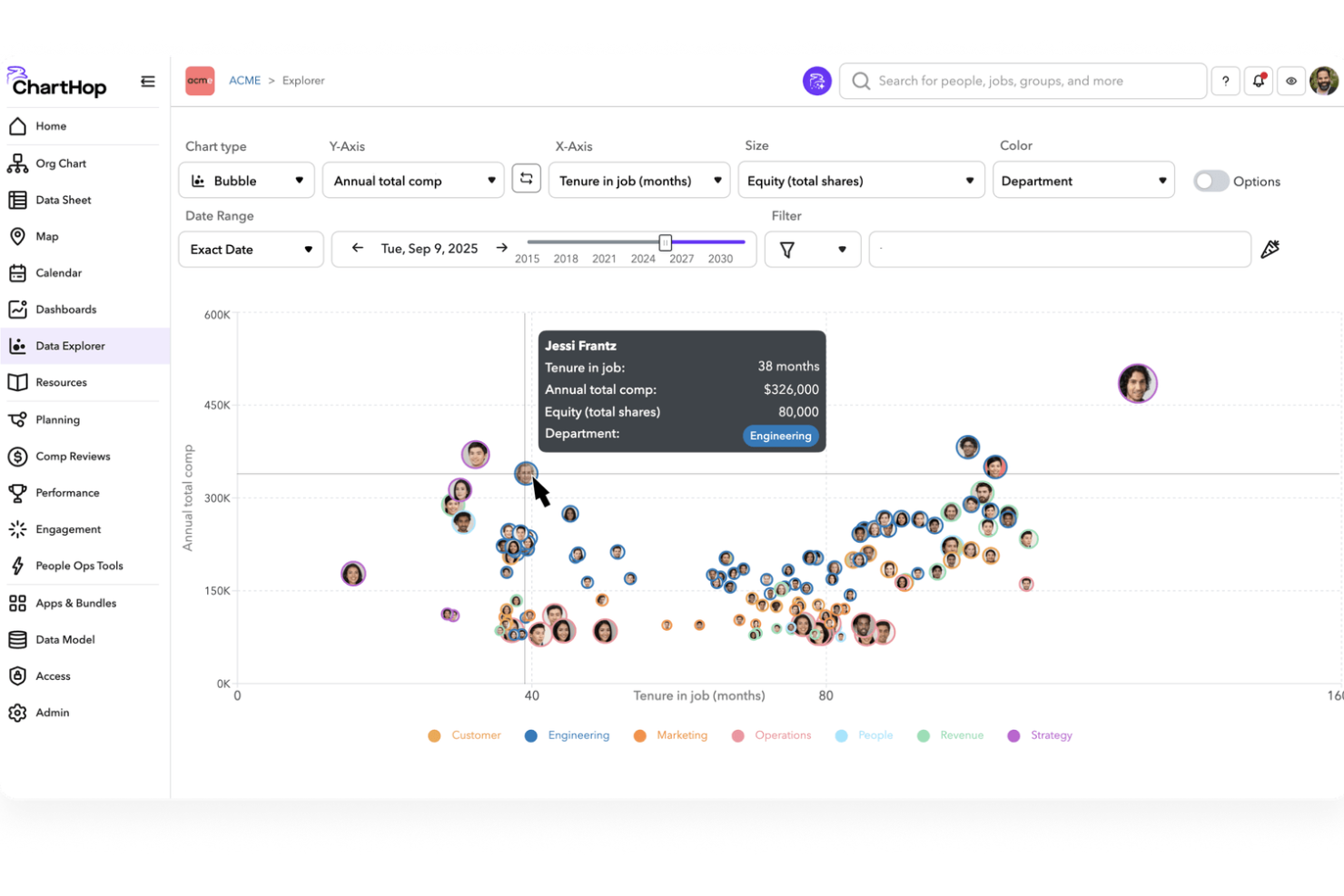
ChartHop helps you tie your people data together so your team can see organizational structure, plan headcount, and make decisions with real information rather than guesswork. It appeals to HR teams, people ops leaders, and managers at growing companies who need clarity across HRIS, performance, compensation, and engagement data in one place.
Why I Picked ChartHop
I picked ChartHop because its blend of AI-assisted exploration and unified people data makes it a strong choice for teams looking for an AI HR software that helps you see patterns across your workforce without cobbling together spreadsheets. Its ChartHop AI lets you ask questions and explore insights in real time, turning raw HR data into answers you can act on. The headcount planning module gives your team a clear picture of workforce forecasts and modeling, and the integrated HRIS module means you’re working from a single system of record rather than fragmented tools.
ChartHop Key Features
In addition to its standout capabilities, I also found several other features that enhance ChartHop's appeal:
- HRIS Module: Centralizes employee data, providing easy access to critical information and streamlining administrative tasks.
- Employee Engagement Tools: Offers surveys and feedback mechanisms to gauge employee satisfaction and foster a positive workplace culture.
- Performance Management: Facilitates goal setting, reviews, and continuous feedback to support employee development and alignment with organizational objectives.
- Unified Company Calendar: Integrates scheduling across teams, ensuring transparency and coordination in planning and time management.
ChartHop Integrations
Integrations include Salesforce, Zendesk, Greenhouse, Lever, BambooHR, Workday, ADP, Gusto, Slack, and Okta.
Pros and Cons
Pros:
- Visual org charts help teams understand structure quickly.
- AI tools let you query HR data conversationally.
- Well-integrated HRIS and reporting in one interface.
Cons:
- AI insights depend on quality of input data.
- Setup may require significant initial data mapping.
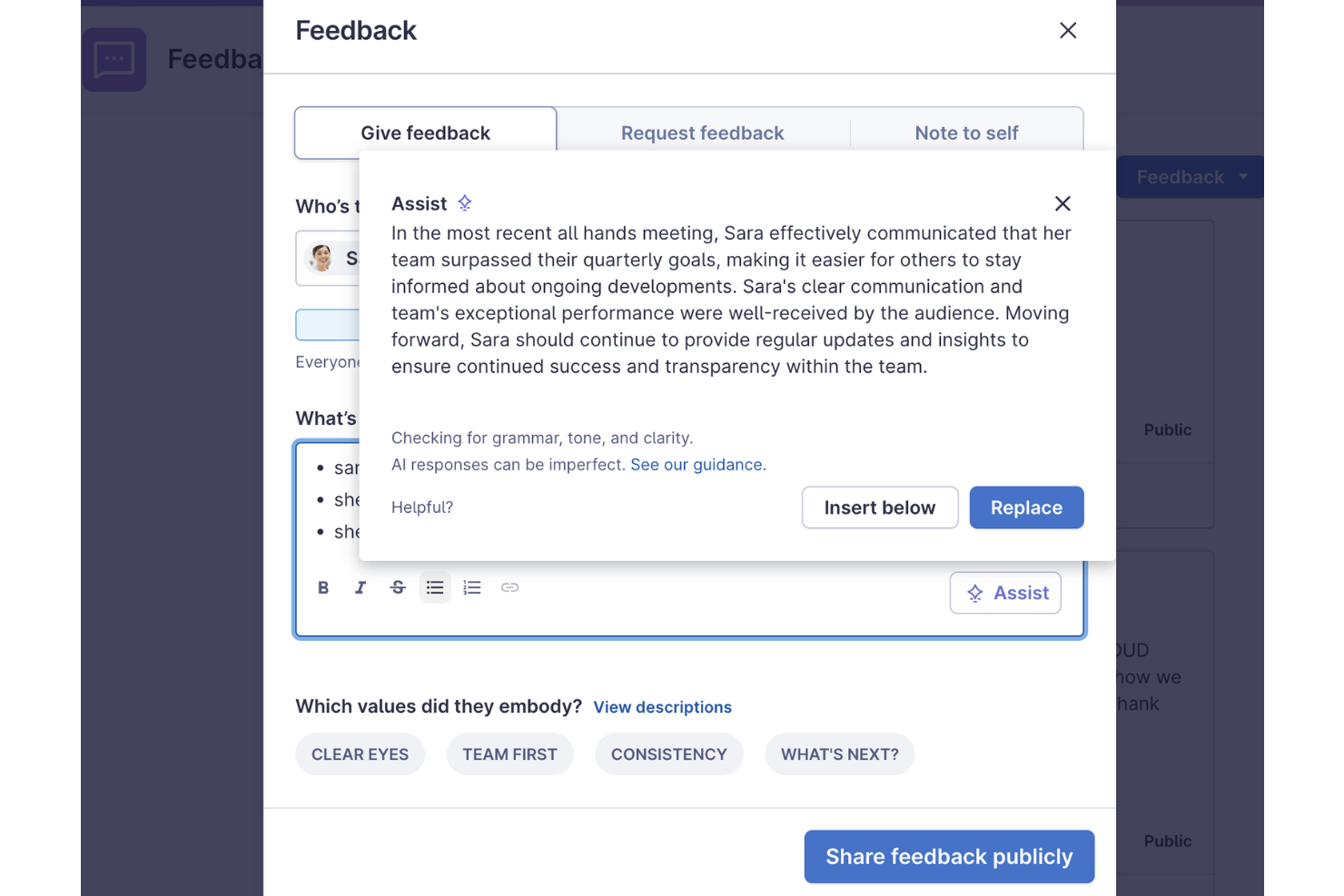
Lattice simplifies performance management and employee engagement through AI-driven insights and tools. It offers actionable insights to enhance the employee experience and drive performance.
Why I picked Lattice: I selected Lattice for its exceptional focus on performance and engagement, including AI-powered features to give managers deeper insights into team dynamics and individual employee needs. Lattice uses AI technology to analyze feedback, offering recommendations to help foster a more positive work environment and enhance overall company culture.
Standout features and integrations:
Features include AI-driven analytics for employee feedback, writing assistance, performance review assistance with bias detection, and personalized development plans. It also monitors team health and provides onboarding support through AI-generated content.
Integrations include Slack, Microsoft Teams, Google Workspace, Okta, BambooHR, ADP, Greenhouse, Lever, Namely, and Zapier.
Pros and Cons
Pros:
- Supports real-time feedback
- Strong tools for performance reviews
- Robust AI analysis features
Cons:
- Initial setup can take time
- Limited customization options for some features
New Product Updates from Lattice

Lattice Enables Custom Naming Across the Platform
Lattice enables custom naming flexibility, allowing admins to rename key platform terms to match internal language and workflows. This update helps organizations improve adoption and align the platform with company terminology. For more information, visit Lattice’s official site.
 .
.
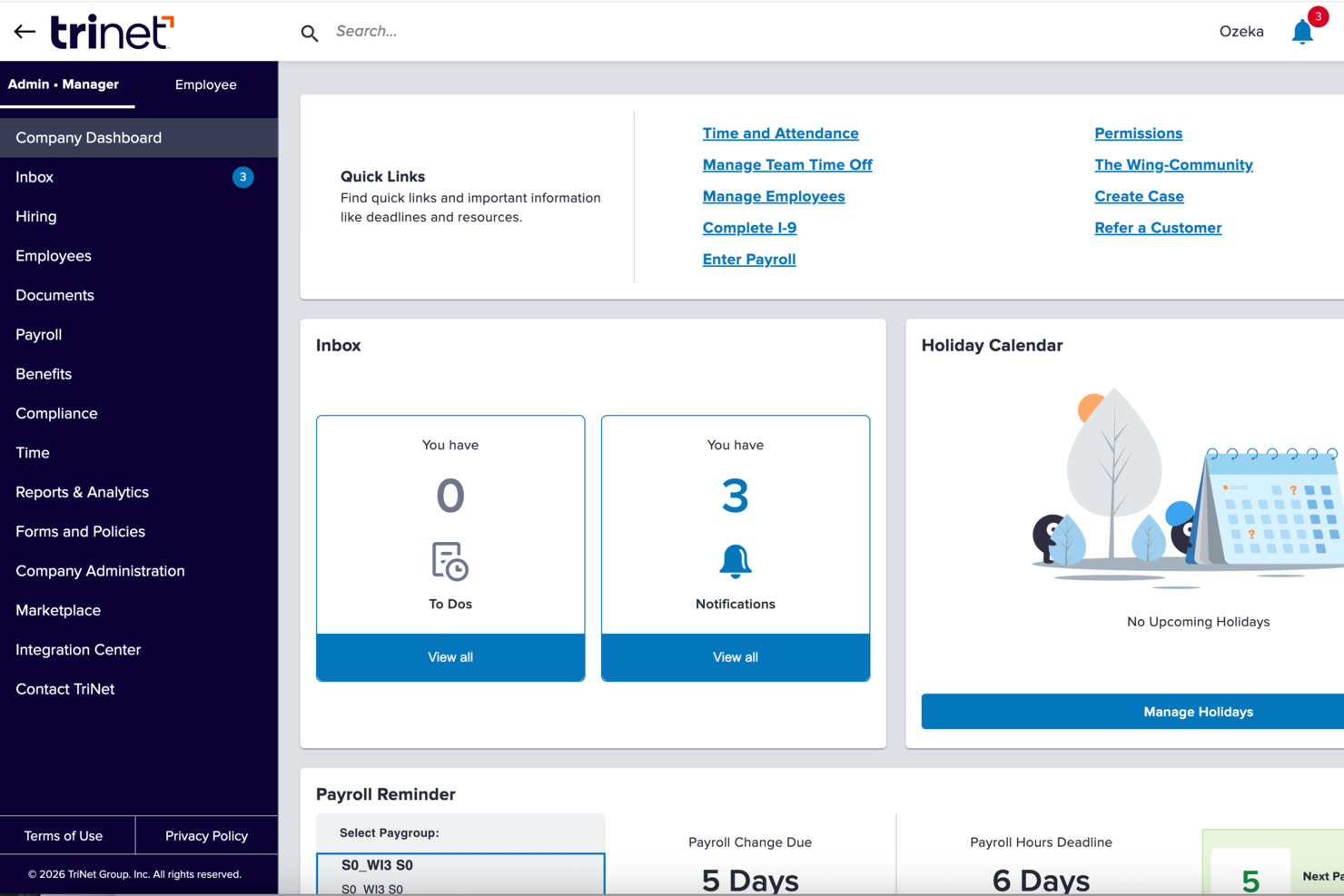
TriNet delivers an AI-augmented HR platform tailored especially for small and midsize businesses looking to reduce administrative load while managing payroll, benefits, compliance, and workforce data all in one place. Its AI-driven capabilities help your team access personalized HR answers and complete tasks through conversational prompts, while the broader system supports hiring, onboarding, performance tracking, and benefits administration.
Why I Picked TriNet
I picked TriNet because it pairs everyday HR operations with AI-enhanced guidance that helps your team navigate questions and tasks faster than traditional manual processes. Its AI-powered assistant and dynamic dashboard bring tailored HR, payroll, and benefits insights directly to you, reducing time spent digging through resources. These tools are built to support HR and business leaders in making informed decisions with contextually relevant information.
TriNet Key Features
Aside from the AI-centric tools that first caught my attention, you’ll find a range of other practical features that support core HR tasks:
- Payroll Processing: Built-in payroll tools support data synchronization across your system to handle wages, deductions, and compliance reporting.
- Benefits Administration: Manage employee benefits selections and enrollment directly within the HR platform with visibility and control over plans and coverage.
- Performance Management: Offers tools for setting goals and providing feedback, enhancing employee performance visibility.
- Applicant Tracking: Streamlines the recruitment process from job posting to candidate vetting.
TriNet Integrations
Integrations include Salesforce, Slack, QuickBooks, Xero, NetSuite, ADP, Google Workspace, Microsoft 365, BambooHR, and Greenhouse.
Pros and Cons
Pros:
- Access to large employer-level benefits can improve employee offerings.
- Payroll management tools reduce manual errors and administrative load.
- TriNet delivers centralized payroll, HR, benefits, and compliance functions in one system.
Cons:
- Less flexibility for highly customized HR and payroll policies.
- Platform interface may feel clunky or dated to some users.
New Product Updates from TriNet
TriNet HR Plus Adds Vestwell 401(k) Connect Integration
TriNet integrates with Vestwell for 401(k) Connect, streamlining deferrals and contributions via TriNet Payroll to Vestwell. For more information, visit TriNet's official site.
 .
.
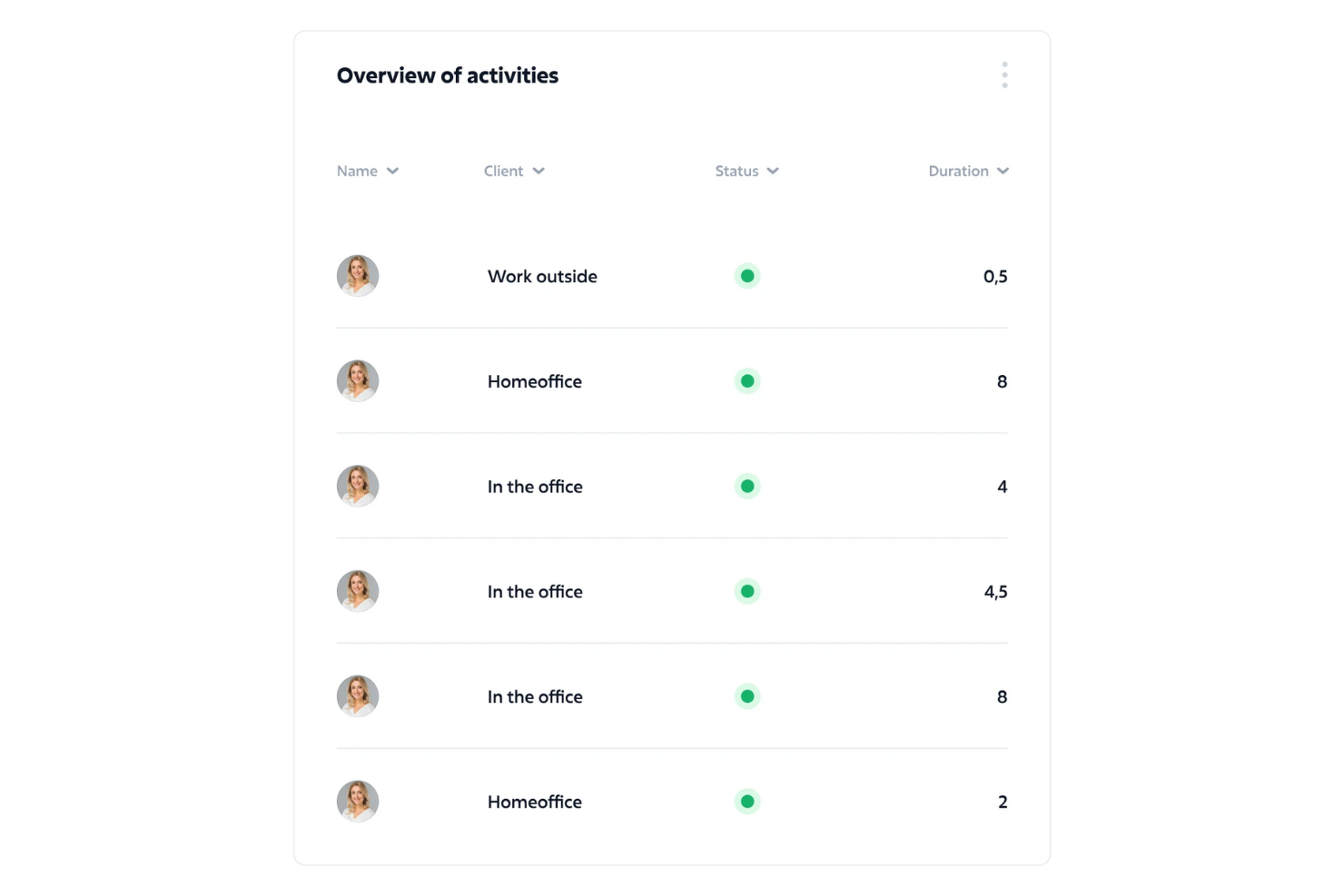
Sloneek is an AI-powered HR platform that helps you manage the full employee lifecycle, from recruiting to offboarding. It combines core HR functions with AI-driven surveys, people analytics, and automation tools, making it useful for both small businesses and larger organizations.
Why I picked Sloneek: I picked Sloneek because it automates up to 90% of routine HR tasks, giving you more time to focus on strategic initiatives. Its AI capabilities generate smart recommendations and people analytics, helping you make data-informed decisions about hiring, performance, and engagement. I also liked that it supports key performance management tools like KPI/OKR tracking and 360° feedback, which can improve how you measure and develop employee performance.
Standout features and integrations:
Features include AI surveys to gather feedback, whistleblowing systems to ensure transparency, and people analytics for better workforce insights. The platform also includes digital document management with e-signatures and mobile access for managing HR tasks on the go.
Integrations include Google Calendar, Jira, Google Workspace, MS Active Directory, Slack, Microsoft Teams, BambooHR, Asana, Trello, Zoom, Zapier, and Salesforce.
Pros and Cons
Pros:
- Mobile app for flexible HR management
- Competency evaluation and KPI/OKR tracking tools
- AI-driven surveys and analytics for decision-making
Cons:
- Some integrations may require extra setup
- Limited customization for complex payroll needs

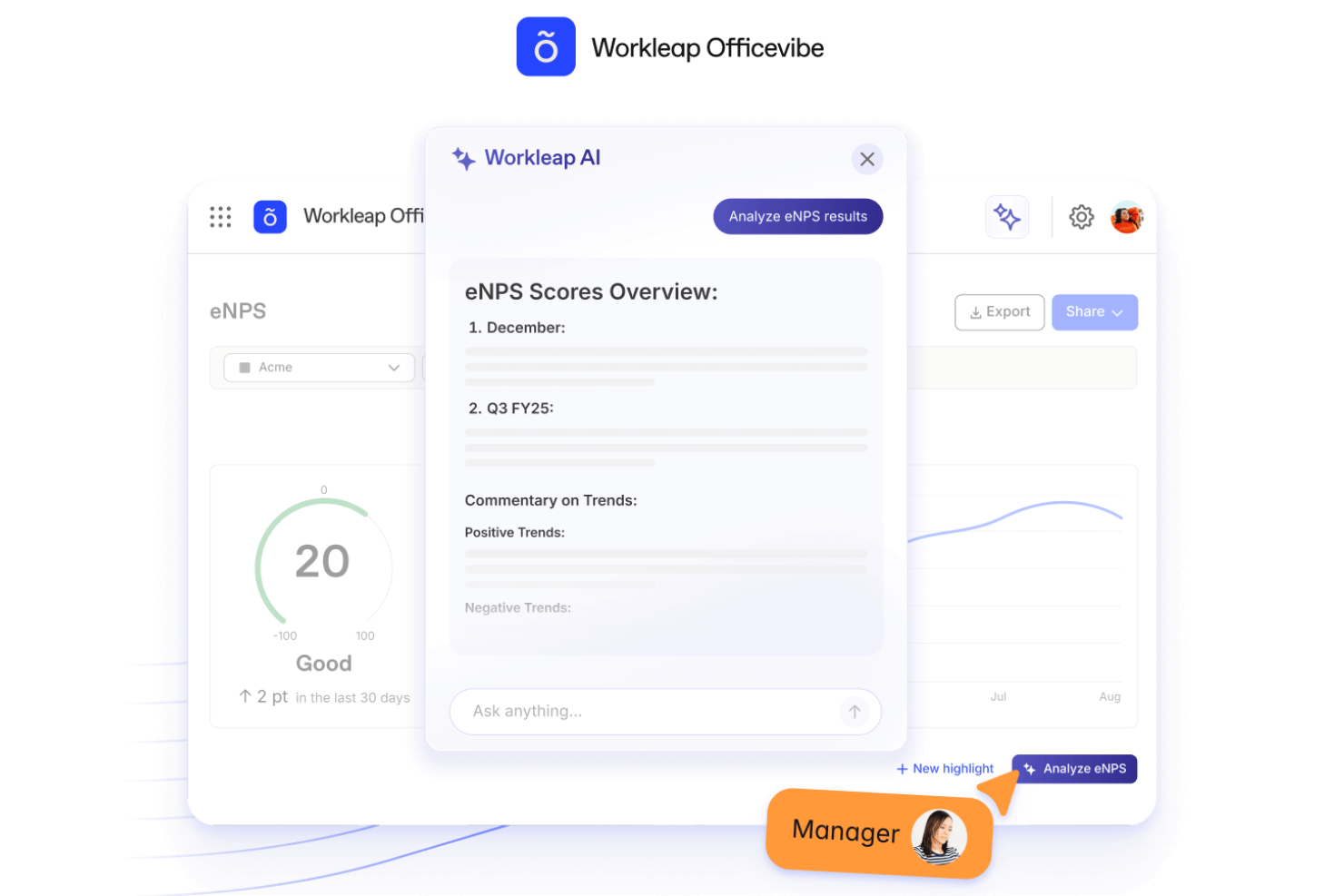
Workleap helps HR teams and people leaders turn employee feedback into meaningful action. If you’re focused on improving engagement and retention through data-driven insights, this platform gives you tools to ask the right questions, understand what your team is thinking, and respond early.
Why I Picked Workleap
I picked Workleap because it gives you insight into engagement trends and tools to act on them immediately. You get pulse surveys and anonymous feedback that feed into AI-generated summaries, so you don’t waste time sifting through raw comments.
I like how you can set up recognition workflows so your team celebrates wins naturally and stays connected. I also appreciate that the modules (engagement, performance, onboarding) are optional, so your team can adopt what you need now and expand later. If your priority is monitoring morale and keeping tabs on sentiment before things spin out of control, you’ll benefit from Workleap’s approach.
Workleap Key Features
Here are some standout features worth highlighting:
- Pulse Surveys & Feedback Engine: Send frequent short surveys and gather anonymous comments to capture team sentiment.
- AI-Generated Trend Summaries: Get automatic summaries of survey results that highlight recurring themes and coach managers with suggested actions.
- Recognition & “Good Vibes” Cards: Enable peer-to-peer shout-outs and built-in recognition so people feel seen and your culture stays active.
- Modular Onboarding & Engagement Expansion: Start with the engagement module and then add onboarding, performance or skills tools when you’re ready — without replacing your current HR system.
Workleap Integrations
Integrations include BambooHR, ADP Workforce Now, Slack, Microsoft Teams, Google Workspace (Calendar & Drive), Zoom, SharePoint & Outlook.
Pros and Cons
Pros:
- Strong onboarding and performance tools
- Easy survey customization and analysis
- Actionable AI-driven engagement insights
Cons:
- Limited advanced analytics customization
- May require setup for integrations
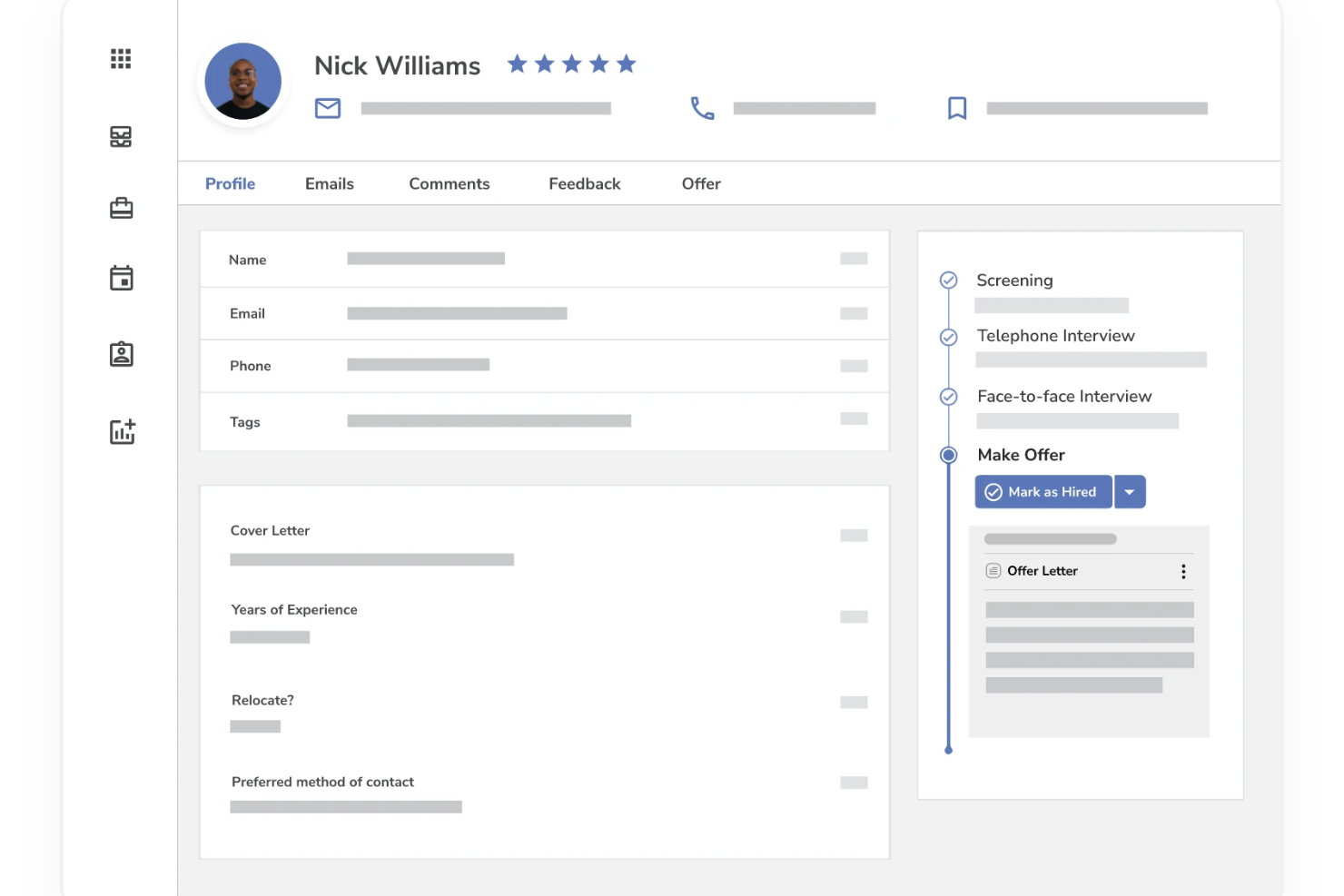
Mitratech Perform is a talent management suite covering recruitment, learning, performance, and analytics. It automates many HR-centric workflows and offers embedded reporting across modules.
Why I picked Mitratech Perform: I picked Perform because its ATS (Mitratech Hire) supports AI-driven resume recommendations, helping you filter and prioritize candidate profiles more efficiently. Also, Perform's analytics tool, Perform Insights, works as an embedded dashboard across its modules—giving you real-time visualizations and trend analysis in hiring, learning, and performance. These features bring more intelligence to HR operations without assuming full-blown AI autonomy.
Standout features and integrations:
Features include automated workflows that trigger reminders, tasks, and alerts across Hire, Perform, and Learn modules—reducing manual follow-ups. In the hiring module, you also get resume screening suggestions and candidate filtering with AI-powered recommendations.
Integrations include ADP Workforce Now, Paylocity, BambooHR, Namely, UKG Pro, Azure, Okta, Google Workspace, SAML 2.0, Slack, Microsoft Teams, and Zoom.
Pros and Cons
Pros:
- Goal setting with cascading and tracking features
- Supports 360-degree and multi-rater feedback
- Highly customizable review forms and workflows
Cons:
- Mobile or on-the-go functionality is less featured compared to desktop
- Reporting and analytics sometimes too basic for advanced users

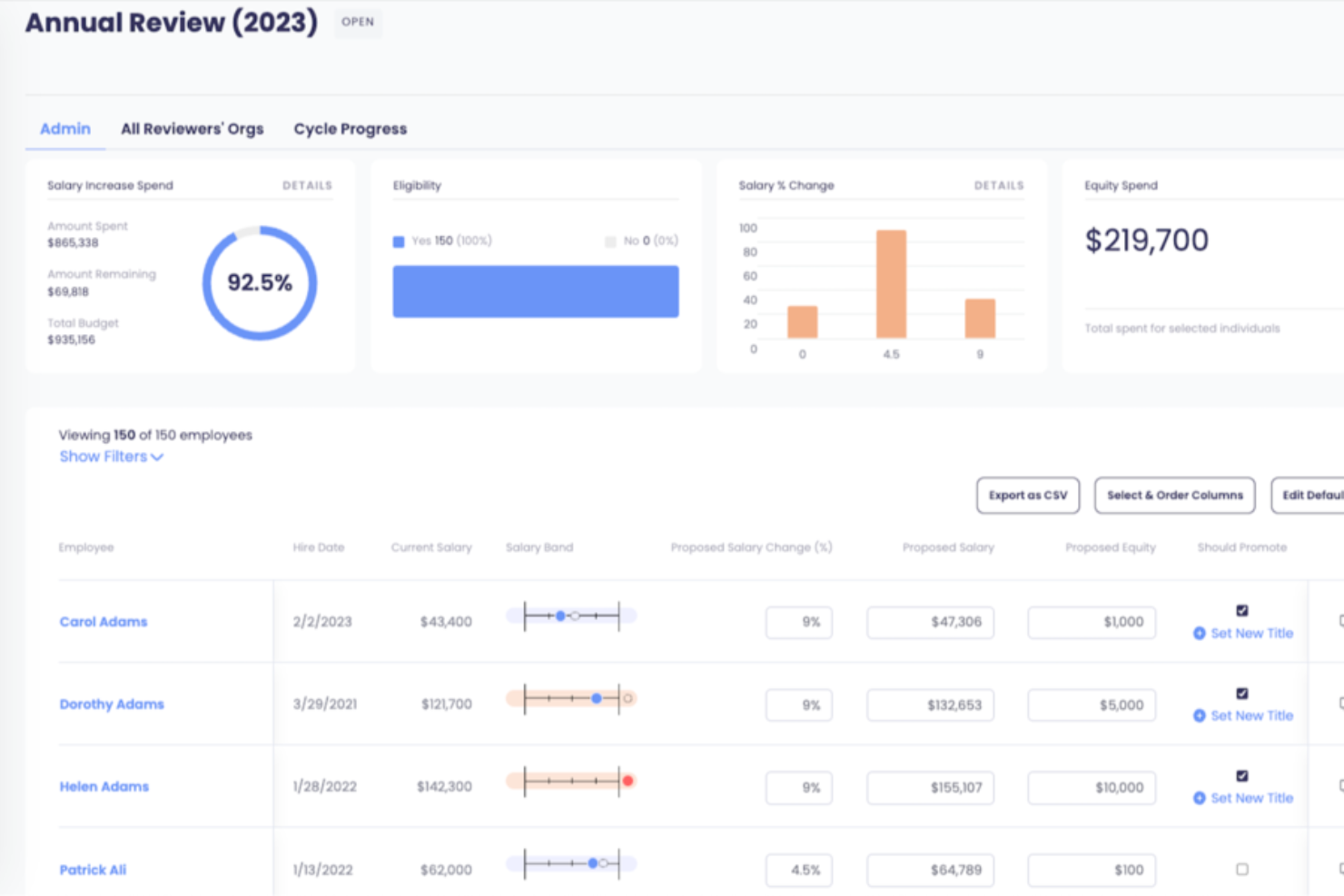
Aeqium is a compensation planning software designed to help complex organizations manage and automate their compensation processes. It offers tools to customize compensation cycles, set clear pay ranges, and gain insights into team compensation.
Why I picked Aeqium: I picked Aeqium because of its AI-powered compensation formula writing, which helps your team make fair, data-driven salary decisions without relying on complex manual calculations. The tool also automates compensation cycles, eliminating spreadsheet chaos and saving time during merit reviews and salary adjustments. With no-code customization, you can also tailor the platform to fit your company’s specific pay structures, while gaining clear insights into salary, equity, and bonuses—all within a system built for compensation planning.
Standout features and integrations:
Features include compensation insights, which provide real-time data integration by syncing directly with your HRIS, ensuring up-to-date compensation data. This allows you to visualize team compensation, track historical changes, and identify pay equity gaps. Additionally, the employee portal offers employees complete insight into their salary, equity, bonuses, and benefits, enhancing transparency and engagement.
Integrations include ADP Workforce Now, BambooHR, Gusto, Justworks, Paylocity, Quickbooks, Run Powered by ADP, and DocuSign.
Pros and Cons
Pros:
- Flexibility in configuring pay bands
- Customizable templates for offer letters
- Pay equity modeling tools
Cons:
- Limited HR analytics beyond compensation
- No built-in ATS or recruiting tie-ins

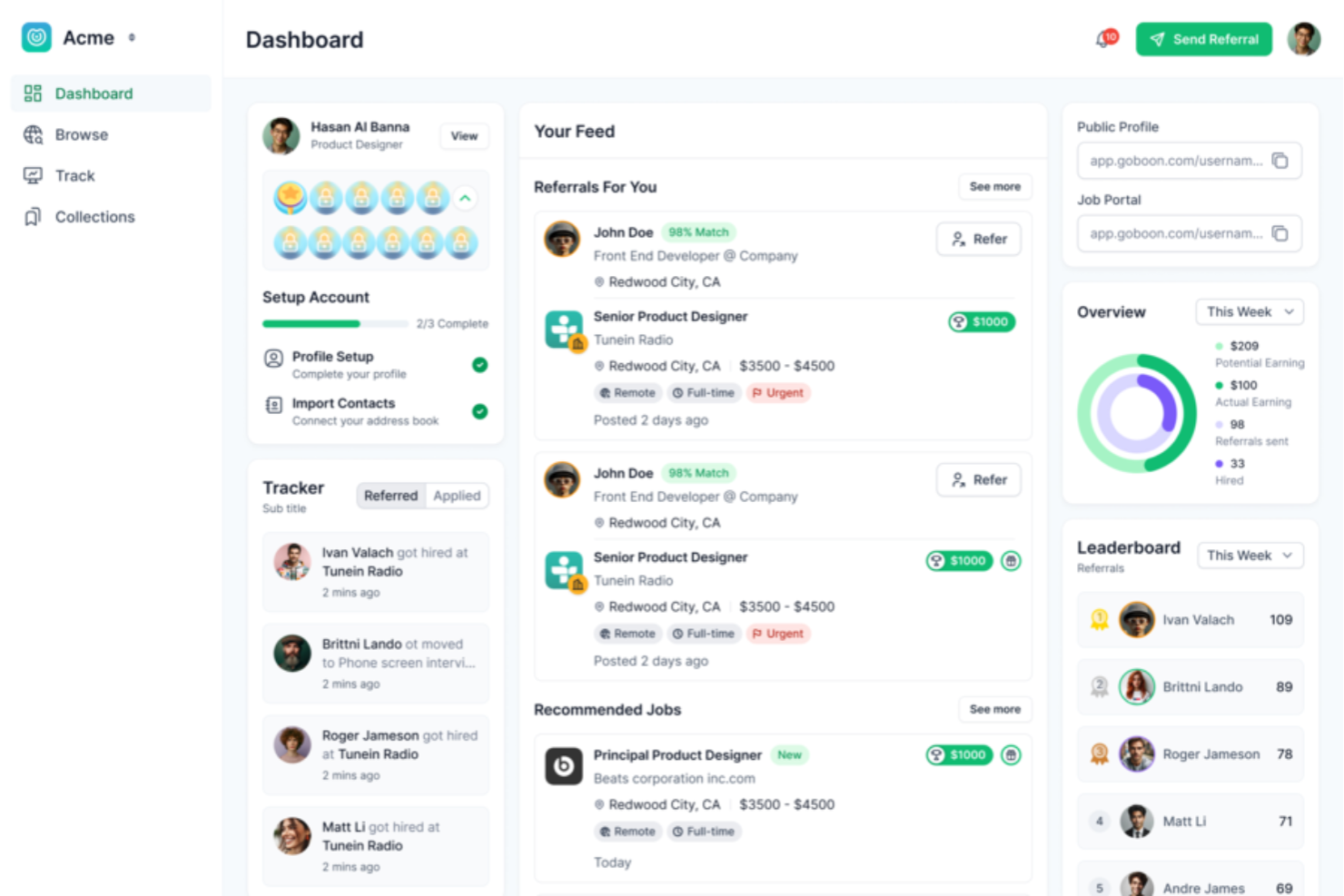
Boon is an AI-powered referral hiring platform that enhances recruitment with automation, recommendations, and gamification. The software helps companies turn job postings into referral opportunities and uncover hidden talent across internal and external networks.
Why I picked Boon: I picked Boon for its focus on community-driven hiring and AI-powered recommendations. Instead of relying solely on direct connections, the platform identifies candidates based on skills and experience, which can help reduce hiring bias and expand the talent pool. Boon also engages employees in the process through gamified referrals, which encourages participation and improves the quality of candidates referred. This makes it a strong choice for organizations looking to improve diversity while cutting down on repetitive recruiting tasks.
Standout features and integrations:
Features include referral gamification that motivates employees to participate, customizable rewards to encourage high-quality referrals, and multilingual support for companies with global workforces. Boon also offers employer branding tools and detailed recruitment analytics to measure referral effectiveness.
Integrations include Jobvite, Bullhorn, SmartRecruiters, ZipRecruiter, iCIMS, Slack, Microsoft Teams, LinkedIn, Google, Facebook, NetSuite, and Google Sheets.
Pros and Cons
Pros:
- Broad integration support
- Gamified referral participation
- AI-powered candidate matching
Cons:
- Limited customization options
- Learning curve for new users
Other AI HR Software
Below is a list of additional AI HR software that didn’t make it into my top 15 list, but are still worth checking out:
- Syndio
For real-time compensation insights
- Guidde
For AI-powered training videos
- Eightfold
AI platform for managing talent diversity
- Paradox
For conversational AI recruiting
- Vee by Visier
For AI-driven workforce insights
- Moveworks
For autonomous HR resolution
- Leena AI
For an AI-powered HR helpdesk
- Sense
For AI candidate engagement
- Affinda
For resume parsing technology
- HrFlow.ai
For parsing HR data using AI


Related HR Software Reviews
If you still haven't found what you're looking for here, check out these other related tools that we've tested and evaluated:
- HR Software
- Payroll Software
- Recruiting Software
- Employer of Record Services
- Applicant Tracking Systems
- Workforce Management Software
AI HR Software Selection Criteria
When selecting the best AI HR software to include in this list, I considered common buyer needs and pain points like improving recruitment efficiency and enhancing data security. I also used the following framework to keep my evaluation structured and fair:
Core Functionality (25% of total score)
To be considered for inclusion in this list, each solution had to fulfill these common use cases:
- Automating recruitment processes
- Managing employee data
- Facilitating payroll processing
- Tracking employee performance
- Ensuring compliance with HR regulations
Additional Standout Features (25% of total score)
To help further narrow down the competition, I also looked for unique features, such as:
- AI-driven candidate sourcing
- Predictive analytics for turnover
- Integration with third-party apps
- Customizable dashboards
- Real-time collaboration tools
Usability (10% of total score)
To get a sense of the usability of each system, I considered the following:
- Intuitive navigation
- Clean interface design
- Minimal learning curve
- Responsive design for mobile
- Clear and concise instructions
Onboarding (10% of total score)
To evaluate the onboarding experience for each platform, I considered the following:
- Availability of training videos
- Interactive product tours
- Access to templates
- Webinars and live demos
- Chatbot assistance for setup
Customer Support (10% of total score)
To assess each software provider’s customer support services, I considered the following:
- 24/7 availability
- Multiple support channels
- Response time to inquiries
- Availability of a knowledge base
- Personalized support options
Value For Money (10% of total score)
To evaluate the value for money of each platform, I considered the following:
- Competitive pricing
- Flexible subscription plans
- Free trial availability
- Cost against features offered
- Discounts for annual payments
Customer Reviews (10% of total score)
To get a sense of overall customer satisfaction, I considered the following when reading customer reviews:
- Overall satisfaction ratings
- Feedback on ease of use
- Reports on customer service quality
- Comments on feature usefulness
- Frequency of software updates and improvements
How to Choose AI HR Software
It’s easy to get bogged down in long feature lists and complex pricing structures. To help you stay focused as you work through your unique software selection process, here’s a checklist of factors to keep in mind:
| Factor | What to Consider |
|---|---|
| Scalability | Can the software grow with your organization? Consider if it supports an increasing number of users and additional features as your team expands. |
| Integrations | Does it work with your existing tools? Check if it connects with your current systems like payroll, communication, and performance management platforms. |
| Customizability | Can you tailor the software to fit your needs? Look for options to adjust workflows, fields, and reports to match your HR processes. |
| Ease of use | Is the interface user-friendly for your team? Evaluate if your staff can easily navigate and use the software without extensive training. |
| Implementation and onboarding | How long will it take to get up and running? Assess the time and resources needed for setup, including any training or support provided by the vendor. |
| Cost | Does the pricing fit your budget? Compare subscription fees, hidden costs, and value offered against your budget constraints. |
| Security safeguards | How does it protect your data? Ensure it complies with industry standards for data protection and offers robust security measures. |
| Compliance requirements | Does it meet your legal obligations? Verify if the software supports compliance with relevant labor laws and regulations in your region. |
Trends in AI HR Software
As everyone knows, the integration of AI-backed features into all types of software is continuing to evolve rapidly to match user needs and incorporate advances in AI technology itself. Here are several trends shaping the development of AI HR tools currently:
- Predictive Analytics in Talent Acquisition: AI-driven predictive analytics support talent acquisition teams by forecasting the success of candidates, and reducing hiring risks. This trend is pivotal for strategic workforce planning.
- Enhanced Employee Experience Platforms: Many platforms now use AI to improve the employee experience by anticipating employee needs and automating answers to routine inquiries. Collectively, these enhancements help boost employee satisfaction and retention.
- Bias Reduction in HR Processes: AI-powered applicant tracking tools help minimize bias in HR decisions by analyzing patterns and promoting diversity in recruitment, facilitating transparent, fair, and inclusive workplace cultures.
- AI-Powered Performance Management: Performance management is benefitting from AI in the context of real-time feedback and personalized development plans, helping to foster continuous growth and productivity.
- Advanced Natural Language Processing (NLP): NLP is improving HR communication interfaces. AI can now understand and respond to complex employee queries in a conversational style, which is key for efficient HR service delivery.
As you can see, these AI HR software trends are shaping a more data-driven, equitable, and responsive landscape across a wide range of human resources applications.
What Is AI HR Software?
AI HR software is a tool that automates and enhances various human resources tasks using artificial intelligence. HR professionals, recruiters, and managers generally use these tools to improve efficiency in recruitment, employee management, and data analysis. Features like automating recruitment processes, managing employee data, and tracking performance help with simplifying workflows and reducing manual tasks. Overall, these tools save time and improve decision-making in HR functions.
Key Features
When selecting AI HR software, keep an eye out for the following key features:
- Automated recruitment: AI-powered recruiting tools screen resumes, rank candidates, and shortlist top talent based on role requirements and historical hiring data. This significantly reduces manual screening time and speeds up the hiring process.
- Employee data management: AI HR software centralizes employee records into a single, intelligent system. Automated data validation helps keep information accurate, up to date, and easy to access across HR teams.
- Performance tracking: AI continuously monitors performance trends, goal progress, feedback, and productivity metrics. These insights support more informed appraisals, coaching conversations, and development planning.
- Integration capabilities: Seamless integrations with payroll, time tracking, accounting, communication, and learning platforms ensure data flows smoothly across systems and eliminate duplicate data entry.
- Customizable workflows: AI-driven workflow automation allows HR teams to tailor approvals, reports, onboarding steps, and notifications to fit organizational processes—improving efficiency and adaptability.
- Predictive analytics: AI analyzes workforce data to forecast trends such as turnover risk, hiring demand, skills gaps, and engagement levels—supporting proactive decision-making and workforce planning.
- Compliance management: AI helps monitor labor law changes, documentation requirements, and policy adherence. Automated alerts and checks reduce compliance risk and administrative overhead.
- Mobile accessibility: Mobile-friendly platforms allow employees and managers to access HR tools, approvals, and insights from anywhere—supporting remote, hybrid, and field-based teams.
- Security safeguards: AI HR software includes robust security features such as encryption, role-based access controls, audit logs, and compliance with data protection regulations to keep sensitive employee information safe.
Benefits
Implementing AI HR software provides several benefits for your team and your business. Here are a few you can look forward to:
- Time savings: Automating recruitment and data management reduces manual tasks, freeing up time for strategic initiatives.
- Improved decision-making: Predictive analytics offer insights into trends like turnover, helping you make informed HR decisions.
- Enhanced compliance: Automated compliance management ensures adherence to labor laws, reducing the risk of penalties.
- Increased accessibility: Mobile features allow access to HR functions from anywhere, keeping your team connected on the go.
- Better data security: Security safeguards protect sensitive information, ensuring your data remains confidential and compliant.
- Personalized HR processes: Customizable workflows let you tailor processes to fit your organization's unique needs, increasing efficiency.
- Boosted employee engagement: Performance tracking provides insights that help in recognizing and rewarding employee contributions, fostering a more engaged workforce.
Costs & Pricing
Selecting AI HR software requires an understanding of the various pricing models and plans available. Costs vary based on features, team size, add-ons, and more. The table below summarizes common plans, their average prices, and typical features included in AI HR software solutions:
Plan Comparison Table for AI HR Software
| Plan Type | Average Price | Common Features |
|---|---|---|
| Free Plan | $0 | Basic employee data management, limited recruitment tools, and basic reporting. |
| Personal Plan | $5-$25/user/month | Advanced data management, performance tracking, and mobile access. |
| Business Plan | $30-$60/user/month | Full recruitment automation, integration capabilities, and compliance tools. |
| Enterprise Plan | $70-$150/user/month | Customizable workflows, predictive analytics, and dedicated support. |
AI HR Software FAQs
Here are some answers to frequently asked questions you may have about AI HR software and how it works:
How does AI in HR software improve the recruitment process?
AI can significantly enhance the recruitment process by automating repetitive tasks such as resume screening and candidate sourcing. It can also use predictive analytics to identify the best candidates by matching their skills and experiences with job requirements. Furthermore, AI-driven chatbots can engage with candidates, schedule interviews, and provide timely updates, improving the candidate experience.
For HR software aimed at improving the recruitment process, I recommend reviewing my list of the best AI recruiting software next.
Can AI HR software help with employee retention?
Yes, AI HR software can help with employee retention by identifying patterns and predictors of employee turnover. It can analyze factors such as job satisfaction, engagement levels, and performance data to forecast potential retention issues. This allows HR teams to proactively address concerns and implement strategies to improve employee retention.
Is AI HR software capable of eliminating bias in hiring?
AI HR software can help reduce bias in hiring by using algorithms that focus on skills and qualifications rather than demographic information. However, it’s important to note that AI systems are only as unbiased as the data they are trained on. Regular audits and updates are necessary to ensure AI remains fair and objective.
How does AI enhance employee engagement and satisfaction?
AI can enhance employee engagement by offering personalized experiences and recommendations for career development. It can analyze employee interactions and feedback to identify engagement drivers and areas for improvement. AI-driven surveys and sentiment analysis tools can also provide insights into employee satisfaction, giving HR teams the insights they need to take targeted actions.
What are the security concerns with AI HR software?
Security concerns with AI HR software include the protection of sensitive employee data and ensuring compliance with data protection regulations. AI HR systems must have robust security measures in place, such as encryption, access controls, and regular security audits. Additionally, transparency in how AI algorithms process data is important to maintain trust and compliance.
How do I choose the best AI HR software for my organization?
Choosing the best AI HR software for your organization involves assessing your specific HR needs and challenges. Consider factors such as the size of your organization, the complexity of your HR processes, and the level of AI integration you require.
It’s also important to evaluate the software’s scalability, user-friendliness, customer support, and integration capabilities with your existing HR systems. Conducting a thorough comparison of features and seeking demos or trials can also help you make an informed decision.
What’s Next
If you're in the process of researching AI HR software, connect with a SoftwareSelect advisor for free recommendations.
You fill out a form and have a quick chat where they get into the specifics of your needs. Then you'll get a shortlist of software to review. They'll even support you through the entire buying process, including price negotiations.