

10 Best Virtual Event Platforms Reviewed in 2026

10 Best Virtual Event Platforms Shortlist


The best virtual event platforms help you host engaging, professional online experiences—whether you’re running a small team meeting, a company-wide town hall, or a large global conference.
Managing online events can be challenging without the right tools. A strong platform brings everything together—live streaming, breakout rooms, registration, analytics, and networking features—so you can deliver seamless, interactive experiences that keep audiences engaged.
After testing dozens of virtual event tools, I’ve curated a list of the top platforms that are intuitive, reliable, and built to fit a variety of event styles and budgets. In this guide, you’ll find solutions that simplify planning, enhance attendee engagement, and make hosting virtual events effortless.
Why Trust Our Software Reviews
We’ve been testing and reviewing HR software systems since 2019. As HR experts ourselves, we know how critical and difficult it is to make the right decision when selecting software.
We invest in deep research to help our audience make better software purchasing decisions. We’ve tested more than 2,000 tools for different HR management use cases and written over 1,000 comprehensive software reviews. Learn how we stay transparent & our software review methodology.
Best Virtual Event Platforms Summary
This comparison chart summarizes pricing details for my top virtual event platform selections to help you find the best one for your budget and business needs.
| Tool | Best For | Trial Info | Price | ||
|---|---|---|---|---|---|
| 1 | Best for curated virtual team events | No free trial available | From $2500 | Website | |
| 2 | Best for mobile event app | Not available | From $2,495/event | Website | |
| 3 | Best virtual event platform for B2B marketers | Free demo available | Pricing upon request | Website | |
| 4 | Best for networking features | Free demo available | Pricing upon request | Website | |
| 5 | Best virtual event platform for event marketing | Free demo available | Pricing upon request | Website | |
| 6 | Best for virtual conferences | Free plan available | From $9/user/month (min 10 seats, billed annually) | Website | |
| 7 | Best for high-quality content creation | 14-day free trial + free plan + free demo available | From $24/month (billed annually) | Website | |
| 8 | Best for collaboration | Free trial available | From $9.20/user/month (billed annually) | Website | |
| 9 | Best for large-scale events | Free demo available | From $499/user/month (billed annually) | Website | |
| 10 | Best virtual event platform for accessibility and inclusion | Free demo available | Pricing upon request | Website |
Best Virtual Event Platform Reviews
Below are my detailed summaries of the best virtual event platforms that made it onto my shortlist. My reviews offer a detailed look at the key features, pros & cons, integrations, and ideal use cases of each tool to help you find the best one for you.

Confetti
Best for curated virtual team events
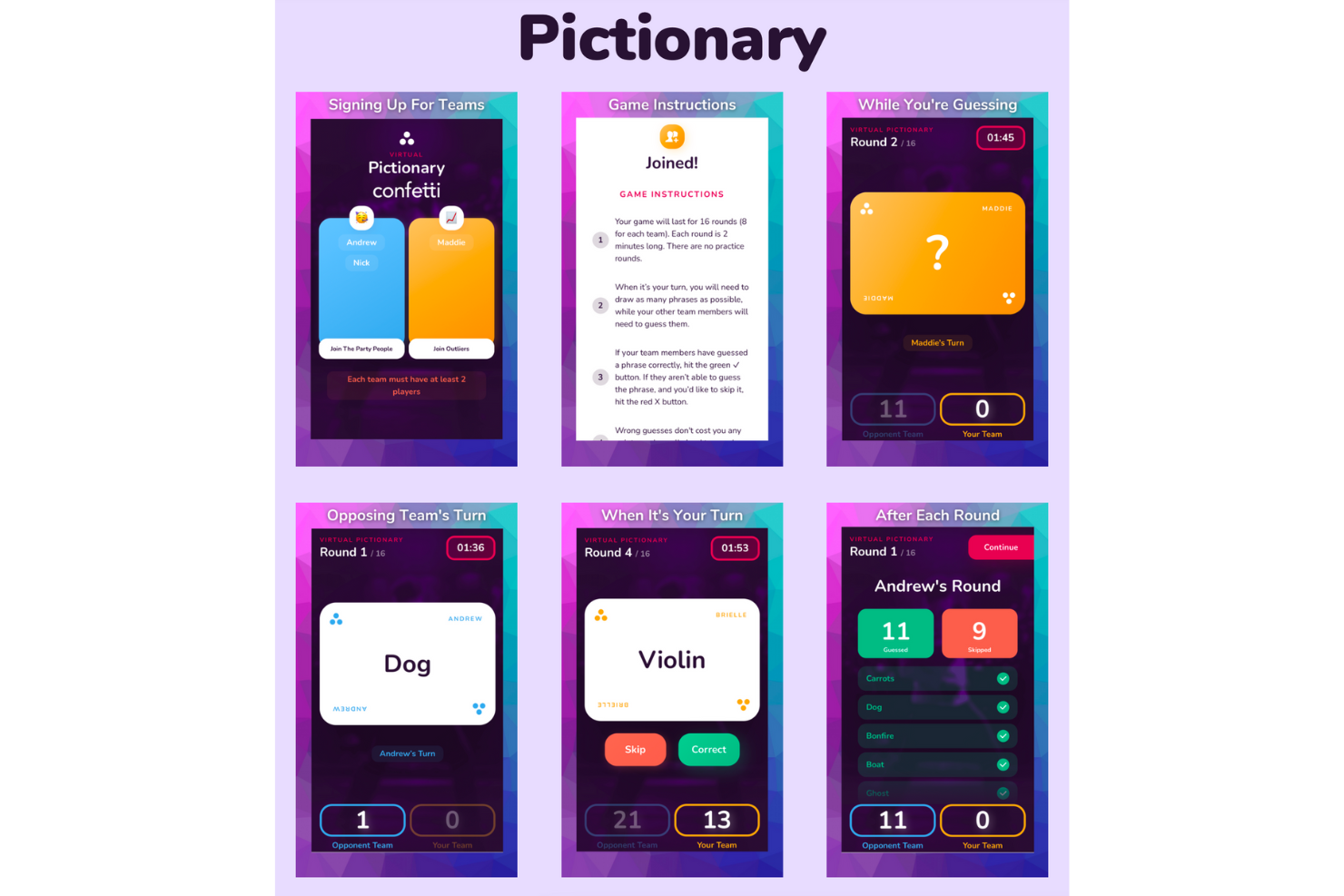
Confetti is an engaging virtual event platform that caters to organizations aiming to enhance employee engagement and team cohesion, especially in remote work settings. It offers a diverse range of live-hosted activities, such as team-building exercises, wellness classes, and DEI events, designed to foster connections and improve morale. By addressing challenges like team disconnection and low employee morale, Confetti provides a solution for companies looking to create a more connected and motivated workforce.
Why I Picked Confetti
I picked Confetti because it excels in providing unique, live-hosted experiences that foster digital engagement and team bonding. One standout feature is its extensive library of over 150 curated events, which include team-building exercises and wellness activities, allowing you to tailor experiences to your team's needs. Another feature I appreciate is the platform's dedicated event planning support, ensuring a seamless execution of activities, from ideation to completion. These features are crucial for organizations seeking to maintain morale and connection in a virtual setting.
Confetti Key Features
In addition to its standout features, Confetti offers several other key functionalities:
- Event Hub: This feature allows you to showcase all your events in one centralized location, making it easy for attendees to browse and register.
- CRM Integration: Confetti's built-in CRM helps manage attendee information and engagement, streamlining communication and follow-ups.
- Livestreaming Capabilities: This feature enables real-time interaction and engagement during virtual events, enhancing the overall experience for participants.
- Form Creation and Reporting: Easily create custom forms and access detailed reports to gather insights and measure the success of your events.
Confetti Integrations
Integrations include Salesforce, HubSpot, Google Analytics, Rule, Jobylon, and Mailchimp. Confetti also offers a REST API and webhooks for custom integrations.
Pros and Cons
Pros:
- Dedicated customer success support
- Wide range of live events
- Intuitive online booking system
Cons:
- Hybrid features may vary by plan
- Limited native recording capabilities

Best for mobile event app

Expo Pass is an event technology platform designed to support digital engagement for live, virtual, and hybrid events, including mobile event app functionality. It appeals to event organizers across various industries who want to improve attendee experiences through efficient registration, check-in, and engagement tools. By simplifying event management, Expo Pass helps teams run complex events more smoothly for both organizers and attendees.
Why I Picked Expo Pass
I picked Expo Pass for its mobile event app, which helps drive digital engagement by keeping event details and interactions in one place. Attendees can view schedules, receive updates, and join networking chats through the app, making it easier to stay connected during virtual events. Lead retrieval tools also support exhibitors by capturing and organizing attendee information in real time.
Expo Pass Key Features
In addition to mobile event app, Expo Pass offers:
- Badge Printing: Allows for seamless on-site badge creation, ensuring a professional touch for your event.
- Attendance Tracking: Provides detailed insights into attendee participation, helping you measure the success of your event.
- Customizable Event Pages: Lets you design event pages that align with your brand, enhancing your event's online presence.
- Real-Time Analytics: Offers data-driven insights to help you understand attendee behavior and improve future events.
Expo Pass Integrations
Integrations include Swoogo, Guidebook, and Avery.
Pros and Cons
Pros:
- Supports digital engagement for virtual and hybrid events
- Push notifications keep participants informed in real time
- Centralizes attendee activity and session participation
Cons:
- Reporting on digital engagement is fairly basic
- Networking tools may feel limited for large audiences

Goldcast
Best virtual event platform for B2B marketers

Goldcast is a virtual event platform specifically designed to suit the needs of B2B marketers.
Why I picked Goldcast: Goldcast describes its beautifully branded events as being akin to watching Netflix. The user interface is slick and inviting, and their built-in studio controls allow users to create event experiences with a fully branded stage, live Q&As, and overlays.
In addition to its visual appeal, Goldcast captures in-depth attendee insights and gathers them into your CRM so that you can act on your pipeline leads as soon as the event is finished. You can also host sponsor resource hubs and share sponsor content, maximizing ROI for each event.
Goldcast Standout Features and Integrations
Features include lead generation, messaging, email reminders, event scheduling, lead capture, presentation screening, analytics, a virtual lobby, and customizable branding.
Integrations include Drift, Eloqua, Enigamio, HubSpot, Marketo, SalesForce, Slack, Splash, Validar, Webooth, and Wistia.
Pros and Cons
Pros:
- Super responsive customer support
- Slick visual interface
- Specifically designed for B2B
Cons:
- High bandwidth requirements
- Networking rooms have capacity of 15

Whova
Best for networking features

Whova is a virtual conference platform designed for event organizers looking to enhance attendee engagement and networking. It supports businesses and organizations by providing tools for event management, attendee interaction, and networking opportunities.
Why I picked Whova: Whova facilitates networking with its community board and attendee matchmaking features. You can create discussion groups and enable one-on-one meetings to foster connections. The live polling and Q&A features keep your audience engaged throughout the event. Whova's strong focus on networking features makes it a great choice for events where attendee interaction is key.
Standout features & integrations:
Features include customizable agendas that cater to different attendee needs, real-time announcements to keep everyone informed, and a lead generation tool to help you connect with potential clients. The platform also offers exhibitor and sponsor management to enhance event revenue opportunities.
Integrations include Zoom, Slack, Salesforce, HubSpot, Google Calendar, Outlook, Mailchimp, Eventbrite, Stripe, and PayPal.
Pros and Cons
Pros:
- Effective lead generation tools
- Real-time announcements
- Customizable agendas
Cons:
- Requires stable internet connection
- Learning curve for new users

Hubilo
Best virtual event platform for event marketing

Hubilo is a virtual event platform with several event marketing functions.
Why I picked Hubilo: From inception through to completion, Hublio can help with every step of the event marketing journey. Their landing page builder helps you to create and customize your landing page with templates, widgets, and registration forms. Ticketing can also be run from their platform, and targeted campaigns can help you reach specific audiences.
Once event attendees are registered, you can boost event attendance with nudge emails. At the event, attendees can visit the networking lounge, watch speakers on the stage, and participate in gamification activities.
Hubilo Standout Features and Integrations
Features include live chat, mobile app, social media engagement, analytics, sponsored sessions, custom landing pages, virtual backgrounds, and banner and logo placement for sponsors.
Integrations include Captello, Interprefy, Kahoot, Kudo, Mailchimp, MootUp, Salesforce, Verbit, and Vodium.
Pros and Cons
Pros:
- Extensive branding opportunities
- Highly scalable
- Events are easy to set up
Cons:
- Networking lounge closes after 60 minutes
- Lacking some depth in onboarding materials
Airmeet
Best for virtual conferences

Airmeet is a virtual event platform designed for hosting large-scale conferences and community events. It caters to businesses and organizations that need tools for managing and engaging large audiences.
Why I picked Airmeet: Airmeet is tailored for virtual conferences with features like customizable virtual spaces and interactive sessions. You can host breakout sessions and networking lounges to facilitate attendee interaction. The platform's focus on creating immersive experiences makes it ideal for engaging large audiences effectively. Its ability to handle high attendee volumes ensures smooth event execution.
Standout features & integrations:
Features include customizable event stages that let you design your event layout, real-time audience engagement tools like polls and Q&A, and a social lounge for networking. The platform also offers detailed analytics to track attendee participation and engagement.
Integrations include Zoom, Slack, Salesforce, HubSpot, Mailchimp, Eventbrite, Stripe, PayPal, Google Calendar, and Zapier.
Pros and Cons
Pros:
- Customizable virtual spaces
- Real-time engagement tools
- Detailed analytics provided
Cons:
- Some limitations on mobile app
- Cannot add LinkedIn info to attendee profiles
Best for high-quality content creation
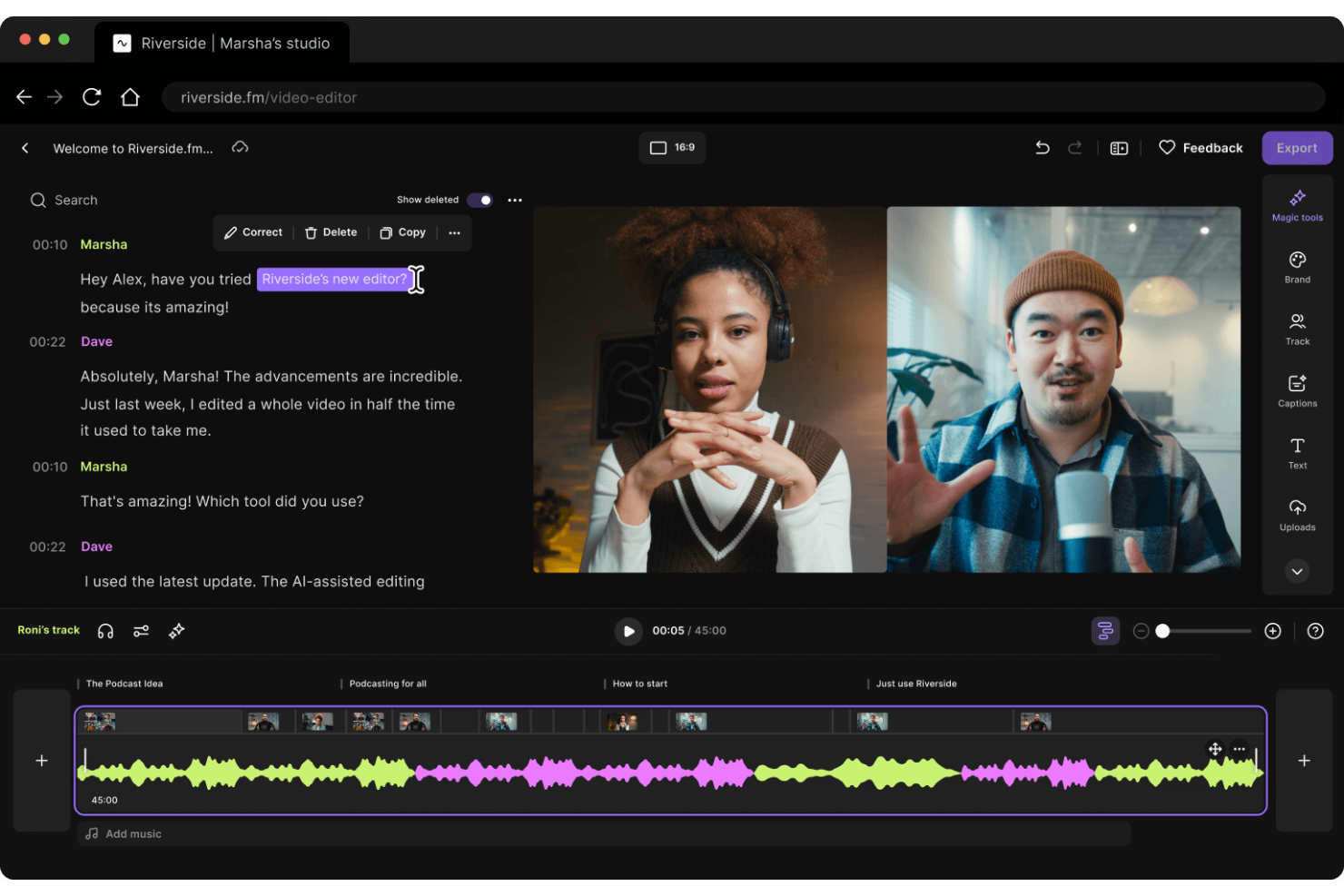
As a professional seeking a dynamic virtual event platform, Riverside could be your go-to solution for engaging digital experiences. Designed for creating high-quality podcasts and videos, it offers features like 4K recording and AI-driven editing tools that could transform your webinars and virtual conferences. Whether you're a marketer, educator, or content creator, Riverside's capabilities in live streaming and audience interaction can address your needs for seamless digital engagement.
Why I Picked Riverside
I picked Riverside for its unparalleled ability to enhance digital engagement through high-quality content creation. The platform's 4K recording capability ensures that your virtual events are delivered with the utmost clarity, while its AI-driven editing tools allow you to polish your content effortlessly. Additionally, Riverside's live streaming feature lets you broadcast in full HD to multiple platforms, ensuring your message reaches a wider audience. These features make it an excellent choice for anyone aiming to elevate their virtual event experience.
Riverside Key Features
In addition to its standout features, I also found several other capabilities that make Riverside a strong contender for digital engagement.
- Multi-Track Recording: Capture separate audio and video tracks for each participant, ensuring flexibility in post-production editing.
- Audience Engagement Tools: Utilize interactive elements like live chat and Q&A to keep your audience engaged during virtual events.
- Custom Branding Options: Personalize your events with custom layouts, logos, and overlays to align with your brand identity.
- Automated Transcriptions: Generate accurate transcripts and show notes automatically, making it easier to repurpose content.
Riverside Integrations
Native integrations are not currently listed by Riverside.
Pros and Cons
Pros:
- Automatic transcription and chapter division
- Free plan without credit card
- AI powered text based editing
Cons:
- Chrome required for best performance
- Free plan limited to 720p
Best for collaboration
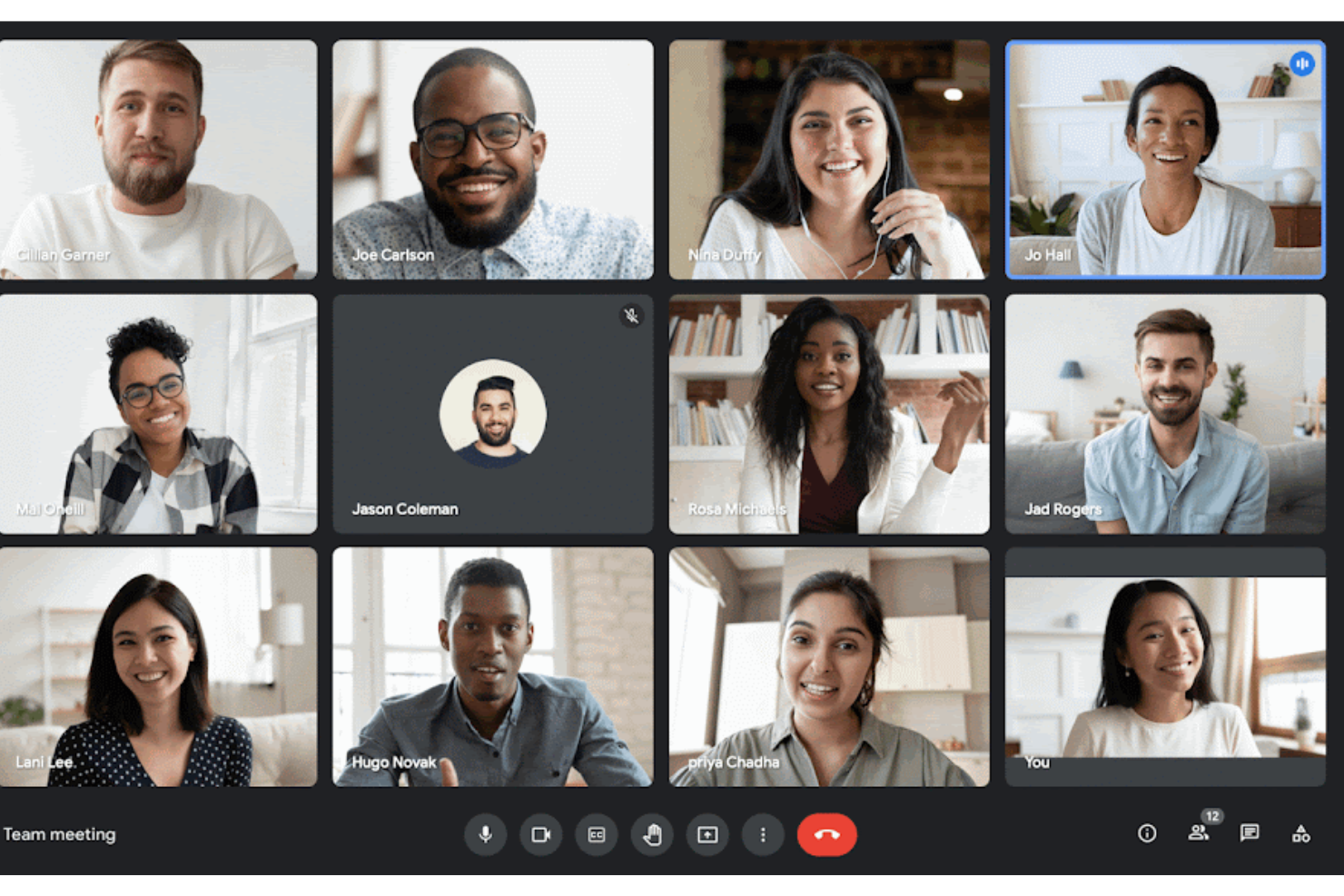
Google Meet is a video conferencing tool that's part of Google Workspace, designed to facilitate virtual events, webinars, and collaborative sessions. It's packed with features like screen sharing and real-time chat, making it a go-to solution for businesses, educational institutions, and nonprofit organizations.
Why I picked Google Meet: I like its focus on accessibility and engagement. Features like live captions and transcription make it easier for everyone to follow along, enhancing inclusivity in your virtual events. The platform also offers interactive tools such as polls and breakout rooms, allowing you to foster engagement and collaboration among participants. Additionally, Google Meet includes noise cancellation, which helps maintain audio clarity by reducing background noise, making sure your message is heard loud and clear.
Google Meet Standout Features and Integrations
Features include live sharing for YouTube videos, music, and games, allowing you to create interactive and engaging experiences during your events. Google Meet also offers translated captions, which can bridge language barriers and ensure everyone can participate fully.
Integrations include Amazon Alexa, Discord, Wix, Google Forms, Spotify, Moodle, Jotform, Calendly, Zoom, Salesforce, HubSpot, and Slack.
Pros and Cons
Pros:
- The platform is browser-friendly, allowing seamless access on various devices, including mobile
- Tools like live chat, audience polling, and screen sharing enhance interaction during meetings
- Integrates well with Google Workspace tools like Calendar, Gmail, and Google Drive
Cons:
- Some users experience delays in video sharing and call drops
- Features like attendee analytics are missing, which can hinder larger meetings

Bizzabo
Best for large-scale events

Bizzabo is an event management platform tailored for large-scale conferences and corporate events. It serves event organizers by providing tools for registration, marketing, and attendee engagement to ensure successful event execution.
Why I picked Bizzabo: Bizzabo is ideal for large-scale events with its scalable solutions and comprehensive event management tools. You can manage registration and ticketing seamlessly while accessing real-time analytics to measure event success. The platform's ability to handle large attendee volumes and complex event structures makes it a top choice for big events. Its marketing automation features further enhance your event's reach and impact.
Standout features & integrations:
Features include a drag-and-drop website builder that lets you create custom event pages, advanced email marketing tools to engage your audience, and a networking platform to connect attendees. The platform also offers robust analytics to help you understand attendee behavior and improve future events.
Integrations include Salesforce, Marketo, HubSpot, Slack, Mailchimp, Zoom, Eventbrite, Stripe, PayPal, and Google Analytics.
Pros and Cons
Pros:
- Customizable event pages
- Advanced marketing automation
- Comprehensive event management tools
Cons:
- Complex features need exploration
- Steep learning curve initially

SpotMe
Best virtual event platform for accessibility and inclusion

SpotMe is a virtual event platform with extensive captioning and translation features.
Why I picked SpotMe: Accessibility should remain a priority for your event regardless of whether it’s in-person or online. SpotMe provides an industry-leading translation, caption, and interpreting tool that’s powered by Interprefy and AI-Media. The service caters to nearly 20 languages, extending the reach to audience members in all locations, and across a variety of needs.
Conversion-optimized registration pages, attendee engagement features like Q&A and polling, and easy breakout sessions allow groups to connect deeply with each other. SpotMe’s templates come with pre-configured content, navigations, and designs, making it easy to get started.
SpotMe Standout Features and Integrations
Features include activity feed, live streaming, attendee registration, breakout sessions, on-demand replays, live captioning, engagement tools, and a design studio.
Integrations include Eloqua, HubSpot, Marketo, Pardot, RainFocus, Salesforce, and Veeva.
Pros and Cons
Pros:
- Accessibility tools
- Save recordings immediately after livestreams
- Intuitive interface
Cons:
- Backstage customization is complex
- Attendee registration / download process takes time
Other Virtual Event Platforms
Here are some additional virtual event platforms options that didn’t make it onto my shortlist, but are still worth checking out:
- Accelevents
Virtual event platform for enterprise organizations
- RingCentral Events
Virtual event platform for large scale digital events
- Microsoft Teams
For avatar-based attendee engagement
- ON24
For webinar hosting
- Hivebrite
For community engagement
- SpatialChat
For interactive virtual environments
- Weve
For team-building events
- vFairs
Virtual event platform for lifelike 3D venues
- EventsAir
Virtual event platform for continuity between virtual, hybrid, and in-person events
- Kaltura
For video integrations
- BigMarker
Virtual event platform for design customization
- PheedLoop
For hybrid events
- HeySummit
For speaker management
- EventMobi
For custom branding


How I Evaluate Virtual Event Platforms for Digital Engagement
I split my evaluation into two layers: the baseline a tool must meet to run a 1,000-person town hall reliably, and the differentiators that set vendors apart for HR teams.
Core Functionality (Table Stakes For This List)
When I'm selecting tools for my list, I rank each one on a scale from 0 (does not offer the functionality) to 5 (excels in this area) for each core functionality listed below. Then, I calculate the tool's total score as a percentage. Each tool needs to achieve a minimum total score of 65% to be considered for inclusion.
- Live Streaming & Broadcasting: I check whether a platform can reliably deliver HD video for multi-session events like company-wide town halls with thousands of concurrent attendees.
- Interactive Engagement Tools: Built-in polls, Q&A, chat, and reactions matter here—especially for keeping remote employees engaged during long onboarding or L&D sessions.
- Breakout Rooms & Networking: I look for configurable breakout sessions that support activities like small-group mentoring circles, new-hire cohort intros, or team workshops.
- Registration & Attendee Management: From branded sign-up pages to invitation workflows, I evaluate how well each platform handles the logistics of getting the right people into the right sessions.
- Event Analytics & Reporting: Post-event data on attendance, session engagement, and participation helps HR teams prove event impact—so I look for exportable reports and dashboards.
- HR & Collaboration Integrations: Connectivity with tools like Slack, Microsoft Teams, Workday, and common LMS platforms is key for fitting virtual events into existing HR workflows.
Once I have a list of tools that meet the criteria, I consider what sets each platform apart.
Differentiating Factors (What Sets Vendors Apart)
Here's how I compare and contrast different vendors:
Standout Features
Multilingual captioning and accessibility features matter for HR teams running events across global offices—I look for built-in live translation and screen-reader support. On-demand content hubs also stand out, since employees in different time zones need to catch replays of sessions like benefits enrollment walkthroughs. I evaluate how much control a platform gives you over branding too, from custom lobbies to staged environments that reinforce company identity during recruiting events.
Beyond Features
Security and compliance certifications like SOC 2 and GDPR are worth checking, especially when events capture sensitive employee data during onboarding or benefits sessions. I also evaluate scalability—whether a platform handles a 50-person workshop one week and a 5,000-person all-hands the next. Pricing transparency matters too, since HR budgets need to justify recurring costs for internal event programs without surprise fees for recordings or add-ons.
How to Choose Virtual Event Platform
It’s easy to get bogged down in long feature lists and complex pricing structures. To help you stay focused as you work through your unique software selection process, here’s a checklist of factors to keep in mind:
| Factor | What to Consider |
|---|---|
| Scalability | Can the platform grow with your organization? Consider future event sizes and participant numbers. Ensure it can handle your largest events without performance issues. |
| Integrations | Does it work with your existing tools? Check for compatibility with your CRM, email marketing, and project management software to streamline workflows. |
| Customizability | Can you tailor the platform to your brand? Look for options to customize event layouts, themes, and branding elements to align with your organization's identity. |
| Ease of use | Is the platform intuitive for both organizers and participants? Consider the user experience to avoid steep learning curves that could impact adoption. |
| Implementation and onboarding | How long will it take to get started? Evaluate the setup time and availability of onboarding resources like tutorials and support to ensure a smooth transition. |
| Cost | Does the pricing fit your budget? Analyze different plans and hidden fees. Consider the cost per attendee and potential discounts for long-term contracts. |
| Security safeguards | Are your data and participants protected? Look for encryption, compliance with data protection laws, and features like access controls to safeguard sensitive information. |
| Support availability | How accessible is help when you need it? Check for 24/7 support, response times, and available channels like chat, email, or phone to ensure timely assistance. |
What Are Virtual Event Platforms?
Virtual event platforms are software solutions that enable organizations to host events online, allowing participants to engage from anywhere. These tools are commonly used by event planners, HR professionals, and marketers to connect with large audiences efficiently. Features like live streaming, interactive chat, and customizable branding help with engaging attendees and creating memorable experiences. Overall, these platforms provide a convenient and accessible way to conduct events without geographical limitations.
Features
When selecting virtual event platforms, keep an eye out for the following key features:
- Live streaming: Broadcast events in real-time to engage participants and reach a wider audience.
- Interactive chat: Facilitate communication between attendees and hosts to enhance engagement and networking.
- Customizable branding: Tailor event layouts and themes to match your organization's identity and maintain brand consistency.
- Event analytics: Track participation and engagement metrics to measure the success of your events.
- Recording capabilities: Capture and store event sessions for future reference or on-demand viewing.
- AI-driven networking: Connect participants with similar interests using AI to foster meaningful interactions.
- Virtual booths: Create interactive spaces for exhibitors to showcase products and services during events.
- Multilingual support: Accommodate international audiences by offering content in multiple languages.
- Security safeguards: Protect sensitive information with encryption and access controls to ensure data privacy.
Benefits
Implementing virtual event platforms provides several benefits for your team and your business. Here are a few you can look forward to:
- Increased accessibility: Reach a global audience by hosting events online, removing geographical barriers and travel costs.
- Enhanced engagement: Use interactive features like live chat and AI-driven networking to keep participants involved and connected.
- Cost efficiency: Save on venue and logistics expenses by transitioning to virtual events, making it budget-friendly.
- Data insights: Gain valuable insights from event analytics to understand participant behavior and improve future events.
- Brand consistency: Maintain your brand's identity with customizable branding options that align with your organization's look and feel.
- Flexibility: Offer on-demand access to recorded sessions, allowing participants to engage with content at their convenience.
- Security assurance: Protect sensitive data with advanced security safeguards, ensuring safe and private virtual interactions.
Costs & Pricing
Selecting virtual event platforms requires an understanding of the various pricing models and plans available. Costs vary based on features, team size, add-ons, and more. The table below summarizes common plans, their average prices, and typical features included in virtual event platforms solutions:
Plan Comparison Table for Virtual Event Platforms
| Plan Type | Average Price | Common Features |
|---|---|---|
| Free Plan | $0 | Basic event hosting, limited participant capacity, and minimal branding options. |
| Personal Plan | $10-$30/user/month | Increased participant capacity, basic analytics, and some customization options. |
| Business Plan | $50-$100/user/month | Advanced analytics, enhanced branding, multiple sessions, and integration with other tools. |
| Enterprise Plan | $200+/user/month | Customization at scale, dedicated support, comprehensive security features, and advanced networking capabilities. |
Virtual Event Platforms FAQs
Here are some answers to common questions about virtual event platforms:
Can virtual event platforms support hybrid events?
Yes, many platforms now offer hybrid functionality, allowing you to engage both in-person and remote audiences with synchronized content and interaction tools.
Can attendees network in a virtual event as effectively as in-person?
Networking virtually can approach the effectiveness of in-person events with the right tools and strategies. Modern virtual event platforms are designed to mimic the serendipity and engagement of face-to-face interactions through features like breakout rooms, virtual “handshakes,” and AI-powered matchmaking that connects attendees based on their interests and goals. Chat functions, video meetings, and interactive Q&A sessions also facilitate deeper connections.
While the dynamic may differ, the potential for meaningful interactions remains high, allowing attendees to network effectively from anywhere. This article also offers tips to help you build your professional network if you’d like to up your game.
How do virtual event platforms help with attendee engagement?
Virtual platforms include features like live polls, Q&A, chat, quizzes, breakout rooms, and gamification to keep attendees involved. Some offer leaderboard challenges or virtual networking lounges to mimic in-person experiences. These tools not only boost interaction but also help organizers track engagement in real time.
How secure are virtual event platforms?
Most virtual event platforms prioritize security, but it’s essential to verify their measures. Look for encryption, data protection compliance, and access control features. Ask the vendor about their security protocols and any past incidents. You should also educate your team and participants on best practices, like using strong passwords and recognizing phishing attempts, to enhance security further.
What’s Next:
If you're in the process of researching virtual event platforms, connect with a SoftwareSelect advisor for free recommendations.
You fill out a form and have a quick chat where they get into the specifics of your needs. Then you'll get a shortlist of software to review. They'll even support you through the entire buying process, including price negotiations.