

10 Best AI Knowledge Base Tools Reviewed in 2026

10 Best AI Knowledge Base Tools Shortlist


Managing information across a team is harder than it looks. Documents pile up, processes and internal knowledge live in different places, and it becomes tough for people to find the answers they need to do their work. AI knowledge base tools help solve this by organizing information, improving search accuracy, and making it easier for teams to access what matters.
These tools use AI to surface relevant content, provide self-service answers to questions, and keep documentation up to date, which can significantly reduce manual effort. In my experience testing these platforms, the right AI capabilities can save time, improve clarity, and help teams collaborate more effectively.
In this article, I’ll share my top picks for AI knowledge base tools, along with insights into their standout features and benefits. Whether you're building your first knowledge hub or upgrading an existing one, you’ll find options that support faster, more intelligent information management.
Why Trust Our Software Recommendations
Our team has been testing and reviewing software since 2012. As HR experts ourselves, we know how difficult—and important—it is to choose the right software.
For this guide, we evaluated tools using hands-on testing and independent research, scoring tools using our selection criteria. We also draw on insights from industry thought leaders and practicing HR experts.
Our reviews reflect our human editorial judgment, not a sales pitch.
Expert reviewers:
AI Knowledge Base Tools Comparison Table
This comparison table summarizes pricing details for my top AI knowledge base tool selections:
| Tool | Best For | Trial Info | Price | ||
|---|---|---|---|---|---|
| 1 | Best for expert-created knowledge hubs | Free demo available | From $599/user/month | Website | |
| 2 | Best for custom documentation workflows | Free demo available | Pricing upon request | Website | |
| 3 | Best for intranet-anchored HR knowledge delivery | Free demo available | Pricing upon request | Website | |
| 4 | Best for AI self-service support | 14-day free trial | From $19/user/month (billed annually) | Website | |
| 5 | Best for enterprise-grade search capabilities | Free demo available | Pricing upon request | Website | |
| 6 | Best for cross-team knowledge workflows | Free plan + 14-day free trial available | From $9/user/month (billed annually) | Website | |
| 7 | Best for AI-driven knowledge health monitoring | Free demo + 14-day free trial available | Pricing upon request | Website | |
| 8 | Best for remote team document sharing | Free demo + 14-day free trial available | From $10/user/month (billed annually) | Website | |
| 9 | Best for HR team knowledge management | Free demo available | Pricing upon request | Website | |
| 10 | Best for automated content upkeep | Free demo available | Pricing upon request | Website |


Best AI Knowledge Base Tool Reviews
Below are my detailed summaries of the best AI knowledge base tools that made it onto my shortlist. My reviews offer a detailed look at the key features, pros & cons, integrations, and ideal use cases of each tool to help you find the best one for you.

Deel HR
Best for expert-created knowledge hubs
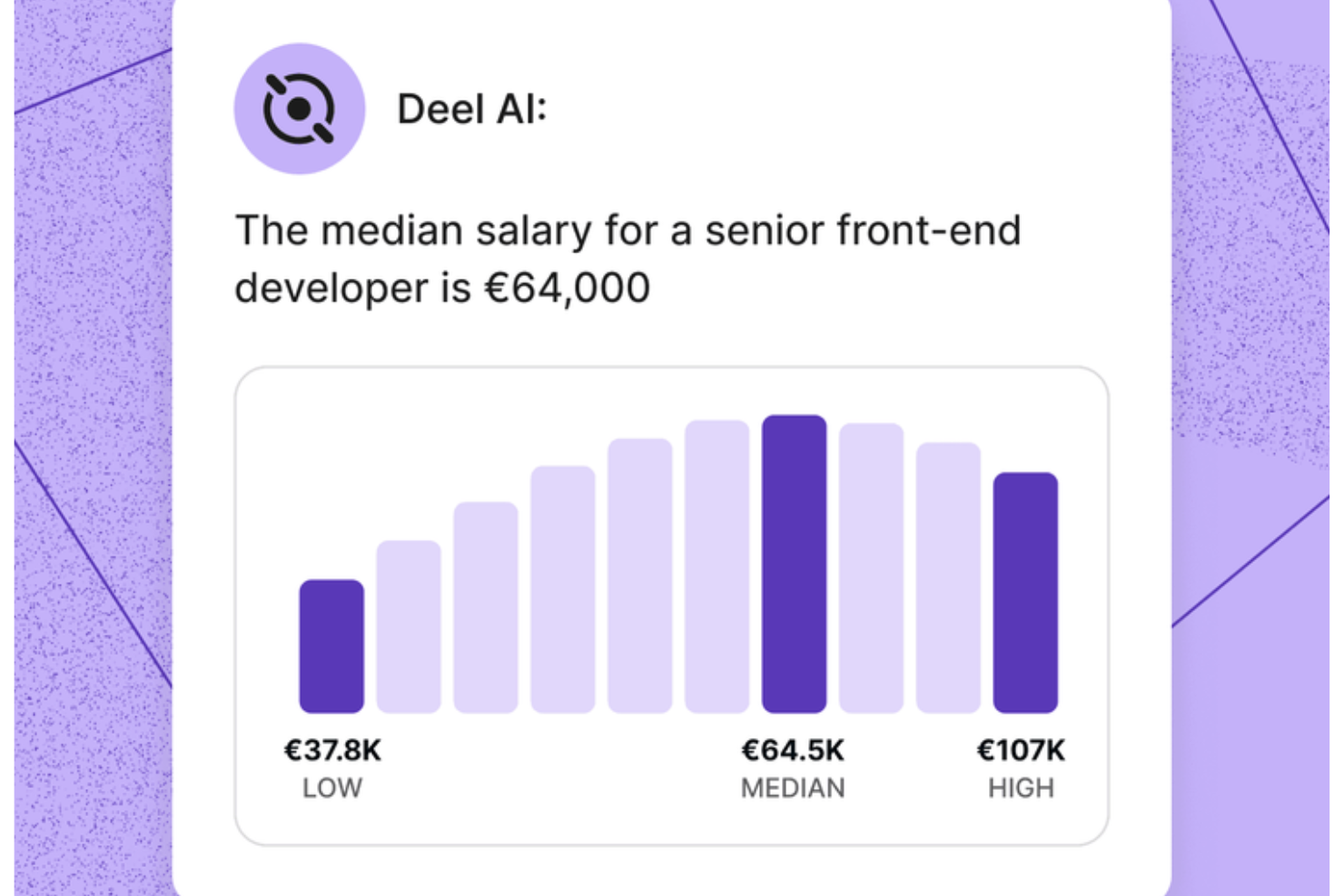
Managing HR and compliance questions across a growing team becomes far easier when you have an intelligent knowledge layer that understands your people data and the rules that apply to them. Deel AI gives you that advantage by acting like an always-on expert that interprets your policies, surfaces answers instantly, and connects insights directly to what you’re viewing in the platform.
Why I Picked Deel
I picked Deel because it functions as a dynamic AI knowledge base built specifically for HR, payroll, and global compliance, not just a general-purpose chatbot. It pulls from Deel’s expert-created Knowledge Hub and merges that with your own workforce data to deliver contextual, real-time answers tailored to your organization. I also appreciate how it understands where you are in the platform and provides summaries, key data, and compliance cues, which sets it apart from static knowledge repositories. For teams that need immediate, data-informed guidance across multiple countries and policies, this level of AI support is hard to replicate.
Deel Key Features
In addition to the contextual AI insights I highlighted above, you’ll find these features valuable if you’re evaluating AI knowledge base tools:
- HR insights from your people data: The system combines your existing data with Deel’s Knowledge Hub to deliver insights tailored to your workforce.
- AI-generated reports and org insights: Lets you create organization summaries, view key data, and receive compliance suggestions using your internal context.
- 24/7 AI support: Provides always-available guidance on HR tasks and product questions, helping you keep work moving in any time zone.
- Self-Service Employee Access: Empower your team with access to their payroll, contracts, and compliance information through a user-friendly interface.
Deel Integrations
Integrations include QuickBooks, Xero, NetSuite, BambooHR, Greenhouse, Slack, Workday, SAP SuccessFactors, Oracle, and Gusto.
Pros and Cons
Pros:
- AI offers instant answers on local labor laws in 150+ countries
- Context-aware insights summarize HR pages as you view them
- Employees can self-serve HR questions without manager involvement
Cons:
- AI guidance may require human review for complex legal scenarios
- Heavy dependence on proprietary Knowledge Hub for accuracy
New Product Updates from Deel HR

Deel Expands Stablecoin Wallet to 80+ Countries
Deel expands its Stablecoin Wallet to 80+ countries with dollar-backed balances and optional rewards. This gives eligible contractors more ways to hold and manage earnings inside Deel. For more information, visit Deel’s official site.
 .
.
Best for custom documentation workflows
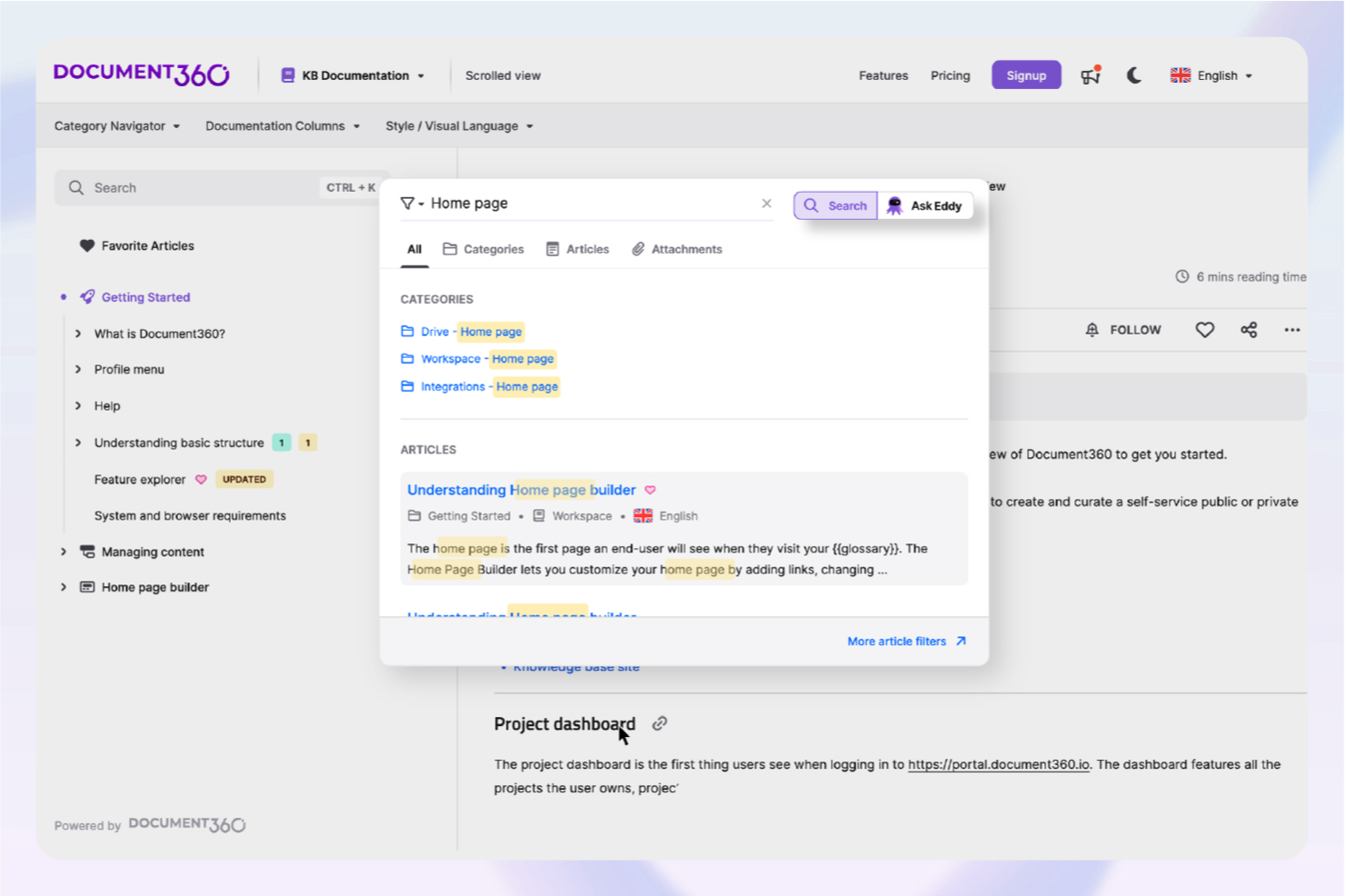
In the ever-evolving landscape of AI knowledge base tools, Document360 stands out as a versatile solution tailored for businesses seeking to enhance their documentation strategies. This tool is particularly appealing to industries such as SaaS, IT, finance, healthcare, and education, where efficient information management is crucial. Document360 addresses challenges in customer support, technical writing, and product management by offering AI-driven features that streamline documentation and improve user engagement.
Why I Picked Document360
I picked Document360 for its unique integration of AI capabilities that are essential for modern knowledge base tools. The platform's AI Premium Suite, which includes AI search and an AI chatbot, directly addresses the need for efficient information retrieval and automated customer support. Additionally, the article summarization feature helps teams quickly distill complex information, making it accessible and actionable. These features make Document360 a compelling choice for organizations looking to optimize their knowledge management processes.
Document360 Key Features
In addition to its AI-driven functionalities, I also found several other features that enhance Document360's utility:
- Advanced Analytics: Tracks user engagement and documentation performance, providing insights to improve content strategy.
- Custom Workflows: Allows you to tailor documentation processes to fit your team's specific needs and operational structure.
- Support Ticket Deflection: Reduces the volume of support inquiries by providing users with instant answers through an intuitive knowledge base.
- Generative AI Integration: Leverages Eddy AI to enhance knowledge management with automated content creation and updates.
Document360 Integrations
Integrations include Freshdesk, Salesforce, Zendesk, Intercom, Microsoft Teams, Slack, Google Analytics, Disqus, Hotjar, and Segment.
Pros and Cons
Pros:
- Custom documentation workflow builder
- Article summarization can save time
- Built-in AI chatbot support
Cons:
- Native integrations somewhat limited
- Advanced features require learning
New Product Updates from Document360

Document360 Adds Drive and Eddy AI Workflow Updates
Document360 adds Drive file renaming, Eddy AI email ticket notifications, and Drive image support in AI Capture. These updates simplify file management, support escalation, and visual content editing. For more information, visit Document360’s official site.
 .
.
Haystack
Best for intranet-anchored HR knowledge delivery
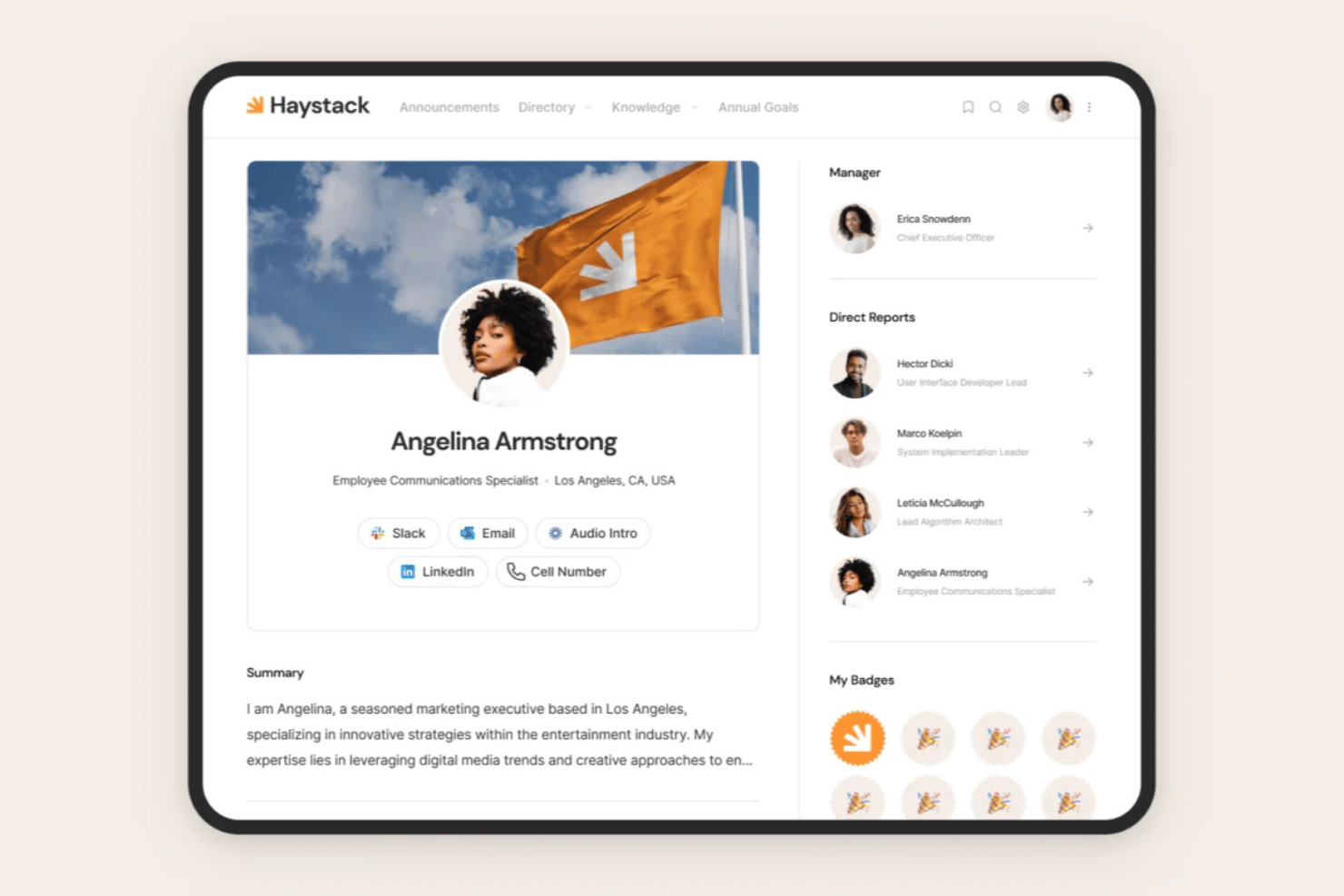
Haystack is an employee experience and intranet platform with a built-in AI knowledge module that combines Google Cloud-powered semantic search, generative Q&A, content freshness governance, and multi-channel delivery across Slack, Teams, email, SMS, and mobile.
Who Is Haystack Best For?
Haystack is a strong fit for HR and internal comms teams that want to anchor their knowledge delivery inside an intranet, with multi-channel reach across Slack, Teams, and mobile.
Why I Picked Haystack
I picked Haystack as one of the best because it's built around the idea that your knowledge base and your intranet should be one thing, not two. The Freshness Engine is what sets it apart for me: you can assign expiration dates to policy documents and handbooks, and Haystack automatically prompts the right content expert to review and re-verify them. Pair that with Google Cloud-powered Universal Search that reads natural language questions and pulls answers across your KB and connected apps like SharePoint and Confluence, and you get a genuinely intranet-anchored HR knowledge experience.
Haystack Key Features
- Multilingual content translation: "Translate with Trust" dynamically translates content into dozens of languages, so distributed teams access the same verified knowledge without separate per-language knowledge bases.
- Must-read confirmations: Admins can mark policy communications as must-read, requiring employees to acknowledge receipt for compliance tracking.
- Company glossary: A centralized glossary defines HR terminology, acronyms, and internal jargon so employees always have a consistent reference point.
- Multi-format content ingestion: Haystack accepts pages, documents, videos, and live-updating embeds from third-party apps like Confluence, SharePoint, and Google Drive within a single knowledge repository.
Haystack Integrations
Haystack supports 40+ HRIS integrations, including Workday, BambooHR, UKG, ADP, and HiBob. It also connects with Google Drive, SharePoint, Confluence, Slack, Microsoft Teams, Okta, and Microsoft Entra ID.
Pros and Cons
Pros:
- Employee onboarding hubs with must-read confirmations
- Multilingual AI translation supports global teams
- Built-in Freshness Engine automates policy review
Cons:
- Lacks native ticket deflection or escalation
- No role-personalized generative AI answers

Best for AI self-service support
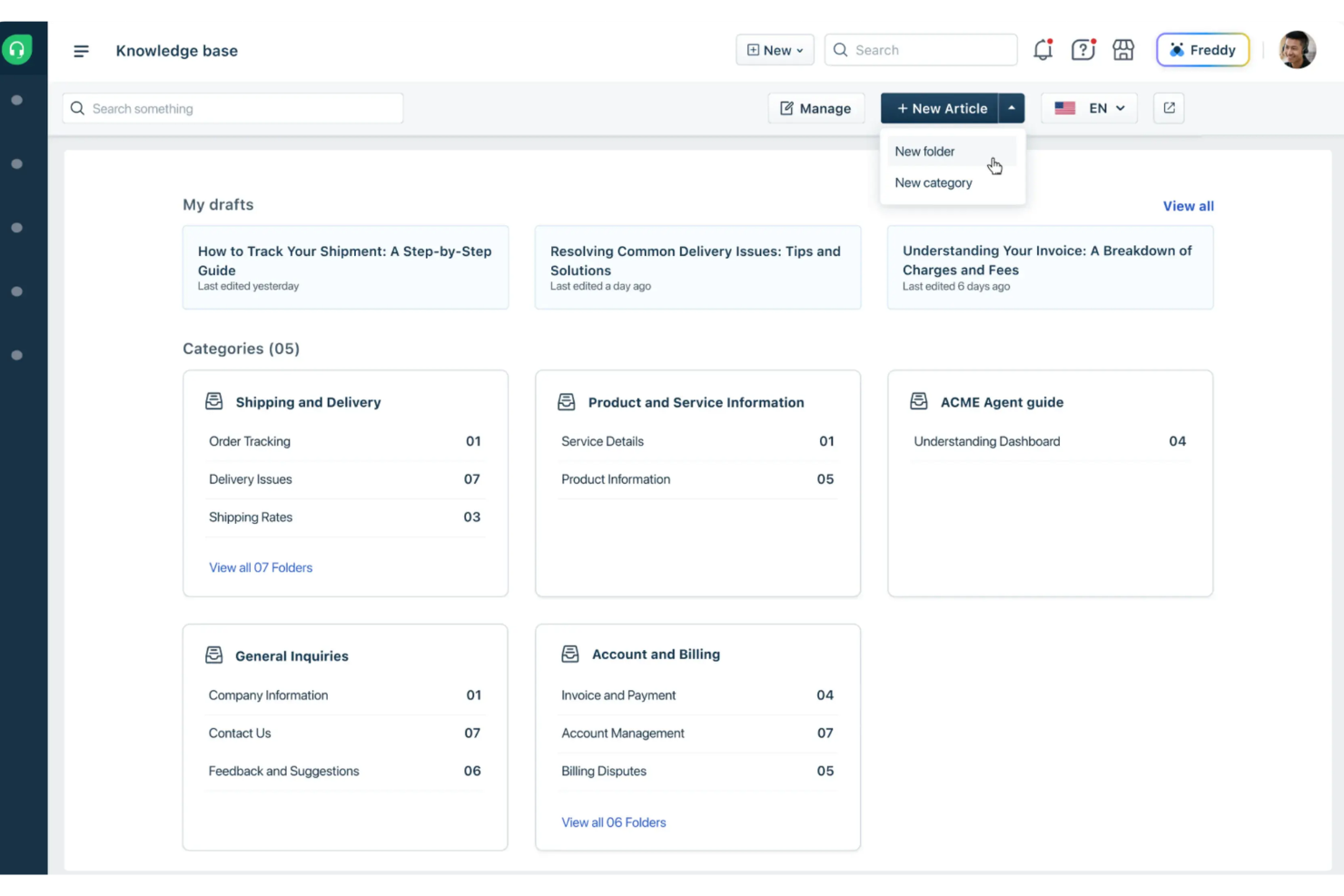
Freshdesk is an AI-driven customer service platform designed to streamline support processes and improve how teams handle customer inquiries. It helps businesses manage customer interactions and resolve issues efficiently through tools like Vertical AI Agents and AI Copilot. Its support portal and knowledge base enable AI self-service support, allowing customers to find answers quickly without contacting a support agent.
Why I Picked Freshdesk
I picked Freshdesk for its AI self-service support, which helps customers find answers without contacting an agent. Its knowledge base and support portal allow businesses to provide helpful articles and resources that customers can search and access on their own. Freshdesk also includes AI Copilot, which assists agents with reply suggestions and ticket summaries to reduce response times. In addition, its Vertical AI Agents can autonomously resolve certain customer issues, helping support teams handle requests more efficiently.
Freshdesk Key Features
In addition to AI self-service support, Freshdesk offers:
- Centralized Workspace: Freshdesk provides a unified platform for managing all customer interactions, ensuring seamless communication across teams.
- Automation Tools: The platform includes automation capabilities for ticket routing and workflow management, reducing manual tasks and increasing efficiency.
- AI Insights: Freshdesk offers AI-driven insights to give leadership visibility into customer service trends and performance metrics.
- Multilingual Support: With support for multiple languages, Freshdesk enables businesses to cater to a diverse customer base.
Freshdesk Integrations
Integrations include Slack, MS Teams, Shopify, Google Calendar, Freshsales Suite, Google Analytics, Atlassian Jira, Mailchimp, HubSpot CRM, and Zoho CRM. Freshdesk also offers a low-code interface that allows users to create custom integrations when needed.
Pros and Cons
Pros:
- AI Copilot suggests replies and summarizes tickets to save agent time
- Organized ticketing system with multiple views for tracking and collaboration
- Self-service portal connects knowledge base with ticketing for faster support
Cons:
- No built-in asset management compared to other Freshworks products
- Slow loading times when handling large ticket volumes

Glean
Best for enterprise-grade search capabilities
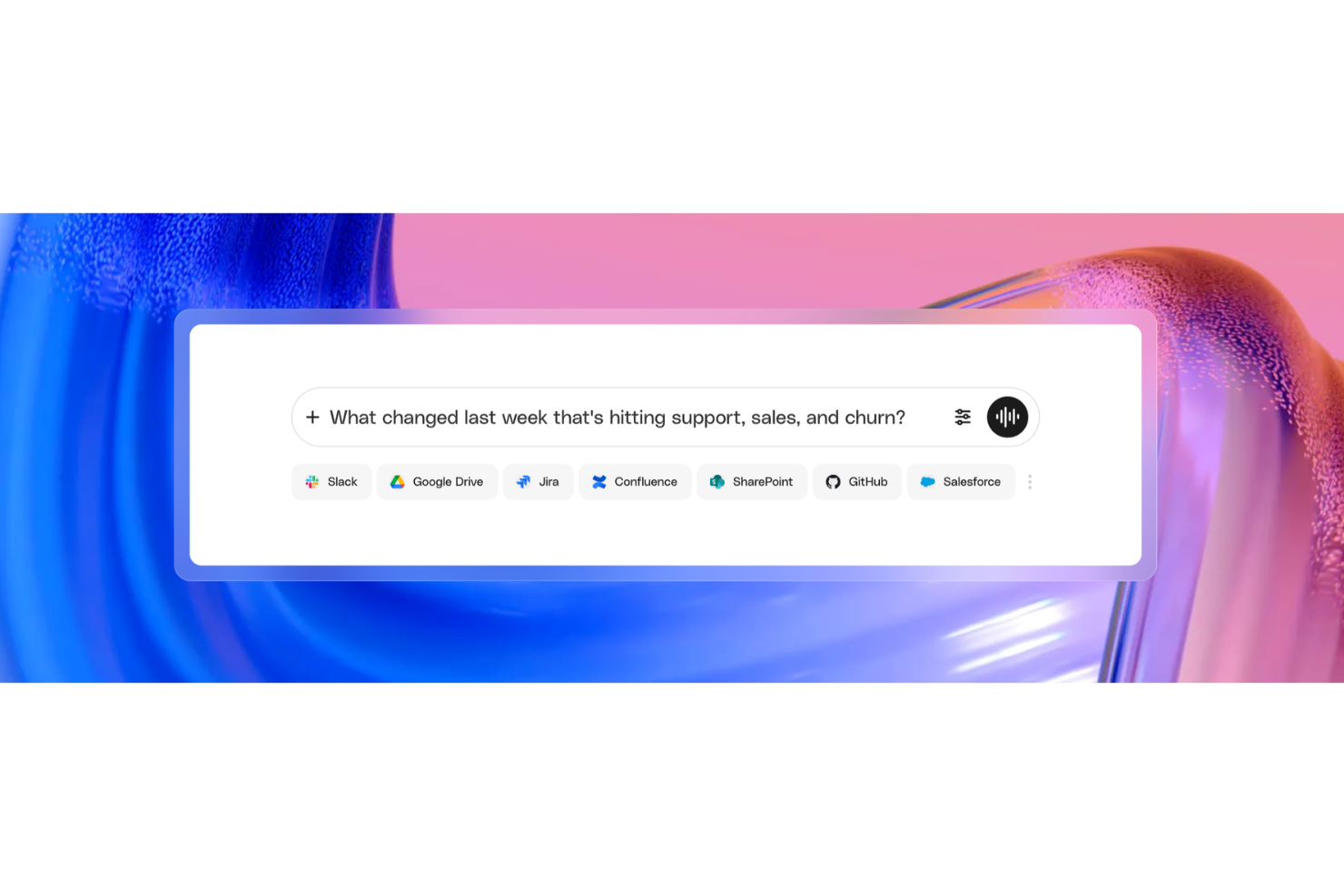
Glean is an enterprise work AI platform that connects knowledge across your business apps and uses AI-powered search, generative answers, and permission-aware access controls to surface trusted, contextual information across every team.
Who Is Glean Best For?
Glean is a strong fit for large enterprises with complex, multi-app tech stacks where IT, HR, and knowledge teams need to govern and surface information at scale.
Why I Picked Glean
Glean is one of my top picks because I love how its enterprise search goes beyond keyword matching. The vector search engine uses deep learning LLMs for semantic understanding, so when someone on my team asks a natural language question, Glean pulls the right answer from Slack, Jira, Google Drive, or any of 100+ connected apps simultaneously. I also find the knowledge graph particularly impressive: it maps relationships between people, content, and interactions to personalize results by role, so two people asking the same question won't get the same generic answer.
Glean Key Features
- Generative AI answers: Glean's AI synthesizes a direct answer to natural language queries and links back to the verified source documents behind that answer.
- Knowledge collections: Organize curated sets of resources, links, and documents into shared collections that teams can access as structured reference hubs.
- Content verification: Mark documents as trusted or flag outdated content so knowledge stays accurate without requiring a manual audit process.
- AI agents: Build no-code AI agents that retrieve, reason over, and act on company knowledge using natural language instructions.
Glean Integrations
Glean offers 275+ native and MCP-based connectors, including Confluence, Slack, Google Workspace, Jira, Salesforce, GitHub, ServiceNow, BambooHR, Dropbox, and Box. It's available on Zapier and provides an API for custom integrations.
Pros and Cons
Pros:
- Indexes existing content without new documentation
- Personalized results based on role context
- Understands natural language query intent well
Cons:
- Search quality drops with poorly tagged documents
- Cannot execute actions in connected apps

Best for cross-team knowledge workflows
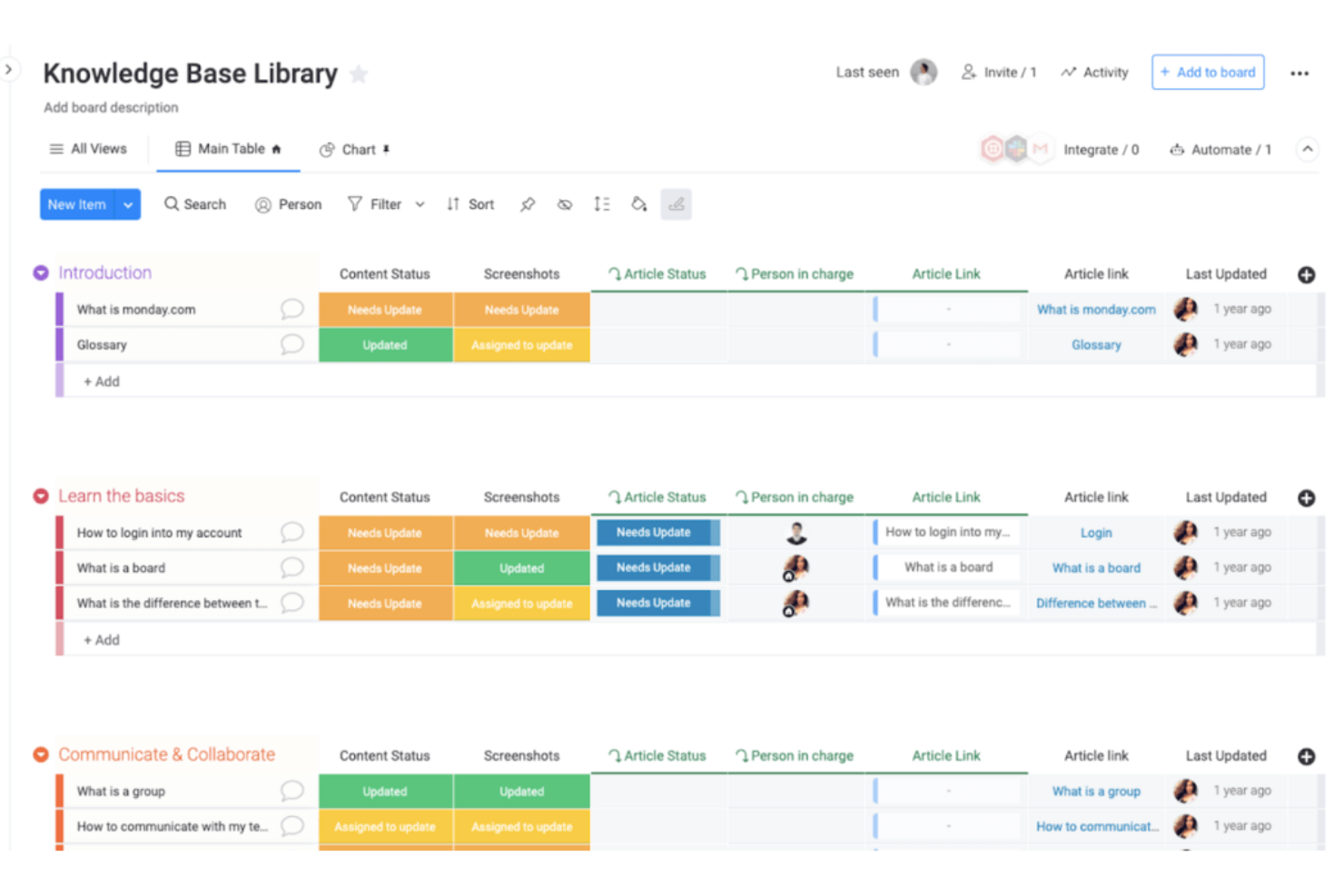
monday AI Workspace is a work management platform that embeds AI agents, a Sidekick assistant, and generative AI tools directly into team workflows to surface, update, and act on shared organizational knowledge across boards and docs.
Who Is monday AI Workspace Best For?
It's a strong fit for operations and project teams at mid-size to large organizations that manage work across multiple departments and need AI embedded in their existing workflows.
Why I Picked monday AI Workspace
I picked monday AI Workspace because of how it connects AI directly to live organizational data across boards and docs, making it one of the few tools where knowledge isn't stored separately from work. I like that the Sidekick assistant pulls context from active projects, ticket histories, and company policies to answer questions in real time. When my team connects Claude or Copilot to our workspace, those AI assistants can read board data and take action without anyone switching apps.
monday AI Workspace Key Features
- AI-powered dashboards: Build live, visual dashboards that update automatically from board and project data.
- Collaborative document editing: Create and edit docs in real time with team members directly inside your workspace.
- Role-based access controls: Control who can view or edit boards, docs, and specific data using granular user permissions.
- Multi-channel integrations: Connect the platform to tools like Slack, Google Drive, and email for streamlined workflows.
monday AI Workspace Integrations
monday AI Workspace offers hundreds of native integrations, including Slack, Google Workspace, Microsoft 365, Salesforce, Jira, GitHub, Zoom, Dropbox, HubSpot, and Zendesk. It also supports Zapier and provides an API for custom integrations.
Pros and Cons
Pros:
- Multiple AI models supported within one workspace
- Knowledge connects directly to live project data
- AI Sidekick searches across all workspace boards
Cons:
- Limited structured HR content ingestion features
- Not purpose-built for HR policy content
New Product Updates from monday AI Workspace
monday AI Workspace Adds Human Approval Routing
monday AI Workspace adds a human-in-the-loop approval block to AI Workflows, sending approval requests and routing workflow paths based on responses. For more information, visit monday AI Workspace's official site.

Stonly
Best for AI-driven knowledge health monitoring
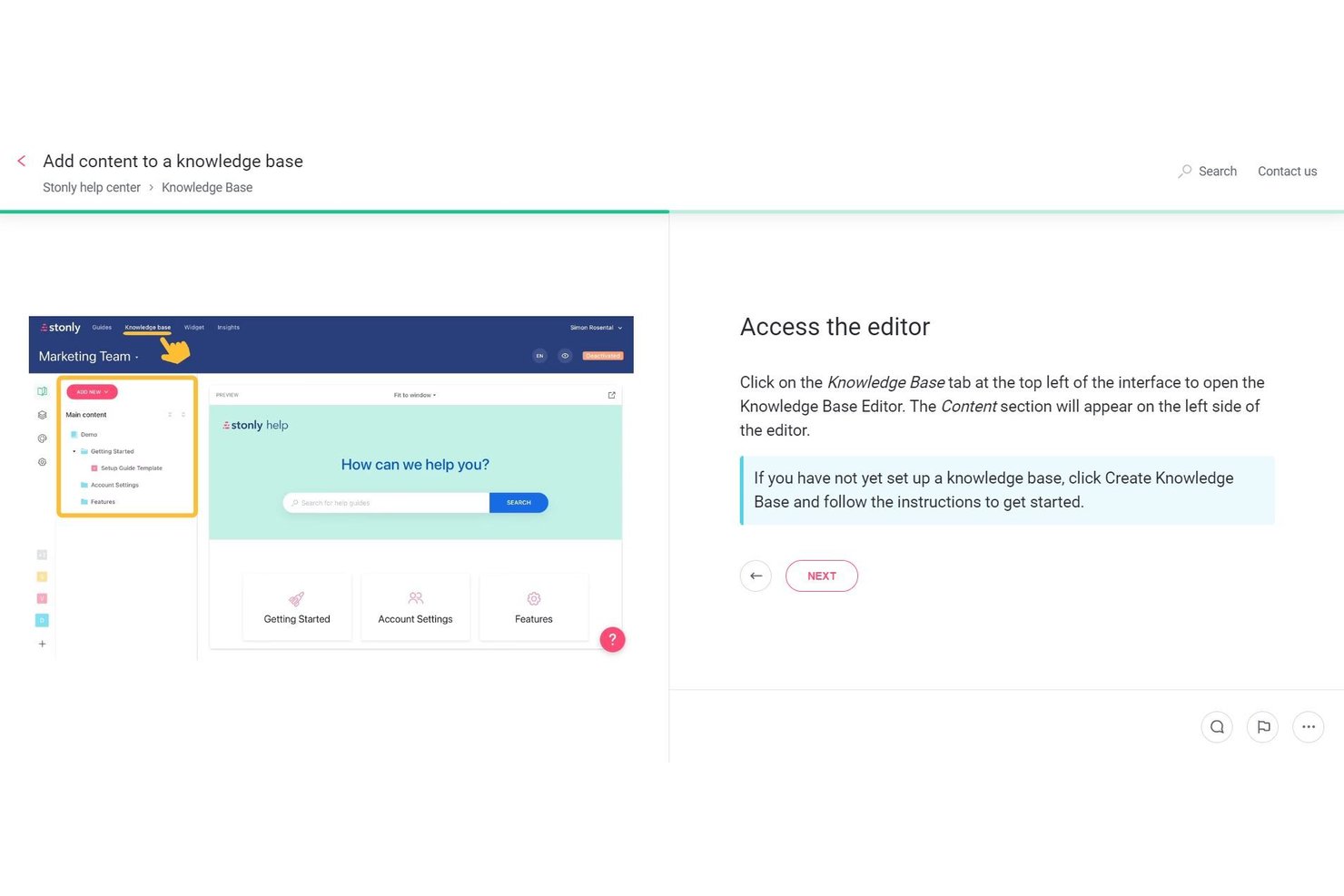
Stonly is an AI knowledge base platform built around structured, step-by-step content, offering semantic search, generative AI answers, interactive decision trees, and autonomous Knowledge Agents that monitor, audit, and draft updates across your knowledge content.
Who Is Stonly Best For?
Stonly is a strong fit for teams managing large volumes of structured knowledge content who need AI to continuously monitor, flag, and draft updates across their knowledge base.
Why I Picked Stonly
Stonly earns its spot on my shortlist because of its Knowledge Agents, which I think are the most capable AI-driven knowledge health monitoring system I've seen in this category. These agents run continuously, flagging broken links, duplicate content, and coverage gaps, then drafting suggested updates for human review before anything goes live. The Knowledge Health Score gives you a live audit of your entire knowledge base, so stale or conflicting content gets caught automatically rather than discovered by a frustrated user.
Stonly Key Features
- Guided Answers: An intent-detection layer that identifies the purpose behind a search query and launches the most relevant interactive decision tree directly from search results.
- Business Process Agents: Scripted AI agents that handle multi-step resolution workflows end-to-end across email, chat, and integrated ticketing platforms like Zendesk and ServiceNow.
- Content segmentation: A targeting feature that delivers different knowledge content to different user groups based on your own user data, available from the Small Business plan and above.
- Full-path analytics: Tracks how users move through individual guides step by step, surfacing where people drop off or search without finding answers.
Stonly Integrations
Stonly offers native integrations with SharePoint, Confluence, Google Drive, Google Sheets, Notion, Slack, Microsoft Teams, Zendesk, Salesforce, and ServiceNow. It also supports Zapier and API-based custom integrations.
Pros and Cons
Pros:
- Multilingual support for global knowledge delivery
- Structured, step-by-step guides reduce AI errors
- AI Knowledge Agents automate content health monitoring
Cons:
- Manual guide creation can be time-consuming
- No native HRIS or employee data sync

Slite
Best for remote team document sharing

Slite is a collaborative documentation tool with flexible formats designed for remote teams needing to share and organize information efficiently. Its main users are distributed teams looking for effective ways to manage and access documents.
Why I picked Slite: Slite goes beyond static document sharing, turning scattered notes and documents into structured, searchable, connected knowledge. The platform uses AI to suggest ways to categorize content, identify overlaps or missing information, and ensure each document fits into a bigger knowledge framework.
Standout features & integrations:
Features include an intuitive interface that simplifies navigation, real-time collaboration that allows your team to work together, and a document organization system that keeps everything in order.
Integrations include Slack, Google Drive, Trello, Asana, GitHub, Dropbox, Microsoft Teams, Zapier, Jira, and Confluence.
Pros and Cons
Pros:
- AI-powered document organization
- Intuitive interface enhances user experience
- AI-assisted search that retrieves answers semantically, not just through keywords
Cons:
- Limited advanced customization options
- Initial setup may require time

HR Cloud
Best for HR team knowledge management

HR Cloud is a comprehensive HR management platform designed to support HR processes for small to medium-sized businesses. It serves HR professionals by offering solutions for onboarding, employee engagement, and performance management.
Why I picked HR Cloud: It features AI-driven analytics and intelligent support agents that provide insights into employee performance and engagement. The platform's onboarding automation tools help you reduce manual tasks, improving efficiency. Its customizable workflows allow you to tailor processes to fit your team's needs.
Standout features & integrations:
Features include customizable workflows that adapt to your team's needs, onboarding automation that reduces manual tasks, and analytics that provide insights into performance and engagement.
Integrations include Slack, Microsoft Teams, Google Workspace, ADP, OneLogin, Okta, Workday, Salesforce, and Zapier.
Pros and Cons
Pros:
- Onboarding automation reduces manual tasks
- Customizable workflows for tailored processes
- AI-driven insights into performance
Cons:
- Limited advanced customization options
- May require time for initial setup

Bloomfire
Best for automated content upkeep

Bloomfire is an AI-driven knowledge-management platform built to help teams keep information accurate, accessible, and continuously improving. It’s especially useful for organizations that want a living, evolving knowledge base without the manual burden of constant content audits.
Why I picked Bloomfire: Bloomfire stands out because of its self-healing AI, which identifies outdated articles, stale workflows, and duplicated content, then automatically pulls or flags them for review. This gives teams the confidence that what they’re searching, referencing, and sharing is always current.
Standout features & integrations:
Features include content tagging and categorization that improve organization, an intuitive interface that supports user engagement, and customizable dashboards while providing insights and metrics on content performance.
Integrations include Slack, Salesforce, Microsoft Teams, Google Drive, Dropbox, Box, OneDrive, Yammer, SharePoint, and Zendesk.
Pros and Cons
Pros:
- Customizable dashboards for personalized views
- Intuitive interface for easy navigation
- AI-powered search enhances information retrieval
Cons:
- Initial setup can be time-consuming
- Limited offline access
Other AI Knowledge Base Tools
Here are some additional AI knowledge base tools options that didn’t make it onto my shortlist, but are still worth checking out:
- Tettra
For workflow integrations
- Guru
For internal AI chat features
- Capacity
For AI-driven support automation
- Freddy AI
For AI-driven customer interaction
- Helpjuice
For scalable knowledge bases
- Gurubase
For AI-enhanced data insights
- Trupeer
For rapid content creation
- Knowmax
For telecom industry knowledge sharing
- HR Acuity
For HR incident management
- monday service
For customizable service management


How I Evaluate AI Knowledge Base Tools
Any tool on this list needs to go beyond keyword search with a chatbot label—I look for AI that actually resolves employee questions about PTO policies, benefits eligibility, or onboarding steps without routing to an HR generalist. I split my evaluation into core functionality every tool must have to qualify, and differentiating factors that separate good options from great ones.
Core Functionality (Table Stakes For This List)
When I'm selecting tools for my list, I rank each one on a scale from 0 (does not offer the functionality) to 5 (excels in this area) for each core functionality listed below. Then, I calculate the tool's total score into a percentage. Each tool needs to achieve a minimum total score of 65% to be considered for inclusion.
- AI-Powered Semantic Search: I check whether search understands natural questions like "how many sick days do I have left" rather than requiring employees to guess the right document title or keyword.
- Generative AI Answers: Each tool should synthesize a direct, cited answer from KB content—not just link to a 40-page handbook when someone asks about parental leave eligibility.
- HR Content Ingestion: I evaluate how well a platform pulls in policies, SOPs, and benefits docs from sources like Google Drive, SharePoint, or an HRIS without requiring manual reformatting.
- Permissions and Access Control: HR content often includes sensitive material, so I look for group- or role-based restrictions that limit who sees compensation bands, disciplinary procedures, or region-specific policies.
- Employee-Facing Deployment: The tool should meet employees where they already work—through Slack, Microsoft Teams, an HRIS portal, or an embedded widget—rather than requiring them to visit a separate site.
- AI Content Management: I look for AI that flags stale policies, detects duplicates, or surfaces content gaps, like identifying that your remote work policy hasn't been updated since your hybrid model changed.
Once I have a list of tools that meet this criteria, I consider what sets each platform apart.
Differentiating Factors (What Sets Vendors Apart)
Here's how I compare and contrast different vendors:
Standout Features
Conversational analytics is a big differentiator—I look for dashboards that reveal what employees ask most often and where the AI fails to find an answer, helping HR teams spot policy gaps before they become repeat tickets. Personalized answer context matters too, especially for global teams where a benefits question should return different results based on the employee's location or role. I also evaluate how well a tool escalates to HR case management when AI confidence is low, preserving the full conversation so nothing gets lost.
Beyond Features
AI governance is something I weigh heavily—HR knowledge bases handle sensitive topics like harassment policies and termination procedures, so I check for guardrails like confidence scoring, source-pinned answers, and admin controls that prevent the AI from generating unsanctioned responses. Compliance and data security also carry real weight, particularly SOC 2 Type II certification and data residency options for organizations with employees across multiple regions. Finally, I evaluate HRIS integration depth, since syncing employee attributes from tools like Workday or BambooHR is what enables personalized, role-aware answers at scale.
How to Choose AI Knowledge Base Tools
It’s easy to get bogged down in long feature lists and complex pricing structures. To help you stay focused as you work through your unique software selection process, here’s a checklist of factors to keep in mind:
| Factor | What to Consider |
| Scalability | Can the tool grow with your team? Check if it supports increasing data volumes and users without impacting performance. |
| Integrations | Does it connect with your existing software stack? Look for compatibility with tools like Slack, Salesforce, and Google Workspace to ensure smooth workflows. |
| Customizability | Can you tailor the tool to fit your processes? Ensure it offers flexible options for workflows and user roles to match your team's needs. |
| Ease of use | Is the tool intuitive? Test the interface to see if it requires minimal training for your team to get started quickly. |
| Implementation and onboarding | How long does setup take? Evaluate the resources needed for deployment and whether support is available during onboarding. |
| Cost | Does the pricing fit your budget? Compare the cost against features offered and watch for hidden fees or long-term contracts. |
| Security safeguards | Are your data protected? Look for encryption, access controls, and compliance with data protection standards to safeguard sensitive information. |
| Support availability | Is support easy to reach when you need help? Check for 24/7 support options and the responsiveness of the vendor's helpdesk. |
What Are AI Knowledge Base Tools?
AI-powered knowledge management tools are digital platforms that use artificial intelligence to organize, manage, and retrieve information more intelligently than traditional systems. Traditional knowledge bases rely heavily on manual tagging, rigid folder structures, and exact keyword matching to find relevant information, which often makes answers hard to find unless you already know where they live.
AI knowledge base tools solve these issues by using natural language processing, semantic search, and predictive recommendations. Instead of searching for an exact phrase, users can ask questions naturally and get accurate results, even if the wording is different from what appears in the documentation. These tools also help keep content up to date by flagging outdated information and identifying gaps.
Teams across customer support, operations, HR, and product rely on internal knowledge bases to speed up information access, create a source of truth for standard operating procedures, support better decision-making, and for a quick reference place to answer questions. By making information easier to maintain and even easier to retrieve, AI knowledge bases improve productivity and help teams work with greater clarity.
Features
When selecting AI knowledge base tools, keep an eye out for the following key features:
- AI-driven search: Quickly find accurate information through intelligent search capabilities that understand context and intent.
- Natural language processing: Enhance user interaction by interpreting and responding to queries in everyday language.
- Predictive analytics: Anticipate user needs and provide timely solutions by analyzing patterns and trends.
- Customizable templates: Tailor the knowledge base to fit your brand and workflow needs with flexible design options.
- Real-time collaboration: Allow teams to work together on documents and updates simultaneously, improving efficiency.
- Data synchronization: Keep information up-to-date across all platforms and devices, ensuring consistency.
- Content categorization: Organize information logically with AI-powered tagging and categorization for easy retrieval.
- Integration capabilities: Connect seamlessly with existing tools like Slack and Salesforce to enhance workflow efficiency.
- Advanced analytics: Gain insights into content performance and user engagement to refine strategies and improve outcomes.
- Automated workflows: Reduce manual tasks and improve efficiency through AI-driven automation of routine processes.
Benefits
Implementing AI knowledge base tools provides several benefits for your team and your business. Here are a few you can look forward to:
- Improved efficiency: AI-driven search and automation reduce the time spent finding information and performing repetitive tasks.
- Enhanced collaboration: Real-time collaboration features allow your team to work together more effectively, even remotely.
- Accurate responses: Natural language processing ensures that queries are understood and answered correctly, improving support quality.
- Informed decision-making: Predictive analytics provide insights into trends and user needs, helping you make better business decisions.
- Consistent information: Data synchronization keeps your knowledge base up-to-date across all platforms, ensuring everyone accesses the same information.
- Customizable solutions: Tailor the platform to fit your specific needs with customizable templates and workflows.
- Increased engagement: Advanced analytics help you understand user behavior and improve content strategies, boosting engagement.
Costs & Pricing
Selecting AI knowledge base tools requires an understanding of the various pricing models and plans available. Costs vary based on features, team size, add-ons, and more. The table below summarizes common plans, their average prices, and typical features included in AI knowledge base tools solutions:
Plan Comparison Table for AI Knowledge Base Tools
| Plan Type | Average Price | Common Features |
| Free Plan | $0 | Basic search functionality, limited storage, and community support. |
| Personal Plan | $5-$15/user/month | Advanced search, basic analytics, customization options, and email support. |
| Business Plan | $20-$50/user/month | AI-driven insights, enhanced collaboration tools, integration capabilities, and priority support. |
| Enterprise Plan | $60-$100/user/month | Full customization, advanced security features, dedicated account manager, and 24/7 premium support. |
AI Knowledge Base Tools FAQs
Here are some answers to common questions about AI knowledge base tools:
Can AI knowledge base tools integrate with existing software?
Yes, most AI knowledge base tools offer integration capabilities with popular software like Slack, Salesforce, and Google Workspace. These integrations help you maintain smooth workflows by connecting your knowledge base with tools your team already uses. Before purchasing, check if the tool supports the specific integrations you need. Some platforms may also offer API access for custom integrations, which can be useful if you have unique requirements. Make sure to evaluate the ease of setup and any potential costs associated with these integrations.
How do AI knowledge base tools enhance data security?
AI knowledge base tools enhance data security by offering features like encryption, access controls, and compliance with data protection standards. When choosing a tool, ensure it complies with regulations like GDPR if you’re operating in Europe. Look for options that allow you to set user permissions, so only authorized team members can access sensitive information. Regular security updates and audits are also important factors to consider, as they ensure the tool remains secure against potential threats.
Are AI knowledge base tools scalable for growing teams?
Yes, AI knowledge base tools are typically scalable and can grow with your team. As your business expands, these tools can accommodate more users and increased data volumes without sacrificing performance. When evaluating options, check if the pricing structure allows for easy scaling. Some tools offer tiered plans that let you add users and features as needed. Also, consider the tool’s ability to handle complex data structures and workflows, as these may become more important as your organization grows.
Do AI knowledge base tools require extensive training?
No, most AI knowledge base tools are designed to be user-friendly, requiring minimal training. However, it’s important to provide your team with some initial guidance to make the most of the tool’s features. Look for providers that offer training resources like tutorials, webinars, and product tours. Some vendors also provide customer support to help with onboarding and troubleshooting. Encouraging your team to explore and experiment with the tool can also accelerate the learning process and boost adoption.
What kind of support can I expect from AI knowledge base tool vendors?
Support varies by vendor, but you can typically expect options like email, chat, and phone support. Some vendors offer 24/7 support, while others may have limited hours. It’s important to understand the level of support you’ll receive, especially during critical times like onboarding or issue resolution. Check if the vendor provides access to a dedicated account manager or a comprehensive help center with FAQs and guides. Community forums can also be a valuable resource for sharing experiences and solutions with other users.
Is Microsoft Copilot the same as an AI knowledge base tool?
No. Copilot is not a knowledge base tool. It does not store, organize, or manage documentation. Instead, it acts as an AI assistant that works on top of your existing files in Microsoft 365. Because Copilot can search across your Microsoft 365 data (SharePoint, OneDrive, Teams). This makes it feel like a knowledge hub, even though it’s not maintaining or structuring that information.
A true knowledge base system:
- Organizes documentation into structured hubs
- Ensures content versioning and governance
- Provides semantic search and topic classification
- Helps verify and update outdated information
- Supports workflows for maintaining shared knowledge
Copilot doesn’t manage any of that — it only reads and interprets the files you already have. Many teams pair Copilot with a structured AI knowledge base tool to optimize content from that knowledge base. It is great for surfacing information quickly, summarizing long documents, and answering questions based on your stored content. It enhances access, even though it doesn’t replace a dedicated knowledge base.