

10 Best AI Office Space Management Software in 2026

Best AI Office Space Management Software Shortlist


AI office space management software uses artificial intelligence to help you plan, reserve, and optimize how workplaces are used and managed. If you’re searching for tools that simplify booking, improve occupancy data, and adapt to hybrid or flexible work, you’re in the right place. The right solution can help your business meet changing employee needs, use office space more wisely, and make better data-driven decisions. Below you’ll find expert picks and essential details so you can confidently choose the best AI tool for your hybrid workplace goals.
Why Trust Our Software Recommendations
Our team has been testing and reviewing software since 2012. As HR experts ourselves, we know how difficult—and important—it is to choose the right software.
For this guide, we evaluated tools using hands-on testing and independent research, scoring tools using our selection criteria. We also draw on insights from industry thought leaders and practicing HR experts.
Our reviews reflect our human editorial judgment, not a sales pitch.
Expert reviewers:
AI Office Space Management Software Comparison Table
This comparison table summarizes pricing details for my top AI office space management software selections:
| Tool | Best For | Trial Info | Price | ||
|---|---|---|---|---|---|
| 1 | Best for predictive space scenario modeling | Free demo available | Pricing upon request | Website | |
| 2 | Best for touchless desk check-in | Free demo available | Pricing upon request | Website | |
| 3 | Best for real-time occupancy insights | Free demo available | From $5/bookable resource/month (billed annually) | Website | |
| 4 | Best for space efficiency recommendations | Free trial + free demo available | From $5/user/month (billed annually) | Website | |
| 5 | Best for flexible desk and room reservations | Free demo available | Pricing upon request | Website | |
| 6 | Best for sensor-driven workspace analytics | Free demo available | Pricing upon request | Website | |
| 7 | Best for AI-powered workplace assistance | Free demo available | From $99/month | Website | |
| 8 | Best for Microsoft ecosystem integration | Free demo available | From $8.55/license/month (billed annually) | Website | |
| 9 | Best for hybrid work scheduling integration | Free demo available | Pricing upon request | Website | |
| 10 | Best for dynamic office mapping | Free demo available | Pricing upon request | Website |

Best AI Office Space Management Software Reviews
Below are my detailed summaries of the best AI office space management software that made it onto my shortlist. My reviews draw from real-world case studies offer a detailed look at the features, capabilities, and integrations of each platform to help you find the best one for you.
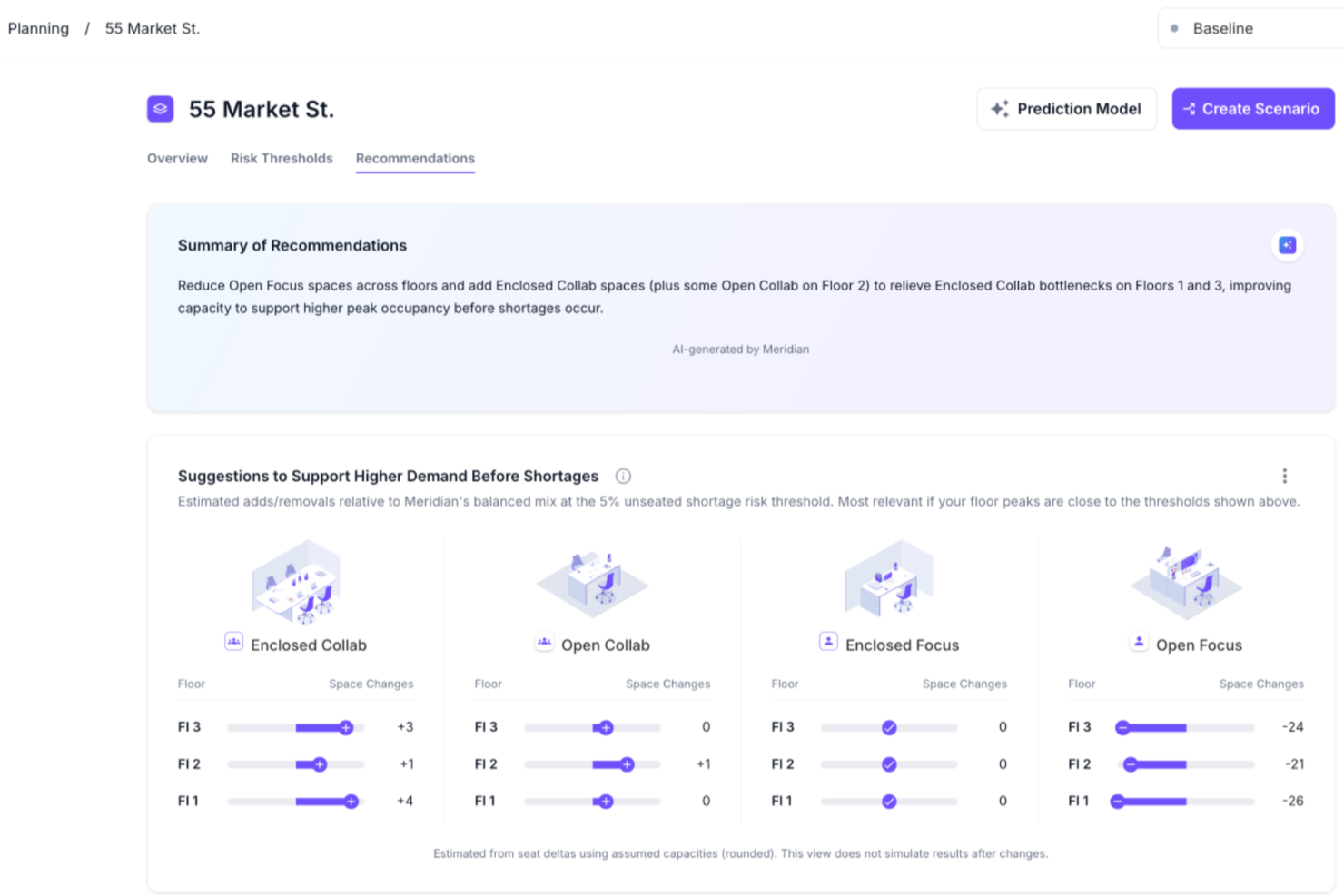
VergeSense is an AI-powered office space management platform that uses occupancy intelligence and predictive planning tools for scenario modeling, capacity forecasting, and portfolio-level space optimization.
Who Is VergeSense Best For?
VergeSense suits corporate real estate and workplace teams at large enterprises managing complex, multi-site office portfolios.
Why I Picked VergeSense
VergeSense is one of my top picks because I love how its Predictive Planning tool handles the "what if" questions that come up constantly in space planning. I can upload a floor plan and run scenario models against real occupancy data, testing headcount growth, hybrid attendance shifts, or consolidation plans before committing to anything. Unlike others, the Large Spatial Model draws from more than 200M sq ft of real workplace behavior across 200+ enterprises, so scenario outputs aren't based on industry averages. I've also found the CFO-ready reporting genuinely useful when I need to defend a footprint decision to leadership.
VergeSense Key Features
- Infinity Area Sensor: A proprietary sensor that captures zone-level occupancy data across open areas, meeting rooms, and neighborhoods, eliminating the need for individual desk sensors.
- Signs of Life detection: A passive occupancy detection method that identifies space use independently of booking data or badge swipes, reducing data gaps.
- Multi-source data integration: Combines occupancy signals from Wi-Fi, badge systems, and desk booking platforms into a single analytics layer for a unified view.
- Capacity threshold alerts: Notifies teams when space utilization crosses set thresholds so they can address over- or under-used areas in real time.
VergeSense Integrations
VergeSense offers dozens of native integrations including Accruent EMS, Archibus by Eptura, Aruba, Cisco Meraki, CBRE Host, Cloudbooking, Condeco by Eptura, Crestron, Microsoft Places, ServiceNow, and Appspace. An open API is also available for custom integrations.
Pros and Cons
Pros:
- Ingests data from Wi-Fi, badges, and sensors
- Delivers consistent measurement across multiple sites
- Sensor accuracy exceeds 95% for occupancy detection
Cons:
- Hardware installation increases upfront cost and extends lead time
- Camera-based sensors require extensive privacy reviews

Best for touchless desk check-in
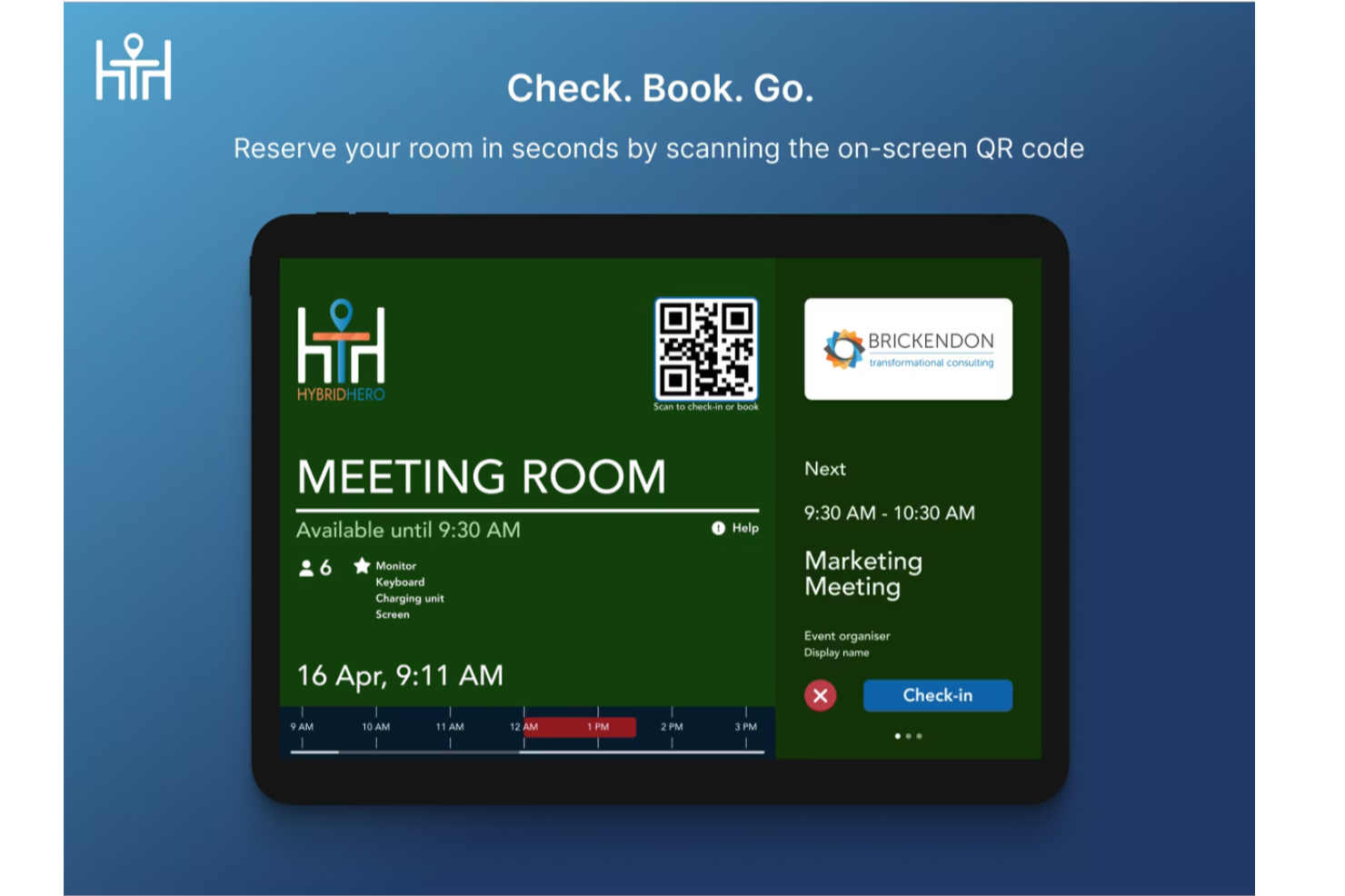
HybridHero is an AI-powered workplace management platform that covers desk booking, meeting room scheduling, visitor management, parking, and space utilization analytics across hybrid office environments.
Who Is Hybrid Hero Best For?
HybridHero is a strong fit for mid-to-large organizations managing hybrid work schedules across multiple office locations or floors.
Why I Picked Hybrid Hero
I picked HybridHero as one of the best for touchless desk check-in because of how well it closes the gap between a booking and actual attendance. Employees scan a QR code at the desk to confirm they're there, and if no check-in happens within a set window (say, 15 minutes), the desk auto-releases back into the available pool. I also like that every missed check-in is tracked as a no-show in the utilisation reporting, so you're building a real picture of desk demand, not just booking data.
Hybrid Hero Key Features
- AI booking assistant: Book a desk using natural-language prompts through the HybridHero AI chat interface, without navigating menus.
- Interactive floor plans: View real-time desk availability across floors and select a specific seat directly from a visual map.
- Heat map analytics: See which zones and desks are used most frequently through color-coded occupancy heat maps.
- Office neighborhood management: Assign desks or zones to specific teams so groups consistently sit in the same area.
Hybrid Hero Integrations
HybridHero offers native integrations with Microsoft Outlook, Microsoft Teams, Google Workspace, Slack, Okta, and Azure Active Directory. It also supports SSO through SAML and OpenID Connect. A REST API and webhooks are available for custom integrations with HRIS, access control, and internal systems.
Pros and Cons
Pros:
- Week cloning speeds up repeat bookings
- Includes parking and visitor management
- Built-in no-show auto-release for desks
Cons:
- Page load times can be slow
- Mobile app lacks full web features

Envoy
Best for real-time occupancy insights
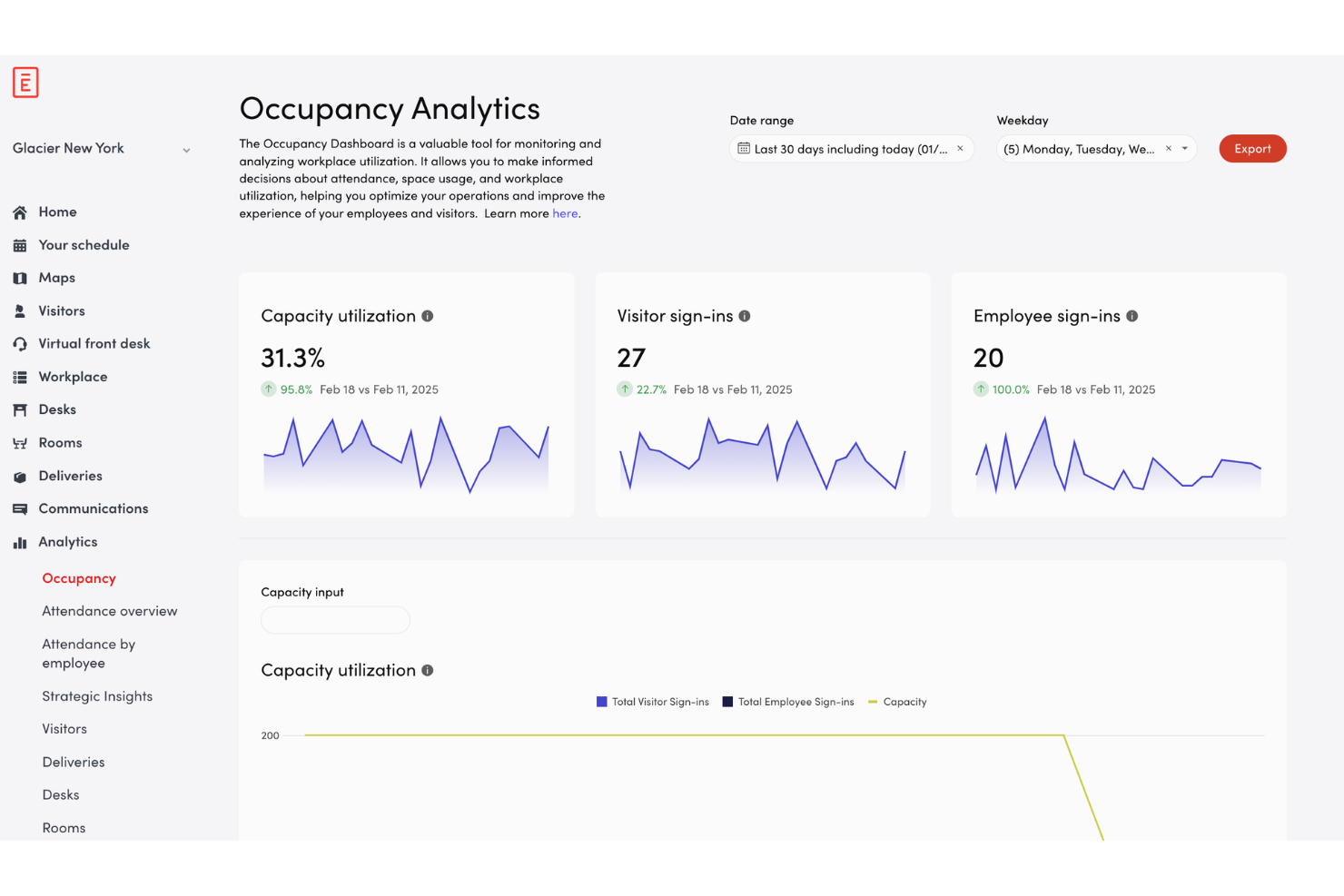
Envoy is an office space management platform for workplace teams, offering automated desk reservations, visitor management, workplace capacity tools, and real-time occupancy tracking for modern workplaces.
Who Is Envoy Best For?
Facility managers and workplace teams at mid-sized or larger offices who need real-time insights into space usage and on-site occupancy.
Why I Picked Envoy
I picked Envoy as one of the best because I can see real-time occupancy insights on every floor, track desk and meeting room usage by the hour, and set thresholds for workplace capacity. I like being able to monitor traffic spikes and adjust space policies quickly.
Envoy Key Features
- Visitor management dashboard: Register and track guests from a single interface.
- Desk booking system: Reserve, release, or assign desks across multiple locations.
- Employee mobile app: Manage bookings, check-ins, and notifications on iOS and Android.
- Touchless sign-in process: Enable QR code or mobile-based entry to shared workspaces.
Envoy Integrations
Envoy offers 100+ integrations through its app directory, including Slack, Microsoft Teams, Google Calendar, Microsoft Outlook, Okta, Salesforce, Brivo, Kisi, Avigilon Alta, and DocuSign. It also connects with Zapier and provides an API for custom integrations.
Pros and Cons
Pros:
- Mobile app enables booking and check-in
- Customizable floor maps reflect workspace bookings
- Real-time occupancy data by desk and room
Cons:
- Requires investing in workplace hardware
- Set up time for complex workplace layouts

deskbird
Best for space efficiency recommendations
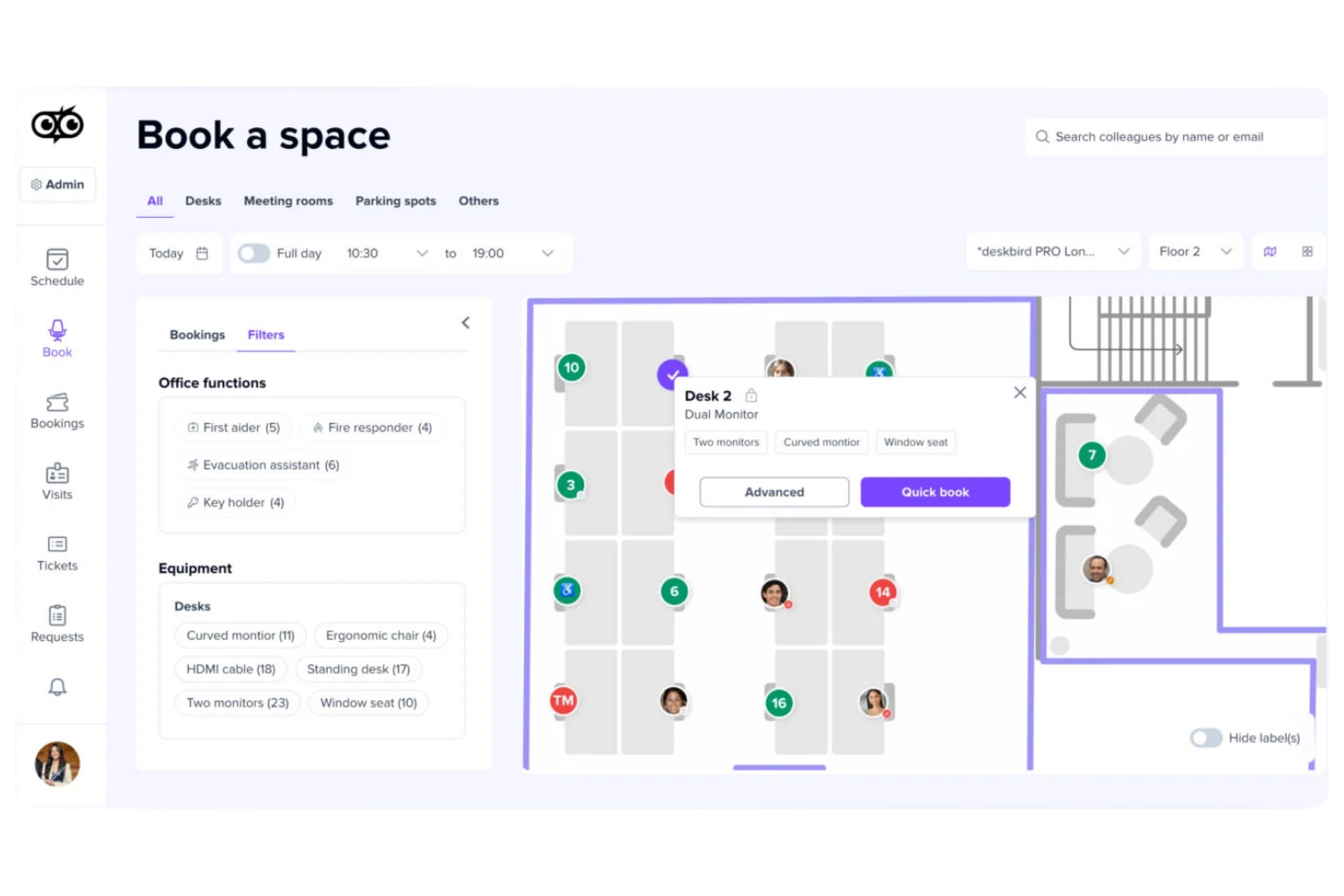
deskbird is an AI-powered office space management platform that offers workspace booking, usage analytics, office occupancy tracking, and smart recommendations for optimizing physical workspace allocation.
Who Is deskbird Best For?
deskbird fits offices with hybrid work models needing a system for workspace scheduling and actionable insights to maximize use of physical space.
Why I Picked deskbird
I picked deskbird as one of the best because I use its AI-based analytics to audit seat occupancy and receive automatic space efficiency recommendations. I get daily and long-term insights, and the platform flags underused areas to help me make informed changes.
deskbird Key Features
- Interactive floor plan: Users can view and select available spaces directly on a digital office map.
- Mobile app booking: Book desks and rooms using the deskbird mobile app for iOS and Android.
- Hybrid work planning: Schedule in-office and remote workdays within the platform.
- Visitor management: Register and track office visitors using integrated workflows.
deskbird Integrations
deskbird offers 50+ native integrations including Microsoft 365, Outlook, Google Workspace, Microsoft Teams, Sage, Rippling, UKG Pro, HiBob, Gusto, Dayforce, ADP, Workday, and Slack. An API is available for custom integrations.
Pros and Cons
Pros:
- Mobile booking for desks and meeting rooms
- Interactive office floorplans for easy navigation
- AI generates actionable workspace efficiency insights
Cons:
- Some analytics features are locked to higher plans
- No native IoT sensor hardware

Robin
Best for flexible desk and room reservations
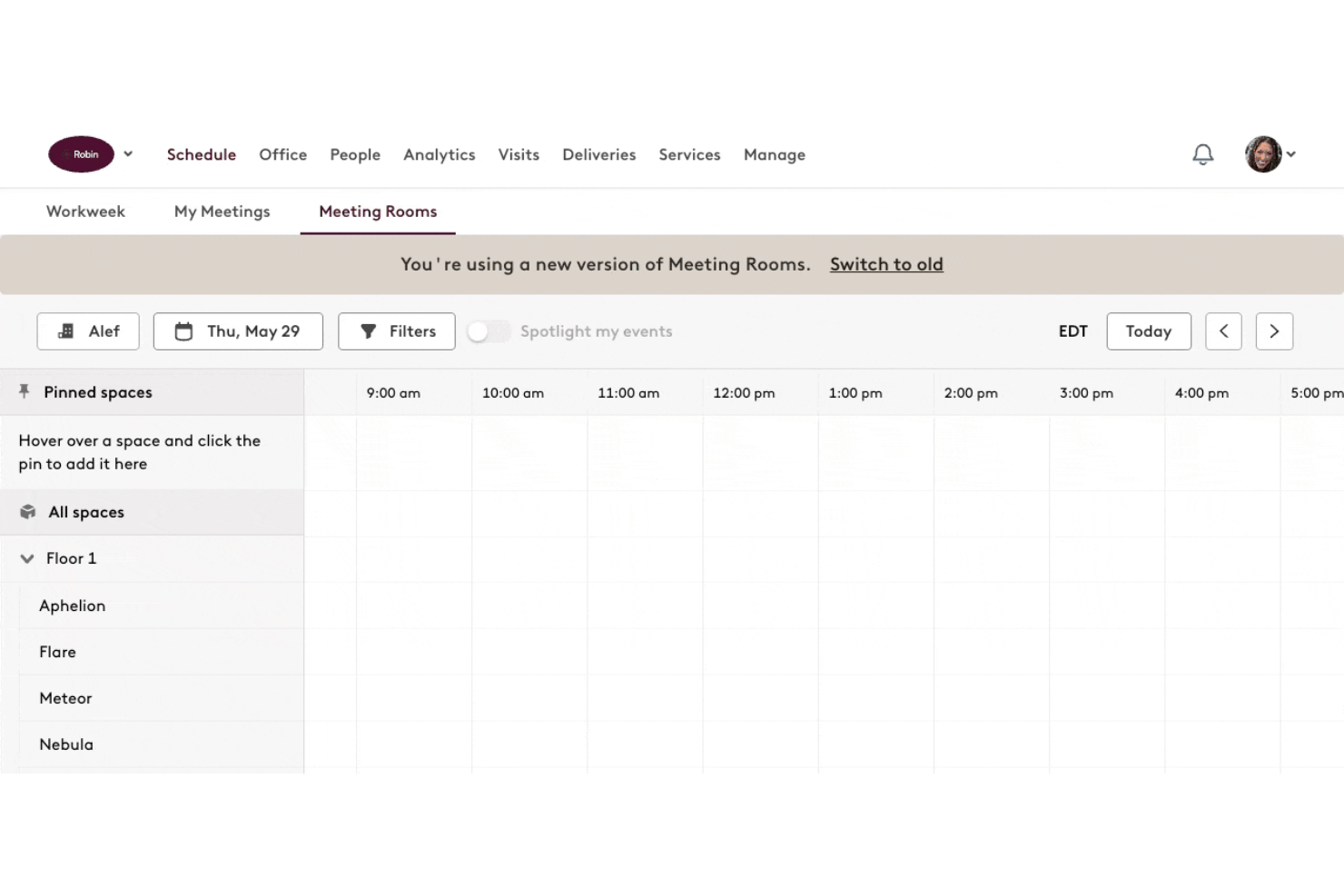
Robin is a space management platform offering AI-powered hot-desking options, room bookings, office maps, analytics, and shared workspace coordination.
Who Is Robin Best For?
Facilities and workplace teams at hybrid offices that need on-demand desk and meeting room scheduling.
Why I Picked Robin
I picked Robin as one of the best because I can set up flexible desk and conference room reservations, manage daily shifts, and configure office maps that update as bookings change. I use Robin’s scheduling rules to automate space assignments for hybrid and remote teams.
Robin Key Features
- Interactive office floor plans: Visualize workspace availability and seating layouts in real time.
- Visitor management: Register, track, and manage guest access directly from the platform.
- Workplace analytics dashboard: Display usage patterns and space utilization metrics for all locations.
- Mobile app booking: Reserve desks or rooms from iOS and Android devices.
Robin Integrations
Robin offers native integrations across the Microsoft ecosystem, including Microsoft Teams, Outlook, Exchange, Entra ID, Intune, and Microsoft 365, as well as Google Calendar and Google Workspace. It also integrates with Slack, Zoom, Okta, OneLogin, Rippling, and access control systems like Avigilon, Brivo, and Kisi. An API is available for custom integrations.
Pros and Cons
Pros:
- Mobile app supports on-the-go reservations
- Real-time occupancy and workplace analytics
- Customizable office maps update with bookings
Cons:
- Some features only available on higher tiers
- Setup for large offices takes time
Best for sensor-driven workspace analytics
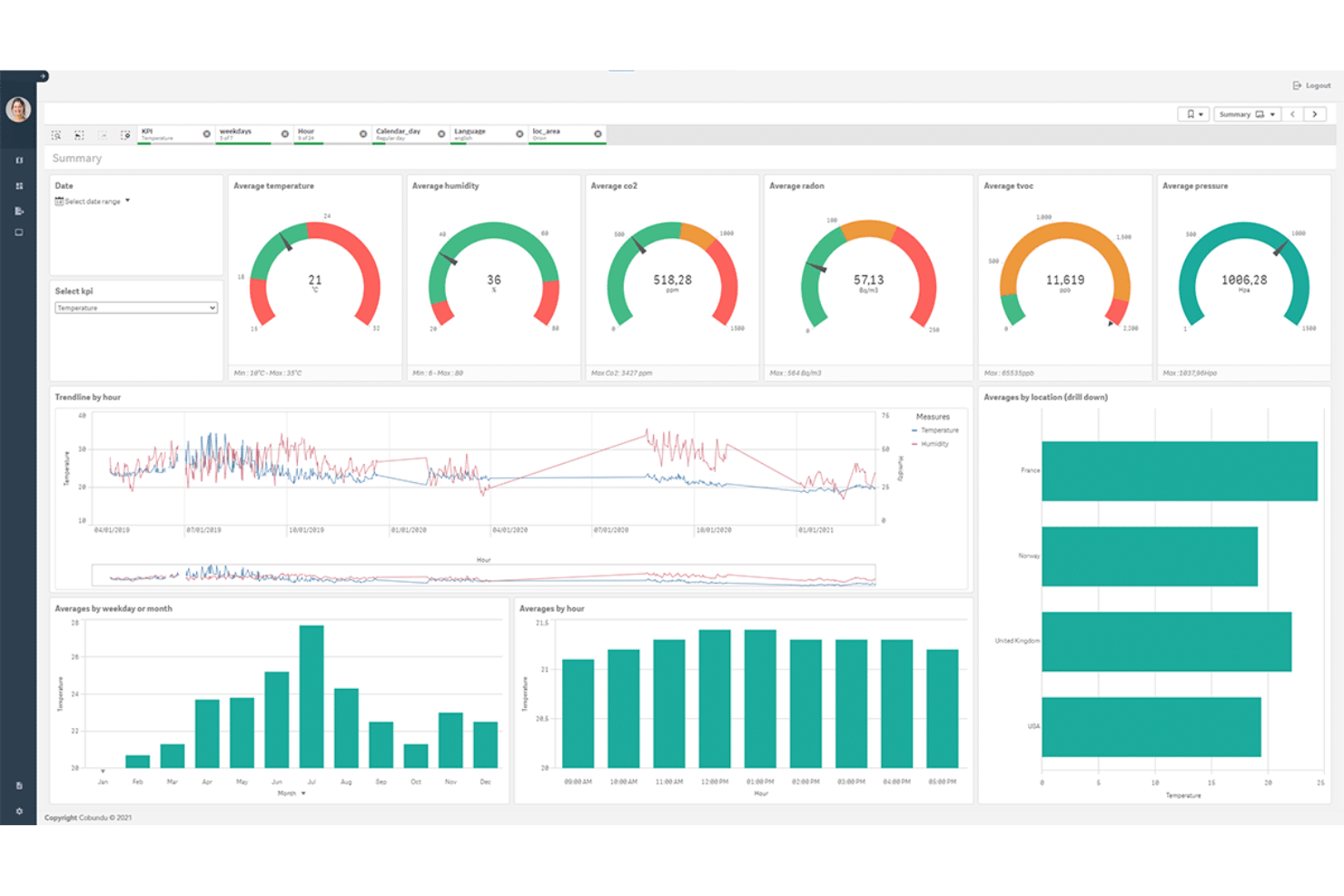
Spacewell is an AI-driven office space management platform that delivers workspace utilization monitoring, desk and room booking, occupancy insights, and automated facility operations management.
Who Is Spacewell Best For?
Facility managers in large corporate offices or multi-site enterprises who need robust workspace monitoring and analytics.
Why I Picked Spacewell
I picked Spacewell as one of the best because I use its IoT sensor integrations to gather real-time workspace occupancy and environmental metrics. I rely on its granular analytics dashboards for seat-level and meeting room utilization tracking.
Spacewell Key Features
- Desk and room booking system: Lets employees reserve workspaces and meeting rooms through a self-service portal.
- Cleaning and maintenance scheduling: Automates assignment and tracking of cleaning and service tasks.
- Live floor plan visualization: Shows current occupancy and activity across office zones in an interactive map.
- Occupant feedback modules: Collects real-time feedback from employees about workspace conditions.
Spacewell Integrations
Spacewell offers native integrations with Oracle, SAP, ServiceNow, Freshservice, Workday, Jira, and Microsoft 365. Google Workspace, AutoCAD, and more. An API is available for custom integrations.
Pros and Cons
Pros:
- Detailed workplace environmental monitoring
- Sensor-based alerts for inefficient space usage
- Real-time heatmapping of workspace occupancy
Cons:
- Workflow customization options are limited
- Initial setup may require technical assistance
YAROOMS
Best for AI-powered workplace assistance
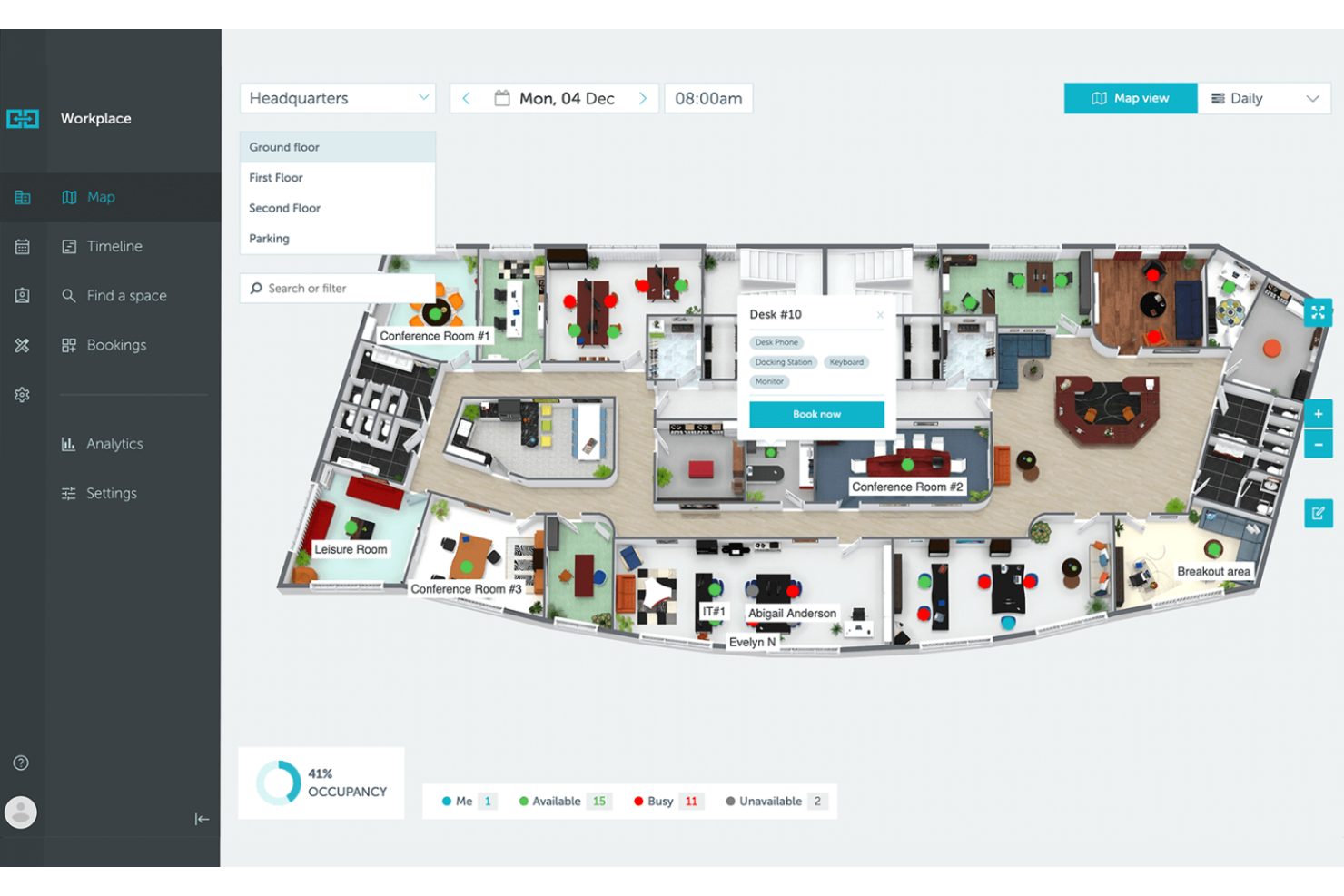
YAROOMS is an AI-driven office space management platform that combines resource booking, workspace analytics, hybrid work planning, and environmental monitoring into an all in one system.
Who Is YAROOMS Best For?
YAROOMS is a strong fit for facilities and workplace managers at mid-sized to large organizations seeking advanced AI support for space management and resource coordination.
Why I Picked YAROOMS
I picked YAROOMS as one of the best because I use its AI-powered assistant, YARVIS, to automate booking requests and respond to employee questions in real time. I rely on its natural language interface and policy-driven recommendations to manage workspace access and optimize resource usage.
YAROOMS Key Features
- Workplace analytics dashboard: Tracks workspace utilization and user activity in real time.
- Hybrid work scheduling: Lets users coordinate in-office and remote workdays.
- Interactive floor plans: Lets users visualize workspace layouts and check availability before booking.
- Room and desk booking: Allows employees to reserve meeting rooms and desks directly from the platform.
YAROOMS Integrations
YAROOMS offers native integrations across the Microsoft ecosystem, including Microsoft Teams, Microsoft 365, Outlook, and Azure AD, along with Google Calendar, Google Meet, Slack, Zoom, MappedIn, and SAML 2.0 for SSO. A REST API is also available for custom integrations.
Pros and Cons
Pros:
- Tracks environmental metrics like CO2 and air quality
- Desk and room mapping is interactive and clear
- AI assistant processes requests in natural language
Cons:
- Mobile app lacks offline booking
- Lacks passive occupancy sensor hardware

Best for Microsoft ecosystem integration
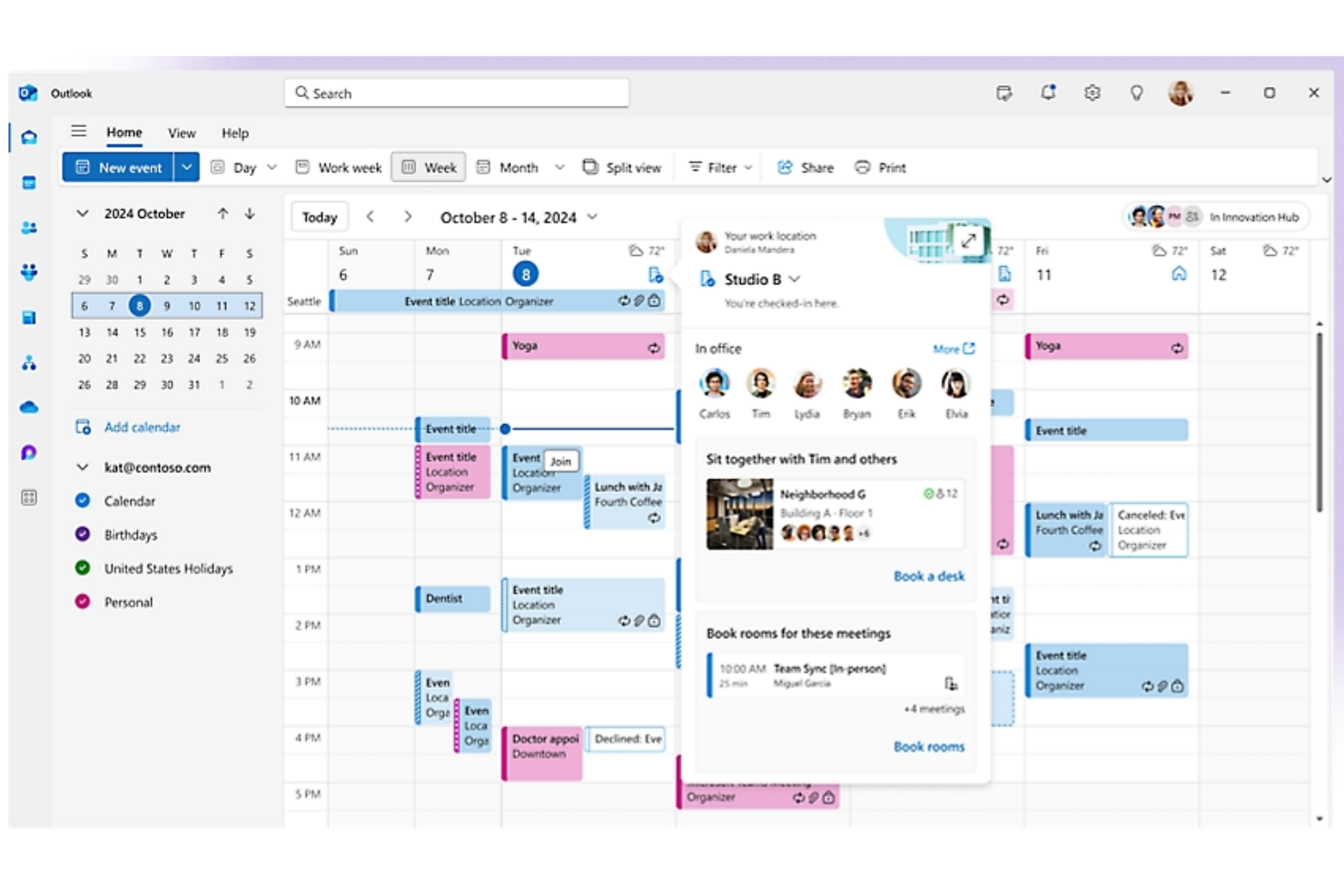
Microsoft Places is a smart workplace management platform that helps organizations manage hybrid workspaces, enable desk and room booking, coordinate in-office schedules, and visualize workplace occupancy through integration with Microsoft 365.
Who Is Microsoft Places Best For?
Microsoft Places is well-suited for medium-to-large organizations using Microsoft 365 who want to manage hybrid office occupancy and space coordination across locations.
Why I Picked Microsoft Places
I picked Microsoft Places as one of the best because I can manage workspace reservation, team schedules, and space utilization directly within the Microsoft 365 ecosystem. I rely on it to sync bookings with Outlook and Teams, keeping all workplace data centralized.
Microsoft Places Key Features
- AI-powered occupancy forecasting: Provides workspace usage predictions using real-time and historical data
- Interactive workplace maps: Lets users visualize office layouts to locate rooms and desks
- Hybrid work scheduling: Lets employees coordinate in-office and remote days with integrated workspace reservations.
- Presence detection integration: Updates workspace availability automatically based on user presence data
Microsoft Places Integrations
Microsoft Places has native integrations across the Microsoft ecosystem, including Microsoft 365, Outlook, Teams, and Azure. An API is available for custom integrations.
Pros and Cons
Pros:
- Direct calendar sync with Outlook and Teams
- AI-powered occupancy forecasts assist planning
- Floor plan mapping is customizable and detailed
Cons:
- Features closely tied to Microsoft 365 subscriptions
- Limited analytics unless using advanced Microsoft licenses

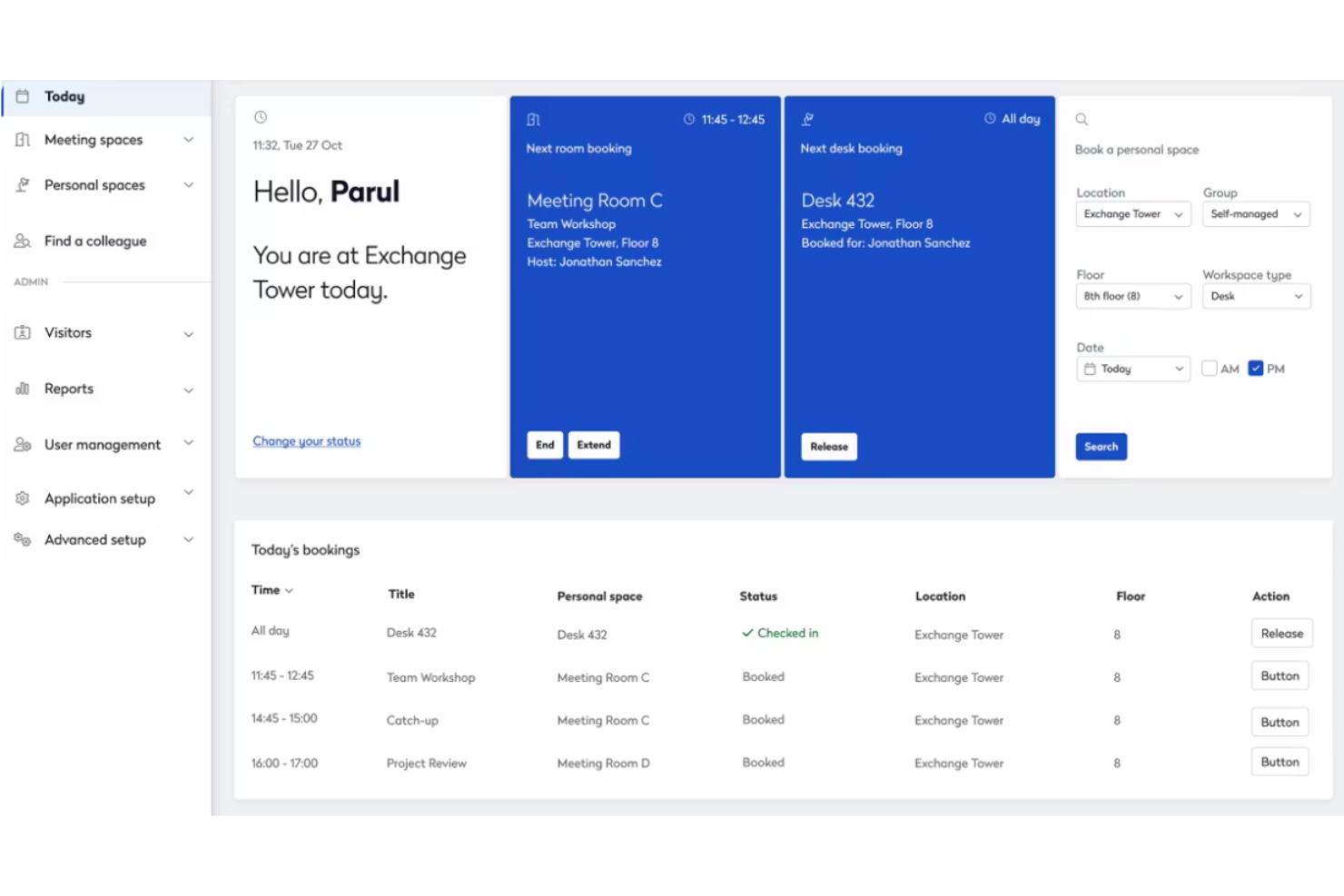
Eptura is a workplace management platform designed for hybrid offices, offering features such as desk and room booking, visitor management, workplace analytics, asset tracking, and space planning.
Who Is Eptura Best For?
HR and facilities teams at enterprise or multi-location companies who want unified management of hybrid workspaces and scheduling.
Why I Picked Eptura
I picked Eptura as one of the best because I can coordinate hybrid work schedules with desk and room booking that syncs across employee calendars and floor plans. I also like how the scheduling automation reduces manual work for my team.
Eptura Key Features
- Interactive floor plan mapping: Visualize workspace layouts and desk assignments in real time.
- Visitor management system: Register guests, track entry, and automate sign-ins.
- Asset tracking dashboard: Monitor and manage office equipment locations and usage.
- Workplace analytics reporting: Analyze occupancy, space usage, and trends with built-in reports.
Eptura Integrations
Eptura offers more than 30 native integrations, including the Microsoft ecosystem, Zoom, Salesforce, Dropbox, Azure, AWS, Power BI, and Slack. It integrates with Zapier, and an API is also available for custom integrations.
Pros and Cons
Pros:
- Mobile booking and check-in functionality
- Custom floor plans reflect actual workspace layouts
- Real-time view of desk and room occupancy
Cons:
- Reporting modules can be difficult to use
- Setup can be complex for large offices


Maptician is an office space management software that provides dynamic office mapping, real-time desk booking, meeting room scheduling, visitor tracking, and workspace occupancy analytics for modern workplaces.
Who Is Maptician Best For?
Office administrators and facility managers in mid-sized and large companies who need real-time control and visualization of dynamic workspaces.
Why I Picked Maptician
I picked Maptician as one of the best because I rely on its interactive dynamic office maps that update in real time, making it easy to visualize and adjust space allocation. The ability to manage both desk and meeting room assignments from a detailed floor plan is a major plus.
Maptician Key Features
- Workplace occupancy analytics: Lets you track and analyze space usage trends over time.
- Visitor management system: Enables front-desk check-ins and guest tracking.
- Health and safety compliance tools: Supports contact tracing and social distancing protocols.
- Self-service desk booking: Allows employees to reserve their own workspaces online.
Maptician Integrations
Native integrations with Microsoft 365, Webex, Microsoft Azure, Brivo, Ping, Google Workspace, Okta, Slack, and more are supported. Maptician also provides an API for custom integrations.
Pros and Cons
Pros:
- Desk booking available through the mobile app
- Includes space utilization and occupancy analytics
- Floorplan updates reflect real-time changes
Cons:
- Annual subscription contract is required
- Lacks passive automatic check-in sensors
Other AI Office Space Management Software
Here are some additional AI office space management software options that didn’t make it onto my shortlist, but are still worth checking out:
- elia
For automated occupancy tracking
- OfficeSpace
For customizing workplace layouts
- anny
For granular permission controls
- Skedda
For interactive floorplan scheduling
- WorkInSync
For centralized resource booking
- Kadence
For real-time occupancy scheduling
- Tactic
For hybrid team coordination
- Joan
For meeting room display integration
- Archie
For workplace visitor management
- Officely
For Slack-based office planning


How I Evaluate AI Office Space Management Software
I look for platforms where AI does more than label a dashboard—it should actively predict occupancy, suggest smarter desk assignments, and surface real estate savings your team can act on. My evaluation splits into two layers: core functionality every tool needs to make the list, and differentiating factors that separate good options from great ones.
Core Functionality (Table Stakes For This List)
When I'm selecting tools for my list, I rank each one on a scale from 0 (does not offer the functionality) to 5 (excels in this area) for each core functionality listed below. Then, I calculate the tool's total score into a percentage. Each tool needs to achieve a minimum total score of 65% to be considered for inclusion.
- AI-Driven Space Optimization: I look for platforms where ML models analyze patterns across seating zones, floors, and shifts to recommend consolidation or layout changes.
- Intelligent Desk & Room Booking: The booking engine should surface smart suggestions—like assigning desks near teammates already scheduled to be in the office that day.
- Occupancy Analytics & Forecasting: I evaluate whether the tool goes beyond historical dashboards to predict future demand, such as forecasting peak days by department.
- Employee-Facing Experience Interface: A mobile or web app that lets employees search for open desks, locate colleagues, and book rooms on the go is what I check for here.
- HR & Workplace System Integrations: Connectors to HRIS platforms, calendar tools like Outlook and Google Calendar, and collaboration apps like Slack or Teams keep data in sync.
- Interactive Floor Plans & Wayfinding: I look for dynamic, visual maps that show real-time availability and let employees tap a desk or room to book it directly from the layout.
Once I have a list of tools that meet this criteria, I consider what sets each platform apart.
Differentiating Factors (What Sets Vendors Apart)
Here's how I compare and contrast different vendors:
Standout Features
Team coordination AI is a big one for me—I check whether a platform can suggest optimal in-office days based on who's collaborating on shared projects. Scenario planning tools also carry weight, especially for HR leaders modeling what happens to space needs after a hiring surge or a return-to-office policy shift. I also look for conversational AI assistants that let employees book a desk or find a colleague through Slack or Teams without leaving their workflow.
Beyond Features
Data privacy matters here because these platforms collect sensitive employee presence and location data. I evaluate whether vendors offer GDPR and SOC 2 compliance alongside configurable anonymization settings. Scalability is another factor I weigh—an HR team managing five offices across different regions needs multi-site dashboards, localized time zones, and flexible licensing that grows with headcount. I also consider onboarding support, since floor plan digitization and sensor setup can stall rollout without a dedicated implementation team.
How to Choose AI Office Space Management Software
It’s easy to get bogged down in long feature lists and complex pricing structures. To help you stay focused as you work through your unique software selection process, here’s a checklist of factors to keep in mind:
| Factor | What to Consider |
|---|---|
| Scalability | Will the system support your current and future office locations, team sizes, or changes to workspace layouts without major upgrades or increased complexity? |
| Integrations | Does the platform connect with the access control, HR, or IT systems you already use? Look for verified integrations, not just API claims. |
| Customizability | Can you tailor occupancy rules, workspace zones, and reporting dashboards to reflect your organization’s unique workflows and policies? |
| Ease of use | Will employees and admins be able to adopt the tool with minimal training? Ask for demos to see if common tasks are quick and straightforward. |
| Implementation and onboarding | How long does setup take, and what resources does the vendor provide for onboarding? Check for migration support, templates, and hands-on guidance. |
| Cost | Are pricing tiers aligned with your expected usage, not just user counts? Watch for extra fees tied to sensor hardware, floorspace, or additional analytics. |
| Security safeguards | Does the tool anonymize or secure occupancy data and comply with privacy regulations? Confirm standards and certifications suited to your region or industry. |
| Support availability | What support channels and service hours does the vendor offer? Consider if you’ll need on-demand troubleshooting or help across multiple time zones. |
What Is AI Office Space Management Software?
AI office space management software is a digital platform that uses artificial intelligence to monitor, analyze, and manage workspace occupancy in real time. These tools provide automated insights into office usage, support booking and resource allocation, and help teams optimize layouts for efficiency. Typically, they include features like occupancy analytics, capacity alerts, and tools for workspace reservation.
Features of AI Office Space Management Software
When selecting AI office space management software, keep an eye out for the following key features:
- Real-time occupancy monitoring: Uses sensors or AI algorithms to track and display the current usage of rooms and workspaces as it happens, helping facilities teams make informed decisions quickly.
- Automated workspace booking: Lets employees reserve desks or meeting rooms through a centralized system, preventing costly double bookings and optimizing resource allocation.
- Occupancy analytics dashboard: Provides detailed visualizations and reports on space usage trends, utilization rates, and peak occupancy times to inform office planning.
- Capacity alerts: Sends notifications when rooms or areas approach or exceed safe or assigned capacities, supporting compliance with workplace safety guidelines.
- Customizable workspace zones: Allows admins to define, adjust, and monitor distinct areas within larger offices or campuses to reflect organizational needs or departmental layouts.
- Privacy controls: Offers features to anonymize or limit personal information gathered through sensors, ensuring compliance with privacy regulations.
- Integration with building systems: Connects with HVAC, lighting, or access control systems to sync occupancy data with facility resources for greater efficiency.
- Intelligent demand forecasting: Uses historical data to predict space needs for future weeks, taking the guesswork out of planning for fluctuating headcounts.
- Mobile app access: Enables workspace booking, check-in, and viewing analytics on the go, increasing flexibility for remote and mobile workers.
- Automated reporting tools: Generate and distribute usage, compliance, or audit reports on a regular schedule with little manual intervention.
Benefits of AI Office Space Management Software
Implementing AI office space management software provides several benefits for your team and your business. Here are a few you can look forward to:
- Optimized workspace utilization: Real-time occupancy monitoring and analytics reveal usage patterns, helping you make better decisions about how to allocate office space.
- Time-saving automation: Automated booking and capacity alerts reduce the manual workload for facilities teams by managing reservations and compliance tasks.
- Improved employee experience: Centralized booking and clear availability status make it easier for employees to find and reserve workspaces or meeting rooms.
- Enhanced safety and compliance: Capacity controls and reporting tools help you keep occupancy within safe limits and maintain up-to-date compliance records.
- Smarter resource planning: AI-powered forecasting uses historical data to predict future space needs across your entire real estate portfolio.
- Increased cost efficiency: Identifying underused areas and eliminating wasted space can help reduce overhead and operating costs.
- Data-driven decision-making: Comprehensive reporting and customizable dashboards empower stakeholders to base office strategies on facts instead of guesses.
Costs and Pricing of AI Office Space Management Software
Selecting AI office space management software requires an understanding of the various pricing models and plans available. Costs vary based on features, team size, add-ons, and more. The table below summarizes common plans, their average prices, and typical features included in AI office space management software solutions:
Plan Comparison Table for AI Office Space Management Software
| Plan Type | Average Price | Common Features |
|---|---|---|
| Free Plan | $0 | Basic occupancy tracking, manual booking system, limited analytics, and email support. |
| Personal Plan | $5-$15/user/month | Desk or room reservations, usage analytics, basic reporting, mobile app access, and chat support. |
| Business Plan | $20-$40/user/month | Automated booking, real-time occupancy data, integrations, admin controls, and capacity alerts. |
| Enterprise Plan | $50-$100/user/month | Custom workflows, advanced analytics, API access, enterprise security, and dedicated support. |
AI Office Space Management Software FAQs
Here are some answers to common questions about AI office space management software:
How does AI office space management software use occupancy data?
AI office space management software gathers occupancy data from sensors or system logins to analyze real-time and historical usage patterns. This helps your team identify how often spaces are used, spot underutilized areas, and make informed decisions about office layouts and resource allocations.
Can these tools help support hybrid or flexible work arrangements?
Yes, most AI office space management solutions support hybrid work by enabling employees to reserve desks in advance, see who is working onsite, and track space availability. This flexibility helps coordinate on-site schedules and ensures compliance with capacity policies.
Is it difficult to onboard employees and admins to these platforms?
No, onboarding is usually straightforward. Most platforms provide interactive product tours, training videos, and templates to help users get started quickly. Admins can often import employee lists, configure floor plans, and set policies with minimal IT support.
What integrations should I look for with these tools?
Look for integrations with calendars, access control systems, HR platforms, and building management systems. These connections help automate bookings, sync user data, and tie workspace usage to other business processes.
How do these systems address privacy concerns about occupancy monitoring?
Most leading solutions offer privacy controls such as data anonymization and limited access to sensitive information. Always review the privacy features to ensure compliance with internal policies and legal regulations, especially if you operate in regions with strict data protection laws.