

10 Best AI Resume Screening Software Reviewed in 2026

10 Best AI Resume Screening Software Shortlist


Finding the right talent is hard, and sifting through countless resumes can be overwhelming. You want to ensure you're making the right hires, but the sheer volume can be daunting.
AI resume screening software can help. These tools use advanced algorithms to identify the best candidates, saving you time and effort. They analyze resumes quickly, focusing on skills and experience that matter to your team.
I’ve reviewed and tested various AI resume screening tools, using my expertise in HR management to provide an unbiased analysis. In this article, I’ll share my top picks, focusing on their AI capabilities and how they can benefit you. Let's dive in to find the solution that fits your needs.
Why Trust Our Software Recommendations
Our team has been testing and reviewing software since 2012. As HR experts ourselves, we know how difficult—and important—it is to choose the right software.
For this guide, we evaluated tools using hands-on testing and independent research, scoring tools using our selection criteria. We also draw on insights from industry thought leaders and practicing HR experts.
Our reviews reflect our human editorial judgment, not a sales pitch.
Expert reviewers:
AI Resume Screening Software Comparison Table
This comparison table summarizes pricing details for my top AI resume screening software selections:
| Tool | Best For | Trial Info | Price | ||
|---|---|---|---|---|---|
| 1 | Best for custom recruitment analytics | Free demo available | Pricing upon request | Website | |
| 2 | Best for outcome-linked high-volume screening | Free demo available | Pricing upon request | Website | |
| 3 | Best for integrated onboarding tools | Free demo available | From $8/user/month | Website | |
| 4 | Best for custom resume evaluation workflows | Free plan available; 14-day free trial | From $9/user/month (billed annually) | Website | |
| 5 | Best for multi-stage candidate screening | 7-day free trial + free demo available | From $99/month (billed annually) | Website | |
| 6 | Best for talent matching | Free demo available | Pricing upon request | Website | |
| 7 | Best for collaborative hiring | Free demo available | From $299/month | Website | |
| 8 | Best for recruiting companies | Free plan available | From $29.98/month (billed quarterly) | Website | |
| 9 | Best for conversational AI | Free demo available | Pricing upon request | Website | |
| 10 | Best for volume hiring | Free demo available | Pricing upon request | Website |

Best AI Resume Screening Software Review
Below are my detailed summaries of the best AI resume screening software that made it onto my shortlist. My reviews offer a detailed look at the key features, pros & cons, integrations, and ideal use cases of each tool to help you find the best one for you.

Best for custom recruitment analytics
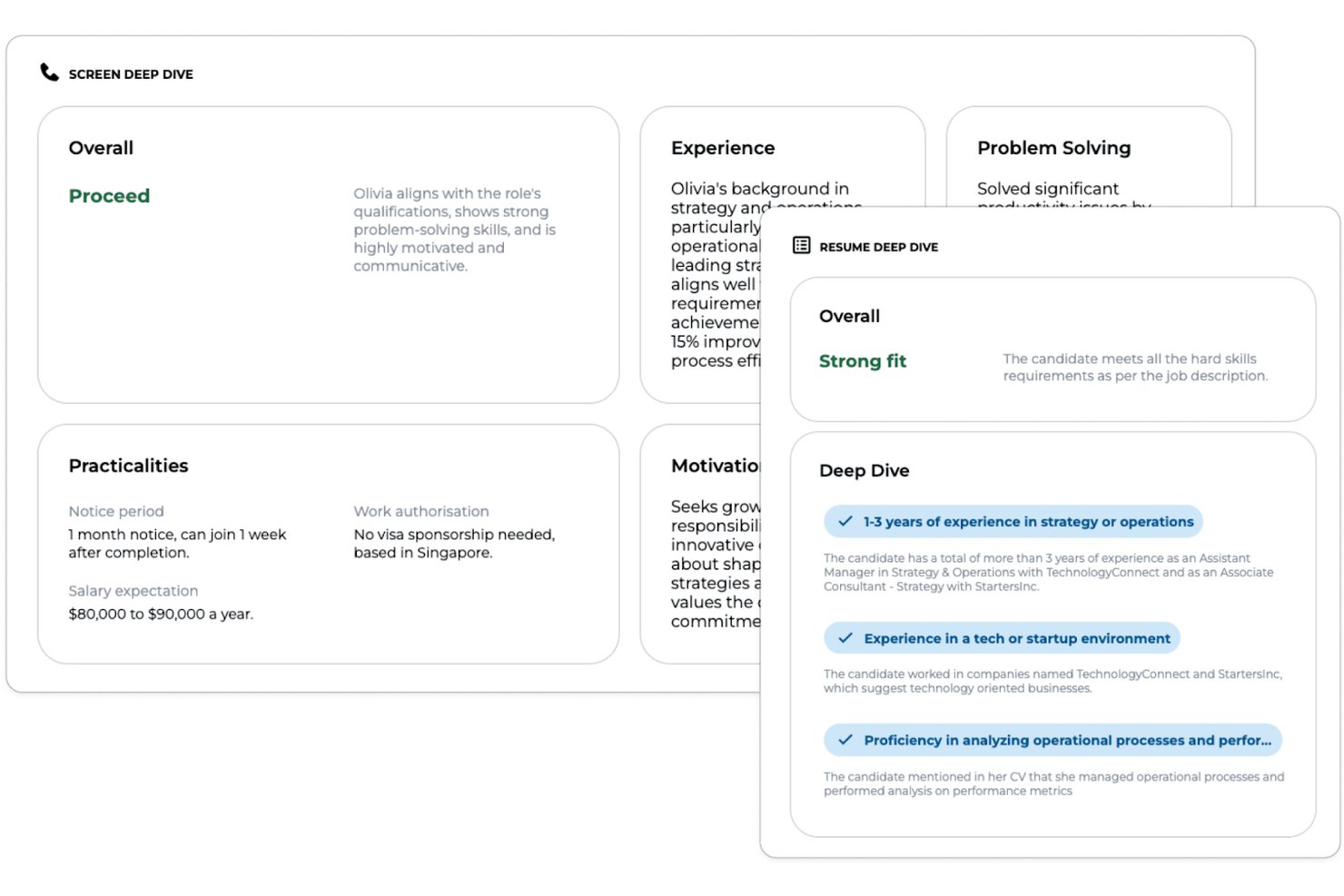
Greenhouse is an enterprise recruitment platform that offers customizable AI-powered resume parsing, advanced candidate scoring tools, DE&I modules, and seamless integrations for organizations looking to optimize talent acquisition workflows.
Who Is Greenhouse Best For?
Greenhouse is a strong choice for large and mid-sized recruiting teams that need customizable workflows and deep integration with existing HR systems.
Why I Picked Greenhouse
I picked Greenhouse because I use its robust reporting suite to track every hiring step, build custom analytics dashboards, and drill into hiring funnel data for granular talent insights. The reporting API lets my team connect analytics straight into BI tools.
Greenhouse Key Features
- AI resume parsing: Extracts candidate data from multiple file types using natural language processing.
- Customizable candidate scorecards: Let hiring teams create evaluation templates based on job requirements.
- Structured interviewing workflows: Guides users through standardized interview processes for fair candidate assessments.
- Bulk candidate actions: Enable batch movement, communication, and dispositioning of large candidate pools.
Greenhouse Integrations
Greenhouse offers 400+ native integrations, including Workday, ADP, SAP SuccessFactors, Oracle, UKG, LinkedIn, DocuSign, Zoom, Slack, BambooHR, and Google Workspace. An API is available for custom integrations.
Pros and Cons
Pros:
- Powerful workflows for high-volume screening
- Advanced candidate scorecard configuration tools
- Custom analytics for every recruitment stage
Cons:
- Onboarding automation can feel complex
- Native AI matching requires third-party add-ons
New Product Updates from Greenhouse

Greenhouse Opens Candidate Insights and Talent Matching Assistants to Beta
Greenhouse opens Candidate Insights and Talent Matching assistants to beta for candidate questions and natural-language search. This helps recruiters review candidates and build searches faster. For more information, visit Greenhouse’s official site.
 .
.
Best for outcome-linked high-volume screening
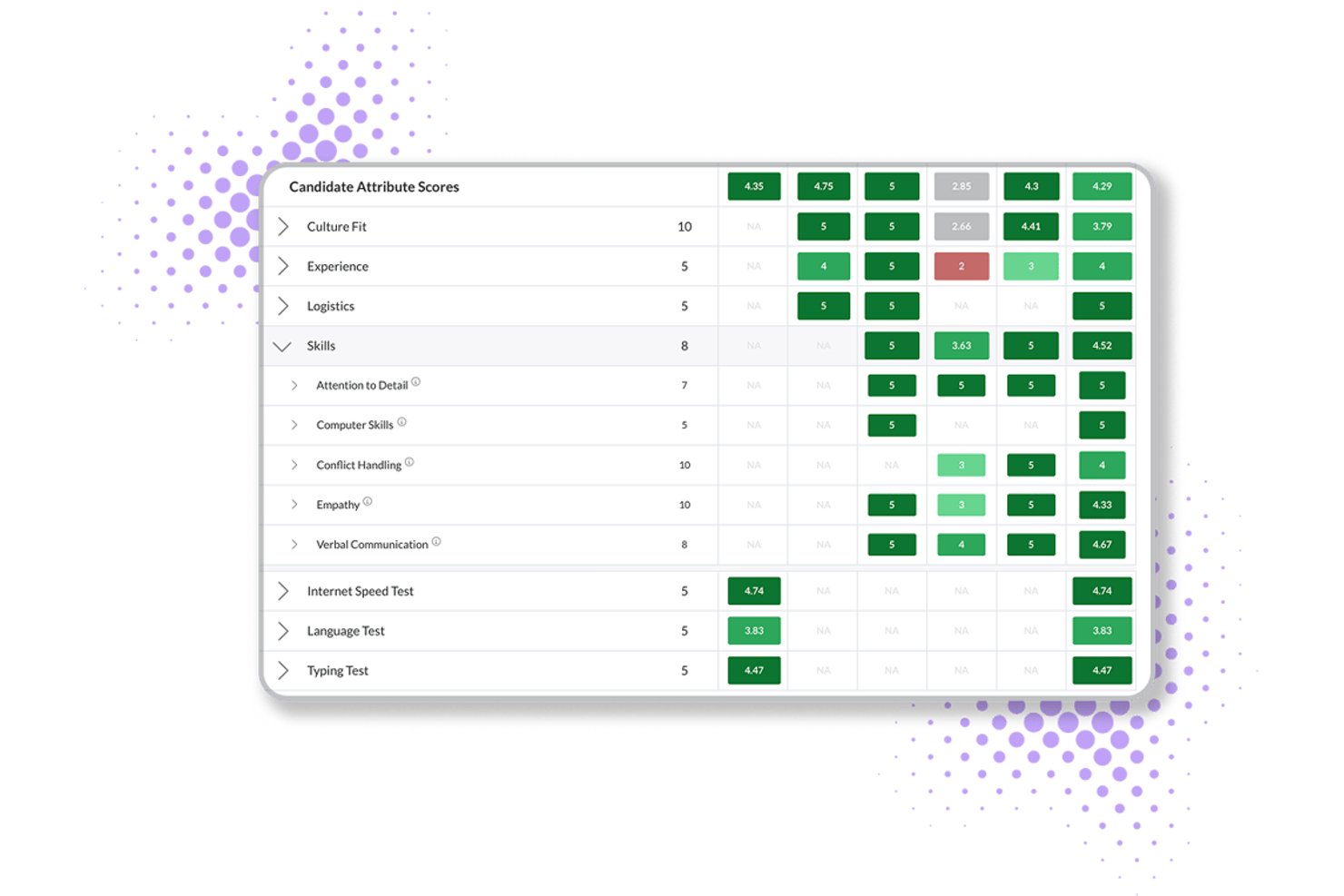
Journeyfront is an AI-powered ATS that combines resume scoring, behavioral assessments, predictive analytics, and hiring-class management for high-volume recruiting operations.
Who Is Journeyfront Best For?
Journeyfront is built for high-volume hiring teams in BPO, contact center, and warehouse environments that need to connect screening decisions to real post-hire outcomes.
Why I Picked Journeyfront
I picked Journeyfront as one of the best because it's the only tool on my list that closes the loop between screening decisions and real post-hire outcomes. Its AI Resume Review scores resumes against job-specific rubrics and feeds into a unified scorecard alongside assessments and interview results. In high-volume BPO or contact center hiring, that means a hiring class built in Journeyfront today can be traced back to 90-day retention and performance data tomorrow.
Journeyfront Key Features
- Predictive behavioral assessments: Candidates complete turnover-risk assessments that forecast 30, 60, 90, and 180-day attrition before a hire is made.
- AI-powered language testing: Built-in language proficiency tests use AI scoring aligned to CEFR levels, removing the need for a third-party language assessment tool.
- Fraud detection flagging: The platform automatically flags VPN use, duplicate IPs, and location changes to surface suspicious applicant activity during high-volume screening.
- Two-way SMS and WhatsApp messaging: Recruiters can send and receive candidate messages directly in the platform via SMS or WhatsApp without switching to a separate communication tool.
Journeyfront Integrations
Journeyfront lists an ecosystem of 400+ vendors, including Workday, Oracle, UKG Pro, BambooHR, Checkr, Sterling, SHL, and Versant. An Open API supports custom integrations, while ATS and HRIS integrations are available as add-ons.
Pros and Cons
Pros:
- Built-in fraud detection for high-volume hiring
- Explainable AI scores with human override
- Directly connects screening to post-hire outcomes
Cons:
- No public third-party bias audit available
- AI resume review feature still in beta

Best for integrated onboarding tools
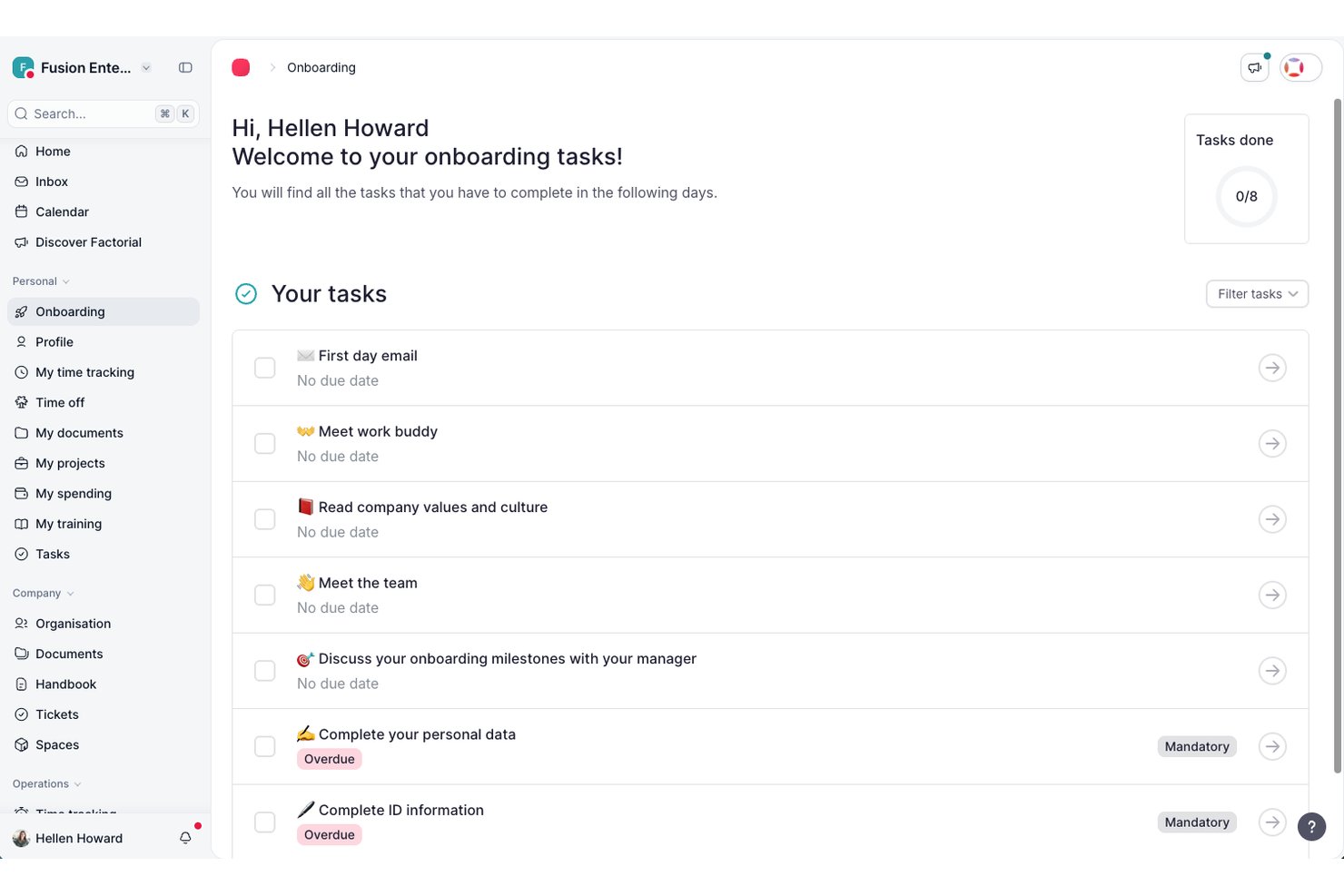
Factorial is an all-in-one HR and business management platform that includes a built-in ATS with AI-powered resume parsing, CV screening, candidate scoring, and hiring pipeline management alongside broader HR tools.
Who Is Factorial Best For?
Factorial is a good fit for small to mid-sized businesses that want to manage recruiting and HR operations in a single platform.
Why I Picked Factorial
I've included Factorial in my top picks because its ATS and onboarding tools share a single platform, so the handoff from hired candidate to active employee doesn't require switching systems or re-entering data. What I like most is how the AI-powered recruitment features, like CV filtering and competency suggestions, connect directly to onboarding workflows. Once a candidate is hired, you can kick off document collection, e-signatures, and task checklists right away. That tight link between recruiting and onboarding is something a lot of standalone AI screening tools simply don't offer.
Factorial Key Features
- AI candidate scoring: Factorial's AI ranks applicants based on how well their profiles match the job requirements you've set.
- Custom hiring pipeline stages: Build and adjust hiring stages for each role, with automatic candidate status updates at each step.
- Talent pool management: Store candidate profiles and surface them again when a relevant new role opens up.
- Job posting distribution: Publish open roles to multiple job boards directly from the platform without leaving the ATS.
Factorial Integrations
Factorial offers 90+ integrations through its marketplace, including LinkedIn, Slack, Okta, Teamtailor, Workable, Google Workspace, and Microsoft Outlook. It also connects with Zapier and has a public API for custom integrations.
Pros and Cons
Pros:
- Covers recruiting alongside payroll and performance
- Built-in GDPR and data retention controls
- Candidate data flows directly into onboarding
Cons:
- Limited customization options for reports
- Recruitment features locked behind premium add-on

Best for custom resume evaluation workflows
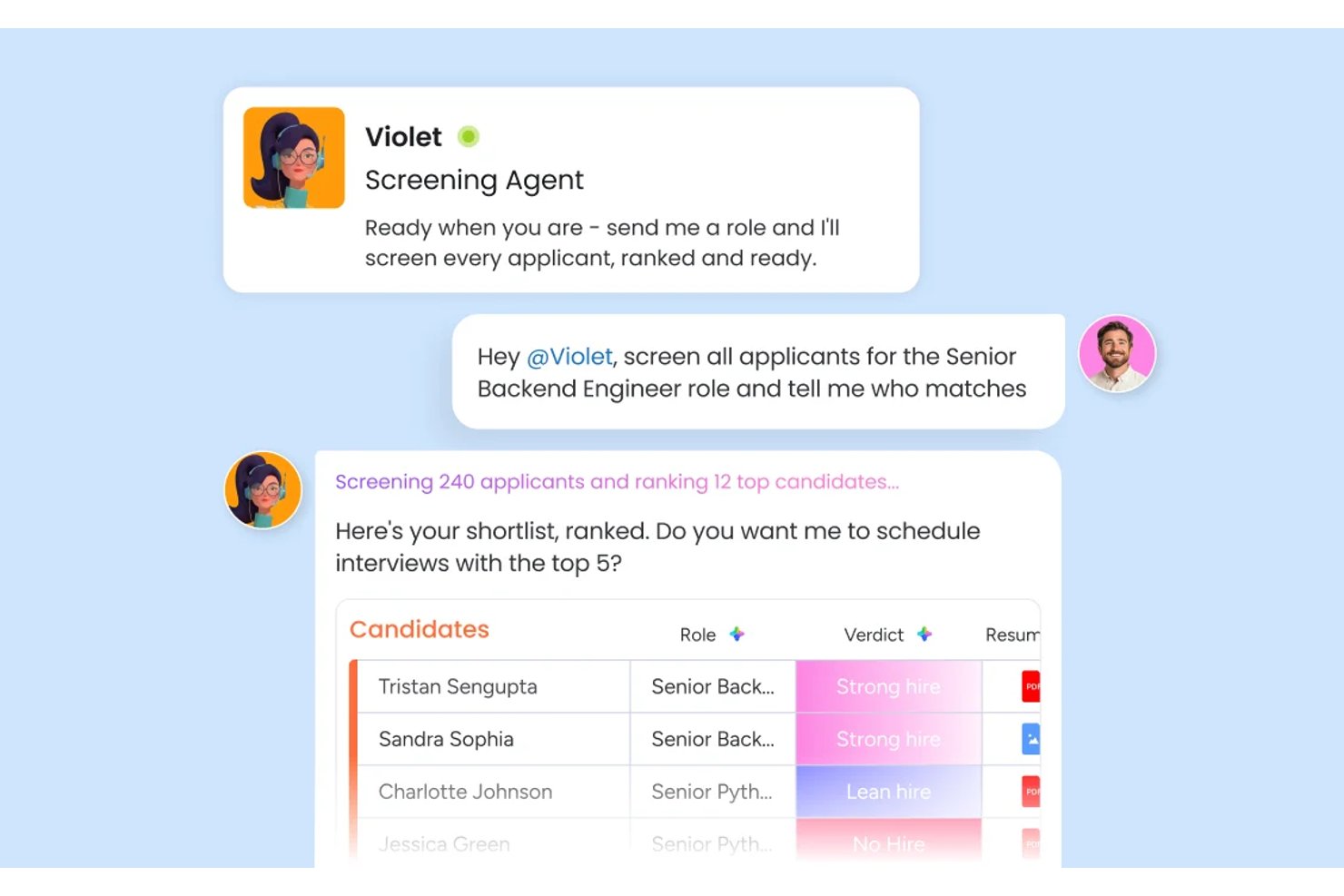
monday AI Workspace is a configurable work OS that lets recruiting teams build custom AI-powered candidate screening pipelines using automated resume parsing, candidate scoring, and cross-team hiring workflows.
Who Is monday AI Workspace Best For?
It's a strong fit for HR operations teams at mid-size organizations that want to build and own their recruiting workflows rather than conform to a rigid, pre-built ATS.
Why I Picked monday AI Workspace
I picked monday AI Workspace because of how much flexibility it gives my team to define what "qualified" actually means for each role. The Screening Agent scores every submission against criteria I set, and the AI Extract Info action pulls structured resume data directly into my board columns. What I find most useful is building custom AI actions in plain language, like prompting the tool to compare a resume against a specific job description and flag skill gaps automatically.
monday AI Workspace Key Features
- Interview coordination agent: Handles scheduling, reminders, and notifications for candidate interviews across global time zones.
- AI Sidekick: Provides an in-platform assistant to summarize candidate profiles and support decision-making in real time.
- Customizable hiring dashboards: Lets teams visualize pipeline status, stages, and team workload using drag-and-drop widgets.
- Automated communication workflows: Triggers templated emails and candidate status updates based on screening actions or candidate movements.
monday AI Workspace Integrations
monday AI Workspace offers hundreds of native integrations, including Slack, Google Workspace, Microsoft 365, Salesforce, Jira, GitHub, Zoom, Dropbox, HubSpot, and Zendesk. It also supports Zapier and provides an API for custom integrations.
Pros and Cons
Pros:
- Visual dashboard tracks pipeline status instantly
- AI supports multi-stage hiring workflows
- Customizable candidate scoring without code
Cons:
- Automation setup requires repeated manual prompts
- Can feel complex for small teams
New Product Updates from monday AI Workspace
monday AI Workspace Adds Human Approval Routing
monday AI Workspace adds a human-in-the-loop approval block to AI Workflows, sending approval requests and routing workflow paths based on responses. For more information, visit monday AI Workspace's official site.

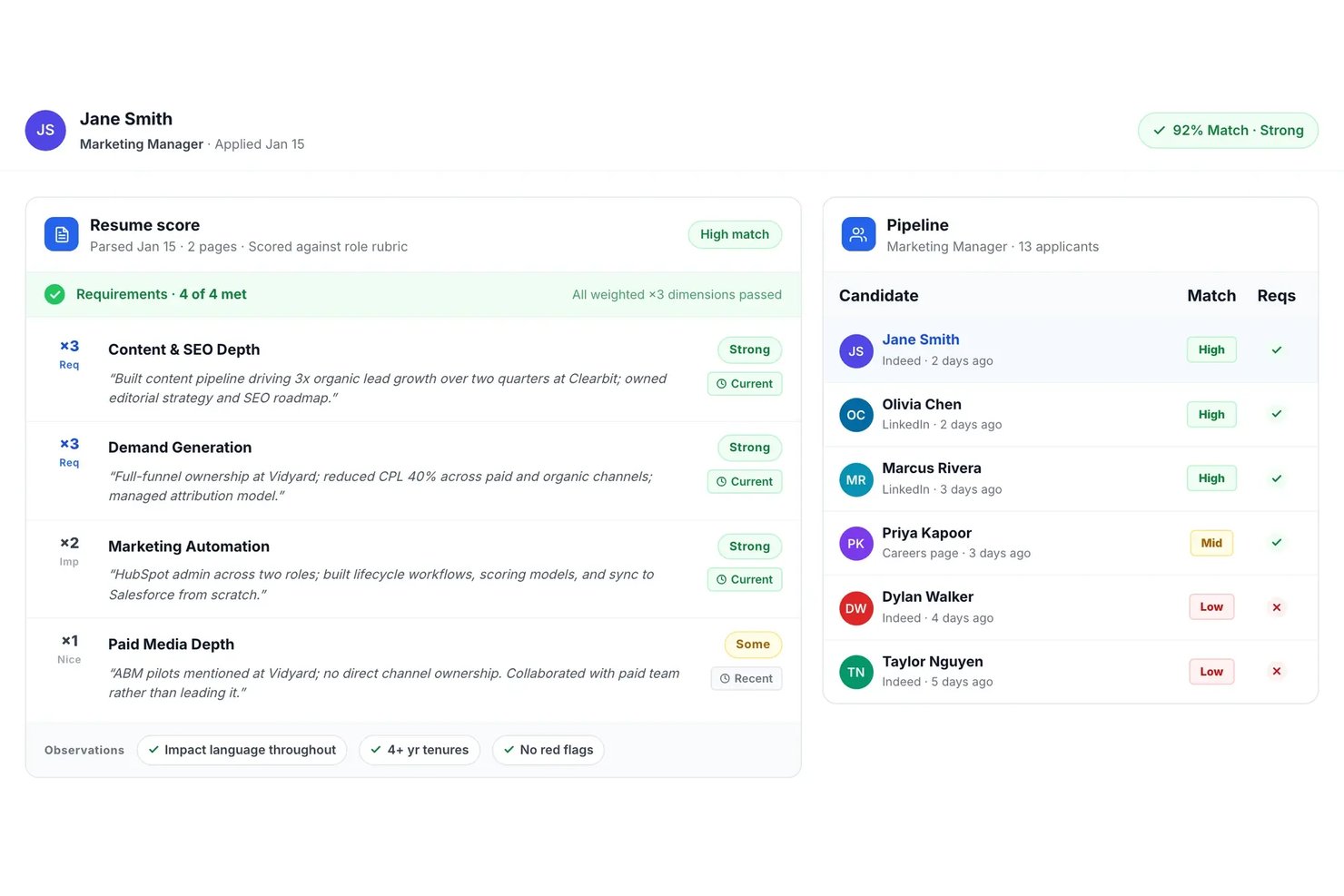
Truffle is an AI-driven resume screening platform that automatically parses, scores, ranks, and matches candidates to job descriptions with built-in multi-stage screening tools for high-volume recruiting teams.
Who Is Truffle Best For?
Truffle fits high-volume recruiters and HR teams at startups and mid-sized companies hiring for roles across multiple locations or business units.
Why I Picked Truffle
I picked Truffle as one of the best because I can launch one-click multi-stage candidate screening for every job. My team gets AI-powered ranking, instant structured shortlist summaries, and built-in async interview and skills screeners in a single flow.
Truffle Key Features
- Blind resume screening: Automatically hides candidates’ personal identifiers to support unbiased evaluation.
- Evidence-linked AI match scores: Presents match scores that include direct links to supporting resume details and criteria.
- Bulk resume uploading: Allows users to upload and process hundreds of resumes simultaneously for each role.
- ATS and HRIS integrations: Connects with major systems like Ashby, Breezy HR, and more through Zapier and open API.
Truffle Integrations
Truffle offers native integrations with Ashby, Breezy HR, and Indeed, and connects with Zapier. An open API is available for custom integrations.
Pros and Cons
Pros:
- Fast bulk processing for high-volume roles
- Built-in async skills and interview screening
- Automated shortlist with evidence-linked AI scores
Cons:
- No multilingual resume parsing support
- Limited advanced reporting and analytics tools

Best for talent matching

Eightfold AI caught my attention because it uses AI to deeply analyze candidate skills and experience, focusing on real job fit instead of just keyword matching. This platform is a match for companies with high-volume or complex hiring needs, where surfacing the strongest, most relevant talent quickly really matters.
I appreciate how it maps existing skills to open roles and internal mobility paths for clearer talent decisions.
Eightfold AI’s Best For
- Large organizations with high-volume resume screening needs
- Companies prioritizing talent matching and internal mobility
Eightfold AI’s Not Great For
- Small companies with basic screening requirements
- Teams wanting deep, customizable workflow automation
What sets Eightfold AI apart
Eightfold AI is built around the idea that skills and actual experience should drive hiring, not just matching keywords on a resume. In practice, it sifts through large volumes of applicants and brings forward people who have proven abilities that align with open roles. Unlike basic screening tools or recruiting features in something like Workday, Eightfold expects you to trust its AI to surface relevant candidates you might miss with manual filtering.
Tradeoffs with Eightfold AI
Eightfold AI optimizes for automated skill-based matching, but you give up detailed manual control and customization over the screening process. If you want to tweak how every filter works, you'll probably feel limited.
Pros and Cons
Pros:
- Centralizes workforce planning data
- Makes hiring decisions more diverse
- AI uncovers full candidate potential
Cons:
- Best with structured HR
- Complex for small organizations

Workable stands out for me when hiring gets collaborative and resume volumes get overwhelming. I like how its AI filters candidate pools and highlights strong matches right inside your collaborative hiring pipelines. Teams are able to comment, rate, and move candidates forward together, all in one place.
I appreciate how candidate scoring is transparent and integrates with real team feedback, which cuts down on back-and-forth review cycles.
Workable’s Best For
- Collaborative hiring teams screening high volumes of resumes
- Organizations wanting AI-driven candidate scoring with transparent team input
Workable’s Not Great For
- Companies handling infrequent or one-off hiring
- Teams needing deep sourcing or candidate relationship management
What sets Workable apart
Workable builds the hiring process around collaboration and transparency rather than just automation. Unlike something like Lever, which focuses heavily on pipeline analytics, Workable expects you to pull multiple stakeholders into candidate evaluations and shortlisting directly in the platform. This tends to work best when you want hiring managers and interviewers embedded in resume review and feedback, not just recruiters.
Tradeoffs with Workable
Workable optimizes for collaborative hiring, but advanced candidate sourcing or deep recruitment marketing capabilities are less visible. You lose out if your process depends on outreach and long-term talent pipelines.
Pros and Cons
Pros:
- Teams collaborate more effectively
- AI aids sourcing and screening
- Unified hiring and HR platform
Cons:
- Need manual setup for integrations
- Features vary by plan tier


Jobscan earns its spot for how it automates resume screening with recruiter-quality keyword and skills matching. When agencies face high volumes or tricky client needs, I see them using Jobscan’s ATS optimization to align resumes with each job’s real requirements.
I like that I can run side-by-side comparisons showing exactly how well a candidate’s resume matches the must-haves. This focus on concrete fit speeds up shortlisting when accuracy matters most.
Jobscan’s Best For
- Recruiting firms processing high-volume candidate pools
- Agencies needing precise ATS-driven resume matching
Jobscan’s Not Great For
- Internal HR teams screening limited applicant numbers
- Companies wanting deep AI interview or assessment features
What sets Jobscan apart
Jobscan is designed around matching resumes to job descriptions using recruiter-style logic, rather than just filtering on broad keywords as you find in basic ATS tools. In practice, this works best for agencies or hiring teams dealing with huge applicant pools who need objective, skills-based matches surfaced before deeper review.
Unlike LinkedIn Recruiter, which centers on search and relationship-building, Jobscan zeroes in on optimizing each resume for an exact role and its real requirements.
Tradeoffs with Jobscan
Jobscan optimizes for accurate, high-volume screening, but you give up broader candidate engagement or interview workflow features, which means you’ll need another tool for end-to-end recruiting.
Pros and Cons
Pros:
- Offers resume and LinkedIn analysis
- Includes ATS-friendly resume builder
- Helps identify missing keywords
Cons:
- Limited features for recruiters
- Focuses on individual applicants


Paradox is my pick here because of the conversational AI that’s built into its screening and scheduling experience. When I evaluate AI resume screening tools for high-volume hiring, what sets Paradox apart is how it uses AI chat to screen candidates in real time, answer questions, and move qualified people straight to the next step. I like that teams can automate early engagement and uncover strong-fit candidates without adding extra steps or delays.
Paradox’s Best For
- High-volume recruiting teams using AI chat for screening
- Organizations automating early candidate screening and scheduling
Paradox’s Not Great For
- Companies needing advanced skills assessments
- Teams that require detailed manual resume reviews
What Sets Paradox Apart
Paradox is unique because it builds the entire screening experience around conversational AI. Instead of expecting recruiters to review resumes directly, the system runs guided chat-based interviews that mimic the give-and-take of a recruiter conversation. I see this work well when organizations want to automate high-volume resume screens but still give candidates the sense of a two-way interaction.
Tradeoffs with Paradox
Paradox optimizes for fast, automated screening using natural language, but you lose the depth and nuance of traditional résumé analysis, which means some details or context may get missed at the earliest stage.
Pros and Cons
Pros:
- Works across time zones
- Instant interview scheduling
- Applications accessible through multiple platforms
Cons:
- Human recruiters still needed to manage final steps
- Chat flows require setup


Harver is a go-to for high-volume hiring, especially when you need a blend of automation and structured decision-making. I picked it for this list because its AI screening engine pre-selects candidates at scale, lining up only those that meet your criteria.
I appreciate its assessment-driven workflows—teams can assess huge talent pools quickly, then filter for job fit and readiness in one place.
Harver’s Best For
- High-volume recruiters screening thousands of candidates
- Teams that need automated pre-hire assessments and filtering
Harver’s Not Great For
- Small businesses with low applicant volume
- Teams wanting a detailed, manual resume review
What sets Harver apart
Harver is designed around large-scale, automated screening—unlike resume tools that expect you to review every candidate in detail. In practice, you set up assessments and rules up front, then the platform sifts through applicants and stacks the best matches at the top. Compared to something like Greenhouse or Lever, Harver expects you to rely on data-driven, hands-off filtering.
Tradeoffs with Harver
Harver optimizes for fast, automated volume screening, but you lose the ability to review each applicant’s details or do in-depth, personalized reviews early in the process.
Pros and Cons
Pros:
- Customizable assessments for different roles
- Provides data-driven hiring insights
- Handles high-volume hiring efficiently
Cons:
- Limited personalization for niche hiring
- Best suited for enterprise setups
Other AI Resume Screening Software
Here are some additional AI resume screening software options that didn’t make it onto my shortlist, but are still worth checking out:
- Alex
For intelligent resume analysis
- Covey
For candidate engagement
- Pesto
For tech recruitment
- HaiTalent
For fast track hiring
- ResumeScreening.ai
For real-time feedback
- Brainner
For automated candidate ranking
- Zoho Recruit
For customizable workflows
- Manatal
For social media recruitment


How I Evaluate AI Resume Screening Software
Any tool on this list needs to do more than slap an "AI" label on basic keyword filters—it has to genuinely reduce screening time and surface better-fit candidates from high-volume applicant pools. I split my evaluation into core functionality every tool must have to qualify, and differentiating factors that separate good options from great ones.
Core Functionality (Table Stakes For This List)
When I'm selecting tools for my list, I rank each one on a scale from 0 (does not offer the functionality) to 5 (excels in this area) for each core functionality listed below. Then, I calculate the tool's total score into a percentage. Each tool needs to achieve a minimum total score of 65% to be considered for inclusion.
- AI-Powered Resume Parsing: I check whether the tool can extract structured data—skills, job titles, education, certifications—from resumes across formats like PDF and DOCX with high accuracy.
- Candidate Scoring & Ranking: Each tool should generate AI-driven match scores and ranked shortlists, so recruiters reviewing 500+ applicants can quickly focus on the top candidates.
- Semantic Job Description Matching: I look for matches that go beyond keyword overlap to understand context, like recognizing that a "people operations lead" aligns with an "HR manager" role.
- Bias Mitigation Controls: Features like blind screening, demographic anonymization, or explainable scoring help me gauge how seriously a platform addresses fairness in automated decisions.
- Bulk Resume Processing: High-volume hiring teams need to screen thousands of resumes per role, so I evaluate whether the tool handles large batches without slowdowns or manual workarounds.
- ATS and HRIS Integration: The tool should connect with platforms like Greenhouse, Workday, or iCIMS so screened candidates flow directly into existing recruiting workflows.
Once I have a list of tools that meet this criteria, I consider what sets each platform apart.
Differentiating Factors (What Sets Vendors Apart)
Here's how I compare and contrast different vendors:
Standout Features
Skills inference is a big differentiator—tools that identify unstated competencies from a candidate's work history surface talent that pure keyword matching would miss. I also evaluate whether a platform lets recruiting teams train custom AI models on their own hiring data and success profiles. Predictive hiring analytics add another layer, giving talent acquisition managers visibility into quality-of-hire trends and pipeline health over time.
Beyond Features
Compliance and AI governance matter a lot here—I check whether vendors publish bias audits and support evolving regulations like the EU AI Act or NYC Local Law 144. Hiring volume fit is equally important, since a tool built for enterprise BPO recruiting often won't suit a mid-market team filling a handful of specialized roles. I also look at time-to-value, including how quickly teams can calibrate scoring models and connect to their existing ATS.
How to Choose AI Resume Screening Software
It’s easy to get bogged down in long feature lists and complex pricing structures. To help you stay focused as you work through your unique software selection process, here’s a checklist of factors to keep in mind:
| Factor | What to Consider |
| Scalability | Can the software grow with your company? Ensure it can handle increased resume volumes without performance issues as your hiring needs expand. |
| Integrations | Does it work with your existing systems? Check for compatibility with your ATS, HRIS, and other essential tools to avoid workflow disruptions. |
| Customizability | Can you tailor it to your needs? Look for options to adjust settings, workflows, and reports to match your hiring processes. |
| Ease of use | Is the interface intuitive? A user-friendly design reduces training time and errors, benefiting your team’s productivity from day one. |
| Implementation and onboarding | How long to get up and running? Consider the time and resources needed for setup, training, and data migration. |
| Cost | Does it fit your budget? Compare pricing plans and watch for hidden fees. Ensure the features justify the cost for your team. |
| Security safeguards | Are your candidates’ data protected? Look for encryption, data privacy compliance, and regular security updates to safeguard sensitive information. |
| Support availability | Is help available when needed? Check for 24/7 support options and dedicated account managers to assist during critical times. |
What Is AI Resume Screening Software?
AI resume screening software is a tool that automates the process of reviewing and evaluating job applicants' resumes using artificial intelligence. HR professionals and recruiters use these tools to quickly identify qualified candidates, reducing time-to-hire and improving recruitment efficiency.
Features like keyword analysis, candidate ranking, and automated filtering help with matching candidates to job requirements, improving the recruitment process.
Overall, these tools save time and improve the quality of hires by using AI capabilities.
Features
Here are the core features any great AI resume screening software should have:
- Keyword analysis: Identifies relevant keywords in resumes to match candidates with job descriptions efficiently.
- Candidate ranking: Automatically ranks candidates based on their qualifications and suitability for the role, saving time in the selection process.
- Automated filtering: Filters out unqualified candidates using predefined criteria, allowing recruiters to focus on top talent.
- Skill assessments: Evaluates candidates' technical and soft skills through AI-driven testing, ensuring a good fit for the job.
- Predictive analytics: Provides insights into candidate potential and future performance, aiding in informed hiring decisions.
- Customizable workflows: Allow teams to tailor the recruitment process to their specific needs, improving efficiency.
- Real-time feedback: Offers instant feedback on resumes, helping candidates improve their applications.
- Diversity and inclusion analytics: Analyze hiring practices to promote a diverse and inclusive workforce.
- Resume parsing: Extracts and organizes information from resumes quickly, reducing manual data entry.
- Interview scheduling: Automates the scheduling of interviews, simplifying the coordination between candidates and recruiters.
Benefits
Implementing AI resume screening software provides several benefits for your team and your business. Here are a few you can look forward to:
- Time savings: Automates the resume review process, freeing up your team's time for other important tasks.
- Improved candidate quality: Uses AI features like candidate ranking to ensure only the most suitable candidates are considered.
- Improved decision-making: Provides predictive analytics that offer insights into candidate potential, aiding in better hiring choices.
- Bias reduction: Promotes fair hiring by using AI-driven criteria, minimizing human bias in the selection process.
- Cost efficiency: Reduces cost-per-hire by automating tasks and improving the effectiveness of recruitment strategies.
- Scalability: Easily handles increased volumes of resumes, making it suitable for growing businesses with expanding hiring needs.
- Better candidate experience: Offers real-time feedback and efficient communication, improving the overall experience for job applicants.
Costs and Pricing
Selecting AI resume screening software requires an understanding of the various pricing models and plans available. Costs vary based on features, team size, add-ons, and more. The table below summarizes common plans, their average prices, and typical features included in AI resume screening software solutions:
Plan Comparison Table for AI Resume Screening Software
| Plan Type | Average Price | Common Features |
| Free Plan | $0 | Basic resume parsing, limited candidate matching, and restricted access to analytics. |
| Personal Plan | $29.99 - 299/user/month | Keyword analysis, candidate ranking, and basic reporting tools. |
| Business Plan | $100-$359/user/month | Advanced filtering, skill assessments, and integration with ATS systems. |
| Enterprise Plan | $199- $500/user/month | Customizable workflows, predictive analytics, and dedicated customer support. |
FAQs
Here are some answers to common questions about AI resume screening software:
How transparent are AI resume screening decisions?
Most tools won’t fully explain why a candidate ranks higher or lower, and that can be frustrating. Look for platforms that show which skills or keywords influenced their decisions. This helps your team understand the AI’s reasoning and build trust in its recommendations.
What happens if your AI tool underrates a strong candidate?
Even the best tools can miss talent with unusual backgrounds or creative resumes. You should always build in a human “second look” for applicants who might slip through. It’s a good safety net.
How accurate are these AI tools compared to human screening?
They’re fast and consistent, but they’re not perfect. Too much reliance on keywords or templates means good candidates might get overlooked. You’ll want a mix of AI and human judgement.
Does the tool adapt over time, or do you need to keep recalibrating it?
Yes they adapt. But as job markets and skills evolve, so should your criteria. You should review and update the settings, thresholds, and filters at least every few months to keep things sharp.
What about resumes that don’t look standard or follow a typical format — can AI still pick them up?
Not always. If a resume has a creative layout, uses odd formatting, or lacks expected keywords, the AI might struggle to parse it properly. For more unconventional hires, you may still want a human gatekeeper.