

10 Best Enterprise Communication Software for 2026

Best Enterprise Communication Software Shortlist


Enterprise communication software refers to digital platforms that help organizations manage internal messaging, meetings, file sharing, and collaboration across teams and locations. If you’re searching for the best enterprise communication software, you’re likely looking for tools that can support secure, efficient, and scalable communication as your workforce grows or becomes more distributed.
This list will help you compare leading options, understand which features matter most for different industries, and choose solutions that fit your organization’s compliance, integration, and workflow needs.
Why Trust Our Software Recommendations
Our team has been testing and reviewing software since 2012. As HR experts ourselves, we know how difficult—and important—it is to choose the right software.
For this guide, we evaluated tools using hands-on testing and independent research, scoring tools using our selection criteria. We also draw on insights from industry thought leaders and practicing HR experts.
Our reviews reflect our human editorial judgment, not a sales pitch.
Expert reviewers:
Enterprise Communication Software Comparison Table
Use this comparison table to review pricing details for my top enterprise communication software selections.
| Tool | Best For | Trial Info | Price | ||
|---|---|---|---|---|---|
| 1 | Best for frontline employee engagement | Free demo available | Pricing upon request | Website | |
| 2 | Best for targeted internal news delivery | Free demo available | Pricing upon request | Website | |
| 3 | Best for fostering company culture | Free demo available | Pricing upon request | Website | |
| 4 | Best for large-scale video meetings | Free plan available | From $14.16/user/month (billed annually) | Website | |
| 5 | Best with integrated productivity apps | 14-day free trial available | From $7/user/month (billed annually) | Website | |
| 6 | Best for end-to-end encrypted messaging | Free plan available | From €7.45/user/month (billed annually) | Website | |
| 7 | Best with Microsoft 365 integration | Free trial available | From $4.00/user/month (billed annually) | Website | |
| 8 | Best for AI-powered voice transcription | 14-day free trial + free demo available | Pricing upon request | Website | |
| 9 | Best for regulated document collaboration | Free demo available | Pricing upon request | Website | |
| 10 | Best for healthcare communication compliance | Free demo available | Pricing upon request | Website |
Best Enterprise Communication Software Reviews
Below are my detailed summaries of the enterprise communication software that made it onto my shortlist. My reviews offer a detailed look at the features, best use cases, and integrations of each platform to help you find the best one for you.

Best for frontline employee engagement
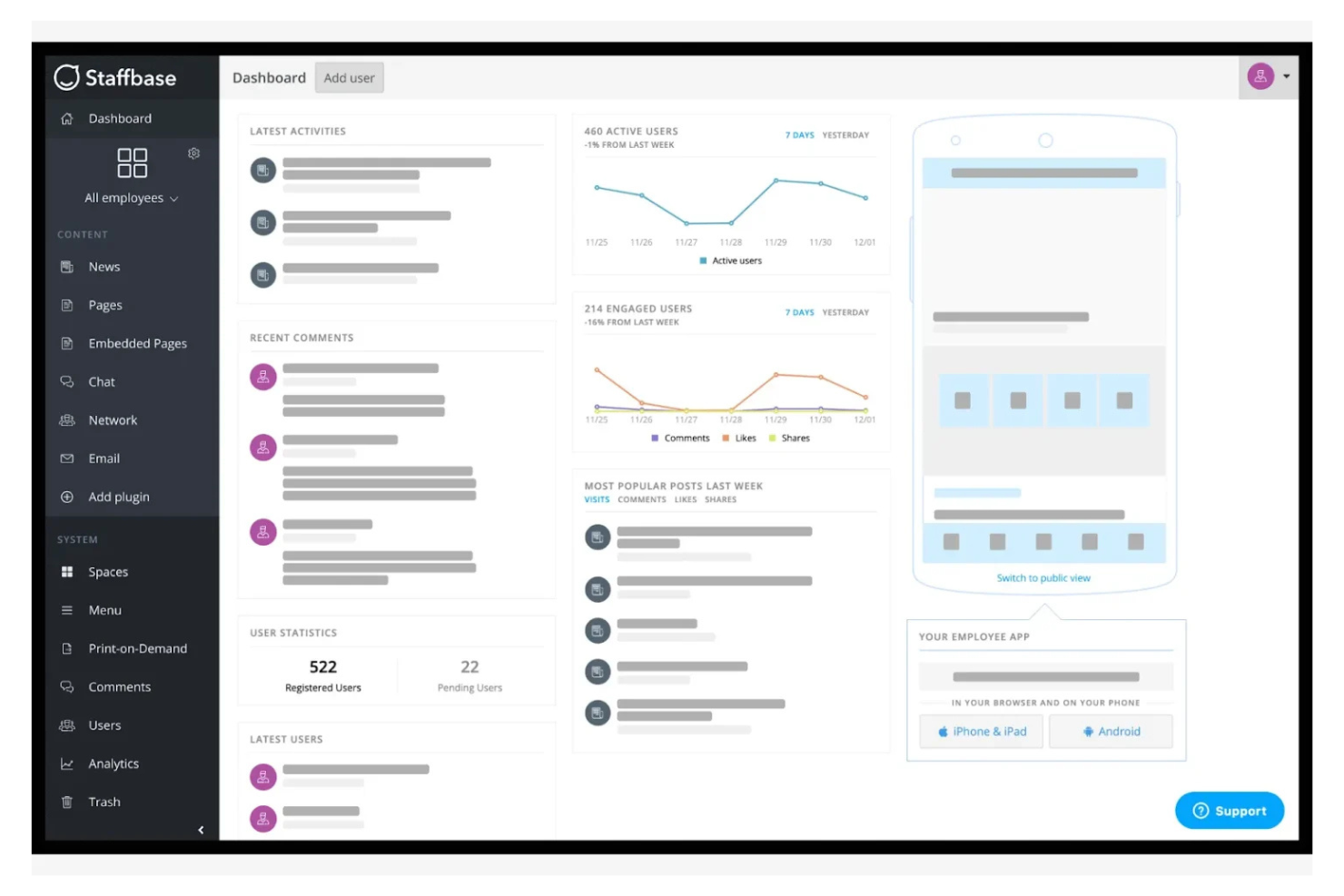
When you need to reach frontline and deskless employees who aren’t always at a computer, Staffbase offers a mobile-first approach to internal communication. It’s designed for organizations in industries like healthcare, retail, and manufacturing that need to engage workers across locations and shifts. Staffbase helps HR and communications teams deliver targeted updates, surveys, and resources directly to employees’ devices.
Why I Picked Staffbase
Frontline engagement is often overlooked in enterprise communication software, which is why I picked Staffbase for this list. Staffbase stands out with its mobile app that delivers company news, updates, and resources directly to employees’ smartphones, making it easy to reach those who aren’t at desks. I appreciate how the platform supports targeted messaging and feedback tools, so HR and communications teams can tailor content to specific groups or locations. This focus on mobile-first communication helps organizations keep every employee informed and connected, no matter where or when they work.
Staffbase Key Features
Some other features that make Staffbase useful for enterprise communication include:
- Employee directory: Searchable profiles help employees find and connect with colleagues across locations.
- Content scheduling: Plan and automate the release of news, updates, and announcements.
- Custom branding: Tailor the look and feel of the platform to match your organization’s identity.
- Analytics dashboard: Track engagement metrics and content performance in real time.
Staffbase Integrations
Integrations include Microsoft 365, ServiceNow, Google Workspace, Cornerstone, and APIs for custom integrations.
Pros and Cons
Pros:
- Branded employee app for company identity
- Push notifications reach non-desk employees
- Mobile app supports offline content access
Cons:
- Content approval workflows can be rigid
- No built-in video conferencing feature

Hub
Best for targeted internal news delivery
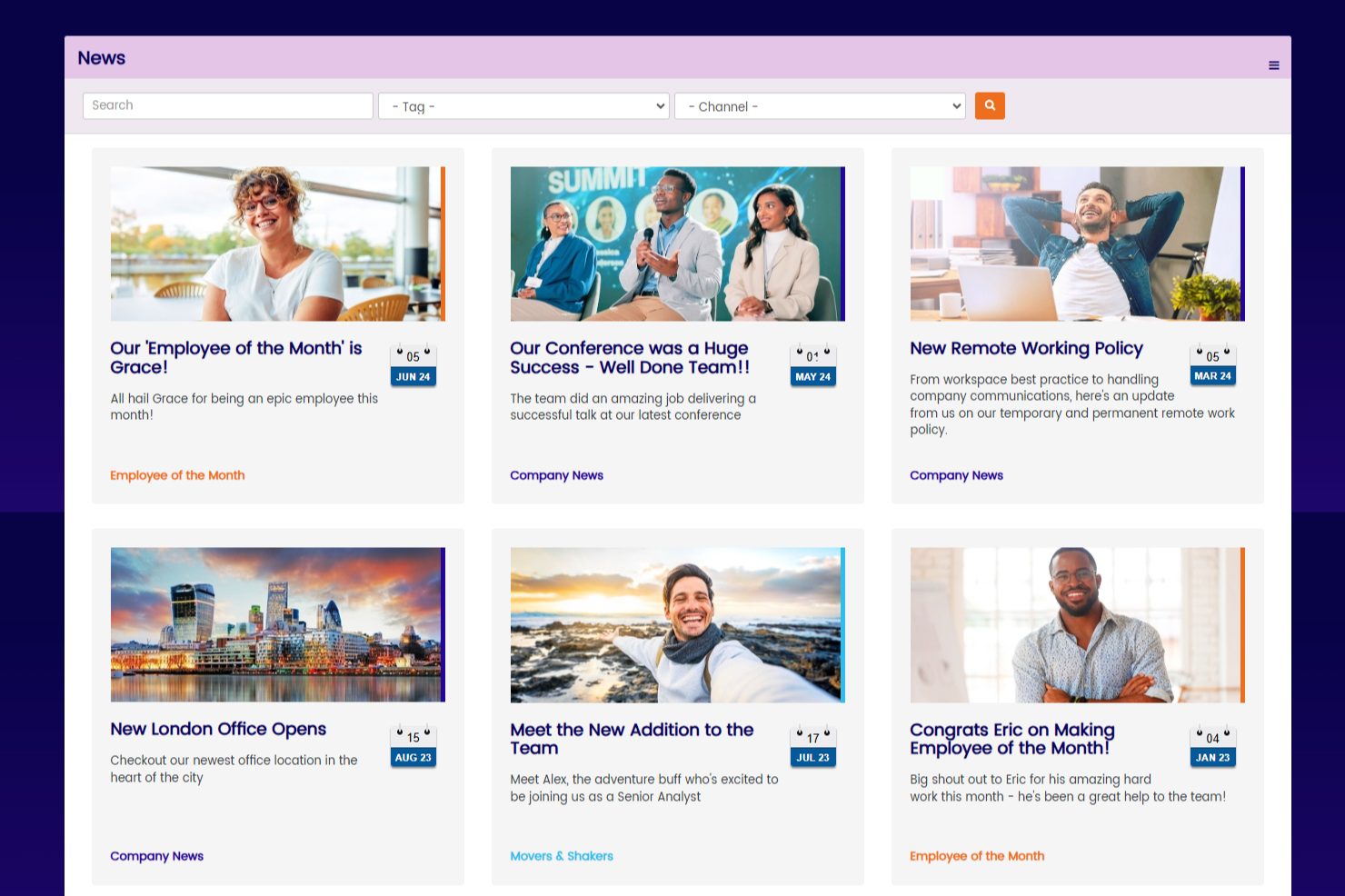
Hub is an enterprise intranet platform that centralizes internal communications across news feeds, employee directories, document libraries, messaging tools, and multi-site management.
Who Is Hub Best For?
Hub is a strong fit for mid-size to large organizations with distributed or deskless workforces that need a centralized place to manage internal communications across multiple teams, locations, or brands.
Why I Picked Hub
I've included Hub in my top picks because of how much control it gives you over the employee homepage experience. Each user sees a homepage built around their role, department, or location, thanks to Hub's smart content tagging and personalization engine. I particularly like the custom quick links and widget layout options, which let comms teams configure what each employee group sees without any IT involvement. That kind of role-based homepage design is genuinely hard to find in an intranet platform that's also this straightforward to manage.
Hub Key Features
- Must Reads: Flag specific posts or announcements as mandatory, requiring employees to confirm they've read them before moving on.
- InMail: Send direct messages between employees within the intranet, without leaving the platform.
- Group forums: Create public, private, or hidden discussion spaces for teams, departments, or project groups.
- Push notifications: Send instant alerts to employees via the Hub progressive web app to surface urgent content.
Hub Integrations
Hub offers native integrations with Microsoft 365 (including SharePoint and Teams), Google Workspace, Slack, Confluence, and BambooHR. It also connects to SharePoint, OneDrive, Google Drive, and Box for embedded cloud drive access. For SSO, Hub supports Microsoft Entra ID, Google, Office 365, OneLogin, and Okta. You can also connect your Eventbrite account to display external events alongside the Hub's internal calendar. An API is available for custom integrations.
Pros and Cons
Pros:
- Peer recognition through built-in Kudos nominations
- "Must Reads" feature tracks policy acknowledgment
- Over 80 granular permission settings available
Cons:
- Google Translate requires manual page-by-page setup
- Search functionality has reported limitations
Workvivo
Best for fostering company culture
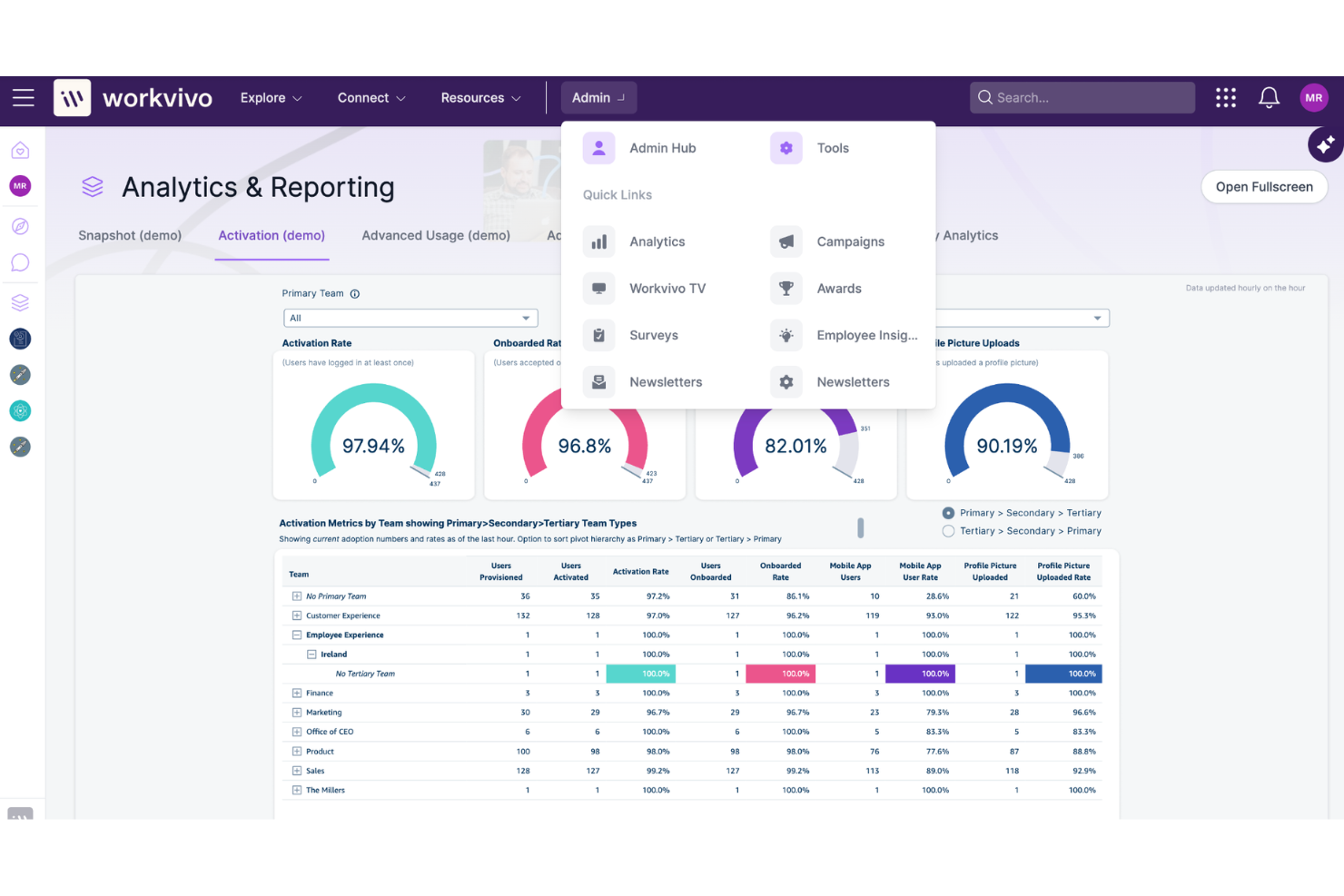
If you’re looking to build a stronger sense of community and recognition across your organization, Workvivo is designed with company culture at its core. This platform appeals to HR leaders and internal communications teams who want to connect employees through social feeds, shout-outs, and interactive spaces. Workvivo helps organizations foster belonging and engagement, especially in distributed or hybrid workplaces.
Why I Picked Workvivo
Fostering company culture takes more than just sharing updates, which is why I picked Workvivo for this list. Workvivo centers its platform around social interaction, letting employees post updates, celebrate achievements, and recognize peers in a public space. I appreciate how the platform includes community spaces and interest groups, so people can connect beyond their day-to-day roles. These features help organizations create a sense of belonging and shared purpose, even when teams are spread out or working remotely.
Workvivo Key Features
Some other features that make Workvivo stand out for enterprise communication include:
- Pulse surveys: Collect real-time feedback from employees on engagement and sentiment.
- Event management: Organize, promote, and track attendance for company events and activities.
- Document sharing: Upload and distribute important files and resources within the platform.
- Mobile app: Give employees access to all features and updates from their smartphones.
Workvivo Integrations
Integrations include Microsoft 365, Google Workspace, Slack, Zoom, Workday, BambooHR, and Microsoft Teams.
Pros and Cons
Pros:
- Event management tools for company-wide activities
- Pulse surveys gather real-time employee feedback
- Social feed encourages peer-to-peer recognition
Cons:
- Integrations require setup by IT administrators
- Limited formatting options for long-form posts

Zoom
Best for large-scale video meetings
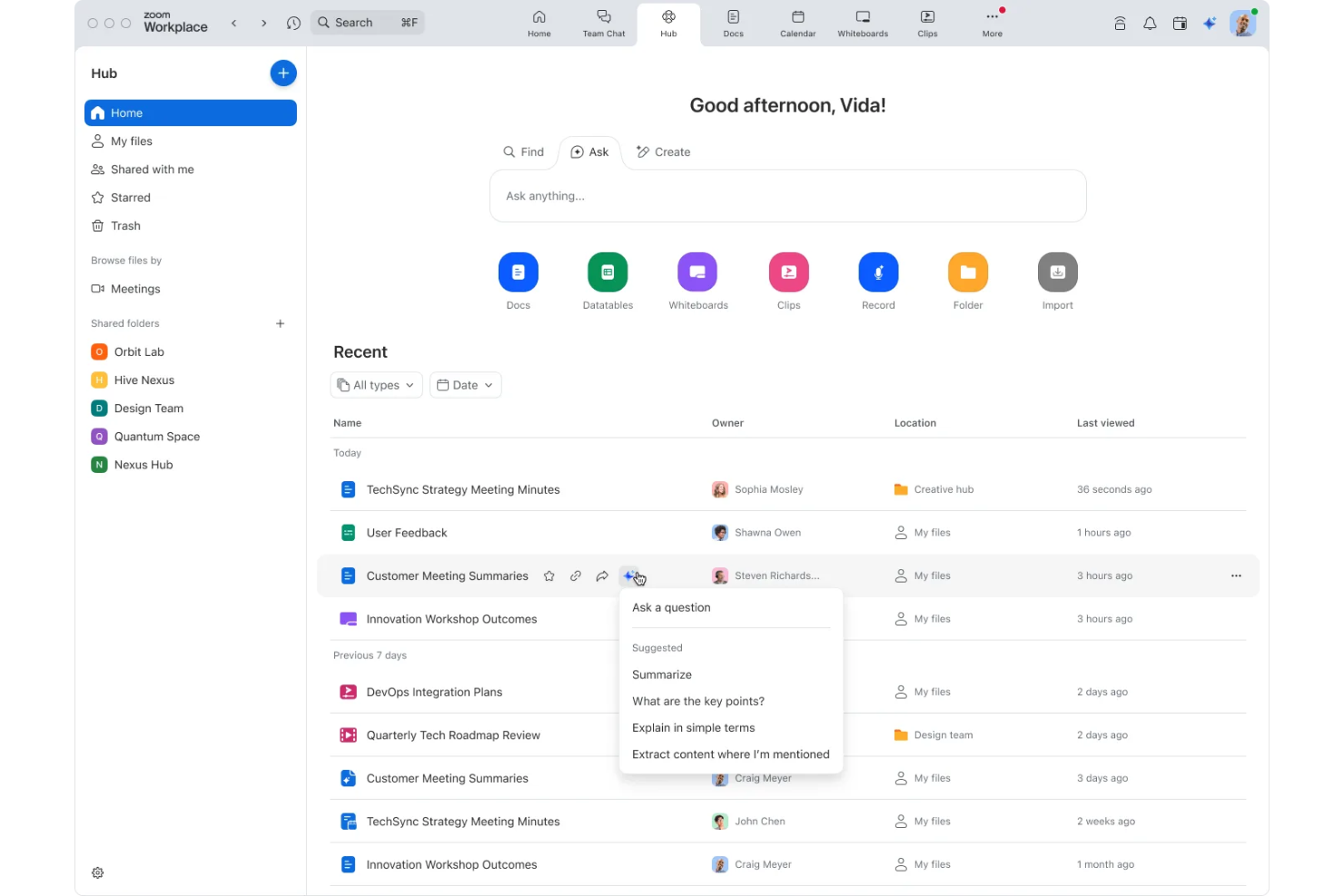
When your organization needs to host large-scale video meetings or webinars, Zoom offers a platform built for reliability and scale. It’s especially useful for enterprises that require high-capacity virtual events, interactive training, or company-wide broadcasts. Zoom’s features help teams manage participant engagement and technical quality, even with thousands of attendees.
Why I Picked Zoom
For organizations that need to connect large groups in real time, Zoom stands out for its ability to support high-capacity video meetings and webinars. I picked Zoom because it allows up to thousands of participants in a single session, with features like breakout rooms and live polling to keep engagement high. Its webinar mode offers controls for managing attendee participation and Q&A, which is essential for company-wide meetings or external events. These capabilities make Zoom a strong choice for enterprises that prioritize reliable, large-scale virtual communication.
Zoom Key Features
Some other features that make Zoom appealing for enterprise teams include:
- Cloud recording and transcription: Automatically save and transcribe meetings for later review or compliance needs.
- Virtual backgrounds and branding: Customize meeting visuals with company logos or professional backdrops.
- End-to-end encryption: Protect sensitive conversations with advanced security for video, audio, and chat.
- Integration with calendar platforms: Schedule and join meetings directly from Google Calendar, Outlook, or other calendar tools.
Zoom Integrations
Integrations include Microsoft Teams, Slack, Google Workspace, Salesforce, HubSpot, Dropbox, Box, Okta, Zendesk, and Trello.
Pros and Cons
Pros:
- Breakout rooms allow for group collaboration
- Webinar mode includes attendee registration tools
- Supports up to 1,000 interactive meeting participants
Cons:
- Lacks advanced moderation controls
- Limited in-meeting file sharing options
Best with integrated productivity apps
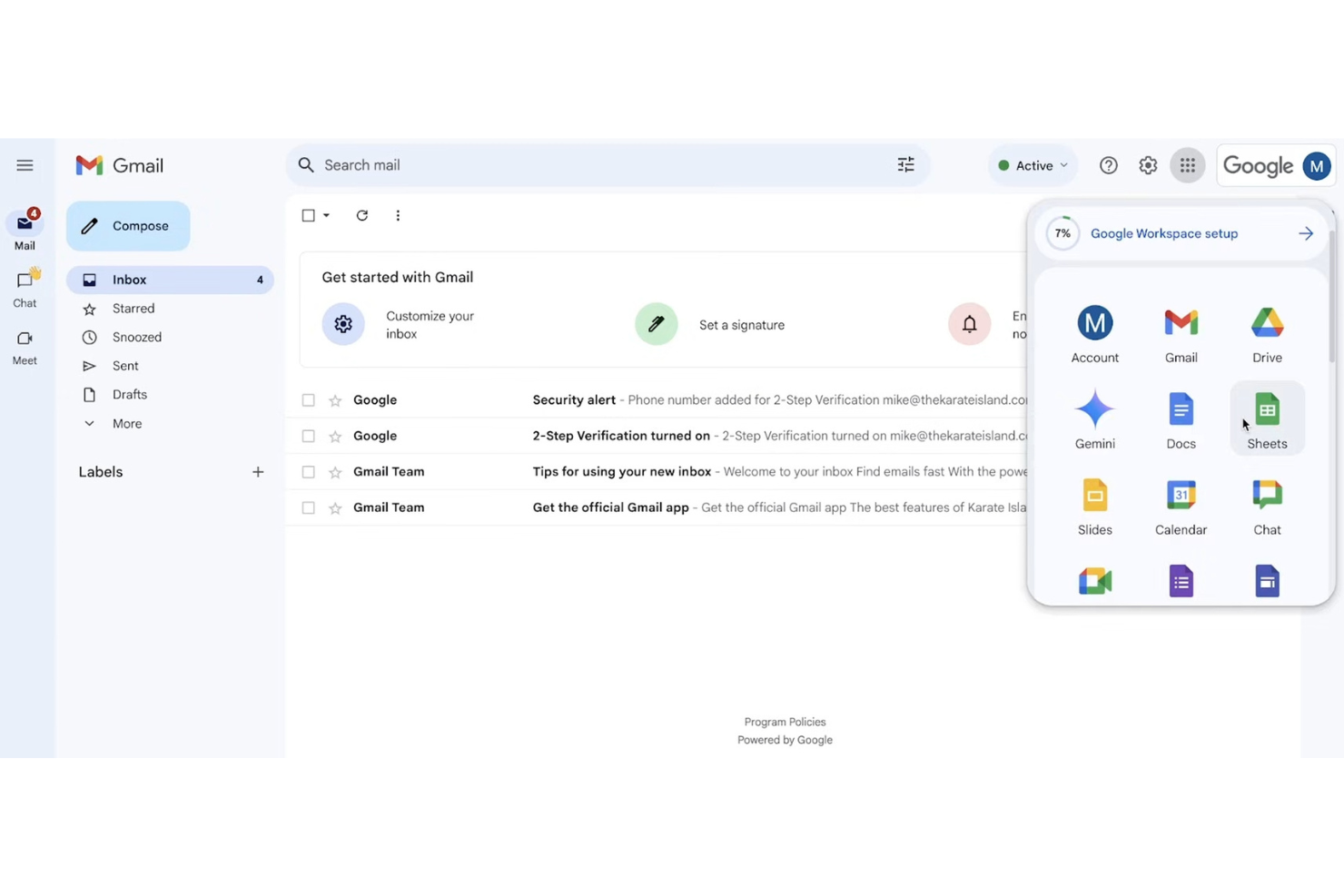
If your team relies on real-time collaboration across documents, spreadsheets, and chat, Google Workspace brings all these tools together in one platform. It’s a strong fit for organizations that want integrated productivity apps with secure communication and file sharing. Google Workspace helps distributed teams stay connected and work together without switching between multiple software tools.
Why I Picked Google Workspace
What sets Google Workspace apart is how it combines communication and productivity tools in a single, unified environment. I picked Google Workspace because it lets teams move between Gmail, Google Chat, and Google Meet while collaborating on Docs, Sheets, and Slides in real time. Shared calendars and Drive storage keep everyone organized and ensure files are always accessible. This level of integration helps enterprise teams communicate, share, and create without barriers or silos.
Google Workspace Key Features
Some other features that make Google Workspace valuable for enterprise teams include:
- Admin console: Manage users, devices, and security settings from a centralized dashboard.
- Data loss prevention (DLP): Set rules to prevent sensitive information from being shared outside your organization.
- AppSheet integration: Build custom business apps without coding, directly from your Workspace data.
- Vault for eDiscovery: Archive, retain, and search emails and chats for compliance and legal needs.
Google Workspace Integrations
Integrations include Tableau, SAP, Figma, Miro, Box, Salesforce, HubSpot, and Okta.
Pros and Cons
Pros:
- Strong spam filtering for business email
- Integrated video meetings within calendar events
- Real-time document editing with team chat
Cons:
- Offline access setup can be inconsistent
- External sharing controls require admin configuration

Wire
Best for end-to-end encrypted messaging
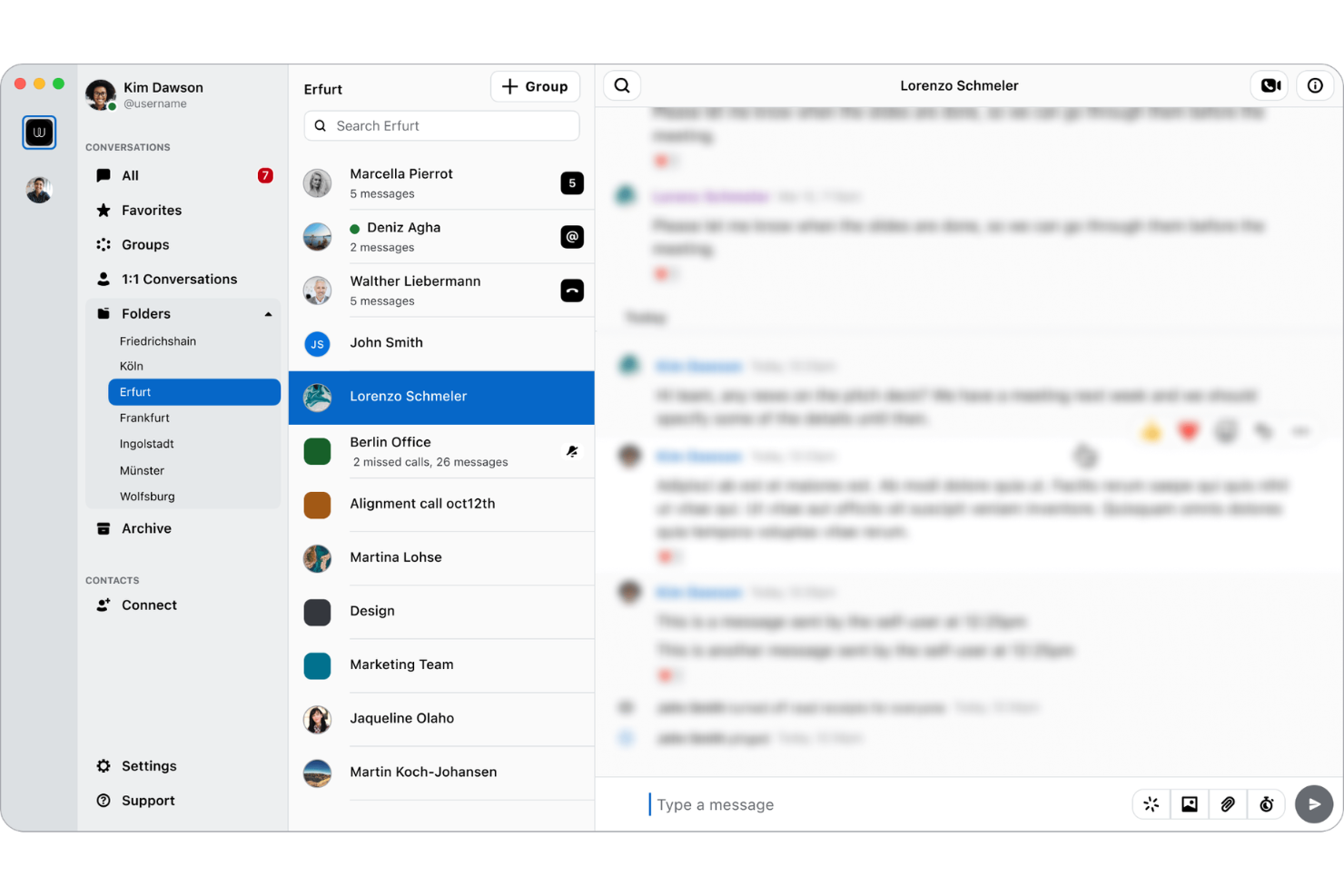
Wire offers end-to-end encrypted messaging designed for organizations that need to protect sensitive conversations and data. It’s a strong fit for security-conscious teams in sectors like government, legal, and finance, where privacy and compliance are non-negotiable. Wire helps you keep internal communications confidential while supporting secure file sharing and group collaboration.
Why I Picked Wire
For teams that need to prioritize privacy, Wire delivers true end-to-end encrypted messaging across all conversations. The platform encrypts messages, calls, and shared files by default, so sensitive business information stays protected at every stage. I like that Wire offers secure group chats and guest rooms, which let you collaborate with external partners without compromising security. These features make Wire a strong choice for organizations where confidential communication is essential.
Wire Key Features
Some other features that make Wire useful for enterprise teams include:
- Multi-device synchronization: Access your messages and calls across desktop, mobile, and web.
- Self-hosting option: Deploy Wire on your own infrastructure for maximum data control.
- Compliance reporting tools: Generate reports to support GDPR and other regulatory requirements.
- User management dashboard: Manage team members, permissions, and access from a centralized admin panel.
Wire Integrations
Native integrations are not currently listed.
Pros and Cons
Pros:
- GDPR compliance features are built-in
- Self-hosting option supports strict data residency
- End-to-end encryption for all communications
Cons:
- Limited admin controls for large organizations
- No native integrations with third-party tools

Best with Microsoft 365 integration
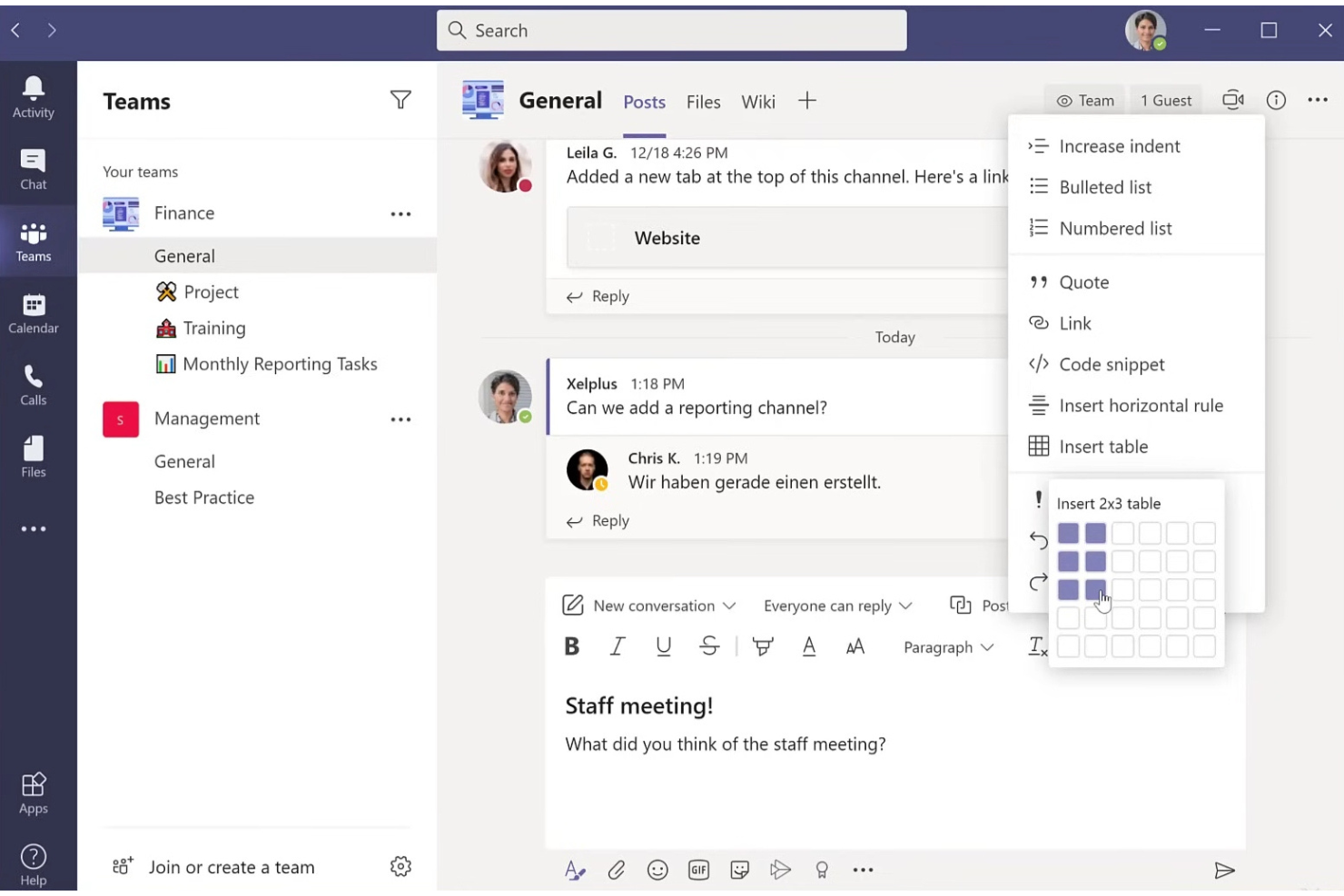
If your organization relies on Microsoft 365, Microsoft Teams offers a unified space for chat, meetings, and collaboration that’s tightly woven into the Microsoft ecosystem. It’s especially useful for enterprises that want to connect communication with document management, scheduling, and productivity tools already in use. Teams helps reduce context switching by letting users access files, calendars, and workflows directly within the same platform they use to communicate.
Why I Picked Microsoft Teams
For organizations already invested in Microsoft 365, Teams stands out because it brings communication and collaboration directly into the tools employees use every day. I picked Microsoft Teams for its deep integration with apps like Outlook, SharePoint, and OneDrive, which lets users schedule meetings, share files, and co-author documents without leaving the platform. Teams also supports threaded conversations and persistent chat within channels, making it easier to keep project discussions organized alongside related files and tasks. This level of integration helps enterprises create a more connected and efficient digital workspace.
Microsoft Teams Key Features
Some other features in Microsoft Teams that support enterprise communication include:
- Live event broadcasting: Host webinars and large-scale virtual events for up to 20,000 attendees.
- Customizable tabs: Add third-party apps, dashboards, or websites directly into team channels for quick access.
- Breakout rooms: Split meeting participants into smaller groups for focused discussions or workshops.
- Direct guest access: Invite external partners or clients to join meetings and collaborate securely.
Microsoft Teams Integrations
Integrations include Outlook, SharePoint, OneDrive, Trello, Asana, ServiceNow, Salesforce, Adobe Creative Cloud, GitHub, and Zoom.
Pros and Cons
Pros:
- Offers live event and webinar hosting
- Allows external guest access for collaboration
- Deep integration with Microsoft 365 applications
Cons:
- Video quality varies with participant bandwidth
- Channel organization can become cluttered
Dialpad
Best for AI-powered voice transcription
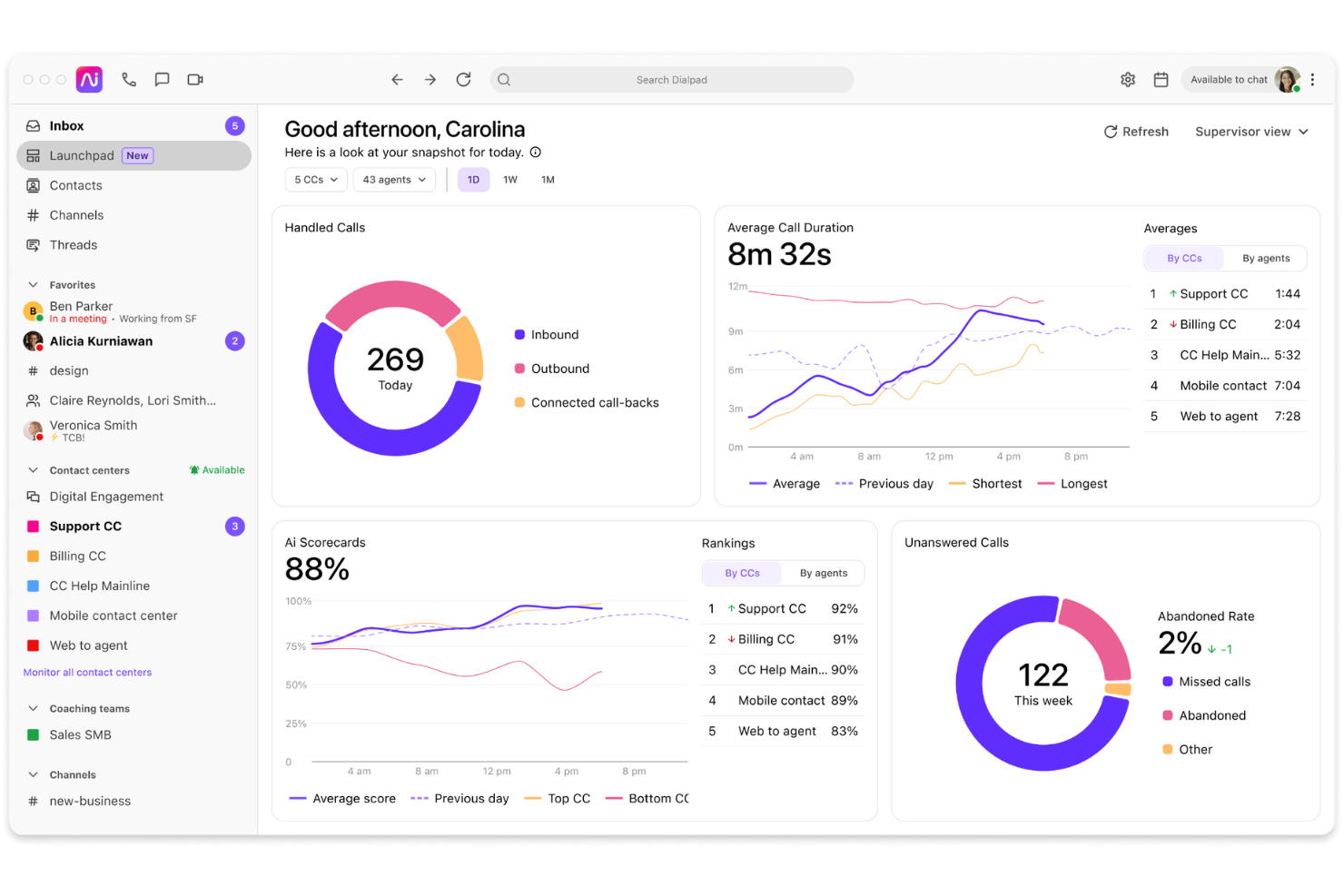
Dialpad offers enterprise communication software with built-in AI voice transcription, making it a strong choice for teams that rely on accurate call records and searchable conversations. It’s especially useful for organizations in sales, support, or compliance-heavy industries that need real-time insights from calls and meetings. If your business values integrated calling, messaging, and AI-driven analytics, Dialpad is designed to meet those needs.
Why I Picked Dialpad
I chose Dialpad for this list because its AI-powered voice transcription stands out in the enterprise communication software space. The platform automatically transcribes calls and meetings in real time, making it easy for teams to capture and search conversations without manual note-taking. I also like that Dialpad’s AI can highlight action items and key topics, which helps organizations stay organized and compliant. These features are especially valuable for businesses that need accurate records for training, quality assurance, or regulatory purposes.
Dialpad Key Features
Some other features in Dialpad that support enterprise communication include:
- Multi-device support: Access calls, messages, and meetings from desktop, mobile, or web apps to stay connected wherever you work.
- Team messaging: Send direct messages or create group chats for quick, organized communication within your organization.
- Integrated video conferencing: Host video meetings directly from the platform without needing a separate tool.
- Call routing and IVR: Set up custom call flows and interactive voice response menus to direct callers to the right department or team member.
Dialpad Integrations
Integrations include Google Workspace, Microsoft Teams, Salesforce, HubSpot, Gmail, Google Calendar, Zendesk, Okta, Slack, and Front.
Pros and Cons
Pros:
- Multi-device access for remote and hybrid teams
- Built-in team messaging and video conferencing
- Real-time AI transcription for calls and meetings
Cons:
- Limited advanced analytics in lower-tier plans
- Occasional transcription inaccuracies with accents
OpenText
Best for regulated document collaboration
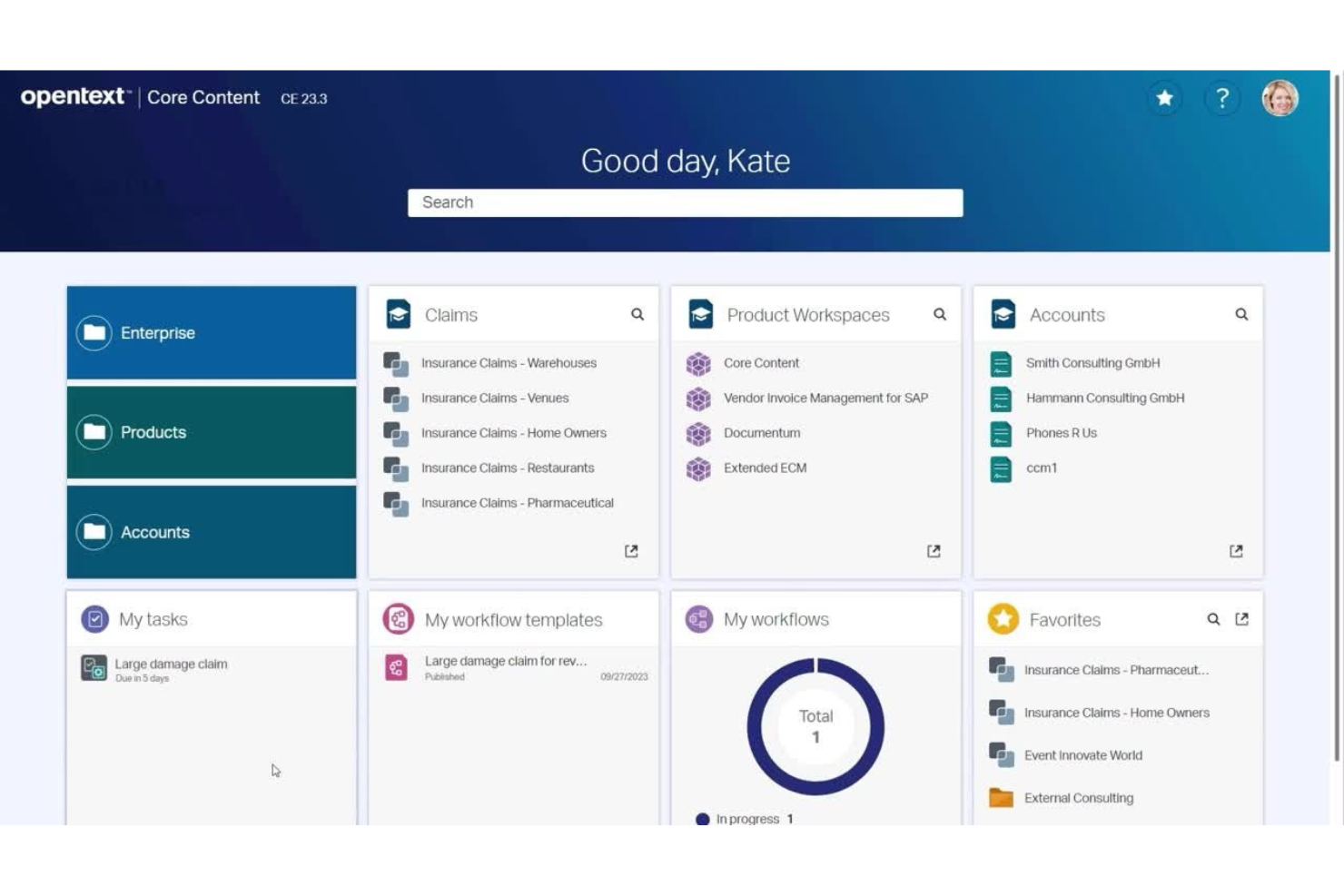
OpenText is designed for organizations that need to collaborate on documents while meeting strict regulatory and compliance standards. It’s especially useful for teams in highly regulated industries like finance, legal, and healthcare, where secure document sharing and audit trails are essential. OpenText helps you manage sensitive content, control access, and maintain compliance throughout the document lifecycle.
Why I Picked OpenText
When regulated document collaboration is a top priority, OpenText stands out for its focus on compliance and security. The platform offers granular access controls and detailed audit trails, which help organizations meet industry regulations and internal governance requirements. I appreciate that OpenText supports secure document sharing and version control, making it easier for teams to collaborate without risking data breaches or compliance violations. These features make OpenText a strong choice for businesses that need to manage sensitive documents and maintain strict oversight.
OpenText Key Features
Some other features that make OpenText valuable for enterprise teams include:
- Automated workflow management: Set up document review and approval processes with customizable workflows.
- eDiscovery tools: Search, collect, and preserve documents for legal and compliance needs.
- Digital signature support: Enable secure signing and authentication of documents within the platform.
- Content archiving: Store and manage historical documents with retention policies and easy retrieval.
OpenText Integrations
Integrations include SAP, Microsoft 365, Salesforce, Google Workspace, Microsoft Azure, and more.
Pros and Cons
Pros:
- Includes built-in digital signature tools
- Offers granular document access permissions
- Supports strict regulatory requirements
Cons:
- Search speed can lag with large repositories
- Interface can feel complex for new users
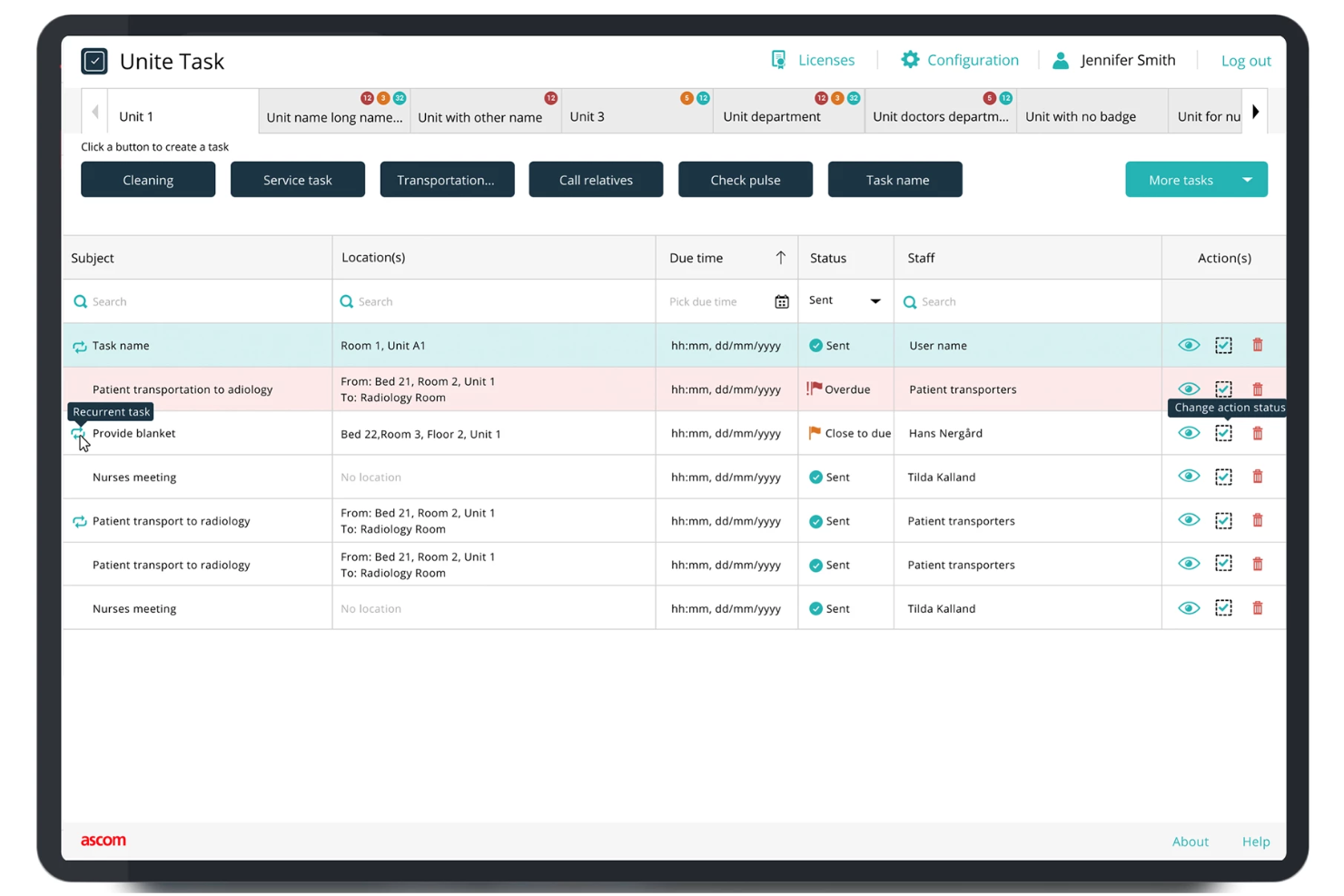
Designed for hospitals and clinical environments, Ascom specializes in secure, compliant communication for healthcare teams. The platform connects caregivers, devices, and patient data while supporting strict regulatory requirements like HIPAA. Ascom helps healthcare organizations coordinate care, reduce delays, and maintain privacy across every shift.
Why I Picked Ascom
Healthcare organizations face unique compliance and privacy challenges, which is why Ascom is a strong fit for this list. The platform is purpose-built to support secure messaging, voice, and alerting that align with healthcare regulations like HIPAA. I appreciate that Ascom integrates with clinical systems and medical devices, helping teams coordinate care while maintaining strict data security. These features make Ascom especially valuable for hospitals and clinics that need to protect patient information while improving communication.
Ascom Key Features
Some other features that make Ascom useful for healthcare teams include:
- Alarm management: Route and prioritize clinical alerts to the right staff members.
- Mobile device support: Enable secure communication on smartphones, pagers, and dedicated medical devices.
- Location tracking: Monitor staff and equipment locations within healthcare facilities.
- Nurse call integration: Connect nurse call systems directly to staff communication devices.
Ascom Integrations
Integrations are not publicly listed.
Pros and Cons
Pros:
- Offers location tracking for staff and assets
- Complies with HIPAA and healthcare regulations
- Supports nurse call and alarm integrations
Cons:
- Limited collaboration features beyond messaging
- Hardware setup can require onsite installation
Other Enterprise Communication Software
Here are some additional enterprise communication software options that didn’t make it onto my shortlist, but are still worth checking out:
- Symphony
For secure financial sector messaging
- Slack
For customizable workflow automation
- RingCentral
For multi-location team collaboration
- Chanty
For simple team chat interface
- Rocket.Chat
For on-premise deployment option
- Connecteam
For mobile workforce coordinatio
- Bitrix24
With built-in CRM integration
- SharePoint
For document management workflows
- TextUs
For SMS-based team communication


How I Evaluate Enterprise Communication Software
I evaluate tools in two layers: baseline capabilities for broadcasting HR updates to a global workforce, and the differentiators that make one option a better fit.
Core Functionality (Table Stakes For This List)
When I'm selecting tools for my list, I rank each one on a scale from 0 (does not offer the functionality) to 5 (excels in this area) for each core functionality listed below. Then, I calculate the tool's total score into a percentage. Each tool needs to achieve a minimum total score of 65% to be considered for inclusion.
- Multi-Channel Messaging: I check whether the platform supports DMs, group channels, and threaded conversations across desktop and mobile, so HR can handle sensitive 1:1s and team-wide updates in one place.
- Company-Wide Broadcasts: The ability to target announcements by department, location, or role matters here, especially when HR needs to push benefits enrollment reminders to specific employee segments.
- Video & Voice Conferencing: I look for integrated video meetings with screen sharing and recording, which covers everything from new-hire orientation sessions to company town halls.
- Enterprise-Grade Security: Each tool's compliance certifications, SSO/SAML support, encryption standards, and role-based permissions get evaluated since HR communications often contain sensitive personnel data.
- HRIS & Directory Integrations: Prebuilt connectors to platforms like Workday, BambooHR, or SAP SuccessFactors help keep org charts and user provisioning current without manual data entry.
- File Sharing & Collaboration: I evaluate how each tool handles document sharing, previews, and version control, particularly for distributing updated handbooks, policy documents, and onboarding packets within conversation threads.
Once I have a list of tools that meet the criteria, I consider what sets each platform apart.
Differentiating Factors (What Sets Vendors Apart)
Here's how I compare and contrast different vendors:
Standout Features
Frontline worker access is a major differentiator. I look for SMS fallback, kiosk modes, or mobile-first experiences that reach warehouse, retail, and field employees who don't have corporate email. Built-in pulse surveys and polls also matter because they let HR capture real-time sentiment after policy changes or open enrollment without adding a separate tool. I evaluate AI-powered assistants too, which can summarize long threads or draft announcements and save HR teams hours of writing time each week.
Beyond Features
Compliance and data governance weigh heavily in my evaluation. HR teams share sensitive employee data daily, so I check for data residency options, message retention policies, and eDiscovery support. The integration ecosystem also matters—tools that connect with your existing HRIS and SSO providers reduce manual provisioning headaches when onboarding hundreds of new hires. I also evaluate total cost of ownership, including how vendors handle add-on pricing for storage, compliance modules, and seasonal workforce fluctuations.
How to Choose Enterprise Communication Software
It’s easy to get bogged down in long feature lists and complex pricing structures. To help you stay focused as you work through your unique software selection process, here’s a checklist of factors to keep in mind:
| Factor | What to Consider |
| Scalability | Will the software support your organization as it grows? Check user limits, pricing jumps, and how easily you can add or remove users. |
| Integrations | Does it connect with your HRIS, project management, or document storage tools? Confirm native integrations and any extra costs. |
| Customizability | Can you tailor channels, permissions, and notifications to fit your team’s structure and workflows? Avoid tools that force rigid setups. |
| Ease of use | Will employees adopt it quickly? Look for clear navigation, minimal training needs, and positive feedback from similar organizations. |
| Implementation and onboarding | How long will it take to roll out? Ask about migration support, training resources, and whether you’ll need IT involvement. |
| Cost | Are all costs clear up front? Consider per-user fees, add-on charges, and contract terms. Compare total cost of ownership, not just sticker price. |
| Security safeguards | Does the tool meet your data protection standards? Look for end-to-end encryption, access controls, and audit logs. |
| Compliance requirements | Will the software help you meet industry or regional regulations like GDPR or HIPAA? Ask for documentation and audit support. |
What Is Enterprise Communication Software?
Enterprise communication software is a digital platform that enables employees to exchange messages, share files, and collaborate in real time across an organization. These tools support secure, centralized communication through chat, voice, video, and document sharing. They help teams coordinate work, maintain records of conversations, and ensure information flows efficiently, whether employees are in the office, remote, or distributed globally.
Features of Enterprise Communication Software
When selecting enterprise communication software, keep an eye out for the following key features:
- Direct messaging: Enables private, one-on-one conversations between employees for quick questions, updates, or confidential discussions.
- Group chat channels: Allows teams or departments to communicate in dedicated spaces, keeping conversations organized by topic or project.
- File sharing: Lets users upload, send, and access documents, images, and other files directly within the platform, reducing reliance on email.
- Voice and video calls: Supports real-time audio and video communication for meetings, check-ins, or urgent discussions without leaving the software.
- Searchable message history: Provides the ability to search past conversations and files, making it easy to retrieve important information when needed.
- User and permission management: Gives administrators control over who can access specific channels, files, or features, supporting security and compliance.
- Notifications and alerts: Keeps users informed of new messages, mentions, or important updates, with customizable settings to reduce distractions.
- Multi-device access: Allows employees to use the software on desktops, laptops, tablets, and smartphones, ensuring communication is possible from anywhere.
- Integration with other tools: Connects with calendars, project management, or HR systems to centralize workflows and reduce context switching.
Benefits of Enterprise Communication Software
Implementing enterprise communication software provides several benefits for your team and your business. Here are a few you can look forward to:
- Faster decision-making: Real-time messaging, calls, and file sharing help teams resolve issues and make decisions without delays.
- Improved information security: End-to-end encryption and permission controls protect sensitive conversations and documents from unauthorized access.
- Better team alignment: Group channels and searchable message history keep everyone on the same page, reducing miscommunication and duplicated work.
- Enhanced remote collaboration: Multi-device access and video conferencing support distributed teams working from different locations or time zones.
- Simplified compliance management: Built-in audit logs and data retention policies help organizations meet regulatory requirements and maintain records.
- Reduced email overload: Centralized chat and file sharing decrease reliance on email, making communication more focused and manageable.
- Easier onboarding for new hires: Organized channels and searchable archives help new employees quickly access key information and integrate into the team.
Costs and Pricing of Enterprise Communication Software
Selecting enterprise communication software requires an understanding of the various pricing models and plans available. Costs vary based on features, team size, add-ons, and more. The table below summarizes common plans, their average prices, and typical features included in enterprise communication software solutions:
Plan Comparison Table for Enterprise Communication Software
| Plan Type | Average Price | Common Features |
| Free Plan | $0 | Basic messaging, limited video calls, and minimal storage. |
| Personal Plan | $5-$15/user/month | Messaging, video conferencing, file sharing, and basic integrations. |
| Business Plan | $20-$35/user/month | Advanced messaging, high-quality video conferencing, enhanced security, and integrations with third-party apps. |
| Enterprise Plan | $40-$60/user/month | Customizable features, compliance tools, advanced analytics, priority support, and unlimited storage. |
Enterprise Communication Software FAQs
Here are some answers to common questions about enterprise communication software:
How does enterprise communication software support remote and hybrid teams?
Enterprise communication software enables remote and hybrid teams to collaborate in real time through instant messaging, video calls, and screen sharing. These collaboration tools keep everyone connected, regardless of location, and help maintain consistent business communication and access to information across distributed teams. By providing an all-in-one hub for remote work, this communication system ensures that the work environment remains productive and cohesive.
Can enterprise communication software integrate with HR and project management tools?
Yes, most enterprise communication tools offer integrations with HR systems, project management platforms, and other communication tools. These integrations help to optimize and centralize workflows, reduce manual data entry, and ensure that information flows smoothly between various communication channels. This connectivity enhances the overall employee experience by making it easier for the right people to access the data they need.
What security features should I look for in enterprise communication software?
Look for end-to-end encryption, user authentication, access controls, and audit logs. These features help protect sensitive company data, ensure only authorized users can access the communication platform, and support compliance with data privacy regulations. Implementing these protocols is a cornerstone of effective communication, ensuring that internal comms remain private and secure from external threats.
How long does it take to implement enterprise communication software?
Implementation time varies based on organization size and complexity. Small teams may be up and running in a day, while larger organizations might need several weeks to transition from an old intranet or legacy system. Success depends on well-planned communication strategies that involve migration, training, and integration with existing systems to foster better teamwork.
What are the common challenges when adopting enterprise communication software?
Common challenges include user resistance to change, data migration issues, and the distractions often found on social media-style interfaces. To improve employee communication, organizations should focus on segmentation of information to avoid notification fatigue. Planning for training and phased rollouts can help address these challenges and improve adoption rates across the entire organization.