

10 Best HR Software for Startups: Reviewed in 2026

10 Best HR Software for Startups Shortlist


As a former HR professional, I know how the right HR software will help you operate more efficiently and be better prepared for the challenges ahead.
All employee information stored safely under one roof, heaps of automations to save you time, and intuitive reporting features. Employee self service! 🙏
Drawing from my years of experience using these tools at growing organizations, I’ve reviewed some of the best HR software for startups and provide some guidance to help you find the best solution for your specific needs.
Why Trust Our Software Recommendations
Our team has been testing and reviewing software since 2012. As HR experts ourselves, we know how difficult—and important—it is to choose the right software.
For this guide, we evaluated tools using hands-on testing and independent research, scoring tools using our selection criteria. We also draw on insights from industry thought leaders and practicing HR experts.
Our reviews reflect our human editorial judgment, not a sales pitch.
Expert reviewers:
HR Software for Startups Comparison Table
This comparison table summarizes pricing details for my top HR software for startups selections:
| Tool | Best For | Trial Info | Price | ||
|---|---|---|---|---|---|
| 1 | Best for automating global hiring and compliance | Free demo available | From $5/employee/month | Website | |
| 2 | Best for integrated expense management | Not available | From $599/employee/month | Website | |
| 3 | Best for AI-driven HR insights | Free demo available | Pricing upon request | Website | |
| 4 | Best for custom org charts and access controls | Free demo available | From $8/user/month | Website | |
| 5 | Best for easy onboarding and 24/7 support | Free demo available | From $199/user/month | Website | |
| 6 | Best for automated payroll processing | Free demo available | From $49/month + $6/month/user | Website | |
| 7 | Best for rapid growth and modern employer branding | Free trial available | From $10/employee/month | Website | |
| 8 | Best for performance management & engagement | Free demo available | Pricing upon request | Website | |
| 9 | Best for a platform-plus-service approach | Free demo available | Pricing upon request | Website | |
| 10 | Best for customizable onboarding workflows | 15-day free trial + free demo available | From $299/month (billed annually) | Website |


Best HR Software for Startups Reviews
Here are my detailed reviews and analyses of various HR software options for startups, including the advantages and disadvantages of each tool, its features, and optimal use cases.

Deel HR
Best for automating global hiring and compliance
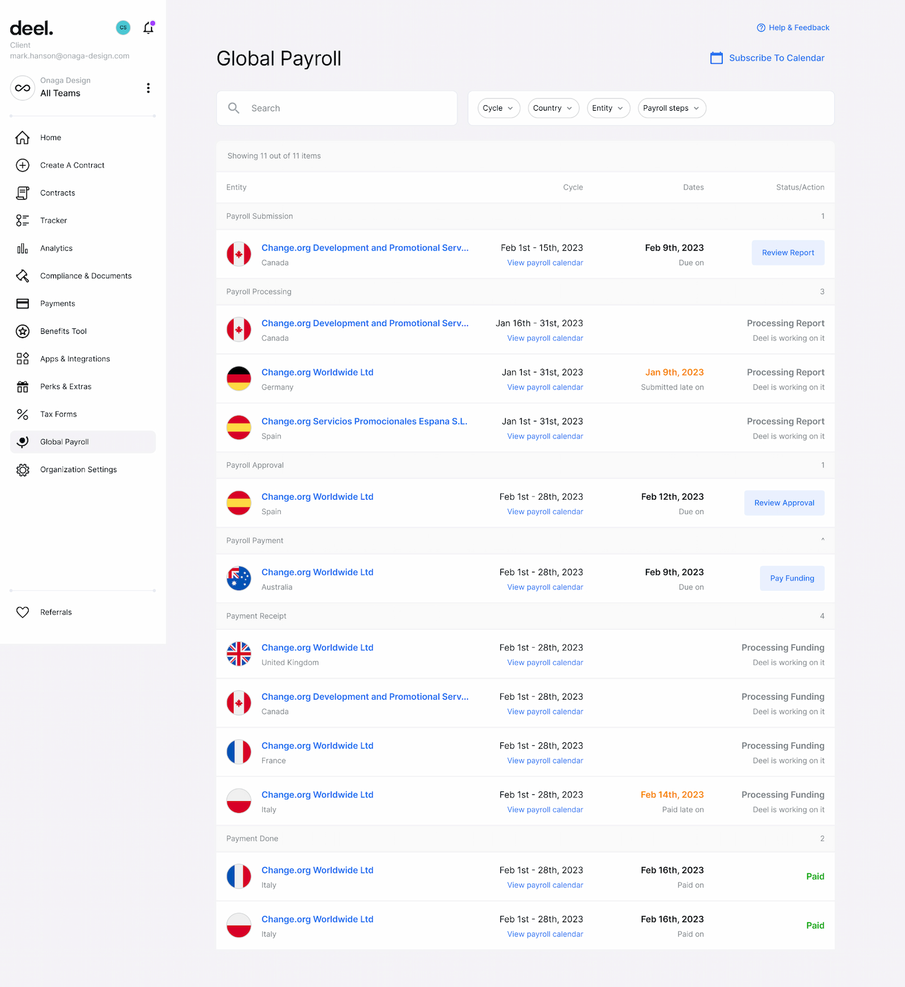
Deel simplifies the process of hiring international talent and managing international payments. It handles compliance, payroll, and HR admin, allowing startups to hire the best talent in 150 countries without worrying about legal issues.
Why I picked Deel: I chose Deel for its focus on automating global hiring and compliance, which is crucial for startups looking to expand internationally. Deel simplifies the complexities of international hiring by ensuring compliance with local laws and regulations (which can be quite complicated without the right software tool.) In that respect, its automation features and ease of use stand out from other HR tools.
Standout features & integrations:
Standout features include automated onboarding, compliance management, payroll processing, and expense management. It also provides support for various currencies and payment options.
Deel integrates natively with QuickBooks, Xero, Gusto, Slack, Microsoft Teams, Google Workspace, Dropbox, Zapier, and Trello
Pros and Cons
Pros:
- Supports multiple currencies
- Ensures compliance
- Simplifies international hiring
Cons:
- Limited customization
- Pricing details are not transparent
New Product Updates from Deel HR

Deel Expands Stablecoin Wallet to 80+ Countries
Deel expands its Stablecoin Wallet to 80+ countries with dollar-backed balances and optional rewards. This gives eligible contractors more ways to hold and manage earnings inside Deel. For more information, visit Deel’s official site.
 .
.
Best for integrated expense management
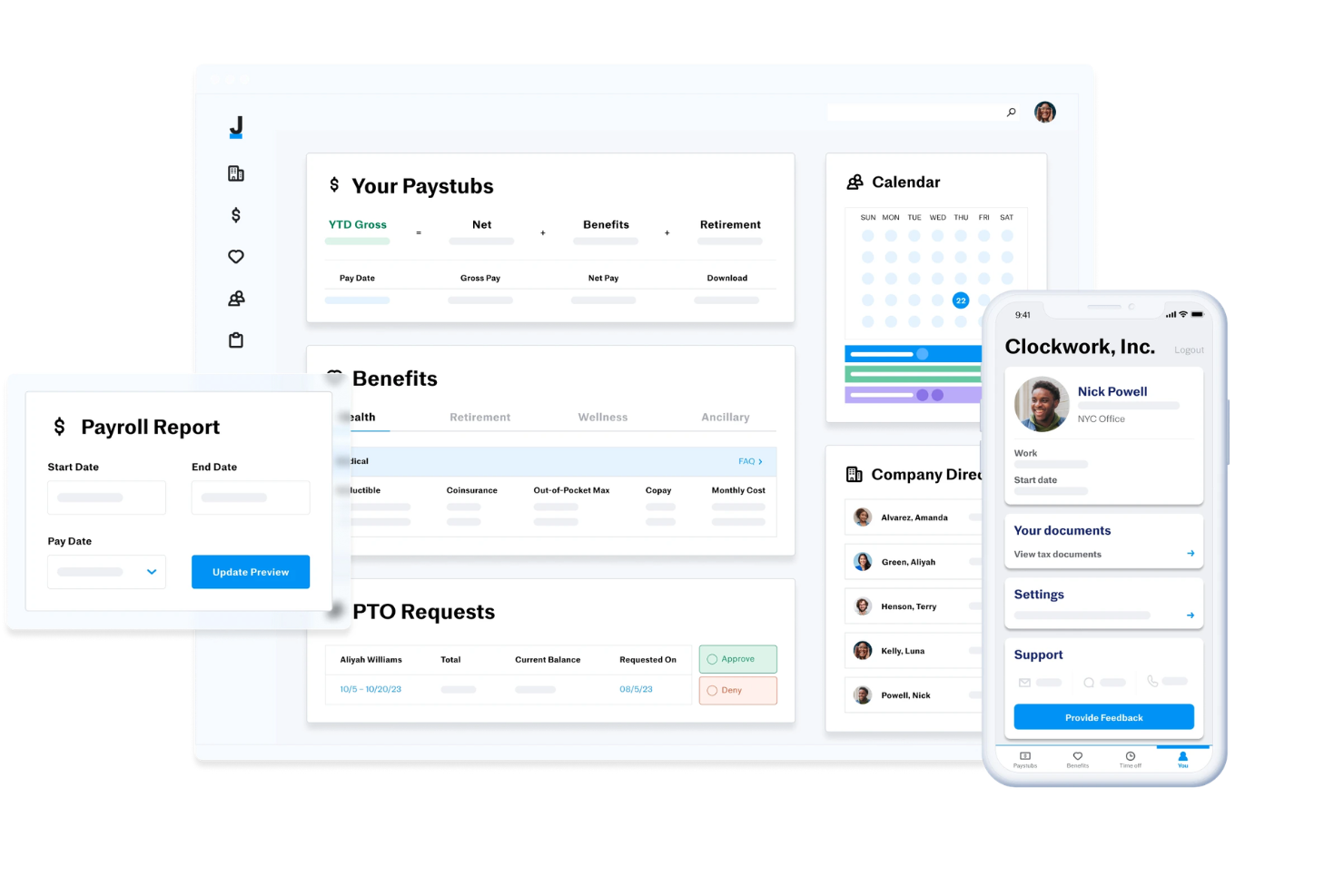
Justworks is an HR and payroll platform for startups that combines automated payroll, benefits administration, compliance support, and onboarding tools in one system.
Who Is Justworks Best For?
Startups and small businesses looking for an all-in-one HR, payroll, and compliance platform that supports rapid growth and multi-state teams.
Why I Picked Justworks
I picked Justworks as one of the best because I like how it brings expense management directly into its HR and payroll platform. My team is able to track, approve, and reimburse employee expenses alongside payroll, which keeps everything in one place. I also appreciate that expense policies and reporting are built into the same dashboard we use for onboarding and benefits.
Justworks Key Services
- Automated payroll processing: Run payroll for salaried and hourly employees, contractors, and vendors in all 50 states.
- Benefits administration: Manage health insurance, 401(k), commuter benefits, and more from a single dashboard.
- Onboarding workflows: Digitally onboard new hires with document collection, e-signatures, and compliance tasks.
- HR document storage: Store and organize employee handbooks, policies, and other HR documents securely online.
Justworks Integrations
Native integrations are not clearly documented. The tool supports integrations via API for custom connections.
Pros and Cons
Pros:
- Customizable onboarding workflows for new hires
- Integrated benefits administration for health and dental
- Built-in HR support for compliance and policy questions
Cons:
- Reporting features are less advanced than some competitors
- Benefits options may be limited outside major metros

Leapsome
Best for AI-driven HR insights

For startups looking to enhance their HR capabilities, Leapsome offers an AI-powered platform that combines employee management with performance and learning tools. This software is well-suited for modern startups aiming to streamline HR processes and boost employee engagement through its comprehensive features. Whether you're managing onboarding or conducting performance reviews, Leapsome provides the insights and tools necessary to support your growing team.
Why I Picked Leapsome
I picked Leapsome for its unique ability to combine HR management with AI-driven insights, making it a great choice for startups. The platform's performance reviews and learning management features allow you to develop and engage your team effectively, fostering a culture of continuous improvement. Additionally, its onboarding tools simplify the integration of new hires, while the AI insights offer valuable recommendations to optimize HR processes. These features align perfectly with the needs of startups seeking to build a strong, dynamic workforce.
Leapsome Key Features
In addition to its AI-driven insights, Leapsome offers several features that cater to the specific needs of startups:
- Employee Records: Manage all employee data in one centralized location, ensuring easy access and organization.
- Absence Management: Track and manage employee absences seamlessly, helping you maintain workforce productivity.
- Goal Setting: Enable your team to set and track goals, fostering accountability and alignment with company objectives.
- Engagement Surveys: Collect valuable feedback from your team to gauge satisfaction and identify areas for improvement.
Leapsome Integrations
Integrations include Slack, Microsoft Teams, G Suite, Jira, BambooHR, Personio, Okta, OneLogin, Greenhouse, and Workday.
Pros and Cons
Pros:
- Comprehensive HRIS includes employee records and onboarding tools.
- AI-powered features enhance HR processes and decision-making.
- Performance reviews and engagement surveys are well-integrated.
Cons:
- Data export limitations, especially for reviews.
- Limited customization for niche business requirements.

Best for custom org charts and access controls
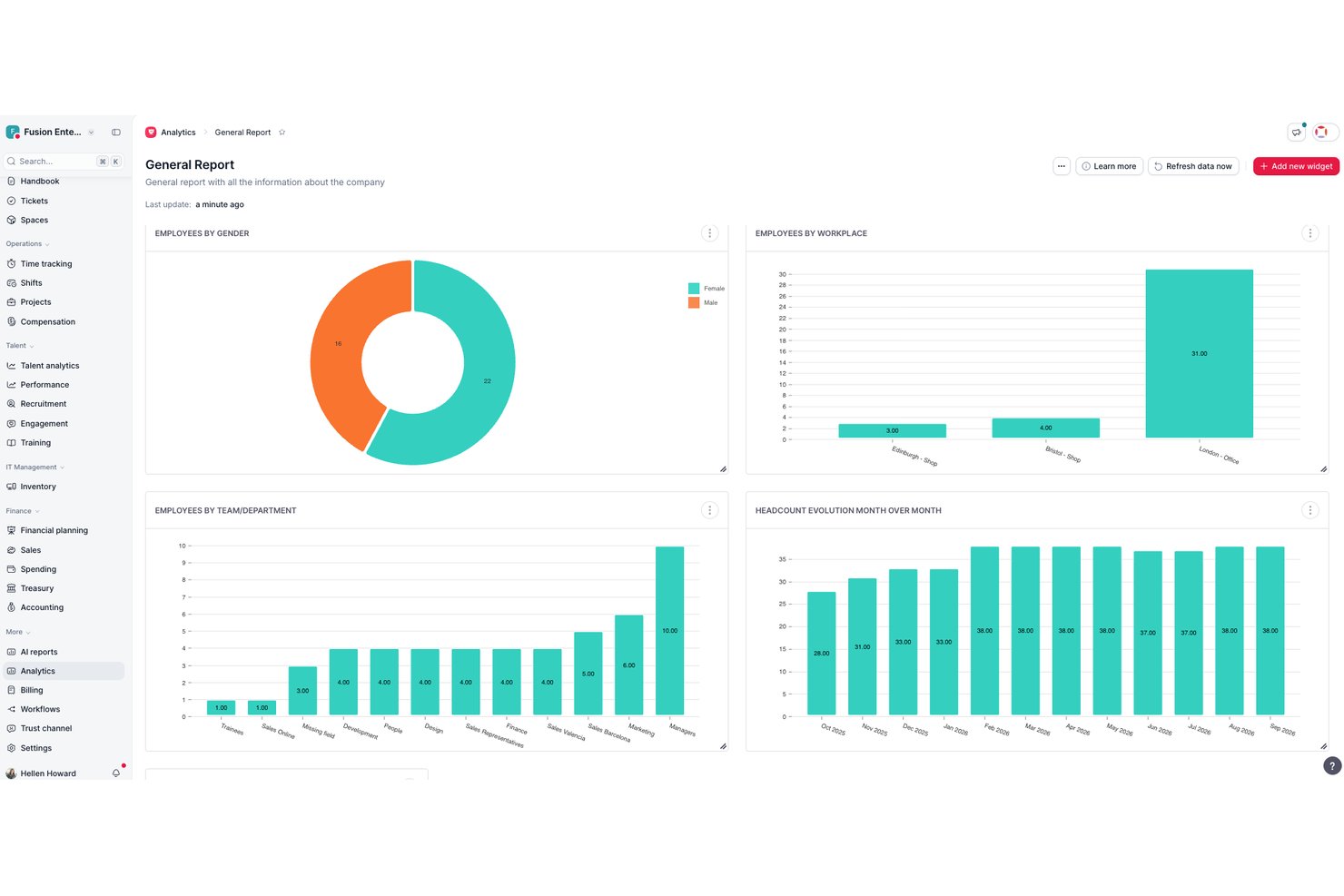
Factorial is an all-in-one HR platform that combines employee records, time tracking, payroll, recruitment, onboarding, and performance management in a single system built for small and growing teams.
Who Is Factorial Best For?
Factorial is a strong fit for early-stage startups and small businesses that need a single platform to manage HR without a dedicated HR team.
Why I Picked Factorial
I picked Factorial as one of the best because its org chart updates automatically as your team changes, so you're never manually correcting a stale chart after a new hire or promotion. I also like the custom permission system: you can build role-based access groups and assign specific approvers to documents and workflows, which keeps sensitive data out of the wrong hands as headcount grows. I've found this particularly useful when onboarding managers who need visibility into their team but not the entire org.
Factorial Key Features
- Employee directory: Store and manage profiles, documents, and custom fields for all employees in one place.
- Time off management: Create unlimited leave policies, automate accruals, and allow self-service PTO requests.
- Performance reviews: Run 360-degree feedback cycles, set up evaluation templates, and track employee goals.
- Recruiting module: Post jobs to multiple boards, screen applicants with built-in ATS tools, and automate interview scheduling.
Factorial Integrations
Factorial offers native integrations with Google Workspace, Slack, Monday, Okta, Teamtailor, Recruitee, LinkedIn, and Zapier, and provides an API for custom integrations.
Pros and Cons
Pros:
- Integrates core HR, time off, hiring
- Org charts update in real time automatically
- Automated onboarding workflows save setup time
Cons:
- Reporting customization is relatively basic
- Payroll limited to select countries only

Best for easy onboarding and 24/7 support
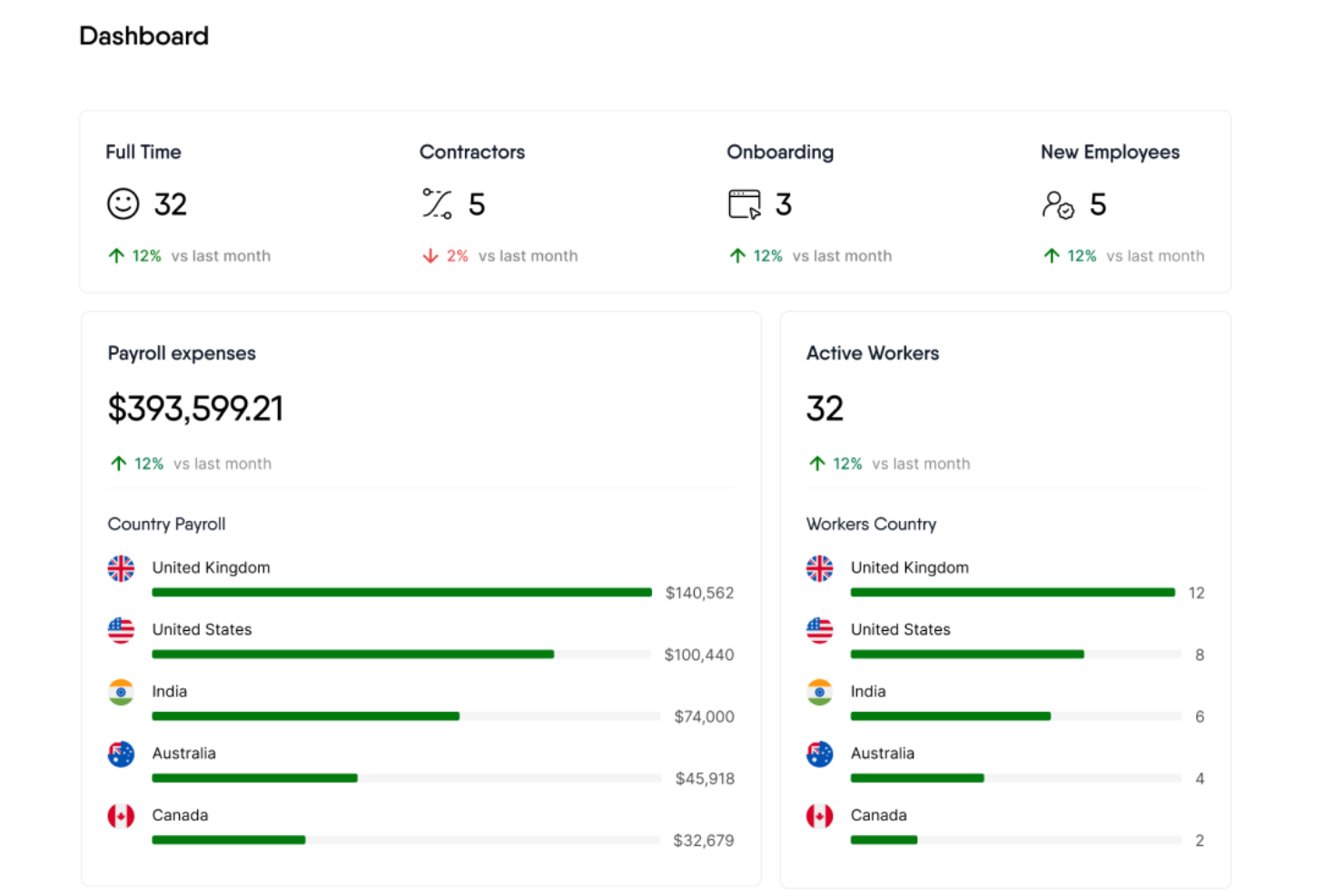
Remofirst is a global employment services platform that offers tools for hiring and managing a global team, including global employer of record services, international payroll and invoice management, benefits management, compliance support, and customer service.
For HR leaders like Wendy Makinson, HR Manager at Joloda Hydraroll, the benefits are clear: “RemoFirst has proven to be an affordable software that allows us to easily onboard members remotely and make payments globally. The fact that RemoFirst is already set up in the countries we need means that we don’t have to invest in official entities, which is a significant cost saving.”
Why I picked Remofirst: Remofirst’s Employer of Record (EOR) service allows startups to quickly and legally hire remote talent from anywhere in the world without the need to establish local entities, which is often a costly and time-consuming process.
Additionally, Remofirst handles all aspects of international payroll, compliance, benefits, and taxes, ensuring startups remain compliant with local labor laws while minimizing administrative burdens. The platform also offers robust onboarding processes, customizable contracts, and 24/7 support.
Standout features & integrations:
Standout features include international payroll and invoice management, benefits management, equipment provisioning, compliance, and an employee cost calculator to determine the cost of employing someone in a different country.
Integrations include ADP.
Pros and Cons
Pros:
- Responsive, 24/7 customer support
- Manages legal and administrative tasks of hiring internationally
- Handles payroll in multiple countries
Cons:
- Limited integrations
- No mobile app available

Gusto
Best for automated payroll processing

Gusto is designed to address the HR needs of startups and small businesses through its integrated platform, which combines payroll, benefits, and HR management in a single solution. If you're looking to streamline administrative tasks and enhance compliance, Gusto might be the tool for you. It appeals particularly to new and small enterprises that need efficient ways to manage payroll, time tracking, and employee benefits without the complexity of larger systems.
Why I Picked Gusto
I picked Gusto for its targeted approach to solving common HR challenges faced by startups, particularly in payroll and compliance. One standout feature is its automated payroll processing, which simplifies the often time-consuming task of running payroll, ensuring that your team gets paid accurately and on time. I also like its compliance alerts that help you stay ahead of regulatory changes, reducing the risk of costly errors. These features make Gusto particularly appealing for startups that need reliable HR solutions without the administrative burden.
Gusto Key Features
In addition to its payroll and compliance capabilities, I also found several other features beneficial for startups:
- Self-Onboarding: This feature allows new hires to complete paperwork and set up direct deposits, reducing the workload on your HR team.
- Employee Benefits Management: Gusto offers a variety of health benefits options, making it easier for you to provide competitive packages to your team.
- Time Tracking: Integrated time tracking helps you manage employee hours seamlessly, which is crucial for accurate payroll.
- Hiring and Onboarding Tools: These tools simplify the recruitment process, from job postings to onboarding new employees, helping you grow your team efficiently.
Gusto Integrations
Integrations include QuickBooks, Xero, Clover, TSheets, When I Work, Homebase, Deputy, Boomr, 7shifts, and Slack. An API is available for custom integrations.
Pros and Cons
Pros:
- Employee self-service portal empowers staff to access pay and forms.
- Payroll, benefits, and HR in one unified platform.
- Automatic tax filings and direct deposit simplify payroll compliance.
Cons:
- SMBs that need advanced compliance or niche industry-specific HR modules may find Gusto limiting.
- Great for simple pay and HR management but not customizable enough to handle large, complex orgs.
New Product Updates from Gusto
Gusto Adds Solo Advisory Tools and Mobile Money Features
Gusto adds Solo S-Corp Advisory Tools and Gusto Money on Mobile for tax guidance, invoicing, and bill payments. These updates help accountants advise solopreneurs and let users manage business finances from their phones. For more information, visit Gusto’s official site.

Best for rapid growth and modern employer branding
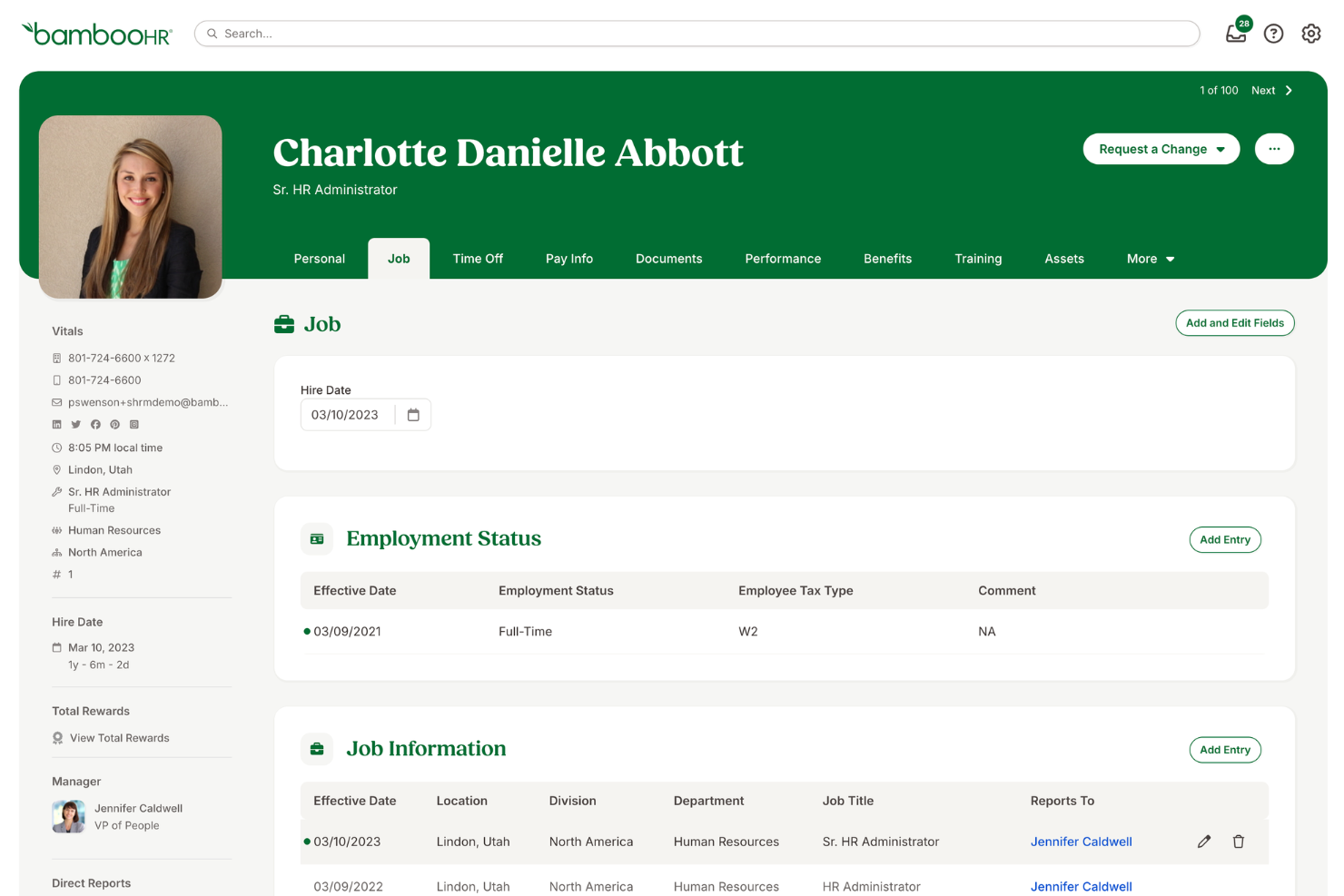
BambooHR is best for rapid growth and scaling startups because it simplifies HR tasks, making them routine and easy to manage. It allows startups to focus on growing their operations while building a strong brand and internal company culture.
As Crystal Pinney-Ramos, HR Technology Strategist at cClearHR, notes: “A lot of people are interested in BambooHR because it’s simple to implement, especially for smaller companies that don’t have dedicated HR teams.”
Why I picked BambooHR: I chose BambooHR for its user-friendly interface, professional onboarding experience, and comprehensive features that meet the specific needs of rapidly growing startups. BambooHR is ideal for fast-growing teams and enhancing employer branding, as it provides tools that help startups attract and retain top talent while building a strong employer brand and internal culture through ongoing employee engagement features.
Standout features & integrations:
Standout features include an applicant tracking system, onboarding tools, performance management, time tracking, and payroll integration. The software also provides employee experience tools to help create a positive workplace culture.
BambooHR integrates natively with the following tools: QuickBooks, Xero, Slack, G Suite, Microsoft 365, Indeed, Glassdoor, LinkedIn, and ZipRecruiter.
Pros and Cons
Pros:
- Offers workplace engagement tools
- Includes an applicant tracking system and onboarding tools
- User-friendly interface
Cons:
- Limited customer support options
- Limited customization options
New Product Updates from BambooHR®

BambooHR Adds Enrollment Waivers and Plan Year Continuity
BambooHR adds automatic enrollment waivers and plan year continuity for Benefits Administration. These updates help admins handle missed deadlines and prepare benefit renewals with less manual work. For more information, visit BambooHR’s official site.
 .
.
HiBob
Best for performance management & engagement

HiBob is an HR software platform designed to help startups manage core HR functions, onboard new hires, and keep teams engaged as they grow. It combines tools for employee data management, time tracking, and compensation with features that support performance reviews and workplace culture initiatives.
As Char Stark, People Operations and Talent Strategist at Beacon HR, points out: “All-in-one platforms like HiBob simplify HR operations by consolidating multiple functions into one tool, reducing complexity.”
Why I picked HiBob: I picked HiBob for its strong focus on performance management and employee engagement—two areas where startups often need extra support. Its performance review tools let you set goals, track progress, and run evaluations that help identify high performers early.
On the engagement side, built-in surveys and feedback tools give you a real-time view of team morale, so you can address issues before they escalate. The combination of these features can help a growing company keep its culture positive while scaling quickly.
Standout features & integrations:
Standout features include onboarding automation to bring new hires up to speed quickly, people analytics that deliver actionable workforce insights, and compensation management tools that keep payroll and benefits organized.
Integrations include ADP, Breezy, Globalization Partners, Paylocity, Trinet, Xero, Sequoia Tech, Greenhouse, Slack, Deel, and NetSuite.
Pros and Cons
Pros:
- Comprehensive HR tools
- Employee self-service capabilities
- Provides detailed and insightful reports
Cons:
- End-to-end payroll only offered for UK businesses
- Could offer more configuration options
TriNet
Best for a platform-plus-service approach
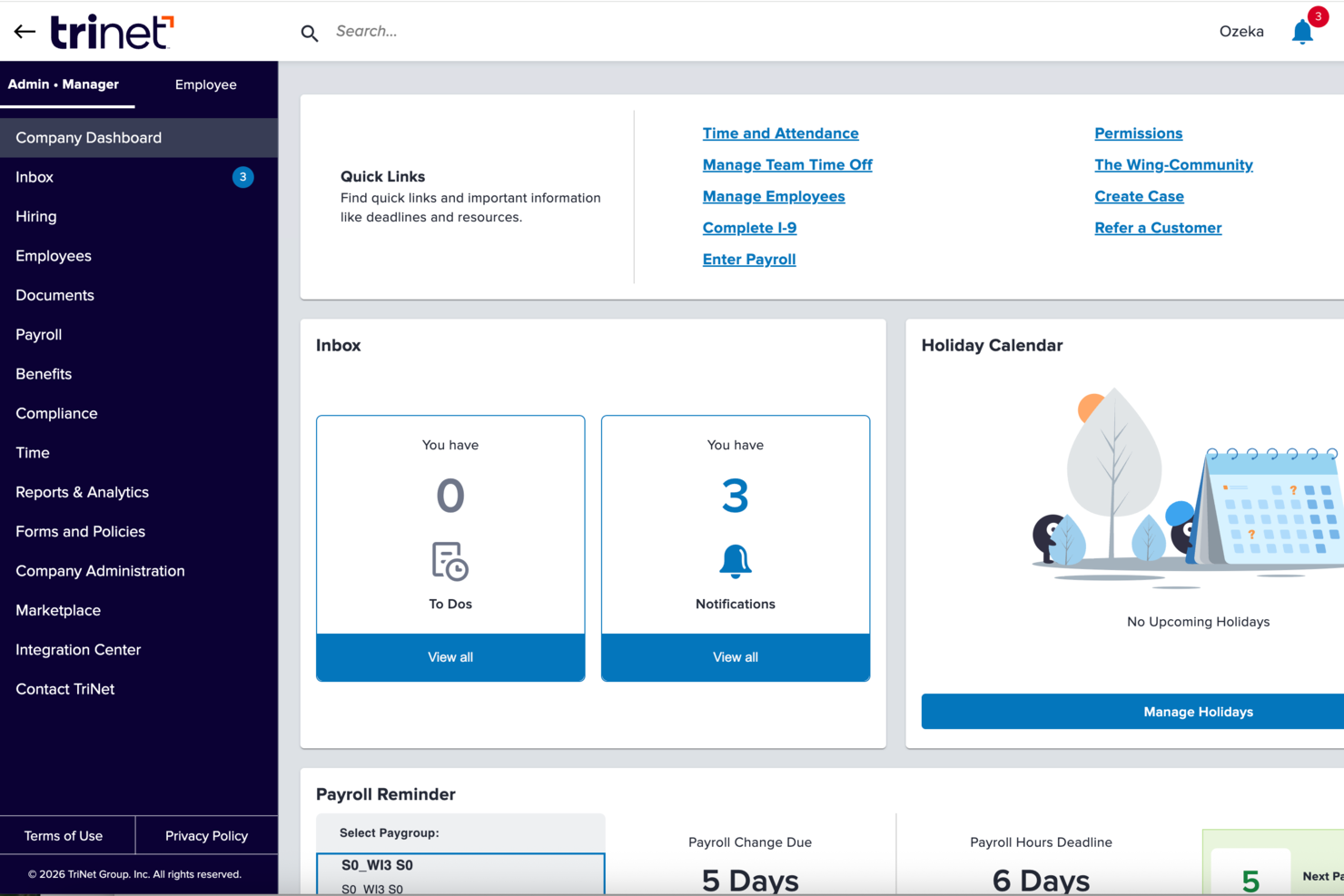
TriNet blends traditional HR software with outsourced HR expertise and payroll services, giving founders and small teams a way to manage hiring, benefits, compliance, and payroll without building an internal HR department. Whether you’re launching a startup or scaling into your first 50+ employees, TriNet provides tools and support that align HR admin with business growth priorities, helping you offload administrative complexity and focus on building your team and culture.
Why I Picked TriNet
I picked TriNet because it gives you access to a PEO-style HR model with integrated payroll, benefits, and compliance management, which makes handling HR tasks much more manageable as your startup grows. You get co-employment support and big-company benefits access, helping smaller teams compete for talent while sharing certain HR responsibilities with TriNet’s professionals. Its payroll and tax compliance tools tie directly into HR operations, reducing manual work and helping you stay aligned with federal and state requirements.
TriNet Key Features
In addition to the payroll and benefits focus that drew me to TriNet, you’ll find a number of other features that support HR needs in a startup environment:
- Payroll Processing: TriNet provides a robust payroll processing system that ensures timely and accurate payroll management.
- Compliance Support: The platform offers compliance assistance to help your startup navigate the complexities of employment laws and regulations.
- Benefits Administration: TriNet simplifies the administration of employee benefits, making it easier to offer competitive packages.
- Self-service Onboarding: Allows new hires to complete onboarding tasks digitally so they’re ready before day one.
TriNet Integrations
Integrations include QuickBooks, Xero, NetSuite, BambooHR, Workday, ADP, Paychex, Gusto, Zenefits, and Salesforce.
Pros and Cons
Pros:
- Offers combined HR software and human expertise support.
- Provides access to benefits typically available only to larger companies.
- Helps manage payroll tax filings and multi-state payroll.
Cons:
- Not the strongest choice if applicant tracking volume is high.
- Platform interface may feel clunky or dated to some users.

Workable HR
Best for customizable onboarding workflows

Workable HR is a comprehensive recruitment and HR management platform designed to cover the entire hiring process from job posting to employee management.
Why I picked Workable HR: Workable offers a robust HRIS that facilitates new hire onboarding experiences through a self-service portal. HR teams can also customize onboarding workflows, ensuring that each role has only the most relevant information to get employees started. This portal also lets new hires upload documentation and fill out the necessary information for their employee profile. Furthermore, the HRIS integrates with Workable's recruiting platform and applicant tracking system (ATS), facilitating an easier transition from applicant to new employee.
Standout features & integrations:
Standout features include customizable employee profiles, organizational charting, documentation management, an employee directory, time-off management, and e-signature collection.
Integrations include ADP, Xero, BambooHR, Greenhouse, Lever, Namely, Rippling, Sapling, and Zenefits.
Pros and Cons
Pros:
- Robust automation features
- Facilitates recruitment-to-hire processes
- Onboarding portal for new hires
Cons:
- Can't run payroll without integrations
- Reporting features could be more customizable
Other HR Software for Startups
Below is a list of additional HR software for startups that didn’t make it into my top 10 list, but are still worth checking out:
- Aeqium
For complex startup compensation planning
- Sloneek
For startup-friendly performance tracking
- SixFifty
For legal employment document creation
- TopSource
For 24/5 dedicated support
- Lattice
For goal setting and tracking progress
- GoCo
For integrated payroll and benefits
- ChartHop
For managing growing teams
- Sage Intacct
For scalable cloud-based financial and operational management
- ADP
For simplified payroll and HR for small businesses
- Paychex
For HR insights and needs assessment


How I Evaluate HR Software for Startups
For startups where a founder manages payroll, onboarding, and compliance solo, I evaluate tools on two layers: must-have functionality and the differentiators that set the best apart.
Core Functionality (Table Stakes For This List)
When I'm selecting tools for my list, I rank each one on a scale from 0 (does not offer the functionality) to 5 (excels in this area) for each core functionality listed below. Then, I calculate the tool's total score into a percentage. Each tool needs to achieve a minimum total score of 65% to be considered for inclusion.
- Employee Records Management: I look for a centralized database where you can store contracts, tax forms, and personal details—plus a visual org chart that updates as roles change.
- Payroll Processing: Whether native or tightly integrated, I evaluate how each tool handles wage calculations, tax withholdings, and direct deposits for both W-2 employees and contractors.
- Onboarding & Offboarding Workflows: A strong onboarding flow should automate offer letters, e-signatures, and compliance documents so a new hire's first day isn't buried in paperwork.
- Time Off & PTO Tracking: I check for self-service PTO requests, configurable accrual rules, and manager approval workflows—features that remove back-and-forth from Slack or email.
- Benefits Administration: I evaluate whether the tool supports digital enrollment, carrier or broker connections, and life-event changes without requiring manual plan updates.
- Compliance & Reporting: Startups rarely have in-house counsel, so I look for automated compliance prompts, standard HR reports, and audit-ready recordkeeping built into the platform.
Once I have a list of tools that meet this criteria, I consider what sets each platform apart.
Differentiating Factors (What Sets Vendors Apart)
Here's how I compare and contrast different vendors:
Standout Features
Global hiring support matters when your team is distributed from day one—I check whether a tool offers EOR services or multi-country payroll built in. Equity and compensation tracking is another area I evaluate closely, since startups often lean heavily on stock options over salary. I also look for built-in performance management features like OKRs and review cycles, which save growing teams from buying a separate platform too early.
Beyond Features
Pricing and scalability are the first things I evaluate—startups need transparent per-employee pricing that won't force a platform migration at 50 or 100 employees. Implementation speed also matters a lot here. A founder wearing the HR hat should be able to set up the system in days using pre-built templates, not weeks with a consultant. I also check how well each tool connects with common startup stacks like Slack, Google Workspace, and QuickBooks, since a disconnected HR platform creates more busywork than it solves.
How to Choose HR Software for Startups
Figuring out the best solution is a bit of a team effort. Follow this process to help you find the best solution for your organization's requirements:
Step 1: Define Your Needs
The first step is always getting clear on your specific needs e.g. workforce composition (number, type, location) and growth plans.
Some key questions to ask at this stage:
- How many employees do we have, and how fast do we expect to grow?
- Do we have a mix of full-time, part-time, and contract workers?
- Are we hiring internationally, and do we need multi-country payroll support?
- What HR processes can be automated (e.g., onboarding, payroll, time-off tracking)?
- Do we need automated payroll runs, or will we manually approve payroll before processing?
- How do we currently handle overtime, commissions, and employee benefits?
- Does our payroll need to manage tax filings, withholdings, and statutory deductions automatically?
- Are we operating in multiple states or countries with different tax laws?
- Do we require built-in compliance updates for law changes?
- What other tools will it need to integrate with?
Best Practices:
- Involve multiple stakeholders: Gather input from HR, finance, compliance, and IT to ensure the system meets all business needs.
- Audit your current payroll process: Identify inefficiencies, compliance risks, and manual tasks that need automation.

Step 2: Research and Compare Vendors
Once needs are defined, research HR software vendors that align with your requirements.
You can use HR service guides like this one as well as your network and HR communities.
Best Practice: Shortlist 3–5 vendors and create a vendor comparison matrix to objectively assess features, pricing, and support options.
Once you've made your shortlist, reach out and book in some live demo calls to help you assess the tool's usability, features, and the team behind it.

Step 3: Finalize Selection and Negotiate Terms
Once a vendor is chosen, review pricing plans, service-level agreements (SLAs), and contract terms.
Clarify any additional costs, such as implementation fees, tax filing charges, or user licenses, before signing.
If the software includes customer support tiers, ensure your company gets the appropriate level of assistance and be super clear about any additional support costs.
Trends in HR Software for Startups
This market is ever-changing. I analyzed numerous product updates, press releases, and release logs to identify some trends in HR software for startups and their potential impact on the industry.
- AI-Powered Recruitment Tools: AI is being used for tasks such as screening resumes and match candidates to job descriptions, reducing the time spent on manual screening. (See my list of the best AI-backed applicant tracking systems for great examples of this!)
- Remote Work Management: Tools for managing remote teams are becoming more sophisticated as Gen Z is entering the workforce and the demand for work-life balance is increasing. They offer features like time tracking and virtual collaboration, which are essential for remote work and increasingly more common.
- Data-Driven Decision Making: HR software is leveraging data analytics to inform decisions. This includes insights on employee performance and retention, forecasting hiring needs, identifying potential talent gaps, and predicting employee turnover rates.
- Wellness and Benefit Prioritization: With an increasing focus on employee well-being and long-term retention, HR software solutions now integrate features such as wellness apps, stress management tools, and platforms promoting work-life balance, alongside remote 1:1 check-ins and continuous performance management.
What is HR Software for Startups?
HR software for startups is designed to help manage various HR functions such as recruitment, onboarding, payroll, benefits administration, training, and performance management.
Key components include applicant tracking, employee databases, payroll processing, benefits management, and performance evaluation, all aimed at streamlining HR processes, ensuring compliance, and improving efficiency in managing a growing workforce.
Key Features of HR Software for Startups
When selecting HR software for startups, focus on features that support growth, efficiency, flexibility, and employee satisfaction. Here are the most important features to consider:
- Employee Onboarding: Automated document signing and management simplify the process of integrating new hires into the company, helping ensure new employees can get productive from day one.
- Payroll Management: Automates salary calculations and disbursements, reducing errors and ensuring timely payments.
- Time and Attendance Tracking: Monitors employee work hours and attendance, helping to manage workforce productivity and compliance with labor laws.
- Performance Management: Tracks and evaluates employee performance, aiding in identifying top performers and areas needing improvement.
- Benefits Administration: Portals for employee enrolment in benefits such as health insurance and retirement plans.
- Employee Self-Service: Allows employees to access and manage their personal information, reducing the administrative burden on HR staff.
- Recruitment and Applicant Tracking: Streamlines the hiring process from job posting to candidate selection to making an offer, creating a better hiring experience for everyone involved.
- Compliance Management: Automatic updates and reminders help ensure adherence to changing labor laws and regulations, minimizing the risk of legal issues and penalties.
- Reporting and Analytics: Provides insights through data analysis and reporting. This supports informed decision-making and strategic planning.
- Integration Capabilities: Allows the software to work seamlessly with other business tools. This ensures a cohesive and efficient workflow across different departments.
If you're looking for a new system primarily for payroll functions, you may want to consider researching payroll platforms for startups too.
Benefits of HR Software for Startups
Leveraging HR software tools is an effective way to alleviate administrative tasks and manage your workforce more efficiently. Here are several benefits that HR software offers for startups:
- Time Savings: Automating routine HR tasks such as payroll, attendance tracking, and employee onboarding saves significant time, allowing HR teams to focus on more strategic initiatives.
- Improved Compliance: HR software helps ensure that startups adhere to labor laws and regulations by providing timely updates and maintaining accurate records, reducing the risk of legal issues.
- Enhanced Employee Experience: By streamlining processes like leave requests and performance management, HR software improves the overall employee experience, leading to higher satisfaction and retention rates.
- Data-Driven Decisions: Access to real-time analytics and reporting enables startups to make informed decisions about their workforce, from hiring to upskilling.
- Scalability: As startups grow, HR software can easily scale to accommodate an increasing number of employees, ensuring that HR processes remain efficient and effective.
Investing in HR software gives startups the tools to manage their workforce effectively, ensure compliance, improve employee satisfaction, and support growth.
Costs & Pricing for HR Software for Startups
HR software for startups typically comes in various plans tailored to different needs and budgets.
Understanding the costs and pricing options for HR software can be challenging, especially for those new to the market.
Below is a table summarizing common plan types, their average prices, and typical features.
Plan Comparison Table for HR Software for Startups
| Plan Type | Average Price | Common Features |
| Free | $0 | Basic employee records, limited user access, and basic reporting |
| Basic | $30-$50/month + $5-$10/employee | Employee records, payroll processing, basic compliance tools, and limited support |
| Mid-Level | $50-$100/month + $5-$15/employee | Advanced payroll, benefits administration, compliance support, and employee self-service portals |
| Premium | $100-$250/month + $10-$25/employee | Comprehensive HR management, advanced analytics, AI-driven features, extensive integrations, and 24/7 support |
| Enterprise | Custom Pricing | Full customization, dedicated support, extensive integrations, and advanced security features |
Each plan caters to different needs: free and basic plans suit small teams, mid-level and premium plans offer advanced features for growing businesses, and enterprise plans provide extensive customization and support for larger startups with complex requirements.
HR Software for Startups FAQs
Here are some of the commonly asked questions about HR software for startups: