

10 Best HRMS for Small Business to Manage Growth in 2026

10 Best HRMS for Small Business


Managing HR in a small business is no easy feat, especially when you’re juggling multiple roles and responsibilities. You may be struggling with endless spreadsheets, spending hours on payroll processing, or dealing with errors in employee data that could lead to compliance risks. On top of that, choosing the right HRMS software can feel overwhelming, with so many tools promising to solve your problems—but which one really will?
HRMS tools are designed to simplify key HR functions like employee data management, payroll automation, recruitment, and benefits administration. They help you save time, minimize errors, and create a more streamlined HR experience for you and your team.
Drawing on my experience as an HR specialist in a small team, I’ve created this shortlist of the best HRMS for small businesses. My goal is to make it easier for you to find a solution that fits your unique needs, so you can spend less time on HR headaches and more time running your business.
Why Trust Our Software Recommendations
Our team has been testing and reviewing software since 2012. As HR experts ourselves, we know how difficult—and important—it is to choose the right software.
For this guide, we evaluated tools using hands-on testing and independent research, scoring tools using our selection criteria. We also draw on insights from industry thought leaders and practicing HR experts.
Our reviews reflect our human editorial judgment, not a sales pitch.
Expert reviewers:
HRMS for Small Business Pricing Comparison Table
This table compares pricing details for my top HRMS selections for small businesses.
| Tool | Best For | Trial Info | Price | ||
|---|---|---|---|---|---|
| 1 | Best with 24/7 expert HR and payroll support | Not available | From $599/employee/month | Website | |
| 2 | Best free all-in-one HRMS for small businesses | Free demo available | From $5/user/month | Website | |
| 3 | Best for payroll-to-benefits coordination | Free demo available | From $49/month + $6/month/user | Website | |
| 4 | Best for flexible HR processes | Free demo available | Pricing upon request | Website | |
| 5 | Best for centralized HR documentation | 14-day free trial + free demo available | From £24/month/business | Website | |
| 6 | Best for payroll automation and integrations | Free demo available | Pricing upon request | Website | |
| 7 | Best employee well-being and feedback module | Free demo available | From $8/user/month | Website | |
| 8 | Best for automation and simplified workflows | Free trial available | From $10/employee/month | Website | |
| 9 | Best for industry-specific payroll features | Free demo available | Pricing upon request | Website | |
| 10 | Best for HR outsourcing and compliance | Free demo available | Pricing upon request | Website |


Reviews of the Best HRMS for Small Businesses
Here’s a brief description of each HRMS for small business to showcase each tool’s best use case, some noteworthy features, and screenshots to give a snapshot of the user interface. Keep reading to find additional bonus picks at the bottom of the list.

Best with 24/7 expert HR and payroll support
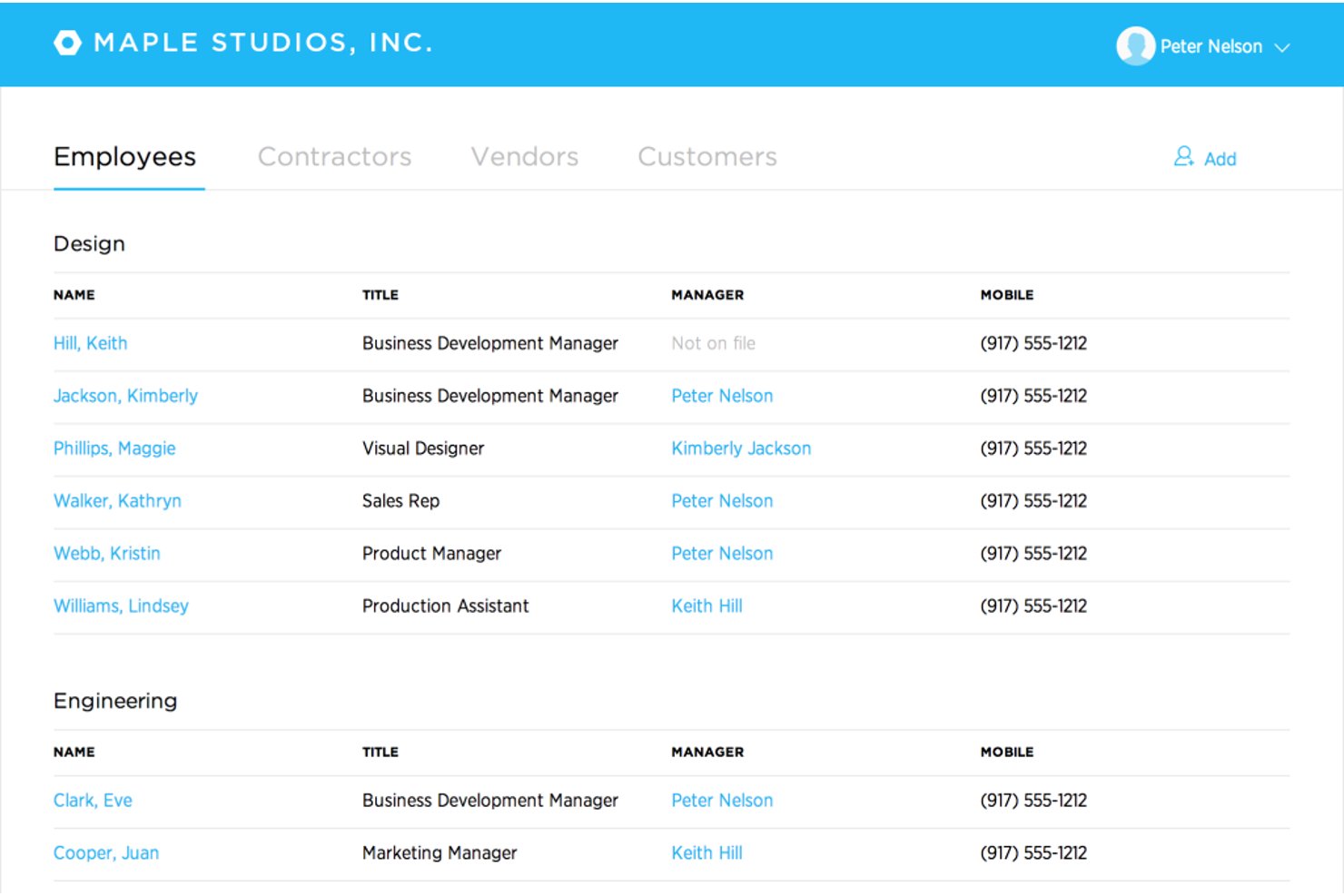
Justworks is a cloud-based HRMS designed for small businesses, combining payroll, benefits administration, HR management, compliance support, and automated tax filings in one platform.
Who Is Justworks Best For?
Small businesses and startups that need simple, compliant payroll and HR management across multiple states or locations.
Why I Picked Justworks
I picked Justworks as one of the best because I rely on their 24/7 expert HR and payroll support for urgent compliance questions and quick troubleshooting. I also appreciate their automated payroll and multi-state tax filings for distributed teams.
Justworks Key Features
- Time tracking add-on: Built-in time tracking integrates directly with payroll for hourly teams.
- Employee self-service portal: Team members can manage their own documents, benefits, and paystubs online.
- Benefits administration: Centralized system to enroll, update, and track benefits for all employees.
- Document storage: Secure, cloud-based repository for company policies and required HR documents.
Justworks Integrations
Native integrations are not clearly documented. An API is available for custom integrations.
Pros and Cons
Pros:
- Offers access to large-group employee benefits
- Multi-state payroll compliance is automated
- 24/7 live HR and payroll support
Cons:
- Custom workflow options are minimal
- Limited built-in performance management tools

Deel HR
Best free all-in-one HRMS for small businesses
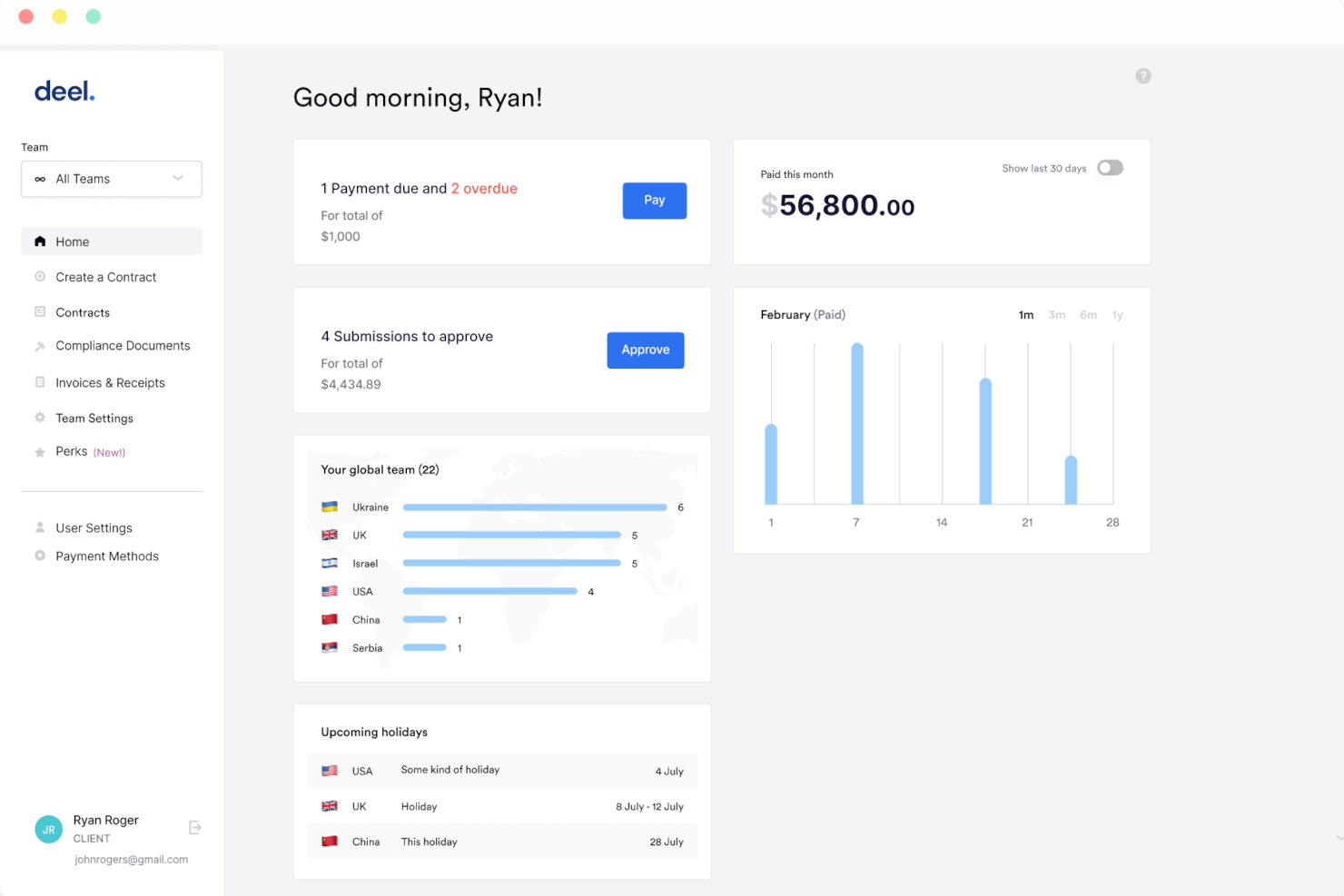
Deel HR is an HR management system for small businesses that covers employee onboarding, document management, time off tracking, and org chart management in one platform.
Who Is Deel HR Best For?
Deel HR is a strong fit for small businesses and startups that need a free, centralized HR system to manage a growing workforce without investing in paid software.
Why I Picked Deel HR
Deel HR earns a spot on my shortlist because it's one of the few HRMS platforms that offers a genuinely free core HR tier for small businesses. The free plan isn't a stripped-down trial—it includes worker profiles, time off tracking, document management, and an org chart, covering the day-to-day needs of a small team without requiring a paid upgrade. When you're ready to grow, you can add modules like recruiting or performance management as a paid add-on without rebuilding anything. Its modular design lets my team start with what we need now and layer in compensation cycles or headcount planning later, all on the same data foundation.
Deel HR Key Features
- Workforce planning: Forecast headcount, model scenarios, and track hiring costs using live workforce data instead of spreadsheets.
- AI-powered applicant tracking: Source candidates automatically, manage interviews, and move new hires directly into onboarding from a single pipeline.
- 360° performance reviews: Run configurable review cycles with quantitative and qualitative feedback, OKRs, and review calibration across your team.
- Anonymous reporting: Built-in whistleblowing tools let employees flag concerns securely, supporting compliance and a speak-up culture.
Deel HR Integrations
Deel HR offers native integrations with Greenhouse, BambooHR, HiBob, Workday, Lever, Ashby, and Personio. An API is available for custom integrations.
New Product Updates from Deel HR

Deel Expands Stablecoin Wallet to 80+ Countries
Deel expands its Stablecoin Wallet to 80+ countries with dollar-backed balances and optional rewards. This gives eligible contractors more ways to hold and manage earnings inside Deel. For more information, visit Deel’s official site.
 .
.
Gusto
Best for payroll-to-benefits coordination
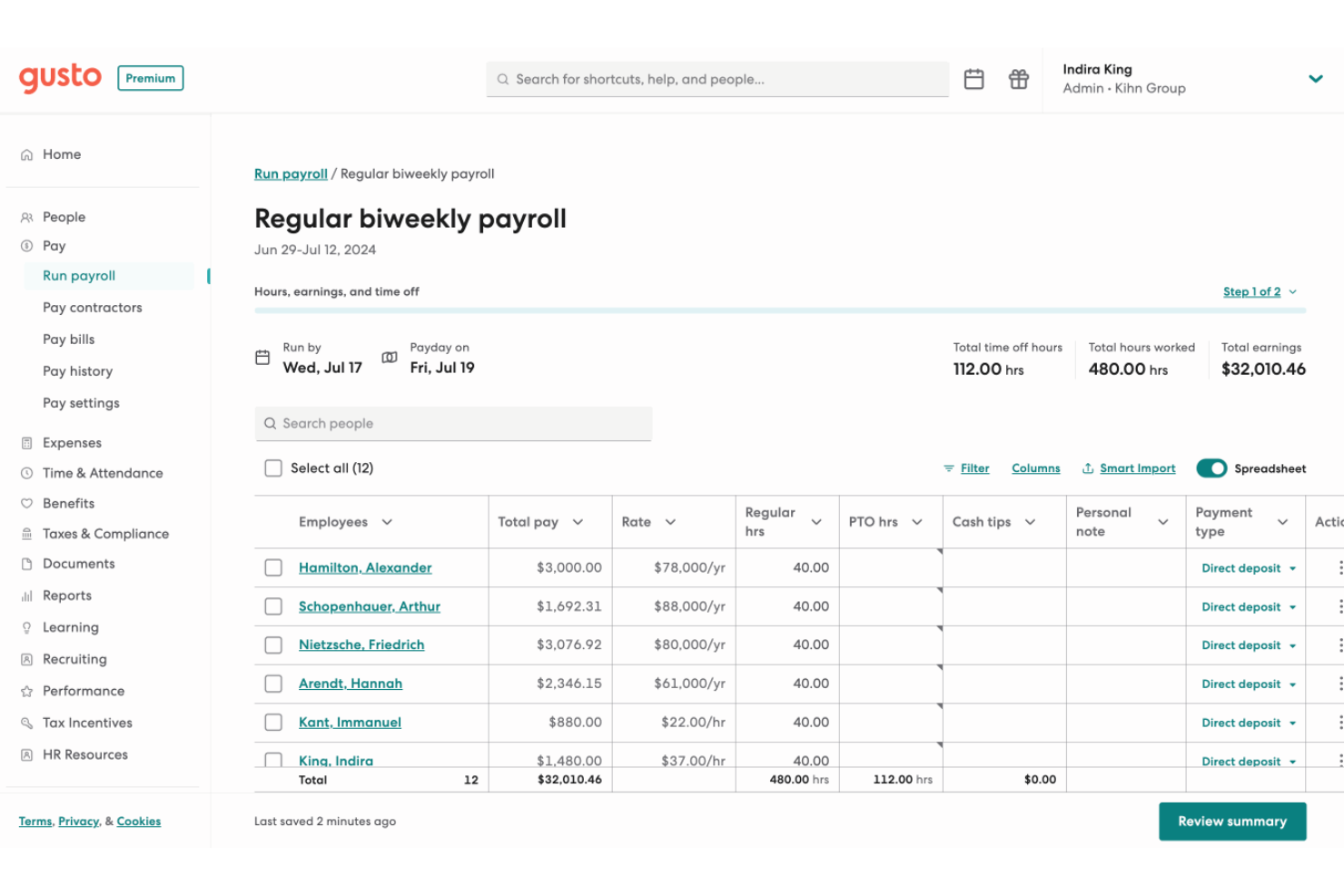
Gusto is an HRMS platform for small businesses that brings together payroll, benefits administration, onboarding, compliance tools, and employee management in one system.
Who Is Gusto Best For?
Gusto is a good fit for small business owners and HR generalists who need to manage payroll and benefits together without a dedicated HR team.
Why I Picked Gusto
Gusto earns its spot on my shortlist because payroll and benefits are woven into a single workflow. When you add a new hire, benefits enrollment starts within the onboarding flow—medical, dental, vision, and 401(k) deductions are calculated and synced with payroll. Gusto also handles open enrollment renewals in-platform, submitting paperwork to carriers so my team doesn't have to chase signatures or track deadlines. The paycheck splitter and Gusto Wallet features add flexibility, letting employees direct portions of each paycheck into savings accounts without extra administrative work.
Gusto Key Features
- Applicant tracking system: Post jobs and track candidates through the hiring pipeline within Gusto, without a separate recruiting tool.
- Mobile time tracking with geolocation: Employees can clock in and out from their phones, with location data captured to verify on-site attendance.
- Performance review templates: Run structured employee reviews using built-in templates, with feedback requests sent to appropriate reviewers on schedule.
- Anonymous feedback surveys: Collect employee input through built-in surveys that keep responses anonymous to encourage candid feedback.
Gusto Integrations
Gusto offers 140+ native integrations, including QuickBooks, Xero, 15Five, 7Shifts, Asana, Bench, Betterment at Work, Box, ApplicantPro, and Checkr. An API is available for custom integrations.
Pros and Cons
Pros:
- Offers self-service onboarding and online storage of tax forms and pay stubs for contractors and employees.
- Payroll, benefits, and HR in one unified platform.
- Payroll runs unlimited times per month without extra fees.
Cons:
- Limited flexibility in customizing tax withholdings or non-standard payroll setups.
- SMBs that need advanced compliance or niche industry-specific HR modules may find Gusto limiting.
New Product Updates from Gusto
Gusto Adds Solo Advisory Tools and Mobile Money Features
Gusto adds Solo S-Corp Advisory Tools and Gusto Money on Mobile for tax guidance, invoicing, and bill payments. These updates help accountants advise solopreneurs and let users manage business finances from their phones. For more information, visit Gusto’s official site.

HiBob
Best for flexible HR processes
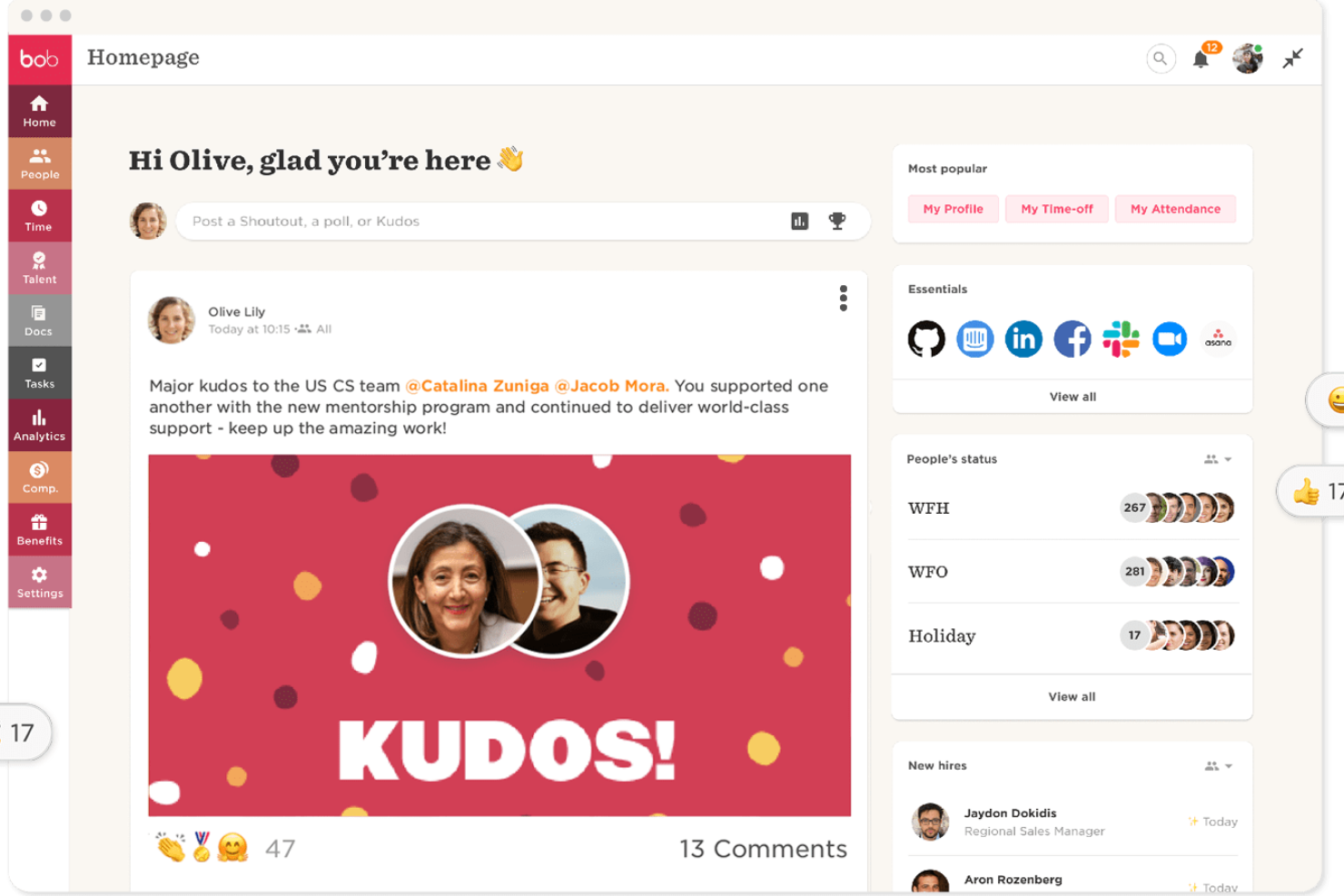
HiBob is an HR management platform designed for small businesses, offering core HR, onboarding, time off tracking, performance management, and customizable workflows.
Who Is HiBob Best For?
HiBob is a strong fit for small and mid-sized businesses that need adaptable HR processes to support fast-changing team structures and people operations.
Why I Picked HiBob
HiBob earns its spot on my shortlist because of how flexible its HR processes are. I love that you can build custom workflows and approval chains that match how your team actually operates, rather than forcing your processes into a rigid system structure. The sandbox environment is especially useful—you can test changes to compensation cycles, automation rules, or performance reviews before they go live, which reduces the risk associated with adjusting HR processes on the fly. The modular setup lets you start with Core HR and add talent, payroll, or workforce planning as your needs grow.
HiBob Key Features
- People analytics: Track headcount, retention, absenteeism, and growth with real-time reports you can schedule and share directly with leadership.
- Onboarding workflows: Automate onboarding tasks and sequences so new hires get a consistent, structured experience from day one.
- Time off management: Employees request and managers approve time off directly within the platform, with visibility into who's in and who's out.
- Employee surveys: Run lifecycle or engagement surveys to collect feedback at key milestones and view results in a built-in dashboard.
HiBob Integrations
HiBob offers native integrations with Slack, Microsoft Teams, Google Workspace, DocuSign, Greenhouse, Okta, and Workable. An API is available for custom integrations.
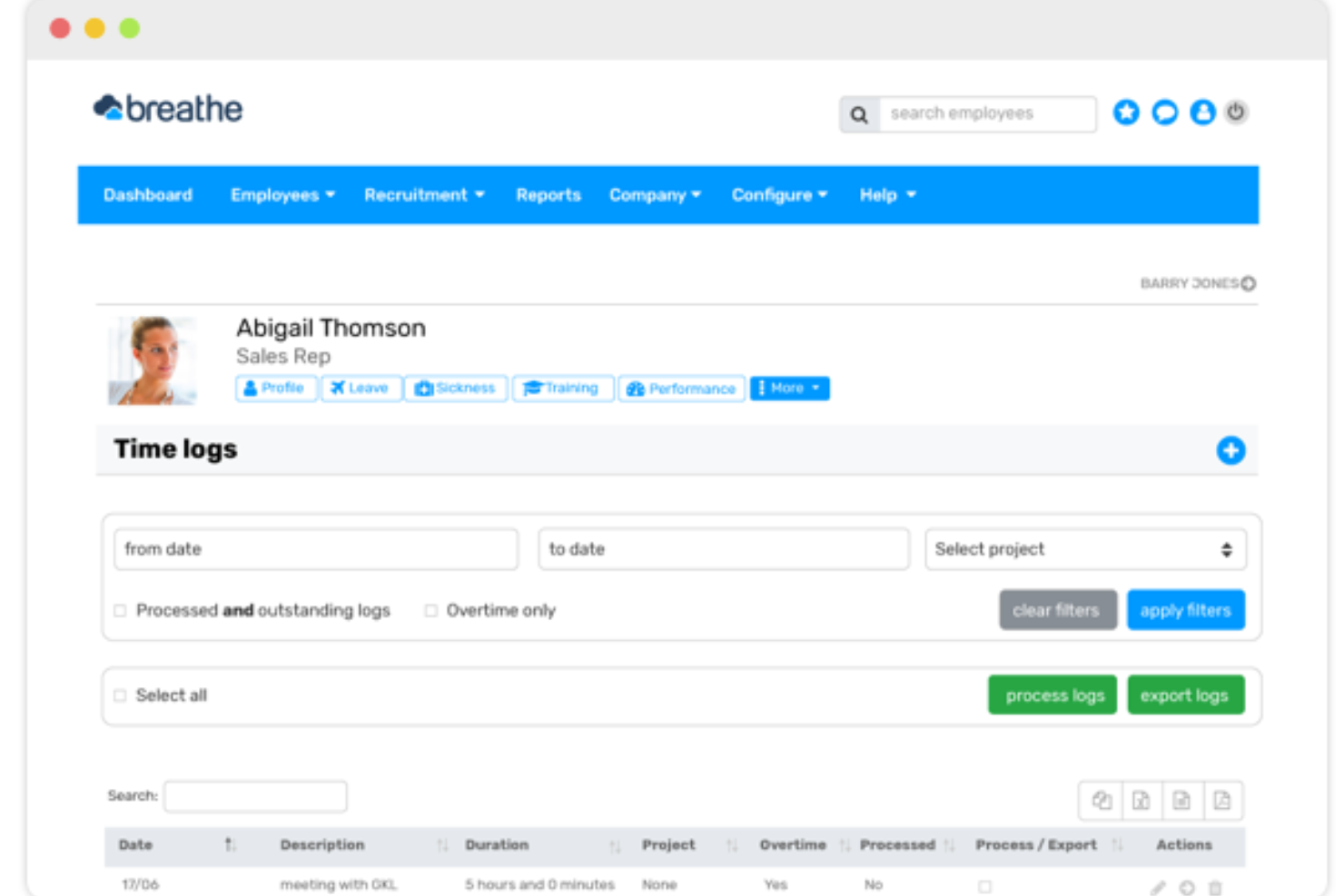
Breathe HR is an HR management system for small businesses that brings together employee records, document management, time off tracking, and performance management in one platform.
Who Is Breathe HR Best For?
Breathe HR is a good fit for small UK-based businesses that need a straightforward way to manage HR admin without a dedicated HR team.
Why I Picked Breathe HR
Breathe HR earns its spot as one of the best on my shortlist because of how well it handles centralized HR documentation for small teams. I love that you can store unlimited documents—contracts, compliance policies, performance reviews—all in one GDPR-compliant location, without worrying about hitting a storage cap. What I find especially useful is the e-signature feature: you can send a contract directly within Breathe, add multiple signees, and get an automatic audit trail with timestamps and IP addresses logged for every signature. There's also a read-tracking feature that shows you exactly who has and hasn't opened a shared company document, so you can send targeted reminders without any manual follow-up.
Breathe HR Key Features
- Holiday and absence tracking: Manage holiday requests, sickness records, and leave balances with a shared calendar view and instant approval workflows.
- Sickness trigger alerts: Set custom Bradford Factor score thresholds or sickness instance limits, and Breathe automatically notifies you when an employee reaches them.
- Performance management: Schedule one-to-ones, run appraisal meetings, and assign goals and tasks to employees directly within the platform.
- Payroll-ready data export: Export HR data in a payroll-ready format to reduce manual data entry when running payroll.
Breathe HR Integrations
Breathe HR offers native integrations with Xero and Google Workspace. An API is available for custom integrations.

Best for payroll automation and integrations
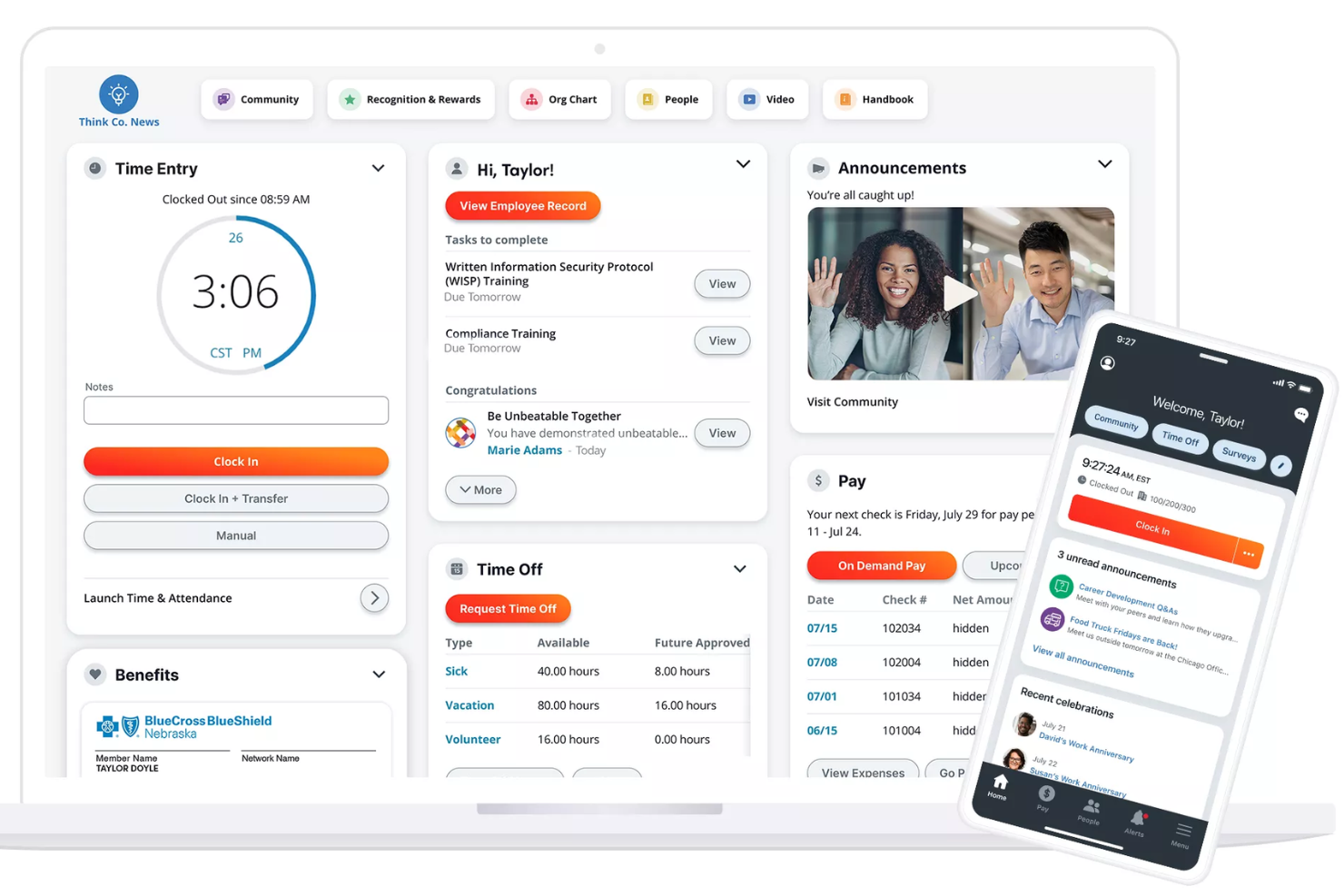
Paylocity is an HRMS platform for small businesses that combines payroll processing, HR management, time tracking, benefits administration, and compliance tools in one system.
Who Is Paylocity Best For?
Paylocity is a good fit for small to mid-sized businesses that need a unified HR and payroll platform with room to scale.
Why I Picked Paylocity
Paylocity earns its spot on my shortlist because of how well its payroll automation handles the details that trip up small HR teams. I particularly like the Payroll Readiness Dashboard, which surfaces critical tasks before processing day and runs 40+ audits to flag issues like unexpected pay spikes before you submit. Hours and labor allocations flow directly from Time & Labor into payroll, so there's no manual re-entry between systems. On the integrations side, Paylocity connects to ATS platforms, benefits and 401(k) providers, ERP systems, and identity tools like Okta and Microsoft Entra—plus open APIs for custom connections.
Paylocity Key Features
- Benefits decision support: Paylocity's Benefits Decision Support tool gives employees personalized plan recommendations based on their individual preferences and situations during open enrollment.
- Tax geolocation: Paylocity audits each employee's location to verify they're paying the correct taxes, with support from a registered IRS Reporting Agent team across all 50 states.
- On demand payment: Employees can access earned wages before payday, giving small businesses a recruiting and retention tool with no impact on payroll cash flow.
- General ledger mapping: Configure GL settings, create journal entries, and generate customized reports directly in the platform without needing to contact Paylocity support.
Paylocity Integrations
Paylocity offers native integrations with ADP, QuickBooks, NetSuite, Okta, Microsoft Entra, and several benefits and 401(k) providers. An API is available for custom integrations.
New Product Updates from Paylocity

Paylocity Expands Expense and Purchase Request Tools
Paylocity adds connected personal cards, smarter expense categorization, and a streamlined purchase request experience. This reduces manual entry and helps finance teams manage expenses and approvals more efficiently. For more information, visit Paylocity’s official site.
 .
.
Best employee well-being and feedback module
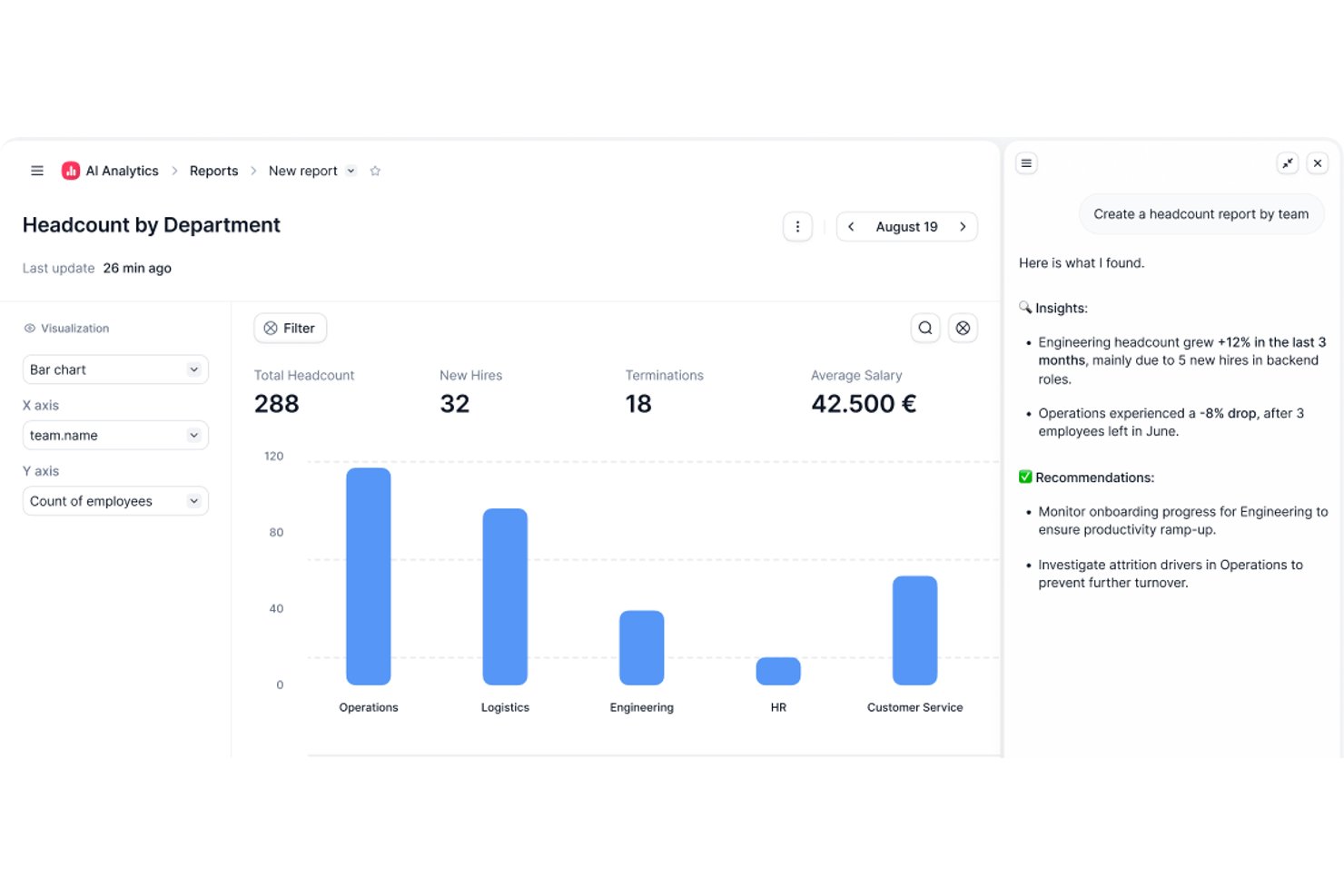
Factorial is an HR management system for small businesses that covers employee records, time off tracking, payroll, onboarding, and performance management in one platform.
Who Is Factorial Best For?
Factorial is a good fit for small and mid-sized businesses looking for an all-in-one HR platform to manage their people operations without a dedicated HR team.
Why I Picked Factorial
Factorial earns its spot on my shortlist because of how well it handles employee well-being and feedback for small teams. I particularly like the Employee Pulse feature, which lets you send daily or custom-scheduled check-ins where employees share their mood anonymously. That kind of regular, low-friction signal is genuinely useful when you don't have a dedicated engagement team watching for burnout or disengagement. On top of that, the Engagement Insight Dashboard pulls together eNPS scores and climate survey results in one view, so I can see participation rates, promoter/detractor breakdowns, and sentiment trends without digging through separate reports. The 360° performance reviews round it out nicely, letting peers, managers, and direct reports all weigh in on the same employee.
Factorial Key Features
- Onboarding and offboarding workflows: Set up task checklists, assign equipment, and send documents for signature as part of a structured onboarding or offboarding process.
- Shift management: Build and publish employee shift schedules, set shift patterns, and let employees view their upcoming shifts from the mobile app.
- Goals and OKR tracking: Create individual or team-level goals, link them to company objectives, and track progress directly within the platform.
- Document management: Store, organize, and share employee documents—like contracts and payslips—with role-based access controls to manage who can view or edit each file.
Factorial Integrations
Factorial offers native integrations with Slack, Google Calendar, Microsoft Outlook, Zapier, and provides an API for custom integrations.

Best for automation and simplified workflows
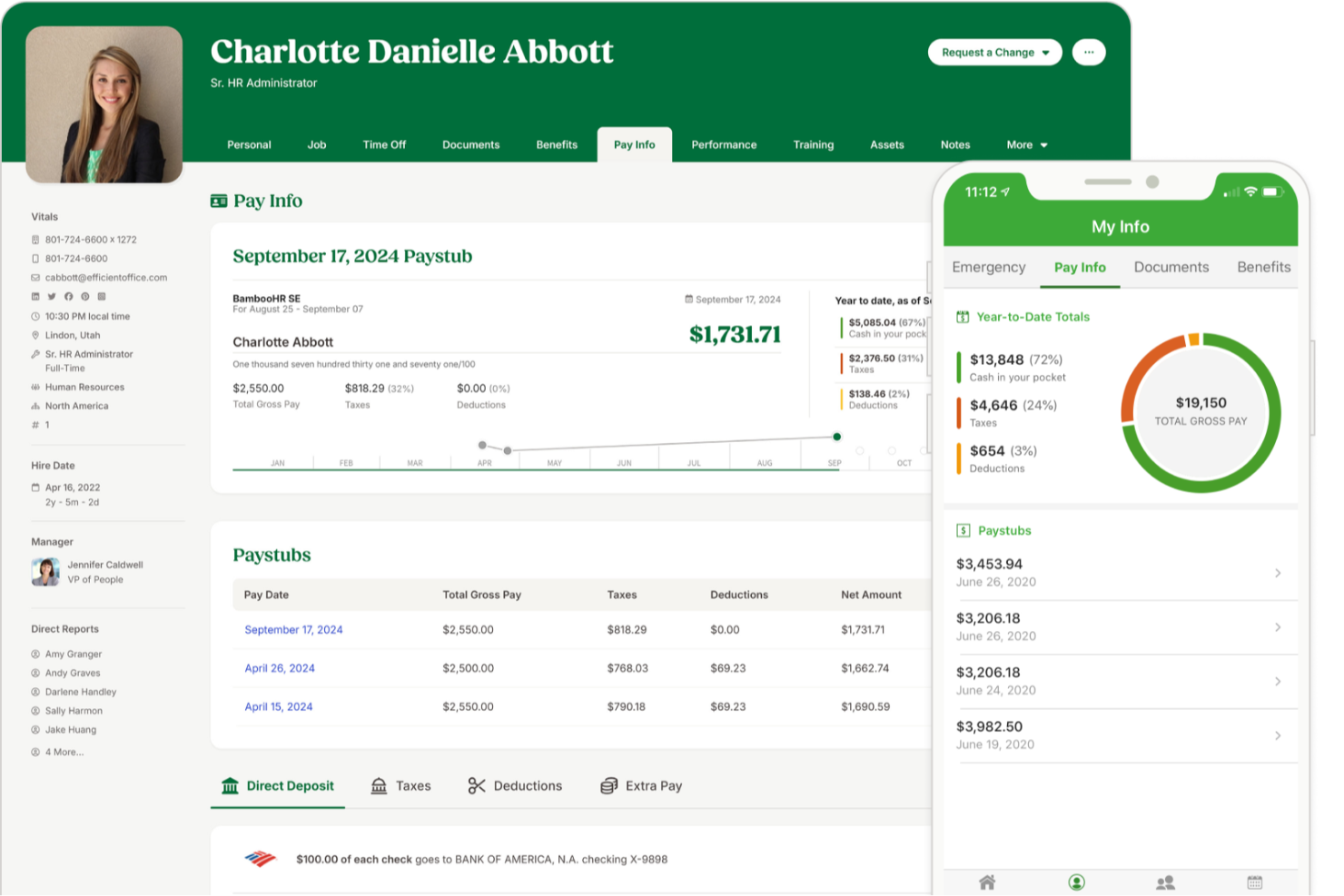
BambooHR is an HR management system for small businesses that covers employee records, onboarding, time-off tracking, workflow automation, and reporting in one platform.
Who Is BambooHR Best For?
BambooHR is a good fit for small to mid-sized businesses that need a dedicated HR system without the complexity of enterprise-grade software.
Why I Picked BambooHR
I picked BambooHR as one of the best because of how well its automated workflows handle the approval bottlenecks that slow small HR teams down. When a time-off request or promotion comes in, BambooHR routes it to the right approver automatically—no email chains, no manual follow-up. I also like the automated onboarding checklists, which assign tasks to the right internal team members the moment a new hire is added, so nothing slips through the cracks before day one. For a small business where one person is often managing all of HR, that kind of built-in structure makes a real operational difference.
BambooHR Key Features
- Applicant tracking system: Manage job postings, review candidates, and move applicants through a hiring pipeline directly within BambooHR.
- Employee self-service portal: Employees can update their own personal information, view pay stubs, and request time off without going through HR.
- Performance management: Run performance review cycles, set goals, and collect peer feedback from within the platform.
- Custom reporting and dashboards: Build real-time reports on workforce data and visualize trends using configurable dashboards.
BambooHR Integrations
BambooHR offers native integrations with ADP, Paylocity, QuickBooks, Slack, Greenhouse, Checkr, and Indeed. It also provides an API for custom integrations.
New Product Updates from BambooHR®

BambooHR Expands Compensation Benchmarking Data
BambooHR adds monthly-refreshed compensation benchmarks, additional data sources, and clearer job match indicators. This gives teams more context when comparing pay data and selecting relevant benchmarks. For more information, visit BambooHR’s official site.
 .
.
Paycor
Best for industry-specific payroll features

Paycor is an HRMS platform for small businesses that brings together payroll, HR management, time tracking, benefits administration, and talent management in one system.
Who Is Paycor Best For?
Paycor is a strong fit for small businesses in industries like healthcare, manufacturing, and retail that need payroll and HR tools built around their specific workforce needs.
Why Paycor Is a Top Pick
Paycor is a top pick because it builds industry-specific payroll logic directly into the product rather than treating every business the same. For manufacturing teams, that means automated blended overtime and piece-rate calculations are handled natively—not through manual workarounds. For healthcare, Paycor supports PBJ (Payroll-Based Journal) reporting and lets you copy and paste shifts between days while filtering by nurse certifications. I also like that each industry gets its own implementation blueprint, so the setup process is led by consultants who already understand your payroll structure before they walk in the door.
Paycor Key Features
- Benefits Advisor: An open enrollment tool that lets employees self-select benefits with built-in decision support, while giving HR teams benchmarking and reporting capabilities.
- Pulse surveys: A built-in employee feedback tool that collects responses and surfaces insights directly within the platform.
- Recruiting software: A candidate tracking and communication tool that lets you post jobs, text candidates, and track applicants through every stage of the hiring pipeline.
- Reporting and analytics: Pre-built and configurable reports covering turnover, headcount, and gender pay equity, all pulling from a single unified data source.
Paycor Integrations
Paycor offers native integrations with QuickBooks, JazzHR, 15Five, DailyPay, OrgChart, Timeero, Spark Hire, Mitratech AssureHire, Tilt, and Procurify. An API is available for custom integrations.
TriNet
Best for HR outsourcing and compliance
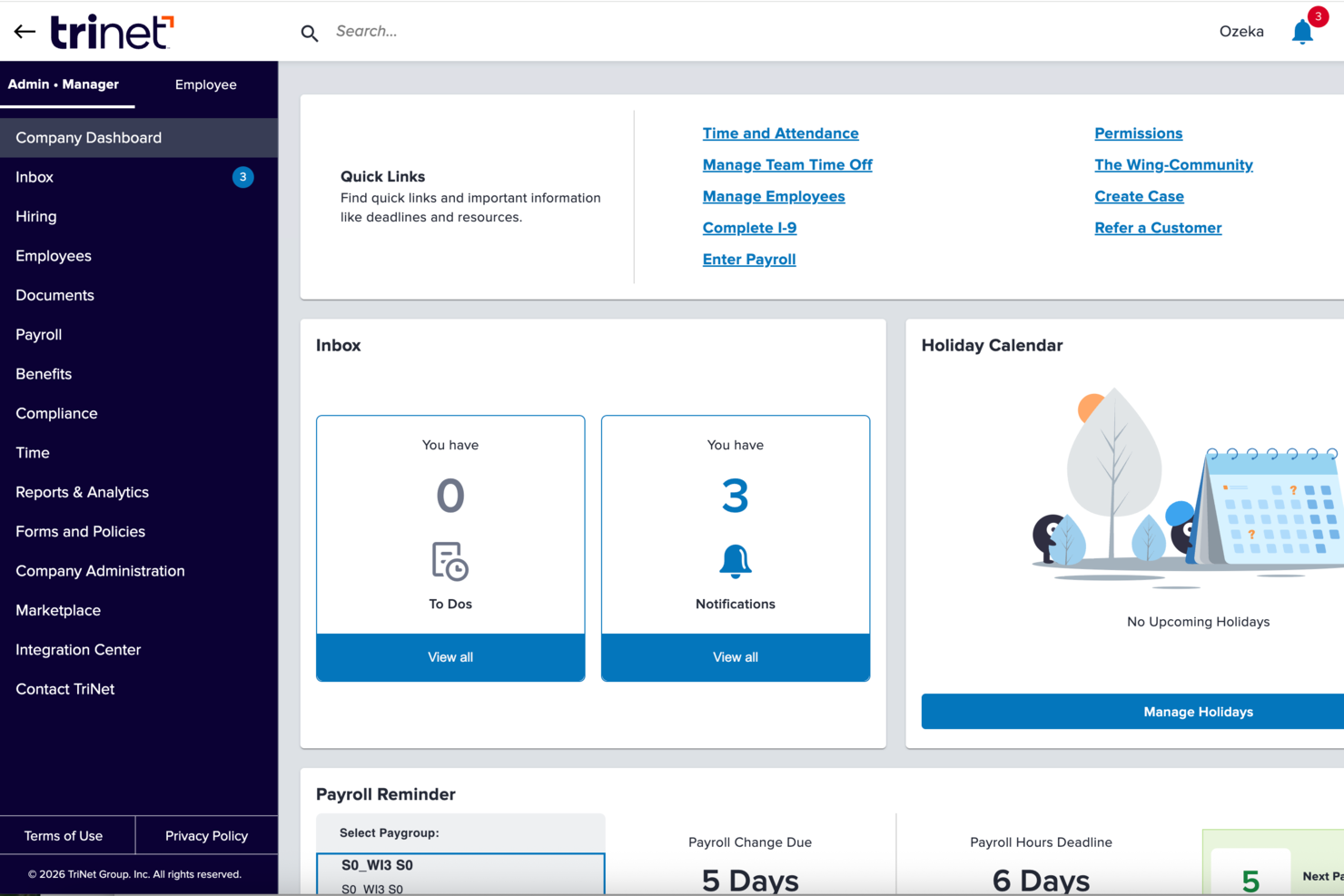
TriNet is an HR management platform for small businesses that combines payroll, benefits administration, HR outsourcing, compliance support, and employee self-service tools.
Who Is TriNet Best For?
TriNet is a strong fit for small businesses that don't have a dedicated HR team and need outside support managing payroll, benefits, and compliance.
Why I Picked TriNet
TriNet earns its spot on my shortlist because of how it handles HR outsourcing through its PEO model—which distinguishes it from standard HRMS platforms. Rather than giving you software to manage HR yourself, TriNet operates as a co-employer, meaning its team takes on responsibility for payroll processing, benefits administration, and compliance alongside you. I particularly like its multi-state compliance monitoring, which tracks regulatory changes across all 50 states and flags which apply to your locations. For small businesses hiring across state lines, this provides a layer of protection. The EPLI coverage and access to a legal hotline through the PEO plan stand out as features you won't find in most HRMS tools.
TriNet Key Features
- Digital onboarding and e-signatures: Set up new hires with automated onboarding workflows and digital document signing, reducing paperwork and manual data entry.
- Time and PTO tracking: Track employee hours, breaks, and time off requests in real time through the platform or mobile app.
- Benefits enrollment tools: Employees can compare plans side by side and enroll through a self-service portal, with ACA and COBRA administration support included.
- On-demand payroll reporting: Generate detailed payroll reports and data visualizations on demand, with direct integration into accounting tools like QuickBooks Online.
TriNet Integrations
TriNet offers native integrations with Oracle Netsuite, Sage Intacct, Greenhouse, Lever, BambooHR, Lattice, and more. TriNet also provides an API for custom integrations.
Pros and Cons
Pros:
- Simplifies hiring and retention with expert resources
- Facilitates compliance with changing HR regulations
- Mobile app provides real-time access to HR data
Cons:
- Frequent support tickets needed for basic tasks
- Some difficulties are reported with payroll processing
Other HRMS for SMB
Below is a list of additional HRMS for small businesses that didn’t make it into my top 10 list, but are still worth checking out:
- Agendrix
HRMS for workforce time tracking
- RemoFirst
HRMS to support growing international teams in 170+ countries
- Sloneek
For centralizing employee management
- Lattice
For real-time feedback and performance management
- HR Cloud
For an automated yet engaging employee onboarding process
- Eddy
For a detailed employee directory
- Sage HR
For managing employee scheduling
- Trinet
For its robust mobile app
- Insperity
HRMS software for US-based small businesses
- Qandle
Create company policies with a flexible HR software


Related HR Software Reviews
If you still haven't found what you're looking for here, check out these other related tools that we've tested and evaluated:
- HR Software
- Payroll Software
- Recruiting Software
- Employer of Record Services
- Applicant Tracking Systems
- Workforce Management Software
How I Evaluate HRMS for Small Business
I split my evaluation into baseline requirements every HRMS for small business must meet—like employee records, PTO tracking, and payroll sync—and differentiators that set the best tools apart.
Core Functionality (Table Stakes For This List)
When I'm selecting tools for my list, I rank each one on a scale from 0 (does not offer the functionality) to 5 (excels in this area) for each core functionality listed below. Then, I calculate the tool's total score into a percentage. Each tool needs to achieve a minimum total score of 65% to be considered for inclusion.
- Employee Database: I check whether the system stores job history, emergency contacts, documents, and custom fields in one searchable hub rather than scattered spreadsheets.
- Onboarding & Offboarding: Each tool should let you build automated workflows—like sending offer letters, collecting e-signatures, and assigning Day 1 tasks—without manual follow-up emails.
- Time Off & Attendance: I evaluate how PTO requests, accrual policies, and approval chains work, especially for teams juggling different leave types across multiple office locations.
- Payroll Integration or Processing: Whether the tool runs payroll natively or syncs with providers like Gusto or QuickBooks, I look for how cleanly hours, deductions, and tax data flow between systems.
- Benefits Administration: Small teams still need to manage health plans and retirement options, so I look for enrollment workflows, carrier connections, and clear employee-facing plan details.
- Compliance & Reporting: I evaluate built-in compliance forms, audit trails, and reporting—things like generating headcount reports or tracking document completion rates across your workforce.
Once I have a list of tools that meet the criteria, I consider what sets each platform apart.
Differentiating Factors (What Sets Vendors Apart)
Here's how I compare and contrast different vendors:
Standout Features
An employee self-service portal makes a real difference for small teams—when staff can update their own addresses, download pay stubs, and submit PTO requests from their phones, it takes routine questions off your plate. I also look at whether a tool includes built-in performance reviews and goal tracking, since most small businesses outgrow informal feedback quickly. Applicant tracking is another differentiator I evaluate; tools that let you post jobs, screen candidates, and convert them into employee records in one system save a lot of duplicate data entry.
Beyond Features
Pricing transparency matters a lot for small businesses, so I check whether vendors offer clear per-employee-per-month rates and low-commitment entry points that scale as you hire. Integration support is equally important—your HRMS needs to connect with tools like QuickBooks, Xero, Slack, or Google Workspace without custom development. I also evaluate onboarding support, especially whether the vendor offers guided setup wizards or data migration templates, since most small teams are moving off spreadsheets and can't afford a months-long implementation.
How to Choose an HRMS for an SMB
An HRMS can help you streamline all your core HR functions into one system, for maximum efficiency. To help you figure out which HRMS best fits your small business's needs, you need to pinpoint your key users and document their specific challenges first.
As you work through your own unique software selection process, keep the following points in mind:
- What problem are you trying to solve - Start by identifying the challenges you're trying to overcome. This will help you clarify the features and functionality the HRMS needs to provide.
- Who will need to use it - To evaluate cost and requirements, consider who will use the software and how many licenses you'll need. For an HRMS, you'll likely want employee-level access for your entire workforce, with special access for your HR administrators and managers. Once that's clear, it's also useful to rank the needs of your different users to identify the key priorities for your power users, managers, and employees, to ensure they're all met.
- What other tools it needs to work with - Clarify what tools you're replacing, what tools are staying, and the tools you'll need to integrate with, such as training management software, single sign-on applications, or work operating systems like Microsoft 365 or Google Workspace. You'll need to decide if the tools will need to integrate together, or alternatively, if you can replace multiple tools with one all-in-one HR platform.
- What outcomes are important - Review the capabilities you want to gain or improve, and how you will measure success. For example, you may want to gain employee self-service capabilities to cut down on admin requests or digitize several paper or Excel-based tracking processes. You could compare software features until you’re blue in the face but if you aren’t thinking about the outcomes you want to achieve, you could waste a lot of valuable time.
- How it would work within your organization - Consider the software selection alongside your existing workflows and systems. Evaluate what's working well, and the areas that are causing issues that need to be addressed.
Remember every business is different — don’t assume that an HRMS will work for your organization just because it's popular.
What is an HRMS?
Human resource management systems (HRMS) is a software tool designed to streamline and automate various HR functions, such as employee data management, payroll processing, benefits administration, and recruitment processes. It provides a centralized platform for storing and accessing employee information, simplifying HR tasks, and improving decision-making.
This software aids small businesses in efficiently managing a small workforce, ensuring compliance with labor laws, and reducing manual workload without costing a bundle. By using HRMS, small businesses can focus more on strategic growth and less on administrative burdens.
Features of an HRMS
Choosing the right Human Resources Management System (HRMS) is crucial for small businesses aiming to maintain compliance, enhance employee management, and focus on growth. The role of HR in small business and large enterprises is heavily reliant on the efficiency of HRIS systems, ensuring streamlined operations and data management.
An effective HRMS can streamline various HR tasks, ensuring that businesses operate smoothly and efficiently. Here are ten essential features to consider:
- Employee Database Management: Your HRMS will function as a centralized database for storing all your employee information. This ensures all employee data is organized and easily accessible, facilitating compliance with record-keeping regulations.
- Payroll Management: Automating payroll reduces errors and manual data entry requirements, making the payroll process far less time-consuming.
- Time and Attendance Tracking: This feature helps organizations track employee hours, manage labor costs, and comply with labor laws regarding overtime and the number of consecutive days worked.
- Benefits Administration: Efficient benefits administration helps attract and retain talent, contributing to overall business growth. Also, with monthly benefit costs linked directly with your payroll module, you'll reduce manual data entry.
- Performance Management: This feature refers to tools for setting goals and evaluating employee performance. Regular performance reviews help improve productivity and identify areas for development, driving business success.
- Recruitment and Applicant Tracking: Efficient recruitment and applicant tracking ensure that the business attracts the best talent quickly. Many systems now take advantage of AI-backed features that make candidate skill comparisons against job descriptions much more efficient and equitable.
- Compliance Management: HRMS systems come with tools to monitor and ensure legal compliance. This feature helps avoid penalties and legal issues, keeping the business operating smoothly.
- Employee Self-Service Portal: This important feature allows employees to access and manage their own HR information such as contact details, banking details, and benefits information. Empowering employees to manage their own data increases engagement and reduces administrative burdens.
- Reporting and Analytics: HRMS systems offer built-in reports and analytics templates to help teams make informed decisions, optimize HR strategies, and support business growth.
- Training and Development: This refers to tools to host and monitor internal employee training programs, often including an internal learning management system (LMS). For a small business, investing in employee development fosters a skilled workforce, which sets the stage for business expansion over time.
For businesses looking for more customization options, exploring advanced HR software can provide a wider range of features to tailor to your needs.
Help Your Small Business Grow With HRMS Solutions
Growing a small business is complicated because there are a lot of things owners have to look out for. But HRMS solutions and other HR software designed for small businesses make the process easier. Many of them help you automate repetitive HR tasks, so you can focus on other aspects of your business. And they help you save time with recruiting, talent management, onboarding, and workforce management.
But most importantly, HRMS software can help you and your team understand how to grow. Mary Karamanos, Senior Vice President, Human Resources at BDC, said “A common mistake that growing companies make is not taking enough time to plan their HR needs. […] The good news is small businesses often attract top employees because they can often offer challenging responsibilities, good learning opportunities, and personal growth.”