

10 Best Hybrid Workplace Management Software in 2026

Best Hybrid Workplace Management Software Shortlist


Hybrid workplace management software gives you the tools to coordinate flexible schedules, book desks, and manage office resources across remote and in-person teams. If you’re searching for the best hybrid workplace management software, you’re probably looking for ways to support employee flexibility, keep track of who’s in the office, and make better use of your workspace.
In this guide, you’ll find my picks for the best tools to help your organization manage hybrid work, with an overview of key features so you can compare solutions and find what fits your needs.
Why Trust Our Software Recommendations
Our team has been testing and reviewing software since 2012. As HR experts ourselves, we know how difficult—and important—it is to choose the right software.
For this guide, we evaluated tools using hands-on testing and independent research, scoring tools using our selection criteria. We also draw on insights from industry thought leaders and practicing HR experts.
Our reviews reflect our human editorial judgment, not a sales pitch.
Expert reviewers:
Hybrid Workplace Management Software Comparison Table
This comparison table summarizes pricing details for my top hybrid workplace management software selections:
| Tool | Best For | Trial Info | Price | ||
|---|---|---|---|---|---|
| 1 | Best for automated workplace experience workflows | Free plan + free demo available | From $500/month | Website | |
| 2 | Best for security and compliance-driven workplaces | Free demo available | From $5/bookable resource/month (billed annually) | Website | |
| 3 | Best for AI-driven office analytics | Free demo available | Pricing upon request | Website | |
| 4 | Best for full Microsoft Teams integration with AI assistant | Free demo available | From $99/month | Website | |
| 5 | Best for ultra-simple room and desk management | 30-day free trial available | From $51/month | Website | |
| 6 | Best for fast onboarding and setup | Free plan available | From €5.50/month (billed annually) | Website | |
| 7 | Best for Slack-based bookings | Free trial + free demo available | From $2.50/user/month (billed annually) | Website | |
| 8 | Best for planned team collaboration | Free demo available | Pricing upon request | Website | |
| 9 | Best for global coworking space access | 14-day free trial + free demo available | From $1.50/user/month (billed annually) | Website | |
| 10 | Best for managing large, multi-location workplaces | Free demo available | Pricing upon request | Website |

Best Hybrid Workplace Management Software Reviews
Below are my detailed summaries of the best hybrid workplace management software that made it onto my shortlist. My reviews offer a detailed look at the features, best use cases, and integrations of each platform to help you find the one that best suits your needs.
elia
Best for automated workplace experience workflows
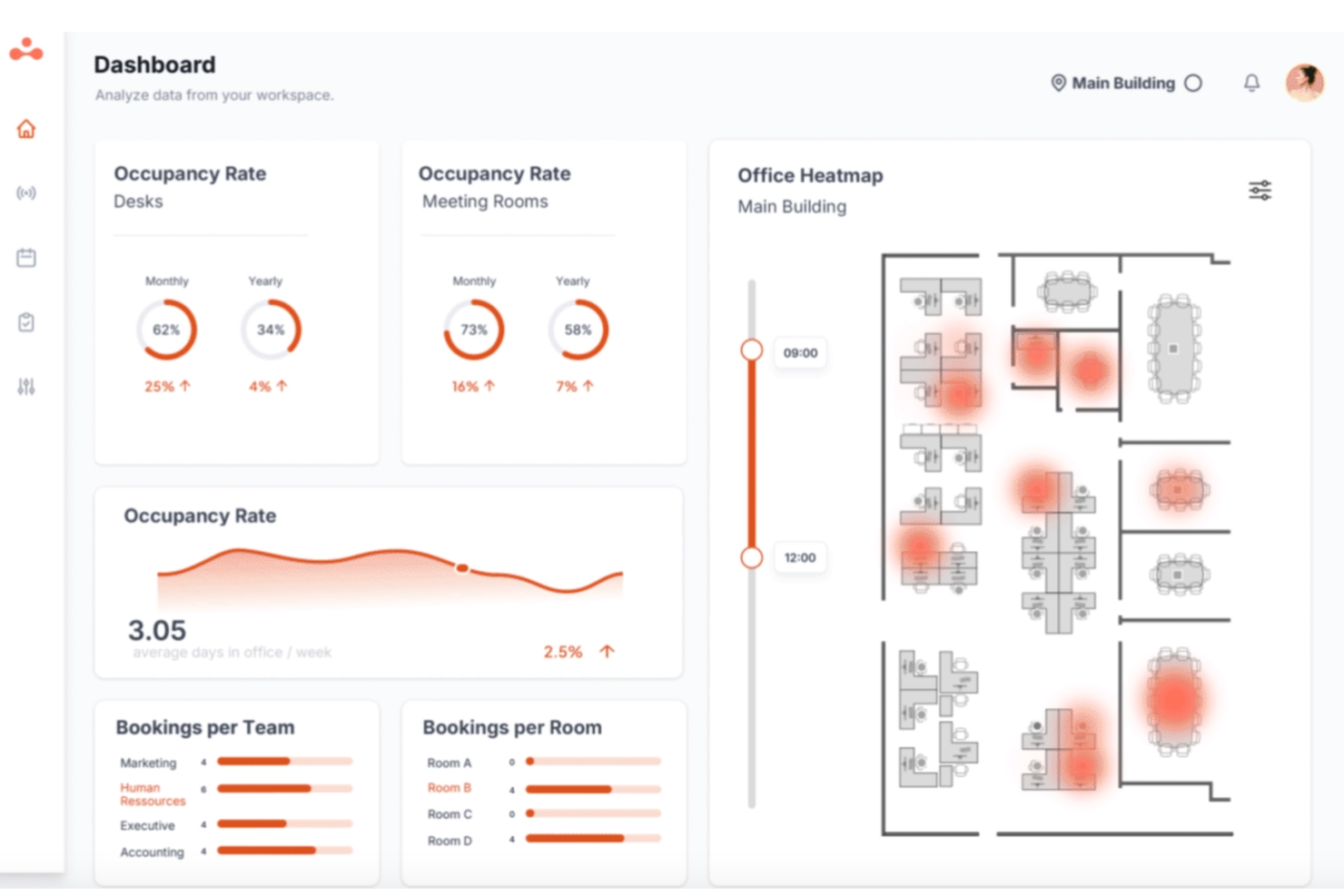
elia is a hybrid workplace management platform that brings together desk booking, room reservations, visitor management, occupancy tracking, and workplace automation tools for teams managing flexible office environments.
Who Is elia Best For?
elia is a good fit for facilities and workplace managers in mid-to-large organizations coordinating hybrid teams across multiple office locations.
Why I Picked elia
I picked elia as one of the best because its workplace automation module goes well beyond basic rule-setting. You can build workflows using customizable triggers, conditions, and actions, so something like automatically canceling a no-show desk booking and reassigning it, or sending visitor arrival alerts to the right host, runs without anyone touching it. I also like the execution logs feature, which gives you full visibility into when and how each automation ran, so you can troubleshoot or optimize without guessing.
elia Key Features
- Interactive floor plan booking: Book desks and rooms directly from a visual, real-time map of your office layout, showing live availability at a glance.
- Colleague presence dashboard: See which teammates are scheduled to come in on any given day, so employees can coordinate in-office time around the people they need to collaborate with.
- Occupancy analytics: Track real-time and historical workspace usage data to identify underutilized areas and make informed decisions about office capacity.
- Workplace request management: Submit and manage service requests (catering, IT, cleaning, maintenance) directly through the platform, with tasks routed to the right teams.
elia Integrations
elia offers native integrations with Microsoft 365, Google Workspace, Slack, and specific tools within those ecosystems, including Google Calendar, Microsoft Teams, and Microsoft Outlook.
Pros and Cons
Pros:
- Built-in visitor pre-registration and notifications
- Built-in IoT sensor occupancy tracking
- Flat-rate pricing regardless of user count
Cons:
- Limited status options beyond office or remote
- Mobile app less polished than desktop

Envoy
Best for security and compliance-driven workplaces
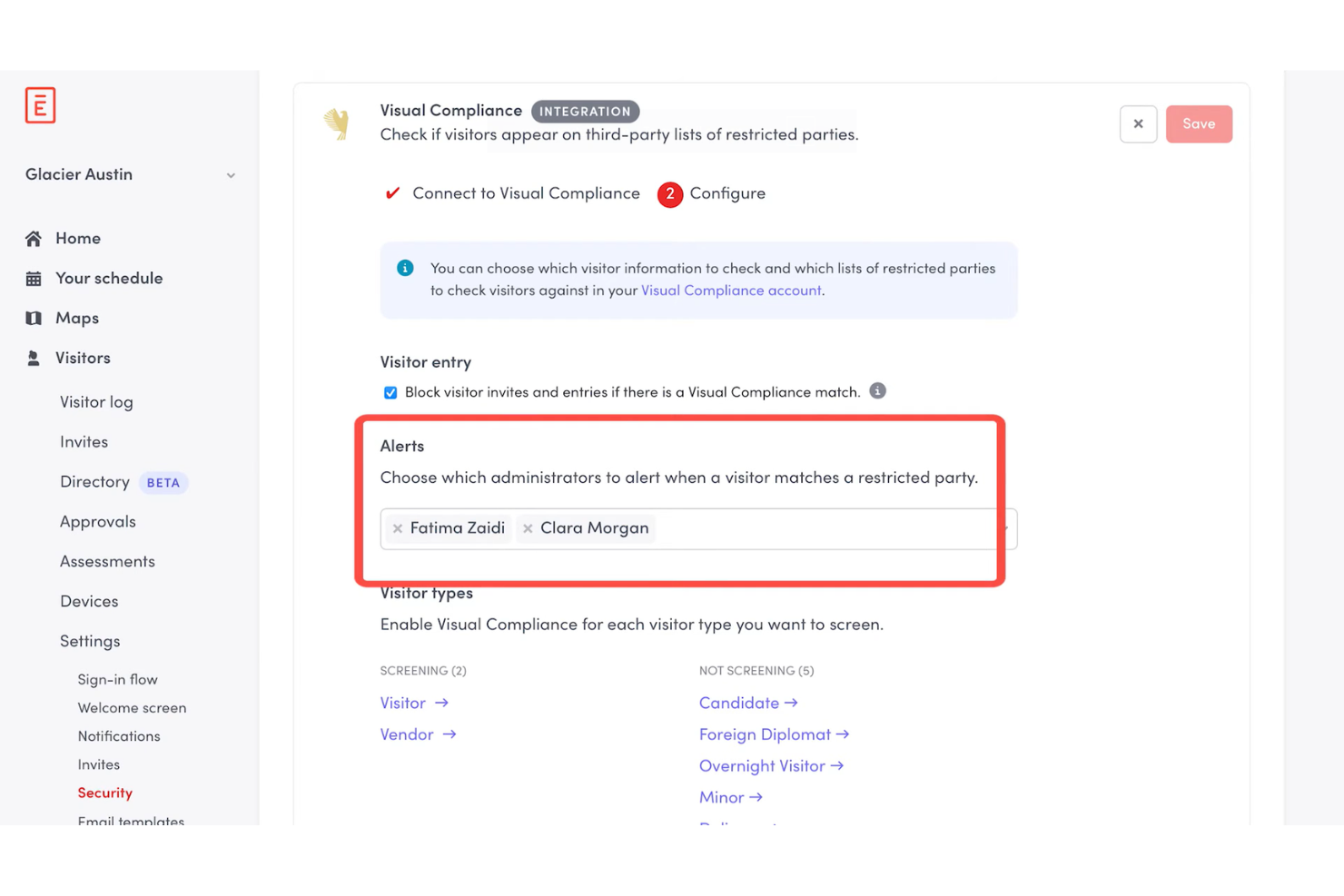
Envoy is a workplace management platform that covers visitor management, desk and room booking, employee scheduling, and physical access control across office locations.
Who Is Envoy Best For?
Envoy is a strong fit for companies in regulated industries like finance, healthcare, and government contracting, where visitor identity, access logs, and legal compliance are non-negotiable.
Why I Picked Envoy
I picked Envoy as one of the best because of how seriously it takes physical security and regulatory compliance as core platform functions, not afterthoughts. The check-in flow can prompt visitors for citizenship information for ITAR screening or require them to watch a safety video for OSHA compliance, and Envoy automatically stores that data in audit-ready records you can export on a schedule. I also like the Visual Compliance integration, which screens visitors against restricted party watchlists in real time.
Envoy Key Features
- Room scheduling: Book meeting rooms directly from Outlook, Google Calendar, or the Envoy app, with automatic release for no-shows.
- Delivery management: Log incoming packages and notify recipients automatically so deliveries don't pile up unattended.
- Capacity limits: Set and enforce location-level or floor-level occupancy caps to control how many people can be on-site at once.
- Desk booking: Let employees reserve hot desks in advance or find available seats on arrival using an interactive floor map.
Envoy Integrations
Envoy offers 100+ integrations through its app directory, including Slack, Microsoft Teams, Google Calendar, Microsoft Outlook, Okta, Salesforce, Brivo, Kisi, Avigilon Alta, and DocuSign. It also connects with Zapier and provides an API for custom integrations.
Pros and Cons
Pros:
- Emergency notifications reach staff on-site
- Real-time occupancy tracking across locations
- Visitor check-in includes compliance screening
Cons:
- Key features locked behind premium tiers
- Device-pairing dropouts require manual troubleshooting

Robin
Best for AI-driven office analytics
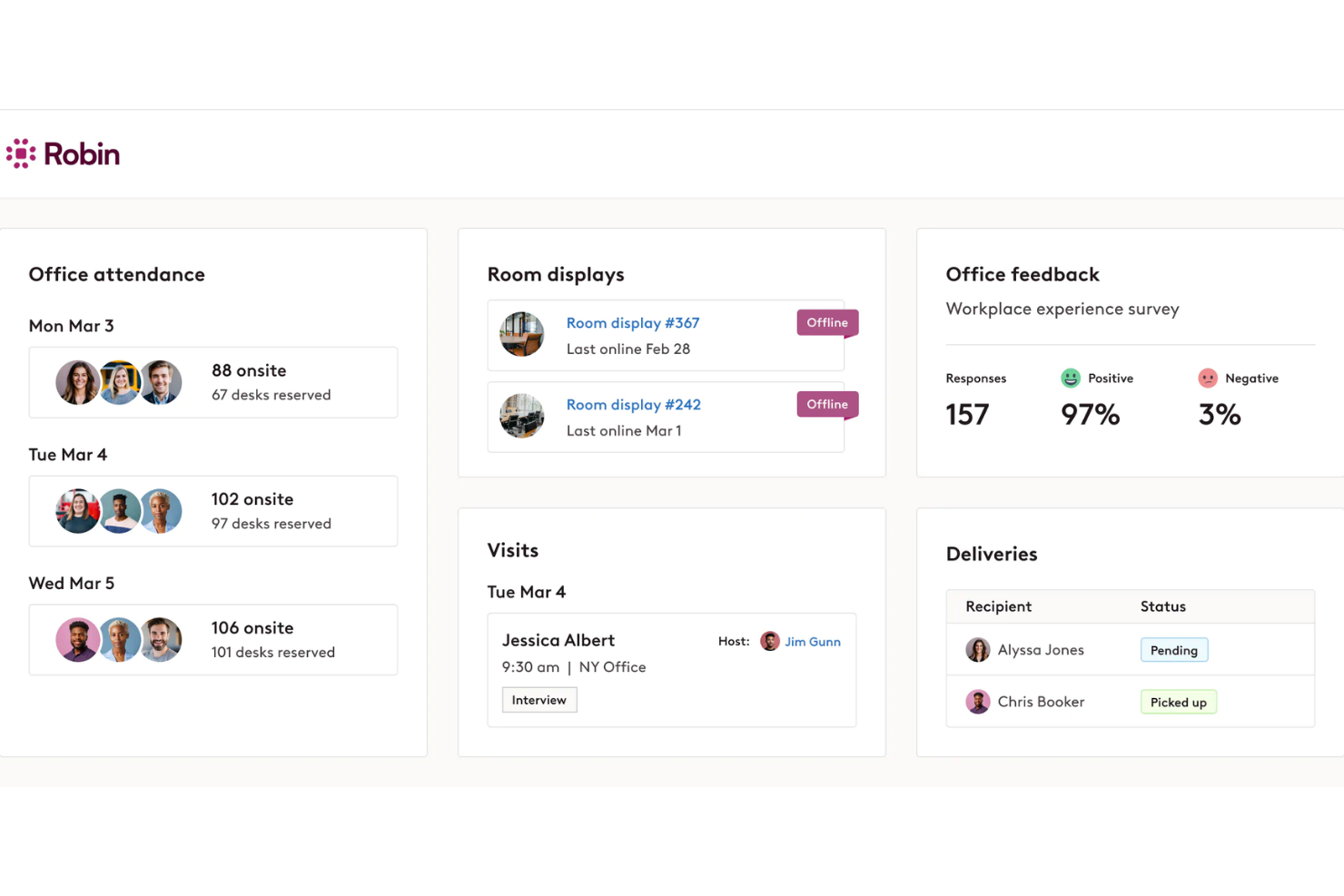
Robin is an AI-driven workplace operations platform covering desk and room booking, space management, visitor management, and occupancy analytics for hybrid office environments.
Who Is Robin Best For?
Robin is a strong fit for IT, facilities, and workplace operations teams at mid-size to enterprise companies that need data-driven tools to manage a flexible, hybrid office day-to-day.
Why I Picked Robin
I picked Robin as one of the best because of how it uses AI to move beyond basic occupancy reporting. Its AI assistant for analytics lets you ask plain-language questions about space usage and get back actionable answers for key insights such as which floors are consistently underused or what real estate you could consolidate. I also like the CollabScore feature, which measures how effectively teams are actually working together in person by combining desk proximity, meeting, and occupancy data.
Robin Key Features
- Desk booking: Reserve desks in advance or on the spot, with AI-powered suggestions based on your team's in-office schedule.
- Meeting services: Submit and manage catering, AV support, and room setup requests from within the room booking workflow.
- Visitor management: Pre-register guests, handle check-ins, and maintain visit logs from a single visitor management module.
- In-office policies: Set and communicate hybrid attendance policies, and let employees track their own in-office progress against those requirements.
Robin Integrations
Robin offers native integrations across the Microsoft ecosystem, including Microsoft Teams, Outlook, Exchange, Entra ID, Intune, and Microsoft 365, as well as Google Calendar and Google Workspace. It also integrates with Slack, Zoom, Okta, OneLogin, Rippling, and access control systems like Avigilon, Brivo, and Kisi. An API is available for custom integrations.
Pros and Cons
Pros:
- Interactive office maps show live availability
- Abandoned meeting protection frees unused rooms
- Occupancy data informs real estate decisions
Cons:
- One-way issue reporting
- Limited move management and space planning
YAROOMS
Best for full Microsoft Teams integration with AI assistant
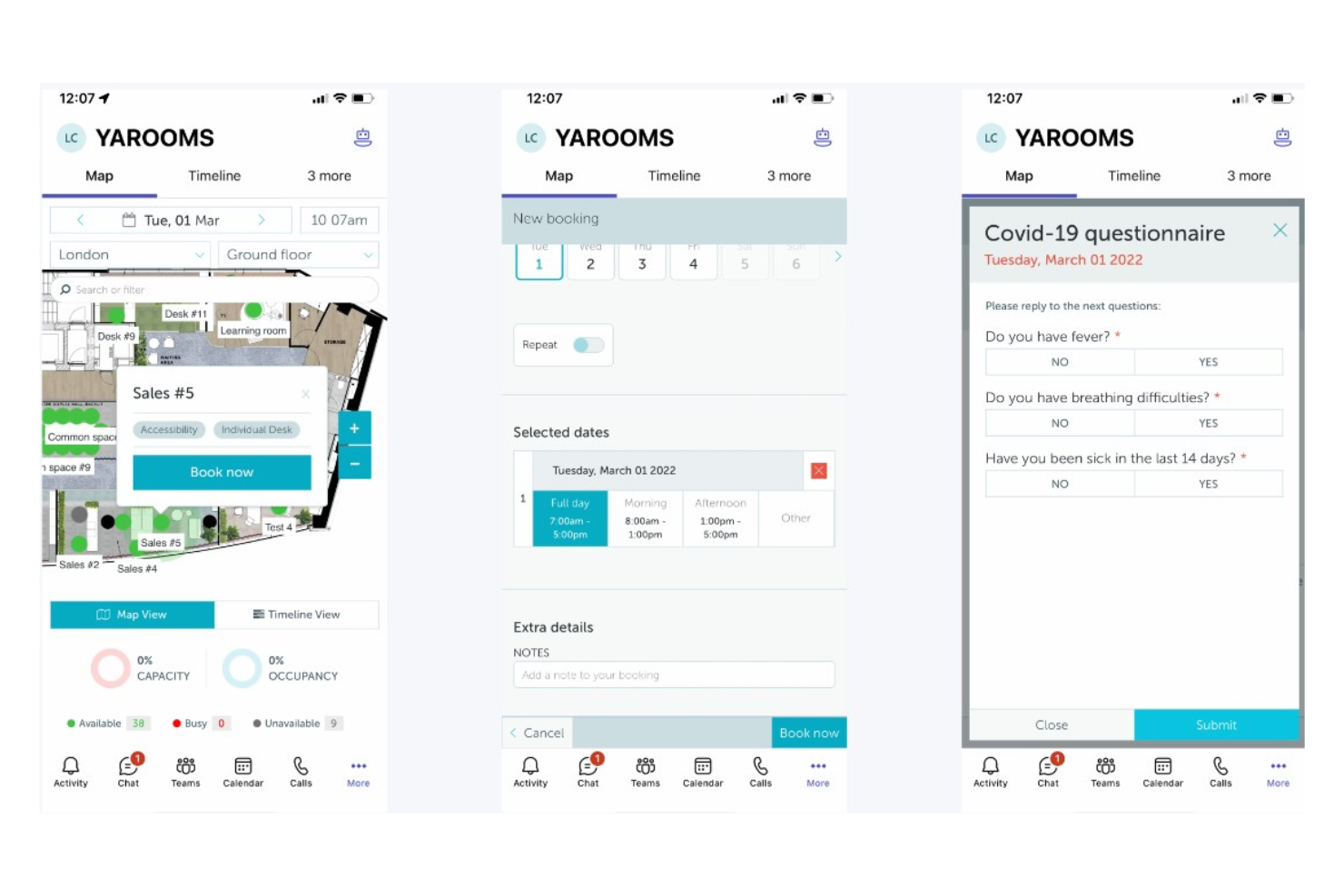
YAROOMS is a workplace management platform covering desk and room booking, hybrid work scheduling, visitor management, and workplace analytics, all operated through a native Microsoft Teams AI assistant called Yarvis.
Who Is YAROOMS Best For?
YAROOMS is a natural fit for mid-to-enterprise organizations already running Microsoft 365 that want workplace management built directly into their existing Teams environment.
Why I Picked YAROOMS
YAROOMS earns its spot on my shortlist because Yarvis, its AI assistant, lives natively inside Microsoft Teams, so employees can book a desk, find a free meeting room, or check a colleague's schedule without ever leaving the app they already use all day. I like that Yarvis handles natural-language requests, meaning someone can type "find me a room for three people Tuesday afternoon" and get bookable options back instantly. That level of Teams-native automation sets YAROOMS apart from tools that treat Microsoft 365 as just another calendar sync.
YAROOMS Key Features
- Hybrid work scheduling: Employees can set their weekly work location plan (office, home, or other) so teams can coordinate in-office days together.
- Interactive floor maps: Visual maps show real-time desk and space availability across floors, letting employees pick specific seats before arrival.
- Visitor management: Register visitors in advance, send automated arrival instructions, and log on-site guests for a full attendance record.
- Workplace analytics: Dashboards track space utilization, occupancy trends, and no-show rates across locations.
YAROOMS Integrations
YAROOMS offers native integrations across the Microsoft ecosystem, including Microsoft Teams, Microsoft 365, Outlook, and Azure AD, along with Google Calendar, Google Meet, Slack, Zoom, MappedIn, and SAML 2.0 for SSO. A REST API is also available for custom integrations.
Pros and Cons
Pros:
- Includes built-in workplace carbon dashboard
- Search function locates colleagues on floor plans
- Color-coded floor maps show live availability
Cons:
- Space limits per tier force unwanted upgrades
- Floorplan view is hard to use on iPhones

Joan
Best for ultra-simple room and desk management
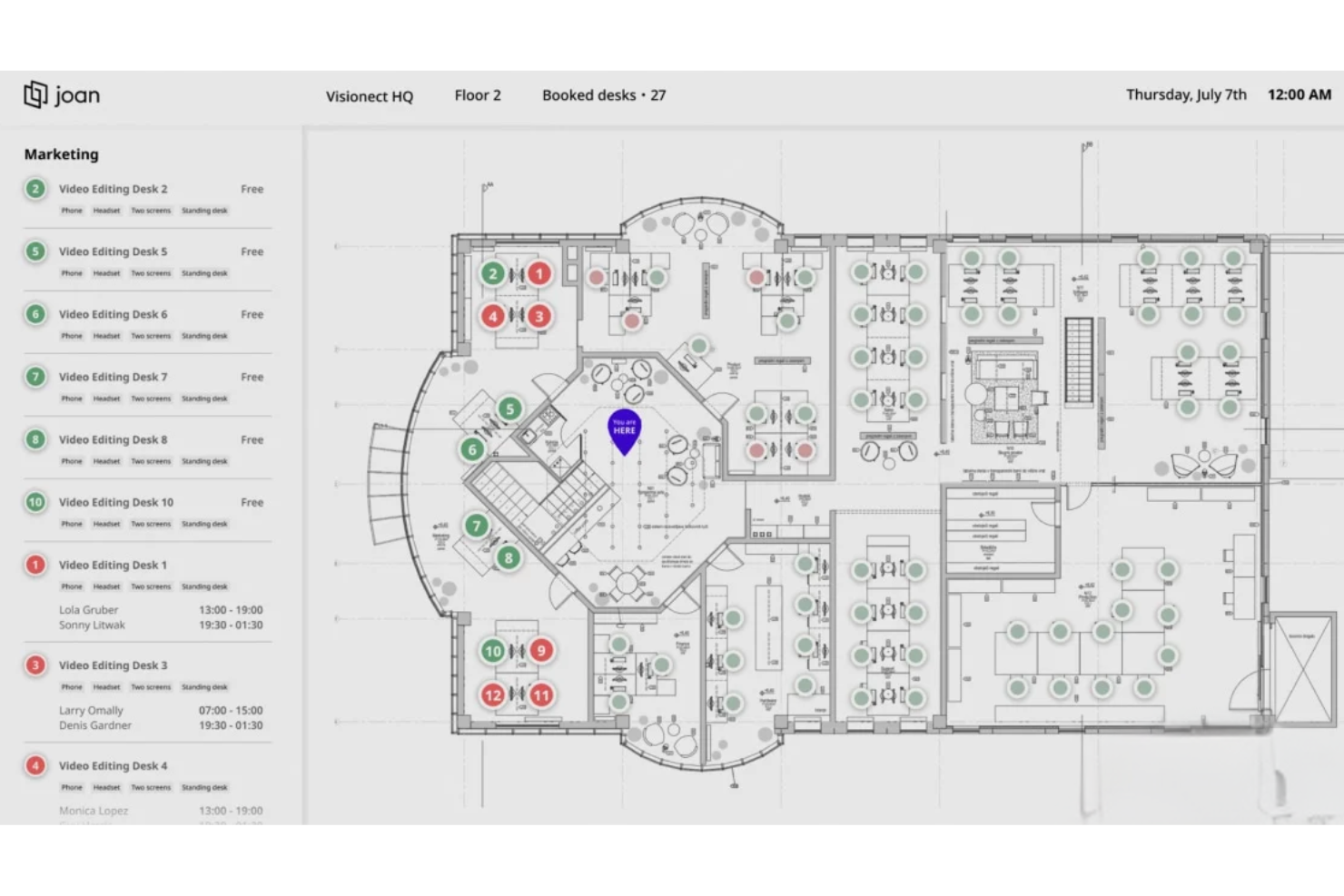
Joan is a workplace management platform covering room booking, desk booking, parking, visitor management, digital signage, and analytics, with its own line of cable-free e-Paper scheduling displays that set it apart from software-only tools.
Who Is Joan Best For?
Joan is a strong fit for small to mid-sized businesses that want a no-fuss way to manage meeting rooms and desks without an IT-heavy setup or training.
Why I Picked Joan
Joan is one of my top picks because I love how fast you can go from sign-up to a fully working room and desk booking setup. The MyJoan portal lets admins configure the entire workplace environment in minutes, and automatic check-in releases no-show rooms without anyone having to intervene. I also like that employees can book directly from Joan's physical e-Paper displays outside a room, removing any dependency on a separate app or calendar.
Joan Key Features
- Asset reservation: Let employees book company assets like equipment and parking spots alongside their desk or room.
- Floorplan overview: Display a live office layout so employees can see real-time desk and room availability across the floor.
- Indoor climate monitoring: Track office temperature and humidity data directly through Joan devices from within the analytics dashboard.
- Announcements: Send targeted messages to only the employees scheduled to be in the office on a given day.
Joan Integrations
Joan offers native integrations across the Microsoft ecosystem, including Microsoft 365, Microsoft Teams, Outlook, Exchange, and Azure AD, along with Google Workspace, Google Calendar, Slack, Zoom, Cisco Webex, Okta, JumpCloud, and iCal. It also connects with Zapier and IFTTT, and has an API for custom integrations.
Pros and Cons
Pros:
- Desk bookings are deployed within one week
- Automatic no-show room release saves space
- Cable-free e-Paper displays need no wiring
Cons:
- Battery drains fast on mesh Wi-Fi networks
- E-ink touchscreen response feels laggy

Dibsido
Best for fast onboarding and setup
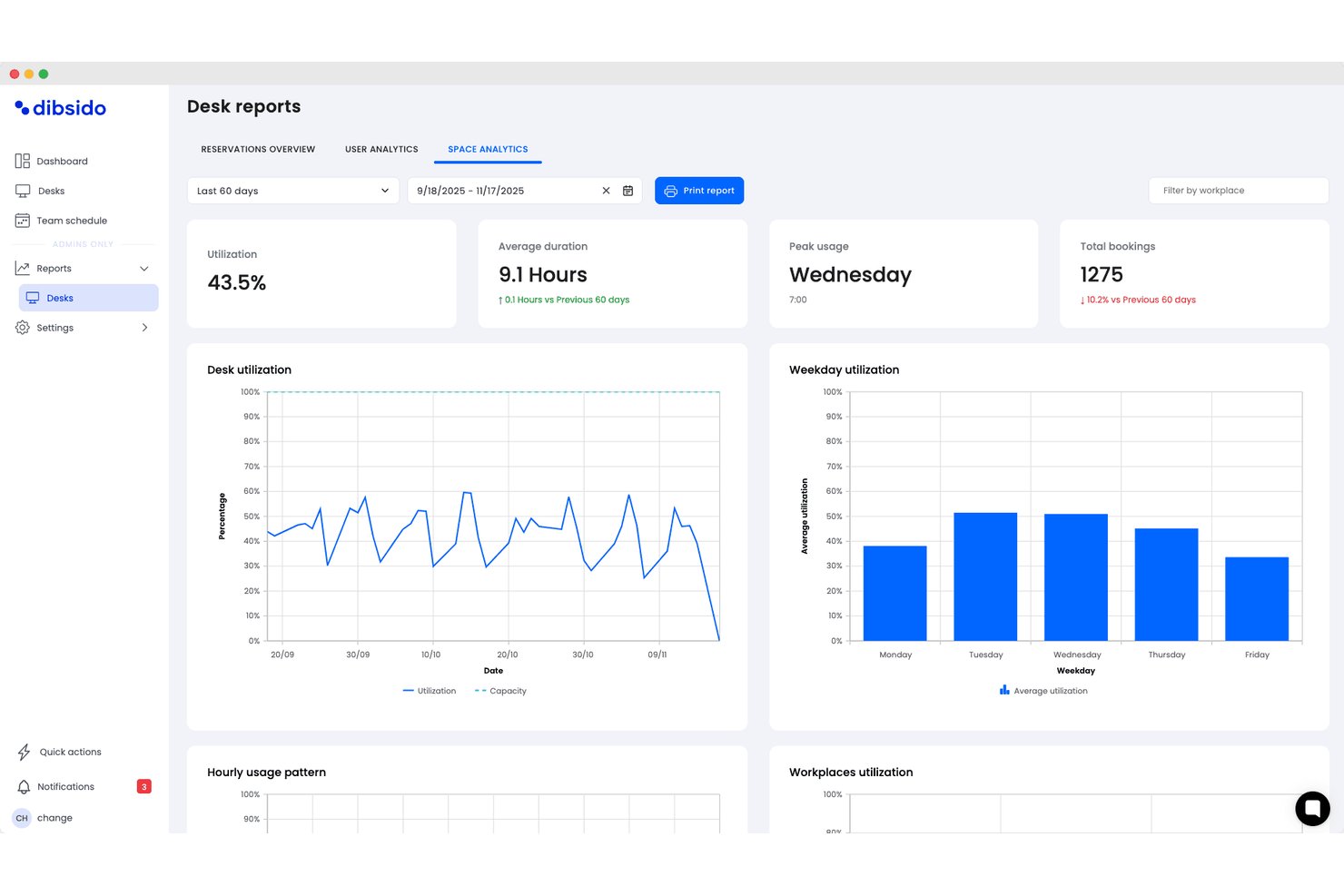
Dibsido is a hybrid workplace management software solution that provides tools for desk booking, meeting room scheduling, parking management, and interactive office maps with integrations for Microsoft, Google, and Slack.
Who Is Dibsido Best For?
Dibsido is a strong match for small to midsize organizations looking for quick and easy hybrid workplace management.
Why I Picked Dibsido
I picked Dibsido as one of the best because I can set up desk, meeting room, and parking bookings in minutes, even without training. In practice, my team uses their interactive floorplan to find and reserve spaces on day one.
Dibsido Key Features
- Microsoft Teams integration: Users can book desks and resources directly within their Microsoft Teams workspace.
- Parking spot management: Allocate, reserve, and manage parking spaces alongside desk and room bookings.
- Team schedule and visibility: View weekly attendance patterns showing who is in the office, working remotely, or on a custom status, complete with exportable attendance logs.
- Resource usage analytics: View usage data and trends to help optimize office layouts and resource planning.
Dibsido Integrations
Dibsido offers native integrations with Microsoft Teams and Slack, plus two-way calendar sync with Microsoft Outlook and Google Calendar. Enterprise SSO is supported through Microsoft Entra ID, Google Workspace, and SAML 2.0, with an API available for custom integrations.
Pros and Cons
Pros:
- Native mobile apps for iOS and Android
- Multilingual support for global hybrid teams
- Interactive floorplans for desk and parking selection
Cons:
- Fewer advanced facilities controls for enterprises
- Limited workflow automations compared to competitors

Officely
Best for Slack-based bookings
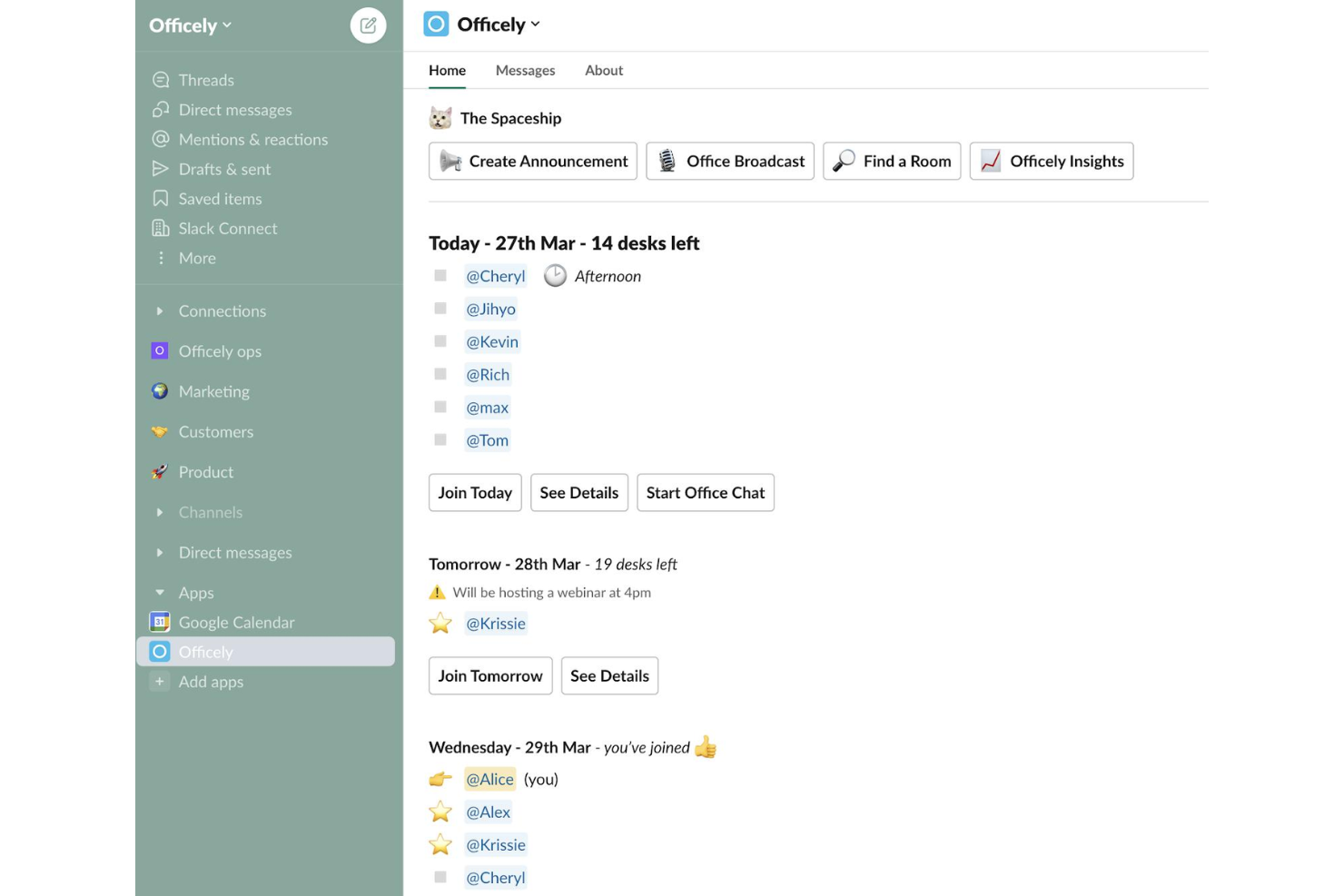
Officely is a hybrid office management tool that lives inside Slack and Microsoft Teams, handling desk booking, meeting room reservations, parking management, attendance tracking, and hybrid policy compliance.
Who Is Officely Best For?
Officely is a great fit for small to mid-sized companies that are already running on Slack or Microsoft Teams and want desk booking and attendance tracking without asking employees to adopt another standalone app.
Why I Picked Officely
I've included Officely in my top picks because no other tool embeds desk booking this deeply into Slack. Employees book a desk, check who's coming in, and get reminders without ever leaving Slack. I also like the neighborhood grouping feature, which lets teams cluster their bookings so people reliably sit near their colleagues on shared office days.
Officely Key Features
- Meeting room booking: Reserve meeting spaces directly inside Slack or Microsoft Teams, with live availability to prevent double bookings.
- Office usage analytics: Tracks daily attendance, capacity trends, and underused days in a single dashboard.
- Parking management: Lets employees reserve parking spaces alongside their desk bookings directly from Slack or Teams.
- Hybrid policy compliance tracking: Automatically logs attendance against your hybrid policy and surfaces compliance gaps by team.
Officely Integrations
Officely offers 30+ native integrations, primarily with HR systems and calendars, including Slack, Microsoft Teams, BambooHR, HiBob, Personio, Workday, Rippling, Deel, Google Calendar, and Microsoft Outlook. It also connects with Azure AD for identity management and SAP SuccessFactors for enterprise HR workflows.
Pros and Cons
Pros:
- Includes parking and meeting room reservations
- Real-time visibility into daily office attendance
- Zero onboarding needed inside Slack or Teams
Cons:
- Floor plan layouts are strictly 2D
- No built-in visitor management features

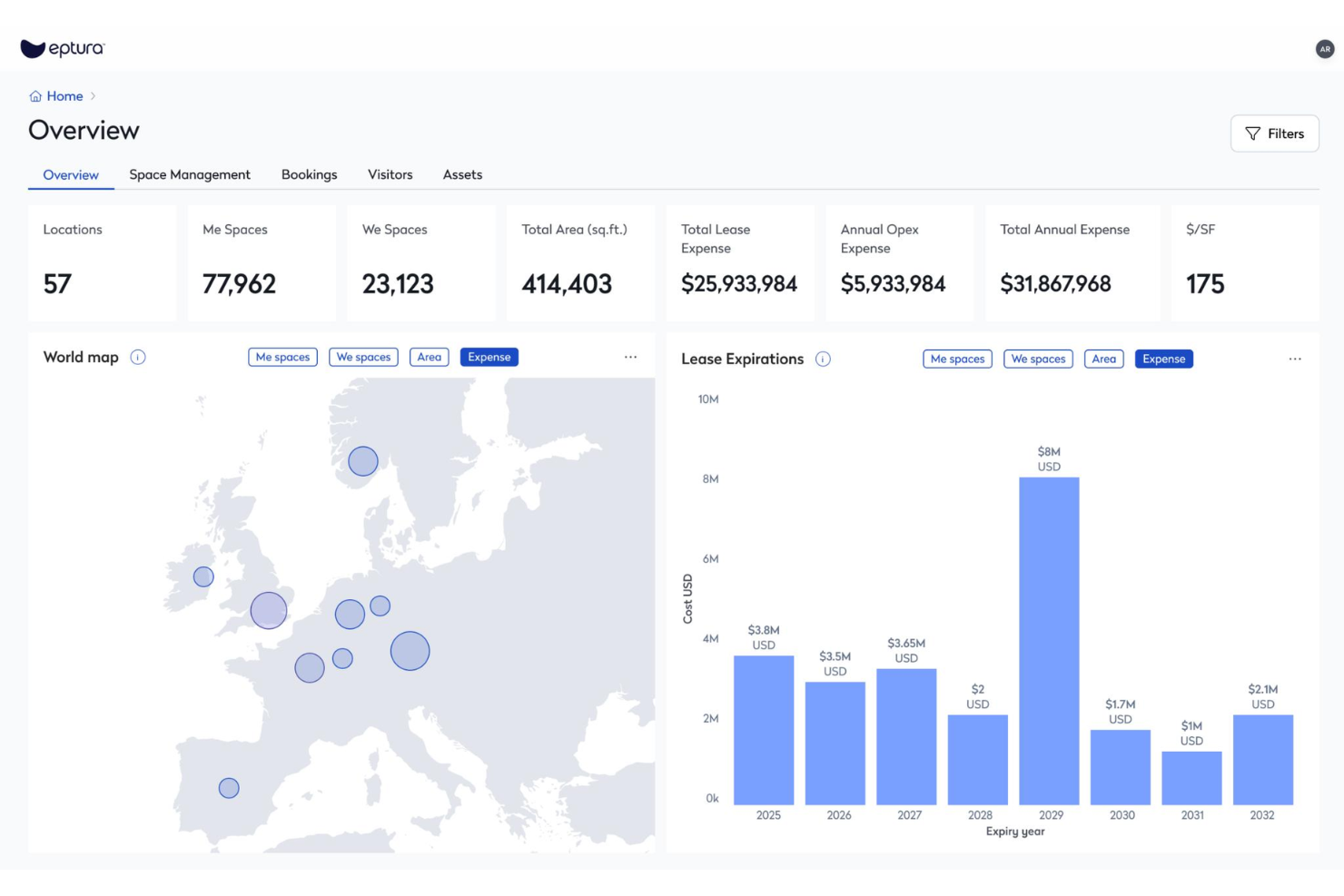
Eptura Workplace is a hybrid workplace management platform with desk booking, conference room scheduling, space planning, move management, and occupancy data tools built for multi-site organizations.
Who Is Eptura Best For?
Eptura Workplace is a strong fit for facilities and real estate teams managing large, distributed office portfolios across multiple regions or countries.
Why I Picked Eptura
Eptura Workplace earns its spot on my shortlist because of how it handles portfolio visibility across a large, distributed real estate footprint. I'm particularly impressed by the real estate performance dashboards, which give you a live view of occupancy, utilization, and space usage across every location at once. The scenario planning tools let you model layout changes and right-size underused sites before committing to anything. For teams managing dozens of offices globally, that kind of data-backed decision-making is hard to replicate in a lighter-weight tool.
Eptura Key Features
- Desk booking: Reserve individual workstations in advance so employees can plan in-office days around their team's schedule.
- Conference room scheduling: Book and manage meeting rooms across all your locations from a single interface.
- Touchless visitor experience: Check in guests without front-desk assistance using a self-serve, digital visitor flow.
- Wayfinding: Help employees and visitors navigate office layouts using interactive maps displayed on in-office devices.
Eptura Integrations
Eptura offers more than 30 native integrations, including the Microsoft ecosystem, Zoom, Salesforce, Dropbox, Azure, AWS, Power BI, and Slack. It integrates with Zapier, and an API is also available for custom integrations.
Pros and Cons
Pros:
- Unifies desk booking, rooms, and visitors in one platform
- Interactive floor plans show real-time seat availability
- Space and move modules support global portfolio management
Cons:
- Outlook room reservations don't always sync back
- Built-in reporting and analytics lack customization depth

FLYDESK
Best for global coworking space access
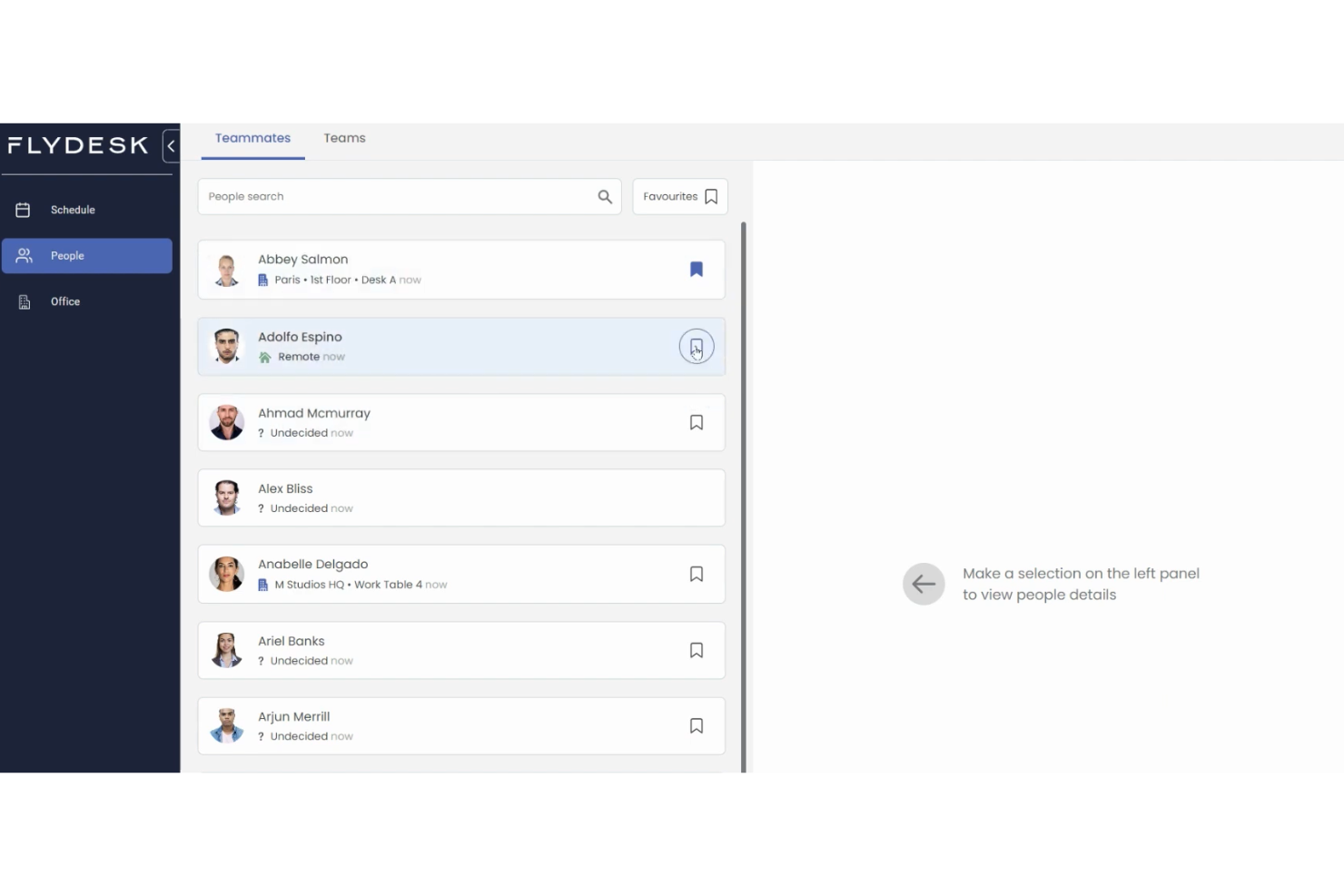
FLYDESK is a hybrid workplace management platform that covers desk booking, workplace scheduling, leave management, and on-demand access to coworking spaces and serviced offices worldwide.
Who Is FLYDESK Best For?
FLYDESK is a strong fit for globally distributed companies whose employees work across multiple countries and need flexible access to local office spaces.
Why I Picked FLYDESK
FLYDESK earns its spot on my shortlist because no other tool in this category pairs internal desk booking with a live global coworking network. Through FLYDESK Space, employees can instantly book desks, meeting rooms, and private offices across thousands of locations from 200+ workspace partners worldwide. I also like that this is built directly into the same platform your team uses for daily scheduling, so a traveling employee can swap their home-office day for a local coworking space without switching tools or submitting a separate request.
FLYDESK Key Features
- Weekly scheduling: Set your work location for each day of the week, office, remote, or off, so teammates always know where everyone will be working.
- Leave management: Submit, approve, and track time-off requests directly within the platform alongside daily scheduling.
- Working hours tracker: Log and monitor employee working hours as an optional add-on tied to your company's HR policy settings.
- Interactive floor map: Navigate a visual, clickable map of your office to see desk availability and book specific spots by location.
FLYDESK Integrations
FLYDESK offers a small set of native integrations focused on collaboration and calendars, including Slack, Microsoft Teams, Google Calendar, Microsoft Outlook, and Microsoft Teams Calendar. It also connects with HRIS platforms like BambooHR and Payfit to sync leave data with payroll workflows. Zapier and API support are not publicly listed.
Pros and Cons
Pros:
- Employees adopt it with minimal training
- Combines scheduling, desks, and leave tracking
- Built-in global coworking space booking
Cons:
- Lacks native integrations with office badge or access control systems
- Workspace analytics are lightweight compared to dedicated space-planning tools
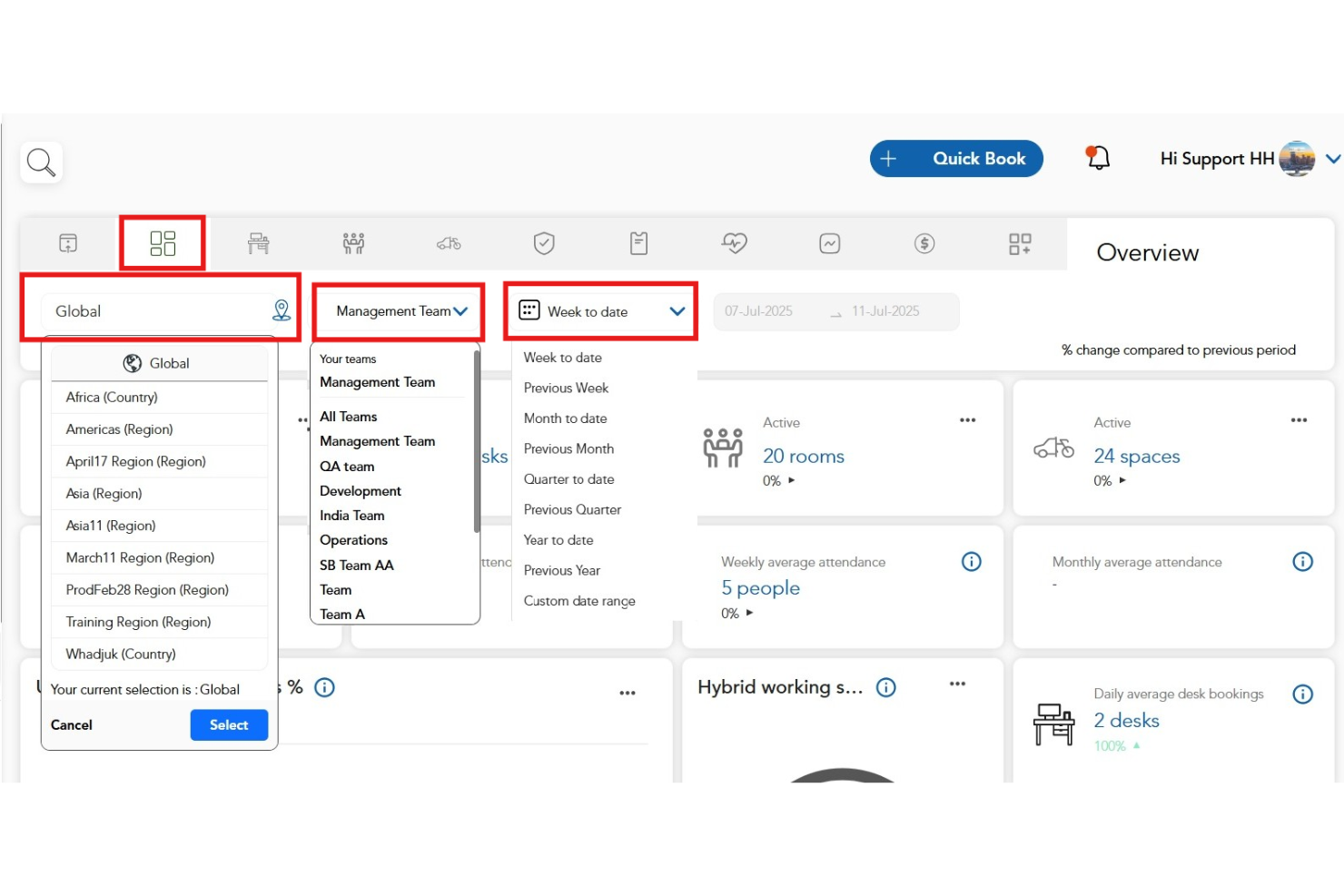
HybridHero is a workplace operating platform that brings desk booking, room management, visitor management, parking, HR, and multi-location space analytics into a single connected system built for enterprise organizations.
Who Is HybridHero Best For?
HybridHero is a strong fit for global enterprises with 500 or more employees managing hybrid teams across multiple office locations, particularly in industries like banking, construction, healthcare, and consulting.
Why I Picked HybridHero
HybridHero earns its spot on my shortlist because no other tool in this category handles genuine enterprise complexity across multiple locations as well. I particularly like the portfolio-level utilisation reporting, which gives workplace, finance, and real estate leaders a single data set across every office rather than siloed dashboards per location. The team neighbourhood feature also means large organizations can preserve team proximity even when managing hundreds of hot desks across floors and cities. I'd also point to the Switch Programme, which gets enterprises migrated and live within five business days.
HybridHero Key Features
- Visitor management: Run kiosk check-in, badge printing, host notifications, NDA capture, and full audit trail from one module.
- Parking management: Let employees reserve bays before arrival, with auto-release of unused spaces and EV charging support.
- Utilization heat maps: View peak day trends and no-show tracking across every module in one board-ready report.
- HR module: Connect hybrid schedules, attendance tracking, and team coordination in a single system alongside your desk and room data.
HybridHero Integrations
HybridHero offers native integrations across the Microsoft ecosystem, including Microsoft Outlook, Microsoft Teams, Office 365, and Azure AD, along with Google Workspace, Slack, Okta, and more. A REST API and webhooks are available for custom integrations with HRIS, access control, and internal systems.
Pros and Cons
Pros:
- Clone previous week's bookings instantly
- Supports 11 languages for global teams
- Built-in HR and parking modules included
Cons:
- Per-user pricing model inflates costs for true hybrid teams
- Mobile app lacks desk-occupant visibility
Other Hybrid Workplace Management Software
Here are some additional hybrid workplace management software options that didn’t make it onto my shortlist, but are still worth checking out:
- Maptician
For real-time space planning
- Yoffix
For Microsoft 365 customization
- Skedda
For setting custom rules for booking access
- deskbird
For integration with Microsoft Teams
- Kadence
For AI-powered space planning features
- Tactic
In-app workplace requests handling
- Archie
For department-based neighborhood seating
- OfficeSpace
All-in-one AI agent platform
- Flowscape
For 3D office visualization tools


How I Evaluate Hybrid Workplace Management Software
I evaluate in two layers: the core capabilities a tool must have—like desk booking and schedule coordination—and the differentiators that separate viable options from the best fit.
Core Functionality (Table Stakes For This List)
When I'm selecting tools for my list, I rank each one on a scale from 0 (does not offer the functionality) to 5 (excels in this area) for each core functionality listed below. Then, I calculate the tool's total score into a percentage. Each tool needs to achieve a minimum total score of 65% to be considered for inclusion.
- Desk & Room Booking: I look for interactive floor plans where employees can visually pick a desk or meeting room, not just select from a dropdown list.
- Hybrid Schedule Management: Teams need a way to set weekly in-office and remote days, so I check whether managers can view and approve schedules at the team level.
- Office Attendance Tracking: I evaluate how each tool captures check-ins—whether through QR codes, badge taps, or geolocation—and how real-time the occupancy data is.
- Space Utilization Analytics: Good reporting shows which floors and neighborhoods sit half-empty on Fridays so workplace leaders can right-size their real estate footprint.
- Team Coordination Tools: I look for features that let employees see when their teammates plan to be on-site, making it easy to cluster office days for collaboration.
- HRIS & Calendar Integrations: Syncing with Google Calendar, Outlook, Slack, and HRIS platforms like Workday or BambooHR keeps scheduling data accurate without manual upkeep.
Once I have a list of tools that meet the criteria, I consider what sets each platform apart.
Differentiating Factors (What Sets Vendors Apart)
Here's how I compare and contrast different vendors:
Standout Features
Visitor management is a feature I pay close attention to—pre-registration, badge printing, and host notifications make a real difference when clients arrive at a hybrid office. I also evaluate smart building integrations, like IoT sensor connections that adjust lighting or climate based on real-time occupancy. Interactive wayfinding rounds out the on-site experience, helping employees navigate large or multi-floor offices to find their booked desk or locate a colleague.
Beyond Features
I check whether a platform fits the buyer's scale—a 50-person startup and a 10,000-employee enterprise with offices on three continents have very different needs around multi-location support and user provisioning. Mobile experience matters too, since employees book desks and check in from their phones, not a desktop. Compliance is another area I evaluate closely; I look for SOC 2 Type II certification, GDPR readiness, and role-based permissions that keep sensitive occupancy and HR data locked down to the right people.
How to Choose Hybrid Workplace Management Software
It’s easy to get bogged down in long feature lists and complex pricing structures. To help you stay focused as you work through your unique software selection process, here’s a checklist of factors to keep in mind:
| Factor | What to Consider |
|---|---|
| Scalability | Is the software able to support your growth plans? Can it handle an increase in users, locations, or data volume? Check for tiered plans or user limits. |
| Integrations | Does the tool connect to your existing HRIS, calendar, and messaging systems? Confirm native integrations for Microsoft 365, Google Workspace, or Slack. |
| Customizability | Can the system adapt to your company’s hybrid policies, approval flows, zoning, or booking restrictions? Ask about custom rules and admin configuration levels. |
| Ease of use | Is the interface simple enough for all employees to adopt quickly? Look for clear navigation, mobile support, and straightforward workflows. |
| Implementation and onboarding | What support will you get during rollout? Assess the availability of onboarding resources, migration assistance, and dedicated training for admins and employees. |
| Cost | How do the pricing models align with your usage patterns or projected growth? Consider hidden costs like premium features, overages, or required integrations. |
| Security safeguards | What controls are in place for data privacy, SSO, and access management? Ensure the vendor meets your organization’s security and compliance requirements. |
| Support availability | Will you have access to timely help if issues arise? Review SLA terms, support channels, hours of operation, and escalation paths. |
What Is a Hybrid Workplace Management Software?
A hybrid workplace management software is a digital platform designed to manage flexible office environments by coordinating desk bookings, meeting room reservations, attendance tracking, and hybrid work schedules. These tools help HR and workplace teams optimize space use, support employee collaboration in-office and remotely, and track building occupancy to align with safety or compliance goals.
Features of Hybrid Workplace Management Software
When selecting hybrid workplace management software, keep an eye out for the following key features:
- Desk booking: Let employees reserve desks for specific days or times, helping ensure workspace availability and reducing conflicts within shared office environments.
- Meeting room management: Allows booking, release, and tracking of conference rooms, often with features to manage equipment and scheduling to maximize room utilization.
- Space utilization analytics: Provides real-time and historical data on how workspace and meeting areas are being used, helping teams optimize layouts and policies.
- Hybrid schedule management: Enables employees to indicate remote or in-office workdays, supporting visibility across teams and reducing office overcrowding.
- Visitor management: Tracks guest check-ins and approvals, prints badges, and logs visits, supporting security and compliance with safety protocols.
- Integration with calendar systems: Syncs bookings, schedules, and meeting room usage with platforms like Microsoft 365 or Google Workspace to avoid double-booking and organize planning.
- Mobile app access: Lets users book desks, rooms, or manage schedules from their smartphones, encouraging usage and flexibility across hybrid teams.
- Access control integration: Links with building security or access badge systems to authorize entry only for scheduled or checked-in employees and visitors.
- Zoning and permissions: Allows admins to set booking rules and permissions by department, team, or floor, ensuring spaces are used as intended.
- Health and capacity compliance: Offers built-in tools for managing safe occupancy levels and enforcing office health guidelines, such as distancing or hygiene checks.
Common Hybrid Workplace Management Software AI Features
Beyond the standard hybrid workplace management software features listed above, many of these solutions are incorporating AI with features like:
- Smart workspace recommendations: Uses AI to suggest ideal desks or rooms based on employee preferences, company policies, and recent booking trends, helping maximize space utilization and employee satisfaction.
- Predictive capacity planning: Analyzes historical usage patterns to forecast future demand for desks, meeting rooms, or other resources, enabling proactive adjustments to office layouts and policies.
- Automated hybrid schedule optimization: Recommends in-office days for teams or individuals to support cross-team collaboration and reduce office crowding, using insights from past schedules and project priorities.
- Anomaly detection for office usage: Monitors occupancy data to alert admins to unusual patterns, such as double-bookings, overcrowding, or underutilized spaces, so issues can be addressed proactively.
- Natural language booking assistants: Let users book spaces or update schedules through AI-driven chatbots or virtual assistants, streamlining the experience and reducing friction for employees.
Benefits of Hybrid Workplace Management Software
Implementing hybrid workplace management software provides several benefits for your team and your business. Here are a few you can look forward to:
- Greater space efficiency: Automated booking and analytics help reduce wasted workspace and ensure every area is used optimally.
- Improved team coordination: Shared visibility into schedules, bookings, and office presence supports collaboration across in-office and remote employees.
- Reduced administrative workload: Self-service booking tools and automated approval flows minimize manual scheduling and administrative tasks for HR and office managers.
- Improved employee experience: Easy reservation systems, mobile access, and AI-powered recommendations make coming to the office more convenient and flexible.
- Better compliance and safety oversight: Features for tracking attendance, health checks, and capacity limits help maintain regulatory compliance and promote workplace safety.
- Smarter resource planning: Predictive analytics and reporting let managers make data-based decisions about space needs and office investments.
- Efficient visitor management: Smooth check-in, tracking, and security controls offer a professional and secure experience for guests and contractors.
Costs and Pricing of Hybrid Workplace Management Software
Selecting hybrid workplace management software requires an understanding of the various pricing models and plans available. Costs vary based on features, team size, add-ons, and more. The table below summarizes common plans, their average prices, and typical features included in hybrid workplace management software solutions:
Plan Comparison Table for Hybrid Workplace Management Software
| Plan Type | Average Price | Common Features |
|---|---|---|
| Free Plan | $0 | Basic desk booking, limited user seats, standard support, and access to core scheduling features. |
| Personal Plan | $5-$15/user/month | Desk and room booking, single-location support, mobile app access, and basic reporting tools. |
| Business Plan | $15-$30/user/month | Multi-location management, visitor management, integrations with calendar platforms, and admin controls. |
| Enterprise Plan | $30-$50/user/month | Custom workflows, advanced analytics, priority support, improved security, and dedicated onboarding. |
Hybrid Workplace Management Software FAQs
Here are some answers to common questions about hybrid workplace management software:
How do hybrid workplace management platforms help with office space planning?
These platforms use booking data and space utilization analytics to show how desks and meeting rooms are actually being used, helping you adjust layouts and policies to better match employee needs.
Can hybrid workplace management software support multiple office locations?
Yes, most solutions include features for managing several sites, so you can set unique rules, monitor usage patterns, and coordinate schedules across different offices or floors.
What integrations should I look for in hybrid workplace management software?
Look for integrations with calendar systems like Microsoft 365 or Google Workspace, collaboration tools such as Slack or Teams, and your HRIS or access control systems, so data flows smoothly between platforms.
Are there privacy or security concerns with using these systems?
Yes, these tools often handle sensitive employee and visitor data. Make sure the provider offers encryption, strong access controls, SSO support, and complies with relevant data privacy laws.
How do users typically handle onboarding with new hybrid workplace systems?
Good platforms offer onboarding resources like interactive tours, video training, templates, and responsive customer support to help you get set up quickly and ensure employees adopt the tool.