

10 Best Workforce Optimization Software for 2026

Workforce Optimization Software Shortlist


Workforce optimization software helps you manage scheduling, productivity, and performance across your teams by combining tools for forecasting, tracking, and analytics. If you’re searching for the best workforce optimization software, you’re likely looking to solve challenges around labor costs, compliance, and employee engagement—while supporting business goals and adapting to changing workplace needs. This list will help you compare leading options for 2026, so you can choose the right platform to improve workforce planning, simplify operations, and support your people.
Why Trust Our Software Reviews
Our team has been testing and reviewing software since 2012. As HR experts ourselves, we know how difficult—and important—it is to choose the right software.
For this guide, we evaluated tools using hands-on testing and independent research, scoring tools using our selection criteria. We also draw on insights from industry thought leaders and and practicing HR experts.
Our reviews reflect our human editorial judgment, not a sales pitch.
Best Workforce Optimization Software Summary
This comparison chart summarizes pricing details for my top workforce optimization software selections to help you find the best one for your budget and business needs.
| Tool | Best For | Trial Info | Price | ||
|---|---|---|---|---|---|
| 1 | Best for centralized global HR records | Free demo available | From $5/employee/month | Website | |
| 2 | Best for unified HR and payroll workflows | Free demo available | Pricing upon request | Website | |
| 3 | Best for continuous pay calculation | Free demo available | Pricing upon request | Website | |
| 4 | Best for automated shift optimization | Free demo available | Pricing upon request | Website | |
| 5 | Best for large enterprise workforce planning | Free demo available | Pricing upon request | Website | |
| 6 | Best with ticketing and support integration | Free trial + free demo available | From $19/agent/month (billed annually) | Website | |
| 7 | Best for retail labor forecasting accuracy | Free demo available | Pricing upon request | Website | |
| 8 | Best for real-time agent coaching features | Free demo available | From $75/user/month (billed annually) | Website | |
| 9 | Best for omnichannel contact center analytics | Free demo available | Pricing upon request | Website | |
| 10 | Best for AI-driven performance insights | Free demo available | From $110/agent/month | Website |
Workforce Optimization Software Reviews
Below are my detailed summaries of the workforce optimization software that made it onto my shortlist. My reviews offer a detailed look at the features, best use cases, and integrations of each platform to help you find the best one for you.

Deel HR
Best for centralized global HR records
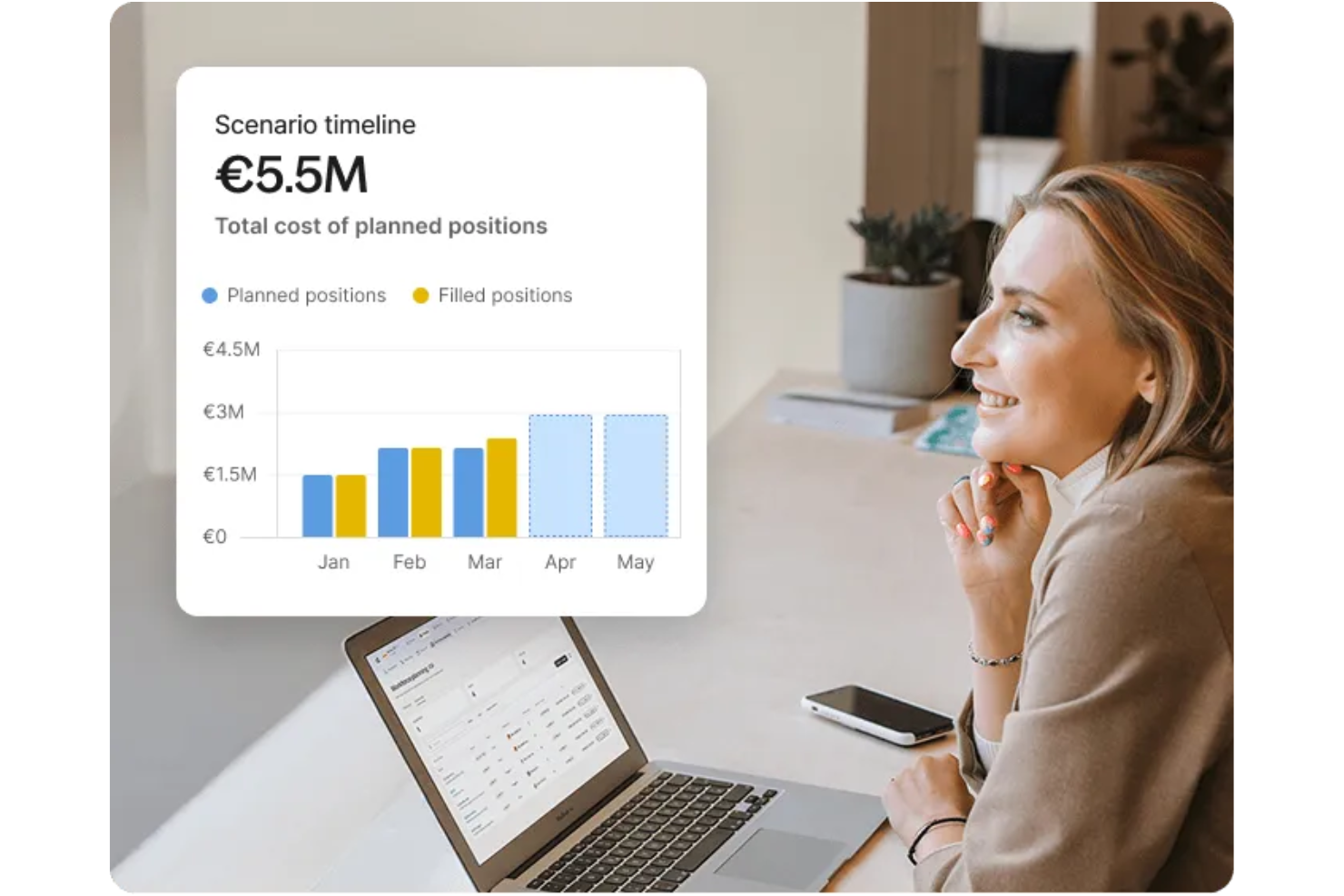
Deel HR is a global workforce optimization platform that brings together HR records management, international onboarding, contractor compliance, and payroll for distributed teams in one system.
Who Is Deel HR Best For?
Deel HR suits HR teams at global companies that need to manage employees and contractors across multiple countries from a single platform.
Why I Picked Deel HR
I picked Deel HR as one of the best because I can centralize all global HR records in one place, no matter how many countries my team operates in. I like that I can store contracts, compliance documents, and employee data for both employees and contractors. My team uses Deel HR to quickly access and update records for audits or internal reviews without juggling multiple systems.
Deel HR Key Features
- Automated payroll processing: Run payroll for employees and contractors in over 100 countries from one dashboard.
- Time off management: Track and approve employee leave requests with customizable policies for each location.
- Expense management: Submit, review, and reimburse expenses directly within the platform.
- Self-service employee portal: Give team members access to their documents, pay slips, and personal information.
Deel HR Integrations
Deel HR offers native integrations with Workday, BambooHR, Greenhouse, HiBob, Lever, and Xero. An API is available for custom integrations.
Pros and Cons
Pros:
- Native payroll and benefits management worldwide
- Localized contract templates for 150+ countries
- Integrated onboarding flows for international hires
Cons:
- Occasional delays in global payment processing
- Some integrations require higher-tier plans
New Product Updates from Deel HR

Deel Expands Stablecoin Wallet to 80+ Countries
Deel expands its Stablecoin Wallet to 80+ countries with dollar-backed balances and optional rewards. This gives eligible contractors more ways to hold and manage earnings inside Deel. For more information, visit Deel’s official site.
 .
.
Workday
Best for unified HR and payroll workflows
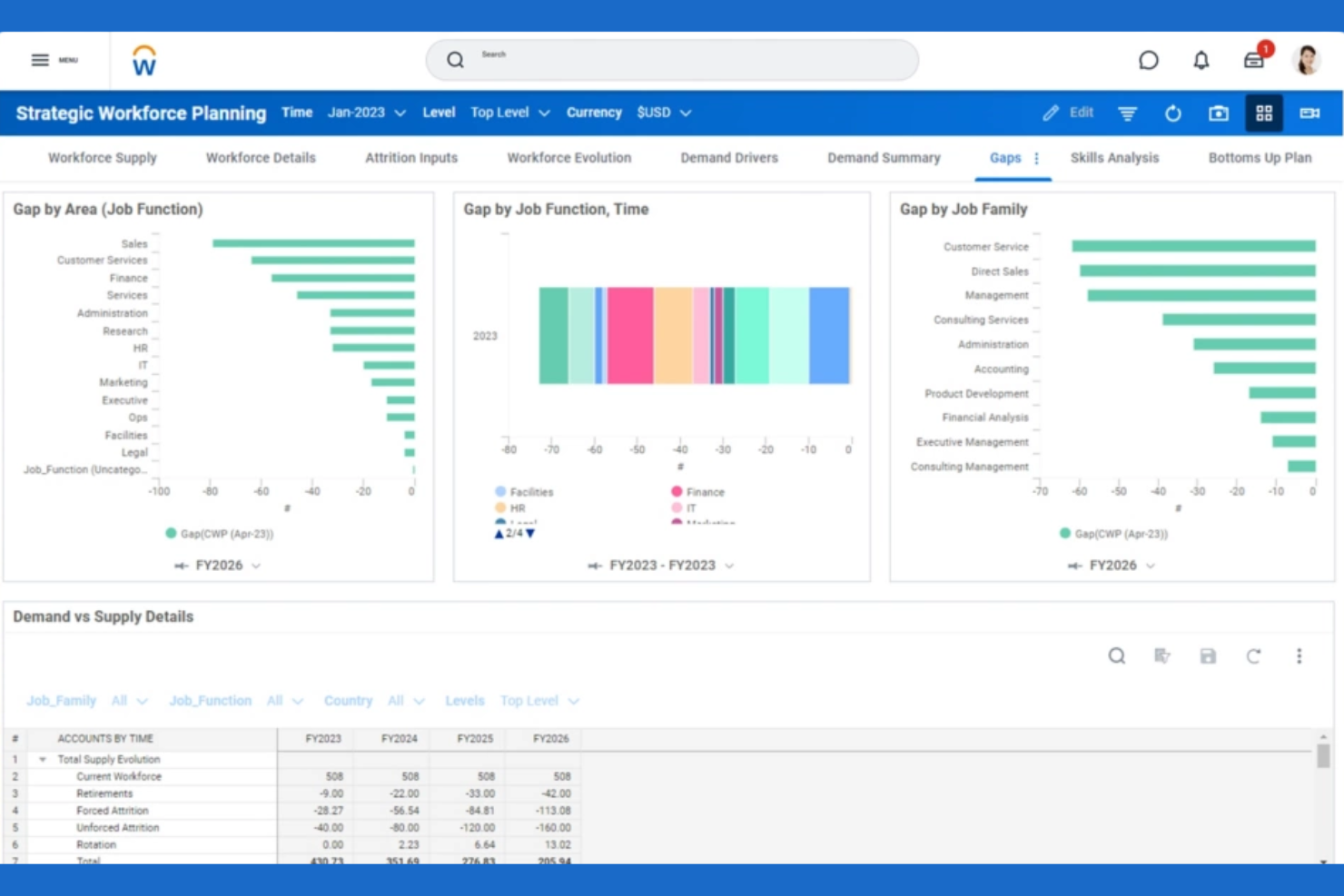
Workday brings HR, payroll, and workforce management tools together in a single platform, making it a strong choice for organizations seeking unified workflows. It’s especially useful for HR teams and finance leaders who need real-time visibility into labor costs and employee data. Workday helps businesses coordinate staffing, automate payroll, and manage compliance without switching between multiple systems.
Why I Picked Workday
What sets Workday apart is its ability to unify HR and payroll workflows within a single system. This approach lets HR and finance teams manage employee records, time tracking, and payroll processing without juggling multiple platforms. I picked Workday because it connects workforce scheduling and compensation data, so you can make real-time decisions based on accurate, up-to-date information. This unified workflow helps organizations reduce manual errors and maintain compliance across HR and payroll functions.
Workday Key Features
Some other features that make Workday appealing for workforce management system include:
- Mobile workforce management app: Employees and managers can access schedules, approve time, and manage requests from their phones.
- Automated absence management: Track, approve, and report on employee absences with built-in policy enforcement.
- Labor cost forecasting: Analyze and predict labor expenses using real-time data and configurable models.
- Role-based dashboards: Give users tailored views of workforce metrics and tasks based on their job function.
Workday Integrations
Integrations include Salesforce, Microsoft Azure, Slack, Adobe Sign, Okta, ServiceNow, LinkedIn, SAP, Oracle, and Google Workspace.
Pros and Cons
Pros:
- Role-based dashboards for workforce analytics
- Mobile app supports on-the-go approvals
- Real-time payroll and HR data sync
Cons:
- Limited connectivity with non-Workday apps
- High dependency on certified consultants

Dayforce
Best for continuous pay calculation
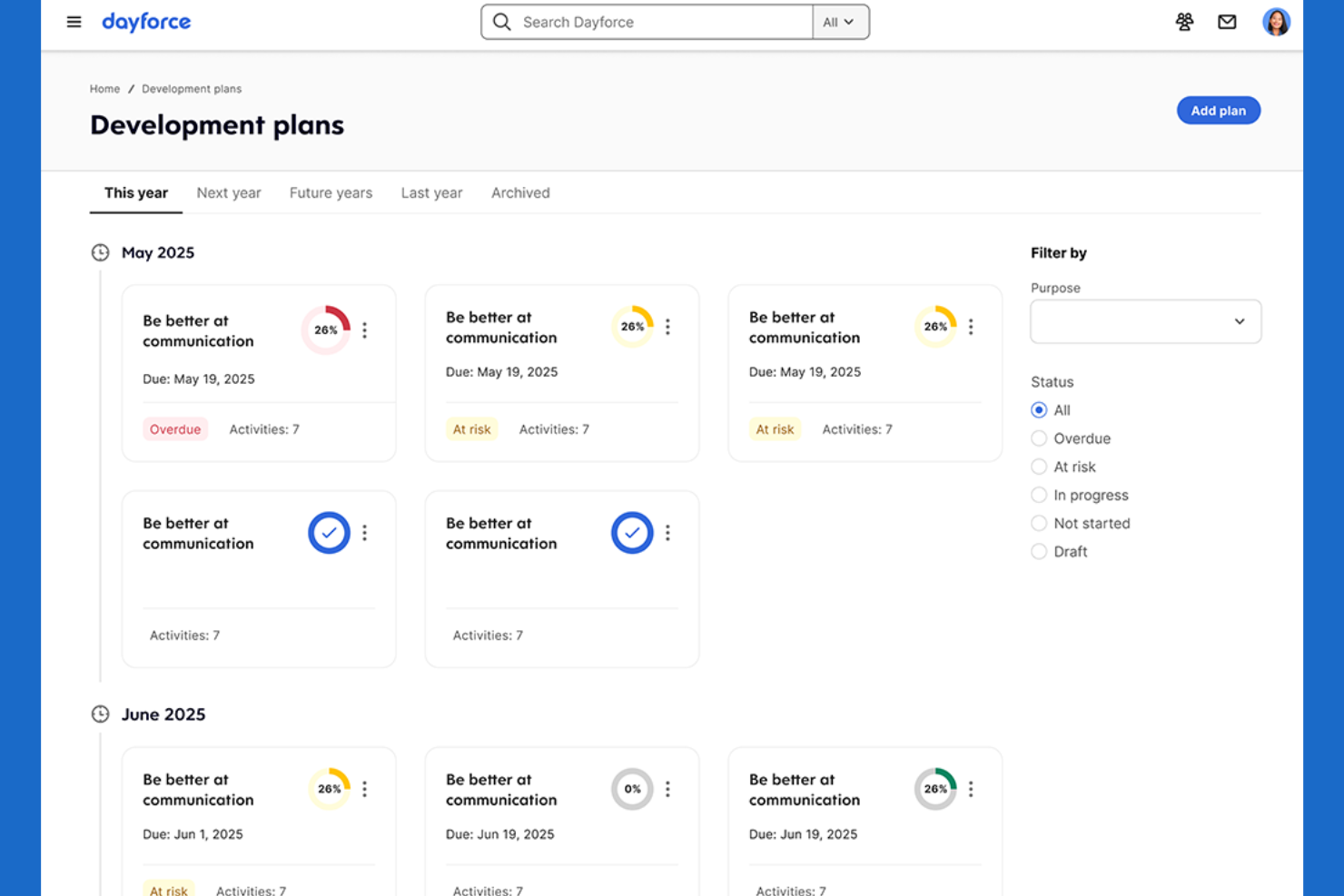
Dayforce offers a single platform for payroll, HR, and workforce management, with a focus on continuous pay calculation. It’s a strong fit for organizations that need up-to-the-minute payroll accuracy, such as those with hourly or shift-based workforces. Dayforce helps HR and payroll teams reduce pay errors and compliance risks by updating pay data in real time.
Why I Picked Dayforce
Unlike many workforce optimization tools, Dayforce calculates pay continuously rather than in batches, which is especially valuable for businesses with complex or variable schedules. This real-time pay calculation means payroll data is always current, helping HR and payroll teams catch errors and address compliance issues before they become problems. I picked Dayforce because it connects time tracking, scheduling, and payroll in a single workflow, so you can see the impact of schedule changes on pay immediately. This approach is ideal for organizations that need accurate, up-to-date payroll information at any moment.
Dayforce Key Features
Some other features that make Dayforce useful for workforce optimization include:
- Automated compliance monitoring: The system checks schedules and pay rules against labor regulations as you build them.
- Employee self-service portal: Staff can view schedules, request time off, and update personal information directly.
- Advanced analytics dashboards: Visualize workforce trends and key metrics with configurable reports.
- Mobile app for managers: Approve timesheets, manage shift swaps, and communicate with employees from anywhere.
Dayforce Integrations
Integrations include Salesforce, Microsoft Dynamics, Workday, SAP, Oracle, ADP, Kronos, QuickBooks, Ceridian, and Infor.
Pros and Cons
Pros:
- Built-in employee self-service
- Automated compliance checks for scheduling and pay
- Updates payroll in real time
Cons:
- Limited transparency on pricing without a quote
- System performance lags during peak periods

Legion
Best for automated shift optimization
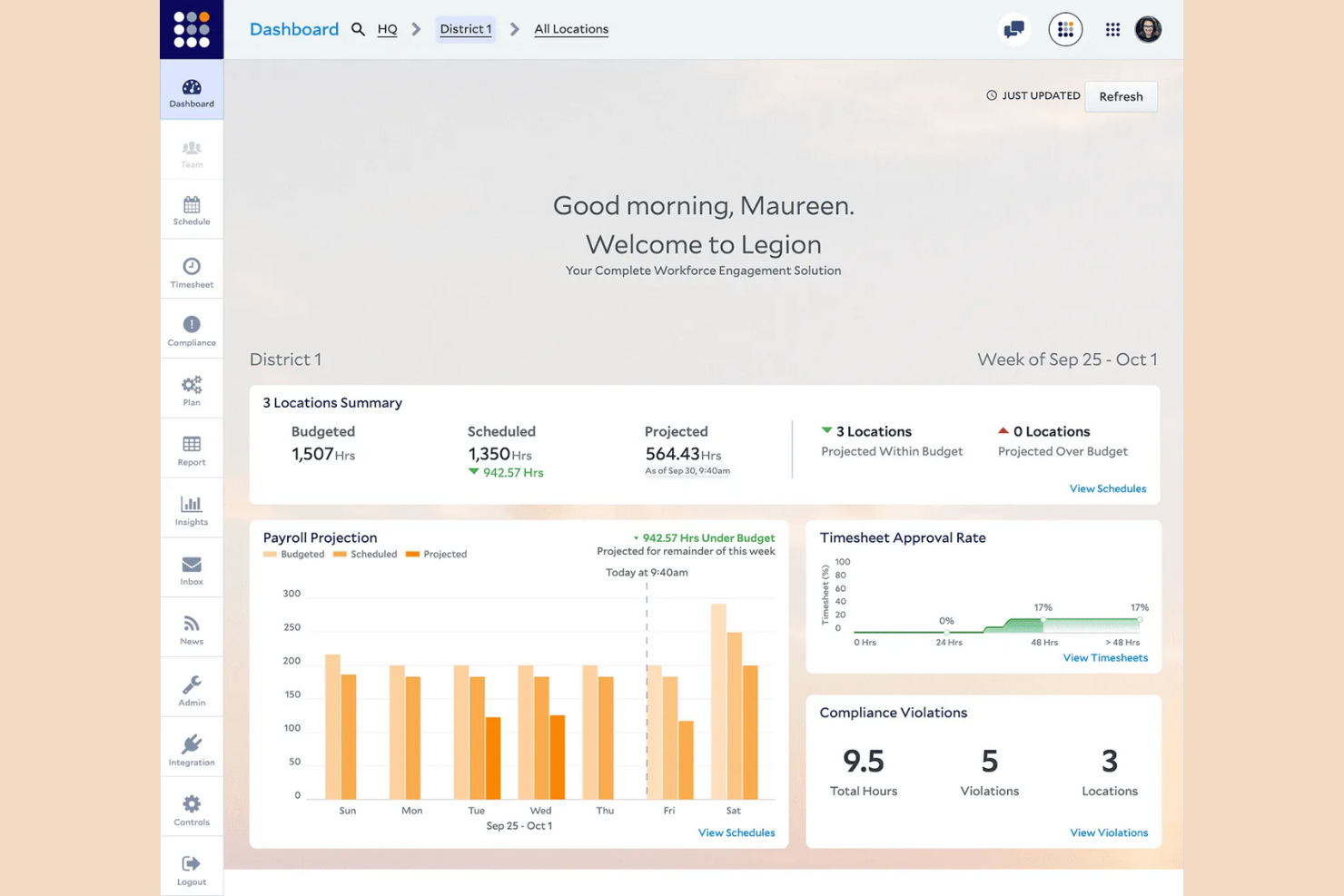
Legion uses AI-driven automation to build optimized shift schedules that match business demand and employee preferences. It’s especially useful for retailers, restaurants, and other businesses with hourly workforces that need to balance labor costs with coverage. Legion helps managers reduce manual scheduling work and minimize compliance risks by automatically generating fair, demand-based schedules.
Why I Picked Legion
What sets Legion apart is its focus on automated shift optimization powered by AI. The platform analyzes business demand, employee availability, and labor rules to automatically generate schedules that meet both operational needs and worker preferences. I picked Legion because it reduces the manual effort managers spend on scheduling while helping ensure compliance with labor laws. This makes it a strong choice for organizations that need to quickly adapt staffing to fluctuating demand without sacrificing fairness or accuracy.
Legion Key Features
Some other features that make Legion valuable for workforce optimization include:
- Demand forecasting engine: Predicts labor needs based on historical sales and traffic data.
- Employee mobile app: Improve employee experience with a mobile app so staff view schedules, swap shifts, and request time off.
- Automated compliance monitoring: Flags potential violations of labor laws and company policies.
- Real-time schedule updates: Instantly notifies employees of any changes to their shifts.
Legion Integrations
Integrations include Accu-Time Systems, GT Clocks, HR Path, Phenom, Rebus by Longbow Advantage, RELEX Solutions, RetailNext, SAP SuccessFactors, Synel, and YOOBIC.
Pros and Cons
Pros:
- Integrated gig-worker pool for understaffed shifts
- Budget-aware labor demand scheduling constraints
- Automated shift swapping via employee app
Cons:
- No native offline mobile accessibility mode
- Limit on custom field data exports

UKG
Best for large enterprise workforce planning
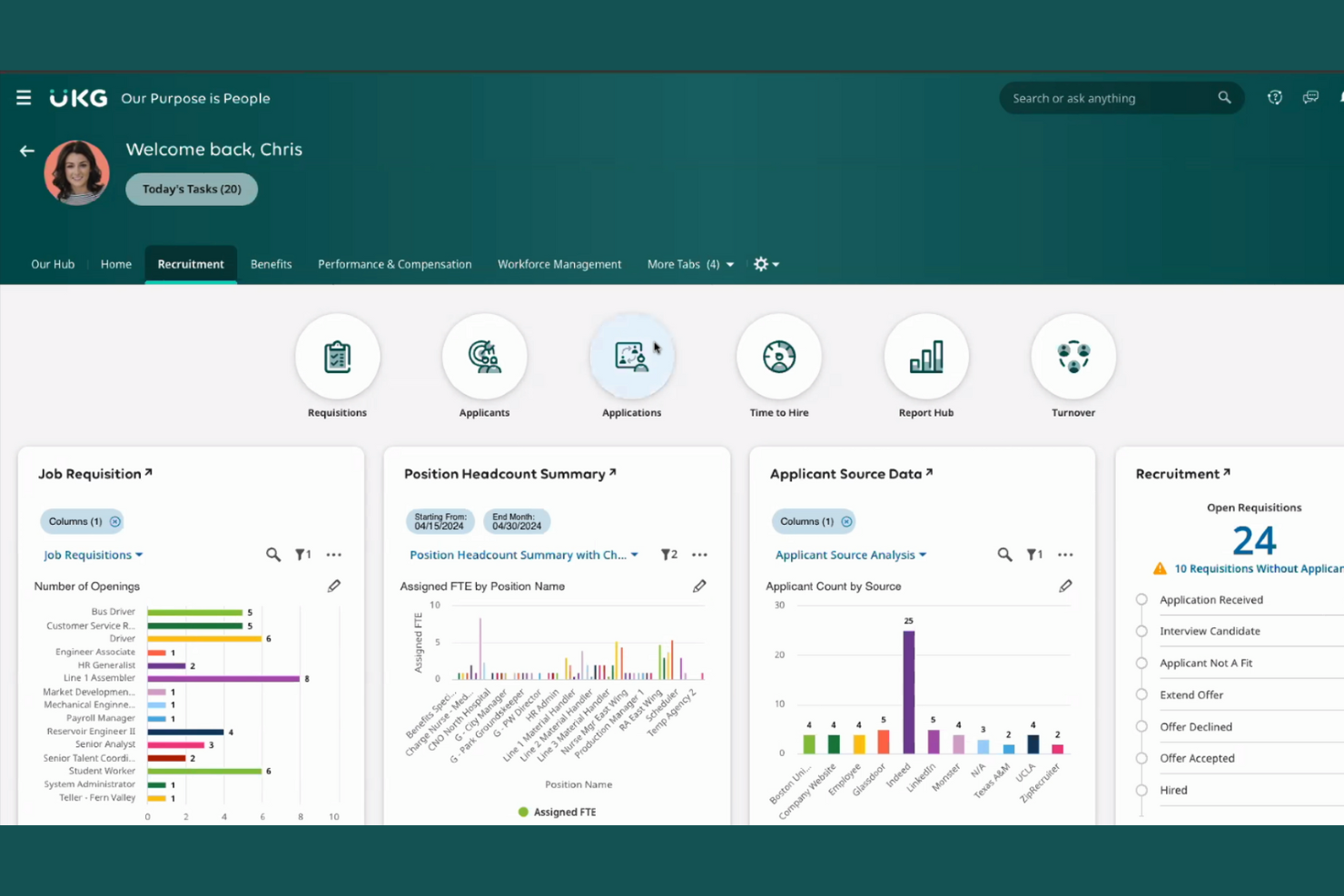
UKG is designed for large enterprises that need advanced workforce planning and management capabilities. It’s a strong fit for HR leaders and operations teams handling complex scheduling, compliance, and labor forecasting across multiple locations. UKG helps organizations coordinate large-scale staffing, manage labor costs, and maintain regulatory compliance in dynamic environments.
Why I Picked UKG
For organizations managing large, distributed workforces, UKG offers specialized tools for enterprise-scale workforce planning. The platform supports advanced scheduling, labor forecasting, and compliance management, which are essential for businesses with complex staffing needs. I picked UKG because it allows HR teams to automate shift assignments and track labor costs across multiple locations. These capabilities make it a strong choice for enterprises that need to optimize staffing ROTAs and maintain regulatory compliance at scale.
UKG Key Features
In addition to its workforce planning strengths, UKG offers several other features that support large organizations:
- Mobile self-service portal: Employees can view schedules, request time off, and swap shifts from their mobile devices.
- Automated time & attendance tracking: Capture employee hours and attendance data with built-in compliance checks.
- Analytics and reporting suite: Generate detailed workforce reports and dashboards for data-driven decision-making.
- Talent management tools: Conduct performance management reviews, goal setting, and employee development within the same platform.
UKG Integrations
Integrations include SAP, Oracle, Workday, ADP, Microsoft Dynamics, Salesforce, Ceridian, Infor, Kronos, and QuickBooks.
Pros and Cons
Pros:
- Supports large-scale payroll and HR operations
- Built-in compliance tools for labor regulations
- Handles complex multi-location scheduling scenarios
Cons:
- High technical expertise for custom reporting
- Implementation process can be lengthy
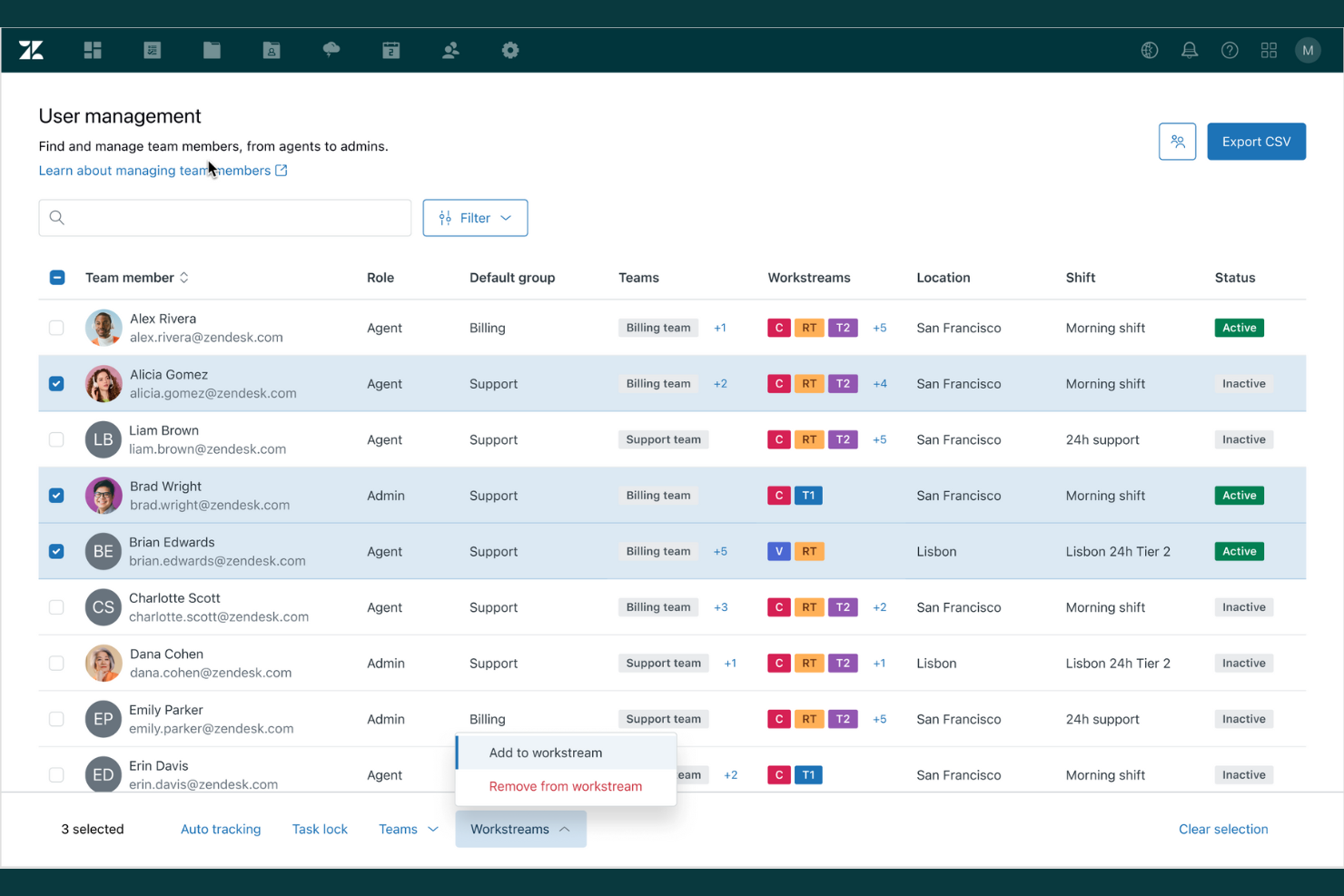
If your team relies on ticketing and integrated support workflows, Zendesk offers a workforce optimization solution built around these needs. It’s especially useful for customer service teams that want to unify ticket management, agent performance tracking, and support analytics in one place. Zendesk helps you coordinate agent workloads and monitor service quality across multiple channels.
Why I Picked Zendesk
Zendesk stands out for its deep ticketing and support integration, which is essential for workforce optimization in customer service environments. The platform connects ticket management with agent performance metrics, so you can track how efficiently issues are resolved and where bottlenecks occur. I like that Zendesk also offers automated ticket routing and escalation, helping teams prioritize urgent requests and balance workloads. These features make it a strong fit for organizations that need to optimize support operations and maintain high service standards.
Zendesk Key Features
Some other features that make Zendesk a strong choice for workforce optimization include:
- Customizable agent dashboards: Give agents and managers real-time visibility into workload and performance metrics.
- Integrated knowledge base: Allow agents to access and share up-to-date support articles during customer interactions.
- SLA management tools: Set, monitor, and enforce service level agreements for different ticket types.
- Multichannel support capabilities: Manage customer conversations across email, chat, phone, and social media from a single platform.
Zendesk Integrations
Integrations include Salesforce, Slack, Shopify, HubSpot, Mailchimp, Trello, Asana, Google Analytics, and Microsoft Teams.
Pros and Cons
Pros:
- Automatic mapping of full-day leave
- SLA tracking supports service quality goals
- Real-time tracking of non-Zendesk activities
Cons:
- No automated ingestion from HR systems
- Manual cache clearing for interface sync
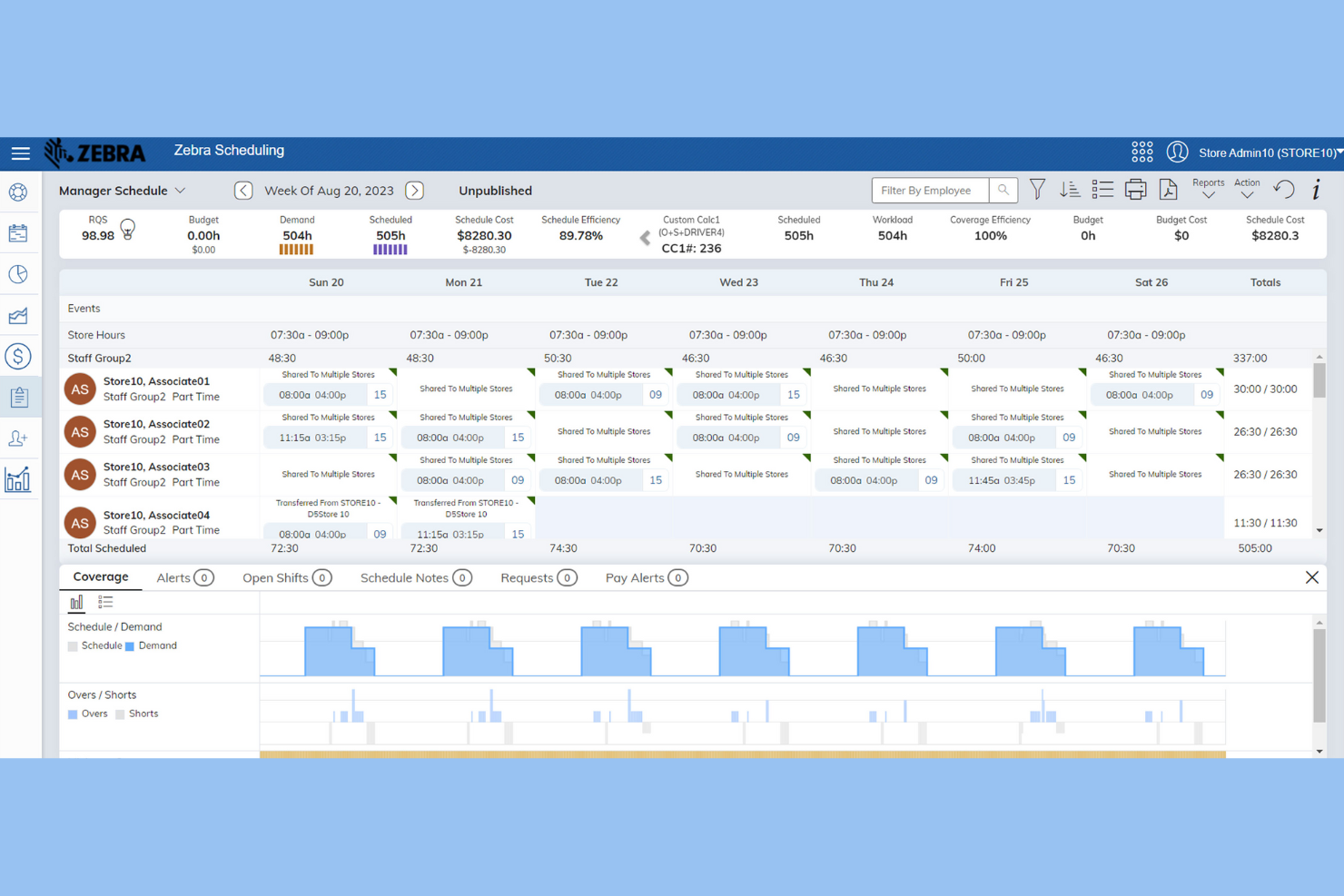
Zebra’s Workcloud Workforce Optimization Suite is designed for retailers who need precise labor forecasting and scheduling. This platform helps store managers and operations leaders align staffing with real-time demand and sales trends. If you’re looking to reduce labor costs and improve shift coverage accuracy in a retail environment, Zebra offers specialized tools to address those needs.
Why I Picked Zebra
For workforce optimization in retail, I picked Zebra because its suite focuses on labor forecasting accuracy—a top concern for store managers and retail operations teams. Zebra uses demand-driven scheduling tools that analyze sales data and foot traffic to predict staffing needs down to the hour. I also like that it offers automated shift assignments, which help reduce overstaffing and understaffing during peak and slow periods. These features make Zebra a strong choice for retailers who want to match labor resources with real-time demand.
Zebra Key Features
Some other features in Zebra’s Workcloud Workforce Optimization Suite that stand out include:
- Mobile scheduling app: Employees and managers can view schedules, swap shifts, and request time off directly from their mobile devices.
- Task management tools: Assign, track, and monitor completion of in-store tasks to keep teams aligned with daily priorities.
- Compliance monitoring: Built-in compliance checks help ensure schedules meet labor laws and company policies.
- Analytics dashboard: Access real-time insights into labor costs, attendance, and productivity trends across locations.
Zebra Integrations
Integrations include SAP, Oracle, Microsoft Dynamics, Kronos, ADP, Salesforce, Workday, Ceridian, and Infor.
Pros and Cons
Pros:
- Integrated task management
- Mobile app for shift management and swaps
- Built-in compliance checks for labor laws
Cons:
- Limited focus beyond the retail industry
- Requires Zebra hardware for full functionality
Genesys
Best for real-time agent coaching features
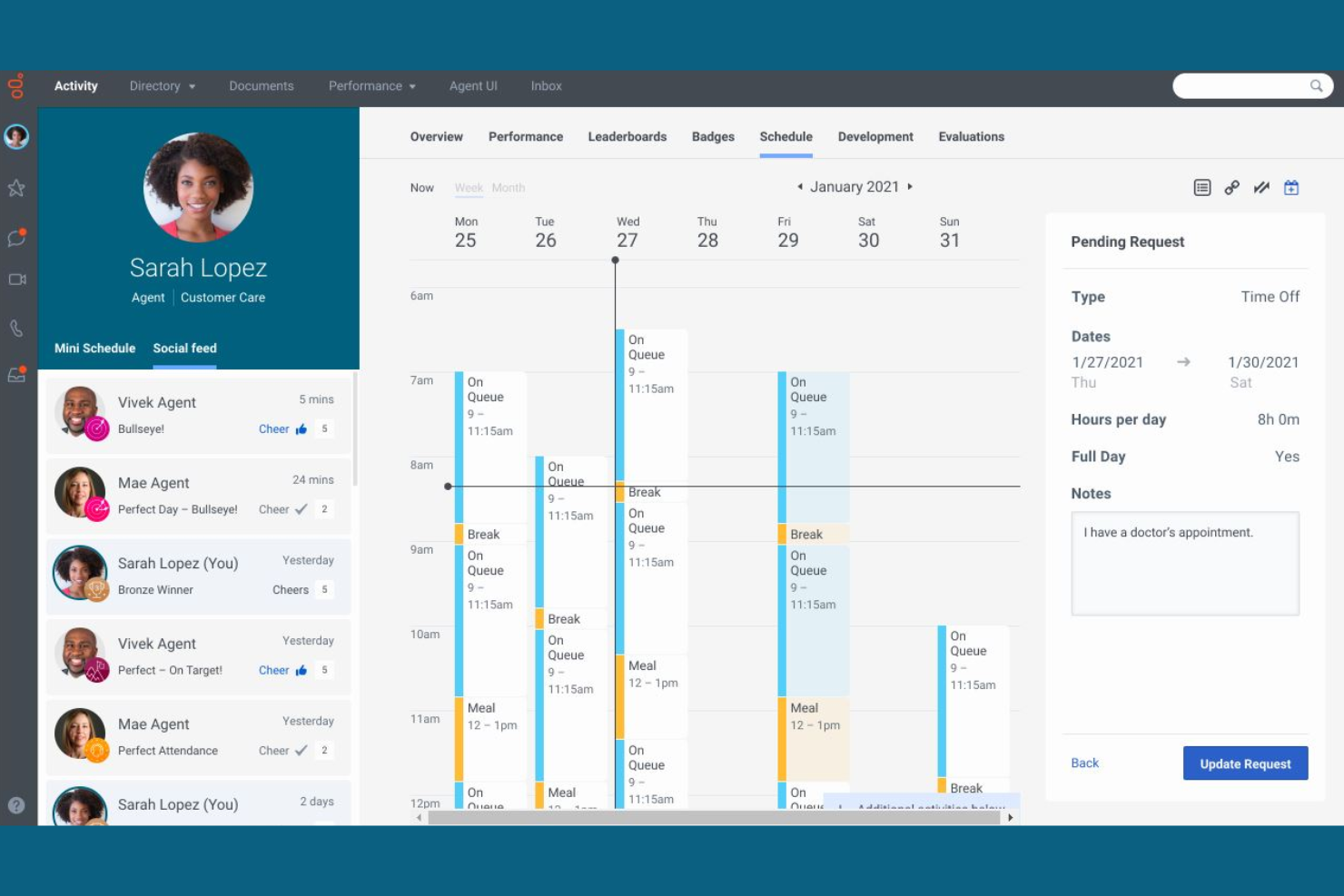
Genesys stands out for its real-time agent coaching features, making it a strong choice for contact centers and customer service teams focused on live performance improvement. If you need to support agents with instant feedback and guidance during customer interactions, this platform offers tools designed for in-the-moment coaching and skill development. Its focus on live support helps managers ensure the right people address issues at the right time.
Why I Picked Genesys
What drew me to Genesys is its strong focus on real-time agent coaching, which is a key differentiator in workforce optimization software. The platform offers live monitoring and whisper coaching, allowing supervisors to provide instant feedback and guidance to agents during customer interactions. I appreciate that Genesys also includes performance dashboards that update in real time, so managers can spot coaching opportunities as they arise. These features make it a practical choice for teams that want to improve agent performance in the moment, not just after the fact.
Genesys Key Features
Some other features that make Genesys a strong option for workforce optimization include:
- Omnichannel routing: Direct customer inquiries to the right agent across voice, chat, email, and social channels.
- Automated workforce forecasting: Predict staffing needs using historical data and AI-driven models.
- Quality management tools: Score and review agent interactions for compliance and service standards.
- Employee gamification modules: Motivate agents with built-in recognition and achievement tracking.
Genesys Integrations
Integrations include Salesforce, Microsoft Dynamics, Zendesk, ServiceNow, Oracle, SAP, AWS, Google Cloud, Twilio, and Cisco.
Pros and Cons
Pros:
- Built-in gamification for agent motivation
- Omnichannel routing for customer interactions
- Real-time agent coaching with live monitoring
Cons:
- Separate management for standalone WFM
- Limit of 100 simultaneous activities
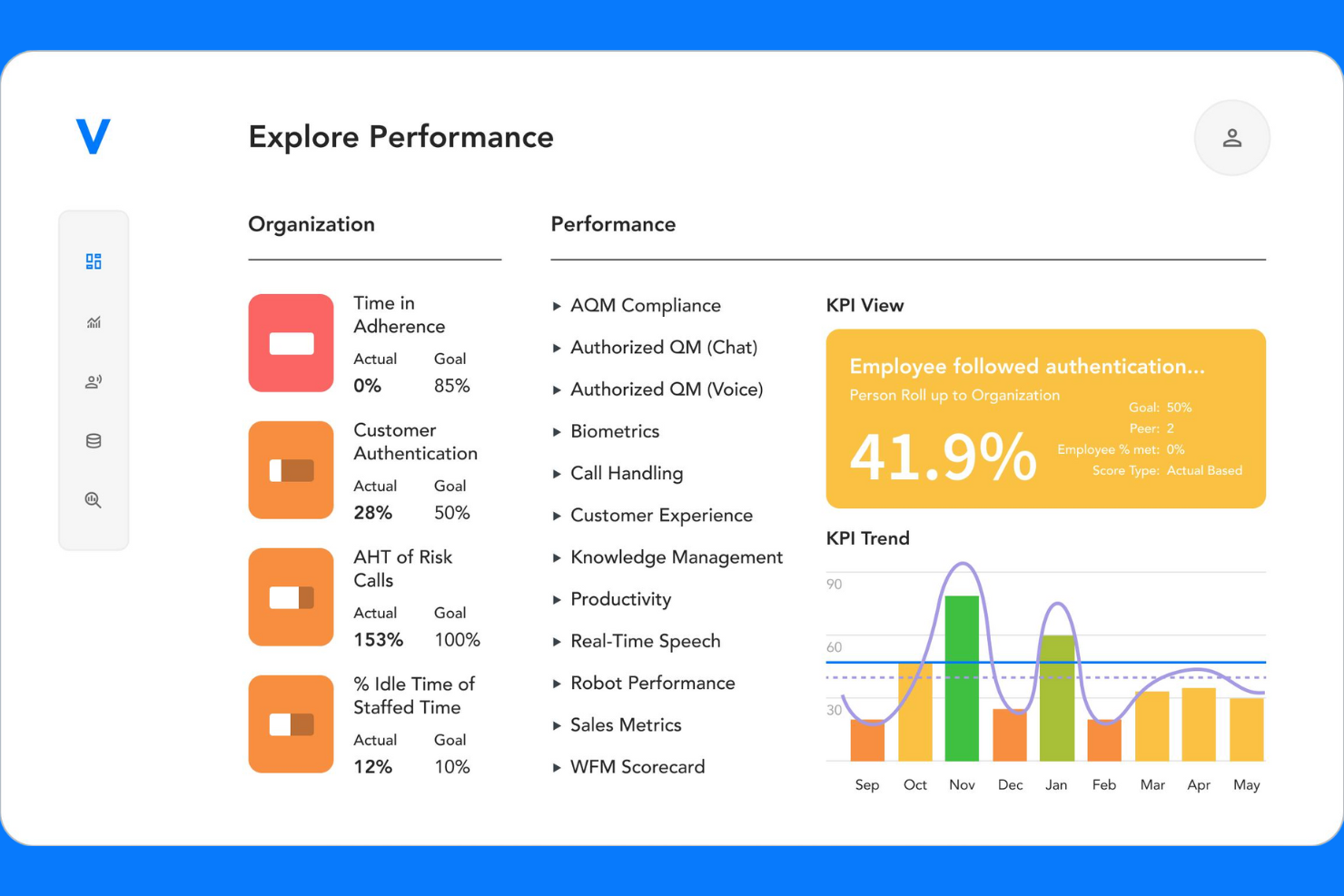
Verint is built for contact center leaders who need deep analytics across voice, chat, email, and social channels. This all-in-one platform helps you unify workforce management and performance tracking in complex, omnichannel environments. If your team struggles to connect agent activity with customer experience insights, Verint offers specialized tools to bridge that gap.
Why I Picked Verint
What sets Verint apart for workforce optimization is its focus on omnichannel contact center analytics. I picked Verint because it brings together data from voice, chat, email, and social channels, giving managers a unified view of agent performance and customer interactions. The platform’s analytics engine helps you identify trends and gaps in service quality across every channel. For teams managing complex, multi-channel operations, Verint’s ability to connect workforce metrics with customer experience insights is especially valuable.
Verint Key Features
Some other features in Verint that are worth noting include:
- Automated quality monitoring: The system automatically reviews and scores customer interactions for quality assurance.
- Forecasting and scheduling engine: Generate staffing forecasts and build optimized schedules based on historical and real-time data.
- Performance scorecards: Track agent KPIs and progress with customizable dashboards and scorecards.
- E-learning and coaching modules: Deliver targeted training and coaching directly within the platform to support agent development.
Verint Integrations
Integrations include Salesforce, Microsoft Dynamics, and HubSpot. An API is available for custom integrations.
Pros and Cons
Pros:
- Customizable performance scorecards
- Built-in e-learning and coaching modules
- Real-time schedule adherence tracking
Cons:
- Advanced features require additional licensing
- Complex setup process for new users
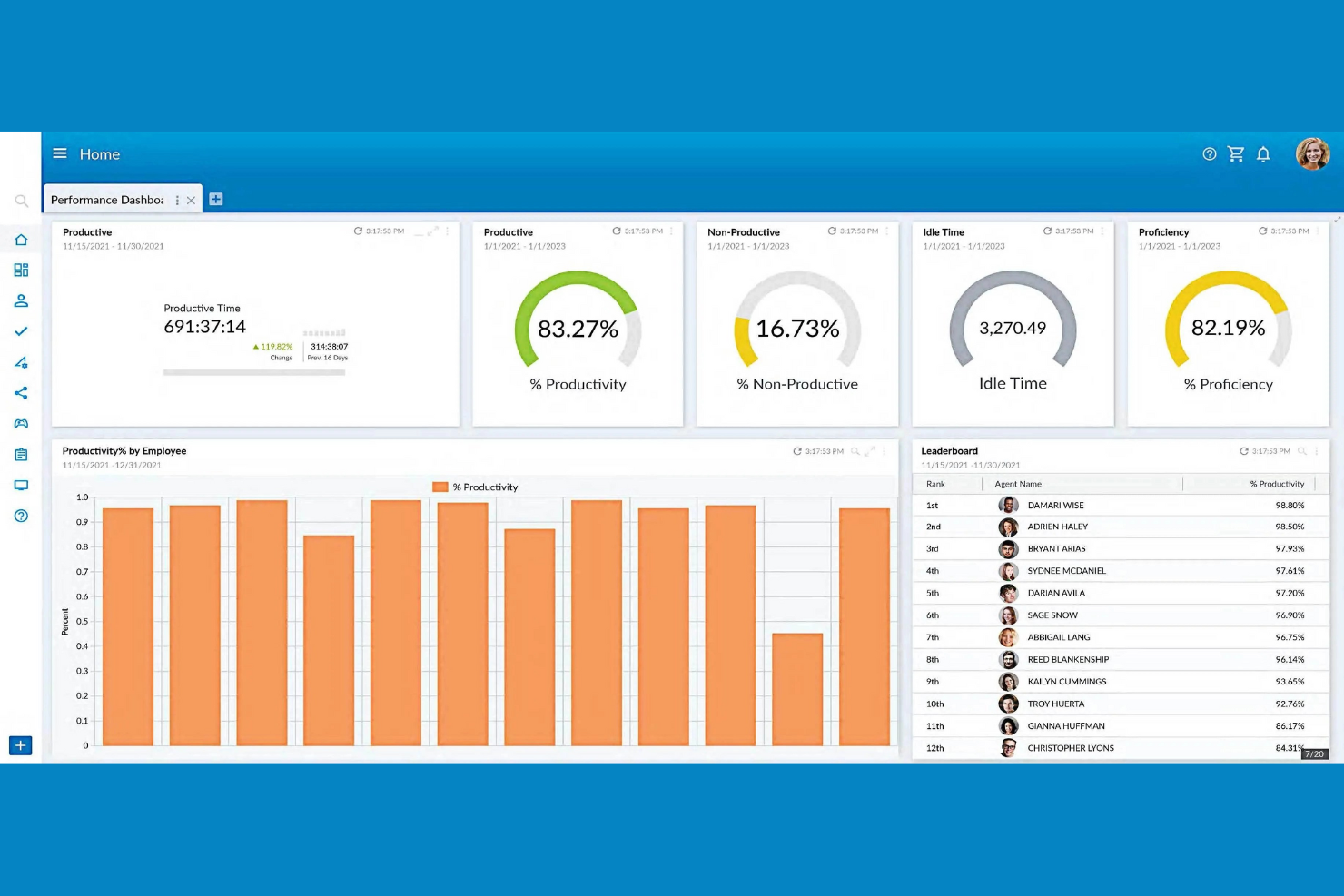
NiCE brings AI-powered analytics to workforce optimization, making it a strong fit for teams focused on performance improvement. If you manage a contact center or a large service operation, this platform helps you uncover actionable insights from employee and customer interactions. Its advanced automation and real-time feedback tools are designed to support data-driven coaching, retention, and continuous process improvement.
Why I Picked NiCE
What sets NiCE apart as a workforce management solution is its focus on AI-driven performance insights. The platform uses AI to analyze large volumes of customer and employee interactions, surfacing trends and coaching opportunities that might otherwise go unnoticed. I picked NiCE because its real-time analytics and automated quality management help managers quickly identify performance gaps and deliver targeted feedback. These capabilities make it especially valuable for organizations that want to use data to drive continuous improvement in service and productivity.
NiCE Key Features
Some other features that make NiCE a strong choice for workforce optimization include:
- Omnichannel interaction recording: Capture and review customer interactions across voice, chat, email, and social channels.
- Automated scheduling engine: Generate optimized employee schedules based on forecasted demand and business rules.
- Employee engagement surveys: Collect real-time feedback from staff to monitor sentiment and engagement.
- Compliance management tools: Track and document adherence to regulatory requirements within your workforce operations.
NiCE Integrations
Integrations include Salesforce, Microsoft Dynamics, SAP, Oracle, Zendesk, Genesys, Avaya, Cisco, Amazon Connect, and Twilio.
Pros and Cons
Pros:
- Built-in employee engagement surveys
- AI-driven long-term staffing demand forecasting
- Automated multi-week shift bidding cycles
Cons:
- Concurrent limit on background processing jobs
- Browser-specific requirements for legacy modules
Other Workforce Optimization Software
Here are some additional workforce optimization software options that didn’t make it onto my shortlist, but are still worth checking out:
- ADP WorkForce Suite
For global compliance management
- Eleveo
For mid-sized contact center scheduling
- ActivTrak
For productivity trend analysis
- Workforce.com
For hourly staff scheduling
- Oracle Cloud HCM
With advanced analytics integration


How I Evaluate Workforce Optimization Software
I split my evaluation into two layers: core capabilities like demand forecasting and shift scheduling that a tool must have, and differentiators that make one platform a better fit than another.
Core Functionality (Table Stakes For This List)
When I'm selecting tools for my list, I rank each one on a scale from 0 (does not offer the functionality) to 5 (excels in this area) for each core functionality listed below. Then, I calculate the tool's total score into a percentage. Each tool needs to achieve a minimum total score of 75% to be considered for inclusion.
- Workforce Forecasting & Planning: I evaluate whether the tool can predict staffing demand using historical data and business drivers, like modeling seasonal spikes in retail or patient volume surges in healthcare.
- Scheduling & Shift Management: Automated schedule generation matters here, especially how well the tool accounts for employee skills, availability, and labor rules when building shift rosters.
- Time & Attendance Tracking: I look at how the platform captures hours worked, from mobile clock-ins for field teams to geofenced check-ins at multi-site operations, and how that data flows into payroll.
- Performance & Productivity Analytics: Dashboards that track KPIs like adherence, utilization, and output per team give managers real visibility, so I check for configurable reporting and benchmarking.
- Skills & Competency Management: The ability to map employee certifications and skill sets to open roles or project needs is what I evaluate, including whether the tool flags expiring credentials.
- Labor Compliance & Cost Management: I check how the platform enforces overtime caps, mandated break rules, and scheduling regulations while giving finance teams real-time labor cost tracking against budget.
Once I have a list of tools that meet the criteria, I consider what sets each platform apart.
Differentiating Factors (What Sets Vendors Apart)
Here's how I compare and contrast different vendors:
Standout Features
Scenario modeling is a big one for me. I want to see tools that let workforce planners test "what if we cut weekend shifts by 20%" before making real changes. AI-driven recommendations add another layer, surfacing patterns like burnout risk or turnover likelihood that manual analysis would miss. I also look at employee self-service portals, since platforms that let frontline workers swap shifts, claim open slots, and manage availability from their phones take significant pressure off scheduling managers.
Beyond Features
Integrations matter a lot in this space. I check whether a platform connects natively with the HRIS and payroll systems a team already runs, since a scheduling tool that can't sync with your existing payroll creates double entry. Industry fit is equally important—a contact center with 500 agents has very different needs than a hospital managing rotating nursing shifts. I also evaluate implementation timelines and onboarding support, because workforce optimization rollouts that drag on for months risk losing buy-in from the managers who need the tool most.
How to Choose Workforce Optimization Software
It’s easy to get bogged down in long feature lists and complex pricing structures. To help you stay focused as you work through your unique software selection process, here’s a checklist of factors to keep in mind:
| Factor | What to Consider |
|---|---|
| Scalability | Will the software handle your current and future headcount, locations, and scheduling complexity? Check for user or location limits. |
| Integrations | Does it connect natively with your payroll, HRIS, and timekeeping systems? Confirm compatibility to avoid manual data entry. |
| Customizability | Can you tailor scheduling rules, compliance settings, and reporting to your organization’s policies and workflows? |
| Ease of use | Will managers and employees adopt it quickly? Look for clear navigation, mobile access, and minimal training requirements. |
| Implementation and onboarding | How long does setup take, and what resources are required? Ask about migration support, training, and typical go-live timelines. |
| Cost | Are pricing tiers transparent and predictable? Consider total cost of ownership, including add-ons, support, and future upgrades. |
| Security safeguards | Does the vendor offer data encryption, role-based access, and compliance with relevant standards (like GDPR or SOC 2)? |
| Compliance requirements | Can the tool adapt to changing labor laws and regional regulations? Look for automated alerts and regular compliance updates. |
What Is Workforce Optimization Software?
Workforce optimization software is a category of digital tools that help organizations plan, manage, and analyze employee scheduling, attendance, and productivity. These systems automate shift assignments, track labor costs, and support compliance with labor regulations. By centralizing workforce data and HR processes, workforce optimization software enables HR teams and managers to align staffing with business needs and improve operational efficiency.
Features of Workforce Optimization Software
When selecting workforce optimization software, keep an eye out for the following key features:
- Shift scheduling: Allows managers to create, assign, and adjust employee shifts based on business needs and staff availability.
- Time and attendance tracking: Records when employees clock in and out, monitors absences, and helps ensure accurate payroll processing.
- Labor forecasting: Uses historical data and trends to predict future staffing needs, helping prevent overstaffing or understaffing.
- Compliance management: Monitors schedules and time records to flag potential violations of labor laws, union rules, or company policies.
- Employee self-service portal: Lets employees view schedules, request time off, and swap shifts, reducing administrative workload for managers.
- Leave management: Tracks vacation, sick leave, and other absences, ensuring accurate accruals and visibility for both employees and HR.
- Reporting and analytics: Provides dashboards and customizable reports on labor costs, attendance patterns, and scheduling efficiency.
- Payroll integration: Connects directly with payroll systems to transfer time and attendance data, reducing manual entry and errors.
- Mobile access: Offers mobile apps or responsive web interfaces so managers and employees can manage schedules and requests on the go.
Benefits of Workforce Optimization Software
Implementing workforce optimization software provides several benefits for your team and your business. Here are a few you can look forward to:
- Improved scheduling accuracy: Automated shift assignments and labor forecasting help ensure the right coverage for every shift.
- Reduced compliance risk: Built-in compliance management flags potential violations of labor laws and company policies before they become issues.
- Lower administrative workload: Employee self-service portals and automated time tracking minimize manual scheduling and data entry tasks.
- Better labor cost control: Real-time reporting and analytics give managers visibility into labor spending and overtime trends.
- Enhanced employee engagement: Mobile access and transparent scheduling empower employees to manage their own availability and requests.
- Faster onboarding and adoption: Intuitive interfaces and guided onboarding tools help teams get up and running with minimal disruption.
- Accurate payroll processing: Direct integration with payroll systems ensures time and attendance data is transferred without errors or delays.
Costs and Pricing of Workforce Optimization Software
Selecting workforce optimization software requires an understanding of the various pricing models and plans available. Costs vary based on features, team size, add-ons, and more. The table below summarizes common plans, their average prices, and typical features included in WFM software solutions:
Plan Comparison Table for Workforce Optimization Software
| Plan Type | Average Price | Common Features |
|---|---|---|
| Free Plan | $0 | Basic shift scheduling, limited time tracking, and access for a small number of users. |
| Personal Plan | $5-$15/user/month | Individual scheduling, time and attendance tracking, mobile access, and basic reporting. |
| Business Plan | $15-$30/user/month | Team scheduling, leave management, compliance monitoring, integrations, and advanced analytics. |
| Enterprise Plan | $30-$60/user/month | Custom workflows, API access, advanced security, dedicated support, and multi-location management. |
Workforce Optimization Software FAQs
Here are some answers to common questions about workforce optimization software:
How does workforce optimization software help with compliance?
Workforce optimization software helps with compliance by monitoring schedules and time records for potential violations of labor laws, union agreements, and company policies. Many tools provide automated alerts and reporting to help human resources teams stay ahead of regulatory changes and avoid costly penalties.
Can workforce optimization software integrate with payroll and HR systems?
Yes, most workforce optimization software can integrate with payroll and HR systems. These integrations allow for automatic transfer of time, attendance, and scheduling data, reducing manual entry and minimizing errors during payroll processing.
What should I consider when choosing workforce optimization software for a remote or hybrid team?
When choosing software for remote or hybrid teams, look for mobile access, cloud-based deployment, and self-service features. These capabilities ensure employees can view schedules, request changes, and track time from any location, supporting flexible work arrangements.
How long does it take to implement workforce optimization software?
Implementation timelines vary, but most organizations can expect setup to take anywhere from a few days to several weeks. Factors include data migration needs, integration complexity, and the availability of onboarding resources like training videos and product tours.
Is workforce optimization software suitable for small businesses?
Yes, many workforce optimization software solutions offer plans and features tailored to small businesses. Look for options with simple setup, transparent pricing, and core scheduling and time tracking features without unnecessary complexity.