I 10 migliori software OKR del 2026: recensioni e confronto

10 La migliore selezione di software OKR


Il software OKR consente di definire obiettivi allineati, monitorare risultati misurabili e responsabilizzare il team grazie a dashboard in tempo reale e aggiornamenti automatici. Lo strumento giusto porta chiarezza nel processo OKR, assicurando che le priorità rimangano visibili e che i team non perdano slancio.
Dopo aver implementato e testato personalmente decine di piattaforme OKR, ti illustrerò le opzioni migliori per aiutarti a gestire facilmente gli obiettivi, migliorare l'adozione e ottenere risultati in tutto il team.
Perché fidarsi delle nostre recensioni sui software
Il nostro team testa e recensisce software dal 2012. In quanto esperti HR noi stessi, sappiamo quanto sia difficile — e importante — scegliere il software giusto.
Per questa guida, abbiamo valutato gli strumenti attraverso test pratici e ricerche indipendenti, assegnando un punteggio agli strumenti in base ai nostri criteri di selezione. Ci basiamo inoltre sulle competenze di leader di pensiero del settore e di professionisti HR attivi.
Le nostre recensioni riflettono il nostro giudizio editoriale umano, non un discorso di vendita.
Revisori esperti:
Tabella comparativa dei software OKR
Questa tabella comparativa riassume i dettagli sui prezzi delle mie migliori selezioni di software OKR:
| Tool | Best For | Trial Info | Price | ||
|---|---|---|---|---|---|
| 1 | Ideale per l'analisi avanzata dei dati | Demo gratuita disponibile | A partire da 5$/dipendente/mese | Website | |
| 2 | Ideale per check-in regolari | Prova gratuita + piano gratuito disponibile | A partire da $7/utente/mese (fatturato annualmente) | Website | |
| 3 | Il migliore con automazione dei flussi di lavoro alimentata da IA | Prova gratuita di 14 giorni | Da $8/utente/mese | Website | |
| 4 | Ideale per lo sviluppo delle competenze e la definizione dei percorsi di carriera tramite IA | Demo gratuita disponibile | Da $2/utente/mese (fatturazione annuale) | Website | |
| 5 | Ideale per la definizione di obiettivi assistita dall'IA | Prova gratuita di 14 giorni + demo disponibile | Da $5/utente/mese | Website | |
| 6 | Ideale come IA aziendale | Dimostrazione gratuita disponibile | A partire da $8/utente/mese | Website | |
| 7 | Ideale per monitorare OKR e KPI insieme | Prova gratuita e demo disponibili | Da $0,09/utente/mese | Website | |
| 8 | Ideale per il feedback continuo sulle performance | Prova gratuita di 30 giorni | Da $3/utente/mese | Website | |
| 9 | Ideale per i team in crescita che implementano gli OKR | Prova gratuita di 14 giorni | A partire da $99/mese (con fatturazione annuale) | Website | |
| 10 | Ideale per visualizzare l'allineamento tra strategia e OKR | Piano gratuito + prova gratuita + demo gratuita disponibili | A partire da €15/utente/mese (con fatturazione annuale) | Website |

Recensioni dei migliori software OKR
Ecco i miei riepiloghi dettagliati dei migliori software OKR inclusi nella mia top 10, con note sul motivo per cui li ho scelti. Ogni recensione offre uno sguardo dettagliato alle funzionalità principali, ai pro e ai contro, alle integrations e ai casi d’uso ideali di ogni sistema, per aiutarti a trovare lo strumento OKR più adatto a te.

Deel HR
Ideale per l'analisi avanzata dei dati

Deel Engage è ideale per le aziende che vogliono collegare OKR, sviluppo di carriera e approfondimenti sulle performance in un unico luogo. È particolarmente utile per i team HR con forza lavoro distribuita che necessitano di un modo chiaro e coerente per misurare competenze, progressi e risultati in diverse regioni.
Perché ho scelto Deel Engage
Ho scelto Deel Engage perché i suoi strumenti di analisi — grafici radar, griglie 9-box e matrici delle competenze — permettono di vedere punti di forza, necessità di sviluppo e tendenze delle performance senza affidarsi all'intuito o a dashboard esterne.
Questi approfondimenti si collegano direttamente agli OKR e alle valutazioni delle performance, aiutando a misurare i progressi in modo continuo, non solo nei cicli di valutazione. Mi piace anche che i percorsi di carriera basati sulle competenze offrano ai dipendenti una visione trasparente di ciò che ci si aspetta da loro mentre crescono. Se il tuo team ha bisogno di OKR supportati da dati misurabili e basati sulle competenze, Deel Engage è una scelta solida.
Caratteristiche principali di Deel Engage
Ecco alcune funzionalità di spicco da evidenziare:
- Analisi Radar & Competenze: Visualizza le forze del team, le lacune e i progressi rispetto agli obiettivi definiti.
- Percorsi di carriera & Framework di competenze: Mostra ai dipendenti le competenze richieste e le aspettative di ruolo con parametri chiari e strutturati.
- Mappatura dei talenti con griglia 9-box: Identifica i membri ad alto potenziale del team e valuta sia le performance sia il potenziale futuro.
- Strumenti di feedback integrati: Esegui valutazioni a 360°, check-in e sondaggi per raccogliere feedback significativi dai dipendenti.
Integrazioni di Deel Engage
Le integrazioni includono Deel HR, Slack, Workday, BambooHR, Personio, HiBob, SAP SuccessFactors, Okta e Google Workspace.
Pros and Cons
Pros:
- Analisi delle performance completa
- Sistema integrato di gestione della formazione
- Raccolta feedback a 360 gradi
Cons:
- Possibile curva di apprendimento per i nuovi utenti
- Potrebbe offrire più opzioni di personalizzazione
New Product Updates from Deel HR

Deel Expands Stablecoin Wallet to 80+ Countries
Deel expands its Stablecoin Wallet to 80+ countries with dollar-backed balances and optional rewards. This gives eligible contractors more ways to hold and manage earnings inside Deel. For more information, visit Deel’s official site.
 .
.
Ideale per check-in regolari

Per le organizzazioni che desiderano migliorare i propri processi di gestione delle prestazioni, Teamflect offre una soluzione efficace integrata perfettamente con Microsoft Teams. Progettato per aziende di tutte le dimensioni, Teamflect è particolarmente indicato per i professionisti delle risorse umane e i team leader che intendono allineare gli obiettivi e aumentare il coinvolgimento. Affrontando sfide come la comunicazione frammentata e il monitoraggio incoerente delle performance, Teamflect fornisce una piattaforma centralizzata per semplificare gli obiettivi e migliorare la produttività.
Perché ho scelto Teamflect
Ho scelto Teamflect per la sua integrazione unica con Microsoft Teams, che facilita l’allineamento senza soluzione di continuità degli obiettivi del team attraverso la gestione a cascata degli OKR, assicurando che ogni membro sia sulla stessa linea. Il meccanismo di feedback continuo offre un modo dinamico per monitorare i progressi e apportare aggiustamenti in tempo reale, fondamentale per mantenere lo slancio verso il raggiungimento degli obiettivi. Inoltre, le revisioni delle prestazioni automatizzate aiutano a ridurre il carico amministrativo, consentendo ai professionisti HR di concentrarsi su iniziative strategiche.
Caratteristiche principali di Teamflect
Oltre alle sue spiccate capacità di integrazione, Teamflect offre diverse altre funzionalità che migliorano la sua efficacia come software OKR:
- Strumenti per riunioni 1-a-1: Facilita incontri regolari tra manager e dipendenti per discutere i progressi e affrontare eventuali criticità.
- Sondaggi di coinvolgimento: Raccoglie feedback dei dipendenti per misurare il morale e individuare aree di miglioramento.
- Premi e riconoscimenti: Offre una piattaforma per riconoscere i traguardi dei dipendenti, favorendo un ambiente di lavoro positivo.
- Piani di sviluppo individuali: Supporta la crescita professionale personalizzata tramite la definizione e il monitoraggio degli obiettivi di sviluppo.
- OKR a cascata: Supporta obiettivi a cascata che collegano le finalità aziendali, di team e individuali.
- Valutazioni delle prestazioni: Modelli integrati per la valutazione delle performance con allineamento agli OKR e componenti di feedback.
Integrazioni di Teamflect
Le integrazioni includono Microsoft Teams, Microsoft 365, Azure Active Directory (Entra ID), Outlook, Power BI e oltre 200 piattaforme HRIS.
Pros and Cons
Pros:
- Gestione OKR nativa in Microsoft Teams
- Ottimo supporto per l'allineamento degli OKR a cascata
- Feedback e valutazioni integrati
Cons:
- Necessario l'utilizzo di Microsoft Teams
- Interfaccia ricca di funzionalità che può risultare complessa per alcuni utenti

Il migliore con automazione dei flussi di lavoro alimentata da IA
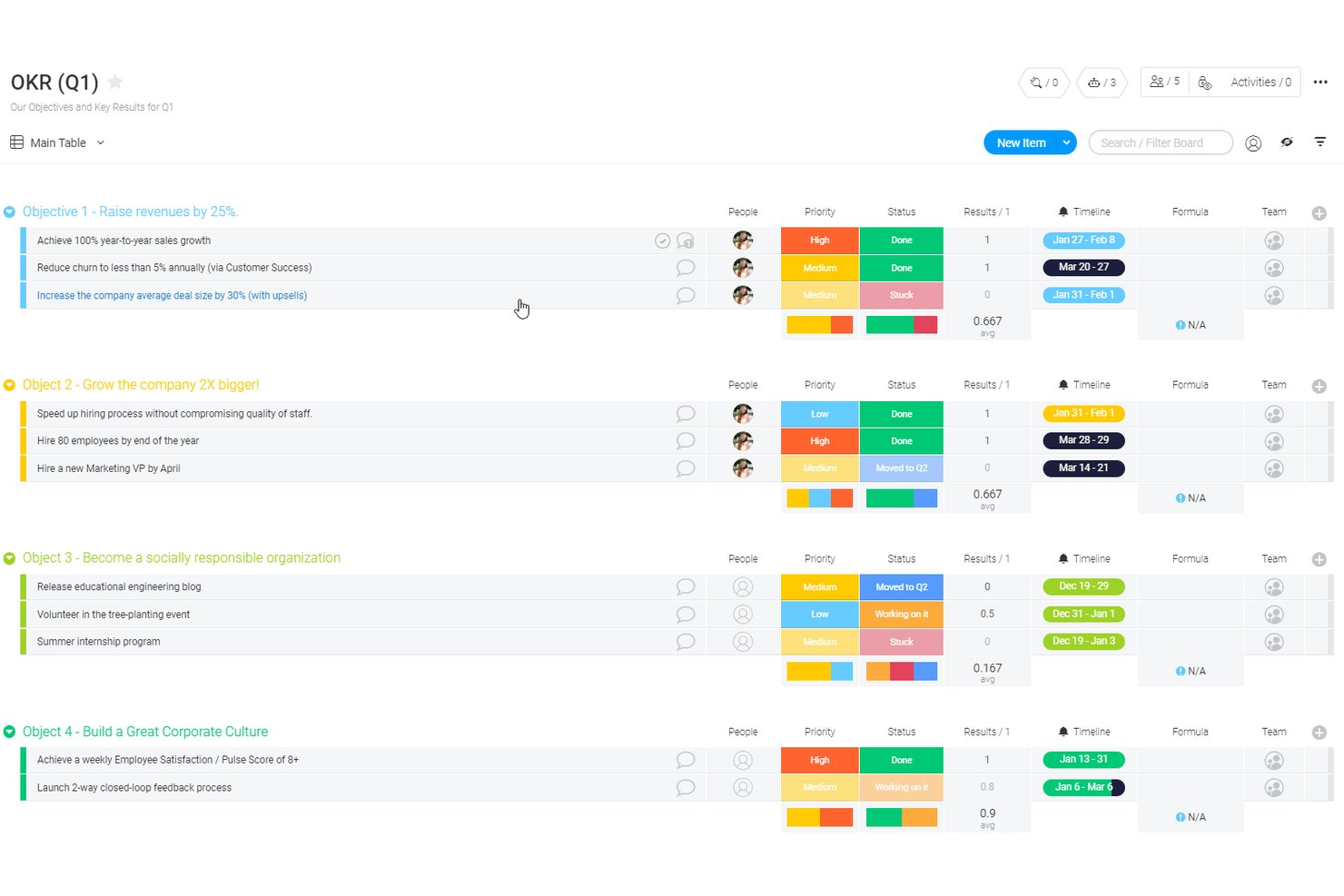
monday AI Workspace è una piattaforma personalizzabile di gestione del lavoro che consente ai team di definire OKR, distribuire obiettivi nei diversi livelli dell'organizzazione e monitorare i progressi tramite dashboard visive e automazione dei flussi di lavoro supportata dall'IA.
Per chi è più adatto monday AI Workspace?
È particolarmente indicato per team interfunzionali di aziende di medie e grandi dimensioni che desiderano il tracciamento degli OKR integrato nei loro attuali flussi di lavoro di gestione delle attività.
Perché ho scelto monday AI Workspace
Ho scelto monday AI Workspace tra i migliori perché il suo builder per i flussi di lavoro con IA riduce davvero il lavoro manuale che spesso causa il fallimento del monitoraggio degli OKR. Uso l'AI Sidekick per ricevere aggiornamenti contestuali sull'avanzamento degli obiettivi senza dover cercare tra le board e le colonne intelligenti con IA segnalano automaticamente i cambiamenti di stato sui principali risultati. Questa combinazione mantiene attivi i cicli degli OKR senza doversi affidare a report manuali verso l'alto.
Caratteristiche principali di monday AI Workspace
- Template OKR personalizzabili: Crea e modifica board OKR per adattarle a strutture e processi unici del team.
- Dashboard visive: Tieni traccia di stato, tempistiche e dipendenze degli obiettivi tramite viste colorate e interattive.
- Strumenti collaborativi interni: Assegna responsabili, condividi workdocs e commenta direttamente sulle board OKR.
- Ricette di automazione: Automatizza aggiornamenti di routine, promemoria o notifiche senza necessità di programmare.
Integrazioni di monday AI Workspace
monday AI Workspace offre centinaia di integrazioni native tramite il proprio sistema interno e il marketplace, inclusi Slack, Salesforce, HubSpot, Google Workspace, Microsoft Teams, Zoom e Jira. Supporta anche Zapier e fornisce un'API per integrazioni personalizzate.
Pros and Cons
Pros:
- L'IA automatizza gli aggiornamenti sui progressi degli OKR
- Board per il monitoraggio degli obiettivi altamente personalizzabili
- Dashboard visive potenti per la visibilità sugli obiettivi
Cons:
- Non è pensato esclusivamente per la metodologia OKR
- Le funzionalità OKR dedicate richiedono una configurazione significativa
New Product Updates from monday AI Workspace
monday AI Workspace Adds Human Approval Routing
monday AI Workspace adds a human-in-the-loop approval block to AI Workflows, sending approval requests and routing workflow paths based on responses. For more information, visit monday AI Workspace's official site.
Ideale per lo sviluppo delle competenze e la definizione dei percorsi di carriera tramite IA
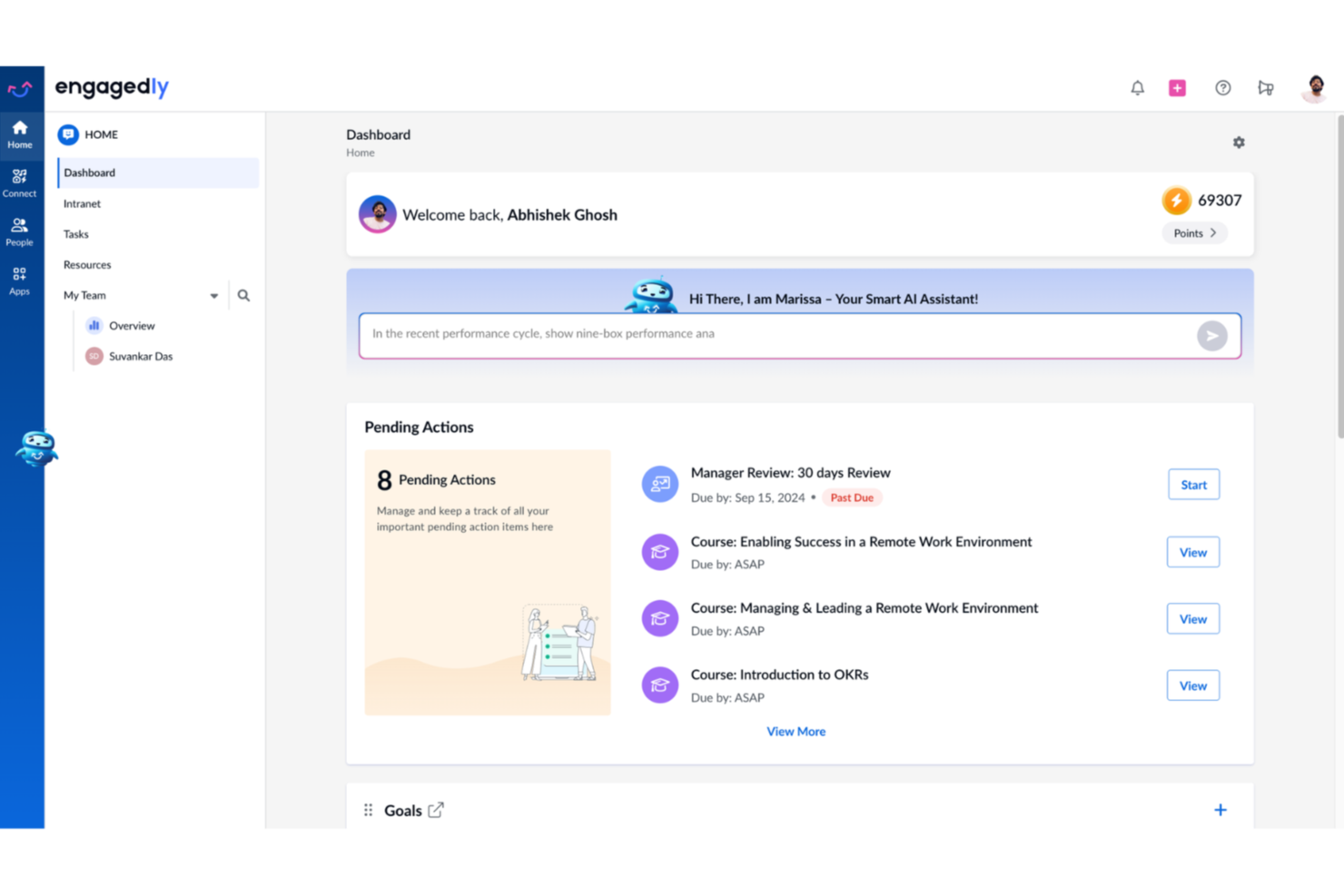
Engagedly è una piattaforma di gestione dei talenti che combina OKR e definizione degli obiettivi con valutazioni delle performance, feedback a 360 gradi, formazione, coinvolgimento dei dipendenti e strumenti di sviluppo professionale basati sull'IA.
Per chi è ideale Engagedly?
Engagedly si adatta ai team HR di medie e grandi aziende che desiderano collegare gli OKR con performance, apprendimento e sviluppo dei talenti in un'unica piattaforma.
Perché ho scelto Engagedly
Ho inserito Engagedly nella mia shortlist perché va oltre la maggior parte degli strumenti OKR, collegando direttamente gli obiettivi allo sviluppo delle competenze e alla crescita professionale. Mi piace come Marissa, l'assistente IA, sia in grado di analizzare un obiettivo e far emergere le competenze specifiche di cui un dipendente ha bisogno per raggiungerlo. Da lì, i moduli Skill Gap Analysis e Career Paths creano un percorso di sviluppo personalizzato, così gli obiettivi guidano vere conversazioni di crescita invece di restare fermi su una dashboard.
Caratteristiche principali di Engagedly
- Modulo Goals 2.0: Configura OKR a cascata e collegali tra team e progetti.
- Feedback a 360 gradi: Avvia cicli di feedback multi-valutatore con template e workflow personalizzabili.
- Riconoscimento gamificato: Assegna badge e punti per risultati raggiunti direttamente all'interno della piattaforma.
- Strumenti per riunioni integrati: Pianifica one-to-one, integra obiettivi o punti di discussione, aggiungi note private o pubbliche.
Integrazioni di Engagedly
Engagedly offre integrazioni native con BambooHR, Okta, OneLogin, Microsoft Teams, Jira, Gmail, Google Sheets e LinkedIn Learning. È disponibile un'API per integrazioni personalizzate.
Pros and Cons
Pros:
- Supporta 17 lingue
- L'IA assiste nella generazione di OKR
- Workflow OKR e obiettivi altamente configurabili
Cons:
- Le funzionalità avanzate richiedono piani di livello superiore
- Le dashboard di analisi possono essere lente a caricarsi

Tability
Ideale per la definizione di obiettivi assistita dall'IA

Gli strumenti di intelligenza artificiale di Tability ti aiutano a redigere rapidamente obiettivi, risultati chiave e piani d'azione, rendendolo particolarmente utile per i team che hanno difficoltà con la formulazione, la struttura o a capire come dovrebbero essere dei “buoni” OKR.
Perché ho scelto Tability
Ho scelto Tability perché utilizza l'IA in modo pratico, aiutandoti a definire obiettivi significativi invece di lasciarti con OKR vaghi o non tracciabili. L'editor degli obiettivi AI suggerisce risultati chiave specifici e misurabili in base al tuo input, riducendo le congetture e garantendo coerenza tra i team.
Mi piace anche il fatto che puoi generare piani d'azione direttamente dai tuoi OKR, dando al tuo team passi successivi chiari invece di obiettivi astratti. La vista di allineamento di Tability ti aiuta a vedere come gli obiettivi si collegano tra i diversi dipartimenti, utile quando gli obiettivi generati dall'IA necessitano di contesto o validazione. E poiché i check-in settimanali sono integrati, il tuo team viene guidato ad aggiornare regolarmente i progressi così che i suggerimenti dell'IA rimangano legati ai risultati reali.
Funzionalità principali di Tability
Ecco alcune caratteristiche di spicco che vale la pena sottolineare:
- Editor di obiettivi AI: Crea bozze di OKR partendo dal tuo input per velocizzare la pianificazione.
- Suggerimenti di piano d'azione AI: Raccomanda iniziative legate a ciascun risultato chiave per aiutare i team a passare dagli obiettivi all'esecuzione.
- Mappa della strategia: Mostra come gli obiettivi si collegano tra i team per migliorare l'allineamento.
- Report pronti per la presentazione: Trasforma gli aggiornamenti in riepiloghi condivisibili per review o riunioni di leadership.
Integrazioni di Tability
Le integrazioni includono Slack, Microsoft Teams, Jira, Asana, Trello, ClickUp, Confluence, Azure AD, Okta, Notion e HubSpot.
Pros and Cons
Pros:
- Adattabile a diversi framework di obiettivi
- Buone funzionalità di monitoraggio dei progressi
- Suggerimenti di obiettivi basati sull'IA
Cons:
- Non ideale per chi necessita di una gestione obiettivi complessa
- La navigazione potrebbe essere più fluida

Ideale come IA aziendale
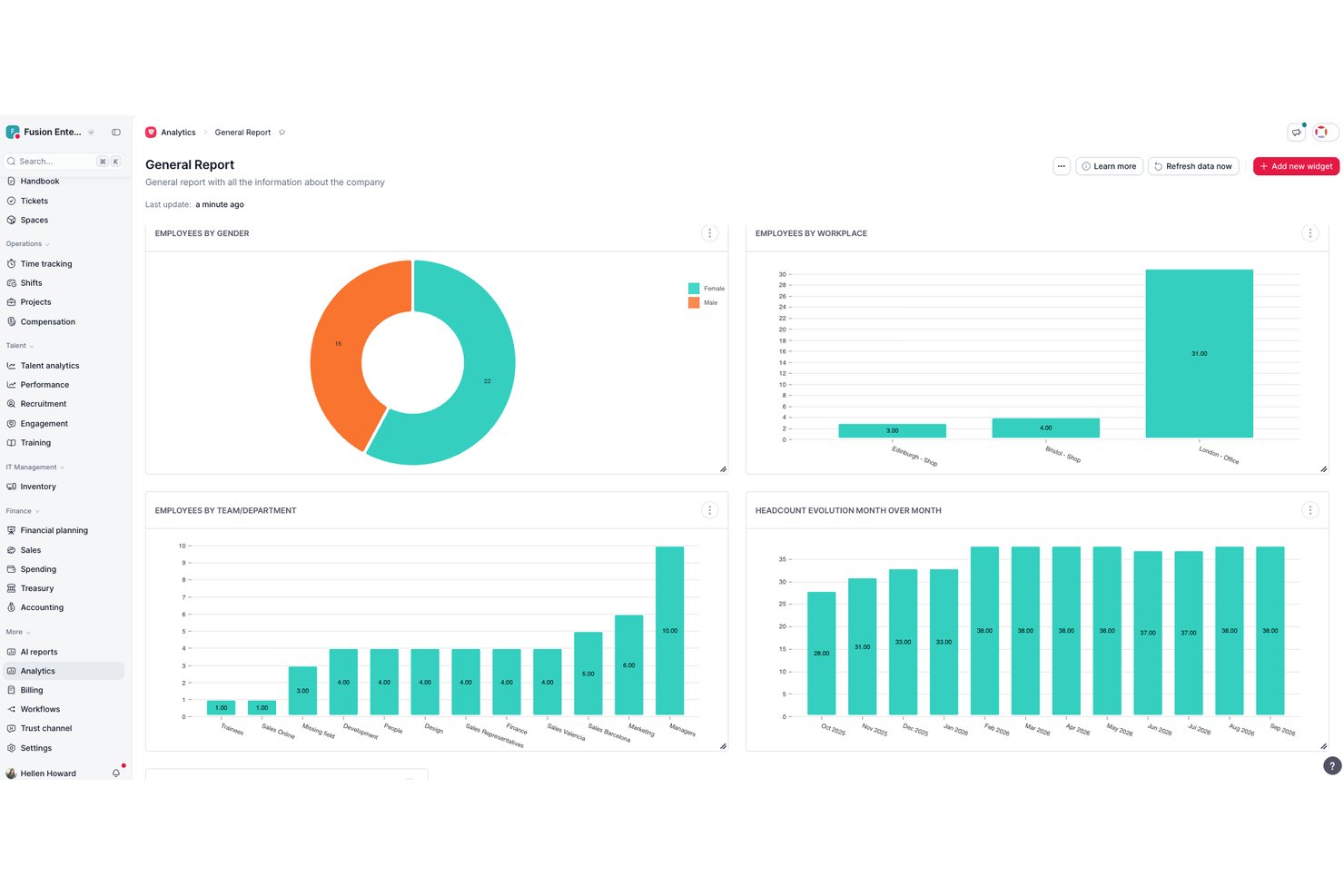
Factorial è una piattaforma HR completa che integra la definizione degli obiettivi e il monitoraggio degli OKR nello stesso sistema utilizzato per le valutazioni delle prestazioni, i sondaggi sul coinvolgimento, le riunioni individuali e la reportistica assistita dall'IA.
A chi è più adatto Factorial?
Factorial è adatto ai team HR e ai responsabili della gestione del personale che desiderano strumenti per la definizione degli obiettivi e la gestione delle prestazioni integrati nello stesso sistema che utilizzano per le attività HR quotidiane.
Perché ho scelto Factorial
Ho incluso Factorial tra le mie scelte principali perché la sua proposta basata sull'IA per l'azienda va oltre un'etichetta accattivante: l'IA della piattaforma gestisce attivamente le operazioni quotidiane che rallentano i team HR, dalla generazione dei report alle risposte alle domande dei dipendenti sulle policy aziendali. Apprezzo particolarmente il fatto che l'avanzamento degli obiettivi venga visualizzato direttamente nei pannelli delle valutazioni delle prestazioni, così i manager possono vedere il completamento dei risultati chiave insieme ai punteggi delle valutazioni senza dover cambiare strumento. La struttura gerarchica di obiettivi principali e secondari, con aggregazione automatica dei progressi, mantiene inoltre visibile l'allineamento degli OKR a livello aziendale senza dover consolidare manualmente i dati.
Funzionalità principali di Factorial
- Risultati chiave ponderati: Assegna un peso individuale a ciascun risultato chiave, in modo che l'avanzamento dell'obiettivo rifletta l'importanza relativa di ogni contributo.
- Logica degli obiettivi negativi: Monitora gli obiettivi in cui un valore più basso indica il successo, come la riduzione del tasso di abbandono, dell'assenteismo o dei tempi di consegna.
- Obiettivi basati sui periodi: Suddividi un singolo obiettivo in traguardi intermedi distribuiti su trimestri o semestri invece di misurare soltanto il risultato finale.
- Controlli di visibilità degli obiettivi: Imposta il pubblico di ciascun obiettivo su una singola persona, un team, un manager o l'intera azienda utilizzando le impostazioni di visibilità integrate.
Integrazioni di Factorial
Factorial documenta centinaia di integrazioni, tra cui Microsoft Teams, Slack, Microsoft Power BI, Google Workspace, Outlook e monday.com. Offre inoltre un'API pubblica e Zapier per connettersi a sistemi personalizzati.
Pros and Cons
Pros:
- La reportistica HR assistita dall'IA supporta il monitoraggio degli obiettivi
- Gli obiettivi principali aggregano automaticamente i progressi
- I pannelli delle valutazioni mostrano l'avanzamento degli obiettivi in tempo reale
Cons:
- Gli aggiornamenti manuali limitano il monitoraggio continuo dei progressi
- Nessun pannello dedicato allo stato di salute degli OKR
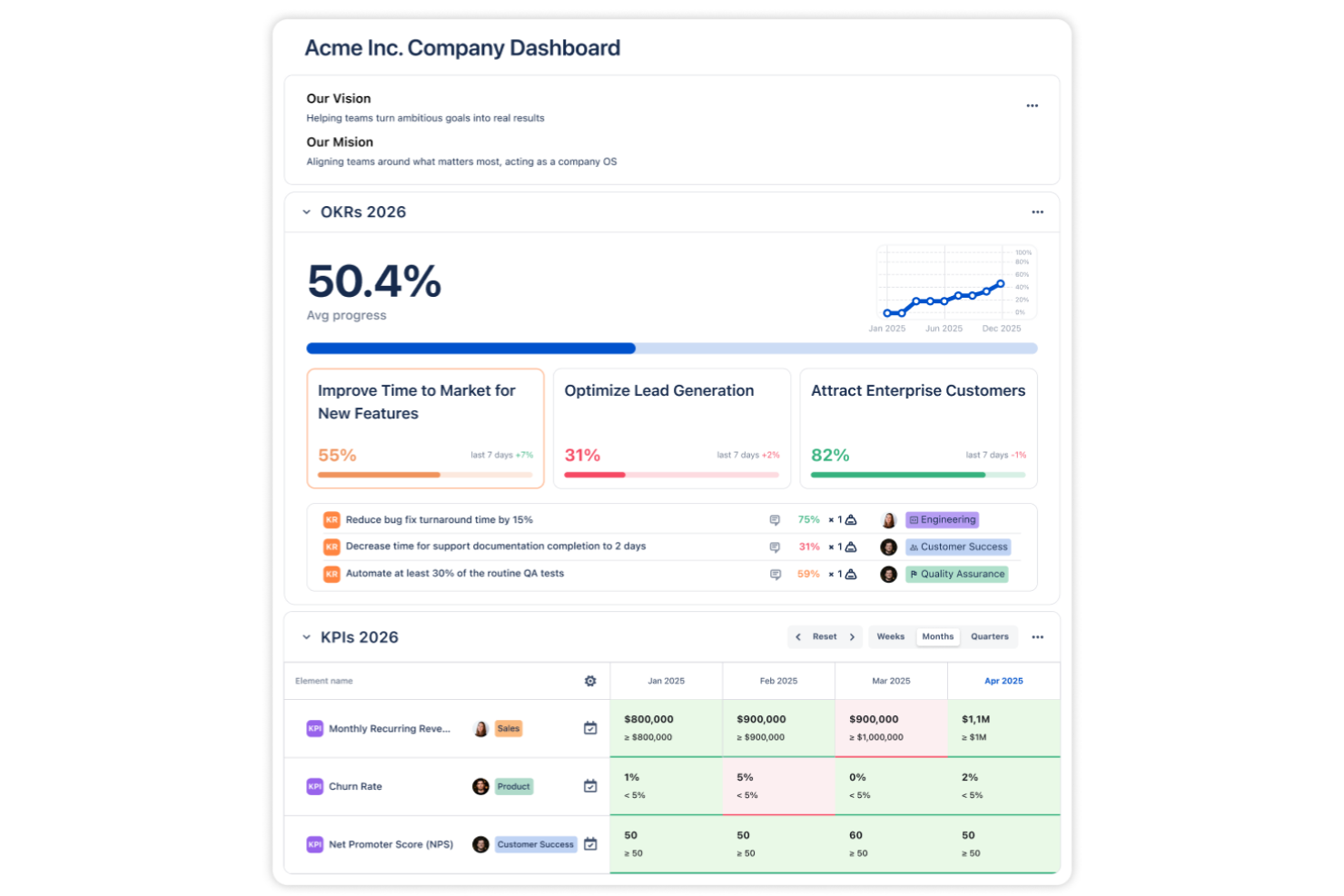
Il software OKR di Oboard è disponibile come applicazione web autonoma e offre anche app integrate per Jira, monday.com e Salesforce. Un punto di forza di Oboard è il suo ecosistema interconnesso. Ad esempio, se il prodotto e l’ingegneria lavorano in Jira, il marketing in monday.com e le vendite in Salesforce, tutti possono collaborare nello stesso workspace di Oboard. Tutte le metriche di successo sono sincronizzate e i team sono allineati sulle diverse piattaforme.
Perché ho scelto Oboard
Ho scelto Oboard perché ti permette di gestire OKR e KPI nello stesso ambiente in cui il tuo team già pianifica, realizza e revisiona il lavoro. Puoi collegare gli obiettivi a qualsiasi epic, issue o progetto di Jira, così gli aggiornamenti sul progresso restano precisi senza monitoraggio manuale.
Oboard si distingue anche per semplicità e facilità d’uso. A differenza di alcuni strumenti che richiedono lunghi processi di onboarding, puoi configurare Oboard e iniziare a tracciare le tue prime metriche in un giorno. Formare il tuo team sulla loro gestione è altrettanto semplice. Sono inoltre disponibili numerose personalizzazioni, così potrai sfruttare le impostazioni avanzate quando sarai pronto.
Caratteristiche principali di Oboard
Oboard offre tante funzionalità utili che ti permettono di configurare i tuoi obiettivi in modo perfettamente allineato alla struttura e ai processi unici della tua organizzazione. Ecco cosa aspettarti:
- Mappe strategiche: Ottieni una panoramica di tutti i tuoi OKR e KPI, nonché dei task che li informano.
- Pesi delle metriche: Assegna diversi livelli di importanza ai tuoi vari obiettivi.
- Roadmap degli OKR: Visualizza i tuoi obiettivi strategici insieme alle iniziative correlate nel tempo e identifica i possibili colli di bottiglia.
- Dashboard personalizzabili: Crea visualizzazioni personalizzate dei tuoi obiettivi prioritari con moduli dedicati a KPI e OKR.
Integrazioni di Oboard
Le integrazioni includono Jira, monday.com, Salesforce e Confluence.
Pros and Cons
Pros:
- Le mappe strategiche permettono di visualizzare facilmente l’allineamento tra reparti.
- La profonda integrazione con Jira collega OKR e KPI a Epics, Issues e Progetti.
- Può essere utilizzato in più ecosistemi (Atlassian, monday.com, Salesforce) o in modo indipendente.
Cons:
- Supporta solo 7 lingue.
- Nessuna app mobile.

Ideale per il feedback continuo sulle performance
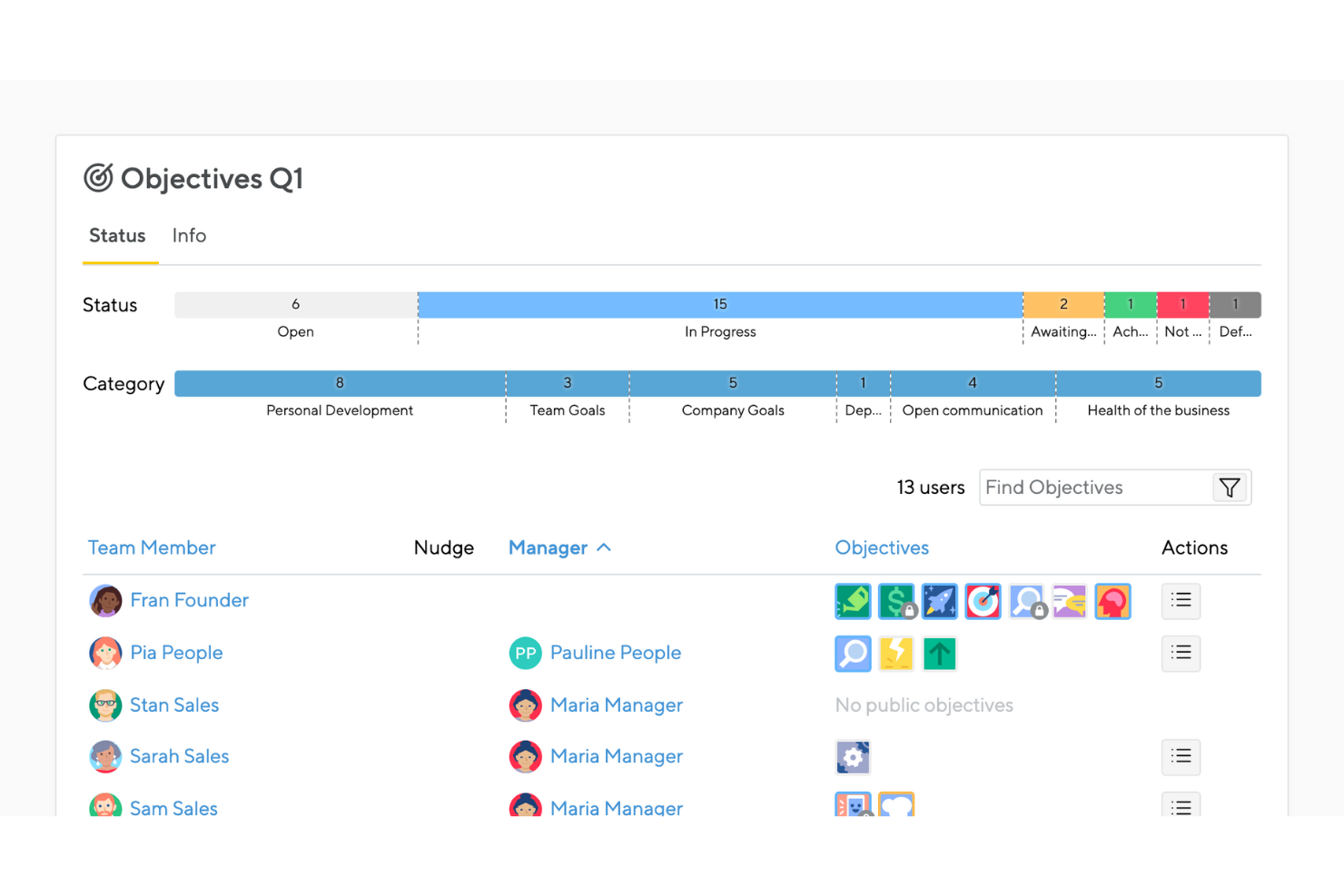
Small Improvements è uno strumento di gestione delle performance che collega obiettivi, feedback e coinvolgimento in un'unica piattaforma. Come soluzione OKR, trasforma gli obiettivi in azioni tramite check-in continui, sondaggi a impulso e riunioni 1:1—aiutando i team a rimanere allineati e concentrati sulla crescita.
Perché ho scelto Small Improvements: Ho scelto Small Improvements perché unisce il monitoraggio degli OKR con funzionalità di feedback continuo e riconoscimento che mantengono alta la motivazione dei team. Puoi impostare obiettivi misurabili, raccogliere feedback a 360 gradi e condurre regolari check-in per mantenere la visibilità sui progressi. Mi piace anche come integra le valutazioni delle performance con strumenti di engagement in tempo reale—aiutandoti a individuare presto tendenze sulla morale o sulla produttività prima che impattino sui risultati.
Per i team HR che puntano a costruire una cultura OKR basata sul feedback, questa piattaforma rende facile mantenere allineamento e responsabilità durante tutto l’anno.
Funzionalità distintive e integrazioni di Small Improvements:
Le funzionalità includono la pianificazione di riunioni 1:1, sondaggi a impulso per monitorare il coinvolgimento e strumenti di riconoscimento per valorizzare i contributi. Puoi impostare obiettivi di squadra e individuali, collegarli a macro-obiettivi aziendali e analizzare i dati di performance con i report integrati.
Le integrazioni includono i principali sistemi HR e strumenti di comunicazione come Personio, Slack, BambooHR e ADP, garantendo un flusso di dati senza soluzione di continuità tra performance e risorse umane.
Pros and Cons
Pros:
- Facilita la pianificazione di riunioni 1:1
- Favorisce il riconoscimento e il feedback tra colleghi
- Ottimi strumenti per il monitoraggio degli obiettivi e la visibilità
Cons:
- Può risultare complesso per i team più piccoli
- Richiede una certa formazione per poterlo padroneggiare

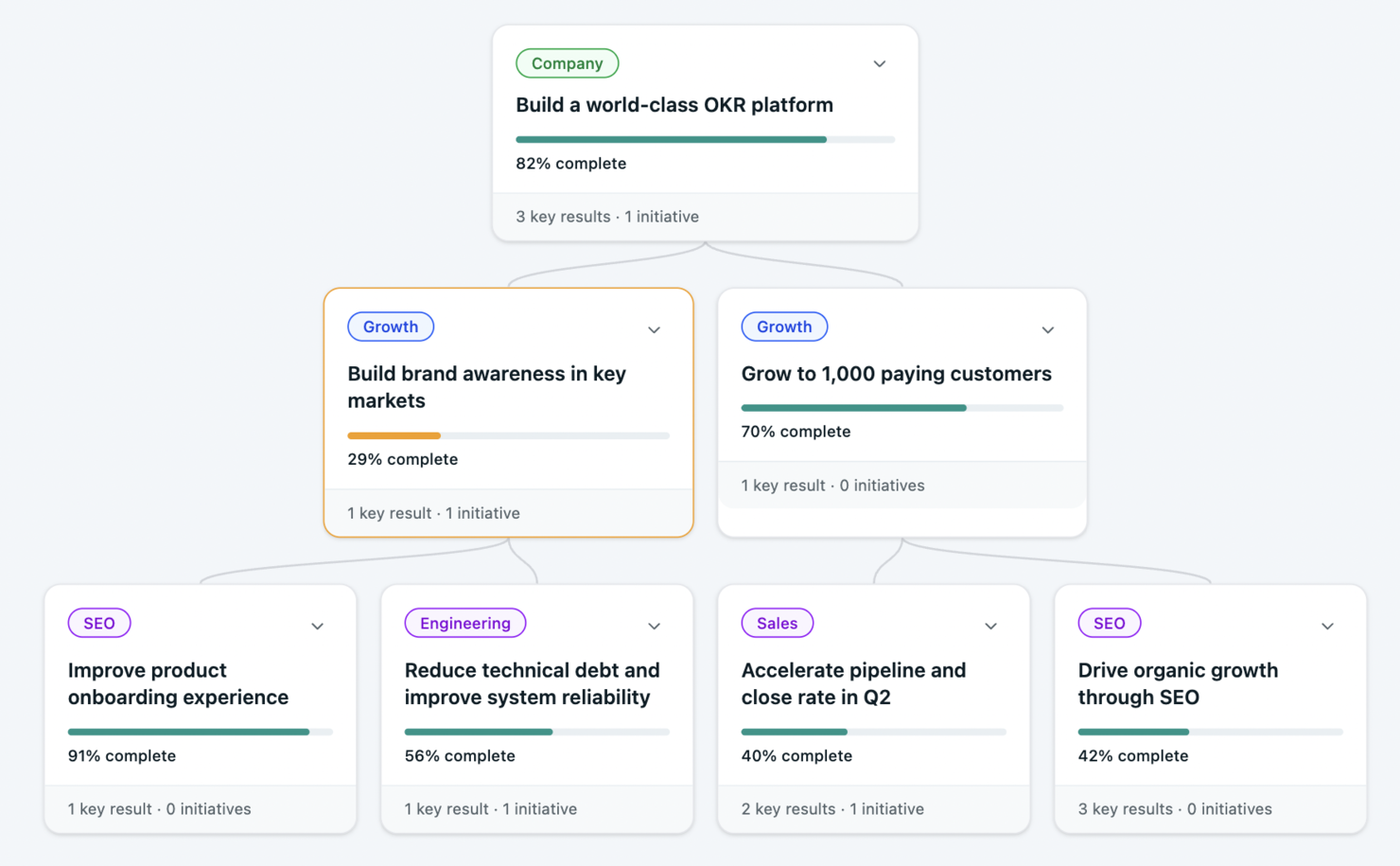
Lo strumento OKR è progettato per i team in crescita che desiderano semplificare i processi di definizione degli obiettivi. Grazie a funzionalità come gli obiettivi generati dall'IA e le verifiche settimanali, il tuo team può mantenere concentrazione e allineamento senza riunioni estese. Questo strumento è particolarmente adatto alle organizzazioni che hanno bisogno di implementare rapidamente gli OKR senza lunghi processi di introduzione.
Perché ho scelto lo strumento OKR
Ho scelto lo strumento OKR perché offre la creazione di obiettivi generati dall'IA, una funzionalità unica che semplifica la definizione degli obiettivi e dei risultati chiave, facendoti risparmiare tempo e fatica e permettendoti al contempo di crescere man mano che la tua organizzazione si espande e cambia. La piattaforma è inoltre concepita per favorire l'allineamento e la visibilità a livello aziendale. Le assegnazioni basate sui ruoli e le funzionalità di allineamento automatico sono solo alcuni dei modi in cui lo strumento OKR promuove una maggiore responsabilità e chiarezza riguardo ai progressi.
Funzionalità principali dello strumento OKR
Oltre alle funzionalità di creazione e allineamento degli obiettivi tramite IA, lo strumento OKR offre:
- OKR illimitati: consente al tuo team di definire e monitorare tutti gli obiettivi e i risultati chiave necessari senza limitazioni.
- Valutazioni delle prestazioni: facilita le valutazioni periodiche delle prestazioni del team e dei singoli, mantenendo tutti allineati agli obiettivi dell'organizzazione.
- OKR gerarchici: offre una visibilità completa su come gli obiettivi individuali e del team si allineano agli obiettivi aziendali.
- Modelli pronti all'uso: offre oltre 50 modelli collaudati per avviare rapidamente il processo di definizione degli obiettivi, aiutandoti a evitare di partire da zero.
Integrazioni dello strumento OKR
Lo strumento OKR si integra nativamente con Slack e Microsoft Teams.
Pros and Cons
Pros:
- Gli obiettivi generati dall'IA semplificano la definizione degli obiettivi per i team
- Gli OKR illimitati consentono di monitorare ampiamente gli obiettivi senza limiti
- I cruscotti pubblici di allineamento migliorano la trasparenza e la responsabilità del team
Cons:
- Non offre numerose integrazioni con applicazioni di terze parti
- Più adatto a team composti da circa 6–200 utenti che non ad ambienti aziendali con requisiti di conformità su larga scala
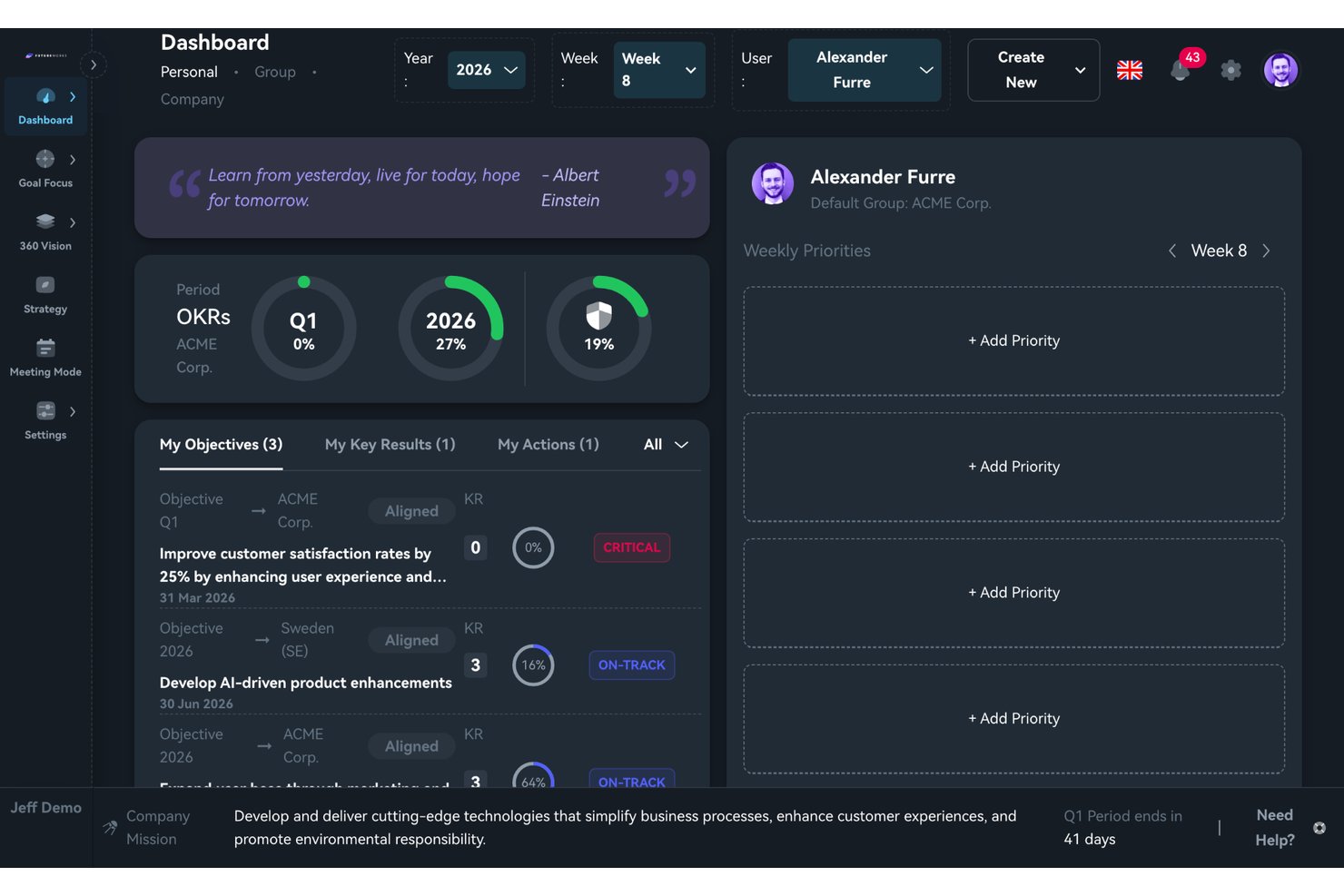
FutureWorks è una piattaforma per la gestione degli OKR che combina la definizione a cascata degli obiettivi su più livelli, la visualizzazione dell'allineamento strategico e la facilitazione strutturata delle riunioni con la stesura degli OKR assistita dall'IA.
Per chi è più indicato FutureWorks?
FutureWorks è particolarmente adatto ai team dirigenziali e ai responsabili della strategia che hanno bisogno di collegare gli obiettivi aziendali a quelli dei team e dei singoli in un'unica visualizzazione chiara.
Perché ho scelto FutureWorks
FutureWorks si è guadagnato un posto nella mia lista ristretta perché la funzionalità Visione a 360° risolve un problema che la maggior parte degli strumenti per OKR gestisce male: mostrare esattamente dove si interrompe l'allineamento. Posso passare dalla visualizzazione degli elementi allineati a quella degli elementi non allineati nell'intera gerarchia, dall'azienda al singolo, con indicatori di stato codificati a colori che rendono immediatamente evidenti le lacune. Anche il Motore di contesto dell'IA è davvero utile: converte i documenti strategici esistenti (PDF, file Word, presentazioni) in OKR strutturati, invece di costringerti a partire da zero.
Caratteristiche principali di FutureWorks
- Modalità riunione con ordini del giorno in tempo reale: Gestisci i check-in settimanali con limiti di tempo utilizzando modelli di ordine del giorno predefiniti che integrano nella riunione lo stato effettivo degli OKR e i punti d'azione.
- Dashboard personale e indicatori circolari di avanzamento: Fornisci a ogni utente una dashboard con indicatori circolari visivi che mostrano il completamento degli OKR del trimestre, dell'anno e di tutti i periodi.
- Sincronizzazione delle attività con Jira, GitHub e Microsoft Planner: Collega e sincronizza le attività con i Risultati chiave in Jira, GitHub e Microsoft Planner, aggiornando automaticamente l'avanzamento degli OKR quando le attività vengono chiuse.
- App mobile per iOS e Android: Consenti agli utenti di effettuare il check-in e aggiornare l'avanzamento degli OKR direttamente dal proprio dispositivo mobile, supportando gli aggiornamenti in mobilità.
Integrazioni di FutureWorks
FutureWorks offre integrazioni native con Jira, GitHub, Microsoft Planner, Azure DevOps, Microsoft Teams e Google Workspace. Fornisce inoltre il provisioning SCIM 2.0, supporta l'SSO con Microsoft e Google e offre webhook e un'API REST per integrazioni personalizzate.
Pros and Cons
Pros:
- La Visione a 360° rende immediatamente visibili le lacune di allineamento
- L'IA converte i documenti strategici esistenti in OKR
- La modalità riunione integra i check-in degli OKR in ordini del giorno con tempi prestabiliti
Cons:
- Nessun modulo dedicato al feedback continuo o agli incontri individuali
- Riconoscimento del marchio limitato al di fuori dei mercati nordici
Altri software OKR
Ecco alcune altre opzioni interessanti che non sono entrate nella mia top 10 dei migliori software OKR, ma che vale comunque la pena esaminare più da vicino:
- ThriveSparrow
Ideale per cicli OKR flessibili
- PerformYard
Ideale per obiettivi integrati e performance
- Profit.co
Ideale per un'esperienza utente intuitiva
- Lattice
Il miglior software per il personale con pianificazione drag-and-drop e gestione dei compiti dei dipendenti
- Quantive Results
Ideale per creare allineamento tra team
- Inspire
Migliore soluzione OKR olistica alimentata dall'IA
- Workleap
Ideale per la definizione degli obiettivi e il coinvolgimento dei dipendenti
- PeopleGoal
Migliori OKR guidati dai dipendenti
- Synergita
Ideale per la gestione continua delle performance
- WorkBoard
Ideale per l’allineamento degli obiettivi aziendali trasversali
- Weekdone
Ideale per strumenti di pianificazione settimanale
- Yaguara
Ideale per e-retailer
- Huminos
Ideale per i dipendenti da remoto
- Kazoo
Ideale per il feedback tra pari
- Heartpace
Ideale per la definizione degli obiettivi individuali
- Unlock:OKR
Ideale per coaching OKR
- Simple OKR
Ideale per la ricerca sulla cultura aziendale
- Ally.io
Ideale per la collaborazione sugli OKR
- Leapsome
Ideale per aziende orientate alle prestazioni
- Peoplebox.ai
Il migliore per monitoraggio automatico degli obiettivi e revisioni automatizzate
- Effy AI
Ideale per una rapida implementazione degli OKR
- Mitratech Perform
I migliori strumenti all'interno di un sistema di gestione delle prestazioni
- Primalogik
Ideale per tenere traccia degli obiettivi con facilità e precisione
- Paycor
Ideale per la gestione della compensazione basata sugli OKR
- Betterworks
Ideale per l’allineamento degli obiettivi aziendali nelle grandi imprese
- Topicflow
Ideale per framework personalizzabili di definizione degli obiettivi


Recensioni correlate di software HR
Se non hai ancora trovato ciò che cerchi, dai un'occhiata a questi altri strumenti correlati che abbiamo testato e valutato:
- Software HR
- Software per la gestione delle buste paga
- Software per il reclutamento
- Servizi di datore di lavoro registrato
- Sistemi di tracciamento dei candidati
- Software per la gestione della forza lavoro
Come Valuto i Software OKR
Divido la mia valutazione in due livelli: le capacità di base che uno strumento deve avere—come il cascading degli obiettivi e i check-in—e i fattori che distinguono le migliori opzioni per i team HR.
Funzionalità di Base (Requisiti Fondamentali per Questa Lista)
Quando seleziono gli strumenti per la mia lista, valuto ciascuno su una scala da 0 (non offre la funzionalità) a 5 (eccelle in quest'area) per ogni funzionalità di base elencata di seguito. Poi, calcolo il punteggio totale dello strumento in percentuale. Ogni strumento deve raggiungere un punteggio totale minimo del 65% per essere preso in considerazione.
- Creazione di Obiettivi e Risultati Chiave: Valuto se è possibile definire obiettivi con diversi tipi di risultati chiave—come percentuali, traguardi o obiettivi numerici—invece di semplici campi di testo.
- Allineamento e Cascading degli Obiettivi: Collegare un OKR a livello di team a un obiettivo aziendale dovrebbe essere visivo e intuitivo, quindi verifico la presenza di alberi di allineamento o mappe gerarchiche.
- Monitoraggio dei Progressi e Check-in: Cerco flussi di lavoro strutturati per i check-in con promemoria e valutazioni di fiducia, non solo uno slider manuale per aggiornare la percentuale di completamento.
- Dashboard e Reportistica OKR: I responsabili HR hanno bisogno di avere una rapida panoramica dello stato degli obiettivi tramite dashboard che offrano filtri per team, periodo e stato.
- Integrazione con Gestione delle Prestazioni: Verifico se gli OKR si integrano nei cicli di valutazione e nelle agende dei colloqui 1:1, poiché strumenti come Lattice e 15Five collegano direttamente gli obiettivi alle conversazioni sulle performance.
- Integrazioni con HRIS e Strumenti di Collaborazione: Lo strumento dovrebbe connettersi al tuo HRIS per la sincronizzazione dei dati dei dipendenti e a piattaforme come Slack o Microsoft Teams per aggiornamenti contestuali e promemoria mirati.
Dopo aver stilato una lista di strumenti che rispondono ai criteri, considero cosa distingue ogni piattaforma.
Fattori Differenzianti (Cosa Distingue i Fornitori)
Ecco come confronto i vari fornitori:
Funzionalità Distintive
Il coaching OKR basato su AI è un grande elemento di distinzione. Strumenti come Betterworks e Quantive offrono suggerimenti AI che aiutano i manager a scrivere risultati chiave più efficaci. Cerco anche spazi di lavoro integrati per meeting 1:1 in cui i punti di discussione si collegano direttamente agli OKR, mantenendo le conversazioni focalizzate sul progresso degli obiettivi. I sondaggi di engagement completano la valutazione—le piattaforme che correlano i dati dei sondaggi "pulse" con il completamento degli OKR forniscono ai responsabili HR una visione più chiara se gli obiettivi stanno stimolando la motivazione o il rischio di burnout.
Oltre le Funzionalità
L'adozione degli OKR spesso si blocca senza un adeguato supporto al rollout, quindi valuto se i fornitori offrono coach per l'onboarding, template predefiniti e risorse per la gestione del cambiamento dedicate ai team HR. L'integrazione tecnica è altrettanto importante—verifico le connessioni HRIS native con piattaforme come Workday o BambooHR, poiché l'inserimento manuale dei dati annulla i benefici attesi. La sicurezza è un'altra priorità perché i tool OKR gestiscono dati sensibili sulle performance. Cerco la conformità SOC 2 Type II e controlli di accesso basati sui ruoli che consentano all'HR di limitare la visibilità per dipartimento o livello.
Come scegliere il software OKR
Ti ho fornito alcuni esempi dei migliori software OKR oggi disponibili sul mercato; ora tocca a te.
Inizia scegliendo un software che corrisponda al modo in cui il tuo team definisce, monitora e verifica effettivamente gli obiettivi, che si tratti di OKR aziendali, obiettivi di team, obiettivi individuali, aggiornamenti sui progressi o allineamento delle prestazioni. Da lì, confronta fattori come integrazioni, reportistica, visibilità, facilità d'uso, scalabilità e quanto bene il software si adatti al tuo processo esistente di definizione degli obiettivi.
Prova il nostro strumento qui sotto per restringere le opzioni in base alle tue esigenze specifiche.
Per una panoramica più dettagliata, consulta la nostra guida su come scegliere il software OKR.
Che cos'è il software OKR?
Il software OKR è uno strumento digitale progettato per aiutare singoli individui, team e organizzazioni a definire, monitorare e gestire Obiettivi e Risultati Chiave (OKR), un framework popolare per la definizione degli obiettivi utilizzato per allineare il lavoro alle priorità strategiche.
Il software offre una piattaforma centralizzata per definire obiettivi ambiziosi e collegarli a risultati chiave misurabili, promuovendo chiarezza, allineamento e responsabilità all'interno dell'organizzazione.
È simile a uno strumento online per il monitoraggio degli obiettivi per tutti i livelli della tua azienda.
Funzionalità del software OKR
Il software OKR è progettato per aiutarti a definire, monitorare e raggiungere gli obiettivi aziendali. L'utilizzo di un software per la gestione degli OKR aiuta ad allineare gli obiettivi aziendali tra team diversi, assicurando che tutti si muovano nella stessa direzione verso il raggiungimento degli obiettivi comuni.
Ecco le funzionalità più importanti da cercare in un software OKR per garantire il successo della tua azienda:
- Definizione e monitoraggio degli obiettivi: Definisci obiettivi e risultati chiave chiari e misurabili, quindi monitora i progressi in tempo reale. Questo ti aiuta a suddividere ambizioni elevate in traguardi gestibili e a vedere concretamente quanto sei vicino al traguardo.
- Allineamento degli obiettivi: Collega gli obiettivi individuali, del team e aziendali, così che tutti remano nella stessa direzione. Questa funzionalità assicura che ogni sforzo contribuisca al quadro generale, evitando momenti del tipo: "Ehi, perché stiamo lavorando di nuovo su questo?".
- Visualizzazione dei progressi: Dashboard visive, grafici e cronologie mostrano esattamente a che punto sei con i tuoi obiettivi. Invece di cercare tra i fogli di calcolo, ottieni chiarezza immediata: è come avere una barra di avanzamento per l'intera organizzazione.
- Strumenti di collaborazione: Condividi, commenta e aggiorna insieme gli OKR, così tutti rimangono sincronizzati. Questi strumenti incoraggiano il feedback tra colleghi e il lavoro di squadra, mantenendo aperti i canali di comunicazione (niente più misteri su chi sia responsabile di cosa).
- Promemoria per verifiche e aggiornamenti: Ricevi amichevoli promemoria per aggiornare regolarmente i tuoi progressi. Questo mantiene tutti coinvolti ed evita che quegli obiettivi finiscano silenziosamente nel dimenticatoio.
- Analisi delle prestazioni e report: Esamina report dettagliati che mostrano tendenze, colli di bottiglia e vittorie. Queste informazioni ti consentono di modificare facilmente le strategie, celebrare i grandi successi o cambiare rotta se un traguardo si rivela più simile all'Everest che a una collina.
- Funzionalità di integrazione: Collega il software OKR agli altri strumenti che già utilizzi, come app per la gestione dei progetti o piattaforme di comunicazione. Questo significa meno inserimenti manuali e flussi di lavoro più fluidi.
- Modelli personalizzabili: Utilizza e modifica i modelli degli obiettivi per adattarli allo stile e alle esigenze della tua azienda. Se non sei nato per scrivere obiettivi, questi modelli ti aiutano ad avviare il processo OKR senza dover partire da zero.
- Controlli per autorizzazioni e privacy: Decidi chi può visualizzare o modificare determinati OKR, per proteggere le informazioni sensibili e promuovere la fiducia. Questa funzionalità ti consente di aprire o limitare l'accesso, a seconda di ciò che è meglio per il tuo team.
Funzionalità comuni dell'intelligenza artificiale nei software OKR
Oltre alle funzionalità standard dei software OKR elencate sopra, molte di queste soluzioni stanno integrando l'intelligenza artificiale con funzionalità come:
- Raccomandazioni automatiche sugli obiettivi: Ricevi suggerimenti intelligenti per nuovi obiettivi basati sulle prestazioni passate e sulle priorità aziendali. Questa funzionalità ti fa risparmiare tempo nella fase di brainstorming e porta alla luce obiettivi che potresti aver trascurato.
- Previsione dei progressi basata sull'intelligenza artificiale: Lascia che l'intelligenza artificiale analizzi i tuoi schemi di aggiornamento e ti dica se è probabile che tu raggiunga o meno i tuoi obiettivi. È come avere una sfera di cristallo per i progressi del tuo team, senza fumo e specchi.
- Analisi del sentiment negli aggiornamenti: L'intelligenza artificiale aiuta a valutare il tono degli aggiornamenti dei membri del team, individuando tempestivamente esaurimento e incertezza. Saprai non solo cosa sta succedendo, ma anche come le persone del tuo team lo vivono.
- Riepiloghi automatici delle verifiche: Ricevi rapide panoramiche generate dall'intelligenza artificiale sullo stato degli OKR di ogni team, così puoi aggiornarti in pochi secondi. Niente più lettura di ogni commento: solo le informazioni importanti, subito.
- Analisi predittiva degli ostacoli: Individua i potenziali ostacoli al raggiungimento dei tuoi obiettivi prima che si trasformino in grandi battute d'arresto. L'intelligenza artificiale analizza i tuoi dati e segnala i problemi finché c'è ancora tempo per cambiare rotta.
Vantaggi del software OKR
Il software OKR è progettato per aiutare le organizzazioni a ottimizzare i processi di definizione e monitoraggio degli obiettivi, migliorare l'allineamento tra i team e promuovere il successo operativo.
Scegliendo il software OKR più adatto alle tue esigenze, puoi aspettarti di ottenere i seguenti vantaggi:
- Maggiore allineamento agli obiettivi e trasparenza: il software per gli OKR garantisce che tutti all'interno dell'organizzazione comprendano gli obiettivi strategici dell'azienda e il proprio ruolo nel raggiungerli. Questa chiarezza favorisce un senso di scopo e direzione, portando a un maggiore coinvolgimento e a una maggiore produttività tra i dipendenti.
- Migliore concentrazione e definizione delle priorità: definendo chiaramente gli obiettivi e i risultati chiave, il software per gli OKR aiuta i team e i singoli a concentrarsi sulle attività più importanti. Questa definizione delle priorità garantisce che le risorse siano allocate in modo efficiente, favorendo risultati migliori per l'azienda.
- Comunicazione e collaborazione migliori: il software per gli OKR offre una piattaforma per discussioni continue su obiettivi, progressi, sfide e ostacoli. Ciò migliora la collaborazione tra i diversi livelli dell'organizzazione, abbattendo i silos e promuovendo una cultura del lavoro di squadra e del successo condiviso.
- Monitoraggio dei progressi in tempo reale: la possibilità di monitorare i progressi verso gli obiettivi in tempo reale consente di apportare rapidamente modifiche e mantiene tutti informati sui risultati raggiunti o sulle aree che richiedono attenzione. Questo ciclo di feedback immediato è fondamentale per mantenere lo slancio e garantire un miglioramento continuo.
- Processo decisionale basato sui dati: grazie alle sue complete funzionalità di analisi e reportistica, il software per gli OKR offre preziose informazioni sulle tendenze delle prestazioni e sulle aree di miglioramento. Questo approccio basato sui dati supporta un processo decisionale informato, la pianificazione strategica e l'esecuzione della strategia, allineando gli sforzi agli obiettivi aziendali.
Sfruttando la potenza del software per gli OKR, le organizzazioni possono migliorare la propria efficienza operativa, promuovere una cultura orientata alle alte prestazioni e favorire una crescita sostenuta in un ambiente aziendale sempre più competitivo.
Costi & prezzi del software per gli OKR
Quando si valutano i prezzi del software per gli OKR, è importante considerare il valore che si ottiene per la propria azienda. Se gestisci una piccola impresa o una startup, potresti riuscire a utilizzare una versione gratuita per monitorare gli obiettivi di un piccolo team. Tuttavia, un piano gratuito non offrirà le stesse funzionalità di un'offerta a pagamento mensile.
Come acquirente di software, è importante comprendere la varietà dei piani disponibili e le differenze in termini di funzionalità, supporto e prezzi.
Tabella di confronto dei piani per il software per gli OKR
| Tipo di piano | Prezzo medio | Funzionalità comuni | Ideale per |
|---|---|---|---|
| Gratuito | $0 | Monitoraggio di base degli OKR, numero limitato di utenti, accesso al supporto della community | Startup e piccoli team che desiderano sperimentare gli OKR senza un impegno finanziario |
| Base | $5-10 per utente/mese | Monitoraggio avanzato degli OKR, OKR illimitati, reportistica di base e supporto via e-mail | Piccole e medie imprese che necessitano di un monitoraggio e di una reportistica più completi senza spendere troppo |
| Professionale | $10-20 per utente/mese | Tutte le funzionalità del piano Base, oltre a reportistica avanzata, funzionalità di integrazione e supporto prioritario via e-mail | Medie e grandi imprese che richiedono analisi dettagliate e un'integrazione fluida con gli strumenti esistenti |
| Aziendale | Prezzi personalizzati | Tutte le funzionalità del piano Professionale, oltre a integrazioni personalizzate, un account manager dedicato, supporto 24/7 e funzionalità di sicurezza avanzate | Grandi aziende con esigenze complesse e una richiesta di elevata personalizzazione, supporto dedicato e sicurezza di alto livello |
Quando si valuta un piano software per gli OKR, è essenziale considerare le dimensioni del team, la complessità degli obiettivi e il livello di supporto di cui si prevede di aver bisogno. Ogni piano è progettato per soddisfare esigenze organizzative diverse, dalle piccole startup alle grandi aziende.
Sebbene sia comprensibile voler iniziare con un piano gratuito o di base, esistono diversi motivi per cui si potrebbe preferire iniziare con un piano più avanzato, tra cui:
- Supporto prioritario e formazione: probabilmente, il motivo più comune per migliorare un piano gratuito o di base è la mancanza di assistenza clienti offerta da tali piani. Passando a un piano più avanzato, otterrai accesso all’assistenza premium e a risorse di formazione, che aiuteranno il tuo team a risolvere rapidamente i problemi e a sfruttare appieno le funzionalità del software. Poiché gli strumenti OKR possono essere un po’ complicati da configurare inizialmente, secondo me vale sicuramente la pena pagare qualcosa in più.
- Framework OKR personalizzabili: spesso i piani di base non offrono sufficiente flessibilità per personalizzare i framework OKR in base alle esigenze specifiche della tua azienda. Passando a un piano superiore, avrai la possibilità di adattare il software OKR al tuo modello aziendale e ai tuoi obiettivi strategici unici.
- Funzionalità avanzate di allineamento degli obiettivi: per mantenere l’allineamento mentre gli obiettivi della tua azienda evolvono, avrai bisogno di sofisticati strumenti di allineamento e visualizzazione. Poiché spesso questi strumenti mancano nei piani gratuiti o di base, dovrai passare a un piano superiore per sbloccare questa funzionalità avanzata.
- Aggiornamenti automatici dei progressi: i piani gratuiti o di base di solito richiedono aggiornamenti manuali, che possono richiedere molto tempo o essere facilmente trascurati. I piani più costosi offrono il monitoraggio e gli aggiornamenti automatici dei progressi, facendoti risparmiare tempo e riducendo la probabilità di errori.
- Integrazione con altri strumenti: la maggior parte dei piani gratuiti o di base non offre funzionalità di integrazione, rendendo questo un altro motivo comune per cui potresti voler scegliere un piano più completo. Integrando il software di gestione degli OKR con altri sistemi chiave, inclusi gli strumenti di gestione dei progetti e di comunicazione interna, migliorerai i tuoi flussi di lavoro e la sincronizzazione dei dati.
In definitiva, è importante scegliere un piano che offra le funzionalità necessarie per soddisfare le tue esigenze attuali e risolvere le tue difficoltà senza superare il tuo budget.
Software OKR: domande frequenti
Stai ancora cercando di capire cosa sia il software OKR e come possa aiutare la tua organizzazione? Queste risposte alle domande frequenti sono un ottimo punto di partenza:
Come si può misurare il ROI del software OKR?
Valutare il ritorno sull’investimento di un software può essere complicato, ma è comprensibile voler quantificare il risultato di un nuovo strumento. Misurare il ROI di qualsiasi cosa significa dividere il valore totale di quella cosa per il suo costo. Quindi la domanda diventa: come si misura il valore del software? Ecco alcuni fattori che potresti includere nel calcolo:
\u003cul\u003e
\u003cli\u003eIl livello di allineamento dei dipendenti rispetto agli obiettivi comuni.\u003c/li\u003e
\u003cli\u003eLa corrispondenza tra la roadmap di ciascun reparto e i tuoi OKR complessivi.\u003c/li\u003e
\u003cli\u003eLa tua capacità di monitorare gli obiettivi fino al completamento a diversi livelli dell’azienda.\u003c/li\u003e
\u003cli\u003eLa gestione complessiva degli OKR: è chiaro chi è responsabile dell’impostazione, del monitoraggio e della comunicazione degli OKR?\u003c/li\u003e
\u003cli\u003eIl tempo risparmiato grazie all’automazione, ad esempio con la possibilità di monitorare gli OKR tramite dashboard interattive.\u003c/li\u003e
\u003c/ul\u003e
In definitiva, spetterà a te definire il valore che ottieni dal software per la gestione degli OKR. È un aspetto che vale la pena considerare prima di investire: la tua definizione di successo è direttamente correlata ai tuoi obiettivi nell’utilizzo di una soluzione software. Assicurati quindi di avere un quadro misurabile di ciò che ti aspetti di ottenere.
Qual è il tempo medio di configurazione del software OKR?
Il tempo medio di configurazione del software OKR può variare a seconda della complessità dello strumento, delle dimensioni della tua organizzazione e del livello di dettaglio dei tuoi obiettivi e risultati chiave. Alcuni sistemi offrono opzioni di configurazione rapida che consentono di iniziare nel giro di poche ore o giorni, soprattutto se mettono a disposizione modelli predefiniti.
Per implementazioni più complesse, in particolare nelle grandi organizzazioni con numerose integrazioni, la configurazione può richiedere da alcune settimane a diversi mesi. Questo processo non comprende solo la configurazione tecnica, ma anche l’allineamento del team, la formazione degli utenti e la verifica che gli OKR siano ben definiti e integrati nei flussi di lavoro esistenti.
Per comprendere meglio le migliori pratiche relative agli OKR, dai un’occhiata al nostro elenco dei migliori podcast dedicati agli OKR per trovare ulteriore ispirazione.
\u0026nbsp;
Esistono opzioni di software OKR specifiche per settore?
Sebbene la maggior parte dei software OKR sia progettata per essere flessibile e adattabile a diversi settori, alcune soluzioni offrono funzionalità personalizzate per settori specifici, come tecnologia, sanità o produzione. Questi strumenti specializzati possono includere modelli specifici per settore o integrazioni con i software comunemente utilizzati in quel campo.
Tuttavia, l’ampia applicabilità degli OKR fa sì che anche un software OKR generalista possa essere utilizzato efficacemente in diversi settori, personalizzando obiettivi e risultati chiave in modo che siano allineati agli obiettivi specifici del settore.
Che livello di assistenza clienti forniscono le aziende di software OKR?
Il livello di assistenza clienti per il software OKR varia dalle risorse self-service, come basi di conoscenza e forum della community, all’assistenza personalizzata via e-mail, chat o telefono.
Alcuni fornitori, come \u003ca href=\u0022https://www.performyard.com/customer-success\u0022 rel=\u0022nofollow noopener\u0022 target=\u0022_blank\u0022\u003ePerformYard\u003c/a\u003e, offrono account manager dedicati o accesso a coach OKR certificati, soprattutto nei piani di livello superiore. \u003cspan style=\u0022font-family: var(–font-family-base); font-size: var(–font-size-body); font-weight: var(–font-weight-regular); letter-spacing: 0.1px; background-color: var(–color-white); color: var(–color-text);\u0022\u003eLa disponibilità dell’assistenza può variare: alcuni servizi forniscono supporto 24 ore su 24, 7 giorni su 7, mentre altri possono avere orari più limitati. \u003c/span\u003e
\u003cspan style=\u0022font-family: var(–font-family-base); font-size: var(–font-size-body); font-weight: var(–font-weight-regular); letter-spacing: 0.1px; background-color: var(–color-white); color: var(–color-text);\u0022\u003eÈ essenziale considerare il livello di assistenza necessario per implementare e utilizzare correttamente il software, compresa la formazione del team sulle migliori pratiche per impostare e monitorare gli OKR\u003c/span\u003e
In che modo il software OKR supporta l'impostazione degli obiettivi dal basso verso l'alto e bidirezionale?
Il software OKR supporta l’impostazione degli obiettivi dal basso verso l’alto e bidirezionale consentendo ai dipendenti di contribuire attivamente al processo di definizione degli obiettivi, invece di limitarsi a ricevere direttive dall’alto verso il basso.
Con questo approccio, i dipendenti sono autorizzati a definire i propri obiettivi in linea con gli obiettivi più ampi dell’azienda, promuovendo un senso di appartenenza e responsabilità. Questa trasparenza garantisce che i contributi individuali siano visibili e che i dipendenti comprendano in che modo il loro lavoro contribuisca al successo dell’azienda, favorendo livelli più elevati di coinvolgimento.
Facilitando l’impostazione bidirezionale degli obiettivi, il software OKR crea un ciclo di feedback continuo tra dipendenti e leadership. Questa comunicazione costante garantisce che gli obiettivi rimangano flessibili e adattabili al mutare delle priorità, mantenendo al contempo tutti allineati.
Quando i dipendenti contribuiscono con le proprie idee e adattano i propri obiettivi, le aziende traggono vantaggio da una forza lavoro più coinvolta e da un percorso più chiaro verso il raggiungimento degli obiettivi condivisi.
Recensioni di software correlate
Cerchi un altro tipo di software per motivare i membri del tuo team? Queste altre classifiche delle 10 migliori opzioni che ho preparato sono un buon punto di partenza:
- Software per il monitoraggio della produttività per team ibridi
- Strumenti di collaborazione online per team
- Software per la pianificazione strategica e la programmazione futura
- App per il benessere aziendale