

10 Best AI Payroll Software Reviewed in 2026

10 Best AI Payroll Software Shortlist


Managing payroll can be a headache for HR teams. You're juggling accuracy, compliance, and deadlines, often with limited resources. That's where AI payroll software steps in, offering relief by automating tedious tasks and reducing errors.
In my experience, choosing the right tool can save your team time and stress. As an independent reviewer with deep knowledge of HR software, I'm here to guide you through the best AI payroll options available.
In this article, I'll share unbiased insights into top picks, focusing on features that matter most to you. Whether you're looking to improve efficiency or ensure compliance, there's a solution that fits your needs. Let's dive into how these tools can transform your payroll process.
Why Trust Our Software Recommendations
Our team has been testing and reviewing software since 2012. As HR experts ourselves, we know how difficult—and important—it is to choose the right software.
For this guide, we evaluated tools using hands-on testing and independent research, scoring tools using our selection criteria. We also draw on insights from industry thought leaders and practicing HR experts.
Our reviews reflect our human editorial judgment, not a sales pitch.
Expert reviewers:
AI Payroll Software Comparison Table
This comparison table summarizes pricing details for my top AI payroll software selections:
| Tool | Best For | Trial Info | Price | ||
|---|---|---|---|---|---|
| 1 | Best for mobile paystub access | 30-day free trial | From $88/month | Website | |
| 2 | Best for AI-driven multi-country payroll | Free demo available | From $29/user/month | Website | |
| 3 | Best for everyday AI assistance in HR and payroll | Not available | Pricing upon request | Website | |
| 4 | Best for calculating wage with tax withholdings | Free demo available | Pricing upon request | Website | |
| 5 | Best for intuitive scheduling workflows | Free demo available | Pricing upon request | Website | |
| 6 | Best with integrated time tracking | Not available | From $599/employee/month | Website | |
| 7 | Best for mid-sized companies | Free demo available | Pricing upon request | Website | |
| 8 | Best for AI-powered error detection | 3-month free trial | Pricing upon request | Website | |
| 9 | Best for embedded AI agents | Free demo available | Pricing upon request | Website | |
| 10 | Best for financial management | Free demo available | From £1,200/month | Website |


Best AI Payroll Software Review
Below are my detailed summaries of the best AI payroll software that made it onto my shortlist. My reviews offer a detailed look at the key features, pros & cons, integrations, and ideal use cases of each tool to help you find the best one for you.
Best for mobile paystub access
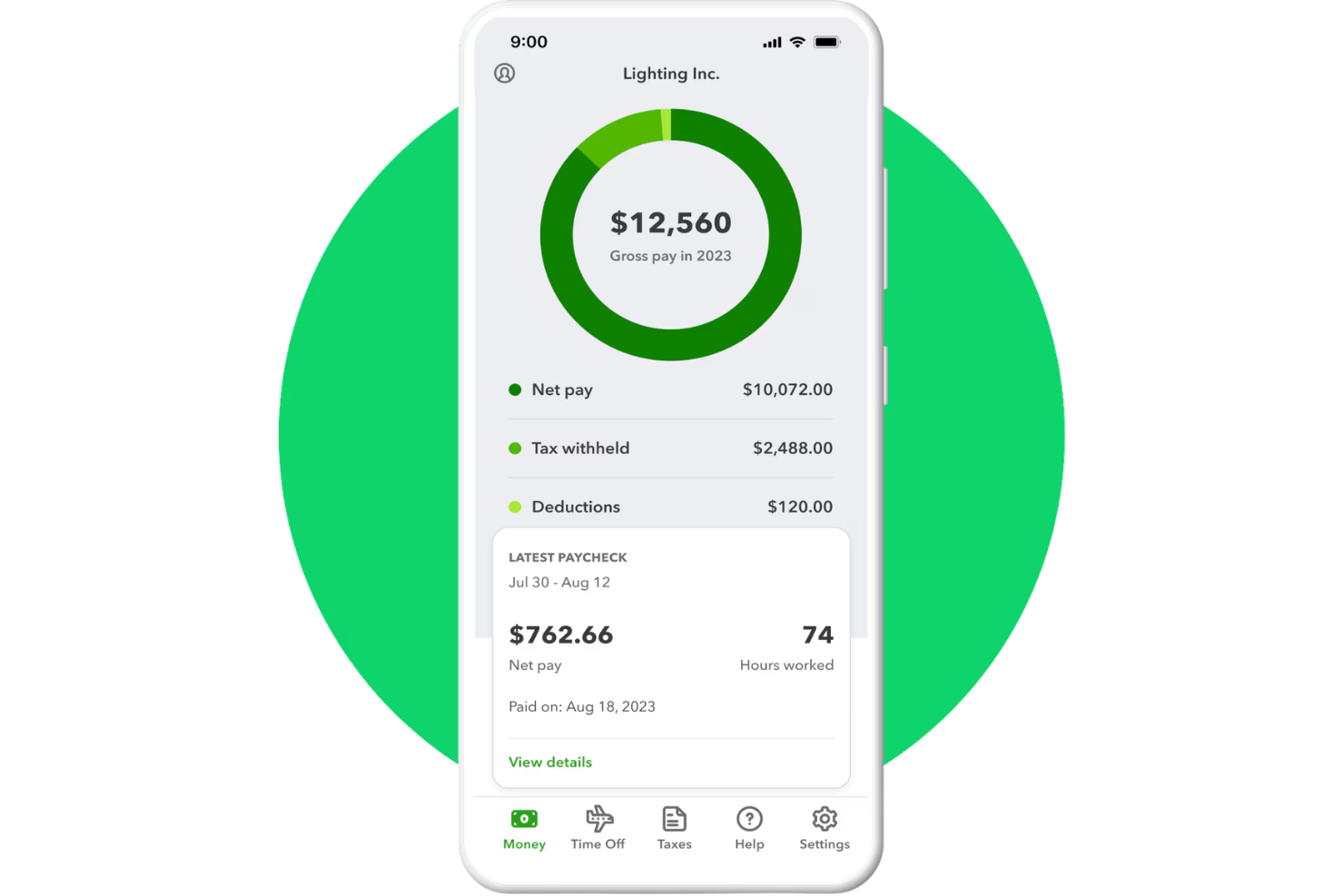
QuickBooks Payroll is a full-service AI payroll platform with an AI assistant that automates payroll processing, tax filing, time tracking, and employee self-service pay access via the QuickBooks Workforce mobile app.
Who Is QuickBooks Workforce Best For?
QuickBooks Workforce is a natural fit for small to mid-sized businesses and accounting firms that want to manage payroll, HR, time tracking, tax filing, and employee workforce data in one connected system.
Why I Picked QuickBooks Workforce
I picked QuickBooks Workforce because employees can access their pay stubs, tax forms, and payroll details through the self-service portal without needing to contact HR. Your team can review previous paychecks, including gross pay, net pay, deductions, and tax withholdings from any device. I also like that payroll, time, and employee data stay connected, making it easier to check pay details and resolve discrepancies.
QuickBooks Workforce Key Features
- Payroll tax management: Calculate, file, and pay federal and state payroll taxes to help businesses manage payroll compliance.
- Payroll AI: Collect payroll data, draft payroll, send reminders, and flag anomalies before review.
- Time tracking: Employees can track hours through QuickBooks Time, with GPS and geofencing tools available on supported plans.
- Employee benefits management: Manage employee benefits, including health insurance, workers’ compensation, and retirement plan options.
QuickBooks Workforce Integrations
Integrations include QuickBooks Online, QuickBooks Time, QuickBooks Payroll, QuickBooks Online Accountant, QuickBooks Payments, Guideline 401(k), Allstate Health Solutions, and Checkr. Custom integrations are available through Intuit’s developer APIs.
Pros and Cons
Pros:
- Combines payroll and HR tools
- Auto Payroll automates eligible payroll runs
- AI flags payroll anomalies before approval
Cons:
- Better suited for QuickBooks users
- Advanced HR tools require higher-tier plans

Best for AI-driven multi-country payroll

Deel Payroll earns its spot here for the way it automates multi-country payroll using AI. When I work with HR teams handling talent in dozens of countries, this is the system I see that manages complex rules and compliance reliably.
I appreciate how Deel lets you run payroll, manage statutory deductions, and process local requirements instantly across more than 100 countries, making global payroll less of a headache.
Deel Payroll’s Best For
- HR teams running payroll for global workforces
- Organizations managing local compliance in 100+ countries
Deel Payroll’s Not Great For
- Companies operating in a single country
- Teams needing granular custom workflows or niche pay rules
What sets Deel Payroll apart
Deel Payroll is shaped around instant compliance and automation for global payroll, leaning into AI to minimize manual setup and maintenance as you expand across countries. Unlike platforms like QuickBooks Payroll, which handle local payroll well, I find Deel expects you’re handling a workforce split over dozens of jurisdictions and want local rules managed for you.
In practice, this fits best when you want a hands-off solution for global employee and contractor pay.
Tradeoffs with Deel Payroll
Deel Payroll optimizes for broad international coverage and automation, but you give up granular workflow customization and advanced local pay rule tailoring. This becomes a limitation if your payroll team wants to build custom exceptions or highly specific routines.
Pros and Cons
Pros:
- Flexible payment options
- Reliable and verified AI-powered compliance support
- Handles over 180 currencies
Cons:
- Some users report issues when withdrawing funds
- Initial setup time and complexity for small teams

Paycom
Best for everyday AI assistance in HR and payroll

Paycom earns its spot for the way it uses embedded AI to automate and simplify core HR and payroll processes. When I see teams juggling everything from payroll runs to time-off requests, Paycom's AI prompts and automated workflows really save time and help catch errors before they hit payroll.
What I like is that features like Beti actually guide employees through paycheck verification, so you get fewer surprises or corrections later. I usually recommend Paycom when teams want AI tools integrated into their everyday HR and payroll experience, not as an add-on or afterthought.
Paycom’s Best For
- HR teams automating routine payroll and compliance tasks
- Organizations needing AI-driven error detection in pay runs
Paycom’s Not Great For
- Companies with highly unique or non-standard payroll needs
- Small businesses wanting basic, no-frills payroll tools
What sets Paycom apart
Paycom is built for organizations that want payroll and HR tasks handled from a single place, where automated checks and AI-powered self-service are part of the daily workflow. Unlike options like ADP or QuickBooks Payroll, which often act as payroll processors with some HR add-ons, Paycom centers everything around employee interaction and real-time validation.
This works best when you want staff to take more ownership over their payroll and HR records as part of their normal routine.
Tradeoffs with Paycom
Paycom optimizes for standardized HR and payroll flows, so when you need unique calculations or highly custom processes, you run into limits on customization and flexibility.
Pros and Cons
Pros:
- User-friendly interface
- Simplifies repetitive administrative tasks
- Built-in AI tools for HR and payroll automation
Cons:
- Limited to insights from existing data
- Lacks predictive and prescriptive analytics

Rippling
Best for calculating wage with tax withholdings
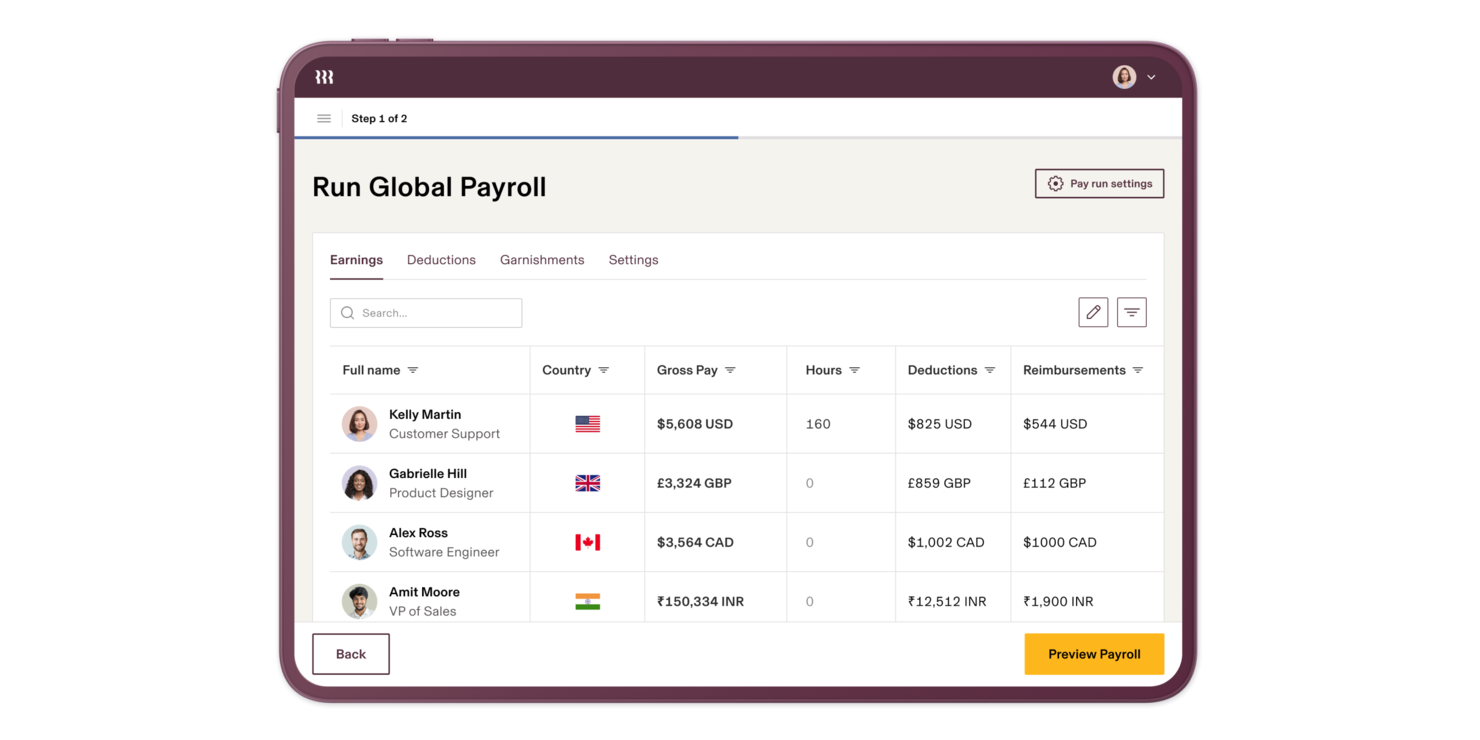
Rippling makes my shortlist for the way it handles complex wage calculations, especially factoring in real-time tax withholdings across multiple US states. When I review AI payroll options for teams with staff in different locations, Rippling’s automated tax compliance stands out.
What I appreciate is the accuracy and transparency you get when payroll runs—taxes, deductions, and rate changes show up immediately, right down to the pay stub.
Rippling’s Best For
- US-based organizations managing multi-state payroll and tax compliance
- Businesses needing automated wage calculations and withholdings
Rippling’s Not Great For
- Companies with mostly international workers outside the US
- Teams looking for non-payroll-specific HR or talent management features
What sets Rippling apart
Rippling takes an automated approach to complex payroll and compliance, handling tax calculations and paycheck adjustments behind the scenes. Unlike Gusto, which focuses more on payroll basics, Rippling expects you to rely on its backend logic to manage tax withholdings for different states without intervention.
In practice, this becomes most valuable when you hire people in new states or need quick clarity on constantly shifting tax rules.
Tradeoffs with Rippling
Rippling optimizes for US payroll and compliance, but the focus on US-specific rules means international payroll feels limited. If you run teams globally, you’ll end up needing a second solution.
Pros and Cons
Pros:
- Integrates HR IT accounting systems
- Supports multi country payroll compliance
- Automates payroll calculations tax withholdings
Cons:
- No free trial offered
- Navigation complexity affects user experience
New Product Updates from Rippling

Rippling Expands Automated Compliance With AI Workflows
Rippling expands Automated Compliance with multi-framework support, AI workflows, an audit portal, and trust centers. These updates help GRC teams manage compliance work and audits. For more information, visit Rippling’s official site.

Paycor
Best for intuitive scheduling workflows
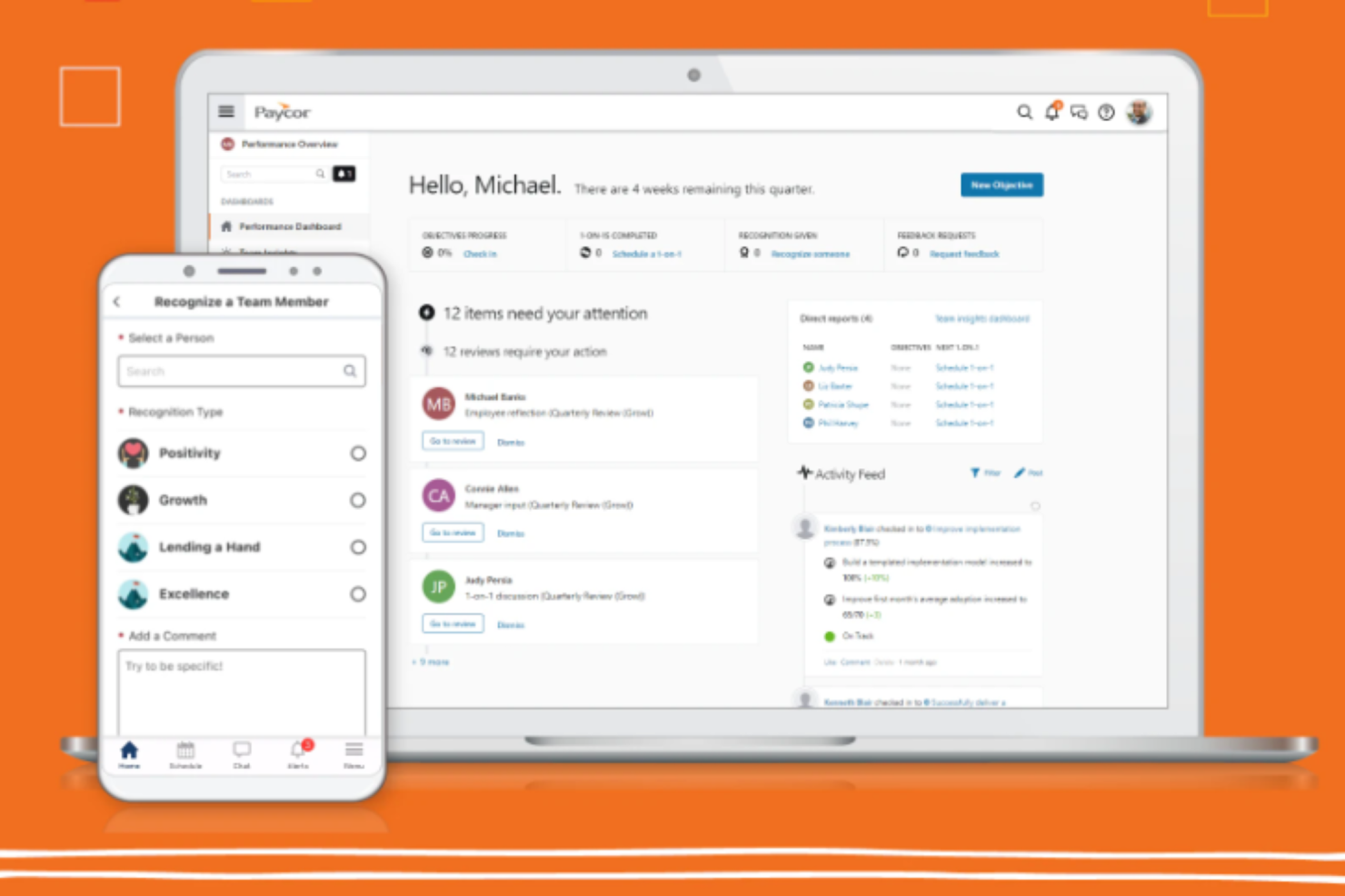
Paycor is an AI-powered HCM platform that covers payroll processing, scheduling, time tracking, workforce analytics, and HR management in a single system.
Who Is Paycor Best For?
Paycor is a strong fit for mid-sized businesses that need a unified HR and payroll platform with built-in AI tools and workforce management capabilities.
Why I Picked Paycor
Paycor is one of my top picks because I love how its Smart Scheduler removes the manual guesswork from building a workforce schedule. The AI automatically generates schedules against your predefined criteria, matching shifts to employees based on skills, certifications, and availability in one pass. I also like that labor forecasting ties directly into the scheduler, pulling in business drivers like sales data or foot traffic so managers build schedules that reflect actual demand. And because scheduling connects natively to payroll and time tracking, there's no re-entering data when payroll runs.
Paycor Key Features
- WISE AI assistant: An AI payroll assistant that surfaces in email and chat to flag errors and handle back-office payroll tasks before they become problems.
- Time card scoring: AI scores time cards against pre-configured attributes and auto-approves those that meet your set thresholds.
- OnDemand Pay: Gives employees access to earned wages before their scheduled payday directly through the platform.
- Real-time payroll calculations: Payroll updates calculate instantly as changes are made, rather than waiting for a batch processing cycle to complete.
Paycor Integrations
Paycor offers over 320 pre-built connectors through its marketplace, including QuickBooks, Greenhouse, iCIMS, Okta, Microsoft Entra ID, Google Workspace, ServiceNow, NetSuite, Oracle, and Jira. Paycor also provides an API and developer tools for building custom integrations. Zapier support is not currently available.
Pros and Cons
Pros:
- Configurable pay grids and payroll workflows
- Talent tools strengthened by acquired ATS
- AI assistant answers plain-language payroll questions
Cons:
- Support responses slow during urgent payroll issues
- Only supports U.S.-based payroll processing

Best with integrated time tracking
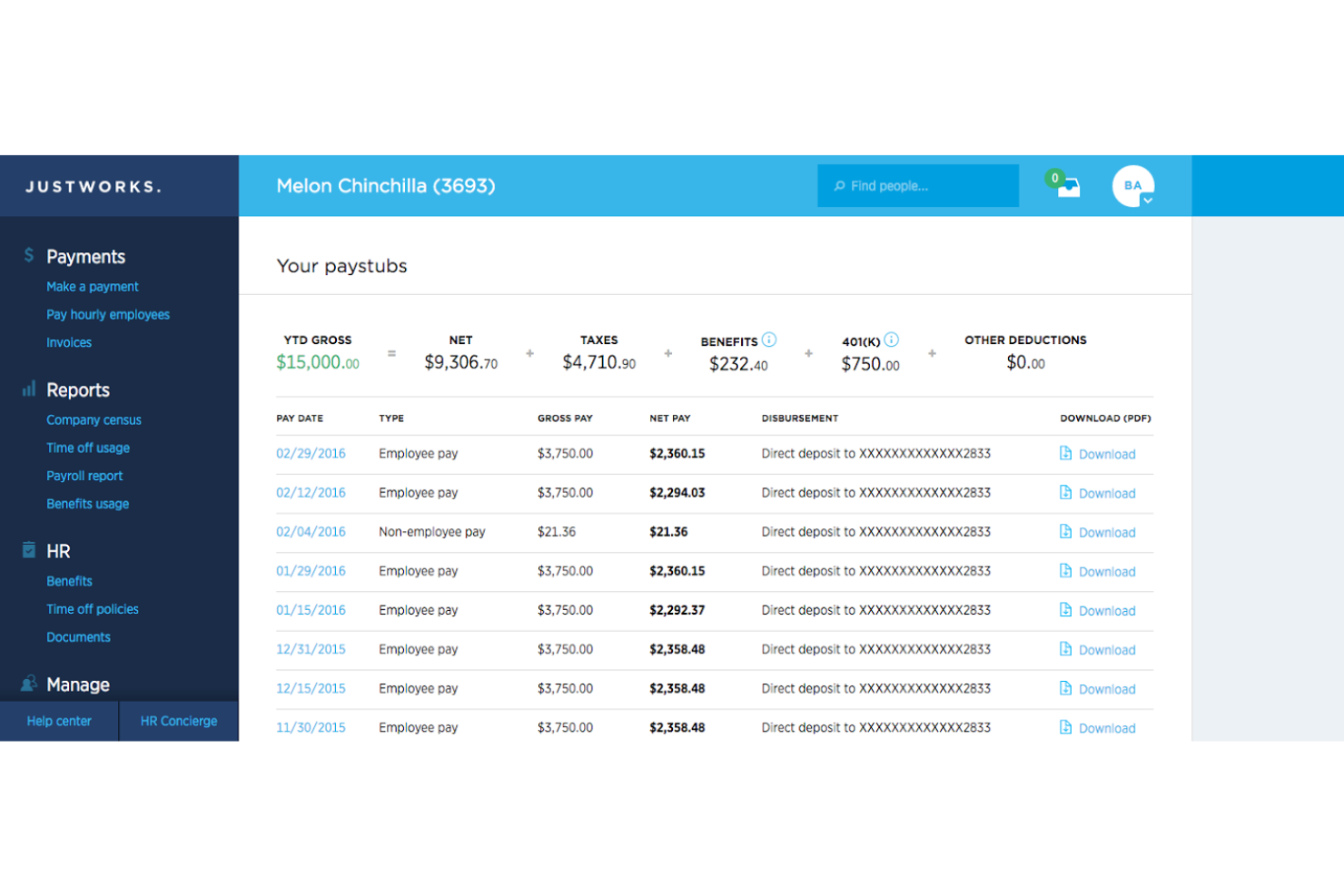
Justworks is on my list because it makes time tracking a core part of payroll, not an afterthought. I've worked with teams who need payroll to stay in lockstep with tracked hours, PTO, and overtime, and this setup actually delivers. I appreciate how Justworks simplifies syncing work hours straight into payroll runs, so you're not dealing with manual exports or mismatched timesheets.
Justworks’s Best For
- Teams that need integrated time tracking and payroll
- Businesses managing hourly, shift, and salaried workers together
Justworks’s Not Great For
- Organizations with advanced payroll automation needs
- Companies needing deep custom payroll reporting
What sets Justworks apart
Justworks is designed to fold time tracking directly into payroll and HR so you handle everything in one place. It expects you to centralize time, attendance, and payment details, which avoids juggling separate apps or spreadsheets. Unlike ADP or Paychex, which often bolt time tracking on, Justworks treats it as a core part of running payroll, not an extra box to check. This works especially well when you prefer a simple, unified way to keep hours and pay up to date.
Tradeoffs with Justworks
By optimizing for all-in-one simplicity, Justworks provides less customization and fewer advanced automation options than some larger, payroll-only systems. That can make it feel limiting if you need highly tailored processes or deep analytics.
Pros and Cons
Pros:
- Simple onboarding workflows for new hires
- Automated payroll tax filings and payments
- Built-in time tracking for hourly workers
Cons:
- No advanced AI-driven payroll analytics
- Benefits administration only available in the US

Best for mid-sized companies

Paylocity is my pick for mid-sized companies that want modern payroll and HR automation with an AI edge. I like how it uses AI features to assist with payroll audits, detect anomalies, and automatically flag areas that need attention as your business grows. I see teams benefit most when they're outgrowing entry-level payroll and need more automation, analytics, and compliance built into daily operations.
Paylocity’s Best For
- Mid-sized companies automating payroll and HR with AI
- Teams needing AI-driven anomaly detection and compliance tools
Paylocity’s Not Great For
- Small businesses with basic payroll needs
- Companies seeking global payroll or complex international support
What sets Paylocity apart
Paylocity stands out by centering its workflows around payroll and HR automation for mid-sized companies, using AI-driven checks and guidance. It focuses on helping you surface issues before they become costly, which reminds me more of Rippling’s proactive alerts than the passive reporting you get from legacy payroll providers. In practice, this works best when you’ve outgrown small-business payroll tools and want tighter handling of compliance.
Tradeoffs with Paylocity
Paylocity optimizes for automation and mid-market scalability, but you lose out on the simplicity and speed you see in tools built for smaller, less complex payroll needs.
Pros and Cons
Pros:
- Unify and automate legacy HR and payroll systems
- Advanced analytics tools
- Strong focus on employee engagement
Cons:
- Initial setup can be time-consuming
- Complex customization options
New Product Updates from Paylocity

Paylocity Expands Expense and Purchase Request Tools
Paylocity adds connected personal cards, smarter expense categorization, and a streamlined purchase request experience. This reduces manual entry and helps finance teams manage expenses and approvals more efficiently. For more information, visit Paylocity’s official site.
 .
.
Best for AI-powered error detection
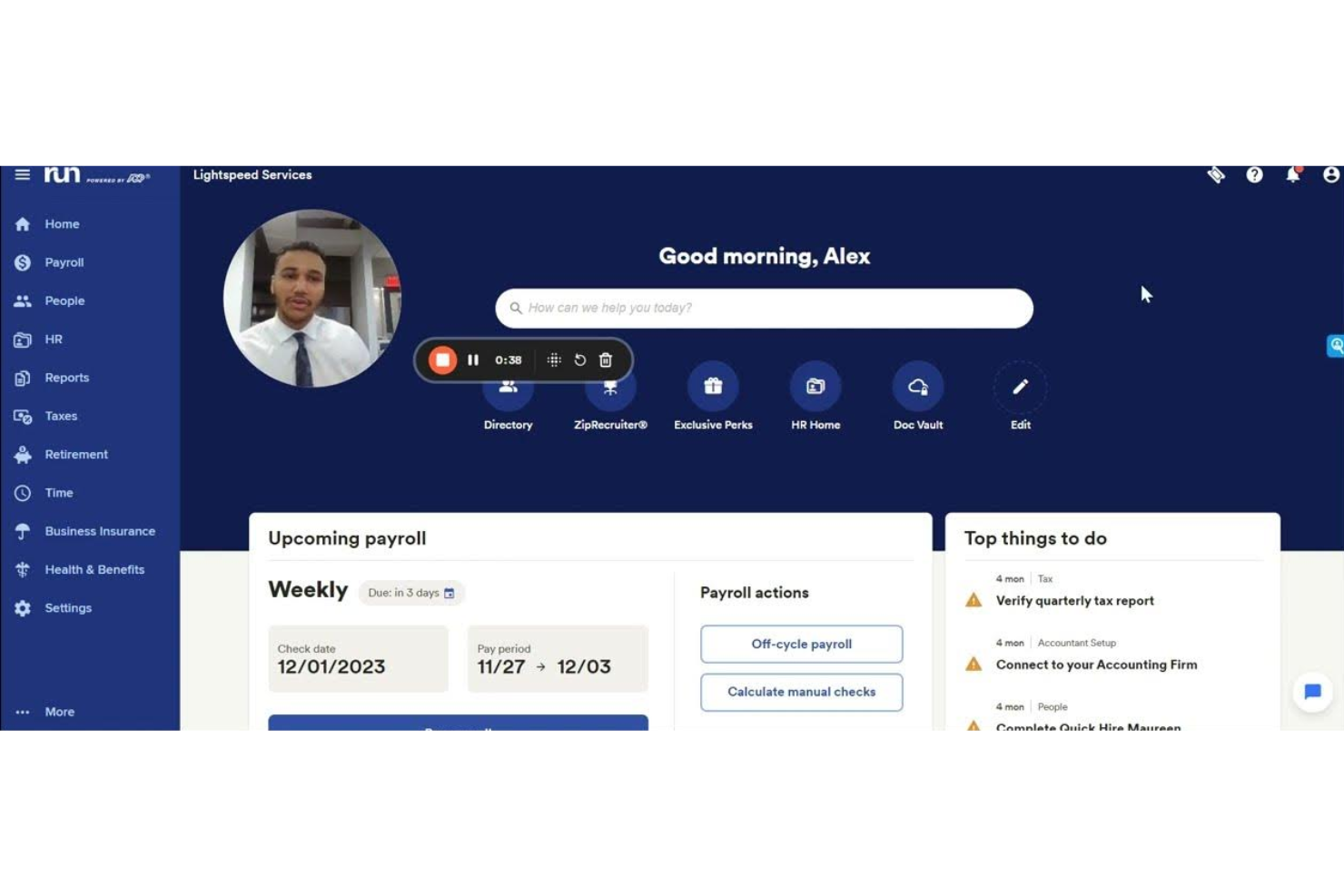
RUN Powered by ADP® lands on my shortlist because its AI-powered error detection is the best I’ve tested in payroll software. Automatic flagging catches common mistakes—like duplicate entries and calculation irregularities—which helps you stay compliant from the start.
What I really appreciate is how the system steps you through specific issues, making payroll accuracy feel much less stressful for HR teams.
RUN Powered by ADP®’s Best For
- Small businesses that want automated payroll error detection
- HR managers focused on compliance and payroll accuracy
RUN Powered by ADP®’s Not Great For
- Companies with highly customized payroll needs
- Large enterprises needing advanced global payroll capabilities
What sets RUN Powered by ADP® apart
RUN Powered by ADP® stands out for how directly it bakes AI error detection into payroll, flagging and explaining issues in real time. Rather than expecting you to check and double-check figures, RUN surfaces potential errors as you go, making it easier to catch problems before they turn into real headaches. Unlike QuickBooks Payroll, which leaves more to manual review, this approach helps HR managers spend less time second-guessing calculations.
Tradeoffs with RUN Powered by ADP®
RUN optimizes for simplicity and guided workflows, but that means you lose some flexibility when it comes to customizing payroll processes for unique or complex situations.
Pros and Cons
Pros:
- Flexible service package options
- Scales with business growth
- Strong payroll tax compliance
Cons:
- Limited report customization
- Higher starting monthly cost

Workday
Best for embedded AI agents

Workday lands on my AI payroll shortlist because its embedded AI agents handle complex payroll actions automatically. I see teams who run multi-country payrolls benefit by letting these AI agents track, analyze, and flag potential errors before they hit payouts. When I tested its recommendation engine, I liked how it called out unusual compensation patterns and guided corrections in real time.
Workday’s Best For
- Enterprises needing AI-driven multi-country payroll oversight
- HR teams focused on compliance and real-time anomaly detection
Workday’s Not Great For
- Small businesses with simple payroll requirements
- Organizations that avoid cloud-based HR platforms
What sets Workday apart
Workday approaches payroll by designing around automation and compliance at scale, rather than manual intervention or flexible templates like in QuickBooks Payroll. The system expects you to centralize complex payroll across different countries with AI agents proactively monitoring for errors and regulatory shifts. In practice, this makes it good for global companies that want payroll risk flagged and handled early, not left for post-processing.
Tradeoffs with Workday
Workday optimizes for scale and automation, but you give up agility when making quick, custom payroll edits. That rigidity can slow you down if you need to handle lots of exceptions or small customizations frequently.
Pros and Cons
Pros:
- Customizable dashboards for tailored insights
- Natural language processing simplifies data interaction
- Predictive analytics enhances decision-making
Cons:
- Limited customization options for small teams
- Requires some technical knowledge to set up
Sage Intacct
Best for financial management

Sage Intacct earns a spot here thanks to its advanced automation of payroll-related financial processes, which is especially important when payroll data feeds directly into your broader accounting ecosystem. When organizations with intricate or multi-entity payrolls need accuracy and auditability, I find Sage Intacct’s deep general ledger capabilities put it ahead.
What I especially appreciate is how expense allocations, tax compliance, and custom reporting all connect to your pay runs. This works best for finance teams who need to link payroll transactions with detailed financial controls and reporting.
Sage Intacct’s Best For
- Organizations needing payroll integrated with full financial management
- Multi-entity businesses requiring detailed payroll accounting and reporting
Sage Intacct’s Not Great For
- Teams that want dedicated payroll processing or AI-first payroll tools
- Companies with very simple or low-volume payroll needs
What sets Sage Intacct apart
Sage Intacct stands out in how it expects your finance and payroll teams to operate as a single, centralized function. Unlike Xero, which is lighter and more transactional, Intacct gears everything for organizations that need consolidated, audit-ready books and compliance across complex structures. In practice, it works well for those juggling payroll, inter-entity accounting, and financial oversight in one place.
Tradeoffs with Sage Intacct
Intacct optimizes for structure, compliance, and financial rigor, but hands-on payroll processing or workflow flexibility tends to get lost. Teams wanting AI-driven payroll or process customization usually find that a dedicated payroll platform fits better.
Pros and Cons
Pros:
- Automated financial workflows
- Real-time financial dashboards
- Multi-dimensional analysis features
Cons:
- Complex for small businesses
- May require extensive setup
Other AI Payroll Software
Here are some additional AI payroll software options that didn’t make it onto my shortlist, but are still worth checking out:
- PayCaptain
For self-service for UK employees
- ZellisONE
For HR integration in the UK and Ireland
- UKG Bryte AI
For compliance support
- Roll by ADP
For chat-based payroll management
- Keka HR
For 100+ plug-and-play payroll integrations
- Papaya Global
For multinational and global payroll


How I Evaluate AI Payroll Software
I look for platforms where AI does more than label-dress—it should catch anomalies before a pay run, auto-adapt to tax changes, or surface cost forecasts without manual pulls. My evaluation splits into two layers: the core functionality a tool needs to qualify and the differentiating factors that separate a good fit from a great one.
Core Functionality (Table Stakes For This List)
When I'm selecting tools for my list, I rank each one on a scale from 0 (does not offer the functionality) to 5 (excels in this area) for each core functionality listed below. Then, I calculate the tool's total score into a percentage. Each tool needs to achieve a minimum total score of 65% to be considered for inclusion.
- AI-Driven Payroll Automation: I evaluate how much of the pay run—calculations, deductions, net pay, disbursement—the platform handles autonomously versus how many steps still need manual review.
- Anomaly & Error Detection: Each tool should flag issues like duplicate payments, hours mismatches, or unusual bonus entries before a run processes, not after.
- Predictive Payroll Analytics: I look for AI-generated forecasts on labor spend, overtime trends, and headcount cost projections that go beyond static, backward-looking reports.
- Automated Tax Compliance: The platform should auto-calculate withholdings, track regulatory updates, and handle filings across multiple jurisdictions without requiring manual tax table uploads.
- Conversational AI Assistant: I check whether employees and admins can ask questions about pay stubs, deductions, or PTO balances and get accurate, real-time answers through a chatbot or AI copilot.
- HRIS & Time Data Integration: Real-time syncing with systems like BambooHR, Workday, or ADP for employee records and timesheet data matters—batch file imports alone fall short.
Once I have a list of tools that meet this criteria, I consider what sets each platform apart.
Differentiating Factors (What Sets Vendors Apart)
Here's how I compare and contrast different vendors:
Standout Features
Smart earnings classification is a big differentiator—I look for platforms where AI auto-categorizes wages, bonuses, and contractor payments into the correct tax and GL buckets instead of relying on manual mapping. Global payroll intelligence also matters for teams running payroll across multiple countries, where AI handles localized compliance and currency conversion in one view. Generative audit trails round things out by producing plain-language summaries of every payroll action, which saves hours when preparing for audits.
Beyond Features
AI trust and transparency is something I weigh heavily—I check whether a platform offers human-in-the-loop controls and explainable recommendations so payroll admins can understand why AI flagged or adjusted an entry. Scalability matters too, especially for orgs juggling W-2 employees, contractors, and multi-entity structures that need a single platform to grow with them. I also evaluate implementation support, since migrating historical payroll data and running parallel cycles during cutover can make or break a team's confidence in a new system.
How to Choose AI Payroll Software
It’s easy to get bogged down in long feature lists and complex pricing structures. To help you stay focused as you work through your unique software selection process, here’s a checklist of factors to keep in mind:
| Factor | What to Consider |
|---|---|
| Scalability | Can the software grow with your business? Consider if it can handle an increasing number of employees and more complex payroll needs as your company expands. |
| Integrations | Check if it integrates with your existing HR and accounting systems. Seamless data flow can save time and reduce errors. Look for popular integrations like QuickBooks and SAP. |
| Customizability | Does the software allow you to tailor workflows to your needs? Customization can help align the tool with your unique processes. |
| Ease of Use | Evaluate if the interface is intuitive and user-friendly. A steep learning curve can hinder adoption and efficiency. |
| Implementation and Onboarding | Assess the time and resources needed to get started. Look for vendors offering comprehensive training and support during the transition. |
| Cost | Consider the total cost of ownership, not just the subscription fee. Factor in setup costs, training, and potential add-ons. |
| Security Safeguards | Ensure the software has robust security measures to protect sensitive payroll data. Look for encryption, multi-factor authentication, and regular security audits. |
| Compliance Requirements | Compliance requirementsVerify if the software meets your industry and regional compliance needs. Non-compliance can lead to fines and legal issues. |
What Is AI Payroll Software?
AI payroll software is a tool that automates payroll processing and management using artificial intelligence. HR professionals and payroll specialists typically use AI in payroll to improve accuracy, save time, and ensure compliance with regulations.
Automated calculations, compliance alerts, and integration capabilities help with reducing errors and managing complex payroll needs. Overall, these tools provide efficiency and peace of mind in handling payroll tasks.
Features of AI Payroll Software
When selecting an AI-powered platform, keep an eye out for the following key payroll software features:
- Automated calculations: Automatically calculates pay, taxes, and deductions to reduce errors and save time.
- Compliance alerts: Provides notifications about changes in labor laws to help maintain compliance.
- Integration capabilities: Connects with existing HR and accounting systems for seamless data flow and efficiency.
- Employee self-service: Allows employees to access and manage their own payroll information, reducing administrative workload.
- Customizable reporting: Offers tailored reports to provide insights into payroll trends and performance metrics.
- Multi-currency support: Handles payroll in various currencies, which is crucial for global companies.
- Real-time analytics: Provides immediate insights into payroll data to support informed decision-making.
- Security safeguards: Protects sensitive payroll information with encryption and authentication measures.
- Mobile access: Enables payroll management on-the-go through mobile devices, increasing flexibility.
- Automated workflows: Streamlines routine tasks by automating processes, freeing up time for strategic work.
Benefits of AI Payroll Software
Implementing AI payroll software provides several benefits for your team and your business. Here are a few you can look forward to:
- Increased accuracy: Automated calculations reduce the risk of errors in payroll processing.
- Time savings: Automated workflows and self-service features free up time for more strategic tasks.
- Regulatory compliance: Compliance alerts help keep your business aligned with changing labor laws.
- Enhanced data insights: Real-time analytics provide valuable insights into payroll trends and performance.
- Improved employee satisfaction: Self-service features empower employees to manage their own payroll data.
- Cost efficiency: Reducing manual tasks minimizes the need for additional payroll staff.
- Global reach: Multi-currency support allows you to manage payroll for international teams effortlessly.
Costs and Pricing of AI Payroll Software
Selecting AI payroll software requires an understanding of the various pricing models and plans available. Costs vary based on features, team size, add-ons, and more. The table below summarizes common plans, their average prices, and typical features included in AI payroll software solutions:
Plan Comparison Table for AI Payroll Software
| Plan Type | Average Price | Common Features |
|---|---|---|
| Free Plan | $0 | Basic payroll processing, limited reporting, and email support. |
| Personal Plan | $5-$25/user/month | Payroll processing, tax calculations, and employee self-service. |
| Business Plan | $30-$75/user/month | Advanced reporting, compliance alerts, and integration capabilities. |
| Enterprise Plan | $80-$150/user/month | Customizable workflows, multi-currency support, real-time analytics, and priority support. |
AI Payroll Software FAQs
Here are some answers to common questions about AI payroll software:
How does AI payroll software handle compliance?
AI payroll software continuously updates to comply with changing tax laws and labor policies. It automates compliance checks and alerts your team to any regulatory changes, helping you stay compliant without manual intervention.
Can AI payroll software integrate with existing systems?
Yes, most AI payroll software can integrate with systems like SAP and Oracle HCM. These integrations ensure seamless data flow between your payroll and other business systems, reducing errors and duplication of effort.
What security measures are in place for AI payroll software?
AI payroll software prioritizes data security by using SSL encryption and other security protocols. It ensures that sensitive payroll data is protected from unauthorized access, keeping your team’s information safe.
How can AI payroll software improve efficiency?
AI payroll software automates repetitive tasks like calculations and reconciliations, freeing up your team to focus on more strategic activities. This automation leads to faster payroll processing and reduced errors.
Is AI payroll software scalable for growing businesses?
Yes, AI payroll software is designed to scale with your business. Whether you’re adding new employees or expanding to new locations, the software can adapt to handle increased complexity and volume. This scalability is especially important when choosing payroll software for small businesses that expect to grow.
How does AI payroll software handle employee inquiries?
Many AI payroll solutions feature chatbots that can answer common employee questions. This functionality helps reduce the burden on your HR team by providing instant responses to routine inquiries.