
20 Best Free Employee Scheduling Software of 2026

Best Free Employee Scheduling Software Shortlist
Here's my pick of the 15 best software from the 20 tools reviewed.


The best free employee scheduling software helps you streamline shift planning, reduce scheduling conflicts, and give your team real-time access into schedules.
If you're still stuck managing shifts with spreadsheets, constantly juggling last-minute changes, or struggling to align availability across locations, you're not alone, and you don't need to keep doing it manually.
Free employee scheduling tools can take the pressure off your overloaded calendar by simplifying how you assign shifts, track time off, manage requests, and communicate with your team. Many even come with mobile apps, automatic reminders, and time tracking, all without the high cost of paid platforms.
As someone with 3+ years of experience analyzing HR software, I’ve researched dozens of platforms to identify which free solutions are actually worth your time. In this guide, I’ll walk you through the top free employee scheduling tools that are reliable, easy to use, and designed for small teams with big scheduling challenges — no credit card required.
Why Trust Our Software Reviews
We've been testing and reviewing HR software since 2019. As HR professionals ourselves, we know how critical and difficult it is to make the right decision when selecting software.
We invest in deep research to help our audience make better software purchasing decisions. We've tested more than 2,000 tools for different HR use causes and written over 1,000 comprehensive software reviews. Learn how we stay transparent, and take a look at our software review methodology.
Table of Contents
Best Free Employee Scheduling: Comparison Chart
This comparison chart summarizes pricing, trial, and demo details for the free employee scheduling software selections that also offer paid plans to help you find the best option for your budget, business needs, and number of employees.
| Tool | Best For | Trial Info | Price | ||
|---|---|---|---|---|---|
| 1 | Best custom templates and unlimited checklists | 14-day free trial and free plan available | From $29/month for up to 30 users | Website | |
| 2 | Best for integrated GPS time tracking | 14-day free trial + free plan + free demo available | From $30/location/month (billed annually) | Website | |
| 3 | Best for Canadian shift-based teams | Free 21-day trial + free demo available | From $2.93/user/month (billed annually) | Website | |
| 4 | Best for conflict-free schedules | Free 30-day trial + free plan available | From $1/user/month | Website | |
| 5 | Best for small businesses | Free plan available | From €25.00/month/location | Website | |
| 6 | Best for the restaurant industry | Free 14-day trial + free plan available | From $39.99/location/month (billed annually) | Website | |
| 7 | Best for integrating scheduling with payroll | Free demo available | From $8/user/month | Website | |
| 8 | Best for hourly employee schedules | Free 14-day trial + free plan + free demo available | From $2/active member/month (billed annually) | Website | |
| 9 | Best for group scheduling | Free 15-day trial + free plan available | From $1.70/user/month (billed annually) | Website | |
| 10 | Best for drag-and-drop schedule management | Free forever plan | From $1.75/user/month | Website | |
| 11 | Best for schedule constraints | Free forever plan available | Free to use | Website | |
| 12 | Best for remote and hybrid teams | Free 14-day trial available | From $3.99/user/month | Website | |
| 13 | Best for automated scheduling | 30-day free trial | From $50/month | Website | |
| 14 | Best for Gantt chart visualization | Free plan + free demo + 14-day free trial available | From $10/user/month (billed annually) + add-on fee | Website | |
| 15 | Best for leave management automation | Free plan available | From $1.50/user/month (billed annually) | Website |

-

Checkr
Visit WebsiteThis is an aggregated rating for this tool including ratings from Crozdesk users and ratings from other sites.4.5 -
Kudoboard
Visit WebsiteThis is an aggregated rating for this tool including ratings from Crozdesk users and ratings from other sites.4.8 -
Native Teams
Visit WebsiteThis is an aggregated rating for this tool including ratings from Crozdesk users and ratings from other sites.4.6





Best Free Employee Scheduling Software Reviews
Here’s a quick look at the top free employee scheduling tools, including their standout features for managing shifts, handling time-off requests, and keeping teams connected. I’ve added screenshots so you can see how each one works before you dive in.
You’ll also find a breakdown of what’s truly free — no hidden fees, no surprises — so you can pick the right fit with confidence.

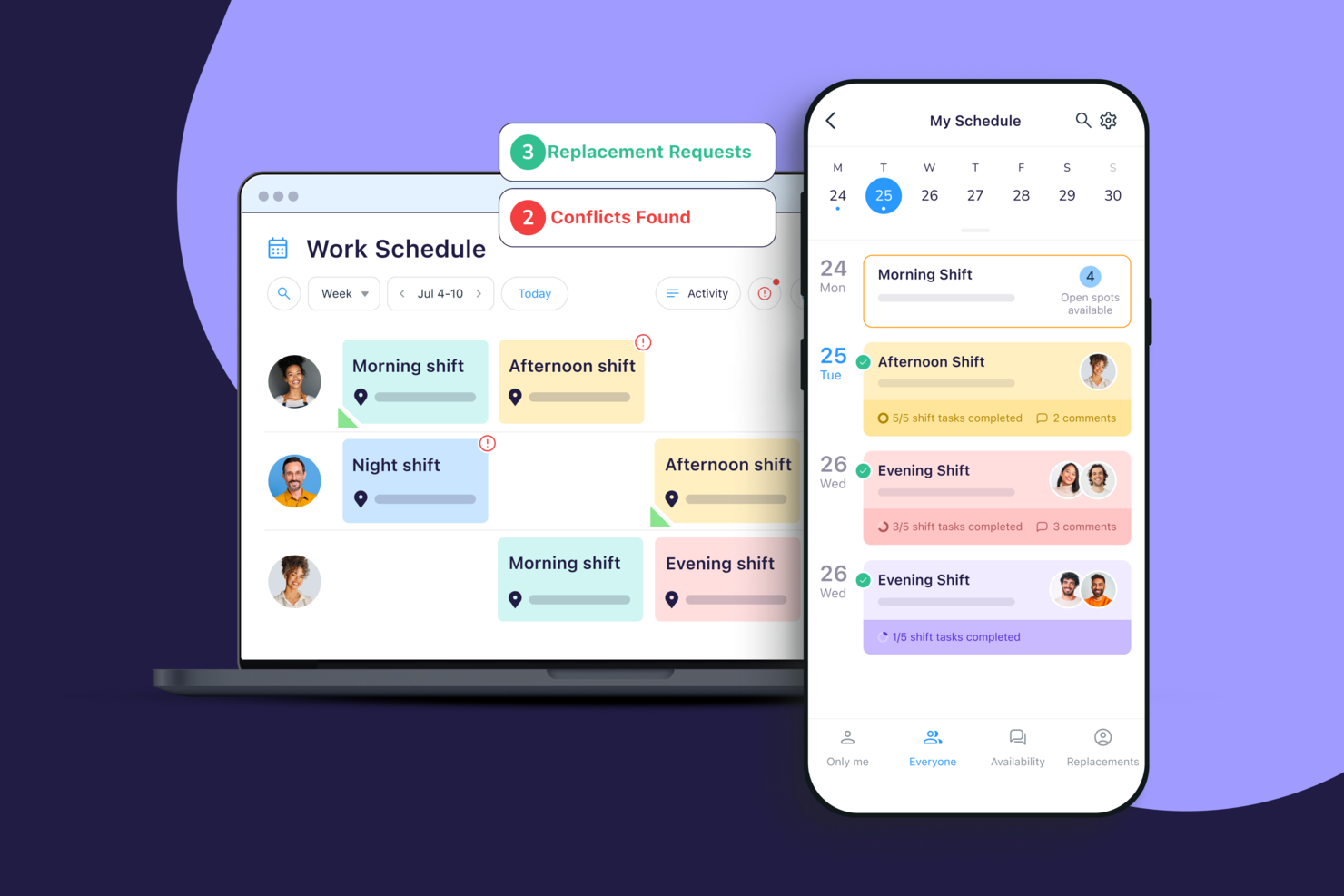
Connecteam gives shift-based businesses and frontline teams a free, mobile-first platform to manage employee schedules, track time, and handle daily operations without paperwork or manual processes.
Who Is Connecteam Best For?
Connecteam is a great fit for small to mid-sized businesses in industries like retail, hospitality, and construction that rely on deskless or hourly workers.
Why I Picked Connecteam
I picked Connecteam as one of the best because I love how its custom scheduling templates and unlimited checklists work together to cover the full shift lifecycle. I use scheduling templates to set up recurring daily or weekly shift patterns once and reuse them without rebuilding from scratch. Then, I attach checklists directly to individual shifts—so a cleaning crew clocking in at 6am sees exactly what tasks they need to complete before they leave. The forms builder also lets me create dynamic checklists that adapt based on employee input, which means I'm not handing out one-size-fits-all lists to teams with different responsibilities.
Connecteam Key Features
- Drag-and-drop scheduler: Build and adjust shifts visually by dragging employees into open slots on a weekly or daily schedule view.
- GPS time clock: Employees clock in and out from their mobile devices, with location tracking to verify they're on-site.
- Open shift management: Post unfilled shifts for eligible employees to claim, reducing the back-and-forth of manual coverage requests.
- In-app chat: Send direct or group messages to employees within the platform, keeping shift-related communication in one place.
Connecteam Integrations
Integrations include QuickBooks, Gusto, Xero, ADP, Zapier, Wix, Lightspeed, PrismHR, Square, BambooHR, Accu-Time Systems, Synel, Shopify, and Clover.
What's Free?
Connecteam offers a free-forever Small Business Plan for up to 10 users with most features available. For teams up to 30 users, a Limited plan is available for free after the 14-day trial, but with some feature restrictions compared to paid plans.
Pros and Cons
Pros:
- Flags conflicts like overtime, unavailability, or overlapping shifts
- Mobile app supports scheduling, chat, and real-time shift alerts
- Auto-scheduling assigns shifts based on skills and availability
Cons:
- Some advanced features sit behind higher-tier paid plans
- Geolocation tools may drain battery on some devices

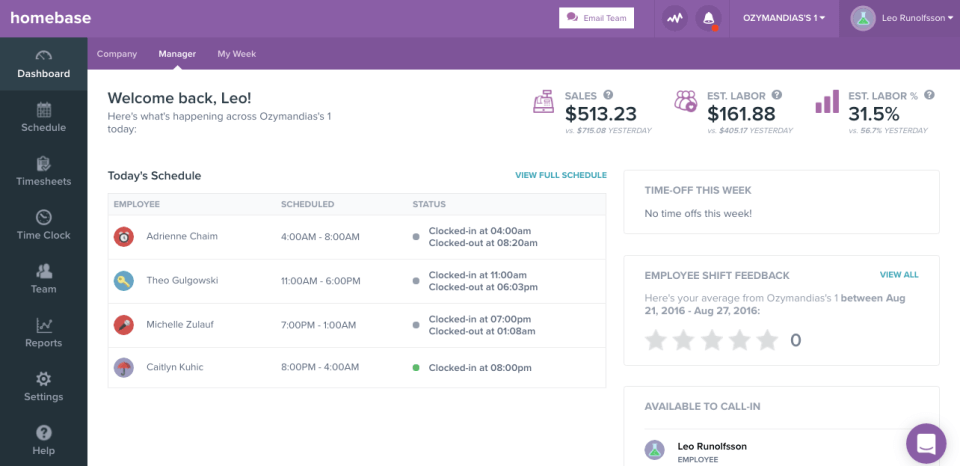
Homebase gives small businesses and hourly teams a way to manage employee schedules, track time, and handle shift changes in one place, helping owners and managers reduce scheduling headaches and improve team communication.
Who Is Homebase Best For?
Homebase is a great fit for small businesses in retail, hospitality, and food service that rely on hourly workers and need simple, accessible scheduling tools.
Why I Picked Homebase
I picked Homebase as one of the best because I love how its GPS time tracking is built directly into the scheduling and time clock workflow—not bolted on as an afterthought. When an employee clocks in, Homebase captures a GPS snapshot of their location at that exact moment, including clock-out and breaks. That's especially useful for teams with field workers or multiple job sites, like a cleaning crew or a landscaping team, where you can't always verify presence in person. I also like that you can set up authorized workplaces, so employees can only clock in from approved locations—which cuts down on time theft without requiring any manual oversight.
Homebase Key Features
- Drag-and-drop schedule builder: Build and edit weekly schedules visually, with hours calculated automatically as you assign shifts.
- Shift trade and coverage requests: Employees can request shift swaps or pick up open shifts directly in the app, with manager approval built into the workflow.
- Automatic timesheet generation: Clock-in and clock-out data, including breaks and overtime, converts automatically into timesheets ready for payroll.
- Team messaging: Send shift reminders, notes, and announcements to individual employees or the whole team directly within the app.
Homebase Integrations
Integrations include Square, Toast, Clover, Shopify, QuickBooks Online, Gusto, ADP RUN, Paychex, Rippling, and Restaurant365.
What's Free?
Homebase offers a free-forever plan for one location with up to 20 employees. The free plan includes basic scheduling, time tracking, and team messaging, but payroll and advanced features require a paid upgrade.
Pros and Cons
Pros:
- Shift-swap and time-off workflows reduce manual coordinator work
- Free plan covers unlimited employees at one location
- GPS-verified time clock
Cons:
- Advanced scheduling filters and views sit behind higher tiers
- Fewer native integrations for enterprise-grade HR systems
New Product Updates from Homebase

Homebase Adds AI Scheduling Assistant for Faster Shift Planning
Homebase introduces Scheduling Assistant, AI-optimized shift creation, and automated conflict resolution. These updates reduce manual scheduling work while keeping teams aligned and shifts fully staffed. For more information, visit Homebase's official site.
 .
.
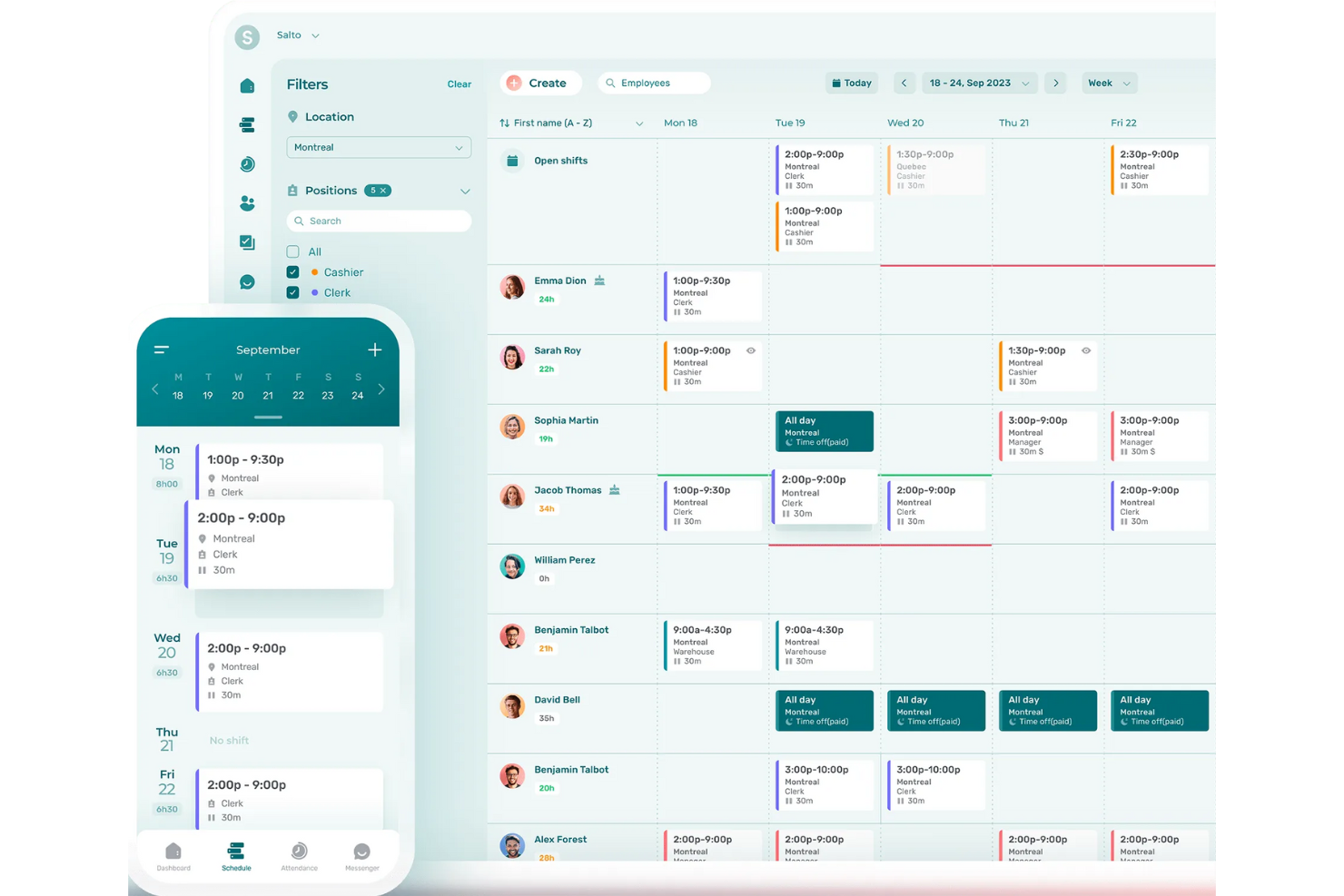
Agendrix is an employee scheduling platform for shift-based businesses that need to simplify shift planning, manage time-off requests, and keep teams connected through a user-friendly web and mobile app.
Who Is Agendrix Best For?
Agendrix suits small to mid-sized businesses in retail, hospitality, and healthcare that rely on hourly or shift-based workers.
Why I Picked Agendrix
I picked Agendrix as a top choice because it's purpose-built for Canadian shift-based teams, with built-in support for bilingual (French and English) workplaces that most scheduling tools simply don't offer. I like how the platform handles province-specific labor compliance, which matters when you're managing teams across Quebec and Ontario with different rules around breaks and overtime. My team also uses the availability and time-off management features to fill shifts faster, since employees submit their availability directly in the app and the schedule updates accordingly.
Agendrix Key Features
- Drag-and-drop schedule builder: Create and adjust shifts visually by dragging employees into time slots on a weekly schedule view.
- Open shift management: Post unfilled shifts so available employees can claim them directly from the mobile app.
- In-app messaging: Send direct messages or group announcements to employees without leaving the scheduling platform.
- Punch clock with geolocation: Employees clock in and out from their phones, with location tracking to confirm they're on-site.
Agendrix Integrations
Integrations include Sage, Ceridian, and ADP Workforce, and an API supports custom integrations.
What's Free?
Agendrix offers a 21-day free trial with access to all features. After the trial, you’ll need to choose a paid plan to continue using the platform.
Pros and Cons
Pros:
- Clear visibility of availability and time-off during scheduling
- Shift confirmations help reduce attendance issues
- Bilingual EN/FR interface ideal for Canadian workplaces
Cons:
- Bulk shift editing could be more flexible
- Automated scheduling rules are less advanced
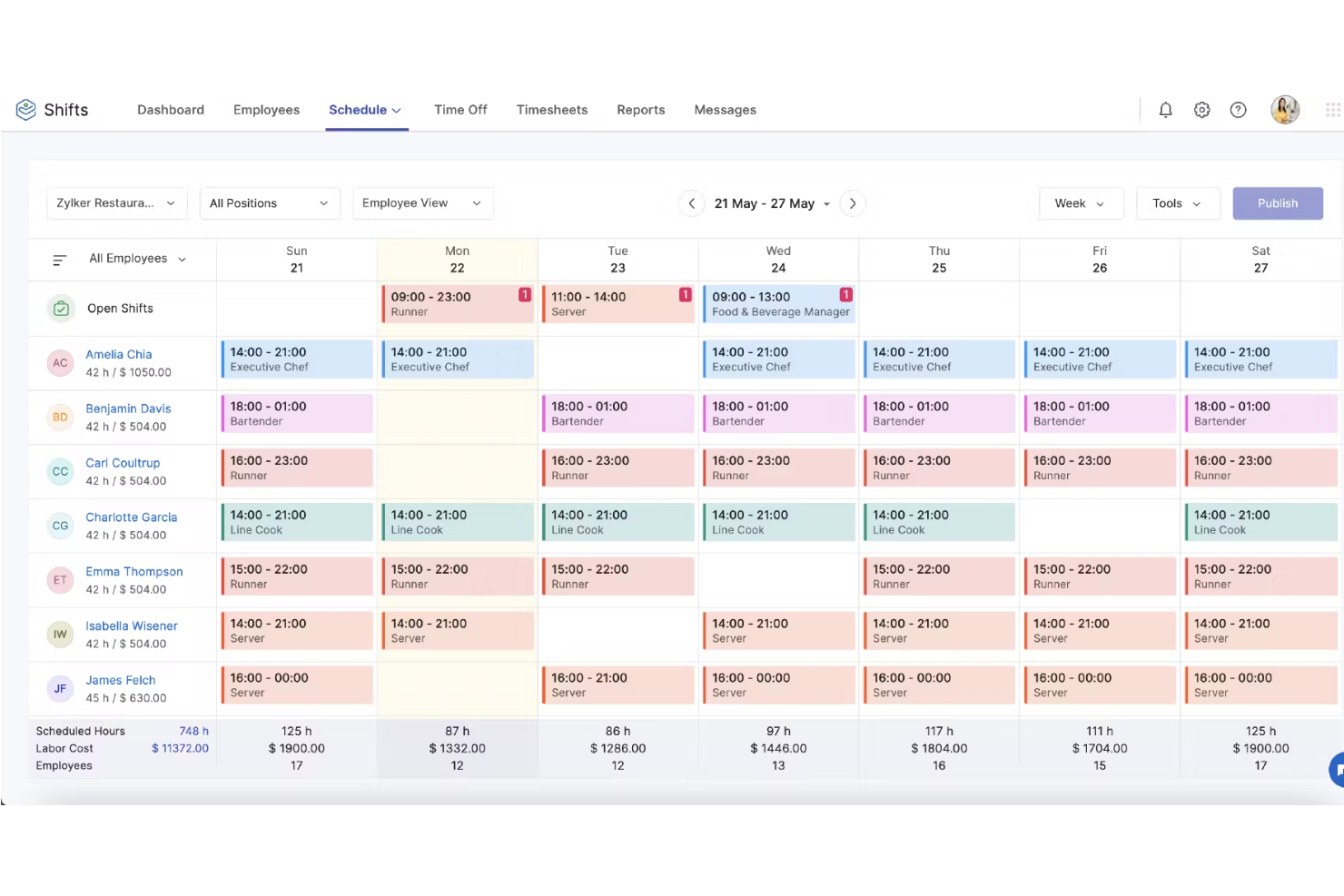
Zoho Shifts is a cloud-based employee scheduling tool designed for small businesses and teams that need to manage shifts, track attendance, and handle time-off requests without the hassle or cost of traditional scheduling software.
Who Is Zoho Shifts Best For?
Zoho Shifts is a great fit for small businesses in shift-heavy industries like retail, hospitality, and food service that need a straightforward way to manage hourly workers.
Why I Picked Zoho Shifts
Zoho Shifts earns its spot on my shortlist because of how well it handles the scheduling conflicts that make managing hourly teams so frustrating. When I'm building out a roster, the tool flags overlapping shifts and availability issues before the schedule goes live—so I'm not scrambling to fix errors after the fact. I also like the shift swap feature, which lets employees trade shifts with qualified co-workers directly in the app, cutting down on the back-and-forth that usually lands in a manager's inbox. Add in the ability to manage schedules across multiple locations from one place, and it's a genuinely practical pick for teams running more than one site.
Zoho Shifts Key Features
- Time off management: Review, approve, or deny employee time-off requests from a single dashboard, accessible on desktop and mobile.
- GPS-based clock-in: Employees clock in from job sites using GPS tagging and geo-fencing to verify they're at the correct location.
- Built-in team messaging: Send direct messages, create group chats, and post announcements to keep staff informed without leaving the app.
- Timesheet export: Export logged hours directly to payroll software for processing at the end of each pay period.
Zoho Shifts Integrations
Native integrations are not currently listed.
What's Free?
Zoho Shifts offers a 30-day free trial with access to all features. After the trial, continued use requires a paid plan, and there is no free-forever option.
Pros and Cons
Pros:
- Templates make recurring scheduling faster
- Employees can drop, swap or offer shifts directly from the app
- Enables mobile clock-in and real-time attendance across locations
Cons:
- Limited deep-customization
- Break tracking/reminders are less advanced


TIMIFY is an employee scheduling platform for teams that manage shifts, appointments, and staff availability, making it a practical choice for businesses seeking a free, flexible way to organize work schedules and bookings.
Who Is TIMIFY Best For?
TIMIFY works well for small businesses that need a straightforward way to manage staff schedules and customer appointments without a steep learning curve.
Why I Picked TIMIFY
I picked TIMIFY because it's built with small business realities in mind—a single person is often managing schedules, bookings, and staff availability all at once. I like how the free plan includes a resource calendar that lets you assign staff to specific services or time slots without needing a paid upgrade. TIMIFY also lets small teams set individual staff availability, so scheduling conflicts are caught before they happen rather than after.
TIMIFY Key Features
- Shift planner: Set flexible rotas for staff working non-standard hours and manage holiday and sick leave in a few clicks.
- Booking dependencies: Assign the staff, rooms, and equipment needed for each service so all related resources are booked automatically.
- Group bookings: Manage group sessions, classes, or events with sign-up tracking and automated notifications for participants.
- Statistics dashboard: View booking data, cancellations, resource capacity, and revenue insights directly from the TIMIFY calendar.
TIMIFY Integrations
Integrations include Google Calendar, Microsoft Office 365, Microsoft Exchange, Zoom, HubSpot, Intercom, Facebook, Instagram, AMPAREX, and Zapier.
What's Free?
TIMIFY offers a free-forever plan that includes unlimited bookings, one calendar, and basic scheduling features. The free plan is limited to one user and does not include access to premium integrations or advanced analytics.
Pros and Cons
Pros:
- Custom booking forms can be created
- Automated reminders reduce no-shows
- Google Calendar and Outlook sync is included
Cons:
- No shift swapping feature in free plan
- No payroll or HR integrations
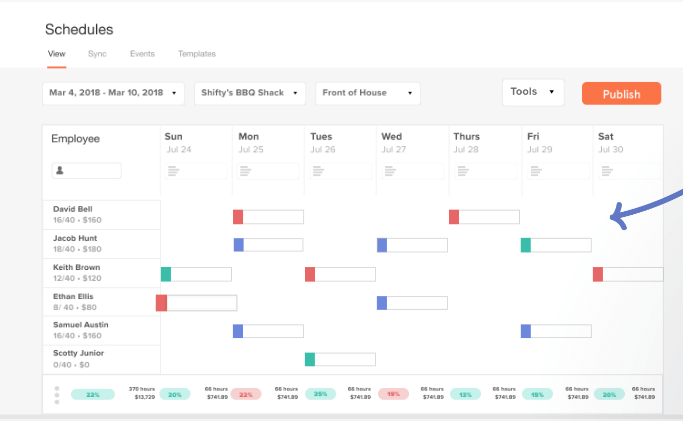
7shifts is an employee scheduling platform designed for hospitality teams who need simple shift planning, time-off management, and team communication in one place, making it easy for managers to handle changing schedules and labor costs.
Who Is 7shifts Best For?
7shifts is a great fit for restaurant owners and managers who need scheduling tools built around the realities of shift-based, high-turnover hospitality work.
Why I Picked 7shifts
I picked 7shifts as one of the best because it's built exclusively for restaurants—and that specificity shows up in every part of the scheduling experience. I love that the AI-driven sales forecasting pulls in historical POS data to recommend exactly how many staff to schedule per shift, so I'm not guessing during a Friday dinner rush or overstaffing a slow Tuesday lunch. The labor compliance tools are also a standout for restaurant managers: 7shifts flags "clopen" shifts, tracks minor scheduling restrictions, and sends real-time overtime alerts as I'm building the schedule—not after the fact. For a restaurant team juggling high turnover and variable shift patterns, that kind of built-in guardrail is genuinely useful.
7shifts Key Features
- Drag-and-drop schedule builder: Build and adjust weekly schedules visually by dragging shifts across roles, days, and locations.
- Shift pool and shift swapping: Employees can pick up open shifts or request swaps directly in the app, with manager approval controls.
- Time-off and availability management: Staff submit availability and time-off requests in the app, which automatically block out those windows when scheduling.
- In-app team messaging: Send direct messages or group announcements to specific roles, departments, or your entire team from within the platform.
7shifts Integrations
Integrations include Toast, Square, Lightspeed, Clover, Revel, Aloha POS, ADP Workforce Now, QuickBooks, Heartland, and Micros.
What's Free?
7shifts offers a free-forever plan for single-location restaurants with up to 15 employees. The free plan includes basic scheduling, availability and time-off management, and one-way announcements, but advanced features and integrations are limited to paid plans.
Pros and Cons
Pros:
- Tip pooling tied directly to POS & hours data
- Shift-swaps and time-off requests handled via employee mobile app
- Lets you view predicted labour cost as you build shifts
Cons:
- Training required to set up integrations properly
- Sync delays with certain POS systems

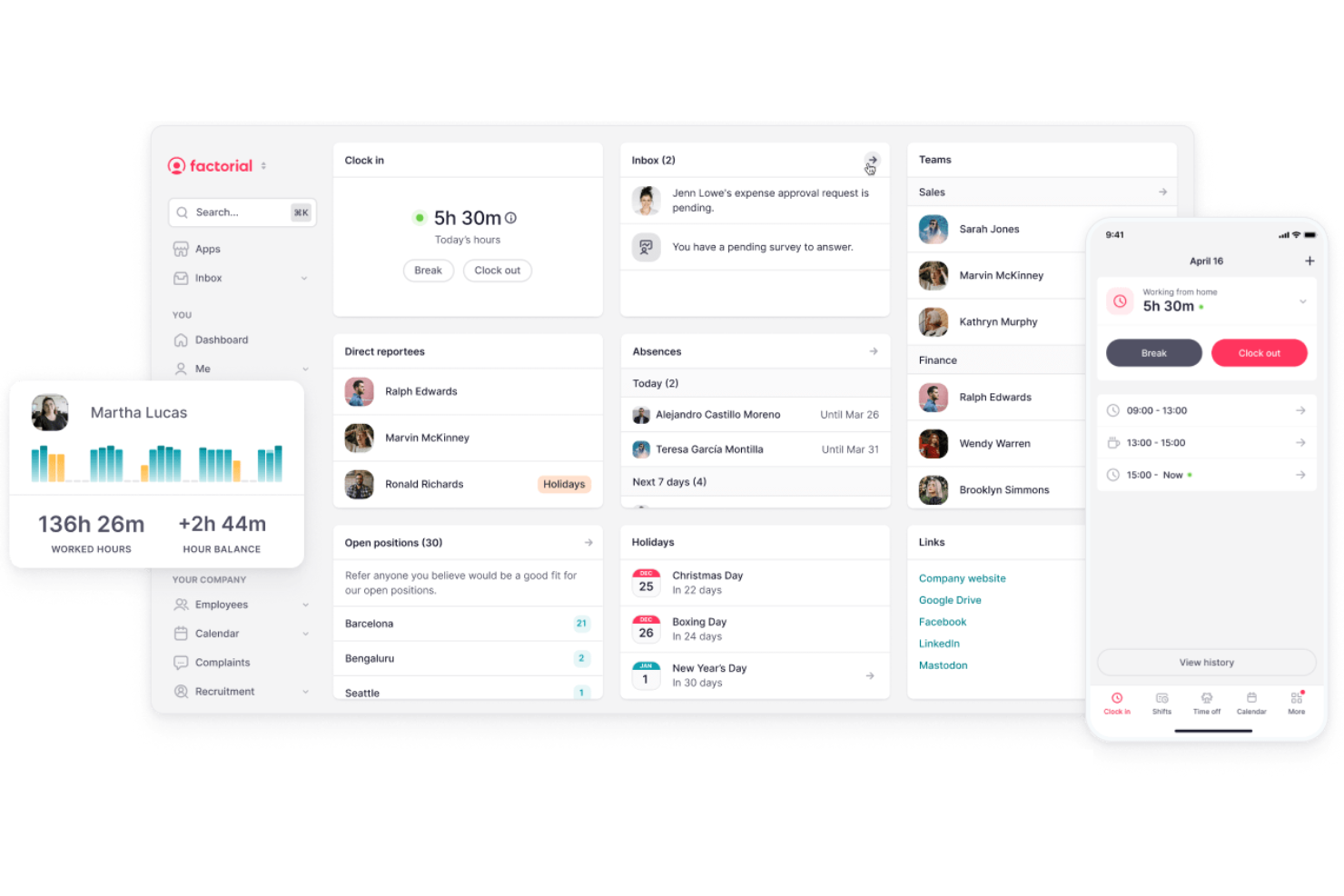
Factorial is an HR platform for small to midsize businesses that need to manage employee scheduling, time tracking, and attendance in one place while connecting these processes with broader HR needs.
Who Is Factorial Best For?
Factorial is a strong fit for small to midsize businesses that need a single platform to handle scheduling, HR, and payroll without juggling multiple tools.
Why I Picked Factorial
I picked Factorial as one of the best because of how tightly its scheduling and time tracking connect to payroll. When employees clock in and out, those hours feed directly into payroll calculations—overtime included. That means I'm not manually reconciling timesheets against pay runs or chasing down discrepancies at the end of the month. I also like that Factorial lets you program and automate bonuses with manager validation built in, so compensation changes are reflected in payslips without extra admin steps.
Factorial Key Features
- Drag-and-drop shift scheduling: Build and adjust employee schedules using a visual drag-and-drop interface with built-in conflict detection.
- Shift swapping: Let employees request shift swaps directly from the mobile app, reducing back-and-forth with managers.
- Geolocation clock-in: Track where employees are clocking in from using GPS-based location verification tied to their time logs.
- Centralized team calendar: View time off, absences, and scheduled shifts in one shared calendar that updates automatically.
Factorial Integrations
Integrations include a3innuva Nómina, DATEV LODAS, Sage 200, Payflow, TravelPerk, Google Workspace, Microsoft Outlook, Microsoft Power BI, Teamtailor, and Figures. Factorial also offers a public API for custom integrations.What's Free?
Factorial offers a free demo so you can explore the platform’s features before committing. There is no free-forever plan or time-limited free trial listed.
Pros and Cons
Pros:
- Custom approval workflows for time off
- Mobile app supports clock-in and scheduling
- Built-in payroll sync with scheduling data
Cons:
- No shift swapping in free version
- Free plan limited to one admin user
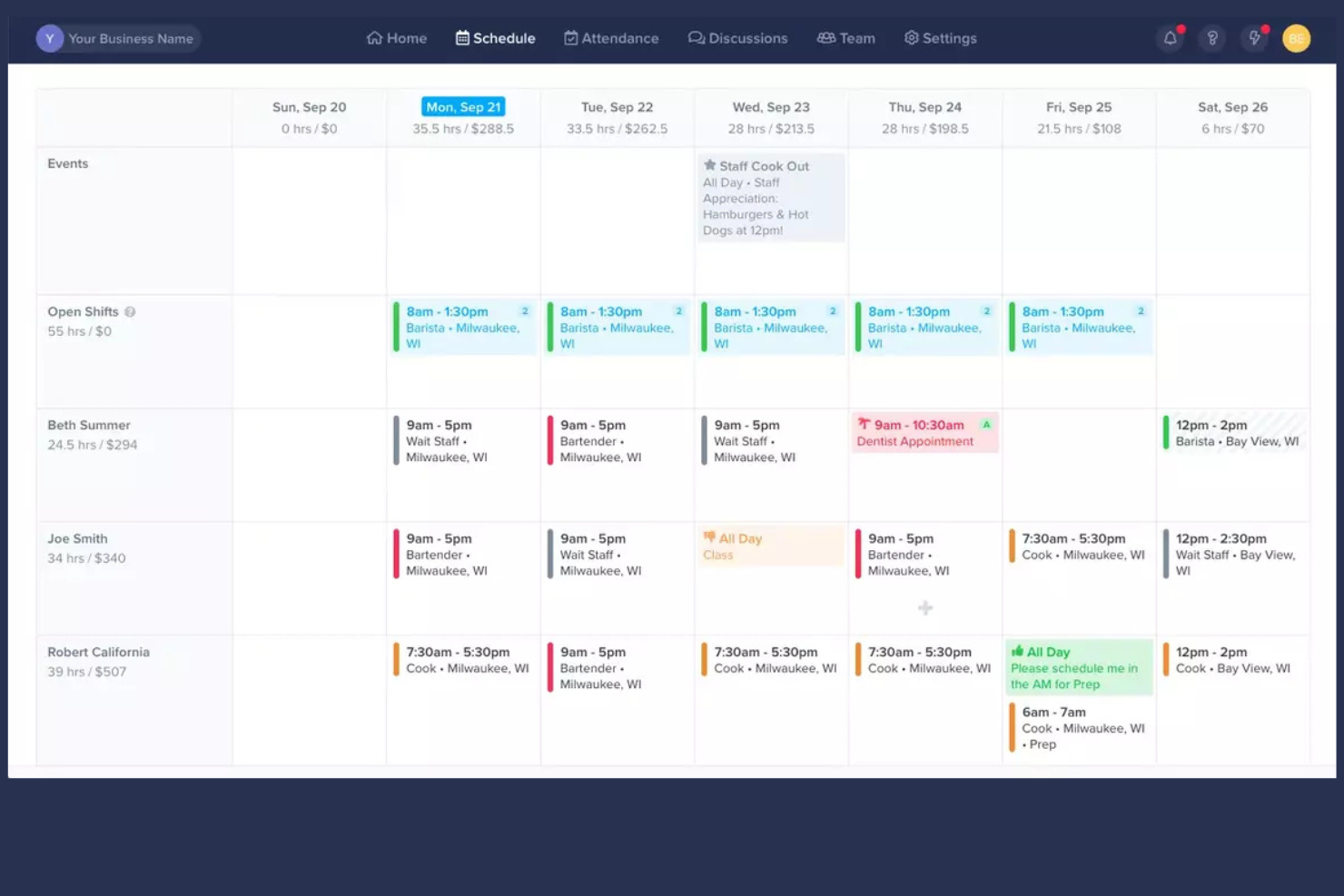
ZoomShift is a scheduling platform designed for businesses with shift-based teams, helping managers and hourly staff coordinate work schedules, track time, and handle shift changes.
Who Is ZoomShift Best For?
ZoomShift is a great fit for small businesses in retail, hospitality, and food service that rely on hourly workers and need simple, no-fuss shift scheduling.
Why I Picked ZoomShift
ZoomShift earns its spot on my shortlist because it's built specifically for hourly employee scheduling, not adapted from a general project or workforce management tool. I like how the availability and shift swap features work together—employees set their availability directly in the app, and when a shift needs to change, they can request a swap without managers having to chase anyone down. I also use the schedule templates to rebuild recurring weekly shifts in minutes rather than starting from scratch each time. The labor cost forecasting tool is another feature I find genuinely useful, letting me compare scheduled hours against a set budget in real time and flag overtime conflicts before they hit payroll.
ZoomShift Key Features
- Time clock: Employees clock in and out directly from the mobile app or a shared device, with GPS tracking to verify location.
- In-app messaging: Managers and team members can send direct messages or group announcements without leaving the platform.
- Open shifts: Managers can post unfilled shifts for eligible employees to claim, reducing the back-and-forth of manual outreach.
- Timesheet management: ZoomShift automatically generates timesheets from clock-in data, which managers can review and approve before exporting to payroll.
ZoomShift Integrations
Integrations include QuickBooks, ADP, Gusto, Paychex, Google Calendar, Outlook Calendar, iCal, and an API for custom integrations.
What's Free?
ZoomShift offers a free-forever Essentials plan for up to 20 users, which includes basic scheduling and team communication features. Scheduling is limited to two weeks in advance and one location on the free plan.
Pros and Cons
Pros:
- Employees can set availability and request shifts
- Built-in time clock with GPS verification
- Shift templates for recurring schedule patterns
Cons:
- Shift swapping not included in free trial
- Admin features restricted during trial period

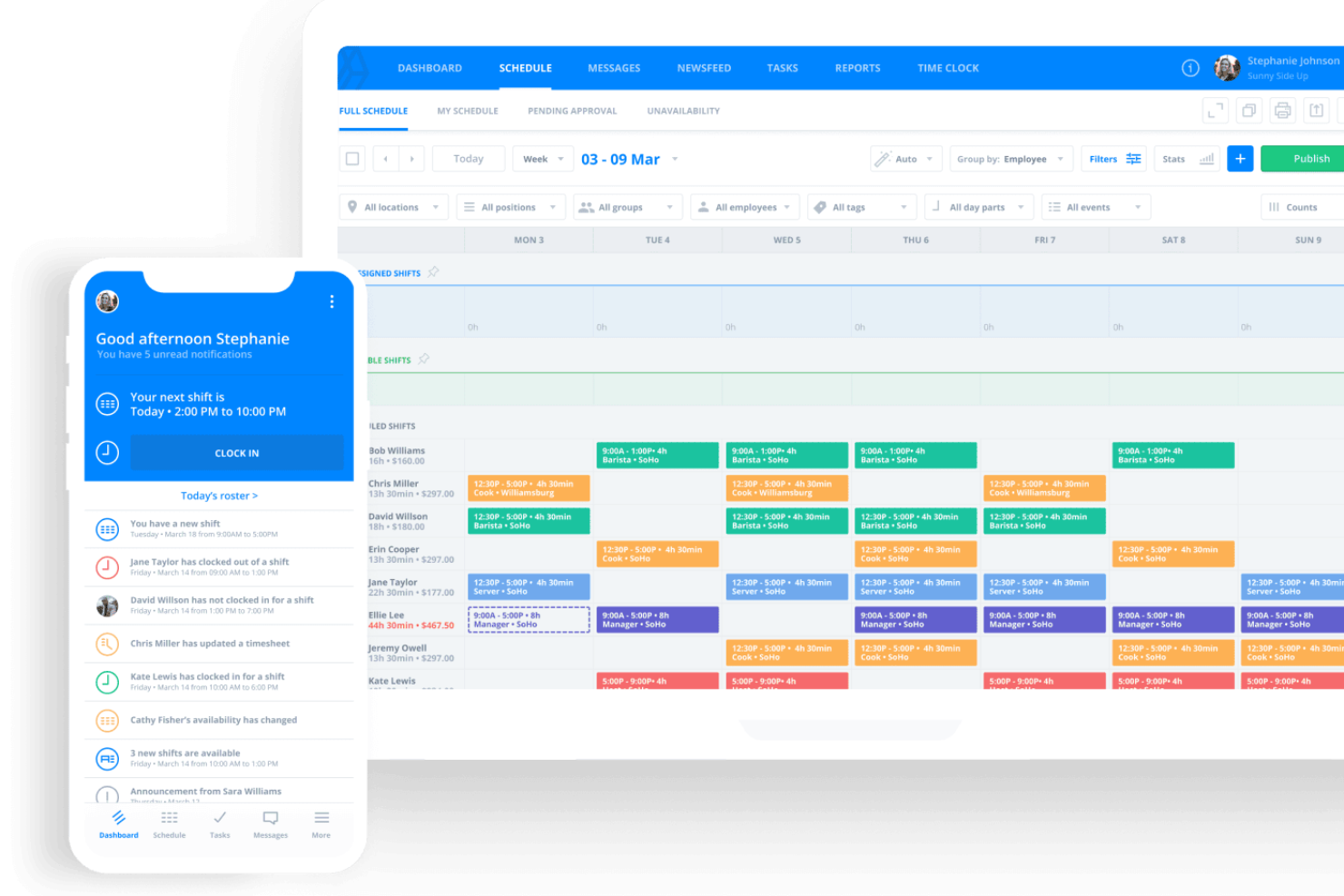
Sling is a scheduling platform built for businesses with hourly teams, helping managers and staff coordinate shifts, track availability, and communicate in one place without the hassle of spreadsheets or endless group messages.
Who Is Sling Best For?
Sling is a great fit for managers in retail, hospitality, and food service who need to schedule and coordinate large hourly teams across one or more locations.
Why I Picked Sling
I picked Sling as one of the best because it handles scheduling for large groups across multiple roles and locations. When you manage a team of 20+ hourly workers, Sling lets you filter and assign shifts by position or location, avoiding a single giant roster you must scan to piece together coverage. I also like the available shifts feature, which lets employees claim open slots themselves—allowing the group to self-organize around what needs to be filled. Group messaging lets you reach specific departments or roles directly, so a shift update for your kitchen staff doesn't go to your front-of-house team.
Sling Key Features
- Time-off management: Employees can submit time-off requests directly in the app, and managers can approve or deny them without leaving the schedule.
- Labor cost tracking: Set hourly wage rates and Sling displays projected labor costs as you build the schedule, so you can stay within budget.
- Newsfeed: Post announcements to your entire team or specific groups, with employees able to like and comment on posts.
- Overtime alerts: Sling flags employees who are approaching overtime thresholds as you assign shifts, helping you avoid unexpected labor costs.
Sling Integrations
Integrations include Toast, Shopify, Square, Gusto, Harbortouch, Restaurant Manager, and POSiTouch.
What's Free?
Sling offers a free-forever plan that includes basic scheduling, time-off requests, and team messaging. The free plan does not include features like labor cost tracking, overtime alerts, or third-party integrations.
Pros and Cons
Pros:
- Employees can set availability and request time off
- Built-in team messaging for shift coordination
- Free plan includes unlimited users and locations
Cons:
- No auto-scheduling or AI shift suggestions
- Free plan lacks payroll and POS integrations


Findmyshift is an employee scheduling platform designed for small businesses, hospitality teams, and organizations that need a simple way to manage shifts, track attendance, and handle last-minute changes without the hassle of spreadsheets or manual processes.
Who Is Findmyshift Best For?
Findmyshift is a strong fit for small to mid-sized teams in shift-heavy industries like retail, hospitality, and healthcare that need straightforward scheduling without a steep learning curve.
Why I Picked Findmyshift
Findmyshift earns its spot on my shortlist because of how well its drag-and-drop scheduler handles the day-to-day chaos of shift management. I like that you can move shifts around the schedule grid with point-and-click editing, right-click menus, and keyboard shortcuts—so when someone calls in sick, I don't have to hunt through menus to reassign their shift. The copy-and-paste functionality is a real time-saver when I'm building out a recurring weekly schedule. The built-in shift swap and cancellation requests let employees handle changes themselves, pending manager approval, which cuts down on the back-and-forth.
Findmyshift Key Features
- Time clock: Employees can clock in and out directly through the platform, with timestamps logged against their scheduled shifts.
- Availability management: Staff can submit their availability and time-off requests, which managers can approve or decline from the schedule view.
- Automated reminders: Findmyshift sends shift reminders to employees via email or SMS so upcoming shifts don't get missed.
- Payroll reporting: Generate exportable reports that calculate hours worked and pay based on shift data and individual pay rates.
Findmyshift Integrations
Integrations include Google Calendar, Microsoft Outlook, Apple Calendar, and a developer API is available for custom integrations.
What's Free?
Findmyshift offers a free-forever plan for up to 5 employees per organization. This plan includes core scheduling features but does not support payroll exports or advanced reporting.
Pros and Cons
Pros:
- Staff can request time off in-app
- Free plan includes unlimited employees and schedules
- Drag-and-drop scheduling for quick shift changes
Cons:
- Mobile app has fewer features than desktop
- No auto-scheduling or shift suggestion tools

ABC Roster is a free employee scheduling tool for small businesses and organizations that manage shift patterns, track staff availability, and simplify roster creation without extra costs.
Who Is ABC Roster Best For?
ABC Roster is a good fit for small businesses and nonprofits that need a straightforward, no-cost tool for managing staff schedules without complex software overhead.
Why I Picked ABC Roster
ABC Roster earns its spot on my shortlist because of how well it handles schedule constraints for small teams. I like that the automated planner doesn't just fill shifts—it generates schedules by analyzing defined constraints, like employee availability windows, days off, and special events, so the output actually reflects real-world staffing limits. In practice, that means my team can set up rules around who's available and when, and let the planner do the heavy lifting instead of manually cross-referencing availability every week. The drag-and-drop schedule builder then makes it easy to fine-tune the result before emailing it directly to staff.
ABC Roster Key Features
- Employee availability tracking: Record each employee's available days and hours to inform schedule generation.
- Schedule export: Export completed rosters to Microsoft Excel, PDF, or HTML for sharing or record-keeping.
- Special event and day-off settings: Mark individual days as special events or days off to account for exceptions in the schedule.
- Direct email distribution: Send finalized schedules to employees directly from within the application.
ABC Roster Integrations
No native integrations are listed.
What's Free?
ABC Roster offers a free-forever plan with no user limits and full access to its core scheduling features. Integrations and advanced automation are not included.
Pros and Cons
Pros:
- Generates printable schedules in multiple formats
- Free to use with no paid upgrade
- Handles complex shift and availability constraints
Cons:
- Lacks built-in messaging or chat features
- No mobile app for on-the-go access
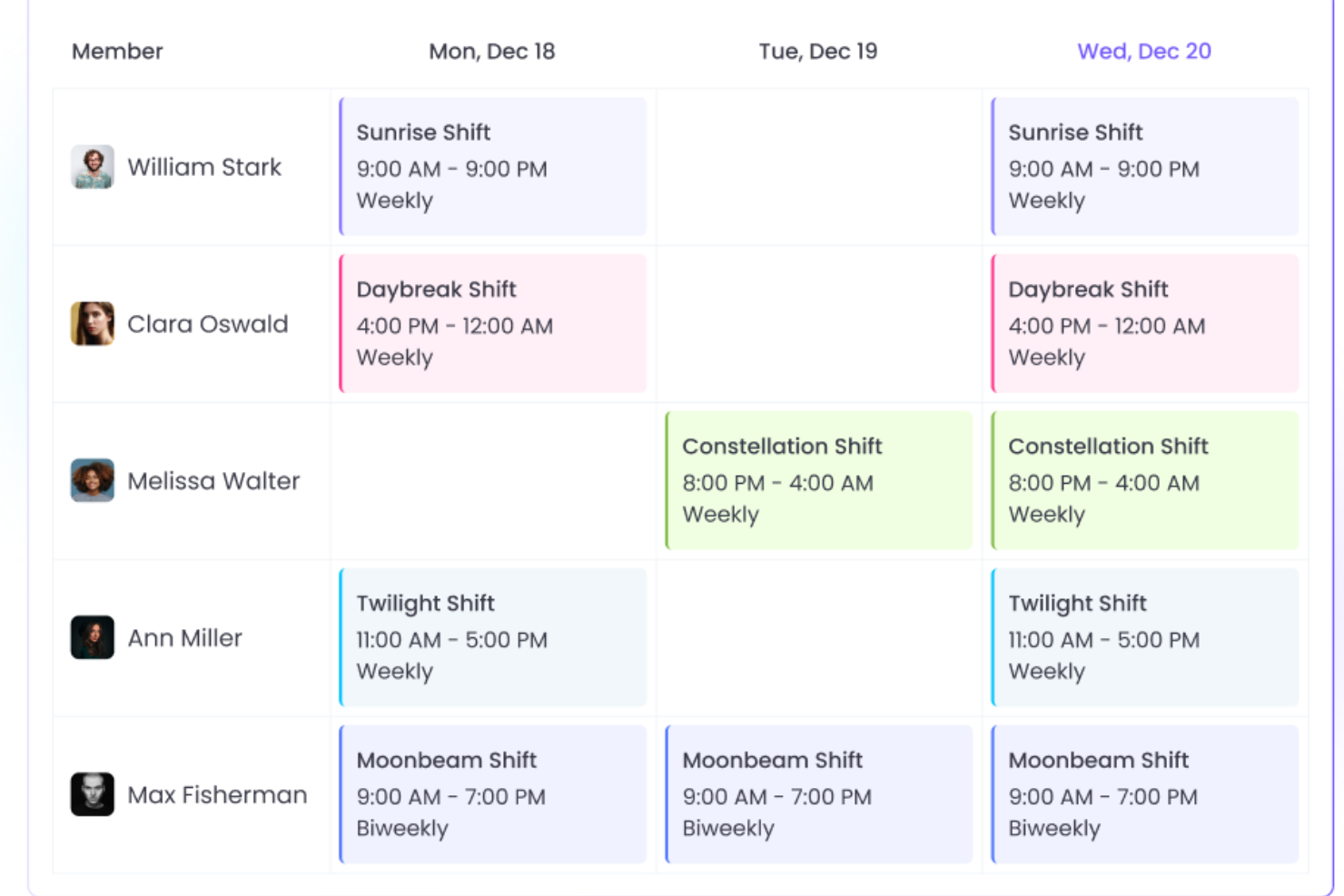
WebWork Time Tracker gives teams and managers a way to schedule shifts, track attendance, and monitor productivity, making it a practical choice for businesses that need to coordinate employee schedules and time tracking in one platform.
Who Is WebWork Time Tracker Best For?
WebWork Time Tracker is a good fit for small to mid-sized businesses managing remote or hybrid teams who need to track work hours and coordinate schedules across locations.
Why I Picked WebWork Time Tracker
WebWork Time Tracker earns its spot on my shortlist because it's one of the few scheduling tools that pairs shift management with real-time activity monitoring—something remote and hybrid teams genuinely need. I like that you can assign shifts across different time zones and track whether employees are actually working their scheduled hours, all from the same dashboard. The silent and visible tracking modes are a nice touch too: you can run the silent tracker on company-owned devices and the visible app on personal ones, which matters when your team is spread across locations with different device policies. The AI-powered productivity insights also flag things like burnout risk and unusual activity patterns, so you're not just scheduling shifts—you're keeping an eye on whether your distributed team is sustainable.
WebWork Time Tracker Key Features
- Attendance tracking: Log employee clock-ins and clock-outs automatically and view attendance records in a centralized timeline.
- Screenshots and activity monitoring: Capture periodic screenshots and measure app and website usage during scheduled work hours.
- Timesheets: Generate detailed timesheets that break down hours worked per employee, project, or task across any date range.
- Leave management: Record and manage employee time-off requests alongside scheduled shifts in one place.
WebWork Time Tracker Integrations
Integrations include Asana, Bitbucket, Azure DevOps, ClickUp, Deel, GitHub, Google Workspace, Gusto, Jira, Notion, and QuickBooks.
What's Free?
WebWork Time Tracker offers a 14-day free trial with access to all features and plans. There is no free-forever plan, and after the trial, a paid subscription is required.
Pros and Cons
Pros:
- Tracks leave requests and approvals in-app
- Includes screenshot monitoring for remote oversight
- Offers shift scheduling and time tracking together
Cons:
- Limited customization for shift templates
- Lacks advanced reporting for scheduling analytics

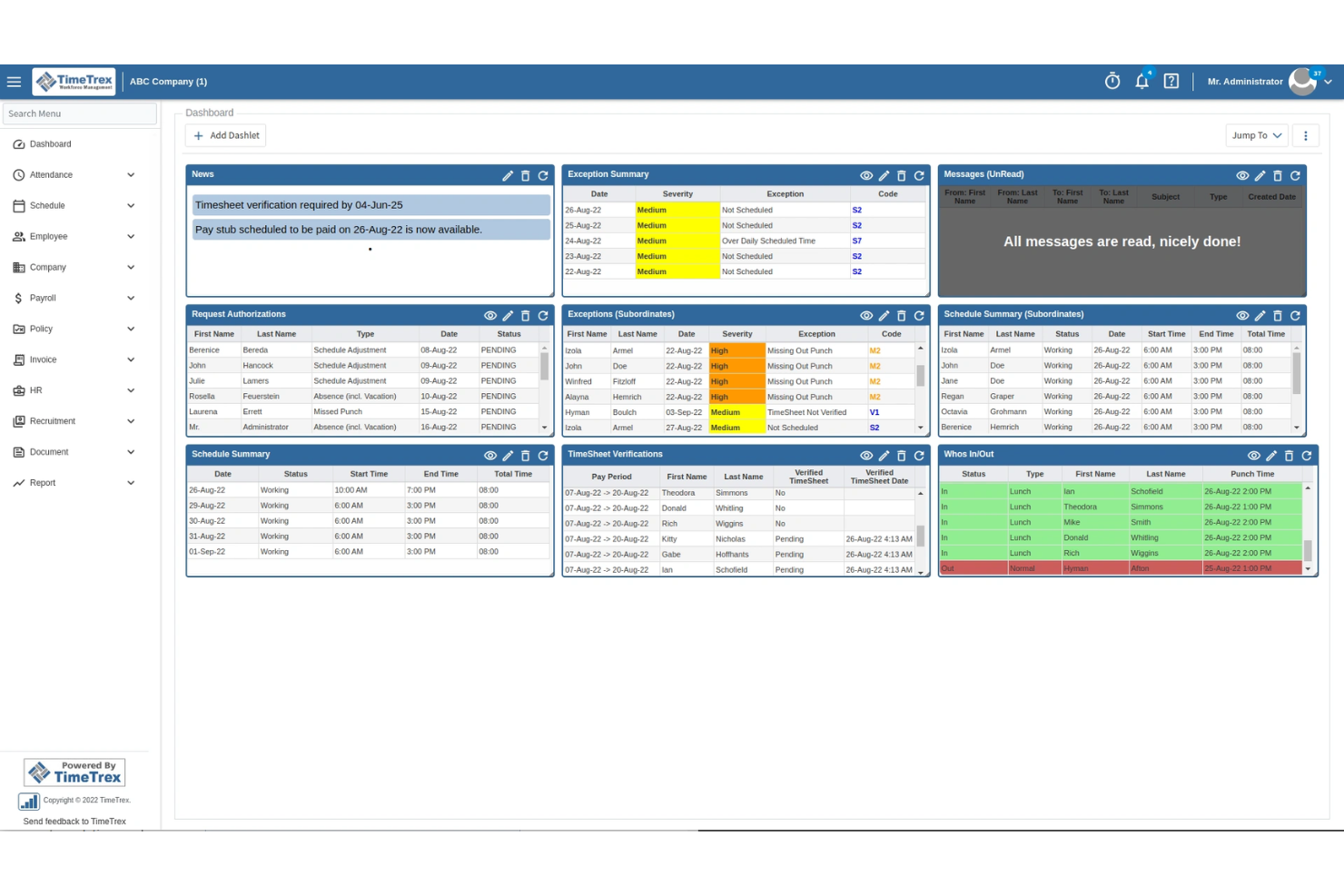
TimeTrex gives small businesses and organizations a way to manage employee scheduling, attendance, and payroll in one platform, helping teams handle shift planning and time tracking without extra cost.
Who Is TimeTrex Best For?
TimeTrex is a strong fit for small to mid-sized businesses that need an all-in-one workforce management tool without the cost of enterprise software.
Why I Picked TimeTrex
TimeTrex stands out for how comprehensive its automated scheduling is. I like that it handles multi-week rotating schedules automatically, so my team isn't rebuilding the same shift patterns from scratch every cycle. The shift template feature is particularly useful here—once you've set up a template, it applies consistently across the schedule without manual input. I also find the bottom-up scheduling approach genuinely practical: employees submit their availability and time-off preferences directly, and the system routes those requests through multi-level approvals, which cuts down on the back-and-forth that usually clogs up a manager's inbox.
TimeTrex Key Features
- GPS and geofencing: Track employee locations in real time and enforce job site attendance with customizable geofences for location-based clock-ins.
- Employee self-service portal: Employees can update personal information, access pay stubs, and submit time-off requests directly without going through HR.
- Real-time attendance dashboard: View live attendance data, monitor who's clocked in, and make schedule adjustments on the spot.
- Built-in messaging: Send internal messages between team members and managers directly within the platform without switching to a separate communication tool.
TimeTrex Integrations
Integrations include QuickBooks, ADP, Paychex, Ceridian, Sage, and an API is available for custom integrations.
What's Free?
TimeTrex offers a free-forever Community Edition that includes core scheduling, time tracking, and payroll features. This plan is self-hosted and does not include premium support or advanced modules like biometric devices and mobile app access.
Pros and Cons
Pros:
- Automated shift assignment based on availability
- Built-in time tracking and attendance tools
- Payroll integration included in free plan
Cons:
- Mobile app can be slow to update
- Interface feels dated compared to competitors
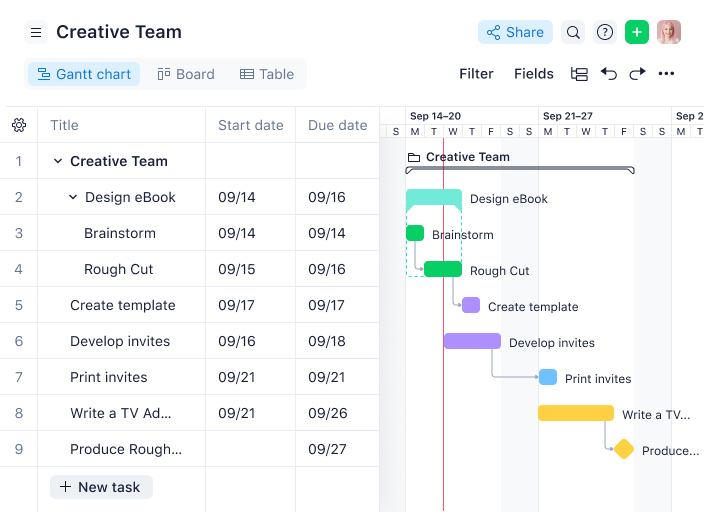
Wrike gives teams in fast-paced businesses a way to organize schedules, assign tasks, and manage employee workloads with visual project planning tools that help keep everyone on track.
Who Is Wrike Best For?
Wrike is a strong fit for mid-sized teams and growing businesses that need to coordinate schedules and workloads across multiple projects and departments.
Why I Picked Wrike
I picked Wrike as one of the best because of how its interactive Gantt chart handles the kind of scheduling complexity that trips up most free tools. I like that you can drag and drop tasks directly on the timeline to reschedule in bulk—when one task shifts, all dependent tasks automatically adjust with it. I also use the critical path analysis feature to spot bottlenecks before they derail a project. The ability to share Gantt chart snapshots via secure public links means my team can keep external stakeholders in the loop without giving them full platform access.
Wrike Key Features
- Workload view: See each team member's assigned tasks and capacity in a visual chart to spot who's overloaded or underutilized.
- Custom request forms: Build intake forms that automatically route incoming work requests to the right team member or project folder.
- Time tracking: Log hours directly on tasks to monitor how long scheduled work actually takes against planned estimates.
- Recurring tasks: Set tasks to repeat on a defined schedule so routine work gets automatically added to the team's workload.
Wrike Integrations
Integrations include Microsoft Teams, Salesforce, Google Drive, Microsoft SharePoint, Zoom, Adobe Creative Cloud, QuickBooks, Power BI, Tableau, and Miro.
What's Free?
Wrike offers a free-forever plan for small teams with up to 5 users. The free plan includes basic task management features but does not support Gantt charts, time tracking, or most integrations.
Pros and Cons
Pros:
- Recurring tasks simplify shift planning
- Workload view helps prevent overbooking staff
- Gantt charts provide clear visual scheduling
Cons:
- No built-in shift swapping for employees
- Free plan limits advanced scheduling features
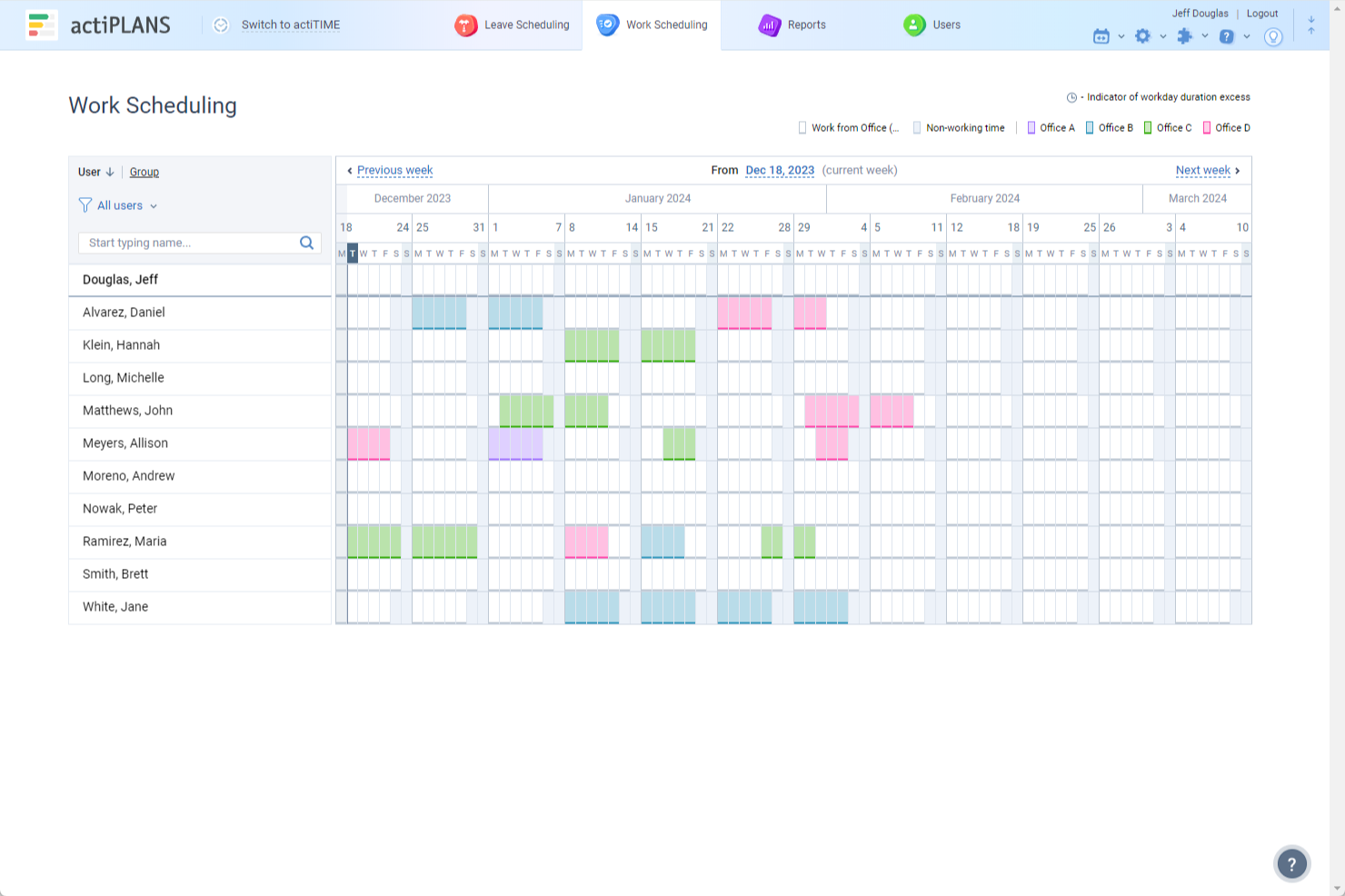
actiPLANS is a scheduling platform designed for teams and businesses that need to manage employee availability, track absences, and simplify time-off requests in one place.
Who Is actiPLANS Best For?
actiPLANS is a good fit for small to mid-sized businesses that need a straightforward way to manage employee leave and scheduling without a complex HR system.
Why I Picked actiPLANS
actiPLANS earns its spot on my shortlist because of how well it handles leave management automation for scheduling purposes. I like that it lets you set up automated leave approval workflows, so managers aren't manually chasing down requests—employees submit time off, and the system routes it through the right approval chain automatically. I also use the leave balance tracking feature, which updates in real time and feeds directly into the schedule, so I can see availability gaps before they become a problem.
actiPLANS Key Features
- Visual timeline: A color-coded shared calendar that displays each team member's scheduled leave so you can spot availability gaps at a glance.
- PTO blackout days: A corporate calendar setting that blocks employees from submitting time-off requests during peak business periods.
- Role-based permissions: User access controls that let you grant or restrict each employee's visibility into schedules, leave data, and actiPLANS features.
- Absence reporting: Built-in reports with filtering options that surface staff absence trends using visual charts, exportable as CSV or PDF files.
actiPLANS Integrations
Native integrations are not currently listed.
What's Free?
actiPLANS offers a free-forever plan for up to 3 users. This plan includes core leave management features but does not support integrations or advanced reporting.
Pros and Cons
Pros:
- Built-in notifications for leave status updates
- Real-time absence calendar for all users
- Automated leave accruals and policy rules
Cons:
- Limited native integrations beyond calendars
- No shift scheduling or rota management
Other Free Employee Scheduling Software
Here are a few more options that didn’t make the best employee scheduling software shortlist:
- Asana
For Kanban-style task scheduling
- Acuity Scheduling
For appointment-based shift scheduling or recurring appointments
- Google Workspace
For existing Google users
- OpenSimSim
Employee scheduling and time tracking tool for mid-sized companies
- Tickspot
Employee scheduling and timecard application for freelancers


Related HR Software Reviews
If you still haven't found what you're looking for here, check out these other related tools that we've tested and evaluated:
- HR Software
- Payroll Software
- Recruiting Software
- Employer of Record Services
- Applicant Tracking Systems
- Workforce Management Software
Selection Criteria for Free Employee Scheduling Software
To find the best free employee scheduling tools, I focused on features that improve shift planning, attendance tracking, team communication, and overall efficiency — while also saving managers time and giving employees more control.
My selection is based on in-depth research into current scheduling software market data, common buyer pain points, and how each tool performs in real-world use. I also verified what each platform offers for free, so you’ll know exactly what’s included at no cost.
Here's a summary of the selection criteria I used to make my final picks for this list:
Core Employee Scheduling Software Functionalities (25% of total score): To be considered for inclusion in my list of the best free scheduling software, each system had to fulfill the following common use cases first:
- FREE tools to create weekly employee work schedules
- Efficient shift planning and distribution
- Tools to handle time-off requests and approvals
- Real-time updates and notifications for staff
- Integrations with other business systems for streamlined operations
Additional Standout Features (25% of total score): To help me hone in on the best free employee scheduling software available, I also took note of any unique features*, including:
- Tools to facilitate shift swaps and coverage among employees
- Innovative scheduling features, such as predictive scheduling based on historical data or AI-driven shift optimization tools
- Full-feature mobile apps that offer more than just schedule viewing and enhance user engagement and accessibility
- Systems with unique insights and advanced reporting & analytics
- Solutions that offer flexible tools for shift customization and employee role assignments
*Note that not all these features are included in free plans, but it depends on the software developer.
Usability (10% of total score): To evaluate the usability of each employee scheduling system, I considered the following:
- An intuitive user interface design, offering a balance between powerful features and an easy-to-navigate interface
- User-friendly design elements like drag-and-drop calendars for scheduling and in-app communication tools
- Role-based access controls that are simple to set up and manage
Onboarding (10% of total score): To get a sense of each software provider's customer onboarding process, I considered the following factors:
- Quick setup processes and clear guidance for first-time users, including customizable templates
- Comprehensive training materials such as videos or interactive tutorials
- Support for migrating data from previous systems into the new platform
Customer Support (10% of total score): To evaluate the level of customer support each vendor offered, I considered the following:
- The availability of multiple support channels, including email, phone, and chat
- The existence of a self-service knowledge base, FAQ repository, or other self-help resources to speed up troubleshooting
- The overall quality, responsiveness, and helpfulness of the support team during customer onboarding and post-purchase, as inferred from customer reviews
Value for Price (10% of total score): To gauge the value of each software, I considered the following factors:
- The availability of free trials or demos to test the software before purchasing
- Transparent pricing models that clearly explain which features are included at each level, with no hidden fees
- Tiered pricing plans that cater to different business sizes, from small to medium-sized businesses (SMBs) up to enterprise-level organizations
Customer Reviews (10% of total score): Evaluating customer reviews is the final element of my selection process, which helps me understand how well a product performs in the hands of real users. Here are the factors I considered:
- Whether a product has consistently high ratings across multiple review platforms, indicating a broad level of user satisfaction
- Specific praises, criticisms, or trends in customer feedback that indicate the software's strengths or areas for improvement
- Whether customer feedback specifically mentions issues with ease of use, customer support responsiveness, or lacking features
- Testimonials that highlight beneficial use cases, including mobile app functionality and customization options
Using this assessment framework helped me identify the employee scheduling software that goes beyond basic requirements to offer additional value through unique features, intuitive usability, smooth onboarding, and effective support, and all for a low price or no price.
How to Choose Free Employee Scheduling Software
Free employee scheduling software can address many challenges, but finding the right fit requires a careful approach. Before diving in, it's crucial to understand the unique needs and challenges your business is facing to guide your selection process.
Here are the most important points to keep in mind to help you choose the best free scheduling software for your team:
- What scheduling challenges are you trying to solve? Start by pinpointing the scheduling issues you're trying to overcome. Are you dealing with frequent shift conflicts, last-minute changes, or employee availability miscommunications?
- Understanding your specific challenges will help you narrow down which free software has the features and functionalities to address them.
- What outcomes are important and how will you measure success? Being clear on your desired outcomes upfront is crucial to avoid wasting valuable time. Are you trying to reduce scheduling conflicts, improve absenteeism, or create a better employee experience for your staff by allowing them to trade shifts?
- Keeping your ultimate goals front and center will help you choose software that delivers the benefits you need, without getting lost in unnecessary features.
- Who are your main users? Consider who will use the software, who your power users are, and how many licenses you'll need. Will it just be your HR professionals and managers handling schedules, or will your whole company need access to trade shifts?
- Since many free tools limit users, it's important to choose software that supports your whole team without hidden fees.
- What software integrations do you require? Make sure the free scheduling software integrates smoothly with the other tools you're already using, such as payroll systems, HR management software, or time-tracking tools.
- Many free solutions have limitations on integrations, so verify whether they can connect with your existing systems or if they’ll require workarounds or extra charges.
- Does the free software satisfy your technical requirements? Consider the software selection alongside your existing workflows and other technical requirements. While a tool might be free, if it doesn’t align with your team’s current workflow, it can create more problems than it solves.
- Consider how it would integrate into your daily operations. Does it support your scheduling process, or will it require significant adjustments to make it work?
Remember, every business is different. Just because an employee scheduling system is free, that doesn't mean it's the right fit for your organization. Instead, focus on the challenges, outcomes, and user needs that matter most to your team to find the best solution for you.
Trends in Free Employee Scheduling Software
Free employee scheduling tools are evolving fast — not just to attract users, but to hook them with enough value to consider upgrading. The latest trend? Smarter, more flexible, and user-friendly platforms that support both managers and frontline staff.
Here are some key trends shaping employee scheduling software currently:
- Integration with Remote Work Tools: Integration with remote work platforms and communication tools has almost become a standard feature, reflecting the ongoing shift to hybrid and remote work environments. This integration enhances coordination and flexibility, allowing teams to stay connected and informed regardless of their physical location.
- AI-Powered Scheduling: Artificial intelligence has been increasingly incorporated to optimize scheduling, taking into account employee preferences, business needs, and even predicting future staffing requirements. This trend indicates a move toward more proactive and intelligent scheduling solutions that can adapt to changing conditions in real-time.
- Employee Self-Service Capabilities: There's a noticeable uptick in features that empower employees, such as shift swapping, open shift claiming, and submitting time-off requests directly through an app. This functionality addresses the demand for greater autonomy and work-life balance, making scheduling more democratic and flexible.
- Mental Health and Wellbeing Analytics: Some platforms have begun to include analytics tools that monitor employee wellbeing, using scheduling data to identify patterns that may indicate burnout or overwork. This novel use of scheduling software underscores a growing recognition of the importance of mental health in the workplace.
The trends reflect a broader shift toward more intelligent, flexible, and employee-centric tools to improve scheduling, productivity, employee well-being, and strategic resource management.
What is Free Employee Scheduling Software?
Free employee scheduling software is a workforce management tool that helps managers create, update, and share work schedules for hourly or shift-based teams — at no cost.
Used by HR professionals, team leads, and small business owners, this software reduces scheduling conflicts, improves team communication, and saves time by automating shift assignments, availability tracking, and time-off requests.
Features of Employee Scheduling Software
Free employee scheduling software can help you optimize your scheduling processes without incurring additional costs. However, while I understand the importance of finding a cost-effective tool, remember that free software will only offer you the bare basics.
Here are the most important employee scheduling features to look for, which I've broken down depending on whether you'll be able to get them for free or not:
Typically Free Scheduling Features:
- Basic Scheduling: This refers to basic scheduling tools that allow you to create weekly schedules for hourly workers to ensure optimal staff levels - the crux of this type of software.
- Time Tracking: Time tracking is a critical functionality for any employee scheduling app. Managers need to track how much time an employee spends on a particular task and also approve timesheets. Employee scheduling apps that have this feature help to boost company productivity.
- Basic Timesheet Reporting and Analytics: These are features to prepare timesheet reports including logged work hours, overtime, and billable hours. Some free systems also offer additional analytics from this data, but not all. Based on timesheet reporting, a business owner will be able to calculate payroll, ship correct invoices, and get a clear picture of the output of their team.
- Mobile App Accessibility: Since nearly everyone has a phone in their pocket at all times, it's crucial that your employee scheduling software offers a mobile app, or is at least mobile-friendly. That way, your employees can stay up-to-date on their work schedule while on the go.
- Schedule Export Options: Depending on your industry, you may need to export your schedules as PDFs, spreadsheets, or email attachments. This is especially important for teams that work remotely or may have limited internet access. Exporting schedules helps take data from the software and store it in the team member’s personal device. This helps in keeping the entire team on track even without access to the software.
- Time-off Requests and Approvals: Time-off requests are a key feature of employee scheduling software as it is directly related to the productivity of the organization. Time-off requests are important for keeping your workforce motivated and active, so an organized way of calculating time-off and submitting requests becomes all the more important.
Advanced Scheduling Features Found in Paid Plans:
- Shift Swapping: This feature allows employees to swap shifts directly within the app, subject to approval. This autonomy reduces management overhead and increases employee satisfaction by giving them control over their schedules.
- Customizable Shifts: This feature allows you to create shifts based on roles, skills, or departments. This level of customization ensures that the right people are scheduled for the right job, enhancing efficiency. (If you want a truly customizable scheduling platform from top to bottom, an open-source scheduling system may be a better fit for your needs.)
- Multi-Location Support: This feature is crucial for businesses with multiple locations. It simplifies schedule management for owners and managers overseeing several operations, ensuring consistency across all sites.
- Integration Capabilities: The ability to integrate with other business systems such as payroll, HR, and time-tracking software can positively impact the efficiency of your operations, reducing errors, and saving time by automating data transfer across platforms.
- Labor Cost Forecasting: This feature helps companies predict labor costs based on historical data, sales forecasts, and staffing needs. It helps businesses plan budgets and adjust schedules to optimize labor costs and improve financial efficiency.
- Budgeting and Cost Analysis: This refers to tools that track actual labor costs against expected costs and budgets, with flags for when your budget will be exceeded. In addition, by analyzing cost trends, this feature can also support better labor cost forecasting in the future.
- Overtime Management: The ability to track and manage overtime also prevents excessive labor costs while ensuring compliance with labor laws, such as the maximum number of consecutive work days that are allowed in your jurisdiction.
Common Employee Scheduling AI Features
Many employee scheduling solutions are incorporating AI features to improve the customer experience, for example:
- Automated schedule optimization: AI analyzes staffing needs, employee availability, labor laws, and historical demand to build the most efficient schedule automatically — reducing conflicts and saving hours of manual planning.
- Predictive labor forecasting: AI predicts future staffing requirements based on patterns, seasonality, and real-time business data, helping you stay ahead of busy periods and avoid costly overstaffing.
- Smart anomaly detection: AI detects irregular time punches, attendance discrepancies, or potential payroll errors before they escalate, allowing managers to intervene quickly.
- AI-driven shift recommendations: When an employee calls out or a shift needs filling, AI suggests the best replacements based on skills, availability, and compliance considerations.
- Compliance monitoring: AI flags scheduling conflicts that violate labor laws (like maximum weekly hours, break requirements, or minor labor restrictions), helping you stay compliant automatically.
- Workload balancing: AI distributes shifts and tasks fairly based on historical workloads, employee preferences, and performance data — reducing burnout and improving team satisfaction.
- Chatbot-driven support: AI-powered chatbots give employees instant answers about their schedules, PTO balances, or shift changes, reducing back-and-forth with managers..
Benefits of Free Employee Scheduling Software
Employee scheduling software can help you manage employee hours, ensure optimal staffing levels, and accommodate individual preferences and needs. Even basic, free versions have lots of benefits to offer, and are a big step up from traditional (i.e., old) scheduling methods, like spreadsheets — yikes!
Here are several benefits you can expect to gain by adopting free online employee scheduling software for your business:
- Cost Savings: By eliminating the need for paper-based schedules or expensive proprietary software, businesses can reallocate funds to other critical areas. This benefit allows for more flexible budgeting and resource allocation, directly impacting the bottom line positively.
- Increased Efficiency: Automated scheduling reduces the time and effort required to create and manage employee schedules. This gives your staff more time to focus on other strategic tasks, thus enhancing overall productivity.
- Employee Empowerment: Giving employees control over their schedules, including the option to request time off or swap shifts, boosts morale and engagement. This empowerment leads to a more committed and productive workforce, directly benefiting organizational goals.
- Improved Regulatory Compliance: By ensuring that scheduling adheres to labor laws and union rules, scheduling software reduces the risk of non-compliance penalties.
- Data-Driven Decisions: Access to reporting and analytics allows managers to make informed decisions regarding staffing needs and performance. It can also support strategic planning and lead to improvements in operational efficiency.
As you can see, adopting free employee scheduling software offers multiple advantages to organizations. These benefits collectively contribute to a more agile, efficient, and competitive business, demonstrating the impact these systems can have on an organization's success.
Costs & Pricing for Employee Scheduling Software
I realize you came to this article looking for the best free employee scheduling options. However, since free plans only offer limited features, there's a good chance you'll need to scale your plan up in the future.
To help you understand the cost landscape of employee scheduling software, I've compiled the basic price ranges and the features they include into the table below.
Plan Comparison Table for Employee Scheduling Software
| Plan Type | Average Price | Common Features |
|---|---|---|
| Free | $0 | Basic scheduling, mobile access, and notifications |
| Basic | $2-10 per user/month | All Free features plus shift swapping, time-off requests, reporting and analytics, integration with HR systems, advanced mobile app features, and email support |
| Professional | $10-30 per user/month | All Basic features plus Advanced scheduling options, labor cost tracking, customizable permissions, and phone & chat support |
| Enterprise | Custom pricing | All Professional features plus personalized onboarding, API access, a dedicated account manager, and advanced security features |
When considering which plan to choose, you should assess the size of your workforce, your specific scheduling needs, and how much customer support you think you'll need.
A truly free option can be a great starting point for small business needs, just to get a taste of the software. But, as your needs grow, moving to a paid plan can unlock additional features and support to make your scheduling processes even more efficient.
Several reasons why you may want to start with a more advanced plan include:
- Complex Scheduling: If your scheduling needs include managing diverse shifts, varying hours, and multiple roles, free software likely isn't going to cut it. Advanced plans offer robust scheduling features to handle complex workforce structures seamlessly.
- Shift Swapping and Availability Management: Most free plans don't offer tools to track staff availability or swap shifts. Upgrading to a paid plan with these features will empower your staff to control their own availability, and reduce scheduling conflicts and last-minute changes.
- Automated Scheduling: Manually creating schedules can be time-consuming and prone to errors. Advanced plans often include AI-powered automated scheduling to optimize shifts based on employee availability and preferences.
- Advanced Reporting and Analytics: To make informed decisions, you need detailed insights into your scheduling patterns and labor costs. Premium plans offer comprehensive reporting and analytics tools that basic plans lack.
- Integration with Payroll and HR Systems: Most free plans don't integrate with other essential HR or payroll systems, requiring you to manually import and export your data from one system to another. To avoid that nightmare, you'll need to scale up to a paid plan to unlock this worthwhile feature, reducing manual data entry and the likelihood of errors.
Ultimately, it's important to secure a plan that offers the features you require to satisfy your current needs and solve your challenges without exceeding your budget.
Frequently Asked Questions on Free Employee Scheduling Software
Here are some answers to frequently asked questions I’ve received regarding free employee scheduling software:
What are the most useful features available on free employee scheduling software?
Free employee scheduling software usually includes shift planning, drag-and-drop calendar views, and automated notifications. You can often set employee availability, approve time-off requests, and assign recurring shifts. Some tools give managers reporting and basic time tracking. However, integrations or payroll options may be limited in free versions.
How do free employee scheduling tools handle shift swaps and availability changes?
Most free scheduling tools let employees request shift swaps or update availability through the platform or mobile app. As a manager, you can approve changes and alert your team instantly. This helps reduce no-shows and manual coordination. However, some advanced swap features may only be available in paid plans.
Can I integrate free scheduling software with my payroll or HR system?
Some free employee scheduling tools offer limited integrations with payroll or HR systems. You may need to manually export scheduling data to upload it into your payroll system, as automatic syncing is often a paid feature. Always check the integration details before choosing a free plan.
Is free employee scheduling software secure and compliant with labor regulations?
Yes, reputable free employee scheduling software uses security protocols like encrypted connections and regular updates. However, compliance with labor laws (like overtime limits or break tracking) may require manual checks or upgraded paid features. Always review each tool’s compliance options to avoid labor violations.
Can I create employee schedules using a mobile app?
Yes, many free employee scheduling tools provide mobile apps (iOS and Android) for both managers and staff. You can create, edit, and share schedules on the go, which is ideal for small teams with varying hours or remote work. Not all features may be available in the free app version, so compare what’s included.
Mobile apps make it easy to send real-time alerts for shift changes via push notifications or texts. If mobile access is a must-have, tools like QuickBooks Time and Zoho Shifts are great places to start — or check out our list of the best online scheduling software for more full-featured options.
How does employee scheduling software simplify payroll processing?
Employee scheduling software captures hours worked, shift patterns, and attendance data. This reduces manual entry and errors. You can often export timesheets or payroll summaries to make paying your team faster and more accurate. Check if your chosen software directly integrates with your payroll platform.
What is the maximum number of users for a free plan, on average?
Most free employee scheduling tools support up to 10-30 users, which works well for small businesses. If your team grows, you may need to upgrade. Always review user limits before choosing software for your team since there isn’t a one-size-fits-all number of users allowed.
What are the limitations of free vs. paid plans?
Free plans often limit the number of users, advanced features, support, and integrations. You may not get custom reports, auto-scheduling, or shift reminders. Paid plans usually unlock more automation, higher capacity, advanced integrations, and premium support. Check the plan’s feature list to match your business needs.
The restrictions on free plans are designed to offer a taste of the software’s capabilities while encouraging users to upgrade for more advanced features or increased capacity.
What is rostering software?
Rostering software helps you create and manage employee work schedules, ensuring you have the right people at the right times. It automates shift assignments, tracks availability, and makes it easy to handle time-off requests. For small business managers, rostering software saves time, removes scheduling guesswork, and lets you adapt quickly when your staffing needs change.
If you’re looking for rostering software (also known as shift scheduling software) these examples come to mind:
- Deputy offers comprehensive rostering, time tracking, and employee management features.
- When I Work covers shift scheduling, employee communication, and time tracking.
- 7shifts offers rostering, time tracking, and labor cost management tools specifically designed for the hospitality industry.
- Humanity includes flexible scheduling tools, time tracking, and integration with payroll systems.
- Rotageek uses advanced algorithms to optimize staff scheduling and rostering.
Final Thoughts
I hope you enjoyed my top picks for the best free employee shift scheduling software. As you can see, employee scheduling software is an important tool that can modernize your workforce.
These all-in-one tools, even if offered for free, can do more than simply improve your scheduling and shift management. They can also help you with labor forecasting, improve team productivity, track time, and minimize no-shows.
Want to stay ahead in all things related to employee management and the HR world? Subscribe to our free People Managing People newsletter to stay in touch.