

10 Best PeopleGuru Alternatives for HR & Payroll in 2026

10 Best PeopleGuru Alternatives Shortlist


Peopleguru is a well-known human capital management system designed for mid-sized organizations.
It helps companies manage the full employee lifecycle, from recruitment and onboarding to payroll, time tracking, benefits, and performance management.
While it's certainly a worthwhile solution, it's far from the only option out there, so it’s worth shopping around to make sure you get the best product for your needs.
Drawing on my personal experience as a former HR specialist, I'll walk you through my recommendations for the best PeopleGuru alternatives to simplify your HR functions.
What Is PeopleGuru?
At its core, PeopleGuru is an HR and payroll software designed to efficiently manage employee information and payroll processes.
It’s marketed as an all-in-one HCM platform, often used by companies that want to streamline HR and payroll without needing separate systems for each function.
Features like employee self-service, payroll processing, and compliance management support your team’s daily HR operations.
Overall, PeopleGuru helps you simplify HR tasks and manage your workforce more effectively.
Why Trust Our Software Recommendations
Our team has been testing and reviewing software since 2012. As HR experts ourselves, we know how difficult—and important—it is to choose the right software.
For this guide, we evaluated tools using hands-on testing and independent research, scoring tools using our selection criteria. We also draw on insights from industry thought leaders and practicing HR experts.
Our reviews reflect our human editorial judgment, not a sales pitch.
Expert reviewers:
PeopleGuru Alternatives Comparison Table
This comparison table highlights pricing details for my top PeopleGuru alternatives.
| Tool | Best For | Trial Info | Price | ||
|---|---|---|---|---|---|
| 1 | Best for 24/7 HR and payroll support | Not available | From $8/user/month + $50/month base fee | Website | |
| 2 | Best for global HR | Free demo available | From $5/employee/month | Website | |
| 3 | Best for simplifying HR tasks for SMBs | Free demo available | From $5/employee/month | Website | |
| 4 | Best for data-driven HR insights | Free demo + free plan available | From $5/employee/month (billed annually) | Website | |
| 5 | Best for small to medium-sized businesses | Free trial + free demo available | Pricing upon request | Website | |
| 6 | Best for industry-specific HR solutions | Free demo available | Pricing upon request | Website | |
| 7 | Best for integrated HR, IT, and finance | Free demo available | Pricing upon request | Website | |
| 8 | Best for global workforce management | Free demo available | From $459/user/month (billed annually) | Website | |
| 9 | Best for user-friendly mobile access | Free demo available | Pricing upon request | Website | |
| 10 | Best for comprehensive workforce management | Free demo available | Pricing upon request | Website |


Best PeopleGuru Alternatives Reviews
Below are my detailed summaries of the best PeopleGuru alternatives that made it onto my shortlist. My reviews offer a detailed look at the key features, pros & cons, integrations, and ideal use cases of each tool to help you find the best one for you.

Best for 24/7 HR and payroll support
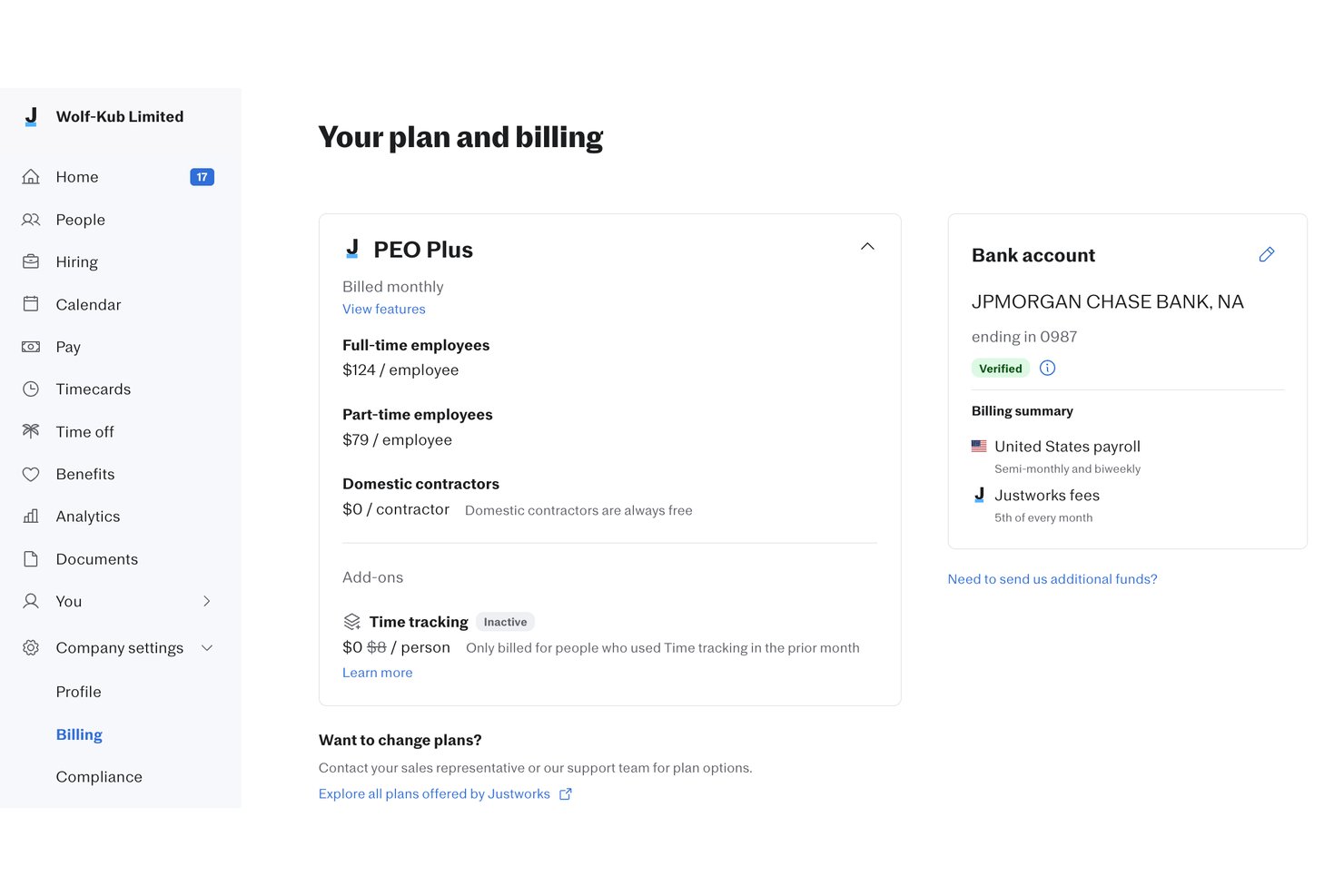
Justworks is an all-in-one HR platform designed for growing businesses and people teams that want to manage payroll, benefits, compliance, and employee onboarding with less hassle and extra support.
Who Is Justworks Best For?
Small and midsize businesses that need straightforward HR, payroll, and benefits management across multiple states.
Why Justworks Is a Good Best PeopleGuru Alternatives
I picked Justworks as one of the best because my team relies on around-the-clock access to HR and payroll experts. I appreciate having live support whenever complex payroll, benefits, or compliance questions come up, even outside traditional business hours.
Justworks Key Features
- Automated payroll processing: Streamlines payroll runs with direct deposit, tax filings, and compliance built in.
- Employee onboarding workflows: Lets you set up tailored onboarding for new hires, including document collection and task tracking.
- Integrated benefits enrollment: Supports online open enrollment for health, dental, vision, and other employee benefits.
- Time off tracking: Manages PTO requests, approvals, and balances with visibility for both employees and managers.
Justworks Integrations
Justworks offers native integrations with QuickBooks, Xero, and Plaid. An API is available for custom integrations.
Pros and Cons
Pros:
- Direct access to certified HR consultants
- Multi-state payroll and compliance handling
- 24/7 live HR and payroll support
Cons:
- Few options for third-party integrations
- Limited performance management features

Deel HR
Best for global HR

Deel is a global human resources (HR) platform built to help businesses manage international teams. While its core focus is on global payroll and compliance, it also includes human resource information system (HRIS) features for hiring, onboarding, and managing distributed teams in over 150 countries.
Why it’s a good PeopleGuru alternative: I picked Deel because it offers broader geographic coverage and support for global operations, making it a strong fit if you're expanding internationally. Deel can automate payroll in multiple currencies and payment methods, which simplifies how you compensate your team across borders. You can also create contracts that align with local labor laws, which helps reduce compliance risks. For teams managing international workers, Deel’s built-in support for local benefits and visa processing gives you flexibility that PeopleGuru doesn’t offer.
Standout features & integrations:
Features include contractor management tools, employer of record (EOR) services, AI-supported compliance safeguards, and bulk global payment capabilities. These options give you more flexibility when managing an international workforce and can help reduce the risk of classification errors or compliance gaps
Integrations include QuickBooks, Xero, Lever, Workable, Slack, Google Workspace, Greenhouse, NetSuite, Expensify, HiBob, Okta, Ashby, BambooHR, Azure Active Directory, SAP, UKG, and Workday.
Pros and Cons
Pros:
- Good for expanding internationally
- Strong emphasis on localized compliance
- Support for local taxes, benefits, and payroll management
Cons:
- May have unnecessary offerings if you have no global expansion plans
- Limited IT asset oversight
New Product Updates from Deel HR

Deel Expands Stablecoin Wallet to 80+ Countries
Deel expands its Stablecoin Wallet to 80+ countries with dollar-backed balances and optional rewards. This gives eligible contractors more ways to hold and manage earnings inside Deel. For more information, visit Deel’s official site.
 .
.
GoCo
Best for simplifying HR tasks for SMBs

Goco is a cloud-based HR and benefits administration platform for small to medium-sized businesses. It's used by HR teams to manage onboarding, benefits, and compliance.
Why it's a good PeopleGuru alternative: Goco simplifies HR tasks with easy-to-use tools for managing employee records and benefits. Its digital onboarding and document management reduce paperwork and save time.
Goco also offers compliance management tools to ensure your business meets legal requirements. Its focus on simplicity and efficiency makes it an excellent choice for streamlining HR processes in smaller teams.
Standout features & integrations:
Features include automated onboarding, digital document management, and benefits administration. You can track employee time and attendance efficiently. The platform also provides tools for performance reviews and feedback collection.
Integrations include QuickBooks, Gusto, Slack, Zapier, BambooHR, Google Workspace, Xero, Microsoft 365, ADP, and Namely.
Pros and Cons
Pros:
- Automated document handling
- Good compliance management
- Efficient onboarding tools
Cons:
- Basic reporting capabilities
- Limited advanced features
ChartHop
Best for data-driven HR insights

ChartHop is a people analytics and workforce planning platform for HR professionals and business leaders. It helps visualize organizational data and manage workforce planning effectively.
Why it's a good PeopleGuru alternative: ChartHop provides advanced data visualization tools that offer deep insights into your organization's structure and performance. You can use its workforce-planning features to make strategic decisions and optimize team performance.
With its focus on data-driven insights, ChartHop helps your team identify trends and address challenges proactively. The platform's ability to integrate data from multiple sources makes it a powerful tool for comprehensive HR analysis.
Standout features & integrations:
Features include customizable dashboards, automated reporting, and scenario planning. You can visualize organizational changes with ease and track performance metrics effectively. The platform also offers tools for managing compensation and headcount planning.
Integrations include Slack, Workday, BambooHR, ADP, Gusto, Namely, Rippling, Greenhouse, Lever, and UKG.
Pros and Cons
Pros:
- Customizable dashboards
- Effective workforce planning
- Strong data visualization capabilities
Cons:
- Learning curve for new users
- May require data integration skills
New Product Updates from ChartHop
ChartHop Adds Role and Filter Controls for Ask ChartHop
AI Pro customers can now set access controls for Ask ChartHop in AI settings, restricting who can use the assistant by role or filter criteria. For more information, visit ChartHop's official site.
 .
.

BambooHR is a cloud-based HR software that simplifies HR tasks for small—to medium-sized businesses. It's widely used by HR professionals who need tools for managing employee data, performance, and recruitment.
Why it's a good PeopleGuru alternative: BambooHR provides a user-friendly interface that simplifies employee record-keeping and performance management. Its applicant tracking and onboarding make hiring a breeze.
The platform also offers reporting tools that help you analyze HR data and make informed decisions. BambooHR's focus on ease of use and efficiency makes it an appealing option for smaller teams.
Standout features & integrations:
Features include customizable workflows, employee self-service, and time-off management. You can manage employee records with ease and track performance metrics effectively. The software also provides tools for conducting employee surveys to gauge satisfaction and engagement.
Integrations include QuickBooks, Xero, Slack, Gusto, ADP, Google Workspace, Microsoft 365, Zapier, Okta, and LinkedIn.
Pros and Cons
Pros:
- Customizable workflows
- Strong performance tracking
- Easy to use interface
Cons:
- Basic reporting capabilities
- Limited advanced features


APS is a cloud-based HR and payroll software designed to streamline processes for various industries, such as healthcare, education, and hospitality. It's mainly used by HR professionals who need efficient payroll processing and core HR management.
Why it's a good PeopleGuru alternative: APS offers tailored solutions that cater to specific industry needs and attendance tracking, recruiting, and ACA compliance help you manage workforce planning efficiently.
The platform's focus on industry-specific solutions ensures it meets the unique demands of your sector. This makes APS a great choice if you're looking for customizable HR solutions.
Standout features & integrations:
Features include core HR management, attendance tracking, and recruiting. You can manage performance with tools that track employee progress. The software's benefits administration helps you handle employee benefits smoothly.
Integrations include QuickBooks, Sage, Xero, NetSuite, Kronos, ADP, Ceridian, Paychex, Paylocity, and Workday.
Pros and Cons
Pros:
- Smooth onboarding process
- Dedicated customer support
- Industry-specific customization
Cons:
- Can be costly for small teams
- Limited mobile app features

Rippling
Best for integrated HR, IT, and finance

Rippling is a unified platform that combines HR, IT, and finance management for businesses of all sizes. It's mainly used by HR professionals and IT managers who need to streamline employee management processes.
Why it's a good PeopleGuru alternative: Rippling offers a unique integration of HR, IT, and finance, allowing you to manage employee devices, apps, and payroll in one place. It enables you to automate onboarding and offboarding processes, ensuring efficient employee transitions.
The platform's ability to manage both HR and IT tasks makes it a versatile solution for your team. With its extensive automation capabilities, Rippling helps you save time and reduce manual work.
Standout features & integrations:
Features include device management, app provisioning, and automated payroll. You can track time and attendance with ease, ensuring accurate payroll processing. The platform also offers customizable workflows to suit your specific business needs.
Integrations include QuickBooks, Slack, Google Workspace, Microsoft 365, Zoom, Salesforce, Xero, GitHub, Dropbox, and Okta.
Pros and Cons
Pros:
- Good for growing businesses
- Customizable workflows
- Automation of onboarding processes
Cons:
- Complex setup for some users
- May require technical skills
New Product Updates from Rippling

Rippling Expands Automated Compliance With AI Workflows
Rippling expands Automated Compliance with multi-framework support, AI workflows, an audit portal, and trust centers. These updates help GRC teams manage compliance work and audits. For more information, visit Rippling’s official site.
Best for global workforce management

Multiplier is a global employment platform designed for businesses looking to manage international teams efficiently. It's primarily used by HR professionals and companies that hire remote employees across different countries.
Why it's a good PeopleGuru alternative: Multiplier offers features like global payroll, compliance management, and employee benefits, which are ideal for managing a diverse workforce. You can easily handle payroll in multiple currencies, ensuring compliance with local labor laws.
With its focus on global workforce management, Multiplier helps you expand your team internationally without the usual headaches. This makes it a valuable alternative if you're looking to grow your business beyond borders.
Standout features & integrations:
Features include global payroll processing, compliance management, and employee benefits administration. Organizations can easily manage employment contracts and taxes across different countries, and the platform provides localized benefits packages to attract and retain top talent.
Integrations include QuickBooks, Xero, BambooHR, Zoho People, FreshBooks, ADP, Gusto, Paylocity, TriNet, and Workday.
Pros and Cons
Pros:
- Efficient global payroll processing
- Localized benefits options
- Supports multiple currencies
Cons:
- May have a learning curve
- Limited customization options

Best for user-friendly mobile access

Paylocity is a cloud-based HR and payroll software designed for businesses seeking to manage their workforce efficiently. It's commonly used by HR professionals and managers who need payroll, benefits administration, and talent management tools.
Why it's a good PeopleGuru alternative: Paylocity offers a user-friendly mobile app allowing employees to access payroll, benefits, and time-off requests. The platform's self-service features empower your team to manage their own HR tasks, reducing administrative burdens.
With tools for performance management and workforce analytics, you can make data-driven decisions.
Standout features & integrations:
Features include performance management, workforce analytics, and benefits administration. You can manage time and attendance with ease, ensuring accurate payroll processing. Paylocity's mobile capabilities make it a convenient choice for teams needing flexibility.
Integrations include QuickBooks, Xero, ADP, SAP, Oracle, Workday, BambooHR, Gusto, TriNet, and Kronos.
Pros and Cons
Pros:
- Good customer support
- Self-service capabilities
- Easy mobile access
Cons:
- May need customization
- Initial learning curve
New Product Updates from Paylocity

Paylocity Adds Candidate Engagement and Talent Rediscovery Agents
Paylocity adds Candidate Engagement and Talent Rediscovery Agents to automate candidate outreach, scheduling, and re-engagement. This helps recruiting teams move candidates through hiring faster. For more information, visit Paylocity’s official site.
 .
.
UKG
Best for comprehensive workforce management

UKG is a workforce management and human capital management software solution for organizations of all sizes. It's primarily used by HR professionals seeking to manage payroll, talent, and timekeeping effectively.
Why it's a good PeopleGuru alternative: UKG offers extensive workforce management capabilities, including advanced scheduling and timekeeping features. You can use its talent management tools to enhance employee engagement and productivity. The software also provides comprehensive payroll solutions and compliance management to ensure accuracy and adherence to regulations.
With its focus on holistic workforce management, UKG is ideal for businesses seeking a unified HR solution.
Standout features & integrations:
Features include advanced scheduling, timekeeping, and payroll processing. You can manage employee engagement through performance management and feedback tools. The platform also offers analytics and reporting to help you make data-driven HR decisions.
Integrations include SAP, Oracle, Workday, ADP, Ceridian, Kronos, QuickBooks, Microsoft Dynamics, Salesforce, and NetSuite.
Pros and Cons
Pros:
- Advanced scheduling capabilities
- Strong compliance support
- Extensive workforce management features
Cons:
- May require training
- Complex implementation process
Other PeopleGuru Alternatives
Here are some additional PeopleGuru alternatives that didn’t make it onto my shortlist but are still worth checking out:
- Paycom
For payroll process automation
- Paycor
For employee development focus
- Cornerstone OnDemand
For talent management solutions
- Dayforce
For real-time payroll processing
- Netchex
For comprehensive employee benefits
- Patriot Software
For small business payroll
- Criterion
For mid-market HR solutions


How I Evaluate PeopleGuru Alternatives
I evaluate every platform against two layers: the baseline must-haves—like native payroll, benefits enrollment, and time tracking—and the differentiators that determine real fit.
Core Functionality (Table Stakes For This List)
When I'm selecting tools for my list, I rank each one on a scale from 0 (does not offer the functionality) to 5 (excels in this area) for each core functionality listed below. Then, I calculate the tool's total score into a percentage. Each tool needs to achieve a minimum total score of 75% to be considered for inclusion.
- Core HR Management: I look for a centralized employee database that handles the full hire-to-exit lifecycle, including org charts, document storage, and custom fields for tracking job history.
- Payroll Processing: Each platform's payroll engine should handle tax filing, direct deposit, deductions, and multi-jurisdiction compliance without requiring a separate third-party tool.
- Benefits Administration: I evaluate how the platform manages open enrollment, carrier connections, and eligibility rules—especially whether employees can compare and elect plans on their own.
- Time & Attendance Tracking: The tool should connect time tracking and PTO approvals directly to payroll, so managers aren't manually reconciling hours across disconnected systems.
- Talent Management: I check for applicant tracking, onboarding workflows, and performance review tools that tie back to the employee record rather than living in a siloed module.
- Employee Self-Service Portal: Employees should be able to view pay stubs, request time off, update personal details, and enroll in benefits from a mobile-friendly portal.
Once I have a list of tools that meet this criteria, I consider what sets each platform apart.
Differentiating Factors (What Sets Vendors Apart)
Here's how I compare and contrast different vendors:
Standout Features
I look for configurable workflow builders that let HR teams adjust approval chains and onboarding sequences without submitting IT tickets. Compliance automation is another differentiator—platforms that auto-generate ACA or EEO-1 filings save hours of manual reporting each cycle. I also evaluate whether a platform includes a built-in LMS, since tying training completion and certifications directly to employee records eliminates the need for a standalone learning tool.
Beyond Features
Pricing transparency matters a lot in this space. I check whether vendors clearly break out per-employee-per-month costs versus bundling implementation fees and module add-ons into opaque quotes. Integration depth is another priority—an HCM platform should connect natively with your accounting system, 401(k) provider, and identity tools like Okta or Azure AD. I also evaluate implementation support, since migrating historical payroll data and running parallel payroll cycles requires hands-on guidance that not every vendor provides.
Why Look For A PeopleGuru Alternative?
While PeopleGuru is a good choice of HR and payroll software, there are a number of reasons why some users seek out alternative solutions.
You might be looking for a PeopleGuru alternative for the following reasons:
1. Limited customization or integrations
If your company uses other specialized tools (like Salesforce, Slack, or niche accounting platforms), PeopleGuru might not integrate as smoothly as larger platforms like Workday or ADP. Custom workflows or highly specific compliance needs may be harder to configure.
2. User interface (UI) and user experience (UX)
Some users report the UI feels dated or less intuitive compared to more modern tools (like Gusto, BambooHR, or Rippling). For example, employee self-service features might not be as sleek or mobile-friendly.
3. Scalability concerns
It’s often best suited for mid-sized organizations. If you're growing fast or planning international expansion, you might need more robust global capabilities.
4. Customer support responsiveness
Depending on your plan, some users have mentioned mixed experiences with support—slower response times or less hands-on onboarding help than expected.
5. Lack of depth in some modules
It offers a wide suite of features, but they may not all be as deep or advanced. For example:
- Performance management might lack advanced goal tracking or feedback features.
- Recruiting might not compete with standalone applicant tracking systems like Greenhouse or Lever.
PeopleGuru Key Features
Here are some of the key features of PeopleGuru to help you contrast and compare what alternative solutions offer:
- Employee self-service: Allows your team to access and update their own information, reducing administrative work.
- Scheduling: Helps you efficiently manage employee shifts and schedules.
- Payroll: Streamlines payroll processing to ensure accurate and timely payments.
- Talent acquisition: Supports your recruitment efforts with tools for managing job postings and applications.
- Onboarding: Simplifies the onboarding process for new hires with automated workflows.
- Benefits administration: Manages employee benefits and ensures compliance with regulations.
- Compliance: Keeps your team aligned with legal requirements and industry standards.
- Reporting and analytics: Provides insights into HR data to help you make informed decisions.
- Digital transformation goals: Focuses on going paperless and enhancing employee engagement through technology.