

10 Best Employee Communication Software for 2026

10 Best Employee Communication Software Shortlist


The best employee communication software helps your organization keep everyone connected, aligned, and engaged—no matter where your team works.
When communication depends on email, scattered messages, and manual check-ins, important information gets lost, deadlines slip, and team cohesion suffers. The right communication platform centralizes chat, announcements, feedback, and collaboration—making it easy for everyone to stay informed and involved.
Drawing on my experience testing HR and internal-communications tools, I’ve reviewed and compared leading employee communication platforms. In this guide, you’ll find solutions that simplify team interaction, improve transparency, and help you build a more connected, productive workplace.
Why Trust Our Software Reviews
Our team has been testing and reviewing software since 2012. As HR experts ourselves, we know how difficult—and important—it is to choose the right software.
For this guide, we evaluated tools using hands-on testing and independent research, scoring tools using our selection criteria. We also draw on insights from industry thought leaders and practicing HR experts.
Our reviews reflect our human editorial judgment, not a sales pitch.
Expert reviewers:
The 10 Best Employee Communication Software Comparison Chart
This comparison chart summarizes basic details about each of my top employee communication software selections. You can view pricing details and the availability of free trials or demos side-by-side to help you find the best software for your budget and business needs.
| Tool | Best For | Trial Info | Price | ||
|---|---|---|---|---|---|
| 1 | Best for fast company-wide updates | Free demo available | Pricing upon request | Website | |
| 2 | Best for recognition communication | Free demo available | Pricing upon request | Website | |
| 3 | Best for mobile-first communication for deskless employees | 14-day free trial | From $29/month (billed annually) | Website | |
| 4 | Best for compliance and security controls | 14-day free trial + free demo available | From $12/user/month | Website | |
| 5 | Best employee communications intranet for SMEs | Free demo available | Pricing upon request | Website | |
| 6 | Best intranet platform for communication & AI knowledge management | Free demo available | From $10/user/month | Website | |
| 7 | Best for displaying company updates | Free plan available | From $8/screen/month (billed annually) | Website | |
| 8 | Best for multi-channel message distribution | Free demo available | Pricing upon request | Website | |
| 9 | Best for high-quality video meetings | Free plan available | From $14.16/user/month (billed annually) | Website | |
| 10 | Best with AI engagement and sentiment tools | Free demo available | Pricing upon request | Website |


Best Employee Communication Software Reviews
To help you find the best employee communication software for you, I’ve described my top 10 choices in detail, highlighting the key features that make each system stand out. I’ve also included a screenshot for each one to give you a glimpse of their user interface too.

Haystack
Best for fast company-wide updates

Haystack is an internal communication platform designed for organizations that need to keep employees informed, connected, and engaged with centralized updates and targeted messaging across departments and locations.
Who Is Haystack Best For?
Haystack is a good fit for mid-sized to large organizations with distributed or deskless workforces that need a reliable way to reach every employee with timely company news.
Why I Picked Haystack
Haystack earns its spot as one of the best on my shortlist because of how well it handles getting a single message out to every employee, regardless of where they work or what tools they use. I love the multi-channel delivery feature—you write one post, and Haystack pushes it out across email, Slack, Microsoft Teams, mobile, and SMS simultaneously. For time-sensitive updates, the emergency alerts feature lets me reach frontline and deskless workers via SMS when a message can't wait. I also rely on the "Mark as Must Read" feature, which flags critical announcements and lets me track exactly who has acknowledged them and send reminders to anyone who hasn't.
Haystack Key Features
- Content templates: Use pre-built and saved templates to create on-brand posts, pages, and event announcements without starting from scratch each time.
- Approval workflows: Set admin-only approval processes and customizable publishing permissions to control who can post and where across the platform.
- Cover art builder: Design visually polished post headers and resource pages directly within Haystack without needing external design tools.
- Scheduled communications: Plan and automate posts in advance to maintain a consistent content calendar across the organization.
Haystack Integrations
Integrations include Slack, Microsoft Teams, Google Drive, Atlassian Confluence, Jira, Box, Dropbox, Zoom, Tableau, and Okta.
Pros and Cons
Pros:
- Enterprise search helps staff quickly find documents and answers
- SMS alerts support time-sensitive or emergency messaging
- Multi-channel publishing ensures every employee gets updates
Cons:
- Limited workflow automation for complex approval chains
- No built-in chat or messaging for real-time conversations

Best for recognition communication

Motivosity helps HR teams and people leaders in all industries boost internal communication by making it easy for employees to connect, share feedback, and recognize each other in real time.
Who Is Motivosity Best For?
Motivosity is a strong fit for mid-sized companies that want to build a culture of appreciation through structured, visible employee recognition.
Why I Picked Motivosity
Motivosity earns its spot on my shortlist because recognition is genuinely baked into how the platform communicates. I love that peer-to-peer giving ties every appreciation directly to a company value—so when someone on my team calls out a colleague's great work, it's not just a nice moment, it's a visible signal of what the organization actually stands for. That recognition lands on a company-wide social feed where teammates can react, comment, and add GIFs, which makes the communication feel organic rather than top-down. I also find the values-based recognition analytics useful—you can see in real time which values are being reinforced and where recognition is flowing across the org, which gives HR a concrete way to track culture health.
Motivosity Key Features
- Milestone celebrations: Automatically trigger recognition posts for birthdays, work anniversaries, and onboarding milestones so no key moment goes unacknowledged.
- Targeted communication: Send announcements to specific employees, departments, or teams so each person only sees what's relevant to them.
- Post engagement tracking: See in real time which employees have viewed or interacted with a post, so you can follow up with anyone who missed it.
- Employee spaces: Create micro-communities for ERGs, interest groups, or company programs where employees can connect and communicate around shared topics.
Motivosity Integrations
Integrations include Rippling, UKG Ready, ADP, Sage HR, Square Payroll, BambooHR, Deel and Dayforce.
Pros and Cons
Pros:
- Spaces organize conversations by team or project
- Scheduled announcements help you manage communication timing
- Social-style feed encourages frequent recognition and updates
Cons:
- Custom branding options are more limited than some competitors
- Limited advanced analytics compared to communication-only tools
New Product Updates from Motivosity

Motivosity Launches Appreciation Intelligence With AI Coaching and Automation
Motivosity introduces Appreciation Intelligence™ with Appreciation Coach, Insights AI, Motivosity Agents, and an MCP Connector. The new capabilities help teams improve recognition, automate routine tasks, and access employee recognition insights faster. For more information, visit Motivosity's official site.

Best for mobile-first communication for deskless employees

Connecteam is an employee communication platform built for businesses with frontline, remote, or deskless teams who need to keep everyone connected, informed, and engaged through mobile messaging, announcements, and real-time updates.
Who Is Connecteam Best For?
Connecteam is a great fit for small to mid-sized businesses in industries like retail, hospitality, construction, and healthcare that rely on hourly or shift-based workers without regular desk access.
Why I Picked Connecteam
Connecteam earns its spot on my shortlist because it's purpose-built for the communication challenges that come with managing deskless teams. I like that the mobile chat lets managers send direct messages or group updates to specific teams, shifts, or locations—without needing employees to have a corporate email address. The in-app newsfeed is another feature I rely on, since it lets me push company announcements and updates that employees can read, react to, and comment on directly from their phones. For frontline-heavy organizations, that kind of mobile-first reach is genuinely hard to replicate with traditional internal comms tools.
Connecteam Key Features
- Surveys and polls: Send targeted surveys or quick polls to gather employee feedback directly through the app.
- Employee directory: Access a searchable, up-to-date contact list so team members can find and reach colleagues instantly.
- Push notifications: Send real-time alerts to specific employees, teams, or locations to ensure time-sensitive messages are seen.
- Digital forms and checklists: Create and distribute custom forms that employees can complete and submit from their mobile devices.
Connecteam Integrations
Integrations include QuickBooks, Gusto, Xero, ADP, Zapier, Wix, Lightspeed, PrismHR, Square, and BambooHR.
Pros and Cons
Pros:
- Mobile-first interface built specifically for deskless and shift-based teams
- Centralized mobile library keeps policies and resources always accessible
- Targeted announcements reduce noise
Cons:
- Admin dashboard can feel crowded with multiple hubs enabled
- Limited advanced analytics unless using higher-tier plans
New Product Updates from Connecteam

Connecteam Expands Break and Timesheet Controls
Connecteam adds flexible break thresholds, personalized policies, auto-end options, a centralized exceptions report, and improved timesheet issue visibility to help teams manage breaks and timesheets more effectively. For more information, visit Connecteam’s official site.
 .
.
Best for compliance and security controls

ThoughtFarmer is an intranet platform built for internal communications that combines company news publishing, two-way employee engagement, people directories, knowledge management, and workflow automation in a single hub.
Who Is ThoughtFarmer Best For?
ThoughtFarmer is a strong fit for mid-market organizations in regulated industries like financial services and legal, where security controls and permissioned content access are non-negotiable.
Why I Picked ThoughtFarmer
ThoughtFarmer earns its spot on my shortlist because of how seriously it treats content access control. I particularly like how permissions are built directly on Active Directory Security Groups, meaning a compliance team can lock down sensitive HR policies to the right people without any manual list management. The built-in content review and approval workflow adds another layer, so communications clear the right sign-offs before they're published company-wide.
ThoughtFarmer Key Features
- FormFlow builder: Create custom digital forms and automate approval workflows directly within the platform.
- Smart alerts and notifications: Send time-sensitive updates as targeted pop-ups, push notifications, or emails based on user profiles.
- Universal smart search: Surface information from the intranet, Google Drive, or SharePoint through a single search bar.
- People directory and org charts: View employee profiles, explore organizational structure, and find expertise quickly.
ThoughtFarmer Integrations
ThoughtFarmer offers native integrations across the Microsoft ecosystem, as well as Google Workspace, Okta, Slack, and Teams. An API is available for custom integrations.
Pros and Cons
Pros:
- Deep Active Directory sync for user management
- Built-in approval workflows
- Granular permission controls for sensitive content
Cons:
- Analytics reporting less advanced
- Mobile experience lags behind dedicated apps

Hub
Best employee communications intranet for SMEs

Hub is an intranet platform built for small and mid-sized businesses that want to centralize internal communications, share documents, and keep employees connected and informed in one place.
Who Is Hub Best For?
Hub is a strong fit for HR and internal comms teams at small and mid-sized businesses that need a dedicated intranet without the complexity of enterprise-grade platforms.
Why I Picked Hub
Hub earns its spot on my shortlist because it's purpose-built as an intranet for SMEs, which means it skips the bloat that makes enterprise platforms frustrating for smaller teams. I particularly like the customizable intranet pages, which let my team build a branded internal hub with news feeds, announcements, and department-specific content without needing a developer. The built-in polls and surveys are useful for gathering quick employee feedback without switching to a separate tool. For internal communications, Hub keeps updates, documents, and team conversations in one place sized for how SMEs operate.
Hub Key Features
- Must reads: Mark content as mandatory so employees must click to confirm they've read it, with automated reminders sent to anyone who hasn't.
- Email broadcasts: Build and send custom emails to all staff or specific user groups directly from within Hub, with preview and template-saving options.
- PWA mobile app: Give employees full intranet access on any mobile device without requiring an app store download, including push notifications for new content.
- Group forums: Create public, private, or hidden group spaces where members can access exclusive content and collaborate in threaded discussions.
Hub Integrations
Integrations include Microsoft 365 and Google Workspace; an API is also available for custom integrations.
Axero
Best intranet platform for communication & AI knowledge management
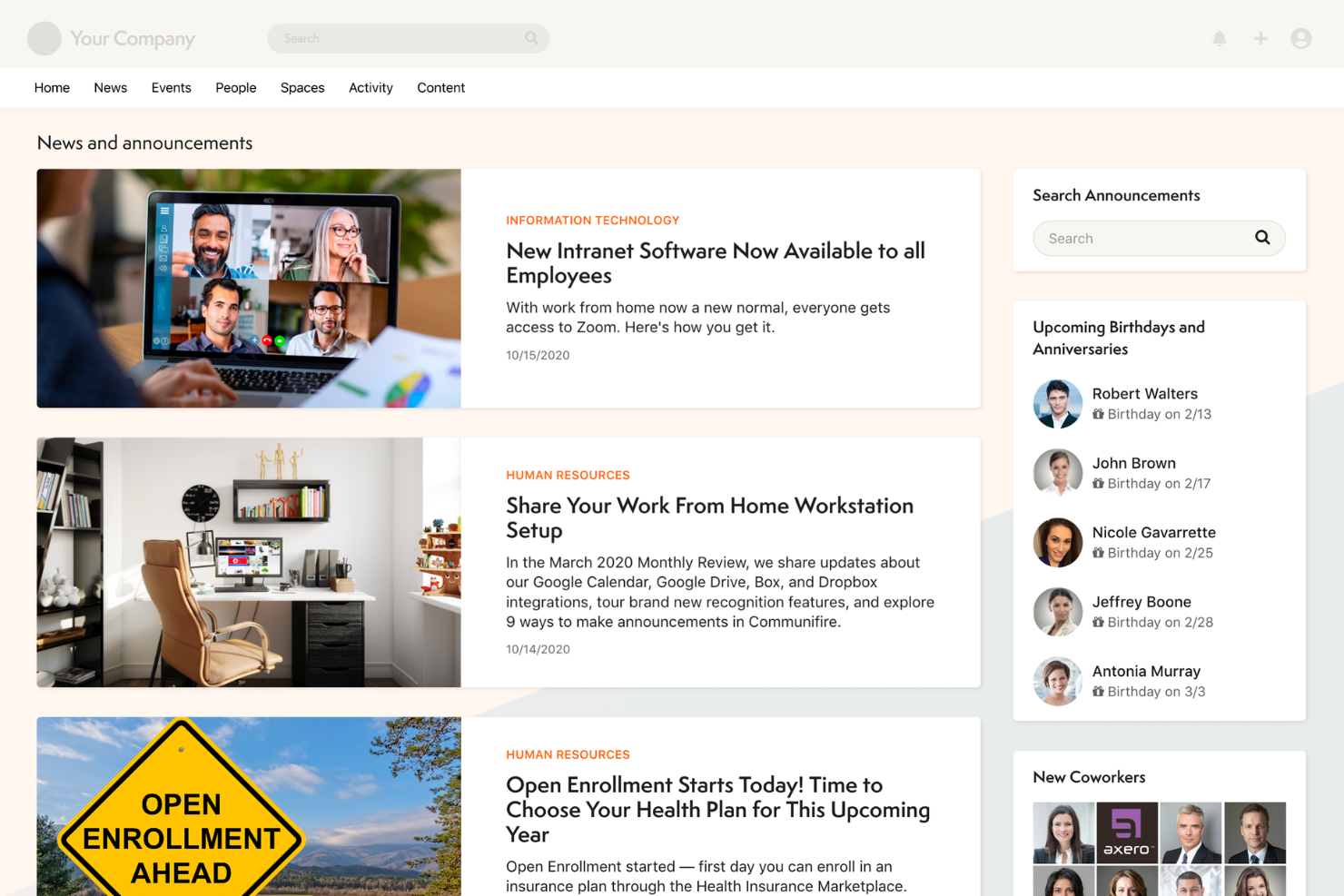
Axero is an intranet platform for organizations that want to centralize internal communications, streamline knowledge sharing, and connect employees across departments and locations.
Who Is Axero Best For?
Axero is a good fit for mid-size to large organizations that need a structured intranet to keep distributed or hybrid teams informed and aligned.
Why I Picked Axero
Axero earns its spot as one of the best on my shortlist because it combines internal communications and AI-powered knowledge management in a single intranet platform. I particularly like Axero Copilot, the built-in AI assistant that taps directly into your intranet's knowledge base to answer employee questions on demand—so your team isn't hunting through folders or pinging colleagues for information they should already have access to. I also use the targeted announcements and broadcasts feature to reach specific employee groups rather than blasting the whole org, which keeps communications relevant. The required reading tool with built-in analytics is another feature I rely on to confirm that critical updates have actually been seen and acknowledged.
Axero Key Features
- Newsletter builder: Create branded internal newsletters using customizable templates to share company updates across the organization.
- Employee directory: Build searchable profiles with custom fields that highlight employee skills, roles, and interests beyond basic contact information.
- Personas: Create custom employee groups to automate permissions and deliver targeted news to specific segments of your workforce.
- Wikis, articles, and blogs: Publish internal content in multiple formats with support for embedded media, attachments, and images.
Axero Integrations
Integrations include Slack, Microsoft Office 365, Google Workspace, Twilio, Microsoft Teams, Zoom, Salesforce SSO, and SharePoint Online Documents.

Yodeck
Best for displaying company updates

Yodeck is a digital signage platform designed for HR teams and internal comms professionals who need to broadcast visual updates, announcements, and key information across multiple office locations or worksites.
Who Is Yodeck Best For?
Yodeck is a strong fit for multi-location businesses and organizations with deskless or frontline workers who can't be reached through email or chat tools.
Why I Picked Yodeck
Yodeck earns its spot on my shortlist because it turns any screen into a live company noticeboard—without requiring IT involvement or complex setup. I particularly like the content scheduling feature, which lets you schedule different updates for each screen, so a manufacturing floor sees safety reminders during shift changes while the office lobby shows company milestones. The 500+ pre-built templates also make it easy to put together polished announcements in minutes, without needing a designer. With cloud-based remote management, I can update every screen across multiple sites from a single dashboard.
Yodeck Key Features
- Layout editor with multiple zones: Divide a single screen into multiple content regions to display different types of information simultaneously.
- Tag-based playlists: Organize and update content across screens using media tags, so changes apply to all tagged assets at once.
- Playback reports: Track proof-of-play data to confirm which content was displayed, on which screens, and when.
- Interactive kiosk app: Turn screens into touch-enabled displays that let employees navigate and engage with content directly.
Yodeck Integrations
Integrations include Microsoft Teams, Viva Engage, Power BI, Grafana, Tableau, Canva, YouTube, Google Calendar, and Google Slides.
Pros and Cons
Pros:
- Detailed scheduling tools for timed announcements
- Wide media support for flexible communication formats
- Easy remote control of screens across many locations
Cons:
- Large deployments may need IT involvement for setup
- Requires physical screens and players to get started
Nectar
Best for multi-channel message distribution

Nectar is an employee recognition platform with tools designed to enhance internal communications within organizations. It offers tools to create engaging messages, share updates across multiple channels, and track communication effectiveness.
Nectar's drag-and-drop builder allows you to craft visually appealing announcements quickly, even without design skills. This feature is beneficial for sharing company updates, event invitations, or policy changes, ensuring your messages capture your team's attention.
Additionally, Nectar enables you to schedule and send messages via text, email, Microsoft Teams, and its own platform, reaching your team on their preferred channels. This flexibility ensures that important information is delivered effectively, keeping everyone informed and engaged.
Features include the ability to segment your audience, allowing you to target specific groups with tailored messages, which helps in delivering relevant information to the right people. Nectar also provides analytics to measure open rates and click-through rates, giving you insights into your communication's impact and areas for improvement.
Integrations include Slack, Microsoft Teams, Google Workspace, Bamboo HR, Workday, Microsoft Outlook, Microsoft Azure, ADP Workforce Now, Paylocity, Rippling, Namely, and Netsuite.
New Product Updates from Nectar

Nectar Enhances Clara AI With Live Platform Data
Nectar introduces live platform data access and expanded knowledge coverage for Clara AI. The updates improve response accuracy and speed while enabling Clara AI to answer questions across more recognition and rewards features. For more information, visit Nectar's official site.
 .
.
Zoom
Best for high-quality video meetings

Zoom connects distributed teams with video meetings, chat, and collaboration tools for organizations needing reliable internal communication across locations, departments, and devices.
Who Is Zoom Best For?
Zoom is a strong fit for mid-size to enterprise teams that rely on frequent video communication to keep remote and hybrid employees connected.
Why I Picked Zoom
Zoom earns its spot on my shortlist because the video quality is genuinely hard to beat for internal meetings. HD audio and video with built-in noise suppression means all-hands calls and team check-ins come through clearly, even when participants are joining from noisy home offices or hotel rooms. I also like the multi-speaker view, which automatically shifts focus to whoever is actively talking—it keeps large meetings from feeling chaotic. On top of that, AI Companion generates meeting summaries and next steps automatically, so my team isn't scrambling to take notes or chase down action items after every call.
Zoom Key Features
- Team Chat channels: Organize ongoing team conversations into dedicated channels, with pinned links, whiteboards, and shared files accessible in a single tab view.
- Translated captions: Display real-time captions in 33 languages during meetings, removing language barriers for multilingual internal teams.
- Zoom Clips: Record and share short-form async video messages with screen and camera capture, plus engagement insights like reactions and view behavior.
- Surveys and polls: Run in-meeting polls or pre-meeting surveys to collect team input and structure agendas before calls begin.
Zoom Integrations
Integrations include Google Workspace, Microsoft 365, Salesforce, HubSpot, Zendesk, Pipedrive, Dropbox, and SharePoint.
Workvivo
Best with AI engagement and sentiment tools
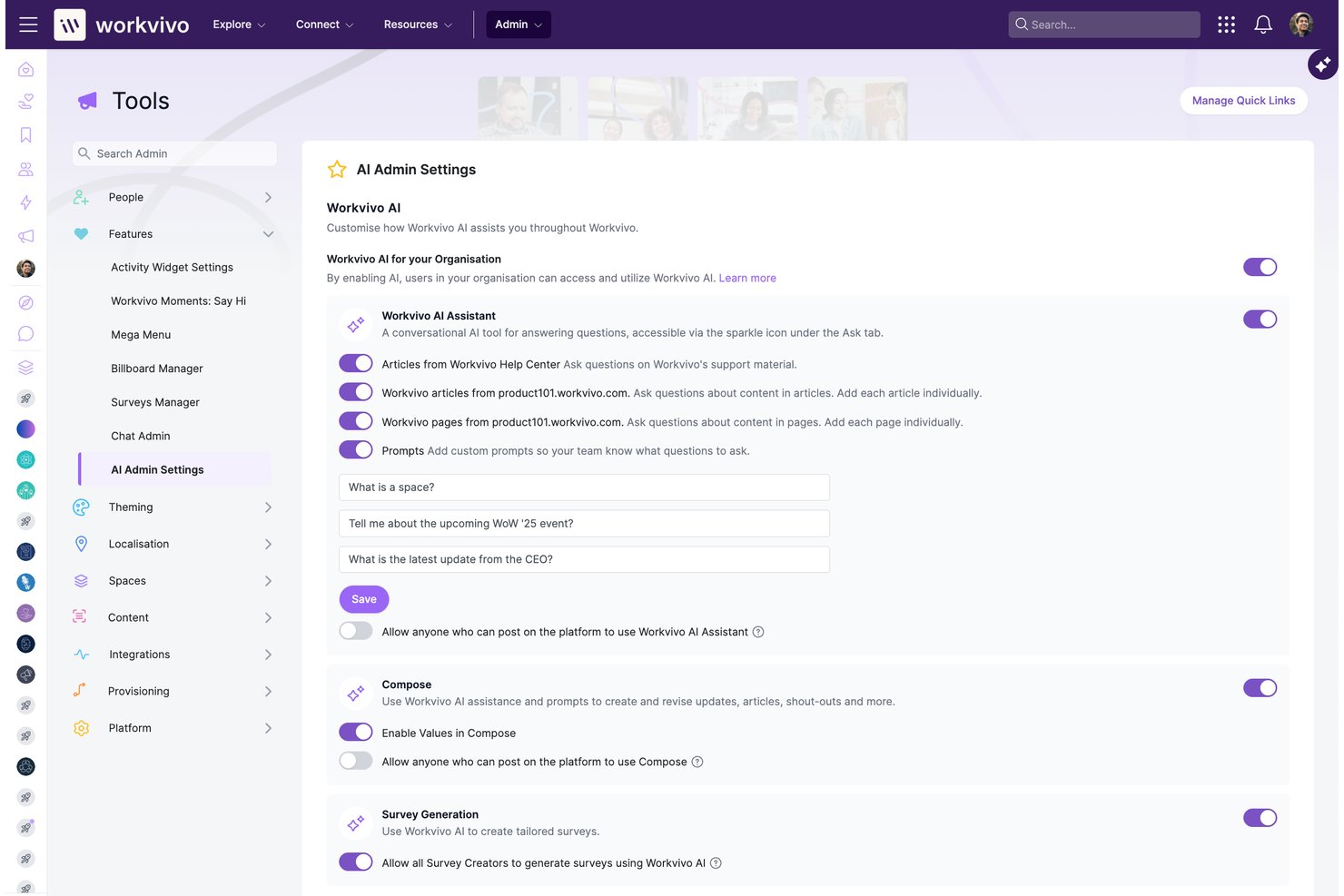
Workvivo is an employee experience platform that combines internal communications, intranet, engagement tools, and employee listening in a single mobile-first hub designed for both desk-based and frontline workforces.
Who Is Workvivo Best For?
Workvivo suits mid-to-large enterprises with distributed or frontline workforces where internal communications and HR teams need to reach every employee, not just desk workers.
Why I Picked Workvivo
Workvivo earns its spot on my shortlist because its AI engagement and sentiment tools are genuinely built into the platform, not bolted on as an afterthought. I particularly like AI Catch Me Up, which delivers personalized briefings so employees never miss key updates, and the Seer sentiment analysis, which uses AI to surface themes and emotional tone across open-ended survey responses. In practice, that means my IC team can act on employee feedback before disengagement takes hold.
Workvivo Key Features
- Spaces: Organize communications and communities by department, project, or interest group for more focused interactions.
- Campaigns and scheduling: Plan and schedule multi-format announcements and internal campaigns across multiple channels.
- Workvivo TV: Broadcast urgent updates and important news on digital signage to engage onsite and frontline employees.
- Livestreams and podcasts: Host real-time video broadcasts and internal audio shows that employees can access on demand.
Workvivo Integrations
Workvivo offers native integrations with Zoom, Slack, Microsoft Teams, Workday, Google Workspace, Salesforce, ServiceNow, and Azure Active Directory. An API is available for custom integrations.
Pros and Cons
Pros:
- Built for frontline workers without corporate email
- Social feed drives organic, two-way employee interaction
- Native AI sentiment analysis included at no extra cost
Cons:
- Mobile and web experience can feel inconsistent
- Chat functionality requires a separate Zoom add-on
Other Employee Communication Software
Here are a few more employee communication software systems that didn’t make the top list, but are still worth checking out:
- ClickUp
For project-specific collaboration and communication
- Blink
For reaching a deskless workforce
- Pumble
For unlimited users and message history
- Guidde
For video-first knowledge communication
- Xoxoday
For centralized internal communications
- SnapComms
For mobile-friendly employee communication and engagement
- Happeo
Channel-based communication
- Workshop
For email communications at scale
- Workmates
Newsfeed and announcements system
- Jive
For mapping team relationships


Related HR Software Reviews
If you still haven't found what you're looking for here, check out these other related tools that we've tested and evaluated:
- HR Software
- Payroll Software
- Recruiting Software
- Employer of Record Services
- Applicant Tracking Systems
- Workforce Management Software
How I Evaluate Employee Communication Software
I split my evaluation into baseline requirements—like multi-channel reach and frontline mobile access—and the differentiators that separate a good tool from the right one for your workforce.
Core Functionality (Table Stakes For This List)
When I'm selecting tools for my list, I rank each one on a scale from 0 (does not offer the functionality) to 5 (excels in this area) for each core functionality listed below. Then, I calculate the tool's total score into a percentage. Each tool needs to achieve a minimum total score of 65% to be considered for inclusion.
- Multi-Channel Message Delivery: I evaluate how many channels a platform can reach employees through—mobile push, email, SMS, desktop, chat, and intranet—and whether you can orchestrate all of them from a single send.
- Audience Segmentation: Targeting a safety update to warehouse staff or a benefits reminder to part-time employees requires flexible segmentation, so I look for attribute-based filtering that syncs with your HRIS.
- Two-Way Communication: I check whether employees can do more than just read—tools that support comments, reactions, polls, and Q&A threads give HR teams a real feedback loop instead of a digital bulletin board.
- Engagement Analytics: Understanding who opened a message, which locations have low read rates, and how a campaign performed over time matters, so I look for dashboards that go beyond basic delivery confirmations.
- Content Creation & Publishing: The best platforms let you build branded newsletters, attach video, use templates, and schedule posts ahead of time—I evaluate how much you can do natively without jumping to external design tools.
- Mobile & Frontline Access: Many employees don't have a company email or sit at a desk, so I look for apps that support phone-number onboarding, QR-code registration, and offline access for workers on the floor or in the field.
Once I have a list of tools that meet the criteria, I consider what sets each platform apart.
Differentiating Factors (What Sets Vendors Apart)
Here's how I compare and contrast different vendors:
Standout Features
Crisis and emergency alerting is a big differentiator—when there's a facility incident or severe weather event, you need mandatory read receipts and escalation paths that cut through the noise. I also evaluate whether a platform includes built-in pulse surveys and sentiment tracking, which let HR teams measure morale without switching to a separate survey tool. Embedded peer recognition features are worth noting too, since they turn a communication platform into a culture-building channel.
Beyond Features
HRIS integration depth matters—I check whether a platform syncs with systems like Workday or BambooHR to auto-provision users and keep segments current as employees change roles or locations. Pricing structure is another factor I weigh, especially how vendors handle mixed workforces with both desk-based and frontline staff, since per-seat models can balloon costs fast. I also evaluate onboarding support, because rolling out a communication app across thousands of employees requires launch playbooks and change management guidance, not just a help center link.
How to Choose Employee Communication Software
Employee communication software can help you share information with your employees more easily, creating a more informed and transparent employee experience. To help you figure out which employee communication software best fits your needs, you need to pinpoint your key users and document their specific challenges first.
As you work through your own unique employee communication software selection process, keep the following points in mind:
- What problem are you trying to solve - Start by identifying the challenges you're trying to overcome. This will help you clarify the features and functionalities the communication software needs to provide.
- Who will need to use it - To evaluate cost and requirements, consider who will use the software and how many licenses you'll need. For employee communication software, you'll likely want employee-level access for your entire workforce, with special access for your HR administrators and managers. Once that's clear, it's also useful to rank the needs of your different users to identify the key priorities for your power users, managers, and employees, to ensure they're all met.
- What other tools it needs to work with - Clarify what tools you're replacing, what tools are staying, and the tools you'll need to integrate with, such as HR management systems, employee directory software, single sign-on applications, or work operating systems like Microsoft 365 or Google Workspace. You'll need to decide if the tools should integrate together, or alternatively, if you can replace multiple tools with an all-in-one multi-channel communication platform.
- What outcomes are important - Review the capabilities you want to gain or improve, and how you will measure success. For example, you may want to digitize your current offline training processes or offer a better mobile learning experience for your remote employees. You could compare communication software features until you’re blue in the face but if you aren’t thinking about the outcomes you want to achieve, you could waste a lot of valuable time.
- How it would work within your organization - Consider the software selection alongside your existing workflows and systems. Evaluate what's working well, and any problem areas that need to be addressed.
Remember every business is different — don’t assume that an employee communication system will work for your organization just because it's popular.
Trends in Employee Communication Software
As organizations continue to adapt to remote, hybrid, and in-office work models, the technology underpinning employee communication tools is also transforming. Here are several trends that reflect the current demands and preferences of businesses and offer insights into the future of workplace communication:
Rapidly Evolving Features
- AI and Machine Learning Enhancements: AI-driven features, such as automated responses and personalized content delivery, are becoming more common. These advancements indicate a shift towards more intelligent and responsive communication platforms that can adapt to individual users' needs.
- Enhanced Security Measures: With the rise of cyber threats, enhanced security features, including end-to-end encryption and advanced user authentication methods, are rapidly evolving. This trend underscores the growing importance of protecting sensitive internal communications from external threats.
Unique and Unusual Functionalities
- Virtual Reality (VR) Meetings: Some platforms are beginning to incorporate VR technology to create more immersive meeting experiences. This novel approach aims to enhance engagement and mimic the dynamics of in-person interactions in a remote setting.
- Emotion Recognition Technology: A few cutting-edge tools are experimenting with emotion recognition to gauge employee sentiment and engagement levels during video calls. This unusual functionality reflects a novel approach to understanding and improving the emotional well-being of remote teams.
As these trends continue to unfold, HR professionals and business leaders must stay informed and adaptable, choosing solutions that address current challenges and remain poised for the future of work.
What is Employee Communication Software?
Employee communication software refers to digital software systems and apps that help companies communicate internally with their staff through instant messaging, text messaging (SMS), phone calls, or video calls. To further improve team collaboration, these platforms offer additional features such as group chat channels, file sharing, and automatic notifications and alerts to ensure all employees are informed of important information or updates promptly.
By streamlining your internal comms through a dedicated platform, you'll be able to improve the flow of information within your organization. By communicating more effectively, your employees will feel more engaged and able to collaborate, increasing overall productivity levels. This is true for all types of workforces, whether your team is office-based, hybrid, fully remote, field-based, or a blend.
Features of Employee Communication Software
These are the main features I assessed in detail when making my final selections for this list of the best cloud-based employee communication software:
- Instant Messaging: The core feature of any communication software today is direct, instant messaging that allows team members to interact one-on-one or in groups. This enables quick decision-making and ensures that information flows smoothly and promptly across all levels of the organization.
- Customizable Notifications: The option to customize notifications helps employees manage their attention and prioritize information effectively. This customization prevents information overload and ensures important messages are not overlooked.
- File Sharing and Collaboration: The capacity for easy file sharing and collaborative editing of documents facilitates teamwork and the efficient exchange of ideas. This feature supports a collaborative culture and streamlines project management.
- Feedback and Survey Tools: Built-in tools for gathering feedback or conducting surveys allow for the easy collection of employee insights. This feedback is invaluable for continuous improvement and ensuring that the communication needs of all employees are met.
- Knowledge Base: Access to a company-wide knowledge base reduces repetitive questions and helps people find the information they need faster, speeding up independent problem solving.
- Video Conferencing: High-quality video conferencing capabilities are essential for replicating face-to-face interactions, especially in a remote or hybrid work setting. This feature helps maintain personal connections and fosters a sense of community among team members.
- Status Updates: Many messaging apps allow team members to indicate their current availability, or whether they are away, in a meeting, or temporarily offline.
- Search: This is an important and user-friendly feature that allows your employees to search for old messages by keyword to find them quickly.
- Analytics and Reporting: The ability to track and analyze communication patterns provides insights into how effectively information is being shared and received. These analytics can guide improvements and help identify any gaps in the internal communication strategy.
- Mobile Compatibility: Having a mobile-friendly application allows team members to stay connected and informed, no matter where they are. This flexibility is essential for maintaining a dynamic and adaptable workforce.
- Secure Data Transmission: Ensuring that all communications are encrypted and secure protects sensitive information from unauthorized access. Security measures are non-negotiable for maintaining trust and confidentiality in internal communications.
By prioritizing employee communication software with these features, you'll meet your current and future needs and gain the tools you need to create a connected, informed, and engaged workplace.
Benefits of Employee Communication Software
Investing in technology to enhance your internal communication abilities is a strategic move that can yield substantial benefits for both users and organizations. Here are several benefits you can expect to gain by investing in the best employee communication software for your unique needs:
- Improved Information Flow: By facilitating the seamless exchange of information across different levels of the organization, your users benefit from having immediate access to the information they need, enhancing productivity.
- Enhanced Collaboration: By providing platforms for real-time messaging, file sharing, and collaborative workspaces, employee communication software significantly boosts teamwork. Teams can collaborate more effectively, regardless of their physical locations, leading to faster project completion and innovation.
- Increased Engagement: Features like surveys, feedback tools, and social recognition capabilities help in gauging and boosting employee engagement. Engaged employees are more productive, exhibit higher morale, and contribute positively to the workplace culture.
- Mobile Accessibility: With mobile compatibility, employees can stay connected and informed, even when away from their desks. This flexibility is particularly beneficial for remote or field workers, ensuring they remain integrated with their teams.
- Secure Communication: Advanced encryption and security protocols protect sensitive information from unauthorized access. Organizations can maintain confidentiality and compliance with data protection regulations, safeguarding both their interests and those of their employees.
As you can see, adopting employee communication software offers a strategic advantage by enhancing collaboration and improving the way information is shared and accessed within an organization.
Costs & Pricing for Employee Communication Software
Employee communication platforms come in various shapes and sizes, each designed to meet different organizational needs and budgets. From free versions designed for small teams or startups to comprehensive enterprise communication solutions that cater to the complex needs of large organizations, understanding the plan options and their pricing is crucial.
Below is a breakdown of the typical plan options available, including the average price and common features included in each plan.
Plan Comparison Table for Employee Communication Software
| Plan Type | Average Price | Common Features Included |
|---|---|---|
| Free | $0 | Basic messaging, file sharing, limited integrations, and user limits |
| Basic | $5-8 per user/month | Enhanced messaging capabilities, unlimited file sharing, some integrations, and basic analytics |
| Standard | $10-15 per user/month | Advanced messaging, comprehensive integrations, expanded file storage, enhanced analytics, and 24/7 support |
| Premium | $20-30 per user/month | All Standard features plus custom integrations, advanced security features, priority support, and advanced analytics |
| Enterprise | Custom Pricing | All Premium features plus unlimited integrations, personalized onboarding, a dedicated account manager, and custom security compliance |
When selecting the best plan for you, consider the size of your team, the specific features you need, and your budget. Remember, the best choice balances functionality with cost, ensuring you pay only for the features your team will use and benefit from.
Employee Communication Software: Frequently Asked Questions
Still wondering about employee communication software and why it’s important? These answers to popular FAQs are a good place to start:
Why are employee communication apps better than email?
Employee communication apps are better than email because they enable real-time messaging, improved collaboration, and targeted updates. You can create channels for specific topics, teams, or projects, cutting down on email overload and missed messages. Features like group chats, push notifications, and searchable archives make it easier for everyone to get the right information fast.
Why are employee communication apps better than email?
There are several reasons why employee communication apps are better than traditional email. First off, research has shown that 60.8% of employees ignore emails at work. That explains why you’re only getting responses half of the time!
The truth is, email volume can quickly become overwhelming. In fact, 1 out of 2 employees say fewer emails would increase their happiness levels. That alone makes a strong case for avoiding emails altogether (unless you enjoy sending messages into digital black holes).
Team communication apps are better than email because they can inject some fun back into your internal communications. Many of the communication tools reviewed in this article are part of larger employee engagement software platforms focused on improving the employee experience. Features such as tagging, liking, and responding with emojis makes communication feel less like work, and more like engaging over social media.
The nature of app-based communication is also faster and more efficient, thanks to alerts, push notifications, and group chat features. Chances are you’ll get a faster response from a colleague in a direct chat rather than sending a formal email. Furthermore, research has shown that most people do check mobile alerts in real-time, whereas 30% of employees don’t check their work email after hours.
At the end of the day, any tools to help improve your employee satisfaction and engagement will also improve your retention and reduce employee turnover. That alone is another solid reason to move away from email.
What security features do employee communication tools offer?
Most platforms offer security features like end-to-end encryption, single sign-on (SSO), and user access controls. You’ll also find tools with audit logs and encrypted data storage. These keep employee conversations private and help your organization control who sees sensitive information.
How do these tools ensure compliance with data protection laws?
These tools support compliance by offering GDPR, HIPAA, or SOC 2 certifications, secure data storage, and customizable access levels. Many solutions provide audit trails and robust privacy settings to help you meet your industry’s regulations. Check vendor documentation for specific certifications and compliance features.
Are there any free employee communication tools suitable for small teams?
Facilitating good employee communications doesn’t have to be expensive, as there are many great free options to choose from. Smaller organizations can get along fine with basic Google offerings such as Gmail, Hangouts, and Meet.
Companies that are Microsoft-centric may prefer to choose Outlook and Skype to stay within a single platform. For video communications, Zoom is easy to use and offers meetings up to 40 minutes in length on the basic free plan.
Do communication tools offer customization options for different industries?
Yes, most leading employee communication tools offer customization like branded portals, industry-specific templates, and integrations. You can tailor notifications, workflows, and compliance measures to fit your team’s needs. Some platforms even have solutions built for healthcare, retail, or manufacturing.
Can employee communication software integrate with our HRIS or payroll system?
Most modern employee communication platforms offer integrations with popular HRIS and payroll software. This means you can sync employee directories, automate onboarding messages, and ensure information flows smoothly between systems. Always check the platform’s integration list and API options for compatibility.
How can I measure the effectiveness of employee communication software?
You can track effectiveness using built-in analytics, such as message open rates, engagement dashboards, and employee feedback tools. Look for platforms that offer reporting on usage trends, read receipts, and survey results. Regularly monitoring these metrics helps identify gaps and improve communication across your organization.
What challenges should I expect when rolling out new communication software?
Common challenges include resistance to change, user training needs, and integration issues with existing systems. To address them, involve stakeholders early, provide clear onboarding resources, and work closely with IT to ensure a smooth rollout. Identifying champions within teams can also speed up adoption and boost engagement.
Other Communication and Collaboration Software Reviews
With employee communication at the top of your mind already, you may also want to take a peek at these other software systems too:
- Team Communication Apps for Hybrid Teams
- Communications Software & Communication Apps
- Intranet Software Solutions To Connect Teams
- Document Management Systems
- Employee Engagement Software
- Employee Experience Platforms
- Remote Working Software for Distributed Teams
- Remote Collaboration Software for Hybrid Teams
- Brainstorming Tools for Sparking Creativity
- Video Conferencing Software for Engaging with Remote Teams
What's Next?
If you're in the process of researching employee communication software, connect with a SoftwareSelect advisor for free recommendations.
You fill out a form and have a quick chat where they get into the specifics of your needs. Then you'll get a shortlist of software to review. They'll even support you through the entire buying process, including price negotiations.