En iyi bulut tabanlı İK yazılımı, bordro, işe alım, performans ve uyumluluk süreçlerini her yerden yönetmenize yardımcı olur; verilerinizi güvende, merkezi ve her zaman güncel tutar.
İK süreçleri elektronik tablolara veya güncelliğini yitirmiş yerel sistemlere dayandığında ekiplerin işlerini yavaşlatır ve iş birliğini zorlaştırır. Bulut İK platformları iş akışlarını otomatikleştirerek, erişilebilirliği artırarak ve verilerinizin yedeklenmesini ve korunmasını sağlayarak bu engelleri ortadan kaldırır.
Onlarca İK aracını bizzat test ettikten sonra, sezgisel, ölçeklenebilir ve modern, esnek iş yerlerine uyum sağlayacak şekilde tasarlanmış en iyi bulut İK yazılımlarını kısa listeye aldım. Bu rehberde operasyonları kolaylaştıran, zaman kazandıran ve nerede çalışılırsa çalışılsın çalışanlarınızı yönetmeyi kolaylaştıran çözümleri bulacaksınız.
Why Trust Our Software Recommendations
6,700+
Reviews
20
Industry experts
16+
Evaluation factors
14
Years
Our team has been testing and reviewing software since 2012. As HR experts ourselves, we know how difficult—and important—it is to choose the right software.
For this guide, we evaluated tools using hands-on testing and independent research, scoring tools using our selection criteria. We also draw on insights from industry thought leaders and practicing HR experts.
Our reviews reflect our human editorial judgment, not a sales pitch.
Expert reviewers:
- Phil GrayCOO
 Kim BehnkeHR Tech Editor & Analyst
 Josh BarkerPeople Ops Manager

Bulut İK Yazılımı Sistemleri Karşılaştırma Tablosu
Bu karşılaştırma tablosu, en iyi bulut İK yazılımı sistemleri seçimlerimle ilgili fiyatlandırma ayrıntılarını özetlemektedir:
Sorted by: Default
| Tool | Starting Price | Website | |
|---|---|---|---|
Best for employee-driven payroll management | 4.3 out of 5 | Pricing upon request Free demo available | Book Demo |
Best cloud HR platform with global payroll | 4.8 out of 5 | $5/user/month Free demo available | Website |
Best with 24/7 HR and payroll customer support | 4.6 out of 5 | $79/user/month Free demo available | Book Demo |
Best for AI-driven HR automation | 4.3 out of 5 | Pricing upon request Free demo available | Website |
Best for scaling multi-entity organizations | 4.5 out of 5 | Pricing upon request Free demo available | Website |
Best for core HR features | 3.9 out of 5 | $10.25/user/month 7-day free trial + demo available | Website |
Best for payroll-HR integration | 4.6 out of 5 | $49/month Free trial + free demo available | Book Demo |
Best for rich customization | 4.8 out of 5 | $2/user/month Free plan + free demo available | Website |
Best for employee self-service | 4.3 out of 5 | $99/month Free demo available | Website |
Best as AI for business | 4.4 out of 5 | $8/user/month Free trial + Free demo available | Website |


En İyi Bulut İK Yazılımı İncelemeleri
En iyi 10 listeme giren en iyi bulut İK yazılımlarına ilişkin ayrıntılı özetlerimi ve onları neden seçtiğime dair notları burada bulabilirsiniz. Her inceleme, size en uygun aracı bulmanıza yardımcı olmak için her sistemin temel özelliklerine, entegrasyonlarına ve ideal kullanım alanlarına ayrıntılı bir bakış sunar.
 Best for employee-driven payroll management
- Free demo available
- Pricing upon request
Visit WebsiteCustomer Rating:4.3/5
Paycom's dashboard features employee changes data, employee usage score, and more. Paycom is a cloud-based HR and payroll platform built on a single database, covering payroll processing, time and attendance, benefits administration, talent management, and employee self-service across the full workforce life cycle.
Who Is Paycom Best For?
Paycom is a strong fit for mid-sized to large organizations that want a single platform to manage HR and payroll without juggling multiple disconnected systems.
Why I Picked Paycom
I've included Paycom in my top picks because of Beti, its employee-driven payroll tool that genuinely changes how payroll gets done. Instead of HR manually pulling together hours, expenses, and deductions, Beti self-starts each pay period by pulling that live data automatically. Employees then review, troubleshoot, and approve their own paychecks before payroll is ever submitted, which catches errors at the source rather than after the fact.
Paycom Key Features
- Benefits administration: Employees can enroll in, update, and manage their benefits directly within the platform during open enrollment or qualifying life events.
- Applicant tracking system: Post job openings, manage candidate pipelines, and move applicants through hiring stages from a single dashboard.
- GONE automated time-off decisions: Automatically approves or denies time-off requests based on rules your team sets, without manager intervention.
- Performance management: Create and assign performance reviews, track goal progress, and store completed appraisals in each employee's record.
Paycom Integrations
Paycom is built on a single-database architecture, so it intentionally limits third-party integrations in favor of keeping all HR and payroll data in one system.
Pros and Cons
Pros:
- Integrated microlearning modules
- Dedicated specialist replaces ticket-based support
- Single database eliminates duplicate data entry
Cons:
- Lacks third-party integrations
- Quote-based pricing structure
 Best cloud HR platform with global payroll
- Free demo available
- From $5/user/month
Visit WebsiteCustomer Rating:4.8/5
Deel’s powerful interface makes it easy to manage employee and contractor data. Deel is a strong fit for companies hiring across multiple countries that need accurate global payroll and compliant employee data management. It centralizes hiring, payments, and documentation for international teams so you don’t have to build local entities or manage country-specific payroll rules yourself.
Why I Picked Deel
I picked Deel because it lets you hire and pay employees or contractors in 150+ countries without dealing with local entity setup or payroll tax requirements.
You can onboard talent quickly through localized employment agreements and automated document collection tailored to each country. It’s also useful if your team needs to manage international perks, equipment, and equity from one dashboard.
I also like that employees can update their personal data, access payslips, and manage payments themselves, removing extra admin work from your HR team.
Deel Key Features
Here are some standout features worth highlighting:
- Localized Employment Contracts: Pre-vetted, country-specific templates that reflect local labor and tax laws.
- Global Payroll Engine: Runs compliant payroll for employees and contractors across multiple regions in one system.
- Equipment Tracking: Lets you assign, track, and retrieve company assets for remote and international workers.
- ID Verification (Veriff): Built-in identity checks to support secure onboarding and compliance needs.
Deel Integrations
Integrations include Ashby, BambooHR, Expensify, Greenhouse, Hibob, NetSuite, Okta, OneLogin, QuickBooks, Xero, Workday, and Workable.
Pros and Cons
Pros:
- Employee self-service tools limit HR involvement in routine tasks
- Supports international benefits and equity administration in-platform
- Localized contracts and workflows keep onboarding compliant
Cons:
- No built-in applicant tracking
- Some integrations require premium tiers to access
 Best with 24/7 HR and payroll customer support
- Free demo available
- From $79/user/month
Visit WebsiteCustomer Rating:4.6/5
Justworks offers a clean onboarding dashboard where employees can complete tasks like verifying bank accounts, entering personal information, and setting up tax withholding selections. Justworks is a cloud-based HR software system for HR teams that brings together employee data, onboarding, payroll, benefits administration, and compliance management in a single platform.
Who Is Justworks Best For?
HR teams at small and midsize businesses in the US needing centralized payroll, benefits, and compliance in one platform.
Why I Picked Justworks
I picked Justworks as one of the best because I can always reach a real HR or payroll expert at any hour, which is crucial during off-cycle payroll runs or urgent compliance situations. I also value their seamless onboarding workflows and native benefits administration.
Justworks Key Features
- Employee self-service portal: Allows employees to access pay stubs, update personal info, and request time off from any device.
- Integrated PTO management: Tracks accruals, manages requests, and automates approval workflows within the platform.
- Document storage and e-signatures: Centralizes HR documents and captures signatures on key onboarding forms digitally.
- Automated compliance reporting: Generates standardized reports for ACA, EEO, and other HR compliance needs.
Justworks Integrations
Justworks offers native integrations with 15Five, Carta, Brex, Accurate, Expensify, QuickBooks, Xero, Greenhouse, and more. An API is available for custom integrations.
Pros and Cons
Pros:
- Strong multi-state payroll and compliance tools
- Automated onboarding and offboarding workflows
- 24/7 access to live HR and payroll support
Cons:
- Minimal customization for workflows and fields
- Limited reporting and analytics functionality
Learn more about Justworks: Best for AI-driven HR automation
- Free demo available
- Pricing upon request
Visit WebsiteCustomer Rating:4.3/5
Paylocity's self-service portal lets employees manage their personal data, view pay stubs, and request time off. Paylocity is built for midsize and large organizations that want deeper automation across payroll and HR. Its AI-driven tools help your team predict staffing needs, improve compensation accuracy, and catch early signs of turnover risk while employees manage routine tasks through an easy self-service experience.
Why I Picked Paylocity
I picked Paylocity because it goes beyond basic HR automation and gives you decision-ready insights you can act on immediately. For example, its forecasting tools help you stay ahead of staffing gaps by analyzing historical trends and upcoming workloads.
Compensation recommendations draw from market data so you can create fair, competitive offers without juggling outside tools, and I also like that it identifies retention risks and provides suggestions your team can act on.
Combined with its self-service portal—which cuts down on daily HR requests—Paylocity is a strong fit for organizations that want automation and guidance in one platform.
Paylocity Key Features
Here are some standout features worth highlighting:
- Headcount Planning: Models future staffing scenarios with budget impact estimates.
- Automated Scheduling: Builds schedules based on labor rules, role needs, and availability.
- Personalized Benefits Guidance: Helps employees choose benefits based on their inputs.
- Built-In Analytics: Surfaces trends in labor costs, attendance, and compliance exposures.
Paylocity Integrations
Integrations include BambooHR, Greenhouse, NetSuite, ADP, Oracle HCM, Workday, Salesforce, Microsoft Teams, HubSpot, Zendesk, Slack, and Microsoft SharePoint.
Pros and Cons
Pros:
- Self-service tools reduce repetitive HR admin work
- Forecasting helps prepare for workload or headcount changes
- AI-driven insights support pay, staffing, and retention decisions
Cons:
- Mobile app missing certain admin configuration options
- Implementation can feel heavy for smaller teams
 Best for scaling multi-entity organizations
- Free demo available
- Pricing upon request
Visit WebsiteCustomer Rating:4.5/5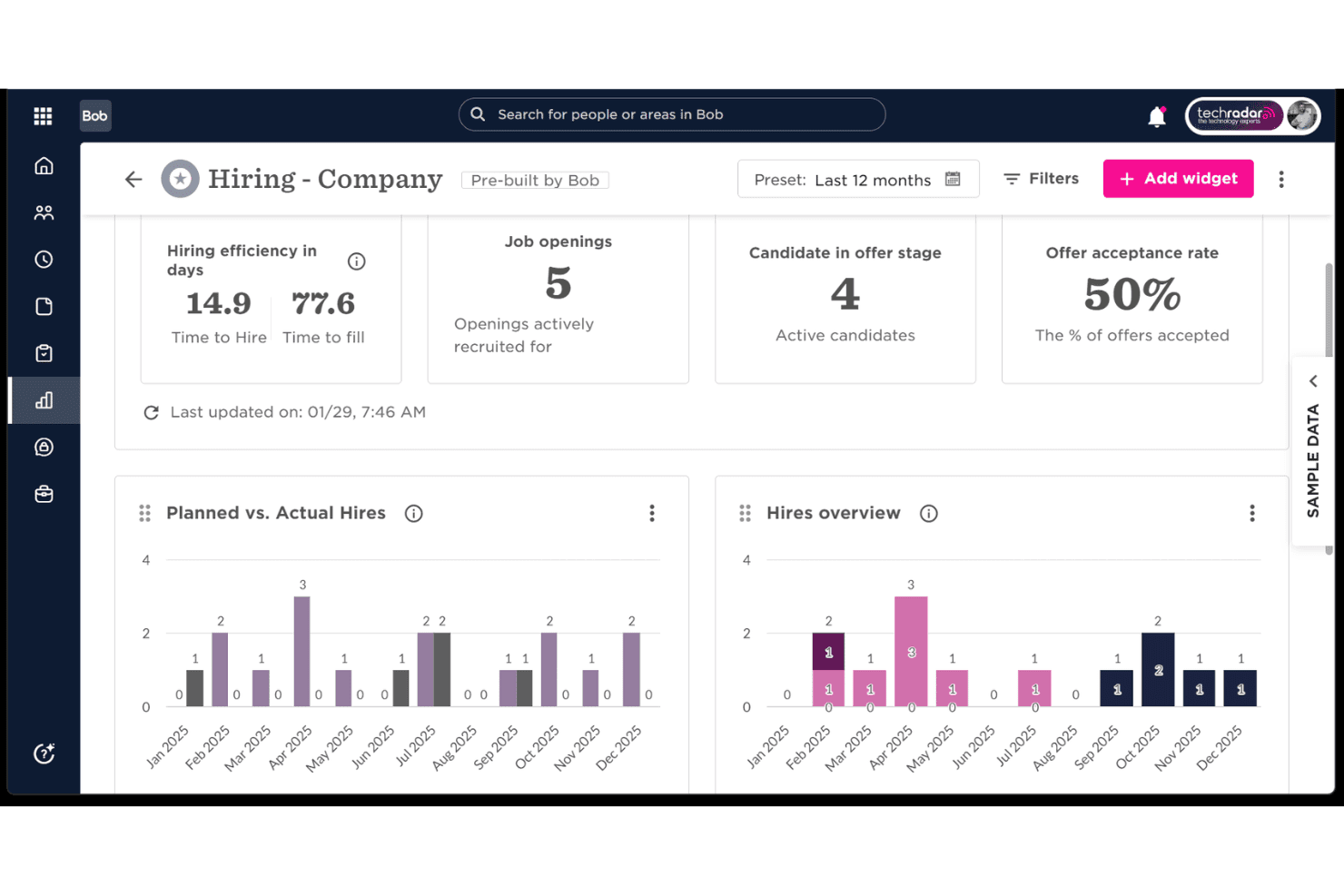
HiBob provides HR teams with a cloud-based hiring dashboard to track recruiting performance, hiring efficiency, open roles, and offer acceptance rates. HiBob is a cloud-based HRIS platform that combines employee records, lifecycle automation, performance management, compensation, and workforce planning in a single system built for global, distributed teams.
Who Is HiBob Best For?
HiBob is a strong fit for People Operations teams at mid-market companies managing headcount across multiple countries or legal entities.
Why I Picked HiBob
HiBob earns its spot on my shortlist because of how cleanly it handles multi-entity org complexity at scale. I like that you can model separate legal entities, manage country-specific leave policies, and run payroll in local currencies, all from one platform. The built-in workforce scenario planning lets you stress-test headcount decisions across entities before acting, which is a capability I rarely see natively in an HRIS.
HiBob Key Features
- Self-service portal: Role-based employee and manager portals let users access profiles, submit requests, and approve workflows.
- Custom document management: Centralizes document storage, version history, and e-signatures for secure record-keeping.
- Integrated performance reviews: Built-in review cycles and feedback tools support ongoing employee development.
- Built-in survey tools: Pulse surveys and sentiment analysis track engagement and help teams act on employee feedback.
HiBob Integrations
HiBob offers native integrations with payroll and HR tools like Greenhouse, Workable, ADP, Google Workspace, Slack, Microsoft Teams, Jira, and Okta. An open API is available for custom integrations.
Pros and Cons
Pros:
- Highly configurable employee lifecycle workflows
- Built-in performance and engagement tools
- Strong multi-entity org structure management
Cons:
- Onboarding setup requires significant configuration time
- Reporting customization can feel limited
 Best for core HR features
- 7-day free trial + demo available
- From $10.25/user/month
Visit WebsiteCustomer Rating:3.9/5
BambooHR’s employee documents dashboard displaying organized folders for uploads, applications, signed documents, and workflow files. BambooHR is designed for small and mid-sized businesses that want a central hub for employee data and day-to-day HR tasks. It brings core HR, hiring, and people-management tools into one system so your team can stay organized and work more efficiently.
Why I Picked BambooHR
I picked BambooHR because it gives you a clear, centralized way to manage the entire employee lifecycle without adding extra complexity. You get tools like ATS workflows, guided onboarding, and built-in e-signatures that help your team handle routine tasks with fewer manual steps.
I also like its Time Tracking and PTO tools, which let employees submit requests and managers approve them in a few clicks, and in-built eNPS surveys give you straightforward insights into employee sentiment, backed by automated data collection. Plus, its add-on payroll service is built to stay compliant with U.S. federal and state requirements, which is helpful if your team wants everything in one place.
BambooHR Key Features
Here are some standout features worth highlighting:
- Employee Self-Service: Lets employees update personal info, upload documents, and access PTO balances on their own.
- Org Chart & Directory: Auto-updates as your team grows, giving everyone visibility into roles and reporting lines.
- Performance Management: Offers goal tracking and simple review cycles to keep employees aligned and on track.
- Company Calendar: Centralizes birthdays, anniversaries, and time off so teams always know who’s available.
BambooHR Integrations
Integrations include Slack, Greenhouse, HireRight, Indeed, Lattice, 15Five, PayScale, Pingboard, NetSuite, Spark Hire, and Zapier.
Pros and Cons
Pros:
- PTO and time tracking reduce manual admin work
- Simple onboarding flows with e-signatures and task assignments
- Clear employee profiles centralize essential HR data
Cons:
- Reporting customization can feel limited for advanced needs
- Payroll is U.S.-only
 Best for payroll-HR integration
- Free trial + free demo available
- From $49/month
Visit WebsiteCustomer Rating:4.6/5
Gusto has an easy-to-learn interface and offers a wide range of essential payroll and HR features. Gusto offers a versatile cloud platform that caters to the needs of small to medium-sized enterprises. With its comprehensive suite of HR tools, Gusto simplifies payroll, benefits administration, and compliance management, addressing the complexities of managing a growing team.
Why I Picked Gusto
I picked Gusto for its seamless integration of payroll and HR functionalities, which are vital for cloud-based HR solutions. The platform's ability to automate payroll calculations and tax filings ensures accuracy and saves time for your team.
Additionally, Gusto's benefits administration feature allows you to manage health insurance, 401(k) plans, and workers' compensation all in one place, providing comprehensive support for employee benefits management. These features make Gusto an attractive choice for businesses looking to streamline their HR operations.
Gusto Key Features
Here are some key features worth highlighting:
- Hiring and Onboarding Tools: These tools help you streamline the recruitment process and ensure new hires are integrated smoothly into your team.
- Time Tracking: This feature allows you to easily manage employee hours and ensure accurate payroll processing.
- Employee Self-Service: Employees can access their pay stubs, benefits, and personal information, reducing administrative burdens.
- Compliance Alerts: Gusto provides alerts for compliance deadlines to help you stay on top of legal requirements.
Gusto Integrations
Integrations include QuickBooks Online, Xero, FreshBooks, Expensify, TSheets, Deputy, Clover, Shopify, WooCommerce, and Slack.
Pros and Cons
Pros:
- Automatic tax filings and direct deposit simplify payroll compliance.
- Payroll, benefits, and HR in one unified platform.
- Employee self-service portal empowers staff to access pay and forms.
Cons:
- Great for simple pay and HR management but not customizable enough to handle large, complex orgs.
- SMBs that need advanced compliance or niche industry-specific HR modules may find Gusto limiting.
 Best for rich customization
- Free plan + free demo available
- From $2/user/month (billed annually)
Visit WebsiteCustomer Rating:4.8/5
TalentHR offers a built-in AI HR Assistant chatbot with a company data toggle and suggested HR questions directly within the platform. TalentHR is a cloud-based HRIS that covers employee records, time-off tracking, onboarding, performance management, and people analytics—with deep customization across fields, workflows, and reporting.
Who Is TalentHR Best For?
TalentHR suits startups and growing SMBs that need a fully functional HRIS without the cost or complexity of enterprise-grade platforms.
Why I Picked TalentHR
TalentHR earns its spot on my shortlist because the customization it offers at this price point is genuinely unusual. I like that you can add custom fields to employee profiles, build tailored onboarding workflows, and configure people analytics reports to track exactly what your team cares about. The AI tools, like candidate suitability scoring and job description generation, are built into the platform rather than added as an afterthought.
TalentHR Key Features
- Safe Voice whistleblowing tool: Allows employees to report concerns confidentially and complies with the EU Whistleblower Directive.
- Document management and e-signature: Centralizes HR files and enables seamless electronic document signing.
- Integrated ATS and job board: Lets you build a branded careers page and manage applicant pipelines within the platform.
- TalentLMS integration: Syncs your HRIS with employee learning and training activities using Epignosis’s native LMS tool.
TalentHR Integrations
TalentHR offers native integrations with Google Calendar, Slack Outlook, and WordPress, connects with Zapier, and provides an API for custom integrations.
Pros and Cons
Pros:
- Onboarding workflows are highly configurable
- Built-in AI tools for recruitment tasks
- Custom fields across all employee records
Cons:
- No native payroll processing included
- Reporting lacks depth for larger teams
Learn more about TalentHR:

Paycor lets you onboard new hires, manage existing employees, and store documents in one platform. Paycor is built for HR teams that want to give employees more control over their own data while reducing admin work. It centralizes employee records, time-off management, and onboarding tasks in one place, making it a strong fit for mid-sized organizations that need reliable self-service tools.
Why I Picked Paycor
I picked Paycor because it gives your team an easy way to manage HR tasks while letting employees handle routine actions themselves. Its self-service portal lets staff update personal details, sign documents, and access payslips without relying on HR, which cuts down on repetitive requests.
You also get detailed audit trails that record every change to an employee profile, helping you maintain accuracy and compliance as your workforce grows. I like that the platform includes customizable permissions, so you can control who sees sensitive information, and it also offers access to HR resources and templates that help your team stay aligned with best practices.
Paycor Key Features
Here are some standout features worth highlighting:
- Performance Review Tools: Provides templates and rating systems to run consistent, documented evaluations.
- Payroll Process Automation: Automates payroll reports, reminders, and recurring tasks to reduce manual oversight.
- Shift & Task Automation: Helps you automate scheduling and repetitive administrative tasks to save time.
- Custom Reporting: Allows you to create tailored HR reports for visibility into workforce trends.
Paycor Integrations
Integrations include Broadcast Employee Communication Suite, Millie, OurPeople, Uncommon Giving, Spark Hire, Workvivo, ADP Workforce Now, Indeed, and Oracle Netsuite.
Pros and Cons
Pros:
- Custom permissions support secure access controls
- Detailed audit trails help maintain compliance accuracy
- Employee self-service reduces routine HR requests
Cons:
- Limited customization for onboarding workflows
- Some advanced analytics require higher-tier plans
 Best as AI for business
- Free trial + Free demo available
- From $8/user/month
Visit WebsiteCustomer Rating:4.4/5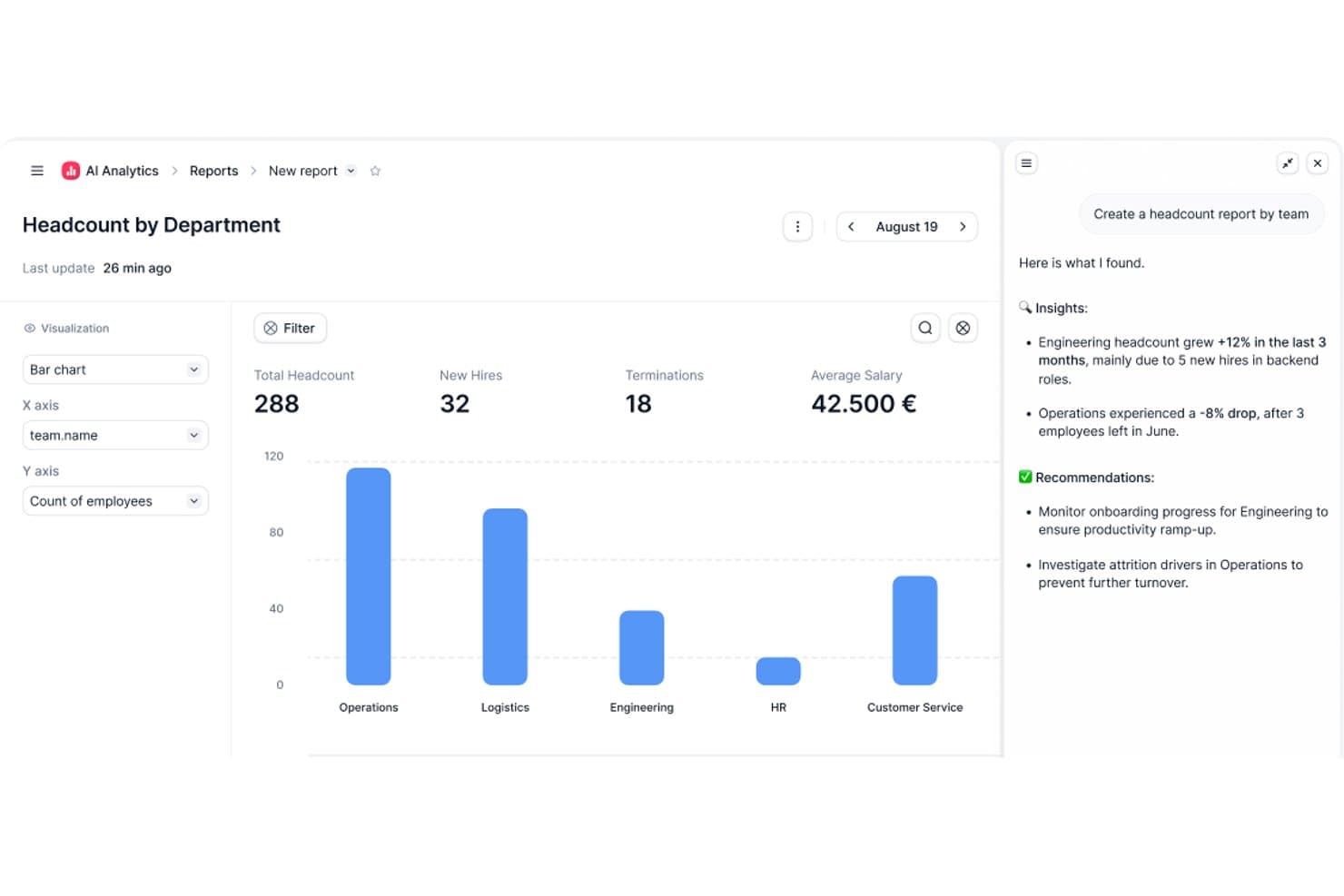
Factorial's AI Analytics generates headcount reports with insights and recommendations. Factorial is a cloud HR platform that brings together time tracking, absence management, payroll preparation, recruitment, performance reviews, and employee records—with AI woven throughout to help you plan schedules, generate reports, and answer employee questions about company policies.
Who Is Factorial Best For?
Factorial suits growing small and mid-sized businesses that want a single platform to manage HR, time tracking, and day-to-day operations with AI built in.
Why I Picked Factorial
I picked Factorial as one of the best because its AI runs through the parts of HR that eat up the most time. Factorial's AI assistant, One, answers employee questions about policies directly so those questions don't land in your inbox, and it can plan timetables and generate reports without you pulling the data manually. The AI angle isn't cosmetic here—it's woven into the core workflows that HR teams actually use every day.
Factorial Key Features
- 360-degree performance reviews: Managers and peers can submit structured feedback on employees using configurable rating scales and competency tracking.
- Shift scheduling: Administrators can build and assign automated, bulk, and rotating shift schedules across teams.
- eNPS and climate surveys: HR teams can run employee net promoter score surveys, team pulse checks, and climate surveys to measure engagement.
- Digital e-signature: Users can send, sign, and track contracts and HR documents with legally compliant electronic signatures.
Factorial Integrations
Factorial offers marketplace integrations with Google Workspace, Slack, Microsoft Azure, Okta, Microsoft Power BI, LinkedIn, and payroll tools such as DATEV LODAS and Sage 200. It also supports a public API, webhooks, SDKs, and Zapier.
Pros and Cons
Pros:
- Onboarding workflows organize new-hire tasks
- Leave requests and balances stay visible
- AI answers policy questions and plans timetables
Cons:
- Complex workflows may require workarounds
- Custom reporting and analytics depth can be limited
Diğer Bulut İK Yazılımları
En iyi bulut İK yazılımları için hazırladığım en iyi 10 listesine giremeyen, ancak yine de göz atmaya değer birkaç seçenek daha şunlardır:
- 11Paychex FlexBest for complex HR processes
- 12HR CloudBest for digital onboarding and offboarding
- 13GoCoBest with integrated benefits administration
- 14Kallidus SaplingBest for customizing workflows
- 15Sage HRBest for managing talent and succession planning
- 16ArcoroBest for health and safety-focused industries
- 17Collage HRBest for Canadian SMBs
- 18Cloud9HRBest for organizational management
- 19RipplingBest for automated onboarding
- 20ClearCoBest for the full employee lifecycle
- 21Folks HRBest cloud HRIS system for Canadian non-profit organizations
- 22Keka HRBest for interconnected HR, payroll, and PSA
- 23Oyster HRBest for international hiring
- 24RiseBest for Canadian companies with lean HR teams
- 25TriNet HR PlusBest cloud HRIS system for benefits management and group insurance
- 26Zoho PeopleBest all-in-one cloud platform for managing variable workforces
- 27OrangeHRMBest free cloud-based HRMS software, available via open source
- 28BrightHRBest cloud HRIS for automations and document management
- 29CezanneBest HR software for global, multi-lingual organizations
- 30ConnecteamBest cloud software for employee shift scheduling
- 31IntelliHRBest cloud HR software for performance management
- 32Employment HeroBest cloud based HR software for Canadian employee benefits administration
- 33Breathe HRBest cloud HR management software for leave management - available as a 14-day free trial
İlgili İK Yazılımı İncelemeleri
Aradığınızı hâlâ burada bulamadıysanız, test edip değerlendirdiğimiz diğer ilgili araçlara göz atın:
- İK Yazılımı
- Bordro Yazılımı
- İşe Alım Yazılımı
- Kayıtlı İşveren Hizmetleri
- Aday Takip Sistemleri
- İşgücü Yönetimi Yazılımı
How I Evaluate Cloud-Based HRIS
I evaluate cloud-based HRIS in two layers—core functionality any tool must have (think: employee records, self-service, and compliance reporting) and differentiators that set the right fit apart.
Core Functionality (Table Stakes For This List)
When I'm selecting tools for my list, I rank each one on a scale from 0 (does not offer the functionality) to 5 (excels in this area) for each core functionality listed below. Then, I calculate the tool's total score into a percentage. Each tool needs to achieve a minimum total score of 75% to be considered for inclusion.
- Employee Database Management: I look for a centralized system of record where HR teams can store job histories, compensation data, and org structures without toggling between spreadsheets.
- Self-Service Portals: Employees and managers should be able to update addresses, submit PTO requests, and approve workflows from both desktop and mobile browsers.
- Onboarding & Lifecycle Management: I evaluate whether a platform handles the full hire-to-exit journey, including offer letter e-signatures, task assignments, and IT provisioning triggers.
- Benefits & Time-Off Administration: This covers PTO accrual policies, leave request approvals, and benefits enrollment—I check whether the tool connects to carriers or requires manual entry.
- Compliance & Reporting: I look for custom report builders that let HR teams pull EEO, headcount, or turnover reports on demand rather than relying on IT or pre-built templates alone.
- Integrations & API Access: A cloud HRIS needs to fit into your existing stack, so I check for native connectors to major payroll and ATS platforms plus a documented API for custom builds.
Once I have a list of tools that meet this criteria, I consider what sets each platform apart.
Differentiating Factors (What Sets Vendors Apart)
Here's how I compare and contrast different vendors:
Standout Features
Global payroll support matters when your workforce spans multiple countries—I check whether a platform handles localized tax rules natively or through certified partners. Configurable workflows are another differentiator I evaluate closely, since no-code approval chains save HR teams real time during open enrollment or org restructures. I also look for built-in performance and engagement tools like review cycles and pulse surveys that tie directly to the employee record rather than requiring a separate platform.
Beyond Features
Scalability is a big factor—I check whether a platform fits your current headcount and can grow with you as you add entities or expand into new regions. Compliance and data security also carry real weight here, since your HRIS holds sensitive employee data. Certifications like SOC 2 Type II and role-based access controls help me gauge how seriously a vendor treats data protection. Total cost of ownership rounds out my evaluation, because implementation fees and add-on module pricing can shift the value equation quickly.
Bulut İK Yazılımı Nasıl Seçilir?
Bulut tabanlı İK yazılımı birçok farklı sorunu çözebilir ve çok sayıda iş akışını iyileştirebilir. İhtiyaçlarınıza en uygun İK yazılımını belirlemenize yardımcı olmak için öncelikle temel kullanıcılarınızı belirlemeniz ve onların karşılaştığı özel zorlukları belgelemeniz gerekir.
Kendi benzersiz İK yazılımı seçim sürecinizi yürütürken aşağıdaki noktaları göz önünde bulundurun:
- Hangi sorunu çözmeye çalışıyorsunuz - Üstesinden gelmeye çalıştığınız zorlukları belirleyerek başlayın. Bu, bulut İK yazılımının sunması gereken özellikleri ve işlevleri netleştirmenize yardımcı olacaktır.
- Kimlerin kullanması gerekecek - Maliyeti ve gereksinimleri değerlendirmek için yazılımı kimlerin kullanacağını ve kaç lisansa ihtiyacınız olacağını göz önünde bulundurun. Platforma bağlı olarak, tüm çalışanlarınız için çalışan düzeyinde erişim ve İK yöneticileriniz ile yöneticileriniz için özel erişim isteyebilirsiniz. Bu netleştikten sonra, tüm ihtiyaçların karşılandığından emin olmak amacıyla İK yazılımınızın ileri düzey kullanıcıları, yöneticiler ve çalışanlar için temel önceliklerinizi belirlemek üzere farklı kullanıcılarınızın ihtiyaçlarını önem sırasına koymanız da faydalı olacaktır.
- Hangi diğer araçlarla birlikte çalışması gerekiyor - Hangi araçları değiştirdiğinizi, hangi araçları kullanmaya devam edeceğinizi ve muhasebe, zaman takibi veya bordro yazılımı gibi hangi araçlarla entegrasyon kurmanız gerektiğini netleştirin. Araçların birbiriyle entegre olup olmaması gerektiğine veya alternatif olarak birden fazla aracı hepsi bir arada sunan bulut tabanlı bir İK platformuyla değiştirip değiştiremeyeceğinize karar vermeniz gerekecektir.
- Hangi sonuçlar önemli - Elde etmek veya geliştirmek istediğiniz yetenekleri ve başarıyı nasıl ölçeceğinizi gözden geçirin. Örneğin, daha fazla self servis olanağı sunarak çalışan deneyimini zenginleştirmek veya ekip içi takdir yeteneklerini artırarak çalışan bağlılığını geliştirmek isteyebilirsiniz. İstediğiniz sonuçları düşünmüyorsanız, İK yazılımı özelliklerini gözleriniz kararana kadar karşılaştırabilirsiniz; ancak bu durumda çok değerli zamanınızı boşa harcayabilirsiniz.
- Kuruluşunuz içinde nasıl çalışacağı - Yazılım seçimini mevcut iş akışlarınız ve sistemlerinizle birlikte değerlendirin. İyi çalışan noktaları ve ele alınması gereken sorunlu alanları belirleyin.
Her işletmenin farklı olduğunu unutmayın — yalnızca popüler olduğu için bulut tabanlı bir İK sisteminin kuruluşunuz için uygun olacağını varsaymayın.
Bulut İK Yazılımındaki Eğilimler
Bulut İK yazılımındaki yeni eğilimleri anlamak, bir çözümde nelere dikkat etmeniz gerektiğini daha iyi değerlendirmenize yardımcı olur. Listelerimin yalnızca güncel değil, geleceğe dönük olmasını sağlamak için bu ürünlerin değişen işlevlerini, özelliklerini ve odak noktalarını takip etmeye çalışıyorum. Şu anda ve gelecekte şekillenen bazı eğilimler şunlardır:
- Yapay Zekâ Destekli Yetenek Kazanımı: Yapay zekâ (AI) yetenekleri, açık pozisyonlarınız için doğru kişileri çekme, keşfetme ve işe alma yöntemlerinizi geliştirerek işe alım süreçlerini iyileştiriyor. İş gereksinimlerini ve aday profillerini anlamada giderek daha yetkin hale geliyor ve daha verimli ve etkili bir işe alım süreci sunuyor. Örneğin, yapay zekâ destekli işe alım araçları büyük miktarda veriyi analiz ederek şunları yapabilir:
- En uygun adayları belirlemek,
- İşe alım süresini kısaltmak ve
- İşe alım ve işe uyum sürecini iyileştirmek.
- Çalışan Esenliği ve Ruh Sağlığı Platformları: Çalışan esenliğine ve ruh sağlığına odaklanan platformların yükselişi, çalışanlarınıza önem verdiğinizi göstermenin artan önemini ortaya koyuyor. Bu bulut tabanlı çözümler; danışmanlık hizmetleri, esenlik takibi ve stres yönetimi araçları gibi kaynaklar sunuyor. Şirketler çalışanların iyilik hâlini önceliklendirdiğinde çalışan memnuniyeti, çalışanları elde tutma ve üretkenlikte belirgin bir iyileşme görebilir. Bu da nihayetinde İK liderlerinin destekleyici ve kalıcı bir iş yeri kültürü oluşturma hedefleriyle örtüşür.
- Gelişmiş Performans Analitiği: Çalışan performansı ve yetenek gelişimi her zamankinden daha önemli—özellikle de yapay zekâ birçok çalışanın günlük yaşamında giderek daha fazla yer alırken. Performans yönetimi araçları, çalışan üretkenliği, bağlılığı ve beceri gelişimi hakkında eyleme dönüştürülebilir bilgiler sunar. İyileştirme alanlarının ve eğitim ihtiyaçlarının belirlenmesine yardımcı olarak çalışanların ellerinden gelen en iyi performansı göstermelerini ve sürekli gelişim yolunda ilerlemelerini sağlar.
- Hibrit İş Gücü Yönetimi Çözümleri: Bulut İK yazılımı; dağıtılmış ekipleri yönetmeye, uzaktan ve ofiste çalışma ortamları arasındaki farkı kapatmaya ve çalışanların fiziksel konumundan bağımsız olarak verimli operasyonlar sağlamaya yönelik özellikleri giderek daha fazla bünyesine katıyor. Buna şu araçlar dahildir:
- Uzaktan devam takibi,
- Ekip iş birliği ve
- Kolaylaştırılmış iletişim.
Bu eğilimler, bulut İK yazılımının gelişimini şekillendirerek yazılımı daha verimli ve modern kuruluşların karmaşık ihtiyaçlarını karşılayabilecek hâle getiriyor.
Yapay zekânın İK yazılım sistemlerini nasıl geliştirdiği hakkında daha fazla bilgi edinmek istiyorsanız, yapay zekânın insan kaynaklarını nasıl etkileyeceğini açıklayan makalelerimize göz atın.
Bulut İK Yazılımı Nedir?
Bulut İK yazılımı, çeşitli insan kaynakları işlevlerini yöneten; uzaktan erişim, veri güvenliği ve çalışanlarla ilgili süreçlerin verimli şekilde yönetilmesini sağlayan çevrim içi bir platformdur. Bulut İK yazılımının temel özellikleri arasında uzaktan erişilebilirlik, çalışan verilerinin yönetimi, bordro işlemleri, işe alım ve işe uyum araçları, performans takibi, yan hakların yönetimi ve gerçek zamanlı analiz ve raporlama yer alır.
Bulut İK Yazılımının Özellikleri
Bulut İK yazılımını seçerken aşağıdaki temel özelliklere dikkat edin:
- Çalışan self servis portalı: Çalışanların kişisel bilgilerini, yan haklarını ve izin taleplerini kendi başlarına yönetmelerine olanak tanıyın; böylece ekibi güçlendirirken İK'nın günlük iş yükünü azaltın.
- Otomatik bordro işleme: Maaşları, kesintileri ve vergi stopajlarını otomatik olarak hesaplayarak maaş günü stresini ortadan kaldırın; herkesin doğru ve zamanında ödeme almasını sağlayın.
- Mesai ve devam takibi: İşe giriş ve çıkış işlemlerini kolaylaştırın. Bu özellik çalışanların çalışma saatlerini kaydeder, devam eğilimlerini izler ve kronik geç kalma gibi sorun haline gelmeden önce belirli kalıpları fark etmenize yardımcı olur.
- Performans yönetimi araçları: Hedefleri takip edin, geri bildirim toplayın ve performans değerlendirmelerini tek bir yerden gerçekleştirin. Bu araçlar şeffaf gelişim yolları oluşturulmasına ve motivasyonun yüksek tutulmasına yardımcı olur.
- İşe alım ve işe alıştırma iş akışları: İş ilanının yayınlanmasından yeni çalışanın karşılanmasına kadar işe alım sürecini kolaylaştırın. Başvuruları düzenleyin, mülakatları planlayın ve işe alıştırma belgelerini otomatikleştirin; böylece kimse e-posta yazışmalarını tek tek incelemek zorunda kalmasın.
- Yan hak yönetimi: Sağlık sigortasını, emeklilik planlarını ve diğer ayrıcalıkları kolayca yönetin. Çalışanlar, İK ile bitmek bilmeyen yazışmalara gerek kalmadan seçenekleri inceleyebilir ve seçimlerini yapabilir.
- Uyumluluk yönetimi: Mevzuat değişikliklerini izleyen ve gerekli belgeleri otomatik olarak güncelleyen yerleşik araçlarla işletmenizin iş kanunlarına uygun hareket etmesini sağlayın.
- Raporlama ve analiz: İş gücü eğilimlerini ortaya çıkarmak, çalışanları elde tutma sorunlarını fark etmek veya başarıları kutlamak için panolara erişin ve özel raporlar oluşturun; tüm bunları gerçek verilere dayandırın.
Yaygın Bulut İK Yazılımı Yapay Zekâ Özellikleri
Yukarıda sıralanan standart bulut İK yazılımı özelliklerinin yanı sıra, bu çözümlerin çoğu aşağıdaki gibi özelliklerle yapay zekâyı da bünyesine katıyor:
- Yapay zekâ destekli aday taraması: Özgeçmişleri otomatik olarak inceleyip nitelikli adayları kısa listeye alarak saatler süren manuel ayıklama işinden tasarruf edin ve en uygun adayı daha hızlı bulun.
- Çalışan devri öngörü analizi: Hangi çalışanların ayrılma riski taşıyabileceğini öngörmek ve analiz etmek için yapay zekâyı kullanın; böylece harekete geçmek ve çalışanları elde tutmayı güçlendirmek için zaman kazanın.
- Akıllı sohbet robotu desteği: Basit soruları yanıtlayan veya çalışanlara ve adaylara İK süreçlerinde 7/24 yol gösteren yapay zekâ sohbet robotları aracılığıyla anında yanıtlar sunun.
- Otomatik uyumluluk izleme: Yapay zekâ, değişen düzenlemeleri tarar, şirket politikalarını günceller, riskleri işaretler ve her güncellemeyi kendiniz incelemek zorunda kalmadan uyumluluğunuzu korumanıza yardımcı olur.
- Duygu analizi: Anketlerden ve kurum içi sohbetlerden gelen geri bildirimleri analiz etmek için yapay zekâdan yararlanın; böylece şirket çalışanlarının moral durumunu ve olası sorunlu alanları gerçek zamanlı olarak takip edin.
- Kişiselleştirilmiş öğrenme önerileri: Yapay zekânın her çalışanın rolüne ve kariyer aşamasına göre uyarlanmış gelişim kursları ve eğitim yolları önermesini sağlayın; böylece mesleki gelişim kişiye özel tasarlanmış gibi hissettirsin.
Bulut İK Yazılımının Faydaları
Bulut tabanlı İK yazılımı, insan kaynakları işlevlerinizi daha verimli hale getirmek ve bunlara her yerden ve her cihazdan erişebilmenizi sağlamak üzere tasarlanmıştır. Ayrıca maliyetleri azaltmanıza, güvenliği artırmanıza ve yazılımınızın en yeni özellikler ve iyileştirmelerle her zaman güncel kalmasını sağlamanıza yardımcı olabilir.
İhtiyaçlarınıza en uygun bulut İK yazılımını seçerek aşağıdaki faydaları elde etmeyi bekleyebilirsiniz:
- Geliştirilmiş Erişilebilirlik: Bulut İK yazılımı, kullanıcıların internet erişimi olan herhangi bir konumdan bilgilere erişmesine ve görevleri gerçekleştirmesine olanak tanır. Ayrıca uzaktan ve hibrit belge yönetim sistemlerinin her yerden kullanılabilmesini sağlar.
- Geliştirilmiş Maliyet Verimliliği: Kurum içi BT altyapısı ve personeli ihtiyacını azaltan bulut İK yazılımı, başlangıç ve devam eden maliyetleri önemli ölçüde düşürür. Kuruluşlar donanım için yüksek sermaye harcamalarından kaçınabilir ve ihtiyaçlarıyla birlikte ölçeklenen abonelik tabanlı bir modelden yararlanabilir.
- Geliştirilmiş Güvenlik: Bulut tabanlı İK yazılımı sağlayıcıları genellikle veri şifreleme ve güvenli veri merkezleri de dahil olmak üzere güçlü güvenlik önlemlerine yatırım yapar. Bu önlemler çoğu zaman bireysel kuruluşların karşılayabileceğinden daha kapsamlıdır. Bu da hassas çalışan verilerinin ihlallere karşı korunmasına yardımcı olur.
- Sürekli Güncellemeler ve İyileştirmeler: Bulut yazılımı sağlayıcıları, yeni özellikler eklemek, kullanıcı deneyimini geliştirmek ve performansı artırmak için ürünlerini sürekli günceller. Kullanıcılar bu güncellemeleri otomatik olarak alır; böylece en yeni araçlara ve işlevlere her zaman erişebilir.
İşletmeler, bulut İK sistemlerini benimseyerek günümüzün dinamik iş ortamında büyük önem taşıyan daha fazla esnekliğin, daha düşük maliyetlerin, geliştirilmiş güvenliğin ve diğer pek çok avantajın tadını çıkarabilir.
Bulut İK Yazılımı Maliyetleri ve Fiyatlandırması
Bulut İK yazılımı, yeni girişimlerden büyük işletmelere kadar farklı büyüklükteki ve türdeki işletmeleri desteklemek için çeşitli planlar ve fiyatlandırma seçenekleri sunar. Her plan, ölçeklenebilirlik ve esneklik sağlamak üzere tasarlanmış kendine özgü özellikler ve fiyatlandırma yapısıyla birlikte gelir. Bilinçli bir karar vermenize yardımcı olmak için yaygın plan seçeneklerinin açıklaması aşağıdadır.
Bulut İK Yazılımı İçin Plan Karşılaştırma Tablosu
| Plan Türü | Ortalama Fiyat | Yaygın Özellikler |
|---|---|---|
| Plan TürüÜcretsiz | Ortalama Fiyat$0 | Yaygın ÖzelliklerTemel İK işlevleri, sınırlı kullanıcı sayısı ve sınırlı veri depolama alanı |
| Plan TürüTemel | Ortalama Fiyat$10-20 kullanıcı başına/aylık | Yaygın ÖzelliklerTemel İK özellikleri, çalışan self servis portalı ve bulut depolama |
| Plan TürüProfesyonel | Ortalama Fiyat$20-40 kullanıcı başına/aylık | Yaygın ÖzelliklerGelişmiş İK özellikleri, API erişimi ve özelleştirme seçenekleri |
| Plan TürüKurumsal | Ortalama FiyatÖzel Fiyatlandırma | Yaygın ÖzelliklerGelişmiş özellikler, tam özelleştirme, özel destek ve analizler |
Bulut İK yazılımı için plan türlerinin, maliyetlerin ve özelliklerin açıklaması.
Doğru planı seçmek kuruluşunuzun büyüklüğüne, İK ihtiyaçlarınızın karmaşıklığına ve bütçenize bağlıdır. Yalnızca yazılımın mevcut yeteneklerini değil, işletmenizle birlikte büyüme potansiyelini de göz önünde bulundurmanız önemlidir. İhtiyaçlarınıza en uygun seçeneği bulmak için farklı bulut İK yazılımı seçeneklerini karşılaştırırken bu faktörleri aklınızda bulundurun.
Sıkça Sorulan Sorular
Bulut tabanlı İK yazılımı ve çalışma şekli hakkında sıkça sorulan soruların bazı yanıtlarını burada bulabilirsiniz:
Bulut tabanlı İK yazılımının farklı türleri var mı?
Kesinlikle var. Bu listeyi odaklı tutmak amacıyla İK yönetim sistemleri kapsamına giren bulut tabanlı İK sistemlerini seçtim. İK yönetim yazılımı alanında aşağıdaki alt kategorilerde yazılımlar bulabilirsiniz:
\u003cul\u003e
\u003cli\u003eHRIS = \u003ca href=\u0022https://peoplemanagingpeople.com/tools/hris-human-resources-information-system/\u0022\u003einsan kaynakları bilgi sistemleri\u003c/a\u003e\u003c/li\u003e
\u003cli\u003eHRMS = insan kaynakları yönetim sistemleri\u003c/li\u003e
\u003cli\u003eHCM = insan sermayesi yönetimi [sistemleri]\u003c/li\u003e
\u003c/ul\u003e
Bunun dışında başka bulut tabanlı yazılım sistemi türleri de vardır. Popüler türler arasında çevrim içi bordro yazılımı ve diğerlerinin yanı sıra \u003ca href=\u0022https://peoplemanagingpeople.com/tools/best-cloud-recruitment-software/\u0022\u003ebulut tabanlı işe alım yazılımı\u003c/a\u003e yer alır.
Bulut tabanlı İK yazılım sistemleri ne kadar yaygın?
Verified Market Research’e göre İK yazılımı pazarının %70’i bulut tabanlı İK yazılımlarından oluşur. Buna HCM, HRMS, HRIS ve diğer yetenek ve iş gücü yönetimi sistemi türleri dahildir. Sektör uzmanları, 2021 ile 2028 arasında %11,12’lik bileşik yıllık büyüme oranı öngörüyor.
260 şirketle anket gerçekleştiren \u003ca href=\u0022https://www.businesswire.com/news/home/20210331005591/en/Companies-Accelerating-Adoption-of-Cloud-Based-HR-Platforms-Amid-Pandemic-ISG-Survey-Finds\u0022 rel=\u0022noopener\u0022 target=\u0022_blank\u0022\u003eInformation Services Group\u003c/a\u003e tarafından yapılan ayrı bir 2021 araştırmasında, katılımcıların %46’sı hâlihazırda bir SaaS platformuna abone olduklarını, %57’si ise 2023 yılına kadar abone olmuş olacaklarını doğruladı.
Bulut tabanlı İK yazılımları için ortalama uygulama süresi nedir?
Bulut tabanlı İK yazılımlarının ortalama uygulama süresi, işletmenin gereksinimlerinin karmaşıklığına ve seçilen yazılıma bağlı olarak önemli ölçüde değişebilir. Genellikle küçük ve orta ölçekli işletmeler, birkaç haftadan birkaç aya kadar değişen bir uygulama süresi bekleyebilir. Daha karmaşık ihtiyaçlara sahip büyük işletmelerin yeni sistemi tamamen entegre etmesi ve personeli eğitmesi birkaç ay sürebilir.
Şirketlerin sorunsuz bir geçiş sağlamak için kilometre taşlarını ve eğitim oturumlarını içeren net bir uygulama planı oluşturmak üzere yazılım sağlayıcılarıyla yakın iş birliği yapması çok önemlidir. Kendi uygulama ihtiyaçlarınız hakkında daha iyi fikir edinmek için yazılım uygulaması ve yeni İK teknolojisine hazır olup olmadığınızı nasıl anlayacağınız hakkındaki bu makaleyi okuyun.
Farklı bulut tabanlı İK yazılımları veri gizliliğini nasıl ele alır?
Veri gizliliği, bulut tabanlı İK yazılımları için kritik bir konudur ve saygın sağlayıcılar GDPR, HIPAA (sağlık hizmetlerinde) veya yerel veri koruma yasaları gibi katı veri koruma düzenlemelerine uyar.
Çoğu yazılım platformu veri şifreleme, düzenli güvenlik denetimleri ve uygunluk kontrolleri gibi güçlü güvenlik önlemleri kullanır. İşletmelerin hassas çalışan bilgilerine kimlerin erişebileceğini kontrol etmesine olanak tanımak için genellikle özelleştirilebilir gizlilik ayarları sunarlar.
Kullanıcılar, her sağlayıcının kullandığı özel güvenlik protokollerini sormalı ve bunların kuruluşun kendi veri güvenliği standartlarıyla uyumlu olduğundan emin olmalıdır. Daha fazla bilgi edinmek istiyorsanız bu makale veri yönetimindeki en iyi uygulamalar hakkında daha fazla ayrıntı sunuyor.
Bulut tabanlı İK yazılımlarının sözleşme koşulları nasıldır?
Bulut tabanlı İK yazılımlarının sözleşme koşulları sağlayıcıya göre değişir. İncelenmesi gereken önemli unsurlar arasında sözleşme süresi, iptal politikaları ve erken fesihle ilişkili ücretler bulunur. Çoğu sağlayıcı, işletmelere bütçelerine ve ihtiyaçlarına göre esneklik sağlayan aylık aboneliklerden yıllık sözleşmelere kadar çeşitli seçenekler sunar.
Potansiyel alıcıların sözleşme koşullarını kapsamlı biçimde incelemesi, sunulan hizmetlerin kapsamını anlaması ve imzalamadan önce belirsiz noktaları sağlayıcıyla netleştirmesi önemlidir. Ölçeklenebilirlik, veri sahipliği ve hizmet düzeyi anlaşmaları (SLA) hakkındaki sorular da sözleşmede ele alınmalıdır.
Diğer İK Yazılımı İncelemeleri
İlginizi çekebilecek diğer bazı bulut tabanlı İK yazılımı listelerini aşağıda bulabilirsiniz:
- Küçük İşletmeler İçin En İyi HRIS Sistemleri
- İnsan Kaynakları Yönetimi İçin En İyi HRMS
- Küçük İşletmeler İçin En İyi HRMS
- İK İşlevlerini Geliştirecek En İyi İK Yazılımı Listesi
- En İyi Çalışan Yönetim Sistemleri
İK yazılımı ekosisteminin sunduklarına daha bütünsel bir bakış için İK yazılımı hakkında kapsamlı rehberimizi mutlaka inceleyin