
16 Best AI Performance Management Tools Reviewed in 2026

10 Best AI Performance Management Tools Shortlist
Here's my pick of the 10 best software from the 16 tools reviewed.


The best AI performance management tools help you track goals, deliver feedback, and unlock actionable insights—so you can support your team’s growth without adding extra admin to your plate.
Traditional performance management often feels clunky, relying on manual reviews or static reports that don’t reflect real-time progress.
AI-powered tools change the game by automating feedback loops, spotting performance trends, and even predicting skill gaps—giving managers the data they need to coach more effectively.
Drawing on years of HR experience and independent software reviews, I’ve curated a list of AI performance management platforms that are intuitive, scalable, and built to improve both productivity and employee engagement.
In this guide, you’ll find solutions that streamline performance tracking while helping your team reach its full potential.
Why Trust Our Software Reviews
We’ve been testing and reviewing HR software systems since 2019. As HR experts ourselves, we know how critical and difficult it is to make the right decision when selecting software.
We invest in deep research to help our audience make better software purchasing decisions. We’ve tested more than 2,000 tools for different HR management use cases and written over 1,000 comprehensive software reviews. Learn how we stay transparent & our software review methodology.
Best AI Performance Management Tools Summary
This comparison chart summarizes pricing details for my top AI performance management tools selections to help you find the best one for your budget and business needs.
| Tool | Best For | Trial Info | Price | ||
|---|---|---|---|---|---|
| 1 | Best for AI-driven global performance reviews | Free demo available | From $5/employee/month | Website | |
| 2 | Best for AI-enabled goals and coaching | Free consultation + free demo available | Pricing upon request | Website | |
| 3 | Best for 360-degree feedback | Free trial available | From $5/user/month | Website | |
| 4 | Best for customizable reviews | Free demo available | From $5/user/month (billed annually) | Website | |
| 5 | Best for AI-powered performance dashboards | Free demo + free plan available | From $8/user/month | Website | |
| 6 | Best for government, small business, & non-profits | Free trial available | From $2.50/employee/month | Website | |
| 7 | Best for HR integration | Free demo available | Pricing upon request | Website | |
| 8 | Best for continuous feedback | Free demo available | From $4/user/month (billed annually) | Website | |
| 9 | Best for remote teams | Not available | Website | ||
| 10 | Best for employee recognition | Free demo available | From $2/user/month (billed annually, minimum price $7,500/year) | Website |

-

Checkr
Visit WebsiteThis is an aggregated rating for this tool including ratings from Crozdesk users and ratings from other sites.4.5 -
Kudoboard
Visit WebsiteThis is an aggregated rating for this tool including ratings from Crozdesk users and ratings from other sites.4.8 -
Native Teams
Visit WebsiteThis is an aggregated rating for this tool including ratings from Crozdesk users and ratings from other sites.4.6





Best AI Performance Management Tool Reviews
Below are my detailed summaries of the best AI performance management tools that made it onto my shortlist. My reviews offer a detailed look at the key features, pros & cons, integrations, and ideal use cases of each tool to help you find the best one for you.


Deel HR is an AI-powered performance management platform that combines global HR tools, automated review workflows, and compliance features for distributed teams.
Who Is Deel HR Best For?
Deel HR is a strong fit for HR teams managing performance across international workforces and time zones.
Why I Picked Deel HR
I picked Deel HR as one of the best because of how it handles AI-driven performance reviews for teams spread across multiple countries. Deel Engage uses built-in AI to draft competency libraries, generate feedback, and build out review cycles in minutes—so instead of starting from scratch each cycle, my team can refine content to better reflect our org's needs. The 360° review functionality is built for global teams, with support for anonymous and open feedback using both quantitative and qualitative methods. Deel AI is embedded directly into the platform and pulls from your live people data to surface contextual insights during review periods—so you're not just running reviews in a vacuum, you're connecting them to real workforce signals.
Deel HR Key Features
- Goal and OKR tracking: Set company, team, and individual OKRs with customizable cycles and real-time progress tracking across your entire workforce.
- Employee engagement surveys: Build pulse surveys and eNPS questionnaires with centralized analytics dashboards for action planning.
- Career progression frameworks: Define role expectations and career paths to give employees visibility into growth opportunities within the organization.
- Performance review calibration: Run calibration sessions to ensure fair and consistent performance evaluations across global teams.
Deel HR Integrations
Deel HR offers native integrations with BambooHR, Workday, HiBob, Greenhouse, Lever, Ashby, Okta, Slack, QuickBooks, Xero, and NetSuite. An API is available for custom integrations.
Pros and Cons
Pros:
- Offers wide country coverage
- Ensures local compliance
- Automates tax calculations
Cons:
- Requires understanding of compliance
- Complex setup for some users
New Product Updates from Deel HR

Deel HR Introduces AI-Powered ATS for Hiring
Deel HR introduces an AI-powered ATS built into its platform. This update enhances hiring efficiency by automating sourcing, screening, and workflows across the recruitment process. For more information, visit Deel HR’s official site.
 .
.
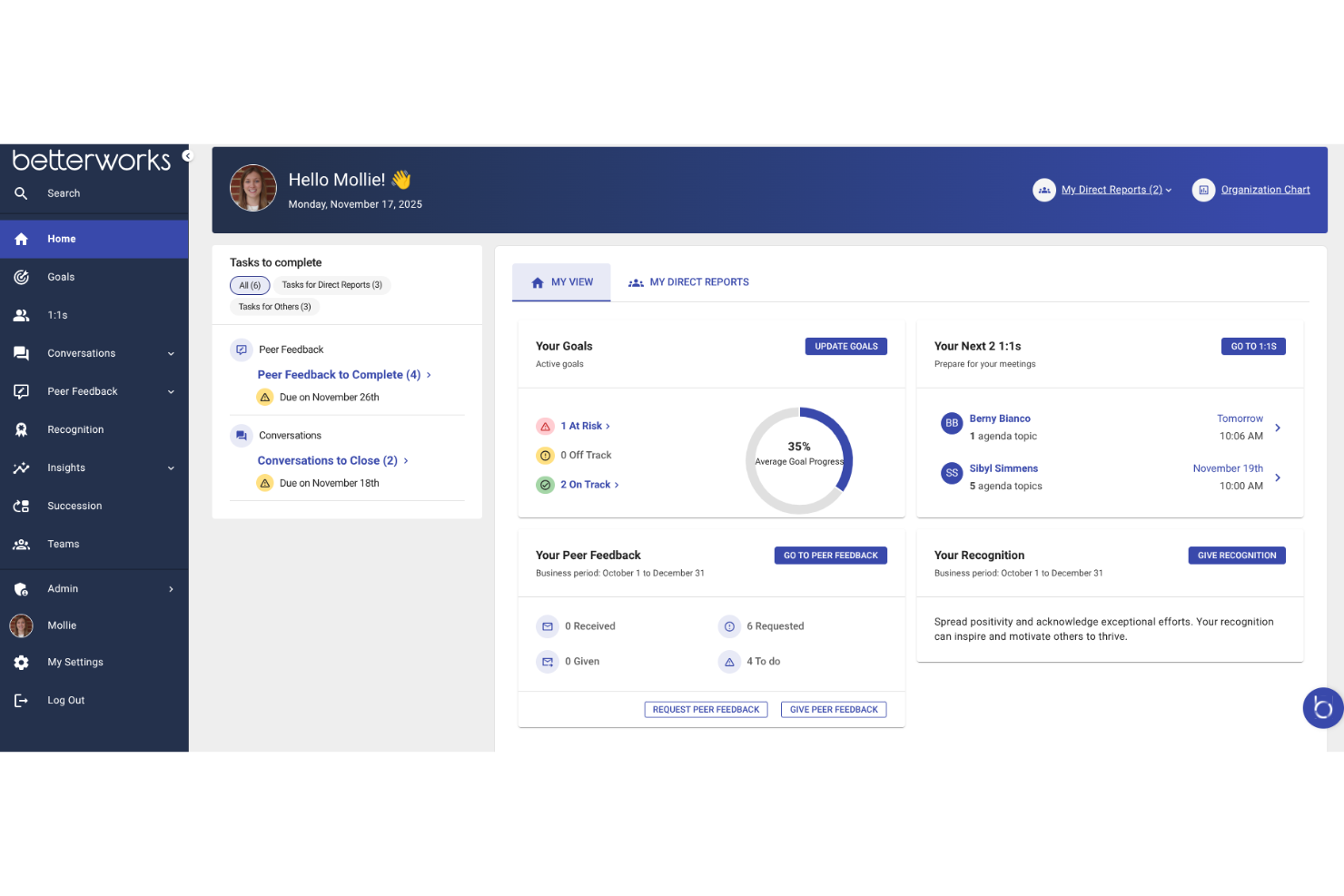
Betterworks is an AI-powered performance management platform that brings together goal setting, continuous feedback, coaching, and analytics for HR teams looking to manage employee performance at scale.
Who Is Betterworks Best For?
Betterworks is a good fit for mid-size to enterprise HR teams that need a structured, AI-supported approach to performance management across large or distributed workforces.
Why I Picked Betterworks
Betterworks earns its spot on my shortlist because of how deeply AI is woven into the goal-setting and coaching experience—not just as a bolt-on feature. I particularly like the Goal Intelligence feature, which uses an employee's role, team context, and company priorities to suggest specific, measurable goals, cutting down the back-and-forth between managers and direct reports. The Curated Manager Context feature also stands out: it synthesizes themes, blockers, and follow-ups across every 1:1 throughout the year, so managers aren't walking into coaching conversations cold. I also find the AI-synthesized performance summary genuinely useful—it pulls together goals, feedback, and 1:1 insights into a coherent narrative that makes review writing faster and more evidence-based.
Betterworks Key Features
- Performance calibration: Run structured calibration sessions that compare employee performance across teams using a consistent, data-backed framework to reduce bias in evaluation decisions.
- Pulse survey builder: Create and schedule recurring engagement surveys using research-backed templates, with anonymity thresholds and eNPS trend tracking built in.
- External feedback collection: Gather structured input from clients, partners, or suppliers directly into the platform without requiring them to have an account.
- 360-degree feedback: Collect peer, upward, and manager feedback across formal and informal cycles, with all responses automatically rolling into performance reviews and calibration tools.
Betterworks Integrations
Betterworks offers native integrations with ADP, Asana, Azure DevOps, BambooHR, GitHub, Google Sheets, Jira, LinkedIn Learning, Microsoft Teams, Okta, Oracle, Salesforce, Slack, SuccessFactors, Udemy, UKG Pro, Workday, and Zenefits. An API is available for custom integrations.
Pros and Cons
Pros:
- Strong customer support
- User-friendly interface
- Supports continuous performance management
Cons:
- Learning curve for integrating AI features
- Limited offline access


Workleap is an AI-powered performance management platform that brings together 360-degree feedback, goal tracking, and continuous feedback tools for HR teams and managers.
Who Is Workleap Best For?
Workleap is a good fit for mid-sized companies that want a structured, people-first approach to performance reviews and ongoing employee development.
Why I Picked Workleap
Workleap earns its spot on my shortlist because of how well it handles 360-degree feedback within a full review cycle. I like that peer feedback, self-assessments, and manager reviews all surface in a single view, so managers walk into performance conversations with full context rather than just their own observations. The AI-powered summaries are a real time-saver. Instead of manually synthesizing multiple inputs, I get a consolidated picture of each employee's performance. I also use the goal-tracking feature year-round, which keeps development conversations grounded in actual progress rather than memory.
Workleap Key Features
- Customizable review cycles: Build review cycles with custom questions, audience selection, and scheduling to match your organization's cadence.
- Cycle progress monitoring: Track participant completion rates and submission status across active review cycles from a single details page.
- Officevibe insights integration: Pull engagement data from Officevibe directly into performance reviews to give managers a fuller picture of each employee.
- Continuous check-ins: Run structured check-ins between formal review cycles to support ongoing coaching and real-time feedback.
Workleap Integrations
Workleap offers native integrations with Officevibe, Slack, and Microsoft Teams. An API is available for custom integrations.
Pros and Cons
Pros:
- Automated feedback notifications
- Flexible review cycle builder
- AI-generated performance summaries
Cons:
- Limited report customization
- Limited report customization
New Product Updates from Workleap

Workleap Launches Human Capital Agent for Slack
Workleap introduces a Human Capital agent on Slack for improved team performance insights. For more information, visit Workleap's official site.
 .
.

PerformYard is a performance management platform for HR teams that offers customizable review cycles, goal tracking, continuous feedback, and analytics for managing employee performance.
Who Is PerformYard Best For?
PerformYard suits HR teams at mid-sized companies that need flexible, configurable performance review processes without a one-size-fits-all approach.
Why I Picked PerformYard
PerformYard is on my shortlist because it extends review customization. I can build review cycles from scratch—defining my own questions, timelines, and touchpoints—or import existing appraisal forms directly into the platform. That flexibility means I'm not retrofitting my process to fit the tool. I also like that PerformYard supports project-based reviews alongside annual and quarterly cycles, so teams with non-traditional review cadences aren't forced into a one-size-fits-all structure.
PerformYard Key Features
- Goal management: Set, track, and cascade goals across individuals, teams, and departments, with alignment to broader company objectives.
- 9-box grid reporting: Visualize employee performance and potential in a 9-box grid to support talent calibration and succession planning.
- Continuous feedback tools: Enable managers and employees to share real-time feedback, recognition, and performance notes outside of formal review cycles.
- AI review summaries: Automatically condense multi-form review responses into a single summary with suggested action items for each employee.
PerformYard Integrations
PerformYard offers native integrations with ADP, BambooHR, Gusto, Rippling, UKG, Workday, Paylocity, Slack, Microsoft Teams, G Suite, Office 365, Okta, and OneLogin, and supports SFTP for compatibility with other HRIS platforms.
Pros and Cons
Pros:
- Goal management functionality
- Detailed reporting capabilities
- Supports various review types
Cons:
- Limited mobile app functionality
- Steeper learning curve for new users

ChartHop is a people analytics and performance management platform that brings together org charts, performance reviews, and AI-driven dashboards for HR teams and business leaders.
Who Is ChartHop Best For?
ChartHop is a strong fit for mid-size to enterprise HR teams that need a centralized view of people data alongside structured performance management.
Why I Picked ChartHop
ChartHop earns its spot on my shortlist because of how its AI-powered dashboards connect performance data to the broader people picture. I like that you can build dashboards that slice performance ratings by department, manager, tenure, compensation, and engagement levels all at once—so when I'm trying to identify promotion candidates or flag retention risks, the data is already layered together. The AI insights layer on top of that, surfacing patterns I'd otherwise have to manually dig for. A key advantage is that performance data doesn't sit in isolation—it feeds directly into ChartHop's headcount planning and compensation modules, so review cycles actually inform workforce decisions rather than just living in a report.
ChartHop Key Features
- Performance review configuration: Build review cycles with configurable questions, workflows, eligibility rules, and approval processes using 15 different question types and quick-start templates.
- Continuous performance management: Run 1:1s, goal tracking, and peer feedback tools, including public recognition shoutouts that push directly to Slack.
- Engagement surveys with AI summaries: Send pulse, eNPS, or lifecycle surveys and use AI to summarize open-ended responses and surface key themes across employee segments.
- Historical performance records: Store current and past performance ratings, goals, 1:1 notes, and recognition on each employee's profile as a single source of truth.
ChartHop Integrations
ChartHop offers native integrations with ADP Workforce Now, BambooHR, Greenhouse, Gusto, Lever, Namely, Paylocity, SAP SuccessFactors, Workday, and QuickBooks Online, with many more HRIS, payroll, and ATS systems supported. An API is available for custom integrations.
Pros and Cons
Pros:
- Live dashboards give visibility into participation, ratings and trends.
- Highly configurable review forms tailored by team or role.
- Centralized performance and people data in one platform.
Cons:
- Smaller organizations with simple review needs may find it more complex than necessary.
- Setup and configuration may require significant time and internal resources.
New Product Updates from ChartHop
ChartHop Adds Same-Day Deactivation for Departures
ChartHop now supports same-day deactivation in Okta and Google for departures. This update helps teams manage employee departures more efficiently and securely. For more information, visit ChartHop's official site.
 .
.

Express Evaluations is a web-based performance management platform designed for structured employee evaluations, customizable review forms, and automated documentation workflows.
Who Is Express Evaluations Best For?
Express Evaluations suits HR teams in government agencies, small businesses, and non-profits that need a straightforward, affordable way to run structured employee reviews.
Why I Picked Express Evaluations
Express Evaluations is one of my top picks because it fits the budget and operational realities of government agencies, small businesses, and non-profits. I've found the custom evaluation templates and automated reminder notifications especially useful—these features matter for small HR teams that can't afford to chase down incomplete reviews manually. I also like that the platform includes pulse surveys and manager check-ins, which let lean HR teams track employee sentiment between review cycles.
Express Evaluations Key Features
- Digital signatures: Sign and finalize evaluation forms directly within the platform, without printing, scanning, or external tools.
- 360-degree evaluation tool: Collect structured feedback on employees from multiple reviewers across different roles and levels.
- Performance improvement plans: Create, present, and track formal improvement plans for employees who need additional support.
- Employee goals: Set and monitor individual employee goals within the platform, keeping development tied directly to the review process.
Express Evaluations Integrations
Native integrations are not clearly documented. An API is available for custom integrations.
Pros and Cons
Pros:
- Automated reminders ensure timely evaluations
- Comprehensive reporting identifies performance trends
- Customizable evaluation templates and schedules
Cons:
- Feature availability varies by plan
- Limited scalability for large organizations

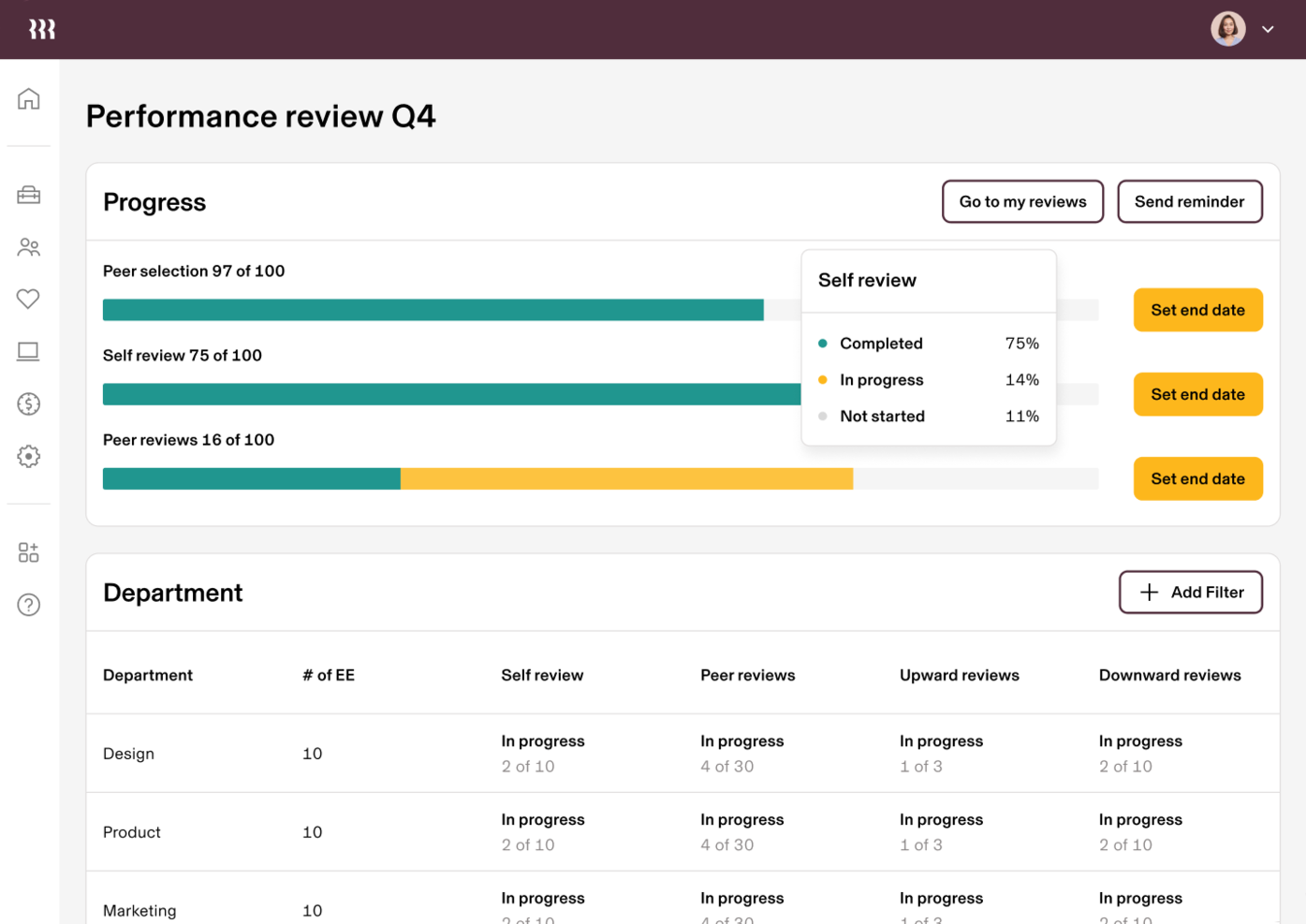
Rippling is an AI-enabled HR platform that combines performance management, employee data, payroll, and IT management in a single system for businesses looking to unify their people operations.
Who Is Rippling Best For?
Rippling is a strong fit for mid-sized to large companies that want performance management built into the same platform handling their HR, payroll, and IT.
Why I Picked Rippling
I picked Rippling as one of the best because its performance management lives inside the same system that runs payroll, benefits, and HR data—and that connection is genuinely useful. When a review cycle wraps up, approved compensation changes sync directly to payroll without any manual exports or re-entry. I also like how calibration pulls in live employee data like tenure and compa-ratio, so rating decisions are grounded in context rather than gut feel. The ability to auto-assign employees to review cycles using attributes like location or department saves my team a lot of setup time at the start of each cycle.
Rippling Key Features
- Customizable review question sets: Build targeted question sets for different reviewer types and add department-specific questions using employee attributes.
- Performance improvement plans: Create structured development plans for low performers and set a recurring cadence for progress check-ins.
- 1:1 meeting templates: Run structured 1:1s using Rippling's built-in template library or custom templates, with action items tracked for accountability.
- Automated review triggers: Set performance check-ins to fire automatically based on employee events, like 30-60-90 day milestones for new hires.
Rippling Integrations
Rippling offers native integrations with Slack, Zoom, Zendesk, and GitHub, and provides an API for custom integrations.
Pros and Cons
Pros:
- Simplifies onboarding processes
- Automated compliance tracking
- Reduces manual tasks
Cons:
- Requires technical setup
- Limited advanced analytics
New Product Updates from Rippling

Rippling Adds New Device Buyback Feature
Rippling has unveiled Device Buyback in its Inventory Management, allowing IT teams to retire and recycle hardware securely, with proceeds credited to future invoices. For more information, visit Rippling's official site.

15Five is an AI-powered performance management platform for HR teams that combines continuous feedback, goal tracking, engagement surveys, and manager coaching tools.
Who Is 15Five Best For?
15Five is a strong fit for mid-sized companies where HR teams and managers need structured, ongoing performance conversations rather than annual review cycles.
Why I Picked 15Five
15Five earns its spot on my shortlist because continuous feedback is built into the platform rather than bolted on as an afterthought. Weekly check-ins give employees a structured space to share progress, flag blockers, and request feedback from their manager regularly. I also like the Kona Meeting Assistant, which automatically takes notes during 1:1s—allowing managers to avoid scrambling to document conversations and focus on the discussion. That note-taking feeds directly into performance reviews, which means review cycles draw on a real record of ongoing feedback rather than whatever a manager can recall from the past six months.
15Five Key Features
- OKR and goal tracking: Set, align, and monitor individual and team goals across the organization with progress updates tied directly to performance cycles.
- AI-assisted performance reviews: Generate review summaries and suggested ratings based on check-in data, feedback, and goal progress collected throughout the review period.
- Employee engagement surveys: Run pulse surveys and deeper engagement assessments with built-in benchmarking to track workforce sentiment over time.
- Manager effectiveness scores: Measure manager performance using aggregated data from direct reports to identify coaching opportunities.
15Five Integrations
15Five offers native integrations with Slack, Microsoft Teams, Google Workspace, BambooHR, Namely, Workday, and ADP. An API is available for custom integrations.
Pros and Cons
Pros:
- Facilitates open communication
- Supports goal alignment
- Encourages regular feedback
Cons:
- May need additional training
- Initial setup takes time


Mesh AI is an AI-powered performance management platform that combines continuous feedback, goal tracking, performance reviews, and analytics for distributed and hybrid teams.
Who Is Mesh AI Best For?
Mesh AI is a good fit for mid-sized to large organizations managing remote or hybrid workforces that need structured, AI-driven performance management across distributed teams.
Why I Picked Mesh AI
Mesh AI earns its spot on my shortlist because of how well it handles the performance visibility gap that remote teams constantly run into. I particularly like the AI-driven nudges feature, which uses Mesh's proprietary models to prompt employees and managers to complete check-ins, share feedback, and follow up on goals—without waiting for a scheduled review cycle. My team is also able to exchange feedback directly inside Slack and Microsoft Teams, which means remote employees aren't context-switching into a separate platform just to give a colleague a shoutout or flag a concern. The continuous feedback loop, where peer and manager inputs feed into behavioral competency profiles in real time, gives distributed managers a much clearer picture of how their reports are actually performing day to day.
Mesh AI Key Features
- Goals/OKRs management: Set, align, and cascade goals across teams using a flexible framework that combines goal tracking with initiative-level progress updates.
- 360-degree reviews: Run configurable performance review cycles that pull in continuous check-in data, peer feedback, and manager input to build a full picture of each employee's performance.
- AI-driven calibration: Analyze ratings and feedback side by side to surface misalignments—like unsubstantiated high ratings or gaps between peer and manager reviews—before finalizing evaluations.
- Lifecycle insights: Track employee data from recruitment through retention, using AI-driven visualizations to identify skill gaps, career progression, and succession planning needs.
Mesh AI Integrations
Mesh AI offers native integrations with Slack, Microsoft Teams, Google Calendar, Outlook Calendar, Microsoft Active Directory (Azure AD), Okta Workforce, JumpCloud, Microsoft Active Directory Federation Services (ADFS), Assisted, MP, and Workforce Junction.
Pros and Cons
Pros:
- Enhances performance dialogues
- Supports remote team dynamics
- Science-backed content
Cons:
- Requires technical knowledge
- Integration challenges reported

Engagedly is an AI-powered performance management platform for HR teams that combines performance reviews, continuous feedback, goal tracking, employee recognition, and learning management in one system.
Who Is Engagedly Best For?
Engagedly is a good fit for mid-sized to enterprise organizations looking for a unified platform that connects performance management with employee development and engagement.
Why I Picked Engagedly
Engagedly earns its spot on my shortlist because of how tightly it weaves employee recognition into the broader performance management cycle. I love that peer praise isn't a standalone feature—it's built directly into the flow of feedback and goal tracking, so recognition happens in context rather than as an afterthought. The gamification layer, which lets teams award points and badges, gives recognition a visible, social dimension that keeps participation high. Engagedly also lets you configure custom rewards, so you're not locked into generic incentives that don't resonate with your workforce.
Engagedly Key Features
- Performance reviews: Run structured review cycles with customizable templates and multi-rater input across your organization.
- OKR and goal alignment: Set and track individual, team, and company-level objectives with key results linked directly to strategic priorities.
- 360-degree feedback: Collect structured input from peers, managers, and direct reports to surface a fuller picture of employee performance.
- Learning experience platform (LXP): Deliver AI-driven, personalized learning content tied directly to employee development goals and skill gaps.
Engagedly Integrations
Engagedly offers native integrations with BambooHR, Google Sheets, Google SSO, Gusto, HiBob, LinkedIn Learning, SpiraLinks, Namely, Okta, Deel, and more. An API is available for custom integrations.
Pros and Cons
Pros:
- Enhances team motivation
- Supports workplace morale
- Aligns goals with company objectives
Cons:
- May need additional training
- Basic reporting capabilities
Other AI Performance Management Tools
Here are some additional AI performance management tools options that didn’t make it onto my shortlist, but are still worth checking out:
- CultureAmp
For engagement insights
- Confirm
For small teams
- Lattice
For goal setting
- ClearCompany
For talent management
- eloomi
For employee learning
- Peoplebox.ai
For team alignment


AI Performance Management Tool Selection Criteria
When selecting the best AI performance management tools to include in this list, I considered common buyer needs and pain points like improving employee engagement and facilitating continuous feedback. I also used the following framework to keep my evaluation structured and fair:
Core Functionality (25% of total score)
To be considered for inclusion in this list, each solution had to fulfill these common use cases:
- Conduct performance reviews
- Facilitate goal setting
- Provide continuous feedback
- Track employee progress
- Generate performance reports
Additional Standout Features (25% of total score)
To help further narrow down the competition, I also looked for unique features, such as:
- AI-driven insights
- Customizable dashboards
- Real-time analytics
- Integration with other HR tools
- Automated reminders and alerts
Usability (10% of total score)
To get a sense of the usability of each system, I considered the following:
- Intuitive user interface
- Easy navigation
- Minimal learning curve
- Aesthetic design
- Accessibility on multiple devices
Onboarding (10% of total score)
To evaluate the onboarding experience for each platform, I considered the following:
- Availability of training videos
- Interactive product tours
- Comprehensive templates
- Webinars and live training sessions
- Responsive chatbots for assistance
Customer Support (10% of total score)
To assess each software provider’s customer support services, I considered the following:
- 24/7 support availability
- Multiple support channels
- Quick response times
- Knowledge base and FAQs
- Personalized support options
Value For Money (10% of total score)
To evaluate the value for money of each platform, I considered the following:
- Competitive pricing
- Flexible payment plans
- Feature set relative to cost
- Discounts for larger teams
- Satisfaction guarantees
Customer Reviews (10% of total score)
To get a sense of overall customer satisfaction, I considered the following when reading customer reviews:
- Overall satisfaction scores
- Frequency of positive feedback
- Commonly reported issues
- Testimonials from similar industries
- Longevity of customer relationships
How to Choose an AI Performance Management Tool
It’s easy to get bogged down in long feature lists and complex pricing structures. To help you stay focused as you work through your unique software selection process, here’s a checklist of factors to keep in mind:
| Factor | What to Consider |
|---|---|
| Scalability | Can the tool grow with your team? Check if it supports your current size and future growth. Look for features like user limits and additional costs for scaling. Consider if it can handle more users or locations without performance issues. |
| Integrations | Does it work with your existing tools? Ensure the software integrates with your current HR systems, communication tools, and other platforms. Consider the ease of integration and any potential disruptions. |
| Customizability | Can you tailor it to fit your processes? Look for customization options like templates, workflows, and dashboards. Avoid tools that require extensive technical skills for simple changes. |
| Ease of use | Is it intuitive for your team? Consider the learning curve and user interface design. Tools should be easy to navigate without extensive training. Look for user reviews mentioning ease of use. |
| Implementation and onboarding | How quickly can you get started? Evaluate the setup process and available resources like training videos and support. Consider the time and effort needed to fully implement the tool in your organization. |
| Cost | Does the pricing fit your budget? Compare costs across vendors, considering both initial and ongoing expenses. Watch for hidden fees and ensure the pricing structure aligns with your financial plans. |
| Security safeguards | Are your data protected? Check for encryption, data backup, and compliance with data protection regulations. Ensure the vendor provides transparency about their security measures and incident response. |
| Support availability | What help is available when you need it? Consider the support channels offered, such as phone, email, and chat. Check if support is available 24/7 and if there are additional costs for premium support services. |
What Are AI Performance Management Tools?
AI performance management tools are software solutions that help organizations track and improve employee performance through data-driven insights and automation. HR professionals, managers, and team leaders generally use these tools to enhance productivity and engagement.
Features such as goal setting, feedback collection, and performance tracking help align team objectives, provide continuous feedback, and monitor progress. Overall, these tools provide a means to manage and enhance workforce performance efficiently.
Features of AI Performance Management Tools
When selecting AI performance management tools, keep an eye out for the following key features:
- Goal setting: Helps align team and individual objectives with business goals, ensuring everyone works towards the same targets.
- Feedback collection: Allows for continuous feedback between team members and managers, fostering a culture of open communication and improvement.
- Performance tracking: Monitors employee progress and performance over time, providing insights into areas for development and achievements.
- Engagement surveys: Collect employee sentiment data to understand workplace morale and identify areas for improvement.
- Customizable dashboards: Offers personalized views of performance data, allowing users to focus on the most relevant information for their roles.
- Integration capabilities: Connects with existing HR systems and tools to provide a seamless workflow and data consistency.
- Real-time analytics: Provides up-to-date insights into performance metrics, enabling quick decision-making and adjustments.
- Automated reminders: Send alerts and notifications to ensure timely completion of tasks and reviews, improving accountability.
Benefits of AI Performance Management Tools
Implementing AI performance management tools provides several benefits for your team and your business. Here are a few you can look forward to:
- Improved alignment: Aligns team goals with business objectives through effective goal setting, ensuring everyone works towards the same targets.
- Enhanced feedback culture: Encourages open communication and continuous improvement with feedback collection features.
- Increased productivity: Tracks performance metrics and progress, helping identify areas for development and recognizing achievements.
- Better engagement: Uses engagement surveys to gather insights into employee sentiment, improving workplace morale.
- Time savings: Automates reminders and notifications, ensuring tasks and reviews are completed on time without manual follow-ups.
- Informed decision-making: Provides real-time analytics and insights, enabling quick adjustments and strategic planning.
- Seamless integration: Connects with existing HR tools and systems, ensuring consistent data flow and reducing administrative burdens.
Costs and Pricing of AI Performance Management Tools
Selecting AI performance management tools requires an understanding of the various pricing models and plans available. Costs vary based on features, team size, add-ons, and more. The table below summarizes common plans, their average prices, and typical features included in AI performance management tools solutions:
Plan Comparison Table for AI Performance Management Tools
| Plan Type | Average Price | Common Features |
|---|---|---|
| Free Plan | $0 | Basic goal setting, limited feedback collection, and minimal performance tracking. |
| Personal Plan | $5-$25/user/month | Enhanced goal setting, basic engagement surveys, feedback tools, and performance tracking. |
| Business Plan | $25-$50/user/month | Advanced analytics, customizable dashboards, comprehensive feedback systems, and integrations. |
| Enterprise Plan | $50-$100/user/month | Full customization, real-time analytics, priority support, and extensive integrations. |
AI Performance Management Tools FAQs
Here are some answers to common questions about AI performance management tools:
How can AI improve performance reviews?
AI makes performance reviews more objective by analyzing data rather than relying solely on personal impressions. It surfaces evidence-based insights from metrics like goal progress, feedback, and collaboration patterns. By spotting trends over time, it highlights both strengths and areas for development that managers may miss. This helps ensure reviews are fairer, more consistent, and focused on growth.
How can AI support employee development?
Yes, AI tools often suggest personalized learning paths and growth opportunities based on performance data. They can recommend training, stretch assignments, or mentorship programs aligned with an employee’s goals. This proactive approach helps employees see clear pathways for advancement. In turn, it can boost engagement and retention by showing that the company invests in their growth.
What are the limitations of AI performance management tools?
AI depends on the quality of data it’s given, so incomplete or biased inputs can lead to flawed outcomes. It often emphasizes measurable results but may struggle to capture soft skills like creativity or leadership. Employees may also distrust algorithm-driven evaluations if transparency is lacking. Finally, AI lacks human judgment and context, so it should always complement—not replace—manager oversight.
What’s Next:
If you're in the process of researching AI performance management tools, connect with a SoftwareSelect advisor for free recommendations.
You fill out a form and have a quick chat where they get into the specifics of your needs. Then you'll get a shortlist of software to review. They'll even support you through the entire buying process, including price negotiations.