

Global payroll solutions for Canada are platforms that help you manage employee payments, tax requirements, and compliance across Canadian and international teams from one place. If you’re navigating cross-border hiring, remote compliance, or eager to reduce payroll admin, you need tools that can handle every complexity.
Here, you’ll find HR-focused, practical guidance to help you choose platforms that keep you compliant, connected, and ready to scale.
Why Trust Our Software Recommendations
6,700+
Reviews
20
Industry experts
16+
Evaluation factors
14
Years
Our team has been testing and reviewing software since 2012. As HR experts ourselves, we know how difficult—and important—it is to choose the right software.
For this guide, we evaluated tools using hands-on testing and independent research, scoring tools using our selection criteria. We also draw on insights from industry thought leaders and practicing HR experts.
Our reviews reflect our human editorial judgment, not a sales pitch.
Expert reviewers:
- Phil GrayCOO
 Kim BehnkeHR Tech Editor & Analyst
 Josh BarkerPeople Ops Manager

Comparison Table: Global Payroll Services for Canada
This comparison table summarizes pricing details for my top global payroll selections for Canada:
| Tool | Best For | Trial Info | Price | ||
|---|---|---|---|---|---|
| 1 | Best for multinational EOR spanning all provinces | Free demo available | From $599/employee/month | Website | |
| 2 | Best for international remote compliance | Free demo available | Pricing upon request | Website | |
| 3 | Best for tiered contractor and EOR hiring globally | Not available | From $399/user/month | Website | |
| 4 | Best for regional tax compliance | Free demo available | From $459/employee/month (billed annually) | Website | |
| 5 | Best for unified payroll with HRIS integrations | Free demo available | Pricing upon request | Website | |
| 6 | Best for real-time continuous pay calculation | Free demo available | Pricing upon request | Website | |
| 7 | Best for direct-owned entity EOR infrastructure | Free demo available | From $599/employee/month (billed annually) | Website | |
| 8 | Best for complex multi-regional pay operations | Free demo available | From $399/employee/month | Website | |
| 9 | Best for automated benefits access | Free demo available | From $79/user/month | Website | |
| 10 | Best for mid-market workforce management | Free demo available | Pricing upon request | Website |


Global Payroll Services for Canada Reviews
Below are my detailed summaries of the best global payroll platforms for Canada that made it onto my shortlist. My reviews offer a detailed look at the features, integrations, and best use cases of each platform to help you find the best one for you.
 1Best for multinational EOR spanning all provinces
G-P
- Free demo available
- From $599/employee/month
Visit WebsiteCustomer Rating:4.5/5
G-P lets users select and manage payroll recipients across multiple countries. G-P is a global employer of record platform that handles payroll, tax withholding, statutory deductions, and contractor management across 180+ countries, including all Canadian provinces and territories.
Who Is G-P Best For?
G-P is the right fit for multinational companies that need to hire and pay employees across multiple Canadian provinces while managing payroll in several other countries from a single platform.
Why I Picked G-P
G-P earns its spot on my shortlist because no other platform I've evaluated handles Canadian provincial complexity at true global scale the way it does. I'm particularly impressed by its Quebec-specific coverage: QPP, QPIP, Revenu Québec remittances, and French-language employment contracts are all built in, not bolted on. Pair that with province-by-province handling of WSIB, CNESST, and WCB across all 13 provinces and territories, and you get a platform that actually accounts for how different Canada's regions are from each other.
G-P Key Features
- Contractor misclassification engine: G-P Contractor™ flags misclassification risks using CRA classification criteria and auto-generates compliant contractor agreements.
- G-P Gia™ compliance assistant: An AI-powered tool that delivers real-time regulatory change alerts across all Canadian provinces and generates employment contracts and HR documents.
- Single-invoice global billing: G-P consolidates all global employment costs into one invoice in a single currency, covering every country and province in scope.
- Bulk onboarding workflows: G-P supports simultaneous onboarding of multiple employees across provinces, with AI guidance that reportedly reduces HR onboarding tasks by 40%.
G-P Integrations
G-P offers documented integrations with Workday, SAP SuccessFactors, UKG Pro, UKG Ready, ADP Workforce Now, BambooHR, HiBob, and Personio. Its API supports custom integrations, while Google Workspace, Microsoft Entra ID, Okta, and Auth0 support user management and SSO.
Pros and Cons
Pros:
- Single invoice consolidates all global payroll
- T4 and T4A slips handled for Canada
- Quebec-specific payroll and compliance fully supported
Cons:
- Automated ROE and RL-1 filing not confirmed
- No standalone payroll for Canadian entities
Learn more about G-P: Best for international remote compliance
- Free demo available
- Pricing upon request
Visit WebsiteCustomer Rating:4.9/5
Deel Payroll tracks unpaid invoices and payroll cycles in one dashboard. Deel Payroll is a global payroll platform that handles payroll processing, tax compliance, statutory filings, and payments across 130+ countries, including full Canadian province-level support, through both managed and self-serve delivery models.
Who Is Deel Payroll Best For?
Deel Payroll fits multinational companies that need to hire, pay, and stay compliant across Canada and multiple other countries from a single platform.
Why I Picked Deel Payroll
I picked Deel Payroll as one of the best because it runs on infrastructure Deel owns and operates, not a patchwork of third-party in-country providers. That distinction matters when something goes wrong: issues get resolved by the people who built the system. For Canadian compliance specifically, I like that it handles T4s, RL-1s, ROEs, and Revenu Québec filings natively, while its EOR model lets companies hire in Canada without setting up a legal entity first.
Deel Payroll Key Services
- Multi-country payroll dashboard: Run payroll in over 130 countries from a single global dashboard with unified gross-to-net reporting.
- Automated statutory filings: Generate and file Canadian T4s, T4As, RL-1s, and ROEs directly from the platform.
- Province-specific rules engine: Apply tax, holiday, minimum wage, and employment standards unique to each Canadian province and territory.
- Integrated HRIS and accounting connectors: Sync payroll data with tools like BambooHR, QuickBooks, Xero, and NetSuite.
Deel Payroll Integrations
Deel Payroll offers native integrations with BambooHR, QuickBooks, Xero, and NetSuite. An API is available for custom integrations.
Pros and Cons
Pros:
- Bilingual pay stubs for Quebec employees
- Operates its own Canadian legal entities
- Native Quebec compliance with RL-1s and QPP
Cons:
- Multi-country setup can take considerable time
- EOR fees higher than payroll-only alternatives
Learn more about Deel Payroll: Best for tiered contractor and EOR hiring globally
- Not available
- From $399/user/month
Visit WebsiteCustomer Rating:4.5/5
HireGlobal tracks worker payments by billing cycle, status, and amount due. HireGlobal is a global payroll and workforce management platform by Toptal that supports contractor management, agent of record (AOR), and employer of record (EOR) hiring across 180+ countries in 50+ currencies.
Who Is HireGlobal Best For?
HireGlobal is a strong fit for multinationals managing a mix of contractors and employees across Canada and other countries who want one platform with tiered compliance options.
Why I Picked HireGlobal
I picked HireGlobal as one of the best because its three-tier hiring model (AOR, Virtual EOR, and full EOR) gives multinationals a genuinely flexible way to manage both Canadian contractors and employees on one platform. I especially like the Virtual EOR tier, which pairs contractor management with $1M misclassification indemnification per worker—a real safeguard given how closely the CRA scrutinizes contractor classification. With 180+ countries and 50+ currencies consolidated into a single invoice per payroll cycle, it's a strong fit if your team is juggling Canadian headcount alongside a broader global workforce.
HireGlobal Key Features
- Consolidated global invoicing: HireGlobal generates a single invoice per payroll cycle across all countries and currencies, reducing manual reconciliation for finance teams.
- Worker misclassification risk guidance: The platform surfaces CRA classification factors—including control, integration, and financial dependence—to help you assess contractor status before hiring.
- Employee self-service portal: Workers can access pay slips and tax forms directly through the platform without routing requests through your HR team.
- SOC 2-compliant data security: HireGlobal applies end-to-end encryption, envelope encryption, and isolated virtual environments to protect payroll data across all supported countries.
HireGlobal Integrations
HireGlobal has one documented native integration with TopTracker, Toptal's time-tracking tool, which supports payment tracking for tracked projects.
Pros and Cons
Pros:
- $1M indemnification for contractor misclassification
- Flexible tiered hiring for contractors and employees
- Consolidates global and Canadian payroll reporting
Cons:
- EOR services depend on third-party partners
- Quebec payroll automation details not disclosed
Learn more about HireGlobal: Best for regional tax compliance
- Free demo available
- From $459/employee/month (billed annually)
Visit WebsiteCustomer Rating:4.7/5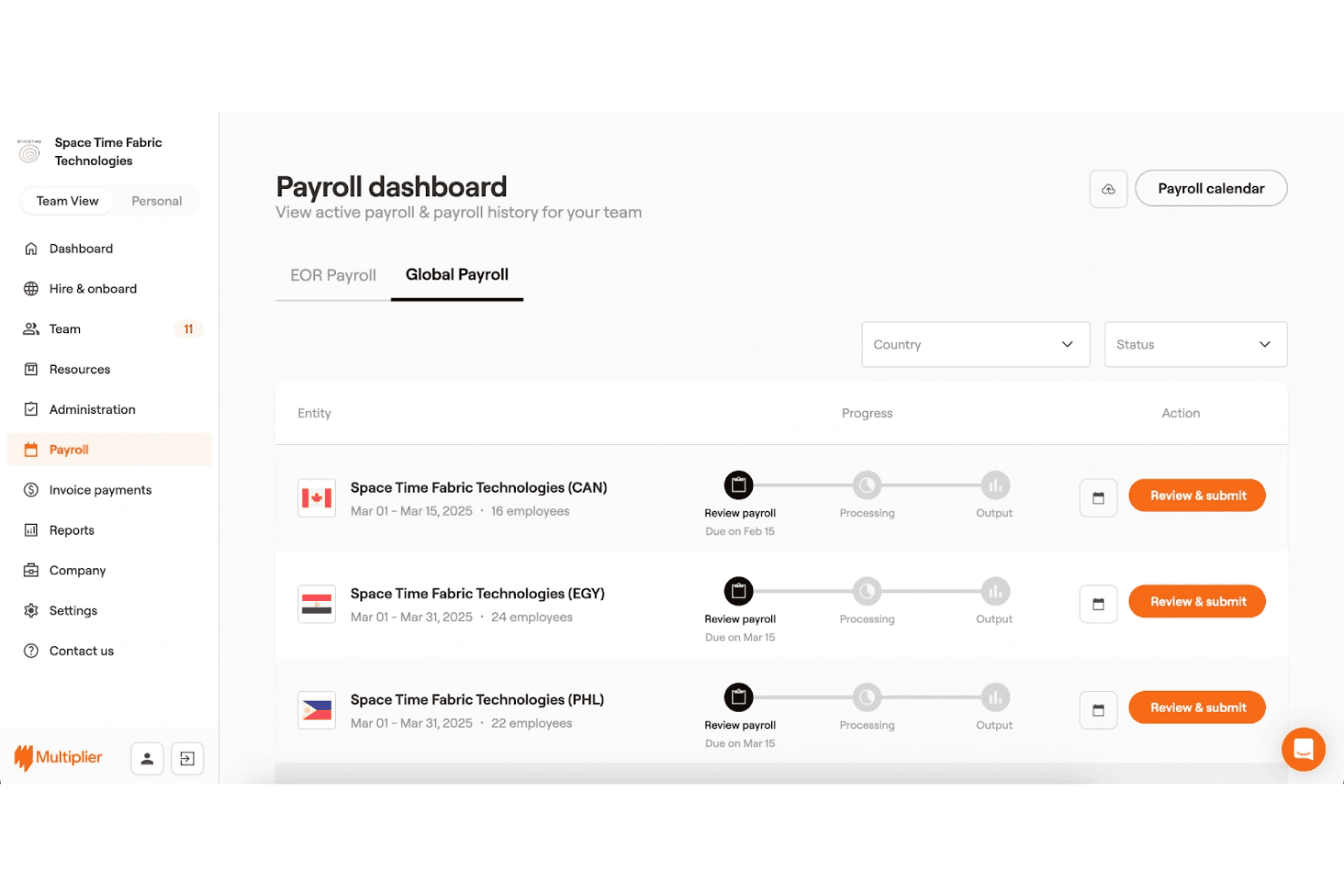
Multiplier centralizes global payroll across multiple countries in one dashboard. Multiplier is a global employment platform that handles employer of record services, multi-country payroll, contractor management, and statutory compliance across 150+ countries, including province-level payroll and tax handling across all Canadian jurisdictions.
Who Is Multiplier Best For?
Multiplier suits multinational companies and global HR teams that need to hire and pay workers across Canadian provinces without setting up a local entity.
Why I Picked Multiplier
Multiplier earns its spot on my shortlist because of how granularly it handles Canadian provincial tax rules. I love that it accounts for Quebec's entirely separate payroll structure, including QPP contributions, Quebec EI rates, and French-language contract requirements, without manual configuration. Province-specific pay frequencies and minimum wage thresholds across all 13 jurisdictions are built directly into the platform.
Multiplier Key Services
- Multi-country payroll dashboard: Run payroll for employees and contractors across over 150 countries from a single interface.
- Customizable pay schedules: Set pay frequencies by country, region, or contract to match local rules and agreements.
- Integrated employee self-service portal: Give workers access to pay stubs, tax forms, and personal payroll data online.
- Automated multi-currency payments: Process salary, bonuses, and contractor invoices in CAD and other major currencies within the platform.
Multiplier Integrations
Integrations include HiBob, BambooHR, Workday, Deel, and more.
Pros and Cons
Pros:
- Supports both EOR and own-entity payroll models
- Generates and files T4s and ROEs automatically
- Handles Quebec payroll as a distinct jurisdiction
Cons:
- Customer support response times vary by region
- Off-cycle payroll runs can be slow to process
Learn more about Multiplier: Best for unified payroll with HRIS integrations
- Free demo available
- Pricing upon request
Visit WebsiteCustomer Rating:4.9/5
Rippling lets users manage global payroll across multiple countries in one place. Rippling is a global payroll and HR platform that processes payroll across 185+ countries, including native Canadian payroll with automated CRA filings, T4s, ROEs, and multi-province tax compliance, all within a unified HRIS, IT, and finance system.
Who Is Rippling Best For?
Rippling suits mid-size to enterprise companies managing employees across multiple countries who want HR, IT, and payroll connected in one system.
Why I Picked Rippling
I picked Rippling as one of the best because its unified data model genuinely changes how payroll runs. When I update a Canadian employee's salary or role in HR, payroll picks it up automatically, no re-entry needed. Rippling also operates its own Canadian entity, so T4s, ROEs, and RL-1s are filed natively, not processed through a third-party partner like most global competitors.
Rippling Key Services
- Multi-country payroll processing: Run payroll in 185+ countries with unified workflows for employees, contractors, and currencies.
- Automated CRA and Revenu Québec filings: File T4, T4A, RL-1, TD1, and ROE forms automatically on the platform.
- Integrated Canadian EFT/direct deposit: Send payments to Canadian employees and contractors via native EFT in CAD.
- Customizable global payroll reporting: Create consolidated, real-time payroll and compliance reports across all countries and entities.
Rippling Integrations
Rippling offers native integrations with QuickBooks Online, Xero, NetSuite, BambooHR, Greenhouse, Slack, and Google Workspace. An API is available for custom integrations.
Pros and Cons
Pros:
- Bilingual pay stubs meet Quebec language requirements
- Automated ROE and T4 filing built in
- Native Canadian entity for direct payroll processing
Cons:
- Canadian EOR offering is relatively new
- Setup requires multiple configuration weeks
 Best for real-time continuous pay calculation
- Free demo available
- Pricing upon request
Visit WebsiteCustomer Rating:4.3/5
Dayforce lets users manage multiple pay group runs from one dashboard. Dayforce is a global HCM platform with native Canadian payroll built in, covering multi-province tax compliance, CRA remittances, T4s, ROEs, and multi-country payroll across 200+ countries from a single unified system.
Who Is Dayforce Best For?
Dayforce is built for mid-market and enterprise organizations managing complex, multi-province Canadian payroll alongside a distributed global workforce.
Why I Picked Dayforce
Dayforce earns its spot on my shortlist because its continuous calculation engine works differently from standard batch-processing payroll tools. Rather than running payroll on a fixed schedule, Dayforce recalculates pay continuously as time and attendance data flows in, so errors surface before payday, not after. I especially like how this feeds directly into Canadian compliance rules, keeping CPP, EI, and QPP deductions current in real time across every province.
Dayforce Key Services
- Automated multi-province tax calculations: Calculates and remits payroll taxes for every Canadian province and territory, including QPP and QPIP in Quebec.
- CRA and Revenu Québec integration: Supports electronic filing of T4, T4A, RL-1, and ROE documents directly to government authorities.
- Bilingual pay statements: Delivers pay documents and self-service portals in both English and French for full regional compliance.
- Global payroll dashboard: Consolidates Canadian and international payroll data into a unified, multi-country reporting interface.
Dayforce Integrations
Dayforce offers native integrations with Workday, SAP SuccessFactors, Oracle HCM, ADP, QuickBooks, NetSuite, and UKG. An API is available for custom integrations.
Pros and Cons
Pros:
- Bilingual employee self-service in French
- Native multi-province and Quebec compliance
- Real-time continuous payroll calculation engine
Cons:
- Reporting customization requires technical configuration
- Long implementation timelines for large organizations
Learn more about Dayforce: Best for direct-owned entity EOR infrastructure
- Free demo available
- From $599/employee/month (billed annually)
Visit WebsiteCustomer Rating:2.9/5
Remote payroll run dashboard showing breakdown by salary, incentives, and expenses. Remote is a global payroll and employer of record platform that processes payroll, statutory deductions, tax remittances, and benefits across 100+ countries through its own directly-owned legal entities.
Who Is Remote Best For?
Remote suits multinational companies and scaling businesses that need to hire and pay workers across multiple countries, including Canada, without setting up local legal entities.
Why I Picked Remote
I picked Remote as one of the best because it owns its Canadian legal entity outright, rather than relying on a third-party partner network like most competitors do. That distinction matters when you're managing CPP, EI, and CRA remittances: Remote's Watchtower compliance engine monitors Canadian regulatory changes in real time. And since earning its Canadian Money Services Business registration, Remote processes CAD payroll on its own payment rails.
Remote Key Services
- Automated year-end tax forms: Generates CRA-compliant T4, T4A, RL-1, and ROE forms for Canadian payroll.
- Multi-country payroll dashboard: Manages payroll, taxes, and employee records across 100+ countries in one interface.
- Bilingual employee self-service portal: Supports both English and French for Canadian employees and administrators.
- Native API and accounting integrations: Syncs payroll data with NetSuite, GoCo, and other HR/accounting tools for unified reporting.
Remote Integrations
Remote offers native integrations with NetSuite, QuickBooks Online, Xero, BambooHR, HiBob, and GoCo. An API is available for custom integrations.
Pros and Cons
Pros:
- Files ROEs electronically to Service Canada
- Handles Quebec QPP and QPIP natively
- Owns Canadian legal entity directly
Cons:
- Support response times can be slow
- EOR fees higher than payroll-only competitors
 8Best for complex multi-regional pay operations
Pebl
- Free demo available
- From $399/employee/month
Visit WebsiteCustomer Rating:4.6/5
Pebl lets users track and approve payroll items across currencies. Pebl is an Employer of Record and global payroll platform that handles employment contracts, statutory deductions, tax filings, and contractor payments across 185+ countries from a single dashboard.
Who Is Pebl Best For?
Pebl is a strong fit for global payroll managers and HR directors at mid-to-large multinationals running payroll across several countries simultaneously.
Why I Picked Pebl
I picked Pebl as one of the best because its payroll aggregator model handles the messy reality of multi-regional operations. When running payroll across Canada, the UK, and Singapore simultaneously, every country's statutory obligations roll into one consolidated monthly invoice. Pebl's Canada setup specifically handles province-level minimum wage compliance, biweekly payroll cycles, CPP contributions, and EI deductions without manual intervention.
Pebl Key Services
- AI assistant Alfie: Instantly answers payroll, compliance, and onboarding questions in 50+ languages.
- Centralized payroll dashboard: Aggregates all employee and contractor payroll data across 185+ countries in one view.
- Multi-currency support: Handles payroll and payments in CAD and other currencies with automated FX calculations.
- Compliance-backed employment contracts: Generates and manages region-specific contracts that follow local labor regulations.
Pebl Integrations
Native integrations are not clearly documented. Pebl provides an API for custom integrations.
Pros and Cons
Pros:
- Handles QPP and QPIP separately from CPP
- Bilingual pay stubs for Quebec employees
- Automated ROE submission to Service Canada
Cons:
- Smaller market presence than legacy vendors
- No free trial before committing
Learn more about Pebl: Best for automated benefits access
- Free demo available
- From $79/user/month
Visit WebsiteCustomer Rating:4.6/5
Justworks lets users view and download detailed paystubs in one place. Justworks is a PEO and EOR platform that lets US-based companies hire and pay employees in Canada and 16 other countries, handling payroll in CAD, statutory deductions, and benefits administration through a single HR system.
Who Is Justworks Best For?
Justworks suits US-headquartered small and mid-sized businesses hiring their first Canadian employees without a local entity.
Why I Picked Justworks
I've included Justworks in my top picks because its EOR model bundles benefits administration directly into Canadian payroll, rather than treating it as an afterthought. I particularly like that employees hired in Canada automatically get access to international travel assistance coverage at no additional cost. The platform also handles CPP, EI, and provincial tax deductions as part of the same package, so there's no patching together separate systems to stay compliant.
Justworks Key Services
- Global payroll dashboard: Manage payroll for Canadian and international employees together from a single online platform.
- Automated statutory deductions: Calculates and withholds CPP, EI, and provincial taxes as part of regular pay runs.
- Records of Employment (ROE) processing: Prepares and files Canadian ROEs for each relevant employee termination event.
- Multiple pay frequencies: Supports different pay schedules to fit varied employment types and business needs.
Justworks Integrations
Justworks offers 20+ integrations, including QuickBooks, Xero, NetSuite, Sage Intacct, Greenhouse, JazzHR, Lever, 15Five, Leapsome, Carta, Brex, and Vanta.
Pros and Cons
Pros:
- EOR model removes need for Canadian entity
- Benefits access bundled for Canadian hires
- Automated CPP, EI deductions included in payroll
Cons:
- US-centric platform
- Limited country coverage
Learn more about Justworks: Best for mid-market workforce management
- Free demo available
- Pricing upon request
Visit WebsiteCustomer Rating:4.3/5
Paylocity's dashboard gives employees a snapshot of time off and pay. Paylocity is a cloud-based HR and payroll platform for mid-market companies that handles Canadian payroll compliance, CRA remittances, T4s, and ROEs alongside multi-country payroll processing across 100+ countries.
Who Is Paylocity Best For?
Paylocity suits US-headquartered mid-market companies (roughly 100–5,000 employees) that already have, or plan to establish, a Canadian legal entity and need to manage cross-border payroll from one platform.
Why I Picked Paylocity
I picked Paylocity as one of the best because it handles the full scope of Canadian workforce management from a single platform that also manages US payroll. I particularly like how it covers Quebec-specific filings (RL-1, RL-2, RL-3) alongside CRA remittances and ROE issuance, with bilingual EN/FR support built in. The hybrid service model pairs a US-based team with in-country Canadian experts, which I find reassuring when provincial rules shift.
Paylocity Key Services
- Global consolidated payroll dashboard: View and manage payroll runs for Canada and 100+ countries in one platform.
- Multi-province tax engine: Applies current tax rates and employment standards for every Canadian province and territory.
- Automated bilingual pay statements: Generates employee pay slips and tax forms in both English and French.
- Customizable reporting and analytics: Create and schedule exportable reports on payroll costs, tax filings, and cross-country labor data.
Paylocity Integrations
Paylocity offers native integrations with BambooHR, QuickBooks, NetSuite, and Xero. An API is available for custom integrations.
Pros and Cons
Pros:
- Bilingual French and English pay statements included
- ROE filing automated through Service Canada
- Handles all Canadian provinces including Quebec
Cons:
- Limited EOR coverage outside North America
- Setup requires an existing Canadian legal entity
Other Global Payroll Services for Canada
Here are some additional global payroll options for Canada that didn’t make it onto my shortlist, but are still worth checking out:
- 11Oyster HRBest for distributed team payroll administration
- 12QuickBooks PayrollBest for native QuickBooks sync
- 13Employment HeroBest for automated HR administration
- 14ADP GlobalView PayrollBest for enterprise workforce scale
- 15RemotePeopleBest for integrated global talent recruitment
- 16GustoBest for integrating benefits with payroll
- 17Papaya GlobalBest for multicurrency payroll disbursement
- 18Atlas HXMBest for local Canadian employment law guidance
- 19Borderless AIBest for no-deposit fast global payroll execution
- 20Payoneer Workforce ManagementBest for built-in contractor payments automation
Related Reviews
How I Evaluate Global Payroll Services for Canada
I split my evaluation into what a platform must handle—like CRA remittances and T4 filings—and what sets vendors apart, from EOR depth to multi-province compliance expertise.
Core Functionality (Table Stakes For This List)
When I'm selecting tools for my list, I rank each one on a scale from 0 (does not offer the functionality) to 5 (excels in this area) for each core functionality listed below. I then calculate the tool's total score into a percentage, using 65% as a benchmark to help assess its overall fit for the list.
- Canadian Tax Compliance: I check whether the platform automatically calculates and remits federal, provincial, CPP, EI, and QPP contributions to the CRA and Revenu Québec.
- Multi-Country Payroll: Each tool's country coverage matters, especially whether it processes Canadian payroll alongside other countries within a single unified dashboard.
- Statutory Filings and Reporting: I look for automated generation and filing of T4s, T4As, RL-1s, and ROEs so your team isn't manually preparing year-end forms.
- Multi-Province Support: Province-specific rules for taxes, stat holidays, and employment standards vary widely, so I evaluate how well each platform handles all provinces and territories.
- CAD Payments and Deposits: I evaluate whether the platform supports direct EFT payments in Canadian dollars to both employee and contractor bank accounts natively.
- EOR or Entity Support: Whether you have a Canadian entity or need an Employer of Record to hire locally, I look for platforms that support one or both models.
Once I have a list of tools that meet the criteria, I consider what sets each platform apart.
Differentiating Factors (What Sets Vendors Apart)
Here's how I compare and contrast different vendors:
Standout Features
ROE automation is a real differentiator. Platforms that electronically submit ROEs to Service Canada save your team hours during layoffs or leaves. I also evaluate contractor compliance engines—tools that distinguish T4 employees from T4A contractors with misclassification safeguards that matter when you're scaling a mixed workforce. Global consolidated reporting ties it together, unifying Canadian payroll with other countries in one multi-currency dashboard.
Beyond Features
I evaluate whether a vendor has in-house Canadian payroll specialists with NPI certifications, since that expertise directly impacts how well they handle provincial employment standards and year-end CRA reconciliations. Data privacy also matters—I check for PIPEDA compliance and Quebec's Law 25 readiness, along with Canadian data residency options. The EOR model is another key factor: vendors that operate their own Canadian entities tend to offer more control than those relying on in-country partners.
How to Choose a Global Payroll Service for Canada
Ready to consolidate Canadian payroll with compliance across multiple provinces and international locations? Use this guide to match options to your top priorities:
| If your priority is... | Look for... |
|---|---|
| If your priority is...Multi-country payroll | Look for...One dashboard for 20+ countries |
| If your priority is...Automated CRA and Revenu Québec filings | Look for...Built-in year-end tax form and ROE generation |
| If your priority is...Hiring Canadians without a local entity | Look for...Employer of Record (EOR) model |
| If your priority is...Bilingual requirements for Quebec | Look for...French and English employee self-service portals |
| If your priority is...Minimum manual effort for Canadian compliance | Look for...Automated updates for provincial tax rules |
How to Vet Your Shortlist
- Request a compliance flowchart: Ask each vendor for a documented workflow of how they calculate and remit CPP, EI, QPP, and income tax to government agencies.
- Test ROE and T4 generation: Run a sample payroll and verify if the platform instantly generates downloadable ROEs and T4s for real or test workers.
- Submit a French-language support ticket: Open a support ticket in French and track resolution time and quality for Quebec support needs.
- Ask for a bilingual pay statement sample: Request an English/French pay stub to confirm language accessibility for Quebec employees.
- Tradeoff to consider: Platforms with their own Canadian legal entity offer more control, while partner-driven EORs provide faster set-up but often less flexibility.
What Are Global Payroll Platforms for Canada?
Global payroll platforms for Canada are software solutions that let you manage payroll for Canadian employees and contractors, handle federal and provincial tax remittances, and support compliance across multiple provinces. These platforms also consolidate payroll processing for teams in Canada and other countries, automate year-end form filings, and provide direct deposit in Canadian dollars—all within one unified system designed for multinational HR and payroll teams.
Why Use Global Payroll Services in Canada?
Payroll in Canada involves several layers of compliance. A global payroll provider helps you account for federal deductions, provincial or territorial requirements, and employment standards that vary depending on where your employees work.
The employee's province of employment matters because it determines which payroll deductions apply. This isn't always the same as where the employee lives, particularly for remote workers.
A global payroll service can help you:
- Calculate payroll across provinces: Apply the right federal and provincial or territorial deductions for each employee.
- Handle Quebec payroll: Quebec uses QPP instead of CPP and also requires QPIP contributions and separate provincial income tax deductions.
- Keep tax rates current: Account for changes to income tax, CPP/QPP, EI, QPIP, and other contributions.
- Manage filings and remittances: Support payroll remittances, T4s, and other required reporting.
- Consolidate international payroll: Manage Canadian payroll alongside payroll in other countries from one system.
This can be especially useful for international companies. Non-resident employers with employees working in Canada can still have Canadian withholding, remitting, and reporting obligations.
Keep in mind that outsourcing payroll doesn't remove your compliance responsibility. The CRA says employers are still responsible for making sure deductions are withheld and remitted on time, even when a payroll service provider handles the process.
How is Payroll Calculated in Canada?
In Canada, payroll is typically calculated for each pay period based on an employee's taxable earnings, pay frequency, tax credits, and province or territory of employment. Employers then withhold the required taxes and contributions before paying the employee their net pay.
A typical Canadian pay calculation includes:
| Payroll component | How it affects pay |
|---|---|
| Payroll componentGross earnings | How it affects paySalary or hourly wages, plus applicable overtime, commissions, bonuses, and other earnings. |
| Payroll componentTaxable benefits | How it affects payCertain employer-provided benefits are added to taxable income and may be subject to payroll deductions. |
| Payroll componentIncome tax | How it affects payFederal and applicable provincial or territorial income tax is withheld from the employee's pay. |
| Payroll componentCPP contributions | How it affects payMost employees outside Quebec contribute to CPP. CPP2 can also apply to earnings above the first annual earnings ceiling. |
| Payroll componentEI premiums | How it affects payEmployees pay Employment Insurance premiums on insurable earnings. |
| Payroll componentQuebec deductions | How it affects payEmployees in Quebec generally pay Quebec Pension Plan (QPP) instead of CPP, plus QPIP and Quebec income tax. |
| Payroll componentOther deductions | How it affects payPayroll may also include pension contributions, benefits premiums, union dues, or other authorized deductions. |
A few factors can change the calculation:
- Pay frequency: CRA formulas account for whether employees are paid weekly, biweekly, semi-monthly, or monthly.
- Province of employment: This determines which provincial or territorial deductions apply and may differ from where the employee lives.
- Quebec payroll: Quebec provincial deductions follow Revenu Québec rules rather than the standard CRA calculation process.
After deductions are taken, the employee receives net pay. The employer then remits the withheld amounts and any required employer contributions.
Canada Payroll Taxes and Deductions
As an employer in Canada, you need to account for both amounts withheld from employee pay and payroll costs paid by the business. What applies depends on the employee's province or territory of employment, with additional rules for Quebec.
| Payroll tax or deduction | What you need to account for |
|---|---|
| Payroll tax or deductionFederal income tax | What you need to account forWithhold federal income tax from employee pay using CRA payroll formulas and the employee's TD1 information. |
| Payroll tax or deductionProvincial or territorial income tax | What you need to account forWithhold the applicable provincial or territorial income tax based on the employee's province of employment. |
| Payroll tax or deductionCPP and CPP2 | What you need to account forOutside Quebec, deduct Canada Pension Plan (CPP) from eligible employee earnings and contribute an equal employer amount. For 2026, the regular CPP rate is 5.95%, with an additional 4% CPP2 contribution on earnings between $74,600 and $85,000. |
| Payroll tax or deductionEmployment Insurance (EI) | What you need to account forDeduct EI premiums from insurable earnings and make an employer contribution. Outside Quebec, the 2026 employee rate is 1.63%, while the standard employer contribution is 1.4 times the employee premium. |
| Payroll tax or deductionQPP | What you need to account forFor Quebec employees, QPP generally replaces CPP. In 2026, the regular contribution rate is 6.30% for both the employee and employer, with an additional contribution on earnings above the first QPP ceiling. |
| Payroll tax or deductionQPIP | What you need to account forQuebec payroll also includes QPIP. In 2026, employees contribute 0.430% and employers contribute 0.602% on insurable earnings up to $103,000. |
| Payroll tax or deductionQuebec EI | What you need to account forQuebec has a lower EI rate because QPIP covers maternity and parental benefits. The 2026 employee EI rate is 1.30%. |
| Payroll tax or deductionTerritorial payroll tax | What you need to account forIf you employ workers in the Northwest Territories or Nunavut, a separate 2% payroll tax can apply and must be withheld from employee remuneration. |
Your employer payroll costs may go beyond these deductions and contributions. Depending on where you employ people, you may also owe province-specific payroll taxes.
- Ontario Employer Health Tax (EHT): Applies to Ontario remuneration once applicable exemption and payroll thresholds are exceeded.
- British Columbia Employer Health Tax: Applies based on total B.C. remuneration, with an exemption for smaller payrolls.
- Quebec Health Services Fund: Employer contribution rates vary based on total payroll and business sector.
- Manitoba Health and Post Secondary Education Tax Levy: Applies when annual Manitoba remuneration exceeds the provincial exemption threshold.
- Newfoundland and Labrador Health and Post Secondary Education Tax: Applies to payroll above the provincial exemption threshold.
- Workers' compensation premiums: Provincial workers' compensation costs may also be calculated using insurable payroll and your industry's premium rate.
Payroll can also include non-tax deductions such as pension contributions, benefit premiums, union dues, court-ordered deductions, and other authorized amounts.
The main takeaway is that your payroll cost in Canada is higher than the employee's gross salary alone. When budgeting for Canadian employees, factor in employer CPP/QPP, EI/QPIP, applicable provincial payroll taxes, workers' compensation, and any benefits or pension contributions you provide.
Canada Leave Entitlements
There isn't one leave entitlement that applies to every Canadian employee. Most employees follow their province or territory's employment standards, while federally regulated employees follow the Canada Labour Code.
The federal rules are still a useful benchmark. The Canada Labour Code provides 13 categories of paid or unpaid leave, covering circumstances such as maternity and parental leave, illness, bereavement, family violence, compassionate care, and pregnancy loss.
Some of the main federal entitlements are:
| Leave | Federal entitlement | Payroll impact |
|---|---|---|
| LeaveMaternity leave | Federal entitlementUp to 17 weeks | Payroll impactUnpaid by the employer under the Canada Labour Code. Eligible employees may receive EI maternity benefits instead. |
| LeaveParental leave | Federal entitlementUp to 63 weeks for one parent; up to 71 weeks when shared | Payroll impactUnpaid under the Code. Eligible employees may receive EI parental benefits. |
| LeaveMedical leave | Federal entitlementUp to 27 weeks of protected unpaid leave | Payroll impactRegular wages generally stop during unpaid leave. Eligible employees may qualify for income-replacement benefits. |
| LeavePaid medical leave | Federal entitlementUp to 10 days per year | Payroll impactPaid at the employee's regular rate and processed through payroll as wages. |
| LeavePersonal leave | Federal entitlementUp to 5 days per year | Payroll impactAfter 3 months of continuous employment, the first 3 days are paid. |
| LeaveFamily violence leave | Federal entitlementUp to 10 days per year | Payroll impactAfter 3 months of continuous employment, the first 5 days are paid. |
| LeaveBereavement leave | Federal entitlementGenerally up to 10 days | Payroll impactAfter 3 months of continuous employment, the first 3 days are paid. Longer leave can apply after the death of a child. |
| LeavePregnancy loss leave | Federal entitlementUp to 8 weeks after a stillbirth, or 3 days in other cases | Payroll impactAfter 3 months of continuous employment, the first 3 days are paid. |
For payroll, the biggest distinction is whether the leave is paid or unpaid:
- Paid leave: The employee continues receiving wages, so normal payroll deductions generally continue.
- Unpaid leave: Regular wages stop, so payroll needs to account for the period without earnings.
- Government-paid benefits: EI may provide income replacement for eligible maternity, parental, sickness, or caregiving leaves. These employee benefits aren't the same as wages paid by the employer.
- Benefits during leave: For many federally protected leaves, pension, health, and disability benefits can continue if the employee keeps paying their required contribution. The employer must generally continue its normal share as well.
- Vacation calculations: Under federal rules, paid leave continues to count toward vacation pay, while vacation pay during unpaid leave is based on wages actually earned during the year.
These federal entitlements shouldn't be applied automatically to your entire Canadian workforce. Provinces set their own minimums. Ontario, for example, provides up to 17 weeks of unpaid pregnancy leave and up to 61 weeks of parental leave following pregnancy leave, or 63 weeks otherwise.
Before processing a leave, check which employment standards apply, how much leave the employee can take, whether any portion must be paid, and how the absence affects benefits and vacation pay.
Canada Public Holidays
Public holiday requirements vary across Canada, so there isn't one holiday calendar you can apply to every employee. For federally regulated employees, there are currently 10 general holidays:
- New Year's Day
- Good Friday
- Victoria Day
- Canada Day
- Labour Day
- National Day for Truth and Reconciliation
- Thanksgiving Day
- Remembrance Day
- Christmas Day
- Boxing Day
Provincial rules differ:
| Jurisdiction | Number of statutory/general holidays |
|---|---|
| JurisdictionFederally regulated | Number of statutory/general holidays10 |
| JurisdictionOntario | Number of statutory/general holidays9 |
| JurisdictionBritish Columbia | Number of statutory/general holidays11 |
| JurisdictionQuebec | Number of statutory/general holidays8 |
The differences matter for payroll because eligibility, holiday pay calculations, and rules for working on a holiday can vary by jurisdiction. Your payroll system therefore needs to identify which employment standards apply to each employee and calculate holiday pay accordingly.
Termination Terms in Canada
Termination requirements depend on the employee's jurisdiction, length of service, and circumstances of the termination.
You may need to account for:
- Notice of termination
- Pay in lieu of notice
- Statutory severance, where applicable
- Outstanding wages
- Unused vacation pay
- Final payroll deductions
- Record of Employment
- Year-end reporting
For federally regulated employees, minimum notice starts at two weeks after three months of continuous employment and increases with service after three years. Provincial rules use their own schedules.
Statutory minimums aren't always the employee's full entitlement. Employment contracts, collective agreements, or common-law rights may provide additional protections. When you process a termination, check the rules for that employee's jurisdiction rather than relying on one Canada-wide notice period.
How is Payroll Compliance Regulated in Canada?
Payroll compliance in Canada is split across federal and provincial authorities.
| Authority | What it covers |
|---|---|
| AuthorityCanada Revenue Agency (CRA) | What it coversIncome-tax withholding, CPP, EI, payroll remittances, payroll accounts, and T4 reporting |
| AuthorityRevenu Québec | What it coversQuebec income tax, QPP, QPIP, and other Quebec employer contributions |
| AuthorityFederal Labour Program | What it coversEmployment standards for federally regulated workplaces |
| AuthorityProvincial and territorial authorities | What it coversEmployment standards for most Canadian workers |
| AuthorityService Canada | What it coversRecords of Employment and Employment Insurance administration |
Your main payroll compliance responsibilities include:
- Calculate deductions correctly: Apply income tax, CPP/QPP, EI/QPIP, and other required deductions.
- Remit on time: Send employee deductions and employer contributions according to your assigned remittance schedule.
- Apply the right jurisdiction: Province of employment affects payroll deductions and employment standards.
- Keep employee data current: Changes to location, worker's compensation, benefits, or TD1 information can affect payroll.
- Complete year-end reporting: T4 returns are generally due by the last day of February following the calendar year.
- Issue ROEs: Provide a Record of Employment when an interruption of earnings requires one.
- Follow employment standards: Apply the correct rules for wages, leave, holidays, vacation, and termination.
For remote employees, pay close attention to province-of-employment rules. An employee may be considered attached to one of your establishments even if they work remotely, which can change the deductions you need to make.
Outsourcing Payroll in Canada
Whether you should outsource Canadian payroll depends mainly on where you employ people, how much payroll expertise you have internally, and whether Canada is your only market.
Start with your workforce:
| If your situation looks like this... | Consider |
|---|---|
| If your situation looks like this...Your workforce is entirely or mainly in Canada | ConsiderLocal payroll provider |
| If your situation looks like this...You have employees across several Canadian provinces | ConsiderLocal or global provider with strong multi-province coverage |
| If your situation looks like this...You employ people in Quebec | ConsiderA provider with dedicated Quebec payroll support |
| If your situation looks like this...You already run payroll in several countries | ConsiderGlobal payroll provider |
| If your situation looks like this...You're expanding into additional countries | ConsiderGlobal payroll provider |
| If your situation looks like this...Your team wants one reporting and payroll system across countries | ConsiderGlobal payroll provider |
Local Payroll Services Company
A local payroll provider focuses primarily on Canadian payroll. It can be a good fit when your workforce is mostly or entirely in Canada, and you need help with:
- Federal and provincial deductions
- CPP and EI
- QPP and QPIP
- CRA and Revenu Québec remittances
- T4 reporting
- Records of Employment
- Vacation and holiday pay
- Province-specific payroll requirements
Choose a local provider when: Canadian payroll expertise matters more than international coverage.
Watch for: Whether the provider supports every province and territory where you employ people, particularly Quebec.
Global Payroll Services Company
A global payroll provider lets you manage Canadian payroll alongside payroll in other countries. It usually adds capabilities such as:
- Multi-country payroll processing
- Consolidated payroll reporting
- Centralized employee data
- Cross-border payroll workflows
- Country-specific tax calculations
- Global payroll dashboards and controls
Choose a global provider when: Canada is one part of a broader international workforce.
Watch for: Whether Canadian payroll support goes deep enough. A provider may claim Canadian coverage without supporting every provincial requirement or Quebec payroll equally well.
Features
Here are the core features any great global payroll for Canada should have:
- Automated tax calculations: Calculates and withholds all federal, provincial, and local taxes, including CPP, EI, and QPP, ensuring accurate remittances to government agencies.
- Multi-country payroll processing: Allows you to manage payroll for Canadian teams alongside employees in other countries from a single dashboard.
- Direct deposit in CAD: Executes employee and contractor payments directly to Canadian bank accounts in Canadian dollars via EFT.
- Statutory filings automation: Generates and files T4s, RL-1s, ROEs, and other required documents as part of each payroll cycle or at year-end.
- Multi-province compliance engine: Applies province-specific tax rules, minimum wage, and statutory holiday calculations across all Canadian regions.
- Employer of Record (EOR) services: Lets you hire Canadian workers without setting up a legal entity, with full compliance handling.
- Bilingual employee self-service: Offers pay statements, tax forms, and support in both English and French to meet federal and Quebec language requirements.
- Contractor classification safeguards: Distinguishes between employees and contractors, generating correct tax documentation and minimizing misclassification risks.
- Integrations with HR and accounting platforms: Connects with popular HRIS platforms and accounting systems to sync payroll data and reporting.
- Global consolidated reporting: Presents unified payroll data across countries, includes multi-currency views, and supports finance with FX-adjusted cost analysis.
Benefits
Implementing global payroll for Canada provides several benefits for your team and your business. Here are a few you can look forward to:
- Full regulatory compliance: Saves time and reduces risk with automated federal, provincial, and CRA remittances, plus up-to-date statutory filing for every employee and contractor.
- Unified global payroll: Manages payroll for Canadian and international teams from one platform, eliminating the need for multiple systems or manual data consolidation.
- Direct deposit efficiency: Delivers timely, accurate CAD payments to employees and contractors, supporting local banking requirements across all provinces.
- Tear-end reporting: Automates generation and submission of T4s, RL-1s, and ROEs, making complex filings routine and reducing administrative overhead for HR.
- Province-specific accuracy: Applies local wage, tax, and statutory rule changes in real time, ensuring compliant payroll regardless of where your employees live and work.
- EOR hiring flexibility: Lets you quickly onboard Canadian talent without setting up a legal entity, backed by reliable Employer of Record support.
- Bilingual experience: Meets language requirements across regions, with French and English self-service portals and pay statements for employees in every province.
Trends in Canada Payroll Software
Canadian payroll software is becoming more automated, but the most useful changes are tied to real payroll problems rather than automation for its own sake. The best global payroll services provide:
- Automated tax updates: CRA payroll formulas are updated during the year. Software that maintains these calculations automatically reduces the need to update tax tables manually.
- Better support for remote workers: Remote work makes the employee's province of employment more important. Payroll platforms need to account for which employer establishment a remote employee is considered attached to, not simply the address where they live.
- More digital reporting: Payroll filing is increasingly electronic, which puts more emphasis on software that can generate, validate, and submit payroll information in the required formats.
- More complex pension calculations: CPP2 introduced a second earnings band above the regular CPP ceiling.
- Stronger Quebec support: Employers with Quebec workers need a system that can handle QPP, QPIP, Quebec income tax, and other Quebec-specific contributions alongside federal requirements.
- More multi-jurisdiction payroll management: As teams spread across provinces and countries, employers need payroll systems that can apply different local rules while keeping reporting and approvals centralized.
Costs and Pricing
Selecting a global payroll provider for Canada requires an understanding of the various pricing models and plans available. Costs vary based on features, team size, add-ons, and more. The table below summarizes common plans, their average prices, and typical features included in global payroll solutions for Canada:
Plan Comparison Table for Global Payroll for Canada
| Plan Type | Average Price | Common Features |
|---|---|---|
| Plan TypeFree Plan | Average Price$0 | Common FeaturesBasic payroll calculators, limited compliance resources, and access to help center articles. |
| Plan TypePersonal Plan | Average Price$10–$30/user/month | Common FeaturesSingle-country payroll, automated tax calculations, and basic direct deposit for employees. |
| Plan TypeBusiness Plan | Average Price$30–$60/user/month | Common FeaturesMulti-country payroll, CRA and Revenu Québec automations, and year-end tax filings for teams. |
| Plan TypeEnterprise Plan | Average Price$60–$120/user/month | Common FeaturesEOR support, API integrations, advanced reporting, bilingual portals, and custom compliance tools. |
FAQs
Here are some answers to common questions about global payroll providers for Canada:
What is the total cost of running payroll in Canada?
The total cost of payroll in Canada is more than an employee’s gross salary. Your actual employer cost can include:
- Employer CPP or QPP contributions
- Employer EI or QPIP premiums
- Provincial payroll taxes such as Ontario or B.C. Employer Health Tax
- Workers’ compensation premiums
- Benefits and pension contributions
- Vacation pay and statutory holiday pay
- Payroll software or outsourced payroll fees
The exact cost depends on the employee’s compensation, province of employment, benefits, and your total payroll size. As a rough budgeting guide, mandatory employer payroll contributions can add around 6%–10% to gross salary for many Canadian employees
Can I use a global payroll provider for Canada if I don’t have a Canadian legal entity?
Yes, many platforms offer employer of record (EOR) services, so you can hire and pay Canadian employees without setting up a separate company in Canada. This is especially useful for quickly onboarding talent or running test hires before establishing a local entity.
What is the difference between global payroll and an EOR in Canada?
With global payroll, your company remains the employee’s legal employer and uses a provider to manage payroll calculations, deductions, filings, and payments. With an EOR, the EOR becomes the legal employer in Canada and handles payroll and employment administration on your behalf.
An EOR is generally more relevant when you want to hire in Canada without setting up your own local employment infrastructure.
Can global payroll software handle employees in Quebec?
Yes, but check for dedicated Quebec support. Quebec payroll has separate requirements, including QPP, QPIP, Quebec income tax, and Revenu Québec reporting, so basic Canadian payroll coverage isn’t always enough.
What is the difference between domestic and global payroll for Canada?
Domestic payroll for Canada manages employees within the country and its tax and employment system. Global payroll coordinates payroll across multiple countries, each with its own currencies, tax rules, reporting requirements, and deadlines.
If you only employ people in Canada, a domestic payroll provider may be enough. If you have teams in Canada and other countries, global payroll can give you one system for managing and reporting on payroll across those locations.
How can payroll companies benefit small business owners in Canada?
Payroll companies can reduce the administrative work involved in calculating pay, deductions, remittances, and year-end reporting. This can be particularly useful for small businesses without an in-house payroll specialist or those hiring across multiple provinces.
A provider can also help keep payroll calculations current as tax rules change, but you’re still responsible for making sure required deductions and remittances are correct and submitted on time.
Can one payroll provider manage Canada and other countries?
Yes. A global payroll provider can manage payroll across Canada and other countries through one platform, giving you consolidated reporting, approvals, and payroll data.
Check how the provider delivers payroll in each country, though. Some process payroll directly while others rely on local partners, and the level of Canadian and Quebec-specific support can vary.
Are independent contractor payments supported along with employee payroll?
Yes, most payroll solutions process both employee and contractor payments, automatically generating the required T4s for employees and T4A forms for contractors, plus issuing direct deposits in CAD.
This content is provided for general informational purposes only and does not constitute legal, tax, or other professional advice. It may not be complete, accurate, or current, and laws and practices may change without notice and vary by jurisdiction. You should not act on this information without obtaining advice from qualified legal or tax counsel in the relevant jurisdiction regarding your specific circumstances.